Category Archives: software development

Updating the world’s most widely deployed SQL database engine: welcome to SQLite 4

A new version of SQLite is in preparation. If you are not a developer, you might not have heard of SQLite, but you have almost certainly used it. It is built into Mac OS X and numerous web browsers, used by many applications which run on Adobe’s Flash runtime, and is the obvious choice if you want a small, fast and reliable database engine to embed into an application. It is open source and as free as you can get:

Anyone is free to copy, modify, publish, use, compile, sell, or distribute the original SQLite code, either in source code form or as a compiled binary, for any purpose, commercial or non-commercial, and by any means.

SQLite3 is the current version; but now there is an update to version 4:

SQLite4 is an alternative, not a replacement, for SQLite3. SQLite3 is not going away. SQLite3 and SQLite4 will be supported in parallel. The SQLite3 legacy will not be abandoned. SQLite3 will continue to be maintained and improved. But designers of new systems will now have the option to select SQLite4 instead of SQLite3 if desired.

The reason for the new version is that some issues in version 3 could not be fixed without breaking compatibility.

So what is new? On a quick read, these seem to be the highlights:

  • A global configuration object (sqlite4_env) which eliminates all use of global and static variables.
  • A new key/value storage engine which has a “greatly simplified” interface and which is pluggable, so you can use a different one if required. The default storage engine is described as a “log-structured merge database”. A B-Tree engine may also be offered later.
  • Primary keys are now real primary keys, as opposed to unique constraints. This speeds up primary key searches.
  • Decimal maths. “All numeric values are represented internally as an 18-digit decimal number with a 3-digit base-10 exponent.” This is advantageous for currency calculations and for cross-platform consistency.
  • Foreign key constraints and recursive triggers on by default
  • Covering support in indexes (when required), to increase the number of queries that can be resolved by querying the indexes alone, at the expense of greater duplication of data

When will SQLite 4 be ready? Code is available but Author D Richard Hipp says:

Everything is still pretty makefile-touchy. Remember, this is like pre-alpha code. It works, but just barely. And things are changing rapidly.

Porting an application from SQLite3 to SQLite4 should be straightforward, according to the author. “An hour or two search-and-replace.”

image

BlackBerry 10: QNX multitasking goodness

I attended the London BlackBerry Jam, one of around 500 developers (the event was sold out) who showed up to learn about developing for Blackberry 10 and in the hope of snagging a prototype of RIM’s next smartphone, the BlackBerry 10 Dev Alpha. The event is part of a tour of 26 cities worldwide. I also spoke to Vivek Bhardwaj, Head of Software Portfolio EMEA for RIM. Does BlackBerry 10 have what it takes to  compete against Apple iPhone and Google Android?

A few quick observations. The event was split into native and web tracks, with the native track focusing on  C/C++ development and the Cascades UI framework, and the web track covering WebWorks, the HTML 5 developer tools which you can use to target mobiles as far back as BlackBerry 5, or to create apps that share code between BlackBerry and other mobile platforms.

There was also a tour of various mobile JavaScript libraries. One that caught my attention was Zepto.js, which implements most of the jQuery API in just 8.4k of compressed code, around 25% of the size of jQuery. The trade-off, aside from some missing features, is lack of support for Internet Explorer, though support for IE 10 is under consideration. Thought-provoking: the price of legacy platforms?

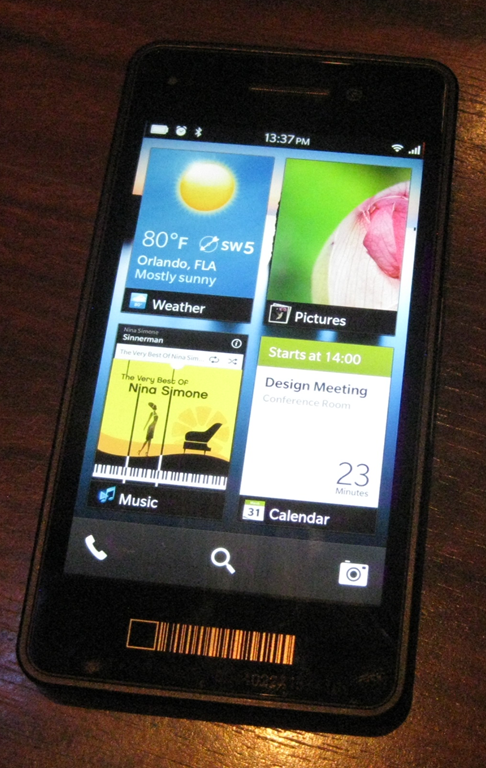
It turned out that the device Bhardwaj was holding, though pretty much the same hardware as the Dev Alpha giveaway, was more revealing as a glimpse of the next-generation BlackBerry. The Dev Alpha, which has an impressive 1280 x 768 screen, comes with no applications other than the web browser and its user interface is pretty much that of the PlayBook. Bhardwaj’s demo device on the other hand is a complete early version of BlackBerry 10 though there were parts that he would not demonstrate. I went to compose an email and he said, “we are not ready to show that yet.”

image

So what is distinctive about BlackBerry 10? One of its key features is multitasking, thanks to the processor scheduling capabilities of QNX, the embedded operating system which underlies both PlayBook and BlackBerry 10. According to Bhardwaj, this enables up to 8 apps to run at once. “Applications all run simultaneously. We don’t need to pause them,” he said. “It’s much more about flow.”

Although apps do run full screen, you can take advantage of the multitasking by “peeking” at a background app. This means holding your finger towards the corner of an app and dragging it left to see a little of what is underneath. In the pic below this is another image.

image

Talking to developers at the event I picked up considerable enthusiasm for BlackBerry 10, though compatibility is a headache. If your customer asks you to support all versions of BlackBerry back to the 5.0 series, you are stuck with WebWorks and the pre-WebKit browser in 5.0. If you can convince your customer to forget 5.0, then you can develop for WebKit. If you want to use Cascades then you are restricted to PlayBook and BlackBerry 10.

BlackBerry 10 also supports Adobe AIR, for Flash-based apps, and an Android runtime for repackaged Android apps.

The prototype BlackBerry 10 phone looks good, but as a brand new platform is it sufficiently exciting to revive RIM’s fortunes? “I don’t believe that in a trillion-dollar plus industry there can only be two players. I think there is more than enough space for four or five platforms. It’s very short-sighted if we think there can only be three ecosystems,” said Bhardwaj.  

Amazon web service APIs: a kind of cloud standard?

I am at the Cloud Computing World Forum in London where one of the highlights was a keynote yesterday from Amazon CTO Werner Vogels. Amazon, oddly enough, does not have a stand here; yet the company dominates the IAAS (Infrastructure as a service) market and has moved beyond that into more PAAS (Platform as a service) type services.

image

Vogels said that the reason for Amazon’s innovation in web services was its low margin business model. This was why, he said, none of the established enterprise software companies had been able to innovate in the same way.

He added that Amazon did not try to lock its customers in:

If this doesn’t work for you, you should be able to work away. You should be in charge, not the enterprise software company.

Sounds good; but Amazon has its own web services API and if you build on it there is an element of lock-in. Or is there? I was intrigued by a remark made by Huawei’s Head of Enterprise R&D John Roese at a recent cloud computing seminar:

We think there is an imperative in the industry to settle on standardised interfaces. There should be no more of this rubbish where people think they can differentiate based on proprietary interfaces in the cloud. A lot of suppliers are not very interested in this because they lose the stickiness of the solution, but we will not see massive cloud adoption without that portability. 

But what are these standardised interfaces? Roese said that Huawei uses Amazon APIs. For example, the Huawei Cloud Storage Engine:

The CSE boasts a high degree of openness. It supports S3-like interfaces and exposes the internal storage service enabler to 3rd party applications.

There is also Eucalyptus, open source software for private clouds that uses Amazon APIs. Is the Amazon web services API becoming a de-facto standard, and what does Amazon itself think about third parties adopting its API?

I asked Vogels, whose response was not encouraging for the likes of Huawei treating it as a standard. The question I put: is the adoption of Amazon’s API by third parties influencing his company in its maintenance and evolution of those APIs?

It is not influencing us. It is influencing them. Who is adopting our APIs? We licensed Eucalyptus. People ask us about standardisation. I’d rather focus on innovation. If others adopt our APIs, I don’t know, we rather focus on innovation.

The lack of interest in standardisation does undermine Vogels’ comments about the freedom of its customers to walk away, though lock-in is not so bad if your use of public cloud is primarily at the IAAS level (though you may be locked into the applications that run on it).

Another mitigating factor is that third parties can wrap cloud management APIs to make one cloud look like another, even if the underlying API is different. Flexiant, which offers cloud orchestration software, told me that it can do this successfully with, for example, Amazon’s API and that of Microsoft Azure. Perhaps, then, standardisation of cloud APIs matters less than it first appears.

Visual Studio LightSwitch to get HTML5 support

Microsoft’s Visual Studio LightSwitch is a rapid application development tool designed to create database-oriented, browser hosted applications with little code.

LightSwitch is intriguing because it does model-driven development. You design the model, LightSwitch generates the application. Microsoft’s idea was that non-specialist developer would like the tool, though there is little evidence of that. However, it does enable professional developers to put together functional applications quickly.

Unfortunately LightSwitch was conceived when Silverlight was all the rage at Microsoft. It generates Silverlight apps, which means they can run either on the desktop or in the browser, but also cuts out every device out there that does not run Silverlight. Including of course hot new mobile devices from Apple iOS to Android and even, on the Metro side, Windows 8.

But this is model-driven development, right? Just add code generation for HTML 5 and the same tool will generate standard browser-based apps.

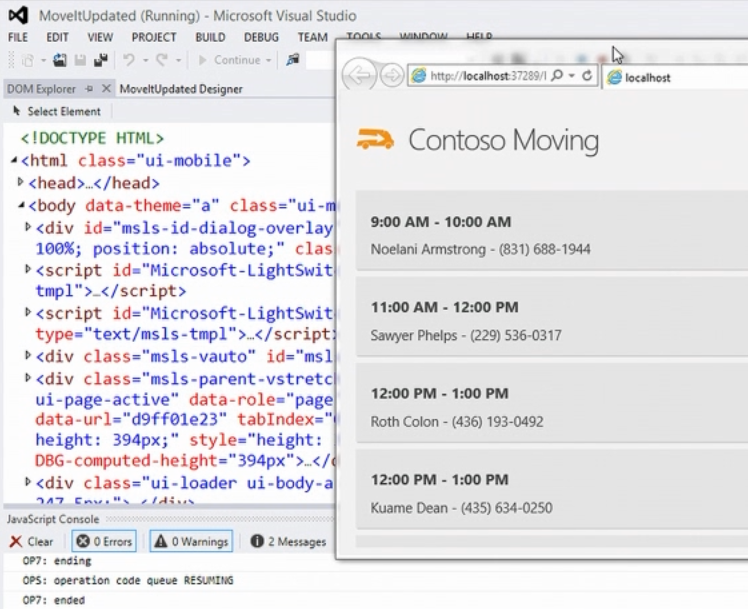
Microsoft has announced just that at TechEd, under way this week in Florida. Visual Studio VP Jason Zander demonstrated LightSwitch for HTML5:

image

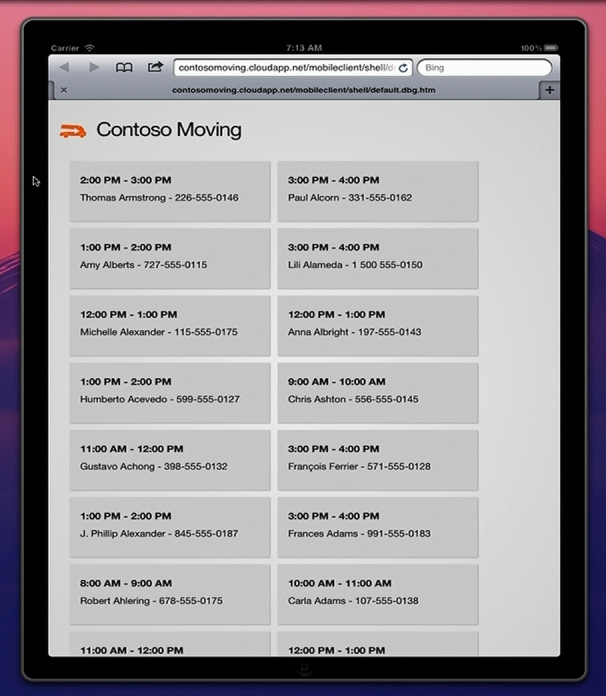
which means you can run the apps on iOS:

image

This feature is not in the current RC of Visual Studio 2012 but will be added later.

HTML 5 support puts LightSwitch back on the map as a RAD (Rapid Application Development) tool. But is there any appetite for model-driven development, which has all-but failed in so many other implementations?

That is as yet unproven, but at least the fate of LightSwitch no longer depends on that of Silverlight.

New Windows 8, new Visual Studio 2012

Microsoft has released the Release Candidate of Visual Studio 2012 (now the official name), which you can download here, to coincide with the release of Windows 8 Release Preview and Windows Server 2012 Release Preview.

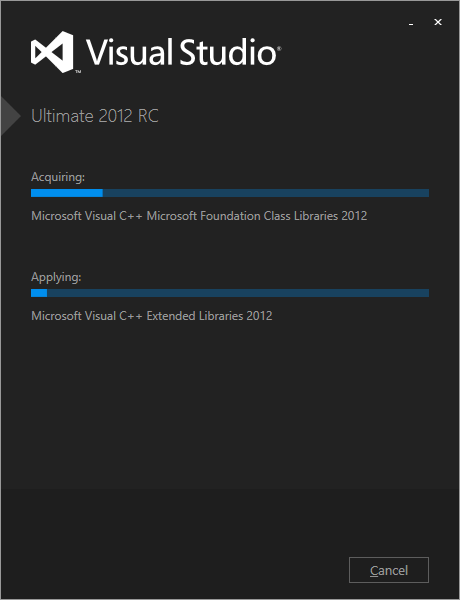
Visual Studio also has a new logo, as you can see from the setup window below.

image

Microsoft’s Jason Zander has posted about the new release here. Some of the main areas of difference between the RC and the Beta are:

  • Better performance
  • User interface tweaks including the return of a little more colour to the product
  • Solution Explorer filtering
  • New Metro style app templates
  • Improved XAML and Blend designers
  • Updated ASP.NET 4.5 web forms to support the await keyword
  • Tweaks to LightSwitch, Team Foundation Server, Architectural Tools

There is also a more detailed post by Scott Hanselman on what’s new in web development here.

Developers like coding in the dark

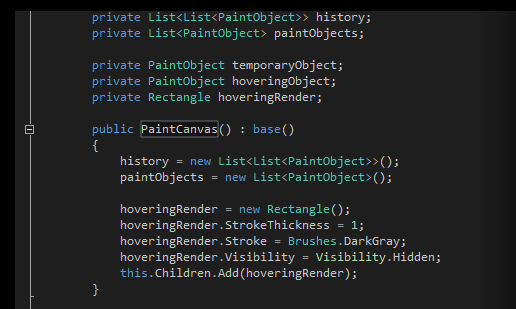
Many developers prefer to code against dark backgrounds, according to this post by Monty Hammontree, Director of User Experience in Microsoft’s developer tools division.

Many of you have expressed a preference for coding within a dark editor. For example, dark editor themes dominate the list of all-time favorites at web sites such as http://studiostyl.es/ which serve as a repository for different Visual Studio styles.

Chief among the reasons many of you have expressed for preferring dark backgrounds is the reduced strain placed on the eyes when staring at the screen for many hours. Many developers state that light text on a dark background is easier to read over longer periods of time than dark text on a light background.

image

Personally I am not in this group. A white-ish background works well for me, and if it is too bright, simply reducing the monitor brightness is an effective fix.

Interesting post though, if only for the snippets of information about the new Visual Studio. Apparently it has around 6000 icons used in 28,000 locations. Another little fact:

Visual Studio’s UI is a mix of WPF, Windows Forms, Win32, HTML, and other UI technologies which made scrollbar theming a challenging project.

If you will be using Visual Studio 2012, are you on the dark side?

The application that would not uninstall

I install a ton of pre-release and test software so it is not surprising that I sometimes run into Windows Installer issues. Here is an entertaining error though. It is unlikely, I guess, that you will hit this problem; but I present it as an illustration of what can go wrong, as we move into the era of locked-down operating systems and easy app installs. Though even these are not perfect. Notice how the operating system fights me all the way.

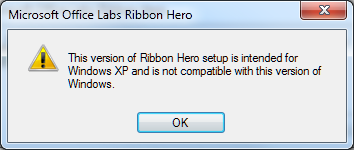
Years ago I installed Microsoft’s Office Labs Ribbon Hero, a tutorial add-on for Office. At the time I was running Windows Vista. Since then I have done an in-place upgrade to Windows 7. I tried to remove it today through Control Panel and got this message:

image

After presenting this information setup closed and the application was not uninstalled.

So … the application does not support Windows 7 and therefore you cannot remove it. Clever, and I found this a tricky problem to get around.

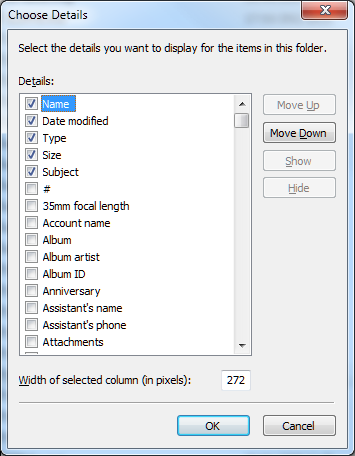
I took a look at the Windows installer files which you can find in %SYSTEMROOT%\Installer. All the msi files have random names. However, you can right-click the column heading area and choose More, then check Subject in the list. Click OK, and now the application to which each msi relates appears.

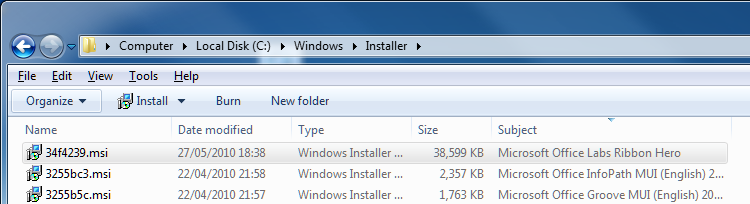
image

Now you can click the column heading to sort by subject and find the problem msi.

image

I copied the msi to my desktop.

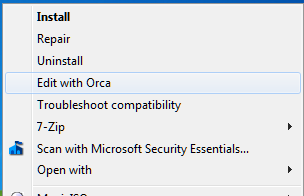
For the next step you need the Orca tool from the Windows Installer SDK. If Orca is installed, you can right-click the MSI and choose Edit with Orca.

image

I then selected LaunchCondition and deleted the launch condition that required Windows XP.

INSTALLED OR VersionNT = 501 OR APPLYING_AUTOUPDATE

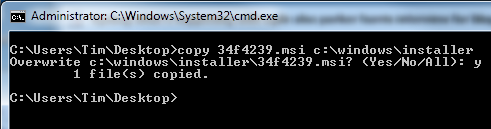
Hmm, something odd here as it should pass INSTALLED? Still, save, right-click the msi, choose Uninstall. You still hit the error. Why? Somehow, Windows works out that you are uninstalling a product for which an msi exists in the official location and uses that one instead. You have to copy your modified msi to the correct location. Open an administrator command prompt:

image

Now right-click the msi and choose Uninstall.

It worked. Phew.

Microsoft appeals to Windows 8 Metro developers not to stray from the official API

Microsoft’s John Hazen has posted on the official Building Windows 8 blog about the security and reliability principles in the Metro platform in Windows 8. Hazen explains how apps are installed from the Windows store, use contracts to interact with the operating system, and have to ask user consent for access to device capabilities such as the webcam or GPS, or to access user data such as documents and music.

The most intriguing part of the document comes when Hazen appeals to developers to stick to the API that is referenced in the official Windows 8 Metro SDK:

Resist the temptation to find ways to invoke APIs that are not included in the SDK. This ultimately undermines the expectations that customers have for your app. APIs that are outside the SDK are not guaranteed to work with Metro style apps either in this release or in future releases, so you may find that your app doesn’t function properly for all customers. These APIs may also not function properly in the async environment that is foundational to Metro style app design. Finally these APIs may undermine customer confidence by accessing resources or data that Metro style apps would not normally interact with. For all these reasons, we have provided checks in the Windows App Certification Kit to help you catch places where you might have inadvertently called interfaces not exposed by the SDK.

While it is possible to hide or obfuscate calls to APIs that are not included in the SDK, this is still a violation of customer expectations and Store policy. In the end, we have created this platform to help developers like you to build amazing apps that work well with the system and with other apps and devices to delight customers. Working with the Metro style SDK is fundamental to your realizing that goal.

The worrying aspect of this appeal to developers to play nice is Hazen’s admission that crafty developers may find ways to escape the Metro sandbox, undermining both the security and the privacy protection built into Metro. The main protection against this is such such an app should be blocked from the Windows Store, but can Microsoft check with 100% confidence that no hidden or obfuscated API calls exist? How effective is the Metro sandbox?

My guess is that the danger will be greater on the x86 version of Windows 8 than in Windows RT, which is locked down to prevent any third-party desktop applications from being installed. Nevertheless, a large part of the non-Metro Windows API must exist in Windows RT, to support the desktop, Explorer and Microsoft Office.

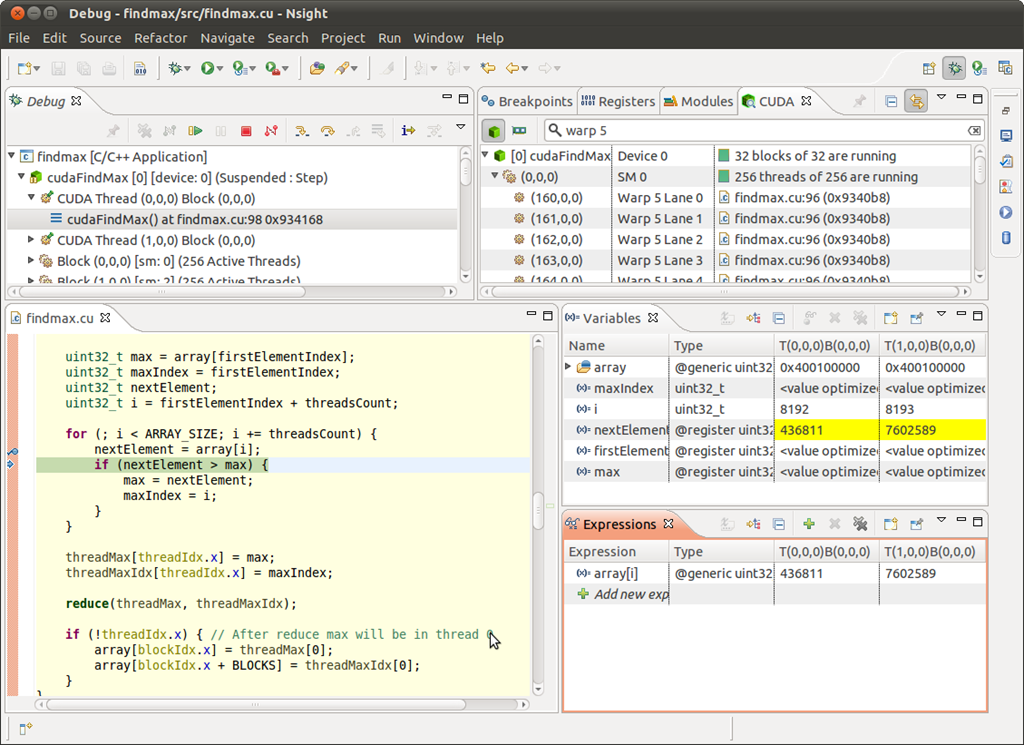
NVIDIA Nsight comes to Eclipse for Mac, Linux GPU programming

NVIDIA has ported its Nsight development tools, previously a plug-in for Visual Studio, to run within the open source Eclipse IDE for use on Mac and Linux.

image

The Nsight tools include profiling, refactoring, syntax highlighting and auto-completion, as well as a bunch of code samples.

The Windows version for Visual Studio has also been updated, and now supports local GPU debugging as well as new support for DirectX frame debugging and analysis.

Although Eclipse of course runs on Windows, Nsight users should continue to use the Visual Studio version. NVIDIA is not supporting use of the Eclipse Nsight on Windows.

The tools are in preview and you can sign up to try them here.

Another significant development is the availability of the CUDA LLVM Compiler. NVIDIA has contributed CUDA compiler code to the open source LLVM project. This means that other languages which compile to LLVM intermediate assembly language can be adapted to support parallel processing on NVIDIA GPUs. The CUDA Compiler SDK will be made available this week at the NVIDIA GPU Technology Conference in San Jose.

Microsoft’s Visual Studio LightSwitch: does it have a future?

A recent and thorough piece on Visual Studio LightSwitch prompted a Twitter discussion on what kind of future the product has. Background:

  • LightSwitch is an application generator which builds data-driven applications.
  • A LightSwitch application uses ASP.NET on the server and Silverlight on the client.
  • LightSwitch applications can be deployed to Windows Azure
  • LightSwitch apps can either be browser-hosted or use Silverlight out of browser for the desktop
  • LightSwitch is model-driven so in principle it could generate other kinds of client, such as HTML5 or Windows 8 Metro.
  • LightSwitch first appeared last year, and has been updated for Visual Studio 11, now in beta.

I have looked at LightSwitch in some detail, including a hands-on where I built an application. I have mixed feelings about the product. It was wrongly marketed, as the kind of thing a non-professional could easily pick up to generate an application for their business. In my opinion it is too complex for most such people. The real market is professional developers looking for greater productivity. As a way of building a multi-tier application which does its best to enforce good design principles, LightSwitch is truly impressive; though I also found annoyances like skimpy documentation, and that some things which should have been easy turned out to be difficult. The visual database designer is excellent.

The question now: what kind of future does LightSwitch have? Conceptually, it is a great product and could evolve into something useful, but I question whether Microsoft will stick with it long enough. Here is what counts against it:

  • The decision to generate Silverlight applications now looks wrong. Microsoft is not going to do much more with Silverlight, and is more focused on HTML5 and JavaScript, or Windows Runtime for Metro-style apps in Windows 8 and some future Windows Phone. There is some family resemblance between Windows Runtime and Silverlight, but not necessarily enough to make porting easy.
  • There is no mobile support, not even for Windows Phone 7 which runs Silverlight.
  • I imagine sales have been dismal. The launch product was badly marketed and perplexing to many.

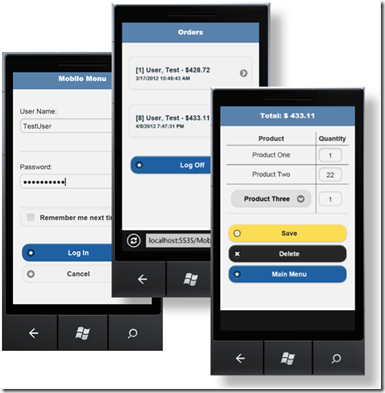
What about the case in favour? Silverlight enthusiast Michael Washington observes that the new Visual Studio 11 version of LightSwitch generates OData feeds on the server, rather than WCF RIA Services. OData is a REST-based service that is suitable for consumption by many different kinds of client. To prove his point, Washington has created demo mobile apps using HTML5 and JQuery – no Silverlight in sight.

image

Pic from here.

Washington also managed to extract this comment from Microsoft’s Steve Hoag on the future of LightSwitch, in an MSDN forum discussion:

LightSwitch is far from dead. Without revealing anything specific I can confirm that the following statements are true:

– There is a commitment for a long term life of this product, with other versions planned

– There is a commitment to explore creation of apps other than Silverlight, although nothing will be announced at this time

Hoag is the documentation lead for LightSwitch.

That said, Microsoft has been known to make such commitments before but later abandon them. Microsoft told me it was committed to cross-platform Silverlight, for example. And it was, for a bit, at least on Windows and Mac; but it is not now. Microsoft was committed to IronRuby and IronPython, once.

For those with even longer memories, I recall a discussion on CompuServe about Visual Basic for DOS. This was the last version of Microsoft Basic for DOS, a fine language in its way, and with a rather good character-based interface builder. Unfortunately it was buggy, and users were desperate for a bug-fix release. Into this discussion appeared a guy from Microsoft, who announced that he was responsible for the forthcoming update to Visual Basic for DOS and asked for the top requests.

Good news – except that there never was an update.

The truth is that with LightSwitch still in beta for Visual Studio 11, it is unlikely that any decision has been made about its future. My guess, and it is only that, is that the Visual Studio 11 version will be little used and that there will be no major update. If I am wrong and it is a big hit, then there will be an update. If I am right about its lack of uptake, but its backing within Microsoft is strong enough, then maybe in Visual Studio 12 or even sooner we will get a version that does it right, with output options for cross-platform HTML5 clients and for Windows Phone and Windows Metro. But do not hold your breath.