Category Archives: windows

Windows 8: return of Start button illuminates Microsoft’s painful transition

The Start button is coming back. At least, that’s the strong rumour, accompanied by leaked screenshots from preview builds. See Mary Jo Foley’s post complete with screen grab, though note that this is the Start button, not the Start menu. Other rumoured changes are boot to desktop by default, and the All Apps view by default in the Start screen.

Will this fix Windows 8? Absolutely not.

There are two reasons. First, in one sense Windows 8 does not need fixing. I’ve been running it from the first previews, and find it solid and fast. The new Start screen works well, and I’m now accustomed to tapping the Windows key and typing to start apps that are not already on the taskbar. It is a better app launcher and organiser than what it replaces, though I am not excited about Live Tiles which are out of sight and out of mind most of the time.

Second, this kind of minor UI change will not address the larger problem, which is the lack of compelling Metro-style apps for the platform. Nor will it fully placate those for whom nothing but making Metro completely invisible is acceptable.

These revisions are intended to make Windows 8 more acceptable to a market that essentially does not want it to change. The core market for Windows is increasingly conservative, being formed of business users with a big investment in the platform who do not want the hassle of retraining users, and home users who are used to Microsoft’s OS and not inclined to switch. While this is a large market, it is also a declining one, with tablets and smartphones taking over many former PC roles, and Macs increasingly the platform of choice for high-end users who need the productivity of a full OS.

Rather than content itself with a declining market, Microsoft came out with its bold re-imagining of Windows, with a new tablet-friendly app platform, while keeping faith with the past by preserving the desktop environment. Predictably, this was not a hit with the conservative market described above; in fact, it was the last thing they wanted, confusing and alienating.

Microsoft made it particularly hard for these users by making the new Metro environment hard to ignore. The Start screen, some settings, default apps for file types including images, PDFs and music, and power button hidden in the right-hand Charms menu all cause confusion.

Only the modern app platform has the potential to lift Windows beyond its large but suffocating and declining market of change-resistant users. Unfortunately the first months of Windows 8 has been more or less the worst case for Microsoft. Existing users dislike it and new users have failed to embrace it.

A rough ride for Windows 8 was expected, though if the script had run according to plan there should have been mitigating factors. A wave of Windows 8 tablets should have delivered a delightful experience with touch while still offering desktop productivity when needed. Well, it has happened a little bit, but Windows 8 tablets have suffered from multiple issues including high prices, lack of availability, fiddly designs, and in the case of Windows RT (the ARM version) poor performance and confusing marketing. Here’s a review of the Lenovo IdeaPad Yoga 11 RT machine, from Ebuyer, which shows what can go wrong:

THIS IS NOT A LAPTOP. It runs the dreadful Windows RT which is NOT windows 8, but a very poor limited version of 8. You can only download what Microsoft wants you to have. It came with a free Norton. The dealer convinced me that the failure to be able to download this was my deficiency. NOT – Norton cannot be downloaded onto RT machines. Neither can any other security software except defender which is already on it. You cannot install Chrome (much better than Explorer) It does not accept I tunes, You cannot dispense with the Microsoft log in password, which I do not need. Where the instructions for how to change the settings are, is still a mystery – as usual THERE IS NO INSTRUCTION MANUAL IN PAPER. You have to hunt for everything or go to an online forum.

A shame, because personally I like the concept of Windows RT with its low power consumption and nearly tinker-proof OS.

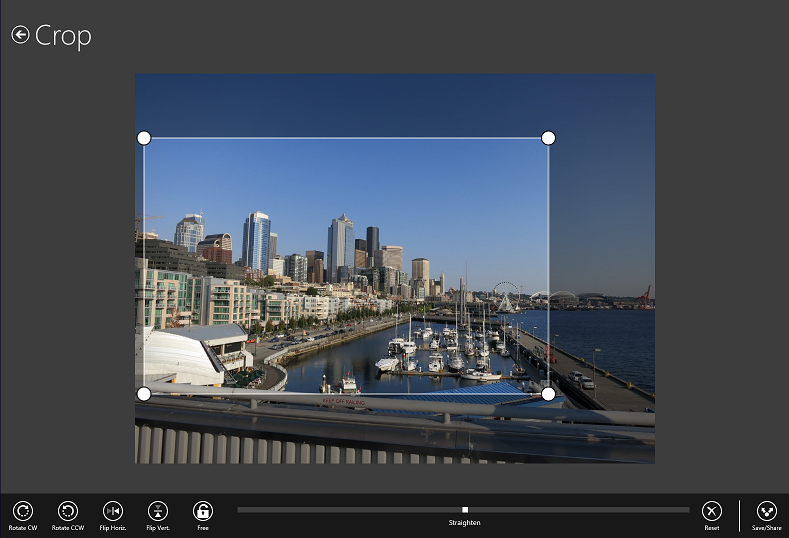
Is there hope for Windows 8? Sure. The core of the OS is excellent on the desktop side, less good on the Metro side but this can be improved. The app story remains poor, though occasionally a decent app comes along, like Adobe’s Photoshop Express: easy, fluid, elegant photo editing which works on both ARM and Intel.

image

It is fair to say, though, that Microsoft and its partners have plenty of work to do if they are to make this new Windows a success.

Fixing an unresponsive screen on a Samsung Series 7 Slate with Windows 8

I currently travel with a Windows 8 slate, the slate being the retail Samsung Series 7 model (similar but not the same as the one given to Build attendees in 2011).

It is a decent machine with good performance, but has one considerable annoyance. From time to time, when waking the device from sleep or even turning on from cold, the screen stops responding to touch. The crude fix is to reset it by turning it off, then holding down the power button so it reboots. Open documents may be lost of course.

I do not have a cure for this behaviour, though I would love to know. However I have discovered the cause, which is that one or both Intel USB host controllers fails to start. You can see the problem in Device Manager:

image

How do you even get to this screen? Well, on my machine, if the top Intel host controller has a problem, then pen input fails but touch works. If the second Intel host controller fails, touch input fails but pen input works. If both fail (which also happens) you are sunk unless you can remote desktop in from another machine on the network.

Once you are in – via pen, touch, or remote desktop – right-click the offending controller and choose Disable. Then right-click again and choose Enable. This will fix the problem until next time.

A likely fix would be an updated driver for the host controller. The current driver dates from 2006.

image

However I cannot easily find anything more up to date.

Update: I have succeeded in updating the driver to one from February 2013 but it does not fix the problem. My conclusion is that the error in the USB Enhanced Host Controller is the symptom and not the cause of the issue. It is a resume or power-on problem; such as something happening too quickly or in the wrong order. Again, suggestions welcome!

Windows in Xbox One: a boost for Windows 8 apps?

What if the just-announced Xbox One runs Windows 8 apps? Could this be the boost that Microsoft’s store and app platform needs?

image

Microsoft has yet to describe the app story for the One in detail, but it would make sense. Here is what we know, as I understand it, though it is no doubt an over-simplification.

Xbox One is described as having three operating systems: a virtualisation host, a Windows OS for general purpose use (including web browsing, Skype, and I would guess the management app), and a dedicated games OS. The games OS runs in parallel, so you can do instant switching between a game and other activities like watching TV, or have a Windows 8-style snapped view where both are visible.

The Apps element on the One will, I presume, be part of the Windows OS. There is considerable commonality between the demands of a touch UI and that of a TV UI (where you are sitting well back from the screen). A touch UI demands large targets so you can hit them with fat fingers, while a TV UI requires large targets so you can see them from a distance. It could be that the tendency towards large, chunky controls in the “Metro” Windows 8 UI is partly driven by planned support for Xbox, even though this tendency is frustrating for desktop users sitting close-up to large screens.

It is unlikely that Microsoft will introduce a completely new app model for Xbox One. Rather, I would expect to see some compatibility between Windows Store apps and Xbox One apps, with differences to account for the different platforms. No accelerometer or touch control on the Xbox One, for example, though you have Kinect which enables a touch-like interaction though hand detection.

What about the OS partitioning? This may mean that the powerful One GPU will not be available to app developers, or that game apps follow an entirely distinct development model.

If developers can easily share code between Xbox One apps and Windows Store apps, with Windows Phone 9 added to the mix at some future date, will that be enough to get some momentum behind Microsoft’s app platform?

Nokia 925: smart camera and metal band design continues Windows Phone 8 and Lumia effort

Nokia has announced the Lumia 925, a high-end Windows Phone which will go on sale in Europe in June from Vodafone and others. The price is around €469 + VAT, presumably without a contract. Vodafone customers will be offered an “exclusive 32GB version” according to the press release.

image

So what’s special about the 925? It sports a 4.5″ AMOLED 1280 x 768 display, which is decent, along with 1GB RAM and 16GB storage. Battery life is a claimed 440 hrs standby and 12.8 hrs talk time. No SD card slot, presumably for the same reason as for the 920: it would have “defiled it” according to Nokia VP Kevin Shields.

A big attraction is the camera, or rather cameras, including the main 8.7 MP PureView which also offers 1080p 30fps HD video, and the front-facing 1.2MP wide angle camera. The magic is said to be both in the lens and the software, especially the Smart Camera update (coming shortly after the launch) which enables the camera to take ten images in one shot, giving the user options for which one to keep (sounds similar to Microsoft’s Blink app which is already available for Windows Phone).

There is also Nokia’s HERE mapping suite which the company says offers “the world’s only fully integrated and true offline maps experience.”

Another Lumia innovation is the metal frame which is for “antenna functionality, appeal and robustness”. Presumably Nokia has ensured that it does not kill the signal when touched in the wrong place, as happened with the metal band for Apple’s iPhone 4.

Seemingly every mention of a Nokia phone has to ask the big questions. Can Windows Phone succeed against iPhone and Android? Can Nokia survive?

Whatever is the answer to those questions, this phone is unlikely to change it.

I will say that after a shaky start with the 800 (nice phone, terrible battery life and unfortunate bugs) the Lumia range has evolved into something excellent, that spans from good budget smartphones like the 620 to devices like the 820 and 920 which are a pleasure to use.

Fixing slow network or wi-fi in Windows 8 with Hyper-V

I had an annoying problem with my Samsung Slate running Windows 8. I use it while traveling, and every time I connected to a different wi-fi network, or even woke it from sleep while on the same network, I would get several minutes pause while Windows tried access the network. During this time, applications like Internet Explorer and Outlook might freeze and show “not responding” messages. Patience was rewarded though, and eventually the network kicked into life and everything worked normally. Until next time.

This is annoying so what is the reason and the fix? The high level view is this:

  1. When you enable Hyper-V in Windows 8 it makes changes to your networking, including creating virtual Ethernet adapters, and unbinding TCP/IP from the physical adapter. If you install the Windows Phone emulator you also get a virtual Ethernet adapter. If you have wi-fi you also get a Network Bridge.
  2. The consequence of (1) is that networking might not work so reliably after Hyper-V is enabled.

The high-level answer then is to remove Hyper-V. That works, but you might want to use Hyper-V, so better still is to fix the problem.

The answer seems to be in a hidden dialog. To get to it, open Control Panel and search for Network , click View network connections. This will show all the stuff Hyper-V has created. Now press the Alt key on the keyboard to show the Advanced menu, and select Advanced settings.

NOTE: if you have a slate without a physical keyboard, this menu is doubly difficult to find. The Windows 8 touch keyboard has no Alt key. Microsoft decided it was more important to have a Smiley key, and could not fit in both. The fix is to go into Change PC Settings – General and enable “Make the standard keyboard available”. It is still not that easy to display the Advanced menu in Network Connections, but it can be done.

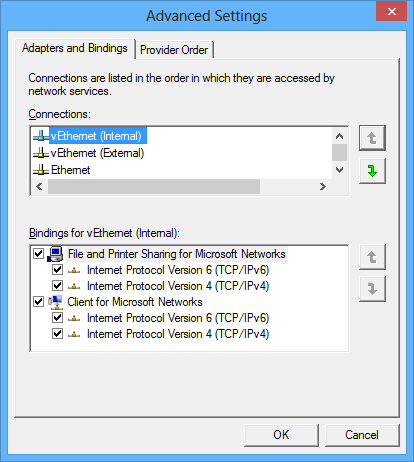
Here is the dialog:

image

Now, if you have the problem with slow networking, you will probably find (as I did) that there is an Internal virtual Ethernet adapter, bound to TCP/IP, listed above the external virtual Ethernet adapter. The internal network cannot connect to the internet:

The Internal type is not bound to a physical network adapter. It is typically used to build a test environment where you want to connect to the virtual machines from the host operating system, but do not want to allow virtual machines on the host to communicate with external networks.

It is plausible that if the internal network has priority over the external network, Windows will struggle to connect to the Internet.

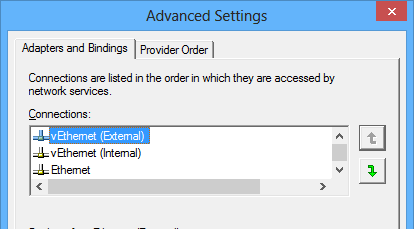
I changed this so that the external virtual Ethernet adapter, bound to TCP/IP, comes at the top.

image

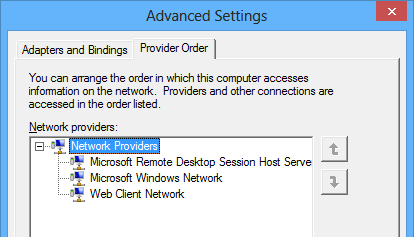
This has helped with my problem, though there is still a bit of uncertainty about how to optimise the settings in this dialog. What about the Provider Order, what is the correct setting? Should the Microsoft Remote Desktop Session Host Server Network Protocol really come first in the list, as per the default?

image

Someone asked on the official forum and did not get an answer. I suggest you leave well alone unless you know better, but would be interested in someone has informed guidance.

Finally, note that if you create a new virtual adapter in Hyper-V settings, you may need to revisit the binding order.

I have never come across this issue on Windows Server, though in principle it might be the same. Odd.

Updated with instructions for enabling the standard keyboard layout.

HP ElitePad 900: a tablet that is easy to disassemble thanks to magnetic screen attachment

I saw the HP ElitePad Windows 8 slate at a trade show last week and was impressed by a feature I had not heard about before: easy serviceability.

Tablets are usually intimidating to disassemble, thanks to screens that are either glued in place or which require alarming force to prise away. The ElitePad is different. It is a slate which is actually easier to take apart than most laptops, thanks to magnetic attachment. HP supplies a  depolarising jig into which you slot the tablet, whereupon you can easily remove the screen with a suction handle. There are a couple of screws to undo first, but it looks like an easy job.

Here are a few screen grabs from the explanatory video (embedded at the end of this post) which show what is involved. This is the tablet in the jig with the screen about to be removed.

image

This is the screen coming away.

image

And here is the unit with screen removed.

image

Once opened up, HP says you can replace these parts:

  • Dock connector
  • speaker system
  • SD and Sim card connector
  • webcam
  • NFC (Near Field Communications) sensor
  • battery
  • wireless LAN
  • antennas
  • power board
  • motherboard
  • processor
  • memory card

According to the video, the motherboard “contains the SSD” which sounds disappointing, since one of the first things you might want to do is to replace the rather small 32GB or 64GB SSD with a larger one.

Unfortunately this feature is not aimed at home users wanting to modify or fix their own tablets; you need the jig and HP training. At least, that is the official line; but I imagine that the DIY community will also benefit from this approach.

The ElitePad has a 10″ 1280×800 screen, dual core Z2760 Atom processor, 2GB RAM, and 32GB or 64GB SSD. It also supports memory expansion via an SD card, and there an option for a SIM for mobile broadband. Battery life is around 8 hours.

HP is using expansion jackets to adapt the ElitePad for specialist tasks – a throwback to the iPaq (remember that?) handheld computer which used the same concept. This includes jackets with additional battery, a productivity jacket with a keyboard and stand, a jacket for medical use, a retail POS (point of sale) option, and a rugged case for outside use. I hated the iPaq jackets, which were horribly bulky, but these look like a better proposition, though it is still a shame to bulk up your nice slim slate with fat case.

According to HP, a key selling point of the ElitePad is enterprise manageability thanks to Active Directory support. Of course this is x86 Windows 8, not Windows RT which cannot be domain-joined.

I do get the impression that HP has put considerable effort into the ElitePad which is not just a me-too Windows 8 product. Good to see.

The main snag with the ElitePad is its high price. It starts at $699 in the US, or £520 + VAT in the UK, and considering the lowly specification in terms of processing power, and the extra cost of the accessories, it looks poor value, though if it is a perfect fit for your business it might still be worth it (and no doubt you will get a better price if you buy in quantity).

Key Easy Assist feature of Microsoft InTune disabled on Windows 8, when will it return?

Microsoft’s cloud PC management service, InTune, is aimed at smaller businesses and the resellers who support them. It brings some of the features of System Center to organisations who are too small to justify deploying it, or who want a simpler solution.

One of the features of InTune is remote assistance. End users click a link on their InTune Center and it fires off an alert to an administrator.

image

When the adminstrator responds they can open up a chat session with the user, with other features including the ability to transfer files and (crucially) to view and control their desktop to troubleshoot problems.

This feature is not the same as the Remote Assistance built into Windows 7. Rather, it is based on Office Live Meeting 2007 (yes, 2007). It is tailor made for remote support, and easier for the end user to initiate.

Those who have tried to use the standard Remote Assistance (which is fine when it works) will be familiar with an intricate dance that starts with helping the user to find it, then talks them through trying Easy Connect, then when that doesn’t work, emailing an invitation file, then quoting the secret password, then verifying it when it doesn’t work, then giving up and blaming firewall issues.

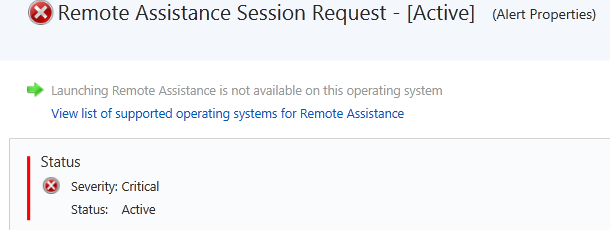
Easy Assist by contrast is straightforward. At least, unless you have Windows 8 on either end. If the administrator is running Microsoft’s latest and greatest they get this message from InTune:

image

It says, “Launching Remote Assistance is not available on this operating system.”

Bewildered admins turned to the forums for assistance. The answer from Microsoft is a classic piece of support doublespeak:

Your account was likely upgraded to our latest release last week, which includes some changes for users on Windows 8. We made some changes to ensure the best experience when supporting customers.  To ensure the best experience on Windows 8 it was necessary to disable support for providing and receiving remote assistance.  This is a feature we want to implement in a future release as we know how valuable it is.

Note that the admin in question says “I often use this feature several times a day.”

This is Microsoft at its worst. It is not just that an important feature was removed without notice. It is also that there is no indication of when it might return, or any guarantee that it will return. The support company now has to explain to its clients why they now have to struggle with the standard Remote Assistance, or else pay extra for a third-party solution like the excellent but expensive LogMeIn. This, of course, will no longer be integrated with InTune.

One might also ask: why does the relatively new InTune product still rely on a feature of Office Live Meeting 2007 for this key functionality? Why is it not part of Lync, which is its replacement now in its second version?

I guess this will eventually be fixed. In the meantime, pleas like this go unanswered.

Easy Assist fix it for Windows 8 Already!!! This is ridiculous Windows 8 was available on Intune back in September of 2012. It more than six months and only the agent works correctly now. Easy Assist is a big selling point for clients to get the Intune Service. I also have a large number of existing Windows 7 customers on Intune who refuse to go to Windows 8 because they will lose functionality.

Microsoft shrugs off Windows 8 issues with record revenue

Yesterday Microsoft released its financial figures for the first three months of 2013.

Quarter ending March 31st 2013 vs quarter ending March 31st 2012, $millions

Segment Revenue Change Profit Change
Client (Windows + Live) 5703 +1070 3459 +480
Server and Tools 5039 +508 1979 +293
Online 832 +125 -262 +218
Business (Office) 6319 +477 4104 +307
Entertainment and devices 2531 +913 342 +570

Note that the figures for Windows and Office are boosted by deferred revenue from upgrade offers. The PC sales decline will be reflected in Windows client sales next time round.

CFO Peter Klein spoke of hoped-for improvements in Windows 8 device fortunes based on refinements coming in Windows “Blue” as well as more power-efficient CPUs coming from Intel. “We are confident we are moving in the right direction,” he said.

He also discussed the new subscription-based model for Office. Office 365 has added five times more subscribers this quarter than in the same period last year, he said, and revenue exceeds $1 billion.

Suh said that System Center revenue is up 22% and that Hyper-V has gained 4 points of market share in the year. Lync and SharePoint are also growing.

In answer to a question about Surface, Microsoft’s own-brand tablet, Klein spoke about a coming “broader array of Windows 8 devices including lower price points.” 

The deferred revenues disguise what would otherwise be a decline in Windows sales, but in other respects these figures are remarkable, particularly in a difficult economy.

Isn’t Windows 8 a failure, and won’t declining PC sales take Microsoft down too? It is possible, but so far the company has proved resilient. Perhaps the most significant positive here is that both Office 365 and Azure are working for the company, which means that cloud computing is not killing Microsoft’s business in the way that some speculated.

The PC puzzle: does the sales drop implicate or justify Windows 8?

Gartner has joined IDC in releasing figures showing a steep drop in PC sales for the first quarter of 2013.

Worldwide PC shipments totalled 79.2 million units in the first quarter of 2013, an 11.2 per cent decline from the first quarter of 2012, according to preliminary results by Gartner, Inc. Global PC shipments went below 80 million units for the first time since the second quarter of 2009. All regions showed a decrease in shipments, with the EMEA region experiencing the steepest decline.

says the release. In EMEA the decline was 16%. In the US, the decline was only 9.6%, but marked the 6 consecutive quarter of decline.

Gartner does not give worldwide figures for Apple, but says that its shipments grew by 7.4% in the US, which is a particularly strong market for Apple, giving it an 11.6% market share.

One bright spot for Microsoft:

Unlike the consumer PC segment, the professional PC market, which accounts for about half of overall PC shipments, has seen growth, driven by continuing PC refreshes.

That will please the folk at the event I am attending right now, the Microsoft Management Summit in Las Vegas, which is about managing servers, PCs and other devices in the enterprise. The consumerisation of IT is real, and so is Bring Your Own Device, but never underestimate the extent to which Windows is embedded in business.

Still, does the overall decline prove that Windows 8 was a huge mistake, and that Windows/Microsoft is now set for long-term decline?
image

Not necessarily. There is another way to look at these figures, which is that Microsoft was correct to conclude, back when Windows 8 was planned, that tablets and touch devices would erode the traditional PC market, and that it had to take the risk of reshaping its desktop operating system accordingly.

It is plausible, even likely, that PC sales would not have declined so fast if Windows 8 had been less radical. On the other hand, the long term cost of not reshaping the Windows UI for touch, nor introducing the app store model of software deployment, would probably be greater.

Put another way, the Windows 8 experiment means that PC sales may eventually stop declining, whereas without it they would continue to trend download, even though the curve for this last quarter might be less shocking.

Even if you accept this reasoning, you can still argue that the Windows 8 tablet personality is so poorly executed that it cannot compete with iOS and Android devices. Most Windows 8 users live on the desktop, even those with touch screens and tablets. I am seeing a lot of Surface Pro here in Vegas, with users loving its portability, performance, and elegant keyboard cover, but I see it being used like a laptop, not like a tablet.

Microsoft undoubtedly made mistakes in the initial release of Windows 8, the biggest problem being that the Windows Runtime side, which supports the tablet personality, was rushed out and is really not finished. Creating excellent and good-looking apps is harder than it should be, which is one reason why there are so few.

  • The Windows 8 experience for new users, especially those with long familiarity with earlier versions, is so poor that many prefer to stick with Windows 7. A few tweaks and compromises would have made this easier.
  • Windows RT, the ARM based edition which runs only “Modern” apps and Office, is spoilt by poor performance as well as the lack of good apps. The absence of Outlook from Office in Windows RT spoils its for the business market, where it is potentially attractive as a cost-effective, secure tablet operating system.
  • Microsoft’s OEM and retail partners do not seem to know how to sell Windows 8.

When I put these points to some Microsoft folk informally here at MMS the answer I got was “Blue will make you happy.” Blue, according to these guys, is not the code name for a new version of Windows. Rather, it is a process of incremental updates which users will get automatically. It is well-known of course that significant Windows 8 updates are on the way, and builds have been leaked.

Windows 8 has made a bad start, but it is not all bad. The desktop side (which is what most of us use most of the time) improves on Windows 7, and it is plausible that a combination of user learning along with updates that make the transition to the new Start screen less jarring will make adoption easier.

Equally, the Windows Runtime side will get better. I expect to see new and improved components for developers building apps, and better reliability and performance. Outlook is rumoured to be coming to Windows RT, and at some point we may also see versions of Office applications appear in the Modern UI.

Windows RT will have a tough fight with Intel-based tablets, but users will win either way, since next-generation ARM chipsets are much faster and Intel is making great strides with low-power, high-performance chipsets of its own.

Incidentally, Windows RT is not quite dead. I heard a questioner here at MMS ask questions about how to deploy their forthcoming purchase of a “large quantity” of RT devices.

Microsoft is at times a stumbling giant, but it is stumbling in the right direction with Windows 8, and it may yet work out. Even if by then it is called Windows 9.

Microsoft takes aim at VMware, talks cloud and mobile device management at MMS 2013

I am attending the Microsoft Management Summit in Las Vegas (between 5 and 6,000 attendees I was told), where Brad Anderson, corporate vice president of Windows Server & System Center, gave the opening keynote this morning.

image

There was not a lot of news as such, but a few things struck me as notable.

Virtualisation rival VMware was never mentioned by name, but frequently referenced by Anderson as “the other guys”. Several case studies from companies that had switched from “the other guys” were mentioned, with improved density and lower costs claimed as you would expect. The most colourful story concerned Dominos (pizza delivery) which apparently manages 15,000 servers across 5,000 stores using System Center and has switched to Hyper-V in 750 of them. The results:

  • 28% faster hard drive writes
  • 36% faster memory speeds
  • 99% reduction in virtualisation helpdesk calls

That last figure is astonishing but needs more context before you can take it seriously. Nevertheless, there is momentum behind Hyper-V. Microsoft says it is now optimising products like Exchange and SQL Server specifically for running on virtual machines (that is, Hyper-V) and it now looks like a safe choice, as well as being conveniently built into Windows Server 2012.

I also noticed how Microsoft is now letting drop some statistics about use of its cloud offerings, Azure and Office 365. The first few years of Azure were notable in that the company never talked about the numbers, which is reason to suppose that they were poor. Today we were told that Azure storage is doubling in capacity every six to nine months, that 420,000 domains are now managed in Azure Active Directory (also used by Office 365), and that Office 365 is now used in some measure by over 20% of enterprises worldwide. Nothing dramatic, but this is evidence of growth.

Back in October 2012 Microsoft acquired a company called StorSimple which specialises in integrating cloud and on-premise storage. There are backup and archiving services as you would expect, but the most innovative piece is called Cloud Integrated Storage (CiS) and lets you access storage via the standard iSCSI protocol that is partly on-premise and partly in the cloud. There was a short StorSimple demo this morning which showed how how you could use CiS for a standard Windows disk volume. Despite the inherent latency of cloud storage performance can be good thanks to data tiering, which puts the most active data on the fastest storage, and the least active data in the cloud. From the white paper (find it here):

CiS systems use three different types of storage: performance-oriented flash SSDs, capacity- oriented SAS disk drives and cloud storage. Data is moved from one type of storage to another according to its relative activity level and customer-chosen policies. Data that becomes more active is moved to a faster type of storage and data that becomes less active is moved to a higher capacity type of storage. 

CiS also uses compression and de-duplication for maximum efficiency.

This is a powerful concept and could be just the thing for admins coping with increased demands for storage. I can also foresee this technology becoming part of Windows server, integrated into Storage Spaces for example.

A third topic in the keynote was mobile device management. When Microsoft released service pack 1 of Configuration Manager (part of System Center) it added the ability to integrate with InTune for cloud management of mobile devices, provided that the devices are iOS, Android, Windows RT, or Windows Phone 8. A later conversation with product manager Andrew Conway confirmed that InTune rather than EAS (Exchange ActiveSync) policies is Microsoft’s strategic direction for mobile device management, though EAS is still used for Android. “Modern devices should be managed from the cloud” was the line from the keynote. InTune includes policy management as well as a company portal where users can install corporate apps.

What if you have a BlackBerry 10 device? Back to EAS. A Windows Mobile 6.x device? System Center Configuration Manager can manage those. There is still some inconsistency then, but with iOS and Android covered InTune does support a large part of what is needed.