Category Archives: windows

Review: Logitech K811 Bluetooth Easy-Switch keyboard for iPad, Mac and more

I travel a lot and use a tablet rather than a laptop, and have gone through numerous Bluetooth keyboards. These are a necessity for me, since the tablet I use is either an iPad, which has no USB slot for a wireless transceiver, or a Windows slate that has only one USB slot that is often occupied.

It is surprising how much can go wrong. Some of the issues I have had (NOT with this keyboard let me emphasise) are keyboards turning themselves on in your bag and performing random actions; keys physically coming off the keyboard while in your bag; and tedious reconnection attempts when the Bluetooth pairing somehow breaks.
Another annoyance is that most Bluetooth keyboards can only pair with one device, forcing you to re-pair every time you switch.

image

Not any more. Logitech’s K811 keyboard can be paired with up to three devices simultaneously. The first three function keys across the top of the keyboard select which one you want to use.

image

This keyboard is designed for iPad, iPhone or Mac, but I found it also worked fine with the Windows tablet subject to few annoyances (keys that are incorrectly marked).

Specifically, on Windows all the alphabetic keys work correctly, as do the numbers, and most of the special characters. The main issues are that backslash types # but can be found on the § key, and @ and ” are transposed. No Windows key of course, but Ctrl-Esc works. Really not too bad.

Note that there is a PC version of the keyboard, called the K810, which seems similar but is a little cheaper. So get that if you only have PCs, but if you have a mix of devices, the Apple one is fine.

While the keyboard is probably not a good choice if you only use a non-Apple tablet, if you have a mix then it can still be useful.

image

This is a standard Mac keyboard though too small to have a separate numeric pad. The function keys default to the special functions, like dimming the backlight, and you have to press the Fn key to get the standard functions.

Physically the keyboard feels sturdy and well-made though it can flex just slightly in the middle since it has four small rubber feet. This did not cause me any problems. The keyboard is big enough for typing at speed and in comfort, and small enough that it tucks easily into most bags. It is 29cm on the longest side.

image

There are some little details that I like. The Connect button can be depressed easily with a finger, no need to find a small pointed object, though I have never pressed it accidentally. There is an on-off switch that is unlikely to slide by accident, avoiding those bag-typing problems mentioned above.

The keyboard has a built-in, non-replaceable rechargeable battery, charged via a USB cable. Battery life is said to be 20 hours of typing with the backlight on, or an impressive one year with the backlight off. You can adjust the brightness of the backlight using the function keys, though it resets when you next switch off and on, so you will probably end up with the backlight on most of the time, though it does dim automatically if you do not type for a while.

The coolest feature is a sensor that detects your hands and turns the backlight on, if the keyboard has been idle, before your hands touch the keys. A bit of a gimmick, but you can’t help admiring it.

Bluetooth switching really does work. I tried a test with an iPad and a Windows tablet. Press the key for the 1st device, and typed text appears on the iPad. Press the key for the 2nd device, and typed text appears on the Windows tablet. Reconnection seems quicker than average.

image

Overall I love the keyboard, and recommend it. I would have liked a protective bag to help prevent damage to the keys when loose in a larger bag, and suggest care with this as it is a common problem.

If you just want a keyboard for an iPad, you might be better off with one of the Logitech keyboard covers. If you have several mobile devices though, this is great, with a quality and convenience that justifies its price.


Microsoft’s Windows 8 app problem will not be solved by incentivising junk

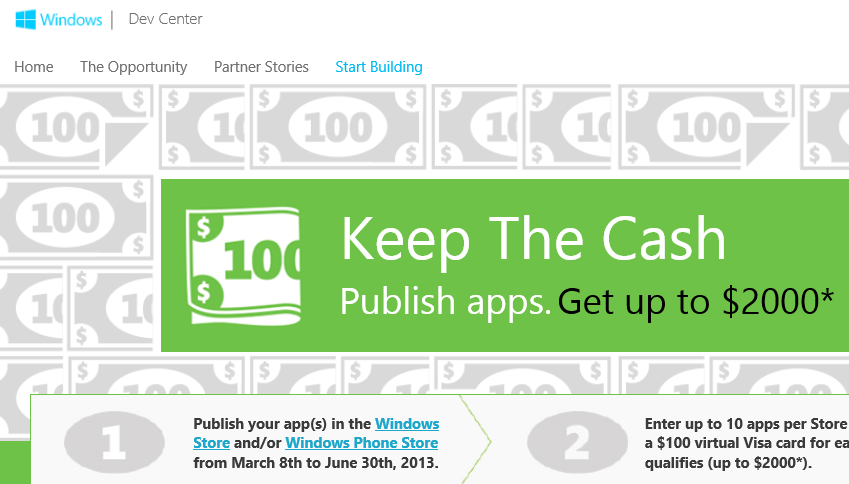
Microsoft has launched a “Keep the cash” offer to developers. Publish up to 20 apps, 10 for Windows Phone and 10 for Windows 8, and get $100 for each of them.

image

The offer is little use for most of the world. The terms state that “Offer good only to legal residents of the 50 United States & D.C. aged 18 or older”.

It is little use for Microsoft either. How much development time does $100 buy? Still, there is a way to make sense of it for hobbyists or developers with some spare time. What you do is to create one of those apps that does very little but is specific to something like a particular sports team or pop star, and maybe searches the web for news about them. Then you replicate it 10 times over for 10 different teams or celebrities. Then you adapt it for both phone and Windows 8 store. That’s 20 apps, $2000.

In other words, the only thing this will achieve is to increase the amount of dross in these two stores. Microsoft is pumping the numbers, so that there is an appearance of success on the most naive analysis, counting the apps.

Incidentally, this is something that Windows Store VP Antoine LeBlond assured me Microsoft would not do, at the launch of Surface RT in New York last year.

Does Microsoft have an app problem? Yes, particularly on Windows 8. Windows Phone 8 is less of a problem; Microsoft’s phone is actually building some momentum from what I can tell and app availability is not too bad, despite some gaps such as Instagram and BBC iPlayer.

The app problem is nothing to do with quantity though. 10 good apps for the Windows Store is worth more to the platform than 10,000 poor ones. In fact, filling the store with junk is a negative that will cement the perception that there is little there that is worthwhile.

Rather, the app problem is the consequence of several factors:

1. The development platform is not good enough. Most things can be done, but not easily, and the default look and feel results in blocky apps that tend to scale badly on big screens. The built-in controls are too primitive. The user interface is insufficiently intuitive and users struggle to discover the menus and features hidden in the Charms bar.

2. Microsoft has so far failed to establish Windows 8 as a tablet platform. The reasons are complex and to do with the Windows heritage, the way OEM and retail partners treat Windows, and the fact that there are other tablet platforms (iOS and Android) out there which meet the need for many people.

3. Windows 8 is out there in reasonable numbers, but most users spend most of there time in the desktop, making the Windows Store app platform less successful than the quantity deployed would suggest.

4. Businesses are mainly standardising on Windows 7, not Windows 8, to the detriment of the new app platform.

In this context, the best thing that could happen for Windows 8 is the appearance of new compelling apps that will drive users to the underused tablet personality. Microsoft could and should do some of those (there are a few efforts, like Fresh Paint).

Those apps, though, will not be developed for $100. They will be developed either by enthusiasts who love the platform (which will not happen until the platform is improved), or by businesses who invest real money and effort in building them.

As it is, this misguided initiative does little other than to draw attention to the problems Microsoft has with its new Windows.

Windows 8 is another Vista says Samsung memory guy: is he right?

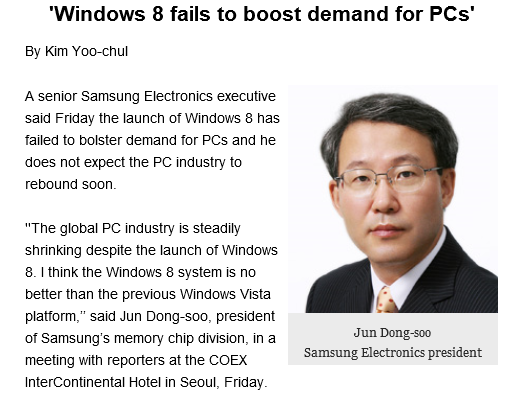
Samsung’s Jun Dong-soo, president of the memory chip division, has likened Windows 8 to Vista and says it has failed to boost PC sales.

”The global PC industry is steadily shrinking despite the launch of Windows 8. I think the Windows 8 system is no better than the previous Windows Vista platform,” he said in a press briefing in Seoul, as reported by the Korea Times. [The link no longer works for me, though the article lives on in Google’s cache].

image

Is he right? I suspect that the tech world from the perspective of a memory chip manufacturer looks different than it does, say, from the perspective of someone considering Microsoft’s Windows strategy more broadly. Has Windows 8 stimulated demand for PCs, and therefore the memory that goes in them? Generally, no.

Equally, just as in the days of Vista, there is plenty of folk wisdom out there advising people to stick with the previous version of Windows, since the new one is more trouble than it is worth.

The parallel is not unreasonable then. Look a bit closer though, and there are as many differences and likenesses. I wondered if this could be expressed as a table, though no doubt there will be debate over the detail and other things that could be included.

  Strategic reasons for failure – necessary annoyances Long-term goal
Windows Vista User Account Control – usability and compatibility problems. Annoying and confusing prompts. Better security in Windows, better behaved applications
  Performance issues, high memory demand caused by Desktop Windows Manager Rich hardware-accelerated graphics, taskbar thumbnails etc
  Bugs and mistakes  
  Stuttering audio caused by poor drivers  
OEM vendors release Vista on underpowered hardware, laden with usual trialware rubbish  
Windows 8 Strategic reasons for failure – necessary annoyances Long-term goal
  Combining new tablet platform with old desktop jarring and confusing for users. Absence of Start menu from desktop disorienting. Establish Windows as a viable tablet platform and one that can plausibly converge with Windows Phone.
  Create ARM build of Windows, locked down so that no new desktop apps can be installed. Windows tablets that benefit from ARM efficiency, are not weighed down with legacy app compatibility issues, and which are more secure and less prone to degrade over time.
  Bugs and mistakes  
  Release Windows 8 with poor Windows Store apps pushing users to desktop alternatives  
  Windows Runtime platform not really ready, too difficult for developers to make great apps  
  Failure to get Windows OEMs and retail channel to understand and promote it as a tablet platform  
  ARM machines including Surface RT too slow; really needs next generation eg Tegra 4  

The point of the above is both positive and negative for Microsoft. On the negative side, it has nobody but itself to blame for some of the problems around the launch of Windows 8. The Windows Runtime platform should have been in a better state for launch, the built-in apps should have been better (especially Mail), and despite ample evidence of the difficulty new users had when first encountering Windows 8, little regard was paid to the problem. OEM and retail partners then compounded the error by simply turning the handle and putting out a bunch of laptops with Windows 8 in place of Windows 7. I regularly see “Windows 8” displays where there is not a single touch-capable machine, which is extraordinary given that support for touch was the primary new feature and goal.

On the other hand, if you look at the pain points in Vista that were strategic rather than blunders, you can see that they did, eventually, succeed. Windows 7 builds on Vista and by general consensus is the best ever version of Windows. While I prefer 8 for various reasons, including its better performance and some useful UI improvements on the desktop side, Windows 7 has the more coherent and satisfying user interface.

The further implication is that the Windows 8 pain may yet prove worthwhile, if Microsoft can fix the annoyances and improve the Windows Runtime platform, and if OEMs can grasp the demand for Windows tablets when done right.

The difficulty with the above is that when Vista came out there was really nowhere to go, other than to the Mac for those looking for high-end personal laptops or desktops (and Vista was generally helpful to Apple). Windows 8 on the other hand has appeared at a time when the PC ecosystem seems under threat from the surge towards mobile and towards Android and iOS tablets. Even if Microsoft gets it right next time, it is unlikely to dominate as before.

Windows Phone 8 enterprise security versus Blackberry 10 Balance and Samsung Knox

How good is Windows Phone 8 security? Actually, pretty good. The key features are described here [pdf]:

  • Trusted Boot prevents booting to an alternative operating system, using the UEFI secure boot standard.
  • Only signed operating system components and apps can run.
  • App sandboxing:

    No communication channels exist between apps on the phone other than through the cloud. Apps are isolated from each other and cannot access memory used or data stored by other applications, including the keyboard cache.

  • Private internal app distribution by businesses who register with Microsoft
  • Password policies set through Exchange ActiveSync (EAS)
  • Built-in device management client
  • Bitlocker encryption when set by EAS RequireDeviceEncryption policy. AES 128 encryption linked to UEFI Trusted Boot.
  • SD card data is not encrypted, but the OS only allows media files to be stored on SD cards.
  • Information Rights Management can prevent documents being edited, printed, or text copied (other than tricks like photographing the screen).
  • Remote Wipe

The security features in Windows Phone 8 are largely based on those in full Windows, since the core operating system is the same. However, devices are more secure since they are not afflicted by the legacy which makes desktop Windows hard to lock down without damaging usability.

While the above sounds good, note that in most cases a simple PIN will get you access to everything. On the other hand, unless the PIN is seen it is not all that insecure, since you can set policies that lock or wipe the phone after a few wrong attempts.

Does Microsoft therefore have a good story versus Blackberry 10 Balance and Samsung Knox, both of which feature secure containers that isolate business apps and data from personal? The approach is different. In Windows Phone the focus is on the whole device, whereas the other two have the concept of segmentation, letting users do what they like (including installation of games and so on) in one segment, while the business gets to control the other.

Windows Phone does in fact have a somewhat similar feature aimed at children. Kids Corner lets you create a "fun" segment containing specified apps and games, sandboxed from the main operating system. While this is currently designed for children borrowing your phone, you can see how it could be adapted to create a personal/business split if Microsoft chose to do so.

For the time being though, you might worry about the potential for users to install a malicious app or game that manages to exploit a bug in Windows Phone and compromise security.

Even if the business can lock down the device so that users cannot install apps, this impairs the user experience to the extent that most users will want another phone for personal use. The attraction of the Blackberry and Samsung approach is the way it combines user freedom with business security.

Is Microsoft doing a good job of articulating the enterprise features of Windows Phone 8? That is a hard question to answer; but my observation is that Nokia, the main Windows Phone vendor, seems to focus more on consumer features like the camera and music, or general features like maps and turn by turn navigation. Enterprise features are hardly mentioned on the Nokia stand here at Mobile World Congress in Barcelona, while Microsoft does not have a stand at all. On the other hand, you would think that the company’s strong partner ecosystem would be effective in communicating the presence of these features to enterprises.

Nokia at Mobile World Congress: aiming for a bigger market

At Mobile World Congress there are endless identikit Android smartphones. Does that justify Nokia’s decision two years ago to adopt Windows Phone? We will never know; but there is some merit in a distinctive offering, even though it comes with the pain of being a minority choice.

image

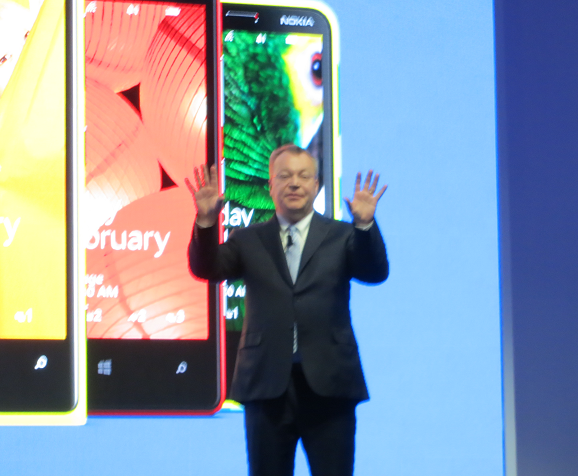
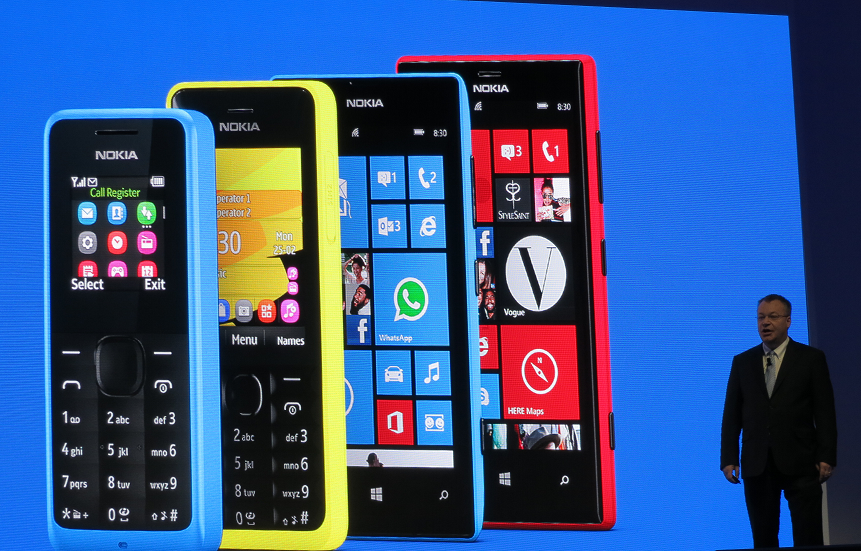
The press would prefer to see jaw-dropping new features on state of the art mobiles, but instead Nokia is delivering what the Windows Phone ecosystem actually needs: cheaper phones. Along with a couple of new feature phones, the 301 with a reasonable camera and Exchange email support, and the 105 at €15 and with a battery that lasts for a month, Nokia CEO Stephen Elop announced two new Lumia devices.

image

The 520 is €139 but still a full-featured Windows Phone 8 device, with a 4” screen, apparently the same camera lens as on a 920, and Nokia’s location apps which are now branded HERE: Maps, Drive and Transit, and Nokia Music with free “Mix Radio” or premium quality, lyrics and download for €4 per month.

The 720 has a more advanced camera with a large f/1.9 aperture and a wide-angle front camera (usually front cameras are rubbish). Wireless charging with an optional cover. The 720 will be €249.

These devices will be in Asian territories this quarter and Europe probably in the second quarter of this year.

Android phones are also available at this kind of price; but my observation is that Windows Phone plus Nokia design and manufacturing compares well to the cheaper Android offerings.

The significance of these phones is that they have the potential to grow the market for Windows Phone apps and maybe to persuade key names like the BBC (there is no iPlayer for Windows Phone) that the platform is worth supporting.

Nokia also announced that its mapping technology will be in Firefox OS. It wants more users for its location services in order to improve their quality. More users means more data.

Another announcement is that the API for Nokia location and imaging features are being opened to third-party developers.

HP goes Android: what does that say about Windows 8?

Here at Mobile World Congress in Barcelona HP has announced a 7” Android tablet which will be available in April.

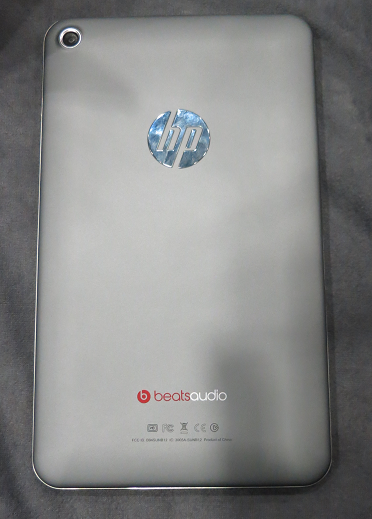
I took a quick look at the Mobile Focus event today. The back of the device is more interesting, showing logos for HP and for Beats Audio.

image

From the front you would be pushed to distinguish it from, say, Google’s Nexus 7. Black screen, runs Android.

I asked the guy on the stand what is distinctive about HP’s little Android slate in a crowded market. He said it had above average build quality, above average sound thanks to Beats Audio (you can find this discussed here), and support for HP’s printing system.

Not much, in other words; but the more interesting question is why HP is doing this. One reason is price. This will be a relatively cheap device, substantially less than any of HP’s windows machines, and without it HP would have little to no presence in the consumer tablet market.

Why not a Windows RT or Windows 8 device? That is the heart of it, and more interesting than the slate itself. HP is not giving up on Windows tablets, but it is positioning them more as business machines whereas the new slate is a consumer device.

The problem is that Microsoft has so far failed to make Windows 8 viable for this kind of market. It is too expensive, too peculiar, and there are too few worthwhile apps. That, and the Windows Runtime platform is not yet good enough, as developers at the sharp end discover. This means that HP has little choice but to go Android.

The form factor is also a problem. 7” seems to be beyond Windows Phone 8 territory, but too small for Windows 8 or RT bearing in mind the desktop and Office aspect. It is an awkward gap in the Windows offering.

The impression I got from several vendors at the show is that Microsoft is on the right lines with Windows 8, but the first release is disappointing on the tablet side.

What if HP starts to experiment with Android tablets that can be used like laptops, with neat keyboard cases and office-style applications? In the end the market will decide on the balance between Android and Windows, with the signs currently that Microsoft will struggle to gain momentum in the consumer tablet market.

Xamarin 2.0 and Xamarin Studio announced, build for OSX, iOS and Android with C#

Xamarin has announced significant updates to its developer platform. Xamarin is the company formed around 18 months ago, when Novell discontinued its investment in Mono, a cross-platform implementation of C# and the .NET Framework. Its focus is on mobile platforms, in particular iOS and Android, though there is also support for the Mac. On Windows and Windows Phone, the presumption is that developers will continue to use Microsoft’s .NET Framework.

“If you look at what you can develop with C#, there’s about 1.2 billion Windows machines out there, but there’s now about a billion Android and iOS devices. Together we can make C# a universal language for application development and reach 2.2 billion devices,” Xamarin co-founder and CEO Nat Friedman told me.

“There’s a wonderful built-in audience of C# developers, millions of them, who need a bridge to mobile. We can help them take their existing skills and tools, and even code they’ve already written, and bring them to mainstream mobile platforms like iOS and Android.”

The key announcements:

  • Xamarin Studio is  an updated version of MonoDevelop, the Mono IDE. It runs on Mac and Windows.#
  • You can now develop iOS apps in Visual Studio for the first time
  • MonoTouch, the framework for iOS, has been renamed Xamarin.iOS
  • Mono for Android is now called Xamarin.Android
  • A new component store has pre-built components for download, some free, some commercial.
  • Xamarin now offers a free Starter edition, and pricing plans for independent developers, smaller businesses, and enterprises. Indie is $299 per platform per year, Business is $999 per platform/year, and Enterprise $1800 platform/year.

The Starter edition is not much use. It has a limited app size, and even the sample project I downloaded, an Employee Directory, exceeded that size and I had to register for a trial.

Xamarin’s philosophy is to share non-visual code, but to create a user interface that is native for each platform. This is a compromise in terms of the effort involved in supporting multiple platforms, but ensures a native experience on each device. “That’s fundamental to our platform,” says Friedman. “We tell our developers to separate the UI layer from the rest of the app. That allows them to share all the non-UI code across platforms, but to deliver a fully native UI, even though the whole app is written in C#. That’s what users demand now, people want native experiences.”

“We’ve been building tools that essentially project the underlying iOS APIs or Java [Android] APIs into C#”, explains co-founder Miguel de Icaza. “What it means is that people need to build a new UI for each platform.” He adds that Microsoft platform developers should be used to this, as Microsoft itself has several similar but incompatible .NET platforms. “There’s the one on Silverlight, the one on WPF, the one on Windows RT, and the one on the phone, it’s four,” he says. “Developers have had to resort to putting their logic into shared libraries, and build a per-platform UI. We’re reusing that knowledge.”

The ability to develop for iOS in Visual Studio is new. “It’s our most-requested feature of all time.” said Friedman.

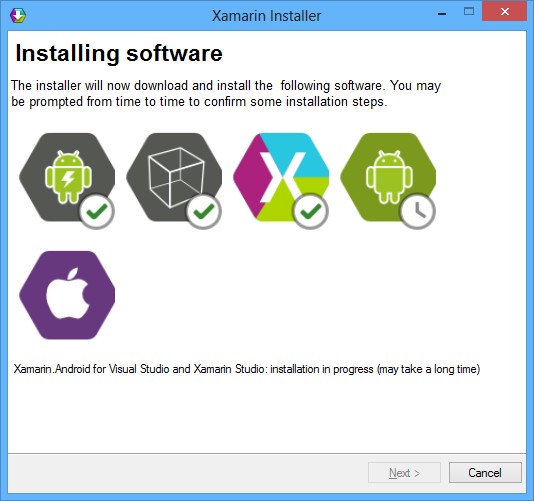
I downloaded Xamarin Studio, which in my case was around 1.3GB including an updated Android SDK.

image

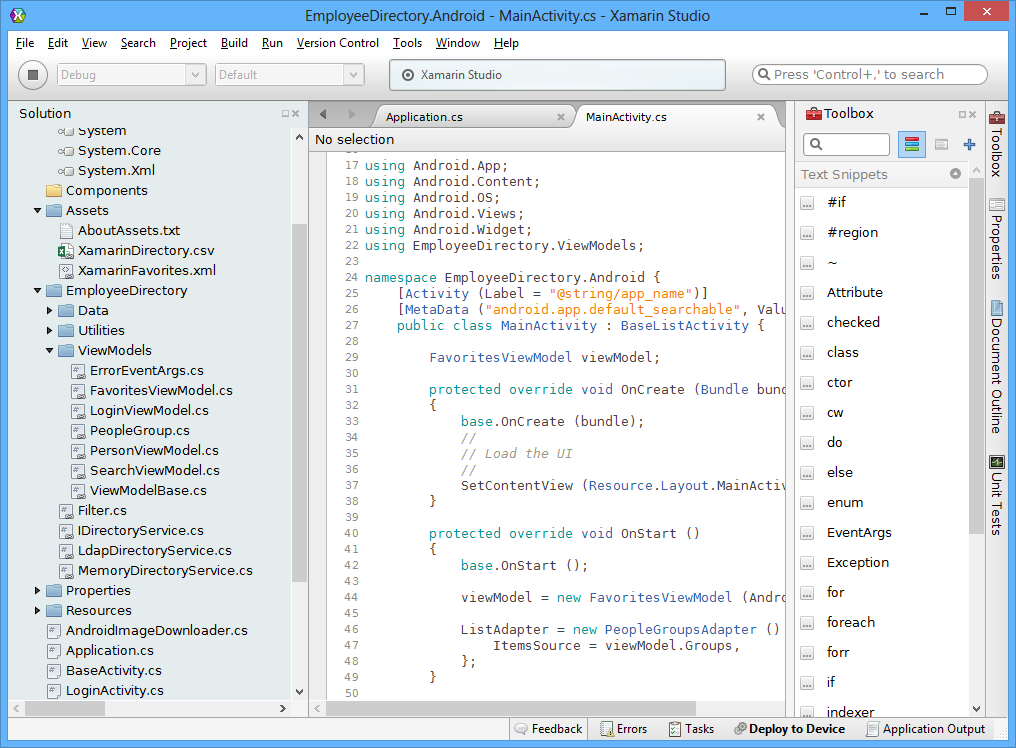
The IDE itself is clean and fast, and very much code-centric. It lacks the bloat of Visual Studio, though you will miss many of the features of Microsoft’s IDE.

image

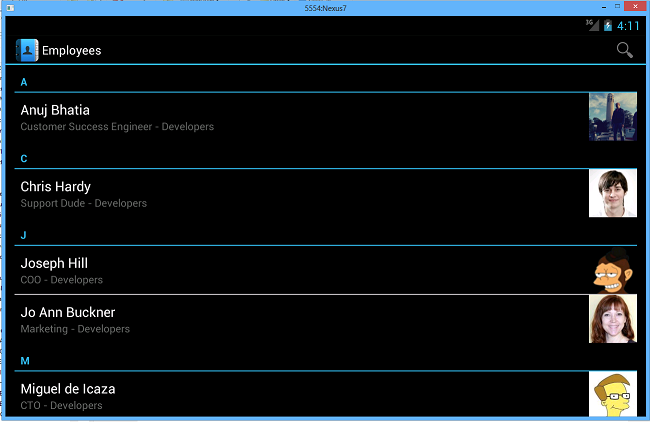
I build the sample Employee Directory app and deployed it to an Android emulator which I use for Nexus 7 development. Deploying the runtime components took a long time, but after waiting patiently the app launched successfully.

image

If you want to do iOS development you will need a Mac of course. Although you can code on Windows, if you then the code is pushed over the the Mac side for compilation and debugging. In order to use Visual Studio, one option is to run Windows in a virtual machine on a Mac, as I have done with reasonable success using Embarcadero’s cross-platform tools.

Xamarin says it is growing fast. There have been 230,000 downloads of its tools, increasing by around 700 per day, and over 12,000 paying customers.

Despite Xamarin’s roots in the open source world (and Mono is still open source), a quick look at the pricing table shows that this is a fully commercial offering and priced accordingly. Presuming customers keep on subscribing, that is a good thing, ensuring the future of the platform; but it is not so good for the smallest developers who might otherwise give it a try.

Review: Nokia Lumia 620, a winner when the price is right

Nokia’s Lumia 620 is now widely available in the UK, and was offered recently at just £120 (including VAT) by O2 on a pay as you go deal (which means that the amount of operator subsidy is small). That struck me as an excellent deal, especially as I already have an O2 sim, so I got one to take a look.

image

The Windows Phone with which I am most familiar is the first one Nokia produced, the Lumia 800, which is still widely available at a similar price to the 620. The 800 is a beautiful phone with a high quality feel, though my early model has a dreadful battery life and suffered from charging problems (going into a state where it could not be charged without much coaxing) until at last a firmware update seemed to fix it.

The 620 is lighter and very slightly smaller than the 800, and feels more ordinary in design and manufacture. On the other hand, it is up-to-date and runs Windows Phone 8, whereas the 800 is stuck with Windows Phone 7.5 or 7.8. The 620 also benefits from a Qualcomm Snapdragon S4 Plus system chip, 1Ghz dual core, versus the 1.4Ghz single core Scorpion and MSM8255 Snapdragon in the 800.

In the picture below, the Lumia 620 is on the left and the 800 on the right.

image

Do not be misled by the apparently faster clock in the 800 (1.4 Ghz vs 1.0 Ghz). In practice, I found the 620 performs much better than the older single-core CPU. Here are my Sunspider Javascript results:

  • Lumia 800: 6987ms
  • Lumia 620: 1448ms

I also have a Lumia 820 on loan. This is the true successor to the 800 and has a gorgeous 4/3″ AMOLED display plus a Snapdragon dual-core 1.5 Ghz chip. It completed Sunspider in just 910ms.

Still, the 820 is around £350 on pay as you go deals, more than double what I paid for 620. It is in a different high-end market, whereas the 620 is in an affordable category alongside dozens of budget Android phones like the HTC Desire C, Samsung Galaxy Ace 2 or Sony Xperia U. If Microsoft is to make real progress with Windows Phone 8, it has to be competitive here as well as at the higher end of the market.

You can see how Nokia has reduced the cost of the 620. The screen is TFT Capacitive, not AMOLED, and looks dim and small next to an 820. The battery is a small 1300 mAh affair, slightly smaller than the one in an 800. The side buttons feel like cheap plastic.

That said, I would rather focus on what the 620 does have, including A-GPS, Bluetooth 3.0, microSD card slot, 5MP camera with flash, front VGA camera, NFC (Near Field Communication) support, accelerometer and compass.

Two significant advantages over the old Lumia 800 are the removable battery (so you can carry a spare) and the microSD card slot, supporting up to 64GB of additional storage.

One thing I noticed with the 620 is that charging the battery is super quick. I have not timed it yet, but it charges considerably faster than the 800.

Battery life when on standby is substantially better than the Lumia 800. With light usage and wi-fi off, I am getting more than 2 and half days.

image

There is 512Mb RAM and 8GB storage; reasonable at this price. The Lumia 610, predecessor to the 620, had only 256Mb RAM which caused app compatibility issues.

Getting started

The out of box experience for me was pretty good. I put in my O2 sim, which worked without any issues. The setup asked for my Microsoft account and password which also worked, though as is typical with Microsoft, I found myself having to enter this several times more when setting up the SkyDrive app.

I have my own Exchange server which uses self-signed certificates. I installed the certificates and rather to my surprise auto-discover then worked and I was able to add my Exchange account to Outlook on the device without my having to enter the server details.

So far so good; but I was expecting some sort of automatic or semi-automatic process of installing the apps I was using on the Lumia 800, but this is more difficult than it should be. Nothing appeared automatically. You have to go to the store and re-install. You can reduce the work slightly by going to your purchase history online and selecting Reinstall; but in many cases that does not work and there is a message saying “App not available on the Web. Try downloading it on your phone.”

That is a shame, since this works well for Windows 8 store apps. The experience of upgrading to a new Windows Phone should be like this:

  1. Buy new phone.
  2. Enter Microsoft account details.
  3. Wait a bit, then carry on where you left off with all apps in place.

Unfortunately we are not there yet.

The new Windows Phone 8 Start screen is a considerable improvement. The big deal is that you can get four times as many icons on the screen, so no need to waste all that space. The Live Tile concept works better on the phone than it does in Windows 8, since you see the Start screen more often. I might work for hours on a PC and never see the Start screen.

The supplied earbuds/microphone are functional but not very good. The sound is mediocre and the earbuds do not feel secure. Incidentally, a much better set comes with the 820; but in practice most of us have our own favourite headset already and I would not mind if Nokia did not bother to include this in the box. Audio with a better quality set is fine, and after copying some MP3s to the device I was happy with the sound.

Once during the course of this review the phone rebooted itself for no apparent reason. Once it froze and I had to remove and replace the battery. Hmm.

Fitting a memory card

The 620 accepts a microSD card up to 64GB. Fitting is not too difficult, though slightly fiddly. First remove the back. Then slide back the silver card holder until it pops up.

image

Insert the card and close the holder.

image

Camera

The camera captures images at 2592 x 1936 pixels. It is fine for the use I am likely to make of it, bearing in mind that I am not yet ready to abandon carrying a separate camera. The camera software supports extensions called “lenses” which let you process the image. An example is Translator which lets you point the camera at some text and have it translated, an intriguing idea from which I got mixed results.

image

I was disappointed to find that Blink, from Microsoft Research, will not install as apparently the 620 does not meet minimum requirements, though I cannot quickly see in what way it falls short.

One small feature that I like on Windows Phone is that you can press the camera button even the phone is locked and use the camera.

Nokia Apps

Nokia has some exclusive apps, of which my favourite is Nokia Drive. I have found it works pretty well for turn-by-turn directions and no longer use my Tom Tom. The 620 lets you install Nokia Drive + Beta, giving you free downloadable maps and offline directions.

City Lens is a fun app that uses augmented reality to superimpose nearby attractions on the image from the phone’s camera. It has some promise, though it asks me to “Calibrate your compass” every time it starts up, which means waving your arms in the air and probably hailing a taxi by mistake.

More seriously, City Lens is only as good as its data, and in my part of England it is not good enough yet, with only a few local businesses showing.

Nokia Transit gives you public transport directions, and worked OK when I asked for directions to my nearest airport, giving a sensible bus route. The app integrates with Nokia Maps for directions and I found the user interface a bit perplexing. The app also freaked out when I asked how to get to London. Sensible options would include my local railway station, which has an hourly service, or a National Express coach from the nearest city centre. Instead, Nokia Transit proposed a seven hour bus journey with numerous changes, starting yesterday (I am not joking). Then the app crashed. Still, looks like it could be useful for local bus journeys.

Nokia Music gives you “Mix radio” for free, and a download service for a per-track fee. Fair enough, though the quality of the Mix radio is indifferent.

Nokia Smart Shoot takes five pictures at a time, and lets you select the best, superimpose faces from one on those of another, or remove people or objects. Face transposition is not my thing, but taking five images at a time makes sense. You can then flip through to find the best, and save it. Useful.

Creative Studio (I am surprised Nokia can use that name) is a simple photo editing app that lets you crop and rotate, remove red eye, adjust colour balance and brightness and so on. It is simple but rather good.

SkyDrive

Microsoft’s cloud storage service SkyDrive is integral to Windows Phone 8. If you follow the setup defaults, photos and videos end up there, though in slightly reduced quality, and it also forms storage for the Office Hub. It is free for up to 7GB of storage and generally works well. Windows Phone would be crippled without it.

Local Scout

Local Scout is an official Windows Phone app that is meant to give information and ratings for local businesses such as shops, restaurants and attractions.

Excuse me while I have a rant. Local Scout was introduced in Windows 7.5 “Mango”, made available in September 2011. It has potential, but I noticed at the time that the data was not that good. In my local area, it included a restaurant that has closed, for example. I hit the link that said “Tell us this place is closed.”

As you can guess, the restaurant is still listed, more than a year later.

There is also a bit of a mystery about Local Scout. It has ratings and reviews, but there is no obvious way to add your own rating or review. The data must come from somewhere, but there are relatively few contributions for the places near me and the app would be more useful with community content.

Local Scout on the Lumia 620 (and on the 820) seems to have got worse. There is no longer a “suggest changes” link so you can no longer easily report that a place has closed. You still cannot add ratings or reviews for places you visit.

All a bit of a disaster. My hunch is that some team created Local Scout for Mango and made a reasonable but incomplete job. Since then, someone decided that it is not important and the thing is essentially frozen. It is still there though; it seems to me that Microsoft should either improve it or abandon it.

This is important because it influences the experience when you pick up a Windows Phone and try to use it. Of course you can use Yelp or TripAdvisor or something else instead; but why does Local Scout occupy a precious spot on the default Start Screen, on most Windows Phones I have seen, when it is so broken?

Office

The Office hub on Windows Phone lets you create, view and edit Word and Excel documents, and view and edit PowerPoint documents. At least, you might be able to. I tried some recent documents on SkyDrive. A PowerPoint opens beautifully, and I can easily edit or hide individual slides. On the other hand, another document I have been working on will not open; it downloads, then the screen flashes slightly, but it never opens. An Excel document downloads and views OK but comes up with a message “can’t edit workbook”.

In both cases, there are in the old binary Office document formats. I tried converting them to the new XML based formats (docx and xlsx) and they worked fine, both for viewing and editing. My recommendation then is to use the new Office formats if you want full access on your Windows Phone.

You can add comments to documents, which is a great feature for collaboration.

If you want to know in detail what will work on the phone, see here, and especially the entry “Why can’t I edit some Microsoft Office documents on my phone?”. This lists “common reasons” why a document cannot be edited. It does not say anything about documents which simply will not open so I guess that is unexpected behaviour.

Given the complexity of Office documents, it is not surprising that there are limitations. On the other hand, it does seem to me problematic that the question of whether you will be able to edit any particular document is, from the user’s perspective, rather hit and miss; and if there are many instances where documents do not open at all I will soon lose confidence in the app.

In an emergency, you could try going through the browser instead, since SkyDrive supports the Office Web Apps.

It may be imperfect, but the Office hub is miles better than nothing.

Other apps

Windows Phone remains a minority taste, and if you want the best and widest selection of apps, you should stick to Apple iOS or Google Android.

That said, the Windows Phone Store does have over 125,000 apps, increasing at around 500 apps per week according to windowsphoneapplist.  Some big names are present, including Twitter, Spotify, Amazon and Google; others are missing or only supported by third party apps, including BBC iPlayer, Dropbox and Instagram. Whether any of these (or others) are deal-breakers is up to the individual.

On the other hand, the strong web browser (see below) means good performance from web apps, which mitigates issues with missing native apps.

YouTube works well full-screen in the browser. Unfortunately BBC iPlayer does not.

A bonus for Xbox users is Xbox SmartGlass, which gives remote control of your console plus a few extras.

image

Internet

Windows Phone 8 includes the Internet Explorer 10 browser, and it is excellent, fast and with decent standards support. It gets a score of 320 at html5test.com, which by no coincidence is the same as IE10 in Windows 8.

image

The 620 also includes the simple, effective internet sharing hotspot feature which was introduced in Windows Phone 7.5, but worth mentioning since it is so useful.

Conclusion

Any budget smartphone is a compromise. The Nokia Lumia 620 is not beautiful to hold, the screen is not the best, the processor is 1.0Ghz rather than the 1.5Ghz on the high-end Lumias, and the battery a bit small.

Nevertheless this is a full Windows Phone 8 smartphone, performance feels snappy, and it supports a generous range of features. It fixes annoyances seen in some earlier Lumias, with a replaceable battery and no fiddly flap over the micro USB port.

The Lumia 620 is a better choice than the old Lumia 800, still on sale at a similar price. It performs basic functions admirably, and has valuable extras like Nokia Drive +. Outlook and the Office hub make it a good choice for Microsoft platform users on a budget.

The Windows Phone 8 OS itself is nice to use but in some areas not as good as it should be. Some of the supplied apps, like Local Scout, are not good enough, and a few crashes suggest bugs.

Web browsing is great though, and strong features like add-on “lenses” for the camera app make up for a few flaws.

In summary, a Lumia 620 is a great way to see what Windows Phone can offer at a budget price. If you can find one for under £150 it is a great deal.

Lumia 620 Key specifications

3.8” display

Dual-core Snapdragon S4 1.0 Ghz, Adreno 305 GPU

Wi-fi 802.11 a/b/g/n, Bluetooth 3.0, NFC

5MP camera with flash, front-facing VGA camera

8GB storage, 512MB RAM, MicroSD up to 64GB

1300 mAh battery

A-GPS

Magnetometer

Ambient light sensor

Orientation sensor

Proximity sensor

Windows Phone 7.8 Live Tiles are buggy, say users

When Microsoft announced Windows Phone 8, one disappointment was that existing phones would not be upgraded to the new mobile operating system. In mitigation, Microsoft promised Windows Phone 7.8 instead, an upgrade to Windows Phone 7.5 that implements the most visible feature of WP8, a new Start screen with more flexible live tiles that can be sized small and other new features.

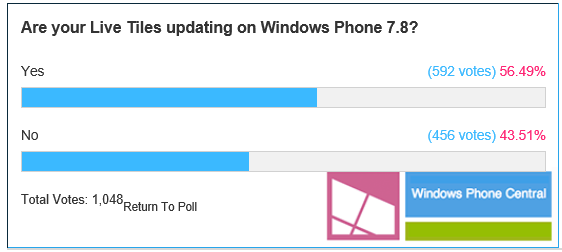
Some users are now receiving 7.8 upgrades, but the news is not all good. According to reports on the Windows Phone Central forum, many users find that the Live Tiles are not refreshing correctly after the upgrade.

image

The idea of Live Tiles is that they refresh in the background with the latest data, such as news alerts or incoming emails.

Developers Heathcliff writes in detail about the problem. He describes three methods to update a Live Tile. The basic ShellTile.Update method works OK, he says. However, if you use an external URL to update a tile, using ShellTileSchedule.Start, it “behaves erratically” and may trigger a problem that drains your battery and makes excessive use of your data connection. Finally, HttpNotificationChannel.BindToShellTile, which uses Microsoft’s notification servers, does not seem to work at all.

On WP 7.5 this method just works as expected. I actually hope I did something wrong here. Or else I don’t understand how this could ever get past the Microsoft Quality Assurance department.

he says.

Finally, users also complain of slower performance after the update, which makes starting apps more laggy.

If Microsoft has put more effort into its new Windows Phone 8 operating system than into an update for existing user, that is understandable, but short-sighted. Those existing users are the best possible evangelists for the platform as well as potential repeat customers; and Windows Phone with its tiny 2.6 per cent global market share, according to IDC, needs all the help it can get.

That said, with decent new WP8 phones like the Nokia 620 available cheaply (O2 in the UK offered this for £120 pay as you go earlier this week), existing Windows Phone 7 users who want to stay up to date are better off buying a new device.

Windows 8: Forget Surface Pro, what matters is the app platform

Microsoft has launched Surface Pro, its own-brand Windows 8 tablet, causing the usual agitation.

  • The 128GB model is sold out online, but has it sold well, or did Microsoft only make a few?
  • Is it too expensive for the spec?
  • Is the battery life too poor?
  • Can you type properly with it on your lap?

All reasonable questions, but to me rather unimportant.

When Microsoft “reimagined” Windows, its goal was to establish its operating system as a new tablet platform. Otherwise, there would have been no sense in upsetting millions of Windows users who were broadly happy with Windows 7, by imposing a new touch-friendly, blocky, mainly single-tasking platform on top of the old familiar Windows.

How is it doing so far? Not well. The reviews for Surface Pro are a symptom of this. It is being treated mainly as an Ultrabook with a detachable keyboard rather than as a tablet. That is a shame, since Surface (RT and Pro) is designed to be tablet-first, with the keyboard cleverly designed into the cover to mitigate the difficulty of using touch alone when you have to use desktop apps.

There are several reasons why Surface is seen as a kind of laptop rather than as a tablet.

First, Microsoft has so far failed to change the way Windows is perceived. People buy Windows devices to run Windows apps, by which they mean Microsoft Office, Skyrim, Foobar2000, and/or their corporate apps written in Visual Basic or C#. The existence of the new Windows Runtime platform is incidental and mainly annoying, since it can get in the way if you only want to run Windows.

This could soon change if there were numerous compelling apps on the new platform; but there are not, and that is reason number two. Which Windows Store apps are better (presuming you have a tablet) than their desktop equivalent, or which are great apps that have no desktop equivalent? It is a short list. Personally I would name the Wordament game, Maps, and the Weather app as examples; and yes, I know how lame that sounds.

Microsoft slipped up badly by spending so little effort on the built-in apps, especially Mail, but also Music and others. The result is that users spend little time in the new user interface (I am guessing but have anecdotal evidence). The further result is that the platform is unattractive to developers, despite the size of the Windows market.

Take a look at the MetroStore Scanner  and you can see that around two hundred apps are added most days (green is updates rather than additions).

image

That in itself does not tell us much. Just one hundred great new apps would be fantastic news for the platform. But no, they are mostly trivial and/or poor and/or repetitive and/or uninteresting.

Why are developers not building more and better apps? That indeed is the question. The main reason of course is that size of the market, not in terms of the numbers of Windows 8 users out there, but in terms of likely sales or adoption.

This is circular though. Good apps will increase the size of the market. So what else?

My views on this changed when I sat down to build my own app, simple though it is. This was harder than I expected, and there is still a z-order bug which I have not got round to fixing. A core question though is this: does the platform help developers to build apps that delight the user? In this respect it is not yet good enough. The kind of app you will build if you follow all the guidelines will be genuinely touch-friendly, but look a bit blocky and spaced out too much. There is also the problem of the disappearing menu bar and the fact that users do not always discover options hidden in the Charms bar. It is too easy to build apps that are not good enough. I regard the poor quality of apps like Mail as evidence of this.

Put another way, it is not yet a platform that inspires developers and makes them want to support it, despite its immaturity.

Windows 8 is not going well then; but I do not write it off. Better apps surely will appear. Further, Microsoft’s next go at this, whether it is called Blue or Windows 8.5 or Windows 9, should be better as the team fix annoyances and add compelling features.

As yet though, there is no sign of Microsoft averting the march of Windows towards being a business-oriented, desktop platform occupying an ever-smaller niche in a world of mobile and browser apps. If I were CEO Steve Ballmer, I would find that a concern.