Category Archives: windows

Office Web Apps better then Open Office for .docx on Linux

I’ve been reviewing Office and SharePoint 2010, and trying out Ubuntu Lucid Lynx, so I thought I would put the two together with a small experiment.

I borrowed a document from Microsoft’s press materials for Office 2010. Perhaps surprisingly, they are in .doc format, not the Open XML .docx that was introduced in Office 2007. That didn’t suit my purposes, so I converted it to .docx using Save As in Office 2010.

image

Then I stuck it on SharePoint 2010.

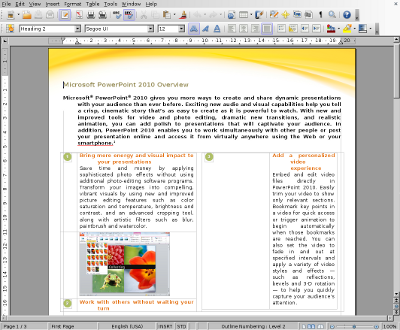
Next, I downloaded it to Ubuntu and opened it in Open Office. It was not a complete disaster, but the formatting was badly messed up.

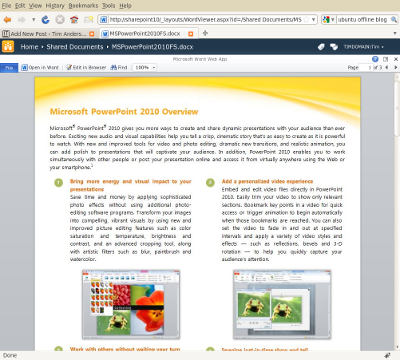
Finally, still in Ubuntu, I navigated to SharePoint and viewed the same document there. It looked fine.

Even better, I was able to click Edit in Browser, make changes, and save. The appearance is not quite WYSIWYG in edit mode, but is the same as in IE on Windows.

The exercise illustrates two points. One is that Open Office is not a good choice for working with Open XML – incidentally, the document looked fine when opened in the old binary .doc format. The other is that SharePoint 2010 and Office Web Apps will have real value on mixed networks suffering from document compatibility issues with Office and its newer formats.

DevExpress merges its Silverlight and WPF UI controls, says VS 2010 is light years ahead

Developer Express is a component vendor with add-ons for Visual Studio and Delphi. It has offered a library of components for Silverlight for some time, and a separate set for WPF (Windows Presentation Foundation), but now says that Silverlight and WPF are close enough that it can merge the two into a single codebase to be called XPF (Express Presentation Framework). CTO Julian Bucknall says:

Silverlight in v4 has the ability to create desktop applications that aren’t sandboxed into triviality. In fact, Silverlight, more than ever, resembles a WPF-lite on the desktop side, to the extent of pundits considering their eventual merging. At long last it is possible to write one set of non-trivial code and compile it both for Silverlight and for WPF without having to reinvent so many wheels on the Silverlight side (and to a much lesser extent on the WPF side).

Even though Visual Studio 2010 is only just released, DevExpress is focusing all its new Silverlight and WPF development on the new platform and IDE:

The Silverlight and WPF controls in DXperience v2010.1 will require .NET 4 and VS2010. In particular, you must use the new Silverlight 4 and WPF 4; the controls will not function with the previous versions of WPF and Silverlight, such as Silverlight 3. Similarly, you cannot use VS2008 or earlier, but must use VS2010. To my mind this isn’t that much of a downside: VS2010 is light years ahead of its earlier brethren in terms of user experience and its use is de rigueur if you are creating applications with either Silverlight or WPF.

Of course it’s in Bucknall’s interests to move developers on; he’s keen to sell upgrades. I still find this interesting. Like him, I find Visual Studio 2010 a major advance on earlier versions. More significant though is the idea of a common WPF and Silverlight codebase, though presumably still with added capabilities when running on WPF. I don’t think Windows-only development is dead; the success of Windows 7 may even stimulate the market for applications that take advantage of its new features. That said, for the large subset of applications where cross-platform is desirable, Silverlight seems to me a better choice than WPF.

Microsoft warns against installing 64-bit Office 2010 unless you really need it

Microsoft has released 64-bit Office 2010, at least to MSDN and Technet subscribers, with general availability to follow shortly. Now that 64-bit Windows is commonplace, you would think that 64-bit Office is the obvious choice.

Apparently not. Take a read of this technical note before installing 64-bit Office 2010. In essence, it recommends installing 32-bit Office, even on 64-bit systems, except in the following case:

If some users in your organization are Excel expert users who work with Excel spreadsheets that are larger than 2 gigabytes (GB), they can install the 64-bit edition of Office 2010. In addition, if you have in-house solution developers, we recommend that those developers have access to the 64-bit edition of Office 2010 so that they can test and update your in-house solutions on the 64-bit edition of Office 2010.

That’s a small niche. So what can go wrong if you decide to go 64-bit? First, it might not install:

If 32-bit Office applications are installed on a computer, a 64-bit Office 2010 installation is blocked by default.

says the tech note. In addition, if you manage to install it, you will have problems with 32-bit Access applications, 32-bit ActiveX controls and COM add-ins, in-place activation of documents where the OLE server is 32-bit, and VBA code that calls the Windows API. VBA deliberately disables API calls defined with the Declare statement; they must the updated with a PtrSafe attribute before they will run.

The Office install DVD includes both 32-bit and 64-bit versions, and the 32-bit version installs by default irrespective of the version of Windows.

Of course I will be trying 64-bit Office on a spare machine. I’m interested to know, for example, whether Outlook benefits from all that extra RAM, since it is notoriously slow. But overall, 64-bit Office 2010 looks more like a release to prepare the ground for the future, than one for normal use.

Silverlight 4.0 released to the web; tools still not final

Microsoft released the Silverlight 4.0 runtime yesterday. Developers can also download the Silverlight 4 Tools; but they are not yet done:

Note that this is a second Release Candidate (RC2) for the tools; the final release will be announced in the coming weeks.

Although it is not stated explicitly, I assume it is fine to use these tools for production work.

Another product needed for Silverlight development but still not final is Expression Blend 4.0. This is the designer-focused IDE for Silverlight and Windows Presentation Foundation. Microsoft has made the release candidate available, but it looks as if the final version will be even later than that for Silverlight 4 Tools.

Disappointing in the context of the launch of Visual Studio 2010; but bear in mind that Silverlight has been developed remarkably fast overall. There are huge new features in version 4, which was first announced at the PDC last November; and that followed only a few months after the release of version 3 last summer.

Why all this energy behind Silverlight? It’s partly Adobe Flash catch-up, I guess, with Silverlight 4 competing more closely with Adobe AIR; and partly a realisation that Silverlight can be the unifying technology that brings together web and client, mobile and desktop for Microsoft. It’s a patchy story of course – not only is the appearance of Silverlight on Apple iPhone or iPad vanishingly unlikely, but more worrying for Microsoft, I hear few people even asking for it.

Even so, Silverlight 4.0 plus Visual Studio 2010 is a capable platform; it will be interesting to see how well it is taken up by developers. If version 4.0 is still not enough to drive mainstream adoption, then I doubt whether any version will do it.

That also raises the question: how can we measure Silverlight take-up? The riastats charts tell us about browser deployment, but while that is important, it only tells us how many have hit some Silverlight content and allowed the plug-in to install. I look at things like activity in the Silverlight forums:

Our forums have 217,426 threads and 247,562 posts, contributed by 77,034 members from around the world. In the past day, we had 108 new threads, 529 new posts, and 70 new users.

it says currently – substantial, but not yet indicative of a major platform shift. Or job stats – 309 UK vacancies right now, according to itjobswatch, putting it behind WPF at 662 vacancies and Adobe Flash at 740. C# on the other hand has 5349; Java 6023.

Windows Phone 7 emulator yields its secrets

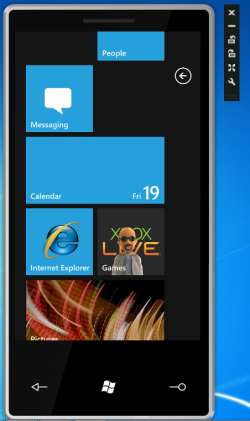
So that didn’t take long. Microsoft has made a Windows Phone 7 emulator available to all, explaining that it is a virtual machine running the real device OS. While it works fine for debugging applications, most of the phone UI is mysteriously absent, the exception being Internet Explorer (needed for testing web applications). However, Dan Ardelean has done some nifty work with the emulator image, discovering that a lot more of the UI is present and can be exposed if you make a few modifications. He posted his modified ROM but has since removed it because of copyright concerns. I doubt it will be hard to find.

image

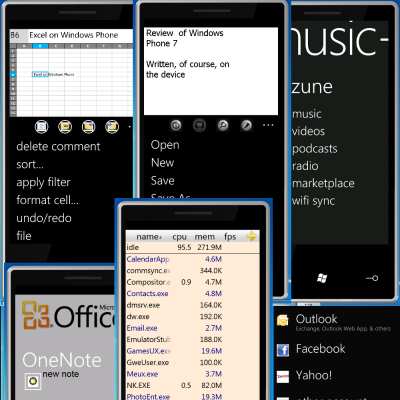
Applications available in the hacked emulator include Mobile Office with Word, Excel, PowerPoint, OneNote and Sharepoint Workspace (undermining Microsoft’s claim that this is only a consumer device), games including a version of Times Reader – full circle for this one, which started out in WPF, moved to Silverlight for Mac, deserted and went to Adobe Flash, and may now reappear in Silverlight – and music/video via a Zune section.

image

My tip to Microsoft: if you don’t want these things to leak, best not put them in the publicly-available image.

Ardelean has also figured out how to amend the native C# port of SQLite, satisfying demand for a local SQL database engine. SQL Server Compact Edition is actually present in Windows Phone 7, but not available to custom applications.

Microsoft playing HTML 5 standards game alongside Silverlight game

I’m at Mix10 in Las Vegas where Microsoft has been showing off the latest preview of IE9 – you can try it here, provided you have Vista SP2, Windows 2008 or Windows 7.

The two themes are performance, with GPU-accelerated HTML and graphics and a new Javascript engine that compiles code in the background, and standards support. This latter was not a surprise to me, as I’d heard the well-informed Molly Holzschlag praise Microsoft’s commitment to HTML5 at a workshop here on Sunday – see this earlier post.

During the keynote, we saw IE9 playing a video using the HTML 5 video tag – no Flash or Silverlight needed. Microsoft also showed that in this instance IE9 performed better than Chrome thanks to better hardware acceleration. Although one should always mistrust one vendor’s demonstration of another vendor’s product, it should not be surprising that Microsoft is able to deliver a browser that is better optimised for Windows.

Video, hardware accelerated graphics, audio element support, fast JavaScript: there is considerable overlap with the features of the Microsoft Silverlight (and Adobe Flash) plug-ins.

The plug-in approach has advantages. It offers consistency across browsers, and enables rapid evolution without the hassles of standards committees. The multimedia features in Silverlight and Flash are well ahead of those in HTML 5 – Holzschlag nailed this when she described today’s HTML 5 demos as reminiscent of Flash demos a decade ago.

Still, if you can do without the plug-in you end up with cleaner code, removing the awkward transition between what is in HTML and JavaScript, and what is in the plug-in. There is also a better chance that your code will run on Apple’s iPhone and iPad, for example.

The question though: can Microsoft do an equally good job of supporting HTML 5 throughout its platform, as it will do with Silverlight? This is where I’m doubtful. The Visual Studio and Expression tools will continue to drive developers towards Silverlight rather than HTML 5.

It’s notable that shortly after Microsoft’s IE9 demos at Mix, we saw demos of fun technology like code-name Houston, develop databases in the cloud using just your browser and … Silverlight.

Windows Phone 7 developer story unveiled at Mix10

I’m in Las Vegas for Microsoft’s Mix10 conference, where the developer story for Windows Phone 7 series is being unveiled. According to the press release, the tooling for Windows Phone 7 looks like this:

  • Visual Studio 2010 Express for Windows Phone (free)
  • Windows Phone 7 Series add-in for Visual Studio 2010 RC
  • XNA Game Studio 4.0
  • Emulator
  • Expression Blend for Win Phone CTP

Essentially, you are meant to use XNA for games on the device, and Silverlight for other kinds of application.

Another part of the announcement describes new services for developers – Microsoft Location Service to provide location information, and a notification service to “push information to the phone, regardless of whether or not an application is running”.

Applications will be marketed through a new Windows Phone Marketplace.

I’ll report more details as they emerge, here and on The Register.

Update: Microsoft has added that Expression Blend 4.0, for Silverlight 4.0 support, will be a free upgrade from Expression Blend 3.0.

Silverlight 4.0 RC, Expression Blend 4.0 beta, VS 2010 add-in available for download here: http://silverlight.net/getstarted/silverlight-4-beta/ 

The MSDN documentation for Windows Phone 7 is here: http://msdn.microsoft.com/en-us/library/ff402531(VS.92).aspx

The Windows Netbook experience: Toshiba NB300

I’ve just received a Toshiba NB300 Netbook, which looks like it will be useful for blogging and web access during a couple of conferences coming up shortly – up to 11 hours battery life, great. I am interested in the user experience when starting out with a new machine, so made a few notes.

I regard this as a critical issue. Microsoft and its OEM partners are up against Apple, a company which pays careful attention to the user experience, from box unwrapping on. Apple charges a premium of course; Windows machines are generally cheaper, and there is an unwritten deal that you put up with a certain amount of foistware and rough edges for the sake of better value overall. On the other hand, if users do not feel good about a product they are unlikely to recommend it to others; Apple has won a fanatical following partly thanks to this attention to detail.

So how was the Toshiba? Better than the Samsung/Vodafone Netbook about which I blogged last month, but still not great.

I switched on and was immediately guided through a registration wizard, being assured that this would activate my warranty. Next I was prompted to activate TEMPRO, a Toshiba service which is meant to send me alerts concerning software updates and so on. I tried to do so, but the activation wizard told me the serial number was invalid, though as far as I can tell it is correct. Next, TEMPRO sent me an alert that my warranty was not registered. You what?

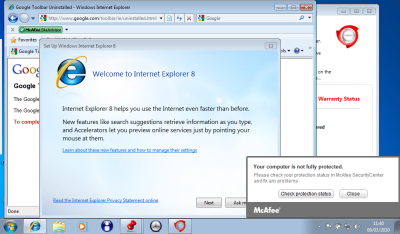
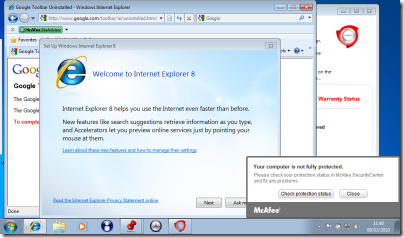
Trying to imagine what a typical user might do, I clicked the Register button just in case. This started up Internet Explorer for the first time. Next, Google popped up a dialog asking me to agree to its privacy policy for the pre-installed Google toolbar. I clicked Disagree and it started uninstalling. In the meantime, IE started its welcome wizard and McAfee started badgering me that I was not fully protected. Here’s my screen a few minutes after first power-on:
image

The problem here is that a bunch of different applications want to get you to agree some terms or set up a subscription, and they are all competing for attention. It is all very predictable, and the end result is ugly. You would think that someone could figure out how to do this in an organised manner.

I took a look at Control Panel. There was a ton of stuff installed although Toshiba is certainly not the worst when it comes to the bundling game. Pre-installed software included the following:

  • Adobe AIR
  • Amazon.co.uk
  • eBay.co.uk
  • Java 6
  • McAfee Security Center (reboot required on uninstall)
  • Silverlight 3
  • Office Home and Student 2007 trial (reboot required on uninstall)
  • Powerpoint 2007
  • Microsoft Works 9
  • Photo Service powered by myphotobook
  • An amazing number of Toshiba utilities – I counted 24
  • Wild Tangent games
  • Windows Live Essentials

I tried Office 2007 trial, which asked to install an ActiveX control to check whether Office 2007 was already installed. This seems a clumsy solution, and perplexing for the user. I let it install, then clicked Buy Now, which got me to a web site where I could purchase it for £86.04.

Microsoft Works 9.0 is also installed in a full version, but whereas Office 2007 has an icon on the desktop, Works is hidden away in the Start menu. It might be all you need on a Netbook, except that its default document formats are unhelpful, if you need to share them with others. Works can open Microsoft’s Office 2007 XML formats (.docx, .xslsx) to some extent, but things went a little awry after I uninstalled Office 2007 trial. Double-clicking a .docx raises a Save As dialog defaulting to .docm, the macro-enabled Open XML format, which is something to do with the Microsoft Open XML Converter. I can’t imagine why it is doing that. Office 2007 will be going back on shortly.

A Toshiba utility called Web Camera Application has an annoying menu which docks to the side of the screen and pops up when you move the mouse there. Since Microsoft has worked hard on the taskbar area, which is where always-on utilities normally live, I’m not clear why Toshiba thinks this is a good idea. Having said that, the similar effort at the top of the screen which handles the Fn keys (known as Flash Cards) is not so bad: mouse activation is off by default, and it shows at a glance what all these keys do. Fn-F8 disables wireless for flight mode, for example. If you want to get rid of the side menu but not the top one, open it and right-click. Uncheck Auto Run and then click Close. If you then want it back, choose Start – All Programs – Toshiba – Utilities – Web Camera Application.

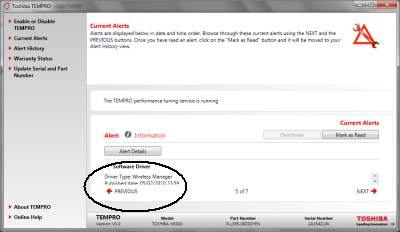
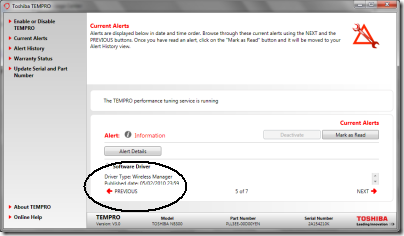
Toshiba pre-installs a multi-function utility called Toshiba Bulletin Board. It includes a Message Center which raises alerts, some of which link to TEMPRO as mentioned above. This turns out to be a bit of a usability disaster too. Here’s what happens. I get a notification that there are alerts to be read. I open Toshiba Bulletin Board and click a hyperlink to open Message Center. It says TEMPRO has some alerts to read, so I click Open. Now I’m in TEMPRO which apparently was not designed with the short 1024×600 screen in mind. It has lots of stuff in a huge dialog, leaving only 1.5 lines of space for the actual message, with a tiny scroll bar next to it. I’ve encircled the message in the pic below so you can see it:
image

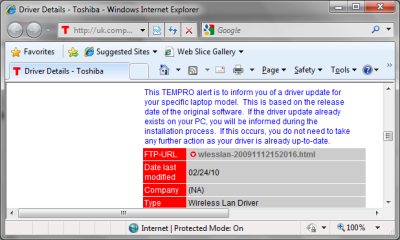
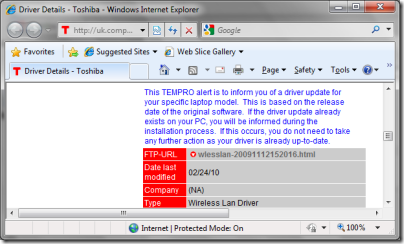
This one is a new software driver. Sounds like something useful, so I click Alert Details. This takes me to a web page called Driver Details. It has a big download icon, but clicking that does nothing. The page says:

To download your chosen file, simply click on the filename below.

Curiously, the “filename” is actually a link to an HTML page.
image

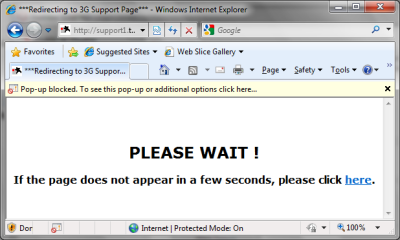
I click it. Now I’m here:

image

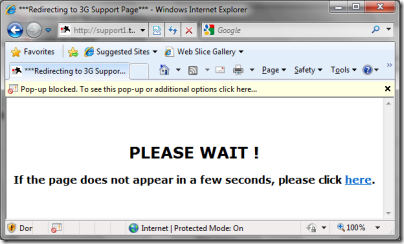
The IE pop-up blocker is doing its stuff, and if I’m impatient I can click a link. I wait a few seconds, nothing happens, so I click the link.

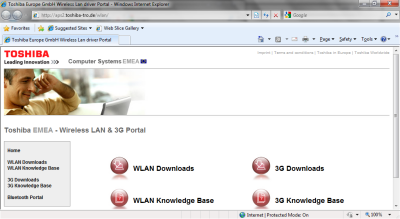
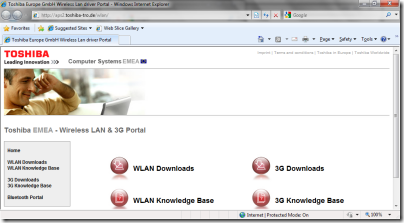
Help! Now I’m at some kind of portal with four big buttons and no clue which to click:
image

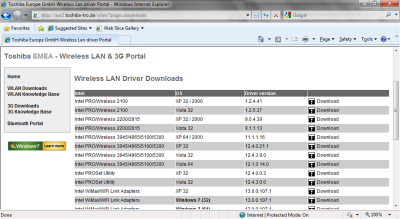
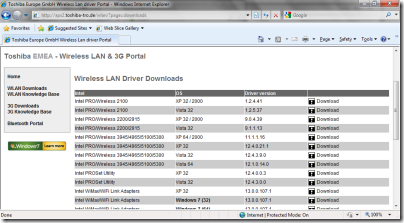
I vaguely recall it was a wireless driver so using my knowledge of acronyms I click WLAN Downloads:
image

Lovely! Now I have a list of around 25 downloads for various operating systems. All I have to do is decide whether my adapter is Intel, Atheros or Realtek, and which version and operating system I require.

Sorry, Toshiba, this is a bad joke. You’ve installed your special utility supposedly to make it easy to keep your product up-to-date, it takes multiple clicks to get anywhere useful, and it is so hopeless that it cannot even select the right driver automatically.

By the way, there is yet another update utility called Toshiba Service Station that comes with an intimidating agreement saying it will keep your data for seven years. I tried that too when prompted; it said No software updates available. How many update utilities does a little netbook need?

While I’m beating up this machine, let me mention the partitioning. The hard drive is only 250GB, but it is divided into three partitions: a small hidden partition for some clever recovery stuff, then two equally-sized partitions one called Windows and the other Data. There’s a case for having a separate partition for the operating system, though I don’t much like it on a Windows client machine because getting the sizes right is a challenge. However, Toshiba hasn’t really done what the names imply. Everything is on the Windows partition, including the data. In other words, the user’s home directory and documents are on the operating system partition. The only thing on drive D is an irritating directory called HDDRecovery which includes a readme pleading with you not to delete it.

Drive D may be handy though – I expect I’ll be trying MeeGo on here soon.

Lessons not learned

I like Toshiba machines, I know Windows backwards, and likely this machine will do a great job for me. Nevertheless, I can see that it has all sorts of usability issues, and that these are mostly not Microsoft’s fault but put there by the OEM vendor.

It beats why there isn’t some kind of usability trial where the prototype is put before a user, who is asked to turn the machine on and, as they say, follow the on-screen directions. The issues are not hard to spot. Toshiba is not a small company; it has the skills and resources to make a machine that offers a pleasing user experience.

It also beats me why resources are devoted to half-baked software like Toshiba Bulletin Board and TEMPRO, which are counter-productive, instead of aiming to integrate seamlessly with the good usability work Microsoft has done in Windows 7.
Microsoft maybe gets the cloud – maybe too late

Microsoft CEO Steve Ballmer gave a talk on the company’s cloud strategy at the University of Washington yesterday. Although a small event, the webcast was widely publicised and coincides with a leaked internal memo on “how cloud computing will change the way people and businesses use technology”, a new Cloud website, and a Cloud Computing press portal, so it is fair to assume that this represents a significant strategy shift.

According to Ballmer:

about 70 percent of our folks are doing things that are entirely cloud-based, or cloud inspired. And by a year from now that will be 90 percent

I watched the webcast, and it struck me as significant that Ballmer kicked off with a vox pop video where various passers by were asked what they thought about cloud computing. Naturally they had no idea, the implication being, I suppose, that the cloud is some new thing that most people are not yet aware of. Ballmer did not spell out why Microsoft made the video, but I suspect he was trying to reassure himself and others that his company is not too late.

I thought the vox pop was mis-conceived. Cloud computing is a technical concept. What if you did a vox pop on the graphical user interface? or concurrency? or Unix? or SQL? You would get equally baffled responses.

It was an interesting contrast with Google’s Eric Schmidt who gave a talk at last month’s Mobile World Congress that was also a big strategy talk; I posted about it here. Schmidt takes the cloud for granted. He does not treat it as the next big thing, but as something that is already here. His talk was both inspiring and chilling. It was inspiring in the sense of what is now possible – for example, that you can go into a restaurant, point your mobile at a foreign-language menu, and get back an instant translation, thanks to Google’s ability to mine its database of human activity. It was chilling with its implications for privacy and Schmidt’s seeming disregard for them.

Ballmer on the other hand is focused on how to transition a company whose business is primarily desktop operating systems and software to one that can prosper in the cloud era:

If you think about where we grew up, other than Windows, we grew up with this product called Microsoft Office. And it’s all about expressing yourself. It’s e-mail, it’s Word, it’s PowerPoint. It’s expression, and interaction, and collaboration. And so really taking Microsoft Office to the cloud, letting it run in the cloud, letting it run from the cloud, helping it let people connect and communicate, and express themselves. That’s one of the core kind of technical ambitions behind the next release of our Office product, which you’ll see coming to market this June.

Really? That’s not my impression of Office 2010. It’s the same old desktop suite, with a dollop of new features and a heavily cut-down online version called Office Web Apps. The problem is not only that Office Web Apps is designed to keep you dependent on offline Office. The problem is that the whole model is wrong. The business model is still based on the three-year upgrade cycle. The real transition comes when the Web Apps are the main version, to which we subscribe, which get constant incremental updates and have an API that lets them participate in mash-ups across the internet.

That said, there are parallels between Ballmer’s talk and that of Schmidt. Ballmer spoke of 5 dimensions:

  • The cloud creates opportunities and responsibilities
  • The cloud learns and helps you learn, decide and take action
  • The cloud enhances your social and professional interactions
  • The cloud wants smarter devices
  • The cloud drives server advances

In the most general sense, those are similar themes. I can even believe that Ballmer, and by implication Microsoft, now realises the necessity of a deep transition, not just adding a few features to Office and Windows. I am not sure though that it is possible for Microsoft as we know it, which is based on Windows, Office and Partners.

Someone asks if Microsoft is just reacting to others. Ballmer says:

You know, if I take a look and say, hey, look, where am I proud of where we are relative to other guys, I’d point to Azure. I think Azure is very different than anything else on the market. I don’t think anybody else is trying to redefine the programming model. I think Amazon has done a nice job of helping you take the server-based programming model, the programming model of yesterday that is not scale agnostic, and then bringing it into the cloud. They’ve done a great job; I give them credit for that. On the other hand, what we’re trying to do with Azure is let you write a different kind of application, and I think we’re more forward-looking in our design point than on a lot of things that we’re doing, and at least right now I don’t see the other guy out there who’s doing the equivalent.

Sorry, I don’t buy this either. Azure does have distinct advantages, mainly to do with porting your existing ASP.NET application and integrating with existing Windows infrastructure. I don’t believe it is “scale agnostic”; something like Google App Engine is better in that respect. With Azure you have to think about how many virtual machines you want to purchase. Nor do I think Azure lets you write “a different kind of application.” There is too little multi-tenancy, too much of the old Windows server model remains in Azure.

Finally, I am surprised how poor Microsoft has become at articulating its message. Azure was badly presented at last year’s PDC, which Ballmer did not attend. It is not an attractive platform for small-scale developers, which makes it hard to get started.

Windows Phone 7 incompatibility may drive developers elsewhere

Microsoft’s Charlie Kindel has blogged about the Windows Phone 7 development platform.

As widely leaked, the new mobile device supports Silverlight and XNA; Kindel also mentions .NET, but since both Silverlight and XNA are .NET platforms, that might not mean anything additional.

The big story is about compatibility:

To deliver what developers expect in the developer platform we’ve had to change how phone apps were written. One result of this is previous Windows mobile applications will not run on Windows Phone 7 Series.

This puts Microsoft in an awkward position. Support for custom business apps has been one of the better aspects of Windows Mobile. What Microsoft should do is to have some way of continuing to run those old apps on the new devices. Instead, Kindel adds:

To be clear, we will continue to work with our partners to deliver new devices based on Windows Mobile 6.5 and will support those products for many years to come, so it’s not as though one line ends as soon as the other begins.

I would not take much account of this. No doubt there will some devices, but demand for Windows Mobile will dive through the floor (if it has not already) once Phone 7 is available, making it an unattractive proposition for hardware partners.

The danger for Microsoft is that after this let-down, those with existing Windows Mobile apps that are now forced to choose a new development platform might choose one from a competitor.

The mitigation is that apps which use the Compact Framework will likely be easier to port to Windows Phone 7, because the language is the same. Native code apps are a different matter. Of course it will be technically possible to write native code apps for Windows Phone 7, but probably locked down and restricted to special cases, such as perhaps the Adobe Flash runtime (I am speculating here).

PS – I see that developer Thomas Amberg has articulated exactly these concerns in a comment to Kindel’s post:

Platform continuity was the single most important feature of Windows Mobile. Being able to run code from 2003 on a current phone is more important to our customers than a fancy UI (which Microsoft seems not able to get right anyway). Further, the ability to access hardware specific APIs through P/Invoke has been vital in many of our projects (e.g. to use Bluetooth in the early days). Those advantages have now gone. You just rendered useless years of development work and many thousands of lines of code.

"we will continue to work with our partners to deliver new devices based on Windows Mobile 6.5 and will support those products for many years to come"

You will, I bet. But which device manufacturer will produce such "dead-end" devices?

Time to switch to another mobile OS.