Category Archives: windows

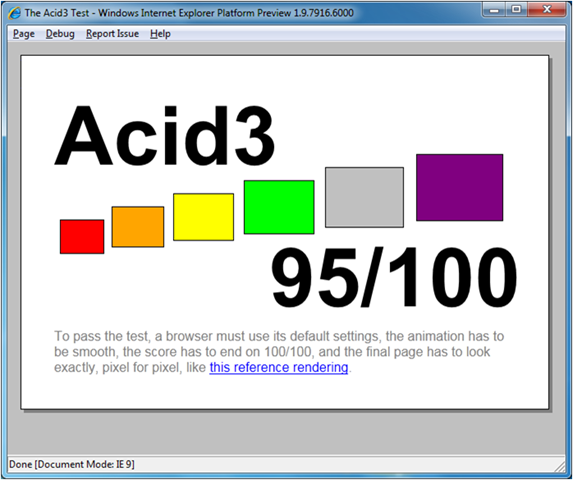
Internet Explorer 9 Preview gets to 95% on Acid 3

Microsoft has released the fourth platform preview for Internet Explorer 9, which you can download here. This is the last preview before the beta release, expected in September.

When IE9 was first previewed, back in March, it scored only 55% on the Acid3 standards test – well ahead of IE8 which scores around 20%, but far short of rivals like Google Chrome and Apple Safari which achieve full marks. Mozilla Firefox is at 94%.

Acid 3

The new preview is at 95%. IE9 is now up there with them – but why not 100%?

According to UK Web Product Manager Mark Quirk, it is down to three features, two of which are related to SVG (Scalable Vector Graphics). Two points are lost because of SMIL (Synchronized Multimedia Integration Language) presentations, which Microsoft does not intend to support because a similar feature will be part of CSS in future. Two points are lost because of SVG fonts, which again Microsoft does not intend to support because it sees WOFF (Web Open Font Format) as the future standard here. One point is lost because of the inability to draw SVG fonts on a path, though there are other ways to draw fonts on a path.

The bottom line: IE9 will most likely stay at 95% right through to its final release.

Incidentally, IE9 JavaScript performance is wildly faster than IE8, thanks to the new “Chakra” engine. IE9 is on the left, Firefox 4 on the right :

image

So when will we get IE9? Although it is not long to September, there is a major difference between the preview and the coming beta, which is that the preview does not have a full user interface. It is mainly to show off the rendering and JavaScript engine. Therefore we can expect new features in the beta versus the preview. Despite that, Quirk says that Microsoft intends the beta to be “good quality for any user”, not just for brave developers and testers.

But how long before the final release? Microsoft is not saying, though when I suggested the first half of 2011 as a reasonable guess, Quirk reminded me that the beta will be high quality and that the release should therefore follow “not too long” after.

Since we will get much of HTML 5 in IE alongside the other popular browsers, do we still need Silverlight?

“As the number of the things you can implement with HTML clearly goes up, the need for Silverlight and Flash goes down,” said Quirk, though he added hastily, “The value that those players add needs to go higher.”

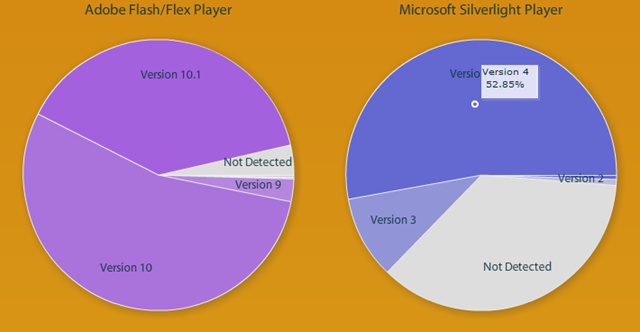
I’d add that even if IE9 is all that we hope, it will take years before older versions fall out of use. Recently the UK government said it will stick with IE6, and whatever you think of that decision, it shows how hard it is to get browsers upgraded everywhere. By contrast, plug-ins like Flash and Silverlight get updated rather fast. I noticed on Riastats today that over 50% of browsers now have the latest Silverlight, and 39% already have Flash 10.1 – over 90% have Flash 10 or higher.

image

If you combine that issue with things like video playback that are problematic even in HTML 5, it suggests that plug-ins will be with us for the foreseeable future, though it is quite possible that their use may decline.

Another factor is tool support, mature for Flash and Silverlight, but not for the newest features of HTML. After IE9 appears, will Microsoft come up with tools that properly support it, in Expression Web and Visual Studio? “We have to, it’s as simple as that,” says Quirk, though he adds, “we haven’t said when.”

Changing the motherboard under Windows 7

Today I needed to swap motherboards between a machine running Hyper-V Server 2008 R2 and another running 32-bit Windows 7. No need to go into the reason in detail; it’s to do with some testing I’m doing of Hyper-V backup and restore. The boards were similar, both Intel, though one had a Pentium D processor installed and the other a Core Duo. Anyway, I did the deed and was intrigued to see whether Windows would start in its new hardware.

Hyper-V Server – which is really 64-bit Server Core 2008 R2 – started fine, installed some new drivers, requested a restart, and all was well.

Windows 7 on the other hand did not start. It rebooted itself and offered startup repair, which I accepted. It suggested I try a system restore, which I refused, on the grounds that the problem was not some new corruption, but that I had just changed the motherboard. Next, startup repair went into a lengthy checking procedure, at the end of which it reported failure with an unknown problem possibly related to a configuration change.

That was annoying. Then I remembered the problems Windows has with changing to and from AHCI, a BIOS configuration for Serial ATA. I posted on the subject in the context of Vista. I checked the BIOS, which was set to AHCI, changed it to IDE mode, and Windows started fine. Then I made the registry change for AHCI, shutdown, changed back to AHCI in the BIOS. Again, Windows started fine.

What puzzles me is why the long-running Windows 7 startup repair sequence does not check for this problem. If the alternative is a complete reinstall of Windows, it could save a lot of time and aggravation.

It is also worth noting that Windows 7 declared itself non-genuine after this operation, though actually it re-activated OK. I guess if you had two machines with OEM versions of Windows 7, for example, and swapped the motherboards, then strictly you would need two new licenses.

Ten years of Microsoft .NET – but what about the next ten?

Technology products have many birthdays – do you count from first announcement, or release to manufacturing, or general availability? Still, this week is a significant one for Microsoft .NET and the C# language, which was first unveiled to the world in detail at Tech-Ed Europe on July 7th, 2000. The timing was odd; July 7th was the last day of Tech-Ed, whereas news at such events is normally reserved to the first day or two – but the reason was to preview the announcement at the Professional Developers Conference in Orlando the following week. It was one of the few occasions when Europe got the exclusive, though as I recall most of the journalists had already gone home.

It is interesting to look back, and I wrote a piece for The Register on .NET hits and misses. However you spin it, it’s fair to say that the .NET platform has proved to be one of Microsoft’s better initiatives, and has delivered on at least some of its goals.

It is even more interesting to look forward. Will we still be using .NET in 2020?

There is no sign of Microsoft announcing a replacement for .NET; and little sign of .NET catching on in a big way outside the Microsoft platform, so in part the question is about how the company will fare over the coming decade. Still, it is worth noting that the role of the .NET framework  in that platform still seems to be increasing.

Most predictions are wrong; but the general trend right now is towards the cloud+device computing model. The proposition is that both applications and data belong in the cloud, whether public, private or hybrid. Further, it seems plausible that we will fall out of love with personal computers, with all their complexity and vulnerability to malware, and embrace devices that just work, where the operating system is locked down, data is just a synchronised local cache, and applications are lightweight clients for internet services. Smartphones are already like this, but by the end of this year when Apple’s iPad has been joined by other slates and small computers running Google Android, Google ChromeOS, Intel/Nokia MeeGo and HP WebOS, it may be obvious that traditional laptop and desktop computers will decline.

It turns out that the .NET Framework is well suited to this model, so much so that Microsoft has made it the development platform for Windows Phone 7. Why stop at Windows Phone 7 – what about larger devices that run only .NET applications, sandboxed from the underlying operating system and updated automatically over the Internet? Microsoft cannot do that for Windows as we know it, because we demand compatibility with existing applications, but it could extend the Windows Phone 7 OS and application model to a wider range of devices that take over some of the tasks for which we currently use a laptop.

In theory then, with Azure in the cloud and Silverlight on devices, the next ten years could be good ones for the .NET Framework.

That said, it is also easy to build the case against. Microsoft has it all to do with Windows Phone 7; the market is happily focused on Apple and Google Android devices at the high end. Microsoft’s hardware partners are showing signs of disloyalty, after years of disappointment with Windows Mobile, and HP has acquired Palm. If Windows Phone 7 fails to capture much of the market, as it may well do, then mobile .NET will likely fail with it. Put this together with a decline in traditional Windows machines, and the attraction of .NET as a cloud-to-client framework will diminish.

Although developer platform VP Scott Guthrie, C# architect Anders Hejlsberg and others are doing an excellent job of evolving the .NET framework, it is the success or failure of the wider Microsoft platform that will determine its future.

Windows 8: detailed plans leaked, show Microsoft cycle of invent, fail, copy

No doubt crisis meetings in Redmond as plans for Windows 8, shared apparently with OEM partners, leak to the web. Of course it may all be an elaborate hoax, and even if not, the slides all state:

Disclaimer – Windows 8 discussion, this is not a plan of record

Still, it looks plausible. So what’s new?

In some ways, Windows 7 was low-hanging fruit. Simply fix what was broken in Windows Vista, make Windows faster, more reliable and more pleasant to use. Windows 8 needs to take a step forward, and according to these slides this is what is planned:

1. Elevation of the Slate as a key form factor. The slides refer to three basic form factors: Slate for web and media consumption, laptop for productivity and all-in-one touch control desktop for both.

2. 3D content display along with “HTML 5 video” and DRM, focus on DLNA.

3. Instant On, always connected. Hang on, wasn’t this promised for 7? And Vista? The docs do refer to a “New Off state” called Logoff + Hibernate, with optimised hibernate plus a “Boot/Shutdown look and feel”. The idea is that this becomes the norm for a switch off.

4. Log on with face recognition. One of the few pieces of real innovation on offer here.

5. Proximity based sleep and wake.

6. Another go at the Windows App Store. This time Microsoft is serious. Approval process. Dashboard for developers with telemetry. Auto update. Software license roams with the user, as do settings – a great idea. Partner co-branding, ho hum.

7. Reinstall or “reset” Windows while keeping apps, docs and settings. A bit like the old repair install, though the difference here seems to be that this is a genuine wipe and reinstall, with apps reinstalled from the App Store. 

8. Windows accounts “could be connected to the cloud”. I would think they must be, if the app store stuff with roaming software licenses is to work. Hooking your Windows login to a Passport ID is not new though; I’m guessing it will just be more prominent and important.

Needless to say, this is not the whole Windows 8 story, even if genuine. What do we learn though? Mainly that Microsoft is taking its lead from Apple and accepts that the App Store concept is central to our future computing experience; the Slate also seems influenced by iPad.

We are also seeing the return of Passport. Most of what was in the controversial .NET My Services from 2001 is now accepted as normal, after Google and Facebook have softened us up for the concepts.

There’s a pattern here. Microsoft gets bright idea – Tablet, Windows Marketplace, Passport. Does half-baked implementation which flops. Apple or Google works out how to do it right. Microsoft copies them.

When do we get Windows 8? You can try and puzzle out the slide on “Windows 8 product cycle” if you like; but I’d bet that it will be around three years from the release of Windows 7: mid to late 2012.

Why we love to hate Microsoft

Mary Branscombe has an excellent ZDNet post on Why do we (love to) hate Microsoft, and asks:

What would Microsoft need to do and say to you for you to be happy to call yourself a fan?

In part she’s reacting to Frank Shaw’s Microsoft by the Numbers in which he highlights the success of Windows 7, and makes the point that Windows netbooks will likely outsell Apple iPads by 7 or 8 times in 2010, that Linux has not ousted Windows either on the desktop or the server, and that Nokia smartphones will likely outsell iPhones by 2.5 times in 2010.

That last one is interesting. Why is Shaw puffing Nokia, when he is VP corporate communications for Microsoft? Well, the enemy of my enemy applies; it’s a jibe at Apple.

Unfortunately for Shaw, Nokia itself admits that Apple iPhone and Google Android are hurting its market share, or at least that is how I interpret this remark:

Nokia now expects its mobile device value market share to be slightly lower in 2010, compared to 2009. This update is primarily due to the competitive situation at the high-end of the market and shifts in product mix.

Nokia is being driven down-market. The same thing has happened to Microsoft in the laptop market, with the high-end going to Apple. This is a worry for both companies, since if a company becomes known as “the best” in a particular sector, it may well extend its market share simply by lowering prices or introducing cheaper product variants. This happened to some extent in the portable music player market – only to some extent, because Apple is still more expensive than most of its competitors, but its market share is now huge.

I digress. Here are a few observations on the ZDNet post. First, has Microsoft really changed as stated?

Microsoft is still paying for the bad old days of arrogance and dubious business practices. I think they’re the bad old days – I spend a lot of time talking to Microsoft insiders, partners and competitors and the attitudes I see have changed, inside and out.

The trouble is, Microsoft is so large and complex that it is hard to generalise. I think of it more as a set of united (or disunited) states than as a single corporate entity. This has always been the case – at least, as long as I can remember, and I don’t go back to the very early days.

I can believe that regulation has mitigated the worst practices of the past. But why on earth is Microsoft suing Salesforce.com (and getting itself counter-sued)? It’s terrible PR; it looks as if Microsoft wants to compete in the courts and not on product quality. If it wins and hurts Salesforce.com, what is the benefit to the industry? I realise Microsoft is not a charity, but we are talking business ethics here.

More broadly, there are two separate topics that need to be addressed. One is about the quality and prospects for Microsoft’s products and services, and the other is about how it is perceived and why.

I’ll take these in reverse order. Microsoft has history, as Mary Branscombe says, and more history than just Clippy. It’s the perceptions of the web community that are most visible to many of us, and the piece of history that counts for most is over the web browser. Microsoft beat off the competition, then froze development, an evil act that is particularly hard to forgive because of its cost in terms of devising workarounds for web pages. Yes, that’s changed now, and we have had IE7, IE8, and the promising IE9; but has Microsoft convinced the community that it would not do the same again if it had the opportunity?

There are other things I can think of. The whole Office Open XML (OOXML) saga, and hints that Microsoft is not following through on its promises. The BlueJ incident.

There is also the question of pricing, especially for business users. When I reviewed a Toshiba Netbook recently I figured that installing Windows Pro (to join a domain) and Office would cost more than the hardware. I suppose you cannot blame a company for charging what the market will bear; but when the commodity software costs more than the commodity hardware, you have to wonder whether monopolistic pricing is still present.

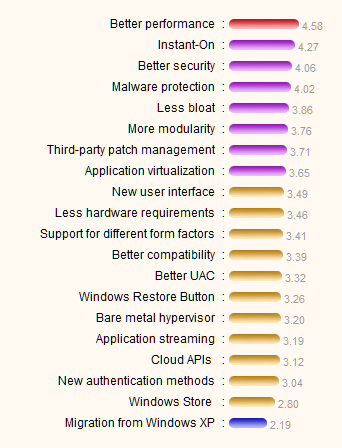
OK, what about product quality? I tend to agree that Microsoft often does better than it is given credit for. Windows 7 is good; Visual Studio 2010 is great; Silverlight 4 was a bit rushed but still impressive, to mention three offerings about which I know a good deal.

Nevertheless, Microsoft still had deep-rooted problems that I’ve not yet seen addressed. I’ll mention a couple.

First Microsoft still has an OEM problem. Going back to that Toshiba Netbook: it was nearly wrecked by poor OEM software additions and the user experience of a new Windows machine often remains poor. Many users do minimal customisation and as a result get a worse experience of Windows than they should. Apple will carry on winning if this is not addressed.

Second, Microsoft is conflicted, caught between the need to preserve its profits from Windows and Office, and the need to keep up with the new Cloud + Device model of computing. It is drifting towards the cloud; and developments like Office Web Apps and other one about which I am not allowed to tell you yet are encouraging (wait until next month). This issue will not go away though.

Third, mainly as a result of the above, Microsoft still does not convince when it comes to cross-platform. Silverlight is cross-platform, sure; except on the Mac you don’t have the COM integration or any equivalent, sorry, and on Linux, well there’s Moonlight or maybe we’ll work something out with Intel. It is the Windows company. Having said that, I put the Live Messenger app on the iPhone 4 I’ve been trying and it’s great; so yes, it sometimes gets it.

What can Microsoft do in order to be better liked? The key to it is this: ensure that our interactions with the company and its products are more often pleasurable than painful. Windows Phone 7 will be an interesting launch to watch, a product where Microsoft has made its best effort to break with past and deliver something users will love. We’ll see.
Virtual wi-fi adapter breaks wireless in Windows 7

Today I was asked to look at a Toshiba Satellite Pro laptop that would not connect to a wireless network. At least, it connected but there was no internet connectivity. I did the usual ipconfig /all and noticed that everything looked OK on the wireless adapter – IP address, default gateway, DNS servers. Nevertheless it could not resolve a ping.

I tried various things – reset the TCP/IP stack, updated the Realtek wireless lan driver, even tried with a different wireless access point, but still it did not work.

Curiously, a wired connection to the same router worked fine. Investigating further, I found that it was possible to ping remote sites by IP number, but not by name. It was a DNS resolution problem. But what? Even specifying the addresses of known good DNS servers in IPv4 properties did not fix it.

I Googled and found this discussion. Ignore the official Microsoft reply. The issue is with this thing:

image

This is the Microsoft Virtual WiFi Miniport Adapter. If it is enabled on this machine, then DNS resolution over wireless fails, even though it says “Not connected.” If it is disabled, everything works. So you right-click it, select Disable, and all is well.

Problem fixed; but what is this virtual adapter? Long Zheng has an overview. Essentially, it lets you have more than one wifi connection even with only one physical wireless adapter, which means you can make any Windows 7 into a wireless access point.

This is odd though, because there is no obvious way to connect it. Here’s the reason:

Currently this feature is a development platform that exists only for application developers.

and with a link to this article, which explains how to create a wireless hosted network using the netsh command line utility.

That’s all very well, but it is annoying to find that a user cannot connect at all, thanks to some unknown interaction with an experimental virtual device that is of little practical use.

What I still do not know is how to fix the issue properly, instead of just disabling the virtual device. The problem is not universal; in fact, the netbook on which I am typing this post also has a virtual wi-fi adapter and it does not cause any problems. I doubt the user will suffer any adverse effects from its absence though.

Update: Kelvyn Taylor points out that the handy Connectify utility uses this feature of Windows 7.

Office and Windows Live SkyDrive – don’t miss unlucky Clause 13

How secure is Windows Live SkyDrive?

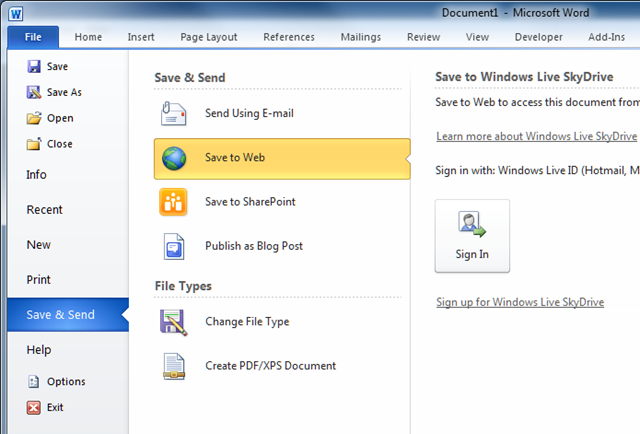
One of the most notable features of Office 2010 is that you can save directly to the Web, without any fuss. In most of the applications this option is accessed via the File menu and the Save & Send submenu. Incidentally, this submenu used to be called Share, but someone decided that was confusing and that Save & Send is less confusing. I think they are both confusing; I would put the Save options under the Save submenu but there it is; it is not too hard to find.

image

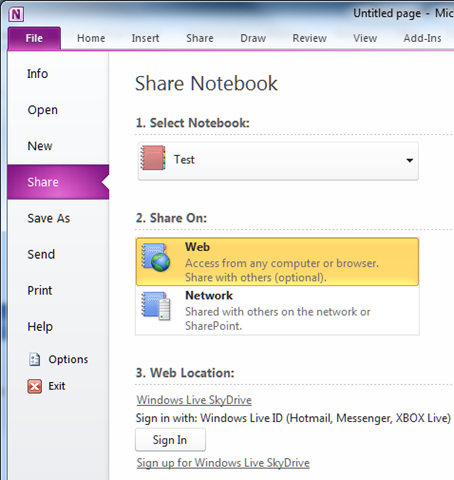
Microsoft does not like to be too consistent; so OneNote 2010 has separate Share and Send menus. The Share menu has a Share On Web option.

image

What Save to Web actually does is to put your document on Windows Live SkyDrive. I am a fan of SkyDrive; it is capacious (25GB), performs OK, reliable in my experience, and free.

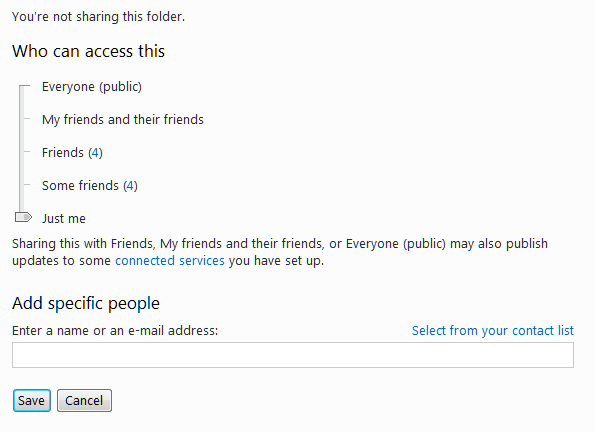
The way the sharing works is based on Microsoft Live IDs and Live Messenger. You can only set permissions for a folder, not for an individual document, and you have options ranging from private to public. Usually the most useful way to set permissions is not through the slider but by adding specific people. Provided they have a Live ID matching the email address they give, they will then get access.

image 

You can also specify whether the access is view only, or “add, edit details, and delete files” – a bit all-or-nothing, but still useful.

image

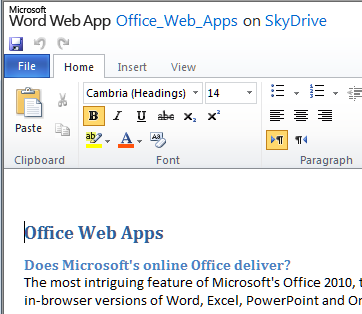
SkyDrive hooks in with Office Web Apps so you can create and edit documents directly in the browser – provided it is a supported browser and that the Web App doesn’t detect you are on a mobile device, in which case it is view-only. The view-only thing is a shame when it comes to a large screen device like an iPad, though the full version nearly works.

image

Overall it’s a major change for Office, even though similar functionality has been around for a while from the likes of Zoho and Google Docs. This is Office, after all, the most popular Office suite; and plenty of users will be trying out these features because they are there, and thinking that they could be pretty useful.

There is one awkward question though. Is Windows Live SkyDrive secure? It turns out that this is not an easy question to answer. Of course it cannot be 100% secure; but even assessing its security is not easy. If you try to find out you are likely to end up here – the Microsoft Service Agreement. Which says, in bold type so you don’t miss it:

13. WE MAKE NO WARRANTY.

We provide the service ‘as-is,’ ‘with all faults’ and ‘as available.’ We do not guarantee the accuracy or timeliness of information available from the service. We and our affiliates, resellers, distributors and vendors (collectively, the ‘ Microsoft parties’) give no express warranties, guarantees or conditions. You may have additional consumer rights under your local laws that this contract cannot change. We exclude any implied warranties including those of merchantability, fitness for a particular purpose, workmanlike effort and non-infringement.

14. LIABILITY LIMITATION.

You can recover from the Microsoft parties only direct damages up to an amount equal to your service fee for one month. You cannot recover any other damages, including consequential, lost profits, special, indirect, incidental or punitive damages.

I guess Clause 13 could be called the unlucky clause. If you are unlucky, don’t come crying to Microsoft.

There are two big questions here. One is how secure your documents are against unauthorised access. The other is how reliable the service is. Might you log on one day and find you cannot get access, or that all your documents have disappeared?

Three observations. First, despite clause 13, Microsoft has a lot to lose if its service fails. It has to succeed in cloud computing to have a profitable future, and a major data-losing catastrophe is costly, in that it drives customers away. The Danger episode was bad enough; though even then Microsoft eventually recovered the data it said initially had been lost.

Second, it may well be that the biggest security risk is from careless users, not from Microsoft. If your password (or that of a friend to whom you have given read or write access) is a favourite football team it won’t be surprising if somebody guesses.

Third, I have no idea how to quantify the risk of Microsoft losing data or denying access to my documents. That suggests it would be foolish to keep data there without backing it up elsewhere from time to time. The same applies to other cloud services. I guess if you pay for a service, and know how it is backed up to a different location, and have tested the effectiveness of that backup, and know that there are archives as well as backups – in other words, you can go back in time – I guess that then you might reasonably feel more confident. Otherwise, well, see clause 13 above.

Windows Phone 7: is it really consumer?

Here at TechEd in New Orleans we’ve seen some further demos of Windows Phone 7. Two features that have been highlighted are the ability to have more then one Exchange account, and a mobile version of SharePoint Workspace for easy access to SharePoint documents and an option to keep an offline copy.

Neither of these strike me as consumer features, which is intriguing given that at the Mix conference in March we were told that the first release of Windows Phone 7 is firmly targeted at consumers rather than businesses.

I also saw a report in the New York Times this morning noting that Apple is working to stave off the threat to iPhone from Google. No mention of Windows Phone 7, which I suspect has been almost written off as irrelevant by the general public. In the rarefied atmosphere of Microsoft TechEd, though, where most people I talk to seem to be solidly Microsoft platform – Exchange, SharePoint, Office Communications Server and so on – having a mobile phone that integrates nicely makes a lot of sense.

There’s also the application aspect. Windows Phone 7 runs Silverlight, which means .NET code, so for developers who already use Visual Studio it is a mobile platform that fits with their work.

In fact, it is easy to see why Windows Phone 7 will appeal to these business users, whereas in the consumer space it is up against tough competition.

I will be interested to see what Microsoft says about business use of Windows Phone 7 as we get closer to launch.

Windows gets thinner – a comeback for the thin client?

Included in today’s SP1 announcement at TechEd is the news that remote desktop sessions to Hyper-V virtual machines will support USB devices as well as the hardware accelerated graphics already announced back in March, in a feature called RemoteFX. The combination means you could be using a remote desktop and still be able to attach USB devices, play games, view HT video, or use graphically demanding applications like Autocad. In other words, it narrows the performance gap between a full desktop or laptop PC, and a thin client with everything running on a remote server.

The downside to this idea is that it requires a high-end graphics card or cards – in particular, lots of video RAM – on the Hyper-V host server. Most servers have low-end graphics cards, because until now there has been little use for them. Nothing comes for free; and it takes more server capacity and more bandwidth to support this kind of remote session. Lightweight sessions using the old Terminal Services model are far more efficient.

Still, you could adopt a hybrid approach and only give users full-featured desktops if they actually need them; and both server power and available bandwidth will increase over time as technology impresses. The implication is that thin clients might get more attention, with the possibility of running all or most of your desktops on the server.

We were told that the prototype thin client device from ThinLinX, demonstrated at TechEd, uses only around 3 watts.

thin-win

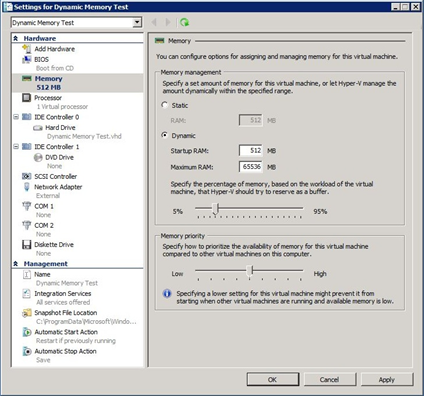
The load on server RAM is mitigated by another SP1 feature in Hyper-V: dynamic memory. You can specify a minimum and maximum for each VM, and the available physical RAM will be allocated dynamically according to load, and the priority you set.

dynamic-mem 

Could thin client Windows stage a comeback? I’d like to see figures showing the real-world cost savings; but it looks plausible to me.

Switching from Windows will not protect your data, says Trusteer CEO

I’ve just been sent some quotes from Mickey Boodaei, CEO of Trusteer, which caught my eye. It’s a response to the story that Google is directing employees not to use Windows because of security concerns.

Boodaei says that while switching from Windows may reduce the prevalence of common malware, it will not protect against “targeted attacks” – in other words, attempts to penetrate a specific network to steal data:

Enterprises that are considering shifting to an operating system like Mac or Linux should realize that although there are less malware programs available against these platforms, the shift will not solve the targeted attacks problem and may even make it worse. Mac and Linux are not more secure than Windows. They’re less targeted. There is a big difference. If you choose a less targeted platform then there is less of a chance of getting infected with standard viruses and Trojans that are not targeting you specifically. This could be an effective way of reducing infection rates for companies that suffer frequent infections.

In a targeted attack where criminals decide to target a specific enterprise because they’re interested in its data assets, they can very easily learn the type of platform used (for example Mac or Linux) and then build malware that attacks this platform and release it against the targeted enterprise.

The security community is years behind when it comes to security products for Mac and Linux. Therefore there is much less chance that any security product will be able to effectively detect and block this attack. By taking that action the enterprise increases its exposure to targeted attacks, not reducing it.

This sounds plausible, though there are a couple of counter-arguments. Windows has some flaws that are not present on Mac or Linux. It is still common for users to run with full local admin rights, even though user account control in Vista and Windows 7 mitigates this by requiring the user to approve certain actions. On Windows, it’s also more likely that you will have to give elevated rights to some application that wants to write to to a system location; there’s a specific “Run as administrator” option in the compatibility options.

Further, I’m always sceptical of statements from the Windows security industry. Are they simply trying to protect their business?

Still, I’m inclined to agree that switching OS is not a silver bullet that will fix security. Take a look at this recent report of malware-infected web sites offering tips for a current hit game, Read Dead Redemption.

The attack is essentially psychological. It plays on the common knowledge that Windows is vulnerable to malware, informing the user that malware has been detected and they must clean it up by running a utility. The utility, of course, is in fact the malware. The chances are good that the user will consent to giving it elevated permissions, once they have been taken in. In principle this kind of attack could work on other operating systems, except that the user might be more sceptical about the presence of malware because it is less common – a rather frail defence.