Category Archives: windows

The mystery of the slow Exchange 2007: when hard-coded values come back to haunt you

Following a migration from Microsoft Small Business Server 2003 to SBS 2008 users were complaining that Exchange was slower than before in some scenarios. How could this be? The new machine had 64-bit goodness and far more RAM than before.

I checked out the machine’s performance and noticed something odd. Store.exe, the Exchange database, usually grabs vast amounts of RAM, but in this case it was using surprisingly little, around 640MB. Could this be related to the performance issue?

I speculated that Exchange memory usage was limited in some way, so looked up where such a limit is set. I found this article. Ran ADSI Edit and there it was, a 640MB limit (or thereabouts), set in msExchESEParamCacheSizeMax.

I removed the limit, restarted Exchange 2007, and it immediately said “thank you very much” and grabbed 8GB instead.

Why did this setting exist? No doubt because back in the days of SBS 2003 and a much less powerful 32-bit machine, someone set it in order to prevent store.exe from crippling the box. It is another example of why Small Business Server is harder to manage than full server setups when Exchange invariably has a dedicated server (or several).

SBS 2008 cannot be installed as an in-place upgrade; but the official migration process does preserve Active Directory; and since that is where this value lives, and since it is not specific to any version of Exchange, it was dutifully transferred.

Why wasn’t the setting discovered and changed before? Well, you will observe that it is somewhat hidden. The main chances of finding it would be either if you were deeply schooled in the ways of Exchange, or if one of the Best Practices Analyzer (BPA) tools picked it up, or if the users screamed that Exchange was slow (which is what happened) and you figured out what was wrong.

The SBS BPA did not notice it. The Exchange BPA did, kind-of. It was not shown as a critical problem, but listed for information under “Non-Default Settings”, ironically with a tick beside it, as “Maximum ESE cache size changed”. Summoning help on this setting leads to this article which refers to Exchange 2000.

An admin failure, yes, but arguably also a defect in Exchange and SBS. Typical Microsoft: critical setting, hard-coded when it would make more sense to use a percentage value, not checked by setup and persistent across major upgrades of Exchange, deeply buried in Active Directory.

Mentioned here just in case it saves someone time when trying to figure out why their shiny 64-bit Exchange 2007 is running worse than 32-bit Exchange 2003 ever did.

A Silverlight UI for Windows Mobile 7, backward compatibility in doubt

Note: speculative post; I have no official information on this.

It’s been rumoured for ages; but at this point I would be surprised if the Windows Mobile 7 UI were not built with Silverlight. Consider:

  • Silverlight has to be supported – it should have been in 6.5 – otherwise nobody will take mobile Silverlight seriously
  • WM7 has to have excellent UI design; and WPF/Silverlight is Microsoft’s designer-friendly UI framework
  • Silverlight 4 already supports touch control in the current beta
  • Scaling/Zooming is baked into Silverlight and ideal for a mobile UI
  • If Silverlight is present on the device it would make sense to build the UI with it

If this is right, there are a couple of interesting aspects for developers. It will make Silverlight a more attractive platform in scenarios such as Enterprise roll-outs where the device can be specified.

The awkward question: what about all those existing Windows Mobile apps built either with native code or with the compact framework? Again, there are rumours of lack of backward compatibility. Does that mean that all Windows Mobile 7 apps with a UI will have to be done in Silverlight? That’s what John Biggs says:

WinMo 7 will not run 6.x code. End of story. It is based on Silverlight and .Net. Everything save a few basic programs will not work under WinMo 7. There is no expectation that this will be a “business device” and the focus is currently on games including some XBox Live functionality for gaming and messaging. There will be a Microsoft App store with an easy approval process.

I find this a stretch. I can believe that Microsoft might initially target the consumer market, or have crippled “consumer” versions; but not that it would give up on mobile business apps – we heard at PDC (to the point of tedium) how Microsoft is supporting “three screens and a cloud”, unified for developers by Visual Studio. There’s no reason why Silverlight should not be used for business apps.

What about backward compatibility though? Traditionally Microsoft does a good job of keeping your old stuff running, within reason; possibly too good – Windows is full of compatibility hacks that may be to its detriment overall.

Another point to bear in mind: WM7 needs a browser, and I don’t see Microsoft re-implementing IE in Silverlight.

So I’m sceptical about this too; but with Windows Mobile at such a low ebb could the company decide it has little to lose?

Silverlight 4 with COM can do anything – on Windows

At PDC Microsoft played down the significance of adding COM support to Silverlight 4 when run out of the browser and fully trusted (you can also be out of the browser and not fully trusted). The demos were of Office automation, and journalists were told that the feature was there to satisfy the requests of a few Enterprise customers.

Now former Microsoft Silverlight program manager Justin Angel, who has implemented his blog in Silverlight, has spelt out what we all knew, that Silverlight with COM support can do just about anything. His richly-illustrated blog post has code examples for:

  • reading and writing to any file (subject I guess to the permissions of the current user)
  • executing any command or file
  • emulating user input with WShell.SendKeys
  • pinning files to the Windows 7 taskbar
  • reading any registry values
  • adding an application to the Windows startup folder
  • doing text to speech using Windows built-in engine
  • accessing local databases with ODBC
  • automating scanners and cameras
  • using the Windows 7 location API, accessing the full .NET Framework
  • and of course … automating Microsoft Office.

Well, fully trusted means fully trusted; and these are great features for powerful though Windows-only Silverlight applications, though I hope no user installs and trusts one of these applets thinking it is “only Silverlight” and can’t do much harm.

The post also has comments on the lack of any equivalent feature for the Mac in Silverlight 4:       

If Microsoft chooses to not go ahead with Mac support in Silverlight 4 RTM, well, it’s not because they couldn’t

says Angel, suggesting that it would be easy to add AppleScript support. (I had to type that quote – no clipboard support in Silverlight 3).

Of course there is time for Microsoft to unveil such a feature, say at Mix10 in March, though I wouldn’t count on it.

The end of Code Access Security in Microsoft .NET

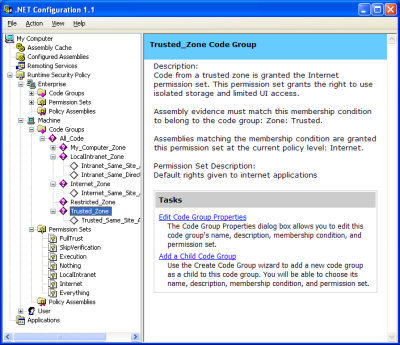
In the early days of .NET I remember being hugely impressed by Code Access Security. It gave administrators total control over what .NET code was permitted to run. It’s true that the configuration tool was a little intimidating, but there were even wizards to adjust .NET security, trust an assembly, or fix an application – great idea, that last one.

image

Well, now the truth is out. Code Access Security was too complex for humans to configure. Buried deep in the documentation for .NET Framework 4.0 you can find Microsoft’s confession, under the heading Security Policy Simplification:

In the .NET Framework 4 Beta 2, the common language runtime (CLR) is moving away from providing security policy for computers. Historically, the .NET Framework has provided code access security (CAS) policy as a mechanism to tightly control and configure the capabilities of managed code. Although CAS policy is powerful, it can be complicated and restrictive. Furthermore, CAS policy does not apply to native applications, so its security guarantees are limited. System administrators should look to operating system-level solutions such as Windows Software Restriction Policies (SRP) as a replacement for CAS policy, because SRP policies provide simple trust mechanisms that apply to both managed and native code. As a security policy solution, SRP is simpler and provides better security guarantees than CAS.

The section below, headed Obsolete Permission Requests, is even more damning of the old system:

Runtime support has been removed for enforcing the Deny, RequestMinimum, RequestOptional, and RequestRefuse permission requests. In general, these requests were not well understood and presented the potential for security vulnerabilities when they were not used properly.

It goes on to explain why they did not work, with explanations like this one for RequestOptional:

RequestOptional was confusing and often used incorrectly with unexpected results. Developers could easily omit permissions from the list without realizing that doing so implicitly refused the omitted permissions.

The new .NET Framework 4.0 no longer enforces these obsolete permissions.

Microsoft is right. As far as I’m aware, few used the .NET Configuration tool, and I cannot even find it in Windows 7, even though Visual Studio and all the versions of the .NET Framework are installed. Developers feared, with justification, that tinkering with the settings would simply cause mysterious exceptions that were hard to resolve.

I recall though that Code Access Security was considered a highly strategic feature when .NET was first released. One of the promises of .NET was that applications would be more secure and malware less prevalent. The fine-grained permissions were a selling point versus Java.

The painful lesson is that simplicity is a feature. Of course some things are inherently complex; but technology succeeds when it simplifies rather than complicates the tasks that we face.

Government security advice is misguided; switching browsers will not make you safe

I have mixed feelings about the recent government recommendations from France and Germany to switch from Internet Explorer for security reasons.

Although raising security awareness seems on the face of it to be a good thing, this is naïve advice and may do more harm than good. Security is a complex and multi-faceted problem, and it does people no service if they believe it can be fixed by switching browsers. Another common illusion is that running anti-virus software, or even up-to-date anti-virus software, makes you safe. It does not. Anti-virus software does not detect all viruses, and in particular it frequently fails on those that are most dangerous, in other words, those which are newest.

Another factor is that many of the most successful malware attacks come via social engineering. That’s not browser-specific, though there are attempts to maintain bad site lists, which don’t in my experience work very well.

The danger is that people think they are safe, and take fewer other precautions, ending up less safe than before.

Is FireFox, Chrome or Opera safer than IE? I’m not even sure about that. The latest versions of each are massively safer than IE6, for sure. But how does a fully-patched IE8 compare to the latest fully-patched versions of the other browsers? At least one test [pdf] says that IE8 is actually safer, though unfortunately it dates from March last year and does not cover drive-by downloads:

Microsoft Internet Explorer 8 (RC1) was the standout in our tests, achieving a best-in-class 69% catch rate against Malware. It is clear that Microsoft is making an effort to provide security to their customers with IE8.

Know a better one? I’d be interested in more recent tests.

Microsoft is not always competent; read this blog for evidence. But it has made genuine efforts to improve security and has a comprehensive update mechanism that mostly works. IE now has protected mode on Vista or Windows 7, which is no panacea but helps a little.

But what about the known zero-day vulnerability in IE? Isn’t that enough to make switching browsers necessary, if only temporarily?

I’m not so sure. Frankly, it would surprise me if there are not known multiple vulnerabilities in all the major browsers, if you move in the right (or wrong) circles.

How then do you do secure computing? Don’t connect to the internet. OK, how else? The risk cannot be eliminated but it can be reduced … don’t run with local admin rights, don’t run unknown executables, only enable plug-ins and scripting for web sites you know to be safe, keep your operating system patched and up-to-date, and so on.

Another thing you can do is to browse the web in a virtual machine – a sort of super protected mode – not perfect, but would prevent some attacks at the expense of convenience.

If you are really serious you can use AppLocker, or another whitelisting technique, to control what can run on your box.

And passwords … one thing I do hold against Microsoft is that the company has a brilliant authentication mechanism called InfoCard that is almost never used, even by Microsoft. Unfortunately that’s not something any individual can change; but it is possible at least to use more complex passwords and not to pass them over the internet in plain text.

I’m not sure, even today, that many people realise that when they use Twitter on an airport or hotel or conference wi-fi, or collect email via POP3, that they are likely passing their credentials in plain text over the internet for any smart hacker to read.

I am also depressed how often I see “security questions” on registration forms, asking for things like mother’s maiden name to be used in case of lost password. It is obvious that these are actually insecurity questions; they lower security while easing the burden on support desks. All too often, these organisations then lower it further by emailing your password back to you in plain text. It also sometimes turns out that the password itself is stored in plain text on their web-connected databases, accessible to hackers.

Overall the IT industry is desperately bad at security, and by and large convenience has won. Yes, I think that should change. No, after years of reporting on IT I am not optimistic that it will, certainly not soon. And knee-jerk instructions to switch browsers may please Mozilla and Google, and web developers for whom Internet Explorer is a constant irritation especially in old versions, but will do little else to improve the situation.
New HP and Microsoft agreement commits $50 million less than similar 2006 deal

I’ve held back comment on the much-hyped HP and Microsoft three-year deal announced on Wednesday mainly because I’ve been uncertain of its significance, if any. It didn’t help that the press release was particularly opaque, full of words with many syllables but little meaning. I received the release minutes before the conference call, during which most of us were asking the same thing: how is this any different from what HP and Microsoft have always done?

It’s fun to compare and contrast with this HP and Microsoft release from December 2006 – three years ago:

We’ve agreed to a three-year, US$300 million investment between our two companies, and a very aggressive go-to-market program on top of that. What you’ll see us do is bring these solutions to the marketplace in a very aggressive way, and go after our customers with something that we think is quite unique in what it can do to change the way people work.

$300 million for three years in 2006; $250 million for three years in 2010. Hmm, not exactly the new breakthrough partnership which has been billed. Look here for what the press release should have said: it’s mainly common-sense cooperation and joint marketing.

Still, I did have a question for CEOs Mark Hurd and Steve Ballmer which was what level of cloud focus was in this new partnership, drawing these remarks from Ballmer:

The fact that our two companies are very directed at the cloud is the driving force behind this deal at this time. The cloud really means a modern architecture for how you build and deploy applications. If you build and deploy them to our service that we operate that’s called Windows Azure. If a customer deploys them inside their own data centre or some other hosted environment, they need a stack on which to build, hardware software and services, that instances the same application model that we’ll have on Windows Azure. I think of it as the private cloud version of Windows Azure.

That thing is going to be an integrated stack from the hardware, the virtualization layer, the management layer and the app model. It’s on that that we are focusing the technical collaboration here … we at Microsoft need to evangelize that same application model whether you choose to host in the the cloud or on your own premises. So in a sense this is entirely cloud motivated.

Hurd added his insistence that this is not just more of the same:

I would not want you to write that it sounds a lot like what Microsoft and HP have been talking about for years. This is the deepest level of collaboration and integration and technical work we’ve done that I’m aware of … it’s a different thing that what you’ve seen before. I guarantee Steve and I would not be on this phone call if this was just another press release from HP and Microsoft.

Well, you be the judge.

I did think Ballmer’s answer was interesting though, in that it shows how much Microsoft (and no doubt HP) are pinning their hopes on the private cloud concept. The term “private cloud” is a dubious one, in that some of the defining characteristics of cloud – exporting your infrastructure, multi-tenancy, shifting the maintenance burden to a third-party – are simply not delivered by a private cloud. That said, in a large organisation they might look similar to most users.

I can’t shake off the thought that since HP wants to carry on selling us servers, and Microsoft wants to carry on selling us licences for Windows and Office, the two are engaged in disguised cloud avoidance. Take Office Web Apps in Office 2010 for example: good enough to claim the online document editing feature; bad enough to keep us using locally installed Office.

That will not work long-term and we will see increasing emphasis on Microsoft’s hosted offerings, which means HP will sell fewer servers. Maybe that’s why the new deal is for a few dollars less than the old one.

Crazy Microsoft stuff

I have a theory that Microsoft’s Small Business Server (SBS), which is meant to be easy to manage, is actually more complex than a full-blown multiple server setup – though you can now emulate the latter nicely using virtual machines.

Yesterday I spotted a post from Paul Culmsee which makes the point well:

A former colleague called me up because he knew of my dim, dark past in the world of Cisco, Active Directory and SharePoint. He asked me to help put in SBS2008 for him, configuring Exchange/AD/SharePoint and migrating his environment over to it.

“Sure”, I say, “it’ll be a snap” (famous last words)

Culmsee is a SharePoint expert. His mistake was to attempt installing Search Server Express (built on SharePoint) into SBS 2008:

Search Server 2008 Express, uses SQL Server Express edition when performing a basic install. As a result, an additional SQL Server Express instance (SERVERNAME\OFFICESERVERS) gets installed onto the Small Business 2008 server. Then, to make matters worse, the installer gets mixed up and installs some Search Server express databases into the new instance (a Shared Service Provider), but then uses the SQL Embedded Edition instance to install other databases (like the searchDB). Then later during the configuration wizard, it cannot find the databases that it needs because it searches the wrong instance!

The problem: there is too much installed on that box, and SBS comes way down low on Microsoft’s priorities, so it issues products and patches that ought to work on SBS as well as on mainstream Microsoft servers, but do not. Culmsee apparently gave up on Search Server Express.

Evidence 2: Exchange 2007 Service Pack 2. Released in August 2009. Does not work on SBS 2008 without daunting manual steps. Six months later, Microsoft releases a special Exchange Server 2007 SP2 Installation Tool for SBS. Even with the tool, the install may be problematic.

In some ways it would not be so bad if SBS were a totally locked-down product with its own patches and no possibility of installing generic Microsoft products – though third parties might scream. As it is, it falls betwixt and between.

You can make it work. You can make it work very well, if you have patience, read SBS blogs like that of Susan Bradley and David Overton, and maintain it carefully. But … don’t pretend it is not complex.

Note also the hassles Culmsee had configuring his HP server. Google Apps anyone?

A year of blogging: another crazy year in tech

At this time of year I allow myself a little introspection. Why do I write this blog? In part because I enjoy it; in part because it lets me write what I want to write, rather than what someone will commission; in part because I need to be visible on the Internet as an individual, not just as an author writing for various publications; in part because I highly value the feedback I get here.

Running a blog has its frustrations. Adding content here has to take a back seat to paying work at times. I also realise that the site is desperately in need of redesign; I’ve played around with some tweaks in an offline version but I’m cautious about making changes because the current format just about works and I don’t want to make it worse. I am a writer and developer, but not a designer.

One company actually offered to redesign the blog for me, but I held back for fear that a sense of obligation would prevent me from writing objectively. That said, I have considered doing something like Adobe’s Serge Jespers and offering a prize for a redesign; if you would like to supply such a prize, in return for a little publicity, let me know. One of my goals is to make use of WordPress widgets to add more interactivity and a degree of future-proofing. I hope 2010 will be the year of a new-look ITWriitng.com.

So what are you reading? Looking at the stats for the year proves something I was already aware of: that the most-read posts are not news stories but how-to articles that solve common problems. The readers are not subscribers, but individuals searching for a solution to their problem. For the record, the top five in order:

Annoying Word 2007 problem- can’t select text – when Office breaks

Cannot open the Outlook window – what sort of error message is that? – when Office breaks again

Visual Studio 6 on Vista – VB 6 just won’t die

Why Outlook 2007 is slow- Microsoft’s official answer – when Office frustrates

Outlook 2007 is slow, RSS broken – when Office still frustrates

The most popular news posts on ITWriting.com:

London Stock Exchange migrating from .NET to Oracle/UNIX platform -  case study becomes PR disaster

Parallel Programming: five reasons for caution. Reflections from Intel’s Parallel Studio briefing – a contrarian view

Apple Snow Leopard and Exchange- the real story – hyped new feature disappoints

Software development trends in emerging markets – are they what you expect?

QCon London 2009 – the best developer conference in the UK

and a few others that I’d like to highlight:

The end of Sun’s bold open source experiment – Sun is taken over by Oracle, though the deal has been subject to long delays thanks to EU scrutiny

Is Silverlight the problem with ITV Player- Microsoft, you have a problem – prophetic insofar as ITV later switched to Adobe Flash; it’s not as good as BBC iPlayer but it is better than before

Google Chrome OS – astonishing – a real first reaction written during the press briefing; my views have not changed much though many commentators don’t get its significance for some reason

Farewell to Personal Computer World- 30 years of personal computing – worth reading the comments if you have any affection for this gone-but-not-forgotten publication

Is high-resolution audio (like SACD) audibly better than than CD – still a question that fascinates me

When the unthinkable happens: Microsoft/Danger loses customer data – as a company Microsoft is not entirely dysfunctional but for some parts there is no better word

Adobe’s chameleon Flash shows its enterprise colours – some interesting comments on this Flash for the Enterprise story

Silverlight 4 ticks all the boxes, questions remain – in 2010 we should get some idea of Silverlight’s significance, now that Microsoft has fixed the most pressing technical issues

and finally HAPPY NEW YEAR

Splashtop: the pragmatic alternative to ChromeOS

Today I received news of the a new Eee PC range from Asus which will be based on the Intel Atom N450. Two things caught my eye. One was the promise of “up to 14 hours of battery life”. The other was the inclusion of dual-boot. The new range offers both Windows 7 and what Asus calls Express Gate, a lightweight Linux which boots, it is claimed, in 8 seconds.

Express Gate is a version of Splashtop, and is a web-oriented OS that offers a web browser based on Firefox, a music player, and instant messaging. There is also support for:

View and edit Microsoft Office compatible documents as well as the latest Adobe PDF formats

though whether that means OpenOffice or something else I’m not yet sure. The Adobe Flash runtime and Java are included, and you can develop custom applications. Citrix Receiver and VMware View offer the potential of using Splashtop as a remote desktop client.

The idea is that you do most of your work in Windows, but use Splashtop when you need access right now to some document or web site. I can see the value of this. Have you ever got half way to a meeting, and wanted to look at your email to review the agenda or location? I have. That said, a Smartphone with email and web access meets much of this need; but I can still imagine times when a larger screen along with access to your laptop’s hard drive could come in handy.

The concept behind Splashtop has some parallels with Google’s ChromeOS, which also aims to “get you onto the web in a few seconds”. The Asus package includes up to 500GB of free web storage, and of course you could use Google’s email and applications from Splashtop. Another similarity is that Splashtop claims to be:

a locked-down environment that is both tamper proof and malware/virus resistant.

That said, ChromeOS is revolution, Splashtop is evolution. The Google OS will be a pure web client, according to current information, and will not run Windows or even Linux desktop applications. Knowing Google, it will likely be well executed and easy to use, and more polished than versions of Splashtop hurriedly customised by OEM vendors.

Splashtop on the other hand arrives almost by stealth. Users are getting a Windows netbook or laptop, and can ignore Splashtop if they wish. Still, that fast boot will make it attractive for those occasions when Splashtop has all you need; and frankly, it sounds as if successfully captures 80% of what many users do most of the time. Splashtop could foster a web-oriented approach for its users, supplemented with a few local applications and local storage; and some may find that it is the need for Windows that becomes a rarity.

It is telling that after years of hearing Microsoft promise faster boot times for Windows – and in fairness, Windows 7 is somewhat quicker than Vista – vendors are turning to Linux to provide something close to instant-on.

Reflections on Microsoft PDC 2009

Microsoft’s Professional Developers Conference has long been a key event in the company’s calendar. CEO Steve Ballmer and his colleagues are famous for their belief that developers make or break a platform, and PDC is where the most committed of those developers learn as much as Microsoft is willing to share of its long-term plans. There have been good – for example, 2000 C# and .NET launch, 2008 Windows 7 – and bad – for example, 2001 Hailstorm, 2003 Longhorn – PDCs but they have all been interesting, at least the ones I have attended.

So how was PDC 2009? While there was a ton of good content there, and an impressive launch for Silverlight 4, there was a noticeable lack of direction; maybe that was why Ballmer decided not to show up. It should have been the Windows Azure PDC, but as I have just written elsewhere, Microsoft has little excitement about its cloud. Chief Software Architect Ray Ozzie gave almost exactly the same keynote this year that he gave last year; and the body language, as it were, is more about avoiding the cloud than embracing it. Cross-platform clients, commodity pricing, throw away your servers: from Microsoft’s point of view, what’s not to hate?

In theory, mobile computing could have been another big story at the PDC, but Microsoft’s slow progress in Mobile is well known.

My instinct is that Microsoft needs to change but does not know how: the wheels continue to turn and we will get new versions of Windows, ever more complex iterations of Windows Server, Exchange, SharePoint, and feature after feature added to Microsoft Office – does it really need to become PhotoShop – but in the end this is more of the same.

The mitigating factors are the high quality of Windows 7, which will drive a lot of new PC sales for a quarter or two, and the strong products coming out of the developer division. Visual Studio 2010 plus Silverlight is an interesting platform, and ASP.NET MVC is in my opinion a big advance from Web Forms.

That’s not enough though; and we still await a convincing strategic discussion of how Microsoft intends to flourish in the next decade.

Technorati Tags: ,,