Tag Archives: microsoft

Intranet and Mail hassles with Windows 8

Microsoft has made changes to networking in Windows 8, mainly I presume for security reasons, but there are odd side-effects, at least in the Release Preview version.

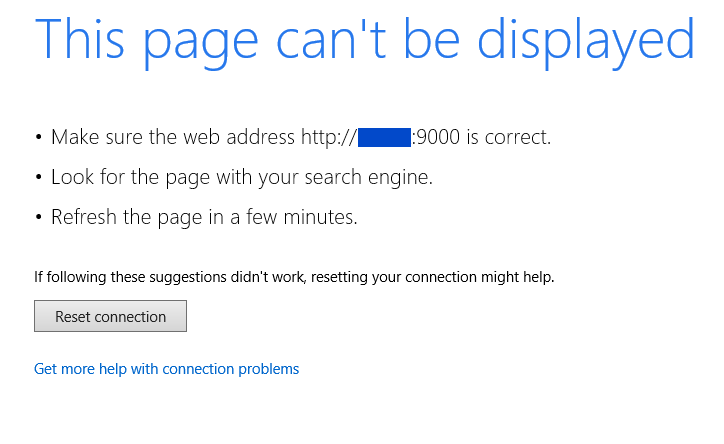
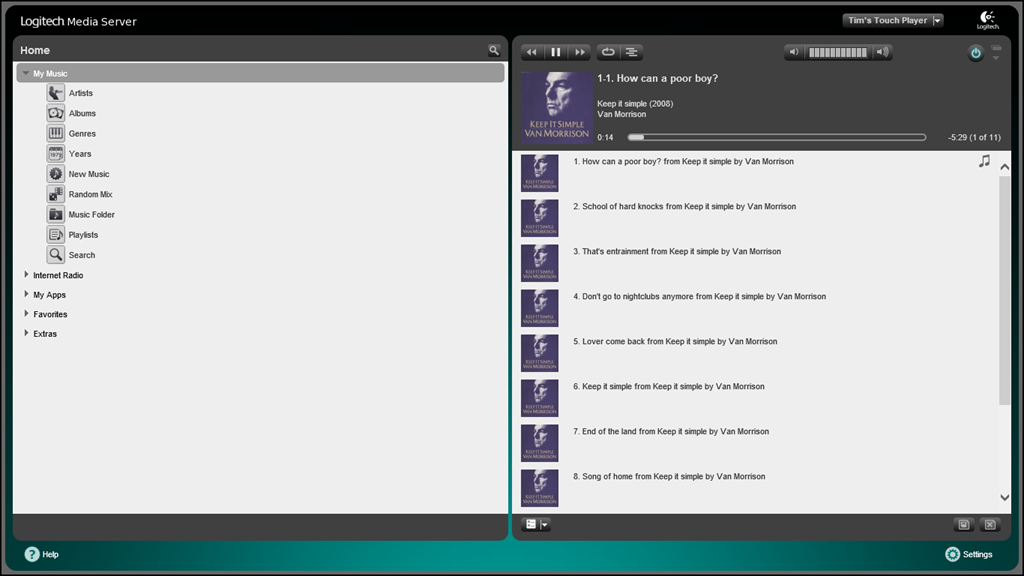
One is that if you browse to a site on your intranet in the Metro-style browser, you are likely to get a connection failure. This is what I get when trying to get to my Logitech Media Server (the Squeezebox server):

image

A bunch of useless, misleading suggestions and that is it.

The solution is to go to desktop IE, Tools, Internet options, Security, Trusted Sites, Sites and add the target URL to the list of Trusted sites. Now it works fine in Metro-style IE:

image

I got exactly the same behaviour with Outlook Web Access on the intranet. It did not work from Metro IE until I added the URL to Trusted Sites.

I am not sure if this is “expected behaviour”; I hope it is not, because it is a significant annoyance. The answer may lie in Microsoft’s Enhanced Protected Mode, described here, but although this states that Metro-style apps cannot connect by default to a server running on the same machine, it does not suggest that the entire intranet is blocked. The security benefits are also compromised if you can easily bypass them by running desktop IE.

While I am on the subject, I am still puzzled by the problems the Metro-style Mail app has with connecting to Exchange when this is configured with a self-signed certificate. I obtained a free SSL Cert from StartCom and confirmed that using a cert from a recognised issuer does fix the problem, though it is not a perfect solution for me because of the detail of my setup.

I would still like to know exactly what is stopping the self-signed approach from working. There are numerous discussions on the subject (this is one of the best) but I have not seen any definitive explanation from Microsoft. Following a suggestion from that thread, I have tried publishing the CRL (Revocation List) on the internet but that has not fixed it for me.

Security is great but we do want to get stuff done with our computers and some of this stuff just seems obstructive. Even if Microsoft is doing the right thing here, that is no excuse for false error messages. Mail, for example, reports “Unable to connect. Ensure that the information you’ve entered is correct.” How hard would it be to report a problem with the server certificate?

Microsoft financials: still growing in the cloud era, but watch out for tablets

I am in the habit of putting Microsoft’s results into a simple table. Here are the latest:

Quarter ending June 30th 2012 vs quarter ending June 30th 2011, $millions

Segment Revenue Change Profit Change
Client (Windows + Live) 4145 -598 2397 -511
Server and Tools 5092 +568 2095 +409
Online 735 +55 -6672 -5927
Business (Office) 6291 +339 4100 +399
Entertainment and devices 1779 +292 -263 -276

It is easy to spot the stars: Server and Office.

It is also easy to spot the weaklings, especially Online, which reported a breathtaking loss thanks to what the accounts call a “goodwill impairment charge”. This translates to an admission that the 2007 acquisition of aQuantive was a complete waste of money.

Mixed signals from Entertainment and devices, where revenue is up but a loss is reported. Since this segment munges together Xbox and Windows Phone, it seems plausible that the phone is the main culprit here. Microsoft identifies payments made to Nokia and the addition of Skype as factors.

Windows is down, in part because Microsoft’s upgrade offer for Windows 8 means some revenue is deferred, though one would imagine that worldwide reports of stagnant PC sales are a contributory factor as well.

If you add up the figures, and allow for overheads, it comes to a wafer-thin operating income of $192 million and a $0.06 loss per share.

What do the figures tell us? Two things: Microsoft still makes a ton of money, and that it is exceedingly bad at acquisitions. I am not sure how a company can mislay $6.2bn without heads rolling somewhere, but that is not my area of expertise.

Microsoft’s Server 2012 family has impressed me so my instinct is that we will see good figures continue there.

On the Office side, it is not all Word and Excel. “Exchange, SharePoint and Lync together grew double-digits,” Microsoft said in its earnings call, adding that Lync revenue is up 45%.

That said, how many server licences can you sell in the cloud era? How can Microsoft grow Azure without cannibalising its server sales?

It is tempting to state, like James Governor at Redmonk, that this is The End of Software: Microsoft Posts a Loss for the First Time ever. Microsoft’s figures have stubbornly refused to prove this though; and a quarter where revenue has risen though poisoned by an acquisition disaster is not the moment to call it.

Microsoft has survived the cloud. The bigger question now is whether it can also survive tablets eating into its Windows sales, not helped by Google pushing out Nexus 7 at casual purchase price – see my first take here.

All eyes then on the new Windows 8 and Office 2013.

Microsoft Office 2013 SkyDrive Pro in action, with offline documents

Microsoft Office 2013, combined with Office 365 or the new SharePoint, introduces SkyDrive Pro. This is an area where users can store documents online, similar to the public SkyDrive, but as part of an organization’s SharePoint site or Office 365 team site.

One features which I was glad to see is the ability to store documents offline in a special Explorer folder. These are kept synchronized with the online storage.

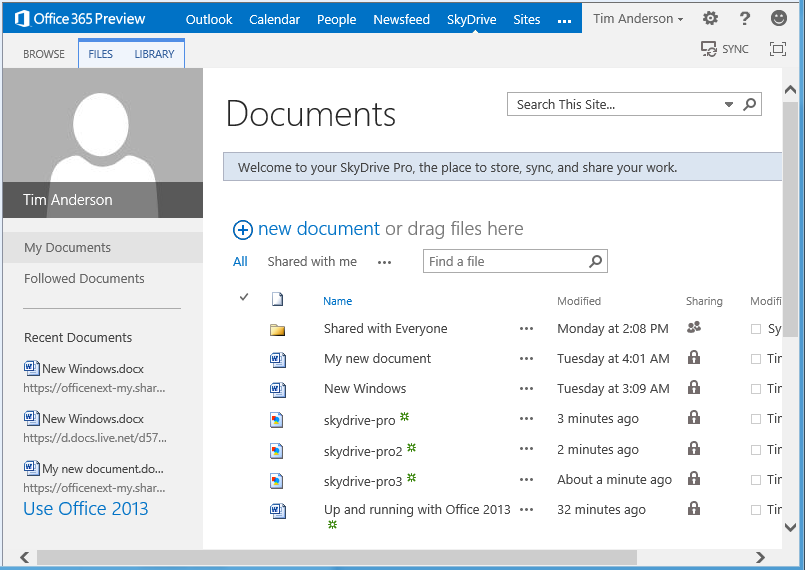
Here is how this works with my preview Office 365 account. I log in to the online portal, and click the SkyDrive option in the menu.

image

I see my SkyDrive files.

image

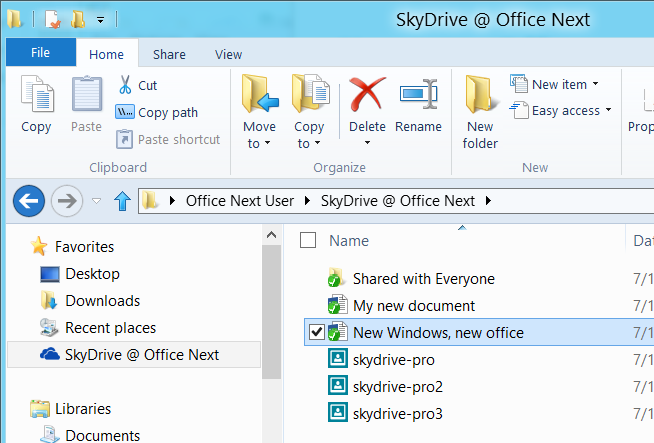
At top right is a SYNC hyperlink. Click that, and this sets up synchronization to a special Explorer folder, which in my case is called SkyDrive @ Office Next. This is not just a shortcut to a network location. The documents remain there if you are working offline.

image

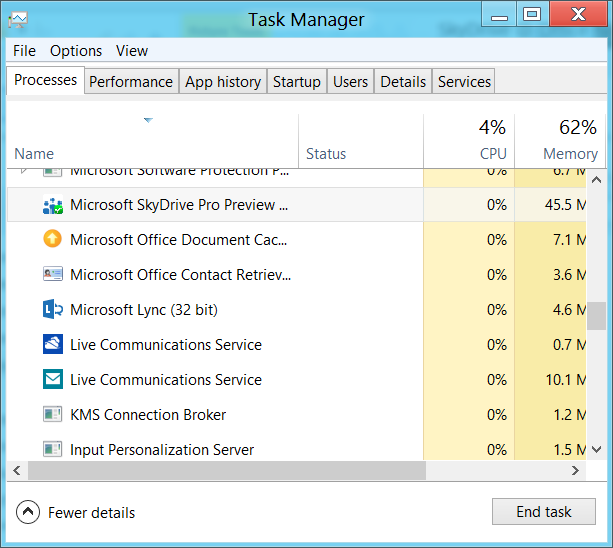
This excellent feature seems to depend on a new client called SkyDrive Pro Preview which has an icon in the notification area and also shows up in Task Manager.

image

If the SkyDrive Pro client is not installed and you attempt to sync your online files, the bad old SharePoint Workspace shows up instead. The consumer SkyDrive client will not do. SharePoint Workspace also supports offline files, but does not integrate with Explorer and is prone to go wrong.

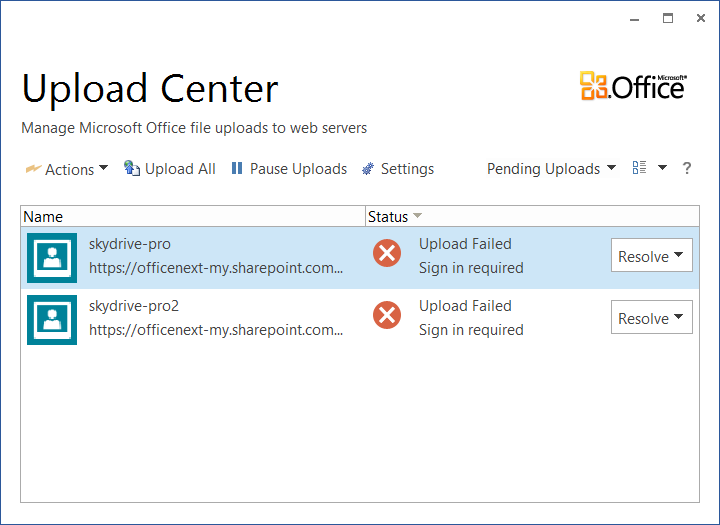
Now here is the puzzle. Microsoft loaned me a Samsung Slate with Office 2013 pre-installed, and this has SkyDrive Pro. However it also has SharePoint Workspace, and the associated Office Upload Center, which duly went into a sulk when trying to sync my SkyDrive Pro files.

image

Clicking Resolve and entering my login details did nothing. However, when I clicked on the SkyDrive Pro icon instead, I got the new-style Office sign-in, following which everything worked.

image

A few puzzles then. Is the SkyDrive Pro client really new, or it is just a new wrapper for the bad old SharePoint Workspace?

Further, it seems that Microsoft has not yet cracked the problem whereby users sign in, tick the “Keep me signed in” option, but still get asked to sign in repeatedly.

Microsoft opens up Office 365 and Azure single sign-on for developers

Remember Passport and Hailstorm? Well here it comes again, kind-of, but in corporate-friendly form. It is called Windows Azure Active Directory, and is currently in Developer Preview:

Windows Azure AD provides software developers with a user centric cloud service for storing and managing user identities, coupled with a world class, secure & standards based authorization and authentication system. With support for .Net, Java, & PHP it can be used on all the major devices and platforms software developers use today.

The clearest explanation I can find is in John Shewchuk’s post on Reimagining Active Directory for the Social Enterprise. He makes the point that every Office 365 user is signing on to Microsoft’s cloud-hosted Active Directory. And here is the big deal:

The Windows Azure Active Directory SSO capability can be used by any application, from Microsoft or a third party running on any technology base. So if a user is signed in to one application and moves to another, the user doesn’t have to sign in again.

Organisations with on-premise Active Directory can use federation and synchronisation (Shewchuk fudges the distinction) so that you can get a single point of management as well as single sign-on between cloud and internal network.

Is this really new? I posted about Single sign-on from Active Directory to Windows Azure back in December 2010, and in fact I even got this working using my own on-premise AD to sign into an Azure app.

It seems though that Microsoft is working on both simplifying the programming, and adding integration with social networks. Here is where it gets to sound even more Hailstorm-like:

… we will look at enhancements to Windows Azure Active Directory and the programming model that enable developers to more easily create applications that work with consumer-oriented identities, integrate with social networks, and incorporate information in the directory into new application experiences.

Hailstorm failed because few trusted Microsoft to be the identity provider for the Internet. It is curious though: I am not sure that Facebook or Google are more well-trusted today, yet they are both used as identity providers by many third parties, especially Facebook. Spotify, for example, requires Facebook sign-in to create an account (an ugly feature).

Perhaps the key lesson is this. Once people are already hooked into a service, it is relatively easy to get them to extend it to third-parties. It is harder to get people to sign up for an all-encompassing internet identity service from scratch.

This is why Azure Active Directory will work where Hailstorm failed, though within a more limited context since nobody expects Microsoft to dominate today in the way it might have done back in 2001.

The Development Game: Achievements in Visual Studio 2012

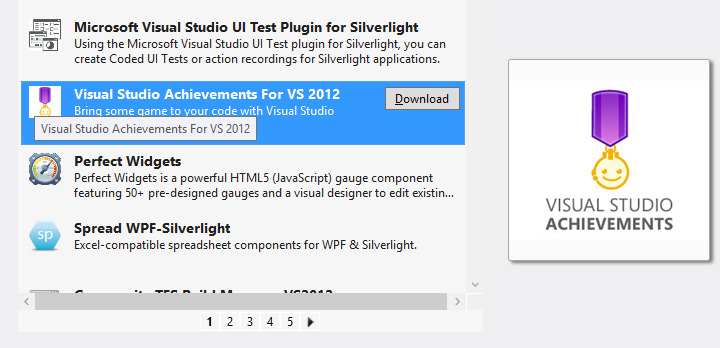
Microsoft has created an Achievements extension for Visual Studio 2012. Borrowing from achievements in games such as those on Xbox 360, and perhaps also inspired by the Office Ribbon Hero,  Visual Studio Achievements lets you earn awards for completing certain tasks, and share them on Facebook and Twitter. You can download Visual Studio Achievements from the Extension Gallery within the IDE.

image

Once installed, you will see a notification each time an achievement is unlocked.

image

You can also check your progress via the Achievements option in the Tools menu, though mine seems slow to update.

image

It sounds a terrible idea, though there are some entertaining ones. Here are a few I like:

Job Security (0 points)

Write 20 single letter class level variables in one file. Kudos to you for being cryptic! Uses FxCop

and

Regional Manager (7 points)

Add 10 regions to a class. Your code is so readable, if I only didn’t have to keep collapsing and expanding!

and

Interrupting Cow (5 points)

Have 10 breakpoints in a file.Where’s that bug? Could here, could be there, could be anywhere!

and

Architect (5 points)

Add 10 items to a sequence diagram. You’re not just a developer; you’re an architect!

You get the idea.

Microsoft is using this to do some not-so-subtle promotion, with plenty of Windows Azure achievements, though it seems to short on Windows 8 badges as yet.

Unfortunately Visual Studio crashed shortly after I installed this extension and I am suspicious.

All pretty silly; yet I like the idea of friendly notifications when you breach some coding guideline.

Microsoft SQL Azure versus SQL Server on Amazon AWS

Amazon RDS for Microsoft SQL Server offers cloud instances of SQL Server. Amazon’s offering even supports “License Mobility”, Microsoft jargon that lets volume licensing customers use an existing SQL Server license for an Amazon’s instance. But how does Amazon’s cloud SQL Server compare with Microsoft’s own offering, SQL Database running on Azure?

Peter Marriott has posted on the subject here (registration required). The key point: despite the obvious similarity (both are SQL Server), these two offerings are radically different. Amazon’s RDS SQL is more IaaS (infrastructure as a service) than PaaS (platform as a service). You choose an edition of SQL Server and rent one or more instances. The advantage is that you get full SQL Server, just like the on-premise editions but hosted by Amazon.

Microsoft’s Azure-hosted SQL on the other hand is more abstracted. You do not rent a SQL Server instance; you rent a database. Under the covers Microsoft provides multiple redundant copies of the data, and if traffic increases, it should scale automatically, though the database size is limited to 150GB. The downside is that not all features of SQL Server are available, as I discovered when migrating data.

Marriott adds that SQL Azure supports encrypted connections and has a more usable administration interface.

A further twist: you can also install SQL Server on an Azure Virtual Machine, which would get you something more like the Amazon approach though I suspect the cost will work out higher.

Microsoft announces launch dates for Windows 8: software will be done early August

Microsoft’s Tami Reller has announced the launch dates for Windows 8, the company’s controversial new operating system which combines the familiar desktop with a new touch-based user interface and associated runtime. She was speaking at the Worldwide Partner Conference under way in Toronto.

image

The team is on track to complete the software in early August, a milestone known as RTM (Release to Manufacturing).

This means that the final version of Windows 8 will be available for download by developers and enterprises from August – just a couple of months from now.

PCs and tablets preloaded with Windows 8 will be in the shops from late October.

The appearance of Windows 8 hardware is more significant this time round than is usually the case. One reason is that most PCs currently on sale do not have touch screens; and even those that do will lack the range of sensors expected in Windows 8 tablets.

Even more significant is that the ARM build of Windows 8, called Windows RT, is only available with new hardware. This means it will not be generally available at all until the hardware appears in October.

Farewell to Microsoft Small Business Server

Microsoft has announced pricing and licensing for Windows Server 2012. A dry topic perhaps; but one which confirms the end of a product with which I am perhaps too familiar: Small Business Server. It is spelt out in the FAQ:

Q33. Will there be a next version of Windows Small Business Server 2011 Standard?

No. Windows Small Business Server 2011 Standard, which includes Exchange Server and Windows server component products, will be the final such Windows Server offering. This change is in response to small business market trends and behavior. The small business computing trends are moving in the direction of cloud computing for applications and services such as email, online back-up and line-of-business tools.

The next question confirms that there will not be a new edition of Small Business Server 2011 Premium either. The official replacement is Windows Server 2012 Essentials, which is in effect the next version of Small Business Server Essentials. This handles local Active Directory, file sharing, local applications, and a connector to Office 365. However there is a 25 user account limit, whereas SBS standard supported up to 75 users, so there will be some businesses who are now forced to choose between moving to Windows Server Standard, or ditching the local server completely (which is often impractical).

image

Microsoft is pinning the reason on cloud computing, which makes some sense. Now and again I am asked by small businesses what sort of technology they should adopt; and my answer in general is to point them at either Microsoft Office 365 or Google Apps.

It is not quite clear-cut. A Small Business Server can theoretically work out cheaper, if you presume that it will not require any external maintenance. That is rarely the case though, and for most people the cloud-hosted option will be both cheaper and less troublesome.

What if you do need on-premise Active Directory, Exchange and SharePoint, which are the core components of SBS? Technically, there are in my opinion better ways to do this than with SBS. While SBS has always been excellent value for money, it is over-complex because it crams onto one box applications which are designed to run on separate boxes. It does work, but if anything goes wrong it is actually harder to troubleshoot than when you have separate servers. I prefer to see one Hyper-V box with separate Virtual Machines (VMs) for each major function, than SBS running on bare metal. VMs are also more flexible, and easier to restore if the hardware breaks.

Farewell then to SBS. I will remember it with some affection though. Think back to the nineties, when most email was POP3, and most internet was dial-up. People had problems like losing emails, because they had been downloaded to a desktop PC and they were out and about with a laptop. Moving to Microsoft Exchange, for which Outlook is the client, was bliss by comparison. Email synchronised itself to all your PCs, you could work offline, and Outlook for all its faults became a one-stop application for calendar, contacts and messages.

The beauty of SBS was that you could get Exchange along with the benefits of a Windows domain – one central directory of users and the ability to assign permissions to file shares – at a price that was more than reasonable.

I also think of SBS as a reliable product, when correctly installed. When it does go wrong it is often due to users trying to do stuff that does not quite work, or other applications which get installed on the same box, or hardware faults which users have attempted to fix by messing around with Windows, or anti-virus software misbehaving (Sophos! Confess!).

Microsoft is doing the right thing though. The SBS bundle makes little sense today, and if you do still need it, you can stick with the 2011 edition for a few years yet.
aQuantive may be Microsoft’s biggest acquisition failure. Have there been good ones? A look back.

Today’s news that Microsoft  is writing off $6.2 billion from the useless acquisition of aQuantive in August 2007 gives me pause for thought.

How bad is this company at acquisitions? Particularly those under CEO Steve Ballmer’s watch. He became CEO in January 2000.

image

Microsoft acquired Danger in February 2008 for $500M. Small relative to the aQuantive acquisition, but how much further money did the company burn transforming Danger from an excellent cloud and mobile company to the group that came up with Kin, the phone withdrawn from the market after just two months on sale? Not to mention the downtime and threatened loss of data suffered by Danger’s online service under Microsoft’s stewardship.

Microsoft attempted to buy Yahoo for $44.6bn in 2008. Yahoo’s executives declined, a move that was (very) bad for Yahoo shareholders but quite possibly right in a business sense; it would not have been a good fit.

Microsoft acquired Groove Networks complete with Notes inventor Ray Ozzie in March 2005. I put this in the disaster category. Groove went nowhere at Microsoft. Ozzie became Chief Software Architect and talked of internet vision but did not deliver. The wretched SharePoint Workspace is apparently based on Groove.

What about the good ones? My view is that Microsoft paid too much for Skype at $8.5 billion but at least it acquired a large number of users and has some chance of enhancing its mobile offerings with Skype integration.

Microsoft acquired Bungie in 2000 and given the success of Halo (without which, maybe, the whole Xbox project might have faltered) we have to count that a success, even though Bungie was spun off back to independence in 2007.

Other notables include Great Plains in December 2000 (now morphed into Dynamics ERP); Connectix in February 2003 which got Microsoft started in virtualization; and Opalis in December 2009 whose software now plays a key role in Microsoft’s System Center 2012 private cloud software.

Winternals in July 2006 was a great acquisition. Microsoft acquired some indispensable Windows troubleshooting tools, and also Mark Russinovich and Bryce Cogwell, able people who I suspect contributed to the transformation of Windows Vista into Windows 7, and in the case of Russinovich, to the technology in Windows Azure which now seems reborn as an excellent cloud platform.

You can see all Microsoft’s completed acquisitions here.

(If the company would like to acquire itwriting.com for a few billion I am willing to talk.)