Tag Archives: microsoft

Running Windows on an Apple iPad

I love the convenience of the iPad but there are times when I miss Windows apps. It is not just for work; there is nothing on the iPad to rival Jack Bridge, for example.

The solution is to run Windows on the iPad via remote desktop.

image

Most versions of Windows have remote desktop built-in, though you do need to install a client on the iPad. I have tried several and settled for the moment on Mocha RDP. If you tap the up arrow at bottom right, you get a toolbar which controls the on-screen keyboard, extra keys useful for Windows, and a menu with options including a macro of pre-defined keystrokes. It even works with my cheap iPad keyboard.

The downside of this approach is that Windows needs to be running somewhere on your network. However Mocha RDP supports wake on lan, so you can turn it on remotely; note that this normally needs to be activated in the PC BIOS.

In my case I already run a Hyper-V server, a free download. I have installed Windows 7 on a VM (virtual machine), so it is always available.

The iPad also supports VPN (Virtual Private Network), so given a decent broadband connection I could connect to Windows while out and about. Alternatively there are systems like LogMeIn which do not require a VPN, though you have to install the LogMeIn agent on the target PC.

The general approach makes a lot of sense to me. Technically it is a hybrid thin/thick client approach. An iPad or other tablet is smart and has its own local apps and storage, but does not attempt to provide the full capabilities of a PC or Mac. When you need that, you can log into a remote desktop.

It is another example of how the mobile revolution is making us rethink how we do computing. The thin client concept is nothing new, but it is only now that it is becoming compelling for users as well as administrators, giving them the convenience of a tablet as well as access to rich applications like Microsoft Office.

Microsoft no doubt has its own plans for combining tablets with desktop-as-a-service. I would guess that it involves Windows 8 on ARM; but it will take some effort to tempt users away from their iPads.

NVIDIA plans to merge CPU and GPU – eventually

I spoke to Dr Steve Scott, NVIDIA’s CTO for Tesla, at the end of the GPU Technology Conference which has just finished here in Beijing. In the closing session, Scott talked about the future of NVIDIA’s GPU computing chips. NVIDIA releases a new generation of graphics chips every two years:

  • 2008 Tesla
  • 2010 Fermi
  • 2012 Kepler
  • 2014 Maxwell

Yes, it is confusing that the Tesla brand, meaning cards for GPU computing, has persisted even though the Tesla family is now obsolete.

image
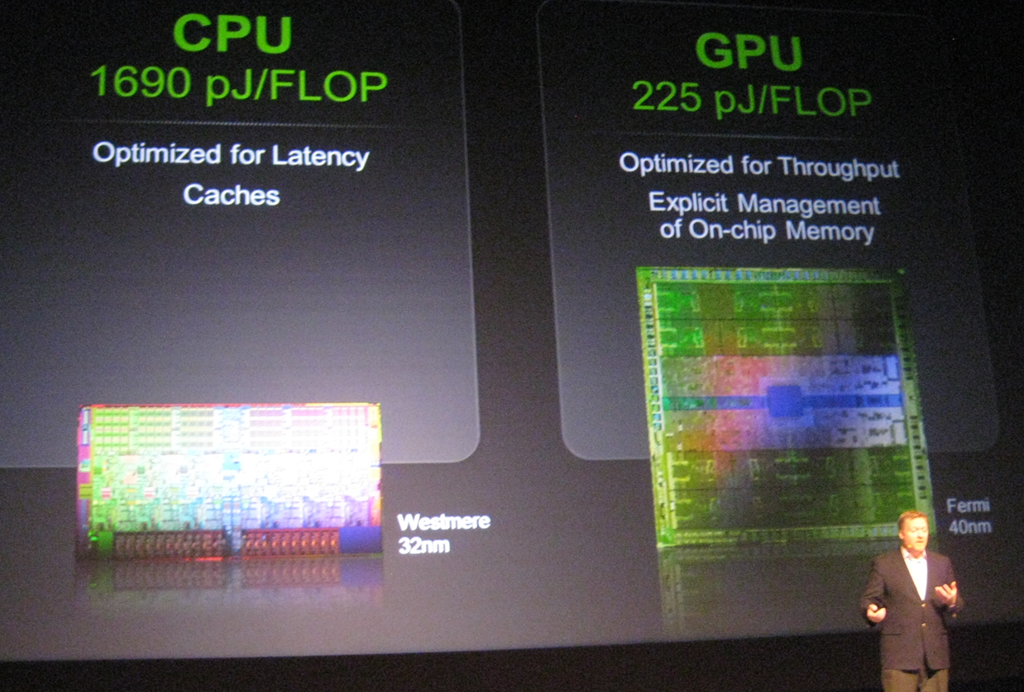
Dr Steve Scott showing off the power efficiency of GPU computing

Scott talked a little about a topic that interests me: the convergence or integration of the GPU and the CPU. The background here is that while the GPU is fast and efficient for parallel number-crunching, it is of course still necessary to have a CPU, and there is a price to pay for the communication between the two. The GPU and the CPU each have their own memory, so data must be copied back and forth, which is an expensive operation.

One solution is for GPU and CPU to share memory, so that a single pointer is valid on both. I asked CEO Jen-Hsun Huang about this and he did not give much hope for this:

We think that today it is far better to have a wonderful CPU with its own dedicated cache and dedicated memory, and a dedicated GPU with a very fast frame buffer, very fast local memory, that combination is a pretty good model, and then we’ll work towards making the programmer’s view and the programmer’s perspective easier and easier.

Scott on the other hand was more forthcoming about future plans. Kepler, which is expected in the first half of 2012, will bring some changes to the CUDA architecture which will “broaden the applicability of GPU programming, tighten the integration of the CPU and GPU, and enhance programmability,” to quote Scott’s slides. This integration will include some limited sharing of memory between GPU and CPU, he said.

What caught my interest though was when he remarked that at some future date NVIDIA will probably build CPU functionality into the GPU. The form that might take, he said, is that the GPU will have a couple of cores that do the CPU functions. This will likely be an implementation of the ARM CPU.

Note that this is not promised for Kepler nor even for Maxwell but was thrown out as a general statement of direction.

There are a couple of further implications. One is that NVIDIA plans to reduce its dependence on Intel. ARM is a better partner, Scott told me, because its designs can be licensed by anyone. It is not surprising then that Intel’s multi-core evangelist James Reinders was dismissive when I asked him about NVIDIA’s claim that the GPU is far more power-efficient than the CPU. Reinders says that the forthcoming MIC (Many Integrated Core) processors codenamed Knights Corner are a better solution, referring to the:

… substantial advantages that the Intel MIC architecture has over GPGPU solutions that will allow it to have the power efficiency we all want for highly parallel workloads, but able to run an enormous volume of code that will never run on GPGPUs (and every algorithm that can run on GPGPUs will certainly be able to run on a MIC co-processor).

In other words, Intel foresees a future without the need for NVIDIA, at least in terms of general-purpose GPU programming, just as NVIDIA foresees a future without the need for Intel.

Incidentally, Scott told me that he left Cray for NVIDIA because of his belief in the superior power efficiency of GPUs. He also described how the Titan supercomputer operated by the Oak Ridge National Laboratory in the USA will be upgraded from its current CPU-only design to incorporate thousands of NVIDIA GPUs, with the intention of achieving twice the speed of Japan’s K computer, currently the world’s fastest.

This whole debate also has implications for Microsoft and Windows. Huang says he is looking forward to Windows on ARM, which makes sense given NVIDIA’s future plans. That said, the I get impression from Microsoft is that Windows on ARM is not intended to be the same as Windows on x86 save for the change of processor. My impression is that Windows on ARM is Microsoft’s iOS, a locked-down operating system that will be safer for users and more profitable for Microsoft as app sales are channelled through its store. That is all very well, but suggests that we will still need x86 Windows if only to retain open access to the operating system.

Another interesting question is what will happen to Microsoft Office on ARM. It may be that x86 Windows will still be required for the full features of Office.

This means we cannot assume that Windows on ARM will be an instant hit; much is uncertain.

Silverlight 5 is done. Is Silverlight also done?

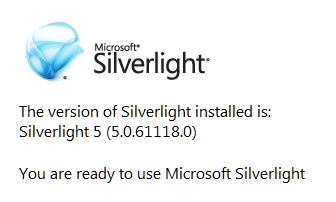
Microsoft has has announced the release of Silverlight 5.0.

image

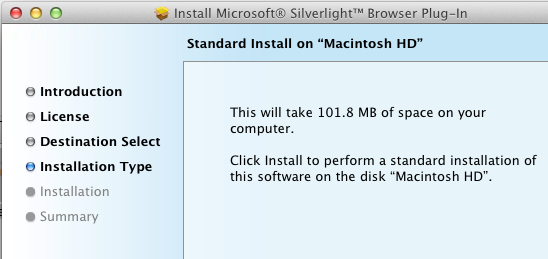
Silverlight is a cross-platform, cross-browser plug-in for Windows and Mac. It is relatively small size – less than 7MB according to Microsoft, though the Mac version seems to be bigger, with a 14MB compressed setup .dmg and apparently over 100MB once installed:

image

Never mind, it is a fine piece of work and has considerable capabilities, including the .NET Framework, the ability to render a GUI defined in XAML, multimedia playback, and support for applications running inside the browser or on the desktop. New in version 5 is better H.264 performance, 3D graphics, and Platform Invoke support on Windows enabling trusted applications to call the native API. Another change is that in-browser applications can also run with full trust, again only on Windows. The cross-platform idea has become increasingly diluted.

If Microsoft had come up with Silverlight early in the .NET story it might have become a major application platform. As it is, while still useful in some contexts, the technology has been side-lined by new things including HTML 5 and the Windows Runtime in the forthcoming Windows 8.

While I have huge respect for the team which created Silverlight and rapidly improved it, it now looks a sad story of reactive technology that failed to capture sufficient developer support. Microsoft invented Silverlight when Adobe Flash looked like it might take over as a universal runtime for web applications. The outcome was that Adobe evolved Flash with renewed vigour, keeping Silverlight at bay. Then Apple invented a new platform called iOS that supported neither Flash nor Silverlight, and the whole plug-in strategy began to look less compelling. Adobe has now reduced its focus on Flash, while Microsoft has been signalling a reduced role for Silverlight since its Professional Developers Conference in October 2010.

The question now is whether there will ever be a Silverlight 6.

Microsoft itself uses Silverlight across a number of products, such as administrative consoles for various server applications. Silverlight will be around for a while yet. Of course it is also the runtime for Windows Phone 7. Visual Studio LightSwitch generates Silverlight applications, and this one I am rather sad about, because it is an interesting tool that now seems to target the wrong platform. Perhaps the team will create an HTML 5 version one day.

Windows Store: Microsoft explains another piece of its new platform

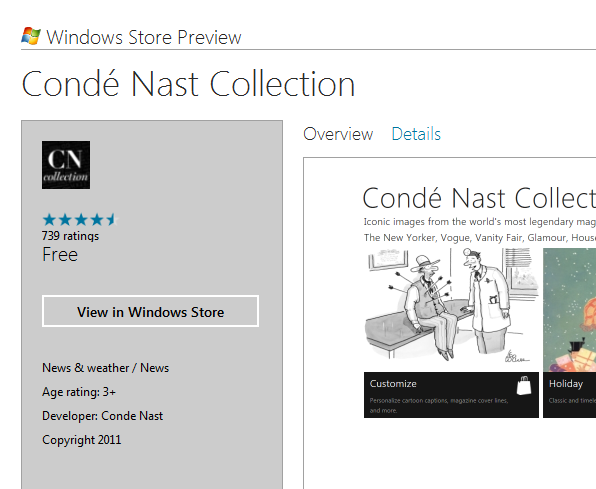
Microsoft’s Ted Dworkin, Partner Progam Manager, has posted details of how the forthcoming Windows Store will work. There is also detailed new information on MSDN. It is a key piece if you care about the next version of Windows, including details of how enterprises will be able to deploy apps as well as the terms of business for independent developers.

image

Here is a quick summary:

  • The store is both an app and a web site. The same content will automatically appear in both.
  • The store is for Metro-style apps, which run on the Windows Runtime. No word about desktop apps; my presumption is that they are excluded. The certification requirements refer only to Metro-style apps.
  • Apps can be offered as full-featured, limited or unlimited trial, upgradeable via in-app purchases.
  • Enterprise apps can be deployed through the store with access limited to employees.
  • Enterprise apps can also be deployed outside the store, using PowerShell scripts to domain-joined machines. Apps must be signed.
  • App vendors can use their own transaction engine and/or ad service if they choose, or use the built-in services for sale, in-app purchase and advertising. Subscriptions do not have to go through the store. My impression is that the initial sale does not have to be transacted through the store either but this is not 100% clear to me.
  • Developer registration for the store costs $49.00 for individuals or $99.00 for companies.
  • Revenue share is 70%, rising to 80% if you achieve over $25,000 revenue for an app.
  • Apps are subject to approval, but developers are given the App Certification Kit as part of the SDK. There is still scope for disagreement over the interpretation of policies.


There is an initial beta preview period during which all apps will be free. Microsoft has also annoyed most of the world’s developers by restricting a First Apps Contest to those who:

 are a developer – professional, hobbyist, or student – and you are a legal resident of the 50 United States and District of Columbia, France, Germany, Japan, or India

Why there are no tablets running Windows Phone 7

Once again people are asking why Microsoft has not allowed OEMs to build tablets running Windows Phone 7. Matthew Baxter-Reynolds says it is to do with income from OEM licenses:

Now, Microsoft charges OEMs far less for Windows Phone licenses (about $15 per unit) than for full-on Windows licenses (on average, working out to about $56 per unit) …  But for Ballmer and the team, this is the bad news scenario. Only $15 per licence? And even less in profit? Compared to $37 in profit? It’s a money-loser, people.

While I agree that Microsoft has a problem with its business model in the new world of mobile devices, I do not follow this reasoning. There is nothing to stop Microsoft charging more for Windows Phone OS on tablets than on phones if it could get away with it. Nor is it necessarily true that Microsoft will succeed in charging as much for Windows 8 on tablets as it does for Windows 8 on PCs. In fact, that is unlikely to be be true; they will be cheaper, especially on ARM.

If it is not this then, that still leaves the question of why Microsoft has not licensed the Windows Phone 7 OS for tablets.

Microsoft has undoubtedly fumbled tablet computing and this was a costly mistake. Nevertheless, it is a company capable of strategic thinking. I think it goes something like this, in no particular order.

First, I reckon Microsoft is thinking beyond the initial OEM license income for its profits from Windows 8 tablets. It is all about the apps – 30% of the income from every app sold on the locked-down ARM edition of Windows 8. Apps tend to be cheap, and there is cost in running the store, but there is potential for ongoing income that will exceed the initial license sale. Especially if, like Apple, Microsoft insists on a cut of subscription income, in-app advertising income, and so on.

Second, Microsoft is also betting on cloud computing. Windows Phone 7 is marketed mainly as a consumer device, but Microsoft is going to play the “this is the device for professionals” card at some point. You can bet that Windows 8 tablets, and their successors, will be promoted as the ideal client for Office 365, as well as for on-premise Exchange, SharePoint and Lync. Sell a tablet, buy a customer for Office 365. Lock customers into Office 365, and sell them other cloud applications and services. Plenty of opportunity for profit.

Third, my guess is that the Windows team at Microsoft does not consider the Windows Phone 7 OS good enough to be the foundation of its future mobile platform. They respect it enough to borrow its Metro design language, along with many aspects of the development model, but in the end Sinofsky and his team were not willing to hand over the future of Windows on devices to Windows CE and Silverlight.

What we are getting with the forthcoming Windows Runtime is a more deeply thought-through new platform in which .NET, native C++ code, and HTML 5 are equally well supported, and in which developers are forced to use asynchronous APIs that keep the user interface responsive. It will be a better app platform than the current Windows Phone OS; in fact, I fully expect Windows Runtime to migrate to the phone in some future version.

If Microsoft had allowed Windows Phone 7 onto tablets, it would have the difficult task of explaining to its customers how Windows 8 tablets differ from Windows Phone OS tablets as well as from those old Windows tablets from Bill Gates days.

Therefore Microsoft took the decision to wait until Windows 8 was ready. That was a bold decision, and it may be too late, but the reasoning is plausible.

image

Exchange 2010 Service Pack 2 with Office 365 migration wizard and retro Outlook Mini

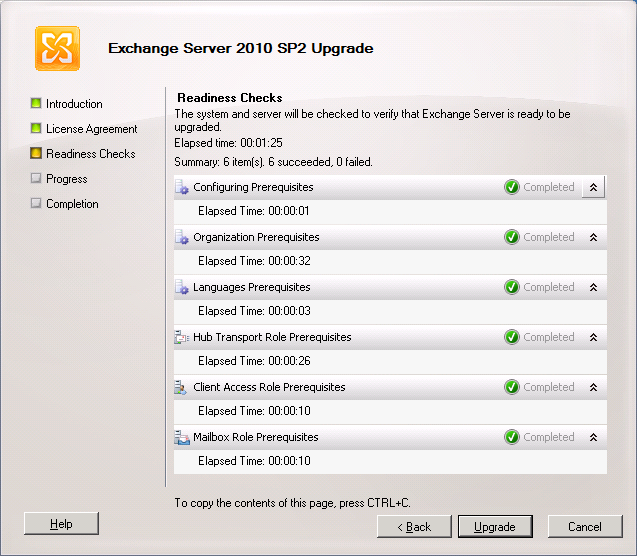
Microsoft has released Exchange 2010 SP2, which I have successfully installed on my small system.

image

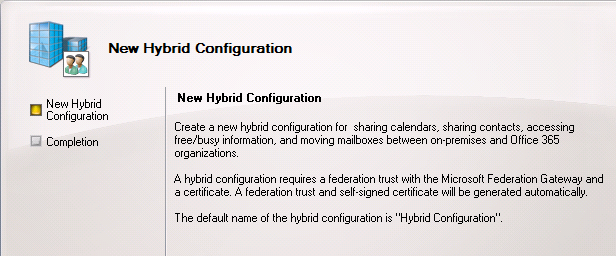
There is a description of what’s new here. The most notable features are the Hybrid Configuration Wizard for setting up co-existence between on-premise Exchange and Office 365, and Outlook Mini for low-end phones with basic browsers.

A hybrid setup lets you include on-Premise Exchange and Office 365 Exchange in a single organisation. You can move mailboxes back and forth, archive messages online (even from on-Premise mailboxes), and synchronize Active Directory information. The feature is not new, but the wizard is.

image

This looks similar to the Exchange migration tools for BPOS and Office 365 so this is mainly a matter of baking them into the product.

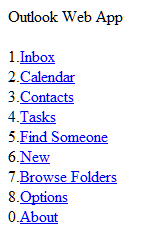
Outlook Mini is very retro; I like it. It is also called Outlook Mobile Access and is similar to a feature of Exchange 2003 though it is new code; it is actually built using Outlook Web Access forms and accessed at the url yourexchange/owa/oma. There is no automatic redirection so users will have to be shown where to find it.

image image


Finally, this note amused me as evidence of how far litigation issues have permeated into Microsoft’s products. But what is the point of a “litigation hold” if it is so easily bypassed?

In Exchange 2010 SP2, you can’t disable or remove a mailbox that has been placed on litigation hold. To bypass this restriction, you must either remove litigation hold from the mailbox, or use the new IgnoreLegalHold switch parameter when removing or disabling the mailbox.

Thoughts on the future of the Win32 platform

Overheard last week at a non-techy social event: “I have just got an iPad. It is gorgeous. It is amazing how much it can do” … conversation continues … “Trevor is always swearing at his computer. He always blames Microsoft. It doesn’t matter what the problem is, he blames Microsoft.”

This is the kind of conversation which is annoying to hear if you are remotely technical. I have and enjoy using an iPad, but it has many limitations and its own share of annoyances. Recently the iOS WordPress app crashed whenever I tried to moderate comments on this blog. On Windows I could have done some troubleshooting, but on the iPad there was little to do other than blindly try removal and reinstall, or wait for a fix. As for Windows, I find it generally reliable and the majority of issues I have with it are not the direct fault of Microsoft.

In other words, reality is not so clear cut; but there is a powerful myth out there that goes along the lines of the conversation I overheard; and it is a myth that is not entirely unfounded given the quality of Apple’s design work and the problems that surround what we might call the Windows ecosystem: foistware, hardware built down to a price, the peculiarities of Outlook, and so on.

I do not think conversations like that quoted above are exceptional and it illustrates the pressure Microsoft is under. For years Windows has been in an almost unassailable position because the alternatives were insufficiently compelling to most people: Linux too awkward and fractured, Mac/OSX too expensive. Now change has come about because of the rise of new kinds of devices, smartphones and tablets, for which Windows was unsuitable. The result is that Apple iOS and Google Android are widely used and growing fast.

That said, we still need PCs, and although the Mac is gaining ground the large majority of these still run Windows. The smartphone or tablet model does not fit all kinds of computing. In fact, if we are thinking of the iPad in particular, it is only a good fit for a minority of uses. I am not thinking of what you just about do with an iPad if you have to, I am thinking of the scenarios where it is your tool of choice. Take word processing for example: the iPad has a version of Pages and you can get an external keyboard but even so I would rather type on a PC or a Mac, or even a netbook, and will get my work done quicker that way.

image

Leaving aside the software that is available, a full PC or Mac gives you keyboard, mouse, and easily supports one or more large high-resolution screens. Whether it is Microsoft Excel, Adobe Photoshop, the latest graphics-intensive game like Bethseda’s Skyrim, CAD software, or development tools like Visual Studio or Eclipse, there are many activities for which a tablet is a poor PC substitute.

Even for things for which a tablet is generally considered good, such as web browsing, a full PC or notebook is better. When browsing the web on an iPad there are little annoyances like slower typing of search queries (and the often daft auto-correct in iOS), awkwardness of looking up a password for a login and pasting it into the browser, small screen size making you scroll around, difficulty of hitting small hyperlinks on sites like discussion forums, and so on.

All of this means that the traditional PC, Mac or notebook seems still to have a strong future, which seems further to imply that Windows also is secure.

I would argue though that this is a rose-tinted view of the future of the Win32/Win64 platform – by which I mean full desktop Windows rather than the “Metro” tablet platform which Microsoft has previewed for the dual-personality Windows 8. Here are three reasons why it is under threat:

1. Tablets will get better and will gradually encroach on the PC market as they become more capable. This process will be complemented by web sites adapting to work better for the growing number of tablet users.

2. Hybrid devices like the Asus Eee Pad Transformer, which runs Android but also docks into a laptop-like keyboard and clamshell case, will cause users to question whether they really need to replace their Windows laptop when it wears out.

3. The drive towards cloud computing will reduce our dependence on desktop applications. Although Google’s Chromebook has not yet caught on, the fact that it exists shows the progress cloud computing is making: a notebook that only has a web browser is a viable proposition.

My assumption is that many of us would like to use tablets for a greater proportion of our computing activities if we could easily do so, because we like their mobility, convenience, low power demands, and relatively low cost. This is especially true for consumers, and less applicable to more regimented offices where there is a computer on every desk.

Another factor for Win32 is that Microsoft itself will slow down its future development, concentrating instead on Metro and its Windows Runtime, as well as cloud services. There are good business reasons for this. Microsoft is not under pressure to improve Win32; users would like it to run faster and with greater reliability, but their main demand is that it continues to run their critical applications successfully.

The conclusion: although Win32 will remain an important and stable platform for many years to come, it is now in slow decline. This will be the case whether or not Microsoft manages to bring Windows itself back on track with a success for Windows 8 on tablets, and overturns the assumption reflected in my initial quote: that an Apple iPad is delightful and Windows nothing but problems.

Why developers need a Mac

I am by no means an Apple fan. For one thing, I find Windows (and Linux) stable and fast, so you are not going to hear me argue that my computing life was transformed once I made that Switch (with a capital letter). Admittedly that is partly because I am familiar with how to fix and tune Windows and remove foistware, but it is not that hard. For another, I am not an admirer of Apple’s secretive approach, or the fact that most requests for comment from journalists are responded to with silence. For a third, I dislike the notion that all apps for its popular mobile platform must be distributed through the Apple store and subject to a fee, now extended to in-app upgrades and subscriptions as well as initial sales. There is also much that I admire about Apple’s platform, but I hope I have convinced you that I am not so bedazzled by the company that I am unable to think coherently about its products.

Nevertheless, I have run a Mac alongside Windows for years now, and I find myself needing it increasingly. Here are four reasons.

The first is that sooner or later you will need to build or test an app for the Mac or, more likely, for iOS. You can only do so using a Mac (leaving aside the exciting world of the hackintosh). This is because Apple only provides the iOS SDK and simulators for its own operating system.

As an aside, I recently spoke to Keith Varty who is evangelising Windows Phone development at Nokia. I asked about the issue of Visual Studio only running on Windows, was that an obstacle for developers using a Mac? He pointed out that it is the same in reverse with Apple, you need a Mac to develop for the iPhone. In fact, it is easier to develop for Windows using a Mac, thanks to the existence of excellent PC emulators, than it is to develop for a Mac using Windows. In any case, special rules apply for Apple.

Second, other than in the most closed internal environments, some of your users will have a Mac or at least an iPad or iPhone. A few years back both developers and system administrators could get away with a deliberate ignorance of Apple computers, saying they are “not supported” or “untested” or just “I have no idea.” That is no longer acceptable (if it ever was) and it is important to test apps on a Mac where that is appropriate, as with web or cross-platform Java or Adobe AIR applications, and more generally to get a feel for how things work on a Mac so that you can respond intelligently to users.

Third, in many areas of development Macs are now dominant. This means that Windows-only developers may be disadvantaged. Today, for example, I was researching Sencha products and came across this:

image

Yes, to get the preview developer tools for Sencha Touch 2, you need a Mac. No doubt Windows versions will follow, but there are times when you need a Mac just to keep up with the latest technology.

Fourth, and this is the most difficult point to make, it is valuable to spend some time on a Mac to avoid bad assumptions about usability. One example that comes to mind is version control. On Windows there is no problem using Git, or Subversion, or any number of systems including Microsoft’s Team Foundation Server installed either locally or on its own server. There is some setup involved though. On a Mac with the latest Xcode, you will find a checkbox in the new project wizard:

image

It is built-in. There is nothing more to do other than check this box. And yes, I know it is pretty easy to use Subversion or Git on Windows – though I would never describe a Team Foundation setup as trivial – but I am talking about the usability of a single checkbox. If you are thinking about the design of your own UI then spending some time on a Mac is though-provoking and likely to be beneficial.

By the way, some other parts of Xcode are less usable than Visual Studio so do not read too much into this example!

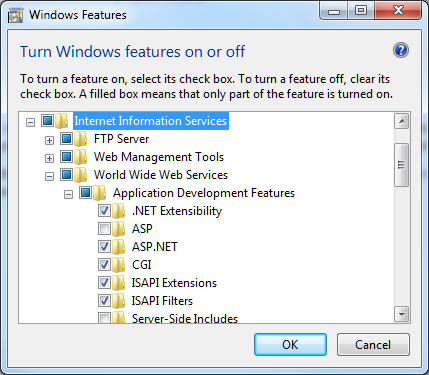
Another example which comes to mind is installing a web server. Windows has IIS, which is a good web server, and you can enable it on Windows 7 by going to Control Panel, Programs, Turn Windows Features on and off, and then waiting while the dialog populates, and then checking which bits of IIS you want to install:

image

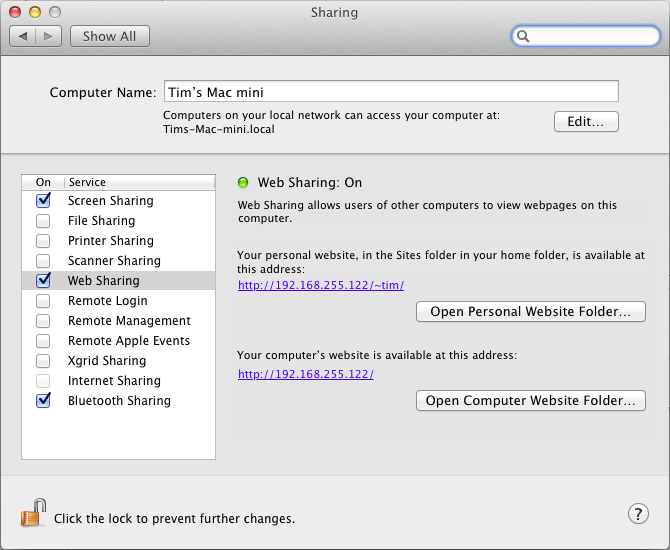
Not difficult, though the intricacies of which Application Development Features you need may require some research. But here is how you set up Apache on a Mac. Go to System Preferences, and check Web Sharing. Apache is now up and running, and on my Mac Mini it started instantly:

image

I am sure there are many more examples, and even examples where Windows has better usability than then Mac (I miss the thumbnail previews in the task bar) but my point is this: it pays to have experience beyond Windows from which to evolve your own user interface ideas.

Post sponsored by Monster for the best in IT Jobs.

Fixing a Windows 7 blue screen with Driver Verifier

A recent annoyance was a blue screen when I was in the middle of typing a Word document. “Memory management” it said.

You might think faulty RAM, but I did not think so as I had tested it extensively with the excellent Memtest86. So what was causing it? And no, I do not regard Windows as an unstable operating system, not any more (not really since Windows 98 days).

I started troubleshooting. The first step is to install the Debugging Tools for Windows, if you have not already, run Windbg, and load the minidump which Windows usually creates when it crashes. Minidumps are saved in the /Windows/Minidump folder.

image

It said VISTA_DRIVER_FAULT and identified the SearchProtocol process, but I was not convinced that this process was really to blame. My reasoning is that it is a Microsoft process that is running on most Windows boxes so unlikely to be badly broken.

I decided to look for a faulty driver. You can do this by running the Driver Verifier Manager, summoned by running verifier.exe (this lives in /Windows/System32 but you can start it from anywhere).

image

This application enables a debugging mode in Windows that will scrutinise the drivers you specify for errors. This slows down Windows so it is not something you want to leave enabled, but it is great for finding problems.

I elected to check all drivers and continued. Reboot, and as expected, an immediate blue screen.

While Driver Verifier is enabled and causing a crash you can only boot into safe mode. However Windbg works OK in safe mode. I took a look at the new minidump. The process name this time was services.exe. That means any of the services could be at fault, so not all that illuminating.

I ran msconfig and disabled all non-Microsoft services. Restarted and verifier was happy. Now it was a matter of “hunt the service”.

Eventually I discovered through trial and error and hunch (it had to be a service which I had recently installed or updated) which service failed to verify. The guilty party: Intel Desktop Utilities. This application monitors sensors on an Intel motherboard for temperature and fan speed, and fires alerts if the readings go outside safe limits.

I uninstalled the desktop utilities. No more blue screens since.

I find it hard to believe that an Intel utility distributed with all its motherboards is causing Windows blue screens; on the other hand in my case it seems clear cut. And yes, I did have the latest version 3.2.0.038b “for Intel Desktop Boards with 5 or 6 Series chipsets.” My board is the DH67CL. I would be interested to know if others with same version can successfully boot with Driver Verifier enabled.

HTML5 scorecard: Amazon Kindle Fire weak, iOS 5 great, IE10 preview one of the best

The Sencha blog has a great series of posts on HTML5 support on various devices. This is of direct interest to Sencha because its products are JavaScript and CSS application frameworks, Sencha Touch for mobile and ExtJS for any browser. The latest post is on the Amazon Kindle Fire – and it is weak:

The Amazon Kindle Fire doesn’t seem designed to run HTML5 apps as a primary goal. It does a good job of displaying ordinary web pages and its resolution and rendering capabilities meet that need well. But there are too many sharp edges, performance issues, and missing HTML5 features for us to recommend that any developer create web apps primarily for the Kindle Fire. The iPad 2 running iOS 5 continues to be the tablet to beat, with the PlayBook a respectable runner-up in HTML5 capabilities.

Part of the problem is that the Fire runs Android 2.3.4 (Gingerbread) which has a weaker browser than later versions. That is not the only source of disappointment though. According to Sencha’s Michael Mullany, the GPU is not used for hardware acceleration of browser content, the JavaScript timer is laggy, there is no embedded HTML5 video (videos launch in a separate player), and CSS corners are not properly anti-aliased.

But what about the Kindle’s cloud-accelerated browsing that we heard so much about when it was announced? This is the biggest disappointment:

One of the main selling points of the Kindle browser is supposed to be its cloud-caching and pipelined HTTP connection that uses the SPDY protocol. This does seem to speed up normal page browsing a little, but it’s not very noticeable and we didn’t test this rigorously. But for HTML5 web apps, where code is downloaded and executed, there doesn’t seem to be any performance difference when we tested with acceleration on and off. It doesn’t appear as if client JavaScript is executed on the server-side at all, so the Kindle does not seem to have Opera Mini-style server-side execution. And SunSpider scores were essentially the same when accelerated browsing was turned on or off.

Moving on from Kindle, it is interesting but not surprising to see a great report for HTML5 in Apple’s iOS 5. Less expected though is a big thumbs-up for HTML5 in Microsoft’s IE10 preview on Windows 8:

Simply put, (and with the caveat that we were running on the notably overpowered developer preview hardware) the IE10 HTML5 experience is one of the best we’ve seen on any platform to date. After a decade of web neglect, Microsoft is back with a vengeance.

image

The main caveat is the absence of WebGL. Microsoft is supporting its own 3D graphics library.

Another worry for Microsoft is simply the level of hostility towards the company and IE in particular, among the developer and designer community it so much wants to reach. You can get a flavour of this from some of the comments to Mullany’s post, for example:

I never really like Windows and I absolutely despise Internet Explorer. There are so many exceptions in code to be made for Internet Explorer that i stopped trying so hard to make it look the same as other browsers. Hopefully, IE 10 will stop all of these exceptions and weird additions that are made to websites that make everything instantly awful so I can actually go back to trying to make things look nice in IE. It’s really sad though that so many people use Windows and IE that we cannot ditch it for a better system and better browser.

What about Android? The most recent offering covered in the Sencha series is Motorola Xoom which is a disaster:

We were excited about the first true Android operating system for tablets and had high hopes for a mobile browser that was as powerful as the platform. Sadly, the Xoom and Honeycomb are a real disappointment. We found consistent and reproducible issues in CSS3 Animations and CSS3 Transitions among other things. We had issues where the browser either hung or crashed. Regular scrolling was slow or below full framerate. We had issues where media playback failed or performed incorrectly. At times it felt like we were using a preproduction device, but we bought our test device from a Verizon Wireless store.

I have a hunch that the latest Galaxy Tab might fare better. Sencha did like the HTML5 support in the BlackBerry PlayBook though.

With Adobe Flash now in decline on mobile devices (Adobe is no longer working on the mobile Flash player) HTML5 support is all-important for rich browser-hosted apps; I will be watching with interest for future Sencha reports.