Category Archives: development

Microsoft’s Azure toolkit for Apple iOS and Android is a start, but nothing like enough

Microsoft ‘s Jamin Spitzer has announced toolkits for Apple iOS, Google Android and Windows Phone, to support its Azure cloud computing platform.

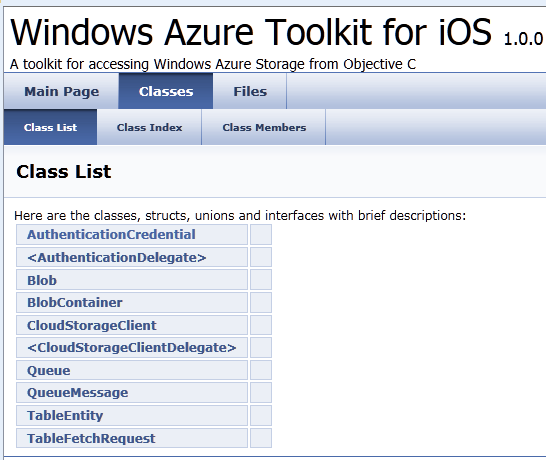
I downloaded the toolkit for iOS and took a look. It is a start, but it is really only a toolkit for Azure storage, excluding SQL Azure.

image

What would I hope for from an iOS toolkit for Azure? Access to SQL Server in Azure would be useful, as would a client for WCF (Windows Communication Foundation). In fact, I would suggest that the WCF RIA Services which Microsoft has built for Silverlight and other .NET clients has a more useful scope than the Azure toolkit; I realise it is not exactly comparing like with like, but most applications built on Azure will be .NET applications and iOS lacks the handy .NET libraries.

A few other observations. The rich documentation for WFC RIA Services is quite a contrast to the Doxyfile docs for the iOS toolkit and its few samples, though Wade Wegner has a walkthrough. One comment asks reasonably enough why the toolkit does not use a two or three letter prefix for its classes, as Apple recommends for third-party developers, in order to avoid naming conflicts caused by Obective C’s lack of namespace support.

The development tool for Azure is Visual Studio, which does not run on a Mac. Microsoft offers a workaround: a Cloud Ready Package which is a pre-baked Azure application; you just have to amend the configuration in a text editor to point to your own storage account, so developers without Visual Studio can get started. That is all very well; but I cannot imagine that many developers will deploy Azure services on this basis.

I never know quite what to make of these little open source projects that Microsoft comes up with from time to time. It looks like a great start, but what is its long-term future? Will it be frozen if its advocate within Microsoft happens to move on?

In other words, this looks like a project, not a strategy.

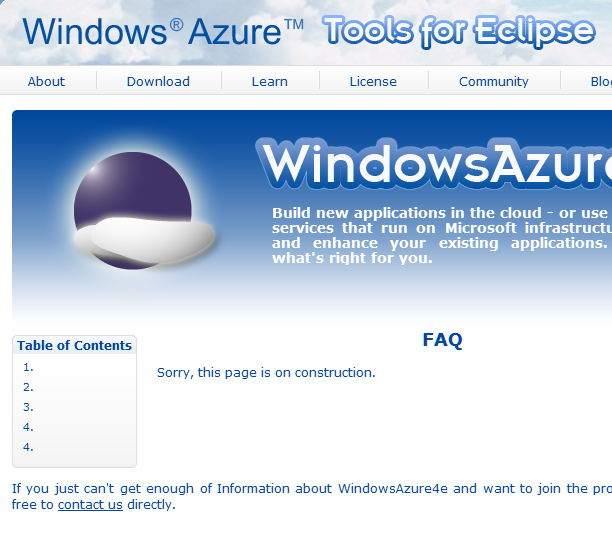
The Windows Azure Tools for Eclipse, developed by Soyatec and funded by Microsoft, is another example. I love the FAQ:

image

This sort of presentation says to developers: Microsoft is not serious about this, avoid.

That is a shame, because a strategy for making Azure useful across a broad range of Windows and non-Windows clients and devices is exactly what Microsoft should be working on, in order to compete effectively with other cloud platforms out there. A strategy means proper resources, a roadmap, and integration into the official Microsoft site rather than quasi-independent sites strewn over the web.

Hands On with RunRev LiveCode: rapid development for iOS, Android, Mac and Windows

RunRev LiveCode is a cross-platform development tool for Mac, Windows, Linux, Web, Apple iOS and, from this month, Google Android.

image

It is an individualistic tool inspired by Apple’s original (but now obsolete) HyperCard and HyperTalk, in which the building blocks of your application are stacks and cards. A stack is like a window, and a card is like a panel overlaid on that window. Unlike HyperCard, LiveCode is not a virtual card stack where each card can represent a record in a database; it is simply a means of building a graphical user interface.

A key attraction of LiveCode is that it now supports the two dominant smartphone platforms. I have been looking at a number of different approaches to mobile development, most recently PhoneGap; how does LiveCode compare to the competition? In order to get some hands on experience I set out to create my simple calculator application in LiveCode.

Coming almost new to LiveCode, I found that building this application took longer than it had done in PhoneGap, which uses HTML and JavaScript. I created a new stack and dragged some buttons onto it easily enough, but found that the approach to coding took some getting used to. There are lots of tutorials, but I found the easiest way to learn was to read through chunks of the user guide [pdf], which does a better job of explaining how to code.

One annoyance is that each object, such as a button, has its own script window, which appears as a tab in the editor. Although my calculator is simple, it does have a fair number of buttons, so you end up constantly switching between tabs. If you amend some code, you have to remember to click Apply before the change takes effect. If you forget, you run the application and puzzle over why it seems to be running an old version. The environment is strongly GUI-centric; you will not like it if you are an enthusiast for Model-View-Controller architecture.

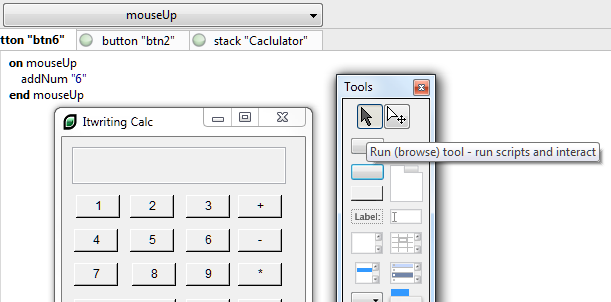
The environment is dynamic, so you can test the stack you are working on at any time simply by switching it to browse mode. This is why it is called Live Code. In this respect it is similar to the Live View in Adobe’s DreamWeaver.

image

I had to get used to writing:

put firstNumber * secondNumber into theResult

instead of

theResult = firstNumber * secondNumber

I was impressed by LiveCode’s ability to change types on the fly and to work out correctly whether you wanted to do something with a string value or a numeric value.

The language is more English-like than most languages, though I am not sure if it really easier. The language minimises use of punctuation which helps readability. Cases in switch statements fall through, C style, unless you remember to include break statements, which is traditionally a common source of bugs.

I got my calculator working on Windows. I tried building for what RunRev calls Web, but was put off by the plug-in requirement:

image 

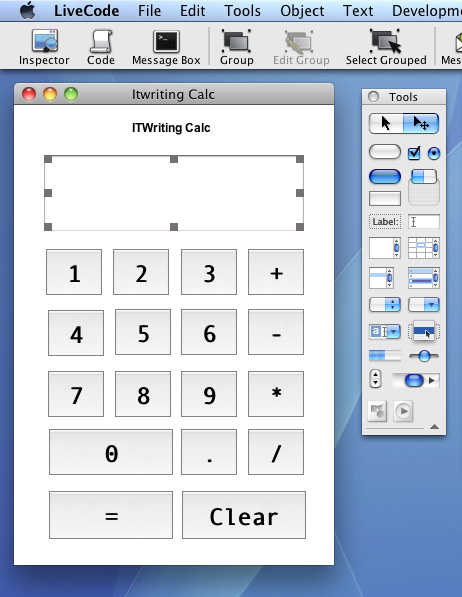
I then moved the project to a Mac to try it on iOS. Everything still worked, but I spent some time resizing the stack and repositioning the buttons to look half-way reasonable on an iPhone. I may be missing some tricks here, but scaling and positioning controls does not seem to be a strong point for LiveCode.

LiveCode does feel that bit more at home on a Mac, reflecting its origins.

image

I was impressed with how easy it was to build the app for iOS. The way cross-platform works in LiveCode is that you open a dialog called Standalone Application Settings. There is a tab for each supported platform, in which you specify options specific to each platform. The options for iOS are extensive, including supported devices, hardware access requirements, orientation options, external libraries and so on. You can then test immediately on the simulator. For on-device testing, you use the Organizer in Xcode to copy the compiled app across.

image

The good news is that the app ran well, much better than than the PhoneGap/jQuery Mobile version, though it did not look as nice and in fairness the other app’s performance issues are likely more to do with jQuery Mobile than PhoneGap itself.

Although I found it a bit of a hassle getting started, nevertheless I was able to build a working app for Windows, Mac and iOS in a few hours, so I should not complain.

Of course there is a lot more that LiveCode can do. It has database libraries, graphical effects, an embedded web browser on some platforms, XML and text processing support, and more. It is also extensible; there is probably not much that cannot be achieved with sufficient effort.

I have not tried the Android support as my version does not include it; though I did notice that the Android options dialog is basic compared to what is available for iOS.

My first impression of LiveCode is positive, but with reservations. It looks to me like a viable and productive route to cross-platform development, or you might use it just as a quick route to app development for iOS, but I did not enjoy working in the IDE which feels quirky and unsophisticated compared to other modern IDEs. My little app works well though, and that suggests it would be worth trying it for something more advanced.

Mobile developers follow the users; PhoneGap most popular cross-platform toolkit says survey

Web Directions has published a State of Mobile Web Development based on input from around 1300 professional web developers. Note that this is a survey of web developers not app developers, which must skew the results if you are interested in the overall app picture, but it is still interesting.

One result deals with developer platform decisions. What are the factors that count when choosing a platform to develop for? New and minority mobile platform players will study this with interest, since getting a large number of developers on board is a high priority.

Here is the ranking of factors based on how many developers consider each one “Very important”:

  1. Number of potential users of your app: 68.55%
  2. Platform capabilities: 60.36%
  3. Ease of development: 58.55%
  4. Worldwide reach of marketplace: 40.02%
  5. Assistance in marketing your app: 23.40%

The message for the likes of Microsoft, HP and RIM is that the best way to attract developers is to sell lots of cool devices. Ease of development matters, but not as much as a large market.

Another section asks which toolkits are preferred if you are developing native apps with web technologies (note the exact question):

  1. PhoneGap 47.6%
  2. Appcelerator 26.5%
  3. Other 15.6%
  4. Adobe AIR 7.8%
  5. Apparatio 1.2%
  6. Rhomobile 1.2%

The sample here is rather small, with only 79 of the 1300 using PhoneGap, for example. I also quibble with the definitions here. Rhomobile’s Rhodes framework compiles Ruby to native code and I doubt it counts in the category “developing native apps with web technologies”. I am even sure whether AIR belongs alongside PhoneGap and Appcelerator, since AIR is Flash whereas the other two are HTML 5. Incidentally, Appcelerator is the company name and what should appear here is Titanium, which is the name of the cross-platform toolkit. Apparat.io is in private beta so its low take-up is not surprising.

Still, it is a good result for the top two. If you are interested in these toolkits don’t miss my recent interviews with André Charland at Nitobi (PhoneGap) and Jeff Haynie at Appcelerator.

Dreamweaver CS5.5 PhoneGap apps: performance issues on Android

This is a follow-on from my earlier post about building a simple PhoneGap app using Adobe Dreamweaver CS5.5. I built it on Windows targeting Android. I liked the development experience up to the point of trying the app: it looks great, but performance is terrible. That is, you tap a button and there is a perceptible pause before the app responds. It is worse in the emulator than on my HTC Desire, but still poor.

I had thought it was a configuration setting – though Dreamweaver makes it rather hard to access the build settings – but I am now wondering if jQuery mobile plus PhoneGap is just too demanding for most Android devices out there right now. Admittedly my Desire is a year or so old now. See this thread for example:

JQuery Mobile on Android is definitely slow. (Tested A2 and A3Pre on Samsung Galaxy S, HTC Desire, ZTE Blade (edit: 2.2 Froyo) – with PhoneGap, stock browser, Opera Mobile)

Something has to be done. The experience is low quality.

It is worth noting that PhoneGap is not yet a version 1.0 release – I was told it may be done by July. Further, you do not have to use jQuery Mobile with it in Dreamweaver; it just happens to provide a great set of user interface widgets. It may be better on Apple iOS; I have not tried that yet.

Nevertheless, this looks like a significant issue if you planning to dive in and deliver Android apps using the tools in the new Dreamweaver.

Another Windows app store – but this time it is virtual. Embarcadero’s AppWave promises instant installs

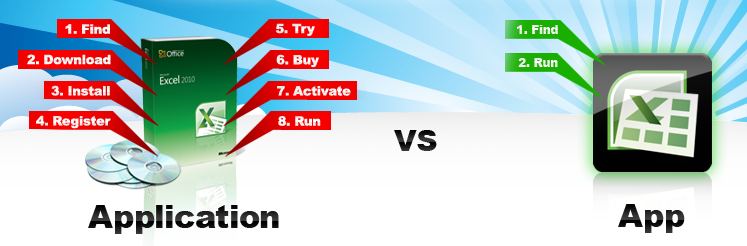
Embarcadero has announced the AppWave Store, a forthcoming app store for Windows which uses application virtualization to avoid the hassles and risks of the usual Windows install process.

image

The idea is that purchasing apps for Windows will be as simple as installing an app on a mobile using the Apple app store or Android Market.

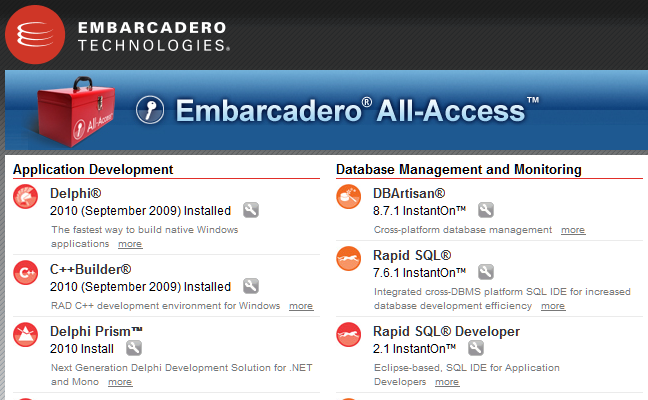
The underlying technology was developed to simplify deployment of Embarcadero’s tools. The All-Access subscription includes a tool box application that lets you run tools using “InstantOn”, which means no installation, just click and run. I have used this for a while now and it works well.

image

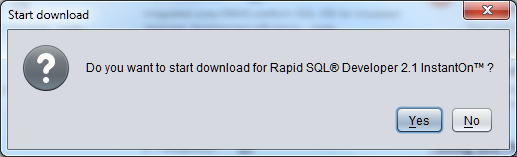
When you run an InstantOn tool for the first time, you are prompted to download:

image

There is of course a pause while the app downloads. This is not thin client technology where the app actually runs remotely. It is installed on your local machine, but isolated so there are no dependencies or conflicts.

image

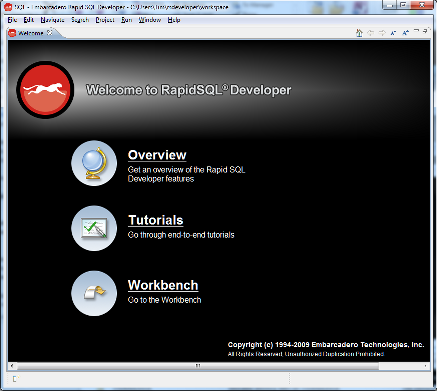
Once downloaded, you just launch the application. No other setup, other than software agreement and registration prompt.

image

The download is cached, so you can launch next time without delay, and it works offline too. AppWave is a rebranded version of InstantOn, and is also available for internal deployment of Embarcadero tools.

The AppWave store takes this technology and applies to a store for the general public. Developers will pay $99 per year (though the fee is waived if you sign up now) and get AppWave Studio, which lets you convert software to run under AppWave. The conversion process is called “mastering” and only takes a few hours, according to the FAQ [pdf].

Windows XP, Vista and 7 are supported clients, availability will be worldwide at launch, and Embarcadero takes 30% of your sale price. No launch date has been announced.

I guess the first big issue is whether developers will feel that the 30% fee is good value bearing in mind that there are many other ways to sell and deploy software.

Second, there are other app stores out there or coming, not least Microsoft’s own which is likely to be part of Windows 8. Will AppWave compete effectively?

Third, does Embarcadero have what it takes to market AppWave and make a destination for Windows users looking for apps?

App virtualization is a neat trick though, and could save significant support costs as well as being appealing for customers. Deploying apps using runtimes like Silverlight or Adobe AIR can be equally seamless, but apps have to be written specifically for those runtimes, whereas AppWave works with apps written for the full Windows API.

It is surprising that Embarcadero is not also marketing the AppWave technology for developers for general purpose use. Possibly this is coming; or maybe the company will try to keep it as an exclusive benefit for the AppWave store. There are alternatives, including Microsoft App-V and VMWare ThinApp.

See also Marco Cantu’s post Understanding Embarcadero AppWave, which is what alerted me to the AppWave store.

Microsoft’s code-first Entity Framework 4.1 nearly done

Microsoft has announced the release candidate of Entity Framework 4.1, the data persistence library for .NET, with a go-live licence. The final release to the web is expected in around one month’s time.

The big new feature is code-first, where you do not need to define a database schema or even a database model. You simply write classes that define objects you want to store, and the framework handles the work of defining the database for you.

Note that according to this article on MSDN:

The Entity Framework is Microsoft’s recommended data access technology for most types of applications.

Of course Microsoft has a long history of data access APIs and keeping up with the latest recommendation over the years has been a challenge. That said, the low-level ADO.NET data API has been in place since the first release of the .NET framework and has evolved rather than been replaced. There has been some confusion over LINQ to SQL versus Entity Framework; but note that LINQ (Language Integrated Query) works with Entity Framework as well.

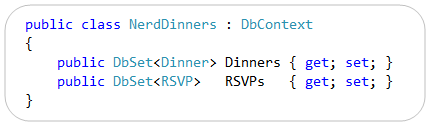
So what is code-first? A good starting point is VP Scott Guthrie’s post from July last year, where he walks through a complete example using his Nerd Dinner theme. He writes classes to define two entities, Dinner and RSVP. Then he writes the following code:

image

Having defined this NerdDinners class inheriting from DbContext, he can go ahead and write a complete database application.

At this point there is still no database. In the simplest case though, you can just add a database connection to the project with the same name as the DbContext class – in this case, “NerdDinners”. The Entity Framework will use this connection, define a database schema for you, and save and retrieve objects accordingly.

The magic under the hood is an example of convention over configuration. That is, the framework will generate code and schema according to assumptions it makes based on the names used in your classes. For example, it picks up the field named DinnerID and makes it a primary key; and seeing a collection of RSVP objects called RSVPs in the Dinner class, the framework creates a relationship between the two generated tables. You can override the default behaviour with code mapping rules. There is also provision for updating the schema if you need to add or modify the fields, though this is a point of uncertainty in Guthrie’s post.

It looks fantastic; though there are a few caveats. One is that Microsoft tends to assume use of its own database managers, SQL Server or for simple cases, SQL Server CE. That said, there are drivers for other databases; for example devart has code-first drivers for Oracle, MySQL, PostgreSQL and SQLite.

Another point is that there is a trade-off when working at such a high level of abstraction. There is less code for you to write, but a large amount of generated code, which can make debugging or optimizing an application harder. This is a familiar trade-off though; and you could say that hand-rolled SQL is no different in principle from hand-rolled assembly code; you can get fantastic results but the amount of effort and skill required is greater, as is the risk of errors if you get it slightly wrong.

The Mono team has said that it does not intend to implement Entity Framework currently; there is a summary of work needed here. If you want to write .NET code that ports easily to Mono it is best avoided.

Are you using Entity Framework in new .NET projects? I would be interested to hear from .NET developers what approach you take to data persistence.

Microsoft’s stumbling Windows Phone 7 launch – from a fan

Danny Tuppeny’s post on Why I’m Close to Giving Up on Windows Phone 7, as a User and a Developer is worth a read. He describes his experience as a Microsoft-platform developer who is a natural enthusiast for Windows Phone, except that he has been unimpressed with how its launch has been handled.

The first thing he noticed was its lack of visibility on the high street – something I have also observed:

I popped into a Carphone Warehouse over the road from the office where I work on launch day. The staff knew nothing about WP7. I called all the local Orange stores, hoping for a HTC Mozart. Nobody knew when, or if, they would be getting any Windows Phone 7 devices. Wow.

That was not necessarily Microsoft’s fault. It had to convince its operator partners to promote the phone, and they had to convince retailers. All difficult with a launch device, in a market all-but sewn up by Apple and Android between them.

Over to Microsoft then, to convince the world of the value of its device. What would it take? Microsoft needed a start-up mentality. Total commitment to its mobile platform. Regular updates and bug-fixes. Responsive support.

As time went on, cracks started to show. There were bugs. Many bugs. At one point, the SMS message store for my wife got corrupt, which meant I couldn’t send, or read, text messages to/from her. I got in touch with the UK WP7 developer advocate that had sorted out the developer phone for my company, and explained the issue. After many emails going back and forth I was told that there may be logs on my phone that would help Microsoft track down this issue but security procedures do not allow them to share a tool to get the logs off my device. I was instead, told to try a factory reset. This fixed the issue, but Microsoft were no closer to finding/fixing the bug.

So what Tuppeny experienced was the opposite of start-up mentality; rather, the frustration of dealing with a huge corporation.

Next, he was disappointed by delays to the Windows Phone 7 update, promised at launch, that would add copy and paste to the operating system:

The update was delayed. And delayed. There was zero transparency from Microsoft. Despite the rest of the company making huge strides in this area over the previous few years, Windows Phone 7 is a quiet, closed box. Nobody knew what was happening with the update, and more importantly, the bug fixes.

He is not giving up:

I’m not giving up, just yet. I truly believe Windows Phone 7 can be something brilliant, but there are definitely issues that need addressing. To show how seriously I believe Microsoft could make this work, I’ve applied to go and work for the Windows Phone team.

My own perspective on this is that Microsoft as a whole does not convey commitment to its mobile platform. How can this be, when CEO Steve Ballmer makes a point of hyping the phone at events like CES and Mobile World Congress? Well, I ask myself why Microsoft has refused to use the Windows Phone 7 OS in a tablet form factor, for which it seems well suited; and I ask myself how the phone OS can survive if Windows 8 is launched on a multitude of different form factors and device types. Paul Thurrott says it:

I can and have speculated that Sinofsky, as the dominant sub-CEO executive at Microsoft now, will simply swoop in and dismantle WP when Windows 8 is ready, but that is just an uneducated outside opinion, nothing more.

That may well not be the case; but the mere fact that some signs point towards it undermines the platform.

If I were Nokia this would worry me; except that Nokia may also in fact plan to embrace some new Windows 8 thing when the time comes, and one presumes that Microsoft has shared more of its future plans with Nokia’s executives than it has with the rest of us.

What’s the story with IE9 and embedded Internet Explorer?

There is a certain amount of fuss over the fact that Apple’s latest mobile Safari does not give full performance when either embedded in another application, or pinned to the home screen.

It would help if Apple were more forthcoming on the issue; but in general you cannot assume that embedded browser components will behave the same way as the full browser, even when they share common libraries.

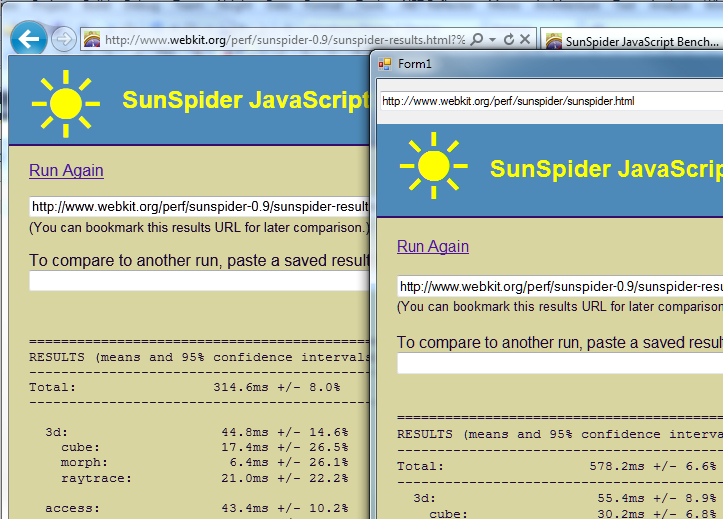
I did some quick experimentation with the released Internet Explorer 9 and the .NET Webbrowser control. First, I tried the SunSpider JavaScript benchmark. I had to use version 0.9 since the latest one gives an error in the Webbrowser control. No great surprise: the embedded version was substantially slower. I ran the tests separately, and for the .NET application I ran in release mode outside Visual Studio. IE9 completed in 314.6ms, the Webbrowser control in 578.2ms.

image

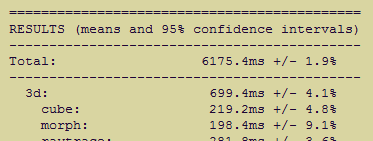
While that may seem a bad result for embedded IE, it could be much worse. Unfortunately I did not think to run this test before installing IE9, so I dual-booted into a Windows install that still has IE8 and ran the exact same application. At 6175ms it was more than ten times slower. It was slightly quicker in standalone IE8, but not by much.

image

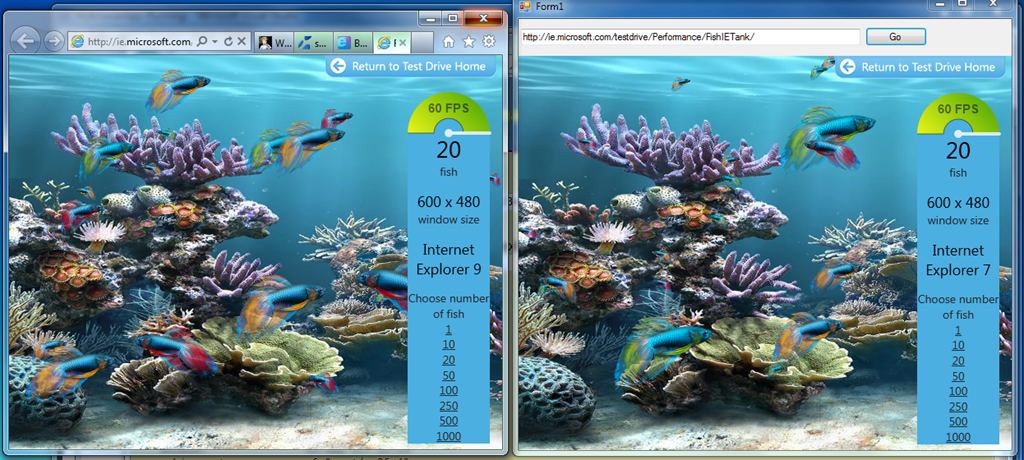
Next I tried the Fish Tank demo, which tests hardware graphic acceleration.

image

There were two notable facts about my result here. First, the Webbrowser control reports itself as Internet Explorer 7. Second, the frame rate for the two instances was nearly identical. In practice it varied slightly and some of the time the standalone IE9 was fractionally faster, but still close. By way of reference, Apple’s Safari was around 10 times slower.

Update: embedded IE is slower on the Fish Tank than I first realised. 60fps is a kind of maximum for the demo. Embedded IE9 slows to 45fps with 50 fish, whereas full IE9 does not drop below 60fps until 500 fish on my system. It does makes the fans whir though!

My guess is that Microsoft is more concerned about compatibility than performance, when it comes to embedded IE. However, clearly there is significant benefit from IE9 even when embedded.

How can you get embedded IE not to report itself as IE7 and to use full standards mode by default? If it is like IE8, this can only be done on a per-application basis via setting a registry key. That is awkward for developers, who would prefer an API call to set this. I am not sure if there is any change for IE9.

Microsoft remakes WCF for REST and the web

WCF is Windows Communication Foundation, the part of Microsoft’s .NET framework that handles service-oriented architecture. When WCF was first designed Microsoft was betting on SOAP web services. SOAP is still widely used but since then the trend has been towards more web-friendly services based on REST (Representational State Transfer) and JSON (JavaScript Object Notation). Microsoft has always argued that WCF is flexible enough to support such alternatives.

That said, a project which I have become aware of here at QCon London is the WCF Web APIs, presented here by Microsoft’s Glenn Block. WCF Web APIs focus on support for REST, JQuery clients, and programming model simplicity for a variety of other clients such as Silverlight and Windows Phone. The bit that surprised me is that WCF Web APIs are not just another wrapper for WCF; it is a completely new library that does not build on the old WCF Service Model. The fact that it is called WCF at all is confusing, though of course it belongs in that space within the overall .NET Framework.

I have not had time to look in detail at the WCF Web APIs, but from what I have seen and heard they are well worth exploring, even if you have found the old WCF somewhat impenetrable.

DevExpress developers ask for more Windows Forms, say Silverlight and WPF not ready

DevExpress, which creates add-on components and tools for Windows and Delphi, has posted its 2011 roadmap. This shows more convergence between components for Silverlight and WPF:

In essence, by the end of the year, the functionality of DXGrid, DXEditors, DXDocking, and DXRibbon will be the same across both platforms.

As for Windows Forms, or winforms, the roadmap says:

With regard to the Windows Forms controls, it is most likely that there will be a large number of smaller enhancements and new features rather than any large complex new control. The reason for this is simple: we believe that our offerings for this platform are very mature and robust.

Customers posting comments to CTO Julian Bucknall’s blog are not happy:

It is sad to see Winforms pushed back so much. WPF is still too slow on most computers for major apps and SL is not mature enough for a complete ERP app.

says Sigurd Decroos, while Heiko Mueller is more blunt:

Sorry guys, but with this roadmap I will not extend my subscription. I use only WinForms and ASP.NET and I’m not interested in WPF/Silverlight – WPF at this time for me is not suitable for my kind of applications (larger business Apps). Silverlight in my eyes is a dead technology – HTML5 is the future for rich internet applications.

Porting is also an issue says Ioannis Mpourkelis:

I believe that you should put more resources on the WinForms controls for 2011. Winforms is here to stay for many years, especially for the companies who want to support existing Winfroms applications. Currently it is impossible to port WinForms applicaitons to Silverlight and very difficult to port WinForms applications to WPF.

Check the full comments for more.

More evidence for the uncertainty around where Microsoft is going with its rich client API.

Update: Bucknall comments on this specific issue here.