Category Archives: development

JetBrains WebStorm 2.0 and PHPStorm 2.0 First Look

I respect JetBrains, an IDE company which survives despite intense competition from free tools such as Eclipse and NetBeans. It does so because developers like the products, especially the IntelliJ IDEA Java IDE. The tools are focused on coding; there are few visual designers but lots of coding help, such as code completion, refactoring, find usages, and fast navigation. The tools are also relatively lightweight, so start up quickly, and generally run on Windows, Mac OS X and Linux.

The latest from JetBrains is two related web development IDEs. WebStorm 2.0 is for general HTML/CSS/JavaScript work, and PHPStorm 2.0 is a superset of WebStorm which adds PHP editing and debugging. There is also some support for Adobe’s Flex and ActionScript code.

New in PHPStorm is PHP 5.3 support, Zend Debugger support, improved SQL editing, support for the Mercurial source code management system, and updates for HTML 5 and EcmaScript 5.

I am interested in these tools since HTML development is increasingly important. Browsers are getting increasingly powerful, with HTML 5 and fast JavaScript engines challenging plugins as rich application runtimes, and PHP is less well served by IDEs than you would expect considering its popularity.

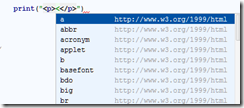
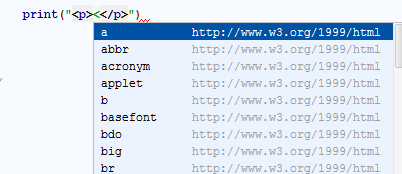
My first impressions though are mixed. I noticed a lot to like, in particular the work JetBrains has done on supporting mixed languages: HTML, JavaScript, CSS, SQL,XML and so on. One of its features is that code completion works even within quotes. For example, if your PHP is outputting HTML to the browser, code completion still works. Most editors treat anything within quotes as plain text rather than as code.
image

The IDE is highly configurable and also supports plugins. Live templates let you expand abbreviations to code fragments. There is support for generating documentation with JSDoc, ASDoc and PHPDoc. Testing with PHPUnit is integrated. These are products that will appeal to developers who are code-oriented – are there any others? – and who like the ability to fine-tune their tools to improve productivity.

That said, I did not find it easy to get started with PHPStorm. The main challenge is configuring your PHP environment to support debugging. I have not yet succeeded, though I have not spent all that long on it. Difficulty getting PHP debugging working seems to be the biggest single topic on the support forums currently.

I know this is tricky and it took me a while to get it working with Eclipse. It is important though, and anything the tools vendors can do to make this easier to setup would be welcome. There is a case for simply installing a dedicated LAMP or WAMP server with the product so that developers get immediate and reliable support for PHP debugging, with the option to configure for their own PHP server later.

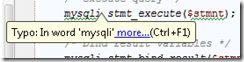
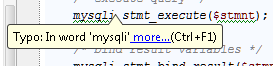
Another thing I found annoying was the over-zealous spell checker, which seems inclined to check variable names as well as being unaware of PHP extensions like mysqli:
image

I expect there is a way to fix both issues by configuring the product.

In general JetBrains does not seem to suffer from the “not invented here” syndrome and uses open source libraries and tools; in fact it depends on Firefox for JavaScript debugging, and automatically installs its own plugin to improve integration.

image

However I picked up a note of disapproval in the description on the Zen Coding site about the way JetBrains has chosen to implement Zen Coding abbreviations:

These plugins are developed by third-party and has their own ZC engine implementation, which leads to different feature set and abbreviation syntax. Zen Coding team has no relation to this projects

WebStorm is modestly priced at £54.00 for individual developers or £115 per concurrent user for organisations.  PHPStorm is £77 or £154 on the same basis. Free licenses are available for education or for open source projects, on application.

Competing products include the free Eclipse PDT and NetBeans, the commercial Zend Studio, and for a more designer-friendly approach to PHP, Adobe Dreamweaver CS5.
What will it take to get developers to try Windows Azure? Microsoft improves its trial offer

Microsoft has announced an improved introductory trial for Windows Azure. You can now get:

  • 750 hours of an Extra Small Compute Instance
  • 25 hours of a Small Compute Instance
  • 500MB storage
  • 10,000 storage transactions
  • 500MB in / 500MB out data transfer
  • 1G Web Edition SQL Azure database

The offer lasts until the end of June, after which you will be charged at standard rates. The allowances are I believe per month – note that 750 hours is approximately the number of hours in a month so you can run an extra small instance continuously. This is the main change from the previous trial, which only offered 25 hours of a small compute instance.

You cannot sign up without handing over credit card details.

Further, some of these limits are not really generous. This blog, for example, would chew through those data transfer limits in no time.

Microsoft is also less generous than Amazon, which offers a year of free usage with data transfer of 15GB in and 15GB out per month. Google App Engine is free up to 1GB or persistent storage and about 5 million pages views a month.

I guess Microsoft needs to figure out whether it wants to target mainly enterprise and large-scale applications, or to offer a commodity platform to a broader market. I doubt this offer is aimed at enterprises. After all, serious commercial developers on Microsoft’s platform have MSDN subscriptions, which with premium and ultimate subscriptions already offer inclusive Azure time that is better than this: 7GB in and 14 GB out per month, for example. Startups on the BizSpark scheme also get this allowance.

This offer is for the rest of us then. It is certainly getting easier to try Azure, but is this enough to encourage experimentation? I suspect Microsoft may need to come even closer to what is offered by the competition.

RunRev releases LiveCode for Android preview alongside iOS, Mac, Windows, Linux

RunRev has announced a preview version of its LiveCode for Google Android, which will join existing versions for Windows, Mac, Linux, Web and iOS.

image

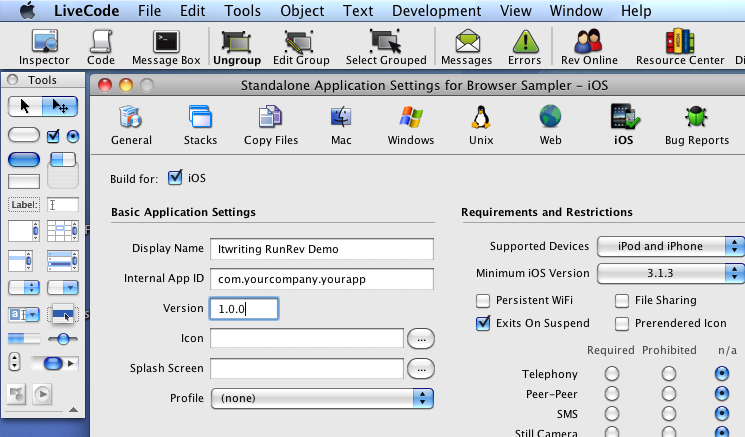
LiveCode is like a modern-day HyperCard, an early database and simple application builder for the Mac. It includes a graphical development environment with scripting using the LiveCode language, described by RunRev as “A very high level language”. Here is a sample:

put “The fox jumped over the lazy dog.” into theText

put “ quick brown” after word 2 of theText

The advantage is fast development, once you have become familiar with the platform.

On a quick look I noticed that LiveCode looks great for building a business-oriented client, but looks more challenging when it comes to interacting with a remote server application, though it does have support for basic http and https requests as well as socket support.

Now that Android is supported LiveCode looks interesting as a quick and easy route to cross-platform mobile apps.

Mobile app developers can register to receive the Android pre-release version today at www.runrev.com.

How Microsoft’s Office Web Apps were written in C# and compiled to JavaScript, maybe

While researching another product I came across this 2009 tweet from Microsoft’s Nikhil Kothari:

Office 2010 web apps – perhaps one of the most ambitious script# projects!

Script# is loosely equivalent to the Google Web Toolkit, but whereas GWT compiles Java to JavaScript, Script# compiles C# to JavaScript. According to the site:

Script# is used extensively by developers within Microsoft building Ajax experiences in Windows Live, Office to name just a couple, as well as by a external developers and companies including Facebook.

I had come across the project before, but was waiting to see if would evolve beyond what looks like a personal project for Kothari. It is hosted on http://projects.nikhilk.net rather than on an official Microsoft domain, and the latest release is 0.6.2. In other words, it does not have the look of a project that you would recommend for production work, interesting though it is. Nor is there much public activity around Script# that I can see, though there is a CodePlex site dedicated to improving its JQuery support.

Seeing Kothari’s tweet though raises several questions.

  • Did Microsoft really use it for Office Web Apps, a high profile project which is a key part of Microsoft’s cloud computing strategy?
  • Is there another, more up-to-date version of Script# that is used internally and which may one day burst into the public arena?
  • How might it impact the Silverlight vs HTML5 debate, if Microsoft comes up with a C# to JavaScript compiler in Visual Studio that lets developers code in .NET but deploy to cross-platform JavaScript?

I am sure there are readers of this blog who know more than I do, so by all means let me know.

Using HTML 5 to mitigate locked-down platforms like Apple iOS

Apple has created a beautiful mobile platform; but it has some drawbacks. One was highlighted yesterday, when Apple rejected an app from Sony for reading and purchasing digital books on the device.

According to Apple’s Trudy Miller, as quoted in the New York Times:

We are now requiring that if an app offers customers the ability to purchase books outside of the app, that the same option is also available to customers from within the app.

What Miller does not spell out is the further implication, which is that the purchase must go though the Apple App Store, and is therefore subject both to approval and to a 30% fee to Apple.

There is a suggestion that Apple is only applying the rule to books at the moment, but that could change. Other readers such as Amazon’s Kindle app will be affected though, after a grace period ending June 30 2011 for existing applications.

Currently these apps have a link which opens the browser, so that users can purchase on the web, and then download to the device, and this is what is annoying Apple. It is not clear to me whether Apple will be satisfied if that link is removed, but with users still to bypass the App Store by purchasing on the web.

It matters little. It is Apple’s platform, and tight control is one of its facets that makes it what it is. Apple can argue that it is enforcing the quality of the user experience. It seems to me that there are competition concerns if Apple comes to dominate a particular market; but don’t hold your breath for change driven by regulators.

What interests me about the issue is the extent to which HTML 5 apps provide a solution. Safari/WebKit on iPhone is a capable platform, and apps can even work offline and have local shortcuts installed. You can use local storage up to at least 5MB, with the user prompted to increase the limit if it is a SQL database – SQLite is built in to the platform.

Local storage is a problem for eReaders, though you can cache a fair amount of text even in 5MB. For many apps though, it is more than enough.

The more Apple locks down and taxes its platform, the more attractive the HTML5 alternative becomes.

Delphi and C++ Builder XE Starter Editions announced

Embarcadero has announced Starter Editions for both Delphi XE and C++ Builder XE, rapid development environments for native Windows applications.

These are not toy versions. The main technical difference between the Starter editions and the Professional versions are the absence of UML modelling, Class Explorer and Resource Manager tools. You also miss out on code completion for HTML, Live Code Templates, Subversion support, translation manager, refactoring and unit testing.

Not a big deal: most of these lacks are either not critical or can be addressed in other ways. Most features are the same, and you can build excellent high-performance applications with these Starter Editions.

The real restriction is the licensing:

Delphi XE Starter can be used by individuals who will earn less than US $1,000 for the applications they create with Delphi, or organizations or companies with five or fewer developers and less than US$1,000 in total annual revenue. Purchase the Professional edition or higher for larger scale commercial use.

with a similar wording for C++ Builder XE Starter.

The other question: how much? At the time of writing the Starter Editions are not in the online store, but according to this article in SD Times they will be $199 each or £149 for upgrades. Ownership of a Starter Edition gives you $100 discount if you later upgrade to a higher edition.

Delphi is as good as ever, especially bearing in mind that Microsoft has no real equivalent. Visual Studio is mostly .NET-based, whereas Delphi compiles to native code; and Visual C++ is more challenging to learn and arguably less productive. It is true that developers are waiting impatiently for 64-bit Delphi and for a promised compiler for OS X (and perhaps iOS?); but in the meantime if you need to build Windows applications do not ignore it.

Update: the European price is €199 each, or upgrades for €149.

No more Ruby support in NetBeans – the feature was little used, says Oracle

Oracle has announced the discontinuation of Ruby support in the NetBeans IDE. The reason? First, to free resources for JDK 7 support; but second (and more significant) – hardly anyone was using it.

There is hardly a shortage of Ruby IDEs. Ones that come to mind are the Eclipse-based Aptana, JetBrains RubyMine, the Visual Studio based Ruby in Steel, and Embarcardero’s 3rd Rail. Further, some Ruby developers prefer to work without an IDE.

I also suspect that Ruby has not quite hit the mainstream in the way it seemed that it might a few years back. Its influence has been huge, but in practice many developers still fall back to PHP, Java and C#.

Visual Studio 2010 nine months on: how good has it proved?

Visual Studio 2010 was released on April 12th 2010. Nine months on, how good has it proved to be?

image

I researched deeply into Visual Studio 2010 at the time, and was impressed overall. It was a huge release, partly because the IDE was rebuilt using Windows Presentation Foundation, and partly because of a large number of new features including the F# language. Performance was always going to be an issue with the move to a .NET-based IDE, but on my machines I found it satisfactory.

Others have been less pleased with the performance. The comments to Jason Zander’s announcement of the Service Pack 1 beta last month make interesting reading. Here is the negative:

I am a professional .NET developer and I am really upset with VS 2010. It crashes more often than VS 2008. It is slow as hell. It even crashes when debugging. VS 2010 is built with WPF which is causing all these problems.

and here is the positive:

I don’t know what y’all complaining about – VS2010 is blazingly fast… at least on my machine.

I am not sure whether the performance issues are more dependent on the the type of work you are doing, or the size of the projects, or some other factor. One issue may be graphics performance, since this will make a big difference to WPF whereas not so much with Visual Studio 2008 and earlier.

Thinking back to this time last year, I also recall how Visual Studio 2010 seems so focused on .NET, including Silverlight. Later on we got the announcement of Visual Studio LightSwitch, a RAD database application tool which builds Silverlight clients. It now seems obvious, especially following the PDC (Professional Developers) conference in November, that the vision of the developer team at Microsoft did not align with the vision of the Windows team; and that the Windows team seemed to win that argument internally. It is odd, because Silverlight has the potential to solve problems for the company. It is a technology that extends from the desktop to Windows Phone 7, which is well-suited to app store deployment thanks to the way apps are isolated, and which potentially can run on multiple platforms. Now with Silverlight 5, promised for release this year, Microsoft is adding more Windows-specific features and allowing more fragmentation between versions. Silverlight on Windows Phone 7 is based on version 3, the Mac version has more limited capabilities than the Windows version, and so on.

Microsoft said at PDC that “HTML 5” is its broad-reach platform. That suggests that what Visual Studio needs is HTML 5 designers and JavaScript libraries that integrate with Microsoft’s server technologies and which make it easier to develop HTML application for multiple form factors including small devices.

It is a confusing story, and I would love to know if the subject came up in CEO Steve Ballmer’s discussions with Bob Muglia, VP of Server and Tools, recently. The outcome of those discussions is that Muglia will be leaving Microsoft in the summer.

We will have to wait for Visual Studio 2012, maybe, to discover any change in its direction. In the meantime, SP1 adds a new help viewer, in response to many complaints, as well as a few new features for testing and debugging. There is also a list of bug-fixes, some of which look significant:

and so on. Let me add that while the list looks bad, it is no more than you would expect for a tool of this complexity and in my own testing Visual Studio 2010 has worked well.

I agree though with some of the commenters who note that Microsoft is slow to react when bugs are reported. It will be more than a year after the initial release when SP1 is finished, though you can use the beta for production code if you dare.

I would be interested in hearing from users of Visual Studio 2010. How are you finding it, or did you try it and go back to Visual Studio 2008? I realise that adoption of a new IDE for production work tends to be slow, because developers are reluctant to switch mid-project.

NVIDIA Tegra 2: amazing mobile power that hints at the future of client computing

Smartphone power has made another jump forward with the announcement at CES in Las Vegas of new devices built on NVIDIA’s new Tegra 2 package – a System on a Chip (SoC) that includes dual-core CPU, GPU, and additional support for HD video encoding and decoding, audio, imaging, USB, PCIe and more:

image

The CPU is the ARM Cortex-A9 which has a RISC (Reduced Instruction Set Computer) architecture and a 32-bit instruction set. It also supports the Thumb-2 instruction set which is actually 16-bit. How is 16-bit an upgrade over 32-bit? Well, 16-bit instructions means smaller code, even though it gets translated to 32-bit instructions at runtime:

For performance optimised code Thumb-2 technology uses 31 percent less memory to reduce system cost, while providing up to 38 percent higher performance than existing high density code, which can be used to prolong battery-life or to enrich the product feature set.

The GPU is an “ultra low power” (ULP) 8-core GeForce. In essence, the package aims for high performance with low power consumption, exactly what is wanted for mobile computing.

Power is also saved by sophisticated power management features. The package uses a combination of suspending parts of the system, gating the clock speed, screen management, and dynamically adjusting voltage and frequency, in order to save power. The result is a system which NVIDIA claims is 25-50 times more efficient than a typical PC.

According to NVIDIA, Tegra 2 enables web browsing up to two times faster than competitors such as the Qualcomm Snapdragon 8250 or Texas Instruments OMAP 3630 – though of course these companies also have new SoCs in preparation.

Tegra 2 is optimised for some specific software. One is the OpenGL graphics API. “The job of the GPU is to implement the logical pipeline defined by OpenGL”, I was told at an NVIDIA briefing.

image

I asked whether this meant that Tegra 2 is sub-optimal for Microsoft’s Direct X API; but NVIDIA says it is sufficiently similar that it makes no difference.

Nevertheless, Tegra 2 has been designed with Android in mind, not Windows. There are a couple of reasons for this. The main one is that Android has all the momentum in the market; but apart from that, Microsoft partnered with Qualcomm for Windows Phone 7, which runs on Snapdragon, shutting out NVIDIA at the initial launch. NVIDIA is a long-term Microsoft partner and the shift from Windows Mobile to Android has apparently cost NVIDIA a lot of time. The shift took place around 18 months ago, when NVIDIA saw how the market was moving. That shift “cost us a year to a year and a half of products to market”, I was told – a delay which must include changes at every level from hardware optimisation, to designing the kind of package that suits the devices Android vendors want to build, to building up knowledge of Android in order to market effectively to hardware vendors.

Despite this focus, Microsoft demonstrated Windows 8 running on Tegra during Steve Ballmer’s keynote, so this should not be taken to mean that Windows or Windows CE will not run. I still found it interesting to hear this example of how deeply the industry has moved away from Microsoft’s mobile platform.

Microsoft should worry. NVIDIA foresees that “all of your computing needs are ultimately going to be surfaced through your mobile device”. Tegra 2 is a step along the way, since HDMI support is built-in, enabling high resolution displays. If you want to do desktop computing, you sit down at your desk, pop your mobile into a dock, and get on with your work or play using a large screen and a keyboard. It seems plausible to me.

During the press conference at CES we were shown an example of simultaneous rich graphic gaming on PC, PlayStation 3, and Tegra 2 Smartphone.

image

Alongside Android, Tegra 2 is optimised for Adobe Flash. NVIDIA has been given full access to the source of the Flash player in order to deliver hardware acceleration.

image

image

Actual devices

What about actual devices? Two that were shown at CES are the LG Optimus 2X:

image

and the Motorola Atrix 4G:

image

Both sport impressive specifications; though the Guardian’s Charles Arthur, who attended a briefing on the Atrix 4G, expresses some scepticism about whether HD video (which needs a large display) and the full desktop version of FireFox are really necessary on a phone. Apparently the claimed battery life is only 8 hours; some of us might be willing to sacrifice a degree of that capability for a longer battery life.

Still, while some manufacturers will get the balance between cost, features, size and battery life wrong, history tells that we will find good ways to use these all this new processing and graphics power, especially if we can get to the point where such a device, combined with cloud computing and a desktop dock, becomes the only client most of us need.

NVIDIA says that over 50 Android/Tegra 2 products are set to be released by mid-2011, in tablet as well as Smartphone form factors. I’m guessing that at least some of these will be winners.

What you read in 2010: top posts on ITWriting.com

With three days to go, traffic on ITWriting.com in 2010 is more than 50% up over that of 2009 with over 1 million unique visitors for the first time. Thank you for your attention in another crazy year in technology.

So what did you read? It is intriguing to look at the stats for the whole year, which are different in character from stats for a week or month. The reason is that over a short period, it is the news of the day that is most read – posts like The Java Crisis and what it means for developers. Over the year though, it is the in-depth technical posts like How to backup Small Business Server 2008 on Hyper-V that draw more readers, along with those posts that are a hit with people searching Google for help with an immediate problem like Cannot open the Outlook window – what sort of error message is that?

The most-read post in 2010 though is in neither category. In July I made a quick post noting that the Amazon Kindle now comes with a web browser based on WebKit and a free worldwide internet connection. Mainly thanks to some helpful comments from users it has become a place where people come for information on that niche subject.

On the programming side, posts about Microsoft’s changing developer story are high on the list:

Lessons from Evernote’s flight from .NET

Microsoft wrestles with HTML5 vs Silverlight futures

Microsoft’s Silverlight dream is over

Another post which is there in the top twenty is this one about Adobe Flash and web services:

SOA, REST and Flash/Flex – why Flash does not PUT

along with this 2009 post on the pros and cons of parallel programming:

Parallel Programming: five reasons for caution. Reflections from Intel’s Parallel Studio briefing

This lightweight post also gets a lot of hits:

Apple iPad vs Windows Tablet vs Google Chrome OS

It is out of date now and I should do a more considered update. Still, it touches on a big theme: the success of the Apple iPad. When you take that alongside the interest in Android tablets, perhaps we can say that 2010 was the year of the tablet. I first thought the tablet concept might take off back in 2003/2004 when I got my first Acer tablet. I was wrong about the timing and wrong about the operating system; but the reasons why tablets are a good idea still apply.

Watching these trends is a lot of fun and I look forward to more surprises in 2011.