Category Archives: microsoft

Microsoft financials: record revenue, consumer sales declining in drift towards Enterprise

Microsoft has announced record revenue for its second financial quarter, October-December 2013. Revenue was bumped up by the launch of Xbox One (3.9 million sold) and new Surface hardware. The real stars though were the server products:

  • SQL Server continued to gain market share with revenue growing double-digits.

  • System Center showed continued strength with double-digit revenue growth.

  • Commercial cloud services revenue more than doubled.

  • Office 365 commercial seats and Azure customers both grew triple-digits.

says the press release.

Another plus point is Bing, which Microsoft says now has 18.2% market share in the USA. Search advertising revenue is up 34%.

It is not all good news. While Microsoft is doing fine in server and cloud, the consumer market is not going well, leaving aside the expected boost from a new Xbox launch:

  • Windows OEM non-pro revenue down 20% year on year (that’s consumer PCs)
  • Office consumer revenue down 24% year on year – partly attributed to the shift towards subscription sales of Office 365 Home Premium

As usual, I have put the results into a quick table for easier viewing:

Quarter ending December 31st 2013 vs quarter ending December 31st 2012, $millions

Segment Revenue Change Gross margin Change
Devices and Consumer Licensing 5384 -319 4978 -153
Devices and Consumer Hardware 4729 +1921 411 -351
Devices and Consumer Other 1793 -206 431 -455
Commercial Licensing 10888 +753 10077 +751
Commercial Other 1780 +391 415 +199

The categories are opaque so here is a quick summary:

Devices and Consumer Licensing: non-volume and non-subscription licensing of Windows, Office, Windows Phone, and “ related patent licensing; and certain other patent licensing revenue” – all those Android royalties?

Devices and Consumer Hardware: the Xbox 360, Xbox Live subscriptions, Surface, and Microsoft PC accessories.

Devices and Consumer Other: Resale, including Windows Store, Xbox Live transactions (other than subscriptions), Windows Phone Marketplace; search advertising; display advertising; Office 365 Home Premium subscriptions; Microsoft Studios (games), retail stores.

Commercial Licensing: server products, including Windows Server, Microsoft SQL Server, Visual Studio, System Center, and Windows Embedded; volume licensing of Windows, Office, Exchange, SharePoint, and Lync; Microsoft Dynamics business solutions, excluding Dynamics CRM Online; Skype.

Commercial Other: Enterprise Services, including support and consulting; Office 365 (excluding Office 365 Home Premium), other Microsoft Office online offerings, and Dynamics CRM Online; Windows Azure.

Here is what is notable. Looking at these figures, Microsoft’s cash cow is obvious: licensing server products, Windows and Office to businesses, which is profitable almost to the point of disgrace: gross margin $million 10,077 on sales of $million 10,888. Microsoft breaks this down a little. Hyper-V has gained 5 points of share, it says, and Windows volume licensing is up 10%.

Cloud (Office 365, Azure, Dynamics CRM online) may be growing strongly, but it is a sideshow relative to the on-premises licensing.

How do we reconcile yet another bumper quarter with the Microsoft/Windows is dead meme? The answer is that it is not dead yet, but the shift away from the consumer market and the deep dependency on on-premises licensing are long-term concerns. Microsoft remains vulnerable to disruption from cheap and easy to maintain clients like Google’s Chromebook, tied to non-Microsoft cloud services.

Nevertheless, these figures do show that, for the moment at least, Microsoft can continue to thrive despite the declining PC market, more so that most of its hardware partners.

Postscript: Microsoft’s segments disguise the reality of its gross margins. The cost of “licensing” is small but it is obvious from its figures that Microsoft is not including all the costs of creating and maintaining the products being licensed. If we look at the figures from a year ago, for example, Microsoft reported a gross margin of $million 2121 on revenue of $million 5186 for Server and Tools. That information is no longer provided and as far as I can tell, we can only guess at the cost per segment of its software products . However, looking at the income statements, you can see that overall Microsoft spent $million 2748 on Research and Development, $million 4283 on Sales and Marketing, and $million 1235 on General and administrative in the quarter.

Microsoft and developer trust

David Sobeski, former Microsoft General Manager, has written about Trust, Users and The Developer Division. It is interesting to me since I recall all these changes: the evolution of the Microsoft C++ from Programmer’s Workbench (which few used) to Visual C++ and then Visual Studio; the original Visual Basic, the transition from VBX to OCX; DDE, OLE and OLE Automation and COM automation, the arrival of C# and .NET and the misery of Visual Basic developers who had to learn .NET; how DCOM (Distributed COM) was the future, especially in conjunction with Transaction Server, and then how it wasn’t, and XML web services were the future, with SOAP and WSDL, and then it wasn’t because REST is better; the transition from ASP to ASP.NET (totally different) to ASP.NET MVC (largely different); and of course the database APIs, the canonical case for Microsoft’s API mind-changing, as DAO gave way to ADO gave way to ADO.NET, not to mention various other SQL Server client libraries, and then there was LINQ and LINQ to SQL and Entity Framework and it is hard to keep up (speaking personally I have not yet really got to grips with Entity Framework).

There is much truth in what Sobeski says; yet his perspective is, I feel, overly negative. At least some of Microsoft’s changes were worthwhile. In particular, the transition to .NET and the introduction of C# was successful and it proved an strong and popular platform for business applications – more so than would have been the case if Microsoft had stuck with C++ and COM-based Visual Basic forever; and yes, the flight to Java would have been more pronounced if C# had not appeared.

Should Silverlight XAML have been “fully compatible” with WPF XAML as Sobeski suggests? I liked Silverlight; to me it was what client-side .NET should have been from the beginning, lightweight and web-friendly, and given its different aims it could never be fully compatible with WPF.

The ever-expanding Windows API is overly bloated and inconsistent for sure; but the code in Petzold’s Programming Windows mostly still works today, at least if you use the 32-bit edition (1998). In fact, Sobeski writes of the virtues of Win16 transitioning to Win32s and Win32 and Win64 in a mostly smooth fashion, without making it clear that this happened alongside the introduction of .NET and other changes.

Even Windows Forms, introduced with .NET in 2002, still works today. ADO.NET too has been resilient, and if you prefer not to use LINQ or Entity Framework then concepts you learned in 2002 will still work now, in Visual Studio 2013.

Why does this talk of developer trust then resonate so strongly? It is all to do with the Windows 8 story, not so much the move to Metro itself, but the way Microsoft communicated (or did not communicate) with developers and the abandonment of frameworks that were well liked. It was 2010 that was the darkest year for Microsoft platform developers. Up until Build in October, rumours swirled. Microsoft was abandoning .NET. Everything was going to be HTML or C++. Nobody would confirm or deny anything. Then at Build 2010 it became obvious that Silverlight was all-but dead, in terms of future development; the same Silverlight that a year earlier had been touted as the future both of the .NET client and the rich web platform, in Microsoft’s vision.

Developers had to wait a further year to discover what Microsoft meant by promoting HTML so strongly. It was all part of the strategy for the tablet-friendly Windows Runtime (WinRT), in which HTML, .NET and C++ are intended to be on an equal footing. Having said which, not all parts of the .NET Framework are supported, mainly because of the sandboxed WinRT environment.

If you are a skilled Windows Forms developer, or a skilled Win32 developer, developing for WinRT is a hard transition, even though you can use a familiar language. If you are a skilled Silverlight or WPF developer, you have knowledge of XAML which is a substantial advantage, but there is still a great deal to learn and a great deal which no longer applies. Microsoft did this to shake off its legacy and avoid compromising the new platform; but the end result is not sufficiently wonderful to justify this rationale. In particular, there could have been more effort to incorporate Silverlight and the work done for Windows Phone (also a sandboxed and touch-based platform).

That said, I disagree with Sobeski’s conclusion:

At the end of the day, developers walked away from Microsoft not because they missed a platform paradigm shift. They left because they lost all trust. You wanted to go somewhere to have your code investments work and continue to work.

Developers go where the users are. The main reason developers have not rushed to support WinRT with new applications is that they can make more money elsewhere, coding for iOS and Android and desktop Windows. All Windows 8 machines other than those running Windows RT (a tiny minority) still run desktop applications, whereas no version of Windows below 8 runs WinRT apps, making it an easy decision.

Changing this state of affairs, if there is any hope of change, requires Microsoft to raise the profile of WinRT among users more than among developers, by selling more Windows tablets and by making the WinRT platform more compelling for users of those tablets. Winning developer support is a factor of course, but I do not take the view that lack of developer support is the chief reason for lacklustre Windows 8 adoption. There are many more obvious reasons, to do with the high demands a dual-personality operating system makes on users.

That said, the events of 2010 and 2011 hurt the Microsoft developer community deeply. The puzzle now is how the company can heal those wounds but without yet another strategy shift that will further undermine confidence in its platform.

Privacy, Google Now, Scroogled, and the connected world

2013 saw the launch of Google Now, a service which aspires to alert you to information you care about at just the right time. Rather than mechanical reminders of events 15 minutes before start time, Google Now promises to take into account location, when you are likely to have to leave to arrive where you want to be, and personal preferences. Much of its intelligence is inferred from what Google knows about you through your browsing patterns, searches, location, social media connections and interactions, and (following Google’s acquisition of Nest, which makes home monitoring kit) who knows what other data that might be gathered.

It is obvious that users are being invited to make a deal. Broadly, the offer is that if you hand over as much of your personal data to Google as you can bear, then in return you will get services that will make your life easier. The price you pay, loss of privacy aside, is more targeted advertising.

There could be other hidden costs. Insurance is one that intrigues me. If insurance companies know everything about you, they may be able to predict more accurately what bad things are likely to happen to you and make insuring against them prohibitively expensive.

Another issue is that the more you use Google Now, the more benefit there is in using Google services versus their competitors. This is another example of the winner-takes-all effect which is commonplace in computing, though it is a different mechanism. It is similar to the competitive advantage Google has already won in search: it has more data, therefore it can more easily refine and personalise search results, therefore it gets more data. However this advantage is now extended to calendar, smartphone, social media, online shopping and other functions. I would expect more future debate on whether it is fair for one company to hold all these data. I have argued before about Google and the case for regulation.

This is all relatively new, and there may be – probably are – other downsides that we have not thought of.

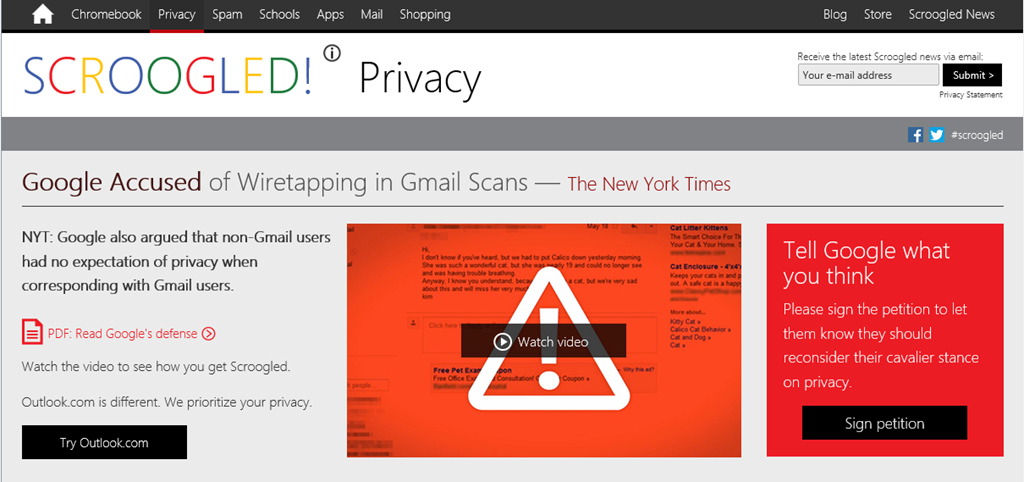
Microsoft in 2013 chose to highlight the privacy risks (among other claimed deficiencies) of engaging with Google through its Scroogled campaign.

image

Some of the concerns raised are valid; but Microsoft is the wrong entity to do this, and the campaign betrays its concern over more mundane risks like losing business: Windows to Android or Chrome OS, Office to Google Docs, and so on. Negative advertising rarely impresses, and I doubt that Scroogled will do much either to promote Microsoft’s services or to disrupt Google. It is also rather an embarrassment.

The red box above suits my theme though. What comes to mind is what in hindsight is one of the most amusing examples of wrong-headed legislation in history. In 1865 the British Parliament passed the first of three Locomotive Acts regulating “road locomotives” or horseless carriages. It limited speed to 4 mph in the country and 2 mph in the town, and required a man carrying a red flag to walk in front of certain types of vehicles.

red-flag

The reason this is so amusing is that having someone walk in front of a motorised vehicle limits the speed of the vehicle to that of the pedestrian, negating its chief benefit.

How could legislators be so stupid? The answer is that they were not stupid and they correctly identified real risks. Motor vehicles can and do cause death and mayhem. They have changed our landscape, in many ways for the worse, and caused untold pollution.

At the same time, the motor vehicle has been a huge advance in civilisation, enabling social interaction, trade and leisure opportunities that we could not now bear to lose. The legislators saw the risks, but had insufficient vision to see the benefits – except that over time, and inevitably, speed limits and other restrictions were relaxed so that motor vehicles were able to deliver the benefits of which they were capable.

My reflection is whether the fears into which the Scroogled campaign attempts to tap are similar to those of the Red Flag legislators. The debate around privacy and data sharing should not be driven by fear, but rather about how to enable the benefits while figuring out what is necessary in terms of regulation. And there is undoubtedly a need for some regulation, just as there is today for motor vehicles – speed limits, safety belts, parking restrictions and all the rest.

Returning for a moment to Microsoft: it seems to me that another risk of its Scroogling efforts is that it positions itself as the red flag rather than the horseless carriage. How is that going to look ten years from now?

Frank comments from Microsoft Product Manager on the Visual Studio 2012 user interface mess. “Secrecy is bad – it lets problems fester”

When Visual Studio 2012 was first previewed, it presented a new IDE style which featured all-caps menus and a mainly monochrome icon set which most developers disliked; the icons were too hard to distinguish. Microsoft has tweaked the design, restored more colour, and I hear fewer complaints today, but that essential design approach remains in Visual Studio 2013.

image

Microsoft product manager Brian Harry has made some frank comments on what happened, in a series of comments beginning here. The comments were made last month, but I had not seen them until today and consider them worth highlighting.

“The implementation of the new UI in 2012 was a mess” says Harry, explaining that the team assigned to create the new look was too small. Worse, it was too secret. “To aggravate this folly, there was a bit of a "cone of secrecy" around the new UI because we didn’t want it "leaking".  Even I didn’t get to see it until months into it,” he writes.

After a strong negative reaction to the preview, “we eventually came to realize we had a crisis on our hands,” says Harry:

Could we have reversed direction, of course.  We debated it vigorously – and for a while, I have to admit, I wasn’t sure.  Ultimately, I concluded that the only way was forward (not that it was actually my decision but I’m just stating my position).  I know some people will disagree with me emphatically and I respect that.  I am in the camp of people who generally like the new UI style.  I know some people think there aren’t any people in that camp but I’ve seen the survey’s and there actually are quite a lot of them.  I do believe there is continued room for improvement and we made some improvements over the past year (the Blue theme, for instance, is very popular – actually Dark is too; Light, not so much).  I’ve gotten completely used to all CAPS menus.  They never bothered me much and now, it just looks normal to me.  Contrast has gotten better.  Icon color has gotten better.  Icon shapes have gotten better.  I’d, personally, still like to see more liberal use of color (Team Explorer is mine and you can see we are a bit more liberal with color than much of VS :))  But all in all, I like the new UI and generally, people internally are happy with it too.

It was a journey and we made mistakes a long the way.  I think the biggest learning was – Don’t kid yourself into thinking you can do a ripple effect feature like that "on the cheap".  Another learning, for me at least, is secrecy is bad – it lets problems fester until they become crises.  Share, share, share.  The feedback is critical to course correction.

Now some observations of my own. My sense is that the flaws in the design stem from over-application of the content-first, “immersive UI” concept which is also seen in Windows 8 “Metro” or “Modern” apps. This concept makes perfect sense if you are browsing the web or reading a document: you want the screen furniture and tools to get out of the way as far as possible. If you are creating content though, the tools become more important. Arguably they become part of the “content”, if you define that as what you are focusing on.

I see the same design error in Microsoft Office 2013, which has a washed-out UI similar in many ways to that in Visual Studio 2012. If you are using Office mainly to consume content, it makes sense, but Office is a content creation tool, and the icons should be more prominent.

I am not sure of the logic behind all-caps menus except that they look vaguely modern and industrial; everybody knows that ALL CAPS is harder to read than lower case or mixed case, so this makes little sense to me.

In neither case is it that big a deal: I can still work productively and you get used to the UI.

Finally, you can tell from Harry’s remarks that the development team at Microsoft went all-out to try and please developers while also satisfying whatever corporate goals (misguided or not) were behind the new style. Kudos to them.

Platform Wars: Google injects Chrome OS into Windows, never mind the poor users

Google announced its Chrome browser in September 2008. Its stated goal was to run web applications better:

What we really needed was not just a browser, but also a modern platform for web pages and applications, and that’s what we set out to build.

Chrome was a hit, thanks to easy install, fast performance, and Google’s ability to advertise it on its own search pages and web applications (as well as some deals with OEM Windows vendors). Today, Chrome is the most popular browser worldwide, according to figures from Statcounter covering desktop, tablet and console browsers:

image

That’s 43.64% versus 22.76% for Microsoft Internet Explorer in second place and 18.9% for Firefox in third.

Most of those users are on Windows. Statcounter also reports that Windows worldwide has a 79.1% market share worldwide – not quite dead – though Windows 8 has a measly 7.29% share, just behind OS X.

Note that these figures are for usage, not current sales, which is one reason why Google’s Chrome S is lost somewhere in “other”.

Today though we are seeing the force of Google’s intention to introduce a “modern platform for web pages and applications”. Chrome version 32, which comes as an automatic update for most users, no longer has the look and feel of Windows. It has thin scroll bars that lack the standard single-step arrows:

image

If you choose the new “Windows 8 mode” which you will find on the Chrome menu, you get something which is neither like desktop Windows, nor like Windows 8. Instead, it is ChromeOS, injected into Windows.

image

Chrome’s “Windows 8” mode only works if you set it as the default browser, and if you choose the Windows 8 mode you lose the desktop version until you select “Relaunch Chrome on the desktop” from its menu.

image

What is the effect of “Windows 8 mode”? It has several advantages for Google:

  • It serves as an introduction to Chrome OS, increasing the chance of selling a Chrome OS device (Chromebook) that does not run Windows at all
  • It hides the desktop, making it more likely that you will choose a Google web app rather than a desktop or Windows 8 app for your next task

However, considered as a “modern” style Windows 8 app, it is poor. It is not touch friendly, it is multi-window, and it ignores the conventions of Windows 8 apps – this is really Chrome OS, remember.

Users are not impressed. The thing they hate most is losing the paging arrows on the scroll bars. Check the long comment thread here. For example:

This is ridiculous, and the "just deal with it" from some developers is really grating. I am -terrified- of when my Chrome will update because even using this page now I’ve used the sidebar & steppers. I have vision problems and I fear this update will make Chrome unusable for me. I’m using Windows and should have my scrollbar harmonised with Windows instead of an operating system I do not use.

This is a strategic move though and unlikely to change. Here are the key official statements in that thread. Here:

This is because we’re switching to the chromeos style. Passing to review-ui to make sure they are ok with this.

and here:

There is no easy way to go back to the previous scrollbars. There was a big change in the graphics stack from chrome 31 to chrome 32 which meant to unify 3 platforms: windows, chromeos and linux and that includes a shared widget theme.

Chrome may lose a few users to IE or Firefox, but it takes lot to get people to switch browsers.

The purpose of this post is to highlight Google’s strategy, rather than to pass judgement on whether or not it is a bad thing. It is part of a strategy to kill the Windows ecosystem, oddly echoing Microsoft’s own strategy of “Embrace, Extend, Extinguish”:

"Embrace, extend, and extinguish", also known as "Embrace, extend, and exterminate", is a phrase that the U.S. Department of Justice found was used internally by Microsoft o describe its strategy for entering product categories involving widely used standards, extending those standards with proprietary capabilities, and then using those differences to disadvantage its competitors.

says Wikipedia.

Speaking personally though, if I am running Windows then I want to take full advantage of Windows, not to have it morph into another OS to suit the goals of a competitor.

Figuring out Project Siena: a Windows 8 app to build Windows 8 apps

A couple of weeks back I took a look at Project Siena, a preview of a new tool for building Windows 8 apps. Project Siena features a simplified user interface builder, an Excel-like expression language, and data-bound controls. It generates Windows 8 JavaScript apps. Project Siena is itself a Windows Store app, and runs fine on Windows RT (the ARM version). I have been using it successfully on Surface 2, on which it runs sweetly.

When I first looked at Project Siena I tried to build the same first app that I have used for numerous simple tests of development tools over the years: a to-do list. I was impressed by how easy it was to create the user interface, but unable to work out the code to complete it. Unless I missed it, the key information is not included in any of the initial documentation. I found this disappointing, since it has been easy to work out the code in every other programming environment I have tried.

I gradually worked it out. Here is the app:

image

The idea is that you have a listbox, an input box, and two buttons. One button takes the contents of the input box and adds it to the list. The other button removes the selected item in the list. All the functionality you need for a to-do list (actually a simple memo control would do, but that would be a bit too simple).

In Siena, data is stored in Collection objects, and you can bind a listbox to a collection. By default, a new listbox is bound to an object called ListboxSample, but you cannot use it for this; if you try, you get a squiggly line error with the message that ListboxSample is not a collection.

image

Instead, you have to create your own collection object. In Siena, you declare a variable by using it and its type is inferred. Enter this for the OnSelect property of the Add button:

Collect(mycollection,{Value: InputText1!Text})

This is the code that took me so long to work out. The Collect function adds an item to a collection. If the collection does not already exist, it creates it. The first argument to Collect is a collection object, and the second, an item. What is an item? In effect, a record or row in a table. The syntax for an item in Siena is:

{Fieldname1: fieldvalue1,Fieldname2: fieldvalue2,…}

where the dots represent additional fields as required. Therefore, the code I entered for the Add button creates or appends an item with a single field, called Value, to a collection called mycollection.

Now you can select the listbox and tap Data and then Items. The collection called mycollection magically appears for selection. Select it. In the case of multi-field collections, you can also choose which field appears in the list. Only one field it seems; yes, Siena needs a grid control.

Then you can run the app, tap Add, and see the content of the input box added to the list.

The Remove button is easy:

Remove(mycollection, Listbox1!Selected)

However, our app has a flaw. The data does not persist. Next time you run the app, the list will be empty. This is easy to fix too. Go back to the OnSelect property of the Add button. Type a semicolon after the existing line of code, and then:

SaveData(mycollection,"mycollection")

This saves the collection to isolated storage on your PC. Alternatively, you could call a web service and save to the cloud, but I am not sure of the code for that yet.

Next, we have to load the data when the app starts. You can use the OnVisible property of the screen for this. Type:

Clear(mycollection);Collect(mycollection,LoadData("mycollection"))

Note that since Collect appends to the collection, we have to clear it first, to avoid duplicate items.

Now the app is complete.

What do I think of Siena after doing this? It certainly has its frustrations, but I like it. I do think that the designers have gone too far in pretending that code is unimportant; it is silly that you have to type into a single line editor. It would also have saved me time if Microsoft had provided a syntax guide and programming guide, rather than concentrating on how to show pretty pictures.

Who is going to use Siena, if anyone? That is the harder question.

Reflecting on 2013: the year of not the PC, no privacy, and the Internet of Things

In last year’s review I wrote “Android up, Apple down, Microsoft so near, so far”. Same again? The headline still rings true, though I would not write “Apple down” today. Android ended Apple’s chance of world domination in mobile, but the company continues to thrive. In some markets Apple is almost the only company that matters. Earlier this month I interviewed Gregor Lawson, the co-founder of Morphsuits, for the Guardian web site. Lawson told me about the company’s mobile app, which he regards as strategically important; it is a free app used for marketing. I did not have space to include this snippet, when I asked him whether he had plans to support Windows Phone alongside Apple iOS and Google Android:

“Oh no. We could almost get away without doing Android. For the business that we track, we have about 80% iOS.”

Simple market share figures do not tell you that. It is a matter of context.

So what did happen in 2013? Here are some headlines.

The year of not the PC

You can safely predict that 2014 will be another year of “The PC is dead” “Oh no it isn’t” exchanges, providing technical commentators with an enduring topic. The PC is not dead; it runs most businesses, it is still the best tool for Office-style productivity, it is an excellent games machine, and a fine open platform for running whatever you want. Its decline is unmistakeable though; for people who can do most of what they need on a tablet, a tablet is a better choice, removing many of the hassles associated with PC ownership and offering portability that a laptop cannot match. Sales figures show that trend and 2013 will be another year of decline for PCs and laptops.

Might that tablet run Windows 8? I will say some more about this in the Microsoft-specific section below; but in summary, there was not sign in 2013 of Windows encroaching in any meaningful way on the iOS/Android tablet market.

The shift away from the desktop is huge for the industry. It continues a trend towards cloud and device which has been obvious for several years, but of which people are now more conscious.

BlackBerry dwindles

I dug out my BlackBerry Playbook (launched in 2011) during my Christmas clear-out. It is a nice little tablet – and the QNX embedded OS on which it is based is great – but it failed in the market for all sorts of reasons, the chief one being that it is neither iOS nor Android. 2013 was the launch year for smartphones running BlackBerry 10 (also QNX based), the Z10 and the Q10, but sales have been equally disappointing. It is a shame as the company did many things right: the operating system is good, the developer evangelism and support before the launch was strong, and the handsets in my brief looks are worthy contenders; but the barriers in front of any company trying to launch a new mobile OS have so far proved too great. Those barriers are to do with app ecosystem, the de-facto lock-in among users who have already purchased apps for their current smartphone and want to carry them over, operator support and marketing, retail support and marketing, and the difficulty of competing against Apple, Google, Nokia and Microsoft. Enterprise security was meant to be the USP for BB10 devices, but there are strong mobile device management solutions for other platforms; in fact, the current wisdom is that BES 10, the BlackBerry mobile device management software which also supports iOS and Android, may now be the future of the company.

The year of no privacy

Humans are not logical creatures, which is the only way to make sense of the no-privacy story of 2013. There are two key sides to this.

One is Edward Snowden’s whistleblowing over the data capture practised by his former employer the NSA (National Security Agency), which according to his reports goes beyond what the public imagines that national security agencies do and caused much consternation and indignation around the world.

The other is the increasing amount of data captured for marketing purposes by Google, mobile operators, internet advertisers, retailers online and offline, and others, about which the public cares very little as far as I can tell. The question is: how much data are we willing to hand over in return for free services, and the answer seems to be, pretty much everything. One or two individuals care about this – Aral Balkan for example – but it is not an issue for most of the public.

I am one who is concerned about this, because data is power, and it strikes me as dangerous to put so much power in the hands of a few large corporations, which are only lightly regulated. How much it really matters is open to debate; we are sailing into the unknown.

Turning this around for a moment, for many businesses the ability to make intelligent use of what has become known as “big data” is now critical.

Wearable computing on the rise

A nod here to wearable computing, with the big story being the previews of Google Glass, embedded Android with camera, Bluetooth and Wi-Fi which is clipped to the side of your head and responds to voice control. It may or may not succeed in the market, and makes another bullet point for the Year of No Privacy, but it is a fascinating experiment with huge potential.

It is not just Google Glass. Devices like fitbit and Nike+ FuelBand monitor our movements for the purpose of fitness tracking and will become commonplace – more data, more possibilities, less privacy. Privacy aside, there is no doubting the potential of such devices to improve health, not only by encouraging exercise, but moving on into things like early warning of heart problems and better data on the effectiveness of different treatments.

The Internet of Things

Wearable computing is one facet of a wider field called the Internet of Things (IoT). I was fortunate to attend ThingMonk, a London event organised by analyst company RedMonk, which gave me several insights. 

image

Claire Rowland at AlertMe.com talks UX for IoT at ThingMonk, next to an internet-connected coffee machine.

One is that IoT will change our lives, mostly in a good way. Ubiquitous small wi-fi enabled computers will get everywhere, talk to sensors, and connect with web services to make our lives mostly better. Home appliances will report service requirements to engineers before we know, moving maps on our SmartPhone will show where our bus has got to, luggage will phone home, and so on.

For businesses, IoT ability will be an important product differentiator, initially at the high end, but increasingly throughout the market in some sectors; motor vehicles is an example.

At the same time, it was evident from ThingMonk that the IoT world is full of ideas not all of which are practical and plenty of mistakes will be made.

It was also evident that lack of standards will hold back the IoT. Vendors will each prefer to use unpublished APIs and proprietary protocols, to protect their business, even though open standards and published APIs would enable more innovation and be a public benefit.

Microsoft in transition

2013 was the year Microsoft lost a CEO (Steve Ballmer announced his retirement) but failed to gain one (no successor has yet been announced). It is a difficult appointment: does Microsoft need an outsider with new ideas, or simply an insider with the ability to execute on the strategy that is already in place? My view is that the latter is likely to work out better. Oddly, the company announced strong financials despite the decline of the PC, which is why regard the tendency of the media to equate the decline of the Windows client with the decline of Microsoft puzzling at times.

Growth areas in the last set of figures were own-brand hardware (Xbox and Surface), server and tools, and cloud services including Office 365 and Azure.

It is possible that 2014 will be the year when Microsoft unveils a dreadful set of figures but I have been waiting for this a long time.

Nevertheless, Microsoft’s traditional software business is under threat, not only from PC decline but also from cloud computing. Weakness in mobile might help competitors (especially Google) promote rival cloud services.

Microsoft also needs to up its game in quality and performance. Bugs in SkyDrive on Windows 8.1 cost me data this year. I edited an article, saved it to SkyDrive, attached it to an email, but the recipient got an old version. It is extraordinary that Microsoft has yet to get sync right after so many years of trying. Another annoyance is the slowness of Microsoft web properties at times, including Bing.

As always, this will be a fascinating company to watch in 2013.

  • Can Microsoft continue to do whatever Nokia was doing right with Windows Phone, so that market share grows?
  • Will the Windows 8 “Metro” platform build some real momentum as market penetration improves?
  • What will the promised unification of phone and tablet platforms look like for developers?
  • How will Xbox One fare against PlayStation 4, given its higher price and lesser graphics power, but greater innovation with Kinect 2 and voice control?
  • At what point does growth in cloud computing mean that growth in on-premise server licenses will stall?

Twitter, Google, Facebook free services get worse

Twitter got worse in 2013. More sponsored posts and the appearance of inline images on the web site mean that for me the appeal of the controlled, short-form feed which made Twitter great has been diluted. Google search got worse in 2013, with more ads and more brand-driven results, and its insistence on putting Google+ at the centre of its services became an annoyance. Facebook too is increasingly commercial.

These are businesses after all. Overall though, it seemed that the web got more proprietary in 2013.

Social media: the good and the bad

During much of 2013 I edited a section on the Guardian web site focused on social media marketing. The opportunity to talk to many experts in the field has been illuminating. Social media is not a short-term fashion; rather, it has changed the way we interact with each other and made it richer and more public. It is also changing marketing, and not just marketing, but the way businesses engage with their customers and potential customers.

Speaking for myself, user reviews on the likes of TripAdvisor and Amazon are now a significant influence on my purchasing decisions. Despite the fact that such platforms are gamed by vendors, overall I believe I am making better decisions as a result. Whether or not I am right about that, the influence is real.

The positive aspect of social media is the opportunity it presents for businesses to be better informed and more responsive to customer needs, and the increasing power of customer opinion to influence others, resulting in better products and more responsible behaviour.

Negatively though, social media marketing means that our public interactions with friends are now invaded by brands looking for a marketing opportunity, enabled by social media platforms which are monetized by selling our personal data (though hopefully anonymized) and access to our social media feeds. When that vendor interaction is shallow and one-sided, it leaves a sour taste.

The good outweighs the bad in my opinion, though see again the note above on the Year of No Privacy.

Personal hopes for 2014

A few personal hopes for me to review this time next year:

  • A redesigned ITWriting.com, probably on a new cloud platform, as time and funds allow
  • A converged device that works for me, so a smartphone can be good enough (for my specialised purposes) as phone, camera and recording device
  • Complete my Windows 8 game; I am working on it and will write up the experience in due course!

Happy New Year!

Do you miss manuals? Why and why not …

It’s that time of year. I keep more than I should, but now and again you have to clear things out. I don’t promise to dispose of all of these though: they remind me of another era, when software came in huge boxes packed with books.

image

If you purchased Microsoft Office, for example, you would get a guide describing every feature, as well as an Excel formula reference, a Visual Basic reference and so on.

If you purchased a development tool, you would get a complete language reference plus a guide to the IDE plus a developer guide.

The books that got most use in my experience were the references – convenient to work on a screen while using a book as reference, especially in the days before multiple displays – and the developer guides. You did not have to go the way the programmer’s guide suggested, but it did give you a clue about how the creators of the language or tool intended that it should be used.

Quality varied of course, but in Microsoft’s case the standard was high. When something new arrived, you could learn a lot by sitting down with just the books for a few hours.

What happened to manuals? Cost was one consideration, especially as many were never opened, being duplicates of what you had already. Obsolescence went deeper than that though. Manuals were always out of date before they printed, especially when update distribution was a download rather than a disk sent out by support (which means from the nineties onward).

Even without the internet, manuals would have died. Online help is cheaper to distribute and integrates with software – press F1 for help.

Then add the power of the web. Today’s references are online and have user comments. Further, the web is a vast knowledgebase which, while not wholly reliable, is far more productive than leafing through pages and pages trying to find the solution to some problem that might not even be referenced. In many cases you could post a question to StackOverflow and get an answer more quickly.

Software has bloated too. I am not sure what a full printed documentation set for Visual Studio 2013 would look like, but it would likely fill a bookshelf if not a room.

When software companies stopped sending out printed manuals, the same books were produced as online (that is, local, but disk-based) help. Then as the web took over more help went to the web, and F1 would either open the web browser or use a help viewer that displayed web content. There are still options for downloading help locally in many development tools.

Nothing to miss then? I am not so sure. It strikes me that the requirement to deliver comprehensive documentation was a valuable discipline. I wonder how many bugs were fixed because the documentation team raised a query about something that did not seem to work right or make sense?

Another inevitable problem is that since documentation no longer has to be in the box (or in the download), some software is delivered without adequate documentation. You are meant to figure it out via videos, blog posts, online forums, searches and questions.

A good documentation team takes the side of the user – whether end user, developer, or system administrator, depending on context. They write the guide by trying things out, and goad the internal developers to supply the information on what does and does not work as necessary. That can still happen today; but without the constraint of having to get books prepared it often does not.

Microsoft Project Siena: another go at the spirit of Visual Basic

Remember Visual Basic? By which I mean, not the current language that is a case-insensitive alternative to C# that does much the same thing, but the original rapid app development tool that democratised Windows development back in 1991. At the time, Windows development was a sought-after skill but rather difficult. VB meant anyone could create an application; pros could build excellent ones, amateurs something ugly and unmaintainable, but nevertheless something that worked. The transition to .NET brought many benefits, but also more complexity. The latest evolution of the Windows client, the Windows Runtime, is also challenging to get right (I am currently writing a simple C# game on the platform).

Microsoft has been looking for a new “VB” for years. 2007: Popfly (now abandoned). 2011: Lightswitch. Now we have Project Siena.

image

Siena is an app for building apps. An app is a Siena document with a .siena extension. Here is what Microsoft’s Bryan Group says:

Microsoft Project Siena (code name) is the beta release of a new technology for business experts, business analysts, consultants, and other app imagineers. Now, without any programming, you can create powerful apps for the device-first and cloud-connected world, with the potential to transform today’s business processes.

Building Siena apps is as easy as editing a document. Place some visuals on a canvas. Hook them up to your data. Customize how your app looks and works. Then, if you need special logic and intelligence, write Excel-like expressions. You can use your app immediately, or share it with colleagues or the world.

This sounds great to me. I installed it and set about building an app. I decided to create the same app I have used to try out dozens of programming tools over the years: a to-do list with the ability to add and remove tasks

image

Building the user interface went OK, but how do I add and remove items from the list? I have got as far as figuring out that I need to type the right magic into the OnSelect property of a button:

image

I will let you know when I have worked out what to do next. I will observe that the environment is geared towards data binding, rather than directly updating the user interface, and remote data, such as binding to tables in Azure Mobile Services, a REST API, an RSS feed or a SharePoint list. However you can also bind to an Excel spreadsheet for local data.

Unfortunately there is no “Run” button. You can preview your Siena app by pressing F5 or tapping the Run button in the top app bar.

To deploy your Siena app, you hit Publish:

image 

This creates a package of files, including InstallApp.exe. Siena generates HTML and JavaScript so you can learn a lot about the environment by poking around in the generated files.

image

Run InstallApp.exe and the app installs into your local PC. Mine runs fine, it just does not work yet.

Siena, as is usual for this type of release, suffers from lack of documentation. There is a function reference and a few sketchy help topics. There are also some sample apps. Here is what the Personnel Manager has in the OnSelect of its Add button; perhaps this is a clue:

UpdateIf(Assoc,ID = ThisItem!ID,{AssignedTo:SelectedDepartment, Time:Now()}); RemoveIf(SelectedAssociates, ID = ThisItem!ID)

While it is great to have a genuinely easy visual interface builder, the development features of Visual Studio are greatly missed; the code editor as far as I can tell is limited to a single line in a text input field, though you do get a squiggly underline if you do it wrong, and a bit of code completion.

How is the average “business expert, business analyst, consultant, and other app imagineer” going to get on with Project Siena? That is the question; and in the current preview I’d guess they will be flummoxed and go straight back to Excel or Access, though I would love to be proved wrong.

It looks like a lot of work has gone into this though, and no doubt better documentation and enhanced features are on the way.

2013: the web gets more proprietary. So do operating systems, mobile, everything

There may yet be an ITWriting review of the year; but in the meantime, the trend that has struck me most this year has been the steady march of permission-based, fee-charged technology during the course of the year, even though it has continued trends that were already established.

The decline of Windows and rise of iOS and Android is a great win for Unix-like operating systems over Microsoft’s proprietary Windows; but how do you get apps onto the new mobile platforms? In general, you have to go through an app store and pay a fee to Apple or Google (or maybe Amazon) for the privilege of deployment, unless you are happy to give away your app. Of course there are ways round that through jailbreaks of various kinds, but in the mainstream it is app stores or nothing.

The desktop/laptop model may be an inferior experience for users, but it is more open, in that vendors can sell software to users without paying a fee to the operating system vendor.

Microsoft though is doing its best to drive Windows down the same path. Windows Phone uses the app store model, and so does the “Metro” personality in Windows 8 – hence the name, “Windows Store apps”.

What about the free and open internet? That too is becoming more proprietary. Of course there is still nothing to stop you putting up a web site and handing out the URL; but that is not, in general, how people navigate to sites. Rather, they enter terms into a search engine, and if the search engine does not list your site near the top, you get few visitors.

In this context, I was fascinated by remarks made by Morphsuits co-founder Gregor Lawson in an interview I did for the Guardian web site. His business makes party costumes and benefits from a strong trademarked brand name. Yet he finds that he has to pay for Google ads simply to ensure that a user who types “morphsuits” into a search engine finds his site:

Yes, it is galling, it really is galling," he says. "We are top of the organic search, but we also have to pay. The reason is that some people like organic, some people like to click on ads. Google, in their infinite wisdom, are giving more and more space to the ads because they get money for the ads. So I have to pay to be in it.

It is also worth noting that when you click a link on Google, whether it is a search result or an ad, it is not a direct link to the target site. Rather, it is a link which redirects to that site after storing a database record that you clicked that link. If you are logged into Google then the search giant knows who you are; if you are not logged in, it probably knows anyway thanks to cookies, IP numbers or other tracking techniques. It does this in order to serve you more relevant ads and make more money.

Of course there are other ways to drive traffic, such as posting on Facebook or Twitter – two more proprietary platforms. As this internet properties grow and become more powerful, they change the rules in their favour (which they are entitled to do) but it does raise the question of how this story will play out over time.

For example, Lawson complains in the same interview that if he posts a message on Facebook, it will not be seen by the majority of Morphsuits fans even though they have chosen to like his Facebook page. Only if he pays for a promoted post can he reach those fans.

The power of Facebook must not be understated. One comment I heard recently is that mobile users on average now spend more time in Facebook than browsing the web and by some margin.

Twitter is better in this respect, though there as well the platform is changing, with APIs withdrawn or metered, for example, to drive users to official Twitter clients or the web site so that the user experience is controlled, ads can be delivered and so on.

These are observations, not value judgements. Users appreciate the free services they get from platforms like Google, Facebook and Twitter, and are happy to give up some freedom and share some personal data in return.

The question I suppose is how much power we are ceding to these corporations, who have the ability to make or break businesses and to favour their own businesses at the expense of others, and the potential abuse of that power at some future date.

I appreciate that most people do not seem to care much about these issues, and perhaps they are right not to care. I will give a shout out though to Aral Balkan who is aware of the issues and who created indiephone as a possible answer – an endeavour that has only small chance of success but which is at least worth noting.

Meanwhile, I expect the web, and mobile, and operating systems, to get even more proprietary in 2014 – for better or worse.