Category Archives: microsoft

System Center 2012, Windows 8 and the BYOD revolution

Yesterday I attended a UK Microsoft MMS catch-up session in Manchester, aimed at those who could not make it to Las Vegas last month. The subject was the new System Center 2012, and how it fits with Microsoft’s concept of the private cloud, and its strategy for supporting Bring Your Own Device (BYOD), the proliferation of mobile devices on which users now expect to be able to receive work email and do other work.

The session, I have to say, was on the dry side; but taken on its own terms System Center 2012 looks good. I was particularly interested in how Microsoft defines “private cloud” versus just a bunch of virtual machines (JBVM?). Attendees where told that a private cloud has four characteristics:

  • Pooled resources: an enterprise cloud, not dedicated servers for each department.
  • Self service: users (who might also be admins) can get new server resources on demand.
  • Elasticity: apps that scale on demand.
  • Usage based: could be charge-back, but more often show-back, the ability to report on what resources each user is consuming.

Microsoft’s virtualization platform is based on Hyper-V, which we were assured now represents 28% of new server virtual machines, but System Center has some support for VMWare and Citrix Xen as well.

System Center now consists of eight major components:

  • Virtual Machine Manager: manage your private cloud
  • Configuration Manager (SCCM): deploy client applications, manage your mobile devices
  • Operations Manager: monitor network and application health
  • Data Protection Manager: backup, not much mentioned
  • Service Manager: Help desk and change management, not much mentioned
  • Orchestrator: a newish product acquired from Opalis in 2009, automates tasks and is critical for self-service
  • App Controller: manage applications on your cloud
  • Endpoint protection: anti-malware, praised occasionally but not really presented yesterday

I will not bore you by going through this blow by blow, but I do have some observations.

First, in a Microsoft-platform world System Center makes a lot of sense for large organisations who do not want public cloud and who want to move to the next stage in managing their servers and clients without radically changing their approach.

Following on from that, System Center meets some of the requirements Microsoft laid out as the start of the session, but not all. In particular, it is weak on elasticity. Microsoft needs something like Amazon’s Elastic Beanstalk which lets you deploy an application, set a minimum and maximum instance count, and have the platform handle the mechanics of load balancing and scaling up and down on demand. You can do it on System Center, we were told, if you can write a bunch of scripts to make it work. At some future point Orchestrator will get auto scale-out functionality.

Second, it seems to me unfortunate that Microsoft has two approaches to cloud management, one in System Center for private cloud, and one in Azure for public cloud. You would expect some differences, of course; but looking at the deployment process for applications on System Center App Controller it seems to be a different model from what you use for Azure.

Third, System Center 2012 has features to support BYOD and enterprise app stores, and my guess is that this is the way forward. Mobile device management in Configuration Manager uses a Configuration Manager Client installed on the device, or where that is not possible, exploits the support for Exchange ActiveSync policies found in many current smartphones, including features like Approved Application List, Require Device Encryption, and remote wipe after a specified number of wrong passwords entered.

The Software Center in Configuration Manager lets users request and install applications using a variety of different mechanisms under the covers, from Windows Installer to scripts and virtualised applications.

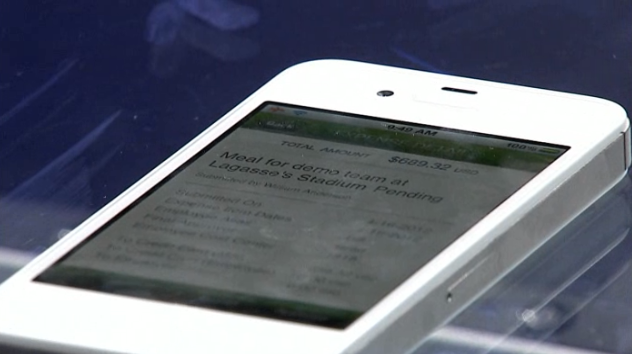
Where this gets even more interesting is in the next version of InTune, the cloud-based PC and device management tool. We saw a demonstration of a custon iOS app installed via self-service from InTune onto an iPhone. I presume this feature will also come to Software Center in SCCM though it is not there yet as far as I aware.

You can also see this demonstrated in the second MMS keynote here – it is the last demo in the Day 2 keynote.

image

InTune differs from System Center in that it is not based on Windows domains, though you can apply a limited set of policies. In some respects it is similar to the new self-service portal which Microsoft is bringing out for deploying Metro apps to Windows RT (Windows on ARM) devices, as described here.

This set me thinking. Which machines will be easier to manage in the enterprise, the Windows boxes with their group policy and patch management and complex application installs? Or the BYOD-style devices, including Windows RT, with their secure operating systems, isolated applications, and easy self-service app install and removal?

The latter approach seems to me a better approach. Of course most corporate apps do not work that way yet, though app virtualisation and desktop virtualisation helps, but it seems to me that this is the right direction for corporate IT.

The implication is two-fold. One is that basing your client device strategy around iPads makes considerable sense. This, I imagine, is what Microsoft fears.

The other implication is that Windows RT (which includes Office) plus Metro apps is close to the perfect corporate client. Microsoft VP Steven Sinofsky no doubt gets this, which is why he is driving Metro in Windows 8 despite the fact that the Windows community largely wants Windows 7 + and not the hybrid Metro and desktop OS that we have in Windows 8.

Windows 8 on x86 will be less suitable, because it perpetuates the security issues in Windows 7, and because users will tend to spend their time in familiar Windows desktop applications which lack the security and isolation benefits of Metro apps, and which will be hard to use on a tablet without keyboard and mouse.

A little colour returns to Visual Studio 11 – but not much

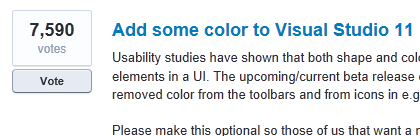
Microsoft has responded to user feedback by re-introducing colour into the Visual Studio 11 IDE. The top request in the official feedback forum was for more colour in the toolbars and icons.

image

Now Microsoft’s Monty Hammontree, who is Director of User Experience, Microsoft Developer Tools Division – it is interesting that such a post exists – has blogged about the company’s response:

We’ve taken this feedback and based on what we heard have made a number of changes planned for Visual Studio 11 RC.

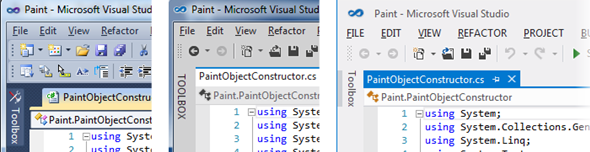
That said, developers expecting a return to the relatively colourful icons in Visual Studio 2010 will be disappointed. Hammontree posted the following side by side image:

image

This shows Visual Studio 10 first, then the beta, and then the forthcoming release candidate. Squint carefully and you can see a few new splashes of colour.

image

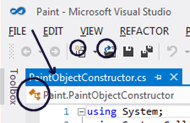
You can also see the the word toolbox is no longer all upper case, another source of complaint.

Hammontree explains that colour has been added to selected icons in order to help distinguish between common actions, differentiate icons within the Solution Explorer, and to reintroduce IntelliSense cues.

Did Microsoft do enough? Some users have welcomed the changes:

You have to appreciate a company that listens to there [sic] users and actually makes changes based off feedback. You guys rock!

while others are doubtful:

with respect, I fear that the changes are token ones and that whoever’s big idea this monochromatic look is, is stubbornly refusing to let go of it in spite of the users overwhelming rejection of it.

or the wittier:

I’m glad you noticed all the feedback about the Beta, when people were upset that you chose the wrong shade of gray.

While the changes are indeed subtle, they are undoubtedly an improvement for those hankering for more colour.

Another issue is that by the time a product hits beta in the Microsoft product cycle, it is in most cases too late to make really major changes. The contentious Metro UI in Windows 8 will be another interesting example.

That said, there are more important things in Visual Studio 11 than the colour scheme, despite the attention the issue has attracted.

Microsoft re-imagining client computer management for Windows 8

I am surprised this post by Microsoft Program Manger Jeffrey Sutherland has not attracted more attention. It describes enterprise app deployment to Windows on ARM devices, now officially called Windows RT devices. These devices run Windows 8 compiled for ARM, which means high efficiency but a greater degree of lockdown than with x86. In particular, desktop applications cannot be installed, though Microsoft Office is pre-installed, but without Outlook.

The interesting aspect is that what Sutherland describes is not just a way of managing Windows RT computers, but a new approach which fits with the trend towards BYOD – Bring Your Own Device – where employees use their own devices for work as well as at home.

Quick reminder: in the old model, Windows clients are managed by being joined to a domain, controlled by Active Directory. Once domain-joined, the machine is subject to group policy administered by the domain, a fine-grained system for configuring settings and deploying applications.

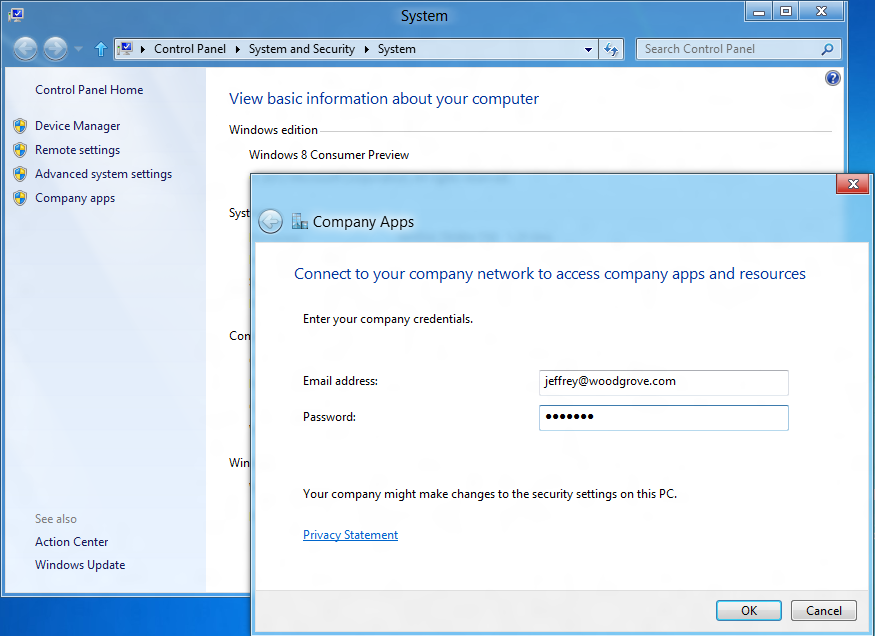
Windows RT devices cannot be joined to a domain. However, there is a new option in Control Panel to “connect to your company network”.

image

Note that the user must still be joined to the Active Directory domain. Since this is now joining the machine to the network and subjecting it to a degree of centralised control, Windows RT network joining is conceptually not far distant from domain joining, but it is a completely new approach.

The next step is to install a management agent which communicates with the Enterprise network.

Once network-joined and with the agent installed, the machine:

  • Is subject to a set of security policies covering password and logon rules (eg whether to allow picture logons)
  • Is audited for antivirus and antispyware status, drive encryption and auto-update; network connection can be refused if not compliant
  • Will lock encrypted drives if wrong password is entered repeatedly
  • can automatically set up a VPN profile for network access
  • enables access to a self-service portal (SSP), operated by the enterprise, for app deployment
  • can be deactivated which renders all SSP-deployed apps inoperable

The SSP can deploy custom or third-party Metro apps, but can also include links to the Windows store and web links to web application.

Microsoft envisages the above tools being used both for company-owned and employee-owned Windows RT devices. One advantage over domain-joining is that it is less intrusive to the user. When you domain-join a Windows PC, it creates a new user profile on the machine, which can be a nuisance if the user wants to use the machine for non-work purposes; they have to either switch profiles or use the work profile for home as well.

Metro-style apps are inherently better suited for intermingling business and home, since they are isolated from one another and from the operating system.

This new approach is not only for Windows RT machines but works on x86 as well:

We do support this functionality on x86. However, x86 also has a load more management functionality through Domain membership, Group Policy and existing tools like System Center.

says Microsoft’s Iain McDonald in the comments.

Although it is true that the old domain-joined model offers a higher degree of control, Windows RT should have security advantages thanks to the lockdown preventing desktop applications from being installed, which will restrict malware.

Windows computer domains are not going away, but BYOD and the trend towards cloud computing will gradually reduce the number of domain-joined machines. For example, a small business using Small Business Server will usually domain-join all its machines, but a small business using Office 365 will usually not do so.

I should add that although the approach outlined above is great for simplicity and flexibility, the fatal flaw for many organisations will be its dependence on Metro-style apps. If you have any Windows desktop apps to deploy, then it will not work.

Nokia Lumia strategy needs time, may not have it

A quick comment on Nokia’s dismal results for the first quarter of 2012. Sales are down 26% quarter on quarter; Smartphone sales down 38% despite the introduction of the Lumia Windows Phone in Europe. Negative operating margin, heavy losses.

The reasons given?

  • competitive industry dynamics continuing to negatively affect the Smart Devices and Mobile
    Phones business units;
  • timing, ramp-up, and consumer demand related to new products; and
  • the macroeconomic environment.

Translation: the new Lumias are failing to compete effectively against Apple iPhone and Google Android devices.

I have a Lumia 800 and like it increasingly. It is elegant and nice to hold, it works well, and Nokia Drive makes an excellent SatNav, to mention three good things.

image

Nevertheless, I am not surprised by the poor sales. When I first got the Lumia its battery life was poor; it is still not great, but was much improved by the last firmware update I installed (1600.2487.8107.12070), for which I had to use a manual process.

There was also an aggravating problem where if the phone ran out of power completely, it could not easily be charged. In other words, it was nearly a brick, though I managed to coax it back to life by repeatedly reconnecting the charger. The problem seems to be fixed with the latest update.

I do not think my experience is untypical, and can see that while in one sense it is a great phone, from another perspective it qualifies as buggy and problematic; I expect returns were above average.

The problems are fixable, but with hindsight Nokia should have worked that bit harder to ensure a trouble-free launch. The US launch of the Lumia 900 may be better since the company has had a little more time to improve quality, though there was a data connection bug.

Everything to prove

The bigger problem is that Windows Phone has everything to prove; iPhone and Android dominate the market, so the Lumia has to be sufficiently better to win customers over to a braver choice.

App availability is another factor. Windows Phone is not on the radar for most app vendors – because its market share is too small.

Despite a few lapses, I have been impressed with what I have seen of Nokia’s Windows Phone efforts. Nokia’s marketing and developer evangelism has been far better than Microsoft’s. At Mobile World Congress in February Microsoft had a large stand but was mainly doing silly “smoked by Windows Phone” demos, while Nokia’s stand was humming with activity.

Microsoft more to blame than Nokia

I also incline to the view that Microsoft is more to blame than Nokia – except insofar as Nokia could have made a different choice of partner.

Windows Phone 7 was nicely designed but badly launched, more than a year before the Lumia appeared. The launch hardware was uninteresting and Microsoft failed to line up strong operator or retail support for its devices. Microsoft focused on quantity rather than quality in the Windows Phone app store, resulting in a mountain of rubbish there.

The pace of development in the Windows Phone 7 operating system has also been rather slow, but the issues are more to do with marketing and partner support than with the OS itself.

Nokia has gone some way towards fixing the issues. Its devices are better, and so is its marketing. It is unlikely though that Nokia can succeed unless Microsoft also ups its smartphone game.

The future

Microsoft’s strategy for Windows Phone and Windows 8, as far as I am aware, does make some sense. We will see convergence of the operating system, improved tool support with an option for native code development, and a coherent cloud story.

This will take time to unfold though. It also seems likely that Windows 8 will have a rocky launch, with desktop users disliking the Metro-style elements imposed for the sake of tablet support. Nokia has indicated that it will be producing Windows 8 tablets as well as phones, but whether this will be an instant hit is at the moment uncertain.

Who knows, perhaps it will be Windows 9 before Microsoft really makes its tablet strategy work.

The problem is that Nokia does not have time to wait while Microsoft sorts out its mobile phone and tablet strategy. It needs quick success.

Two final thoughts.

First, Microsoft can hardly afford to see Nokia fail, so some sort of acquisition would not surprise me.

Second, how difficult would it be for Nokia to bring out some Android smartphones alongside its Windows range? Currently we are told that there is no plan B, but perhaps there should be.

Microsoft results: old business model still humming, future a concern

Microsoft has published its latest financials. Here is my at-a-glance summary:

Quarter ending March 31st 2012 vs quarter ending March 31st 2011, $millions

Segment Revenue Change Profit Change
Client (Windows + Live) 4624 +177 2952 +160
Server and Tools 4572 +386 1738 +285
Online 707 +40 -479 +297
Business (Office) 5814 +485 3770 +457
Entertainment and devices 1616 -319 -229 -439

What is notable? Well, Windows 7 is still driving Enterprise sales, but more striking is the success of Microsoft’s server business. The company reports “double-digit” growth for SQL Server and more than 20% growth in System Center. This seems to be evidence that the company’s private cloud strategy is working; and from what I have seen of the forthcoming Server 8, I expect it to continue to work.

Losing $229m in entertainment and devices seems careless though the beleaguered Windows Phone must be in there too. Windows Phone is not mentioned in the press release.

Overall these are impressive figures for a company widely perceived as being overtaken by Apple, Google and Amazon in the things that matter for the future: mobile, internet and cloud.

At the same time, those “things that matter” are exactly the areas of weakness, which must be a concern.

A bug in embedded Internet Explorer in Windows 8

Long-time readers of this site may remember that I did some work on embedding Internet Explorer, and its core rendering component MSHTML, in .NET applications. The code is still online.

I noticed that it does not work properly in Windows 8 Consumer Preview. Specifically, plain HTML works but you can no longer apply external CSS stylesheets. I reported the bug here (sign-in required).  I did not use my own component, but rather the standard WebBrowser control. I have appended the code to reproduce the bug in case you cannot see the report.

Microsoft has now responded as follows:

We were able to validate your feedback. However, based on the limited impact this bug may have, we will not be able to address this bug during this release.

This status is also known as “won’t fix” and gives me pause for thought. How many other little bugs are there which Microsoft is not fixing, but which break a certain number of applications?

If you are one of those few people using embedded IE in an application, I suggest checking Windows 8 compatibility now to avoid any unpleasant surprises.

Perhaps it would be preferable to use WebKit or Gecko (Mozilla) rather than IE in any case. There is a thread on stackoverflow that discusses some options. OpenWebKitSharp looks promising.

Code to reproduce the bug:

Create a Windows Forms application in C# in VS 11. Add a Webbrowser control and two buttons, and an OpenFileDialog control. Also add a reference to the COM library Microsoft HTML Object Library.

Here is the code for the first button that loads some HTML:

string sHTML = "<html><head><title>Some title</title></head><body><p>Some text</p></body></html>";
this.webBrowser1.DocumentText = sHTML;

Here is the code for the second button that applies a stylesheet:

openFileDialog1.Filter = "CSS files|*.css";
if (openFileDialog1.ShowDialog() == DialogResult.OK)  {
mshtml.HTMLDocument doc = (mshtml.HTMLDocument)this.webBrowser1.Document.DomDocument;
doc.createStyleSheet(openFileDialog1.FileName);
}

This is the stylesheet I am applying:

body
{
    font-family: Arial;
    font-size: 18pt;
}

To reproduce, run the application. Click the first button to load the HTML. Then click the second button to apply the stylesheet. In Windows 7 and earlier the stylesheet is applied. In Windows 8, the stylesheet is not applied.

UPDATE: It seems this bug was fixed in Windows 8 RTM, despite the “will not fix” designation. Good.

Windows 8 to be called Windows 8, no Outlook on ARM

Microsoft has announced the range of editions planned for Windows 8, which is now the official name (previously it was a code name).

Here is what I found interesting. Windows on Arm (WOA) is now called Windows RT and ships with Office included. However, Outlook is not included, confirming my suspicion that Outlook may gradually get de-emphasised in favour of separate email, calendar and task managers built into the operating system but with strong Exchange support – a good move since Outlook is perhaps the most confusing and over-complex application that Microsoft ships.

Windows RT is missing some features which are in the Intel versions, not least the ability to install desktop software, but has an unique feature of its own: device encryption.

I consider Windows RT as critical to the success of the Windows 8 project, and the only edition that may compete effectively with the Apple iPad in terms of price, convenience, battery life and usability. That said, the market will see the Intel version as primary, since it is the one that can run all our existing apps, but all the legacy baggage will also weigh it down. Users will suffer the disjunction between Metro and Desktop, and will need mouse or stylus and keyboard to use desktop applications. The danger is that Windows RT will get lost in the noise.

Windows Phone and Windows 8 convergence: a few more hints from Microsoft

The moment when Nokia is in the midst of the US launch for its Lumia 900 phone, which both Nokia and Microsoft hope will win some market share for Windows Phone 7, is not the best time to talk about Windows Phone 8 from a marketing perspective. Especially when Windows Phone 8 will have a new kernel based on Windows 8 rather than Windows CE, news which was leaked in early February and made almost official by writer Paul Thurrott who has access to advance information under NDA:

Windows Phone 8, codenamed Apollo, will be based on the Windows 8 kernel and not on Windows CE as are current versions. This will not impact app compatibility: Microsoft expects to have over 100,000 Windows Phone 7.5-compatible apps available by the time WP8 launches, and they will all work fine on this new OS.

Nevertheless, Microsoft is talking a little about Windows Phone 8. Yesterday Larry Lieberman posted about the future of the Windows Phone SDK. After echoing Thurrott’s words about compatibility, he added:

We’ve also heard some developers express concern about the long term future of Silverlight for Windows Phone. Please don’t panic; XAML and C#/VB.NET development in Windows 8 can be viewed as a direct evolution from today’s Silverlight. All of your managed programming skills are transferrable to building applications for Windows 8, and in many cases, much of your code will be transferrable as well. Note that when targeting a tablet vs. a phone, you do of course, need to design user experiences that are appropriately tailored to each device.

Panic or not, these are not comforting words if you love Silverlight. Lieberman is saying that if you code today in Silverlight, you had better learn to code for WinRT instead in order to target future versions of Windows Phone.

The odd thing here is that while Lieberman says:

today’s Windows Phone applications and games will run on the next major version of Windows Phone.

(in bold so that you do not doubt it), he also says that “much of your code will be transferrable as well”. Which is equivalent to saying “not all your code will be transferrable.” So how is it that “non-transferrable code” nevertheless runs on Windows Phone 8 if already compiled for Window Phone 7? It sounds like some kind of compatibility layer; I would be interested to know more about how this will work.

I was also intrigued by this comment from Silverlight developer Morton Nielsen:

Its really hard to sell this investment to customers with all these rumors floating, and you only willing to say that my skill set is preserved is only fuel onto that. The fact is that there is no good alternative to Silverlight, and its an awesome solution for distribution LOB apps, but the experience on win8 is horrible at best. And it doesn’t help that the blend team is ignoring us with a final v5, and sl5 is so buggy it needs 100% DEET but we don’t see any GDRs any longer.

What are these acronyms? DEET just means insect repellent, ie. bug fixes. GDR is likely “General Distribution Release”; I guess Nielsen is saying that no bug-fix releases are turning up are turning up for Silverlight 5, implying that Microsoft has abandoned it.

All in all, this does not strike me as a particularly reassuring post for Windows Phone developers hoping that their code will continue to be useful, despite Lieberman’s statement that:

I hope we’ve dispelled some of your concerns

Still, it has been obvious for some time that WinRT, not Silverlight, is how Microsoft sees the future of its platform so nobody should be surprised.

Update: Several of you have commented that Lieberman talks about WinRT on Windows 8 not on Windows Phone 8. Nobody has said that WinRT will be on Windows Phone 8, only that the kernel will be the that of Windows 8 rather than Windows CE. That said, Lieberman does specifically refer to “the long term future of Silverlight for Windows Phone” and goes on to talk about WinRT. The implication is that WinRT is the future direction for Windows Phone as well as for Windows 8 on tablets. Maybe that transition will not occur until Windows Phone 9; maybe Windows Phone as an OS will disappear completely and become a form factor for Windows 8 or Windows 9. This aspect is not clear to me; if you know more, I would love to know.

Run Metro apps in a window on Windows 8

I have been drilling into Visual Studio 11 beta recently. This includes a simulator for debugging Windows 8 Metro style apps and I was surprised by the way it works. Unlike the Windows Phone emulators, which are isolated environments for testing apps, the simulator is actually a window into your own machine.

image

You can do some strange stuff. For example, you can not only debug your app in the simulator, you can run up Visual Studio 11 on the desktop within the simulator and edit it as well. It will not let you run the simulator within the simulator though – I tried!

It occurred to me that the metro simulator accomplishes one of the things some users of the consumer preview have asked for. It lets you run Metro apps in a window, so that you can resize them, minimize them, and avoid the jarring context switch between full-screen Metro and the normal desktop with the taskbar.

image

What is the simulator? It is actually a remote desktop session into your own machine. Normally you cannot do this, as Windows client only allows one session at a time and you already have one running, but Microsoft has given itself special permission.

Running Metro apps in a windows is not its intended purpose but it is interesting to try as it shows how this might have worked if Microsoft had taken a more desktop-centric approach to the dual personality in Windows 8.

A further thought is to consider why the Visual Studio team decided to do things this way. Microsoft’s developers saw the necessity of working in the Visual Studio IDE while also exercising the Metro-style app.

Well, what if you are not a developer, but you still want to have Excel open while you check out, for example, the Bing Finance app? It is not only developers that may have good reasons to have a desktop and a Metro app running side by side.

Dual monitors accomplish this of course, and to some extent so does the “Snap” split view if you have the right screen resolution, but running Metro in its own window is a rather convenient solution.

Developers dislike monochrome Visual Studio 11 beta

Microsoft is having trouble convincing developers that its new Metro-influenced Visual Studio user interface, in the forthcoming version now in beta, is a good idea.

To be more precise, it is not so much Metro, but the way Microsoft has chosen to use it, with toolbox icons now black and white. The change also affects menus such as IntelliSense in the code editor. Here is the new design:

image

or you can choose a “Dark” colour scheme:

image

and the old 2010 design for comparison:

image

Developers voting on this over at UserVoice, the official feedback site, have made this the single biggest issue, with 4707 votes.

image

They do not much like the All Caps in the toolbox names either.

Microsoft has marked this as “Under review” so maybe there could yet be a more colourful future for Visual Studio 11.