Category Archives: mobile

Xamarin brings C# to development of apps for the Mac App Store

Xamarin has released Xamarin Mac which adds Mac support to the existing iOS and Android compilers from the company:

  • MonoTouch: apps for iPhone and iPad using the MonoDevelop IDE on the Mac
  • Mono for Android: apps for Android using either Visual Studio or MonoDevelop
  • Xamarin.Mac: apps for Mac OS X using MonoDevelop on the Mac

The major platforms missing from the above are Windows and Linux (unless you count Android), even though Mono began as a Linux implementation of Microsoft’s .NET platform.

Xamarin says that a Windows version is not necessary since you can use Microsoft’s tools to code in C# for Windows desktop and Windows phone.

You can also get Mono for Windows, Mac and Linux from the old Mono project site.

Why would you bother with paid-for Xamarin.Mac when you can get Mono for Mac as a free download? There is even a Mac packager which lets you create a standalone package for your Mono app. A good question, but I guess the answer is the benefit of Xamarin-specific libraries and support from the company. Xamarin has also done the work to ensure that you can distribute your app via the Mac App Store.

Xamarin.Mac costs $399 for personal use, or $999 for an enterprise license which allows internal as well as app store distribution. A one year, one seat license with priority support costs $2,499.

Xamarin knows how to charge then, and in the end that may be a key reason why the project is working, whereas Mono struggled as an open source project that never had the resources it deserved.

The Mono Project site now says that it is “sponsored by Xamarin” so open source developers are getting some benefit from the commercial offshoot.

Xamarin is important for the C# language, since it represents a viable implementation which is independent of Microsoft.

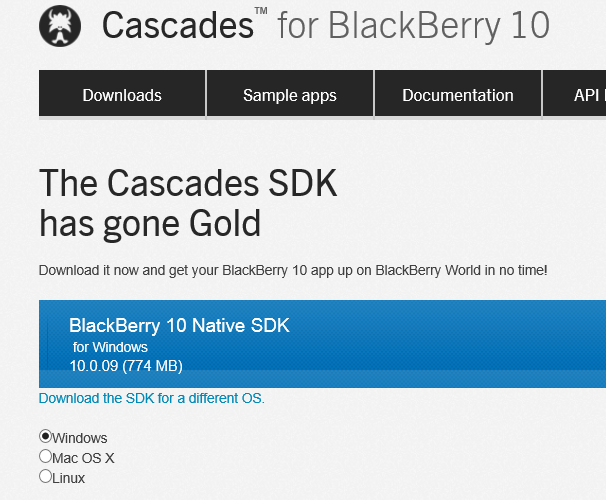
RIM BlackBerry 10 SDK is now gold


BlackBerry 10 developers can now download the release version of the various SDKs.


image

There are three primary SDKs: native C/C++, Cascades which includes a C++ app and user interface framework, and WebWorks for HTML5 and JavaScript.

If that is not enough, there is also an Adobe AIR SDK, and a Java SDK which is compatible with the Android Runtime.

RIM has made a huge effort to attract developers to its new platform, though how it will fare versus iOS, Android, and a somewhat reinvigorated Windows Phone is open to speculation.

Nokia forms 71% of Windows Phone market according to AdDuplex research

These figures from AdDuplex, which runs an ad network for Windows Phone, surprised me. The company studies its stats for a random day in November, the 30th, and reports that 71% of the Windows Phone devices contacting its servers were from Nokia. The Lumia 710 leads with 24%, followed by Lumia 800 at 18%, and the Lumia 900 at 7%.

image

The obvious conclusion is that Nokia dominates the Windows Phone market. Bad news for HTC, which seems to be making a real effort with its 8X release (the 20th most popular device according to the stats).

Dominating the market may sound good for Nokia, but unfortunately the entire market is relatively small. The risk for the platform is that it becomes in effect a Nokia-only OS with all the other OEMs focused on Android.

Infragistics building cross-platform development strategy on XAML says CEO

I spoke to Dean Guida, CEO at Infragistics, maker of components for Windows, web and mobile development platforms. Windows developers with long memories will remember Sheridan software, who created products including Data Widgets and VBAssist. Infragistics was formed in 2000 when Sheridan merged with another company, ProtoView.

In other words, this is a company with roots in the Microsoft developer platform, though for a few years now it has been madly diversifying in order to survive in the new world of mobile. Guida particularly wanted to talk about IgniteUI, a set of JQuery controls which developers use either for web applications or for mobile web applications wrapped as native with PhoneGap/Cordova.

“The majority of the market is looking at doing hybrid apps because it is so expensive to do native,” Guida told me.

Infragistics has also moved into the business iOS market, with SharePlus for SharePoint access on an iPad, and ReportPlus for reporting from SQL Server or SharePoint to iPad clients. Infragistics is building on what appears to be a growing trend: businesses which run Microsoft on the server, but are buying in iPads as mobile clients.
image

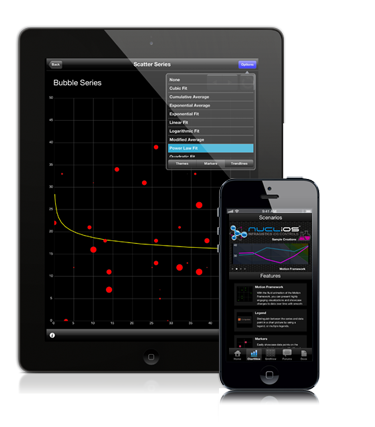
Other products include Nuclios, a set of native iOS components for developers, and IguanaUI for Android.

I asked Guida how the new mobile markets compared to the traditional Windows platform, for Infragistics as a component vendor.

“The whole market’s in transition,” he says. “People are looking at mobility strategy and how to support BYOD [Bring Your Own Device], all these different platforms, and a lot of our conversations are around IgniteUI. We need to reach the iPad, and more than the iPad as well.”

“There’s still a huge market doing ASP.NET, Windows Forms, WPF. It’s still a bigger market, but the next phase is around mobility.”

What about Windows 8, does he think Microsoft has got it right? Guida’s first reaction to my question is to state that the traditional Windows platform is by no means dead. “[Microsoft] may have shifted the focus away from Silverlight and WPF, but the enterprise hasn’t, in terms of WPF. The enterprise has not shifted aware from WPF. We’ve brought some of our enterprise customers to Microsoft to show them that, some of the largest banks in the world, the insurance industry, the retail industry. These companies are making a multi-year investment decision on WPF, where the life of the application if 5 years plus.

“Silverlight, nobody was really happy about that, but Microsoft made that decision. We’re going to continue to support Silverlight, because it makes sense for us. We have a codebase of XAML that covers both WPF and Silverlight.”

Guida adds that Windows 8 and Windows Phone 8 are “great innovation”, mentioning features like Live Tiles and people hub social media aggregation, which has application in business as well. “They’re against a lot of headwind of momentum and popularity, but because Microsoft is such an enterprise company, they are going to be successful.”

How well does the XAML in Infragistics components, built for WPF and Silverlight, translate to XAML on the Windows Runtime, for Windows 8 store apps?

“It translates well now, it did not translate well in the beginning,” Guida says, referring to the early previews. “We’re moving hundreds of our HTML and XAML components to WinJS and WinRT XAML. We’re able to reuse our code. We have to do more work with touch, and we want to maintain performance. We’re in beta now with a handful of components, but we’ll get up to 100s of components available.”

It turns out that XAML is critical to the Infragistics development strategy for iOS as well as Windows. “We wrote a translator that translates XAML code to iOS and XAML code to HTML and JavaScript. We can code in XAML, add new features, fix bugs, and then it moves over to these other platforms. It’s helped us move as quickly as we’ve moved.”

What about Windows on ARM, as in Surface RT? “We fully support it,” says Guida, though “with a straight port, you lose performance. That’s what we’re working on.”
Will you buy a Surface Pro? Here is why and why not

Microsoft has announced pricing for Surface Pro, its own-brand tablet running Windows 8. Quick summary:

  • 64GB is $899
  • 128GB is $999

image

UK pricing has not been announced, but if it follows the pattern of Surface RT we can expect around £720 and £799.

These prices include a free Surface pen, but not a Touch or Type keyboard cover. Since this is one of the best features of Surface, you can add around $120 or £100 (a little more for the Type cover) to the price.

Here’s why you don’t want a Surface Pro:

  • Unlike Surface RT, this tablet runs any Windows application, most of which do not work well with touch control. So you will need that keyboard and trackpad or mouse, making it an awkward thing versus an iPad or, in some ways, a traditional laptop.
  • The spec is a long way from cutting-edge. Screen is 1920×1080 pixels, versus 2048-by-1536  on a cheaper Apple iPad. Core i5 has been around a while. Storage spec is poor – even 128GB is small by current standards, my Samsung Slate from February had a 256GB SSD – and the cameras seem no better than the basic ones in Surface RT. 4GB RAM is also minimal for a new Windows machine.
  • This thing is not cheap. With the keyboard, it is nearly double the cost of a Surface RT, and you don’t get Office 2013 thrown in – Home and Student is around $100 or £85.
  • Microsoft is including a pen. Why? It does not clip into the Surface so you will lose it, and a pen, while fantastic for taking notes or sketching in tablet mode, is less good than a mouse or trackpad for most other operations.
  • Battery life half that of Surface RT: ouch.
  • Do not compare this with an iPad. It only makes sense if you want or need to run Windows. It is even less like an iPad than Surface RT.

A failure? Not necessarily. Here is why you do want a Surface Pro:

  • It is a little bigger than Surface RT, but much smaller than the average laptop, even with the keyboard cover, and it is all you need on your trip. I find laptops bulky and awkward now.
  • Performance will be much better than Surface RT. I presume it better my existing Samsung Slate, which has an older Core i5, and that is already a zippy performer.
  • The Surface is well made and designed. The only problem I am aware of with Surface RT is fraying keyboard seams, which I hope will be fixed in later production runs. The flip-out stand works well and the keyboard covers are excellent.
  • That USB 3.0 port is a big asset.  Of course Surface RT should have had this as well. You can attach as much storage as you need with great performance, or other devices.

The question is this: what other laptop or Windows 8 slate will be better than a Surface Pro, all things considered? You will easily find a better spec for the money, but when you evaluate the complete package Surface Pro may still be a winner.

That said, we have not yet seen Surface Pro and my judgment is based on combining what I know about Surface RT with my experience of the Samsung Core i5 slate.

The internal storage limitation is my biggest concern. 64GB is hopeless and 128GB still too small. There is a microSDXC card slot, and a sizeable card will be pretty much essential, again increasing the real-world price.

Apps sell better with Live Tiles, says Nokia, with other tips for phone developers

I attended an online seminar by Nokia’s Jure Sustersic on Windows Phone 8 development. It was a high level session so not much new, though Sustersic says the 7.8 update for existing 7.x Windows Phones  is coming very soon; he would not announce a date though.

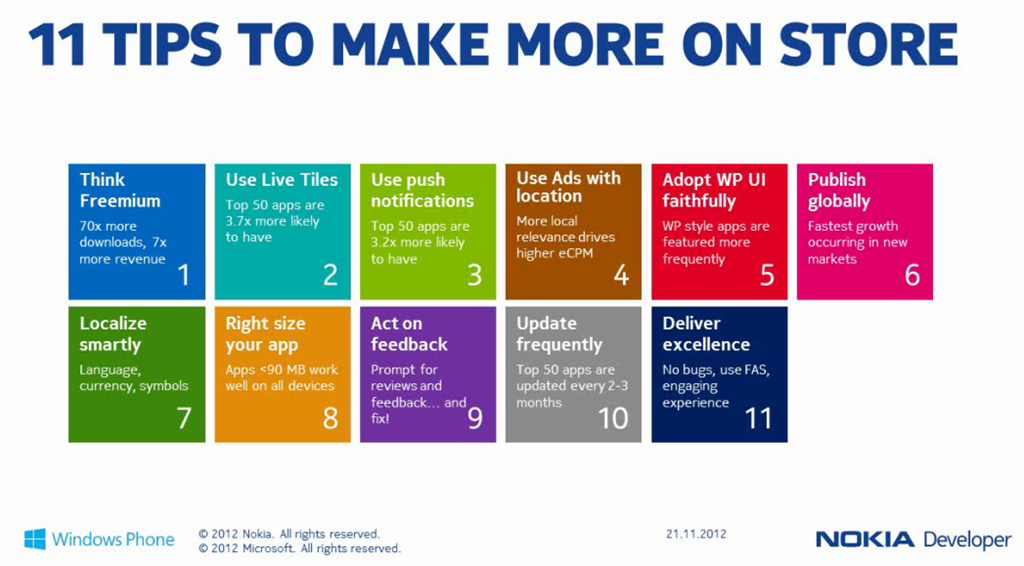
The slide that caught my eye was one on how to make more profitable apps, including some intriguing statistics. In particular, according to Sustersic:

  • Freemium apps (free to download but with paid upgrades or in-app purchases) achieve 70 times as many downloads and 7 times more revenue
  • The top 50 apps are 3.7 times more likely to have Live Tiles
  • The top 50 apps are 3.2 times more likely to use Push Notifications
  • The top 50 apps are updated every 2-3 months
  • The fastest growth is in new markets, so localize


image

Of course what Windows Phone developers want most is a larger market, so for Nokia to sell more phones. Random reboots aside, Windows Phone 8 has been well received, but it an uphill task.

I covered the Windows Phone 8 development platform in summary here.

BlackBerry 10: key dates for developers announced, $10,000 incentive dangled

RIM has announced key dates for developers in the run up to launch on January 30 2013.

The schedule looks like this:

  • November 29: SDK update
  • December 11: Gold SDK available
  • January 21: Deadline for app submission to qualify for the $10,000 giveaway
  • January 30: BlackBerry 10 Launch

Following the release of Microsoft’s Windows Phone 8 this month, RIM’s BlackBerry 10 is next up in the category of smartphone platforms trying not to drown in the Android and iOS tide (more Android than iOS of late).

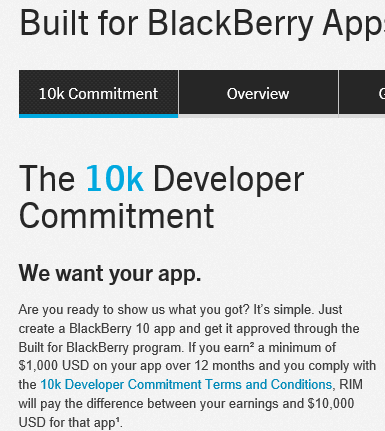
RIM’s strategy includes an element of “if you can’t beat ‘em, buy ‘em”. The company is offering a $10,000 guarantee to developers who achieve at least $1000 revenue from their BlackBerry 10 app in the first year.

image

There are terms of conditions, of course, including the performance, design, security and usefulness of the app.

It will be fascinating to see if RIM is successful in this attempt to fill its store at launch with high quality apps – something Microsoft failed to do for the Windows 8 App Store.

The offer is a no-brainer for developers who already intended to make a commercial app for BlackBerry 10. For others it is a nice incentive but perhaps not the easy money that it first appears, presuming no cheating of course. The majority of apps do not achieve even $1000 revenue. Creating an app that is good enough to do so, without that costing so much that the $10,000 loses its significance, is not trivial.

How bad is the Surface RT?

I have just read this piece on Slate entitled Why is the Surface so bad? after using the device for most of yesterday, on a train and at a technical event.

image

Oddly, I like the Surface RT increasingly, though I too am puzzled by some of its shortcomings.

Here are some of the issues I am aware of:

  • The apps. This is the biggest issue. Where are the delightful apps? For example, the mail client is barely adequate. The music app is annoying, though there is plenty to stream if you have an Xbox Music Pass. It cannot play FLAC files, which I use for my Squeezebox-based system at home.

    How hard is it for a company the size of Microsoft to write a superb mail app and a superb music app for its critical new product? I would guess that a small fraction of the advertising budget would have been enough. Why was there no one at Microsoft with the guts to throw them back at the team that developed them and say, “Not good enough, we do not have a product.”

  • Performance is so-so. It is not terrible in my experience, but at times makes you wonder if Windows 8 is too much on a Tegra 3; or whether it needs a whole lot more optimisation. Battery life is also OK but could be better. I got 7 hours or so yesterday, with wi-fi on constantly, and some of the time powering a phone being used as a wi-fi hotspot.
  • I got errors updating Microsoft Office. Mostly fixed by exiting the Office Upload Center. There’s no excuse for that. This is the appliance model. Microsoft knows exactly what hardware I have and what software I have, and has locked it down so I can only install sandboxed apps from the Store. Testing various update scenarios is easy.
  • For that matter, why is there an Office Upload Center? It is dreadful error-prone software. Dropbox has no Upload Center. Is it so hard to sync documents with SkyDrive or SharePoint – how long has Microsoft been batting at this problem?
  • I am concerned by reports of early keyboard disintegration, though mine is still OK

Enough griping though. Here is why I like this device.

First, I have no problem with the weight and I like the solid feel of the unit. The Surface is compact. The Surface with its keyboard is about 350g lighter and 4mm slimmer than my Samsung Slate without a keyboard; I am including the cover because I would never travel with a slate without a cover.

Second, unlike the Slate (magazine) reviewer, I do think the keyboard cover is a breakthrough. The Touch keyboard provides a usable full keyboard and trackpad while not adding any significant bulk; it forms a useful cover when closed, and when folded back it does not get in the way while you use Surface as a slate. I find myself using it in Slate mode frequently. Do not believe those who say you need keyboard and mouse to operate a Surface; there is only an argument for this if you never venture out of the desktop.

I can do more than occasional typing on the Touch keyboard; it is fine for longer documents as well.

Third, I can do real work with the Surface. Yesterday I sat with Surface on my lap, typing notes into Word, with Mail docked to the left, and Twitter open in desktop IE alongside Word. For all its faults, I found that the Surface worked well in this context.

Fourth, if you know Windows, there are things you can do that are difficult with other tablets. VPN to my office and remote desktop to a Windows 7 machine there is built in and works well. SharePoint via WebDAV is a shortcut in the Windows File Explorer.

Of course you could do all this with a laptop. So why not have a laptop, which you can buy for less money than a Surface? It is certainly an option; but as I have adapted first to the Samsung Slate running Windows 8, and now to the Surface, I find laptops bulky and inconvenient. I think of a laptop more as I used to perceive a desktop PC, something which is best suited to permanent siting on a desk rather than being carted around.

Further, the Surface really is a tablet. Imagine you want to show some photos to a friend or colleague. On a laptop that is awkward. The keyboard gets in the way. On a tablet like the Surface it is easy; just open the folder in the full-screen photo app and swipe through the images, with the keyboard cover folded back. Pretty much any tablet will do that equally well – or better if you have a Retina iPad – but it shows that Surface is not just a laptop in disguise.

There are reasons why I get better results from the Surface than some. One is that I know Windows 8 well, having used it intensively for many months. Another is that I am familiar with Windows foibles, so when these appear in the Surface I am likely to know what to do. Of course they should not appear at all; see above.

Microsoft seems to have created a device with many flaws, but one that is useful and sometimes delightful even despite those flaws.

Windows Phone 8 launches: is it enough?

Microsoft has launched Windows Phone 8 at a press event in San Francisco, streamed around the world. Joe Belfiore presented the new features in his usual enthusiastic style (complete with kids on stage to show Kids Corner), and the phone was endorsed by CEO Steve Ballmer and celebrity Jessica Alba.

image

Key new features:

  • Built on Windows 8 kernel rather than Windows CE
  • Data Sense is for optimizing (ie reducing) mobile data usage and offers visibility about which apps are using data and how much, as well as a data compression feature that enables up to 45% more web browsing for the same amount of data transfer. The compression feature requires operator support and some details are not yet clear.
  • People hub has “Rooms” which let you group contacts, a feature that seems close to what Google+ offers with circles, though Microsoft also has a limited sharing feature that lets trusted contacts see a Room schedule on an iPhone.
  • New Skype app which runs in the background in an efficient manner – you wonder how popular this will be with operators
  • Kids Corner lets you create a kind of secondary login for children, with apps, games and music that you select. Your normal Start screen is protected by a password, so no embarrassing calls or tweets.

image

  • Apps can now display content on the lock screen and integrate into hubs and with Windows Phone Wallet.
  • More apps are coming, and Belfiore told us that 46 of the 50 most popular apps across all platforms are available for Windows Phone 8. Pandora, Urbanspoon and Temple Run got a mention.
  • There is an iTunes import feature which will copy unprotected music from iTunes to SkyDrive for use on the phone and with Xbox Music.
  • 7GB SkyDrive cloud storage comes for free.
  • OneNote has a new voice transcription feature.
  • Now support for 50 languages, with apps in 191 countries

This was not an event for developers, though we did learn that the SDK will be made available to everyone from tomorrow 30th October.

Phones themselves will be available from this weekend in Europe and from November 14th in the USA.

I got a quick look at the HTX 8x, and was struck by how slim it is, with a 720X1280 4.3″ screen.

image

It is curved at the back and has a quality feel, though I am not sure HTC quite matches Nokia for hardware design.

image

I like Windows Phone and there are some tempting new features here. Will this improve Microsoft’s market share and Nokia’s fortunes? This may sound like ducking this issue, but I do not think the fortunes of Windows Phone depend on its features or even the quality of the phones. It is all about operator and retail partnerships, and what customers get told when they walk in to buy a phone and a contract. Windows Phone launched to near-invisibility on the high street. Matters have improved a little since then, especially after Nokia came out with the Lumia (Ballmer said that Nokia sells more Windows Phones than any other vendor), but Microsoft’s phone was still an also-ran after iOS and Android. How does Microsoft get into those in-store conversations, yet alone win them?

I also think Windows 8 is a factor here. If devices like Surface RT are popular, then Live Tiles and other elements of Windows Phone 8 will become familiar. On the other hand if Windows 8 users rush to install substitute Start menus and ignore the new app platform, not much will have been achieved.