Category Archives: .net

Developers: will you do Metro?

It is fascinating to watch the Metro-fication of all things Microsoft, from the Xbox 360 user interface to Windows Phone to Windows 8 to forthcoming versions of Office and other applications.

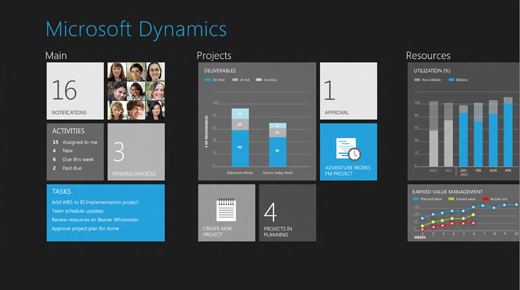
Future versions of Dynamics products were previewed at the Convergence 2012 event (which included a session called CRM goes Metro) and there are a bunch of screenshots here.

image

Microsoft calls Metro a design language and you can see its guiding principles here. Calling it a language does not seem quite right; the word “style” is more accurate, but it does have building block elements (and yes it is blocky) which I guess make it more than just a style.

A safe prediction at this point is that all Microsoft’s products will be touched by Metro influence, even though not all will become full Metro apps running on the Windows Runtime (WinRT).

In the past the style adopted by Microsoft for its own applications have strongly influenced third-party applications as well. Once Windows, Office, Dynamics and other apps have a Metro look, other apps that do not may begin to look dated or out of place.

Metro is controversial though, perhaps even more so than the Office Ribbon which replaced menus in Office 2007 and 2012. There is some connection: members of the Office team who worked with Steven Sinofsky on the design of Office 2007, including Julie Larson-Green and Jensen Harris, are now working with him on Windows 8. Harris has written extensively about the work on Office 2007 on his Office User Interface Blog, though the last substantial post was in 2008.

What’s not to like about Metro? Here’s a few arguments against:

  • Beauty is in the eye of etc; but the blockiness of the Metro style does give it a utilitarian appearance. In Windows Phone 7 it is nice to use, but not so great to look at.
  • The Live Tile concept, where shortcut blocks can be populated with current information, adds a random element to Metro start screens which does not always look good.
  • The emphasis on simplicity and immersion makes Metro vulnerable to the accusation that it wastes too much precious screen space.
  • Metro tends to be a horizontally scrolling style, though I am not sure if this is baked into the guidelines. This takes some adjustment since most of us are more used to vertical scrolling to see more content.
  • Metro seems to be optimized for a touch UI, and while its advocates insist that it is just as good with keyboard and mouse, that is a stretch. Metro seems to be a big bet on touch as the future of human-computer interaction.

On the other hand, the usability of Windows Phone 7 is a point in its favour, and some are convinced. Paul Greenberg, in a positive take on Microsoft’s strategy based on his trip to Convergence 2012, says:

They have nailed UX (a.k.a user experience). Nailed it. Their combination of the extremely well done Metro interface and their work on natural user interfaces involving voice and touch is the new gold standard – and I’m someone who loves Apple products. (please, Mac fanboys, spare my life.)

I would be interested to hear from developers whether you expect to embrace the Metro style in your apps, wither in WinRT or elsewhere.

Microsoft’s platform nearly invisible at QCon London 2012

QCon London ended yesterday. It was the biggest London QCon yet, with around 1200 developers and a certain amount of room chaos, but still a friendly atmosphere and a great opportunity to catch up with developers, vendors, and industry trends.

Microsoft was near-invisible at QCon. There was a sparsely attended Azure session, mainly I would guess because QCon attendees do not see that Azure has any relevance to them. What does it offer that they cannot get from Amazon EC2, Google App Engine, Joyent or another niche provider, or from their own private clouds?

Mark Rendle at the Azure session did state that Node.js runs better on Windows (and Azure) than on Linux. However he did not have performance figure to hand. A quick search throws up these figures from Node.js inventor Ryan Dahl: 

  v 0.6.0 (Linux) v 0.6.0 (Windows)
http_simple.js /bytes/1024 6263 r/s 5823 r/s
io.js read 26.63 mB/s 26.51 mB/s
io.js write 17.40 mB/s 33.58 mB/s
startup.js 49.6 ms 52.04 ms

These figures are more “nothing to choose between them” than evidence for better performance, but since 0.6.0 was the first Windows release it is possible that it has swung in its favour since. It is a decent showing for sure, but there are other more important factors when choosing a cloud platform: cost, resiliency, services available and so on. Amazon is charging ahead; why choose Azure?

My sense is that developers presume that Azure is mainly relevant to Microsoft platform businesses hosting Microsoft platform applications; and I suspect that a detailed analysis would bear out that presumption despite the encouraging figures above. That said, Azure seems to me a solid though somewhat expensive offering and one that the company has undersold.

I have focused on Azure because QCon tends to be more about the server than the client (though there was  a good deal of mobile this year), and at enterprise scale. It beats me why Microsoft was not exhibiting there, as the attendees are an influential lot and exactly the target audience, if the company wants to move beyond its home crowd.

I heard little talk of Windows 8 and little talk of Windows Phone 7,  though Nokia sponsored some of the catering and ran a hospitality suite which unfortunately I was not able to attend.

Nor did I get to Tomas Petricek’s talk on asynchronous programming in F#, though functional programming was hot at QCon last year and I would guess he drew a bigger audience than Azure managed.

Microsoft is coming from behind in cloud -  Infrastructure as a Service and/or Platform as a Service – as well as in mobile.

I should add the company is, from what I hear, doing better with its Software as a Service cloud, Office 365; and of course I realise that there are plenty of Microsoft-platform folk who attend other events such as the company’s own BUILD, Tech Ed and so on.

Update:

This is the basis for the claim that node.js runs better on Windows:

IOCP supports Sockets, Pipes, and Regular Files.
That is, Windows has true async kernel file I/O.
(In Unix we have to fake it with a userspace thread pool.)

from Dahl’s presentation on the Node roadmap at NodeConf May 2011.

Windows on ARM: Microsoft can write Desktop apps, but you cannot

Microsoft’s Windows chief Steven Sinofsky has written a long post describing Windows on ARM (WOA), which he says is a:

new member of the Windows family, much like Windows Server, Windows Embedded, or Windows Phone

There are many point of interest in the post, but the one which stands out for me is that while the traditional Windows desktop exists in WOA, third party applications will not be allowed there:

Developers with existing code, whether in C, C++, C#, Visual Basic, or JavaScript, are free to incorporate that code into their apps, so long as it targets the WinRT API set for Windows services. The Windows Store can carry, distribute, and service both the ARM and x86/64 implementations of apps (should there be native code in the app requiring two distributions).

says Sinofsky. He writes with extreme care on this issue, since the position for which he argues is finely nuanced. Why have the Windows desktop on WOA at all?

Some have suggested we might remove the desktop from WOA in an effort to be pure, to break from the past, or to be more simplistic or expeditious in our approach. To us, giving up something useful that has little cost to customers was a compromise that we didn’t want to see in the evolution of PCs

he says, while also saying:

WOA (as with Windows 8 ) is designed so that customers focused on Metro style apps don’t need to spend time in the desktop.

From a developer perspective, the desktop is more than just a different Windows shell. Apps that run on the Windows Runtime (WinRT) are isolated from each other and can call only a limited set of “safe” Windows APIs, protecting users from malware and instability, but also constraining their capabilities. The desktop by contrast is the old Windows, an open operating system. On Windows 8 Intel, most things that run on Windows 7 today will still work. On WOA though, even recompilation to target the ARM architecture will not help you, since Microsoft will not let desktops apps install:

Consumers obtain all software, including device drivers, through the Windows Store and Microsoft Update or Windows Update.

What if you really want to use WOA, but have some essential desktop application without which you cannot do your work, and which cannot quickly and easily be ported to WinRT? Microsoft’s answer is that you must use Windows on Intel.

That said, Microsoft itself has this problem in the form of Office, its productivity suite. Microsoft’s answer to itself is to run it on the desktop:

Within the Windows desktop, WOA includes desktop versions of the new Microsoft Word, Excel, PowerPoint, and OneNote, codenamed “Office 15”.

No Outlook, which I take to imply that a new WinRT-based Exchange client and PIM (Personal Information Manager) is on the way – a good thing.

Microsoft’s aim is to give customers the security and stability of a locked-down machine, while still offering a full version of Office. If you think of this as something like an Apple iPad but with no-compromise document editing and creation, then it sounds compelling.

At the same time, some users may be annoyed that the solution Microsoft has adopted for its legacy desktop application suite is not also available to them.

The caveat: it is not clear in Sinofsky’s post whether there may be some exceptions, for example for corporate deployments, or for hardware vendors or mobile operators. It will also be intriguing to see how Office 15 on ARM handles extensibility, for example with Office add-ins or Visual Basic macros. I suspect they will not be supported, but if they are, then that would be a route to a kind of desktop programming on WOA.

It will be interesting to see how Microsoft locks down Explorer, which Sinofksy says is present:

You can use Windows Explorer, for example, to connect to external storage devices, transfer and manage files from a network share, or use multiple displays, and do all of this with or without an attached keyboard and mouse—your choice.

By the way, this is a picture of the Windows ARM desktop as it looked at the BUILD conference last September. The SoC (System on a Chip) on this machine is from NVIDIA.

Windows Phone 8 “Apollo”: Windows 8 kernel, more form factors

Microsoft’s partner ecosystem is vulnerable to leaks, as demonstrated today by reports of a video said to have been made for Nokia, which arrived in the hands of a smartphone review website. The leaked information was corroborated by Windows journalist Paul Thurrott who has received advance information independently from Microsoft, but under non-disclosure:

Thanks to a recent leak which has revealed some interesting information about the next major Windows Phone version, I can now publicly discuss Windows Phone 8 for the first time.

First, a quick recap:

  • Windows Phone 7.5 “Mango” came out in the second half of last year and was the launch OS for Nokia’s Lumia phones.
  • Windows Phone “Tango” is expected in the second quarter of 2012 and appears to be a minor update focused on low-end handsets.
  • Windows Phone “Apollo” is the subject of the new leaks. Some of the details:
  • Uses the Windows 8 kernel and other OS components, rather than Windows CE
  • Supports multicore processors
  • Supports more form factors and screen resolutions
  • Preserves compatibility with Windows Phone 7 apps
  • Adds BitLocker encryption

I presume this also means that native code development will be supported, as it is for the Windows Runtime (WinRT) in Windows 8.

Date for “Apollo”? The rumour is towards the end of this year, as a close follow-on from Windows 8 itself.

Like many leaks, this one raises as many questions as it answers. While it makes sense that Windows Phone 8 and Windows 8 should share the same kernel, it also raises the question of  how they are differentiated. Windows 8, especially on ARM, is designed for small screens and tablets. Windows Phone 8, we now learn, will support more form factors. The implication is that there may be Windows Phone 8 devices that are close in size to Windows 8 devices. Will they run the same apps from the same Marketplace, at least in some cases, in the same way that some iOS apps support both iPhone and iPad?

The Windows 8 and Windows Phone 8 era will be simplified in one sense, with a single core operating system across desktop and devices. In another sense though, it ushers in new complexity, with multiple platforms that have subtle or not so subtle differences:

  • Windows 8 desktop side, on laptop and tablet (x86)
  • Windows 8 desktop side, laptop and tablet (ARM) – rumoured to be locked down for Office and perhaps a few other favoured apps
  • Windows 8 Metro side, desktop, laptop and tablet (x86) which should be nearly the same as
  • Windows 8 Metro side, desktop, laptop and tablet (ARM) – runs WinRT
  • Windows Phone 8 – runs WinRT, plus Silverlight compatibility layer

My guess is that Microsoft will push WinRT as the single platform developers should target, but I can see scope for confusion among both developers and users.

Why Microsoft is scrapping the MIX conference

Microsoft is scrapping its MIX conference, according to General Manager Tim O’Brien:

we have decided to merge MIX, our spring web conference for developers and designers, into our next major developer conference, which we will host sometime in the coming year. I know a number of folks were wondering about MIX, given the time of year, so we wanted to make sure there’s no ambiguity, and be very clear… there will be no MIX 2012.

O’Brien says that MIX started in the aftermath of the 2005 PDC because:

there was a lot of discussion around our engagement with the web community, and how we needed a more focused effort around our upcoming plans for Internet Explorer, the roadmap for our web platform, the work we were starting on web standards (we were shipping IE6 at the time), and so on.

That is not quite how I recall it. PDC 2005 was the pre-Vista PDC, no, not the “three pillars of Longhorn” in PDC 2003, but the diluted version of Longhorn that was actually delivered as Windows Vista. One thing Microsoft really did get around this time was that design mattered. Apple had cool design, Adobe had cool design (and a strong grip on the designer community), but Microsoft did not.

Windows Presentation Foundation (WPF) was intended to win designers to the Windows platform, with its graphically-rich and multimedia-friendly API. In order to do this, the company needed to win designers over to the idea of using Expression Blend rather than Adobe Flash and Photoshop.

This was doubly true when Microsoft decided to bring WPF to the browser in the form of Silverlight, a decision that was announced at PDC 2005 and expanded on at the first MIX in 2006.

One of the things I recall at the first and second MIX events were groups of bemused Flash designers who had been bussed in by Microsoft to enjoy the lights of Vegas and learn about Blend.

General web authoring was a factor as well, as Microsoft sought to bring Internet Explorer back on track and to persuade web designers of the virtues of Microsoft’s web platform.

I enjoyed the MIX events. They were small enough that you could easily get to speak both to attendees and to the Microsoft folk there, and once you allow for the fact that Vegas is Vegas, the atmosphere was good.

As an attempt to appeal to designers though, MIX was a failure. It was all too forced; many of the people attending were developers anyway; and Microsoft itself included more and more developer content in ensuing MIX events.

The 2010 MIX was hijacked by Windows Phone 7, an interesting topic but drifting far from the original intentions.

It comes as no surprise to hear than MIX is no more. It is associated with WPF and Silverlight, neither of which are now strategic for Microsoft in these days of Windows 8 and the Windows Runtime (WinRT).

That said, Microsoft still has difficulty appealing to designers.

What next then? O’Brien says:

we look ahead to 2012 and beyond, the goal is to ensure that global Microsoft developer events are of the caliber that many of you experienced at BUILD last September, in addition to the thousands of online and local developer events we host around the world to support communities and connect directly with developers. We will share more details of our next developer event later this year.

image

Microsoft LocalDB: another option for local databases

Microsoft is launching SQL Server 2012 on  March 7th 2012. In Microsoft’s world “launches” do not always coincide with the availability of release code, which may come before or after, but they are usually not far apart.

The big news in SQL Server 2012 is in new BI (Business Intelligence) features and the ability to import and export from the open source Hadoop framework. Microsoft is also supporting Hadoop on Windows Server and Windows Azure. Robert Sheldon has an excellent article on TechTarget which describes the Hadoop integration.

At the other end of the scale though there is a new approach to local databases, which interests me as this is the kind of thing an application developer might use for local applications. SQL Express LocalDB uses the full SQL Server Express engine but does not require a SQL Server service to be running or even installed. In summary:

  • The LocalDB binaries can be installed with a separate installer or as part of the SQL Server Express.
  • LocalDB instances are isolated to the user.
  • The LocalDB system databases are buried deep in AppData in the user profile. The default location for user databases is the root of the user profile.
  • The old SQL Server User Instances are now deprecated

A driver for LocalDB has to know how to fire up the SQL Server binaries if they are not running, which means that old drivers will not work. Microsoft has patched System.Data.SqlClient in .NET 4 to work with LocalDB.

LocalDB Pros and cons

The advantage of LocalDB over the cut-down Compact Edition is that you get full access to SQL Server features including transactions, stored procedures, geographical data types and so on. It is meant to improve on the old user instances by simplifying matters for the user: no need to run a service, and management of SQL Server completely hidden.

The disadvantage is that your app still has the overhead of SQL Server running in a separate process. A SQL Server LocalDB install also takes around 140MB, which bumps up the download size if your app is distributed on the web.

If you need a local database, it seems to me that Microsoft still has nothing that quite matches SQLite, which runs in-process, is lightning fast, and which does not require any hidden system databases.

On the other hand, it might make sense to use SQL Server if you want to integrate with a server database, or if you are familiar with coding for SQL Server.

I would like to see Windows ship with a local database engine documented as something developers can rely on being there, as with Core Data on the Mac. It would also help if the SQL Server team got together with the Office team and worked out how to get Access and SQL Server Express to use the same database engine – yes, I know Access can use SQL Server data, but it still defaults to its own .ACCDB format and JET database engine.

OEMs are still breaking Windows: can Microsoft fix this with Windows 8?

Mark Russinovich works for Microsoft and has deep knowledge of Windows internals; he created the original Sysinternals tools which are invaluable for troubleshooting.

His account of troubleshooting a new PC purchased by a member of his family is both amusing and depressing, though I admire his honesty:

My mom recently purchased a new PC, so as a result, I spent a frustrating hour removing the piles of crapware the OEM had loaded onto it (now I would recommend getting a Microsoft Signature PC, which are crapware-free). I say frustrating because of the time it took and because even otherwise simple applications were implemented as monstrosities with complex and lengthy uninstall procedures. Even the OEM’s warranty and help files were full-blown installations. Making matters worse, several of the craplets failed to uninstall successfully, either throwing error messages or leaving behind stray fragments that forced me to hunt them down and execute precision strikes.

I admire his honesty. What he is describing, remember, is his company’s core product, following its mutilation by one of the companies Microsoft calls “partners”.

Russinovich adds:

As my cleaning was drawing to a close, I noticed that the antimalware the OEM had put on the PC had a 1-year license, after which she’d have to pay to continue service. With excellent free antimalware solutions on the market, there’s no reason for any consumer to pay for antimalware, so I promptly uninstalled it (which of course was a multistep process that took over 20 minutes and yielded several errors). I then headed to the Internet to download what I – not surprisingly given my affiliation – consider the best free antimalware solution, Microsoft Security Essentials (MSE).

Right. I do the same. However, the MSE install failed, probably thanks to a broken transfer application used to migrate files and settings from an old PC, and it took him hours of work to identify the problem and complete the install.

What interests me here is not so much the specific problems, but Microsoft’s big problem: that buying a new Windows PC is so often a terrible user experience. Not always: business PCs tend to be cleaner, and some OEMs are better than others. Nevertheless, although I have had Microsoft folk tell me a number of times that its partners were getting the message, that to compete with Apple they need to deliver a better experience, the problem has not been cracked.

There is something about the ecosystem which ensures that users get a bad product. It goes like this I guess: customers are price-sensitive, and to get the price required OEM vendors have to take the money from malware companies and others desperate to drive users towards their products. Yet in doing so they perpetuate the situation where you you have to buy Apple, or be a computer professional, in order to get a clean install. That describes a broken ecosystem.

Microsoft’s Signature PCs are another option, but they are only available from Microsoft stores.

The next interesting question is whether Microsoft can fix this with Windows 8. It may want to follow the example of Windows Phone 7, which is carefully locked down so that OEMs and operators can add their own apps, but their ability to customise the operating system is limited, protecting the user experience. It is hard to see how Microsoft can achieve the same with the x86 version of Windows 8, since this remains an open platform, though it may be possible to insulate the Metro side from too much tinkering. Windows 8 on ARM, on the other hand, may well follow the Windows Phone pattern.

The mystery of unexpected expiring sessions in ASP.NET

This is one of those posts that will not interest you unless you have a similar problem. That said, it does illustrate one general truth, that in software problems are often not what they first appear to be, and solving them can be like one of those adventure games where you think your quest is for the magic gem, but when you find the magic gem you discover that you also need the enchanted ring, and so on.

Recently I have been troubleshooting a session problem on an ASP.NET application running on a shared host (IIS 7.0).

This particular application has a form with some lengthy text fields. Users complete the form and then hit save. The problem: sometimes they would take too long thinking, and when they hit save they would lose their work and be redirected to a login page. It is the kind of thing most of us have experienced once in a while on a discussion forum.

The solution seems easy though. Just increase the session timeout.  However, this had already been done, but the sessions still seemed to time out too early. Failure one.

My next thought was to introduce a workaround, especially as this is a shared host where we cannot control exactly how the server is configured. I set up a simple AJAX script that ran in the background and called a page in the application from time to time, just to keep the session alive. I also had it write a log for each ping, in order to track the behaviour.

By the way, if you do this, make sure that you disable caching on the page you are pinging. Just pop this at the top of the .aspx page:

<%@ OutputCache Duration="1" Location="None" VaryByParam="None"%>

It turned out though that the session still died. One moment it was alive, next moment gone. Failure two.

This pretty much proved that session timeout as such was not the issue. I suspected that the application pool was being recycled – and after checking with the ISP, who checked the event log, this turned out to be the case. Check this post for why this might happen, as well as the discussion here. If the application pool is recycled, then your application restarts, wiping any session values. On a shared host, it might be some else’s badly-behaved application that triggers this.

The solution then is to change the way the application stores session variables. ASP.NET has three session modes. The default is InProc, which is fast but not resilient, and for obvious reasons not suitable for apps which run on multiple servers. If you change this to StateServer, then session values are stored by the ASP.NET State Service instead. Note that this service is not running by default, but you can easily enable it, and our helpful ISP arranged this. The third option is to use SQLServer, which is suitable for web farms. Storing session state outside the application process means that it survives pool recycling.

Note the small print though. Once you move away from InProc, session variables are serialized, not just held in memory. This means that classes must have the System.Serializable attribute. Note also that objects might emerge from serialization and deserialization a little different from how they went in, if they hold state that is more complex than simple properties. The constructor is not called, for example. Further, some properties cannot sensibly be serialized. See this article for more information, and why you might need to do custom serialization for some classes.

After tweaking the application to work with the State Service though, the outcome was depressing. The session still died. Failure three.

Why might a session die when the pool recycles, even if you are not using InProc mode? The answer seems to be that the new pool generates a new machine key by default. The machine key is used to encrypt and decrypt the session values, so if the key changes, your existing session values are invalid.

The solution was to specify the machine key in web.config. See here for how to configure the machine key.

Everything worked. Success at last.

Why developers need a Mac

I am by no means an Apple fan. For one thing, I find Windows (and Linux) stable and fast, so you are not going to hear me argue that my computing life was transformed once I made that Switch (with a capital letter). Admittedly that is partly because I am familiar with how to fix and tune Windows and remove foistware, but it is not that hard. For another, I am not an admirer of Apple’s secretive approach, or the fact that most requests for comment from journalists are responded to with silence. For a third, I dislike the notion that all apps for its popular mobile platform must be distributed through the Apple store and subject to a fee, now extended to in-app upgrades and subscriptions as well as initial sales. There is also much that I admire about Apple’s platform, but I hope I have convinced you that I am not so bedazzled by the company that I am unable to think coherently about its products.

Nevertheless, I have run a Mac alongside Windows for years now, and I find myself needing it increasingly. Here are four reasons.

The first is that sooner or later you will need to build or test an app for the Mac or, more likely, for iOS. You can only do so using a Mac (leaving aside the exciting world of the hackintosh). This is because Apple only provides the iOS SDK and simulators for its own operating system.

As an aside, I recently spoke to Keith Varty who is evangelising Windows Phone development at Nokia. I asked about the issue of Visual Studio only running on Windows, was that an obstacle for developers using a Mac? He pointed out that it is the same in reverse with Apple, you need a Mac to develop for the iPhone. In fact, it is easier to develop for Windows using a Mac, thanks to the existence of excellent PC emulators, than it is to develop for a Mac using Windows. In any case, special rules apply for Apple.

Second, other than in the most closed internal environments, some of your users will have a Mac or at least an iPad or iPhone. A few years back both developers and system administrators could get away with a deliberate ignorance of Apple computers, saying they are “not supported” or “untested” or just “I have no idea.” That is no longer acceptable (if it ever was) and it is important to test apps on a Mac where that is appropriate, as with web or cross-platform Java or Adobe AIR applications, and more generally to get a feel for how things work on a Mac so that you can respond intelligently to users.

Third, in many areas of development Macs are now dominant. This means that Windows-only developers may be disadvantaged. Today, for example, I was researching Sencha products and came across this:

image

Yes, to get the preview developer tools for Sencha Touch 2, you need a Mac. No doubt Windows versions will follow, but there are times when you need a Mac just to keep up with the latest technology.

Fourth, and this is the most difficult point to make, it is valuable to spend some time on a Mac to avoid bad assumptions about usability. One example that comes to mind is version control. On Windows there is no problem using Git, or Subversion, or any number of systems including Microsoft’s Team Foundation Server installed either locally or on its own server. There is some setup involved though. On a Mac with the latest Xcode, you will find a checkbox in the new project wizard:

image

It is built-in. There is nothing more to do other than check this box. And yes, I know it is pretty easy to use Subversion or Git on Windows – though I would never describe a Team Foundation setup as trivial – but I am talking about the usability of a single checkbox. If you are thinking about the design of your own UI then spending some time on a Mac is though-provoking and likely to be beneficial.

By the way, some other parts of Xcode are less usable than Visual Studio so do not read too much into this example!

Another example which comes to mind is installing a web server. Windows has IIS, which is a good web server, and you can enable it on Windows 7 by going to Control Panel, Programs, Turn Windows Features on and off, and then waiting while the dialog populates, and then checking which bits of IIS you want to install:

image

Not difficult, though the intricacies of which Application Development Features you need may require some research. But here is how you set up Apache on a Mac. Go to System Preferences, and check Web Sharing. Apache is now up and running, and on my Mac Mini it started instantly:

image

I am sure there are many more examples, and even examples where Windows has better usability than then Mac (I miss the thumbnail previews in the task bar) but my point is this: it pays to have experience beyond Windows from which to evolve your own user interface ideas.

Post sponsored by Monster for the best in IT Jobs.

What next for Adobe Flash? Think runtime not plugin

Adobe is stating that mobile Flash will no longer be developed:

Our future work with Flash on mobile devices will be focused on enabling Flash developers to package native apps with Adobe AIR for all the major app stores. We will no longer continue to develop Flash Player in the browser to work with new mobile device configurations (chipset, browser, OS version, etc.) following the upcoming release of Flash Player 11.1 for Android and BlackBerry PlayBook. We will of course continue to provide critical bug fixes and security updates for existing device configurations. We will also allow our source code licensees to continue working on and release their own implementations.

Although this seems like a major shift in strategy, Adobe has been moving in this direction for some time. At the MAX conference last month the company was clear that most web developers can be expected to use HTML 5 rather than Flash most of the time, reserving use of the plug-in for video, games and certain kinds of application. As for mobile, all the talk was about AIR and the captive runtime, an approach similar to the iOS packager which bundles the Flash runtime into your application so that no plug-in or additional download is required.

This approach is now explicit, and I reckon we can further conclude that if the Flash plugin for mobile is being abandoned, then the Flash plugin for the desktop is also less important than before. Mobile browsing is huge, and likely to grow, so developing web pages for Flash is unattractive other than in cases where there is an easy way to direct mobile browsers to a non-Flash alternative. Flash as a browser plugin will now decline forever, which is a good thing for web standards even if it is not necessarily a good thing for web developers, who must face the challenge of cross-browser development.

So what is Flash now? It is still Adobe’s runtime, and the client for its media services, and in that role it remains significant. Thanks to Adobe’s packaging work, you can take your Flash or Flex application and deploy it to most desktop and recent mobile platforms, though not to Windows Phone or older Android devices. Could you not use HTML 5, JavaScript and PhoneGap instead? Maybe in some cases; but Flash is a richer, faster and more consistent platform, as well as benefiting from Adobe’s design and development tools.

See also my piece for the Register: Down but not out: Flash in an HTML5 world.

Update: Added official Adobe link for statement on mobile Flash.