Category Archives: .net

Xamarin acquires LessPainful, announces Test Cloud for mobile apps

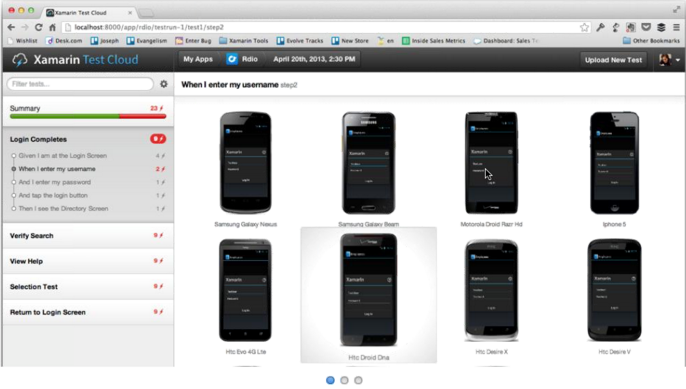
Xamarin, a company which provides tools for cross-platform development in C#, has announced its acquisition of LessPainful and the creation of cloud-based testing for mobile apps based on LessPainful’s technology and the Calabash scripting language it created.

The Test Cloud will perform automated user-interface tests on real devices, hosted by Xamarin, will provide detailed reports in the event of test failures, and will support Continuous Integration so that bugs are caught as early as possible.
image

“After you’ve conquered the cross-platform mobile development problem, testing is the next large pain point” says Xamarin CEO Nat Friedman. “You can’t just get by with manual testing. There’s a need for the same level of tools and processes in mobile testing that you have in desktop and web testing.”

“Quality is actually more important on mobile than in other places. Mobile sessions are very short. People are really intolerant of low quality on mobile. The release cycles are shorter too. People are revving more frequently, and testing is a bigger challenge.”

Another issue with mobile testing is the number of devices out there, especially if you throw cross-platform into the mix. “You have on Android all these manufacturers who customise the OS in different ways, you have multiple different versions that are in use, and you have multiple different form factors and device capabilities. The testing permutation matrix is huge.”

“Automated UI testing is the only kind of testing that can ensure that the app does what it is supposed to do.”

Friedman says that the Xamarin UI tests are more robust than competing UI test frameworks because they do not depend on UI image recognition. “The right answer is object-based, you identify user interface elements on the screen by object IDs”.”

How does testing on real devices work? If you have 50 developers testing on 27 devices in Xamarin’s cloud, will there be racks and racks of devices to support them?  “That’s what it looks like at our end, racks and racks of devices,” confirmed Friedman. “The service is going to be built based on device/hour usage. We’ll be able to scale up to match what people need.

“We talk to developers who spend $8,000 a month just to get new devices. That’s not counting the labour and everything else they need to do, to set up their own testing infrastructure. It’s a giant pain point.”

Xamarin’s Test Cloud will offer plug-ins for Jenkins, TeamCity, and Microsoft’s Team Foundation Server, to support Continuous Integration.

The scripting language for the Test Cloud is either Calabash , or C# scripting which is under development by Xamarin.

The Test Cloud is not just for applications developed using Xamarin’s C# framework, but also supports other frameworks including those written in native iOS Objective C. However, only iOS and Android are supported.

Availability is set for the third quarter of 2013.

Xamarin’s Evolve conference is currently under way in Austin, Texas, with around 600 developers in attendance. Friedman says the company is growing fast. 1000 developers a day download the tools, there are over 15,000 paid developers, and the company now has 65 employees.

More information on the Xamarin Test Cloud is here.

Internal Windows Runtime apps are prohibitively expensive to deploy, says Microsoft Regional Director

Now we know why Microsoft has been so reluctant to divulge details of how to deploy a business app that uses the Windows Runtime (also known as Metro apps or Windows Store apps; though in this case the Windows Store app designation is particularly silly since these apps are precisely not Store apps).

Presuming Windows MVP and Regional Director Rockford Lhotka is correct, a business that wishes to sideload Windows Runtime apps (in other words, to deploy but not via the Windows Store), a business needs to purchase a $30 sideloading key which, by a stroke of marketing genius, is only available in packs of 100.

image

Note the above screen grab shows a price of more than $30.00. I believe this is because Lhotka’s figures do not allow for any reseller markup, though there could be regional differences as well.

Here is what Microsoft’s Antoine Leblond said back in April 2012:

To enable sideloading of a Metro style app onto a PC:

  • Set Group Policy for “Allow all trusted apps to install”. If you cannot use Group Policy, then you can set this through the following setting: HKEY_LOCAL_MACHINE\Software\Policies\Microsoft\Windows\Appx\AllowAllTrustedApps = 1
  • Verify that the app is signed by a CA that is trusted on the target machines
  • Activate a special product key by using a script on the target machine to enable sideloading. We’ll go into more detail about how the IT admin will acquire the product keys in an upcoming blog post. The product key only needs to be install and activated once on the PC.

I have not seen the promised upcoming blog post but would be interested in doing so if anyone has a link?

Sideloading keys are only valid on Windows 8 Pro or Windows 8 Enterprise.

As a further disincentive, if you want to avoid running a PowerShell script on each target machine, you will need either System Center or InTune to manage the PCs. InTune is the cheaper option, at $6.00 per device per month. Lhotka calculates:

Let’s assume that your organization has 100 Windows RT or Windows 8 Pro devices, so you buy $3000 worth of side-loading keys. And let’s assume you use InTune. Finally let’s assume your devices have a 3 year life – which is pretty typical for corporate devices where you buy a service agreement from Lenovo or Dell or another vendor.

These 100 devices will cost $3000 for keys, plus $6 per device per month. This means that your org with 100 devices will pay around $23,000 extra to deploy a WinRT app just for this licensing.

and he concludes:

Right now it appears that Microsoft has worked very hard to devise a licensing and deployment scheme for WinRT apps designed specifically to discourage the creation of any WinRT business apps. Whether this is intentional or accidental I can’t say, but it is surely the case that no responsible business or IT manager could look at these scenarios and think that a move to WinRT for business app development makes sense at this time

That said, I am not sure he is being completely fair. I doubt a business will subscript to InTune just to support sideloading, and for those who do not want to subscribe, running a PowerShell script is not that hard. It seems to me that the problem could be mostly fixed by offering the sideloading keys in smaller packs.

I would add that now is probably not the moment to deploy a Windows Runtime app. The platform is not as good as it should be, and there is a case for waiting for the first major update in my opinion.

Still, $3000 for a licence pack is substantial, especially for a small business with fewer than 100 PCs.

The “Modern UI” side of Windows 8 has not taken off as yet, and a rational approach would be to encourage rather than discourage corporate developers to target the platform.

Note: a Microsoft Regional Director does not work directly for Microsoft. Lhotka works for Magenic. A Regional Director is an independent professional who is recognized for their ability to train and evangelise development on Microsoft’s platform.

Cross-platform frameworks ordered by percentage of shared code

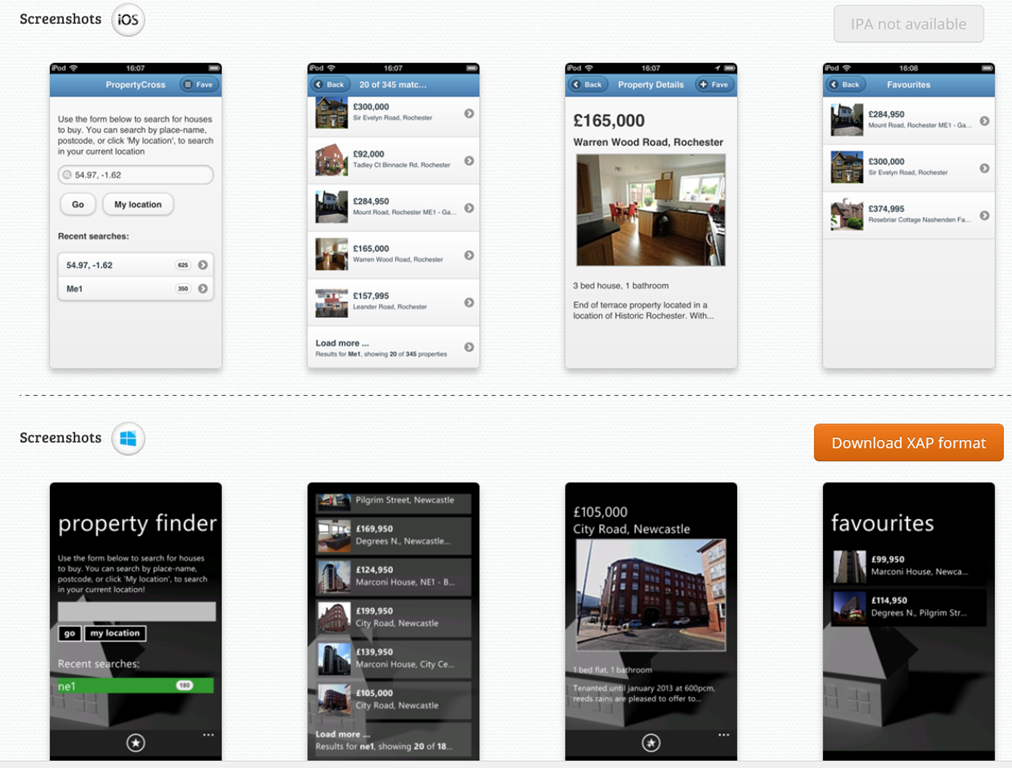
Following my piece on different approaches to building the user interface in cross-platform frameworks, twitter user Sam Hogarth pointed me to the PropertyCross project. This implements a non-trivial application in 8 different cross-platform tools, covering Android, iOS and Windows Phone. Note that only four of the frameworks support Windows Phone.

Using the pie charts presented for each framework, I was able to order them by percentage of shared code as follows:

1= Adobe AIR (100%), JQTouch (100%) , RhoMobile (100%), Sencha Touch (100%)

5. Appcelerator Titanium (around 90%)

6. JQuery Mobile (around 80%)

7. Xamarin (around 40%)

8. Native (0%)

A couple of notes. Of the 100% frameworks, three do not support Windows Phone, and the one which does (Rhomobile) seems to be a bit broken on Windows Phone, judging by the screenshots. The Property Details and Favourites pages do not render properly.

You would get more code sharing with Xamarin if you only supported two rather than three platforms. That is logical: since it does not abstract the GUI.

In most cases (not Rhomobile) it is striking how different Windows Phone appears versus iOS and Android, even with jQuery Mobile which uses HTML5.

image

Xamarin vs Titanium vs FireMonkey: should cross-platform tools abstract the GUI?

Cross-platform development is a big deal, and will continue to be so until a day comes when everyone uses the same platform. Android? HTML? WebKit? iOS? Windows? Maybe one day, but for now the world is multi-platform, and unless you can afford to ignore all platforms but one, or to develop independent projects for each platform, some kind of cross-platform approach makes sense, especially in mobile.

Sometimes I hear it said that there are essentially two approaches to cross-platform mobile apps. You can either use an embedded browser control and write a web app wrapped as a native app, as in Adobe PhoneGap/Cordova or the similar approach taken by Sencha, or you can use a cross-platform tool that creates native apps, such as Xamarin Studio, Appcelerator Titanium, or Embarcardero FireMonkey.

Within the second category though, there is diversity. In particular, they vary concerning the extent to which they abstract the user interface.

Here is the trade-off. If you design your cross-platform framework to include user interface widgets, like labels, buttons, grids and menus, then you can have your application work almost the same way on every platform. You can also have tools that build the user interface once for all the platforms. This is a big win in terms of coding effort. If the framework is well implemented, it will still adopt some of the characteristics native to each platform so that it looks more or less native.

Some tools do this by drawing their own controls. Embarcadero FireMonkey is in this category. Another approach is to use native controls where possible (in other words, to call the API that shows a button, rather than drawing the button with the graphics API), but to use custom drawing where necessary, even sometimes implementing a control from one platform on another. The downside is that because those controls are not in fact native, there will be some differences, perhaps obvious, perhaps subtle. Martin Fowler at ThoughtWorks refers to this as the uncanny valley and argues against emulated controls.

Further, if you are sharing the UI design across all platforms, it is hard to make your design feel equally right in all cases. It might be better to take the approach adopted by most games, using a design that is distinctive to your app and make a virtue of its consistency across platforms, even though it does not have the native look and feel on any platform.

Xamarin Studio on the other hand makes no attempt to provide a shared GUI framework:

We don’t try to provide a user interface abstraction layer that works across all the platforms. We think that’s a bad approach that leads to lowest common denominator user interfaces.*

CEO Nat Friedman told me. He is right; but the downside is the effort involved in maintaining two or more user interface designs for your app.

This is an old debate. One of the reasons IBM created Eclipse was a disagreement with Sun over the best way to design a cross-platform user interface framework. Sun’s Swing framework, derived from Netscape’s Internet Foundation Classes first released in 1996, takes the custom-drawn approach, which is why Swing apps always look like Swing apps (even if you apply the “Windows” look and feel). A team from IBM, some originally from Object Technology International which was a company acquired by IBM, believed it was better to wrap native controls with a Java abstraction layer, created SWT (Standard Widget Toolkit) to do that, and used it to build Eclipse.

Personally I am wary of toolkits which rely heavily on custom-drawn controls rather than native controls, though I see their value. On the other hand, Xamarin Studio is so far in the other direction that it removes some of the benefit of a cross-platform framework.

My prediction is that Xamarin will come up with its own GUI abstraction framework in future, along the lines of SWT. It is a compromise; but one which delivers a lot of value to developers who want to create cross-platform apps with the maximum amount of shared code.

*I have never understood this use of the term “lowest common demominator”. The LCD in maths is the lowest number into which a specific group of numbers divide exactly, so it is an elegant thing. In cross-platform what you should strive for is the highest common intersection: to make available all the features common to each platform.

Update: in April 2014 Xamarin announced Xamarin Forms, a GUI framework which wraps native controls in a XAML implementation (XAML is the presentation language also used by Microsoft, for WPF, Silverlight, Windows Phone and Windows Runtime (Windows 8) apps. There is a quick hands-on here.

Xamarin 2.0 and Xamarin Studio announced, build for OSX, iOS and Android with C#

Xamarin has announced significant updates to its developer platform. Xamarin is the company formed around 18 months ago, when Novell discontinued its investment in Mono, a cross-platform implementation of C# and the .NET Framework. Its focus is on mobile platforms, in particular iOS and Android, though there is also support for the Mac. On Windows and Windows Phone, the presumption is that developers will continue to use Microsoft’s .NET Framework.

“If you look at what you can develop with C#, there’s about 1.2 billion Windows machines out there, but there’s now about a billion Android and iOS devices. Together we can make C# a universal language for application development and reach 2.2 billion devices,” Xamarin co-founder and CEO Nat Friedman told me.

“There’s a wonderful built-in audience of C# developers, millions of them, who need a bridge to mobile. We can help them take their existing skills and tools, and even code they’ve already written, and bring them to mainstream mobile platforms like iOS and Android.”

The key announcements:

  • Xamarin Studio is  an updated version of MonoDevelop, the Mono IDE. It runs on Mac and Windows.#
  • You can now develop iOS apps in Visual Studio for the first time
  • MonoTouch, the framework for iOS, has been renamed Xamarin.iOS
  • Mono for Android is now called Xamarin.Android
  • A new component store has pre-built components for download, some free, some commercial.
  • Xamarin now offers a free Starter edition, and pricing plans for independent developers, smaller businesses, and enterprises. Indie is $299 per platform per year, Business is $999 per platform/year, and Enterprise $1800 platform/year.

The Starter edition is not much use. It has a limited app size, and even the sample project I downloaded, an Employee Directory, exceeded that size and I had to register for a trial.

Xamarin’s philosophy is to share non-visual code, but to create a user interface that is native for each platform. This is a compromise in terms of the effort involved in supporting multiple platforms, but ensures a native experience on each device. “That’s fundamental to our platform,” says Friedman. “We tell our developers to separate the UI layer from the rest of the app. That allows them to share all the non-UI code across platforms, but to deliver a fully native UI, even though the whole app is written in C#. That’s what users demand now, people want native experiences.”

“We’ve been building tools that essentially project the underlying iOS APIs or Java [Android] APIs into C#”, explains co-founder Miguel de Icaza. “What it means is that people need to build a new UI for each platform.” He adds that Microsoft platform developers should be used to this, as Microsoft itself has several similar but incompatible .NET platforms. “There’s the one on Silverlight, the one on WPF, the one on Windows RT, and the one on the phone, it’s four,” he says. “Developers have had to resort to putting their logic into shared libraries, and build a per-platform UI. We’re reusing that knowledge.”

The ability to develop for iOS in Visual Studio is new. “It’s our most-requested feature of all time.” said Friedman.

I downloaded Xamarin Studio, which in my case was around 1.3GB including an updated Android SDK.

image

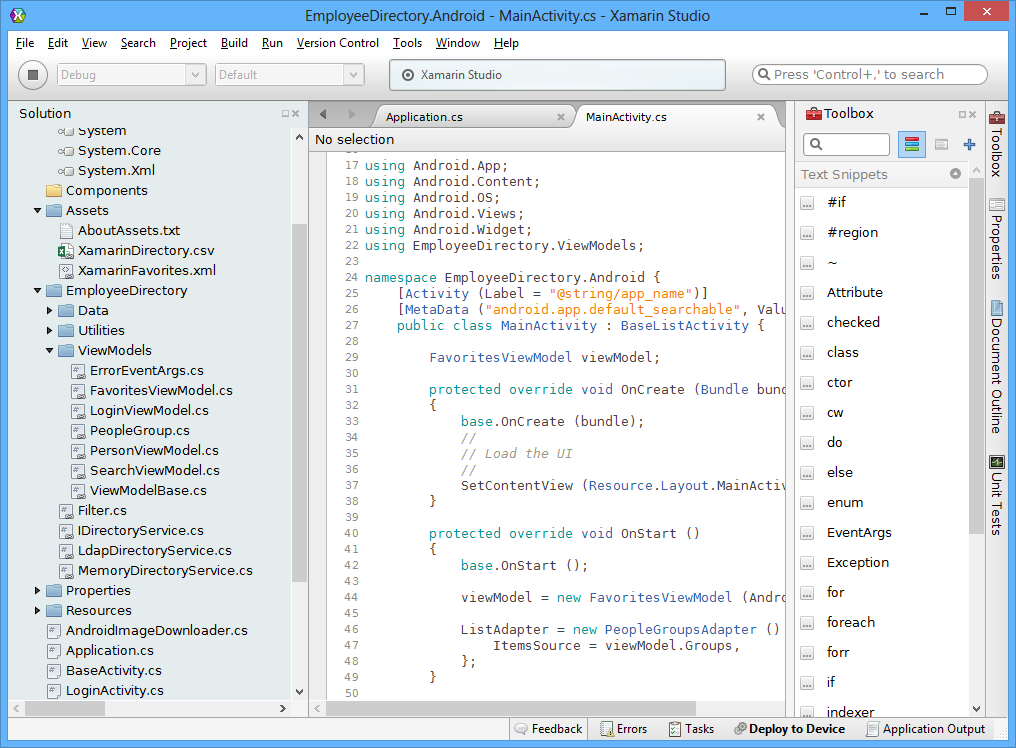
The IDE itself is clean and fast, and very much code-centric. It lacks the bloat of Visual Studio, though you will miss many of the features of Microsoft’s IDE.

image

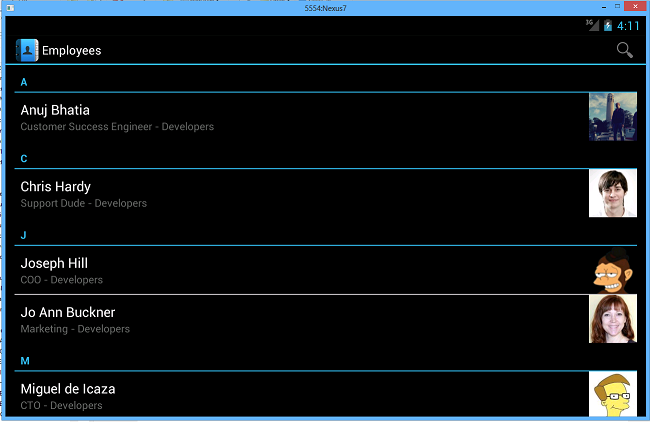
I build the sample Employee Directory app and deployed it to an Android emulator which I use for Nexus 7 development. Deploying the runtime components took a long time, but after waiting patiently the app launched successfully.

image

If you want to do iOS development you will need a Mac of course. Although you can code on Windows, if you then the code is pushed over the the Mac side for compilation and debugging. In order to use Visual Studio, one option is to run Windows in a virtual machine on a Mac, as I have done with reasonable success using Embarcadero’s cross-platform tools.

Xamarin says it is growing fast. There have been 230,000 downloads of its tools, increasing by around 700 per day, and over 12,000 paying customers.

Despite Xamarin’s roots in the open source world (and Mono is still open source), a quick look at the pricing table shows that this is a fully commercial offering and priced accordingly. Presuming customers keep on subscribing, that is a good thing, ensuring the future of the platform; but it is not so good for the smallest developers who might otherwise give it a try.

Microsoft’s Visual Studio and Team Foundation Server get Git integration

Microsoft has announced Git integration in both the Visual Studio IDE and the Team Foundation Service hosted source code management system. According to Technical Fellow Brian Harry:

1. Team Foundation Server will host Git repositories – and more concretely, Team Foundation Service has support for hosting Git repositories starting today.

2. Visual Studio will have Git support – and concretely, we released a CTP of a VSIX plugin for the Visual Studio 2012 Update 2 CTP today.

Git is an open source version control system originally designed by Linus Torvalds to support the development of the Linux operating system. It is a distributed version control system, which means every working directory is itself a full repository, enabling easy forking and offline work.

Team Foundation Service is a version of Team Foundation Server hosted by Microsoft.

Git integration was also recently added to Perforce, another version control system, in the form of the Perforce Git Fusion add-in, emphasising the fact that Git is now a mainstream, enterprise revision control system.

Java software quality: frameworks good, Struts or C++ bad says report

CAST has released an intriguing report on Java applications and software quality.

The company analysed 497 applications, comprising 152 million lines of code across 88 organisations and six global industries. It then looked at how software quality correlated with frameworks used.

◾Hibernate has the highest quality scores.
◾Applications built with Struts have the lowest quality scores.
◾Applications that did not use any framework had a huge variance in quality, which indicates that frameworks do in fact help develop applications of predictable quality.

A further investigation looked at what happens to software quality in mixed language applications:

◾Applications built in pure JEE, with no frameworks or multi-lingual mingling, had the highest quality scores.
◾Mixing Java with C or C++ lowers quality scores.
◾Mixing Java with COBOL, Java-DB, and Microsoft .NET delivered higher quality scores.

Frameworks are good but pure J2EE is better? Mixing with C/C++ lowers software quality, but mixing with .NET or COBOL raises software quality? These are odd results, and I wonder if this research is correlating the right factors. Here is a clue:

One common challenge for developers with framework usage is configuring them correctly. CAST data shows that a large majority of applications analyzed had some level of misconfiguration, indicating the need for better training or to simplify the use of frameworks.

I have a hunch that what this research really tells us is that the most competent developers deliver the highest quality code. Maybe the smartest developers do not use Struts.

Microsoft updates .NET Framework 4.5 for Windows 8, Server 2012 to fix performance, bugs

Microsoft has released an update for .NET Framework 4.5 which you may have noticed flying past if you keep an eye on Windows Update in Windows 8. The update is described here, and it is a big one. For example, in the Network Class Library:

Assume that you run a .NET Framework 4.5-based application that uses asynchronous APIs to read chunked responses. In this situation, the chunked responses may be read synchronously.

The HttpWebRequest class lets callers read an HTTP response either synchronously or asynchronously. However, if the response is a chunked HTTP response, then parts of the response are read by using synchronous I/O (Winsock calls) even when the caller uses the asynchronous code path. In this situation, the calling thread is blocked until data is received on the network.

Given this and other issues, the update is highly recommended. Maybe we will see fewer pauses in Windows App Store apps, some of which have not delivered on the “fast and fluid” promise.

Google the new Microsoft, goes to war on Windows Phone users (updated)

Google has fired a one – two – three salvo at Microsoft and Windows Phone users. Consider the following.

First, we learn that Google, under the guise of Winter cleaning, is removing Google Sync from its Mail, Calendar and Contacts online products, for consumers only. This is the Exchange ActiveSync protocol used by Windows Phone and other mobile devices:

Starting January 30, 2013, consumers won’t be able to set up new devices using Google Sync; however, existing Google Sync connections will continue to function

Next, Microsoft reveals that Google is blocking the creation of a YouTube app for Windows Phone:

Microsoft is ready to release a high quality YouTube app for Windows Phone. We just need permission to access YouTube in the way that other phones already do, permission Google has refused to provide.

Now Google is blocking Windows Phone users from accessing Google Maps in the mobile browser. Google says:

The mobile web version of Google Maps is optimized for WebKit browsers such as Chrome and Safari. However, since Internet Explorer is not a WebKit browser, Windows Phone devices are not able to access Google Maps for the mobile web.

but Microsoft observes that Google Maps works fine in IE on Windows and:

Internet Explorer in Windows Phone 8 and Windows 8 use the same rendering engine.

This last is of most concern. It is one thing to “optimize” for WebKit, another specifically to block non-WebKit browsers. If WebKit is in Google’s eyes the de facto standard for mobile devices – which are more significant than desktop browsers – then what is the function of the W3C, and what is to prevent a repetition of the IE6 effect where one company (Microsoft) in controlled what was implemented for most users?

We can conclude that Google has decided its interests are better served by inconveniencing Windows Phone users in the hope of stifling the platform, rather than trying to persuade Windows Phone users to use its services as it does on Apple’s iOS platform (with considerable success).

Sympathy for Microsoft will be limited because of its history. The company has never been a friend of cross-platform support, preferring to keep its customers on Windows. That said, it is difficult to find exact analogies for what is happening now. Nor is it clear what is and is not reasonable. Google Mail, YouTube and Maps are all Google properties. Is it reasonable to expect Google to make the extra effort required to support additional platforms? It is a matter for debate with no easy and clear cut answer.

This does not mean you have to like it. If it is Windows Phone today, what platform might it be tomorrow? Google’s willingness to lock out users of other platforms is a warning, and one that should give pause for thought to any individual, business or government entity who depends or is considering depending on the Google platform. If history tells us anything, it is that monopoly and lock-in always works out badly for users. Check the price of inkjet cartridges for a simple example, or the price of Microsoft Office for business users for another.

What will be the effect on Windows Phone of Google’s campaign? That again is hard to judge. Microsoft is better off than RIM, for example, because it does have something like a complete stack of what it takes to be a mobile platform, especially in conjunction with Nokia: search, maps, email, web-based documents, cloud storage, music streaming and so on. That said, “doesn’t work properly with YouTube, Gmail, Google Maps” is hardly a selling point.

Update: Google now says:

We periodically test Google Maps compatibility with mobile browsers to make sure we deliver the best experience for those users.

In our last test, IE mobile still did not offer a good maps experience with no ability to pan or zoom and perform basic map functionality. As a result, we chose to continue to redirect IE mobile users to Google.com where they could at least make local searches. The Firefox mobile browser did offer a somewhat better user experience and that’s why there is no redirect for those users.

Recent improvements to IE mobile and Google Maps now deliver a better experience and we are currently working to remove the redirect. We will continue to test Google Maps compatibility with other mobile browsers to ensure the best possible experience for users.

Is Google being straight with us? Why has the statement changed overnight?

One user discovered that certain URLs work for Google maps on Windows Phone and posted a video to prove it.

The video shows Google Maps working on a Lumia 800 (not the latest version of Windows Phone). I tried this URL:

ms-gl=au&ie=UTF8&t=m&source=embed&oe=UTF8&msa=0&msid=202255975001106586432.0004bb17c01b36a71a644

on my own Lumia 800 and it does indeed work. You can search for places, they show up on the map, and you can zoom with the + and – controls. However, it is not perfect. The search box is slightly corrupted and I am unable to pinch to zoom or swipe to pan. Better than nothing? Certainly.

Still, the experience is sufficiently degraded to lend some credence to Google’s statements; and there is undoubtedly extra work in supporting additional browsers as any web developer will confirm. 

Is Google at war with Windows Phone, or just not going out of its way to support a rival platform? Watch this space.

Visual Studio LightSwitch HTML: mainly for mobile

Microsoft’s Visual Studio LightSwitch is an innovative development tool that lets you build multi-tier database applications without ever designing the user interface directly. Instead, you work with defining the database and the the features you want on your screens. LightSwitch generates the user interface for you. You can also add code snippets, and advanced developers can create custom controls and extensions.

The thinking behind LightSwitch was to make it easy for non-developers to create database applications, though it is not the most intuitive of tools and in reality it is developers looking for rapid application development who are most likely to use it. There is a lot to like in the way it is designed, like the data-first approach and the easy to use database designer, but this is spoilt by some odd decisions. One is that the LightSwitch team are seemingly averse to reference documentation, preferring to deliver various how-to walkthroughs, which is frustrating if you want to find out in detail how it is meant to work.

The initial release of LightSwitch, as well as the new edition in Visual Studio 2012, generates only a Silverlight client, making it useless for mobile devices and somewhat annoying on desktop PCs since you have to install the Silverlight runtime. Microsoft has addressed this by creating an HTML client update, which lets you generate an HTML user interface. This is now at Preview two, and I downloaded it to have a look.

Since LightSwitch generates the user interface from metadata, you might hope that the HTML version would let you take a project created for Silverlight, and simply generate a functionally equivalent HTML application instead. Even if some touching up was needed, such as rewriting C# snippets in JavaScript, this would be a nice option. However that is not the approach Microsoft has taken. It has added an option to create an HTML client for a LightSwitch project, but you have to redo all the screens. In addition, the HTML client is intended mainly for mobile, and is designed for touch control, as explained by Microsoft’s Joe Binder here:

We are not expanding the HTML client’s scenario target to include desktop in our first formal release.  The first release will be based exclusively on JQueryMobile and be optimized for building touch-oriented apps.  We’ll stay tuned to your feedback to sort out where/when we go after that, but we still have some issues to sort out for our mobile story and we’ll remained focused until we feel confident that we have a viable mobile offering.

Of course it is still HTML, and will run on modern desktop browsers, though the generated user interface uses JQuery Mobile extensively. Another of the issues here is that HTML 5 may be better supported on smartphones running WebKit-based browsers than on desktops such as Windows XP running Internet Explorer 8, creating problems for LightSwitch. It is also hard to create a user interface that is equally well suited to touch control as to keyboard/mouse interaction; this issue is a common complaint about Windows Store apps on Windows 8.

The HTML client is still interesting, more so than the original LightSwitch with its Silverlight web or desktop clients. Rapid database app development for mobile devices is an key area, as businesses work to enable their mobile users to access company data.

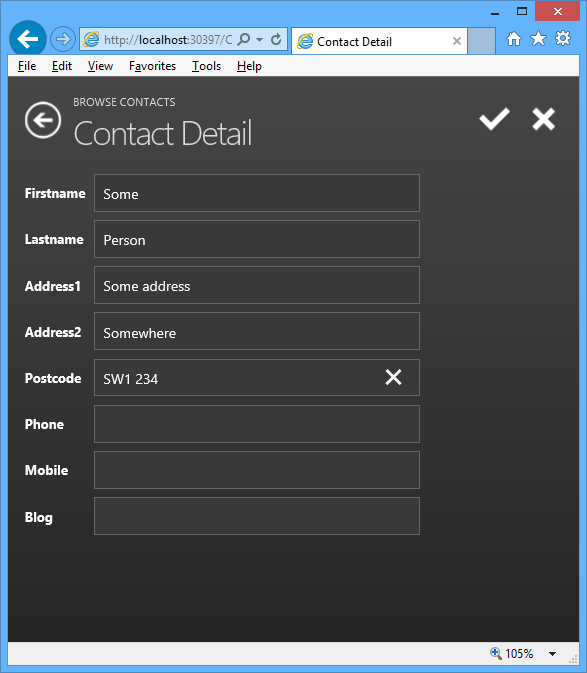
After installing the preview, I built a quick HTML client app, based on a contact database.

image

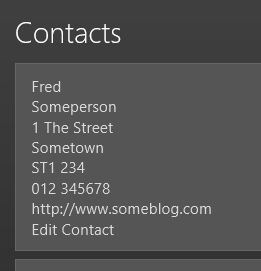
It did not take long to build a working application, though there are some puzzles. My first effort at creating a contact list only displayed the firstname of each record. Apparently that is the “summary” layout, and I cannot see any quick way to change the summary definition to something more useful. Instead, I changed it to a Rows Layout which shows all the fields, but lets you delete those which are not required. Then I added an Edit contact button, though it appears as plain text without even an underline to show that it is a hyperlink, and I cannot see quickly how to change this:

image

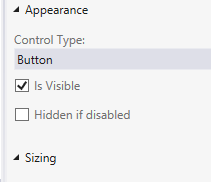
The button’s “Appearance” properties are not helpful:

image

I also found an annoyance that may be a bug. I created several new contacts via a Contact details form (the first illustration above). I saved each contact with the tick button, whereupon they appear in the contact list. However they are not yet really saved. To save the contact to the database, you have to execute the save action, which is a built-in button on the BrowseContacts form. When I tried to save, the phone number fields (defined as Phone Number fields) failed validation, even though they would be valid phone numbers in the UK, and the records were not saved. Fair enough I suppose, but why did they pass validation in the Contact Detail form?

I am sure there are easy fixes for all these niggles, but I mention them to illustrate the point about this not being the most intuitive of tools.

The general approach also takes some mental adjustment. Here is a tool that makes web apps, but you cannot use a web design tool to customise the user interface.

As a tool for building mobile web apps, LightSwitch does show promise and I look forward to the final release. That said, it would be good if Microsoft could adapt the HTML output so you can make it suitable for desktop browsers as well.