Category Archives: professional

Adobe sheds more light on its LiveCycle plans–but what is happening to its Digital Enterprise Platform?

When Adobe announced a shift in its business strategy in November, it was not clear what the implications were for the products that were no longer favoured. Since then bits of information have dripped out, presumably as the company itself works out its priorities. In December developers learned that Flash Catalyst would be discontinued and Flash Builder would have features removed. Now VP Arun Anantharaman has posted about what is happening to LiveCycle, the Enterprise Services side of Adobe.

Quick summary: Anantharaman says that the following “core offerings” will be the subject of continuing investment:

  • Modules: Reader Extensions, Forms, Output, Digital Signatures, Rights Management, Process Management, PDF Generation
  • Tools: Workbench, Designer
  • Solutions: Correspondence Management
  • ECM Connectors: SharePoint, IBM Filenet, Documentum
  • Advanced Offerings: Data Services

While it is reassuring to see that Data Services will not be abandoned, and that the most important PDF-based server products still have a future, not everything is clear regarding Adobe’s enterprise strategy. It is telling that Anantharaman’s post is entitled “The Future of LiveCycle”; yet the LiveCycle product page still says that LiveCycle has been replaced by the Adobe Digital Enterprise Platform:

The next evolution of LiveCycle is here. The new Adobe Digital Enterprise Platform (ADEP) brings together core LiveCycle capabilities and much more.

So why not a post on the future of ADEP? If you look at the FAQ about ADEP it seems that many of the modules mentioned above have been replaced by ADEP services.

It would also be helpful to spell out exactly what is being dropped, rather than leaving customers to work this out by spotting what is not mentioned. It does appear that the work Adobe has done on composite applications (“Mosaic”) is a casualty. Collaboration services are another obvious omission. Correspondence seems to be the sole survivor from what was three Solutions Accelerators: the other two were “Review and Approval” and “Interactive Statements”.

There is also the question of what is happening with Adobe’s Enterprise Content Management story. In October 2010, Adobe completed its acquisition of Day Software, thereby acquiring REST pioneer Roy Fielding as well as Day’s core product, CQ (Communiqué). ADEP seemed to bring together the CRX content repository which is used by CQ with Adobe’s previous investment in Enterprise application development, as well including the PDF document services that go back many years at Adobe, before the Macromedia acquisition.

Now, Web Content Management is still a focus at Adobe, being part of what Adobe, with its love of the Experience word, calls Web Experience Management. This is from Anantharaman’s statement last November:

we are now planning to focus our Enterprise efforts on products targeting the digital marketer, including the Digital Marketing Suite and Web Experience Management solution.

That suggests CQ and CRX are alive and well at Adobe; but what exactly is happening to ADEP?

I have asked Adobe for clarification of its Enterprise strategy, and while nobody was available to speak to me on the subject immediately, I have been told that this should be possible in a couple of weeks time, so watch this space.


Appcelerator CEO on EMEA expansion, Titanium vs PhoneGap, and how WebKit drives HTML5 standards

I spoke to Appcelerator CEO Jeff Haynie yesterday, just before today’s announcement of the opening of an EMEA headquarters in Reading. It has only 4 or 5 staff at the moment, mostly sales and marketing, but will expand into professional services and training.

Appcelerator’s product is a cross-platform (though see below) development platform for both desktop and mobile applications. The mobile aspect makes this a hot market to be in, and the company says it has annual growth of several hundred percent. “We’re not profitable yet, but we’ve got about 1300 customers now,” Haynie told me. “ On the developer numbers side, we’ve got about 235,000 mobile developers and about 35,000 apps that have been built.”

Jeff Haynie, Appcelerator

In November 2011, Red Hat invested in Appcelerator and announced a partnership based on using Titanium with OpenShift, Red Hat’s cloud platform.

Another cross-platform mobile toolkit is PhoneGap, which has received lots of attention following the acquisition of Nitobi, the company which built PhoneGap, by Adobe, and also the donation of PhoneGap to the Apache Foundation. I asked Haynie to explain how Titanium’s approach differs from that of PhoneGap.

Technically what we do and what PhoneGap does is a lot different. PhoneGap is about how do you take HTML and wrap it into a web browser and put it into a native container and expose some of the basic APIs. Titanium is really about how you expose JavaScript for an API for native capabilities, and have you build a real native application or an HTML5 application. We offer both a true native application – I mean the UI is native and you get full access to all the API as if you had written it native, but you are writing it in JavaScript. We have also got now an HTML5 product where that same codebase can be deployed into an HTML5 web-driven interface. We think that is wildly different technically and delivers a much better application.

Haynie agrees that cross-platform tools can compromise performance and design, and even resists placing Titanium in the cross-platform category:

Titanium is a real native UI. When you’re in an iPhone TableView it’s actually a real native TableView, not an HTML5 table that happens to look like a TableView. You get the best of both worlds. You get a JavaScript-driven, web-driven API, but when you actually create the app you get a real app. Then we have an open extensible API so it’s really easy if you want to expose additional capabilities or bring in third-party libraries, very similar to what you do in Java with JNI [Java Native Invocation].

The category has got a bit of a bad rap. We wouldn’t really describe ourselves as cross-platform. We’re really an API that allows you target multiple different devices. It’s not a write-once run anywhere, it’s really API driven.

80% of our core APIs are meant to be portable. Filesystems, threads, things like that. Even some of the UI layer, basic views and buttons and things like that. But then you have a Titanium iOS namespace [for example] which allows you to access all the iOS-specific APIs, that aren’t portable.

I asked Haynie for his perspective on the mobile platform wars. Apple and Android dominate, but what about the others?

RIM and Microsoft are fighting for third place. I would go long on Microsoft. Look at Xbox, look at the impact of long-term endeavours, they have the sustainability and the investment power to play the long game, especially in the enterprise. We’ll see Microsoft make significant strides in Windows 8 and beyond.

Even within Android, there are going to be a lot of different types of Android that will be both complementary and competitive with Google. They will continue to take the lion’s share of the market. Apple will be a smaller but highly profitable and vertically integrated ecosystem. In my opinion Microsoft is a bit of bridge between both. They’re more open than Apple, and more vertically integrated than Google, with tighter standardisation and stacks.

I wouldn’t quite count RIM out. They still have a decent market share, especially in certain parts of the world and certain types of application. But they’ve got a long way to go with their new platform.

So will Titanium support Windows 8 “Metro” apps, running on the new WinRT runtime?

Yes, we don’t have a date or anything to announce, but yes.

I was also interested in his thoughts on Adobe, particularly as there is some flow of employees from Adobe to Appcelerator. Is he seeing migration of developers from Flex, Flash and AIR to Titanium?

Adobe has had a tremendously successful product in Flash, the web wouldn’t be the web today if it wasn’t for Flash, but the advent of HTML5 is encroaching on that. How do they move to the next big thing, I don’t know if they have a next big thing? And they’re dealing in an ecosystem that’s not necessarily level ground. That’s churning lots of dissenting and different opinions inside Adobe, is what we’re hearing.

We’re seeing a large degree of people that are Flash, ActionScript oriented that are migrating. We’ve hired a number of people from Adobe. Quite a lot of people in our QA group actually came out of the Adobe AIR group. Adobe is a fantastic company, the question is what’s their future and what’s their plan?

FInally, we discussed web standards. With a product that depends on web technology, does Appcelerator get involved in the HTML5 standards process? The question prompted an intriguing response with regard to WebKit, the open source browser engine.

We’re heavily involved in the Eclipse foundation, but not in the W3C today. I spent about 3 and half years on the W3C in my last company, so I’m familiar with the process and the people. The W3C process is largely driven – and I know the PhoneGap people have tried to get involved – by the WHAT working group and the HTML5 working group, which ultimately are driven by the browser manufacturers … it’s a largely vendor-oriented, fragmented space right now, that’s the challenge. We still haven’t managed to get a royalty-free, IPR-free codec for video.

I’d also say that one of the biggest factors pushing HTML5 is less the standardisation itself and more WebKit. WebKit has become the de facto [standard], which has really been driven by Apple and Google and against Microsoft. That’s driving HTML5 forward as much as the working group itself.

PHP Developer survey shows dominance of mobile, social media and cloud

Zend, a company which specialises in PHP frameworks and tools, has released the results of a developer survey from November 2011.

The survey attracted 3,335 respondents drawn, it says, from “enterprise, SMB and independent developers worldwide.” I have a quibble with this, since I believe the survey should state that these were PHP developers. Why? Because I have an email from November which asked me to participate and said:

Zend is taking the pulse of PHP developers. What’s hot and what matters most in your view of PHP?

There is a difference between “developers” and “PHP developers”, and much though I love PHP the survey should make this clear. Nevertheless, If you participated, but mainly use Java or some other language, your input is still included. Later the survey states that “more than 50% of enterprise developers and more than 65% of SMB developers surveyed report spending more than half of their time working in PHP.” But if they are already identified as PHP developers, that is not a valuable statistic.

Caveat aside, the results make good reading. Some highlights:

  • 66% of those surveyed are working on mobile development.
  • 45% are integrating with social media
  • 41% are doing cloud-based development

Those are huge figures, and demonstrate how far in the past was the era when mobile was some little niche compared to mainstream development. It is the mainstream now – though you would get a less mobile-oriented picture if you surveyed enterprise developers alone. Similar thoughts apply to social media and cloud deployment.

The next figures that caught my eye relate to cloud deployment specifically.

  • 30% plan to use Amazon
  • 28% will use cloud but are undecided which to use
  • 10% plan to use Rackspace
  • 6% plan to use Microsoft Azure
  • 5% have another public cloud in mind (Google? Heroku?)
  • 3% plan to use IBM Smart Cloud

The main message here is: look how much business Amazon is getting, and how little is going to giants like Microsoft, IBM and Google. Then again, these are PHP developers, in which light 6% for Microsoft Azure is not bad – or are these PHP developer who also work in .NET?

I was also interested in the “other languages used” section. 82% use JavaScript, which is no surprise given that PHP is a web technology, but more striking is that 24% also use Java, well ahead of C/C++ at 17%, C# at 15% and Python at 11%.

Finally, the really important stuff. 86% of developers listen to music while coding, and the most popular artists are:

  1. Metallica
  2. = Pink Floyd and Linkin Park

Wow.

The mystery of unexpected expiring sessions in ASP.NET

This is one of those posts that will not interest you unless you have a similar problem. That said, it does illustrate one general truth, that in software problems are often not what they first appear to be, and solving them can be like one of those adventure games where you think your quest is for the magic gem, but when you find the magic gem you discover that you also need the enchanted ring, and so on.

Recently I have been troubleshooting a session problem on an ASP.NET application running on a shared host (IIS 7.0).

This particular application has a form with some lengthy text fields. Users complete the form and then hit save. The problem: sometimes they would take too long thinking, and when they hit save they would lose their work and be redirected to a login page. It is the kind of thing most of us have experienced once in a while on a discussion forum.

The solution seems easy though. Just increase the session timeout.  However, this had already been done, but the sessions still seemed to time out too early. Failure one.

My next thought was to introduce a workaround, especially as this is a shared host where we cannot control exactly how the server is configured. I set up a simple AJAX script that ran in the background and called a page in the application from time to time, just to keep the session alive. I also had it write a log for each ping, in order to track the behaviour.

By the way, if you do this, make sure that you disable caching on the page you are pinging. Just pop this at the top of the .aspx page:

<%@ OutputCache Duration="1" Location="None" VaryByParam="None"%>

It turned out though that the session still died. One moment it was alive, next moment gone. Failure two.

This pretty much proved that session timeout as such was not the issue. I suspected that the application pool was being recycled – and after checking with the ISP, who checked the event log, this turned out to be the case. Check this post for why this might happen, as well as the discussion here. If the application pool is recycled, then your application restarts, wiping any session values. On a shared host, it might be some else’s badly-behaved application that triggers this.

The solution then is to change the way the application stores session variables. ASP.NET has three session modes. The default is InProc, which is fast but not resilient, and for obvious reasons not suitable for apps which run on multiple servers. If you change this to StateServer, then session values are stored by the ASP.NET State Service instead. Note that this service is not running by default, but you can easily enable it, and our helpful ISP arranged this. The third option is to use SQLServer, which is suitable for web farms. Storing session state outside the application process means that it survives pool recycling.

Note the small print though. Once you move away from InProc, session variables are serialized, not just held in memory. This means that classes must have the System.Serializable attribute. Note also that objects might emerge from serialization and deserialization a little different from how they went in, if they hold state that is more complex than simple properties. The constructor is not called, for example. Further, some properties cannot sensibly be serialized. See this article for more information, and why you might need to do custom serialization for some classes.

After tweaking the application to work with the State Service though, the outcome was depressing. The session still died. Failure three.

Why might a session die when the pool recycles, even if you are not using InProc mode? The answer seems to be that the new pool generates a new machine key by default. The machine key is used to encrypt and decrypt the session values, so if the key changes, your existing session values are invalid.

The solution was to specify the machine key in web.config. See here for how to configure the machine key.

Everything worked. Success at last.

Windows Phone, Windows 8, and Metro Metro Metro feature in Microsoft’s last keynote at CES

I watched Microsoft CEO Steve Ballmer give the last in a long series of Microsoft keynotes at the Consumer Electronics Show in Las Vegas.

image

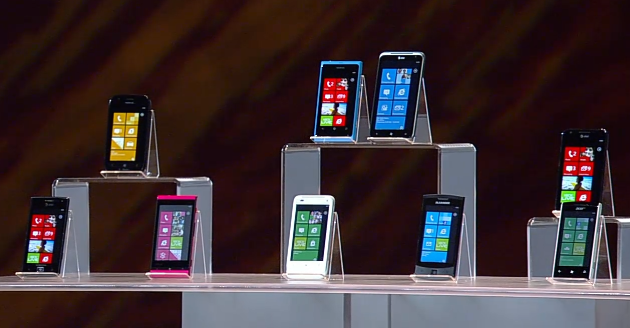
There were three themes: Windows Phone, Windows 8, and Xbox with Kinect. It was a disappointing keynote though, mainly because of the lack of new news. Most of the Windows Phone presentation could have been from last year, except that we now have Nokia involvement which has resulted in stronger devices and marketing. What we have is in effect a re-launch necessitated by the failure of the initial launch; but the presentation lacked the pizzazz that it needed to convince sceptics to take another look. That said, I have enjoyed using Nokia’s Lumia 800 and still believe the platform has potential; but Microsoft could have made more of this opportunity. A failed voice demo did nothing other than remind us that voice control in Windows Phone is no Apple Siri.

image

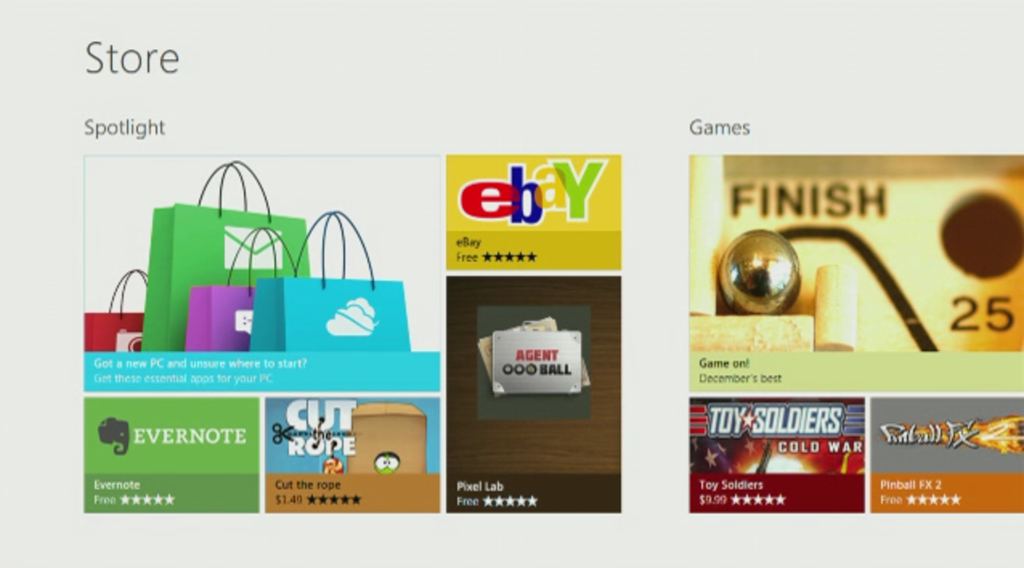
What about Windows 8? Windows Chief Marketing Officer Tami Reller gave a presentation, and I was hoping to catch a glimpse of new stuff since the preview at last year’s BUILD conference. There was not much though, and Reller was using the same Samsung tablet as given to BUILD delegates. We did get a view of the forthcoming Windows Store that I had not seen before:

image

Reller mainly showed the Metro interface, in line with a general focus on Metro also emphasised by Ballmer. She talked about ARM and said that Metro apps will run on both Intel and ARM editions of Windows 8; notably she did not say the same thing about desktop apps, which implies once again that Microsoft intends to downplay the desktop side in the ARM release.

Reller also emphasised that Windows 8 Metro works well on small screens, as if to remind us that it will inevitably come to Windows Phone in time.

Windows 8 looks like a decent tablet OS, but the obvious questions are why users will want this when they already have iOS and Android, and why Microsoft is changing direction so dramatically in this release of Windows? The CES keynote was a great opportunity to convince the world of the merits of its new strategy, but instead it felt more as if Microsoft was ducking these issues.

Xbox and Kinect followed, and proved firmer ground for the company, partly because these products are already successful. There was a voice control demo for Xbox which worked perfectly, in contrast to the Windows Phone effort. We also heard about Microsoft’s new alliance with News Corporation, which will bring media including Fox News and the Wall Street Journal to the console. We also saw the best demo of the day, a Sesame Street interactive Kinect game played with genuine enthusiasm by an actual child.

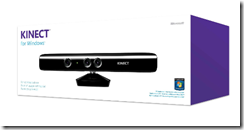
Microsoft unveiled Kinect for Windows, to be released on 1st February, except that there was not much to say about it. Amazon.com has the product available for pre-order, and there was more to be learned there.

image

The new product  retails at $249.99, compared to $149 for the Xbox version, but seems little different. Here is what the description says:

This Kinect Sensor for Windows has a shortened USB cable to ensure reliability across a broad range of computers and includes a small dongle to improve coexistence with other USB peripherals. The new firmware enables the depth camera to see objects as close as 50 centimeters in front of the device without losing accuracy or precision, with graceful degradation down to 40 centimeters. “Near Mode” will enable a whole new class of “close up” applications, beyond the living room scenarios for Kinect for Xbox 360.

I imagine hackers are already wondering if they can get the new firmware onto the Xbox edition and use that instead. Kinect for Windows does not come with any software.

What is the use of it? That is an open question. Potentially it could be an interesting alternative to a mouse or touch screen, face recognition could be used for personalisation, and maybe there will be some compelling applications. If so, none were shown at CES.

I am not sure of the extent of Microsoft’s ambitions for this first Windows release of Kinect, but at $249 with no software (the Xbox version includes a game) I would think it will be a hard sell, other than to developers. If wonderful apps appear, of course, I will change my mind.

Storage Spaces coming to Windows 8 client as well as server

Steven Sinofsky has posted on the Building Windows 8 blog, making it clear that this feature is coming to the Windows 8 client as well as to Windows Server 8.

I took a hands-on look at Storage Spaces back in October.

The feature lets you add and remove physical drives from a pool of storage, create virtual disks in that pool with RAID-like resiliency if you have more than one physical drive available. There is also “thin provisioning”, which lets you create a virtual disk bigger than the available space. It sounds daft at first, but makes sense if you think of it as a resource to which you add media as needed rather than paying for it all up-front. It

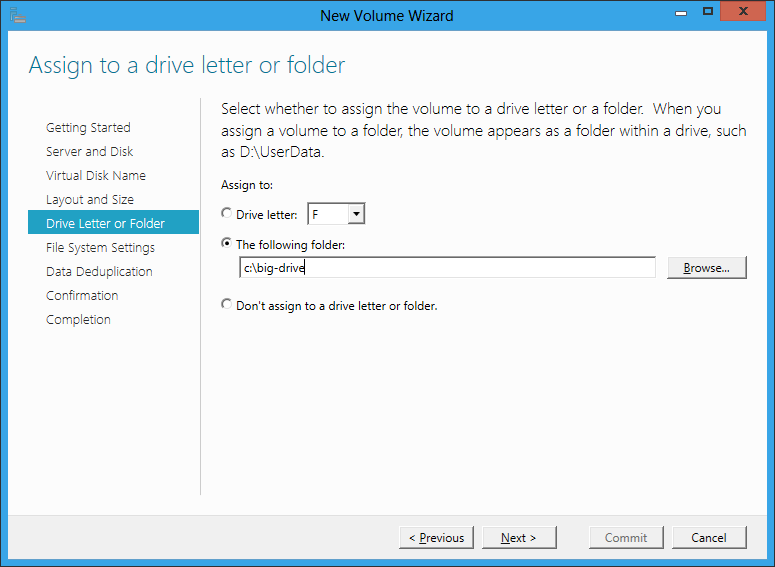
The server version includes data deduplication so that similar or identical files occupy less physical space. Another feature which is long overdue is the ability to allocate space to a virtual folder rather than to a drive letter.

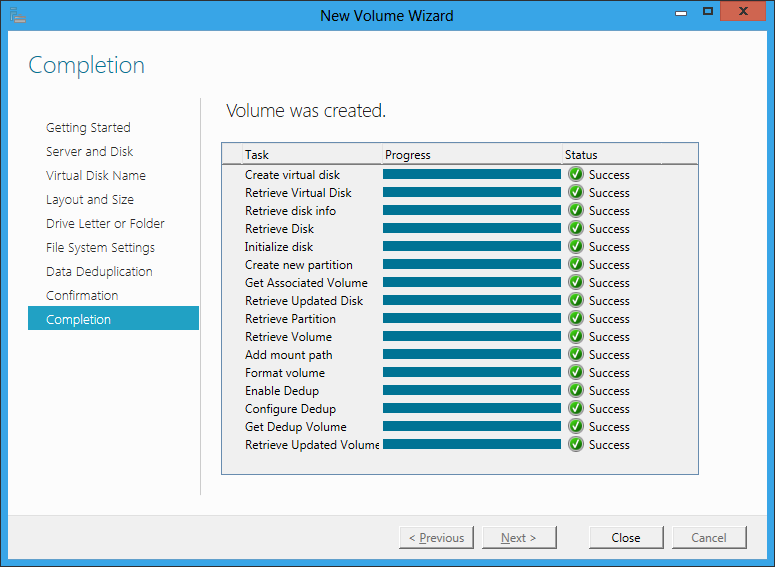
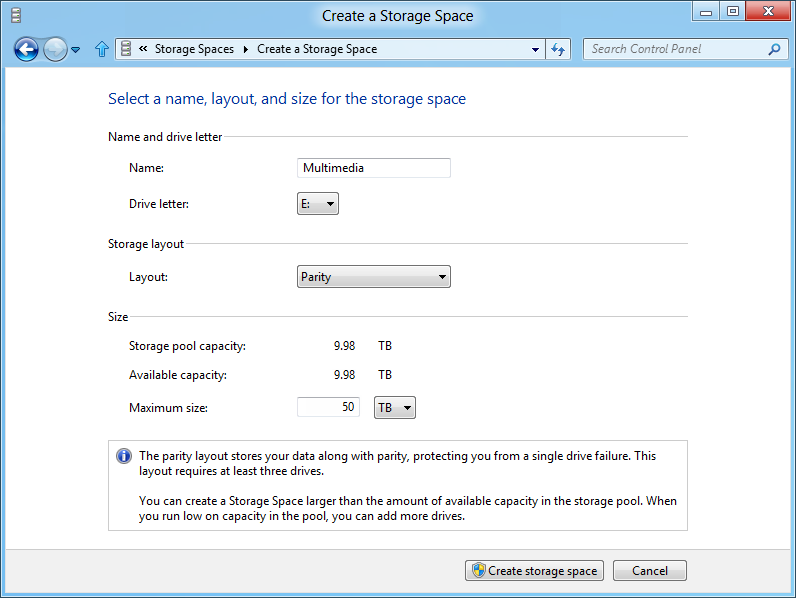
I do not know if all these features will come to the Windows 8 client version, but as data deduplication is not mentioned in Sinofsky’s post, and the dialog he shows does not include a folder option, it may well be that these are server-only. This is the new Windows 8 dialog:

image

Storage Spaces occupies a kind of middle ground in that enterprises will typically have more grown-up storage systems such as a Fibre Channel or iSCSI SAN (Storage Area Network). At the other end of the scale, individual business users do not want to bother with multiple drives at all. Nevertheless, for individuals with projects like storing large amounts of video, or small businesses looking for good value but reliable storage based on cheap SATA drives, Storage Spaces look like a great feature.

Most computer professionals will recall seeing users struggling with space issues on their laptop, not realising that the vendor (Toshiba was one example) had partitioned the drive and that they had a capacious D drive that was completely empty. It really is time that Microsoft figured out how to make storage management seamless and transparent for the user, and this seems to me a big step in that direction.

Users petition Asus over locked bootloader in Asus Transformer Prime

The new Asus Transformer Prime TF201 Android tablet is winning praise for its performance and flexibility. It is driven by NVIDIA’s quad-core Tegra 3 processor and can be equipped with a keyboard and dock that extends battery life and makes the device more like a laptop.

All good; but techie users are upset that the bootloader is encrypted, which means the kernel cannot be modified other than through official Asus updates.

A petition on the subject has achieved over 2000 signatures. Detailed discussion of the implications are here.

image

Why do vendors lock the bootloader? One reason is for support, since it increases the user’s ability to mess up their machines. On the other hand, most users who hack to this extent understand what they are doing. This comment from the petition stood out for me:

We understand that custom firmware cannot be supported by ASUS, but we consider that it is our right to customise our devices in any way we wish: once bought, the Prime is our property alone to modify if we choose.

This is something we have taken for granted in the PC era, but the tablet era is looking different, with locked-down devices that give vendors more control. The success of the Apple iPad suggests that most users do not mind if the result is a good experience. It is a profound change though, and one that makes users vulnerable to vendors who are slow or reluctant to provide updates.

What is the best way to choose a development tool?

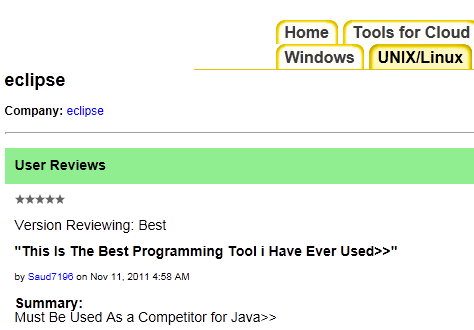
Research company Evans Data sent me a link this morning to its new Tool Grader service. This is a simple web application for reviewing and rating software tools. The same tool may rated separately rated for different platforms. For example, there is one entry for Eclipse under UNIX/Linux, and another separate one under Tools for Mobile.

I took a quick look and rate the site mostly useless. There are not many reviews, and most of the reviews are of little value, for example “This Is The Best Programming Tool i Have Ever Used,” from somebody who says that Eclipse “Must be used as a competitor for Java.”

image

The site would improve of course if a lot of people were to use it; but currently there is little incentive to do so, since most developers will take one look and never return. Evans Data could do better; it has a ton of data from surveys it has conducted and if it were to take some of the more useful data from those reports and integrate it with the Tool Grader the site would be more valuable. It will not do that I guess because its business model is to sell those reports, and because it would be a lot of work.

It gave me pause for thought though. What is the best way to choose a development tool? Part of the problem is that context is everything. The same tool will be great for one purpose and poor for another; it depends what you want it for, especially when it is a multi-faceted product like Eclipse or Visual Studio, both of which are really tool platforms.

If you are looking for information on which tool will be best for your project, I doubt that either Tool Grader or even purchasing an expensive report will help you much. One approach that has value is to install several candidates and try them out, but it takes considerable time and effort. Another idea is to go along to an active community like Stack Overflow, describe your project in some detail including any constraints like “our developers span three continents” or “the boss insists we use Rational ClearCase for source code management”, and ask for opinions from other users.

When I am assessing a tool I always try to visit forums where it is discussed and get a flavour of the types of problems and queries users have. If there is little discussion that suggests the tool is most likely little used, usually a bad thing. If the vendor has no open discussion on its site and emphasises the “contact support” route that suggests a weak community. I also look for potential showstoppers like instability or intractable problems such as difficulty wresting acceptable performance from either the tool or its output.

I do not pretend it is easy though. Tool choices are important because they have a significant impact on productivity, and it is hard to change your mind once you and your team have invested money, skills and code in a particular product.

Adobe: why the big business shift when financial results look so good?

Adobe released its quarterly and full year results last week; I am catching up with this now after a week in China.

The company is doing well. Revenue is up by 11% year on year and it generated $1.5 billion in cash. It is buying back shares, usually a sign that a company has more money than it knows what to do with.

Here is the comparison with the equivalent quarter last year:

  Q4 2010 Q4 2011
Creative and interactive 404.8 437.2
Digital Media 165.9 186.4
Digital Enterprise 273.3 342.4
Omniture 109.0 131.1
Print and publishing 55 55.1

In other words, all business segments grew – impressive in uncertain economic times. See this earlier post for a rough breakdown of the segments.

A couple of observations. First, Adobe is benefiting from the big trend in IT towards web, cloud and device. Many companies regard apps (as in mobile apps) as vehicles for marketing, and Adobe’s tools are a natural fit, with or without Flash. We are in a more design-centric IT world than was the case a few years back, driven by Apple, SEO (Search Engine Optimisation), and just because we can: technology now performs basic computing functions with ease so design becomes the key differentiator.

Adobe is nevertheless remarkable in the way it has managed the transition from print to digital. Few companies manage that kind of fundamental shift in their market successfully.

The other point that interests me is why Adobe announced a major change in its business model in November. Digital media and marketing will be the focus, while it winds down its enterprise development platform, as well as moving away from Flash and focusing on HTML5 for delivery.

Unless the announced figures disguise future problems that are only visible on the inside, this move was driven by bad results. Digital Enterprise, which includes the middleware business, increased revenue by 25% over the same quarter last year.

In 2012 the Digital Enterprise segment is being renamed Digital Marketing Solutions, expressing the company’s intent.

Adobe’s change of direction caught me by surprise, as it was not really flagged at the MAX conference the previous month, though there was evidence of struggle with regard to Flash versus HTML5.

I would describe Adobe’s moves as bold. Taking action ahead of when it becomes inevitable is a good thing, but there are significant risks. Adobe’s platform is all about synergies, and chopping off bits that still have a significant following may have unexpected consequences.

Another curious facet of Adobe’s move is that its normally excellent PR department has done little, as far as I am aware, to brief the press. Major news concerning what will be donated to Apache, or the discontinuation of Flash Catalyst, has emerged from sporadic reports instead. Normally that is a sign of a company under stress, rather than one which is about to deliver excellent results.

I guess this time next year we will have a clearer picture.

Android: good or bad for Java? Oracle claims harm but I am sceptical

Patent blogger Florian Mueller quotes a statement filed by Oracle in its legal dispute with Google over its use of the Java language in Android:

Android’s growth in the mobile device market has been exponential, steadily diminishing Java’s share. For instance, Amazon’s newly-released Kindle Fire tablet is based on Android, while prior versions of the Kindle were Java-based. Android has been gaining in other areas as well, with Android-based set-top boxes and even televisions appearing this year. These are markets where Java has traditionally been strong but is now losing ground to Android. The longer Android is allowed to continue fragmenting the Java ecosystem, the more serious the harm to Java becomes, and the more difficult it is to try to unwind. Oracle suffers harm in the form of lost licensing opportunities for its existing Java platform products, and the enterprise-wide harm from fragmentation of Java, which reduces the ‘write once, run anywhere’ capability that has historically provided Java such great value.

The Kindle is an interesting example. I had not realised that the pre-Fire Kindle runs Java, but Oracle shows it as a case study and indeed, here are the javadocs.

Android infuriates Oracle because it uses the Java language, but has its own virtual machine called Dalvik. Dalvik bytecode is different from Java bytecode.

I have no expertise on the legal position, but while I can see Oracle’s point it is also true that Android has greatly boosted interest in Java development. Although Google has fragmented Java, the fact that the language is the same benefits Oracle insofar as it increases the pool of Java developers who may also be inclined to create Java applications on the server or in other contexts.

The interesting question to ask is where Java would be without Android. On mobile, it would likely be close to death. Apple’s iOS platform is equally as resistant to Java as to Adobe Flash. RIM Blackberry used to be a Java platform, but is moving away:

While we will continue to support our BlackBerry Java developer community as they build for BlackBerry smartphones, after further investigation we decided against supporting BlackBerry Java on BlackBerry BBX. We concluded that the BlackBerry Java experience on the BlackBerry PlayBook platform would ultimately not satisfy us, our development community, or our customers as the platform continues to evolve.

Microsoft has no interest in Java on the Windows Phone OS or in the Windows 8 OS that will likely replace it on devices.

Oracle’s claim is in the context of a legal dispute, and as Mueller observes, the company is happy to show off growing interest in Java in its press releases – though without mentioning the A word.

Of course you can understand why Oracle might want to enjoy the benefit of Java’s Android boost as well as the reward of a legal victory over Google.

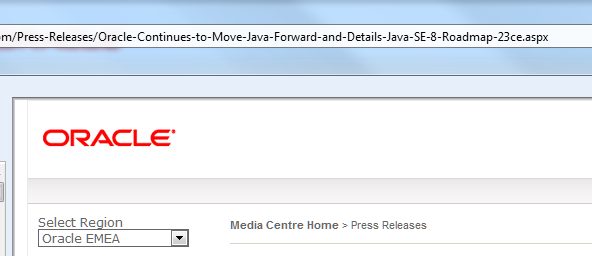
PS: interesting that Oracle’s Java press release seems to be served by Microsoft .NET:

image