Category Archives: professional

On Supercomputers, China’s Tianhe-1A in particular, and why you should think twice before going to see one

I am just back from Beijing courtesy of Nvidia; I attended the GPU Technology conference and also got to see not one but two supercomputers:  Mole-8.5 in Beijing and Tianhe-1A in Tianjin, a coach ride away.

Mole-8.5 is currently at no. 21 and Tianhe-1A at no. 2 on the top 500 list of the world’s fastest supercomputers.

There was a reason Nvidia took journalists along, of course. Both are powered partly by Nvidia Tesla GPUs, and it is part of the company’s campaign to convince the world that GPUs are essential for supercomputing, because of their greater efficiency than CPUs. Intel says we should wait for its MIC (Many Integrated Core) CPU instead; but  Nvidia has a point, and increasing numbers of supercomputers are plugging in thousands of Nvidia GPUs. That does not include the world’s current no. 1, Japan’s K Computer, but it will include the USA’s Titan, currently no. 3, which will add up to 18.000 GPUs in 2012 with plans that may take it to the top spot; we were told that that it aims to be twice as fast as the K Computer.

Supercomputers are important. They excel at processing large amounts of data, so typical applications are climate research, biomedical research, simulations of all kinds used for design and engineering, energy modelling, and so on. These efforts are important to the human race, so you will never catch me saying that supercomputers are esoteric and of no interest to most of us.

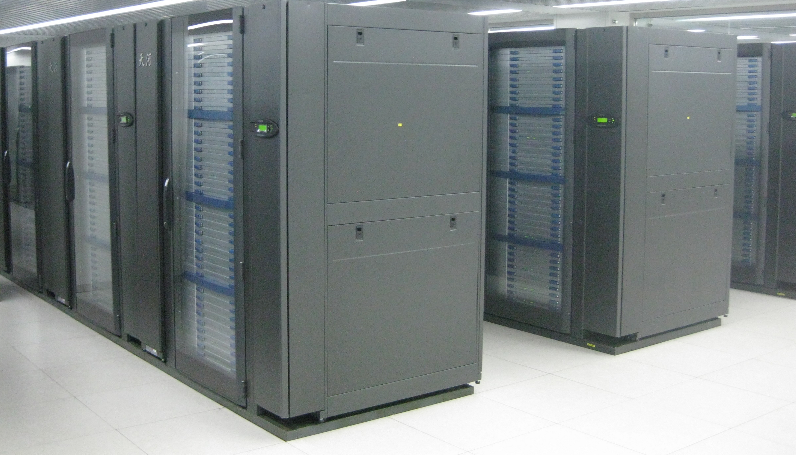
That said, supercomputers are physically little different from any other datacenter: rows of racks. Here is a bit of Mole-8.5:
image 

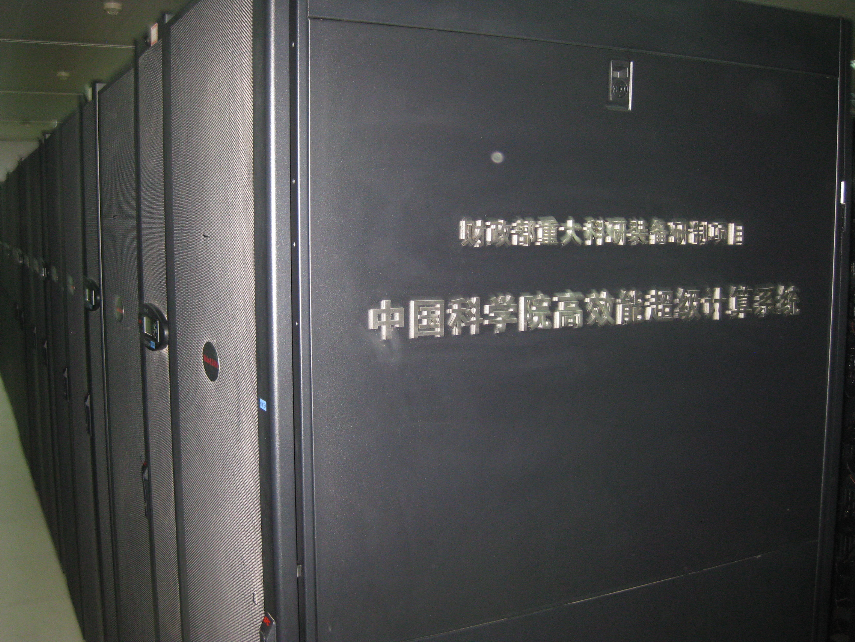
and here is a bit of Tianhe-1A:

image

In some ways Tianhe-1A is more striking from outside.

image

If you are interested in datacenters, how they are cooled, how they are powered, how they are constructed, then you will enjoy a visit to a supercomputer. Otherwise you may find it disappointing, especially given that you can run an application on a supercomputer without any need to be there physically.

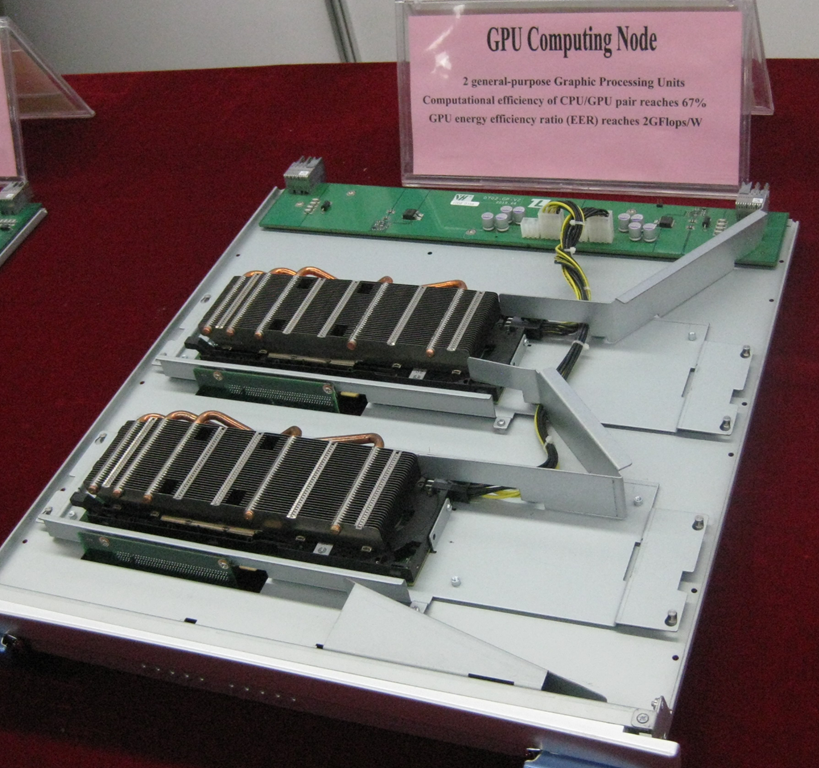
Of course there is still value in going to a supercomputing centre to talk to the people who run it and find out more about how the system is put together. Again though I should warn you that physically a supercomputer is repetitive. They achieve their mighty flop/s (floating point per second) counts by having lots and lots of processors (whether CPU or GPU) running in parallel. You can make a supercomputer faster by adding another cupboard with another set of racks with more boards with CPUs
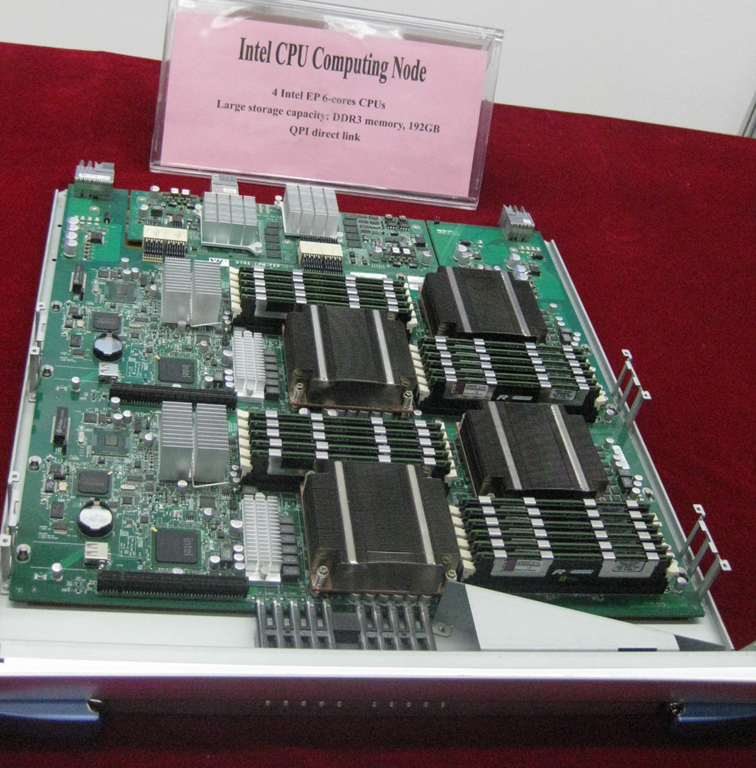
image

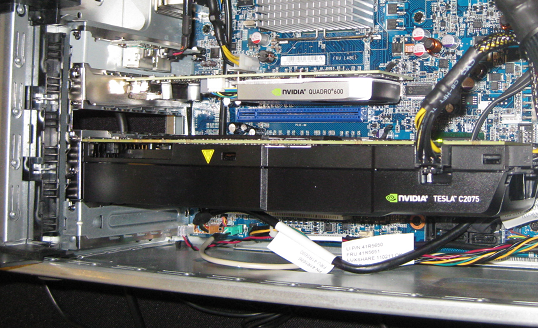
or GPUs

image

and provided your design is right you will get more flop/s.

Yes there is more to it than that, and points of interest include the speed of the network, which is critical in order to support high performance, as well as the software that manages it. Take a look at the K Computer’s Tofu Interconnect. But the term “supercomputer” is a little misleading: we are talking about a network of nodes rather than a single amazing monolithic machine.

Personally I enjoyed the tours, though the visit to Tianhe-1A was among the more curious visits I have experienced. We visited along with a bunch of Nvidia executives. The execs sat along one side of a conference table, the Chinese hosts along the other side, and they engaged in a diplomatic exercise of being very polite to each other while the journalists milled around the room.

image

We did get a tour of Tianhe-1A but unfortunately little chance to talk to the people involved, though we did have a short group interview with the project director, Liu Guangming.

image

He gave us short, guarded but precise answers, speaking through an interpreter. We asked about funding. “The way things work here is different from how it works in the USA,” he said, “The government supports us a lot, the building and infrastructure, all the machines, are all paid for by the government. The government also pays for the operational cost.” Nevertheless, users are charged for their time on Tianhe-1A, but this is to promote efficiency. “If users pay they use the system more efficiently, that is the reason for the charge,” he said. However, the users also get their funding from the government’s research budget.

Downplayed on the slides, but mentioned here, is the fact that the supercomputer was developed by the “National team of defence technology.” Food for thought.

We also asked about the usage of the GPU nodes as opposed to the CPU nodes, having noticed that many of the applications presented in the briefing were CPU-only. “The GPU stage is somewhat experimental,” he said, though he is “seeing increasing use of the GPU, and such a heterogeneous system should be the future of HPC [High Performance Computing].” Some applications do use the GPU and the results have been good. Overall the system has 60-70% sustained utilisation.

Another key topic: might China develop its own GPU? Tianhe-1A already includes 2048 China-designed “Galaxy FT” CPUs, alongside 14336 Intel CPUs and 7168 NVIDIA GPUS.

We already have the technology, said Guangming.

From 2005 -7 we designed a chip, a stream processor similar to a GPU. But the peak performance was not that good. We tried AMD GPUs, but they do not have EEC [Extended Error Correction], so that is why we went to NVIDIA. China does have the technology to make GPUs. Also the technology is growing, but what we implement is a commercial decision.

Liu Guangming closed with a short speech.

Many of the people from outside China might think that China’s HPC experienced explosive development last year. But China has been involved in HPC for 20 years. Next, the Chinese government is highly committed to HPC. Third, the economy is growing fast and we see the demand for HPC. These factors have produced the explosive growth you witnessed.

The Tianjin Supercomputer is open and you are welcome to visit.
Adobe discontinues Flash Catalyst, clarifies Flex and Flash Builder futures

Adobe has told a group of Flex developers, invited to San Francisco for a special reconciliatory summit following the sudden announcement that Flex is moving to the Apache Foundation, that Flash Catalyst will be discontinued. Developer Fabien Nicollet was there and posts:

CS5.5 version of Catalyst is the latest version of Flash Catalyst. It is compatible with Flex 4.5, but compatibility will not be ensured for future versions.

Flash Builder will also have features removed in future versions. Adobe’s slide talks of:

Removing unpopular and expensive to maintain features: Design View, Data Centric Development (DCD) and Flash Catalyst workflows.

The Monocle profiler, shown at the MAX conference as a sneak peek, “continues as a priority”.

The FalconJS project, to compile Flex to HTML5, will be discontinued, though possibly donated to Apache at a date to be determined.

AIR on Linux will not be given to Apache because it would mean sharing the proprietary Flash Player code. This is bad news in the Apache context.

Nicollet concludes:

Flex still has a bright future for companies who want to build fast and robust applications . Not to mention the people who will have a hard time building complex applications on HTML5, for whom Flex will always be a viable and mature alternative.

That is the optimistic view. What is clear from the summit is that Adobe is greatly reducing its investment. I guess we knew this already; but hearing about how Flash Builder will be cut-down, Catalyst discontinued, and so on, will not improve developer confidence.

A lot depends on the progress of the Apache project. My concern here is that since the Flash player, which is the Flex runtime, remains proprietary, this will dampen enthusiasm in the open source community and limit its ability to innovate around Flex.

NVIDIA CEO Jen-Hsun Huang beats the drum for GPU computing

In his keynote at the GPU Technology Conference here in Beijing NVIIDA CEO Jens-Hsun Huang presented the simple logic of GPU computing. The main constraint on computing is power consumption, he said:

Power is now the limiter of every computing platform, from cellphones to PCs and even datacenters.

CPUs are optimized for single-threaded computing and are relatively inefficient. According to Huang a CPU spends 50 times as much power scheduling instructions as it does executing them. A GPU by contrast is formed of many simple processors and is optimized for parallel processing, making it more efficient when measured in FLOP/s (Floating Point Operations per Second), a way of benchmarking computer performance. Therefore it is inevitable that computers make use of GPU computing in order to achieve best performance. Note that this does not mean dispensing with the CPU, but rather handing off processing to the GPU when appropriate.

This point is now accepted in the world of supercomputers. The computer at Chinese National Supercomputing Center in Tianjin has 14,336 Intel CPUs, 7168 Nvidia Tesla GPUs, and 2048 custom-designed 8-core CPUs called Galaxy FT-1000, and can achieve 4.7 Petaflop/s for a power consumption of 4.04 MegaWatts (million watts), as presented this morning by the center’s Vice Director Xiaoquian Zhu. This is currently the 2nd fastest supercomputer in the world.

Huang says that without GPUs the world would wait until 2035 for the first Exascale (1 Exaflop/s) supercomputer, presuming a power constraint of 20MW and current levels of performance improvement year by year, whereas by combining CPUs with GPUs this can be achieved in 2019.

Supercomputing is only half of the GPU computing story. More interesting for most users is the way this technology trickles down to the kind of computers we actually use. For example, today Lenovo announced several workstations which use NVIDIA’s Maximus technology to combine a GPU designed primarily for driving a display (Quadro) with a GPU designed primarily for GPU computing (Tesla). These workstations are aimed at design professionals, for whom the ability to render detailed designs quickly is important. The image below shows a Lenovo S20 on display here. Maybe these are not quite everyday computers, but they are still PCs. Approximate price to follow soon when I have had a chance to ask Lenovo. Update: prices start at around $4500 for an S20, with most of the cost being for the Tesla board.

image

GPU computing with NVIDIA in Beijing

I’m in Beijing for NVIDIA’s GPU Technology Conference; I attended last year’s event in San Jose and found it fascinating, partly because it has an academic and research flavour with a huge variety of projects on display.

This year the event is in Beijing, reflecting the level of HPC (High Performance Computing) activity in this region.

image

image

NVIDIA’s business is graphics processors, though it has expanded into the SoC (System on a chip) business with its ARM-based Tegra chipset. This conference though is focused at the other end of the scale: Tesla GPUs that are primarily designed not for driving a display, but for rapid processing using massively parallel computing.

The Tesla business is relatively small for NVIDIA; less than 5% of its overall revenue, I was told; and I was told that the company treats it partly as research and development. That said, GPU computing is coming into the mainstream and the business is expected to grow. NVIDIA’s desktop GPU cards also support GPU computing.

I recently reviewed a video format converter from Cyberlink; the product was unexceptional except that it can take advantage of GPU computing when available to speed processing when converting from one video format to another. Since I do have a suitable graphics card (though sadly not a Tesla) this made a substantial difference, converting several times faster than another format converted I tried.

Of course NVIDIA is not the only player; there is an open standard (OpenCL) for GPU computing and other GPU vendors such as AMD implement OpenCL. NVIDIA implements OpenCL but also has its own CUDA architecture, which tends to be the focus of its conference as you would expect.

More reports soon.

Silverlight 5 is done. Is Silverlight also done?

Microsoft has has announced the release of Silverlight 5.0.

image

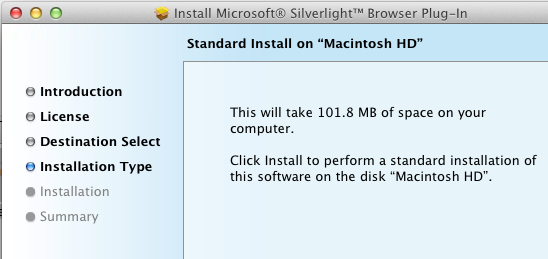
Silverlight is a cross-platform, cross-browser plug-in for Windows and Mac. It is relatively small size – less than 7MB according to Microsoft, though the Mac version seems to be bigger, with a 14MB compressed setup .dmg and apparently over 100MB once installed:

image

Never mind, it is a fine piece of work and has considerable capabilities, including the .NET Framework, the ability to render a GUI defined in XAML, multimedia playback, and support for applications running inside the browser or on the desktop. New in version 5 is better H.264 performance, 3D graphics, and Platform Invoke support on Windows enabling trusted applications to call the native API. Another change is that in-browser applications can also run with full trust, again only on Windows. The cross-platform idea has become increasingly diluted.

If Microsoft had come up with Silverlight early in the .NET story it might have become a major application platform. As it is, while still useful in some contexts, the technology has been side-lined by new things including HTML 5 and the Windows Runtime in the forthcoming Windows 8.

While I have huge respect for the team which created Silverlight and rapidly improved it, it now looks a sad story of reactive technology that failed to capture sufficient developer support. Microsoft invented Silverlight when Adobe Flash looked like it might take over as a universal runtime for web applications. The outcome was that Adobe evolved Flash with renewed vigour, keeping Silverlight at bay. Then Apple invented a new platform called iOS that supported neither Flash nor Silverlight, and the whole plug-in strategy began to look less compelling. Adobe has now reduced its focus on Flash, while Microsoft has been signalling a reduced role for Silverlight since its Professional Developers Conference in October 2010.

The question now is whether there will ever be a Silverlight 6.

Microsoft itself uses Silverlight across a number of products, such as administrative consoles for various server applications. Silverlight will be around for a while yet. Of course it is also the runtime for Windows Phone 7. Visual Studio LightSwitch generates Silverlight applications, and this one I am rather sad about, because it is an interesting tool that now seems to target the wrong platform. Perhaps the team will create an HTML 5 version one day.

HP contributes webOS to open source. Where next for HP mobile devices?

HP has announced that webOS, the mobile operating system acquired with Palm, will become an open source project:

HP will make the underlying code of webOS available under an open source license. Developers, partners, HP engineers and other hardware manufacturers can deliver ongoing enhancements and new versions into the marketplace.

HP will engage the open source community to help define the charter of the open source project under a set of operating principles:

  • The goal of the project is to accelerate the open development of the webOS platform
  • HP will be an active participant and investor in the project
  • Good, transparent and inclusive governance to avoid fragmentation
  • Software will be provided as a pure open source project

Despite the upbeat language, the fact that HP does not state that it will actually manufacture any webOS devices suggests that this is more a retreat than an advance. What kind of investment will HP put into webOS, if it is not selling devices?

Another problem is that Google Android is doing a great job meeting the demand for a freely available and mostly open source mobile operating system, leaving little space for other projects such as webOS or the Intel-sponsored MeeGo.

The question that interest me: where will HP now go with its mobile devices? There are several possibilities. It could do nothing, and focus on servers and PCs, thereby missing out on what is potentially a huge market. It could throw its hand in with Microsoft, with Windows 8 tablets sometime next year, and maybe some future version of Windows Phone. Or it could embrace Android, which still seems to have unstoppable momentum despite poor sales for most Android tablets.

Windows Store: Microsoft explains another piece of its new platform

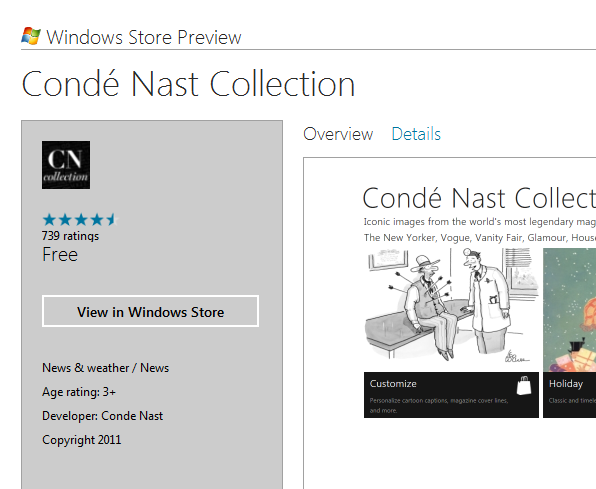
Microsoft’s Ted Dworkin, Partner Progam Manager, has posted details of how the forthcoming Windows Store will work. There is also detailed new information on MSDN. It is a key piece if you care about the next version of Windows, including details of how enterprises will be able to deploy apps as well as the terms of business for independent developers.

image

Here is a quick summary:

  • The store is both an app and a web site. The same content will automatically appear in both.
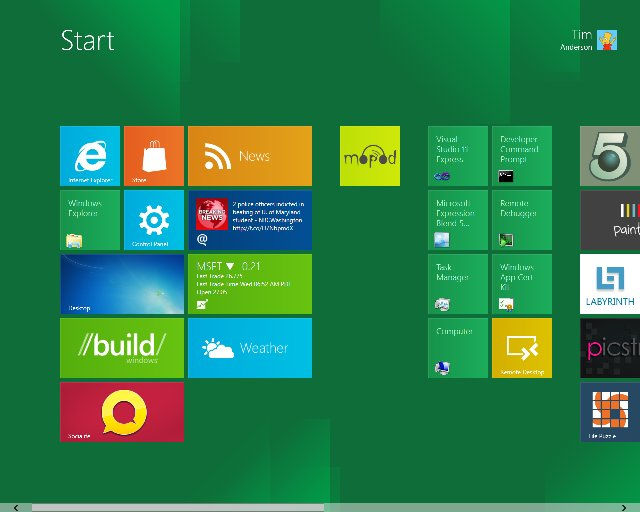
  • The store is for Metro-style apps, which run on the Windows Runtime. No word about desktop apps; my presumption is that they are excluded. The certification requirements refer only to Metro-style apps.
  • Apps can be offered as full-featured, limited or unlimited trial, upgradeable via in-app purchases.
  • Enterprise apps can be deployed through the store with access limited to employees.
  • Enterprise apps can also be deployed outside the store, using PowerShell scripts to domain-joined machines. Apps must be signed.
  • App vendors can use their own transaction engine and/or ad service if they choose, or use the built-in services for sale, in-app purchase and advertising. Subscriptions do not have to go through the store. My impression is that the initial sale does not have to be transacted through the store either but this is not 100% clear to me.
  • Developer registration for the store costs $49.00 for individuals or $99.00 for companies.
  • Revenue share is 70%, rising to 80% if you achieve over $25,000 revenue for an app.
  • Apps are subject to approval, but developers are given the App Certification Kit as part of the SDK. There is still scope for disagreement over the interpretation of policies.


There is an initial beta preview period during which all apps will be free. Microsoft has also annoyed most of the world’s developers by restricting a First Apps Contest to those who:

 are a developer – professional, hobbyist, or student – and you are a legal resident of the 50 United States and District of Columbia, France, Germany, Japan, or India

Why there are no tablets running Windows Phone 7

Once again people are asking why Microsoft has not allowed OEMs to build tablets running Windows Phone 7. Matthew Baxter-Reynolds says it is to do with income from OEM licenses:

Now, Microsoft charges OEMs far less for Windows Phone licenses (about $15 per unit) than for full-on Windows licenses (on average, working out to about $56 per unit) …  But for Ballmer and the team, this is the bad news scenario. Only $15 per licence? And even less in profit? Compared to $37 in profit? It’s a money-loser, people.

While I agree that Microsoft has a problem with its business model in the new world of mobile devices, I do not follow this reasoning. There is nothing to stop Microsoft charging more for Windows Phone OS on tablets than on phones if it could get away with it. Nor is it necessarily true that Microsoft will succeed in charging as much for Windows 8 on tablets as it does for Windows 8 on PCs. In fact, that is unlikely to be be true; they will be cheaper, especially on ARM.

If it is not this then, that still leaves the question of why Microsoft has not licensed the Windows Phone 7 OS for tablets.

Microsoft has undoubtedly fumbled tablet computing and this was a costly mistake. Nevertheless, it is a company capable of strategic thinking. I think it goes something like this, in no particular order.

First, I reckon Microsoft is thinking beyond the initial OEM license income for its profits from Windows 8 tablets. It is all about the apps – 30% of the income from every app sold on the locked-down ARM edition of Windows 8. Apps tend to be cheap, and there is cost in running the store, but there is potential for ongoing income that will exceed the initial license sale. Especially if, like Apple, Microsoft insists on a cut of subscription income, in-app advertising income, and so on.

Second, Microsoft is also betting on cloud computing. Windows Phone 7 is marketed mainly as a consumer device, but Microsoft is going to play the “this is the device for professionals” card at some point. You can bet that Windows 8 tablets, and their successors, will be promoted as the ideal client for Office 365, as well as for on-premise Exchange, SharePoint and Lync. Sell a tablet, buy a customer for Office 365. Lock customers into Office 365, and sell them other cloud applications and services. Plenty of opportunity for profit.

Third, my guess is that the Windows team at Microsoft does not consider the Windows Phone 7 OS good enough to be the foundation of its future mobile platform. They respect it enough to borrow its Metro design language, along with many aspects of the development model, but in the end Sinofsky and his team were not willing to hand over the future of Windows on devices to Windows CE and Silverlight.

What we are getting with the forthcoming Windows Runtime is a more deeply thought-through new platform in which .NET, native C++ code, and HTML 5 are equally well supported, and in which developers are forced to use asynchronous APIs that keep the user interface responsive. It will be a better app platform than the current Windows Phone OS; in fact, I fully expect Windows Runtime to migrate to the phone in some future version.

If Microsoft had allowed Windows Phone 7 onto tablets, it would have the difficult task of explaining to its customers how Windows 8 tablets differ from Windows Phone OS tablets as well as from those old Windows tablets from Bill Gates days.

Therefore Microsoft took the decision to wait until Windows 8 was ready. That was a bold decision, and it may be too late, but the reasoning is plausible.

image

Oxygene for Java released: develop for Android and Java runtime with Delphi language in Visual Studio

RemObjects has released Oxygene for Java, a new version of its Object Pascal compiler. Object Pascal is pretty much the Delphi language though with some additional features of its own. Previous versions target the .NET runtime, and a version of this is marketed by Embarcadero as Prism. The IDE for Oxygene is Microsoft’s Visual Studio. This new version targets both the Java Runtime and the Android Dalvik VM. The obvious target market is Delphi developers who now want to create apps for Android, or cross-platform Java applications.

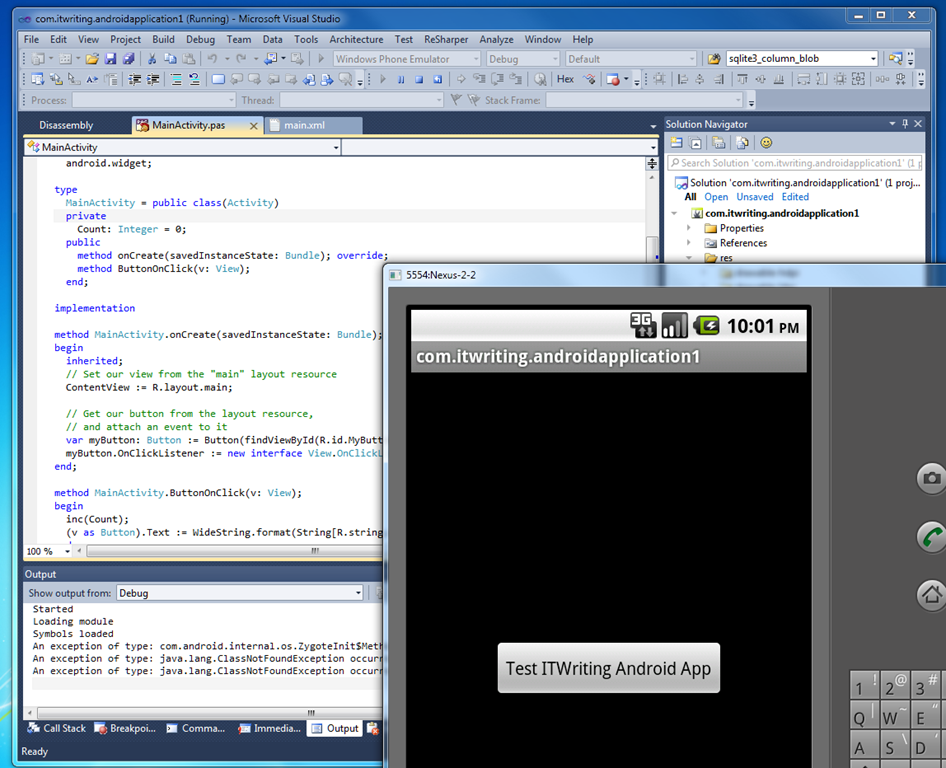
I downloaded the trial and ran the supplied Hello World in the Android emulator … it works.

image

A few further notes from the RemObjects announcement. While only Visual Studio is supported initially, an Eclipse version is also in preparation. Oxygene directly consumes .JAR libraries so you can use both first and third-party libraries. There is also a tool called Oxidizer that lets you import Java language code, which will be converted to Oxygene Object Pascal.

A point to note is that Embarcadero has already announced that its cross-platform FireMonkey framework will support Android as well as Apple iOS. This means that developers who want to code for Android in the Delphi language will have two choices. It looks to me as if Oxygene will be more suitable if you want to stay close to the Android SDK, whereas FireMonkey has its own custom-drawn user interface widgets and effects and should come into its own if you want the same code to run on both iOS and Android.

Given that a skilled Delphi developer would probably learn Java fairly quickly, how much value is there in Oxygene for Java? I guess factors include how much more productive you can be in Oxygene and the value of sharing code across projects targeting different platforms, presuming that you do not want to run Java everywhere.

Google’s real-time analytics, and why it gives it away

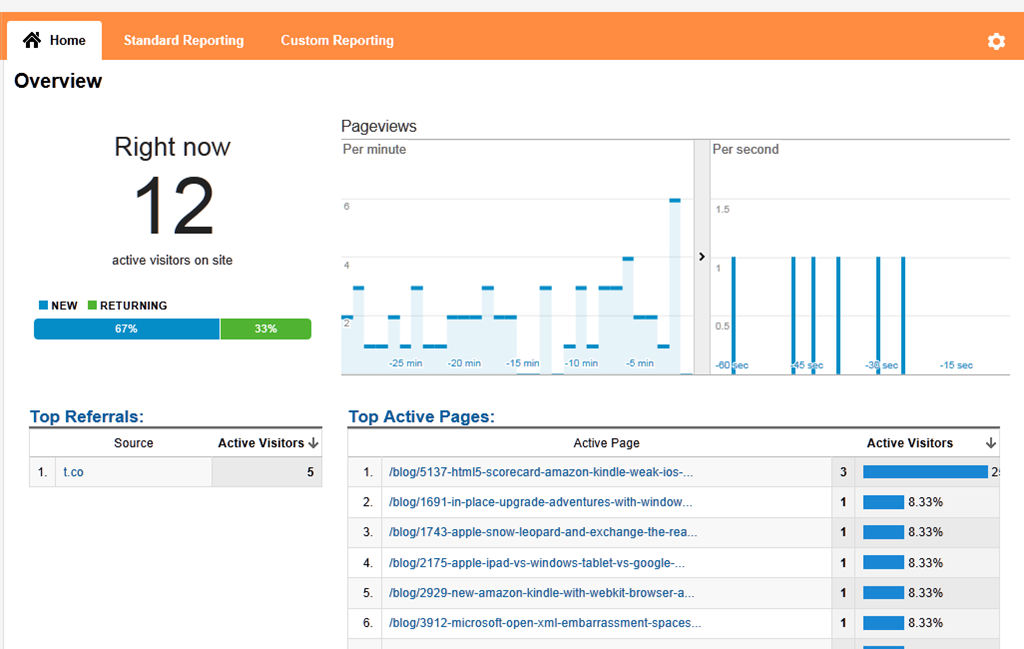
The free Google Analytics has added a real-time view which is great fun to watch:

image 

Aside from distracting bloggers, is there much value to real-time analytics? I’m not sure there is much advantage but it does demo well.

Why does Google invest so much in giving away analytics? Simple: it gets your data too. The amount of data Google receives on our web activities is breathtaking.

Here is something that annoys me. Perform a Google search, hover your mouse over a link, and note that visually it looks as if you have a direct link to the result. Even the text in the IE status bar says that you have

image

The truth though: the link is actually to a Google site, in this case:

http://www.google.co.uk/url?sa=t&rct=j&q=itwriting.com&source=web&cd=1&ved=0CBwQFjAA&url=http%3A%2F%2Fitwriting.com%2F&ei=58HMTuC4GI3E8QO56tDqDw&usg=AFQjCNGGr8FB9ywzsmKgVeJiInfTMm0EIQ&sig2=WO6JkzqzGoGxpbdstavwOQ

This is not for your benefit! In fact, it slows down your browsing, since you now have to wait for two sites to respond, first Google and then the actual destination. Google does this though because it wants to know exactly what you clicked on its search page. I also regard the way the status bar is faked as deceptive, as well as being a weakness in Internet Explorer – this is meant to show you what the hyperlink actually targets.

Microsoft’s Bing does not do this as far as I can tell, so if you want to get to your searched destinations faster, do not use Google. Unfortunately (from this perspective) Google’s search algorithms are rather quick so you may lose as much as you gain.