Category Archives: software development

Microsoft Office 365: the detail and the developer story

I attended the UK launch of Office 365 yesterday and found it a puzzling affair. The company chose to focus on small businesses, and what we got was several examples of customers who had discovered the advantages of storing documents online. We were even shown a live video conference with a jerky, embarrassing webcam stream adding zero business value and reminding me of NetMeeting back in 1995 – which by the way was a rather cool product. Most of what we saw could have been done equally well in Google Apps, except for a demo of the vile SharePoint Workspace for offline editing of a shared document, though if you were paying attention you could see that the presenter was not really offline at all.

There seems to be a large amount of point-missing going on.

There is also a common misconception that Office 365 is “Office in the cloud”, based on Office Web Apps. Although Office Web Apps is an interesting and occasionally useful feature, it is well down the list of what matters in Office 365. It is more accurate to say that Office 365 is for those who do not want to edit documents in the browser.

I am guessing that Microsoft’s focus on small businesses is partly a political matter. Microsoft has to offer an enterprise story and it does, with four enterprise plans, but it is a sensitive matter considering Microsoft’s relationship with partners, who get to sell less hardware and will make less money installing and maintaining complex server applications like Exchange and SharePoint. The, umm, messaging at the Worldwide Partner Conference next month is something I will be watching with interest.

The main point of Office 365 is a simple one: that instead of running Exchange and SharePoint yourself, or with a partner, you use these products on a multi-tenant basis in Microsoft’s cloud. This has been possible for some time with BPOS (Business Productivity Online Suite), but with Office 365 the products are updated to the latest 2010 versions and the marketing has stepped up a gear.

I was glad to attend yesterday’s event though, because I got to talk with Microsoft’s Simon May and Jo Carpenter after the briefing, and they answered some of my questions.

The first was: what is really in Office 365, in terms of detailed features? You can get this information here, in the Service Description documents for the various components. If you are wondering what features of on-premise SharePoint are not available in the Office 365 version, for example, this is where you can find out. There is also a Support Service Description that sets out exactly what support is available, including response time objectives. Reading these documents is also a reminder of how deep these products are, especially SharePoint which is a programmable platform with a wide range of services.

That leads on to my second question: what is the developer story in Office 365? SharePoint is build on ASP.NET, and you can code SharePoint applications in Visual Studio and deploy them to Office 365. Not all the services available in on-premise SharePoint are in the online version, but there is a decent subset. Microsoft has a Sharepoint Online for Office 365 Developer Guide with more details.

Now start joining the dots with technologies like Active Directory Federation Services – single sign-on to Office 365 using on-premise Active Directory – and Windows Azure which offers hosted SQL Server and App Fabric middleware. What about using Office 365 not only for documents and email, but also as a portal for cloud-hosted enterprise applications?

That makes sense to me, though there are still limitations. Here is a thread where someone asks:

Does some know if it is possible to make a database connection with Office365, SharePoint (Designer) and SQL Azure database ?

and the answer from Microsoft’s Mark Kashman on the SharePoint team:

You cannot do this via SharePoint Designer today. What you can do is to create a Silverlight or javaScript client application that calls out to SQL Azure.

In the near future, we are designing a way to make these connections using the base SharePoint technology called BCS (Business Connectivity Services) where then you could develop a service to service to SQL Azure.

If you cannot wait, check out the Cloud Connector for SharePoint 2010 from Layer 2 GmbH.

It seems obvious that Office 365 and Azure together have potential as a developer platform.

What about third-party applications and extensions for Office 365? This is another thing that Microsoft did not talk about yesterday; but it seems to me that there is potential here as well. It is not well integrated, but you can search Microsoft Pinpoint for Office 365 applications and get some results. If Office 365 succeeds, and I think it will, there is an opportunity for developers here.
Microsoft partners with Joyent to bring node.js server-side JavaScript to Windows

Microsoft will port node.js to Windows in partnership with Joyent. This will work on Windows Azure as well as other versions of Windows back to Server 2003.

But can you not already run node.js on Windows? This is possible using Cygwin and instructions are here. Cygwin makes Windows more like Linux by providing familiar Linux tools and a Linux API layer. Cygwin is a great tool, though it can be an awkward dependency, but a true Windows port should be higher performance and more robust, particularly as the intention is to use the IOCP API. See here for an explanation of IOCP:

With IOCP, you don’t need to supply a completion function, wait on an event handle to signal, or poll the status of the overlapped operation. Once you create the IOCP and add your overlapped socket handle to the IOCP, you can start the overlapped operation by using any of the I/O APIs mentioned above (except recv, recvfrom, send, or sendto). You will have your worker thread block on GetQueuedCompletionStatus API waiting for an I/O completion packet. When an overlapped I/O completes, an I/O completion packet arrives at the IOCP and GetQueuedCompletionStatus returns.

IOCP is the Windows NT Operating System support for writing a scalable, high throughput server using very simple threading and blocking code on overlapped I/O operations. Thus there can be a significant performance advantage of using overlapped socket I/O with Windows NT IOCPs.

I was impressed by node.js when I saw it presented by author Ryan Dahl at a pre-Dreamforce event last year. Since then it has become better known. This is an interesting move, particularly in the context of an greater focus on JavaScript in the forthcoming version of Windows known as Windows 8. End to end JavaScript for your next-generation real time networking applications?

Hands On with Flash Builder 4.5.1 for Apple iOS

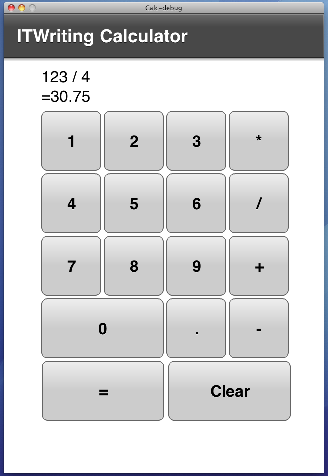
Flash 4.5.1 has been released recently, the first with integrated support for Apple iOS as well as Google Android and RIM Blackberry Tablet OS. I was keen to try my calculator app on iOS, having already tested it for Android. You can do most of the development on Windows, but I moved the project to OS X so I could try it in the iOS simulator and then on an actual iPhone 4.

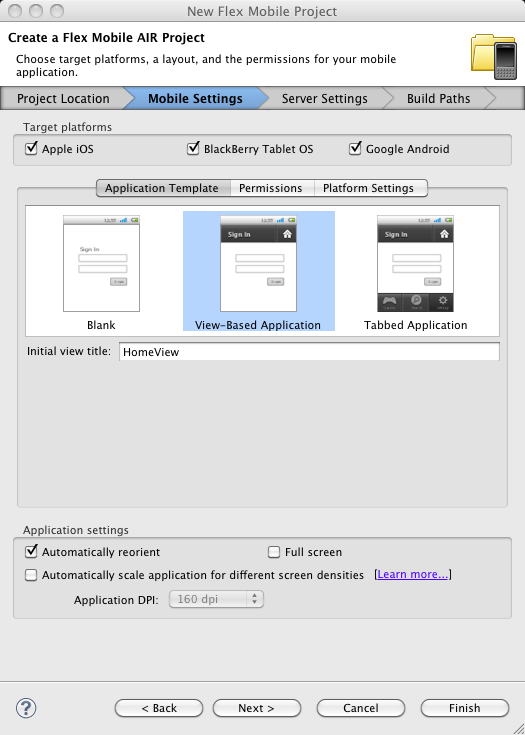
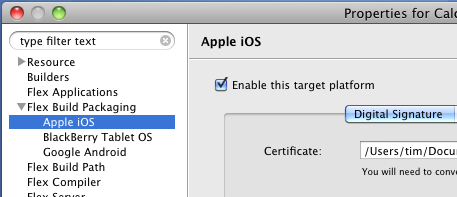
Adding iOS as a target platform was easy: right-click the project, choose Properties, check to add the platform.

image

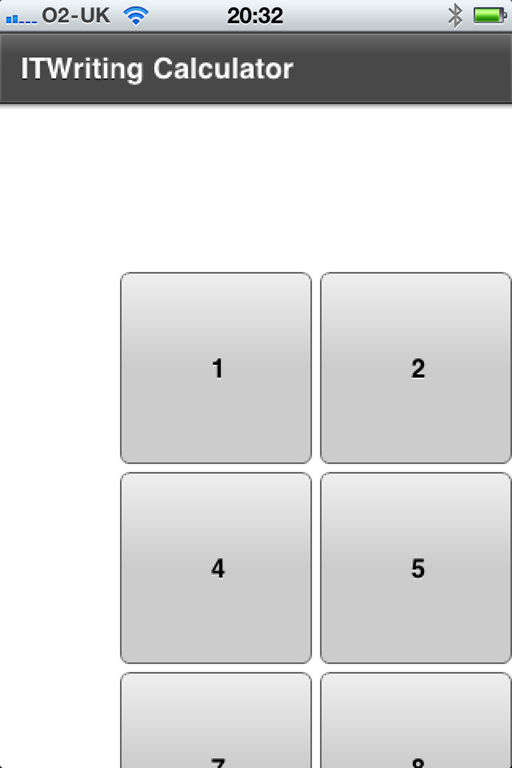
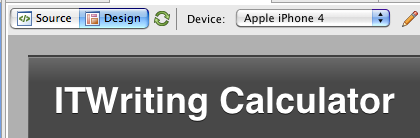
Then I worked on the UI. The buttons on my design were too small. The answer I guess is to use relative sizes, but I thought for a quick test I would simply set the device to Apple iPhone 4 and resize the layout for that.

image

After a bit of tweaking I got the app working nicely in the iOS simulator, again set to iPhone4. I was also able to set breakpoints and debug the app easily.

image

Then I tried it on the device. I did the Apple provisioning dance. I then compiled a release build, which took a long time and featured a thermometer that stuck on zero the entire time. It worked though, and I got the app into iTunes and synched.

On the device the app did not look too good.

image

Well, I have read up on supporting multiple screen sizes and on setting mobile project preferences and I am still not sure why this did not work, especially as it looked OK in the simulator. I had auto-scaling on, and the docs say:

When you enable automatic scaling, Flex optimizes the way it displays the application for the screen density of each device.

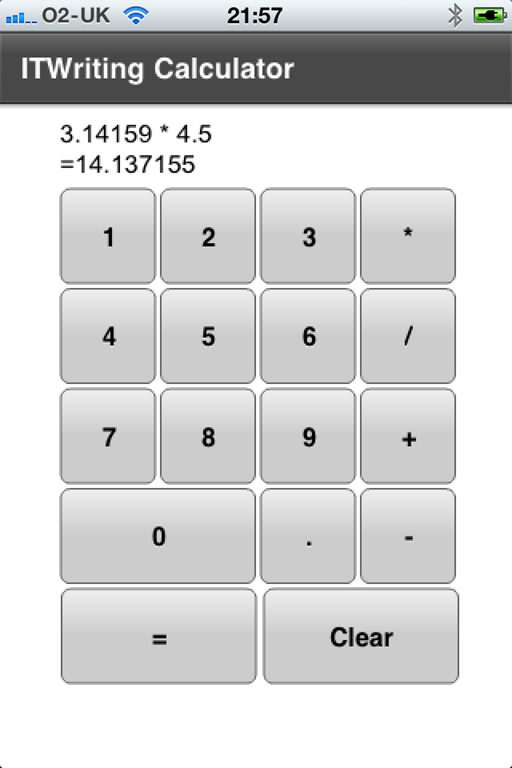
I fixed the the immediate issue though by adding the attribute applicationDPI=”320” to the ViewNavigatorApplication element.

Now it works fine.

image

So how is performance? I have managed to create some rather poorly performing calculator UIs in my various tests of cross-platform mobile tools, and this is one of the better ones, though not as responsive as the Titanium app on iOS. However the Flex app is more consistent across Android and iOS, whereas Titanium was poor on Android. Loading takes a few second, but it is acceptable. The app size is only 6MB which is not bad, considering that the necessary bits of Adobe AIR are compiled into it.

Note that this is little more than a Hello World app. My reasoning is that if this does not work well, then nothing will.

So far I am encouraged. Taking into account the development experience and performance across both Android and iOS, this is one of the best I have tried so far with my simple example.

Adobe announces strong results though much of the business looks flat

Adobe has announced its financial results for its second quarter. Revenue is up 9% year on year, and profits are up too, so it looks like a strong quarter. However, the success is really limited to a couple of business segments.

Here is the comparison with the equivalent quarter last year:

  Q2 2010 Q2 2011
Creative and interactive 429.3 433.1
Digital Media 139.3 136.7
Digital Enterprise 231.9 283.5
Omniture 91.9 115.9
Print and publishing 56.6 54

Adobe has changed the segmentation of these figures since last time I looked, removing the confusing Platform and splitting out Digital Media. Broadly:

  • Creative and interactive is most of Creative Suite and the Flash platform including both developer tools and streaming servers. It also includes the nascent Digital Publishing Suite for  Apple iPad and tablet publications.
  • Digital Media is Creative Suite Production Premium and individual sales of Photoshop. Premiere Pro, After Effects and Audition.
  • Digital Enterprise Solutions is the LiveCycle middleware, now rebranded as part of the Digital Enterprise Platform, plus the content management platform acquired with Day Software in October 2010, and Acrobat.
  • Omniture is self-explanatory; this is the analytics business acquired in 2009.
  • Print and Publishing is a bunch of tools including, oddly, ColdFusion but not InDesign. Technical authoring sits here, as does Director.

So what do these figures tell us? Creative Suite is trundling on OK, but no more than that, particularly when you consider that Q2 included the release of a paid-for upgrade, CS5.5. Revenue from Digital Media is slightly down, as is Print and publishing.

The strong results are in Digital Enterprise, following the acquisition of Day, and in Omniture.

Both of these were smart acquisitions in my view, though I am not a financial analyst. In a connected era, analytics is crucial, with great potential for integration with the design and development tools.

The enterprise middleware also seems to be going well. This is really a strange amalgam of the old Adobe document publishing and workflow servers with the application services that came from Macromedia. Throw Day software into the mix, with Roy Fielding’s content-centric vision for application development, and you have an interesting platform.

Adobe is also benefiting from the Apple-led revolution towards design-centric software.

That said, not everything is going Adobe’s way. The momentum behind both HTML5 and Apple iOS is a threat to the Flash business. Never mind the technical arguments, the fact is that designers are more likely to be working on removing Flash from their web pages than putting it in. Adobe also needs to sustain its prices, and there is plenty of downward pressure on software prices today, partly driven by Apple and its App Store model. I also get the impression that the hosted services at Acrobat.com have not taken off in the way Adobe had hoped.

C# vs C++ and .NET vs Mono vs Compact Framework performance tests

A detailed benchmark posted on codeproject investigates the performance of basic operations including string handling, hash tables, math generics, simple arithmetic, sorting, file scanning and (for C#) platform invoke of native code. These are the conclusions:

  • There is only a small performance penalty for C# on the desktop versus C++.
  • Mono is generally slower than Microsoft .NET but still acceptable, and all the benchmarks ran without modification.
  • The Compact Framework, an implementation of .NET for mobile devices, performs poorly.

My observations: this matches my own experiments. Why then do some .NET applications still perform badly? When Evernote switched its application from .NET to native code it got much better performance.

The main reason is a couple of issues that this kind of benchmark hides. One is the GUI layer, which involves a ton of platform invoke code under the covers. Another is the large size of .NET applications because of the runtime and library overhead; a lot more stuff gets loaded into memory.

One thing to like about Silverlight is that it is truly optimized for client programming and load time tends to be faster than for a desktop .NET application.

Note that for mobile these benchmarks suggest that C++ still has a big advantage. It would be interesting to see them applied to Silverlight apps on Windows Phone 7. As I understand it, the Silverlight .NET runtime in Windows Phone 7 shares code with the Compact Framework on Windows Mobile, so it is possible that the poor results for the Compact Framework would also apply to Silverlight on Windows Phone 7. Unfortunately developers do not have the option for C++ on Windows Phone 7.

RESTful and modernised: making sense of Adobe’s new Enterprise platform

Adobe has announced its Digital Enterprise Platform for Customer Experience Management. My tip to Adobe: that is too many words with too many syllables for busy IT people who are trying to get their work done. What on earth is it? The same old stuff repackaged, or something genuinely new?

The answer is a bit of each. Adobe has made several big acquisitions over the last few years, starting with the Macromedia merger in 2005 that really formed a new Adobe, bringing together digital publishing and the Flash platform. In September 2009 Adobe acquires Omniture for web analytics, and in October 2010 Day Software. This last one seems to be having a huge impact. Day’s product is called CQ5 Web Content Management and is built on CRX, a content repository which conforms to JCR 2.0 (Java Technology API 2.0), a Java API. Here’s Roy Fielding, formerly at Day and now Principal Scientist at Adobe, from this white paper [pdf]:

The Content Repository API for Java Technology (JCR) is poised to revolutionize the development of J2SE/J2EETM applications in the same way that the Web has revolutionized the development of network-based applications. JCR’s interface designers have followed the guiding principles of the Web to simplify the interactions between an application and its content repository, thus replacing many application-specific or storage-specific interfaces with a single, generic API for content repository manipulation.

JCR is a boon for application developers. Its multipurpose nature and agnostic content model encourages reuse of the same code for many different applications, reducing both the effort spent on development per application and the number of interfaces that must be learned along the way. Its clean separation between content manipulation and storage management allows the repository implementation to be chosen based on the actual performance characteristics of the application rather than some potential characteristics that were imagined early in the application design. JCR enables developers to build full-featured applications based on open source implementations of a repository while maintaining compatibility with the proprietary repositories that are the mainstay of large data centers.

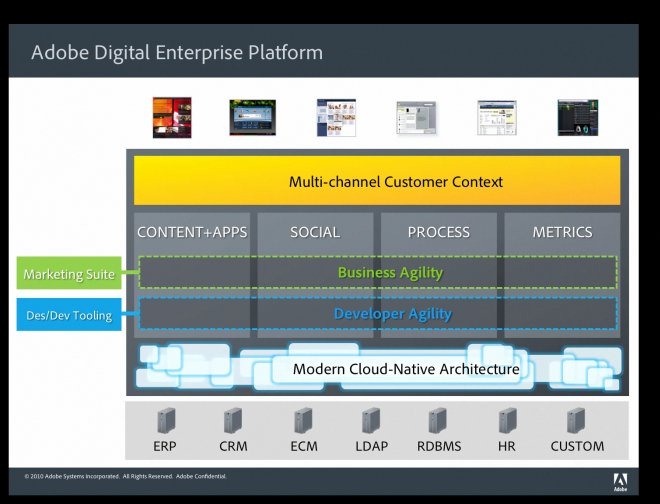
Adobe already has an application platform based on LiveCycle Enterprise Suite, which you will notice now redirects to the Digital Enterprise Platform. Ben Watson, Adobe’s Principal Customer Experience Strategist, explained it to me like this:

The core of the platform now becomes the repository that we got from the Day acquisition. We are also following their leadership around the use of RESTful technology, so changing how we do our web services implementation, how we do our real time data integration into Flash using data services. There’s really four technologies at play here. There’s CQ5, Adobe LiveCycle which is all the business process management on the back end, the online marketing suite with Omniture, and Creative tools which allow to both design and develop all of this content and assets … We had two Java platforms and we brought them into one.

adobe-slide

You can read up on the Digital Enterprise Platform here or see a chart of capabilities here. Much of it does look like rebranding of existing LiveCycle modules; but as a statement of direction it is an interesting one.

Is this for on-premise deployment, or cloud hosted? Adobe has a tie-up with Amazon for hosted deployment, though there is no no multi-tenant hosting from Adobe yet; I got the impression from Watson that it is being worked on.

Adobe is aware that it does not stand alone, and there are several connectors and integration points for third-party applications, such as a SAP data services connector.

Adobe also has a series of “solutions”, which are permutations of web content management, analytics, document processing, social media and so on.  There is also a Unified Workspace, currently in beta, which is a dashboard application.

The company’s line is that it is well placed to address the challenge of the mobile revolution, and to bring greater usability and social interaction to business applications, the consumerization of IT.

Although that sounds a strong pitch, melding all this together into something new while keeping hold of existing developers and designers is a challenge. Another issue for Adobe is that the company’s strong presence in design, multimedia and marketing makes it hard to appeal to more general enterprise developers. Nevertheless, the combination of Fielding’s influence and Adobe’s strength in design, documents and cross-platform clients makes this a platform worth watching.

Adobe Flash Builder now targets Apple iOS, BlackBerry PlayBook, Google Android

Adobe has released Flash Builder 4.5.1, a free update to Flash Builder 4.5. The big news is that it now targets Apple iOS as well as Google Android and BlackBerry Tablet OS (as used in the PlayBook).

image

Although Apple iOS support in Flash Builder was announced when Creative Suite 5.5 was released, it has only now been made available. I will be testing the new support shortly so check back soon. In my simple cross-platform test app, mobile AIR was one of the better performers on Android, so if performance is good on iOS as well this will prove a useful tool.

Cross-platform concerns as Adobe abandons AIR for Linux

Adobe is giving up on AIR for Linux – at least, in a fully supported manner:

To support the variety of Linux-based platforms across PCs and devices, we are prioritizing a Linux porting kit for AIR (including source code), which Open Screen Project (OSP) partners can use to complete implementations of AIR for Linux-based platforms on PCs, mobile devices, TVs and TV-connected devices. We will no longer be releasing our own versions of Adobe AIR and the AIR SDK for desktop Linux, but expect that one or more of our partners will do so. The last Adobe release of AIR for desktop Linux is AIR 2.6.

This is a curious message. OSP partners include ARM, Intel, the BBC, Google, Toshiba and other big names; but which of these might build an AIR SDK and on what sort of terms might it be supplied? Or it is more likely that, say, the BBC will deliver BBC iPlayer for LInux in a bundle that includes the AIR runtime? Or is it just wishful thinking?

Adobe’s open source evangelist Dave McAllister has a go at defending the decision, pointing out that the growing client operating systems are Android and iOS, not desktop Linux, and that AIR for Linux accounts for only a 0.5% download share. However, Linux developers observe that Adobe’s AIR for Linux effort has always been half-hearted and tricky to install, especially on 64-bit installations. AIR itself is still 32-bit, as is the Flash Player on all systems, though there is 64-bit version in preview codenamed “Square”.

Most people run Windows or Mac desktops, and will not miss AIR for Linux. That said, decisions like this do undermine confidence in the Flash platform as a cross-platform proposition. The problem is, Flash technology is not open source and ultimately whether a particular platform is supported is a matter for Adobe, with all the commercial and political factors that implies.

The risk for Adobe is that when it abandons smaller platforms, it make open standard alternatives and in particular the collection of web technologies we call HTML5 more attractive.

Hands On with Appcelerator Titanium Studio

I spent some time today trying out Appcelerator’s new Titanium Studio. Titanium is a cross-platform framework that lets you compile apps for Apple iOS, Google Android, RIM Blackberry, and desktop operating systems. Its chief attraction is the mobile aspect, particularly as it claims to build “native apps”.

I am thoroughly bored of writing calculator apps, but having embarked on this this test case I am keeping going since it makes it easier to compare one with another. I started by writing it for Android on Windows. I had some setup issues, but once resolved it pretty much worked, though the development process was fairly painful.  There is no visual GUI designer and my calculator has quite a few buttons, so I ended up counting pixels and trying out my work by debugging in the emulator. Performing a build and running in the emulator is a lengthy operation, so this is a tedious way to work. Come back Visual Studio, all is forgiven!

I persevered though, and eventually had my calculator up and running on my HTC Desire.

image

The design could be improved; but it is good enough for my purpose. Unfortunately though the GUI is not as responsive as I would like. It is easy to lose taps if you tap a little too fast, which is a serious flaw in a calculator. In this respect, the Titanium build is better than the PhoneGap/JQuery app I built, but still not good enough for a production app.

Time to port to iOS. Here I ran into a number of difficulties. I installing Titanium Studio on a Mac, copied the project from Windows and tried to open it. Titanium Studio complained about the absence of the Android SDK and eventually froze trying to fully initialize the workspace. Force Quit, delete the project, and try again. This time I created a new project and just copied over the app.js file that has my source code. Titanium Studio was happier; but the app would not open in the iOS Simulator.

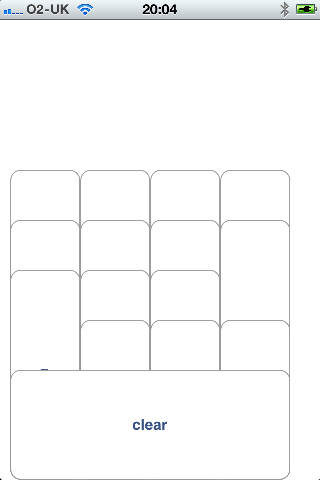
The problem: I have installed the latest Xcode and IOS 5.0 beta SDK. Even if you target iOS 4.x, Titanium is not quite compatible. However, my iPhone is still on iOS 4.3, and I was able to deploy the app to the device. Unfortunately the GUI was scrambled. This is how it looked:

image

Not good. Eventually I worked out the problem. On Titanium for Android there is no need to specify the height of buttons and labels; this automatically sizes to the content. On iOS though, if you do not specify the height it stretches the object from whatever you specify as top down to the bottom of the container.

I added height attributes to sort out the GUI, though I am still scratching my head over one issue. I specified a different value for the top attribute of a label and a button, but they were rendered at the same vertical position. Odd. I simply compensated for this and ended up with a workable GUI. Here it is on the iPhone:

image

The good news: this is by far the best performing of all the cross-platform solutions I have tried. I cannot out-tap it, and it would be fine in this respect for a production app.

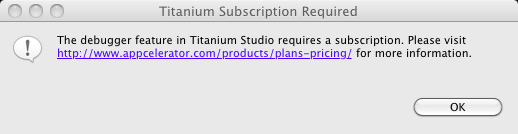
Note that attempting to debug using the community edition raises this message:

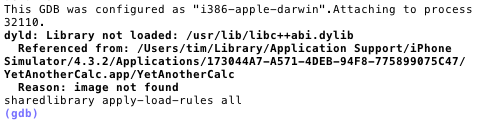
image

No debugging without a subscription; a strong incentive to subscribe.

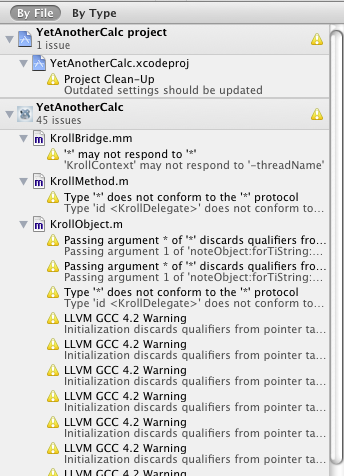
It is also worth noting that you can open the project generated by Titanium in Xcode. I wondered if that might shed light on the compatibility issues. It is an interesting thing to try, as you see the innards of Titanium’s code, complete with a number of reported issues.

image

I also get this:

image

Still, time to wrap up. I am impressed with the performance of my app on the iPhone, but disappointed on Android. On the other hand, the whole point of Titanium is to achieve cross-platform, otherwise you might as well use Objective C. Of course there may be ways to improve the performance; I just dived in and tried out the tool without chasing up possible optimisations.

Appcelerator has released Titanium Studio, IDE for cross-platform mobile development

Appcelerator has released Titanium Studio, an IDE built with Aptana, the Eclipse-based IDE which the company acquired in January. It is an interesting products because it lets you build cross-platform mobile apps for Apple iOS, Google Android, and Blackberry, as well as desktop applications.

I downloaded the community edition and gave it a quick try. The download includes the Titanium SDK and is around 150MB.

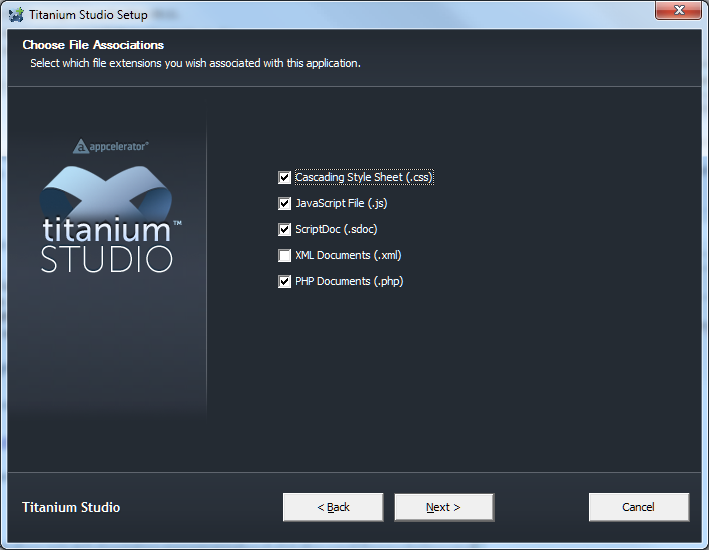
Titanium Studio wanted to grab file associations for CSS, JS and PHP by default – but at least it asked first

image

I noticed lots of Python scripts getting installed. The install completed and I was up and running.

Running the IDE requires login, which seems intrusive. You can avoid this by going offline.

image

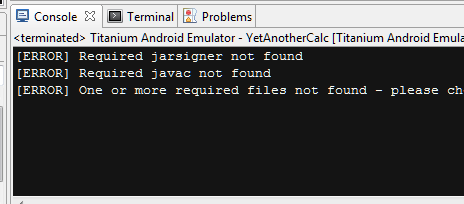
I created a new empty Android 2.2 project and got an error on first run. Required jarsigner not found. Required javac not found.

image

I fixed this by adding the JDK to the path and setting Java_home to the JDK; previously my Adobe CS5 install had set this to its own JRE install.

Next, I built a hello world application.

image

It feels like a version 1.0 release. When I clicked Run it started the emulator but did not run the app for some reason. A second run after the emulator had opened worked. Code Assist seems a bit hit or miss. There it tooltip help for some keywords, but too brief to be much use, and pressing F1 is unrewarding. No visual GUI designer. Finally, and this is purely a personal thing, the editor has a black background – something I will be sure to change soon.

Nevertheless, this is a step forward for Titanium and presuming the apps perform well I think it is significant and worth investigating.