Category Archives: software development

Adobe closes AIR Marketplace, InMarket

Adobe is giving up its efforts to support developers deploying to multiple app stores. The idea of InMarket,  announced at the Adobe MAX Conference in October 2010, was to be a one-stop distribution point for developers seeking to target multiple platforms. Adobe handled distribution and billing. The reason given:

After reviewing our efforts and based on feedback from developers, we have decided that we will deliver the most value by helping developers author and publish their apps on multiple platforms. Given this focus, we have decided to discontinue development and support of Adobe InMarket. We are going to continue to provide support for publishing to different app stores through our tooling. The recent Flash Builder 4.5 and Flash Professional CS5.5 provide support for publishing to multiple mobile platforms including Android and Apple iOS devices.

Adobe is not giving developers much time to adjust. The InMarket URL will terminate on August 31. This is causing some consternation:

I don’t understand how you expect publishers will be able to push an update to all the markets they publish to with enough time to get their user base to update before they’re totally screwed. One month? You do realize that even updates pushed to AppUp can take up to 2-weeks for vetting? This is crazy

That said, the low traffic on the InMarket forum is a clue to what Adobe is closing it down.

InMarket only supported Intel AppUp and AIR Marketplace, which rather misses the point of targeting multiple platforms. Had Adobe been able to offer instant deployment to all the key app stores, including Android Market and Apple’s iOS App Store, it would have been more attractive. Given the complexities of the approval process, it is not surprising that this was hard to achieve. A further complication is that Adobe’s AIR runtime is not allowed on iOS. Apps for iOS have to be packaged as native iOS apps.

What about AIR Marketplace?

When we established Adobe AIR Marketplace three years ago, there were few distribution opportunities for AIR developers. There are now several app stores on desktops, mobile devices and tablets that service AIR developers including Apple App Store, Android Market, BlackBerry App World, Intel AppUp center, Samsung Apps, and Toshiba App Place. We encourage you to use these newer popular app stores to distribute your applications.

This of course describes describes exactly the problem that InMarket was meant to address: the challenge of maintaining support for multiple app stores.

AIR Marketplace is still up and running at the time of writing, and seems to have more life than InMarket:

image

That said, why would any potential customer look specifically for AIR applications? It is a runtime and ideally should be invisible to the user. I was interested to see reference to AIR packagers for Windows, Mac and Android in a recent announcement, suggesting to me that Adobe is de-emphasising AIR as a runtime and making it into something more like a cross-platform development tool.

The strategy behind Mono has shifted: ten years of open source .NET

Yesterday, SUSE and Xamarin announced, in effect, the transfer of all things Mono to Xamarin.

The agreement grants Xamarin a broad, perpetual license to all intellectual property covering Mono, MonoTouch, Mono for Android and Mono Tools for Visual Studio. Xamarin will also provide technical support to SUSE customers using Mono-based products, and assume stewardship of the Mono open source community project.

Xamarin is a startup formed by Mono founder Miguel de Icaza following the acquisition of Novell and SUSE by Attachmate, which ceased Mono development.

Attachmate acquired Novell in November 2010. Mono has been plucked from the abyss with impressive speed.

That said, the strategy behind Mono has shifted. Mono exists because de Icaza liked what Microsoft announced back in 2000 when it introduced C# and the .NET Framework. Microsoft made a show of standardizing the .NET CLI (Common Language Infrastructure), which made PR sense at the time since there was controversy over Sun’s ownership of Java, though nobody really believed that Microsoft knew how to steward an open source development platform or indeed believed that it was really serious about it. History largely justifies that scepticism; but de Icaza called Microsoft’s bluff and forged ahead with Mono, implementing not only the CLI and C# but most of the .NET Framework as well.

The goal of Mono, as I recall, was to bring the benefits of C# and .NET to Linux developers, and to enable developers to move applications freely between Windows and Linux. Apple OS X was also on the radar, though it took longer to become much use. Recalling Mono’s early days, de Icaza said:

Mono to me is a means to an end: a technology to help Linux succeed on the desktop.

Mono worked remarkably well from quite early on, but never quite well enough to persuade mainstream developers it was a sensible choice for applications that would otherwise have run on Windows. It did emerge as a viable and productive toolset and platform for Linux and a number of Mono applications became popular, including Beagle search, Tomboy notes, and F-Spot photo management. Some ASP.NET applications run on Mono; I have one on this site. Another Mono success was its use as the scripting engine in Unity, a game development platform.

A big problem for Mono though was the lack of a business model. There was support and servicing of course, which must have generated some revenue for Novell, but most Mono use is free. Novell possibly had in mind that Mono could be significant as an application server, but it has never become a really trusted platform in the Enterprise. For example, as Alan Radding (Dancing Dinosaur) notes:

DancingDinosaur has not found any SUSE on z user that has successfully implemented .NET apps on the mainframe. A few have tried but reported that Mono on z wasn’t ready for prime time.

Even among the free software and open source community, Mono was hampered by suspicion of Microsoft. If Mono became successful enough to threaten Microsoft, would lawyers appear? Given the way Microsoft is currently behaving with Android, filing legal actions and signing up licensees, those fears might not be unwarranted.

So what is Mono today? The answer is that Mono is now primarily a mobile platform. The Xamarin home page makes this clear, as well as making it apparent that the Mono team has discovered the value of a business model:

image

Xamarin is tapping into two real business needs. One is the need for a cross-platform mobile development platform that works. The second is a way for Windows developers to use their existing C# skills for mobile development, given that they might not be happy with the tiny market share currently achieved by Windows Phone 7.

When I had a quick try with Monotouch I was impressed, and I would like to spend some more time with it and with Mono for Android.

Mono has touch competition though. In particular, PhoneGap, Appcelerator’s Titanium, and Adobe AIR. I was interested to see that Adobe is coming up with a packager for AIR on Android, which may significantly improve it as a cross-platform mobile toolkit.

Still, Xamarin is small and nimble and I expect it to succeed. It has also has Visual Studio integration, which is an advantage. One of the pieces Xamarin has now licensed from SUSE is Mono for Visual Studio.

The downside of these latest developments is that if you depend on Mono for the desktop or for ASP.NET, you may find these parts of the Mono project getting little attention from the new company. But Mobile is all that matters now, right?

I write this on July 19 2011. According to Wikipedia:

Recognizing that their small team could not expect to build and support a full product, they launched the Mono open source project, on July 19, 2001 at the O’Reilly conference.

Well, if there was a launch there it was low-key. It is not mentioned in this report. But de Icaza does recall:

We planned the announcement to come by July 19th 2001, so we could announce this at the O’Reilly conference, as Tim O’Reilly had been very supportive of this effort, and had offered his help since the early stages, when it was still a very young idea. When we announced the project launch we had our team in place, and we were shipping our metadata framework and our C# compiler as well as a few initial classes So officially the Mono project was launched on that date, but it had been brewing for a very long time.

Happy Anniversary!

Embarcadero RAD Studio XE2 will have cross-platform compilation

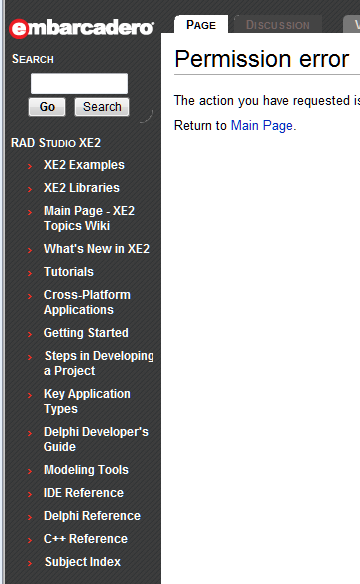
A Google search for RAD Studio XE2, presumably the successor to RAD Studio XE which includes Delphi, Delphi Prism (for .NET), C++ Builder and RAD PHP, throws up the following page:

image

The actual links need a login for a closed beta unfortunately.

Hmm, what caught my eye is the entry for cross-platform applications. Good to see this coming soon.

Adobe releases 64-bit Flash Player 11 beta, AIR 3 with packager for Windows, Mac, Android

Adobe has released a beta version of Flash Player 11 and AIR 3. The AIR release is of limited interest since as yet there is no public SDK; Adobe mainly wants to test compatibility.  That said, the announcement describes a key new feature, the ability to package AIR applications as standalone executables on Windows, Mac and Android. You can already do this on Apple iOS, a feature that was forced on Adobe by Apple’s refusal to allow application runtimes on iOS – unless they are WebKit or FileMaker. This is new for the other platforms though, and I assume comes as a result of the popularity of the iOS packager. The effect is that you no longer have to advertise the fact that your app runs on AIR or require users to obtain the runtime; your app will just work.

Adobe may have its eye on the Mac App Store, which will disallow applications that require a runtime. Extending the AIR packager to desktop OS X should get around that limitation.

64-bit Flash Player is also a big deal, and really long overdue, though there has already been a preview codenamed Square which offered 64-bit. Although there are probably not many Flash applications that really need 64-bit, this is good for compatibility with 64-bit browsers and of course desktop applications when compiled with AIR. There could also be value in 64-bit for business intelligence clients which manipulate large datasets.

Another new feature in Flash Player 11 is Stage3D, codename Molehill, which is a new API for hardware-accelerated 3D graphics. Stage3D has its own shader language, called AGAL (Adobe Graphics Assembly Language); my heart sinks a little when I see vendors inventing new languages rather than using one that is already available, such as OpenGL Shading Language, but Adobe says AGAL is simpler and more secure. If you would like to use GL SL with Stage3D, check out the 3rd-party Mandreel framework which comples GL SL shaders to AGAL.

Flash Player 11 also has a built-in H.264/AVC software encoder for cameras, which will improve video chat and video conferencing, and adds potential for applications that stream video out as well as in.

Native JSON support will simplify and accelerate the handling of data in this popular format.

Another feature that caught my eye is socket progress events. When transferring data, it is important to give feedback to the user on progress. A new property lets developers monitor the number of bytes remaining in the write buffer, and a new event is raised when data is being sent, enabling more informative data transfer applications.

LZMA compression for SWF files, the compiled format for Flash content, is claimed to reduce SWF size by up to 40%.

When do we get a full release? Adobe is taking its time, but my hunch is that it will be in 2011, maybe in time for the MAX conference in October.

Microsoft partners are not whooping and cheering for Office 365

There is a telling moment in the day two keynote at Microsoft’s Worldwide Partner Conference. “Now we’ve added Office 365”, says Corporate VP Jon Roskill. Do you guys feel the momentum?” There is a muted cheer, not the big whoop Roskill is looking for. “Now let’s have some momentum, whoo!” he repeats. Another barely audible cheer.

Why are partners not whooping and cheering?  Take a look at the Microsoft-commissioned Forrester report [PDF] on the total economic impact of Office 365. This report claims a remarkable payback period of only 2 months for a midsize organization moving to Office 365.

Looking at the figures in more detail, Forrester claims $54,000 saved over three years in eliminated hardware, $10,000 over the period in eliminated third-party software, $25,000 saved in web conferencing (Lync Online is bundled with Office 365), and $18,000 in “internal labor and professional services” saved on planning and implementation. There is an even bigger saving in support. Here I find it hard to puzzle out exactly what Forrester is claiming. It talks about “savings of $206,350 over three years” from simplified support and outsourced administration of infrastructure, but also refers to $146,250 costs in admin and support costs for Office 365; I am not sure if the $206,350 is a net figure. Forrester also throws in $260,625 saved on reduced travel thanks to online collaboration, which strikes me as highly speculative.

I suggest therefore that you do not take Forrester’s figures too seriously; but it is still worth noting that many of the savings come from revenue that would otherwise have gone to partners. How much partner income is lost will depend on the extent to which an organization outsources its IT admin, planning, support and administration, and on the margins partners achieve on things like third-party software; but it is considerable.

Of course there are also new business opportunities for partners. Presuming the savings from Office 365 and Microsoft’s other cloud offerings are real, a cloud-oriented partner has a strong sales pitch both to existing and new customers. Partners get an ongoing commission from subscriptions.

There is also an opportunity for new applications which link to cloud services. Yesterday Microsoft announced that the Windows Azure Marketplace, which used to offer data services and application building blocks, now also offers finished applications in US markets.

It is also true that Microsoft’s cloud offering is more partner-friendly than others, because it is a hybrid solution. Forrester’s report mentioned above assumes use of Active Directory Federation Services for single-sign on between on-premise and Office 365, a key feature which has been under-reported in the media coverage I have seen for Office 365. This feature, along with the fact that Microsoft’s server products like Exchange, SharePoint and Dynamics CRM can be deployed either online or as hosted services, means that there is flexibility over what is hosted and what is on-premise.

Nevertheless, it is hard to construct a reality in which the savings customers get from cloud services are real, without the further implication that total partner revenue will diminish, even though certain individual partners who take advantage of the new opportunities may end up winners.

This is true even if Microsoft succeeds in retaining all of its existing Microsoft-platform customers, rather than losing them to Google or other cloud providers. The consequences of a migration to Google, which is inherently not a hybrid platform, seem to me more severe.

Is there any way to put a positive spin on this, from a partner’s perspective? A couple of thoughts on this.

First, even if certain kinds of IT business are under threat from cloud migration, it is also true that the transforming impact of IT and the internet on businesses is far from complete. Much of what businesses currently do with IT can be greatly improved, there is still a thirst for new and improved business applications, and new technology including not only the cloud, but also massively parallel computing and of course mobile presents many new opportunities.

Second, it seems to me that partners should not be asking themselves how to maintain their business, but instead planning for change. It seems to me inevitable that the demand for skills in installing and nursing servers, deploying applications, and in maintaining and supporting clients, will diminish; and that is a good thing because these activities are IT plumbing and if they can be reduced it frees resources for other activities which have more business potential.

Behind the whooping and cheering, Microsoft’s message to partners is a tough one. Change, or die.

Embarcadero promises Delphi everywhere: Mac, iOS this year, Android, Blackberry, Windows Phone to follow

I noticed the following remark from Embarcadero’s David Intersimone regarding Delphi, its application builder based on Pascal.

We are putting Delphi (and C++Builder) everywhere this year and over the next 5 years. Today you can use Delphi for Desktop, Client/Server, Multi-Tier, Cloud, Web, Web Services (REST and SOAP). This year you will also be able to build for Macintosh and iOS. Linux is also on the roadmap for the coming years along with Android, Blackberry and Windows Phone 7.

Welcome news; though Delphi enthusiasts are all too familiar with bold promises. Two years ago I interviewed Embarcadero’s CEO Wayne Williams and he promised cross-platform Delphi in 2010; but when Delphi XE appeared last year neither Mac nor 64-bit (another longstanding request) was included.

That said, I am still a big Delphi fan. Mobile is a particularly interesting prospect. I have tried numerous cross-platform mobile toolkits and they all have problems; on the other hand they are improving fast and in a couple of years things like Appcelerator’s Titanium and  Nitobi’s PhoneGap may be hard to catch.

Update: what will Delphi’s Android support look like? I would be interested to know whether Embarcadero is working on its own compiler, or whether it is partnering with RemObjects and that what Intersimone is referring to is Project Cooper:

“Cooper” is a new and exciting research project going on in the RemObjects Software Labs, to bring the Oxygene language to the Java and Android platforms. The original Oxygene for .NET set out to bring a modern and “next generation” Object Pascal to the .NET world; Project “Cooper” is taking this endeavor to the next level, expanding the reach of Oxygene to the second big managed platform.

In other words, Project Cooper will compile Delphi code to Java.

Note that Embarcadero officially adopted Oxygene and offers it as its own product called Prism. It seems plausible that the same will happen with Project Cooper. Since Windows Phone is a .NET platform, there is also potential for Oxygene/Prism to target Microsoft’s mobile platform:

Windows Phone 7 – Microsoft’s new Windows Phone 7 uses Silverlight for application development,  and did I mention Delphi Prism does Silverlight?

says Jim McKeeth at RemObjects.

What about Delphi on the Mac and on iOS? There is also a possible Oxygene/Prism route here, via MonoMac: Delphi to .NET/Mono to Mac. However, I suspect Delphi developers would be disappointed if this turned out to be Embarcadero’s approach to Mac and iOS support. Programmers choose Delphi because they like compilation to native code.

Hands on debugging an Azure application – what to do when it works locally but not in the cloud

I have been writing a Facebook application hosted on Microsoft Azure. I hit a problem where my application worked fine on the local development fabric, but failed when deployed to Azure. The application was not actually crashing; it just did not work as expected. Specifically, either the Facebook authentication or the ASP.NET Forms Authentication was failing; when I tried to log on, the log on failed.

This scenario, where the app works locally but not on Azure, is potentially a bad one because you do not have the luxury of breakpoints and variable inspection. There are several approaches. You can have the application write a log, which you could download or view by using Remote Desktop to the Azure instance. You can have the application output debug messages to HTML. Or you can use IntelliTrace.

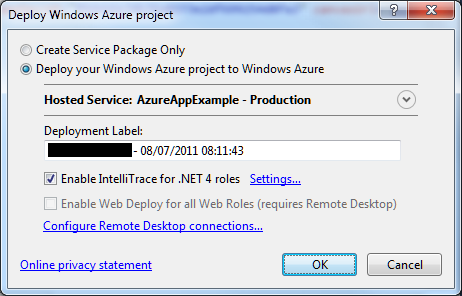
I tried IntelliTrace. It is easy to set up, just check the box when deploying.

image

Once deployed, I tried the application. Clicked the Log On button, after which the screen flashed but still asked me to Log On. The log on had failed.

image

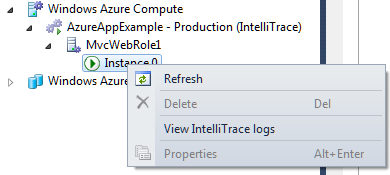
I closed the app, opened Server Explorer in Visual Studio, drilled down into the Windows Azure Compute node and selected View IntelliTrace Logs.

image

The logs took a few minutes to download. Then you can view is the IntelliTrace log summary, which includes a list of exceptions. You can double-click an exception to start an IntelliTrace debug session.

image

Useful, but I still could not figure out what was wrong. I also found that IntelliTrace did not show the values for local variables in its debug sessions, though it does show exceptions in detail.

Now, if you really want to debug and trace an Azure application you had better read this MSDN article which explains how to create custom debugging and trace agents and write logs to Azure storage. That seems like a lot of work, so I resorted to the old technique of writing messages to HTML.

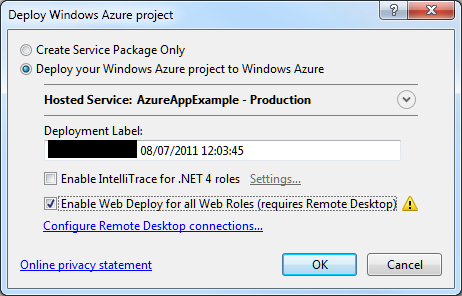
At this point I should mention something you must do in order to debug on Azure and remain sane.  This is to enable WebDeploy:

image

It is not that hard to set up, though you do need to enable Remote Desktop which means a trip to the Azure management portal. In my case I am behind a firewall so I needed to configure Web Deploy to use the standard SSL port. All is explained here.

Why use Web Deploy? Well, normally when you deploy to Azure the service actually builds, copies and spins up a new virtual machine image for your app. That process is fundamental to Azure’s design and means there are always at least two copies of the VM in existence. It is also slow, so if you are making changes to an app, deploying, and then testing, you will spend most of your time waiting for Azure.

Web Deploy, by contrast, writes to your existing instance, so it is many times quicker. Note that once you have your app working, it is essential to deploy it properly, since Azure might revert your app to the last VM you created.

With Web Deploy enabled I got back to work. I discovered that FormsAuthentication.SetAuthCookie was not working. The odd thing being, it worked locally, and it had worked in a previous version deployed to Azure.

Then I began to figure it out. My app runs in a Facebook canvas. Since the app is served from a different site than Facebook, cookies may be rejected. When I ran the app locally, the app was in a different IE security zone, so different rules applied.

But why had it worked before? I realised that when it worked before I had used Google Chrome. That was it. IE worked locally; but only Chrome worked when deployed.

I have given up trying to fix the specific problem for the moment. I have dug into it a little, and discovered that cookie handling in a Facebook canvas with IE is a long-standing problem, and that the Facebook C# SDK may have bugs in this area. It is not essential for my sample; I have found I can get by with the Facebook session. To get the user ID, for example:

FacebookWebContext.Current.Session.UserId

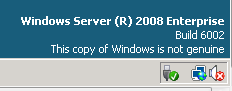
The time has not been wasted though as I have learned a bit about Azure debugging. I was also amused to discover that my Azure VM has activation problems:

image

The frustration of developing for Facebook with C#

I am researching a piece on developing for Facebook with Microsoft Azure, and of course the first thing I did was to try it out.

It is not easy. The first problem is that Facebook does not care about C#. There are four SDKs on offer: JavaScript, Apple iOS, Google Android, and PHP. This has led to a proliferation of experimental and third-party SDKs which are mostly not very good.

The next problem is that the Facebook API is constantly changing. If you try to wrap it neatly in an SDK, it is likely that some things will break when the next big change comes along.

This leads to the third problem, which is that Google may not be your friend. That helpful article or discussion on developing for Facebook might be out of date now.

Now, there are a couple of reasons why it should be getting better. Jim Zimmerman and Nathan Totten at Thuzi (Totten is now a technical evangelist at Microsoft) created a new C# Facebook SDK, needing it for their own apps and frustrated with what was on offer elsewhere. The Facebook C# SDK looks like it has some momentum.

C# 4.0 actually works well with Facebook, thanks to the dynamic keyword, which makes it easier to cope with Facebook’s changes and also lets it map closely to the official PHP SDK, as Totten explains.

Nevertheless, there are still a few problems. One is that documentation for the SDK is sketchy to say the least. There is currently no reference for it on the Codeplex site, and most of the comments are the kind that produces impressive-looking automatic documentation but actually tells you nothing of substance. Plucking one at random:

FacebookClient.GetAsync(System.Collections.Generic.IDictionary<string,object>)

Summary:
Makes an asynchronous GET request to the Facebook server.

Parameters:
parameters: The parameters.

Another problem, inherent to dynamic typing, is that IntelliSense (auto-completion in Visual Studio) has limited value. You constantly need to reference the Facebook documentation.

Finally, the SDK has changed quite a bit in different versions and some of the samples reference old versions.

In particular, I found it a struggle getting OAuth authentication and access token retrieval working and ended up borrowing Totten’s sample code here which mostly works – though note that the code in the sample does not cope with the same users logging out and logging in again; I fixed this by changing his InMemoryUserStore to use a ConcurrentDictionary instead of a ConcurrentBag, though there are plenty of other ways you can store users.

I’m puzzled why Microsoft does not invest more in making this easier. Microsoft invested in Facebook and it is easy to get the impression that Microsoft and Facebook are in some sort of informal alliance versus Google. Windows Phone 7, for example, ties in closely with Facebook and is probably the best Facebook phone out there.

As it is, although I prefer coding in C# to PHP, I would say that choosing PHP as the platform for your Facebook app will present less friction.

ReSharper 6.0 arrives: intelligent editing and decompiling for Visual Studio

JetBrains has released ReSharper 6.0, an add-on for Visual Studio 2008 and 2010 that delivers a remarkable range of tools, mostly focused on code editing and static analysis. There is also a unit test runner and a source code decompiler.

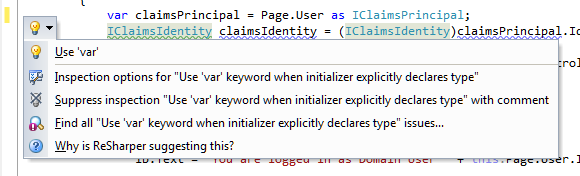
The heart of ReSharper is refactoring, hence the name, and it adds a large number of refactoring options to Visual Studio. These are nicely integrated with the editor, not only as right-click menu options, but with light-bulb suggestions that appear automatically. Here, for example, ReSharper is telling me that I could use implicit type declaration, and offering to make the change for me, or alternatively to suppress this type of suggestion forever if I do not like it:

image

Source code decompiling is also nicely done. In the above code, IClaimsIdentity is part of the .NET Framework so the source code is not normally available. With ReSharper though, I can navigate to decompiled source:

image

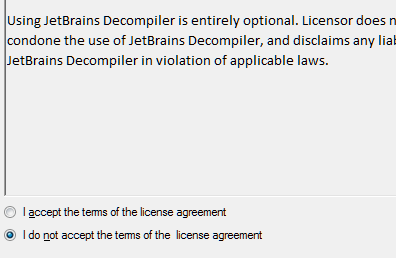
This could be legally sensitive, so I have to pass a Decompiler Legal Notice in which JetBrains attempts to disclaim liability.

image

Then I am in, though the results are not exciting in this instance:

image

If you only want the decompiler, you may find the free dotPeek is all you need.

The what’s new list in ReSharper 6.0 is long. It includes support for JavaScript, ASP.NET Razor, CSS and HTML, better XAML support including creating properties and dependency properties from usage, and macros for file headers which automates things like inserting current date and time.

The pricing is not excessive: in the UK it costs £148 for a personal license or £259 for a commercial license. If you think ReSharper will save you time and improve your code quality, which it likely will, it will soon pay for itself.

Internet Explorer 10 Platform Preview 2 gets web workers, HTML5 sandbox

Microsoft has released Internet Explorer 10 Platform Preview 2 which adds a number of features. These include:
  • Web Workers for background JavaScript.
  • File Reader API
  • HTML 5 drag and drop
  • CSS3 positioned floats
  • HTML 5 sandboxing
  • Some features of HTML 5 forms
I asked Microsoft’s Ryan Gavin and Rob Mauceri why IE seems so far behind its rivals in HTML 5 support if you look at a test site such as html5test.com, where IE9 scores 141 and Google Chrome 329. I was given several reasons. The site does not cover CSS3, SVG, yet does include “specs that are still under development, specs that have been superseded by other things, you have look at what it is actually testing,” said Mauceri. He added that the site only tests for the existence of the feature rather than how well it is implemented.
Fair points, but my sense is that Microsoft, while hugely ahead of where it used to be in terms of HTML standards support, is likely behind Google and Mozilla and likely to remain so. Microsoft has a slower release cycle, and a greater burden of legacy issues to worry about.
That said, Microsoft is pushing forward energetically compared to pre-IE9 days and the new features are interesting, particularly in the light of the greater role of HTML5 which has been promised for Windows 8.
Web Workers, for example, enables more responsive web pages through concurrent programming.
image
I also asked how Microsoft will enable greater access to the Windows API in Windows 8 without polluting the standards, but got the non unexpected answer “wait for the Build conference”.
No formal word on timing, but I would expect the delivery of IE10 and Windows 8 to be connected.