Category Archives: software development

Disappearing cloud APIs: a new legacy software problem in the making

Today Google announced that a number of its APIs are to be withdrawn:

This highlights an issue with platform as a service (PaaS). If you build an app on a set of cloud services provided by a third-party, there is a risk that those services will change or disappear so that your app no longer works.

Many of Google’s APIs are free, or free for all but the heaviest users, so you can argue that you get what you pay for. Developers are particularly frustrated by the disappearance of the Translate API, where Google says:

Due to the substantial economic burden caused by extensive abuse, the number of requests you may make per day will be limited and the API will be shut off completely on December 1, 2011.

Poor old Google with its “substantial economic burden”. Oddly though, some developers are willing to pay, but this is not going to be an option:

It would be much better if Google charges using Translate API than shutting it down. Now i will have to remove this functionality from my projects. Nicely done Google 🙁

says one developer. Further, Google’s rationale for withdrawing APIs is likely multi-faceted. If I write an app that calls a Google API in the background, there is no direct benefit to Google unless it makes a charge. From Google’s perspective it is better to supply a widget, that can be branded, or to get users logging onto its site so it can gather stats and display advertising.

Still, my main interest here is in the implications for cloud computing, particularly PaaS. I frequently see old apps running in businesses. In some cases the original developer is long gone and nobody understands the code, if they have it at all. These apps keep running though. In a PaaS world that will no longer be possible; they will stop working if the APIs they use disappear.

The other side of this coin is that responsible service providers have to keep old APIs supported in order not to break applications. I have an application which I wrote 5 years ago using Amazon’s Simple Storage Service (S3). It still works today. There must be thousands of other applications which also use it. Amazon is now stuck with that API, and I guess that unless some major security flaw is discovered it will continue to work for the foreseeable future.

Would you consider running PHP on Azure? Microsoft faces uphill battle to convince customers.

Yesterday Microsoft announced Windows Azure SDK for PHP version 3.0, an update to its open source SDK for PHP on Windows Azure. The SDK wraps Azure storage, diagnostics and management services with a PHP API.

Microsoft has been working for years on making IIS a good platform for PHP. FastCGI for IIS was introduced partly, I guess, with PHP in mind; and Microsoft runs a dedicated site for PHP on IIS. The Web Platform Installer installs a number of PHP applications including WordPress, Joomla and Drupal.

It is good to see Microsoft making an effort to support this important open source platform, and I am sure it has been welcomed by Microsoft-platform organisations who want to run WordPress, say, on their existing infrastructure.

Attracting PHP developers to Azure may be harder though. I asked Nick Hines, CTO for Innovation at Thoughtworks, a global IT consultancy and developer, what he thought of the idea.

I’d struggle to see any reason. Even if you had it in your datacentre, I certainly wouldn’t advise a client, unless there was some corporate mandate to the contrary, and especially if they wanted scale, to be running a Java or a PHP application on Windows.

Microsoft’s scaling and availability story around windows hasn’t had the penetration of the datacentre that Java and Linux has. If you look at some of the heavy users of all kinds of technology that we come across , such as some of the investment banks, what they’re tending to do is to build front and middle tier applications using C# and taking advantage of things like Silverlight to get the fancy front ends that they want, but the back end services and heavy lifting and number crunching predominantly is Java or some sort of Java variant running on Linux.

Hine also said that he had not realised running PHP on Azure was something Microsoft was promoting, and voiced his suspicion that PHP would be at a disadvantage to C# and .NET when it came to calling Azure APIs.

His remarks do not surprise me, and Microsoft will have to work hard to persuade a broad range of customers that Azure is as good a platform for PHP as Linux and Apache – even leaving aside the question of whether that is the case.

The new PHP SDK is on Codeplex and developed partly by a third-party, ReadDolmen, sponsored by Microsoft. While I understand why Microsoft is using a third-party, this kind of approach troubles me in that you have to ask, what will happen to the project if Microsoft stops sponsoring it? It is not an organic open source project driven by its users, and there are examples of similar exercises that have turned out to be more to do with PR than with real commitment.

I was trying to think of important open source projects from Microsoft and the best I could come up with is ASP.NET MVC. This is also made available on CodePlex, and is clearly a critical and popular project.

However the two are not really comparable. The SDK for PHP is licensed under the New BSD License; whereas ASP.NET MVC has the restrictive Microsoft Source License for ASP.NET Pre-Release Components (even though it is now RTM – Released to manufacturing). ASP.NET MVC 1.0 was licensed under the Microsoft Public License, but I do not know if this will eventually also be the case for ASP.NET MVC 3.0.

Further, ASP.NET MVC is developed by Microsoft itself, and has its own web site as part of the official ASP.NET site. Many users may not realise that the source is published.

My reasoning, then, is that if Microsoft really want to make PHP a first-class citizen on Azure, it should hire a crack PHP team and develop its own supporting libraries; as well as coming up with some solid evidence for its merits versus, say, Linux on Amazon EC2, that might persuade someone like Nick Hine that it is worth a look.

Windows Phone “Mango” shown, looks good but still no Adobe Flash

I attended the London press briefing for Windows Phone “Mango”, also known as Windows Phone 7.1. This will be on new phones in the Autumn, and will be a free update for all existing Windows Phone 7 devices.

image

Microsoft showed a bunch of new features, including Internet Explorer 9 – which, we were told, is built from the same code as the PC version – improved social media integration now including Twitter and LinkedIn as well as Facebook, Hotmail, Exchange, Messenger and Gmail; and multi-tasking support.

Hold down the back key for a moment, and all running apps appear in a tiled view. Just tap the one you want.

We also saw text-to-voice and voice-to-text demos. The presented spoke the reply to a text message, though admittedly he chose to do a one-word reply, and sent it successfully.

Microsoft also announced three new OEM partners, Acer Inc., Fujitsu Ltd. and ZTE Corp.

It looks good; but I did have a sense that Microsoft is ducking the hard questions. One of those concerns Adobe Flash support. At a separate developer briefing, I asked developer relations guy Brandon Watson about Adobe Flash support, observing that when Windows Phone was shown in detail pre-launch at the Mix 2009 conference in Las Vegas, it was clearly stated that Flash would be on the phone, and that Adobe was being allowed to build the Flash runtime in native code, but that it would not be included at launch.

“It does not run on the phone”, said Watson. Then he added, “It does not run on the phone.” Finally, he said, “It does not run on the phone.”

Silverlight does not run in the mobile browser either, so perhaps the problem is with mobile IE – clearly not all the code is included. Or maybe Adobe is hanging back; I asked Adobe about this at Mobile World Congress earlier this year and got an answer that was warmer but no more informative. Or maybe Microsoft is thinking, Apple does not need it, so we do not need it either.

It is a shame though, because there is a perception that Flash is one of the advantages of not going the Apple route.

On the developer side, the beta tools for Mango were released today. You can target either Windows Phone 7.0 or 7.1 with the tools, so if the beta tag does not put you off you can get going straight away. There is a ton of good stuff for developers, including the SQL Server CE local database, and the ability to mix XNA and Silverlight in a single app. We saw an app from British Airways that makes use of this to show a 3D view of an aircraft cabin when choosing a seat; I am not sure how much real value this adds but it demos nicely.

The new emulator includes accelerometer support, so you can simulate movement to test your app’s response.

There is also a profiler which shows your app’s performance in various views. Code that you wrote is highlighted in blue in the graphical view, so you can tell what you can optimise, as opposed to slow system calls that are outside your control.

The developer tools are great though, and having played with a number of mobile developer toolkits I would say that Microsoft’s is among the best and above average, though I would like to see an option for native code development. “We hear that a lot,” Watson told me.

The problem though: developers want a big market, and so far Windows Phone has not delivered it. It is almost invisible on the high street, and all the current operators and manufacturers have other phones that they are more concerned about. That will change when Nokia devices appear, but in an intensively competitive market (not forgetting HP WebOS and RIM Blackberry/QNX/PlayBook) it will not be easy for Microsoft to gain ground.

After the event I discussed this with some of the Microsoft folk. Maybe the company can better exploit the Xbox link, and sell the phone to that community. Maybe Nokia will save the day. Maybe when Microsoft comes out with a fully professional iteration of Windows Phone, tightly linked to Active Directory and group policy, and with additional developer features aimed at line of business apps, maybe then it will take off.

One positive thing I heard today was an anecdotal report that returns on Windows Phone 7 are among the lowest because users like the device so much.

The social features in Windows Phone are already good and will be better in Mango – though bear in mind that by the time Mango phones appear in the Autumn, Microsoft will likely have iPhone 5 and many tempting new Android devices to contend with.

Years ago it used to be said that Microsoft had average products (or worse) but excellent marketing. With Windows Phone, the product is good but either the marketing is lacking or the task is too great. Of course there is still time, and this industry is full of surprises, but it will take more than Mango to make Windows Phone fly.

Cracks appear in Microsoft’s bundled installers for Visual Studio 2010 as I try ADFS

I am trying out Microsoft Active Directory Federation Services (ADFS), chasing the dream of single sign-on between on-premise Active Directory and the cloud.

Oddly, although ADFS has been around for a while, it feels more bleeding edge than it should. ADFS is critical to Microsoft’s cloud platform play, and it needs to build this stuff right into Windows Server and .NET rather than making it a downloadable add-on.

The big problem with installers, whether on Windows or elsewhere, is dependencies and versions. You get some variant of DLL Hell, when A requires the latest version of B, and C requires an old version of B, and you need both A and C installed. The issue on Windows has reduced over the years, partly because of more side-by-side installations where multiple versions co-exist, and partly because Microsoft has invested huge effort into its installers.

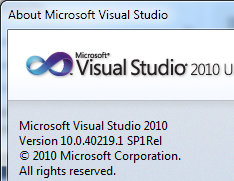
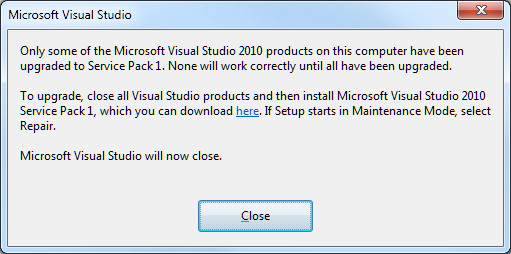
There are still issues though, and I ran into a few of them when trying ADFS. I have Visual Studio 2010 installed on Windows 7 64-bit, and it is up-to-date with Service Pack 1, released in April. However, after installing the Windows Identity Foundation (WIF) runtime and SDK, I got this error when attempting to start Visual Studio:

image

Only some of the Microsoft Visual Studio 2010 products on this computer have been upgraded to Service Pack 1. None will work correctly until all have been upgraded.

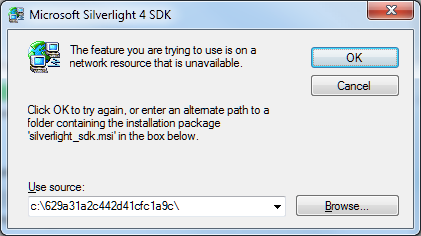
I’m guessing that the WIF components have not been updated to take account of SP1 and broke something. Never mind, I found my Visual Studio SP1 .ISO (I avoid the web installs where possible), ran setup, and choose to reapply the service pack. It trundled along until it decided that it needed to run or query the Silverlight 4 SDK setup:

image

A dialog asked for silverlight_sdk.msi. I wasted some time over this. Why is the installer looking for silverlight_sdk.msi in a location that does not exist? I’d guess because the Silverlight SDK installer is wrapped as an executable that unpacked the MSI there, ran it and then deleted it. Indeed, I discovered that both the Silverlight 4 SDK and the Silverlight 4 Tools for Visual Studio are .EXE files that wrap zip archives. You can rename them with a .zip or .7z extension and extract them with the open source 7 Zip, but not for some reason with the ZIP extractor built into Windows. Then you can get hold of silverlight_sdk.msi.

I did this, but then discovered that silverlight_sdk.msi is also on the Visual Studio SP1 ISO. All I needed to do was to point the installer there, though it is odd that it cannot find the file of its own accord.

It also seems to me that this scenario should not occur. If the MSI for installation A might be needed later by installation B, it should not be put into a temporary location and then deleted.

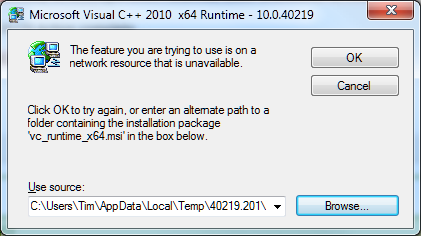
The SPI repair continued, and I got a reprise of the same issue but with the Visual C++ runtimes. The following dialog appeared twice for x86, and twice for x64:

image

These files are also on the SP1 .ISO, so I pointed the installer there once again and setup continued.

Unfortunately something else was wrong. After a lengthy install, the SP1 installer started rollback without so much as a warning dialog, and then exited declaring that a fatal error had occurred. I looked at the logs

I rebooted, tried again, same result.

I was about to trawl the forums, but thought I should try running Visual Studio 2010 again, just in case. Everything was fine.

image

Logic tells me that the SP1 “rollback” was not quite a rollback, since it fixed the problem. Then again, bear in mind that it was rolling back the reapplication of the service pack which is different from the usual rollback scenario.

Visual Studio, .NET, myriad SDKs that each get updated at different times, developers who download and install these in an unpredictable order … it is not surprising that it goes wrong sometimes; in fact it is surprising that it does not go wrong more often. So I guess I should not beat up Microsoft too much about this. Even so this was an unwelcome reminder of a problem I have not seen much in the last few years, other then with beta installs which play by different rules.

Infragistics: upbeat on Windows Phone but also building for Apple iOS, Google Android

I spoke to Dean Guida, CEO and co-founder of Infragistics, at TechEd in Atlanta earlier this week. Infragistics makes components, mainly for Windows but now beginning to support non-Windows clients. There is a set of jQuery controls in preparation, and “Our roadmaps are also going to deliver native on Android and iPhone,” Guida told me. “We have a lot of software companies that use our tools in their commercial apps, and a lot of enterprises, and we feel that we need to do it,” though he adds, “we feel that the best and the smartest business solution is to go mobile web.”

image

Infragistics has a focus on data visualization, and Guida showed me some great-looking components that show animated charts, with a huge range of customisation options, and including geo-spatial and timeline controls.

I was intrigued to find Guida more upbeat about Windows Phone than most commentators, though I make allowance for the fact that his company has a component suite for the platform. “More than half of our customers told us that they’re either building or they will build for Windows Phone in the next 12 months,” he told me.

His view, which I share, is that they key advantage of Windows Phone is to Microsoft-platform enterprises rather than to consumers. “It’s so easy to extend their knowledge of Silverlight and extend apps, that they’ll be able to extend the data and the access to information this way. I think that’s going to be a beachhead for Microsoft.”

Of course Microsoft has marketed Windows Phone to consumers so far, and has told businesses they should continue to use Windows Mobile 6.5, clearly a dead-end. It may be easier when the company is able to move on from this mixed messaging and get behind Windows Phone as a business mobile platform.

Continuing a contrarian theme, Guida is also positive about Windows Presentation Foundation (WPF). “It’s huge, especially in the financial markets. They’ve made big bets on it. They’ve built a lot of their trading apps and a lot of their internal apps on it. We’ve been telling Microsoft this for years,” he says.

The problem I guess is that while WPF/Silverlight makes sense for data visualisation for internal apps where you control the platform, for broad reach apps that are visible to the rest of us, Adobe Flash or some other approach is a better fit.

It is understandable that companies like Infragistics are keen to talk up the Microsoft platform. Their business depends on it. It is true that Infragistics is now experimenting with other platforms like Apple iOS and Google Android, but historically developers on non-Microsoft platforms have not formed a strong component market.

“They don’t get it as much as Microsoft developers,” says Guida. “We used to have a ton of Java components. I was at the second JavaOne conference. We built some of the first AWT components, JavaBeans, Swing components. There’s a lot more pain developing for these platforms than on the Microsoft platform, Microsoft has done a great job with the tooling. Why have that pain? I think there is a distinction between the Microsoft and the non-Microsoft developer, that they have a higher tolerance for, pain’s probably not the right word, but a higher tolerance for taking longer to get stuff done. I can only believe that over time maturity will happen. It’s really about satisfying a business need or a consumer need. These platforms are different, but if we go in and give them the tools, why not? We’re really just this year starting to get there.”

It is a brave hope; but looking at the Infragistics site, there are currently no Java controls on offer, and even the 2008 NetAdvantage for JavaServer Faces (JSF) seems to have disappeared. If the Microsoft client platform does decline, the future will be challenging.

Three questions about Microsoft’s cloud play at TechEd 2011

This year’s Microsoft TechEd is subtitled Cloud Power: Delivered, and sky blue is the theme colour. Microsoft seems to be serious about its cloud play, based on Windows Azure.

Then again, Microsoft is busy redefining its on-premise solutions in terms of cloud as well. A bunch of Windows Servers on virtual machines managed by System Center Virtual Machine Manager (SCVMM) is now called a private cloud – note that the forthcoming SCVMM 2012 can manage VMWare and Citrix XenServer as well as Microsoft’s own Hyper-V. If everything is cloud then nothing is cloud, and the sceptical might wonder whether this is rebranding rather than true cloud computing.

I think there is a measure of that, but also that Microsoft really is pushing Azure heavily, as well as hosted applications like Office 365, and does intend to be a cloud computing company. Here are three side-questions which I have been mulling over; I would be interested in comments.

image

Microsoft gets Azure – but does its community?

At lunch today I sat next to a delegate and asked what she thought of all the Azure push at TechEd. She said it was interesting, but irrelevant to her as her organisation looks after its own IT. She then added, unprompted, that they have a 7,000-strong IT department.

How much of Microsoft’s community will actually buy into Azure?

Is Microsoft over-complicating the cloud?

One of the big announcements here at TechEd is about new features in AppFabric, the middleware part of Windows Azure. When I read about new features in the Azure service bus I think how this shows maturity in Azure; but with the niggling question of whether Microsoft is now replicating all the complexity of on-premise software in a new cloud environment, rather than bringing radical new simplicity to enterprise computing. Is Microsoft over-complicating the cloud, or it is more that the same necessity for complex solutions exist wherever you deploy your applications?

What are the implications of cloud for Microsoft partners?

TechEd 2011 has a huge exhibition and of course every stand has contrived to find some aspect of cloud that it supports or enables. However, Windows Azure is meant to shift the burden of maintenance from customers to Microsoft. If Azure succeeds, will there be room for so many third-party vendors? What about the whole IT support industry, internal and external, are their jobs at risk? It seems to me that if moving to a multi-tenanted platform really does reduce cost, there must be implications for IT jobs as well.

The stock answer for internal staff is that reducing infrastructure cost is an opportunity for new uses of IT that are beneficial to the business. Staff currently engaged in keeping the wheels turning can now deliver more and better applications. That seems to me a rose-tinted view, but there may be something in it.

Mono splits from Novell/Attachmate to form basis of new company

Mono is an open source implementation of .NET, formerly sponsored by Novell, and its future following Novell’s acquisition by Attachmate has been the subject of speculation.

Today Mono leader Miguel de Icaza has revealed new plans. In a blog post, he announces Xamarin, a new company focused on Mono. This company will build new commercial .NET tools for Apple iOS and Google Android, to enable .NET development on those platforms. Note that they will not be called MonoTouch and MonoDroid, the Novell offerings for this, but will be “source compatible”. I am sure there are brand and intellectual property ownership issues here; but de Icaza is no stranger to negotiating tricky issues of this kind, bearing in mind Mono’s relationship with Microsoft .NET. However I am not sure why the new company cannot acquire the existing brands, since it seems that Attachmate will no longer be able to support them.

The plans are not exactly new, but have been forced by Attachmate’s decision to lay off the entire Mono team:

We have been trying to spin Mono off from Novell for more than a year now. Everyone agreed that Mono would have a brighter future as an independent company, so a plan was prepared last year.

To make a long story short, the plan to spin off was not executed. Instead on Monday May 2nd, the Canadian and American teams were laid off; Europe, Brazil and Japan followed a few days later. These layoffs included all the MonoTouch and MonoDroid engineers and other key Mono developers.

Apparently Xamarin has “angel funding” but is looking for more.

The advent of MonoTouch and MonoDroid has been good for Mono, since it gives the project a stronger business model than it had previously. These mobile platforms are hot, and the ability to code for them in C# is great for Microsoft Platform developers. This factor could enable Xamarin to succeed.

On the other hand, Novell’s name gave Mono enterprise credibility as well as the backing of a large company, and these it now lacks.

The curious thing is that Mono is valuable to Microsoft. The company seems at times to hate Mono, because it removes the need for Windows, and at other times to love it, because it extends the breadth of .NET to include Linux and now iOS and Android. Microsoft gave some sort of official status to Moonlight, the Mono implementation of Silverlight, though the company’s support for Moonlight has always seemed hesitant.

So can we expect now that the company which can afford $8.5 billion for Skype, could expend a few million in support of Xamarin? Or will it stand by and hope that Mono fades away?

I have no idea, though I would like to see both Mono and Xamarin succeed. It is no threat to Microsoft, but does take .NET to places that Microsoft will never support. Without Mono, C# is merely a language for programming Windows.

Hands On with Adobe Flash Builder 4.5 for Android

I have been trying several cross-platform development tools for mobile, and today I set out to create an Adobe AIR app for Android using the new Flash Builder 4.5, available separately or as part of the Creative Suite CS5.5.

I made another calculator app, which may seem boring but gives me a chance to compare like with like.

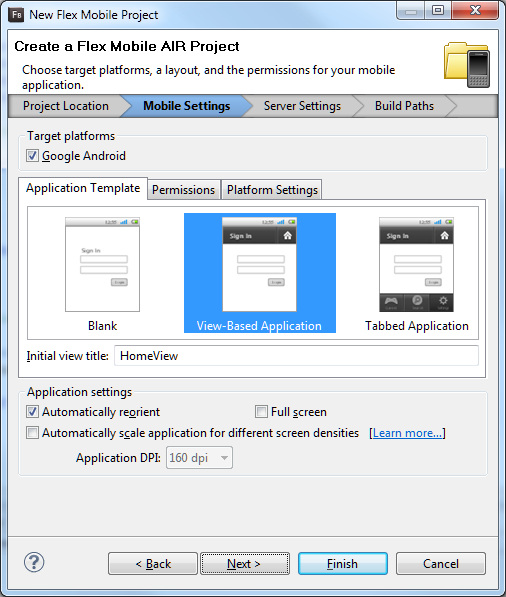
You get started by running up Flash Builder and creating a new Flex Mobile Project.

image

The disappointment here is that only Android is supported, so it is not all that cross-platform. According to Adobe’s Andrew Shorten:

An update to Flash Builder, scheduled for June 2011, will provide additional options to package Flex applications for Apple iOS and will include built-in support for packaging both Flex and ActionScript applications for BlackBerry Tablet OS.

so we have not got long to wait.

Flash Builder is based on Eclipse. The IDE is slow at times, for example when switching to visual design mode, but the platform is familiar to many developers and it feels reassuringly enterprise-ready. I find it a productive environment.

I laid out a screen with buttons and a label to display the output. The alignment tools work well although I made them a little too small as you will see shortly. Then I started writing code. The language of Flash Builder is ActionScript, which is based on JavaScript.

Here I met my first little annoyance. You can easily create a click handler for a button by right-clicking in the designer and choosing Generate Click Handler, or by clicking Generate Event Handler in the properties window. However, I thought it would be smart for most of my buttons to share the same event handler. All I need to do is to read the label of the button which was clicked, and pass it to my addnum routine that processes the input:

protected function btn_clickHandler(event:MouseEvent):void
{
    var theButton:Button = Button(event.currentTarget);
    addnum(theButton.label);
}

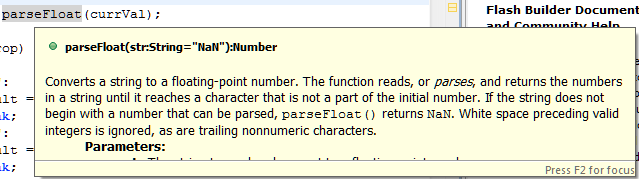
This works fine, but the IDE does not let you select an existing event handler for a button. You can paste it in, or add in in the source code editor, which is what I ended up doing. The source code editor is rather good, with excellent code completion, hover-over help for keywords, and so on.

image

The second annoyance was with the label. I wanted to add a border. I selected the label but could not see a border property. I went to the full list of properties and found exotic things like dominantBaseline in the style list but still no border.

Then I found this in the reference for a label:

Borders are not supported. If you need a border, or a more complicated background, use a separate graphic element, such as a Rect, behind the Label.

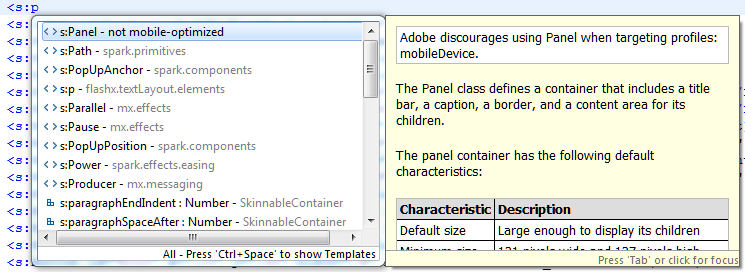
I wondered if a panel would work, and started to type it in the editor:

image

Well, it looks as if Panel is overkill for simply getting a border, but it was interesting to see the editor report that “Adobe discourages using Panel when targeting profiles: mobileDevice”. I decided to do without a border for the moment.

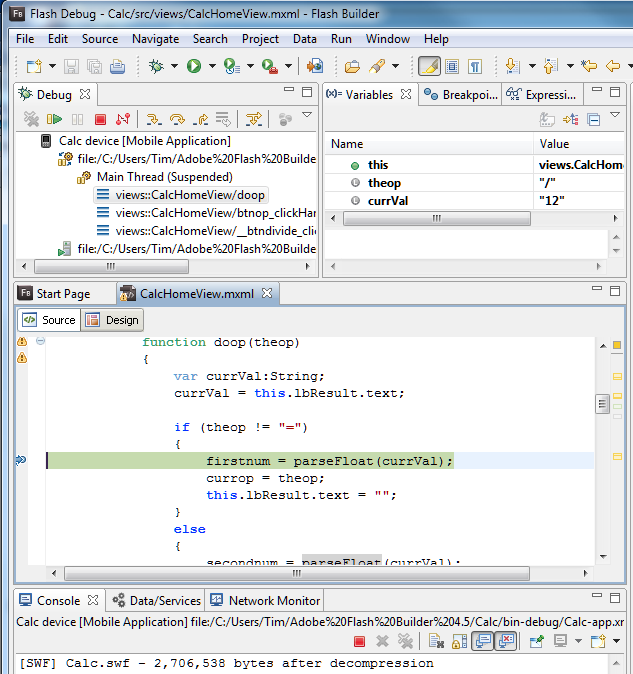
I finished the coding and successfully ran the project in the Android simulator. Next, I attached a device and created a new Run Configuration for a device attached via USB. I plugged in my HTC Desire running Android 2.2. Provided USB debugging is enabled on the device, this works well. Not only could I run on the device; I could also set a breakpoint and debug on the device. Everything was a bit slow in debug mode but it worked.

image

Finally, I built a release version using Export Release Build on the Project menu. You have to sign the package, but there is a wizard to create a certificate for testing.

Here it is on the device – as I mentioned, the size of the buttons needs a little work:

image

So how is performance, bearing in mind that the app is trivial. Well, the good news is that performance is OK, though launch is a little slow, except for one thing that I have not figured out. Sometimes I touch a button, and see the graphic effect as the button depresses, but the input does not register. It seems most prone to this just after launching, and usually a second tap works fine.

The vsize reported for the app process by the Dalvik Debug Monitor is around 200K, similar to that for the PhoneGap version.

Overall I am impressed, though I would like to understand the button issue, and I am beginning to wonder if my year-old HTC Desire is a bit under-powered for AIR. Device performance is improving rapidly, and Flash optimization is part of the design process for mobile graphics chips, so my guess is that AIR will be more than viable as a cross-platform toolkit for mobile. You also get the benefit of all those lovely Adobe design tools.

Microsoft’s Azure toolkit for Apple iOS and Android is a start, but nothing like enough

Microsoft ‘s Jamin Spitzer has announced toolkits for Apple iOS, Google Android and Windows Phone, to support its Azure cloud computing platform.

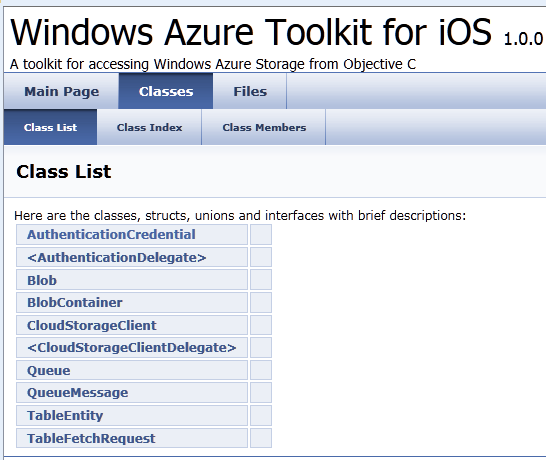
I downloaded the toolkit for iOS and took a look. It is a start, but it is really only a toolkit for Azure storage, excluding SQL Azure.

image

What would I hope for from an iOS toolkit for Azure? Access to SQL Server in Azure would be useful, as would a client for WCF (Windows Communication Foundation). In fact, I would suggest that the WCF RIA Services which Microsoft has built for Silverlight and other .NET clients has a more useful scope than the Azure toolkit; I realise it is not exactly comparing like with like, but most applications built on Azure will be .NET applications and iOS lacks the handy .NET libraries.

A few other observations. The rich documentation for WFC RIA Services is quite a contrast to the Doxyfile docs for the iOS toolkit and its few samples, though Wade Wegner has a walkthrough. One comment asks reasonably enough why the toolkit does not use a two or three letter prefix for its classes, as Apple recommends for third-party developers, in order to avoid naming conflicts caused by Obective C’s lack of namespace support.

The development tool for Azure is Visual Studio, which does not run on a Mac. Microsoft offers a workaround: a Cloud Ready Package which is a pre-baked Azure application; you just have to amend the configuration in a text editor to point to your own storage account, so developers without Visual Studio can get started. That is all very well; but I cannot imagine that many developers will deploy Azure services on this basis.

I never know quite what to make of these little open source projects that Microsoft comes up with from time to time. It looks like a great start, but what is its long-term future? Will it be frozen if its advocate within Microsoft happens to move on?

In other words, this looks like a project, not a strategy.

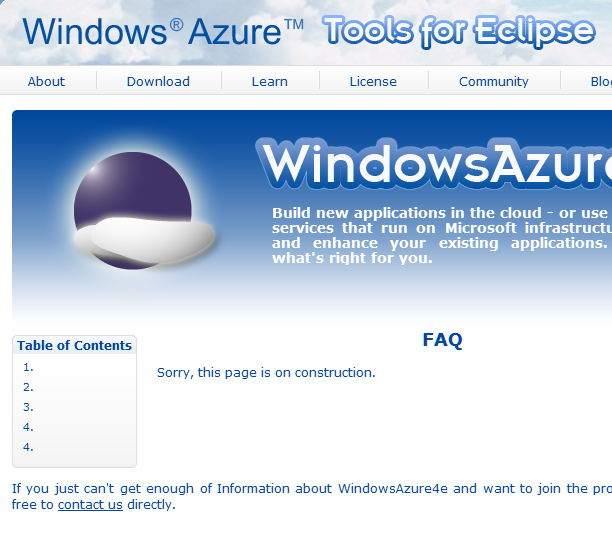
The Windows Azure Tools for Eclipse, developed by Soyatec and funded by Microsoft, is another example. I love the FAQ:

image

This sort of presentation says to developers: Microsoft is not serious about this, avoid.

That is a shame, because a strategy for making Azure useful across a broad range of Windows and non-Windows clients and devices is exactly what Microsoft should be working on, in order to compete effectively with other cloud platforms out there. A strategy means proper resources, a roadmap, and integration into the official Microsoft site rather than quasi-independent sites strewn over the web.

Hands On with RunRev LiveCode: rapid development for iOS, Android, Mac and Windows

RunRev LiveCode is a cross-platform development tool for Mac, Windows, Linux, Web, Apple iOS and, from this month, Google Android.

image

It is an individualistic tool inspired by Apple’s original (but now obsolete) HyperCard and HyperTalk, in which the building blocks of your application are stacks and cards. A stack is like a window, and a card is like a panel overlaid on that window. Unlike HyperCard, LiveCode is not a virtual card stack where each card can represent a record in a database; it is simply a means of building a graphical user interface.

A key attraction of LiveCode is that it now supports the two dominant smartphone platforms. I have been looking at a number of different approaches to mobile development, most recently PhoneGap; how does LiveCode compare to the competition? In order to get some hands on experience I set out to create my simple calculator application in LiveCode.

Coming almost new to LiveCode, I found that building this application took longer than it had done in PhoneGap, which uses HTML and JavaScript. I created a new stack and dragged some buttons onto it easily enough, but found that the approach to coding took some getting used to. There are lots of tutorials, but I found the easiest way to learn was to read through chunks of the user guide [pdf], which does a better job of explaining how to code.

One annoyance is that each object, such as a button, has its own script window, which appears as a tab in the editor. Although my calculator is simple, it does have a fair number of buttons, so you end up constantly switching between tabs. If you amend some code, you have to remember to click Apply before the change takes effect. If you forget, you run the application and puzzle over why it seems to be running an old version. The environment is strongly GUI-centric; you will not like it if you are an enthusiast for Model-View-Controller architecture.

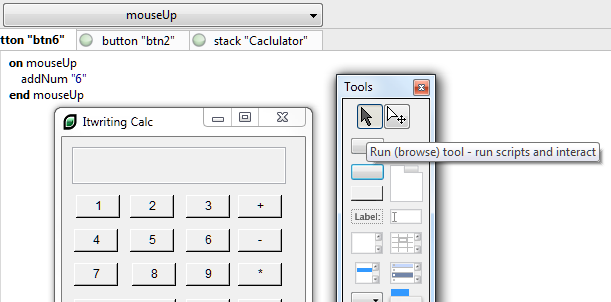
The environment is dynamic, so you can test the stack you are working on at any time simply by switching it to browse mode. This is why it is called Live Code. In this respect it is similar to the Live View in Adobe’s DreamWeaver.

image

I had to get used to writing:

put firstNumber * secondNumber into theResult

instead of

theResult = firstNumber * secondNumber

I was impressed by LiveCode’s ability to change types on the fly and to work out correctly whether you wanted to do something with a string value or a numeric value.

The language is more English-like than most languages, though I am not sure if it really easier. The language minimises use of punctuation which helps readability. Cases in switch statements fall through, C style, unless you remember to include break statements, which is traditionally a common source of bugs.

I got my calculator working on Windows. I tried building for what RunRev calls Web, but was put off by the plug-in requirement:

image 

I then moved the project to a Mac to try it on iOS. Everything still worked, but I spent some time resizing the stack and repositioning the buttons to look half-way reasonable on an iPhone. I may be missing some tricks here, but scaling and positioning controls does not seem to be a strong point for LiveCode.

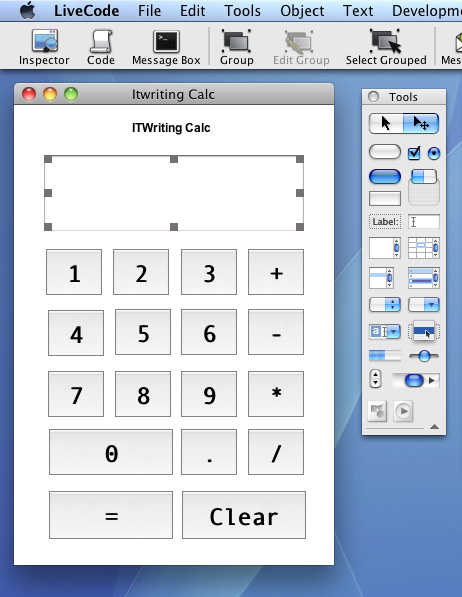
LiveCode does feel that bit more at home on a Mac, reflecting its origins.

image

I was impressed with how easy it was to build the app for iOS. The way cross-platform works in LiveCode is that you open a dialog called Standalone Application Settings. There is a tab for each supported platform, in which you specify options specific to each platform. The options for iOS are extensive, including supported devices, hardware access requirements, orientation options, external libraries and so on. You can then test immediately on the simulator. For on-device testing, you use the Organizer in Xcode to copy the compiled app across.

image

The good news is that the app ran well, much better than than the PhoneGap/jQuery Mobile version, though it did not look as nice and in fairness the other app’s performance issues are likely more to do with jQuery Mobile than PhoneGap itself.

Although I found it a bit of a hassle getting started, nevertheless I was able to build a working app for Windows, Mac and iOS in a few hours, so I should not complain.

Of course there is a lot more that LiveCode can do. It has database libraries, graphical effects, an embedded web browser on some platforms, XML and text processing support, and more. It is also extensible; there is probably not much that cannot be achieved with sufficient effort.

I have not tried the Android support as my version does not include it; though I did notice that the Android options dialog is basic compared to what is available for iOS.

My first impression of LiveCode is positive, but with reservations. It looks to me like a viable and productive route to cross-platform development, or you might use it just as a quick route to app development for iOS, but I did not enjoy working in the IDE which feels quirky and unsophisticated compared to other modern IDEs. My little app works well though, and that suggests it would be worth trying it for something more advanced.