Category Archives: windows

Installing Windows 8 developer preview on VirtualBox

I have installed the Windows 8 developer preview on Oracle VirtualBox. It does not work on Virtual PC since 64-bit guests are not supported. It is probably fine on Hyper-V, but I don’t have spare Hyper-V capacity for it at the moment.

image

I had a few hassles and thought it would be worth sharing my notes.

I gave the VM 2GB of RAM, 2 processors, and the maximum amount of video ram, but these settings are up to you.

The main problem I encountered was with the mouse. I found that it worked a bit in the Windows 8 guest, but only a bit. The pointer jumped around and was too frustrating to use.

The solution I found was to remote desktop to the VM from my Windows 7 desktop. I could not get the remote desktop built into VirtualBox to work, on a brief try, so I used pure Windows to Windows.

In order to do this, I first set networking in VirtualBox to Bridged. This means it is on the same subnet as the host computer. Then I enabled remote desktop access in the Windows 8 control panel. I opened a command prompt to check the IP address – Windows key + R opens the Run prompt and is a useful combination when the mouse is not working.

Then I was able to use remote desktop to that IP address. Note that unless you join the Windows 8 machine to a domain, the username is:

machinename\email address

or alternatively

WindowsLiveID\email address

presuming you do the default thing, which is to hook up Windows 8 to a Live ID.

Now, if you do this you will have two GUIs showing, which is untidy. You can fix this by running the VM headless. Shut down the VM, navigate to the VirtualBox directory and run the following command:

vboxheadless –startvm yourvmname

Now you can log on to the Windows 8 VM without having any other instance on the screen.

You might not have the same problem with the mouse, of course.

Incidentally, I am not sure what is the best way to shutdown the VM, but I use a command prompt or WindowsKey – R and type:

shutdown /s

My final observation: Windows 8 with just mouse and keyboard is a lot less fun than on a real tablet. It raises the question of just how much value there is in Windows 8 for non-tablet users. I suspect rather little, which is why Windows 7 is set for a long life on the corporate desktop, and for other users who do not have touch screens.

A few facts about Microsoft’s new Windows Runtime

I’ve just come out of Martyn Lovell’s talk on WinRT internals here at BUILD in Anaheim, California.

Make no mistake: Microsoft has re-invented the Windows API in WinRT. Just to recap, WinRT is the API for Metro-style applications, the touch-centric, app-centric API for tablets and, one presumes, eventually for Windows Phone (though Microsoft has yet to admit it).

WinRT is only useable from Metro applications. You cannot call WinRT from a Win32 application, nor vice versa*. I think it is reasonable to assume that a future version of Windows which runs only WinRT is a possibility; and that Windows 8 on ARM will look a bit like that even though Win32 will still be there, but mainly out of sight; but I am speculating.

Does that mean Win32 is now legacy? In a way, but such a huge legacy that for the moment we should think of Windows 8 as two platforms side by side.

There is no inter-app communication in WinRT other than by the pre-defined contracts built into the system (though Lovell noted that you could always use the file system and polling for a crude inter-process communication).

There is no way to install a shared dynamic library. Apps can only use the system libraries together with what you install with the app. Each app lives in its own context and is isolated. In other words, WinRT is not extensible, other than within your app’s code*.

If you figure out a way to bypass limitations of WinRT by calling other Windows APIs, your app might work but the submission process for the Windows Store will prohibit it.

Versioning is built into WinRT. This means that when Windows 9 comes along, you will be able to code just against the Windows 8 versions of the classes, for compatibility, and your IDE can support this by only exposing the Windows 8 version of the API.

The CLR exists in the Metro environment, for use by .NET applications, complete with JIT (Just in time) compilation. However only a subset of the .NET Framework libraries are included. Microsoft aimed to include only what was necessary for Metro. I am not sure yet what is included and what is not, beyond the obvious (no Windows Forms, for example) but will be investigating what is documented. The native WinRT APIs look similar to a COM callable wrapper from the .NET side. That said, you do not normally need to care about WinRT interfaces, even though these are there in WinRT. Normally you interact with WinRT classes, making it more natural for .NET than working with COM.

WinRT is full of asynchronous calls. Lovell told us that Microsoft had seen in the past that if both synchronous and asynchronous APIs are available for the same function, then developers often use the synchronous version even when they should not, making applications less responsive. The new await keyword in C# makes this easy to code.

WinRT makes use of the ILDasm metadata format which is also used by .NET. This means you get rich metadata for IntelliSense and debugging, but note that the actual runtime is not .NET; they just borrowed the same metadata format.

WinRT objects are reference counted like COM for memory management, with weak references to avoid circularity. You should not have to worry about this; you can code according to the conventions of your language.

There are three ways to write WinRT applications. One is C++, in which case you write directly to the “projection” of WinRT into your language. The second is .NET, in which case your code goes via the CLR. The third is HTML and JavaScript, in which case your code goes via the “Chakra” JavaScript engine also used by Internet Explorer 9 and higher. Lovell assured me that there is little difference in performance in most cases, though there could be advantages for C++ in certain niche scenarios. Of course we heard that story for .NET as well, but from what I have seen it is more plausible in WinRT.

There is no message loop in WinRT. There is no GDI in WinRT. All graphics are via DirectX. XNA, the .NET games framework, is not supported. It seems that you will need to use C++ for fancy DirectX coding, though this is not confirmed. Of course your XAML or Canvas code will be rendered by DirectX under the covers.

It is fascinating to see how Microsoft has borrowed XAML and ILDasm from .NET, but that WinRT is native and not .NET at its core. My take on this is that Microsoft intended to preserve the productivity of .NET, but without any performance compromise.

Despite the inclusion of .NET though, the fact that only a subset of the Framework is available, and that interop to the Windows API will not work*, means that most existing apps will need considerable work to be ported to Metro.

*Updates

A few clarifications.

It has been shown that you can call WinRT from Win32 (the favoured word for Win32 seems to be “desktop applications”) though I’m not sure how useful it is.

Concerning P/Invoke (Platform Invocation) to Win32 APIs, apparently this does work for a certain specified, small subset of the Windows API. It also works for your own native code DLL, with the proviso that if your native code DLL calls a disallowed Win32 API it will raise an error.

WinRT is partially extensible. A Framework Extension is a library which you can reference as a dependency in your app’s manifest. When the app is deployed it will download this dependency from the Windows Store. An example is the C Runtime Library. An extension library installs into its own directory, and can be used by multiple WinRT apps provided each one also references it in their manifests. However, the caveat is that only Microsoft can create these extensions: there is no way to create your own shared extension for general distribution, though an enterprise can deploy a shared extension internally.
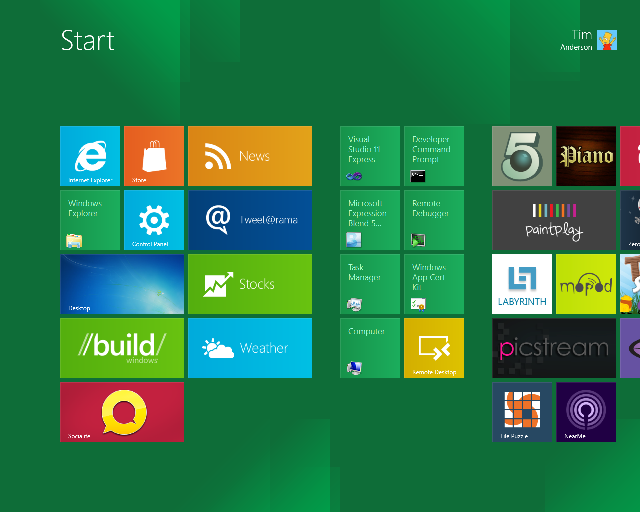
Building Windows – when Microsoft shows its hand

I’m in Anaheim, California on the eve of Microsoft’s BUILD conference. I have heard the phrase “wait until BUILD” so many times from Microsoft over the last few months that it has given this conference a special flavour. After Wednesday, the company will have to think of another way to avoid awkward questions like what is happening to Silverlight.

This is the latest chapter in the progression of Windows, server client and mobile. In particular, I will be trying to understand Microsoft’s software development platform. Whatever it looks like, it will be diverse, and include native code, HTML and JavaScript, .NET code including Silverlight, and perhaps some new hybrid. What will be the pros and cons of each approach, how do developers create apps that span desktop, tablet and mobile, and how will the delivery model change in the app store era?

Interesting questions; but the other theme is about how effectively Microsoft will compete versus its competition as the importance of desktop Windows shrinks. Cloud, mobile and tablet are the themes here, and after many mis-steps time is running out.

Not much to add except “watch this space” over the next few days; though I would be interested in any specific comments or questions on Microsoft’s strategy.

Windows Live Messenger error message hell

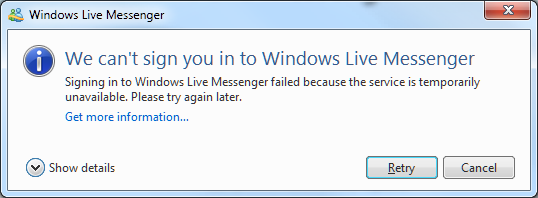
Recently I tried to sign into Live Messenger on Windows 7, only to be informed of what appears to be a temporary interruption in service.

image

Show details, by the way, shows Error code: 80040154

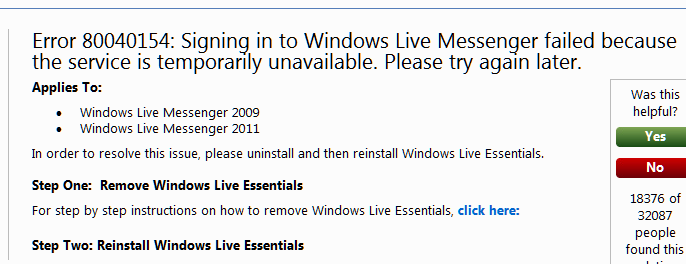
I retried and got the same message, so I clicked the Get more information link, which took me here:

image

The help document says that the solution is to reinstall Windows Live Essentials. I confirmed this, not by reinstalling (yet), but by trying Live Messenger on another machine, where I could sign into the same account successfully.

A few observations about this:

  • The error message is incorrect, since the error is apparently on the client whereas the message states it is a temporary problem with the service.
  • Microsoft’s engineers know that the error message is incorrect, since the help document references both the message and the solution.
  • The error message has been incorrect for years, since it applies to both Windows Live Messenger 2009 and 2011.
  • The misleading error message is particularly annoying, since if the user wants to use Live Messenger urgently they may well wait as advised by the message, not realising that the problem can be fixed immediately.
  • The solution is a brute-force one that involves many other applications, including Live Mail and Live Writer (on which I am typing this post). Or is it enough just to reinstall Messenger? The message suggests not. However if you use Live Mail for all your email, you probably want to know whether the uninstall will delete all your email and contacts or not. The referenced article on uninstalling Live Essentials does not say.

How could Microsoft improve this? At risk of stating the obvious:

  • Give an accurate error message.
  • Give a solution which targets the exact problem rather than relying on an uninstall/reinstall procedure that changes many things that are working fine.
  • If this is impossible, at least advise the user in one place concerning their obvious questions, such as “what happens to my stuff”.

Update: I found the cause of this problem. A developer tool beta had overwritten my system path with its own, breaking this among other things. I do not blame any application for breaking in these circumstances. I fixed the Live Messenger problem by performing a Repair on Live Essentials – less risky than uninstall/reinstall, and in this case sufficient.

Another idea if you have this kind of problem is System Restore.

Nevertheless, the error message could do with some work!

File operations in Windows: the good and the bad, the past and the future

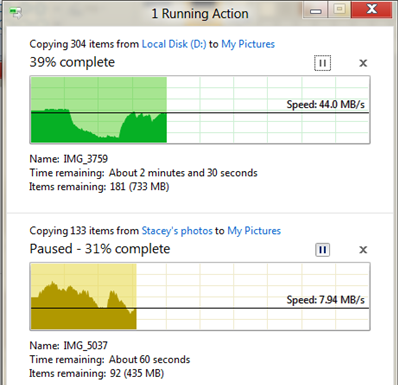
Microsoft’s Windows chief Steven Sinofksy has posted details of what file operations look like in Windows 8. There are a few changes, including a consolidated view of all current file operations that lets you pause and resume any of them. You can also click for more details and get a pretty graph.

image

Microsoft has also worked on the conflict resolution dialog, the one that says “Copy and Replace”, “Don’t copy”, and “Copy, but keep both files”. I consider this a pretty good dialog, but the new one adds the ability to inspect the actual files or even open them to check which is which.

A few observations. First, file operations are hard to get right from a usability perspective. I guess we have all had the experience of trying to help a non-technical user over the phone with some operation like, say, downloading a zip file, extracting it, and doing something with the contents. A common problem is that the user cannot find what they downloaded. Then they are not sure whether they did download it, and do so again. Then they get confused by the ZIP file, which mostly behaves like a folder in Explorer but is not quite the same; and of course since Windows XP SP2 all downloaded files are “blocked” by default which is another source of perplexity.

If you add complications like hidden folders and hidden file extensions in Windows Explorer, what should be a simple task can be really awkward. Let’s say your user has a video file called somemovie.vob that needs to be renamed to somevideo.mpg before it will play. With the default setting, when you rename it you actually get somevideo.mpg.vob. You have to talk the user through showing file extensions before it will work, or maybe open up a command prompt and use ren which does actually work correctly. Microsoft could fix this with a “Change file extension” option in Windows Explorer, but I do not know if this has made it to Windows 8.

The problems with hidden files and hidden file extensions show that something is wrong with the underlying model. Showing them is wrong because they are ugly and confusing; hiding them is wrong because you sometimes need them. It is a partial abstraction that is only partly successful. 

Apple’s solution in iOS is to hide the file system completely. The user will never have these problems. However, this is an autocratic approach that introduces new difficulties. If you have a documents in Pages in iOS you cannot move it directly to DropBox, for example, because there is no accessible file system. You are limited by whatever options the Pages app gives you for doing something with a document.

I believe thought that Apple is on the right lines. The app-centric view makes sense to users, and abstracting the file system so that users do not generally need to care about the location of a file is a reasonable goal. If the File Explorer goes the way of the command prompt, and becomes a tool used rarely by most users, that will mean Windows usability has improved.

Cloud-centric computing has potential to improve this, with your local storage just a cache of your internet-stored documents and data.

Finally, it is worth noting that file operations have got significantly better in Windows. Using the clipboard to copy and paste files, which I think came in with Windows 95, was a big advance. Then Vista fixed another annoyance: multiple file operations would abort on the first failure, leaving you uncertain which files had actually been transferred. Vista broke performance though, and file operations could be hilariously slow as Windows “discovered” files or just seemed to hang with a spinning bagel. Service packs and then Windows 7 pretty much fixed that.

I still like ROBOCOPY though. Hey Microsoft – why doesn’t Explorer have “Copy new and changed files only” or “Mirror directory”?

HP business breakdown and why a PC spin-off could backfire

I had a look at HP’s latest financials, following last night’s triple blast of news from the computer giant. It is ceasing webOS operations, acquiring enterprise knowledge management company Autonomy, and considering (though only considering) a spin-off or other major change to its PC division, the Personal Systems Group. Here is what HP said:

As part of the transformation, HP announced that its board of directors has authorized the exploration of strategic alternatives for the company’s Personal Systems Group. HP will consider a broad range of options that may include, among others, a full or partial separation of PSG from HP through a spin-off or other transaction. (See accompanying press release.)

Looking at the results for the second quarter 2011, here is how the main pieces break down:

$millions

Segment Percentage of revenue Earnings Percentage of total earnings
Services 9,089 28.5% 1225 33.8%
Servers, storage and networking 5396 16.9% 699 19.3%
HP Software 780 2.4% 151 4.2%
Personal systems group 9,592 30.1% 567 15.7%
Imaging and printing 6,087 19.1% 892 24.6%
Financial Services 932 2.9% 88 2.4%

Note that “Earnings” is earnings from operations; HP actually made less money than that, because various other corporate costs have to be deducted. But it gives an idea of where HP’s profit comes from.

So what do these groups do? PSG is notebooks, desktops, workstations and other, where “other” I’d guess will include the webOS mobile devices. In PSG, notebooks accounts for 54% of the total, with desktops taking 38% of the rest. Virtually all of these run Windows.

In servers, storage and networking, 61% is from what HP calls “Industry standard servers”. This is code for Windows server.

Under services, the three big businesses are Infrastructure Technology Outsourcing (42%), Technology Services (30%) and Application Services (19%). The first of these is clear-cut (have HP run your infrastructure), but the second two are both consulting services and on a brief look seem to have some overlap.

Autonomy, by the way, reported revenue of $million 247 in the three months ending June 30 2011 – pretty tiny relative to HP.

A few comments then. It’s worth noting that PSG is the biggest single segment for revenue, but not so for profit, though it is still making a useful contribution.

Imaging and Printing contributes most earnings as a proportion of revenue. I do not know how much of that comes from absurdly overpriced ink cartridges!

If you take PSG together with Industry Standard Servers, you find that around 40% of HP’s revenue comes from boxes running Windows. If you then consider what its printers, network and storage systems attach to, and that a proportion of HP’s consulting business concerns Windows systems and applications, it is obvious that HP’s fortunes are deeply entwined with Microsoft.

If HP removes PSG that will still be true, though less so. But why would HP want do remove PSG? I would guess two main reasons. One is that it is unprofitable relative to the other segments, and the other is that HP foresees the business declining under the force of various well-documented pressures: Apple, mobile, cloud.

It still makes little sense to me. I can understand why HP might want to get out of consumer desktops and laptops, but it seems to me that to supply corporate PCs fits snugly with the rest of HP’s business and has beneficial side-effects. After all, PCs, printers and servers do all plug together both physically and conceptually. Getting rid of PSG might have a negative effect on other parts of HPs business.

In the SMB market, by the way, resellers like HP because unlike Dell it does not mainly sell direct. HP boxes generally work as advertised in my experience, though I rate the laptops less highly than the servers and desktops.

HP discontinues WebOS, considers PC spin-off. Should have stuck with Microsoft

Oh yes, and buys Autonomy, a fast-growing specialist in enterprise knowledge management.

Here’s the news from HP’s announcement:

As part of the transformation, HP announced that its board of directors has authorized the exploration of strategic alternatives for the company’s Personal Systems Group. HP will consider a broad range of options that may include, among others, a full or partial separation of PSG from HP through a spin-off or other transaction. (See accompanying press release.)

HP will discontinue operations for webOS devices, specifically the TouchPad and webOS phones. The devices have not met internal milestones and financial targets. HP will continue to explore options to optimize the value of webOS software going forward.

In addition, HP announced the terms of a recommended transaction for all of the outstanding shares of Autonomy Corporation plc for £25.50 ($42.11) per share in cash.

A few quick comments. First, the failure of webOS does not surprise me. There is not much wrong with webOS as such; in pure technical terms it deserves better. Its focus on adapting web technologies for local mobile applications is far-sighted; it is a more interesting operating system than Android and in some ways it is surprising that it went to HP and not to Google, which is a web technology specialist.

The problem is that HP, despite its size, is not big enough to make a success of webOS on its own. This was my comment from just over a year ago:

Mobile platforms stand (or fall) on several pillars: hardware, software, mobile operator partners, and apps. Apple is powering ahead with all of these. Google Android is as well, and has become the obvious choice for vendors (other than HP) who want to ride the wave of a successful platform. Windows Phone 7 faces obvious challenges, but at least in theory Microsoft can make it work though integration with Windows and by offering developers a familiar set of tools, as I’ve noted here.

It is obvious that not all these platforms can succeed. If we accept that Apple and Android will occupy the top two rungs of the ladder when it comes to attracting app developers, that means HP webOS cannot do better than third; and I’d speculate that it will be some way lower down than that.

Frankly, if HP did not want to do Android, it should have stuck with Microsoft. But this is where the webOS news ties in with the announcement about he Personal Systems Group. HP fell out with Microsoft last year, as I noted in my 2010 retrospective. I said the two companies should make up; but it looks as if HP is more inclined to give up on PCs and pursue other lines that have better margins – like enterprise software.

I am puzzled though by the PSG announcement. It is always curious when a company announces that it might or might not do something, and the fact that HP says it is considering a spin-off of its PC division will be enough to makes its customers uncertain about the long-term future of HP PCs and some of them will buy elsewhere as a result. It would have paid HP either to say nothing, or to be more definite and aim for a speedy transition.

All this, on the eve of Microsoft’s detailed unveiling of Windows 8. What are the implications? More than I can put into a single post; but like Gartner’s reports of dramatically declining PC sales in Western Europe presented earlier this week, this is a sign of structural change in the industry.

Microsoft will be glad of one thing: it no longer has this major partner promoting a rival mobile and tablet operating system. Note that HP still is a major partner: even if it sells the Personal Systems Group, its server and services business will still be deeply entwined with Windows.

Reports of 19% decline in Western European PC market show structural change

As if we needed telling, a new Gartner report shows a steep decline in the PC market in Western Europe. A “PC” in this context includes Macs but excludes smartphones and what Gartner called “media tablets”, mostly Apple iPads. A few figures comparing shipments in the second quarter 2011 with the same period in 2010:

  • Total PC sales down 18.9%
  • Netbook sales down 53%
  • Desktop PCs down 15.4%
  • Apple up 0.5%
  • Consumer PC market down 27%

What interests me here is not so much the normal ebbing and flowing of the PC market, but structural change indicating a switch away from PCs and laptops to more lightweight mobile devices. I believe this is evidence of that, though the economy is weak and extending the life of existing PCs is an obvious saving both for businesses and consumers.

Still, the dramatic decline in netbook sales suggests that consumers really are buying the more expensive iPad in preference. If you believe that consumers are to some extent ahead of business in their technology choices, then we can expect more of the same in the corporate market too.

No doubt alarm bells have been ringing in Microsoft’s Redmond headquarters for some time. The company is betting on Windows 8 to rescue its operating system from permanent decline, which is why next month’s BUILD conference is so critical. Nevertheless, it will be a year or so before we get new-style tablets running Windows 8, so will it be too late? I tend to think not, just because of the strength of Microsoft in the business world and the importance of Windows for existing applications, but it is interesting to speculate.

One factor which you can argue either way, in terms of Microsoft’s prospects, is that non-iPad tablets seem to be struggling. HP’s TouchPad and RIM’s PlayBook seem to be selling poorly. Google Android looks more hopeful though overshadowed by legal concerns from multiple sources. In Australia and parts of Europe Apple has successfully barred or delayed sales of Samsung’s Galaxy Tab 10.1, though the latest news is that the ban has been lifted outside Germany.

See also: Fumbling tablet computing – Microsoft’s biggest mistake?

Parallels Desktop 6 for Mac: nice work but beware Windows security settings

I’ve just set up Parallels Desktop 6 on a Mac, in preparation for some development work. Installed Parallels, created a new virtual machine, and selected a Windows 7 Professional with SP1 CD image downloaded from Microsoft’s excellent MSDN subscription service.

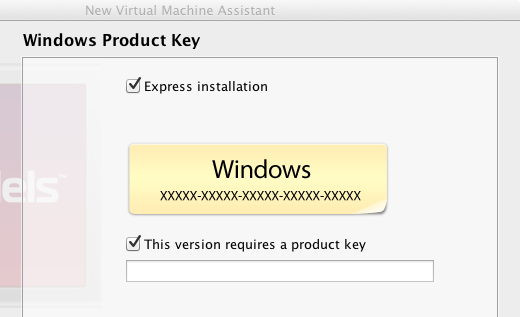
The way this works is that you install the Parallels application and the create a new virtual machine, selecting a boot CD or image. Next, you have a dialog where you select whether or not you want an Express installation. It is checked by default. I left it checked and proceeded with the install.

image

The setup was delightfully smooth and I was soon running Windows on the Mac. I chose a “Like my PC” install so that Windows runs in a window. The alternative is to hide the virtual Windows desktop and simply to show Windows applications on the Mac desktop.

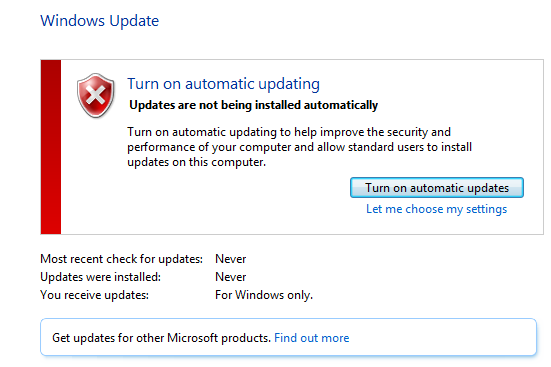
Everything seemed fine, but I was puzzled. Why was Windows not installing any updates? It turns out that the Express install disables this setting.

image

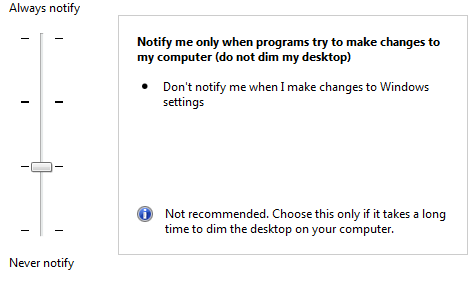
It also sets user account control to an insecure setting, where the approval dialog does not use the secure desktop.

image

The Parallels Express install also sets up an Administrator account with a blank password, so you log on automatically.

No anti-virus is installed, which is not surprising since Windows does not come with anti-virus software by default.

These choices make a remarkable difference to the user experience. Set up was a pleasure and I could get to work straight away, untroubled by prompts, updates or warnings.

Unfortunately Windows in this state is insecure, and I am surprised that Parallels sets this as the default. Disabling automatic updates is particularly dangerous, leaving users at the mercy of any security issues that have been discovered since the install CD was built.

In mitigation, the Parallels user guide advises that you set a password after installation – but who reads user guides?

If you uncheck the Express Install option, you get a normal Windows installation with Microsoft’s defaults.

These security settings are unlikely to matter if you do not connect your Windows virtual machine to the internet, or if you never use a web browser or other Internet-connected software such as email clients. If you do real work in Windows though, which might well include Windows Outlook since the Mac version is poor in comparison, then I suggest changing the settings so that Window updates properly, as well as installing anti-virus software such as the free Security Essentials.

Microsoft financials: Office and server dominate as Windows falters

Microsoft has released its quarterly figures for January-March 2011. My at-a-glance summary is below.

Quarter ending June 30th 2011 vs quarter ending June 30th 2010, $millions

Segment Revenue Change Profit Change
Client (Windows + Live) 4740 -41 2943 -123
Server and Tools 4643 +494 1774 +214
Online 662 +94 -728 -40
Business (Office) 5777 +402 3618 +399
Entertainment and devices 1485 +341 32 +204

Business as usual? More or less, but there are a few points to note.

The figure that jumps out is the stunning performance of Office, which includes SharePoint and Exchange. Why is everyone buying Office 2010, when a document like the one I am typing now could be done just as well in Word 2.0 from 1991, or more plausibly the free OpenOffice?

The answer is the Microsoft has successfully transitioned many of its customers to using Office with SharePoint and Exchange, making it harder to stick with old versions and selling CALs (Client Access Licences) as well as the Office suite itself. This is highly profitable, though the aspect that puzzles me is that Office 365, which is cloud-hosted SharePoint and Exchange, is more cost-effective for the customer since it includes server software, CALs and in some cases the Office client for a commodity-priced subscription.

In other words, I find it hard to see how Microsoft can remain equally profitable if a significant proportion of its customers switch to Office 365. The company may be depending on its ability to upsell those customers to further online services; or perhaps it has not fully thought this through and has set Office 365 pricing at what it needs to be in order to compete with Google.

Fortunately for Microsoft, there is enough doubt concerning the safety of cloud services to sustain continued strong sales of on-premise solutions.

Second notable thing: Windows is in decline. The reason: it is losing market share to Apple and to Google Android. Netbook sales are down 41% according to the release, and I would guess that those sales have mostly gone to Apple iPad and Android tablets rather than to Windows notebooks.

Will Windows 8 reverse the decline? Speculation of course, but it will not repeat the success of Windows 7. In fact, my guess is that Windows 8 will be a hard sell to enterprises which have finally been persuaded to migrate from Windows XP. They are settling down for another five years of stability. Windows 7 was a consolidation release, just the sort of thing enterprises like. Windows 8 will be a revolution release, with most of the interest focused on what it can do in mobile and tablets. If it does succeed, it will do so slowly; there will be no rush to upgrade from 7 other than from the usual early adopters. It may improve sales in the consumer market, but neither Mac nor iPad nor Android is going away.

That leads on to mobile, the figures for which are buried under a pile of Xbox consoles. A good quarter for Xbox, though note how poor the margins are compared to those for Office or Windows.

Finally, the online money drain continues. Note that this is Bing and online advertising, not Azure or Office 365. Microsoft must feel that it the strategic value of these online services is worth the cost, particularly since they tie into mobile and the ecosystem which Nokia is depending on for a reversal of its fortunes. Given that the company has money to burn, there may actually be some sense in that; though for a segment to make such large and consistent losses over a long period has to be a concern.