Category Archives: windows

When remote desktop does not connect: changing Windows DNS setttings remotely

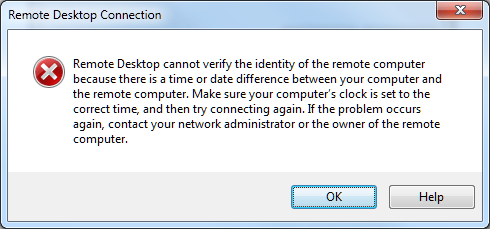
This was an annoying. I tried to remote desktop into my Hyper-V Server today and could not. The message:

Remote Desktop cannot verify the identity of the remote computer because there is a time or date difference between your computer and the remote computer.

image

Hmm. I typed:

net time \\myhypervbox

and it was the same as the time on my desktop.

A Google or two later, and I discovered that this message is caused by an incorrect DNS setting on the target computer. That made sense, since a DNS server died recently. I had changed the settings on the VMs but forgot to do it on the Hyper-V host. Thank you Microsoft for a misleading error message.

Of course my Hyper-V server has no screen attached. So how to change the DNS setting? Umm, not by remote desktop.

I fiddled with netsh for a bit. This looks promising, but it was not playing ball. I tried to list the interfaces and it gave an error saying it could not do so when remote access is not running. Further, I have two network cards in this machine, and Hyper-V creates virtual interfaces, and I was not sure what the correct network interface name was.

Next up was the registry editor. Run Regedit, choose File – Connect Network Registry. That worked. I went to:

HKEY_LOCAL_MACHINE\SYSTEM\CurrentControlSet\Services\tcpip\Parameters\Interfaces

This lists the network interfaces as GUIDs. I went through them one by one, and in the two cases where the NameServer entry was set to the dead server, I changed it to the new one.

There is also an entry for NameServer in the top level Parameters key but this was blank and I left it alone.

If you want to know what all these keys do, there is a guide here.

I rebooted the machine, remotely of course:

shutdown /m \\myhypervbox /r

and when it restarted remote desktop worked again.

Hands on debugging an Azure application – what to do when it works locally but not in the cloud

I have been writing a Facebook application hosted on Microsoft Azure. I hit a problem where my application worked fine on the local development fabric, but failed when deployed to Azure. The application was not actually crashing; it just did not work as expected. Specifically, either the Facebook authentication or the ASP.NET Forms Authentication was failing; when I tried to log on, the log on failed.

This scenario, where the app works locally but not on Azure, is potentially a bad one because you do not have the luxury of breakpoints and variable inspection. There are several approaches. You can have the application write a log, which you could download or view by using Remote Desktop to the Azure instance. You can have the application output debug messages to HTML. Or you can use IntelliTrace.

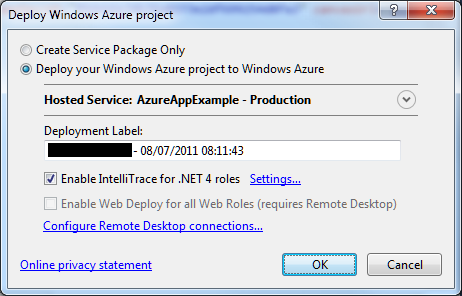
I tried IntelliTrace. It is easy to set up, just check the box when deploying.

image

Once deployed, I tried the application. Clicked the Log On button, after which the screen flashed but still asked me to Log On. The log on had failed.

image

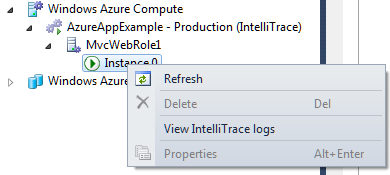
I closed the app, opened Server Explorer in Visual Studio, drilled down into the Windows Azure Compute node and selected View IntelliTrace Logs.

image

The logs took a few minutes to download. Then you can view is the IntelliTrace log summary, which includes a list of exceptions. You can double-click an exception to start an IntelliTrace debug session.

image

Useful, but I still could not figure out what was wrong. I also found that IntelliTrace did not show the values for local variables in its debug sessions, though it does show exceptions in detail.

Now, if you really want to debug and trace an Azure application you had better read this MSDN article which explains how to create custom debugging and trace agents and write logs to Azure storage. That seems like a lot of work, so I resorted to the old technique of writing messages to HTML.

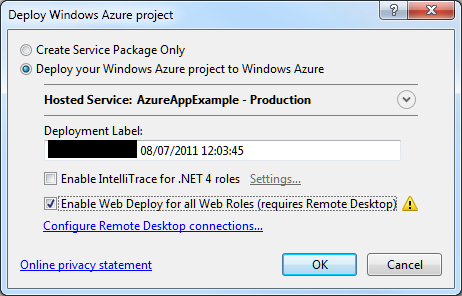
At this point I should mention something you must do in order to debug on Azure and remain sane.  This is to enable WebDeploy:

image

It is not that hard to set up, though you do need to enable Remote Desktop which means a trip to the Azure management portal. In my case I am behind a firewall so I needed to configure Web Deploy to use the standard SSL port. All is explained here.

Why use Web Deploy? Well, normally when you deploy to Azure the service actually builds, copies and spins up a new virtual machine image for your app. That process is fundamental to Azure’s design and means there are always at least two copies of the VM in existence. It is also slow, so if you are making changes to an app, deploying, and then testing, you will spend most of your time waiting for Azure.

Web Deploy, by contrast, writes to your existing instance, so it is many times quicker. Note that once you have your app working, it is essential to deploy it properly, since Azure might revert your app to the last VM you created.

With Web Deploy enabled I got back to work. I discovered that FormsAuthentication.SetAuthCookie was not working. The odd thing being, it worked locally, and it had worked in a previous version deployed to Azure.

Then I began to figure it out. My app runs in a Facebook canvas. Since the app is served from a different site than Facebook, cookies may be rejected. When I ran the app locally, the app was in a different IE security zone, so different rules applied.

But why had it worked before? I realised that when it worked before I had used Google Chrome. That was it. IE worked locally; but only Chrome worked when deployed.

I have given up trying to fix the specific problem for the moment. I have dug into it a little, and discovered that cookie handling in a Facebook canvas with IE is a long-standing problem, and that the Facebook C# SDK may have bugs in this area. It is not essential for my sample; I have found I can get by with the Facebook session. To get the user ID, for example:

FacebookWebContext.Current.Session.UserId

The time has not been wasted though as I have learned a bit about Azure debugging. I was also amused to discover that my Azure VM has activation problems:

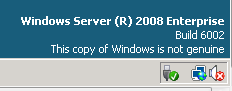
image

Microsoft Office 365: the detail and the developer story

I attended the UK launch of Office 365 yesterday and found it a puzzling affair. The company chose to focus on small businesses, and what we got was several examples of customers who had discovered the advantages of storing documents online. We were even shown a live video conference with a jerky, embarrassing webcam stream adding zero business value and reminding me of NetMeeting back in 1995 – which by the way was a rather cool product. Most of what we saw could have been done equally well in Google Apps, except for a demo of the vile SharePoint Workspace for offline editing of a shared document, though if you were paying attention you could see that the presenter was not really offline at all.

There seems to be a large amount of point-missing going on.

There is also a common misconception that Office 365 is “Office in the cloud”, based on Office Web Apps. Although Office Web Apps is an interesting and occasionally useful feature, it is well down the list of what matters in Office 365. It is more accurate to say that Office 365 is for those who do not want to edit documents in the browser.

I am guessing that Microsoft’s focus on small businesses is partly a political matter. Microsoft has to offer an enterprise story and it does, with four enterprise plans, but it is a sensitive matter considering Microsoft’s relationship with partners, who get to sell less hardware and will make less money installing and maintaining complex server applications like Exchange and SharePoint. The, umm, messaging at the Worldwide Partner Conference next month is something I will be watching with interest.

The main point of Office 365 is a simple one: that instead of running Exchange and SharePoint yourself, or with a partner, you use these products on a multi-tenant basis in Microsoft’s cloud. This has been possible for some time with BPOS (Business Productivity Online Suite), but with Office 365 the products are updated to the latest 2010 versions and the marketing has stepped up a gear.

I was glad to attend yesterday’s event though, because I got to talk with Microsoft’s Simon May and Jo Carpenter after the briefing, and they answered some of my questions.

The first was: what is really in Office 365, in terms of detailed features? You can get this information here, in the Service Description documents for the various components. If you are wondering what features of on-premise SharePoint are not available in the Office 365 version, for example, this is where you can find out. There is also a Support Service Description that sets out exactly what support is available, including response time objectives. Reading these documents is also a reminder of how deep these products are, especially SharePoint which is a programmable platform with a wide range of services.

That leads on to my second question: what is the developer story in Office 365? SharePoint is build on ASP.NET, and you can code SharePoint applications in Visual Studio and deploy them to Office 365. Not all the services available in on-premise SharePoint are in the online version, but there is a decent subset. Microsoft has a Sharepoint Online for Office 365 Developer Guide with more details.

Now start joining the dots with technologies like Active Directory Federation Services – single sign-on to Office 365 using on-premise Active Directory – and Windows Azure which offers hosted SQL Server and App Fabric middleware. What about using Office 365 not only for documents and email, but also as a portal for cloud-hosted enterprise applications?

That makes sense to me, though there are still limitations. Here is a thread where someone asks:

Does some know if it is possible to make a database connection with Office365, SharePoint (Designer) and SQL Azure database ?

and the answer from Microsoft’s Mark Kashman on the SharePoint team:

You cannot do this via SharePoint Designer today. What you can do is to create a Silverlight or javaScript client application that calls out to SQL Azure.

In the near future, we are designing a way to make these connections using the base SharePoint technology called BCS (Business Connectivity Services) where then you could develop a service to service to SQL Azure.

If you cannot wait, check out the Cloud Connector for SharePoint 2010 from Layer 2 GmbH.

It seems obvious that Office 365 and Azure together have potential as a developer platform.

What about third-party applications and extensions for Office 365? This is another thing that Microsoft did not talk about yesterday; but it seems to me that there is potential here as well. It is not well integrated, but you can search Microsoft Pinpoint for Office 365 applications and get some results. If Office 365 succeeds, and I think it will, there is an opportunity for developers here.

Microsoft partners with Joyent to bring node.js server-side JavaScript to Windows

Microsoft will port node.js to Windows in partnership with Joyent. This will work on Windows Azure as well as other versions of Windows back to Server 2003.

But can you not already run node.js on Windows? This is possible using Cygwin and instructions are here. Cygwin makes Windows more like Linux by providing familiar Linux tools and a Linux API layer. Cygwin is a great tool, though it can be an awkward dependency, but a true Windows port should be higher performance and more robust, particularly as the intention is to use the IOCP API. See here for an explanation of IOCP:

With IOCP, you don’t need to supply a completion function, wait on an event handle to signal, or poll the status of the overlapped operation. Once you create the IOCP and add your overlapped socket handle to the IOCP, you can start the overlapped operation by using any of the I/O APIs mentioned above (except recv, recvfrom, send, or sendto). You will have your worker thread block on GetQueuedCompletionStatus API waiting for an I/O completion packet. When an overlapped I/O completes, an I/O completion packet arrives at the IOCP and GetQueuedCompletionStatus returns.

IOCP is the Windows NT Operating System support for writing a scalable, high throughput server using very simple threading and blocking code on overlapped I/O operations. Thus there can be a significant performance advantage of using overlapped socket I/O with Windows NT IOCPs.

I was impressed by node.js when I saw it presented by author Ryan Dahl at a pre-Dreamforce event last year. Since then it has become better known. This is an interesting move, particularly in the context of an greater focus on JavaScript in the forthcoming version of Windows known as Windows 8. End to end JavaScript for your next-generation real time networking applications?

Apple iCloud: i is for integrated

Apple has announced iCloud, smart cloud storage for Apple devices.

The iCloud will store documents, email, contacts and appointments, and synch the data to multiple devices including iPad, iPhone, iPod touch, Mac or PC. You get 5GB free with more available to purchase. Books are synched so that your place is saved from one device to the next, a feature borrowed from Amazon Kindle.

Apple has also exposed an API for developers:

Apple apps are seamlessly integrated with iCloud, and we’ve given developers the tools to make their apps work with iCloud, too. So you’ll be able to paint a masterpiece, play a game, create reminders, edit stock lists, and more — and have it all stay with you on all your devices.

This API allows for key-value pairs to be stored as well as documents.

The iCloud also backs up settings, including device settings and app data. If your iOS device is stolen, restoring it should be just a matter of reconnecting:

When you set up a new iOS device or need to restore the information on one you already have, iCloud Backup does the heavy lifting. Just connect your device to Wi-Fi and enter your Apple ID and password. Your personal data — along with your purchased music, apps, and books from iTunes — will appear on your device.

This is similar to what Google is promising for the Chromebook; in fact, there are quite a few parallels there.

Email is also synchronised, provided you use Apple’s me.com email account. Users of Microsoft Exchange or similar server-based systems already have the experience of email, appointments and contacts synched across all devices; now iCloud brings this to all Apple users.

There is also special provision for music. In this case you do not actually have to upload the tracks in most cases, since Apple will “scan and match” your collection. This applies to CDs you have ripped as well as iTunes purchases, which strikes me as a big concession from the music industry, since there is actually no way to tell if you ripped your own CD or copied it from a friend. You do have to pay $24.99 annually for this though, so it is a kind of music subscription. However it falls short of Spotify’s play-anything offer, since you have to acquire each track by some separate means first.

Taking each feature individually, there is little new here other than Apple’s deal with the music companies. Taken together though, this is a big deal. Apple iOS devices are no longer tied to an iTunes installation on Mac or PC; they are now cloud devices. If you think as I do that cloud+device is the direction of computing today, this is a key move.

One weak point is collaboration. The iCloud seems to be a private store, whereas with technology like Microsoft SharePoint or Google Apps you can publish documents to selected individuals or to the world.

I expect it is just a matter of time before Apple adds document sharing based on Apple IDs or me.com email identities. Another obvious move would be some sort of web site integration so you can publish certain kinds of data.

Another weak point is system requirements. Some features will require iOS 5 or OS X Lion. However, in the past iOS upgrades have been free so that is unlikely to be a problem; and even an upgrade to Lion will only be $29.00, provided your Mac is compatible – it needs Intel Core 2 Duo or better.

There is also the question of whether you want to store all your critical data on Apple’s servers. In my own encounters with Apple’s online security I have not been impressed. Someone managed to sign up for iTunes using my email address once; I could have had full access to his account and stored credit card details. Apple also uses the notorious “security questions” technique for resetting passwords. It is also not clear whether data in iCloud is encrypted.

That said, as with the iPad versus Microsoft’s Tablet PC, I am struck by how Apple has taken a feature which Microsoft has worked on for years but failed to implement sensibly and consistently. Microsoft had Live Mesh for example back in 2008 complete with an API for synchronising documents across PCs. The API was poor, there was an operating system component which could be problematic to install, and mobile device support never really came. Then in 2010 Microsoft scrapped most it and replaced it with a new Live Mesh based on SkyDrive which is now part of Windows Live Essentials. It is an optional extra for Windows users and aimed at consumers; business users can get some of this using Exchange and SharePoint as mentioned above, though these are usually privately hosted. Everything is an extra, some things free, some things paid for. In the confusion third party services like Dropbox have flourished.

Microsoft will learn from Apple and we will see a nicely integrated cloud story in Windows sometime around 2014, based on past performance.

Gang of Four member Erich Gamma joining Microsoft’s Visual Studio team

Microsoft’s Jason Zander has announced

that Erich Gamma will be joining the Visual Studio team as a Microsoft Distinguished Engineer

Gamma is one of the “Gang of Four” who shook up software development back in 1994 with the book Design Patterns: Elements of Reusable Object-Oriented Software.

The other authors are Richard Helm, Ralph Johnson and John Vlissides.

Gamma has previously been associated with Java rather than .NET. He was co-developer with Kent Beck of the JUnit unit test framework, and also worked on the Eclipse tools platform and at IBM Rational on application lifecycle management (ALM).

It is a prestigious hire and I would expect Gamma’s influence on Visual Studio to be a positive one, especially in areas like software quality, refactoring and ALM.

Considering Windows 8 as an HTML platform

Amongst all the fuss about whether Microsoft is deprecating Silverlight or even client-side .NET, it is easy to lose sight of the other angle on this. What are the implications of Microsoft embracing HTML and JavaScript as a new first-class Windows development platform? Here’s the quote again:

Today, we also talked a bit about how developers will build apps for the new system. Windows 8 apps use the power of HTML5, tapping into the native capabilities of Windows using standard JavaScript and HTML to deliver new kinds of experiences. These new Windows 8 apps are full-screen and touch-optimized, and they easily integrate with the capabilities of the new Windows user interface.

When Microsoft introduced IE9 with hardware-accelerated graphics, support for some key parts of HTML 5, and a new fast JavaScript engine, it was not only trying to recover ground in the browser wars. It also had in mind a new application runtime for Windows, for desktop as well as for web applications.

In order to achieve this, we can expect more hooks between the browser engine and the local operating system. There is potential security risk, but Microsoft of all companies will be sensitive to this and I would expect it to get the security right. The further implication is that some parts of a Windows HTML application will be Windows-specific. It is an “Embrace and extend” strategy, as I noted in this Register article back in September last year when former Silverlight product manager Scott Barnes broke the story of how the Windows team at Microsoft was favouring HTML and JavaScript above .NET.

The rationale for this is two-fold. First, I’m guessing that Microsoft thinks it will work better. Although .NET client apps are now commonplace, especially for custom business applications, problems like slow start-up and heavy memory requirements never really went away, though I would argue that in Silverlight they are almost eliminated.

Second, HTML and JavaScript is a universal programming platform. With the new model, any developer who can code a web page can also code a Windows app. Corporate VP Michael Angiulo said at Computex in Taipei:

Windows 8’s new application platform … is based on HTML 5, JavaScript and CSS, the most widely understood programming languages of all time. These languages form the backbone of the web, so that on day 1 when Windows 8 ships hundreds of millions of developers will already know how to build great apps for Windows 8.

These are both compelling arguments. Nevertheless, there are several reasons why making Windows an HTML platform might not be the instant hit that Microsoft will be hoping for. Here are a few:

  • Microsoft’s Visual Studio is .NET oriented. It does have a web design tool, Expression Web, which is OK but still falls short compared to Adobe Dreamweaver. Web designers tend to use Dreamweaver anyway, thanks to Mac compatibility and integration with other Adobe tools. Even Dreamweaver is not great as an application development tool, as opposed to a web design tool. Tooling is a problem, and it is fair to say that whatever goodies Microsoft comes up with in this area will likely be a step back compared to what it already has for C# or C++.
  • Standards are a mixed blessing if you are trying to sell an operating system. If Microsoft does such a good job of standards support that the same apps run with minor tweaks on an iPad and on Android, users may do just that. If Microsoft encumbers the standards with too many proprietary extensions, the universality of the platform is lost.
  • Windows plus HTML and JavaScript sounds a lot like Palm/HP WebOS, which has gained favourable reviews but has yet to take off in terms of sales. Otherwise, Palm would not have been taken over by HP.
  • The question of whether HTML and JavaScript will really take over app development is open. I certainly hear voices saying so. I interviewed Nitobi’s president André Charland, in charge of PhoneGap, and he makes a good case. On the other hand, App development today is still dominated by platform-specific development, Objective C for Apple iOS and Java on Dalvik, the Google Android virtual machine.
  • The standard in HTML/JavaScript app platforms is not Microsoft’s Internet Explorer, but WebKit, as used in iOS and in Google Android and Chrome. Microsoft did great work in standards support in IE9, but so far it has not stopped its browser share decline. Worldwide figures from StatCounter show Internet Explorer in continuing slow decline overall, and Chrome still growing and set to overtake Firefox in a year or so.

In other words, there is little evidence that embracing HTML and JavaScript as an app platform will ensure success for Windows 8.

That said, other factors count for more. Developers will go where their customers are, and if Microsoft turns out a version of Windows that wins substantial market share in the emerging tablet market as well as on traditional notebooks, the new platform will be a hit.

The risk though is that the market will continue to perceive Windows as an OS for desktop and laptop, and look to iOS or Android for mobile and touch devices. The dual personality of Windows 8 may count against it, if it means devices that are compromised by having to support both user interface models.

Microsoft refuses to comment as .NET developers fret about Windows 8

There is a long discussion over on the official Silverlight forum about Microsoft’s Windows 8 demo at D9 and what was said, and not said; and another over on Channel 9, Microsoft’s video-centric community site for developers.

At D9 Microsoft showed that Windows 8 has a dual personality. In one mode it has a touch-centric user interface which is an evolved version of what is on Windows Phone 7. In another mode, just a swipe away, it is the old Windows 7, plus whatever incremental improvements Microsoft may add. Let’s call it the Tiled mode and the Classic mode.

Pretty much everything that runs on Windows today will likely still run on Windows 8, in its Classic mode. However, the Tiled mode has a new development platform based on HTML and JavaScript, exploiting the rich features of HTML 5, and the fast JavaScript engine and hardware acceleration in the latest Internet Explorer.

Although D9 is not a developer event, Microsoft did talk specifically about this aspect. Here is the press release:

Today, we also talked a bit about how developers will build apps for the new system. Windows 8 apps use the power of HTML5, tapping into the native capabilities of Windows using standard JavaScript and HTML to deliver new kinds of experiences. These new Windows 8 apps are full-screen and touch-optimized, and they easily integrate with the capabilities of the new Windows user interface. There’s much more to the platform, capabilities and tools than we showed today.

Program Manager Jensen Harris says in the preview video:

We introduced a new platform based on standard web technologies

Microsoft made no mention of either Silverlight or .NET, even though Silverlight is used as the development platform in Windows Phone 7, from which Windows 8 Tiled mode draws its inspiration.

The fear of .NET developers is that Microsoft’s Windows team now regards not only Silverlight but also .NET on the client as a legacy technology. Everything will still run, but to take full advantage of Tiled mode you will need to use the new HTML and JavaScript model. Here are a couple of sample comments. This:

My biggest fears coming into Windows 8 was that, as a mostly WPF+.NET developer, was that they would shift everything to Silverlight and leave the FULL platform (can you write a Visual Studio in Silverlight? of course not, not designed for that) in the dust. To my utter shock, they did something much, much, much worse.

and this:

We are not Windows developers because we love Windows. We put up with Windows so we can use C#, F# and VS2010. I’ve considered changing the platform many times. What stops me each time is the goodness that keeps coming from devdiv. LINQ, Rx, TPL, async – these are the reasons I’m still on Windows.

Underlying the discussion is that developers have clients, and clients want applications that run on a platform with a future. Currently, Microsoft is promoting HTML and JavaScript as the future for Windows applications, putting every client-side .NET developer at a disadvantage in those pitches.

What is curious is that the developer tools division at Microsoft, part of Server and Tools, has continued to support and promote .NET; and in fact Microsoft is soon to deliver Visual Studio LightSwitch, a new edition of Visual Studio that generates only Silverlight applications. Microsoft is also using Silverlight for a number of its own web user interfaces, such as for Azure, System Center and Windows InTune, as noted here.

Now, I still expect that both Silverlight and native code, possibly with some new XAML-based tool, will be supported for Windows 8 Tiled mode. But Microsoft has not said so; and may remain silent until the Build conference in September according to .NET community manager Pete Brown:

You all saw a very small technology demo of Windows 8, and a brief press release. We’re all being quiet right now because we can’t comment on this. It’s not because we don’t care, aren’t listening, have given up, or are agreeing or disagreeing with you on something. All I can say for now is to please wait until September. If we say more before then, that will be great, but there are no promises (and I’m not aware of any plans) to say more right now. I’m very sorry that there’s nothing else to share at the moment. I know that answer is terrible, but it’s all that we can say right now. Seriously.

While this is clearly not Brown’s fault, this is poor developer communication and PR from Microsoft. The fact that .NET and Silverlight champion Scott Guthrie is moving to Windows Azure is no comfort.

The developer division, and in fact the whole of Server and Tools, has long been a bright spot at Microsoft and among its most consistent performers. The .NET story overall includes some bumps, but as a platform for business applications it has been a remarkable success. The C# language has evolved rapidly and effectively under the guidance of Technical Fellow Anders Hejlsberg. It would be bewildering if Microsoft were to turn its back on .NET, even if only on the client.

In fact, it is bewildering that Microsoft is being so careless with this critical part of its platform, even if this turns out to be more to do with communication than technical factors.

From the outside, it still looks as if Microsoft’s server and tools division is pulling one way, and the Windows team the other. If that is the case, it is destructive, and something CEO Steve Ballmer should address; though I imagine that Steven Sinofsky, the man who steered Windows 7 to launch so successfully, is a hard person to oppose even for the CEO.

Update: Journalist Mary Jo Foley has posted on what she “hears from my contacts” about Jupiter:

Jupiter is a user interface library for Windows and will allow developers to build immersive applications using a XAML-based approach with coming tools from Microsoft. Jupiter will allow users a choice of programming languages, namely, C#, Visual Basic and C++.

Jupiter, presuming her sources are accurate, is the managed code platform for the new Windows shell – “Tiled mode” or “Tailored Apps” or “Modern Shell – MoSH”; though if that is the case, I am not sure whether C++ in this context will compile to managed or unmanaged code. Since Silverlight is already a way to code using XAML, it is also not clear to me whether Jupiter is in effect a new Windows-only version of Silverlight, or yet another approach.

A pivotal moment for Microsoft as it attempts to escape its Windows legacy

image

Last year I wrote a piece for The Register on 25 years of Windows. I even ran up Windows 1.0 in a DOS box to have a look.

The surprising thing about Windows is not how much has changed in 25 years, but how little. The WIMP model (Windows, Icons, Menus, Pointer) has stayed the same. Inevitably, Windows was completely rebuilt during that period, in the form of Windows NT, but Microsoft was careful to make the user interface reassuringly familiar. Windows NT 3.1 looked the same as Windows 3.1, but did not crash so often. Windows NT 4.0 used the Windows 95 user interface. Further, as far as possible old applications still ran. In fact, Notepad on Windows 1.0 looks very like Notepad on Windows 7.

Then Apple releases the iPhone in 2007, and suddenly Microsoft has a problem. Apple demonstrates that it is possible to create a touch user interface, without a stylus, that really works. Apple does this by creating a new operating system, iOS, which is incompatible with its existing OS X used for desktops and laptops. Yes, much of the underlying code is the same, but OS X applications do not run. Nobody would expect them to on a phone; but then Apple does the iPad, approaching the screen size of a laptop, but still iOS, touch-centric, and incompatible with Mac OS X.

The advantage of Apple’s clean-room approach is that there are no compromises or fudges to make applications built for keyboard and mouse somehow work. iPhone and iPad are huge hits, and users seemingly do not mind sticking with OS X for their productivity applications like Microsoft Office and Adobe PhotoShop, and using the iPad and iPhone for web browsing and for apps that are more about consuming than creating – except that productivity apps like the iWork suite are now creeping onto iOS, and this together with the web application/cloud computing model may mean that OS X gets used less and iOS more over time; but OS X is not going away.

What about Microsoft? It has a big hit with Windows 7, but suddenly it all feels rather legacy. What about the new computing model which is mobile, touch-centric, and enjoyable to use in a way previously unknown in computing? One thing is sure: Microsoft cannot continue with WIMP. It has to break with 25 years of Windows and find a different user interface model.

2010, and Microsoft does Windows Phone 7. This is Microsoft’s iOS: same old Windows underneath, though based on the cut-down Windows CE, but otherwise a complete break from the past. The user interface is a new touch-centric effort called Metro and based on sliding tiles. The main thread of continuity for developers is its app platform based on Silverlight, which runs .NET code written in C# and Visual Basic.

You might have thought that Microsoft would follow Apple by using the phone OS for other form factors as well, and making Silverlight its core app platform for Windows (the cross-platform dream is long gone).

Instead, Microsoft embarked on a third strategy.

“We introduced a new platform based on standard web technologies”, says program manager Jensen Harris in his preview video. Windows 8 uses elements from the Windows Phone 7 UI, but driven by HTML and JavaScript rather than by Silverlight. Well, maybe you can use Silverlight instead; or maybe native code. Not everything is clear yet; but what Microsoft is choosing to focus on is its use of web technology.

Who will buy touch-centric Windows 8 devices? Microsoft’s problem: there is already a touch-centric OS out in the market, supported by countless third-party apps. As it has discovered with Windows Phone 7, it is not enough to do a decent alternative. So what, says the market, we already have iOS, and if we want something non-Apple, there’s Android. And WebOS. And Blackberry PlayBook.

The one thing Microsoft can do that others cannot is run Windows. Not new Windows, but old Windows. There is a reason why Windows 7 was the fastest-selling operating system of all time – most of the business world runs on Windows.

Therefore Windows 8 does both. There’s the new platform, and there’s the old platform, and you just swipe between them.

image

Windows 8 is a migration strategy. Is a mobile, touch-centric UI the future of client computing? Quite possibly, but in the meantime you have all this old stuff to run, not least Microsoft Office. Here is the answer: run both.

There are a few problems with this strategy.

First, while Microsoft will focus on the new HTML-based platform, in the real world people will buy Windows to run their existing Windows apps. That means they will need keyboard and mouse. Windows 8 OEMs will be fighting an old battle: how to make devices that run well as tablets, but also have keyboard and trackpad, and a competitive price. We have seen that approach fail with the old Tablet PC line and its swivel screens.

Alternatively, we will see touch-only devices and users will curse as they try to run Excel.

Second problem: Microsoft’s Windows team is focused on the new UI. The old one will likely be pretty much Windows 7. The success of Windows 7 was driven by innovations and improvements that matter whatever you run, rather than ones that you can only use if you are running apps built for the new platform.

A split personality means divided attention, and one or other or both will suffer. Is Windows 7 now frozen in time as the last of its line? That does look possible.

Third, what is the developer story? Hitherto, the Windows developer story has been pretty simple and single-minded. There is native code and the Windows API, or for the last decade or so there has been .NET. All-conquering C# has been the unifying language from desktop to server, with Silverlight bringing it to the browser.

Now Microsoft is saying HTML and JavaScript. Plaudits from the standards folk – who mostly do not run Windows and still will not – but confusion for the Microsoft-platform community.

That said, I will be surprised if Silverlight is not also an option for new-style apps, enabling Windows Phone apps to be ported easily.

Even so, there must be a reason for Microsoft’s emphasis on HTML and JavaScript for local apps as well as web applications. It does feel as if the one common thread to the company’s developer story has suddenly been cut, and for no good reason given that Silverlight fits perfectly with the new UI model.

Let me add, it is hard to see a future for the Windows Phone 7 OS, given what we have seen in Windows 8. It seems plausible that Windows Phone 8+ will use the same code as Windows 8, which is another reason to suppose that Silverlight will be fully supported.

I can see where Microsoft wants to get to. It wants to succeed in mobile and in the new touch-centric world, as the alternative is gradual erosion of its entire market and Windows ecosystem. Is this the best way, and will it work? Open questions; and the company has some tricky positioning to do, especially to its developers. The forthcoming Build conference will be critical.

Check out these images of Windows 8 – but where is Silverlight?

Microsoft’s Windows President Steven Sinofsky has shown off an early build of Windows 8 at the D9 conference in Rancho Palos Verdes, California. It turns out that the not-so subliminal messaging at the PDC conference late in 2010 was spot on. HTML 5 and JavaScript are at the centre of the new Windows, for apps as well as in the browser:

Windows 8 apps use the power of HTML5, tapping into the native capabilities of Windows using standard JavaScript and HTML to deliver new kinds of experiences.

says program manager Jensen Harris in his introductory video.

So what is the new Windows like? Here is tour with some screen grabs from the above video. I have deliberately included fingers in several of the shots, because the new Windows is touch-centric.

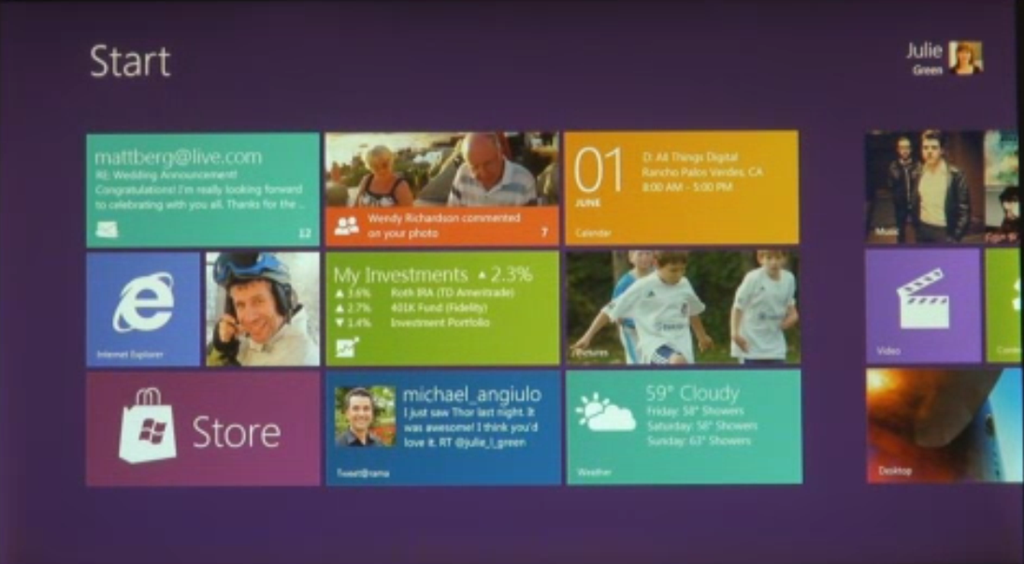
First, Windows 8 borrows from Windows Phone and has a Start screen built with Live tiles:

image

Live tiles, as on Windows Phone, are more than just icons; they can include notifications, video and animations. They are more like app previews.

Apps run essentially full-screen, as on Apple’s iPad:

image

You switch apps by swiping. Here is a screen caught mid-swipe:

image 

However, you can also have two apps on screen. One is the main app, the other is docked to the side:

image

A menu on the right shows Search, Share. Start. Connect and Settings. I am not sure what Connect does.

image

Believe it or not, this is Internet Explorer 10, with tabs along the top that preview each page (nice idea):

image

The on-screen keyboard looks like a big phone keyboard:

image

Dual Personality

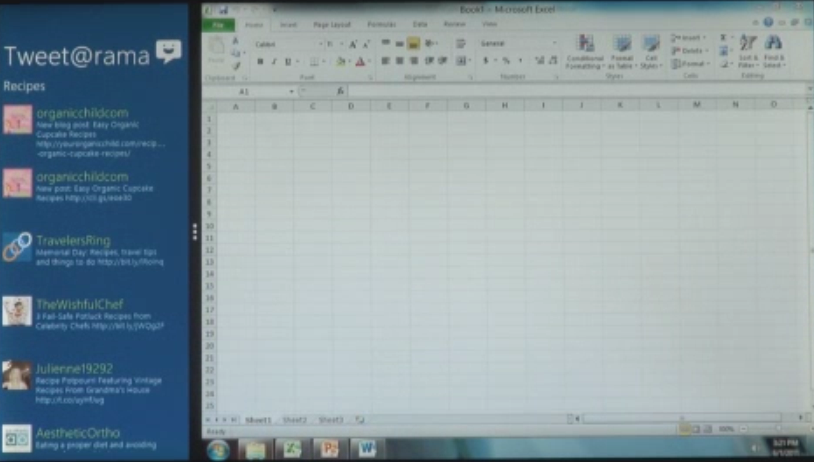
So where is the rest of Windows that we know and love/hate? It is still there; run an “old” Windows app like Excel and presto, it is Windows 7, complete with task bar. This image looks blurry, which actually is a clue to how big and bold the UI shown for the “new” apps really is:

image

You can run old and new-style apps side by side, using the main/side app model:

image

Windows 8 will run on both Intel x86/x64 processors, and on ARM. Legacy app compatibility on Intel will be great, but on ARM applications will need to be recompiled. There is no x86 emulation layer; Sinofsky said that was too difficult to do. Windows 8 will not require any more hardware than Windows 7.

It looks like Microsoft has created an excellent tablet/slate UI which has the same relation to the iPad that Windows Phone 7 has to the iPhone. It borrows many of the ideas but adds some distinctive features.

The big difference: whereas Apple has chosen to continue a dual line, with desktop/laptop Mac in one stream and iOS for iPhone and iPad in another, Microsoft is combining the two.

At least, it is in Windows 8. What about the current Windows Phone OS, which is built on the Windows CE OS? Will it be replaced by a variant of Windows 8, possibly with “full Windows” option disabled? That is my guess, but there is a lot which Microsoft has not yet explained about its future product plans.

Another question: where is Silverlight and .NET? Clearly these technologies are still supported, at least on x86, since all of Windows is still there. In a report from D9, Sinofsky says:

The browser that we showed runs Silverlight and it will still run on the desktop

That does not answer the question: can developers build apps for the new Windows user interface (and Windows store) using Silverlight, or is it HTML/JavaScript only? What about native code?

I will be surprised if all these options are not available, but it was not explicitly stated at D9. The emphasis is firmly on HTML.

We are promised more details at the BUILD conference in September.