Tag Archives: microsoft

Microsoft backs ECMAScript, dismisses Google Dart

Microsoft has posted an article on Evolving ECMAScript on its IE Blog. ECMAScript is the official standard for what we call JavaScript. The company is proposing some minor additions “to address gaps in Math, String and Number functionality as well as Globalization.” It has also taken the opportunity to take a shot at Google, which is proposing a new web language called Dart:

Some examples, like Dart, portend that JavaScript has fundamental flaws and to support these scenarios requires a “clean break” from JavaScript in both syntax and runtime. We disagree with this point of view. We believe that with committee participant focus, the standards runtime can be expanded and the syntactic features necessary to support JavaScript at scale can be built upon the existing JavaScript standard.

Dart will compile to JavaScript so there is a measure of compatibility, but if the language catches on then browsers without a native implementation will be disadvantaged.

PCs down, Android up: astonishing figures from Gartner show shift to mobile

Want to know why Apple is suing Samsung over Android, or why Microsoft is re-imagining Windows as a touch-friendly mobile OS? Look no further than Gartner’s latest report on European and worldwide sales in the third quarter of 2011.

First, this release shows PC sales in Western Europe, not helped by HP’s dithering over what to do with its PC division. Total shipments declined by 11.4%. Apple increased its unit share by 19.6% to 7.6%, which would be greater when measured by value since its computers command the highest prices, but still small relative to the entire desktop and notebook market. Netbook sales declined by 40%, presumably because people are buying Apple iPads instead. “Media tablets” including the iPad are not included in these figures.

Next, take a look at worldwide sales of mobile devices. Units are up 5.6% year on year, to over 4.4m devices in the latest quarter.

Then at the operating system breakdown for smartphones (115m devices). The operating system in features phones does not much matter. Android grabbed an amazing 52% of sales (from 25% a year earlier), versus Apple’s 15%. Gartner thinks Apple’s decline is a blip cause by customers waiting for iPhone 4S, but this is still an extraordinary result for Android. Symbian is down from 36.3% to 16.9% (the “burning platform”); RIM is down from 15.4% to 11%; Microsoft is down from 2.7% to 1.5% – is that burning any less?

It would be remarkable if Microsoft’ share does not increase at least a little in the fourth quarter, with the launch of Nokia’s Lumia and much more promotional activity, but on these figures it needs a miracle.

Asus Transformer Prime looks great – but I would rather have it with Windows 8

Asus has announced the Transformer Prime, a quad-core tablet which comes with a mobile dock. The tablet looks like this:

image

but it docks with a keyboard to become more like a laptop:

image

The dock includes a keyboard, USB port, SD card slot, and an additional battery. Asus claim a battery life of 18 hours for the tablet when docked, or 12 hours for the tablet alone.

Specs for the Transformer Prime include 32GB storage, 1GB RAM, micro HDMI port, front and rear facing cameras (the rear camera can take full 1080p HD video), light sensor and gyroscope, GPS, combined audio and mic-in jack, and of course wi-fi and Bluetooth.

The real star of the Transformer Prime though is NVIDIA’s new Tegra 3 SoC (System on a Chip).

image

Tegra 3 includes a quad-core ARM Cortex A9 CPU and a 12-core GeForce GPU, compared to its predecessor the dual-core Tegra 2 with its 8 core GPU. It also supports double the amount of RAM: 2GB rather than 1GB. Anand Lal Shimpi has a great overview here.

The Transformer Prime is set to arrive in the UK in early January with a recommended price of £499 inc VAT. It will run Android Ice Cream Sandwich.

Perhaps I have spent too much time with the Windows 8 preview over the last month, but I cannot help thinking that this would make an excellent Windows 8 tablet. I like the idea of the keyboard/dock which also forms protection for the tablet screen; with Windows and Office this might be the only device I need when travelling.

Quick thoughts on Xcode and Objective C versus Microsoft’s tools

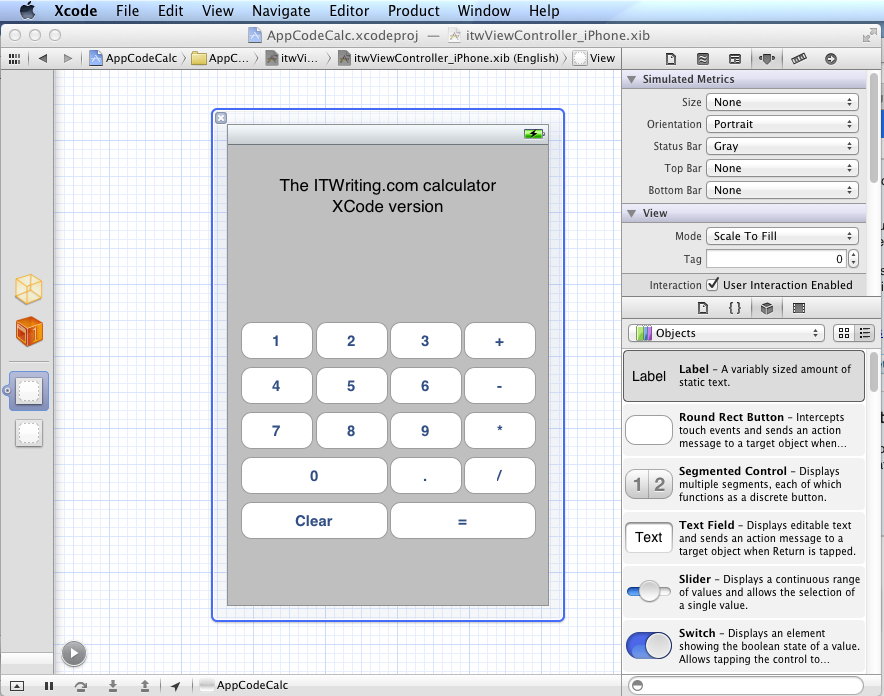
I have been trying out JetBrains’ AppCode which meant working in an Apple development environment for a time. I took the opportunity to implement my simple calculator app in iOS native code.

image

Objective C is a distinctive language with a mixed reputation, but I enjoy coding with it. I used Automatic Reference Counting (ARC), a feature introduced in Xcode 4.2 and OSX 10.7, iOS 5; ARC now also works with 10.6 and iOS 4. This means objects are automatically disposed, and I did not have to worry about memory management at all in my simple app. This is not a complete memory management solution (if there is such a thing) – if you use malloc you must use free – but it meant that the code in my app is not particularly verbose or complex compared to other languages. Apple’s libraries seem to favour plain English method names like StringByAppendingString which makes for readable code.

I was impressed by how easy it is to make an app that looks good, because the controls are beautifully designed. I understand the attraction of developing solely for Apple’s platform.

I also love the integrated source control in Xcode. You find yourself using a local Git repository almost without thinking about it. Microsoft could learn from that; no need for Team Foundation Server for a solo developer.

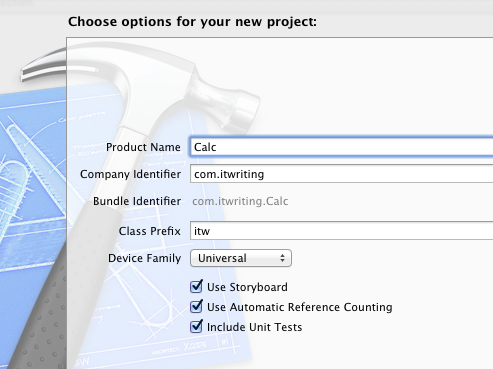
I did miss namespaces. In Objective C, if you want to remove the risk of name collision with a library, you have to use your own class prefix (and hope that nobody else picked the same one).

image

Interface Builder, the visual UI designer, is great but many developers do not use it, because coding the UI without it is more flexible. It is a shame that you have to make this choice, unlike IDE’s with “two way tools” that let you edit in code or visually and seamlessly keep the two in synch. I found myself constantly having to re-display windows like the Attributes Inspector though it is not too bad once you learn the keyboard shortcuts. The latest Interface Builder has a storyboard feature which lets you define several screens and link them. It looks useful, though when I played with this I found it difficult to follow all the linking lines the designer drew for me.

It is interesting to compare the Mac and iOS development platform with that for Windows. Microsoft promotes the idea of language choice, though most professional development is either C# or C++, whereas on Apple’s platform it is Objective C and Cocoa or you are on your own. Although Mac and Windows are of a similar age, Microsoft’s platform gives a GUI developer more choices: Win32, MFC, WTL, Windows Forms, Windows Presentation Foundation and Silverlight, and in Windows 8 the new WinRT.

I get the impression that Microsoft is envious of this single-minded approach and trying to bring it to Metro-style Windows 8, where you still have a choice of languages but really only one GUI framework.

That said, Visual Studio is an impressive tool and both C# and C++ have important features which are lacking in Objective C. I would judge that Visual Studio is the more productive tool overall, but Apple’s developer platform has its own attractions.

Moving Windows with its applications: too difficult

I have just replaced my PC – well, if you count new motherboard, new CPU, new hard drive, new RAM as replacement, though it sits in the same case – and faced again the question of what to do with my Windows setup, complete with hundreds of applications.

A few years back, there was no question. You took every opportunity to do a clean install, because without it Windows gradually became unusable, as gloriously recounted by Verity Stob.

Stob’s analysis is not completely wrong today, but the matter has greatly improved. The Windows 7 64-bit installation that I use today was installed in August 2009 (run systeminfo if you want to check yours), and that was an in-place upgrade from Windows Vista 64-bit, as recorded here. That Vista install was done in January 2008, so I have preserved applications and settings for coming up to four years and two motherboard changes.

The trade-off is that in return for putting up with some cruft you get a big win in convenience. There is no need to dig out install media, downloads and licence codes, and migration to a new system is quicker.

So why complain? Well, although it can usually be done, moving Windows from one machine to another is not supported by Microsoft, unless the hardware is identical:

Microsoft does not support restoring a system state backup from one computer to a second computer of a different make, model, or hardware configuration. Microsoft will only provide commercially reasonable efforts to support this process. Even if the source and destination computers seem to be identical makes and models, there may be driver, hardware, or firmware differences between the source and destination computers.

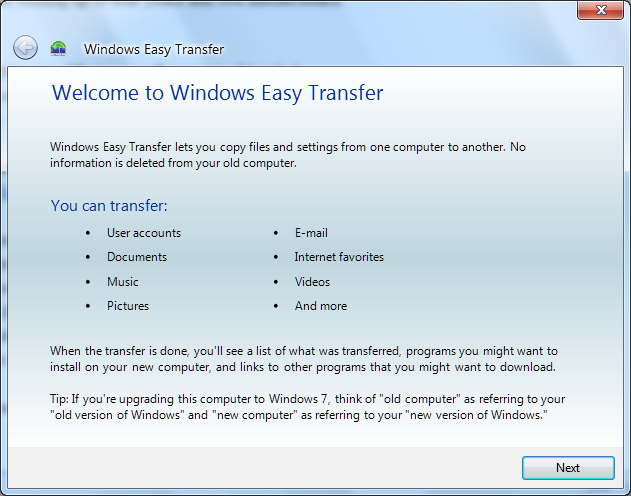
What this means is that users who get a new computer are directed instead towards the Windows Easy Transfer application:

image

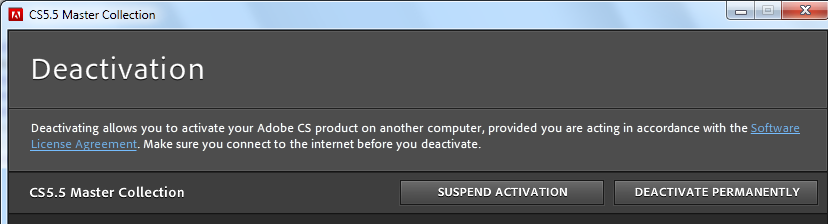
This is a handy tool, but it does not transfer applications. This last point can be particularly tiresome if you use software that requires activation on each machine on which it is installed, not least Microsoft’s own Windows and Office. Adobe’s Creative Suite, for example, allows installation on up to two machines, after which it will no longer install unless you specifically deactivate it:

image

If you trash your old PC, or it breaks, without deactivating first, then you have to call support and plead your case.

Apple’s Migration Assistant, by contrast, does move applications, making a better user experience.

If you can easily move applications, settings and data, of course, there is no need to move the entire operating system, since you have all that matters.

Why does Microsoft make this so hard? Two reasons I can think of.

One is that there are technical challenges in moving Windows to new hardware; though having said that, I suspect that Microsoft could easily have created a migration wizard that includes applications if it wished to do so.

The second, and more important, is licencing. Most consumer versions of Windows (and Office too) are OEM licences, which are not allowed to be transferred from the machine with which they are supplied. If Microsoft made it easier to move Windows or to migrate applications, less new software would be sold. Enterprises are expected to handle this in a different way, with centralised application management tools.

Virtualisation changes the game of course. The point of virtualisation is that you run the operating system on abstracted hardware that can easily be replicated on another machine. I really would like to run a virtual desktop, but I do not have a suitably high-powered server and there are niggles over fast graphics, USB devices, studio quality audio and so on. I expect all these to be solved and that a virtual desktop is in my future.

In the meantime, I have personally lost patience with the idea of reinstalling everything, and fortunately I do not use OEM Windows licences.

The wider question is interesting though. Although the desire of Microsoft and its partners to protect licence income is understandable, there are new models of application licencing that work better for users. In Google’s world you just sign on in your browser, and all your stuff is there. In Apple’s world, your iOS apps are licenced to you, not your device, and when you get a new device they all reappear. Even Microsoft’s Xbox works like this too, though that was not always the case.

This competition, in combination with virtualisation, means that Microsoft’s approach with Windows looks out of date as well as being unpleasant for users.

Windows 8 is on the horizon, and I would guess that the forthcoming Windows Store will be better in this respect, though note that at its Build conference in September Microsoft did not discuss the business aspects of the Store.

Something has changed for Windows Phone

When Windows Phone 7 launched last year, it was obvious that it could not succeed since it was all-but invisible to most people. In my local small town centre, which has several mobile phone shops, it was nowhere to be seen.

I went out to post a letter just now and was astonished to see this poster in the window of Phones4u:

image

I went in and discovered only a dummy of the Radar and Titan on display. I asked to see a Titan and they got one out for me to see.

The Nokia Lumia 800 was also on display, this one a working model.

image

The Titan has a gorgeous large screen, but while it is slightly bulky it is slim and does not feel heavy to hold. I put it alongside the Lumia; the Titan screen does look larger and better. Unfortunately I could not see the Lumia out of its clip. The Lumia does benefit from Nokia Drive (not working because no internet connection) and seems to be around £100 cheaper than the Titan. The Lumia also has the free British Airways app pre-installed.

I asked the assistant what she thought of Windows Phone and she said she had not tried it. I said I had an HTC Desire (true) and she seemed slightly puzzled about why I would want a Windows Phone though she thought it would be good for work because of Office.

Still, Microsoft’s device has visibility at last, though this seems to be more because of moves by Nokia and HTC than from Microsoft itself. If it can win the support and enthusiasm of some of those influential retail assistants we may see significant growth in market share.

Microsoft financials: Server and Office business still growing

Microsoft has announced its quarterly figures for July-September 2011. Despite its problems in mobile and in search, and the declaration of a post-PC era by competitors, the company is still a huge money-making machine. Here is my at-a-glance summary of the segment breakdown:

Quarter ending September 30th 2011 vs quarter ending September 30th 2010, $millions

Segment Revenue Change Profit Change
Client (Windows + Live) 4868 +83 3251 -335
Server and Tools 4250 +386 1597 +57
Online 625 +98 -494 +64
Business (Office) 5622 +401 3661 +196
Entertainment and devices 1963 +168 352 -34

These look like decent figures to me, though Microsoft’s broad-brush breakdown disguises trouble spots like the poor sales of Windows Phone 7. The online business, which includes Bing and ad sales, continues to bleed money, though slightly less than for the same quarter last year.

Microsoft says Bing-powered US search share (which includes Yahoo!) is now 27%, which is impressive, though I look at stats for itwriting.com and see Bing and Yahoo! at 4.7% combined, even though it has more visits from the USA than from any other region. Bing must have some area of strength that does not include technology blogs.

Currently the stars of the show are Server and tools, where Microsoft reports a sixth consecutive quarter of double-digit growth, and the Business division, where Microsoft reports strong growth for SharePoint, Lync and Exchange.

Microsoft also says that Office 365 has “strong adoption from small businesses to large enterprises”, though there are no exact figures. It does not surprise me me as it is an excellent product, misreported by some media who exaggerated the importance of Office Web Apps. Forget Office Web Apps: this is hosted Exchange and SharePoint, with web conferencing thrown in.

Entertainment and devices is mainly Xbox. My observation here is first, to note how well Microsoft has done to take Xbox to the top spot in the US console market, overtaking both the previous generation champion Sony and the once-unstoppable Nintendo Wii; and second, to note how small the profits are relative to the rest of the business. This may be slightly unfair, as I imagine some of those Xbox profits have been poured into Windows Phone investment.

Finally, I was amused by the Metro-style design of the accompanying PowerPoint slides:

image

Hands On with Storage Spaces in Windows Server 8

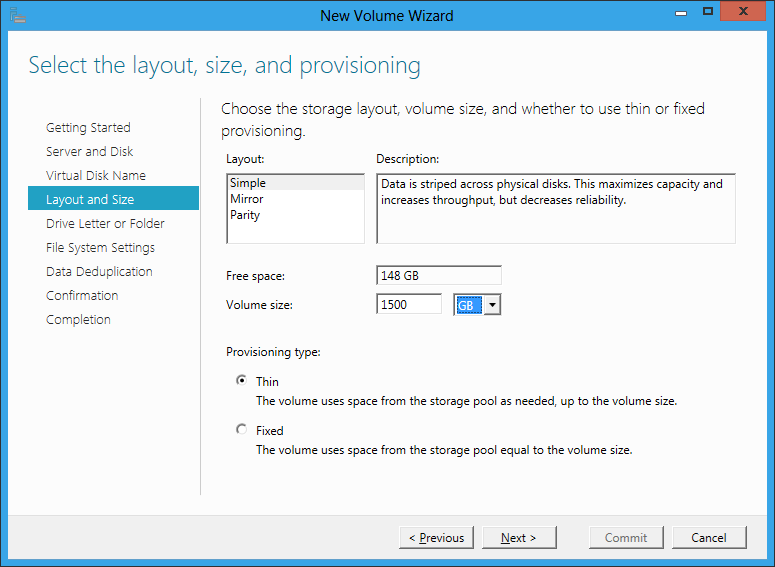
Storage Spaces is a new virtual storage feature in Windows Server 8. I have the developer preview installed, but it took me a while to get Storage Spaces working – you need one or more unused hard drives. I finally managed to find a spare 150GB Sata drive and tried it out. Note that I am going to create a 1.5TB drive on this using the magic of thin provisioning, with data deduplication thrown in for good measure.

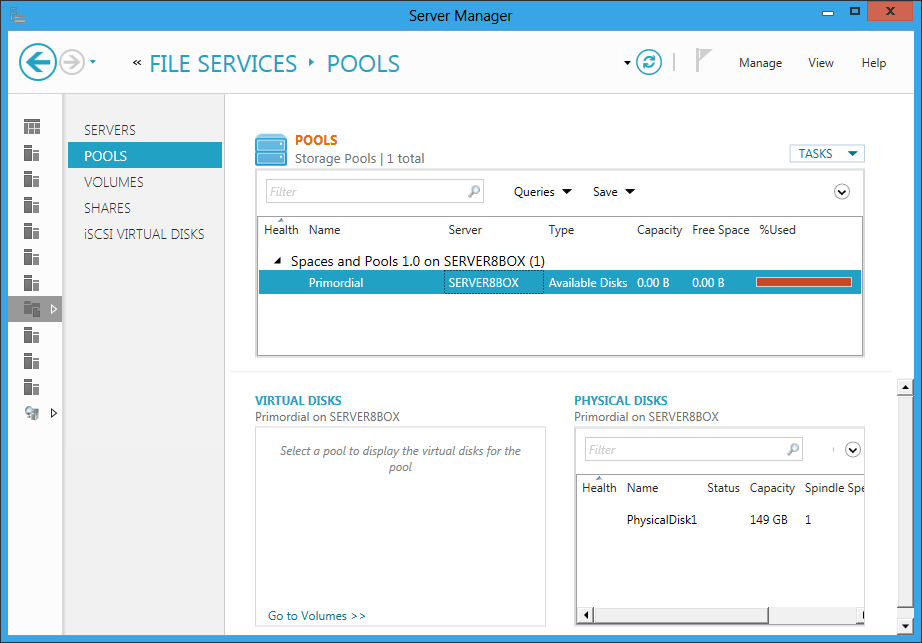
Step 1 is to go into the file services section of server manager and create a pool. A pool is a collection of one or more disks which you will use in aggregate.

image

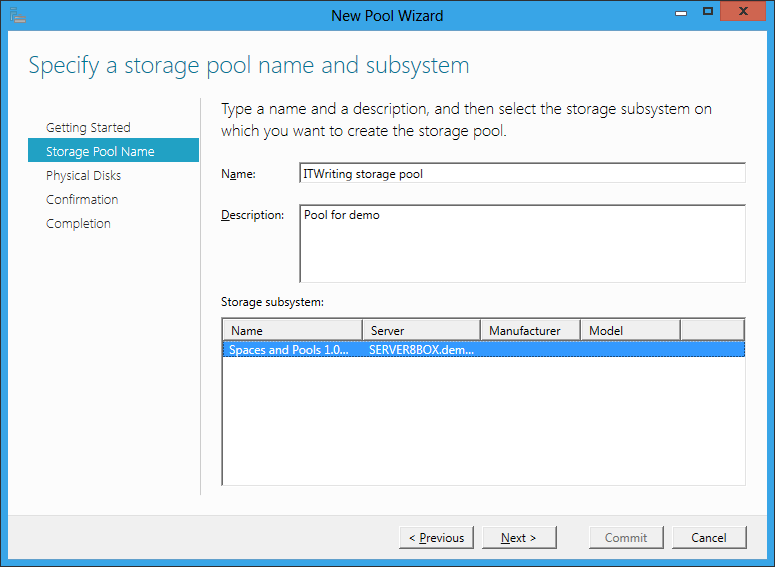
Here I specify the pool name and the subsystem where it will find its disks. In my case it is the RAID controller built into the motherboard.

image

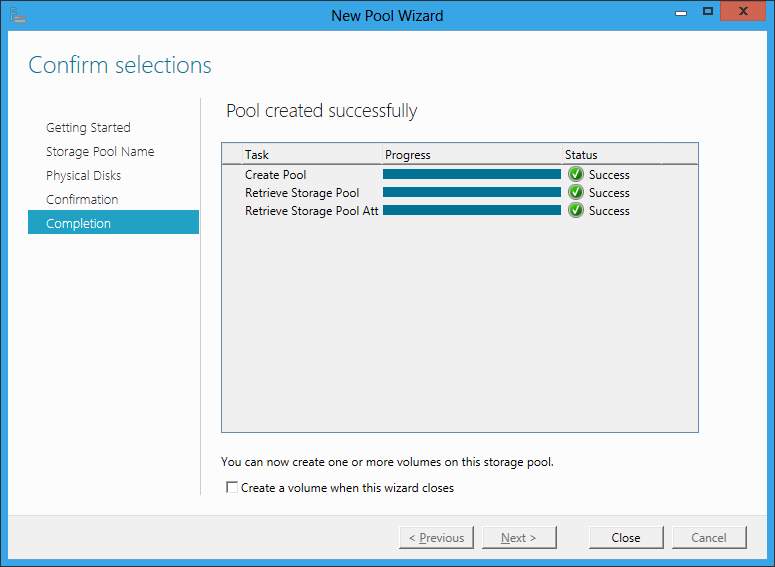
Success

image

Next task is to create a new volume. I’ve selected thin provisioning as I want a drive larger than the available space. If it runs out of real space, I will have to add another drive to the pool. I have also selected Simple layout, which means no resiliency. I am doing this for the demo as I only have one drive, but in reality I would always use one of the resilient options. They are apparently not RAID, even though they are like RAID.

image

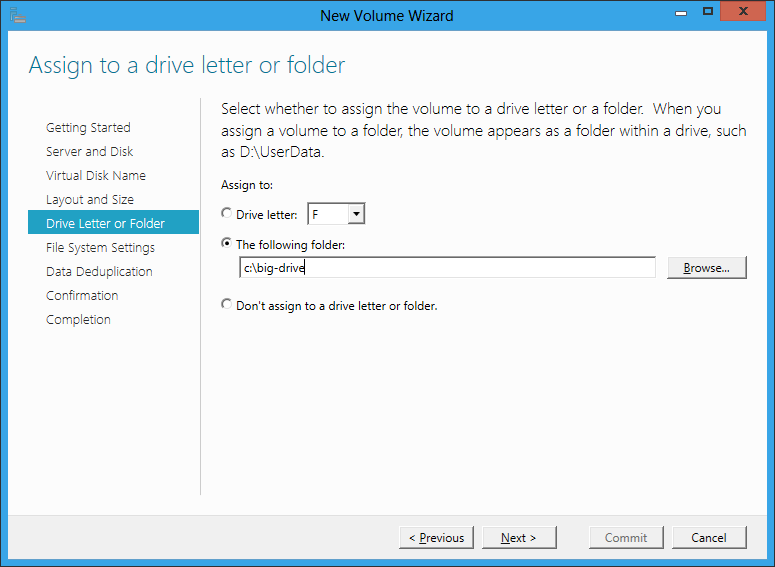
Next I assign the new drive to a virtual folder, as I am bored with Windows drive letters.

image

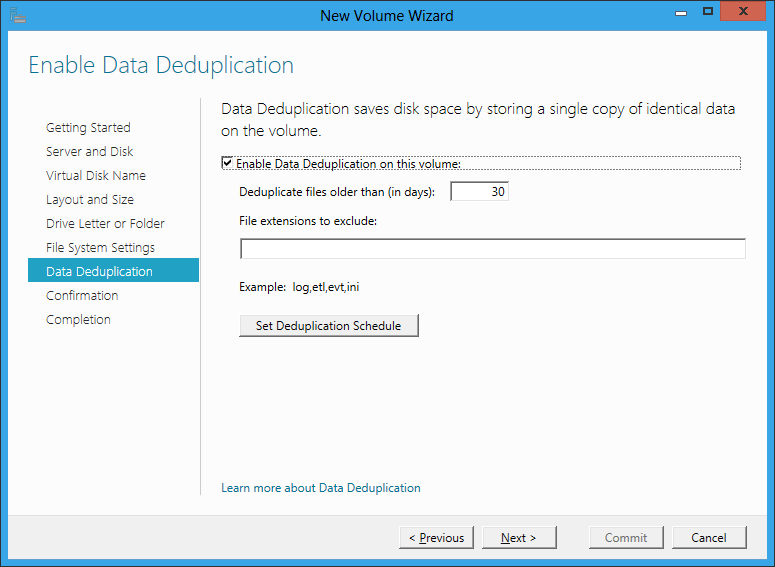
I turn on data deduplication. This means that I can have several copies of the same file, but it will only occupy the space of one. If a file is mostly the same as another file, I will also save space.

image

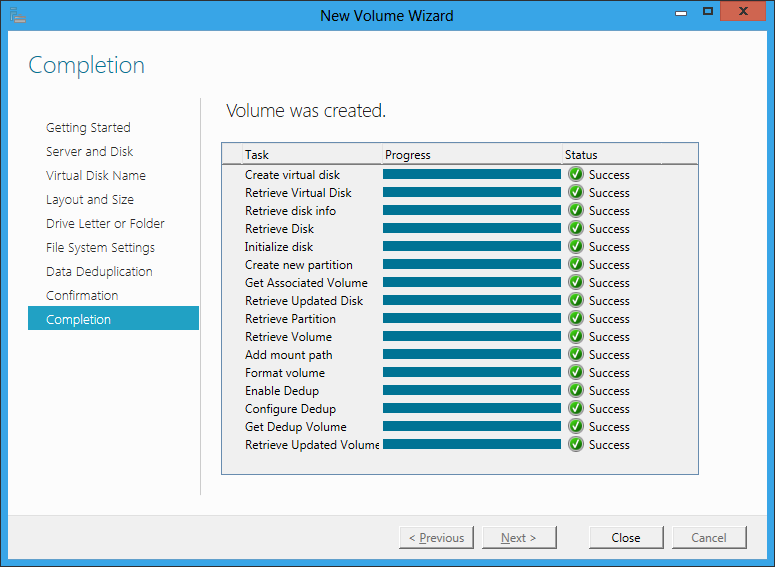
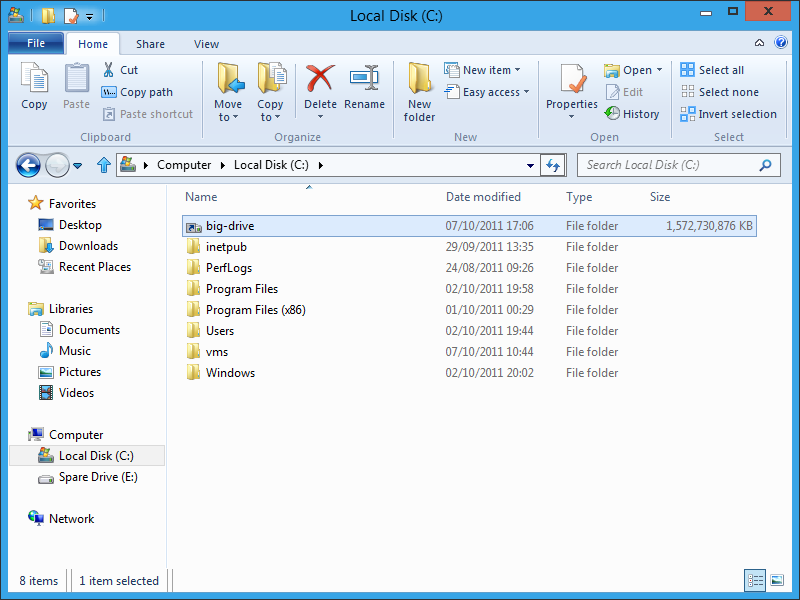
Success again. Note that Windows formatted the new drive for me in a matter of minutes. It may help that most of the space does not really exist.

image

Here is my drive ready for use, with 1,572,730,876 KB free. Handy.

image

I am impressed with how easy Storage Spaces are to use, and that it works with cheap Sata drives.

Now, I remember that Windows Home Server had an easy to use storage system called Drive Extender. You could just add and remove drives. Is Storage Spaces a kind of grown up version of Drive Extender? I asked the Windows storage team and got a snooty reply. “We do not contrast our upcoming capabilities with those that might have been offered in the past as part of other Microsoft products.” However, the spokesperson did add:

Storage Spaces delivers a rich storage virtualization capability directly from within Windows. Two powerful new abstractions (Pools and Spaces) deliver multiple benefits including seamless and easy capacity aggregation and expansion ("just add drives to a pool"), optimal just-in-time allocation (via Thin Provisioning), resiliency to physical drive failures (via mirrored or parity spaces), continuous availability (via integration with failover clustering and cluster shared volumes), ease-of-management via integration with the rich new Windows Storage Management API (with WMI interfaces and associated PowerShell cmdlets), and "pay-for-play" via support for pools comprising heterogeneous media (e.g. SSDs and HDDs). Obviously, these are just a subset of features.

Obviously. I like Storage Spaces so far though, and the feature seems to bring some similar benefits to Windows Server users.

Windows Runtime must come to Windows Phone

I’ve been trying Windows Phone 7 in its latest “Mango” version over the last couple of days and mostly enjoying it. One thing I am not impressed by though is the range of apps available. Have a look at the Marketplace – Microsoft may claim 30,000 apps, but given how unexciting even the “top” selections are, you can imagine how bad the bottom ones must be. Microsoft I guess has been guilty of accepting almost anything to puff up the numbers.

What would fix this? Sell more phones, of course; but also improve the platform for developers. Windows Phone 7.x is not a bad platform: you get Silverlight, XNA, C# and Visual Studio.

By contrast though, the Windows Runtime (WinRT) shown at the BUILD conference earlier this month is a platform mobile developers can love. Here are what seem to me three great features:

  • Three first-class languages and programming platforms – C#/.NET, JavaScript and HTML 5, C++ and native code. All three are strategic platforms. I particularly like the native code option, as many mobile developers like native code and it is a weakness of Windows Phone 7.
  • Asynchrony built into the platform. This is a smart move: make every API call that might cause a delay an async-only call. On top of that, build easy async programming into the languages. The result should give apps a responsive user interface almost by default; developers will need to make an effort to freeze the UI.
  • Contracts which integrate apps with the operating system and with one another. There are five contracts: search, share, play to, settings, and app to app picking (for example, file selection).

Microsoft’s Windows chief Steven Sinofsky says Windows 8 is for tablets but not for phones. But he has to say that, because if Microsoft announced that the current Windows Phone 7.5 is a platform without a future, it would further dampen enthusiasm for the product.

Is there any reason why WinRT should not come to Windows Phone? A few:

  • Windows Phone is currently built on Windows CE, a cut-down version of Windows, whereas WinRT runs on top of the full Windows API.
  • The Metro-style UI is designed for tablets rather than phones.
  • Finally, the existence of Desktop Windows is presumed in the current Windows 8 design. If Microsoft has not had time to work out a Metro-style UI for something, you simply use the Desktop version.

All of these are good reasons why the arrival of WinRT on the phone will be delayed, but none are insuperable. Long-term, I find it inconceivable that Microsoft will persevere with a different programming platform for the phone and for tablets.

What are the implications for Windows Phone developers today? Well, WinRT and Metro borrow from the phone OS, so the porting effort should not be too bad, except in the case of XNA, a .NET wrapper for DirectX which WinRT does not support.

Of course this post is entirely speculative, and I have no insight into Microsoft’s plans beyond what is publicly stated, so there might be other compatibility options when and if the time comes.

And it is time that is Microsoft’s biggest enemy. Fumbling tablet computing has been a costly mistake, and the big question is whether anyone will care how good some future Windows Phone will be, if the ecosystem which Nokia likes to talk about is firmly established as Android vs Apple.

A few observations on Windows Phone 7.5 “Mango”

I received a Windows Phone running version 7.5 “Mango” for review yesterday. Here are some initial observations; I am not going to call it a review after such as short time.

image

There is still no screen capture utility – well, there is this one but it requires a developer accounts. So no screens, sorry. Microsoft should fix this – how difficult can it be?

Microsoft says there over 500 updates in Mango, and it does feel like a significant update, though retaining the look and feel of the first release. A half-version upgrade is about right.

Some things I noticed:

  • Task switching. Press and hold the back button, and swipe through running apps. This is excellent, better than iPhone or Android.
  • Voice control. This is expanded in Mango to include web search, text messaging and more. Tip: to see the commands, hold down the Windows key to go into speech mode, and click the help icon.

    It has great potential, especially with a bluetooth headset for true hands-free. I have a Plantronics Voyager Pro bluetooth headset, reviewed here. Using this guy, I can press and hold the call button on the headset, to put the phone into speech mode.

    I found this works well for calling people or simple searches, but general speech to text is not too good. I tried texting someone the message “Your parcels have arrived”. After several attempts, all of which were interpreted as various strings of garbage starting “George”, I gave up. I would still use it for making calls though; it seems that when the scope is narrowed to people in your contacts list, the interpretation is more reliable.

  • The search button is no longer contextual – it always takes you to Bing search. I think this is a retrograde step.
  • Local Scout is a feature that is meant to find restaurants, shops, things to do, and other handy information based on your location or the current map location. This is a neat idea, but when I tried it for my home town it did not work well. The first problem: I found that tapping the Local Scout tile is unreliable, and sometimes reports that Bing cannot find the location even when the location button in Bing Maps works fine.

    Fortunately you can also use Local Scout from Bing Maps. The Local Scout listing was not good though. Of the top 20 food and drink places, one had been closed for years, others were duplicated under old and new names, and there were hardly any ratings or reviews. Tap “Suggest changes” and you can submit changes to the address details or report closure, but you cannot add a review or rating, which seems a severe omission.

    I downloaded the TripAdvisor app which is a great deal more useful, mainly because of the amount of user-generated content.

    Maybe I’m missing something, but it seems to me that Microsoft needs to join a few dots here; Local Scout is only as good as its data.

  • Office and SharePoint integration. As soon as I gave Windows Phone my Live ID, it picked up my SkyDrive account and was able to open, edit and save documents there. I also hooked up Outlook to my own Exchange server, and added an Office 365 SharePoint account as well.

    SkyDrive support is new and a huge feature, especially considering that it is a free service. Editing features on the phone are limited, but you can include basic formatting.  More important, you can easily access what could be a large document repository.

    OneNote support is good, and notes made on your phone sync automatically to SkyDrive, where you can further view and edit them in a browser, or in desktop OneNote. I guess I can show a grab of the browser, which shows that the voice memo is inaccessible:

    image

    I discovered a few oddities. I was unable to link Windows Phone to my own SharePoint 2010 test server, receiving a message “We don’t support this authentication scheme”. Later I found this information:

Unless your organization uses a Microsoft Forefront Unified Access Gateway (UAG) server, you can only access a SharePoint 2010 site if you’re in the office and connected to your organization’s Wi-Fi network.

That is a considerable limitation. It did work OK with SharePoint on Office 365, except that for some reason I can find no way to create new documents on Office 365 – well, maybe in the browser. The Office Hub can create new documents on SkyDrive, but not on SharePoint, which is odd as the two have a lot in common.

Despite these issues, you get a lot out of the box for using Office on the move, particularly if you use a supported SharePoint configuration or SkyDrive. The on-screen keyboard is good too.

  • Music search. This is a fun feature. Go to Bing search, click the music icon, and it will try to recognize what is playing. It had no problem finding Katy Perry’s Teenage Dream. It struggled a bit with the more obscure Strangely Strange but Oddly Normal by Dr. Strangely Strange; but on the second attempt it found that too.
  • The social media features seem strong to me, though you are limited to the baked-in services which are Twitter, LinkedIn, Facebook and Windows Live (no Google+). You do have to link each service to your Live ID for full features; for example, you give permission to Windows Live to post to your Twitter account. The integration is smooth and if you spend your time juggling with these four services then this may well the phone for you. For example, you can post a message to all of them at once. I found the People hub good enough as a Twitter client.
  • Apps are still lacking. The issue is not the quantity of apps available, but their quality, and the lack of certain key apps. There is no official Dropbox app, for example, so you will need to use the web or a third-party workaround. On the positive side, the free Guardian app is great, especially since you can pin a section to the Start screen – I did this for Technology – and there are apps for WordPress, Amazon Kindle, the ubiquitous Angry Birds and some other essentials.

    I noticed that TripAdvisor has 61 ratings on the Windows Phone Marketplace, whereas the Android version has 39,930. That illustrates the scale problem Microsoft is facing.

  • Still no Adobe Flash.
  • Microsoft’s new Windows Phone site is clean and informative. Not always the case with Microsoft’s sites. The My Windows Phone site lets you find your, lock or erase your phone, once configured.
  • Internet sharing, which makes your phone into a wireless hotspot, is coming but subject to operator support and approval. This means you will likely pay extra for “tethering”. I have a free app which does this on my Android phone and find it useful, though whether it is worth paying extra every month is another matter.
  • Microsoft has introduced some features aimed at enterprises. In particular, Information Rights Management is now supported for Outlook and Office mobile documents. Another important feature is the ability to deploy custom applications as hidden apps, which do not appear in Marketplace searches, but can be downloaded from a link circulated internally. There is now a Lync (business messaging and conferencing) client for both Office 365 and on-premise Lync servers.

Future of Windows Phone?

My guess is that Microsoft is badly disappointed by the sales performance of Windows Phone to date. The problem is not so much the phone itself, but that it has failed to convince either the operators, or the retailers, or the general public, that it is something special and worth choosing ahead of either an Apple iPhone or Google Android device. In fact, typically retailers have few if any Windows Phones on display, and even customers asking specifically for one may be redirected to something else. The truth is, there is a disadvantage in having a minority-choice device, most obviously in the selection of apps available, but also in features that rely on user-generated content.

I asked about this problem at the Mango press launch and was told that the Nokia partnership will be the solution.

My review device is a first-generation HTC Trophy, and while it is decent enough it is not outstanding. Give Windows Phone some truly desirable hardware and a few must-have apps, and its fortunes will change, but that is not an outcome that I take for granted.

I do like the SkyDrive and Office 365 integration though, with the caveats noted above, and if I were Microsoft I would be pushing the value of those features.