Tag Archives: microsoft

Notes from the field: “cannot open the Outlook window” in Windows 10. OneDrive the culprit?

A friend was having problems with Outlook on a new Windows 10 laptop. It had been set up with a POP3/SMTP email account. Everything worked fine at first, but then Outlook refused to open, displaying a message “Cannot open the Outlook window”. The version of Outlook was the latest Outlook 2016, purchased via personal subscription.

Presuming database corruption, I created a new profile and entered the email settings. It worked at first and then exactly the same error occurred, after Outlook had been closed and reopened a couple of times.

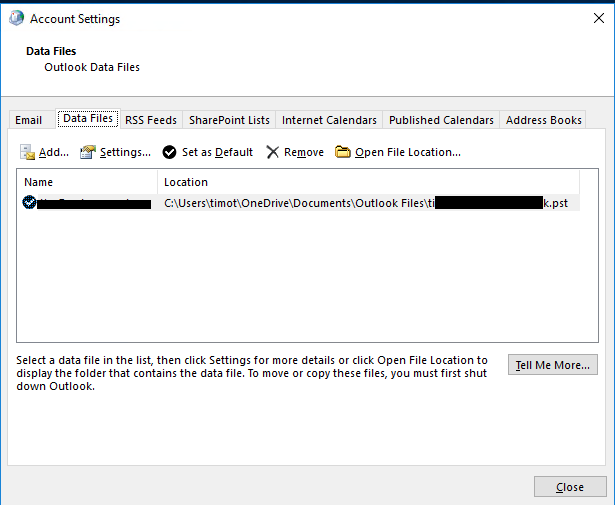
I looked more closely and noticed something odd. Outlook was saving the .pst database for this account to OneDrive. This is not something you would notice, since the location of this database is normally invisible to the user. However you can see it if you go into Account Settings and then Data Files.

Note: this screenshot comes not from my friend’s PC but from my own test install of Windows 10, which uses the defaults. I simply set up Outlook with a POP3 email account.
image

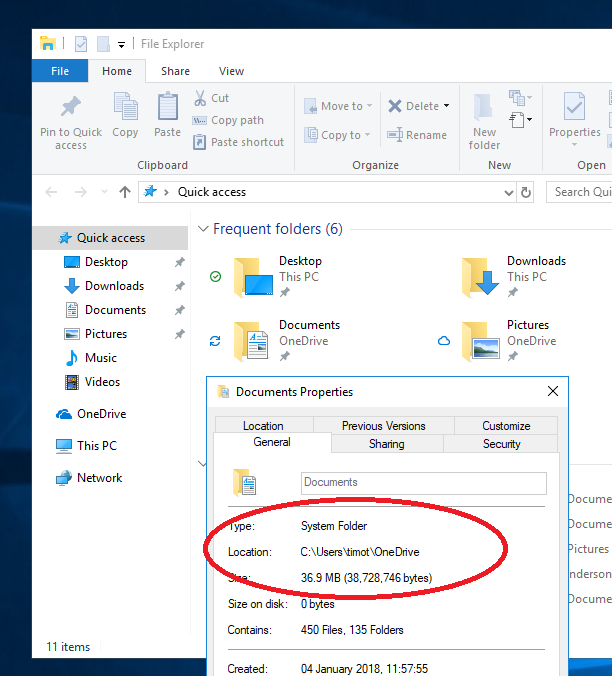
Why was this happening? It is because Windows 10 sets OneDrive as the default location for documents if you set it up with a personal Microsoft account, which is the default for non-business users.
image

Outlook creates .pst files in a sub-folder of the special Documents location, called Outlook Files.

Note: Outlook does not do this for .ost files used for Exchange, Office 365 or Outlook.com. It is only something you will see if you use an old-style POP3 email account, or possibly IMAP (I have not tested this).

Saving active .pst files in OneDrive is not a good idea. Even if it works, it brings no benefit, since you cannot get multiple versions of Outlook on different PCs to use the same synced .pst.

Worse, it is known to cause corruption. Check out this ancient post on the subject from the experts at Slipstick systems:

The answer: It won’t work in most services and is not recommended in any service. Outlook puts a lock on the pst file when the pst file is open. OneDrive (and other cloud solutions) continually syncs the local folder. It won’t be able to sync the pst because Outlook has a lock on it and as a result, the pst file could become corrupted and data loss occur.

Unfortunately it is not that easy to persuade Outlook to save the .pst elsewhere. The method I used was:

1. Open the Mail applet in Control Panel (always the first port of call if Outlook will not open).

2. Select a profile, even one that doesn’t work, and choose Properties.  Click Data Files tab and then Add. This lets you create a new, empty .pst in the location of your choice. Close this dialog.

3. When setting up the email account, choose Manual settings, and then select the option to deliver mail to an existing .pst. Browse to select the one you created.

image

All of this is well buried and typical users will not find these settings.

The other solution is to reconfigure the location of the Documents folder to be on the local hard drive and not in the special OneDrive folder. Of course this will affect all your documents and not just Outlook. Saving everyday documents to OneDrive is not such a bad idea, since it gives you resilience in the case where your hard drive or SSD fails.

Note: There are multiple reasons for the “Cannot open the Outlook window” error so the above is not necessarily the fix you need, if you have come here in search of an answer. It only applies if you have this particular configuration and use POP3 email.

Microsoft financials: Azure revenue grows 93% year on year

Microsoft delivered excellent figures in its latest financial results, for the period Jan-March 2018. Total revenue of $26,819 million was up 16% year on year, within which Azure revenue grew 93%.

The overall story is that cloud services and subscription income is working well for the company. Azure is not the whole of Microsoft’s cloud; in fact I would argue that Office 365 (built around hosted Exchange) is equally important, since it drives uptake for other products and services including desktop Office and Dynamics. Office 365 commercial revenue grew 42% and Office consumer grew 12%.

Perhaps more surprising is that this was also a good quarter for Windows and Xbox. Windows OEM revenue up 4%, Surface up 32%, Xbox up 24%. Why is Windows growing? One reason is that businesses really are upgrading to Windows 10, where perhaps they sat out Windows 8 as best they could. This is necessary for security reasons if nothing else. The uptake for Windows 10 has had spin-off benefits for things like Surface sales, as CFO Amy Hood explained in the financial webcast.

Even LinkedIn is doing well, with revenue growth of 37%, driven by job advertising and sponsored content.

In the webcast, CEO Satya Nadella talked up “the intelligent cloud and the intelligent edge” and the role of AI in securing the cloud.

GDPR is also seen as an opportunity. It is less costly to host applications in our GDPR-complaint cloud than to achieve this on-premises, said Microsoft.

So everything is fine for Microsoft? Perhaps, perhaps not. The company has transitioned not only to cloud, but to enterprise, and is becoming less and less visible to consumers. The home PC is not the ubiquitous thing it once was, and in mobile there is no longer any Windows, aside from the occasional Windows 10 tablet. Xbox and gaming PCs are the only bright spots in consumer.

This means the company has changed its character. It has also missed out on things like mobile payments, home assistants and home automation. You can see how Google, Amazon and to some extent Apple are jostling for position as a kind of portal to everything for the consumer, with great strategic advantage as powerful intermediaries to consumer purchases. Microsoft is absent.

Every business person is also a consumer and retreating from this market could prove costly long-term.

For now though, the company is delivering nicely on Nadella’s cloud strategy.

Here is the breakdown by segment, such as it is:   

Quarter ending March 31st 2018 vs quarter ending March 31st 2017, $millions

Segment Revenue Change Operating income Change
Productivity and Business Processes 9006 +1299 3115 +575
Intelligent Cloud 7896 +1166 2654 +506
More Personal Computing 9917 +1142 2523 +488

The segments break down as:

Productivity and Business Processes: Office, Office 365, Dynamics 365 and on-premises Dynamics, LinkedIn

Intelligent Cloud: Server products, Azure cloud services

More Personal Computing: Consumer including Windows, Xbox; Bing search; Surface hardware

What is Azure Sphere?

Microsoft has announced Azure Sphere, and in a manner which I’m guessing many will find confusing.

It is obviously something to do with IoT (Internet of Things) and intended to make your IoT solutions more secure. It is obviously something to do with Azure, Microsoft’s cloud platform. But what is a “crossover class of MCU”? What is an “HLOS small enough for MCUs”? Where does the “Azure Sphere OS”, which is Microsoft’s new Linux, actually run?

image

Let’s start with MCU (Microcontroller Unit). The most informative description of what Azure Sphere is all about is this research paper [PDF]. The target of Azure Sphere is devices powered by microcontrollers – in other words, IoT devices that are more than just sensors and have their own processors, though with less capability than a full SoC (System on a Chip). It is obvious that such devices, if compromised, have considerable risks. A fire in your oven? A radiotherapy machine that kills rather than heals? Toys that spy on children? Not good.

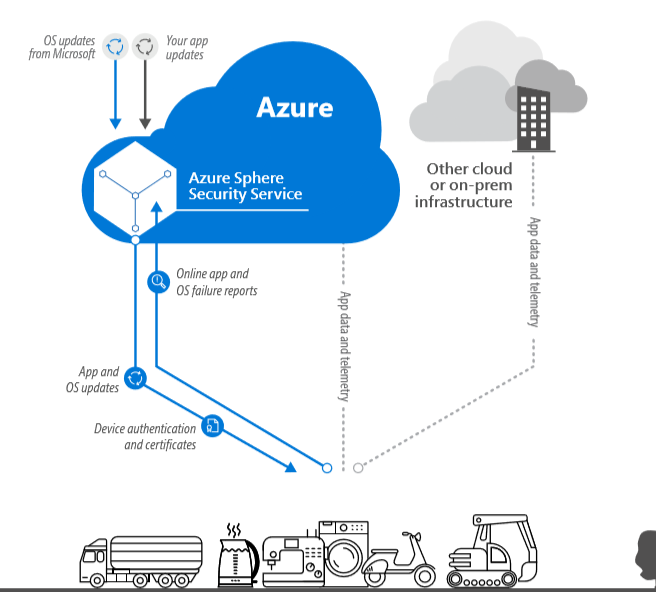
Microsoft’s solution is to have those devices run on a new processor designed in partnership with MediaTek (a large Taiwanese system-on-chip manufacturer) and running the tiny Azure Sphere OS. Built-in features include hardware-based security (private keys in a hardware-protected vault), hardware-enforced compartmentalization, certificate-based authentication and failure reporting. The new processor is called Sopris in Microsoft’s paper.

image
The Sopris Microprocessor

These Azure Sphere devices communicate with Microsoft’s Azure Sphere service to receive both OS and application updates, and to process failure reports.

Azure Sphere does not determine how the production data from your IoT device is handled. You can deal with this as you like, using Azure, another cloud provider, or on-premises infrastructure.

A point of interest is that the Azure Sphere OS runs Microsoft’s own customised version of Linux. Why Linux? Microsoft must have concluded that there was insufficient advantage, and more friction, in using a version of Windows (though Windows IoT Core exists). Use of Linux in Microsoft can only increase; and remember, Linux is now built into Windows.

Why Subsystem for Linux in Windows 10 and Windows Server? And what are the implications?

Microsoft is busy improving Windows Subsystem for Linux (WSL), the compatibility layer that lets you run Linux on Windows. WSL is not an emulator. It accesses the same file system and you can launch Windows applications from WSL, and vice versa. It also runs actual Linux binaries.

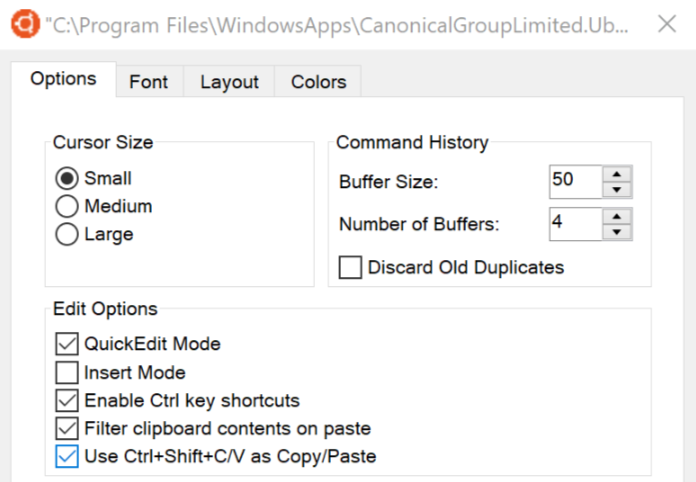
The latest announcements cover copy/paste between Linux and Windows, and a tabbed console. Both enhancements are in the skip-ahead insider version of Windows 10, which means they are unlikely to be in the one about to be released, currently known as Spring Creators Update (but rumoured to be getting a name change). In other words, you may have to wait around six months for this to be generally available.

image 

These are not huge changes, but overall WSL is a big deal. Why is Microsoft doing it? One Betanews commenter says:

I still can’t figure out who this whole "Linux-on-Windows" thing is meant for. Developers who work on both platforms maybe? I guess it would be handy for people who just want to try out Linux before migrating to it, but that’s the last thing Microsoft would want to promote.

Microsoft has in fact stated the primary purpose of WSL:

This is primarily a tool for developers — especially web developers and those who work on or with open source projects. This allows those who want/need to use Bash, common Linux tools (sed, awk, etc.) and many Linux-first tools (Ruby, Python, etc.) to use their toolchain on Windows.

There is a bit more to it. Developers are small in number relative to general users, but disproportionately influential, since they make the applications the rest of us run, and if the applications are not there or are inferior, the ecosystem starts to fail and the operating system declines.

I am not sure when it was that developers started to prefer Macs, but I noticed this trend many years ago, perhaps from the time that OS X moved to x86 (2006). This was not just about preferring the Mac user interface. In 2008 Apple opened up iOS, its mobile OS, to third-party applications, and a Mac was required for iOS development (this is still the case). It has long been relatively easy to run a Windows emulator on a Mac, but not vice versa, so for developers who want to support multiple target platforms from one computer, the Mac makes sense.

OS X / macOS is a Unix-like operating system, based on BSD (Berkeley Software Distribution). This means that moving between Linux and Mac is relatively smooth, from a developer perspective. The same tools are generally available. The internet runs mostly on Linux so the Mac has an advantage there as well.

In some cases this is more than just inconvenience. Windows has a long-standing issue with path lengths. MAX_PATH is defined as 260 characters. This limitation can be mostly removed if you have Windows 10 build 1607 or higher. Nevertheless, path issues have made Windows awkward for developing with Java, Node.js, and other languages or frameworks which typically use deeply nested directories. Open source developers perhaps did not care as much about these issues because they were mostly using Mac or Linux.

Microsoft has responded by improving Windows as a platform on which to develop applications. Visual Studio now targets Mac, iOS and Android as well as Windows. MAX_PATH has been alleviated as far as possible. WSL however goes much further. You can install and run Linux development tools and utilities such as gcc, perl, sed, awk, grep, wget, openssl, perl and more. There is no MAX_PATH issue. You can run the Linux build of Apache, PHP, MySQL and more. I used WSL to debug a PHP application and explained how here.

WSL is not perfect. Not everything is implemented. You can check the current issues here. Still, it is genuinely useful and mitigates the advantages of Mac or Linux for developers.

Microsoft has also added WSL to Windows Server. Why? The main focus here seems to be on administrators. There are times when it is handy to run a Linux command or script on Windows Server. It is not intended for production use as a server, though there is now support for background tasks; however it is still per-session so you would need to keep a user logged on in order to run, for example, a web server. More important, Microsoft has not designed WSL for production use as a server platform so it might not be as optimized or reliable as you require.

Implications of WSL

Where is this going? This is where it gets speculative. I will argue though that WSL is in part an admission of defeat. Windows remains an important development platform, but is now greatly outweighed by Unix-like platforms:

  • Web/Internet applications
  • iOS applications
  • Android applications

Where Windows support is needed, developers have many cross-platform options to choose from, a popular choice today being Electron, based on Chromium (the open source foundation of Google Chrome) and Node.js.

Today there seems little chance of Windows winning back market share as a mobile operating system, and the importance of desktop applications looks destined for long slow decline.

Windows Server remains a significant application platform, but Microsoft is focused more on driving developers to Azure cloud services than on Windows Server itself. SQL Server now runs on Linux, ASP.NET Core is cross-platform, and Azure has excellent support for Linux.

All of this leads me to think that WSL will continue to improve, perhaps to the point where production loads are supported on Windows Server, for example. Further, the ability to run Windows applications on Linux (which is more or less what happens in SQL Server for Linux) may become equally as important as the reverse.

Should you go to Microsoft Build?

image

In the beginning there was the Professional Developers Conference (PDC) – the first was in 1992. They were fantastic events, with deep dives into the innards of Windows and how to develop applications on Microsoft’s platform. Much of the technology presented was in early preview and often did not work quite right; some things that were presented never made it to production, famous examples including “Hailstorm” also known as .NET My Services, and the WinFS file system originally slated for Windows Vista.

These events seemed to be a critical part of Microsoft’s development cycle. Internally teams would ready their latest stuff for a PDC session, which was then adapted and re-presented at other events around the world.

Then PDC kind-of morphed into Microsoft Build, the first of which took place in September 2011. Unlike PDC, Build was specifically focused on Windows, and was originally associated with Windows 8 and its new app platform, WinRT. Part of the vision behind Windows 8 was that it would have a strong app ecosystem and Build was about enthusing and informing developers about the possibilities.

As it turned out, the Windows 8 app ecosystem was a bit of a disaster for various reasons. Microsoft had another go with UWP (Universal Windows Platform) in Windows 10. Build in April 2015 was an amazing event, where the company appeared to be going all-out to make UWP on both desktop and mobile a success. Not only was the platform itself being enhanced, but we also got Project Centennial (deliver desktop applications via the Store), Project Astoria (compile Android apps to UWP) and Project Islandwood (compile iOS code for UWP).

Just a few months later the company made a huge about-turn. CEO Satya Nadella’s Aligning Engineering to Strategy memo signalled the beginning of the end for Windows Phone, and the departure of Stephen Elop and the dismantling of the Nokia devices acquisition. That was the end of the universal part of UWP.

Project Astoria was scrapped. The Windows Bridge for iOS (Project Islandwood) still just about exists, but its core rationale (get iOS apps to Windows Phone) is now irrelevant.

Nadella steered the company instead towards “the intelligent cloud” and to date that strategy has been successful, with impressive growth for Office 365 and Microsoft Azure.

Microsoft has announced Build 2018, in early May, I find it intriguing, given the history of Build, that Windows is not currently mentioned on the event’s home page. In the page description metadata it says:

Microsoft Build 2018, Seattle, WA May 7-9, 2018. Microsoft’s ultimate developer conference focused on cloud, artificial intelligence, mixed reality, and more.

In the main text of the page, about the only specific topics mentioned are these:

Take in keynotes by Microsoft CEO Satya Nadella and other visionaries behind the Intelligent Cloud and Intelligent Edge

That sounds like a focus on Azure and AI/ML/IoT/Big Data cloud services, and on mobile and IoT devices. It is a long way removed from the original concept of Build as all about Windows and its application platform.

Windows remains important to Microsoft, and to all of us who use it day to day. Still, if you think about cutting-edge software development today, Windows desktop applications are probably not the first thing to come to mind, nor UWP for that matter.

This being the case, it does make sense for the company to focus on its cloud services at Build, and on diverse mobile platforms through what is now an amazing range of cross-platform tools in Visual Studio.

Of course there will in fact also be Windows stuff at Build, including Windows and HoloLens Mixed Reality, Cortana skills and UWP improvements.

Still, if you can only get to one big Microsoft event in the year, Ignite in September is now a bigger deal and closer to the heart of the new (or current) Microsoft.

Let me add that these Microsoft events, whether Build or PDC, have on occasion seen some stunning announcements. Examples include the unveiling of C# and the .NET Framework, the 2003 Longhorn reveal (yes it all turned to dust), Windows 7 in 2008, and Windows 8 in 2011.

I would like to think that the company still has the capacity to surprise and amaze us; but it must be admitted that the current Build pitch is rather unexciting. Google I/O, incidentally, is on at the same time.

Microsoft introduces new feedback system for technical documentation, will delete existing comments

Microsoft is introducing a new feedback system for https://docs.microsoft.com, used for its technical documentation.

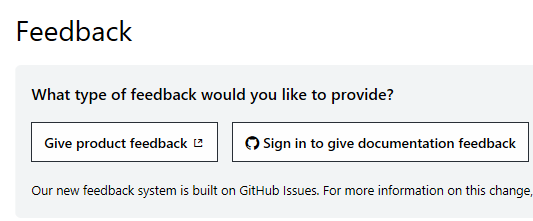
The new system, which you can already see for certain topics such as the Visual Studio IDE, is based on GitHub issues. When you leave a comment, you can specify whether it concerns documentation or product functionality.

image

So far so good, but the downside is that all existing comments will be deleted:

image

The statement “Old comments will not be carried over. If content within a comment thread is important to you, please save a copy.” is unhelpful. Nobody knows what comments will be useful to them in future.

Few things sap enthusiasm for community participation more than having all the past contributions into which you have put effort suddenly zapped. Nor is this the first time, as user guibirow notes:

As much I like the new system idea, I hate the fact that this is happening over and over.
It used to be a Disqus comment system, then moved to LiveFyre, then moved now to this new system, what will be the next?
The worst part of this all is that MS does not care about past content lost on these discussions, so many times I found issues described in the docs that are gone now.
Please, pay attention to your previous mistakes, don’t let the information be lost again, at lest import them as closed issue in the new system.

Sometimes progress has a cost and that is understood. However it is not impossible to migrate content from one system to another. It just takes effort.

Update: Microsoft’s Rob Eisenberg has responded with an explanation and mitigation plan regarding existing comments. He says that a straight migration of the comments is impossible:

    • There is a lot of garbage, spam and even dangerous content within existing LiveFyre comments which would violate GitHub terms of usage and our open source code of conduct, as well as cause security problems.
    • There isn’t a good way to map LiveFyre users to GitHub users and using a bot account to anonymously add comments is questionable with respect to OSS practices and GitHub terms of use.
    • For legal and privacy reasons, we cannot move user-associated data from one system to another without consent from users (GDPR).
    • LiveFyre conversations are threaded, while GitHub issues are not.
    • Placing the old comments into the GitHub Issues system would derail the entire GitHub Issues workflow for both customers and employees and muddle the data.
    • It isn’t clear whether there is a way to invoke GitHub APIs for a migration of this scale such that it wouldn’t violate GitHub API terms of use.

He also has an archiving proposal:

We would take the comments from an article on docs.microsoft.com and then convert them into a Markdown file. During this process, we would strip all user info (remember GDPR). The Markdown file would then be committed to a GitHub repo. Finally, at the bottom of the feedback section, next to the link that says "View on GitHub" we would add a second link that said something like "View Comment Archive". This link would connect you directly to the Markdown comment file for that page.

This sounds positive. At the same time, it is a mess that illustrates some of the disadvantages of a “best of breed” approach to solving technical problems. If Microsoft could use its own technology to host a documentation and commenting system, and a source code management and issue tracking system for that matter, this issue would not occur, and users would not need multiple accounts, causing the legal issues mentioned above.

Microsoft in fact used to use its own platform for all the above but decided to shift to using third-party solutions because they worked better. That seemed to be a good thing, improving user experience and productivity, but becomes a problem when what seems to be the best third-party option changes.

What the Blazor! After Silverlight, .NET in the browser reappears by another route

Silverlight, Microsoft’s browser plug-in which included a cut-down .NET runtime, once seemed full of promise for developers looking for an end-to-end .NET solution, cross-platform on Windows and Mac, and with support for “out of browser” applications for a native-like experience.

Silverlight was killed by various factors, including the industry’s rejection of old-style browser plug-ins, and warring factions at Microsoft which resulted in Silverlight on Windows Phone, but not on Windows 8. The Windows 8 model won, with what became the Universal Windows Platform (UWP) in Windows 10, but this is quite a different thing with no cross-platform support. Or there is Xamarin which is cross-platform .NET, and one day perhaps Microsoft will figure out what to do about having both UWP and Xamarin.

Yesterday though Microsoft announced (though it was already known to those paying attention) Blazor, an experimental project for hosting the .NET Runtime in the browser via WebAssembly. The name derives from “Browser + Razor”, Razor being the syntax used by ASP.NET to combine HTML and C# in a web application. C# in Razor executes on the server, whereas in Blazor it executes on the client.

Blazor is enabled by work the Xamarin team has done to compile the Mono runtime to WebAssembly. Although this sounds like a relatively large download, the team is hoping that a combination of smart linking (to strip out unnecessary code in both applications and the runtime) with caching and HTTP compression will make this acceptable.

This post by Steve Sanderson is a good technical overview. Some key points:

– you can run applications either as interpreted .NET IL (intermediate language) or pre-compiled

– Blazor is an SPA (Single Page Application) framework with solutions for routing, state management, dependency injection, unit testing and more

– UI components use HTML and CSS

– There will be a browser API which you can call from C# code

– you will be able to interop with JavaScript libraries

– Microsoft will provide ASP.NET libraries that integrate with Blazor, but you can use Blazor with any server-side technology

What version of .NET will be supported? This is where it gets messy. Sanderson says Blazor will support .NET Standard 2.0 or higher, but not completely in the some functions will throw a PlatformNotSupported exception. The reason is that not all functions make sense in the context of a Blazor application.

Blazor sounds promising, if developers can get past the though the demo application on Azure currently gives me a 403 error. So there is this video from NDC Oslo instead.

The other question is whether Blazor has a future or will join Silverlight and other failed attempts to create a new application platform that works. Microsoft demands much patience from its .NET community.

C# and .NET: good news and bad as Python rises

Two pieces of .NET news recently:

Microsoft has published a .NET Core 2.1 roadmap and says:

We intend to start shipping .NET Core 2.1 previews on a monthly basis starting this month, leading to a final release in the first half of 2018.

.NET Core is the cross-platform, open source implementation of the .NET Framework. It provides a future for C# and .NET even if Windows declines.

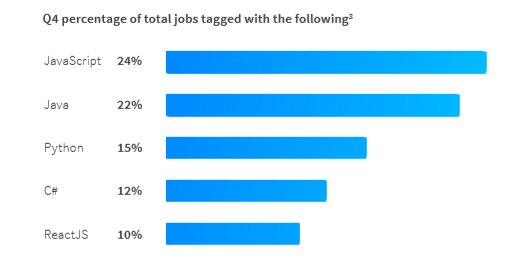
Then again, StackOverflow has just published a report on the most sought-after programming languages in the UK and Ireland, based on the tags on job advertisements on its site. C# has declined to fourth place, now below Python, and half the demand for JavaScript:

image

To be fair, this is more about increased demand for Python, probably driven by interest in AI, rather than decline in C#. If you look at traffic on the StackOverflow site C# is steady, but Python is growing fast:

image

The point that interest me though is the extent to which Microsoft can establish .NET Core beyond the Microsoft-platform community. Personally I like C# and would like to see it have a strong future.

There is plenty of goodness in .NET Core. Performance seems to be better in many cases, and cross-platforms is a big advantage.

That said, there is plenty of confusion too. Microsoft has three major implementations of .NET: the .NET Framework for Windows, Xamarin/Mono for cross-platform, and .NET Core for, umm, cross-platform. If you want cross-platform ASP.NET you will use .NET Core. If you want cross-platform Windows/iOS/macOS/Android, then it’s Xamarin/Mono.

The official line is that by targeting a specification (a version of .NET Standard), you can get cross-platform irrespective of the implementation. It’s still rather opaque:

The specification is not singular, but an incrementally growing and linearly versioned set of APIs. The first version of the standard establishes a baseline set of APIs. Subsequent versions add APIs and inherit APIs defined by previous versions. There is no established provision for removing APIs from the standard.

.NET Standard is not specific to any one .NET implementation, nor does it match the versioning scheme of any of those runtimes.

APIs added to any of the implementations (such as, .NET Framework, .NET Core and Mono) can be considered as candidates to add to the specification, particularly if they are thought to be fundamental in nature.

Microsoft also says that plenty of code is shared between the various implementations. True, but it still strikes me that having both Xamarin/Mono and .NET Core is one cross-platform implementation too many.

Strong financial results from Microsoft as it aims for breadth of services

Microsoft reported a big quarter (in terms of revenue) for the three months ending December 31st, with revenue of $28,918 million.

What’s notable? Mainly the big jump in Microsoft’s recent success stories: year on year Office 365 up by 41%, Azure up by 98%, Dynamics 365 up by 67%.

Windows is flat/weak as you would expect, and Surface hardware is standing still. Xbox grew a bit following the launch of Xbox One X.

LinkedIn is growing: revenue of $1.3 billion and “sessions growth of over 20%” in the quarter. In the earnings webcast, Microsoft’s Amy Hood said that the LinkedIn acquisition has both performed better, and seems more strategic, now than it did at the time.

Hood also made reference to the company’s ability to up-sell cloud users to higher-margin services. “Office 365 commercial revenue increased 41 percent from installed base growth across all customer segments, and ARPU [Average Revenue per User] expansion from continued customer migration to higher value offers in the E3 and E5 workloads.”

This point is key and is the answer (from the provider’s point of view) to the lower margins implicit in moving from software to services. When Microsoft sells a licence for you to use Windows or Office, the margin is huge because reproducing the software, or providing it for download, costs almost nothing; whereas with a subscription there is significant cost to providing the service. However the subscription has advantages which offset this, in particular the continuing interaction with the customer that both provides data, which the customer as well as the provider can mine (subject to appropriate privacy controls), and gives opportunity for the provider to extend the relationship into new or upgraded services.

CEO Satya Nadella fielded a good question about Microsoft losing out to Sony in gaming and to Alexa and Google Home in voice devices. On gaming, Nadella referred to the PC alongside Xbox as a strategic asset. “PC gaming is a growth market,” he said, as well as software such as Minecraft now on mobile devices, giving the company a broad reach. He also remarked on Azure as a gaming back end.

As for Cortana in the home (or absence from), Nadella said that the focus is on the server-side cognitive services. He also talked about voice input and control of Office 365. The key point though was that Microsoft wants to work both with its own and other voice assistant devices so it can win on services even when competitor devices are in use. “One-turn dialogs on one speaker in one home, that’s just not our vision,” he said.

Nadella made another key point in the webcast, in answer to a question about how Azure Stack (a packaged version of Azure for installation on-premises) will impact Azure. “Computing is becoming more distributed, not less distributed,” he said. IoT and sensors play a large part in this. Everything goes to the cloud but computing on the edge (the new buzzword for local processing) is important for efficiency.

It is easy to see ways in which Microsoft could stumble. The PC will decline as the number of users who need a desktop or laptop computer diminishes. Microsoft’s failure in mobile could prove costly as competitors use synergy with their own applications and cloud services to steer customers away. There are opportunities such as home automation and payments which seem closed to the company now.

Then again, strong results such as these show how the company can succeed by continuing to migrate its business users to cloud services. It remains deeply embedded in business computing.

Here is my chart summarising Microsoft’s performance:   

Quarter ending December 31st 2017 vs quarter ending December 31st 2016, $millions

Segment Revenue Change Operating income Change
Productivity and Business Processes 8953 +1774 3337 +284
Intelligent Cloud 7795 +1037 2832 +541
More Personal Computing 12170 +281 2510 -51

The segments break down as:

Productivity and Business Processes: Office, Office 365, Dynamics 365 and on-premises Dynamics, LinkedIn

Intelligent Cloud: Server products, Azure cloud services

More Personal Computing: Consumer including Windows, Xbox; Bing search; Surface hardware

Office 2016 now “built out of one codebase for all platforms” says Microsoft engineer

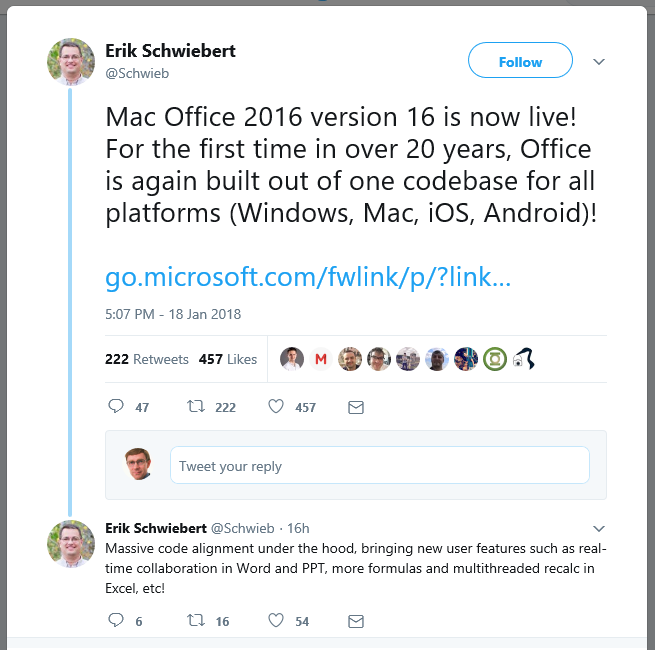
Microsoft’s Erik Schweibert, principal engineer in the Apple Productivity Experiences group, says that with the release of Office 2016 version 16 for the Mac, the productivity suite is now “for the first time in 20 years, built out of one codebase for all platforms (Windows, Mac, iOS, Android).”

image

This is not the first time I have heard of substantial code-sharing between the various versions of Office, but this claim goes beyond that. Of course there is still platform-specific code and it is worth reading the Twitter thread for a more background.

“The shared code is all C++. Each platform has native code interfacing with the OS (ie, Objective C for Mac and iOS, Java for Android, C/C++ for Windows, etc),” says Schweibert.

Does this mean that there is exact feature parity? No. The mobile versions remain cut-down, and some features remain platform-specific. “We’re not trying to provide uniform “lowest common denominator” support across all platforms so there will always be disparate feature gaps,” he says.

Even the online version of Office shares much of the code. “Web components share some code (backend server is shared C++ compiled code, front end is HTML and script)”, Schweibert says.

There is more news on what is new in Office for the Mac here. The big feature is real-time collaborative editing in Word, Excel and PowerPoint. 

What about 20 years ago? Schweibert is thinking about Word 6 for the Mac in 1994, a terrible release about which you can read more here:

“Shipping a crappy product is a lot like beating your head against the wall.  It really does feel good when you ship a great product as a follow-up, and it really does motivate you to spend some time trying to figure out how not to ship a crappy product again.

Mac Word 6.0 was a crappy product.  And, we spent some time trying to figure out how not to do that again.  In the process, we learned a few things, not the least of which was the meaning of the term “Mac-like.”

Word 6.0 for the Mac was poor for all sorts of reasons, as explained by Rick Schaut in the post above. The performance was poor, and the look and feel was too much like the Windows version – because it was the Windows code, recompiled. “Dialog boxes had "OK" and "Cancel" exactly reversed compared to the way they were in virtually every other Mac application — because that was the convention under Windows,” says one comment.

This is not the case today. Thanks to its lack of a mobile platform, Microsoft has a strong incentive to create excellent cross-platform applications.

There is more about the new cross-platform engineering effort in the video below.