Category Archives: development

GPU programming coming to low-power and mobile devices – from EU Mont Blanc supercomputer to smartphones

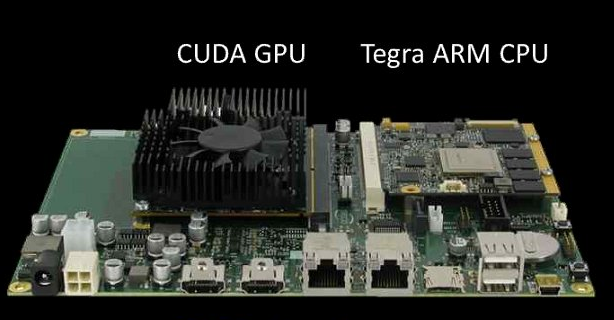
Supercomputing and low-power computing are not normally associated; but at the SC11 Supercomputing conference the Barcelona Supercomputing Center (BSC) has announced a new supercomputer, called the called the Mont-Blanc Project, which will combine the ARM-based NVIDIA Tegra SoC with separate CUDA GPUs. CUDA is NVIDIA’s parallel computing architecture, enabling general purpose computing on the GPU.

The project’s publicity says this enables power saving of 15 to 30 times, versus today’s supercomputers:

The analysis of the performance of HPC systems since 1993 shows exponential improvements at the rate of one order of magnitude every 3 years: One petaflops was achieved in 2008, one exaflops is expected in 2020. Based on a 20 MW power budget, this requires an efficiency of 50 GFLOPS/Watt. However, the current leader in energy efficiency achieves only 1.7n GFLOPS/Watt. Thus, a 30x improvement is required.

NVIDIA is also creating a new hardware and software development kit for Tegra + CUDA, to be made available in the first half of 2012.

image

The combination of fast concurrent processing, low power draw and mobile devices is enticing. Features like speech recognition and smart cameras depend on rapid processing, and the technology has the potential to make smart devices very much smarter.

NVIDIA has competition though. ARM, which designs most of the CPUs in use on smartphones and tablets today, has recently started designing mobile GPUs as well, and its Mali series supports OpenCL, an open alternative to CUDA for general-purpose computing on the GPU. The Mali-T604 has 1 to 4 cores while the recently announced Mali-T658 has 1 to 8 cores. ARM specifically optimises its GPUs to work alongside its CPUs, which must be a concern for GPU specialists such as NVIDIA. However, we have yet to see devices with either T604 or T658: the first T604 devices are likely to appear in 2012, and T658 in 2013.

Adobe “shifting its business model”: more publishing, less programming

Adobe has announced a shift in its business strategy, together with the loss of around 750 employees.

So what is changing? Adobe says it will be focusing on digital media and digital marketing, while investing less in “certain enterprise solution product lines.” In line with this strategy, Adobe acquired video advertising company auditude last week.

Here are the things which Adobe says are “important elements” in its new approach:

  • Creative Suite extended with tablet apps and delivered through the cloud
  • Greater investment in HTML 5: Dreamweaver, Edge and PhoneGap
  • Flash positioned for “advanced” web, video, and mobile apps
  • Digital publishing solutions
  • Video advertising
  • Document services such as electronic contracts and signatures

So what will Adobe be doing less? This is harder to discern as the releases, naturally enough, say less about it. The key remark is that:

the company will reduce its investment, and expected license revenue, in certain enterprise solution product lines

We can conclude, I guess, that the Digital Enterprise Platform once known as LiveCycle is going to get less attention as the company focuses more on digital content and less on providing a platform for enterprise applications. I would guess that this will impact the middleware services more than things like the Flex framework and Flash Platform tools, but I am speculating. More information is coming in a financial analyst meeting tomorrow in New York.

Eclipse and Xtend: some confusion in getting started

Last weekend there was some publicity around Xtend, an Eclipse project which extends Java with new language features. Xtend now has a new landing page, as announced by the lead architect Sven Efftinge.

I did intend to post about this yesterday, but I wanted to see it in action first, so I tried to download it and have a look. I believe this is a case where those who wrote the new landing page are too close to the project and made some assumptions, because I did not find it obvious how to proceed.

If you follow the Download link you are invited to paste one of the three URLs into the Eclipse update manager.

image

As a newcomer to the project, I did not want three URLs to choose from, I wanted just one. I picked Release as in general this one is likely to work.

Now, the instructions say:

To install the Xtend plugins open the update manager and paste one of the URLs on the right into the field ‘Work with’ and select the Xtend SDK.

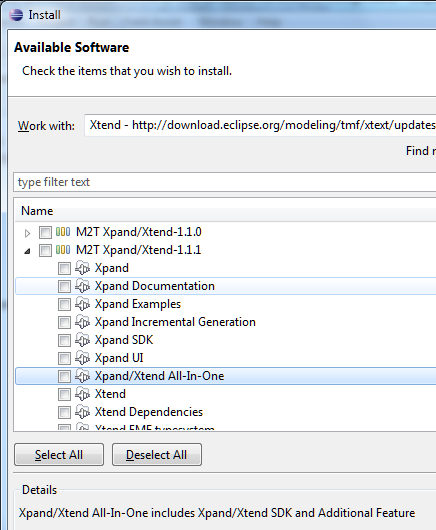
The update manager actually presents you with a long list of updates, none of which say Xtend. I took a stab at what I thought was the right thing.

image

The All-In-One includes the Xtend SDK, which is what I want, right?

Wrong. After installation I could not find the tutorial which the docs said would be available.

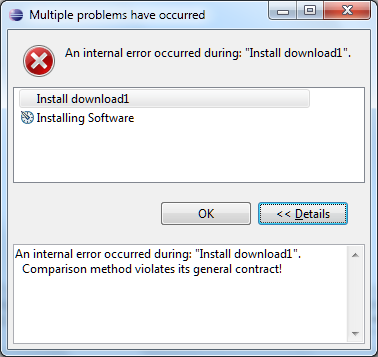
I did some messing around with Eclipse and got the occasional error like this one:

image

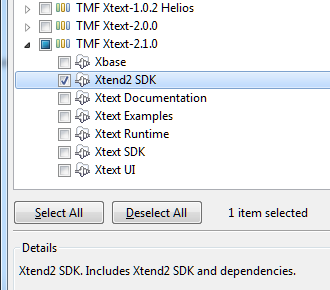
Then I realised that I should have looked under the TMF Xtext-2.1.0 tree, which is where the correct Xtend SDK resides:

image

Except that if you find this helpful post by  Max Rohde you will know:

The other packages need to be selected since otherwise the Xtend editors will not work.

So you should select all of TMF Xtext-2.1.0 (or the latest release). Easy when you know, but not obvious since the word Xtend does not appear in the top node of the tree.

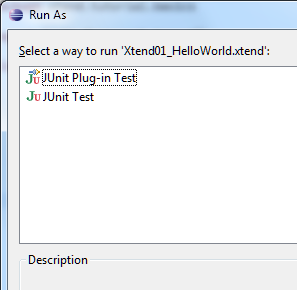
I was then able to create the tutorial project. I opened HelloWorld.xtend and got this:

image

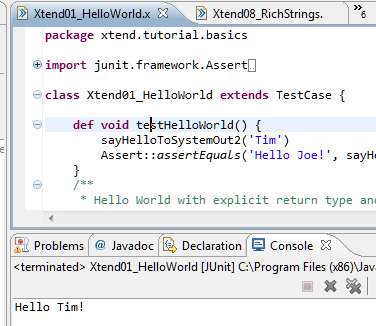
Ah, but you have read Rohde’s post so you know this is expected and that you should run this as a JUnit Test. However it does not have any output. To see some output, you have to run one of the other examples, like Xtend08_RichStrings, or perhaps add:

sayHelloToSystemOut2(‘Tim’)

to the testHelloWorld() method in HelloWorld.xtend.

image

OK, it works.

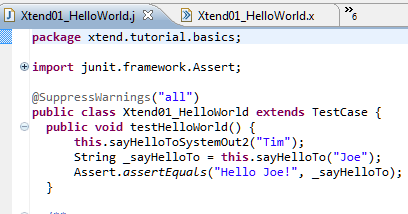
So what is Xtend? It is essentially a code generator which lets you write in Xtend and generate Java. You can see the generated code in the tutorial project under xtend-gen.

image

Xtend adds some nice features: type inference, property syntax, closures, switch expressions with no fall-through, template expressions, extension methods, and multiple dispatch.

I can imagine C# creator Anders Hejlsberg smiling here, as most of this is already in C# in some form or other.

But is Xtend the right way to bring these features to Java? I am not convinced so far. It is an interesting Eclipse project, but it may be more significant in speeding the implementation of features like these into Java itself, than as a mainstream approach to writing applications. Xtend is a kind of hybrid approach, where you will be switching between Java and Xtend while you code and debug your application, and I suspect it would get frustrating.

There is also the question of widespread community support – beyond Eclipse.

Finally, it would be good if the new landing page could be made more helpful for those getting started.

Quick thoughts on Xcode and Objective C versus Microsoft’s tools

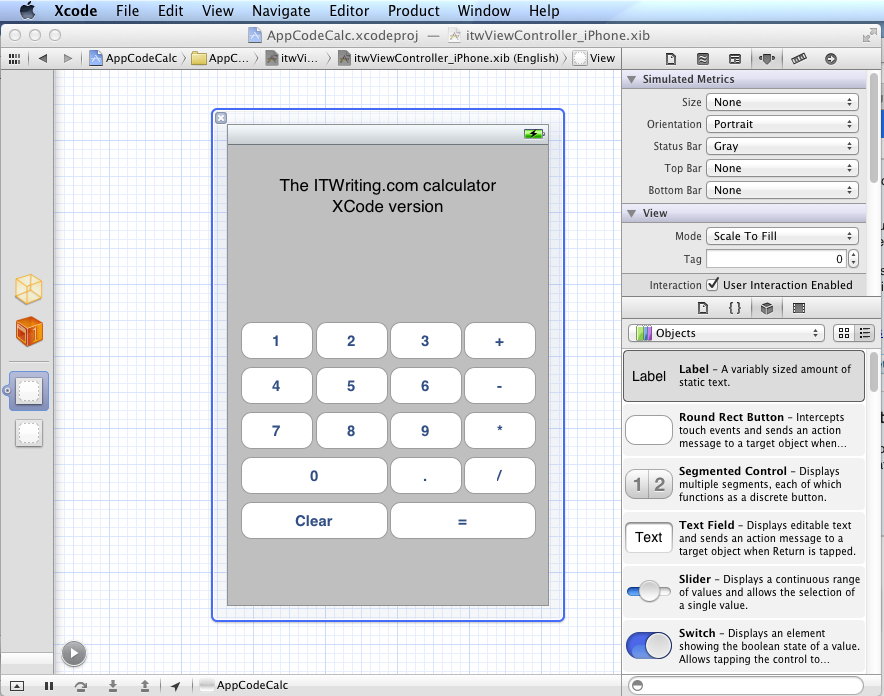
I have been trying out JetBrains’ AppCode which meant working in an Apple development environment for a time. I took the opportunity to implement my simple calculator app in iOS native code.

image

Objective C is a distinctive language with a mixed reputation, but I enjoy coding with it. I used Automatic Reference Counting (ARC), a feature introduced in Xcode 4.2 and OSX 10.7, iOS 5; ARC now also works with 10.6 and iOS 4. This means objects are automatically disposed, and I did not have to worry about memory management at all in my simple app. This is not a complete memory management solution (if there is such a thing) – if you use malloc you must use free – but it meant that the code in my app is not particularly verbose or complex compared to other languages. Apple’s libraries seem to favour plain English method names like StringByAppendingString which makes for readable code.

I was impressed by how easy it is to make an app that looks good, because the controls are beautifully designed. I understand the attraction of developing solely for Apple’s platform.

I also love the integrated source control in Xcode. You find yourself using a local Git repository almost without thinking about it. Microsoft could learn from that; no need for Team Foundation Server for a solo developer.

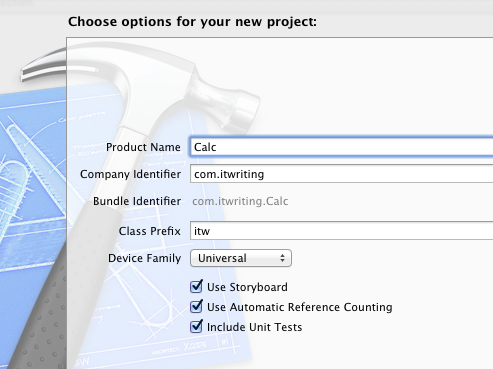
I did miss namespaces. In Objective C, if you want to remove the risk of name collision with a library, you have to use your own class prefix (and hope that nobody else picked the same one).

image

Interface Builder, the visual UI designer, is great but many developers do not use it, because coding the UI without it is more flexible. It is a shame that you have to make this choice, unlike IDE’s with “two way tools” that let you edit in code or visually and seamlessly keep the two in synch. I found myself constantly having to re-display windows like the Attributes Inspector though it is not too bad once you learn the keyboard shortcuts. The latest Interface Builder has a storyboard feature which lets you define several screens and link them. It looks useful, though when I played with this I found it difficult to follow all the linking lines the designer drew for me.

It is interesting to compare the Mac and iOS development platform with that for Windows. Microsoft promotes the idea of language choice, though most professional development is either C# or C++, whereas on Apple’s platform it is Objective C and Cocoa or you are on your own. Although Mac and Windows are of a similar age, Microsoft’s platform gives a GUI developer more choices: Win32, MFC, WTL, Windows Forms, Windows Presentation Foundation and Silverlight, and in Windows 8 the new WinRT.

I get the impression that Microsoft is envious of this single-minded approach and trying to bring it to Metro-style Windows 8, where you still have a choice of languages but really only one GUI framework.

That said, Visual Studio is an impressive tool and both C# and C++ have important features which are lacking in Objective C. I would judge that Visual Studio is the more productive tool overall, but Apple’s developer platform has its own attractions.

Delphi XE2 FireMonkey for Windows, Mac, iOS: great idea, but is it usable?

I am sure all readers of this blog will know by now that Delphi XE2 (and RAD Studio XE2) has been released, and that to the astonishment of Delphi-watchers it supports not only 64-bit compilation on Windows, but also cross-platform apps for Windows, Mac OS X and even iOS for iPhone and iPad (with Android promised).

I tried this early on and was broadly impressed – my app worked and ran on all three platforms.

image

However it is an exceedingly simple app, pretty much Hello World, and there are some worrying aspects to this Delphi release. FireMonkey is based on technology from KSDev, which was acquired by Embarcadero in January this year. To go from acquisition to full Delphi integration and release in a few months is extraordinary, and makes you wonder what corners were cut.

It seems that corners were cut: you only have to read this post by developer and Delphi enthusiast Chris Rolliston:

To put it bluntly, FireMonkey in its current state isn’t good enough even for writing a Notepad clone (I know, because I’ve been trying). You can check out Herbert Sauro’s blog for various details (here, also a follow up post here). For my part, here’s a highish-level list of missing features and dubious coding practices, written from the POV of FireMonkey being a VCL substitute on the Mac (since on OS X, that is what it is).

Fortunately I did not write a Notepad clone, I wrote a Calculator clone, which explains why I did not run into as many problems.

Update: See also A look at the 3D side of FireMonkey by Eric Grange:

…if you want to achieve anything beyond a few poorly texture objects, you’ll need to design and write a lot of custom code rather than rely on the framework… with obvious implications of obsolescence and compatibility issues whenever FMX finally gets the features in standard.

There has already been an update for Delphi XE2 which is said to fix over 120 bugs as well as an open source licensing issue. I also noticed better performance for my simple iOS calculator after the update.

Still, FireMonkey early adopters face some significant issues if they are trying to make VCL-like applications, which I am guessing is a common scenario. There is a mismatch here, in that FireMonkey is based on VGScene and DXScene from KSDev, and the focus of those libraries was rich 2D and 3D graphics. Some Delphi developers undoubtedly develop rich graphical applications, but a great many do not, and I would judge that if Embarcadero had been able to deliver something more like a cross-platform VCL that just worked, the average Delphi developer would have been happier.

The company must be aware of this, and one reading of the journey from VSCene/DXScene to FireMonkey is that Embarcadero has been madly stuffing bits of VCL into the framework. Eventually, once the bugs are shaken out and missing features implemented, we may have something close to the ideal.

In the meantime, you can make a good case for Adobe Flash and Flex if what you really want is cross-platform 2D and 3D graphics; while VCL-style developers may be best off using the current FireMonkey more for trying out ideas and learning the new Framework than for real work, pending further improvements.

On the positive side, even though FireMonkey is a bit rough, Embarcadero has delivered a development environment for Windows and Mac that works. You can work in the familiar Delphi IDE and code around any problems. The Delphi community is not short of able developers who will share their workarounds.

I have some other questions about Delphi. Why are there so many editions, and who uses the middleware framework DataSnap, or other enterprisey features like UML modeling?

There appear to be five editions of Delphi XE2: Starter, Professional, Enterprise, Ultimate and Architect, where Architect has features missing in Ultimate – should the Ultimate be called the Penultimate? It breaks down like this:

  • Starter: low cost, restrictive license that is mainly non-commercial (you are allowed revenue up to $1000 per year). No 64-bit, no Mac or iOS. $199.00
  • Professional: The basic Delphi product. Missing a few features like UML diagramming, no DataSnap. Limited IntraWeb. $899.00.
  • Enterprise: For more than double the price, you get DataSnap and dbExpress server drivers. $1,999.00
  • Ultimate: Adds a developer edition of Embarcadero’s DBPowerStudio. $2999.00
  • Architect: Adds more UML modeling, and a developer edition of Embarcadero’s ER/Studio database modeling tool. $3499.00

The RAD Studio range is similar, but adds C++ Builder, PHP and .NET development. No Starter version. Prices from $1399.00 for Professional to $4299.00 for Architect. The non-Ultimate Ultimate is $3799.00.

All prices discounted by around 40% for upgraders.

The problem for Embarcadero is that Delphi is such a great and flexible tool that you can easily use it for database or multi-tier applications with just the Professional edition. See here, for example, for REST client and server suggestions. Third parties like devart do a good job of providing alternative data access components and dbExpress drivers. I would be interested to know, therefore, what proportion of Delphi developers buy into the official middleware options.

As an aside, I wondered about DataSnap licensing. I looked at the DataSnap page which says for licensing information look here – which is a MIDAS article from 2000, yes Embarcadero, that is 11 years ago. Which proves if nothing else what a ramshackle web site has evolved over the years.

Personally I would prefer to see Embarcadero focus on the Professional edition and improve humdrum things like FireMonkey documentation and bugs, and go easy on enterprise middleware which is a market that is well served elsewhere.

I have seen huge interest in Delphi as a productive, flexible, high-performance tool for Windows, Mac and mobile, but the momentum is endangered by quality issues.

Google offers the web a new language called Dart – but why?

Google has announced an early preview of Dart, a new language for web applications. The news is not a surprise, especially if you have been keeping track of the developer conference GOTO Aarhus, whose organisers had pre-announced that Google would be announcing its new language there, as indeed it did.

image

Dart is a curly-brace language like JavaScript, Java, C, C++ and C#. In Dart, as in C# and Java, a class can implement multiple interfaces, but only inherit from a single class. Dart supports both static and dynamic typing. Google says it can be executed by a Dart VM, or converted to JavaScript:

Dart code can be executed in two different ways: either on a native virtual machine or on top of a JavaScript engine by using a compiler that translates Dart code to JavaScript. This means you can write a web application in Dart and have it compiled and run on any modern browser. The Dart VM is not currently integrated in Chrome but we plan to explore this option.

Google also says that you will be able to “execute Dart code directly in a VM on the server side”, so you can infer that Google has Dart in mind as an alternative PHP as well as to JavaScript. The company is using the phrase “structured web programming” to describe Dart, and this phrase appears in the announcement and as the subtitle on the Dart site. The implication is that JavaScript code tends to be poorly structured and that Dart will promote more maintainable code.

In the preview Dart only runs in Chrome, Safari 5 and Firefox 4+ – spot the missing browser vendors.

At first glance, Dart looks like a promising language, though I find myself asking what it is really for, when it bears a strong family resemblance to existing languages, and bearing in mind that the Google Web Toolkit, which compiles Java to JavaScript, already enables structured programming for web applications. The list of problems which Dart solves in the technical overview is not all that compelling.

Google states that:

Developers have not been able to create homogeneous systems that encompass both client and server, except for a few cases such as Node.js and Google Web Toolkit (GWT).

This is or was one of the attractions of Microsoft Silverlight, presuming you use C# on both server and client, but Silverlight is a plug-in that was never going to run on an iPad and from which Microsoft itself is now retreating; though it is worth noting that Dart is not unlike C#, especially the latest version of C# with dynamic features.

I guess that Dart is a consequence of the failure of ECMAScript 4.0, which was a cooperative effort to create a more modern and advanced JavaScript. Google is now going it alone; the key question is whether it can win support from others such as Apple and Microsoft, or whether this will be a Google language for Google on the server and Chrome on the client, or an interesting experiment that never really catches on.

Do we need Dart? I would value hearing from others what you think of Google’s proposal.

CodeRage free online conference for Delphi and RAD Studio starts next week

Embarcadero’s CodeRage virtual conference starts next week from October 17 2011, and is worth a look if you have any interest in Delphi or the new RAD Studio XE2.

There are sessions on 64-bit Delphi, the new cross-platform FireMonkey framwork, the new LiveBindings data binding system, Prism (Delphi for .NET), and extras including a session on Regular Expressions in Delphi and elsewhere, Dependency Injection and Delphi Spring, unit testing with Delphi, and using 3D graphics in business applications.

Of course you could wait for the replays to be available, but if this is like previous events there is a chance to ask questions to people who might actually know the answers, so there is an advantage to the live event – though the event is schedules for Pacific Time so the afternoon ones involve a late night if you are in the UK.

Developers keen to get apps on Barnes & Noble Nook

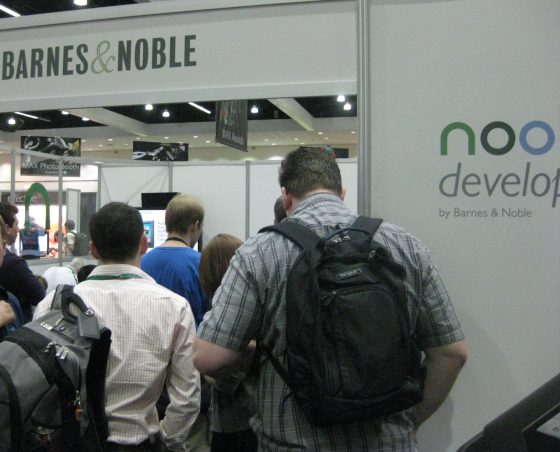
I took a quick look round the exhibition here at Adobe MAX in Los Angeles, and was intrigued to see crowds round the Barnes & Noble Nook stand, a newcomer to Max.

image

Barnes & Noble has its own app store for Color Nook, the AIR runtime is on the device, and in fact is used for some of the built-in apps. It is not the most powerful of tablets, and it only has wi-fi for internet connectivity, but nevertheless is proving a worthwhile market for apps. The store is curated to maintain quality, and one of the points made to me on the stand is that owners expect to pay for their content, making it easier to sell paid-for apps.

image

Unfortunately this device is not available globally, and of course everyone is waiting to see what impact Amazon’s Kindle Fire will have on Nook’s sales. Even so, for developers who have a suitable app this is a significant market.

Installing Windows 8 developer preview on VirtualBox

I have installed the Windows 8 developer preview on Oracle VirtualBox. It does not work on Virtual PC since 64-bit guests are not supported. It is probably fine on Hyper-V, but I don’t have spare Hyper-V capacity for it at the moment.

image

I had a few hassles and thought it would be worth sharing my notes.

I gave the VM 2GB of RAM, 2 processors, and the maximum amount of video ram, but these settings are up to you.

The main problem I encountered was with the mouse. I found that it worked a bit in the Windows 8 guest, but only a bit. The pointer jumped around and was too frustrating to use.

The solution I found was to remote desktop to the VM from my Windows 7 desktop. I could not get the remote desktop built into VirtualBox to work, on a brief try, so I used pure Windows to Windows.

In order to do this, I first set networking in VirtualBox to Bridged. This means it is on the same subnet as the host computer. Then I enabled remote desktop access in the Windows 8 control panel. I opened a command prompt to check the IP address – Windows key + R opens the Run prompt and is a useful combination when the mouse is not working.

Then I was able to use remote desktop to that IP address. Note that unless you join the Windows 8 machine to a domain, the username is:

machinename\email address

or alternatively

WindowsLiveID\email address

presuming you do the default thing, which is to hook up Windows 8 to a Live ID.

Now, if you do this you will have two GUIs showing, which is untidy. You can fix this by running the VM headless. Shut down the VM, navigate to the VirtualBox directory and run the following command:

vboxheadless –startvm yourvmname

Now you can log on to the Windows 8 VM without having any other instance on the screen.

You might not have the same problem with the mouse, of course.

Incidentally, I am not sure what is the best way to shutdown the VM, but I use a command prompt or WindowsKey – R and type:

shutdown /s

My final observation: Windows 8 with just mouse and keyboard is a lot less fun than on a real tablet. It raises the question of just how much value there is in Windows 8 for non-tablet users. I suspect rather little, which is why Windows 7 is set for a long life on the corporate desktop, and for other users who do not have touch screens.

Continuous Integration vs Continuous Delivery vs Continuous Deployment: what is the difference?

I am reading the excellent book Continuous Delivery by Jez Humble and David Farley. But what is Continuous Delivery and how does it differ from the other “continuous” development methodologies?

It helps to understand that all these methodologies spring from the Agile software development movement, and the expression Continuous Delivery is a quote from the Agile Manifesto:

Our highest priority is to satisfy the customer through early and continuous delivery of valuable software.

Now, the starting assumption is that most software projects integrate a number of smaller projects, whether from third-parties or from team members. Since these pieces are developed to some extent independently there is a risk that changes made to one piece will require modifications to another piece; hence according to Humble and Farley:

Most software developed by large teams spends a significant proportion of its development time in an unusable state.

The business of getting all the parts to work together is called integration, and if this involves serious work you need to have an integration phase where this is the sole objective. This is a bad idea for all sorts of reasons, slowing development and preventing proper testing other than at the end of these integration phases.

The solution is called Continuous Integration (CI). You have a frequent automated build that assembles all the pieces from all the teams into a working application. If the build fails, or if automated tests run against the build fail, then this is a bug that should be fixed immediately, not later in some separate phase of development.

Tools for CI include Cruise Control, Hudson, TeamCity and others; .NET developers can also configure Visual Studio Team Foundation Server for CI.

The problem with CI alone is that the development environment is not the same as the production environment. What if the CI build works and tests pass, but once deployed the application breaks or performs badly? Perhaps the development environment runs a multi-tier application with all the tiers on a single box, but when deployed onto actual multiple machines or VMs, something goes wrong. Permission problems are another common source of errors.

Continuous Delivery means that you not only build the software, but also deploy it frequently. This usually means provisioning servers, which you can automate using a tool like Puppet for Unix-like servers, or with Virtual Lab Management in a Visual Studio environment. Automation is pretty much essential for this to work. The more closely the test environment matches the production environment, the better.

Generally though, Continuous Delivery means deployment to a test environment. What about taking the next step, and deploying continuously to production? That is the methodology called Continuous Deployment. It sounds risky; but if you have a very extensive and thorough set of automated tests, then the risks are mitigated, especially as the extent of the changes in any one deployment is reduced.

Other suggestions for reducing risk include deploying to a small subset of users first, called “canary testing”; and making rollback easy.

That said, to judge by the Humble/Farley book the distinction between Continuous Delivery and Continuous Deployment is just a little blurred. The authors acknowledge that continuous deployment into production is not always a good idea. They also imply that Continuous Deployment might mean only that your application is always ready and easy to deploy into production, not that you necessarily deploy it constantly:

Your implementation should make it possible to deploy any version of your application that has made it past the automated tests into any of your environments at the push of a button, given the correct credentials.

Compliance and security are also factors that may rightly make it impossible to automate deployment to production completely.

Client-installed applications present some special difficulties which Humble and Farley discuss.

In summary then:

Continuous integration: your application always builds and passes its tests, including all the pieces from different sub-teams.

Continuous delivery: your application always builds and deploys to a test environment and passes its tests.

Continuous deployment: your application is always ready to deploy to production through a largely automated process.

Update: I received an email from Martin Fowler about this post. He refers to Jez Humble’s post on Continuous Delivery vs Continous Deployment and adds:

– I would use your definition of Continuous Deployment for Continuous Delivery

– I would change the definition of Continuous Deployment to say something like "every good build is released to production"

However, I clarified with him that if you building for a test environment but are confident that any build that passes would be OK to deploy to production, then you are still doing Continuous Delivery. In the end, while I am sure you should use Fowler and Humble’s definitions rather than mine, it seems to me a fine distinction and that if you are doing Continuous Delivery properly then the transition to Continuous Deployment is largely a matter of policy.