Category Archives: google

Hands on with Google Cloud Connect: Microsoft docs in Google’s cloud

Google has released Cloud Connect for Microsoft Office, and I gave it a quick try.

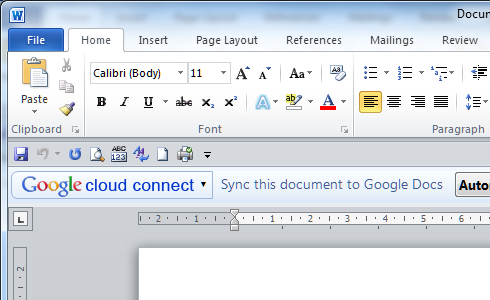
Cloud Connect is a plug-in for Microsoft Office which installs a toolbar into Word, Excel and PowerPoint. There is no way that I can see to hide the toolbar. Every time you work in Office you will see Google’s logo.
image

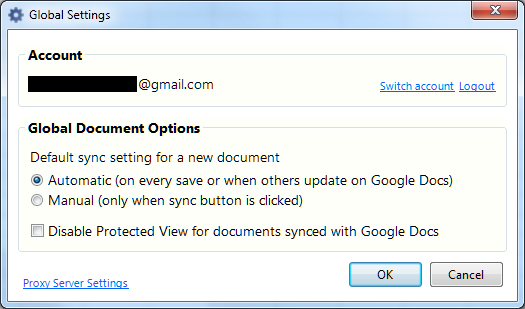
From the toolbar, you sign into a Google Docs account, for which you must sign up if you have not done so already. The sign-in involves passing a rather bewildering dialog granting permission to Cloud Connect on your computer to access Google Docs and contacts on your behalf.

The Cloud Connect settings synchronise your document with Google Docs every time you save, or whenever the document is updated on Google’s servers.
image

Once a document is synched, the Cloud Connect toolbar shows an URL to the document:

image

You get simultaneous editing if more than one person is working on the document. Google Docs will also keep a revision history.

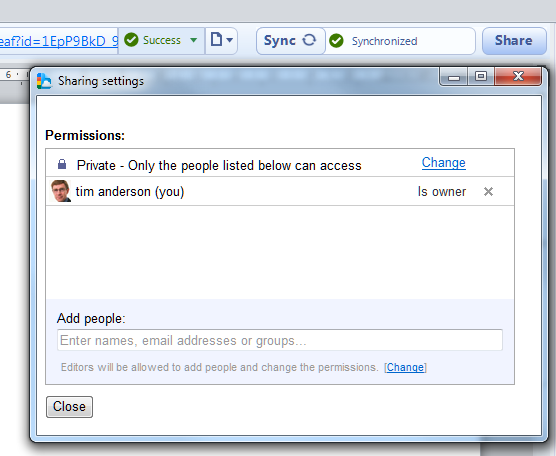
You can easily share a document by clicking the Share button in the toolbar:
image

I found it interesting that Google stores your document in its original Microsoft format, not as a Google document. If you go to Google Docs in a web browser, they are marked by Microsoft Office icons.

image

If you click on them in Google Docs online, they appear in a read-only viewer.

That said, in the case of Word and Excel documents the online viewer has an option to Edit Online.
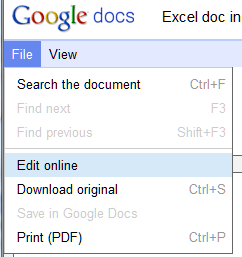
image

This is where it gets messy. If you choose Edit online, Google docs converts your Office document to a Google doc, which possible loss of formatting. Worse still, if you make changes these are not synched back to Microsoft Office because you are actually working on a second copy:
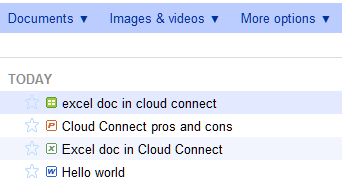
image

Note that I now have two versions of the same Excel document, distinguished only by the icon and that the title has been forced to lower case. One is a Google spreadsheet, the other an Excel spreadsheet.

Google says this is like SharePoint, but better.

Google Cloud Connect vastly improves Microsoft Office 2003, 2007 and 2010, so companies can start using web-enabled teamwork tools without upgrading Microsoft Office or implementing SharePoint 2010.

Google makes the point that Office 2010 lacks web-based collaboration unless you have SharePoint, and says its $50 per user Google Apps for Business is more affordable. I am sure that is less than typical SharePoint rollouts – though SharePoint has other features.  The best current comparison would be with Business Productivity Online Standard Suite at $10 per user per month, which is more than Google but still relatively inexpensive. BPOS is out of date though and an even better comparison will be Office 365 including SharePoint 2010 online, though this is still in beta.

Like Google, Microsoft has a free offering, SkyDrive, which also lets you upload and share Office documents.

Microsoft’s Office Web Apps have an advantage over Cloud Connect, in that they allow in-browser editing without conversion to a different format, though the editing features on offer are very limited compared with what you can do in the desktop applications.

Despite a few reservations, I am impressed with Cloud Connect. Google has made setup and usage simple. Your document is always available offline, which is a significant benefit over SharePoint – and one day I intend to post on how poorly Microsoft’s SharePoint Workspace 2010 performs both in features and usability. Sharing a document with others is as easy as with other types of Google documents.

The main issue is the disconnect between Office documents and Google documents, and I can see this causing confusion.

Update: I uninstalled Cloud Connect after a couple of days. Two reasons. First, the chunky toolbar is annoying and takes valuable working space. Second, I had performance issues when working with documents opened from SharePoint. I guess the two do not get on well together.

Microsoft has its own unsurprisingly negative take on the product here. Apparently Cloud Connect uses the Track Changes feature under the covers, hence breaking this feature for any other purpose. If so, I would like to have been warned about this. On the other hand, I still like the usability of Cloud Connect. Microsoft is right to observe that auto-sync could result in inadvertent document sharing; but the simple and prominent sharing dialog is easier to use than SharePoint permissions.
Appcelerator releases Titanium Mobile 1.6

Appcelerator has released Titanium Mobile 1.6, an update to its cross-platform app framework for Apple iOS and Google Android.

The update adds 26 features for Android and 9 features for iOS. The Facebook API has been completely redone, keeping up-to-date with the latest Facebook API. There is beta support for the Android NDK – native code development.

Android 1.6 is now deprecated and will not be supported in future releases.

While not a big release in itself, Titanium Mobile 1.6 is require for using forthcoming Titanium+Plus modules, libraries which add support for features such as barcode reading and PayPal payments.

There is no sign yet of Aptana integration, following the acquisition of this JavaScript IDE in January.

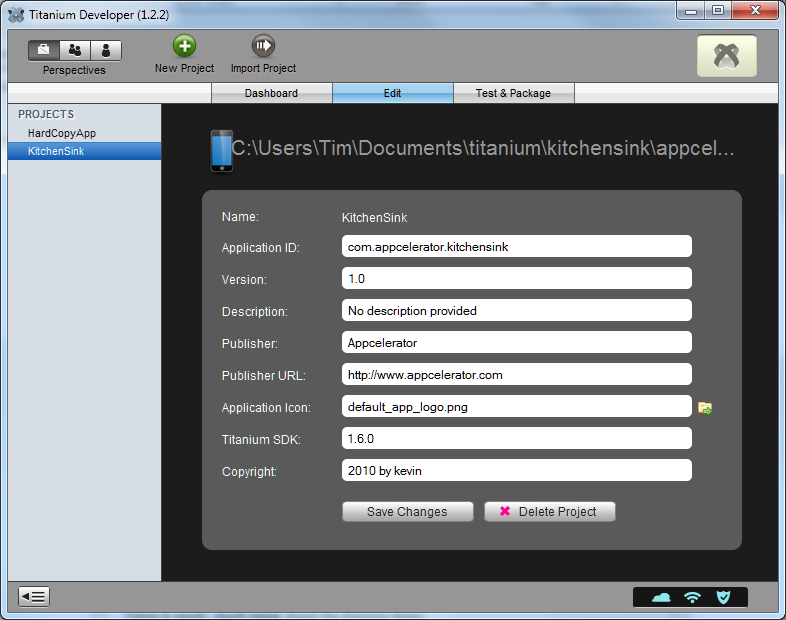
Updating to the 1.6 SDK was delightfully easy on Windows. Just open Titanium Developer and click the prompt.

image

Computer book stats show resilience of Java as Android booms

Mike Hendrickson at O’Reilly has posted four articles analysing the state of the computer book market in more detail than most of us care about.  The overall picture is not too good – sales are down – and there are some interesting trends.

Here is a good one for anyone who thinks Java is dying. The programming languages post shows that unit sales of books on Java increased by 17.2% in 2010 vs 2009, whereas the next most popular language, C#, declined by 1.7%. Objective C, in third place, also declined slightly. JavaScript unit sales were up by 14.5%.

Why is Java booming? There is a clue in one of the two bestselling Java titles mentioned by Hendrickson: Professional Android 2 Application Development

Another trend that caught my eye is in the first post. Some of the Down categories surprised me:

Adobe Flash –84.43%

Mac OS –32.12%

Web Design Tools –53.2%

Adobe’s Creative Suite 5 has sold well as far as I’m aware so although books on Flash and Dreamweaver have not been selling well, it is dangerous to draw obvious conclusions.

The influence of Android is unmistakeable though. Something for Oracle to consider as it pursues Google for breach of intellectual property.

Nokia plus Windows Phone 7 – would that be a smart move?

The rumour is that Nokia’s CEO, ex-Microsoft Stephen Elop, is planning a major strategy announcement on Friday February 11. The obvious move would be to embrace a new Smartphone platform, since neither Symbian nor MeeGo look likely to catch up with frontrunners Google Android or Apple iPhone. Could Elop be planning to partner with his former company and embrace Windows Phone 7?

It is a fascinating proposition. Here is the case in favour. For both Nokia and Microsoft, Android is the key competition in this market. The momentum behind Android is deterring both phone manufacturers and operators from investing seriously in Windows Phone 7. Microsoft’s phone is well-regarded, but has made little impact on the general public. Nokia could change that; it could make beautiful Windows 7 phones and get them to the mass market.

Microsoft has also done a good job with the developer tools for Windows Phone 7, with Visual Studio 2010, Silverlight, XNA, and the .NET Framework.

On the other hand, if Nokia were to adopt Windows Phone 7 for its high-end phone platform, would it not alienate its own development community, which is oriented towards Linux and C/C++? I think it would, unless Nokia insisted that as part of its deal with Microsoft, Windows Phone 7 would also support native code development with Qt, Nokia’s cross-platform application framework. This would be great news for Microsoft as well, though it might not recognise it. Windows Phone 7 needs to allow native code development, and Qt is ideal for the purpose. Qt already supports Windows CE, which underlies Windows Phone 7. If Nokia could present Windows Phone 7 as just another platform for Qt, the deal would be palatable for existing Nokia developers.

If Nokia were to announce this, it would transform the prospects for Microsoft’s Smartphone OS as well as helping Nokia to make a renewed impact.

Now for the case against. I am not sure that Qt on Windows Phone 7 would be acceptable to Microsoft, which might prefer to keep developers locked to Visual Studio and .NET; and Nokia has an easy alternative, which is to adopt Android instead. Qt support is still an issue, but there is already an independent project to bring Qt to Android. The combination of the Android and Nokia brands has obvious appeal, whereas taking on Windows Phone 7 would be risky.

The biggest shadow over Windows Phone 7 is cast by Microsoft itself. I do not doubt the commitment of the team which builds it within Microsoft, nor the quality of the developer tools. I do question though whether Microsoft as a whole sees a long-term future for Windows Phone 7 and its “Metro” user interface. The strong hint at CES was that Windows 8, rather than Windows Phone 7, is the basis of Microsoft’s tablet strategy; and if that proves to be the case, then Windows Phone 7 may gradually be displaced. Another puzzle is how Microsoft intends to use “Jupiter”, a rumoured new user interface library for Windows that may well be designed with mobile and touch control in mind. Maybe full Windows with “Jupiter” is the future of Microsoft’s mobile platform, rather than Windows Phone 7? I discuss this in more detail here.

There is enough uncertainty around Windows Phone 7, and enough buzz around Android, that Google’s mobile platform looks to me more attractive than Microsoft’s from Nokia’s perspective. I do not dismiss the Windows Phone idea though; it would be a bold and interesting move.

I expect this post to be very out of date soon, if not by Friday, then certainly by early next week at Mobile World Congress.

Update: A Nokia and Microsoft partnership is looking more likely since Google’s Vic Gundotra tweeted:

#feb11 "Two turkeys do not make an Eagle".

Back to BASIC with NS App Studio for mobile

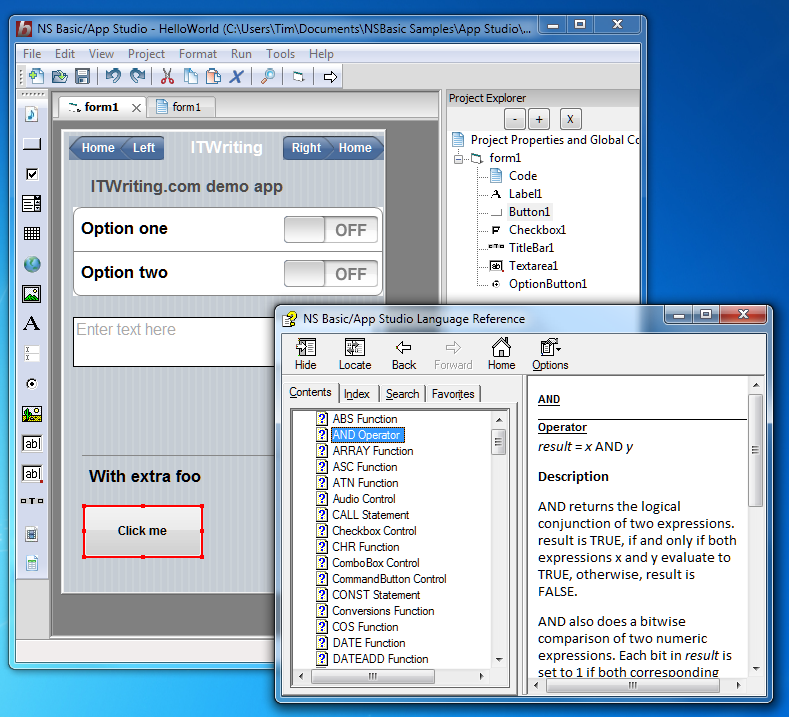
I was intrigued to discover NS Basic/App Studio, which offers a simple Windows IDE targeting iPhone and Android mobile devices.

image

It is all a bit retro, especially when you discover that the company (NS Basic Corporation) has the leading Basic on the … Apple Newton.

Still, something like Visual Basic for iPhone and Android sounds interesting. Does this thing deliver?

I tried the demo. What NS App Studio actually does is to translate Basic code to JavaScript, so the end result is a web application targeting mobile browsers, rather than a mobile app. There is a bit more to it though. Apps have access to local storage including SQLite databases, since this is available to the WebKit-based browsers on iPhone and Android. You can create a shortcut to a web app and even run it offline, making it behave somewhat like a locally installed app. Further, the FAQ notes that you can wrap your web app with PhoneGap to create an app that you can distribute through the App Store or Android Market; and this or similar capability may eventually be included in the IDE.

The question though: why would you choose to use Basic rather than just learning JavaScript? I can make sense of the Google Web Toolkit, which compiles Java to JavaScript, but Google’s effort is more sophisticated. You are not expected to puzzle out the generated JavaScript, but just work in Java. By contrast, with NS App Studio you code in Basic but debug in JavaScript, with all sorts of potential for confusion.

I got the impression that the product is not yet mature. I changed the name of the form in my Hello World project, for example, but found generated code that still referred to the old name, causing a JavaScript error. I found it confusing that the property listed as “text” in the visual grid was “textContent” in code. The IDE is very simple, but also very lacking in features. Most developers would find a modern JavaScript IDE more productive.

Nevertheless it is interesting as a proof of concept, and shows the capability of these mobile browsers as a pre-installed application runtime.

Appcelerator acquires Aptana

Appcelerator, a company whose main product is a cross-platform desktop and mobile toolkit called Titanium, has acquired Aptana, whose Aptana Studio 2 is probably the best IDE for JavaScript application development, and which also supports Ruby on Rails, PHP, Python, and Adobe AIR.

It makes sense, in that Titanium uses JavaScript as the primary language for the application logic and UI.

image

Appcelerator is already doing well from the current surge of interest in mobile apps, offering an obvious solution to developers endeavouring to support both Apple iOS and Google Android with a single code base. Aptana looks a good acquisition; but the news may not be so welcome to those who rely on Aptana Studio for Adobe AIR; I imagine Appcelerator may see this as a competing platform. Then again, most AIR developers use the Flash IDE or Flash Builder so it is unlikely to have a huge impact even if AIR support is dropped (I do not know what the plans are in this respect).

The server-side technologies like PHP and Ruby are a better fit, since many mobile apps have a server component.

Update: in the webcast about the acquisition, Appcelerator CEO Jeff Haynie said “There’s quite a few questions around Aptana as it relates to Adobe and ColdFusion; I don’t think we can say anything about that.”

The company is expecting to release a joint Aptana Studio/Appcelerator Titanium beta in March 2011. The initial release will not include a visual designer, though this is planned for some future release.

Talk of Windows 8 on an smartphone shows Microsoft’s mobile confusion

During a conference call to discuss Intel’s latest financials, CEO Paul Otellini raised the possibility of putting the full Windows OS onto a smartphone, running a low power Intel SoC (System on Chip). The matter came up with Otellini was asked about the impact of Windows on ARM, announced at CES earlier this month:

The plus for Intel is that as they unify their operating systems we now have the ability for the first time: one, to have a designed-from-scratch, touch-enabled operating system for tablets that runs on Intel that we don’t have today. And secondly, we have the ability to put our lowest-power Intel processors running Windows 8 – or ‘next-generation Windows’ – into phones, because it’s the same OS stack. And I look at that as an upside opportunity for us.

The reasoning seems to be: if Windows 8 is designed to run well on mobile devices with ARM, it will also run well on mobile devices with an Intel SoC, which will let us put it on phones.

Note the point he highlighted: Microsoft unifying its operating systems. No more full Windows vs Windows CE; one OS from mobile to desktop.

Although that sounds compelling, the snag is that Windows is not well suited to low-power mobile devices, which is why Windows CE was invented in the first place. Microsoft can fix this to some extent by fixing the things that make it unsuitable, but it carries a heavy compatibility burden.

It also throws up the question: just what are Microsoft’s long-term plans for Windows Phone 7, which is built on Windows CE, has its own GUI mostly written in native code, and a development platform based on .NET – Silverlight and XNA – plus a native code SDK that only mobile operators and device manufacturers get to use?

At CES Microsoft Steven Sinofsky sort-of denied that Windows will encroach on Windows Phone 7 territory. “Windows Phone 7 is uniquely focused on the small form factor that Windows doesn’t focus on,” he said.

Nevertheless, the company’s decision not to use the Windows Phone 7 OS for tablets may make that inevitable. What is the difference between a smartphone and a small tablet? Does Microsoft expect developers to write apps designed for Windows on a small tablet and then rewrite them for Windows Phone 7 using Silverlight?

It does not make sense; and despite the Windows Phone 7 promotion included in CEO Steve Ballmer’s CES keynote, I was left wondering whether Microsoft’s new mobile OS really has a future.

That said, Silverlight abstracts the OS, so in principle Microsoft could use it to form a consistent mobile development platform irrespective of whether the underlying OS is Windows CE or full Windows. I am not getting that sense from the company though, and I’d expect the primary Windows SDK to remain based on C++.

I am struggling to understand how Microsoft expects this to work. App compatibility is the obvious benefit of full Windows; but two big issues are that most Windows apps are not touch-friendly and are not designed for small screens. Putting Windows on a tablet with a decent screen size and the dreaded stylus works to some extent, but will never compete with Apple’s iPad for usability. On smaller screens most existing apps will not work properly; and if Windows on small devices sprouts a completely new touch-friendly GUI, or borrows the one from Windows Phone 7, then app compatibility with desktop Windows will be limited.

It feels as if Microsoft’s Windows team is saying one thing, the Windows Phone 7 and developer teams saying another, and partners like Intel saying yet another. Windows Phone 7 was meant to be the thing that made belated sense of Microsoft’s mobile strategy, but even that now looks doubtful for the reasons stated above.

Microsoft is still a long way from having a coherent strategy for mobile devices, and that lack is damaging the company and helping Apple and Google to establish their competing operating systems.

Update: Mary-Jo Foley writes about Microsoft “Jupiter” which is a rumoured new user interface and application model designed for Windows 8 and its app store:

Jupiter is going to be a new user interface (UI) library for Windows, built alongside Windows 8. It will be a thin XAML/UI layer on top of Windows application programming interfaces and frameworks for subsystems like graphics, text and input. The idea is Jupiter will bring support for smoother and more fluid animation, rich typography, and new media capabilities to Windows 8 devices.

Is Jupiter a .Net technology, or XAML adapted for native code, or both? Is it one and the same as, say, Silverlight 6? That is not stated, though Senior VP Soma Somasegar helpfully (or not) said that:

some of the information in this post is not right and out of date, not reflecting Microsoft’s current thinking.

That seems to tacitly confirm that it fairly represents Microsoft’s thinking at some time in the not-too-distant past.

It would make sense to me if Microsoft used Silverlight to unify its application platform as mentioned above, and combining the XAML presentation layer with native code could address performance and memory usage concerns with .NET. This is the kind of news that would really give confidence to Silverlight developers, rather than the damage limitation PR that Microsoft has put out since PDC late last year.

On the other hand, I believe Somasegar when he says the information is out of date, so for the time being it is just another dose of uncertainty.

Half-baked Android tablets will help Apple, give hope to Microsoft

The downside of open is fragmentation. CES earlier this month was overflowing with Android tablets and smartphones, but since anyone can use Android, device manufacturers may disappoint users, for example by shipping tablets that do not use a version of Android designed for tablets, or shipping devices that do not have access to the official Android Market.

The Inquirer reported yesterday that the Asus tablets announced at CES will not in fact ship with Android 3.0 Honeycomb. The reason stated is that:

because the company did not know the detailed technical specifications requirements of the Android 3.0 Honeycomb operating system, it could not confirm that Honeycomb will be the tablets’ OS.

Although it is stated that the tablets will ship with Android 2.3 Gingerbread, I get the impression that Asus might upgrade them to Honeycomb eventually; and since they are now apparently not due until the third quarter there is time for plans to change.

Not all Android devices have Google’s official compatibility blessing.  The frequently asked questions make a good read:

Anyone is welcome to use the Android source code, but if the device isn’t compatible, it’s not considered part of the Android ecosystem.

Only devices that have passed Google’s compatibility tests get access to the Android Market. This leads to a surprising situation for users: you might buy an Android tablet or smartphone and find that it has no access to the Android Market.

Vendors can get round this to some extent by creating their own Android app stores, though this kind of fragmentation is likely to have a bad outcome, with a limited selection of apps and insufficient market share to attract developer attention.

This means that a handy question to ask a salesman is: does this gadget have the Android Market? If the answer is anything less than a demo of the official Google Android Market client, that is reason for caution.

The context is that all these devices have to compete with Apple; and the App Store is a significant part of the appeal of iOS devices. Therefore an Android device without access to the Android Market is disadvantaged, though it is not something you are likely to find mentioned on the box.

There is an obvious danger for Android, that customers confronted with a vast range of Android offerings will find it hard to distinguish between what is excellent, what is reasonable, and horrible implementations like the Next Tablet.

Even the element of uncertainty is enough to help Apple, which is likely to announce a second generation iPad soon. It may even give hope to Microsoft, depending on when “Windows 8” tablets come to market and how good they prove to be.

The challenge for Google is how to keep Android open, while also preventing its brand from being damaged by too many sub-standard devices.

Google, Adobe Flash, and H.264 video

On signing into Google Docs today I saw the following:

image

I clicked Learn more and was directed to this article. The files you can upload and play:

  • WebM files (Vp8 video codec and Vorbis Audio codec)
  • .MPEG4, 3GPP and MOV files – (h264 and mpeg4 video codecs and AAC audio codec)
  • .AVI (many cameras use this format – typically the video codec is MJPEG and audio is PCM)
  • .MPEGPS (MPEG2 video codec and MP2 audio)
  • .WMV
  • .FLV (Adobe – FLV1 video codec, MP3 audio)

And how do you play a video?

Simply click a video file that you’ve uploaded to your Documents List and the video opens in a new page that includes a video player. You will need to have Flash installed for the video player to work.

At the same time, Google says it is removing H.264 support from its Chrome browser:

Though H.264 plays an important role in video, as our goal is to enable open innovation, support for the codec will be removed and our resources directed towards completely open codec technologies.

How do we make sense of this? The implication is that Google is not in fact bothered about H.264, but rather wants to promote Flash for video instead of the HTML 5 <video> element. That is a problem for Apple iOS users who cannot run Flash, and puzzling insofar as you would expect Google to be promoting rather than discouraging HTML 5 adoption.

Possibly the real target is Apple. Flash has become a key selling point for non-Apple mobile devices. By making more use of Flash, Google can make the web more annoying for iOS users and thereby promote Android.

As John Gruber observes, Google has some questions to answer.

Update: Google’s Mike Jazayeri has posted some more background on the decision here.

Google flexes its Chrome browser muscles, removes support for H.264 video – but what about Adobe Flash?

Google has announced that it will remove support for the H.264 video codec in its Chrome browser:

…we are changing Chrome’s HTML5 <video> support to make it consistent with the codecs already supported by the open Chromium project. Specifically, we are supporting the WebM (VP8) and Theora video codecs, and will consider adding support for other high-quality open codecs in the future. Though H.264 plays an important role in video, as our goal is to enable open innovation, support for the codec will be removed and our resources directed towards completely open codec technologies.

The reason given is that Google wishes to support open standards. That sounds good for open standards, but not so good for users who simply want a video to play.

Google’s position contrasts that of Microsoft with IE9:

In its HTML5 support, IE9 will support playback of H.264 video as well as VP8 video when the user has installed a VP8 codec on Windows

Still, at least IE9 will play VP8 if the codec is installed, so that makes VP8 look a better option for content providers – which is the outcome Google is hoping for.

I have mixed feelings about this approach, because while it is good for open standards it is bad for compatibility. I am also not sure that it is consistent. Google announced in June that it is integrating Adobe Flash support into the browser; yet Flash is not an open standard.

That also suggests that H.264 video will still play in Chrome, provided it is in a Flash wrapper.

Maybe Google is learning from Apple how to deprecate technologies by removing support. Apple refuses to allow Java or Flash on iOS, and has stopped doing its own build of Java for OS X. Apple has also stated that these “optional” components may not be used in apps that are deployed in the Mac App Store, thus making a disincentive for developers considering those runtimes.

Apple has not squashed Flash though; and Google may find it equally hard to squash H.264, which is widely supported throughout the industry, has the best tools, and for which hardware is optimised. Apple supports H.264 but is unlikely to support WebM or Theora any time soon. Here’s what Apple CEO Steve Jobs said in April 2010:

To achieve long battery life when playing video, mobile devices must decode the video in hardware; decoding it in software uses too much power. Many of the chips used in modern mobile devices contain a decoder called H.264 – an industry standard that is used in every Blu-ray DVD player and has been adopted by Apple, Google (YouTube), Vimeo, Netflix and many other companies.

Although Flash has recently added support for H.264, the video on almost all Flash websites currently requires an older generation decoder that is not implemented in mobile chips and must be run in software. The difference is striking: on an iPhone, for example, H.264 videos play for up to 10 hours, while videos decoded in software play for less than 5 hours before the battery is fully drained.

When websites re-encode their videos using H.264, they can offer them without using Flash at all. They play perfectly in browsers like Apple’s Safari and Google’s Chrome without any plugins whatsoever, and look great on iPhones, iPods and iPads.

It seems Jobs spoke too soon when he said H.264 would play perfectly in Chrome.

Post updated to add Apple quote