Category Archives: microsoft

Considering Windows 8 as an HTML platform

Amongst all the fuss about whether Microsoft is deprecating Silverlight or even client-side .NET, it is easy to lose sight of the other angle on this. What are the implications of Microsoft embracing HTML and JavaScript as a new first-class Windows development platform? Here’s the quote again:

Today, we also talked a bit about how developers will build apps for the new system. Windows 8 apps use the power of HTML5, tapping into the native capabilities of Windows using standard JavaScript and HTML to deliver new kinds of experiences. These new Windows 8 apps are full-screen and touch-optimized, and they easily integrate with the capabilities of the new Windows user interface.

When Microsoft introduced IE9 with hardware-accelerated graphics, support for some key parts of HTML 5, and a new fast JavaScript engine, it was not only trying to recover ground in the browser wars. It also had in mind a new application runtime for Windows, for desktop as well as for web applications.

In order to achieve this, we can expect more hooks between the browser engine and the local operating system. There is potential security risk, but Microsoft of all companies will be sensitive to this and I would expect it to get the security right. The further implication is that some parts of a Windows HTML application will be Windows-specific. It is an “Embrace and extend” strategy, as I noted in this Register article back in September last year when former Silverlight product manager Scott Barnes broke the story of how the Windows team at Microsoft was favouring HTML and JavaScript above .NET.

The rationale for this is two-fold. First, I’m guessing that Microsoft thinks it will work better. Although .NET client apps are now commonplace, especially for custom business applications, problems like slow start-up and heavy memory requirements never really went away, though I would argue that in Silverlight they are almost eliminated.

Second, HTML and JavaScript is a universal programming platform. With the new model, any developer who can code a web page can also code a Windows app. Corporate VP Michael Angiulo said at Computex in Taipei:

Windows 8’s new application platform … is based on HTML 5, JavaScript and CSS, the most widely understood programming languages of all time. These languages form the backbone of the web, so that on day 1 when Windows 8 ships hundreds of millions of developers will already know how to build great apps for Windows 8.

These are both compelling arguments. Nevertheless, there are several reasons why making Windows an HTML platform might not be the instant hit that Microsoft will be hoping for. Here are a few:

  • Microsoft’s Visual Studio is .NET oriented. It does have a web design tool, Expression Web, which is OK but still falls short compared to Adobe Dreamweaver. Web designers tend to use Dreamweaver anyway, thanks to Mac compatibility and integration with other Adobe tools. Even Dreamweaver is not great as an application development tool, as opposed to a web design tool. Tooling is a problem, and it is fair to say that whatever goodies Microsoft comes up with in this area will likely be a step back compared to what it already has for C# or C++.
  • Standards are a mixed blessing if you are trying to sell an operating system. If Microsoft does such a good job of standards support that the same apps run with minor tweaks on an iPad and on Android, users may do just that. If Microsoft encumbers the standards with too many proprietary extensions, the universality of the platform is lost.
  • Windows plus HTML and JavaScript sounds a lot like Palm/HP WebOS, which has gained favourable reviews but has yet to take off in terms of sales. Otherwise, Palm would not have been taken over by HP.
  • The question of whether HTML and JavaScript will really take over app development is open. I certainly hear voices saying so. I interviewed Nitobi’s president André Charland, in charge of PhoneGap, and he makes a good case. On the other hand, App development today is still dominated by platform-specific development, Objective C for Apple iOS and Java on Dalvik, the Google Android virtual machine.
  • The standard in HTML/JavaScript app platforms is not Microsoft’s Internet Explorer, but WebKit, as used in iOS and in Google Android and Chrome. Microsoft did great work in standards support in IE9, but so far it has not stopped its browser share decline. Worldwide figures from StatCounter show Internet Explorer in continuing slow decline overall, and Chrome still growing and set to overtake Firefox in a year or so.

In other words, there is little evidence that embracing HTML and JavaScript as an app platform will ensure success for Windows 8.

That said, other factors count for more. Developers will go where their customers are, and if Microsoft turns out a version of Windows that wins substantial market share in the emerging tablet market as well as on traditional notebooks, the new platform will be a hit.

The risk though is that the market will continue to perceive Windows as an OS for desktop and laptop, and look to iOS or Android for mobile and touch devices. The dual personality of Windows 8 may count against it, if it means devices that are compromised by having to support both user interface models.

Microsoft refuses to comment as .NET developers fret about Windows 8

There is a long discussion over on the official Silverlight forum about Microsoft’s Windows 8 demo at D9 and what was said, and not said; and another over on Channel 9, Microsoft’s video-centric community site for developers.

At D9 Microsoft showed that Windows 8 has a dual personality. In one mode it has a touch-centric user interface which is an evolved version of what is on Windows Phone 7. In another mode, just a swipe away, it is the old Windows 7, plus whatever incremental improvements Microsoft may add. Let’s call it the Tiled mode and the Classic mode.

Pretty much everything that runs on Windows today will likely still run on Windows 8, in its Classic mode. However, the Tiled mode has a new development platform based on HTML and JavaScript, exploiting the rich features of HTML 5, and the fast JavaScript engine and hardware acceleration in the latest Internet Explorer.

Although D9 is not a developer event, Microsoft did talk specifically about this aspect. Here is the press release:

Today, we also talked a bit about how developers will build apps for the new system. Windows 8 apps use the power of HTML5, tapping into the native capabilities of Windows using standard JavaScript and HTML to deliver new kinds of experiences. These new Windows 8 apps are full-screen and touch-optimized, and they easily integrate with the capabilities of the new Windows user interface. There’s much more to the platform, capabilities and tools than we showed today.

Program Manager Jensen Harris says in the preview video:

We introduced a new platform based on standard web technologies

Microsoft made no mention of either Silverlight or .NET, even though Silverlight is used as the development platform in Windows Phone 7, from which Windows 8 Tiled mode draws its inspiration.

The fear of .NET developers is that Microsoft’s Windows team now regards not only Silverlight but also .NET on the client as a legacy technology. Everything will still run, but to take full advantage of Tiled mode you will need to use the new HTML and JavaScript model. Here are a couple of sample comments. This:

My biggest fears coming into Windows 8 was that, as a mostly WPF+.NET developer, was that they would shift everything to Silverlight and leave the FULL platform (can you write a Visual Studio in Silverlight? of course not, not designed for that) in the dust. To my utter shock, they did something much, much, much worse.

and this:

We are not Windows developers because we love Windows. We put up with Windows so we can use C#, F# and VS2010. I’ve considered changing the platform many times. What stops me each time is the goodness that keeps coming from devdiv. LINQ, Rx, TPL, async – these are the reasons I’m still on Windows.

Underlying the discussion is that developers have clients, and clients want applications that run on a platform with a future. Currently, Microsoft is promoting HTML and JavaScript as the future for Windows applications, putting every client-side .NET developer at a disadvantage in those pitches.

What is curious is that the developer tools division at Microsoft, part of Server and Tools, has continued to support and promote .NET; and in fact Microsoft is soon to deliver Visual Studio LightSwitch, a new edition of Visual Studio that generates only Silverlight applications. Microsoft is also using Silverlight for a number of its own web user interfaces, such as for Azure, System Center and Windows InTune, as noted here.

Now, I still expect that both Silverlight and native code, possibly with some new XAML-based tool, will be supported for Windows 8 Tiled mode. But Microsoft has not said so; and may remain silent until the Build conference in September according to .NET community manager Pete Brown:

You all saw a very small technology demo of Windows 8, and a brief press release. We’re all being quiet right now because we can’t comment on this. It’s not because we don’t care, aren’t listening, have given up, or are agreeing or disagreeing with you on something. All I can say for now is to please wait until September. If we say more before then, that will be great, but there are no promises (and I’m not aware of any plans) to say more right now. I’m very sorry that there’s nothing else to share at the moment. I know that answer is terrible, but it’s all that we can say right now. Seriously.

While this is clearly not Brown’s fault, this is poor developer communication and PR from Microsoft. The fact that .NET and Silverlight champion Scott Guthrie is moving to Windows Azure is no comfort.

The developer division, and in fact the whole of Server and Tools, has long been a bright spot at Microsoft and among its most consistent performers. The .NET story overall includes some bumps, but as a platform for business applications it has been a remarkable success. The C# language has evolved rapidly and effectively under the guidance of Technical Fellow Anders Hejlsberg. It would be bewildering if Microsoft were to turn its back on .NET, even if only on the client.

In fact, it is bewildering that Microsoft is being so careless with this critical part of its platform, even if this turns out to be more to do with communication than technical factors.

From the outside, it still looks as if Microsoft’s server and tools division is pulling one way, and the Windows team the other. If that is the case, it is destructive, and something CEO Steve Ballmer should address; though I imagine that Steven Sinofsky, the man who steered Windows 7 to launch so successfully, is a hard person to oppose even for the CEO.

Update: Journalist Mary Jo Foley has posted on what she “hears from my contacts” about Jupiter:

Jupiter is a user interface library for Windows and will allow developers to build immersive applications using a XAML-based approach with coming tools from Microsoft. Jupiter will allow users a choice of programming languages, namely, C#, Visual Basic and C++.

Jupiter, presuming her sources are accurate, is the managed code platform for the new Windows shell – “Tiled mode” or “Tailored Apps” or “Modern Shell – MoSH”; though if that is the case, I am not sure whether C++ in this context will compile to managed or unmanaged code. Since Silverlight is already a way to code using XAML, it is also not clear to me whether Jupiter is in effect a new Windows-only version of Silverlight, or yet another approach.

A pivotal moment for Microsoft as it attempts to escape its Windows legacy

image

Last year I wrote a piece for The Register on 25 years of Windows. I even ran up Windows 1.0 in a DOS box to have a look.

The surprising thing about Windows is not how much has changed in 25 years, but how little. The WIMP model (Windows, Icons, Menus, Pointer) has stayed the same. Inevitably, Windows was completely rebuilt during that period, in the form of Windows NT, but Microsoft was careful to make the user interface reassuringly familiar. Windows NT 3.1 looked the same as Windows 3.1, but did not crash so often. Windows NT 4.0 used the Windows 95 user interface. Further, as far as possible old applications still ran. In fact, Notepad on Windows 1.0 looks very like Notepad on Windows 7.

Then Apple releases the iPhone in 2007, and suddenly Microsoft has a problem. Apple demonstrates that it is possible to create a touch user interface, without a stylus, that really works. Apple does this by creating a new operating system, iOS, which is incompatible with its existing OS X used for desktops and laptops. Yes, much of the underlying code is the same, but OS X applications do not run. Nobody would expect them to on a phone; but then Apple does the iPad, approaching the screen size of a laptop, but still iOS, touch-centric, and incompatible with Mac OS X.

The advantage of Apple’s clean-room approach is that there are no compromises or fudges to make applications built for keyboard and mouse somehow work. iPhone and iPad are huge hits, and users seemingly do not mind sticking with OS X for their productivity applications like Microsoft Office and Adobe PhotoShop, and using the iPad and iPhone for web browsing and for apps that are more about consuming than creating – except that productivity apps like the iWork suite are now creeping onto iOS, and this together with the web application/cloud computing model may mean that OS X gets used less and iOS more over time; but OS X is not going away.

What about Microsoft? It has a big hit with Windows 7, but suddenly it all feels rather legacy. What about the new computing model which is mobile, touch-centric, and enjoyable to use in a way previously unknown in computing? One thing is sure: Microsoft cannot continue with WIMP. It has to break with 25 years of Windows and find a different user interface model.

2010, and Microsoft does Windows Phone 7. This is Microsoft’s iOS: same old Windows underneath, though based on the cut-down Windows CE, but otherwise a complete break from the past. The user interface is a new touch-centric effort called Metro and based on sliding tiles. The main thread of continuity for developers is its app platform based on Silverlight, which runs .NET code written in C# and Visual Basic.

You might have thought that Microsoft would follow Apple by using the phone OS for other form factors as well, and making Silverlight its core app platform for Windows (the cross-platform dream is long gone).

Instead, Microsoft embarked on a third strategy.

“We introduced a new platform based on standard web technologies”, says program manager Jensen Harris in his preview video. Windows 8 uses elements from the Windows Phone 7 UI, but driven by HTML and JavaScript rather than by Silverlight. Well, maybe you can use Silverlight instead; or maybe native code. Not everything is clear yet; but what Microsoft is choosing to focus on is its use of web technology.

Who will buy touch-centric Windows 8 devices? Microsoft’s problem: there is already a touch-centric OS out in the market, supported by countless third-party apps. As it has discovered with Windows Phone 7, it is not enough to do a decent alternative. So what, says the market, we already have iOS, and if we want something non-Apple, there’s Android. And WebOS. And Blackberry PlayBook.

The one thing Microsoft can do that others cannot is run Windows. Not new Windows, but old Windows. There is a reason why Windows 7 was the fastest-selling operating system of all time – most of the business world runs on Windows.

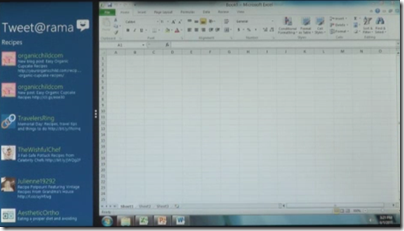
Therefore Windows 8 does both. There’s the new platform, and there’s the old platform, and you just swipe between them.
image

Windows 8 is a migration strategy. Is a mobile, touch-centric UI the future of client computing? Quite possibly, but in the meantime you have all this old stuff to run, not least Microsoft Office. Here is the answer: run both.

There are a few problems with this strategy.

First, while Microsoft will focus on the new HTML-based platform, in the real world people will buy Windows to run their existing Windows apps. That means they will need keyboard and mouse. Windows 8 OEMs will be fighting an old battle: how to make devices that run well as tablets, but also have keyboard and trackpad, and a competitive price. We have seen that approach fail with the old Tablet PC line and its swivel screens.

Alternatively, we will see touch-only devices and users will curse as they try to run Excel.

Second problem: Microsoft’s Windows team is focused on the new UI. The old one will likely be pretty much Windows 7. The success of Windows 7 was driven by innovations and improvements that matter whatever you run, rather than ones that you can only use if you are running apps built for the new platform.

A split personality means divided attention, and one or other or both will suffer. Is Windows 7 now frozen in time as the last of its line? That does look possible.

Third, what is the developer story? Hitherto, the Windows developer story has been pretty simple and single-minded. There is native code and the Windows API, or for the last decade or so there has been .NET. All-conquering C# has been the unifying language from desktop to server, with Silverlight bringing it to the browser.

Now Microsoft is saying HTML and JavaScript. Plaudits from the standards folk – who mostly do not run Windows and still will not – but confusion for the Microsoft-platform community.

That said, I will be surprised if Silverlight is not also an option for new-style apps, enabling Windows Phone apps to be ported easily.

Even so, there must be a reason for Microsoft’s emphasis on HTML and JavaScript for local apps as well as web applications. It does feel as if the one common thread to the company’s developer story has suddenly been cut, and for no good reason given that Silverlight fits perfectly with the new UI model.

Let me add, it is hard to see a future for the Windows Phone 7 OS, given what we have seen in Windows 8. It seems plausible that Windows Phone 8+ will use the same code as Windows 8, which is another reason to suppose that Silverlight will be fully supported.

I can see where Microsoft wants to get to. It wants to succeed in mobile and in the new touch-centric world, as the alternative is gradual erosion of its entire market and Windows ecosystem. Is this the best way, and will it work? Open questions; and the company has some tricky positioning to do, especially to its developers. The forthcoming Build conference will be critical.

Check out these images of Windows 8 – but where is Silverlight?

Microsoft’s Windows President Steven Sinofsky has shown off an early build of Windows 8 at the D9 conference in Rancho Palos Verdes, California. It turns out that the not-so subliminal messaging at the PDC conference late in 2010 was spot on. HTML 5 and JavaScript are at the centre of the new Windows, for apps as well as in the browser:

Windows 8 apps use the power of HTML5, tapping into the native capabilities of Windows using standard JavaScript and HTML to deliver new kinds of experiences.

says program manager Jensen Harris in his introductory video.

So what is the new Windows like? Here is tour with some screen grabs from the above video. I have deliberately included fingers in several of the shots, because the new Windows is touch-centric.

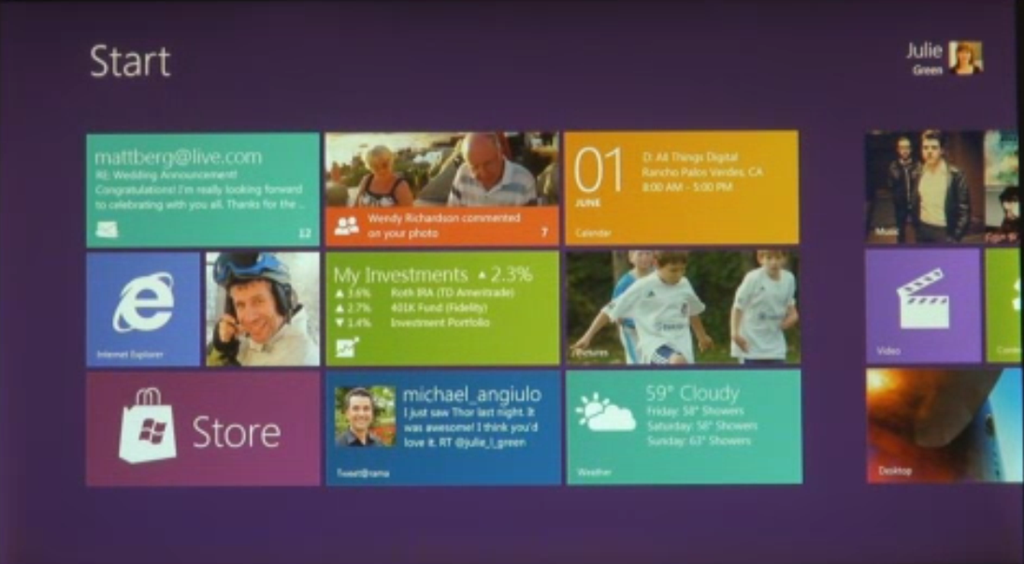
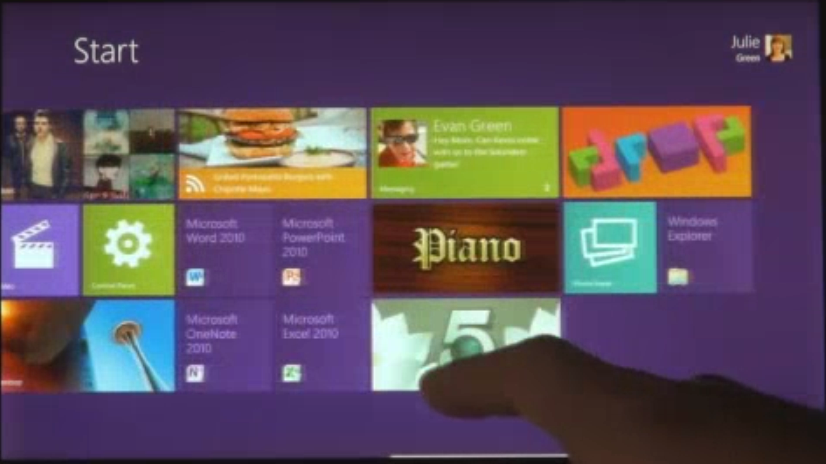
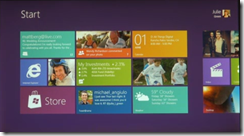
First, Windows 8 borrows from Windows Phone and has a Start screen built with Live tiles:

image

Live tiles, as on Windows Phone, are more than just icons; they can include notifications, video and animations. They are more like app previews.

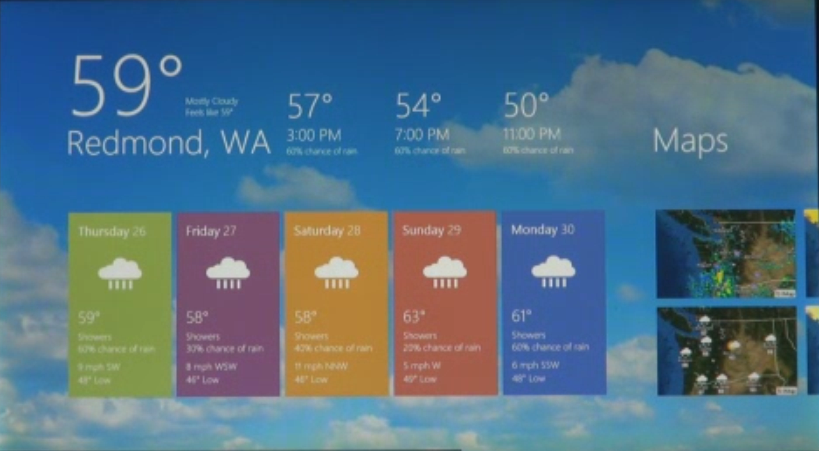
Apps run essentially full-screen, as on Apple’s iPad:

image

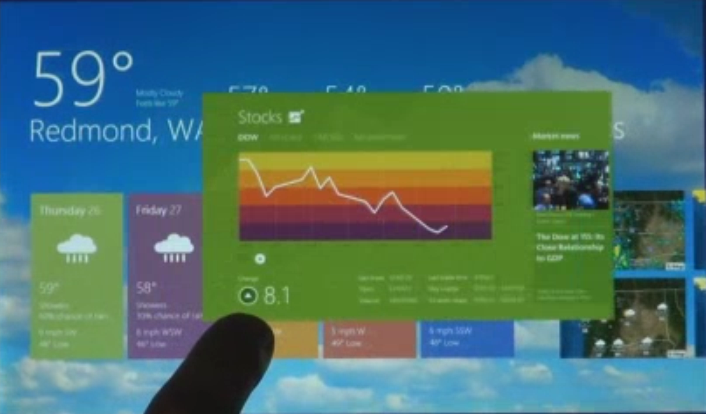
You switch apps by swiping. Here is a screen caught mid-swipe:

image 

However, you can also have two apps on screen. One is the main app, the other is docked to the side:

image

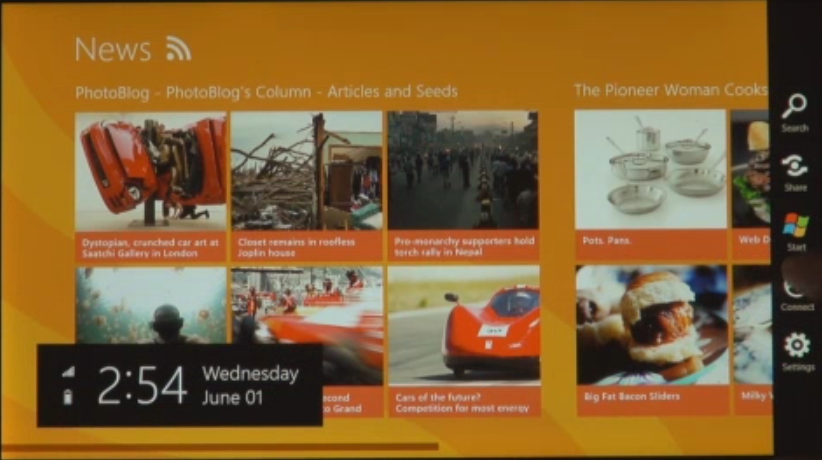
A menu on the right shows Search, Share. Start. Connect and Settings. I am not sure what Connect does.

image

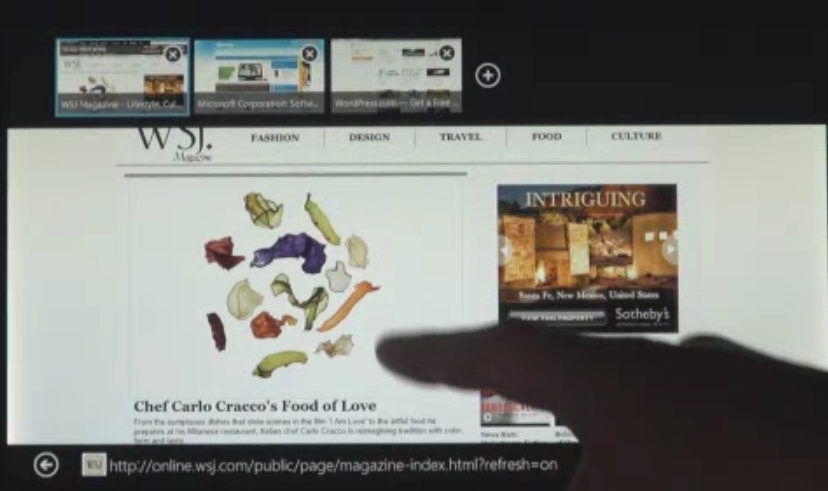
Believe it or not, this is Internet Explorer 10, with tabs along the top that preview each page (nice idea):

image

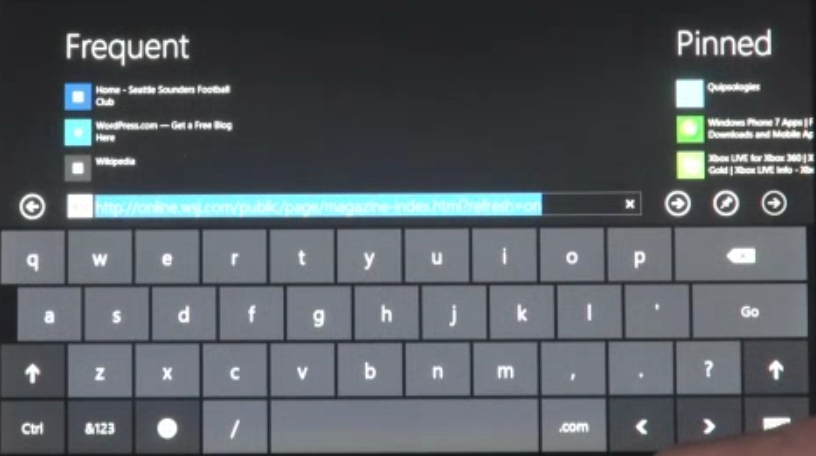
The on-screen keyboard looks like a big phone keyboard:

image

Dual Personality

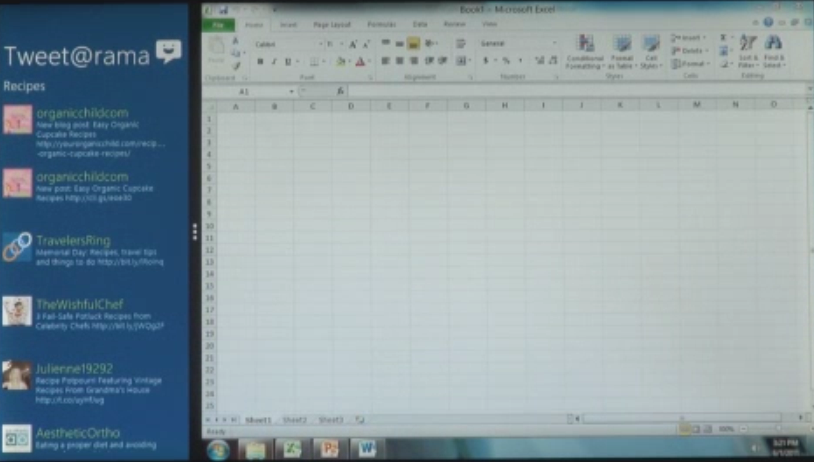
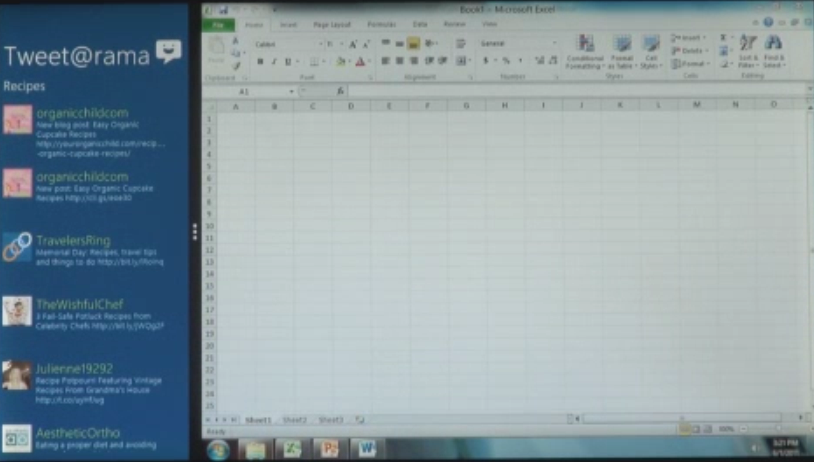
So where is the rest of Windows that we know and love/hate? It is still there; run an “old” Windows app like Excel and presto, it is Windows 7, complete with task bar. This image looks blurry, which actually is a clue to how big and bold the UI shown for the “new” apps really is:

image

You can run old and new-style apps side by side, using the main/side app model:

image

Windows 8 will run on both Intel x86/x64 processors, and on ARM. Legacy app compatibility on Intel will be great, but on ARM applications will need to be recompiled. There is no x86 emulation layer; Sinofsky said that was too difficult to do. Windows 8 will not require any more hardware than Windows 7.

It looks like Microsoft has created an excellent tablet/slate UI which has the same relation to the iPad that Windows Phone 7 has to the iPhone. It borrows many of the ideas but adds some distinctive features.

The big difference: whereas Apple has chosen to continue a dual line, with desktop/laptop Mac in one stream and iOS for iPhone and iPad in another, Microsoft is combining the two.

At least, it is in Windows 8. What about the current Windows Phone OS, which is built on the Windows CE OS? Will it be replaced by a variant of Windows 8, possibly with “full Windows” option disabled? That is my guess, but there is a lot which Microsoft has not yet explained about its future product plans.

Another question: where is Silverlight and .NET? Clearly these technologies are still supported, at least on x86, since all of Windows is still there. In a report from D9, Sinofsky says:

The browser that we showed runs Silverlight and it will still run on the desktop

That does not answer the question: can developers build apps for the new Windows user interface (and Windows store) using Silverlight, or is it HTML/JavaScript only? What about native code?

I will be surprised if all these options are not available, but it was not explicitly stated at D9. The emphasis is firmly on HTML.

We are promised more details at the BUILD conference in September.

OpenOffice moving to Apache; next step reunification with LibreOffice

Oracle has announced that it is contributing the OpenOffice.org code, the source for the free productivity suite that competes with Microsoft Office, to the Apache Software Foundation’s Incubator:

Incubation is the first step for a project to be considered among the diverse Open Source initiatives overseen by the ASF. A submitted project and its community will join the more than 50 projects in the Apache Incubator, and will benefit from the Foundation’s widely-emulated meritocratic process, stewardship, outreach, support, community events, and guiding principles that are affectionately known as "The Apache Way".

Everybody love the Apache Foundation so this is good news for the future of the project, though the Document Foundation, formed by renegade OpenOffice.org contributors fed up with Oracle’s stewardship, says the event is neutral from their perspective. The Document Foundation welcomes the ability to reuse code that will now but under the Apache License, but adds:

The Document Foundation would welcome the reuniting of the OpenOffice.org and LibreOffice projects into a single community of equals in the wake of the departure of Oracle. The step Oracle has taken today was no doubt taken in good faith, but does not appear to directly achieve this goal. The Apache community, which we respect enormously, has very different expectations and norms – licensing, membership and more – to the existing OpenOffice.org and LibreOffice projects. We regret the missed opportunity but are committed to working with all active community members to devise the best possible future for LibreOffice and OpenOffice.org.

It seems inevitable that the two projects will be reunited, and it seems that dialogue has already begun:

TDF is therefore willing to start talking with Apache Software Foundation, following the email from ASF President Jim Jagielski, who is anticipating frequent contacts between the Apache Software Foundation and The Document Foundation over the next few months.

A curious story, but one that seems likely to end in a good way. IBM, which is a big supporter of the ODF XML document formats used in OpenOffice, is welcoming the move:

Over the long-term, we plan to work with other Apache contributors to extend the vision of productivity beyond documents. We are learning much more about the semantic web through our additional work on LotusLive Symphony, and the vision in the research and lab teams has to extend productivity into new realms. Meanwhile, the Apache community can be expected to accelerate adoption of ODF as a primary set of document formats, and to drive ODF compatibility in other products and solutions in the future.

says Ed Brill. It is good to read about new approaches to productivity, because this has been a weakness in OpenOffice which is sometimes perceived a a kind of inferior-but-free equivalent to Microsoft Office. In the meantime, Microsoft has worked to make its own suite more distinctive, to defend a territory that accounts for a significant share of its profits. The ribbon user interface is part of that strategy, but more significant is its integration with SharePoint, and the emergence of Office Open XML as a unifying format for editing documents in desktop Office and within the browser using Office Web Apps.

Unifying the open source teams behind OpenOffice and getting it away from Oracle are both important steps towards making the project more compelling.

Would you consider running PHP on Azure? Microsoft faces uphill battle to convince customers.

Yesterday Microsoft announced Windows Azure SDK for PHP version 3.0, an update to its open source SDK for PHP on Windows Azure. The SDK wraps Azure storage, diagnostics and management services with a PHP API.

Microsoft has been working for years on making IIS a good platform for PHP. FastCGI for IIS was introduced partly, I guess, with PHP in mind; and Microsoft runs a dedicated site for PHP on IIS. The Web Platform Installer installs a number of PHP applications including WordPress, Joomla and Drupal.

It is good to see Microsoft making an effort to support this important open source platform, and I am sure it has been welcomed by Microsoft-platform organisations who want to run WordPress, say, on their existing infrastructure.

Attracting PHP developers to Azure may be harder though. I asked Nick Hines, CTO for Innovation at Thoughtworks, a global IT consultancy and developer, what he thought of the idea.

I’d struggle to see any reason. Even if you had it in your datacentre, I certainly wouldn’t advise a client, unless there was some corporate mandate to the contrary, and especially if they wanted scale, to be running a Java or a PHP application on Windows.

Microsoft’s scaling and availability story around windows hasn’t had the penetration of the datacentre that Java and Linux has. If you look at some of the heavy users of all kinds of technology that we come across , such as some of the investment banks, what they’re tending to do is to build front and middle tier applications using C# and taking advantage of things like Silverlight to get the fancy front ends that they want, but the back end services and heavy lifting and number crunching predominantly is Java or some sort of Java variant running on Linux.

Hine also said that he had not realised running PHP on Azure was something Microsoft was promoting, and voiced his suspicion that PHP would be at a disadvantage to C# and .NET when it came to calling Azure APIs.

His remarks do not surprise me, and Microsoft will have to work hard to persuade a broad range of customers that Azure is as good a platform for PHP as Linux and Apache – even leaving aside the question of whether that is the case.

The new PHP SDK is on Codeplex and developed partly by a third-party, ReadDolmen, sponsored by Microsoft. While I understand why Microsoft is using a third-party, this kind of approach troubles me in that you have to ask, what will happen to the project if Microsoft stops sponsoring it? It is not an organic open source project driven by its users, and there are examples of similar exercises that have turned out to be more to do with PR than with real commitment.

I was trying to think of important open source projects from Microsoft and the best I could come up with is ASP.NET MVC. This is also made available on CodePlex, and is clearly a critical and popular project.

However the two are not really comparable. The SDK for PHP is licensed under the New BSD License; whereas ASP.NET MVC has the restrictive Microsoft Source License for ASP.NET Pre-Release Components (even though it is now RTM – Released to manufacturing). ASP.NET MVC 1.0 was licensed under the Microsoft Public License, but I do not know if this will eventually also be the case for ASP.NET MVC 3.0.

Further, ASP.NET MVC is developed by Microsoft itself, and has its own web site as part of the official ASP.NET site. Many users may not realise that the source is published.

My reasoning, then, is that if Microsoft really want to make PHP a first-class citizen on Azure, it should hire a crack PHP team and develop its own supporting libraries; as well as coming up with some solid evidence for its merits versus, say, Linux on Amazon EC2, that might persuade someone like Nick Hine that it is worth a look.

SharePoint Workspace 2010 – what a mess

For some time I have been meaning to post about SharePoint Workspace 2010. This application was introduced as part of Office 2010, though it is partly based on the older Office Groove software. Its purpose is to allow users to work with documents stored on SharePoint servers even when they are offline. I regard this as an important feature, and since I now store many of my own documents in SharePoint I was quick to install and use it.

I hate it. I am surprised that the Office team released software that is so unreliable, bewildering, overcomplicated, and hard to use even when working as designed. Given that it came out at a time when Microsoft had supposedly got the message about design and user experience, it really is surprisingly bad.

What is wrong with it? All I want to do is to work offline with my SharePoint documents; but the first annoyance is that SharePoint Workspace is designed to accommodate multiple different SharePoint servers. That is not a bad thing in itself, but it means that every time I want to get to my Workspace, I have to go through two steps. First, open the SharePoint workspace Launchbar:

image

Then double-click Home to open my actual Workspace:

image

The workspace is Explorer-like, but it is not Explorer. I think this is a mistake. Microsoft should have made this just another folder in Explorer, that works online and offline, and synchronises when connected. Like Dropbox, in fact. But it did not.

Still, I could cope with this if it worked well. Unfortunately it does not. Here was the first unpleasant message I encountered:

image

“You are storing 196 more documents than SharePoint Workspace supports,” it says. The phrasing is odd. If SharePoint Workspace does not support that number of documents, how come I am storing them?

If you are lucky enough to find it, this document attempts to explain. Here are the limits:

SharePoint Workspace cannot synchronize any files that are larger than 1 GB. Additionally, SharePoint Workspace will stop synchronizing any shared folder that exceeds the following limits: More than 5000 files or a set of files that exceeds 2 GB in total size.

I am way below this though. Why do I get the warning? Maybe because:

For optimal performance in a shared folder, keep the following in mind:

  • Avoid adding large files (>50 MB) to a shared folder.
  • Avoid adding large numbers of files (>100 files) at once.
  • Avoid storing large numbers of files (>500 files) in a shared folder.

Perhaps then I am within the absolute limit, but above the recommended limit for “optimal performance”. However, this article tells a slightly different story:

You can store approximately 500 documents in SharePoint Workspace. If you exceed this limit, a warning message appears on the Launchbar whenever you start up SharePoint Workspace to remind you that you need to free up space. You can ignore this message and continue to do all SharePoint Workspace activities, though with degraded performance.

If you attempt to create a new SharePoint workspace that would exceed 1800 documents across your SharePoint workspaces, a warning message appears to inform you that only document properties will be downloaded to the workspace.

What then are the limits? 5000 per folder? 500 per folder? 1800 overall? or 500 overall?

If it is 500 overall, that is rather small. What is worse though, SharePoint Workspace lacks any common-sense way to control synchronisation. For example, I would like a global setting that said: Synchronize all documents that changed in the last 90 days, plus others I individually specify.

No such luck. You can connect or disconnect entire libraries, otherwise you can manually set a document to download headers only by right-clicking and choosing Discard local copy. That’s it.

I am not done yet. I get other puzzling errors and messages from this thing, which rarely works as expected. In particular, it is rather bad at its primary function, synching offline changes. To demonstrate this, I decided to record exactly what happens when trying something simple like creating a SharePoint document when offline.

I open SharePoint Workspace when offline. I right-click in a folder and choose New Document. Word opens, which is good. I type my document and hit save. Word opens the Save dialog at the default My Documents location – not where I want it.

However, I can click at top left of the Save dialog where it says Workspaces.

image

Then I have to navigate back down to the location where I want it and click Save. Eventually I get this notification:

image

Great, I have managed to create and save a SharePoint document when offline. Except, if I look now in the location to which I have just saved it, it is empty:

image

However, it does appears in Word’s recent document list and I can open it from there.

Perhaps it will sort itself out when I reconnect. I reconnect. Oh no, here comes an unwelcome notification:

image

On investigation, I now find my document in another thing called Microsoft Office Upload Center, with a warning mark:

image

I click Upload all. Nothing happens. I drop down Actions and select Upload. Nothing happens. No error, no upload.

Oddly, if I open SharePoint Workspace, it says it is synchronized. I guess it means synchronized but with errors.

So what is the problem here? Sometimes the problem is that Word is still running. Even if the document is not actually open in Word, some file lock is  not released and it prevents the upload, though you do not get an error message that tells you what is wrong. Not this time though. I could not get it to sync.

I rebooted. Still no joy. I re-opened the document in Word by double-clicking and hit save. Something fixed itself.

image

I am so conditioned to this kind of rigmarole that I rarely try this now. I store the document locally and copy it to SharePoint when it is online, bypassing the Workspace.

Why do I bother with it? A couple of reasons. One is that the ability to get at your SharePoint documents offline, and to have a kind of additional backup, really is a huge feature, and I prefer one that works badly than to be completely without it. Second, I like to live with these things so that I can assess how well they work. Otherwise we are at the mercy of the press releases that state the existence of the feature but do not describe its limitations.

I hope Microsoft comes up with something better for Office 2012 (or vNext).

Windows Phone “Mango” shown, looks good but still no Adobe Flash

I attended the London press briefing for Windows Phone “Mango”, also known as Windows Phone 7.1. This will be on new phones in the Autumn, and will be a free update for all existing Windows Phone 7 devices.

image

Microsoft showed a bunch of new features, including Internet Explorer 9 – which, we were told, is built from the same code as the PC version – improved social media integration now including Twitter and LinkedIn as well as Facebook, Hotmail, Exchange, Messenger and Gmail; and multi-tasking support.

Hold down the back key for a moment, and all running apps appear in a tiled view. Just tap the one you want.

We also saw text-to-voice and voice-to-text demos. The presented spoke the reply to a text message, though admittedly he chose to do a one-word reply, and sent it successfully.

Microsoft also announced three new OEM partners, Acer Inc., Fujitsu Ltd. and ZTE Corp.

It looks good; but I did have a sense that Microsoft is ducking the hard questions. One of those concerns Adobe Flash support. At a separate developer briefing, I asked developer relations guy Brandon Watson about Adobe Flash support, observing that when Windows Phone was shown in detail pre-launch at the Mix 2009 conference in Las Vegas, it was clearly stated that Flash would be on the phone, and that Adobe was being allowed to build the Flash runtime in native code, but that it would not be included at launch.

“It does not run on the phone”, said Watson. Then he added, “It does not run on the phone.” Finally, he said, “It does not run on the phone.”

Silverlight does not run in the mobile browser either, so perhaps the problem is with mobile IE – clearly not all the code is included. Or maybe Adobe is hanging back; I asked Adobe about this at Mobile World Congress earlier this year and got an answer that was warmer but no more informative. Or maybe Microsoft is thinking, Apple does not need it, so we do not need it either.

It is a shame though, because there is a perception that Flash is one of the advantages of not going the Apple route.

On the developer side, the beta tools for Mango were released today. You can target either Windows Phone 7.0 or 7.1 with the tools, so if the beta tag does not put you off you can get going straight away. There is a ton of good stuff for developers, including the SQL Server CE local database, and the ability to mix XNA and Silverlight in a single app. We saw an app from British Airways that makes use of this to show a 3D view of an aircraft cabin when choosing a seat; I am not sure how much real value this adds but it demos nicely.

The new emulator includes accelerometer support, so you can simulate movement to test your app’s response.

There is also a profiler which shows your app’s performance in various views. Code that you wrote is highlighted in blue in the graphical view, so you can tell what you can optimise, as opposed to slow system calls that are outside your control.

The developer tools are great though, and having played with a number of mobile developer toolkits I would say that Microsoft’s is among the best and above average, though I would like to see an option for native code development. “We hear that a lot,” Watson told me.

The problem though: developers want a big market, and so far Windows Phone has not delivered it. It is almost invisible on the high street, and all the current operators and manufacturers have other phones that they are more concerned about. That will change when Nokia devices appear, but in an intensively competitive market (not forgetting HP WebOS and RIM Blackberry/QNX/PlayBook) it will not be easy for Microsoft to gain ground.

After the event I discussed this with some of the Microsoft folk. Maybe the company can better exploit the Xbox link, and sell the phone to that community. Maybe Nokia will save the day. Maybe when Microsoft comes out with a fully professional iteration of Windows Phone, tightly linked to Active Directory and group policy, and with additional developer features aimed at line of business apps, maybe then it will take off.

One positive thing I heard today was an anecdotal report that returns on Windows Phone 7 are among the lowest because users like the device so much.

The social features in Windows Phone are already good and will be better in Mango – though bear in mind that by the time Mango phones appear in the Autumn, Microsoft will likely have iPhone 5 and many tempting new Android devices to contend with.

Years ago it used to be said that Microsoft had average products (or worse) but excellent marketing. With Windows Phone, the product is good but either the marketing is lacking or the task is too great. Of course there is still time, and this industry is full of surprises, but it will take more than Mango to make Windows Phone fly.

Cracks appear in Microsoft’s bundled installers for Visual Studio 2010 as I try ADFS

I am trying out Microsoft Active Directory Federation Services (ADFS), chasing the dream of single sign-on between on-premise Active Directory and the cloud.

Oddly, although ADFS has been around for a while, it feels more bleeding edge than it should. ADFS is critical to Microsoft’s cloud platform play, and it needs to build this stuff right into Windows Server and .NET rather than making it a downloadable add-on.

The big problem with installers, whether on Windows or elsewhere, is dependencies and versions. You get some variant of DLL Hell, when A requires the latest version of B, and C requires an old version of B, and you need both A and C installed. The issue on Windows has reduced over the years, partly because of more side-by-side installations where multiple versions co-exist, and partly because Microsoft has invested huge effort into its installers.

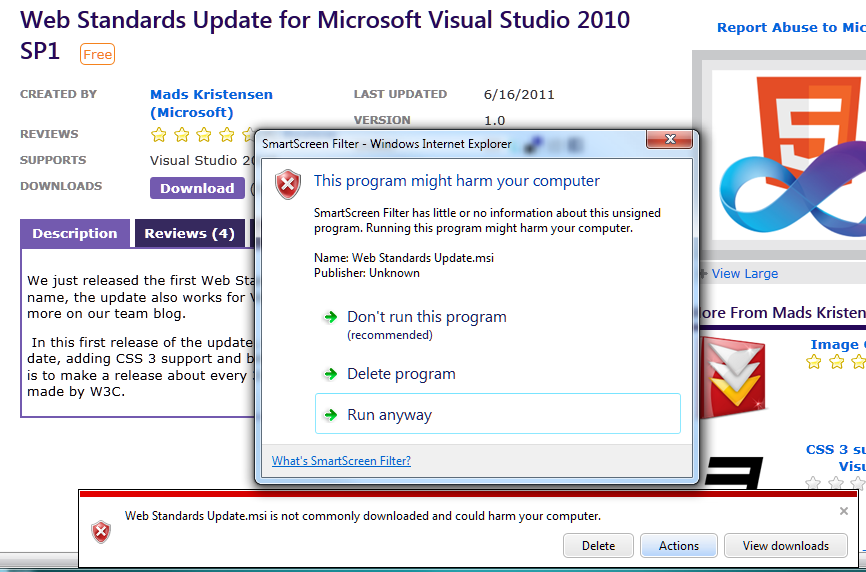
There are still issues though, and I ran into a few of them when trying ADFS. I have Visual Studio 2010 installed on Windows 7 64-bit, and it is up-to-date with Service Pack 1, released in April. However, after installing the Windows Identity Foundation (WIF) runtime and SDK, I got this error when attempting to start Visual Studio:

image

Only some of the Microsoft Visual Studio 2010 products on this computer have been upgraded to Service Pack 1. None will work correctly until all have been upgraded.

I’m guessing that the WIF components have not been updated to take account of SP1 and broke something. Never mind, I found my Visual Studio SP1 .ISO (I avoid the web installs where possible), ran setup, and choose to reapply the service pack. It trundled along until it decided that it needed to run or query the Silverlight 4 SDK setup:

image

A dialog asked for silverlight_sdk.msi. I wasted some time over this. Why is the installer looking for silverlight_sdk.msi in a location that does not exist? I’d guess because the Silverlight SDK installer is wrapped as an executable that unpacked the MSI there, ran it and then deleted it. Indeed, I discovered that both the Silverlight 4 SDK and the Silverlight 4 Tools for Visual Studio are .EXE files that wrap zip archives. You can rename them with a .zip or .7z extension and extract them with the open source 7 Zip, but not for some reason with the ZIP extractor built into Windows. Then you can get hold of silverlight_sdk.msi.

I did this, but then discovered that silverlight_sdk.msi is also on the Visual Studio SP1 ISO. All I needed to do was to point the installer there, though it is odd that it cannot find the file of its own accord.

It also seems to me that this scenario should not occur. If the MSI for installation A might be needed later by installation B, it should not be put into a temporary location and then deleted.

The SPI repair continued, and I got a reprise of the same issue but with the Visual C++ runtimes. The following dialog appeared twice for x86, and twice for x64:

image

These files are also on the SP1 .ISO, so I pointed the installer there once again and setup continued.

Unfortunately something else was wrong. After a lengthy install, the SP1 installer started rollback without so much as a warning dialog, and then exited declaring that a fatal error had occurred. I looked at the logs

I rebooted, tried again, same result.

I was about to trawl the forums, but thought I should try running Visual Studio 2010 again, just in case. Everything was fine.

image

Logic tells me that the SP1 “rollback” was not quite a rollback, since it fixed the problem. Then again, bear in mind that it was rolling back the reapplication of the service pack which is different from the usual rollback scenario.

Visual Studio, .NET, myriad SDKs that each get updated at different times, developers who download and install these in an unpredictable order … it is not surprising that it goes wrong sometimes; in fact it is surprising that it does not go wrong more often. So I guess I should not beat up Microsoft too much about this. Even so this was an unwelcome reminder of a problem I have not seen much in the last few years, other then with beta installs which play by different rules.

Infragistics: upbeat on Windows Phone but also building for Apple iOS, Google Android

I spoke to Dean Guida, CEO and co-founder of Infragistics, at TechEd in Atlanta earlier this week. Infragistics makes components, mainly for Windows but now beginning to support non-Windows clients. There is a set of jQuery controls in preparation, and “Our roadmaps are also going to deliver native on Android and iPhone,” Guida told me. “We have a lot of software companies that use our tools in their commercial apps, and a lot of enterprises, and we feel that we need to do it,” though he adds, “we feel that the best and the smartest business solution is to go mobile web.”

image

Infragistics has a focus on data visualization, and Guida showed me some great-looking components that show animated charts, with a huge range of customisation options, and including geo-spatial and timeline controls.

I was intrigued to find Guida more upbeat about Windows Phone than most commentators, though I make allowance for the fact that his company has a component suite for the platform. “More than half of our customers told us that they’re either building or they will build for Windows Phone in the next 12 months,” he told me.

His view, which I share, is that they key advantage of Windows Phone is to Microsoft-platform enterprises rather than to consumers. “It’s so easy to extend their knowledge of Silverlight and extend apps, that they’ll be able to extend the data and the access to information this way. I think that’s going to be a beachhead for Microsoft.”

Of course Microsoft has marketed Windows Phone to consumers so far, and has told businesses they should continue to use Windows Mobile 6.5, clearly a dead-end. It may be easier when the company is able to move on from this mixed messaging and get behind Windows Phone as a business mobile platform.

Continuing a contrarian theme, Guida is also positive about Windows Presentation Foundation (WPF). “It’s huge, especially in the financial markets. They’ve made big bets on it. They’ve built a lot of their trading apps and a lot of their internal apps on it. We’ve been telling Microsoft this for years,” he says.

The problem I guess is that while WPF/Silverlight makes sense for data visualisation for internal apps where you control the platform, for broad reach apps that are visible to the rest of us, Adobe Flash or some other approach is a better fit.

It is understandable that companies like Infragistics are keen to talk up the Microsoft platform. Their business depends on it. It is true that Infragistics is now experimenting with other platforms like Apple iOS and Google Android, but historically developers on non-Microsoft platforms have not formed a strong component market.

“They don’t get it as much as Microsoft developers,” says Guida. “We used to have a ton of Java components. I was at the second JavaOne conference. We built some of the first AWT components, JavaBeans, Swing components. There’s a lot more pain developing for these platforms than on the Microsoft platform, Microsoft has done a great job with the tooling. Why have that pain? I think there is a distinction between the Microsoft and the non-Microsoft developer, that they have a higher tolerance for, pain’s probably not the right word, but a higher tolerance for taking longer to get stuff done. I can only believe that over time maturity will happen. It’s really about satisfying a business need or a consumer need. These platforms are different, but if we go in and give them the tools, why not? We’re really just this year starting to get there.”

It is a brave hope; but looking at the Infragistics site, there are currently no Java controls on offer, and even the 2008 NetAdvantage for JavaServer Faces (JSF) seems to have disappeared. If the Microsoft client platform does decline, the future will be challenging.