Category Archives: microsoft

Bob Muglia leaving Microsoft, CEO Steve Ballmer searching for new cloud leadership

Microsoft has announced that Bob Muglia, President of Server and Tools, is leaving Microsoft.

In his memo, Steve Ballmer says:

Bob Muglia and I have been talking about the overall business and what is needed to accelerate our growth. In this context, I have decided that now is the time to put new leadership in place for STB. This is simply recognition that all businesses go through cycles and need new and different talent to manage through those cycles.

It is always hard to tell from the outside, but in my encounters Muglia has been among the most articulate and confident of Microsoft’s top executives. I have also noticed in my regular look at Microsoft’s financials that the Server and Tools business has performed consistently well for as long as I can remember.

Most recently, Muglia took over the Azure business and seemed to know where he was going with it. He is also responsible for developer tools, and while his remarks about Silverlight at Microsoft’s PDC in November were disappointing to developers on that platform, they showed a clear sense of direction.

In this context, it seems surprising that Ballmer is in search of “new and different talent”. It does sound as if Ballmer and Muglia do not see the future of the cloud business – which is the focus of the memo – in the same way.

The key question: in what way did Ballmer and Muglia’s vision differ? I guess we will get some more clues as today’s news is discussed.

Update: Mary Jo Foley has posted Bob Muglia’s internal email to his team:

Later this year, I’m moving on to new opportunities outside of Microsoft, so I wanted to take a few minutes to share with you what’s important to me in life and leadership.

The foundation of who I am is based on living with integrity. Integrity requires principles, and my primary principle is to focus on doing the right thing, as best I can. The best thing, to the best of my ability, for our customers, our products, our shareholders, and of course, our people.

Just sugar, or did Muglia feel that staying at Microsoft would compromise those principles?

Since the announcement, the reaction across the industry has shown the high regard in which he is held, and bewilderment at why he is being let go. Here’s Redmonk analyst James Governor on Twitter:

Another exit: Microsoft server chief Muglia leaving company normally i say so what but this is TERRIBLE for microsoft

Apple’s Mac App Store – and the forgotten Windows Marketplace

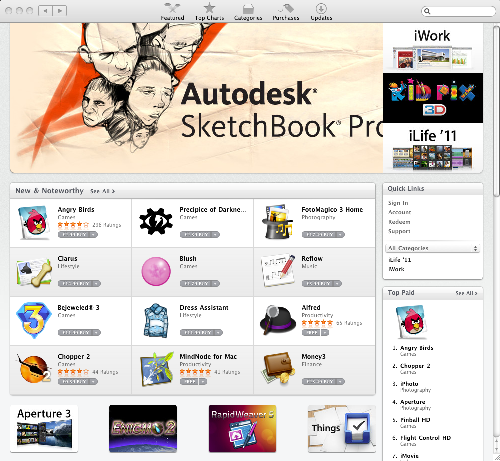
Apple launched the Mac App Store yesterday and I had a look this morning. It is only available to users of Mac OS X Snow Leopard, where it comes with the latest system update.

image

It is interesting that Apple has not used iTunes for the App Store, but has developed new client software. Maybe it is coming round to opinion that iTunes has become bloated; it is only for historic reasons that a music player has become an all-purpose app installer.

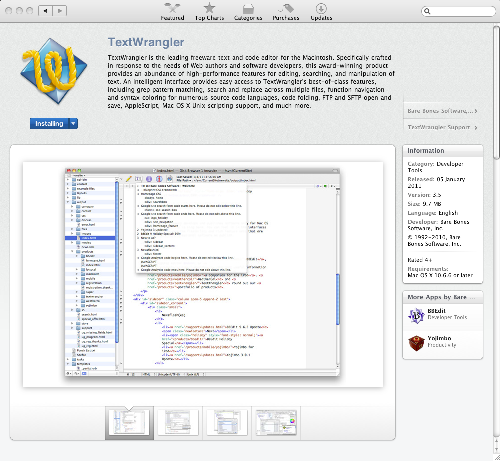
The store itself worked well for me. I picked a free app, TextWrangler, and signed in with my Apple ID. The UI showed Installing, then Installed, and I was done.

image

The TextWrangler icon appeared in the Dock so I could start the app easily.

What counts is what I did not have to do – reboot, select from setup options, or deal with perplexing error messages.

Users will also like the common-sense licensing, which lets you download and install a purchased app on any Mac you use, controlled by your App Store log-in. I am not sure what happens if you install your app on your friend’s Mac, then sign out of the App Store. There is some link between the app and your Apple ID, because if you copy the application to another Mac it will ask for your sign-in details when you first run it, but I am not clear whether this is checked on every run to deter piracy.

Most important, there is an attractive range of apps at good prices. In the UK, Angry Birds is £2.99, Pinball HD £1.79, and Apple Pages or Keynote £11.99 each. That is less than typical Apple Store shrink-wrap prices. The prices for Pages and Keynote makes the price Microsoft charges for Office look impossibly expensive. Good for customers; but worrying for independent software vendors who want to make a living.

Developers pay $99.00 per year to join the Mac Developer Program and then 30% commission to Apple on every sale. Of course, like the iPhone App Store, apps are subject to Apple’s approval.

Lest you think it is clever of Apple to invent an app store for the desktop, it is worth noting that the concept is an old one. Linux has delivered free software like this for years, and some distributions have also featured paid app installers integrated into the OS.

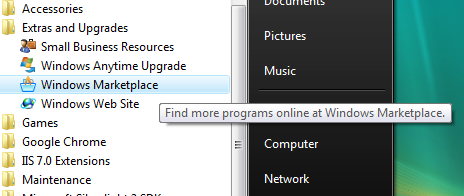
So has Microsoft, which has run various varieties of Windows Marketplace over the years, for mobile and desktop applications. Windows Vista shipped with an app store for both Microsoft and third-party apps built-in. It was on the Start menu:

image

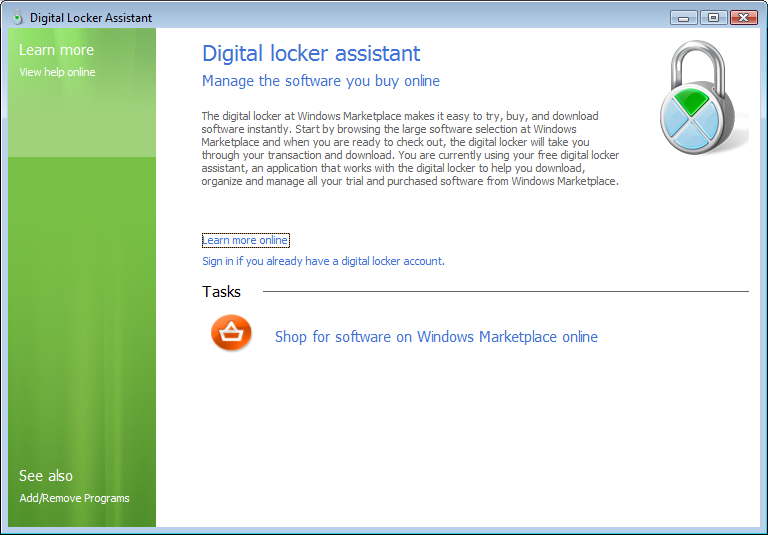
as well as in Control Panel:

image

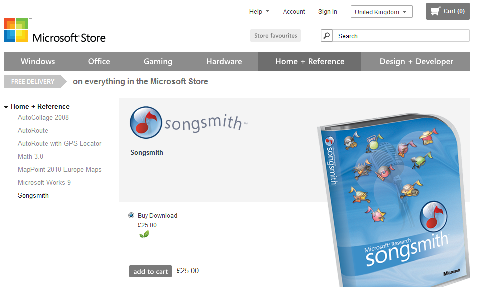
On November 1st 2008 Microsoft shut down Windows Marketplace and “transitioned” it to a referral site. There was some angst at the time about the closing of the digital locker, which proved insecure against the threat of corporate mind-changing. It still runs the online Microsoft Store, but this is for Microsoft-only products. For example, you can download Microsoft Songsmith for £25.00:

image

Why did Windows Marketplace fail? Well, the user experience was poor, it was insufficiently prominent in the Vista user interface, setup could be troublesome. Major Windows app vendors figured out that they would be better off drawing potential customers to their own web sites, where they have full control. As is often the case, Microsoft was conflicted over whether it wanted to drive customers to the online store, or to partner retailers, or to app vendor sites; and the OEMs would have their say as well, when customising Windows for their own PCs.

Another factor is that Windows apps are often not well isolated. Silverlight actually solves this problem – out-of-browser apps are well isolated and secure – but Microsoft does not even ship Silverlight by default with Windows.

The indications are that Microsoft will have another go in Windows 8. Documents leaked last year show an app store. From my post at the time:

There’s a pattern here. Microsoft gets bright idea – Tablet, Windows Marketplace, Passport. Does half-baked implementation which flops. Apple or Google works out how to do it right. Microsoft copies them.

NVIDIA Tegra 2: amazing mobile power that hints at the future of client computing

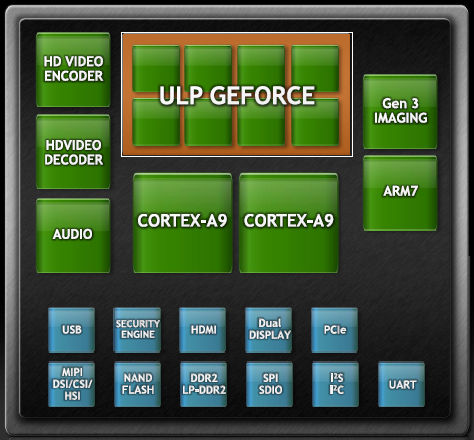
Smartphone power has made another jump forward with the announcement at CES in Las Vegas of new devices built on NVIDIA’s new Tegra 2 package – a System on a Chip (SoC) that includes dual-core CPU, GPU, and additional support for HD video encoding and decoding, audio, imaging, USB, PCIe and more:

image

The CPU is the ARM Cortex-A9 which has a RISC (Reduced Instruction Set Computer) architecture and a 32-bit instruction set. It also supports the Thumb-2 instruction set which is actually 16-bit. How is 16-bit an upgrade over 32-bit? Well, 16-bit instructions means smaller code, even though it gets translated to 32-bit instructions at runtime:

For performance optimised code Thumb-2 technology uses 31 percent less memory to reduce system cost, while providing up to 38 percent higher performance than existing high density code, which can be used to prolong battery-life or to enrich the product feature set.

The GPU is an “ultra low power” (ULP) 8-core GeForce. In essence, the package aims for high performance with low power consumption, exactly what is wanted for mobile computing.

Power is also saved by sophisticated power management features. The package uses a combination of suspending parts of the system, gating the clock speed, screen management, and dynamically adjusting voltage and frequency, in order to save power. The result is a system which NVIDIA claims is 25-50 times more efficient than a typical PC.

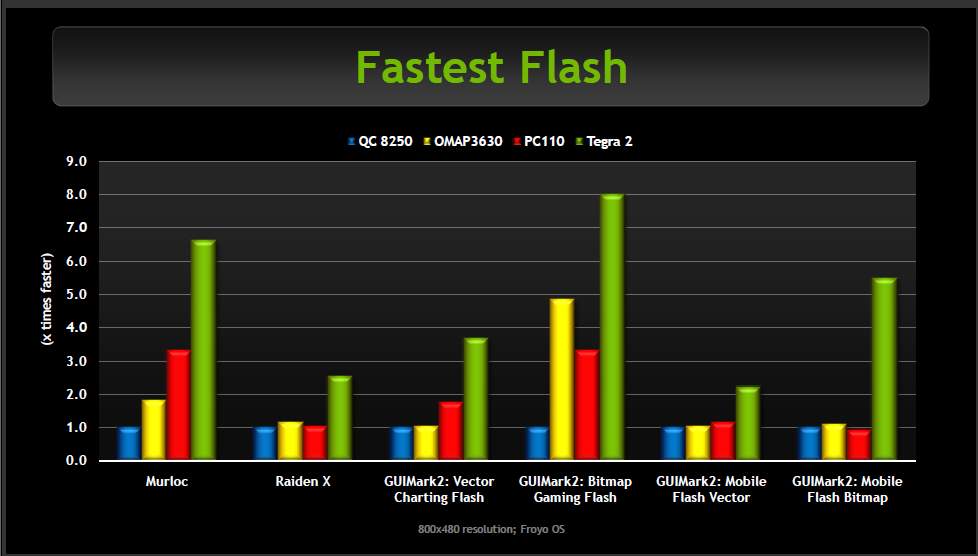
According to NVIDIA, Tegra 2 enables web browsing up to two times faster than competitors such as the Qualcomm Snapdragon 8250 or Texas Instruments OMAP 3630 – though of course these companies also have new SoCs in preparation.

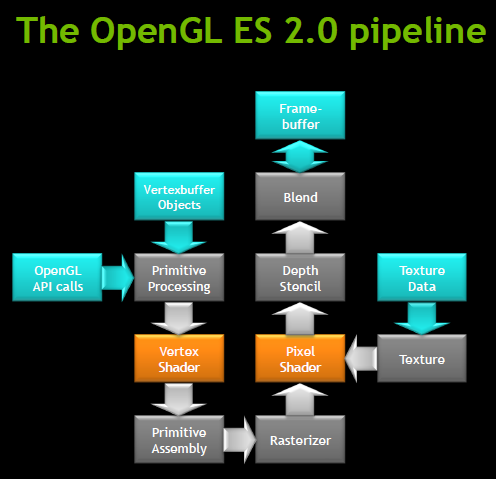
Tegra 2 is optimised for some specific software. One is the OpenGL graphics API. “The job of the GPU is to implement the logical pipeline defined by OpenGL”, I was told at an NVIDIA briefing.

image

I asked whether this meant that Tegra 2 is sub-optimal for Microsoft’s Direct X API; but NVIDIA says it is sufficiently similar that it makes no difference.

Nevertheless, Tegra 2 has been designed with Android in mind, not Windows. There are a couple of reasons for this. The main one is that Android has all the momentum in the market; but apart from that, Microsoft partnered with Qualcomm for Windows Phone 7, which runs on Snapdragon, shutting out NVIDIA at the initial launch. NVIDIA is a long-term Microsoft partner and the shift from Windows Mobile to Android has apparently cost NVIDIA a lot of time. The shift took place around 18 months ago, when NVIDIA saw how the market was moving. That shift “cost us a year to a year and a half of products to market”, I was told – a delay which must include changes at every level from hardware optimisation, to designing the kind of package that suits the devices Android vendors want to build, to building up knowledge of Android in order to market effectively to hardware vendors.

Despite this focus, Microsoft demonstrated Windows 8 running on Tegra during Steve Ballmer’s keynote, so this should not be taken to mean that Windows or Windows CE will not run. I still found it interesting to hear this example of how deeply the industry has moved away from Microsoft’s mobile platform.

Microsoft should worry. NVIDIA foresees that “all of your computing needs are ultimately going to be surfaced through your mobile device”. Tegra 2 is a step along the way, since HDMI support is built-in, enabling high resolution displays. If you want to do desktop computing, you sit down at your desk, pop your mobile into a dock, and get on with your work or play using a large screen and a keyboard. It seems plausible to me.

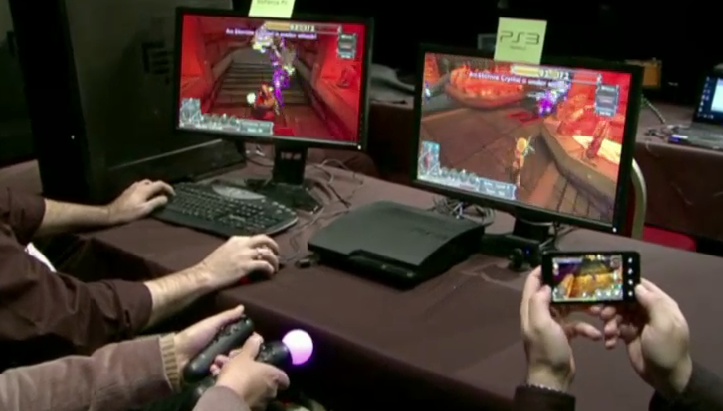
During the press conference at CES we were shown an example of simultaneous rich graphic gaming on PC, PlayStation 3, and Tegra 2 Smartphone.

image

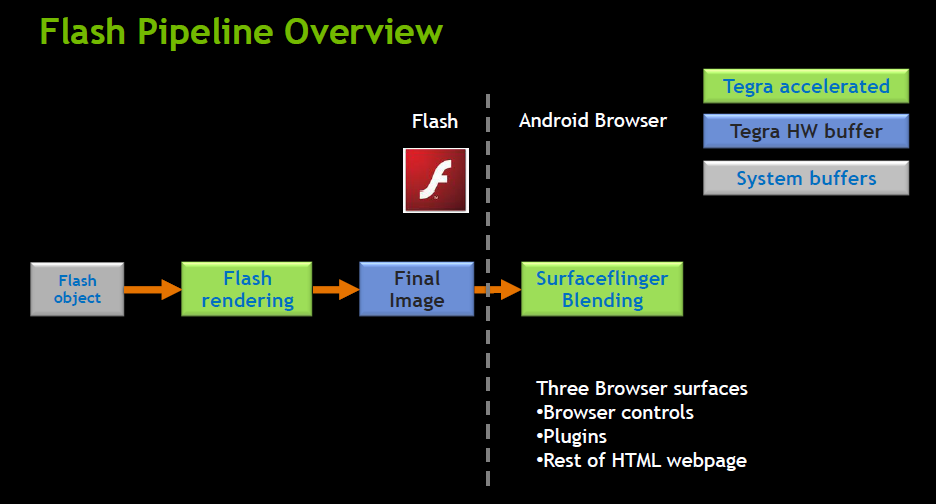
Alongside Android, Tegra 2 is optimised for Adobe Flash. NVIDIA has been given full access to the source of the Flash player in order to deliver hardware acceleration.

image

image

Actual devices

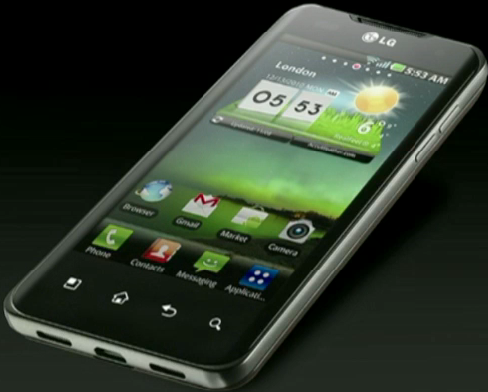
What about actual devices? Two that were shown at CES are the LG Optimus 2X:

image

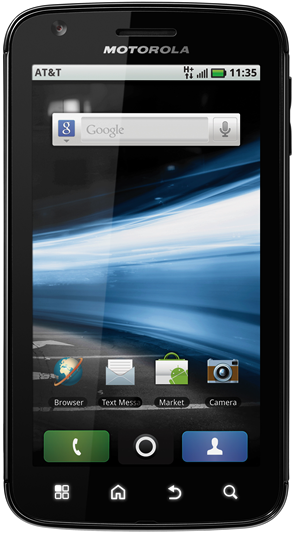
and the Motorola Atrix 4G:

image

Both sport impressive specifications; though the Guardian’s Charles Arthur, who attended a briefing on the Atrix 4G, expresses some scepticism about whether HD video (which needs a large display) and the full desktop version of FireFox are really necessary on a phone. Apparently the claimed battery life is only 8 hours; some of us might be willing to sacrifice a degree of that capability for a longer battery life.

Still, while some manufacturers will get the balance between cost, features, size and battery life wrong, history tells that we will find good ways to use these all this new processing and graphics power, especially if we can get to the point where such a device, combined with cloud computing and a desktop dock, becomes the only client most of us need.

NVIDIA says that over 50 Android/Tegra 2 products are set to be released by mid-2011, in tablet as well as Smartphone form factors. I’m guessing that at least some of these will be winners.

Steve Ballmer at CES: Microsoft pins mobile hopes on Windows 8

Microsoft CEO Steve Ballmer gave the keynote at CES in Las Vegas last night. It was a polished performance and everything worked, but was short on vision or any immediate answer to the twin forces of Apple iPad and Google Android which are squeezing out Microsoft in the mobile world – smartphones and tablets – which currently forms the centre of attention in personal computing.

That said, CES stands for Consumer Electronics Show; and Ballmer did a good job showing off how well Kinect is performing, claiming sales of 8 million already. He showed more examples of controlling Xbox through speech and gesture, and said that Kinect is also boosting sales of the console; clearly it is now taking it beyond the hardcore market of first-person shooters.

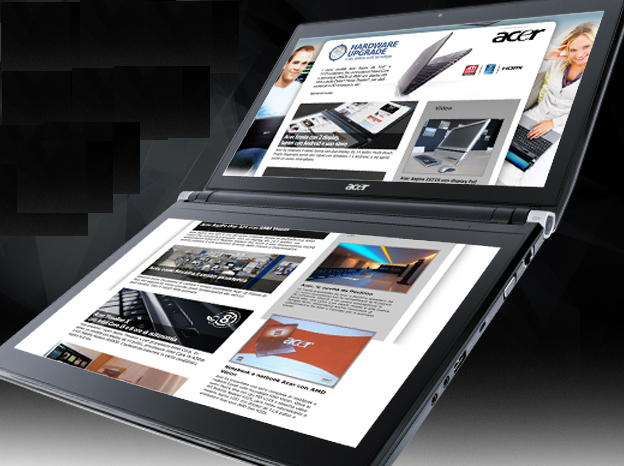
We saw some fun new Windows devices, such as Acer’s dual-screen Iconia laptop.

image

There was also a demonstration of the updated Microsoft Surface which now runs full Windows 7 and does not require hidden cameras, so that it can now be used in more scenarios, such as for interactive digital signage.

All well and good; but what about mobile? We got a Windows Phone 7 demo, but no sales figures, nor any mobile partners on stage; I’m guessing they are too busy promoting their new Android devices. Ballmer did say that the phone is coming on Verizon and Sprint in the first half of this year. Application availability is improving, but how will Microsoft win attention for its smartphone? My local high street is full of mobile phone shops, none of which even stock it as far as I can tell. There is a tie-in with Xbox Live which may help a little.

The problem though is that Microsoft does not seem to be wholeheartedly behind the Windows Phone 7 OS, which is based on Windows CE with a new GUI and Silverlight/XNA runtime for applications. Rather, Microsoft is signalling that full Windows is its future mobile operating system. At CES it announced Windows on ARM, the processor of choice in mobile, and during the keynote we saw the next version of Windows (though with the Windows 7 GUI) running on various ARM devices.

The power available in new System on a Chip packages like NVIDIA’s Tegra 2 leaves me in no doubt that full Windows could technically run on almost any size of device; but that does not make it the sensible choice for all form factors. Note also that while it was not mentioned at CES, NVIDIA has said that Tegra 2 is optimized for Android.

Microsoft could plausibly have released a tablet based on the Windows Phone 7 OS, which is built for touch control, this year. Instead, it will be at least 2012 before we see a Windows 8 tablet, and we are taking it on trust that this will really work nicely with touch and not need a stylus dangling at the side. By then Apple will, I presume, be releasing iPad generation 3.

Putting this in a developer context, what is Microsoft’s mobile development platform? Silverlight and XNA? The full Windows native API? Or HTML 5? Each of these is very different and it seems to me a muddled story.

NVIDIA’s first CPU, Project Denver, aims to bring ARM to desktops and servers

At CES in Las Vegas today NVIDIA’s CEO Jen-Hsun Huang announced the company’s first CPU: Project Denver. This is a partnership with ARM, to create “a full custom processor” targeting “high performance computing – servers, PCs, super-computers, cloud computing.” NVIDIA will still licence ARM processors for mobile computing.

Since ARM has in the past focused on the mobile and embedded market, and NVIDIA on GPUs, it is a departure for both companies.

Why? Huang says it is because ARM is “the new standard microprocessor architecture.” Judging by this chart, shown at the press briefing, it is hard to disagree:

image

In a few years, said Huang, “There will be more ARM processors shipped than all the x86 chips ever shipped.”

image

NVIDIA’s press release explains that the purpose of Project Denver is to extend the range of ARM systems upwards:

For several years, makers of high-end computing platforms have had no choice about instruction-set architecture.  The only option was the x86 instruction set with variable-length instructions, a small register set, and other features that interfered with modern compiler optimizations, required a larger area for instruction decoding, and substantially reduced energy efficiency.

Denver provides a choice.   System builders can now choose a high-performance processor based on a RISC instruction set with modern features such as fixed-width instructions, predication, and a large general register file.   These features enable advanced compiler techniques and simplify implementation, ultimately leading to higher performance and a more energy-efficient processor.

The other interesting aspect of Project Denver is its integration with the GPU – as you would expect from NVIDIA:

An ARM processor coupled with an NVIDIA GPU represents the computing platform of the future.  A high-performance CPU with a standard instruction set will run the serial parts of applications and provide compatibility while a highly-parallel, highly-efficient GPU will run the parallel portions of programs.

While we tend to focus most on power efficiency for mobile devices, because we notice how long our batteries last, it is equally important for larger systems. Power consumption and dealing with heat is a key issue for datacentres, while in everyday desktop computing power consumption is a significant proportion of the running cost of an IT system.

Project Denver puts a different spin on Microsoft’s Windows-on-ARM announcement today. The assumption is that Microsoft has in mind a mobile future for Windows; but if Denver takes off it could be important on desktops and servers as well.

Before getting too excited, it is worth recalling how Intel’s Itanium, cruelly dubbed the Itanic, mostly failed in the market. That was partly thanks to design problems, and partly because the industry was too deeply hooked into x86 applications. I also recall Motorola’s doomed attempts to sell Windows NT on PowerPC in the mid Nineties.

Denver could fare better, thanks to the ubiquity of ARM in the mobile world. That said, much will depend on whether a Denver-based system really does offer significant benefits over whatever Intel and/or AMD will have come up with by the time it ships. If it is less than spectacular, Denver will be a hard sell.

Windows 8 will run on ARM processors – a natural home for Silverlight?

Microsoft announced today at CES in Las Vegas that the next version of Windows will run on ARM as well as Intel CPUs. But why? The reason is that ARM CPUs have huge momentum in mobile computing, thanks to their low power consumption. Microsoft wants Windows to support System on a Chip (SoC) architectures such as NVIDIA’s Tegra 2, which has two ARM Cortex-A9 CPUs combined with an HD-capable graphics processor in a single package. In its press release, the company is careful not to upset established x86/x64 partners Intel and AMD too much, emphasising that Windows will run on SoC packages based on those CPUs as well.

It is an interesting announcement, but one that raises as many questions as answers. The first concerns Microsoft’s mobile strategy, with Windows now seeming to encroach on territory that you have thought belonged to its embedded operating system, Windows CE, which underlies both Windows Mobile and Windows Phone 7. With all its legacy APIs, full-blown Windows does not seem ideal for low-powered, resource-constrained mobile devices; yet the company seems set on bringing full Windows rather than something based on Windows Phone 7 to the emerging tablet market.

The second issue is that applications will need at least re-compiling, and in many cases some re-coding, in order to run on ARM CPUs. Microsoft says it will deliver Office for ARM:

Sinofsky: Microsoft Office is an important part of customers’ PC experience and ensuring it runs natively on ARM is a natural extension of our Windows commitment to SoC architectures.

Windows and Office alone is enough for a decent business device; but customers who buy Windows on ARM expecting their existing games or applications to run will be disappointed.

We have been here before. In the early days of Windows CE, devices ran a variety of processors such as MIPS or Hitachi SH3, and developers had to compile multiple binaries and create setups that installed the right one on each device. In an attempt to overcome the friction this created, Microsoft introduced the Common Executable Format (CEF) with Windows CE 3.0 in 2000. This was an intermediate language format which was translated to native code by a “translator” when it was installed onto a device.

It sounds  a bit like .NET or Java; and it was indeed a forerunner of the .NET Common Language Runtime, which appeared in 2002. However, CEF never really caught on. Although it solved deployment issues, it introduced performance problems and was troublesome to debug. Most developers preferred to stick with true native code.

Today though .NET is mature; and we also have Silverlight, a cross-platform implementation of the .NET Framework combined with multimedia player and graphics framework. If Microsoft includes .NET and Silverlight in its ARM build of Windows, that would solve some of the deployment problems, especially for business devices. Many custom applications are built for .NET; and these would in principle run without any need to recompile, since a .NET executable is intermediate code which is compiled to native code at runtime, though any code which includes “platform invoke” calls to native APIs would not work.

It is surprising therefore that neither .NET nor Silverlight is mentioned in Windows president Steve Sinofsky’s Q&A about Windows on ARM. Still, we should not read too much into that. It would be madness if Microsoft did not support its .NET technologies on this new platform, would it not?

Hardware vendors chase Apple’s iPad at CES with Android, not Windows

There is a chorus of disapproval on the web today as Asus announced a full-fat Windows tablet  (Eee Slate EP121)  at CES in Las Vegas, along with three other devices running Google Android – the Eee Pad MeMo, the Eee Pad Transformer, and the Eee Pad Slider.

The most detailed “review” I’ve seen for the EP121 is on the Windows Experience Blog. Core i5, 4GB RAM, 64GB SSD, capacitive screen with touch and stylus input.

Nice in its way; but no kind of game-changer since this is an echo of early Windows slates which never achieved more than niche success. Four big disadvantages:

  • Short battery life
  • High price
  • The stylus
  • and another thing: in the rush to embrace touch computing, vendors appear to have forgotten one of the best features of those early tablets: you could rest your hand on the screen while writing with the pen. If you have a combined touch/stylus device that will not work.

Microsoft fans will be hoping CEO Steve Ballmer does not make too much of the EP121 and devices like this in tonight’s keynote. If he does, it will seem the company has learned little from failures of the past.

Asus deserves respect for introducing the netbook to the world in 2007, with the original Eee PC. It ran Linux, had an SSD in place of a hard drive, battery life was good, and above all it was light and cheap. Back then the story was how Microsoft missed the mark with its 2006 Origami project – small portable PCs running Windows – only to be shown how to do it by OEMs with simple netbooks at the right price.

Asus itself is not betting on Windows for tablet success; after all, three of the four products unveiled yesterday run Android. Despite what was apparently a poor CES press conference these may work out OK, though the prices look on the high side.

There will be many more tablets announced at CES, most of them running Android. Android “Honeycomb”, which is also Android 3.0 if Asus CEO Johnny Shih had his terminology right, is the first version created with tablet support in mind.

But why the tablet rush? The answer is obvious: it is because Apple has re-invented the category with the iPad. Since the iPad has succeeded where the Tablet PC failed, as a mass-market device, intuitively you would expect vendors to study what is right about it and to copy that, rather than repeating past mistakes. I think that includes long battery life and a touch-centric user interface; keyboard or stylus is OK as an optional extra but no more than that.

Equalling Apple’s design excellence and closed-but-seamless ecosystem is not possible for most manufacturers, but thanks to Android they can come up with devices that are better in other aspects: cheaper, more powerful, or with added features such as USB ports and Adobe Flash support.

It is reasonable to expect that at least a few of the CES tablets will succeed as not-quite iPads that hit the mark, just as Smartphones like the HTC Desire and Motorola Droid series have done with respect to the iPhone.

Microsoft? Ballmer’s main advantage is that expectations are low. Even if he exceeds those expectations, the abundance of Android tablets at CES shows how badly the company misjudged and mishandled the mobile market.

The implication for developers is that if you want app ubiquity, you have to develop for Android and iOS.

Microsoft could help itself and its developers by delivering a cross-platform runtime for the .NET Framework that would run on Android. I doubt Silverlight for Android would be technically difficult for Microsoft; but sadly after PDC it looks unlikely.

Ten big tech trends from 2010

This was an amazing year for tech. Here are some of the things that struck me as significant.

Sun Java became Oracle Java

Oracle acquired Sun and set about imposing its authority on Java. Java is still Java, but Oracle lacks Sun’s commitment to open source and community – though even in Sun days there was tension in this area. That was nothing to the fireworks we saw in 2010, with Java Community Process members resigning, IBM switching from its commitment to the Apache Harmony project to the official OpenJDK, and the Apache foundation waging a war of words against Oracle that was impassioned but, it seems, futile.

Microsoft got cloud religion

Only up to a point, of course. This is the Windows and Office company, after all. However – and this is a little subjective – this was the year when Microsoft convinced me it is serious about Windows Azure for hosting our applications and data. In addition, it seems to me that the company is willing to upset its partners if necessary for the sake of its hosted Exchange and SharePoint – BPOS (Business Productivity Online Suite), soon to become Office 365.

This is a profound change for Microsoft, bearing in mind its business model. I spoke to a few partners when researching this article for the Register and was interested by the level of unease that was expressed.

Microsoft also announced some impressive customer wins for BPOS, especially in government, though the price the customers pay for these is never mentioned in the press releases.

Microsoft Silverlight shrank towards Windows-only

Silverlight is Microsoft’s browser plug-in which delivers multimedia and the .NET Framework to Windows and Mac; it is also the development platform for Windows Phone 7. It still works on a Mac, but in 2010 Microsoft made it clear that cross-platform Silverlight is no longer its strategy (if it ever was), and undermined the Mac version by adding Windows-specific features that interoperate with the local operating system. Silverlight is still an excellent runtime, powerful, relatively lightweight, easy to deploy, and supported by strong tools in Visual Studio 2010. If you have users who do not run Windows though, it now looks a brave choice.

The Apple iPad was a hit

I still have to pinch myself when thinking about how Microsoft now needs to catch up with Apple in tablet computing. I got my first tablet in 2003, yes seven years ago, and it ran Windows. Now despite seven years of product refinement it is obvious that Windows tablets miss the mark that Apple has hit with its first attempt – though drawing heavily on what it learnt with the equally successful iPhone. I see iPads all over the place, in business as well as elsewhere, and it seems to me that the success of a touch interface on this larger screen signifies a transition in personal computing that will have a big impact.

Google Android was a hit

Just when Apple seemed to have the future of mobile computing in its hands, Google’s Android alternative took off, benefiting from mass adoption by everyone-but-Apple among hardware manufacturers. Android is not as elegantly designed or as usable as Apple’s iOS, but it is close enough; and it is a relatively open platform that runs Adobe Flash and other apps that do not meet Apple’s approval. There are other contenders: Microsoft Windows Phone 7; RIM’s QNX-based OS in the PlayBook; HP’s Palm WebOS; Nokia Symbian and Intel/Nokia MeeGo – but how many mobile operating systems can succeed? Right now, all we can safely say is that Apple has real competition from Android.

HP fell out with Microsoft

Here is an interesting one. The year kicked off with a press release announcing that HP and Microsoft love each other to the extent of $250 million over three years – but if you looked closely, that turned out to be less than a similar deal in 2006. After that, the signs were even less friendly. HP acquired Palm in April, signalling its intent to compete with Windows Mobile rather than adopting it; and later this year HP announced that it was discontinuing its Windows Home Server range. Of course HP remains a strong partner for Windows servers, desktops and laptops; but these are obvious signs of strain.

The truth though is that these two companies need one another. I think they should kiss and make up.

eBook readers were a hit

I guess this is less developer-oriented; but 2010 was the year when electronic book publishing seemed to hit the mainstream. Like any book lover I have mixed feelings about this and its implications for bookshops. I doubt we will see books disappear to the same extent as records and CDs; but I do think that book downloads will grow rapidly over the next few years and that paper-and-ink sales will diminish. It is a fascinating tech battle too: Amazon Kindle vs Apple iPad vs the rest (Sony Reader, Barnes and Noble Nook, and others which share their EPUB format). I have a suspicion that converged devices like the iPad may win this one, but displays that are readable in sunlight have special requirements so I am not sure.

HTML 5 got real

2010 was a huge year for HTML 5 – partly because Microsoft announced its support in Internet Explorer 9, currently in beta; and partly because the continued growth of browsers such as Mozilla Firefox, and the WebKit-based Google Chrome, Apple Safari and numerous mobile browsers showed that HTML 5 would be an important platform with or without Microsoft. Yes, it is fragmented and unfinished; but more and more of HTML 5 is usable now or in the near future.

Adobe Flash survived Apple and HTML 5

2010 was the year of Steve Jobs’ notorious Thoughts on Flash as well as a big year for HTML 5, which encroaches on territory that used to require the services of a browser plug-in. Many people declared Adobe Flash dead, but the reality was different and the company had a great year. Apple’s focus on design and usability helps Adobe’s design-centric approach even while Apple’s refusal to allow Flash on its mobile computers opposes it.

Windows 7 was a hit

Huge relief in Redmond as Windows 7 sold and sold. The future belongs to mobile and cloud; but Windows is not going away soon, and version 7 is driving lots of upgrades as even XP diehards move over. I’m guessing that we will get first sight of Windows 8 in 2011. Another triumph, or another Vista?

Microsoft Hyper-V Annoyance: special permissions for VHDs

Today I needed to enlarge a virtual hard drive used by a Hyper-V virtual machine.

No problem: I used the third-party VHD Resizer which successfully copied my existing VHD to a new and larger one.

The snag: when I renamed the VHDs so that the new one took the place of the old, the VM would not start and Hyper-V reported “Access Denied”.

I looked at the permissions for the old VHD and noticed that they include full access for an account identified only by a GUID. Even more annoying, you cannot easily add those permissions to another file, as the security GUI reports the account as not found.

The solution comes from John Dombrowski in this thread:

1. Shutdown the VM
2. Detach the VHD file, apply changes
3. Reattach the VHD file, apply changes

This replaced the correct GUID for the VM.

Incidentally, this might not work if you use a remote Hyper-V manager. Permissions for remote management of Hyper-V are a notoriously prickly thing to set up. I have had problems on occasion with importing VMs, where this did not work from the remote management tool but did work if done on the machine itself, with similar access denied errors reported. If you use exactly the same account it should not be a problem, but if the remote user is different then bear this in mind.

Microsoft Outlook 2010 annoyance: tasks do not show in contact activities

I discovered an Outlook 2010 annoyance over this long weekend. A user I’m in touch with uses Outlook 2007 as a simple CRM system. He creates tasks that are linked to contacts, using the Contacts button at the bottom of the New Task window, things like “Call John” with some notes. If he then looks at the Outlook contact record for John, he clicks the Activities tab and sees all the tasks linked to that contact listed.

Trouble is, he upgraded to Outlook 2010 recently and the feature no longer works. The Contacts button is not in the New Task window by default, but you can get it back by selecting Show contacts linked to the current item in File – Options – Contacts. Even if you do though, the Activities list in a Contact window is broken and the tasks do not appear.

It turns out that this is a bug, possibly caught in the crossfire as Microsoft develops the Outlook Social Connector, which has its own Activities record.

Bugs are unsurprising in a product as complex and multi-faceted as Outlook; but Microsoft could do much better in its communication. This thread on “Microsoft Answers” lacks any official response; we do not even know if it is fixed in the Office 2010 SP1, now in private beta, or whether the feature has been removed and it is just the user interface that needs cleaning up.

While it is unimportant to most of us, clearly if you do use Outlook as a simple CRM system it is crucial. In fact, I recall when contact linking was introduced in Outlook it was touted as a major new feature.

Some users have resorted to re-installing Outlook 2007, which turns out to be rather awkward thanks to the interdependence between Outlook and Word, though it can be made to work.

Incidentally, I was interested to note that Microsoft performed a u-turn with regard to the availability of Business Contact Manager (BCM), an Outlook add-in and companion product. This used to be installed by default with Office Small Business edition, and was something that I used to uncheck or uninstall as I never used it and it could cause problems. Nevertheless, some people did use it, and were upset to find it missing from Outlook 2010 Home and Business. The updated Business Contact Manager was only available by download if you had a volume license for Office.

This was a silly decision, since Business Contact Manager targets very small businesses (including one-person businesses) who are least likely to have a volume license. Microsoft therefore changed its mind:

After careful consideration, we decided to simplify the Office 2010 lineup by including Outlook with BCM, a business product, only in volume licensing. We understand it is not ideal for every user. When we made this decision, we underestimated the importance of BCM to our small business customers and those who purchased previous versions of Office in retail stores or pre-installed on PCs. Worse yet, we left many of our customers, who didn’t want to buy through volume licensing, stranded with their data locked in previous versions of Office.

Since September, you can download BCM if you have any licensed copy of Outlook 2010.