Category Archives: microsoft

Microsoft Exchange 2010 annoyance: certificate wizard incompatible with certificate services

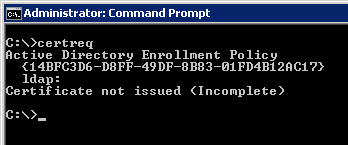
I’ve used the holiday break to do some testing on Exchange 2010. I have a virtual network which includes a machine running Microsoft’s Certificate Services. The wizard generates a .req file which you can submit to a certification authority. In my case I submitted to my own certificate server using the certreq command.  Here’s what you get:

image

The error message is “Certificate not issued (Incomplete)”

Kudos to Vadims Podans on the Network Steve Forum who has the answer. The Exchange 2010 wizard creates the request in a Unicode file. Certificate Services only understands Ansi. You have to open the request file in Notepad and then Save As specifying Ansi encoding. Then it works.

Actually it doesn’t work, but you get a more intelligible error. When you submit the request using certreq you have to specify a template by adding the argument:

-attrib "CertificateTemplate:WebServer"

Podans has that information too.

I realise that the majority of Exchange admins submit certificate requests to commercial authorities rather than internal ones. Still, you would hope that a Microsoft certificate wizard would be compatible with Microsoft’s own certificate server, at least if you check the right box.

Remote access to files in Microsoft Small Business Server 2011

Among the most interesting features in the new Small Business Server 2011 standard edition – I suspect it is in the Essentials version as well – is the ability to access shared folders remotely via a web application.

This is actually a feature borrowed from Windows Home Server, which also exposes shared folders in its remote access web application.

Note this is different from SharePoint, which is also available in SBS. SharePoint stores files in a SQL Server content database and publishes them in document libraries. Shared Folders by contrast are simple file shares. Although they lack the rich features of SharePoint, such as discussions, or check in and check out, they are faster and more convenient when all you want to do is to share files. Another benefit is that on the local network you can access shared folders directly with Windows Explorer. This can also be done with SharePoint, but under the covers it uses WebDAV – web distributed authoring and versioning – which is slower and can be tricky to get working, especially on Windows XP. SharePoint is also less suitable for files of types that it does not recognise, whereas a shared folder will accept anything you care to put into it.

While these may seem subtle distinctions, in practice they are not, and the matter of SharePoint versus shared folders is one that some businesses struggle with.

Now that you can publish shared folders through the Remote Web Access web site, this issue will be less pressing, since remote access without the need for VPN (virtual private network) is often the key reason for moving files into SharePoint.

The Remote Web Access site is not itself a SharePoint site; it is an ASP.NET application that you can find in C:\Program Files\Windows Small Business Server\Bin\WebApp\RemoteAccess. I noticed two ASP.NET user controls, one called filesgadget.ascx and one called richupload.ascx.

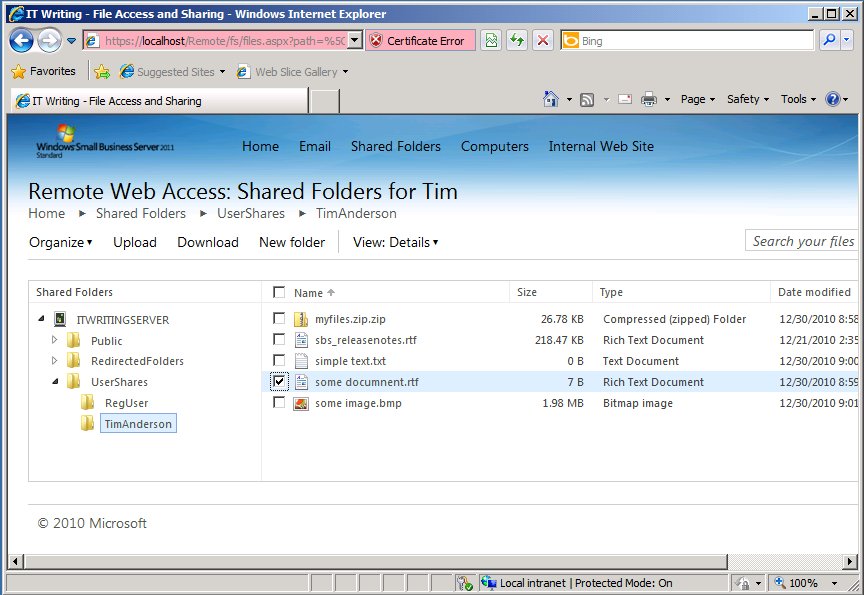
If you browse to this site, you can access folders and files in the SBS Shares to which you have access, controlled by NTFS permissions. The file sharing application will pick up any shared folders on the server. When you open a folder, the files are listed in the browser with options to upload, download, delete, rename, copy, cut or paste.

image

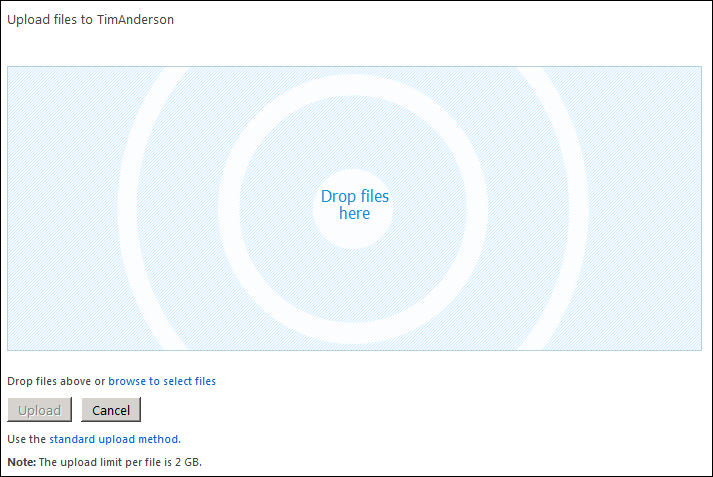
If you choose Upload, you can add documents by dragging them into the browser.

image

I also tried the site in Google Chrome. It worked, though not the drag-and-drop file upload. You can still upload files using a standard file chooser.

This looks to me like a great and overdue feature for Small Business Server. The only snag I can foresee is that some users may still find the SharePoint vs Shared Folder choice confusing and wonder why documents in the “Internal web site” are presented differently and with more features than those in shared folders. It may still be difficult to decide which to use; but at least the choice will no longer be driven solely by whether remote access via the browser is required.

What you read in 2010: top posts on ITWriting.com

With three days to go, traffic on ITWriting.com in 2010 is more than 50% up over that of 2009 with over 1 million unique visitors for the first time. Thank you for your attention in another crazy year in technology.

So what did you read? It is intriguing to look at the stats for the whole year, which are different in character from stats for a week or month. The reason is that over a short period, it is the news of the day that is most read – posts like The Java Crisis and what it means for developers. Over the year though, it is the in-depth technical posts like How to backup Small Business Server 2008 on Hyper-V that draw more readers, along with those posts that are a hit with people searching Google for help with an immediate problem like Cannot open the Outlook window – what sort of error message is that?

The most-read post in 2010 though is in neither category. In July I made a quick post noting that the Amazon Kindle now comes with a web browser based on WebKit and a free worldwide internet connection. Mainly thanks to some helpful comments from users it has become a place where people come for information on that niche subject.

On the programming side, posts about Microsoft’s changing developer story are high on the list:

Lessons from Evernote’s flight from .NET

Microsoft wrestles with HTML5 vs Silverlight futures

Microsoft’s Silverlight dream is over

Another post which is there in the top twenty is this one about Adobe Flash and web services:

SOA, REST and Flash/Flex – why Flash does not PUT

along with this 2009 post on the pros and cons of parallel programming:

Parallel Programming: five reasons for caution. Reflections from Intel’s Parallel Studio briefing

This lightweight post also gets a lot of hits:

Apple iPad vs Windows Tablet vs Google Chrome OS

It is out of date now and I should do a more considered update. Still, it touches on a big theme: the success of the Apple iPad. When you take that alongside the interest in Android tablets, perhaps we can say that 2010 was the year of the tablet. I first thought the tablet concept might take off back in 2003/2004 when I got my first Acer tablet. I was wrong about the timing and wrong about the operating system; but the reasons why tablets are a good idea still apply.

Watching these trends is a lot of fun and I look forward to more surprises in 2011.

Microsoft’s muddled licensing for Office Web Apps

I’ve been reviewing Microsoft’s Small Business Server 2011 – mainly the standard edition as that is the one that is finished. The more interesting cloud-oriented Essentials version is not coming until sometime next year.

In its marketing [pdf] for SBS 2011 Microsoft says:

Get things done from virtually wherever and whenever. With Office Web Apps (included in SharePoint Foundation 2010), users can view, create, and edit documents anyplace with an Internet connection.

This appears to be only a half-truth. You can install Office Web Apps into SharePoint Foundation 2010, but it is not included in a default install of SBS 2011 Standard, and as far as I can tell the setup for it is not on the DVD. If you try to download it, you will find it is only available through the Volume Licensing Service Center, and that you require a volume license for Microsoft Office to get it. You can also get it through TechNet, but this is for evaluation only.

The Office Web Apps site states:

Business customers licensed for Microsoft Office 2010 through a Volume Licensing program can run Office Web Apps on-premises on a server running Microsoft SharePoint Foundation 2010 or Microsoft SharePoint Server 2010.

and it also appears that each user requires a volume license for desktop Microsoft Office in order to use it. In other words, the Client Access License for Office Web Apps is a volume license for Office. You cannot purchase a volume license for 5 users, and then have everyone in your 50-person organisation use it.

This approach to licensing makes no sense. In fact, I’m not sure it is even internally consistent. Part of the web app concept is that you could, if need be, walk up to a PC in an internet cafe, log in to SharePoint, and make a quick edit to a Word document. You are not going to ask the management “is this machine correctly licensed for Office Web Apps?”

What if you are using Linux, or an Apple iPad (it almost works), or a RIM PlayBook, or some other device on which Office cannot be installed? These are scenarios where Office Web Apps is particularly useful; Microsoft cannot expect users to buy a license for desktop Office for machines which cannot run it.

Note Office Web Apps applications are severely cut-down in comparison to the desktop editions. It is not even close to the same thing. Further, Microsoft lets anyone in the world use Office Web Apps for free – provided it is on SkyDrive and not on a locally installed SharePoint.

Microsoft is also happy to give users of Office 365, the forthcoming hosted version of server apps including SharePoint, access to Office Web Apps:

Work from virtually any place and any device with the Office Web Apps

I’m guessing that somewhere in Microsoft the powerful Office group is insisting that Office Web Apps is a feature of the desktop product. Anyone else can see that it is not; it is a feature of SharePoint. Excluding it from SBS 2011 by default does nothing except to complicate matters for admins – and it is a fiddly install – thus reducing the appeal of the product.

Incidentally, I see nothing unreasonable about Microsoft charging for an on-premise install of Office Web Apps. But it should be licensed as a web application, not as a desktop application.

For more on this see Sharon Richardson’s post and Susan Bradley’s complaint.

Fixing a slow Windows XP PC

Yesterday I investigated a Windows XP machine that had become so slow it was unusable. It was a Dell Dimension 2350 with 1GB RAM and a 2.00 Ghz Celeron CPU – not too bad a spec for XP – that had been out of use for a while and was being brought back into service for a specific and undemanding task. At first it had performed fine, but after applying Service Pack 3 and installing Microsoft Security Essentials it had ground almost to a halt. The machine performed so badly that trying to troubleshoot it was like wading through glue. You could get task manager up and see plenty of RAM free, but the CPU was stuck on 100%.

After trying a few futile things like updating the BIOS, I installed Process Explorer and Process Monitor from Sysinternals. Looking at the activity summary in Proccess Monitor it was obvious which process was to blame: an instance of svchost.exe started with the command line: c:\windows\system32\svchost.exe –k netsvcs

However, netsvcs is responsible for many different services. I did a bit more poking around with Process Explorer and found the culprit: Windows Automatic Updates. Typing:

net stop wuauserv

at a command prompt fixed the problem temporarily.

It appears that the Windows Update database, which you can find in %windir%\Software Distribution\DataStore, can get corrupted. The Windows Update service goes into a spin and consumes all your computing resources. You can turn Automatic Updates off by right-clicking My Computer, Properties, and Automatic Updates tab; or you can fix it the brute-force way by deleting the DataStore folder and letting Windows recreate it, though you lose your update history; or you can try to repair the database.

Of course there are many reasons why Windows XP might run slowly, and often it is not easy to troubleshoot. There is abundant well-meaning advice on the internet, much of it based on the assumption that malware is involved, but finding the right answer to a particular problem is a matter of luck. In a professional context, it is hardly worth the time and corporates will just re-image the machine.

I do find it interesting that when Windows XP first appeared in 2001 it specified a minimum of 64MB RAM and ran OK in 128MB. Once fully patched with Service Pack 3, automatic updates, Internet Explorer 8 and anti-virus, it needs at least 512MB and in my experience 1GB to be comfortable. Unfortunately you have little choice; if you want to connect to the Internet or run recent applications, you have to update it. Automatic updates is a also a near-essential security feature.

Finally, kudos to the Sysinternals team whose tools are invaluable for solving this kind of problem.

Microsoft inadvertently shares BPOS offline address books with other customers

According to an email I’ve seen, sent to customers of Microsoft BPOS (Business Productivity Online Suite), some users have found their Offline Address Book – an Exchange feature which stores a company’s internal address list – has been downloaded by other BPOS customers:

Microsoft recently became aware that, due to a configuration issue, Offline Address Book information for Business Productivity Online Suite–Standard customers could be inadvertently downloaded by other customers of the service, in a very specific circumstance. The issue was resolved within two hours of identification, and we completed a thorough review of processes to prevent this type of issue from occurring again. Our records indicate that a very small number of downloads actually occurred, and we are working with those few customers to remove the files.

This issue affected only Business Productivity Online Suite–Standard customers; no other Microsoft Online Services were affected.

Big deal? Probably not, especially as customer address lists, which might be useful to competitors, are not normally included in an Offline Address Book.

That said, any leakage of data from one customer to another is a serious issue, as it is exactly this possibility which deters users from using cloud services in the first place. It is an inherent hazard of multi-tenancy.

Still, kudos to Microsoft for owning up.

Adobe declares glittering results as CEO says Apple’s Flash ban has no impact on its revenue

Adobe has proudly declared its first billion dollar quarter, $1,008 m in the quarter ending Dec 3 2010 versus $757.3 m in the same quarter of 2009.

I am not a financial analyst, but a few things leap out from the figures. One is that Omniture, the analytics company Adobe acquired at the end of 2009, is doing well and contributing significantly to Adobe’s revenue – $98.4 m in Q4 2010. The billion dollar quarter would not have happened without it. Second, Creative Suite 5 is selling well, better than Creative Suite 4.

Creative Suite 4 was released in October 2008, and Creative Suite 5 in April 2010. It is not perfect, but the following table compares the Creative Solutions segment (mainly Creative Suite) of the two products quarter by quarter from their respective release dates:

Quarters after release 1st 2nd 3rd 4th 5th 6th
Creative Suite 4 508.7 460.7 411.7 400.4 429.30 432.0
Creative Suite 5 532.7 549.7 542.1      

CS4 drops off noticeably following an initial surge, whereas CS5 has kept on selling. It is a good product and a de-facto industry standard, but not every user is persuaded to upgrade every time a new release appears. My guess is that things like better 64-bit support – which make a huge difference in the production tools – and new tricks in PhotoShop have been successful in driving upgrades to CS5. Further, the explosion of premium mobile devices led by Apple’s iPhone and iPad has not been bad for Adobe despite Apple CEO Steve Jobs doing his best to put down Flash. Publishers creating media for the iPad, for example, will most likely use Adobe’s tools to do so. CEO Shantanu Narayen said in the earnings calls, “We have not seen any impact on our revenue from Apple’s choice [to not support Flash]”, though I am sure he would make a big deal of it if Apple were to change its mind.

Before getting too carried away though, I note that Creative Suite 3, published in March 2007, did just as well as CS5.  Here are the figures:

Quarters after release 1st 2nd 3rd 4th 5th 6th
Creative Suite 3 436.6 545.5 570.5 543.5 527.2 493.6

In fact, Q4 2007 at $570.5 m is still a record for Adobe’s Creative Solutions segment. So maybe CS4 was an unfortunate blip. Then again, not quite all the revenue in Creative Solutions is the suite; it also includes Flash Platform services such as media streaming. Further, the economy looked rosier in 2007.

Here is the quarter vs quarter comparison over the whole company:

  Q4 2009 Q4 2010
Creative Solutions 429.3 542.1
Digital Enterprise 211.8 274.10
Omniture 26.3 98.4
Platform 47 46.1
Print and publishing 42.9 47.3

In this table, Creative Solutions has already been mentioned. Digital Enterprise, formerly called Business Productivity, includes Acrobat, LiveCycle and Connect web conferencing. Platform is confusing; according to the Q4 09 datasheet it includes the developer tools, Flash Platform Services and ColdFusion. However, the Q4 10 datasheet omits any list of products for Platform, though it includes them for the other segments, and lists ColdFusion under Print and Publishing along with Director, Contribute, PostScript, eLearning Suite and some other older products. According to this document [pdf] InDesign which is huge in print publishing is not included in Print and Publishing, so I guess it is in Creative Solutions.

In the earnings call, Adobe’s Mark Garrett did mention Platform, and attributed its growth (compared to Q3 2010) to “higher toolbar distribution revenue driven primarily by the release of the new Adobe Reader version 10 in the quarter.” This refers to the vile practice of foisting a third-party toolbar (unless they opt-out) on people forced to download Adobe Reader because they have been send a PDF. Perhaps in the light of these good results Adobe could be persuaded to stop doing so?

I am not sure how much this breakdown can be trusted as it makes little sense to me. Do not take the segment names too seriously then; but they are all we have when it comes to trying to compare like with like.

Still, clearly Adobe is doing well and has successfully steered around some nasty rocks that Apple threw in its way. I imagine that Microsoft’s decision to retreat from its efforts to establish Silverlight as a cross-platform rival to Flash has also helped build confidence in Adobe’s platform. The company’s point of vulnerability is its dependence on shrink-wrap software for the majority of its revenue; projects like the abandoned Rome show that Adobe knows how to move towards cloud-deployed, subscription-based software but with business booming under its current model, and little sign of success for cloud projects like Acrobat.com, you can understand why the company is in no hurry to change.  

Salesforce.com acquires Heroku, wants your Enterprise apps

The big news today is that Salesforce.com has agreed to acquire Heroku, a company which hosts Ruby applications using an architecture that enables seamless scalability. Heroku apps run on “dynos”, each of which is a single process running Ruby code on the Heroku “grid” – an abstraction which runs on instances of Amazon EC2 virtual machines. To scale your app, you simply add more dynos.

image

Why is Salesforce.com acquiring Heroku? Well, for some years an interesting question about Salesforce.com has been how it can escape its cloud CRM niche. The obvious approach is to add further applications, which it has done to some extent with FinancialForce, but it seems the strategy now is to become a platform for custom business applications. We already knew about VMForce, a partnership with VMWare currently in beta that lets you host Java applications that are integrated with Force.com, but it is with the announcements here at Dreamforce that the pieces are falling into place. Database.com for data access and storage; now Heroku for Ruby applications.

These services join several others which Salesforce.com is branding at Force.com 2:

Appforce – in effect the old Force.com, build departmental apps with visual tools and declarative code.

Siteforce – again an existing capability, build web sites on Force.com.

ISVForce – build your own multi-tenant application and sign up customers.

Salesforce.com is thoroughly corporate in its approach and its obvious competition is not so much Google AppEngine or Amazon EC2, but Microsoft Azure: too expensive for casual developers, but with strong Enterprise features.

Identity management is key to this battle. Microsoft’s identity system is Active Directory, with federation between local and cloud directories enabling single sign-on. Salesforce.com has its own user directory and developing on its platform will push you towards using it.

Today’s announcement makes sense of something that puzzled me: why we got a session on node.js at Monday’s Cloudstock event. It was a great session and I wrote it up here. Heroku has been experimenting with node.js support, with considerable success, and says it will introduce a new version next year.

Finally, the Heroku acquisition is great news for Enterprise use of Ruby. Today many potential new developers will be looking at it with interest.

Wrestling with Microsoft SharePoint

I do not know what to think about Microsoft SharePoint. It is kind-of inevitable if you live on the Microsoft platform. At some point the question comes up: how do we get to our documents over the Internet; and while VPN works, it is an awkward solution that means opening a VPN tunnel first and arguably opens up too much from a security perspective; direct internet access is easier and works from any device. Microsoft also has Direct Access, which lets you connect to network shares without a VPN; I have not tried it though it requires Windows 7 which is a serious restriction.

In any case, SharePoint does so much more: search, blogs and wikis, company portal, business intelligence, platform for document workflow applications, office web apps for in-browser editing of Office documents, alerts when documents are added or changed, and near-infinite possibilities for customization, to mention a few features.

The downside is that SharePoint is intricate, sometimes slow, and complex to administer.

I run a miniature Microsoft-platform setup for test and development. The servers are on Hyper-V virtual machines, and include Exchange 2007 (2010 upgrade pending), SharePoint 2010, and ISA Server 2006. I have been trying out SharePoint for some time, and once I figured out how to map a drive reliably I have enjoyed using it as a document repository. I have also tried SharePoint WorkSpace 2010 on a netbook, which is useful for offline work, though the user interface needs attention and it has an annoying limit on the number of items it will download.

The problem I have had though is that the internal URL (eg http://sharepoint) was different from the external URL (eg https://sharepoint.mydomain.com). In consequence, it did not work smoothly on a laptop or netbook that is not always on the internal network.

I spent some time fixing this. I am not sure that I found the best solution, but I found one that works. I extended the SharePoint application to a second web site for ssl access; I set up split DNS so that sharepoint.mydomain.com resolves to the internal server on the local network, and to ISA on the internet; I set up a new listener in ISA for the external URL, and a new policy that redirects to the internal server using SSL throughout; I turned off link translation; I removed all the paths except for /*; I set NTLM authentication. Finally I set Alternate Access Mappings for the new external URL which, thanks to split DNS, also works internally.

If that sounds like jargon, welcome to the world of SharePoint administration. Few things are intuitive or straightforward; which is why, for example, you can find a three part series by the Troy Starr on What every SharePoint administrator needs to know about Alternate Access Mappings.

Another thing that is obvious to SharePoint admins but not to occasional visitors: when you patch SharePoint with an official update, it is not enough to run the patch. You also have to update the configuration with psconfig -update or the configuration wizard, to update the metadata.

And after all that, in my very simple SharePoint setup, I still have warnings in Health Analyzer about missing server side dependencies for WebPart class [8d6034c4-a416-e535-281a-6b714894e1aa] – I am not sure why the Analyzer cannot look up the GUID somewhere and present something more meaningful, nor why the “More information about this rule” link in the analyzer takes you to the SharePoint Server home page rather than anywhere useful.

That said, I am pleased with my setup. It makes getting at documents when out and about very easy, particularly with mapped drive integration. I also found several iPhone clients – Steve McDonnell has a round up – and installed the free Moprise to get started. Performance is rather good; and while it has little advantage over Dropbox for an individual, in a corporate environment it makes sense.

My immediate conclusion is that specialising in SharePoint consultancy and administration is probably a smart move if you have the requisite skills; but that tinkering with SharePoint is something non-specialists are unlikely to enjoy. Shifting the administrative burden to Microsoft by using its hosted SharePoint is attractive, as is using an alternative collaboration and document platform such as Google Apps, though the two platforms are not very alike.

The top Silverlight feature request: implement on more platforms

One of the things mentioned by Microsoft VP Scott Guthrie in his Firestarter keynote yesterday was that Silverlight 5, the new version set for release in 2011, implements some 70% of what users have voted for. I presume he means the feedback forum here. But look what the top request is – as noted by a comment to yesterday’s post:

image

Looking at the comments, Android is a common request, and relatively easy for Microsoft to achieve given the open nature of that platform.

This was apparently not part of the 70% though. Instead, Guthrie introduced more Windows-only features – showing that concerns about divergence between Windows and Mac implementations when Microsoft announced COM support at the 2009 PDC were justified.

What if Microsoft had purchased Novell, or purchased Mono from Novell, instead of letting it go to Attachmate? It would have enabled Microsoft to unify the Windows and Linux implementations as well as building on the work the Mono team has done on compilation for iOS.

That dream is over though; the Silverlight application strategy seems focused on making it better for Windows-platform corporations.