Category Archives: microsoft

Google Chrome usage growing fast; Apple ahead on mobile web

Looking at my browser stats for February one thing stands out: Google Chrome. The top five browsers are these:

  1. Internet Explorer 40.5%
  2. Firefox 34.1%
  3. Chrome 10.5%
  4. Safari 4.3%
  5. Opera 2.9%

Chrome usage has more than doubled in six months, on this site.

I don’t pretend this is representative of the web as a whole, though I suspect it is a good leading indicator because of the relatively technical readership. Note that although I post a lot about Microsoft, IE usage here is below that on the web as a whole. Here are the figures from NetMarketShare for February:

  1. Internet Explorer 61.58%
  2. Firefox 24.23%
  3. Chrome 5.61%
  4. Safari 4.45%
  5. Opera 2.35%

and from  statcounter:

  1. Internet Explorer 54.81%
  2. Firefox 31.29%
  3. Chrome 6.88%
  4. Safari 4.16%
  5. Opera 1.94%

There are sizeable variations (so distrust both), but similar trends: gradual decline for IE, Firefox growing slightly, Chrome growing dramatically. Safari I suspect tracks Mac usage closely, a little below because some Mac users use Firefox. Mobile is interesting too, here’s StatCounter:

  1. Opera 24.26
  2. iPhone 22.5
  3. Nokia 16.8
  4. Blackberry 11.29
  5. Android 6.27
  6. iTouch 10.87

Note that iPhone/iTouch would be top if combined. Note also the complete absence of IE: either Windows Mobile users don’t browse the web, or they use Opera to do so.

I’m most interested in how Chrome usage is gathering pace. There are implications for web applications, since Chrome has an exceptionally fast JavaScript engine. Firefox is fast too, but on my latest quick Sunspider test, Firefox 3.6 scored 998.2ms vs Chrome 4.0’s 588.4ms (lower is better). IE 8.0 is miserably slow on this of course; just for the record, 5075.2ms.

Why are people switching to Chrome? I’d suggest the following. First, it is quick and easy to install, and installs into the user’s home directory on Windows so does not require local administrative rights. Second, it starts in a blink, contributing to a positive impression. Third, Google is now promoting it vigorously – I frequently see it advertised. Finally, users just like it; it works as advertised, and generally does so quickly.

Windows trackpad annoyances: disappearing pointer, auto clicking

Today the mouse pointer disappeared on my Toshiba laptop running Windows 7 disappeared. I could see that the trackpad or mouse (it made no difference if I plugged in a USB mouse) was working, because I could see mouseover effects as I moved round the screen, but the actual pointer was not visible.

The immediate workaround is to go to Control Panel, search for Mouse, and click Make it easier to see the mouse pointer. Tab to Display Pointer Trails and press the spacebar. This lets you see the mouse at least while it is moving. It disappears again when stationary.

image

It’s definitely an improvement; but not a complete fix. What is? Well, rebooting; but the problem may recur. Things that might help: tweaking display settings, updating the video driver, avoiding hibernation. If anyone has a definitive fix, I’d love to hear.

While I’m on the subject, here’s another constant annoyance. Every new laptop install of Windows 7 that I’ve seen has a feature called tapping enabled. This converts taps on your touchpad into mouse clicks. It is the first thing I turn off. The reason it drives me crazy is that it always detects unintended taps. The consequences are severe: buttons appear to click themselves, dialogs close unexpectedly, work can even be lost.

Worse still, it is not an easy setting to find. First, you must have the proper driver installed – usually its a Synaptics driver, though downloaded from your laptop vendor’s site. Second, you have to go to Control Panel, Mouse, Change Mouse Settings, Advanced tab, click Advanced Feature Settings, then click Settings under Detailed Settings for Touch Pad operations, then uncheck Enable Tapping. At least, that’s how it is on mine; the path may vary slightly on others.

image

This is a setting that should be off by default; and a setting that should be easy to find, not buried under obscure labels like “Advanced”.

I have lost count of the number of people who have been delighted when I’ve showed them how to disable this feature. “Thank you; I wondered why it kept clicking by itself.”

Fragmentation and the RIA wars: Flash is the least bad solution

The latest salvo in the Adobe Flash wars comes from the Free Software Foundation, in an open letter to Google:

Just think what you can achieve by releasing the VP8 codec under an irrevocable royalty-free license and pushing it out to users on YouTube? You can end the web’s dependence on patent-encumbered video formats and proprietary software (Flash) … Apple has had the mettle to ditch Flash on the iPhone and the iPad – albeit for suspect reasons and using abhorrent methods (DRM) – and this has pushed web developers to make Flash-free alternatives of their pages. You could do the same with YouTube, for better reasons, and it would be a death-blow to Flash’s dominance in web video.

Fair point; but one thing the FSF misses is that Apple’s stance has not only “pushed web developers to make Flash-free alternatives of their pages”. It has also pushed developers into making Apple-specific apps as an alternative to web pages – which to my mind is unfortunate.

The problem goes beyond web pages. If you have an application that goes beyond HTML and JavaScript, maybe for offline use or to integrate with other local applications or hardware, there is no cross-platform solution for the iPhone, iTouch or forthcoming iPad.

While I understand that non-proprietary platforms are preferable to proprietary platforms, it seems to me that a free cross-platform runtime is less evil than a vendor-controlled platform where I have to seek approval and share income with the vendor just to get my app installed.

More broadly, it is obvious that the days of Windows on the desktop, Web for everything else are over. We are seeing a proliferation of devices, each with their own SDK: alongside Apple there is Palm WebOS, Nokia/Intel Meego, Google Android, and when Windows Phone 7 comes along, Microsoft Silverlight.

The question: if you have an application and want to reach all these platforms, what do you do? A web app if possible; but otherwise?

It is the new fragmentation; and frankly, Adobe Flash is the closest thing we have to a solution, particularly with the native compilation option for iPhone that is coming in Creative Suite 5.

I don’t like the idea of a single company owning the runtime that unifies all these platforms. That’s not healthy. Still, at least Adobe is currently independent of the obvious industry giants: Google, Apple, Microsoft, IBM and so on.

Dealing a death-blow to Flash is all very well, but the end result could be something worse.

What’s on at Mix 2010 – some surprises as Microsoft talks standards

Microsoft’s Mix conference is on next month – probably the company’s second most interesting conference after PDC, though this Mix looks rather better than last year’s relatively drab PDC (free laptops aside). The company has plenty to talk about, primarily around Windows Phone development – twelve sessions! – Internet Explorer 9, and Silverlight 4. Mix is meant to be a web design conference – though it has always strayed extensively into Windows-only territory – and the inclusion of Windows Phone is a bit of a stretch, but I doubt attendees will care.

It’s notable that Microsoft is making more than a nod to web standards and open source. There is a full day workshop from Molly Holzschlag on HTML5 Now: The Future of Web Markup Today, John Resig on How jQuery Makes Hard Things Simple, and Doug Schepers from the W3C with Microsoft’s Patrick Dengler on SVG: The Past, Present and Future of Vector Graphics for the Web; Christian Heilmann on Participating in the Web of Data with Open Standards; and not forgetting Miguel de Icaza on The Mono Project.

Why would Microsoft talk about such things? Arguably it is a kind of smokescreen, talking standards while busily promoting proprietary stuff like SharePoint and Silverlight. I think there is some of that; but that this new focus also reflects power shifts in the industry. In the new cloud-based era Microsoft has to compete with Google, Mozilla and others; and to make sure that its stuff works in some measure on a diversity of clients, from Android to iPhone. Note the session on Practical Strategies for Debugging Cross-Browser Display Issues.

I would not call this a conversion. I would say this is more about “Windows if we can, standards if we must”. That necessity is increasing though, and the sessions at Mix reflect that.

Mono Tools for Visual Studio: code on Windows, run on Linux

I have just com across Mono Tools, a Novell add-in for Visual Studio that lets you test Mono compatibility. It adds a Mono menu which has options to run locally or remotely in Mono, analyze for compatibility issues, and create deployment packages. No sign of Mac support, which is a missed opportunity, but understandable given that Novell owns SUSE Linux.

For those few still unfamiliar with Mono, it is an open source implementation of Microsoft’s .NET Framework, enabling your .NET applications to run on other platforms. One compelling use is to have your ASP.NET web applications run on the free Apache web server, rather than Microsoft’s IIS.

image

Mono Tools works with both Windows Forms and web projects.

image

This is just the sort of thing Mono needs to move it further into the mainstream, though another less welcome sign of business acceptance is that this is a commercial product, currently costing $99.00 for an individual or $249.00 per seat in an organization. There is also an Ultimate edition at $2,499, which comes with a commercial non-LGPL license to redistribute Mono.

The Mono Tools team is now looking for testers for its 1.1 edition, which supports Visual Studio 2010.

Microsoft rolls out its browser choice update – but which is really the best?

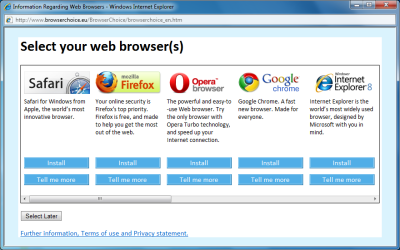
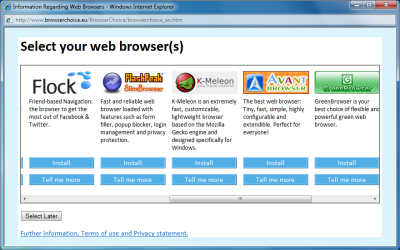
Microsoft is rolling out its EU-required Browser Choice update. File under industry madness; but one thing I found interesting was the choice of words used by each vendor to market their browser.

image

I only saw the top five in Microsoft’s post; but here are the words:

Google Chrome: A fast new browser. Made for everyone.

Mozilla Firefox: Your online security is Firefox’s top priority. Firefox is free, and made to help you get the most out of the web.

Safari: Safari for Windows from Apple, the world’s most innovative browser.

Internet Explorer 8: The world’s most widely used browser. IE8 makes your web experience safer and easier than ever.

Opera: The powerful and easy-to-use web browser. Try the only browser with Opera Turbo technology, and speed up your internet connection.

Needless to say, there is little here that would really guide a user’s choice, though there is a “tell me more” link for each. It’s also worth bearing in mind that the target readership is the subset of computer users who did not realise until now that they could install a web browser other than IE.

Still, Google is right to emphasise speed; that is the main reason I use it. It is also my first choice for sites that do not render properly in IE. Firefox plays the security card, trading on recent public fretting over IE insecurities, but doesn’t mention its real strength: rich add-on availability. Microsoft is bland as usual; Apple says nothing of note; and Opera talks about some strange feature called Turbo.

But which browser should a user choose? Personally I leave IE as default and run up one of the others as I want to; this fits with my instinct to keep Windows running as closely as possible to how its designers intended. My most-used browsers after that are Chrome and Firefox; I rarely touch Safari or Opera, though both are installed.

Windows Phone 7 development rumours abound

News about the Windows Phone 7 development platform is leaking out, ahead of its official unveiling at the Mix conference next month. Rumour has it that both Silverlight and the XNA gaming framework will be supported, for creating consumer-focused applications, together with limited access to native APIs subject to Microsoft’s specific approval.

The controversial aspect, if these ideas prove to be accurate, is lack of compatibility with existing applications. It seems possible that C++ applications written for previous versions of Windows Mobile will not run, while those written for the Compact Framework will need porting to the Silverlight UI.

While there is little love for Windows Mobile, it is used for business applications where it integrates well with the rest of Microsoft’s platform. Since Windows Phone 7 seems to target the consumer, Microsoft may argue that this does not matter, since businesses can continue to use Windows Mobile. You would imagine, though, that enthusiasm for continuing with Windows Mobile will be limited given the superior usability of Windows Phone 7. Maybe a professional edition to follow in 2011?

One thing we know for sure is that Adobe Flash is not supported in the first release, though Microsoft says it is not opposed to it appearing on the platform in future. That in itself is interesting, since Adobe is hardly likely or able to rewrite Flash in Silverlight or XNA. Will certain important developers have privileged access to a wider range of native APIs? Despite rumours, there is still plenty to speculate about.

Google’s strategy unveiled: a little bit of everything you do

Google CEO Eric Schmidt gave a keynote address at the Mobile World Congress yesterday, which is worth watching if you have an interest in the future of technology or, well, human life.

image

The talk was an informative and open insight into Google’s future direction. It was centred on mobile; but since Google now regards the mobile phone as the primary device for how we interact with the world, that was no limitation. Google is putting mobile first, said Schmidt, because it is the meeting point for the three things that matter: computing, connectivity and the cloud. He believes that phones will replace credit cards, for example, as they are smarter and more secure for financial transactions.

Google’s strategy is to combine the near-unlimited power of server-side computing with its database of human behaviour, to create devices that are “like magic. All of a sudden there are things you can do that were not previously possible.”

He gave an illuminating example: Google voice search. You speak into your phone, and Google transcribes your voice and performs a search. Voice recognition is nothing new, but the difference in the Google demo is that it works. Here’s how. The problem with voice recognition is that one word sounds very like another, especially since we do not speak with precision and every voice varies. Computers cannot understand exactly what we say, but they can use dictionaries to come up with a set of possibilities for what we said, one of which is likely to be correct.

image

The next step is the brilliant one. Google takes this set of possible phrases and compares it to recent Google searches. If one of them matches a popular search, then it is likely to be what you said. Bingo. Google now does this in four languages, with German demonstrated for the first time yesterday.

It works on the assumption that humans are not very original. We tend to do similar things, and to be interested in similar things. Therefore, as Schmidt noted, if you are a tourist walking around a city with your location-aware phone, Google does not only know where you are; it also has a good idea of where you will go next.

Another cool demo is for image recognition. We saw this in two guises. In one, you hold up your phone and do an image search using the camera as input. Result: information about the building you are looking at. [Or maybe the person? Hmm.]

In another demo, you point the camera at your foreign-language menu as you ponder which incomprehensible dish might be one you could eat. Back comes the translation in your own language.

Note that these demonstrations are not really about super-powerful phones, but rather about the other two factors mentioned above, the power of cloud computing combined with a vast database of knowledge.

Schmidt’s blind spot is that he does not really see privacy as an issue. He mentions it from time to time; but he is clear that he regards the trade-off, that we give our personal data to Google in return for these cool services, as worth it. I posted a remarkable quote yesterday. Here’s another one, from late on in the address:

Google will know more about the customer because it benefits the customer if we know more about them.

What Schmidt fails to do is to extrapolate the implications for stuff other than cool services. One is what happens if that huge database is used dishonourably. Another is the huge competitive advantage it gives to Google versus everyone else; Google has this data, but rest of us do not. A third is how that data could be used in ways that disadvantage us. An example is in insurance. Insurance is about pooling risk. The more data insurance companies have about you, the more accurately they can assess the risk, which means a wider range of premiums. If by some mechanism insurance companies are able to analyse Google’s data to assess risk, they can refuse to insure, or charge high penalties, for the higher risks. We won’t necessarily enjoy that, because it means more us may find it impossible to get the insurance we want at a price we can afford.

Google’s business strategy

That’s the technical side. What are Google’s business plans? Schmidt made some interesting comments here as well, many of them in the question and answer session.

Google does not plan to become a mobile operator. Schmidt received some fairly hostile questions on this topic. Since Google positions operators as dumb pipes, stealing their talk minutes and insisting on an open web for services, who will invest in infrastructure? Schmidt denies positioning operators as dumb pipes, but does not leave them room for much other than infrastructure; he says they might have a role in financial transactions.

How do we (both Google and the rest of us) make money? Two main areas, according to Schmidt. One is advertising. He says that online advertising spend is currently one tenth of the total, and that this proportion must grow since “consumers are moving from offline to online.” In addition, mobile advertising will be huge since you can target location as well as using other data to personalise ads. “The local opportunity is much larger, and largely unexplored,” he says.

The other big opportunity is apps. The number of apps that need to be installed locally is constantly diminishing, he says, leaving great potential for new cloud-based applications and services.

As for Google, Schmidt says it wants to be part of everything you do:

We want to have a little bit of Google in every transaction on the internet

Thought-provoking stuff, and a force that will be hard to resist.

So who can compete with Google? Making equally capable phones is easy; building an equally good database of human intentions not so much, particularly since it is self-perpetuating: the more we all use Google, the better it gets.

No wonder Microsoft is piling money into Bing, with limited success so far. No wonder Apple’s Steve Jobs is concerned:

On Google: We did not enter the search business, Jobs said. They entered the phone business. Make no mistake, they want to kill the iPhone. We won’t let them, he says. Someone else asks something on a different topic, but there’s no getting Jobs off this rant. I want to go back to that other question first and say one more thing, he says. This don’t be evil mantra: "It’s bullshit." Audience roars.

Visual Studio 2010 testers unhappy with help

Visual Studio 2010 comes with a brand new help system, based on a local help server rather than a database plus viewer as in the past. There is also an option to use Internet-based help for the most up to date content.

Sounds good, but developers are not happy. The problem: the new help appears to have no index of contents. You are meant to navigate by search, then perhaps navigate forward and back using the table of contents tree that appears on the left.

image

In the old one, you could use the index to find keywords quickly:

image

It turns out that many users prefer the old approach:

This is terrible. Productivity will go to zero without an index. Online help is junk, even on a fast connection — it can never be as fast as my local PC and when I am programming, I need instant answers.

says one commenter.

Microsoft says:

We realize the importance of delivering a keyword index, but we were unable to deliver it in our first release. In this V1.0 release of help system, we first implemented an improved search capability in order to deliver a more familiar, consistent online and offline experience. We then implemented a keyword index feature based on our search catalog. Unfortunately, the results did not meet our quality bar and we determined that this feature would require more work than the Beta 2 timeline allowed. We are looking at implementing it for at future release.

The odd thing is, there is a third-party viewer called H3Viewer which was apparently put together in a short time using Delphi and the new APIs. It turns out that Visual Studio’s Help is actually an early example of a new Windows Help System called Help 3, and is designed with a comprehensive API for developers. If you set the default help viewer in Visual Studio 2010 to H3Viewer, it works more like the old one, complete with index:

image

I can’t actually recommend H3Viewer in the current  beta. It takes ages to read 440,000 index entries every time you start it up and view the index pane – a message notes that “a late fix in the RC release has slowed down the reading of index items dramatically”. In addition, it does not cope well if you set your help preference to online. Still, H3Viewer will likely improve.

Speaking personally, I don’t mind the idea of search-based help, provided that the search works really well. In practice, it is often easier to Google for what you want to know, bypassing the official help completely, though that may mean getting to the same place by another route. Nevertheless, a reliable online reference is important and it seems that a lot of developers do in fact use the local index.

Windows Phone 7 Series and Microsoft’s partner problem

I watched Microsoft’s Steve Ballmer, Joe Belfiore, and Andy Lees introduce Windows Phone 7 Series. It appears to be a complete departure from previous iterations of Windows Mobile, in fact borrowing more from Zune than it does from earlier Windows phones. At one point, Lees noted that it has a “new core OS” optimized in partnership with Qualcomm, though I would not rest too much speculation on that one phrase.

image

Unfortunately, the piece that I am most interested in, which is the developer platform, was not much discussed. It is to be unveiled at Mix next month in Las Vegas. Ballmer did say:

We raised the platform on which people can build … a new foundation with a rich set of development tools, built in and complete service availability that software developers can assume as a foundation.

Make of that what you will. I’d be surprised though if Silverlight is not a big part of the development story, along with revamped Windows Live services. I guess I’m expecting Microsoft to deliver with Silverlight something similar to what Adobe is doing with Flash and AIR – AIR for mobile devices has just been announced – but without the breadth of support across devices that Adobe has achieved.

We have been told that Flash will not be part of Windows Phone 7 in its first version, so it looks like it may live in its own development world to some extent.

The demo at the press launch has been well received, and it looks likely that Microsoft is creating a more usable phone than earlier generations. That’s good, though it is telling that it took Apple with iPhone and perhaps Google with Android to convince Microsoft that maybe the Start menu and a cut down Windows API wasn’t the best way to do a phone.

In the absence of technical details, what interested me most were the comments about how Microsoft relates to its partners. It is a hot topic for me. I am taking heat for talking about a poor experience on WIndows 7 that is really the fault of 3rd parties. The problem is that the partner system which worked so well for Microsoft in the early days of the PC is now working against it, and an unpleasant experience of a Windows 7 netbook is a symptom of that.

Clearly Microsoft also understands this. Ballmer noted that

We want to lead and take complete accountability for the end user experience … have more consistency in the hardware platform, more consistency in the user experience, but still enable [partner] innovation

Translation: we are being hammered by OEMs who wreck our product with poor quality hardware and add-on software.

But how will Microsoft change this aspect of Windows, whether on the desktop or a device? “There’s a bit of a conundrum here,” said Ballmer, and he is right. If Microsoft tries Apple-style lockdown, it may run into anti-trust trouble and/or drive OEMs to Linux. If Microsoft does no more than talk the talk, then the problem remains.

It is true that Microsoft is strictly specifying minimum hardware. That’s nothing new; it has done this since the earliest days of Pocket PC.

I’m inclined to think it is just talking the talk and that nothing will change. Still, here’s Lees on the same subject. He begins by restating Microsoft’s belief in the partner model:

One of the things we’ve kept constant is our belief in the partner model. There are three reasons why partners are fundamental to our business. Firstly, they add rich experience and expertise across a broad spectrum of areas, hardware, software and services. Second, is … scale. We need partners to develop, market and support Windows phones at this scale. Third, partners meet diverse needs by providing customers with choice. One size does not fit all. People want different kinds of phones.

It’s odd how Apple thrives without all that “rich experience and expertise.” But never mind. Lees adds:

We have changed how we work with them. The goal is to improve the quality and consistency.

So Microsoft says with one breath how it just loves the partner model, and with the next that it is changing it. We all know why it wants to change it. It is because it is broken, though Microsoft cannot bring itself to admit it out loud.

The question: which of these near-contradictory statements do you believe? That it is sticking with the failing partner model, or that it is changing it? My guess is the former, because I am not sure that Microsoft really has the will or even the ability to change, but I would like to be proved wrong.

Oh, and Lees says that the mobile operators:

… have tremendous value to add. They are not just dumb pipes. Our model is about enabling those innovations so that they can add software and services and benefit from our … platform.

I understand why Lees said this; but I find it hard to think of tremendous added value from the operators. Apple’s iPhone success is partly thanks to its skill in working round them.