Category Archives: .net

How is Microsoft Azure doing? Some stats from Satya Nadella and Scott Guthrie

Microsoft financials are hard to parse these days, with figures broken down into broad categories that reveal little about what is succeeding and what is not.

image
CEO Satya Nadella speaks in San Francisco

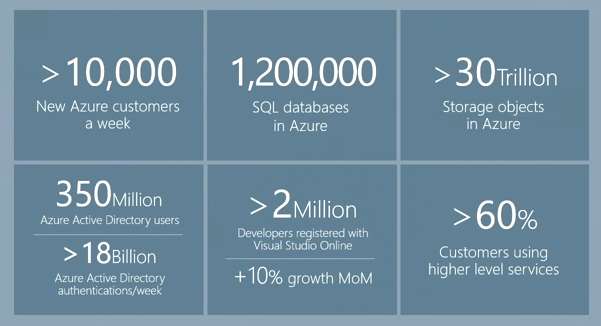
At a cloud platform event yesterday in San Francisco, CEO Satya Nadella and VP of cloud and enterprise Scott Guthrie offered some figures. Here is what I gleaned:

  • Projected revenue of $4.4Bn if current trends continue (“run rate”)
  • Annual investment of $4.5Bn
  • Over 10,000 new customers per week
  • 1,200,000 SQL databases
  • Over 30 trillion storage objects
  • 350 million users in Azure Active Directory
  • 19 Azure datacentre regions, up to 600,000 servers in each region

image

Now, one observation from the above is that Microsoft says it is spending more on Azure than it is earning – not unreasonable at a time of fast growth.

However, I do not know how complete the figures are. Nadella said Office 365 runs on Azure (though this may be only partially true; that certainly used to be the case); but I doubt that all Office 365 revenue is included in the above.

What about SQL Server licensing, for example, does Microsoft count it under SQL Server, or Azure, or both depending which marketing event it is?

If you know the answer to this, I would love to hear.

At the event, Guthrie (I think) made a bold statement. He said that there would only be three vendors in hyper-scale cloud computing, being Microsoft, Amazon and Google.

IBM for one would disagree; but there are huge barriers to entry even for industry giants.

I consider Microsoft’s progress extraordinary. Guthrie said that it was just two years ago that he announced the remaking of Azure – this is when things like Azure stateful VMs and the new portal arrived. Prior to that date, Azure stuttered.

Now, here is journalist and open source advocate Matt Asay:

Microsoft used to be evil. Then it was irrelevant. Now it looks like a winner.

He quotes Bill Bennett

Microsoft has created a cloud computing service that makes creating a server as simple as setting up a Word document

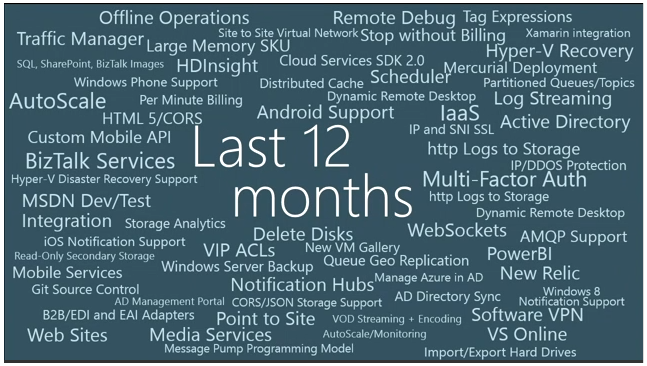
New features are coming apace to Azure, and Guthrie showed this slide of what has been added in the last 12 months:

image

The synergy of Azure with Visual Studio, Windows Server and IIS is such that it is a natural choice for Microsoft-platform developers hosting web applications, and Azure VMs are useful for experimentation.

Does anything spoil this picture? Well, when I sat down to write what I thought would be a simple application, I ran into familiar problems. Half-baked samples, ever changing APIs and libraries, beta code evangelised by Microsoft folk with little indication of what to do if you would rather not use this in production, and so on.

There is also a risk that as Azure services multiply, working out what to use and when becomes harder, and complexity increases.

Azure also largely means Windows – and yes, I heard yesterday that 20% of Azure VMs run Linux – but if you have standardised on Linux servers and use a Mac or Linux for development, Azure looks to me less attractive than AWS which has more synergy with that approach.

Still, it is a bright spot in Microsoft’s product line and right now I expect its growth to continue.

Xamarin Evolve: developers enjoy the buzz around cross-platform coding with C#

“It’s like a Microsoft developer event back when they were good,” one exhibitor here at Xamarin Evolve in Atlanta told me, and I do see what he means. There is plenty of buzz, since Xamarin is just three years old as a company and growing fast; there is the sense of an emerging technology, and that developers are actually enjoying their exploration of what they can do on today’s mobile devices.

Microsoft is an engineering-led company and was more so in its early days. The same is true of Xamarin. It also also still small enough that everyone is approachable, including co-founders Miguel de Icaza and Nat Friedman. The session on what’s new in Xamarin.Mac and Xamarin.iOS was presented by de Icaza, and it is obvious that he is still hands-on with the technology and knows it inside out. Developers warm to this because they feel that the company will be responsive to their needs.

image

Approachability is important, because this is a company that is delivering code at breakneck speed and bugs or known issues are not uncommon. A typical conversation with an attendee here goes like this:

“How do you find the tools?” “Oh, we like them, they are working well for us. Well, we did find some bugs, but we talked to Xamarin about them and they were fixed quickly.”

Xamarin’s tools let you write C# code and compile it for iOS, Android and Mac. If you are building for Windows Phone or Windows, you will probably use Microsoft’s tools and share non-visual C# code, though the recently introduced Xamarin Forms, a cross-platform XML language for defining a user interface, builds for Windows Phone as well as iOS and Android.

The relationship with Microsoft runs deep. The main appeal of the tools is to Microsoft platform developers who either want to use their existing C# (or now F#) skills to respond to the inevitable demand for iOS and Android clients, or to port existing C# code, or to make use of existing C# libraries to integrate with Windows applications on the server.

That said, Xamarin is beginning to appeal to developers from outside the Microsoft ecosystem and I was told that there is now demand for Xamarin to run introductory C# classes. Key to its appeal is that you get deep native integration on each platform. The word “native” is abused by cross-platform tool vendors, all of whom claim to have it. In Xamarin’s case what it means is that the user interface is rendered using native controls on each platform. There are also extensive language bindings so that, for example, you can call the iOS API seamlessly from C# code. Of course this code is not cross-platform, so developers need to work out how to structure their solutions to isolate the platform-specific code so that the app builds correctly for each target. The developers of Wordament, a casual game which started out as a Windows Phone app, gave a nice session on this here at Evolve.

Wordament has an interesting history. It started out using Silverlight for Windows Phone and Google App Engine on the server. Following outages with Google App Engine, the server parts were moved to Azure. Then for Windows 8 the team ported the app to HTML and JavaScript. Then they did a port to Objective C for iOS and Java for Android. Then they found that managing all these codebases made it near-impossible to add features. Wordament is a network game where you compete simultaneously with players on all platforms, so all versions need to keep tightly in step. So they ported to Xamarin and now it is C# on all platforms.. 

I digress. The attendees here are mostly from a Microsoft platform background, and they like the fact that Xamarin works with Visual Studio. This also means that there are plenty of Microsoft partner companies here, such as the component vendors DevExpress, Syncfusion, Infragistics and ComponentOne. It is curious: according to one of the component companies I spoke to, Microsoft platform developers get the value of this approach where others do not. They have had only limited success with products for native iOS or Android development, but now that Xamarin Forms has come along, interest is high.

Another Microsoft connection is Charles Petzold – yes, the guy who wrote Programming Windows – who is here presenting on Xamarin Forms and signing preview copies of his book on the subject. Petzold now works for Xamarin; I interviewed him here and hope to post this soon. Microsoft itself is here as well; it is the biggest sponsor and promoting Microsoft Azure along with Visual Studio.

Xamarin is not Microsoft though, and that is also important. IBM is also a big sponsor, and announced a partnership with Xamarin, offering libraries and IDE add-ins to integrate with its Worklight mobile-oriented middleware. Amazon is here, promoting both its app platform and its cloud services. Google is a sponsor though not all that visible here; Peter Friese from the company gave a session on using Google Play Services, and Jon Skeet also from Google presented a session, but it was pure C# and not Google-specific. Salesforce is a sponsor because it wants developers to hook into its cloud services no matter what tool they use; so too is Dropbox.

  image

Most of the Xamarin folk use Macs, and either use Xamarin Studio (a customised version of the open source MonoDevelop IDE), or Visual Studio running in a virtual machine (given that the team mostly use Macs, this seems to me the preferred platform for Xamarin development, though Visual Studio is a more advanced IDE so you will probably end up dipping in and out of Windows/Mac however you approach it).

Xamarin announced several new products here at Evolve; I gave a quick summary in a Register post. To be specific:

  • A new fast Android emulator based on Virtual Box
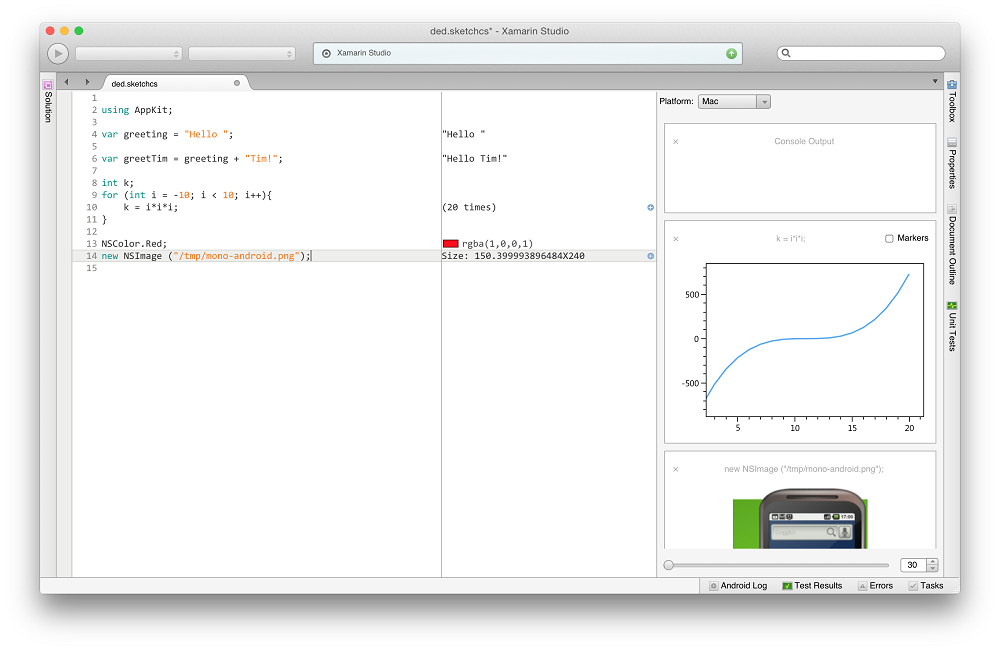
  • Xamarin Sketches for trying out code with immediate analysis and execution
  • Xamarin Profiler
  • Xamarin Insights: analytics and troubleshooting for deployed apps

Of these, Sketches is the most interesting. You write snippets of code and the tool not only executes it but does magic like generating a graph from sequences of data. You can use it for UI code too, trying out different fonts, colours and shapes until you get something you like. It is great fun and would be good for teaching as well; maybe Xamarin could do a version for education at a modest price (or free)?

image

I am looking forward to trying out Sketches though I have heard grumbles about the preview being hard to get working so it may have to wait until next week.

image

Is this why it is Windows 10 (not 9): avoiding Windows 95 detection?

Why did Microsoft call the Windows release after 8 version 10 rather than 9?

Windows boss Terry Myerson said it was because it was such a huge release – but then he would say that.

A more prosaic reason could be the old software problem of false version detection. After all, we have had Windows 9x before – that is, Windows 95 and Windows 98.

Former Windows chief Steven Sinofsky tweeted this a few hours ago:

image

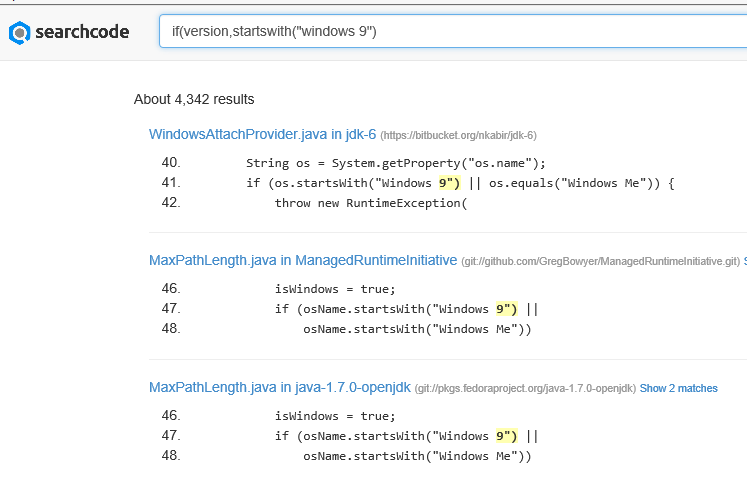
which if you follow the link gets this:

image

The first of these throws an exception if the name of the OS starts with “Windows 9”; and there are plenty of others like it.

Now, Windows version numbers are complex (Windows 95 actually reported itself as version 4.0) and well-written applications would get this right. There is also a year or so before Windows 10 is released, which gives time for developers, and the suppliers of runtimes like Java, to fix their code if necessary.

Still, it seems to me plausible that avoiding a version headache was a factor behind the naming of Windows 10.

Microsoft releases WinJS cross-browser JavaScript library but why?

Microsoft has announced WinJS 3.0:

The Windows Library for JavaScript (WinJS) project is pleased to announce the general availability of its first release – WinJS 3.0 – since the open source project began at //BUILD 2014.

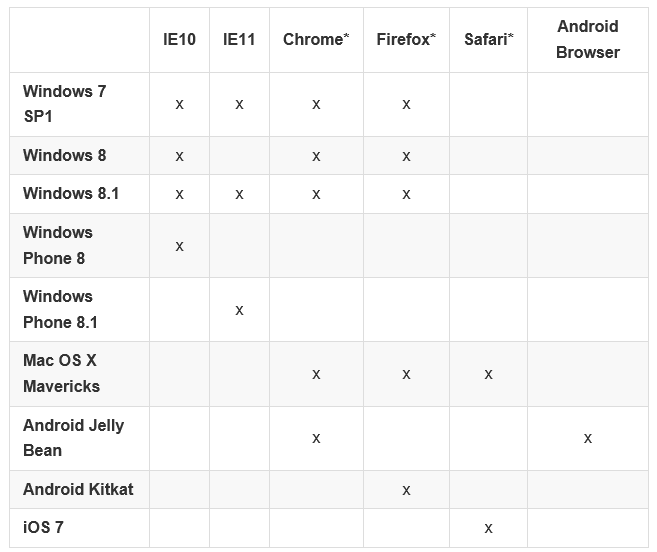
Much of WinJS will run on any modern browser but the browser support matrix has a number of gaps:

image

You can also see what runs where from this status table.

But what is WinJS? Note that it comes from the Windows apps team, not the web development team at Microsoft. WinJS was designed to enable app development for Windows 8 “Metro” (also known as the Windows Runtime) using JavaScript, CSS and HTML. Back in 2010, when Microsoft signalled the end of Silverlight and the rise of HTML 5 for browser-based applications, early versions of WinJS would already have been in preparation. Using WinJS you can share code across a Windows 8 app, web apps, and via an app packager like Apache Cordova, in apps for Android and iOS as well.

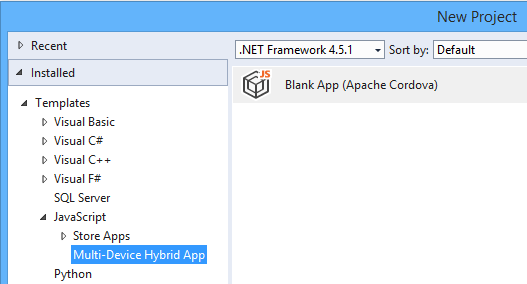
Note that Cordova is now integrated into Visual Studio, using the catchy name Multi-Device Hybrid App:

image

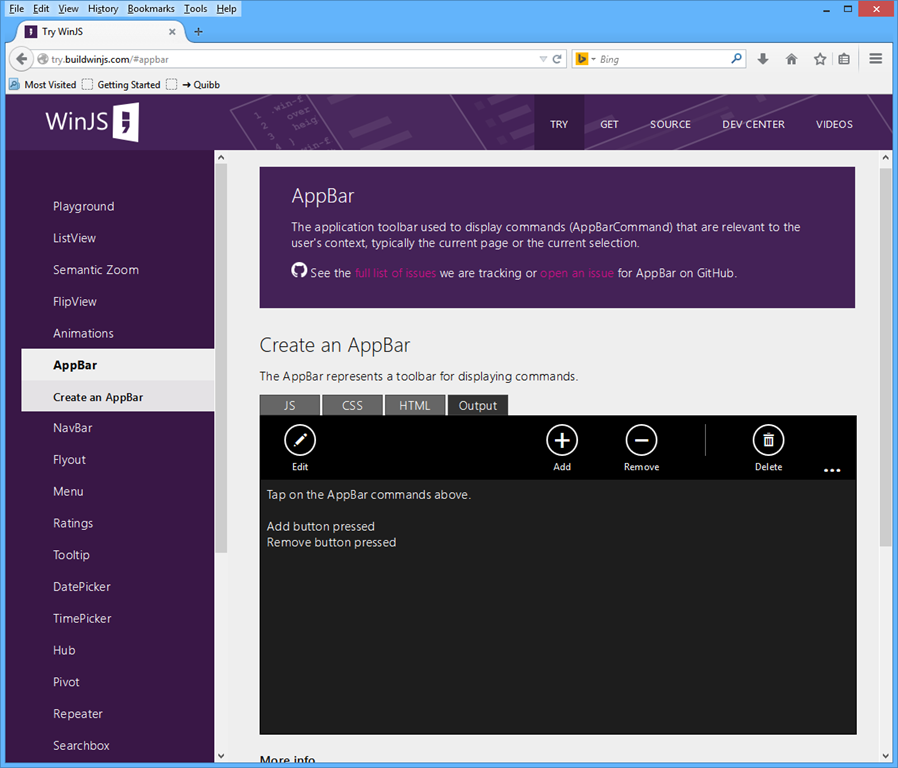
If you want to know what kind of controls and components are on offer in WinJS, you can find out using the excellent demo site here. This is Firefox:

image

Quick summary then: WinJS lets you build apps that look like Windows 8 Store apps, but which run cross-browser and cross-platform. But who wants to do that?

Maybe Microsoft does. The messaging from the company, especially since CEO Satya Nadella took over from Windows guy Steve Ballmer, is “any device”, provided of course that they hook up to Microsoft’s services. That messaging is intended for developers outside the company too. Check out the current campaign for Microsoft Azure, which says “consume on any device”.

image

This could be a web application, or it could be a client app using Azure Mobile Services or an ASP.NET Web API application to connect to cloud data.

You do not have to use WinJS to consume Microsoft’s services of course. Why would developers want to use the look and feel of a rather unloved app platform, rather than the native look and feel of Android or iOS? That is an excellent question, and in most cases they will not. There could be cases though, for example for internal business apps where users care most about functionality. What is the current stock? What is the lead time? Show me this customer’s order history. A WinJS app might not look right for the platform, but the UI will be touch-friendly, and ease of rollout across the major mobile platforms could trump Apple’s design guidelines.

If you are writing a pure web application, users expectations concerning native look and feel are not so high. The touch-oriented design of WinJS is its main appeal, though other web frameworks like JQuery Mobile also offer this. The “Metro” design language is distinctive, and Microsoft will be making a renewed push for Windows Store apps, or Universal Apps, as part of the new wave of Windows called Windows 9 or “Threshold”. WinJS is the way to build apps for that platform using JavaScript and HTML, with the added bonus of easy porting to a broad range of devices.

This is a hard sell though. I am impressed by the effort Microsoft has put into making WinJS work cross-platform, but will be surprised to see much usage outside Windows Store apps (including Windows Phone). On the other hand, it does help to keep the code honest: this really is HTML and JavaScript, not just a wrapper for Windows Runtime APIs.

Lifetime registration as a Windows Store developer, now from £12

Microsoft has removed some friction from developing for the Windows Store (whether phone or Windows 8) by removing the requirement to pay an annual subscription:

As we continue to execute on the vision to integrate the Windows and Windows Phone developer experiences, we have taken another step by moving to a one-time lifelong Dev Center registration fee.

says Microsoft’s Todd Brix in a post today. He adds that the 600,000 developers already registered are covered, with no additional fee required.

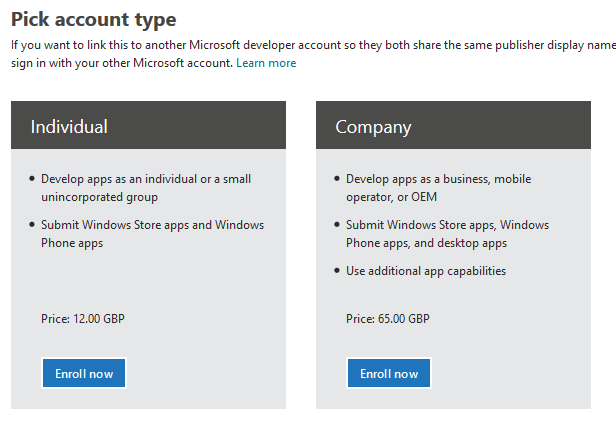
How much is the fee? Brix does not say, and I could not find it quickly, so I started the signup process. I was offered individual registration for just £12.00. A company registration is £65.00.

image

Both fees are of course negligible for a developer, compared to the cost of developing an app that is worth installing. Considering that Microsoft has had problems with junk apps filling its store, you could argue that fees are justifiable as a means of restraining the flow of meaningless or malicious apps.

The counter-argument is that fees deter developers from getting started, and that today’s hobbyist may come up with the next Minecraft. It is better to control quality with a robust checking process before apps are admitted into the store.

I had a quick glance today, and have the impression that Microsoft has made progress in removing the worst offenders, following some agitation at the end of last month.

Microsoft is laying the foundation for another go at its app platform with the launch of Windows 9, about which we will hear more in a couple of weeks time.

Microsoft integrates Azure websites with hybrid cloud

Microsoft has announced the integration of Azure websites with Azure virtual networks, including access to on-premise resources if you have a site-to-site VPN.

The Virtual Network feature grants your website access to resources running your VNET that includes being able to access web services or databases running on your Azure Virtual Machines. If your VNET is connected to your on premise network with Site to Site VPN, then your Azure Website will now be able to access on premise systems through the Azure Websites Virtual Network feature.

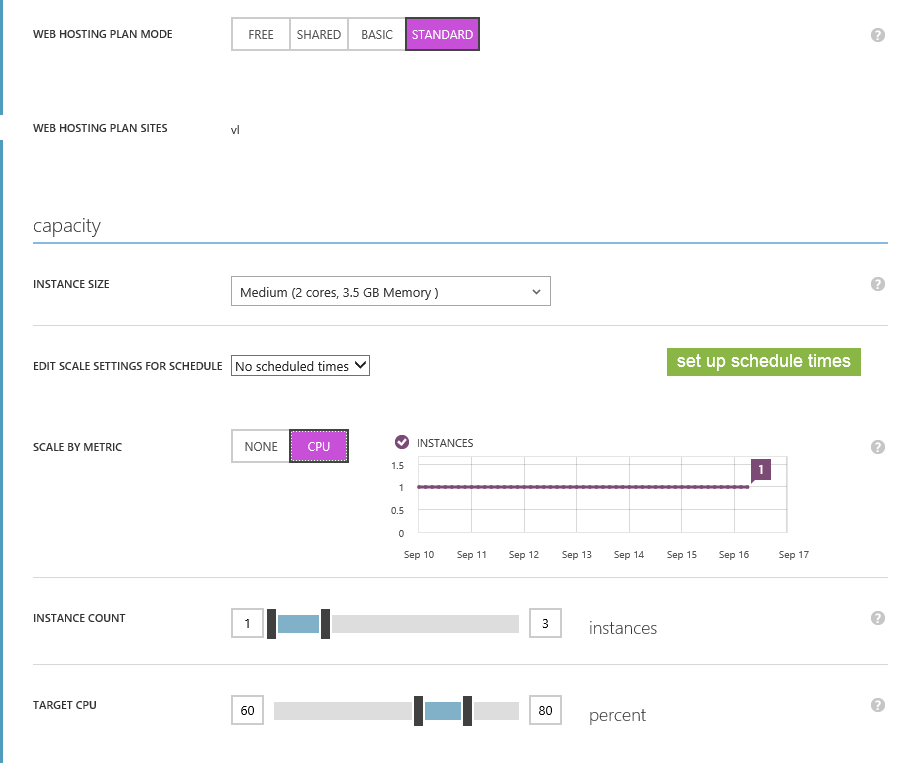
Azure websites let you deploy web applications running on IIS (Microsoft’s web server) hosted in Microsoft’s cloud. The application platform can be framework can be ASP.NET, Java, PHP, Node.js or Python. There are Free, Shared and Basic tiers which are mainly for prototyping, and a Standard tier which has auto-scaling features, managed through Microsoft’s web portal:

image

The development tool is Visual Studio, which now has strong integration with Azure.

Integration with virtual networks is a significant feature. You could now host what is in effect an intranet application on Azure if it is convenient. If it is only used in working hours, say, or mainly used in the first couple of hours in the morning, you could scale it accordingly.

Have a look at that web configuration page above, and compare it with the intricacies of System Center. It is a huge difference and shows that some parts of Microsoft have learned that usability matters, even for systems aimed at IT professionals.

Windows “9”: forget the Start menu, consider the apps

This week has seen multiple leaks of early builds of the next version of Windows – sometimes called Windows 9 or “Threshold” – showing Microsoft’s continuing inability to persuade all of its partners to keep secrets.

It seems to me that the leaks are likely to be genuine, though the usual health warnings apply. I also expect that Microsoft is deliberately holding back from releasing final UI designs, in part because they are likely to leak, so you should not read too much into the appearance.

The headline new features are a revamped Start menu which appears in the old position on the desktop, rather than on a separate screen; and the ability to run several desktops at once, as a way of organising your work.

No doubt the new Start menu will feel more comfortable for Windows 7 users, though for myself I am now used to the full-screen version and it is no big deal.

I am more interested in what is happening with Windows Store apps (also known as Metro or Windows Runtime apps). These are significant because it is this kind of app that you can easily port to Windows Phone using a Visual Studio Universal App project.

We saw these apps running in desktop windows, in a preview at the Build developer conference earlier this year. The leaked build seems also to have this feature. Check out the video here. Here is Calculator running on the desktop:

image

This is the Metro app, not the old desktop calculator. Here it is in Windows 8.1:

image

Note a big difference though: in Windows 8.1 you can get a window bar to appear along the top, but in Windows 9 there is also a maximize widget at top right of the window (in Windows, this doubles as a “restore down” button when the windows is already maximized).

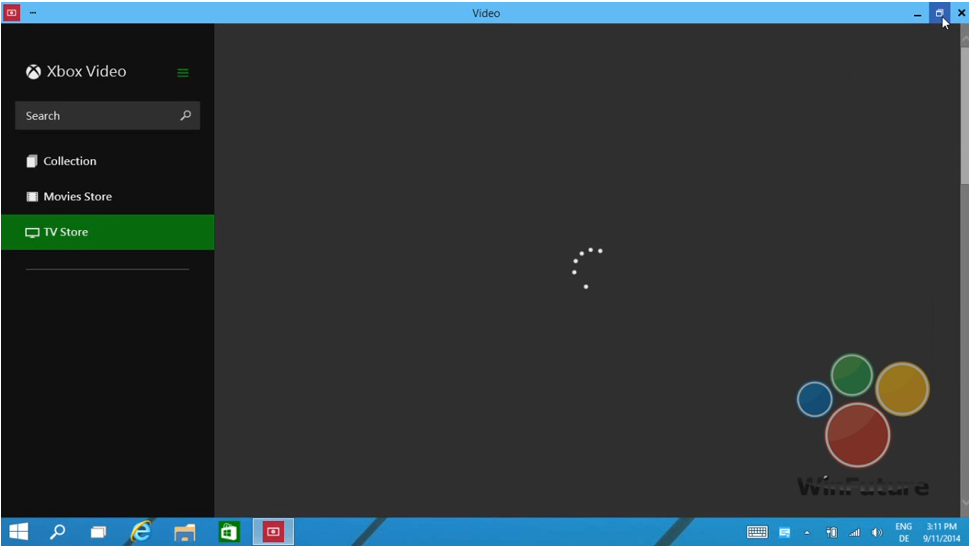
Later in the video, we see this in operation. The user starts the Xbox Video app full screen:

image

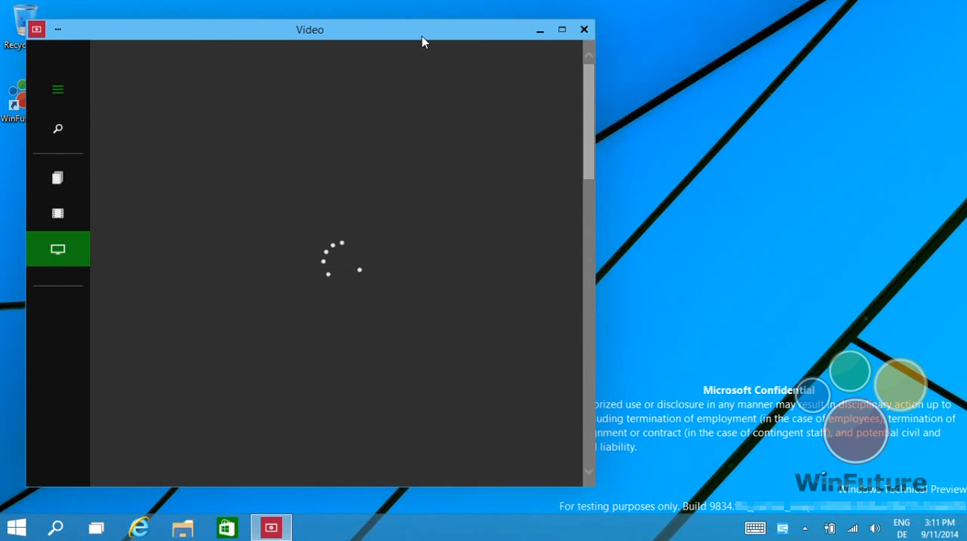
and then hits the “restore down” button:

image

This is therefore the bridge between the “Metro” and desktop environments. Hit that button, and the full-screen experience becomes a windowed app on the desktop.

In another leaked image, the Charms menu options (a right-edge menu in Windows 8.x) becomes a drop-down window menu, summoned by clicking in the right-hand upper corner. Users often find the Charms menu awkward with mouse and keyboard (I still do) so this will be a more convenient alternative.

Now, although Windows experts can easily see the difference between a Metro app and a desktop app, I doubt that the average user will care. All they will note is that this kind of app requires Windows 8 or 9 to run.

Although this is a diminished target for developers, who may still prefer to write desktop apps that target Windows 7 (or XP) and higher, my guess is that this new UI will make Windows Runtime apps more visible and acceptable for users who live primarily in the desktop – which is most Windows users.

If Microsoft can increase the momentum behind this style of apps, then their benefits will be more apparent too: easy install and uninstall via the Store, low malware risk, and a UI that works well on tablets as well as with mouse and keyboard. This in turn would make more sense of the small Windows tablets from the likes of Toshiba, HP and Lenovo which we recently saw at IFA in Berlin.

There would be a knock-on benefit for Windows Phone, too, thanks to relatively easy porting between the two platforms.

What do you think – is desktop integration enough to rescue the Windows 8 app platform?

Book review: Professional ASP.NET MVC 5. Is this the way to learn ASP.NET MVC?

This book caught my eye because while I like ASP.NET MVC, Microsoft’s modern web application framework, it seems to be badly documented. Even the word “badly” is not quite right; there is lots of documentation, some of high quality, but finding your way around it is challenging, thanks to the many different pieces involved. When I completed an ASP.NET MVC project recently, I found it frustrating thanks to over-reliance on sample projects (hey, here is a an application we did that works, see if you can figure out how we did it), many out of date articles relating to old versions; and the opposite, posts and samples which include preview software that does not seem wise to use in production.

image

In my experience ASP.NET MVC is both cleaner and faster than ASP.NET Web Forms, the older .NET web framework, but there is more to learn before you can go ahead and write an application.

Professional ASP.NET MVC 5 gives you nearly 600 pages on the subject. It is aimed at a broad readership: the introduction states:

Professional ASP.NET MVC 5 is designed to teach ASP.NET MVC, from a beginner level through advanced topics.

Perhaps that is too broad, though the idea is that the first six chapters (about 150 pages) cover the basics, and that the later chapters are more advanced, so if you are not a beginner you can start at chapter 7.

The main author is Jon Galloway who is a Technical Evangelist at Microsoft. The other authors are Brad Wilson, formerly at Microsoft and now at CenturyLink Cloud; K Scott Allen at OdeToCode, David Matson who is on the ASP.NET MVC team at Microsoft, and Phil Haack formerly at Microsoft and now at GitHub. I get the impression that Haack wrote several chapters in an earlier edition of the book, but did not work directly on this one; Galloway brought his chapters up to date.

Be in no doubt: there are plenty of well-informed ASP.NET MVC people on this team.

The earlier part of the book uses a sample Music Store application, a version of which is publicly available here. You can also download a tutorial, based on the sample, written by Galloway. The public tutorial however dates from 2011 and is based on ASP.NET MVC 3 and Visual Studio 2010. The book uses Visual Studio 2013.

Chapters 1 to 6, the beginner section, do a decent job of talking you through how to build a first application. There are chapters on Controllers, Views, Models, Forms and HTML Helpers, and finally Data Annotations and Validation. It’s a good basic introduction but if you are like me you will come out with many questions, like what is an ActionResult (the type of most Controller methods)? You have to wait until chapter 16 for a full description.

Chapter 7 is on Membership, Authorization and Security. That is too much for one chapter. It is mostly on security, and inadequate on membership. One of my disappointments with this book is that Azure Active Directory hardly gets a mention; yet to my mind integration of web applications with Office 365 (which uses Azure AD) is a huge feature for Microsoft.

On security though, this is a useful chapter, with handy coverage of Cross-Site Request Forgery and other common vulnerabilities.

Next comes a chapter on AJAX with a little bit on JQuery, client-side validation, and Ajax ActionLinks. Here is the dilemma though. Does it make sense to cover JQuery in detail, when this very popular open source library is widely documented elsewhere? On the other hand, does it make sense not to cover JQuery in detail, when it is usually a vital part of your ASP.NET MVC application?

I would add that this title is poor on design aspects of a web application. That said, I was not expecting much on the design side; but what would help would be coverage of how to work with designers: what is safe to hand over to designers, and how does a typical designer/developer workflow play out with ASP.NET MVC?

I would also like to see more coverage of how to work with Bootstrap, the CSS framework which is integrated with ASP.NET MVC 5 in Visual Studio. I found it a challenge, for example, to discover the best way to change the default fonts and colours used, which is rather basic.

Chapter 9 is on routing, dry but essential background. Chapter 10 on NuGet, the Visual Studio package manager, and a good chapter given how important NuGet now is for most Visual Studio work.

Incidentally, many of the samples for the book can be installed via NuGet. It’s not completely obvious how to do this. I found the best way is to go to http://www.nuget.org and search for Wrox.ProMvc5 – here is the link to the search results. This lists all the packages available; note the package names. Then open the Nuget package manager console and type:

install-package [packagename]

to get the sample.

Chapter 11 is a too-brief chapter on the Web API. I would like to see more on this, maybe even walking through a complete application with clients for say, Windows Phone and a web application – though the following chapter does present a client example using AngularJS.

Chapter 13 is a somewhat theoretical look at dependency injection and inversion of control; handy as Microsoft developers talk a lot about this.

Next comes a very brief introduction to unit testing, intended I think only as a starting point.

For me, the the next two chapters are the most valuable. Chapter 15 concerns extending MVC: you learn about extending models with value providers and model binders; validating models; writing HTML helpers and Razor (the view engine in ASP.NET MVC) helpers; authentication filters and authorization filters. Chapter 16 on advanced topics looks in more detail at Razor, routing, templates, ActionResult and a few other things.

Finally, we get a look at how the Nuget.org application was put together, and an appendix covering some miscellaneous details like what is new in ASP.NET MVC 5.1.

Conclusions

I find this one hard to summarise. There is too much missing to give this an unreserved recommendation. I would like more on topics including ASP.NET Identity, Azure AD integration, Entity Framework, Bootstrap, and more. Trying to cover every developer from beginner to advanced is too much; removing some of the introductory material would have left more room for the more interesting sections. The book is also rather weighted towards theory rather than hands-on coding. At some points it felt more like an explanation from the ASP.NET MVC team on “why we did it this way”, than a developer tutorial.

That said, having those insights from the team is valuable in itself. As someone who has only recently engaged with ASP.NET MVC in a real application, I did find the book useful and will come back to some of those explanations in future.

Looking at what else is available, it seems to me that there is a shortage of books on this subject and that a “what you need to know” title aimed at professional developers would be widely welcomed. It would pay Microsoft to sponsor it, since my sense is that some developers stick with ASP.NET Web Forms not because it is better, but because it is more approachable.

 

Microsoft introduces a new 2D graphics API for the Windows Runtime

Microsoft has announced Win2D, a Windows Runtime API that wraps Direct2D (part of DirectX), for accelerated graphics in Windows Store apps.

The new API is described here and you can download the current binary here. It is in its early stages, but already supports basic drawing, bitmap loading, some image effects, and a vector and matrix math library. Here is some sample code:

void canvasControl_Draw(CanvasControl sender, CanvasDrawEventArgs args)
{
args.DrawingSession.Clear(Colors.CornflowerBlue);
args.DrawingSession.DrawEllipse(190, 125, 140, 40, Colors.Black, 6);
args.DrawingSession.DrawText("Hello, world!", 100, 100, Colors.Yellow);
}

Although this hardly looks exciting, it is important because it enables accelerated custom drawing from languages other than C++, and without needing to learn Direct2D itself. It will be easier to make rich custom controls, or casual 2D games.

That said, there are already alternative C# wrappers for DirectX in Windows Runtime apps, such as SharpDX.

Some of the comments on the MSDN post are sceptical:

Managed DirectX and XNA were however cancelled despite the frustration from the community which in response created open source alternatives to save the projects and customers that had invested in technology Microsoft introduced.

I understand that the future is "uncertain", but is this technology something that we should dare invest in or will it see the same fate as it’s earlier incarnations?

Microsoft’s Shawn Hargreaves assures:

Win2D is absolutely not a side project or some kind of stop gap that will later be replaced by anything different.

The target here is universal apps, so not just Windows Store apps but also Windows Phone. Despite the hesitant reception for the Windows Runtime in Windows 8, it looks as if Microsoft is still committed to the platform and that it will remain centre stage in Windows vNext.

Bing Developer Assistant adds code samples to Visual Studio IntelliSense, with mixed results

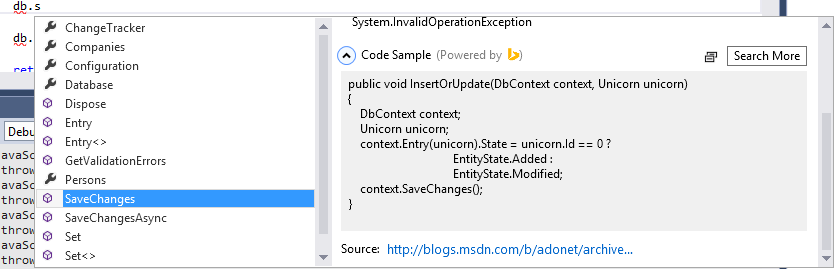
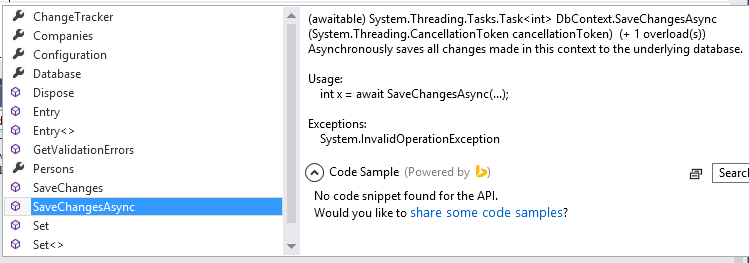
Microsoft has updated its Bing Developer Assistant Beta, a Visual Studio 2013 add-in which hooks into IntelliSense so that you get code samples as well as brief documentation. For example, in an Entity Framework project, if you select dbContext.SaveChanges, you get a code sample which uses that method.

image

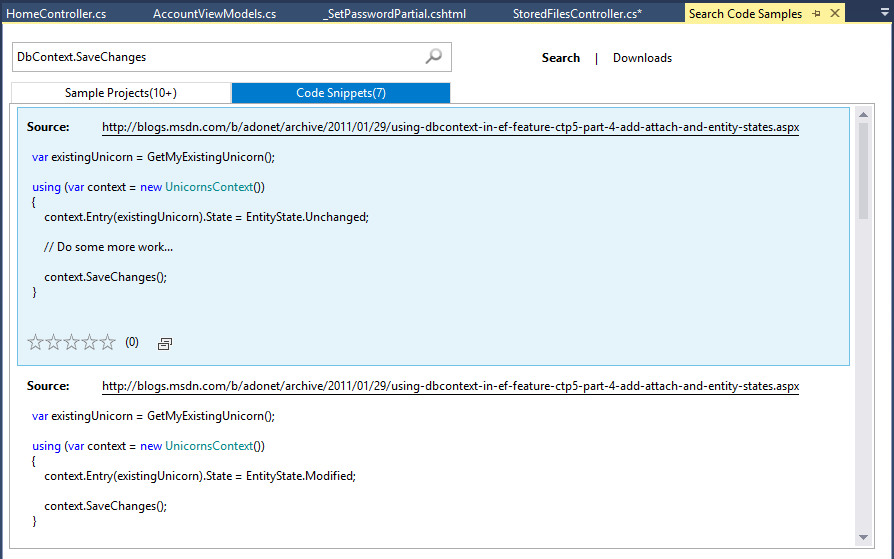
There is no guarantee of course that the sample is relevant to what you are trying to accomplish. You can hit Search More though and get a selection of code snippets and sample projects, drawn from sites including MSDN, StackOverflow and Codeproject.

image

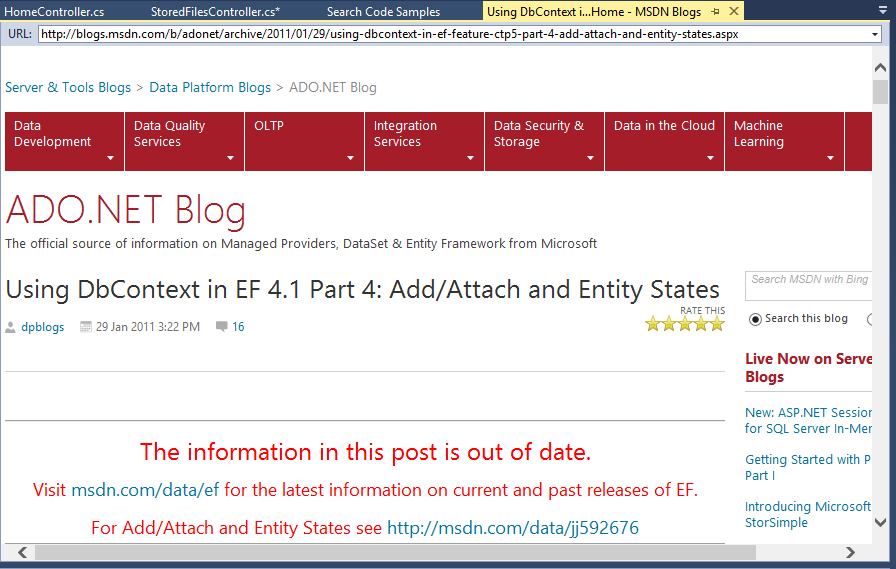
Developer beware though. Looking at the code samples, the top one is from a 2011 blog post relating to CTP (Community Tech Preview) 5 of Entity Framework 4.1. If you hit the link, you get this:

image

“The information in this post is out of date”, it says, followed by a link to what is in fairness a rather helpful article on using SaveChanges.

Hmm, maybe Bing Developer Assistant should try filtering the search to eliminate samples on preview or obsolete APIs? A snag here though is that on occasion the blogs and samples on preview frameworks are all you can get, because by the time the thing is actually released, the developer evangelists have move on to blog about the next up and coming cool thing.

If you choose an object member for which Bing finds no code sample, you are prompted to add one of your own:

image

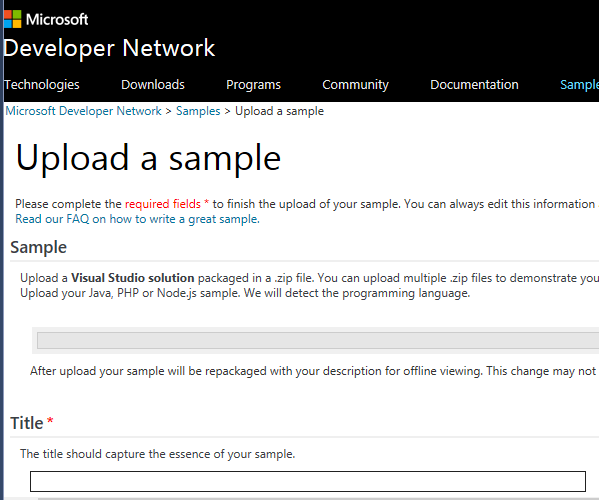
This takes to to the Developer Network sample upload page:

image

This form is quite a lot of work, but lets you add a code snippet or sample project together with title and comments explaining what it does.

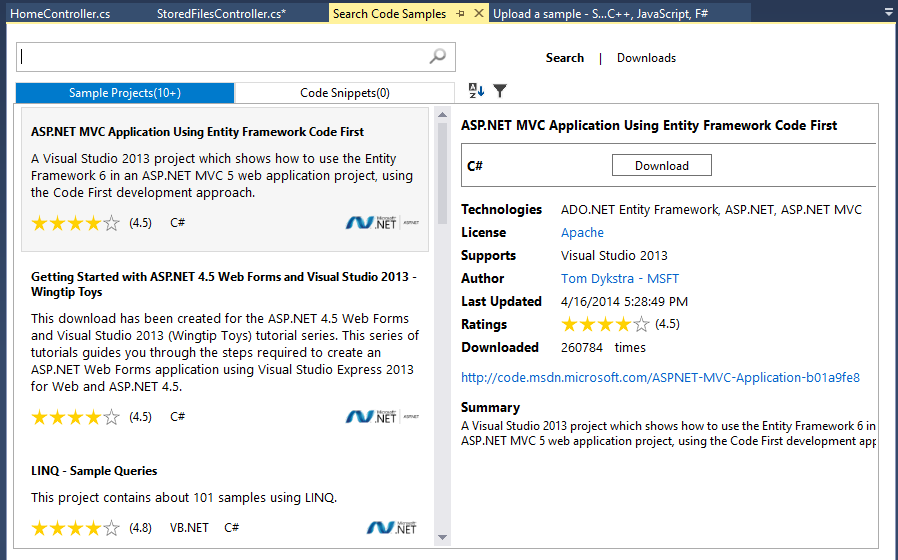
The Bing Developer Assistant also searches for sample projects:

image

Again it is a case of picking and choosing what is really relevant; but developers are experts and expected to use common sense.

A drawback with Bing Developer Assistant is that only one add-on can extend IntelliSense, so if you use Resharper or another tool which also does this, you have to choose which one to allow.

In the end, this is all about integrating web search into the IDE. Is that a good idea, or is it better simply to have your web browser open, perhaps on another display, and type “dbContext SaveChanges EF6” or some such into your favourite search engine?

There is some merit in a search engine that automatically filters to show only code samples – hey, that is what Google’s popular Code Search did, until it was mysteriously shut down – though I’m not sure how much I like the idea of possibly obsolete and deprecated samples showing up in Visual Studio as you are coding.

Still, the truth is that web search is critical to software development today and it is good to see that recognised.