Category Archives: professional

Microsoft’s muddled licensing for Office Web Apps

I’ve been reviewing Microsoft’s Small Business Server 2011 – mainly the standard edition as that is the one that is finished. The more interesting cloud-oriented Essentials version is not coming until sometime next year.

In its marketing [pdf] for SBS 2011 Microsoft says:

Get things done from virtually wherever and whenever. With Office Web Apps (included in SharePoint Foundation 2010), users can view, create, and edit documents anyplace with an Internet connection.

This appears to be only a half-truth. You can install Office Web Apps into SharePoint Foundation 2010, but it is not included in a default install of SBS 2011 Standard, and as far as I can tell the setup for it is not on the DVD. If you try to download it, you will find it is only available through the Volume Licensing Service Center, and that you require a volume license for Microsoft Office to get it. You can also get it through TechNet, but this is for evaluation only.

The Office Web Apps site states:

Business customers licensed for Microsoft Office 2010 through a Volume Licensing program can run Office Web Apps on-premises on a server running Microsoft SharePoint Foundation 2010 or Microsoft SharePoint Server 2010.

and it also appears that each user requires a volume license for desktop Microsoft Office in order to use it. In other words, the Client Access License for Office Web Apps is a volume license for Office. You cannot purchase a volume license for 5 users, and then have everyone in your 50-person organisation use it.

This approach to licensing makes no sense. In fact, I’m not sure it is even internally consistent. Part of the web app concept is that you could, if need be, walk up to a PC in an internet cafe, log in to SharePoint, and make a quick edit to a Word document. You are not going to ask the management “is this machine correctly licensed for Office Web Apps?”

What if you are using Linux, or an Apple iPad (it almost works), or a RIM PlayBook, or some other device on which Office cannot be installed? These are scenarios where Office Web Apps is particularly useful; Microsoft cannot expect users to buy a license for desktop Office for machines which cannot run it.

Note Office Web Apps applications are severely cut-down in comparison to the desktop editions. It is not even close to the same thing. Further, Microsoft lets anyone in the world use Office Web Apps for free – provided it is on SkyDrive and not on a locally installed SharePoint.

Microsoft is also happy to give users of Office 365, the forthcoming hosted version of server apps including SharePoint, access to Office Web Apps:

Work from virtually any place and any device with the Office Web Apps

I’m guessing that somewhere in Microsoft the powerful Office group is insisting that Office Web Apps is a feature of the desktop product. Anyone else can see that it is not; it is a feature of SharePoint. Excluding it from SBS 2011 by default does nothing except to complicate matters for admins – and it is a fiddly install – thus reducing the appeal of the product.

Incidentally, I see nothing unreasonable about Microsoft charging for an on-premise install of Office Web Apps. But it should be licensed as a web application, not as a desktop application.

For more on this see Sharon Richardson’s post and Susan Bradley’s complaint.
Single sign-on from Active Directory to Windows Azure: big feature, still challenging

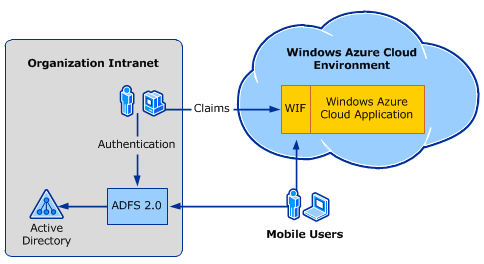
Microsoft has posted a white paper setting out what you need to do in order to have users who are signed on to a local Windows domain seamlessly use an Azure-hosted application, without having to sign in again.

I think this is a huge feature. Maintaining a single user directory is more secure and more robust than efforts to synchronise a local directory with a cloud-hosted directory, and this is a point of friction when it comes to adopting services such as Google Apps or Salesforce.com. Single sign-on with federated directory services takes that away. As an application developer, you can write code that looks the same as it would for a locally deployed application, but host it on Azure.

There is also a usability issue. Users hate having to sign in multiple times, and hate it even more if they have to maintain separate username/password combinations for different applications (though we all do).

The white paper explains how to use Active Directory Federation Services (ADFS) and Windows Identity Foundation (WIF, part of the .NET Framework) to achieve both single sign-on and access to user data across local network and cloud.

image

The snag? It is a complex process. The white paper has a walk-through, though to complete it you also need this guide on setting up ADFS and WIF. There are numerous steps, some of which are not obvious. Did you know that “.NET 4.0 has new behavior that, by default, will cause an error condition on a page request that contains a WS-Federation authentication token”?

Of course dealing with complexity is part of the job of a developer or system administrator. Then again, complexity also means more to remember and more to troubleshoot, and less incentive to try it out.

One of the reasons I am enthusiastic about Windows Small Business Server Essentials (codename Aurora) is that it promises to do single sign-on to the cloud in a truly user-friendly manner. According to a briefing I had from SBS technical product manager Michael Leworthy, cloud application vendors will supply “cloud integration modules,” connectors that you install into your SBS to get instant single sign-on integration.

SBS Essentials does run ADFS under the covers, but you will not need a 35-page guide to get it working, or so we are promised. I admit, I have not been able to test this feature yet, and aside from Microsoft’s BPOS/Office 365 I do not know how many online applications will support it.

Still, this is the kind of thing that will get single sign-on with Active Directory widely adopted.

Consider FaceBook Connect. Register your app with Facebook; write a few lines of JavaScript and PHP; and you can achieve the same results: single sign-on and access to user account information. Facebook knows that to get wide adoption for its identity platform it has to be easy to implement.

On Microsoft’s platform, another option is to join your Azure instance to the local domain. This is a feature of Azure Connect, currently in beta.

Are you using ADFS, with Azure or another platform? I would be interested to hear how it is going.

Adobe declares glittering results as CEO says Apple’s Flash ban has no impact on its revenue

Adobe has proudly declared its first billion dollar quarter, $1,008 m in the quarter ending Dec 3 2010 versus $757.3 m in the same quarter of 2009.

I am not a financial analyst, but a few things leap out from the figures. One is that Omniture, the analytics company Adobe acquired at the end of 2009, is doing well and contributing significantly to Adobe’s revenue – $98.4 m in Q4 2010. The billion dollar quarter would not have happened without it. Second, Creative Suite 5 is selling well, better than Creative Suite 4.

Creative Suite 4 was released in October 2008, and Creative Suite 5 in April 2010. It is not perfect, but the following table compares the Creative Solutions segment (mainly Creative Suite) of the two products quarter by quarter from their respective release dates:

Quarters after release 1st 2nd 3rd 4th 5th 6th
Creative Suite 4 508.7 460.7 411.7 400.4 429.30 432.0
Creative Suite 5 532.7 549.7 542.1      

CS4 drops off noticeably following an initial surge, whereas CS5 has kept on selling. It is a good product and a de-facto industry standard, but not every user is persuaded to upgrade every time a new release appears. My guess is that things like better 64-bit support – which make a huge difference in the production tools – and new tricks in PhotoShop have been successful in driving upgrades to CS5. Further, the explosion of premium mobile devices led by Apple’s iPhone and iPad has not been bad for Adobe despite Apple CEO Steve Jobs doing his best to put down Flash. Publishers creating media for the iPad, for example, will most likely use Adobe’s tools to do so. CEO Shantanu Narayen said in the earnings calls, “We have not seen any impact on our revenue from Apple’s choice [to not support Flash]”, though I am sure he would make a big deal of it if Apple were to change its mind.

Before getting too carried away though, I note that Creative Suite 3, published in March 2007, did just as well as CS5.  Here are the figures:

Quarters after release 1st 2nd 3rd 4th 5th 6th
Creative Suite 3 436.6 545.5 570.5 543.5 527.2 493.6

In fact, Q4 2007 at $570.5 m is still a record for Adobe’s Creative Solutions segment. So maybe CS4 was an unfortunate blip. Then again, not quite all the revenue in Creative Solutions is the suite; it also includes Flash Platform services such as media streaming. Further, the economy looked rosier in 2007.

Here is the quarter vs quarter comparison over the whole company:

  Q4 2009 Q4 2010
Creative Solutions 429.3 542.1
Digital Enterprise 211.8 274.10
Omniture 26.3 98.4
Platform 47 46.1
Print and publishing 42.9 47.3

In this table, Creative Solutions has already been mentioned. Digital Enterprise, formerly called Business Productivity, includes Acrobat, LiveCycle and Connect web conferencing. Platform is confusing; according to the Q4 09 datasheet it includes the developer tools, Flash Platform Services and ColdFusion. However, the Q4 10 datasheet omits any list of products for Platform, though it includes them for the other segments, and lists ColdFusion under Print and Publishing along with Director, Contribute, PostScript, eLearning Suite and some other older products. According to this document [pdf] InDesign which is huge in print publishing is not included in Print and Publishing, so I guess it is in Creative Solutions.

In the earnings call, Adobe’s Mark Garrett did mention Platform, and attributed its growth (compared to Q3 2010) to “higher toolbar distribution revenue driven primarily by the release of the new Adobe Reader version 10 in the quarter.” This refers to the vile practice of foisting a third-party toolbar (unless they opt-out) on people forced to download Adobe Reader because they have been send a PDF. Perhaps in the light of these good results Adobe could be persuaded to stop doing so?

I am not sure how much this breakdown can be trusted as it makes little sense to me. Do not take the segment names too seriously then; but they are all we have when it comes to trying to compare like with like.

Still, clearly Adobe is doing well and has successfully steered around some nasty rocks that Apple threw in its way. I imagine that Microsoft’s decision to retreat from its efforts to establish Silverlight as a cross-platform rival to Flash has also helped build confidence in Adobe’s platform. The company’s point of vulnerability is its dependence on shrink-wrap software for the majority of its revenue; projects like the abandoned Rome show that Adobe knows how to move towards cloud-deployed, subscription-based software but with business booming under its current model, and little sign of success for cloud projects like Acrobat.com, you can understand why the company is in no hurry to change.  

Rumblings in the Subversion community as WANdisco claims to be “shaking it up”

Subversion is an open source version control system used by developers to manage source code; it was an improvement over CVS which it to some extent replaced. Everyone loved it until Linus Torvalds came up with an alternative called Git which is better suited for the distributed development typical of large open source projects like Linux. Now everyone loves Git – with a bit of love left over for another distributed system called Mercurial – and Subversion has become a tad unfashionable, though still widely used.

David Richards is president and CEO of WANdisco, which has a source code management suite based on Subversion. He has announced his intention to “shake up Software Change Management” by fixing Subversion’s weak points. He writes:

Enough is enough. Subversion gets a lot of criticism due to the shortcomings of branching and merging, especially when compared with GIT and others, and we simply don’t have the time to debate whether or not this should be done when it clearly should be.

Why so combative? Well, there a few curious points here. Subversion was originally sponsored by Collabnet, which has its own ALM (Application Lifecycle Management) suite which uses Subversion, as well as a free product called Subversion Edge which packages the official open source release with some convenient tools. Subversion did not become a top-level Apache project until February 17 2010. According to Richards, there is now competition between commercial companies to be seen as the primary Subversion sponsors. In a blog post today, Richard refers to “commercial interests that are dependent on the perception that they are the ones developing Subversion” and adds:

We also believe it’s unhelpful when certain unscrupulous committers decide to commit trivial changes in large files to simply get their stats up.

Richards feels that Subversion development has stagnated:

Didn’t the community just announce a road map? Yes they did, but that’s pretty much all that happened (and that really pisses us off.) The commit logs (code committed by developers to the project) tell the real story. We are not happy with the volume, speed or participation on the project right now. Blogging, or answering questions on user lists are important, but so is writing source code.

The not-so-veiled threat in Richards’ post is that he will fork Subversion if necessary. He says “we don’t believe that [forking] is necessary” but when he adds later that “we would prefer that this be a community effort” it seems clear that forking is an option.

Richard says that WANdisco held a “summit” of companies with a vested interest in Subversion and that there was “a common theme: branching and merging must improve.”

Personally I like Subversion though it is also obvious that Git is superior for many projects. Richards does not help his cause by accusing “GIT Fanatics” of being unfair in their criticisms.  The comments to his post are worth reading, for example:

I used Subversion without prejudice over CVS because it was better. Today I use Git without prejudice over the other two. Git has changed how I work. I use facilities in Git that are not possible with Subversion or CVS.

Developers who take this view will not care much now about Subversion. Still, a lot of people still use it, probably many more than those who use Git, and improvements would be welcome. I am not clear though why the CEO of WANdisco is sounding so embattled, or what politics or difference of opinion is dividing the Subversion community, and would like to hear more about it.

Update: clarified that Subversion Edge is a free product

Update 2: The Apache Software Foundation replies in a blog post:

WANdisco’s false implication that it is in some kind of steering position in Subversion development discredits the efforts of other contributors and companies … we welcome WANdisco’s involvement in Subversion, and failure on WANdisco’s part to address the above concerns will have no effect on the acceptance of technical work funded by WANdisco. We simply felt it necessary to clarify WANdisco’s role in Apache Subversion, for the benefit of our users and potential contributors.

Don’t miss Ryan Dahl on Node.js

I’m just back from Dreamforce in San Francisco, where one of the sessions I enjoyed most was from Ryan Dahl in the Cloudstock pre-conference event.

He is the author of node.js, a binding for the V8 Javascript engine, not for running in the browser but for creating server apps. However, it is interesting even if you don’t want to use V8, because of the approach he takes to concurrency and I/O. I wrote up the session here, under the title Nginx the new Apache, node.js the new PHP?

What was Dahl doing at a Dreamforce conference? That was a question that puzzled me, until later in the week when it was announced that Salesforce.com is acquiring Heroku. Heroku has been experimenting with running node.js on its hosted infrastructure for Ruby applications, and may come up with a Ruby wrapper.

Salesforce.com acquires Heroku, wants your Enterprise apps

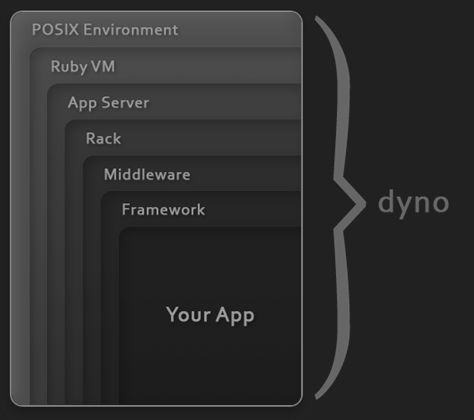
The big news today is that Salesforce.com has agreed to acquire Heroku, a company which hosts Ruby applications using an architecture that enables seamless scalability. Heroku apps run on “dynos”, each of which is a single process running Ruby code on the Heroku “grid” – an abstraction which runs on instances of Amazon EC2 virtual machines. To scale your app, you simply add more dynos.

image

Why is Salesforce.com acquiring Heroku? Well, for some years an interesting question about Salesforce.com has been how it can escape its cloud CRM niche. The obvious approach is to add further applications, which it has done to some extent with FinancialForce, but it seems the strategy now is to become a platform for custom business applications. We already knew about VMForce, a partnership with VMWare currently in beta that lets you host Java applications that are integrated with Force.com, but it is with the announcements here at Dreamforce that the pieces are falling into place. Database.com for data access and storage; now Heroku for Ruby applications.

These services join several others which Salesforce.com is branding at Force.com 2:

Appforce – in effect the old Force.com, build departmental apps with visual tools and declarative code.

Siteforce – again an existing capability, build web sites on Force.com.

ISVForce – build your own multi-tenant application and sign up customers.

Salesforce.com is thoroughly corporate in its approach and its obvious competition is not so much Google AppEngine or Amazon EC2, but Microsoft Azure: too expensive for casual developers, but with strong Enterprise features.

Identity management is key to this battle. Microsoft’s identity system is Active Directory, with federation between local and cloud directories enabling single sign-on. Salesforce.com has its own user directory and developing on its platform will push you towards using it.

Today’s announcement makes sense of something that puzzled me: why we got a session on node.js at Monday’s Cloudstock event. It was a great session and I wrote it up here. Heroku has been experimenting with node.js support, with considerable success, and says it will introduce a new version next year.

Finally, the Heroku acquisition is great news for Enterprise use of Ruby. Today many potential new developers will be looking at it with interest.

Database.com extends the salesforce.com platform

At Dreamforce today Salesforce.com announced its latest platform venture: Database.com. Salesforce.com is built on an Oracle database with various custom optimizations; and database.com now exposes this as a generic cloud database which can be accessed from a variety of languages – Java, .NET, Ruby and PHP – and accessed from applications running on almost any platform: VMForce, Smartphones, Amazon EC2, Google App Engine, Microsoft Azure, Microsoft Excel, Adobe Flash/Flex and others. One way to use it would via JPA (Java Persistence API) in an VMForce Java application.

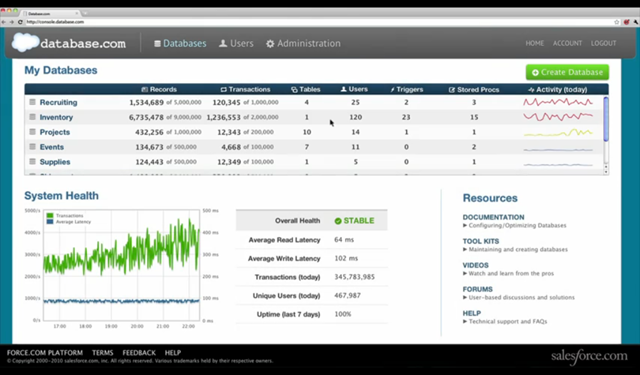
The Database.com console is a web application that has a console giving access to your databases and showing useful statistics and system information.

image

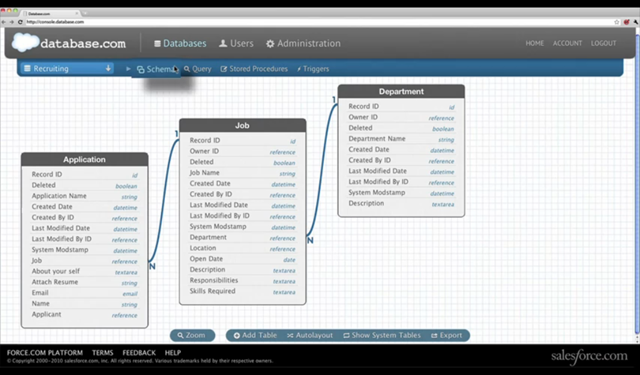
You can also create new databases, specifying the schema and relationships.

image

The details presented in the keynote today were sketchy – we saw applications that honestly could have been built just as easily with MySQL – but there is more information in the FAQ. The Database.com API is through SOAP or REST web services, not SQL. Third parties can create drivers so you can you use it with SQL APIs such as ODBC or JDBC. There is row level security, and built-in full text search.

According to the FAQ, Database.com “includes a native trigger and stored procedure language”.

Pricing starts from free – for up to 100,000 records, 50,000 transactions and 3 users per month. After than it is $10.00 per month per additional 100,000 records, $10.00 per month per additional 150,000 transactions, and $10.00 per user if you need the built-in authentication and security system – which as you would expect is based on the native force.com identity system.

As far as I can tell one of the goals of Database.com – and also the forthcoming chatter.com free public collaboration service – is to draw users towards the force.com platform.

Roger Jennings has analysed the pricing and reckons that Database.com is much more expensive than Microsoft’s SQL Azure – for 500 users and a 50GB database $15,000 per month for Database.com vs a little over $500 for the same thing on SQL Azure, though the two are difficult to compare directly and he has had to make a number of assumptions. Responding to a question at the press and analyst Q&A today, Benioff seemed to accept that the pricing is relatively high, but justified in his view by the range of services on offer. Of course the pricing could change if it proves uncompetitive.

Unlike SQL Azure, Database.com starts from free, which is a great attraction for developers interested in giving it a try. Trying out Azure is risky because if you leave a service running inadvertently you may run up a big bill.

In practice SQL Azure is likely to be more attractive than Database.com for its core market, existing Microsoft-platform developers. Microsoft experimented with a web services API for SQL Server Data Services in Azure, but ended up offering full SQL, enabling developers to continue working in familiar ways.

Equally, Force.com developers will like Database.com and its integration with the force.com platform.

Some of what Database.com can do is already available through force.com and I am not sure how the pricing looks for organizations that are already big salesforce.com users; I hope to find out more soon.

What is interesting here is the way salesforce.com is making its platform more generic. There will be more force.com announcements tomorrow and I expect to to see further efforts to broaden the platform then.

Update – I had a chat with Database.com General Manager Igor Tsyganskiy. He says Microsoft’s SQL Azure is the closest competitor to Database.com but argues that because Salesforce.com is extending its platform in an organic way it will do a better job than Microsoft which has built a cloud platform from scratch. We did not address the pricing comparison directly, but Tsyganskiy says that existing Force.com customers always have the option to “talk to their Account Executive” so there could be flexibility.

Since Database.com is in one sense the same as Force.com, the API is similar. The underlying query language is SOQL – the Salesforce Object Query Language which is based on SQL SELECT though with limitations. The language for stored procedures and triggers is Apex. SQL drivers from Progress Software are intended to address the demand for SQL access.

I mentioned that Microsoft came under pressure to replace its web services API for SQL Server Data Services with full SQL – might Database.com face similar pressure? We’ll see, said Tsyganskiy. The case is not entirely parallel. SQL Server is a cloud implementation of an existing SQL database with which developers are familiar. Database.com on the other hand abstracts the underlying data store – although Salesforce.com is an Oracle customer, Tsyganskiy said that the platform stores data in a variety of ways so should not be thought of as a wrapper for an Oracle database server.

Although Database.com is designed to be used from anywhere, I’d guess that Java running on VMForce with JPA, and following today’s announcement Heroku apps also hosted by Salesforce.com, will be the most common scenarios for complex applications.

Silverlight 5 unveiled: more power, more Windows

Microsoft has announced details of Silverlight 5, a major new release of its browser plug-in and desktop runtime for Windows and Mac. Silverlight is also the primary application runtime for Windows Phone 7, though this update does not apply to the phone yet. Silverlight 5 will go into beta in the first half of 2011, and release is planned for the second half of 2011 – no more than a year or so away.

So what’s in Silverlight 5?

On the media side, there is hardware decoding of H.264 video (an overdue feature) plus enhancements including TrickPlay which enables fast-forward and rewind. There is also remote control support of some kind. According to VP Scott Guthrie, you will be able to stream HD video to a netbook.

The bigger area of change is in Silverlight as an application runtime. Here are the highlights:

  • Text rendering is much improved, with multi-columns, OpenType support, and control of tracking and leading.
  • Postscript vector printing greatly improves printing support, and you can now create a dedicated print view different from what is on screen.
  • A new hardware-accelerated 3D graphics API, as well as immediate mode graphics which lets you render directly to the GPU.
  • There is a 64-bit version of Silverlight 5.
  • WS-Trust support for secure messaging in tandem with Windows Communication Foundation.
  • Databinding enhancements, and support for debugging a binding by setting a breakpoint on it.

Alongside these, trusted Silverlight applications have new capabilities. But what is a trusted application? In the past, Silverlight applications become trusted if they run out of the browser and the user gives permission via a dialog. In Silverlight 5 this changes. A Silverlight application can be trusted within the browser as well, though Microsoft says this only works “when enabled via a group policy registry key and an application certificate”. This implies that the feature is aimed at corporate environments rather than for applets with a broad reach.

Once trusted, an in-browser Silverlight applet has the following additional features:

  • A new web browser control lets you host HTML content within a Silverlight application.
  • Read and write access to My Documents
  • Ability to launch Microsoft Office applications – examples include creating an email message or opening a report in Word
  • Access to COM components – Microsoft gives the example of accessing a USB security key or a bar-code scanner
  • Ability to call native code vith PInvoke (Platform Invoke)

In addition, out of browser applications support multiple windows including child windows, so they can be made to behave even more like normal desktop Windows applications.

You can see the theme here: making trusted Silverlight applications more powerful so that a larger proportion of custom business applications can be implemented in the browser or as Silverlight out-of-browser applications, rather than as traditional Windows applications that require desktop deployment. Put this together with Office 365 and Windows Azure, and you can see how well Silverlight works as a component in Microsoft’s cloud stack – provided users do not have anything inconvenient like an Apple iPad.

But what about the Mac? All these “trusted” features appear to be Windows-only. I asked about Mac support and was told:

We’re evaluating mechanisms for enabling similar trusted applications on the mac.

Fair enough; but the way this is put does suggest that having retreated from any ambitions for broad device reach in statements at the recent PDC conference, it now seems that Microsoft is further retreating from Mac and Windows parity, and moving Silverlight more towards being an application runtime for Windows – though note that there will still be a Silverlight 5 for the Mac and which will have the features that do not require COM or PInvoke.

It is disappointing that there is still no built-in local database support, though there are third-party offerings.

There are a couple of ways to look at Silverlight. Microsoft’s lack of commitment to cross-platform parity and its unwillingness to address broad device support means it does not look good as a broad-reach browser plugin, despite its great features on systems that do support it.

On the other hand, as an alternative to desktop Windows applications Silverlight looks increasingly attractive as its capabilities increase.

More information on the new features here – though note it neglects to mention what will and will not work on a Mac.

Migrating from physical to virtual with Hyper-V and disk2vhd

I have a PC on which I did most of my work for several years. It runs Windows XP, and although I copied any critical data off it long ago, I still wheel it out from time to time because it has Visual Studio 6 and Delphi 7 projects with various add-ins installed, and it is easier to use the existing PC than to replicate the environment in a virtual machine.

These old machines are a nuisance though; so I thought I’d try migrating it to a virtual machine. There are numerous options for this, but I picked Microsoft Hyper-V because I already run several test servers on this platform with success. Having a VM on a server rather than on the desktop with Virtual PC, Virtual Box or similar means it is always easily available and can be backed up centrally.

The operation began smoothly. I installed the free Sysinternals utility Disk2vhd, which uses shadow copy so that it can create a VHD (virtual hard drive) from the system on which it is running. Next, I moved the VHD to the Hyper-V server and created a new virtual machine set to boot from that drive.

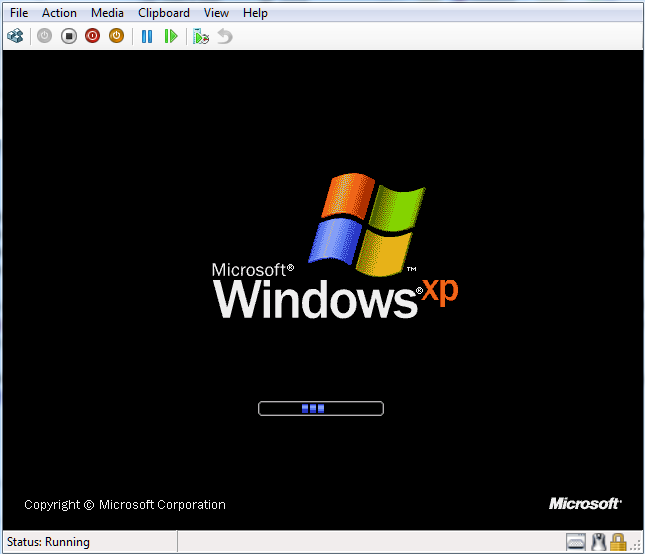
Windows XP started up first time without any blue screen problems, though it did ask to be reactivated.

image

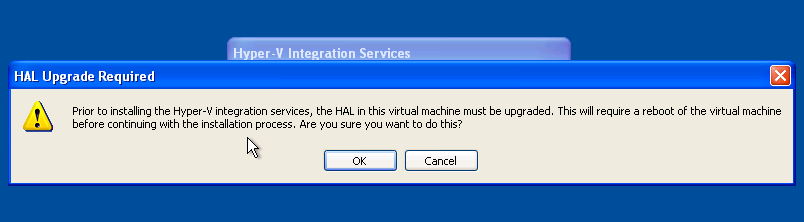
I could not activate yet though, because XP could not find a driver for the network card. The solution was to install the Hyper-V integration services, and here things started to go wrong. Integration services asked to upgrade the HAL (Hardware Abstraction Layer), a key system DLL:

image

However, on restart I got the very same dialog.

Fortunately I was not the first to have this problem. I was prepared for some hassle and had my XP with SP3 CD ready, so I copied and expanded halaacpi.dll from this CD to my system32 folder and amended boot.ini as suggested:

multi(0)disk(0)rdisk(0)partition(2)\WINDOWS=”Disk2vhd Microsoft Windows XP Professional” /FASTDETECT /NOEXECUTE=OPTIN /HAL=halaacpi.dll

I rebooted and now the integration services installed OK. However, if you do this then I suggest your delete the /HAL=halaacpi.dll argument before rebooting again, as with this in place Windows would not start for me.  In fact, you can delete the special Disk2vhd option in boot.ini completely; it is no longer needed.

After that everything was fine – integration worked, the network came to life and I activated Windows – but performance was poor. To be fair, it was not that good in hardware either. Still, I am working on it. I’ve given the Virtual Machine 1.5GB RAM and dual processors. Removing software made obsolete by the migration, things like the SoundMAX and NVIDIA drivers seemed to help quite a bit. It is usable, and will improve as I fine-tune the setup.

Overall, the process was easier than I expected and getting at my old developer setup is now much more convenient.

Adobe abandons Project ROME, focuses on apps rather than cloud

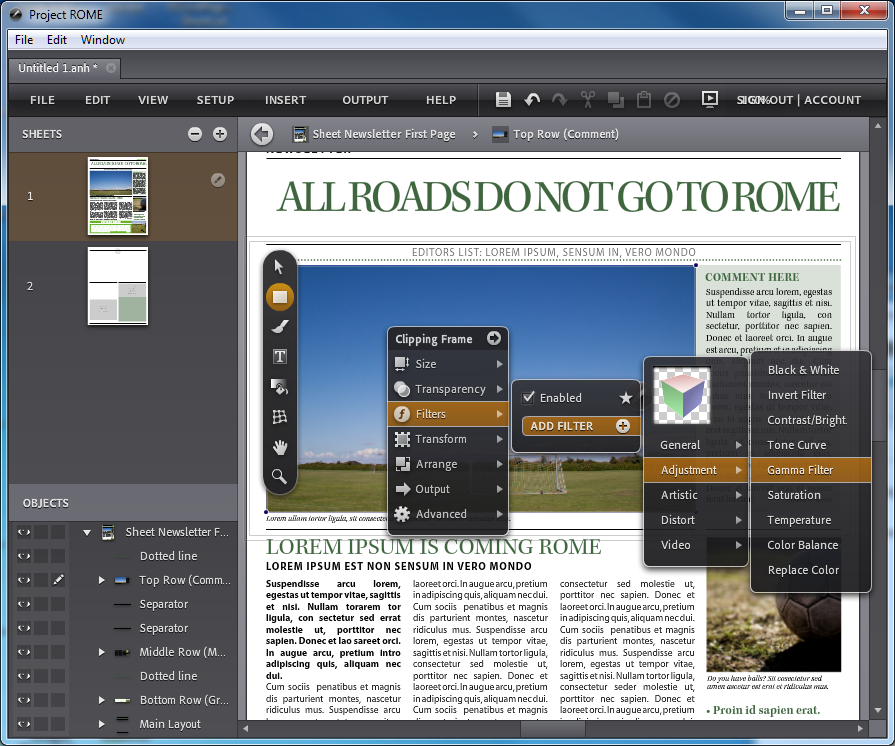
Adobe is ceasing investment in Project ROME, a labs project which provides a rich design and desktop publishing application implemented as an Adobe AIR application, running either in the browser or on the desktop using the Flash player as a runtime.

image

According to the announcement:

Project ROME by Adobe was intended to explore the opportunity and usability of creative tools as software-as-a-service in the education market and beyond. We have received valuable input from the community after a public preview of the software. Following serious evaluation and consideration of customer input and in weighing this product initiative against other projects currently in development, we have made the difficult decision to stop development on Project ROME. Given our priorities, we’re focusing resources on delivering tablet applications, which we believe will have significant impact on creative workflows.

There must be some broken hearts at Adobe because ROME is a beautiful and capable application that serves, if nothing else, as a demonstration of how capable a Rich Internet Application can be. In fact, I have used it for that purpose: when asked whether a web application could ever deliver the a user interface that comes close to the best desktop applications, I showed Project Rome with great effect.

I first saw Project ROME as a “sneak peek” at the Adobe MAX conference in 2009. It had made it past those initial prototypes and was being worked up as a full release, with a free version for education and a commercial version for the rest of us. Curiously, Adobe says the commercial version will remain available as an unsupported freebie, but the educational offering is being pulled: “we do not want to see pre-release software used in the classroom “.

Why abandon it now? I think we have Apple’s Steve Jobs to thank. AIR applications do not run on the iPad; and when Adobe says it is focusing instead on tablet applications, the iPad will figure largely in those plans. Still, there are a few other factors:

  • One thing that was not convincing in the briefing I received about Project ROME was the business model. It was going to be subscription-based, but how many in this non-professional target market would subscribe to online desktop publishing, when there are well-established alternatives like Microsoft Publisher?
  • Adobe makes most of its money from selling desktop software, in the Creative Suite package. ROME was always going to be a toy relative to the desktop offerings.
  • The output from ROME is primarily PDF. If Rome had been able to build web pages rather than PDF documents, perhaps that would have made better sense for a cloud application.
  • Adobe did not market the pre-release effectively. I do not recall hearing about it at MAX in October, which surprised me – it may have been covered somewhere, but was not covered in the keynotes despite being a great example of a RIA.
  • The ROME forum shows only modest activity, suggesting that Project ROME had failed to attract the attention Adobe may have hoped for.

It is still worth taking a look at Project ROME; and I guess that some of the ideas may resurface in apps for iPad, Android and other tablets. It will be interesting to see to what extent Adobe itself uses Flash and AIR for the commercial design apps it delivers.

Final reflection: this decision is a tangible example of the ascendancy of mobile apps versus web applications – though note that Adobe still has a bunch of web applications at Acrobat.com, including the online word processor once called Buzzword and a spreadsheet application called Tables.