Category Archives: software development

SharpDX: Managed DirectX for Metro from the community

One of the disappointments in Microsoft’s new Windows Runtime platform is lack of support for XNA, a gaming/fast graphics API which wraps DirectX and is supported on Windows, Windows Phone and on Xbox 360.

Developer Alexandre Mutel has stepped up to fill the gap with the open source SharpDX, which also provides access to the DirectX API from C#, supports both desktop and Windows Runtime development. One of the first games to use SharpDX, ARMED, has already arrived in the Windows Store.

image

In addition, Mutel says “it will certainly be possible to use ShardDX from Windows Phone 8”.

SharpDX was made possible by a custom tool called SharpGen which generates the .NET API automatically from the DirectX SDK.

The puzzle is why Microsoft did not make more effort to support XNA in Windows 8, or failing that to provide an alternative for .NET developers.

If you want to use SharpDX, be prepared for considerable effort learning the API, as there is little documentation so far. Still, it will likely be easier than learning C++, which is the official solution for DirectX on the Windows Runtime.

Telerik acquires Fiddler

Windows component vendor Telerik has acquired Fiddler, a free tool for inspecting and modifying web traffic, usually used to test and debug network and application issues. The announcement states that Fiddler’s creator Eric Lawrence, currently at Microsoft, is joining Telerik’s testing division.

The story seems to be that Fiddler was a spare time activity for Lawrence, who will now be able to focus on it exclusively. Telerik’s Christopher Eyhorn says:

This was a natural extension because Fiddler is already in use as the core technology behind Test Studio’s load and performance features.  Additionally, we gain a formidable competitive edge over other tools as both Eric and Fiddler join the Test Studio product family.

Eyhorn also refers to “our commitment to keeping Fiddler free and making further investments into the tool,” so it looks as if its freeware status is safe for the time being. Fears for its future have already been expressed, but Eyhorn says:

Please don’t judge us by the actions of our competitors; we will earn your trust through our actions.

He adds that Fiddler is installed over 10,000 times every weekday. The website has attracted over 5 million unique visitors so far this year, showing that maintaining a popular freeware tool represents a great PR opportunity.

Nokia and Windows Phone 8: more questions than answers

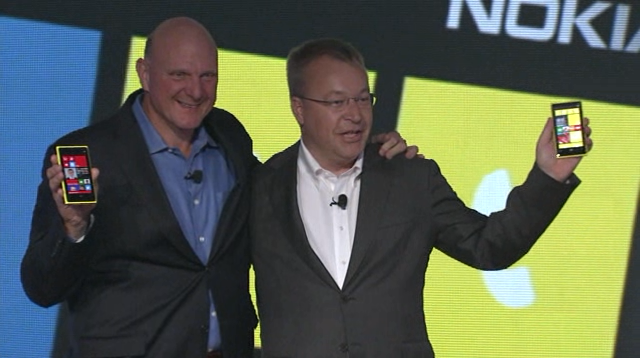
Nokia’s CEO Stephen Elop announced the Lumia 820 and 920 yesterday in New York; new versions of its high-end Windows smartphones and the first to run the forthcoming Windows Phone 8 operating system. Windows Phone 8 runs the same kernel as Windows 8 on PCs and is a significant step towards unification of Microsoft’s development platform.

image

Among the key features announced yesterday:

Wireless charging with the Qi standard and a couple of deals to place charging points in public places. The London Heathrow Virgin Atlantic lounge and the Coffee Bean & Tea Leaf chain will have charging points; not much, but a start. Wireless charging accessories include the JBL PowerUP which combines wireless charging and an audio dock.

PureView imaging technology. This is Nokia’s brand name for a bunch of photo features. Most significant is “floating lens technology” on the larger 920 which, Nokia claims, overcomes camera shake to enable the camera to take in “five times more light”; think of it as a virtual tripod that allows longer exposure without motion blur. If it works it is a huge feature for photo enthusiasts.

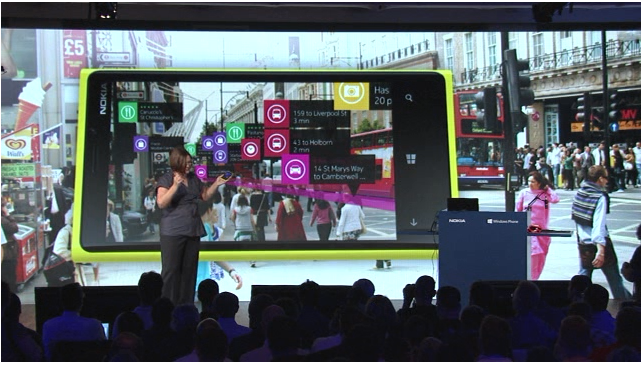
City Lens augmented reality which overlays the view through the phone’s camera with data about what to do and where to go; apparently there is data for indoor as well as outdoor locations.

image

Synaptics ClearPad touch which enables gloved finger support. Since Synaptics is a third-party I guess this feature is unlikely to be exclusive to Nokia for long.

Windows Phone 8 operating system shown off by Microsoft’s Joe Belfiore, including more customizable Live Tiles and a “Blink” feature from Microsoft Research which takes multiple shots in quick succession to enable interesting features like avoiding closed eyes and allowing after-the-event editing using alternate shots.

Screenshots are now a built-in feature. Who cares? Journalists of course; non-availability of this trivial feature meant fewer screenshots of Windows Phone 7 on the web.

Lumia 920 has a 4.5 inch screen, 1.5Ghz dual core Snapdragon S4, front and rear cameras, 1GB RAM, 32GB storage.

Lumia 820 has a 4.3 inch screen,  1.5 Ghz dual core Snapdragon S4, front and rear cameras, 1GB RAM, 8GB storage, microSD slot.

The big disappointment yesterday: no announcement concerning price or availability. Here is what the press release says:

Both phones will be available in pentaband LTE and HSPA+ variants and are expected to start shipping in select markets later in the year. Nokia will announce pricing and specific roll-out dates country by country when sales are due to begin.

Worries about a delay were not relieved by Microsoft’s announcement that the Windows Phone SDK preview will be available to select developers from September 12. “Next Wednesday I’ll share detailed instructions on how current Windows Phone developers with published apps can apply. But I do want to set your expectations that program access will be limited,” says Microsoft’s Todd Bix. He adds that, “The full Windows Phone 8 SDK will be made publically available later this year when we unveil Windows Phone 8.”

That suggests a considerable wait before availability. Even if the Lumias go on sale the same day that the SDK is final, it sounds like November at best; and that gives developers no time at all to work with the new SDK before launch. Key developers have early access of course.

image

Overall the event was less than it should have been, at a time when Android looks vulnerable thanks to Apple’s patent win over Samsung last month.

In some ways though, Nokia’s announcements have little to do with the key questions over Nokia’s Lumia range and Windows Phone 8. Quality is one issue; the launch of the Lumia 800 was damaged by the device’s poor battery life and tendency to sulk and become unchargeable; the rumour is that return rates were unusually high. The knock-on effect is to make it hard for retailers to recommend it to their customers, though firmware updates eventually improved matters. How is battery life on the 820 and 920? What has been done to address quality issues?

Another question, and to me the biggest one, is how Windows 8 for PCs will fare in the market and the impact it will have on Windows Phone. The more time I spend with Windows 8 the more I like it, especially on a tablet, but also on the desktop. There is a barrier to adoption though as the new user interface is a demanding transition for some users. If Windows 8 tablets succeed, there will be instant recognition for the phone user interface and users will have a reason to demand it over iPhone or Android, something that has been lacking up to now.

On the other hand, if appreciation for the nice features of Windows 8 is drowned out by a chorus of “give us back the Start menu”, while vendors focus on expensive fiddly hybrids rather than simple, lightweight tablets, then I doubt Windows Phone 8 will take off either.

Currently I use a Lumia as my main smartphone and (battery life aside) get on well with it. Nokia’s experience with the operating system should mean that this new generation is better, and the phones look good. As Elop himself said though, this is all about ecosystems, and the viability of his third ecosystem is still in the balance.

Embarcadero releases RAD Studio XE3

Embarcadero has released RAD Studio XE3, a major upgrade to its suite of tools for Windows, cross-platform and web development.

New in this version:

  • Windows 8 compatibility
  • Metropolis framework for desktop apps that have the look and feel of Windows 8 “Modern UI” (formerly Metro) apps. Live Tile support is included via a proxy Windows Runtime app.
  • Prism XE3 for .NET development, including support for the Windows Runtime in Windows 8, using a Delphi-like language.
  • Version 2 of the FireMonkey cross-platform framework, with improved touch support, a new grid control
  • Easier data binding in both FireMonkey and the Windows-only VCL (Visual Component Library) framework
  • New HTML5 Builder tool which replaces RadPHP. The new tool supports cross-platform mobile development by integrating PhoneGap, which lets you wrap HTML apps as native mobile apps.

Mac OSX support is included but iOS support has been removed, pending release of a forthcoming Mobile Studio product.

64-bit C++Builder is not in this release. 64-bit Delphi was introduced in the previous XE2 release.

Embarcadero has backed down from a proposed change to the license for the Professional edition which prohibited connection to remote databases. This restriction now only applies to the dbExpress database framework.

More when I have installed the actual release. The most eye-catching feature is Metropolis, though whether there is really a demand for a fake Modern UI framework is an open question. There are also concerns about deployment, which will not work on Windows RT (the ARM version) and may involve some hacks on x86, since it cannot go through the Windows Store.

image

Last year’s RAD Studio XE2 was an amazing release in terms of announced features, but plagued by quality issues which left some developers disappointed.

Delphi XE3 Professional downgraded to local databases only

There is a bit of a stir in the Embarcadero community following the leaking of a document which appears to be an email to partners concerning a major change in the EULA (End User Licence Agreement) for the Professional edition of Delphi, the RAD development tool for Windows (with lately some cross-platform capability).

This email is to let Embarcadero Technology partners know about some changes being made to the EULA changes in our XE3 release.

In particular, the use of data access technologies for client/server connectivity will no longer be allowed in the Professional edition.
This includes both Embarcadero and 3rd party solutions. Professional users may only, legally, access local databases with their applications.

Users who want to use client/server database access can purchase a Client/Server Add-On Pack for their Professional edition or purchase
an Enterprise, Ultimate or Architect edition product.

This restriction if for new licenses only.  Users upgrading to XE3 will be "grandfathered" in that they will be able to continue to use 3rd party data access technologies for client/server database access in version XE3. Additionally, Starter Edition has been restricted to use of MyBase (.CDS or .XML file formats) only for "database access."

While this has not been officially confirmed I believe the email, at least,is authentic. Embarcadero’s David Intersimone implicitly confirms it with comments in the lengthy discussion on the Embarcadero forums.

It sounds complex and, like many software licences, based essentially on trust rather than technical limitation.

In the past, Professional has been the edition of Delphi to get if you want to do real work but do not need fancy stuff like modeling tools, advanced database frameworks and so on.

A “Professional” edition with local database access only does not deserve the name. This kind of restriction is usually reserved for tools aimed at hobbyists or intended mainly for trial purposes.

The news has not gone down well. Some of the most vocal on the Embarcadero forums are partners whose add-ons will no longer be legal to use with the Professional edition.

As a loyal Delphi developer since 1995… and as an Embarcadero Technology Partner… I cannot simply sit by and say nothing. This EULA change is WRONG. There’s no moral ambiguity here! It doesn’t tow a line, fall into a "grey area" or wobble on the tightrope… it is simply wrong. It crosses every line: ethically, morally, and progressively. Not only that, but as an idea it is patently stupid! The condition is financially and logistically unenforcable, and the only thing it does is serve to deter new customers.

says Simon Stuart, creator of the Lua4Delphi library.

The core problem here? It is hard to make money on development tools, given the competition that is either free or provided by platform vendors (meaning Microsoft or Apple) who have every advantage in terms of finance and inside knowledge.

Delphi is a fantastic tool; but Embarcadero still struggles with quality issues. The answer is greater investment, but where does that come from? Upping the price is one strategy, though it is no sure-fire solution as the above debate demonstrates.

Update: It appears that Embarcadero has backed down. The “finalized” EULA states that the local database restriction only applies to dbExpress, a specific Embarcadero database framework:

Licensee may not use that portion of the Product identified as “dbExpress” in association with a database located on a different machine other than the machine on which the Works are installed.

Windows 8 compatibility issues: speech input, secure Flash drives

Two items I have reviewed recently over on the gadget blog have given me pause for thought concerning Windows 8 compatibility. This is good in my experience when it comes to desktop applications, but sometimes that is not enough.

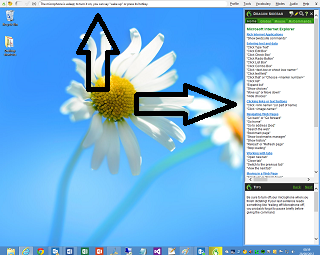
The first was Dragon NaturallySpeaking 12, Nuance’s excellent voice recognition system. It works fine on Windows 8, on the desktop that is. Dragon works by intercepting voice input across the whole of Windows. When it runs, it puts a bar across the top of your desktop and a sidebar with helpful tips and shortcuts.

image

Dragon appears not to work at all in the Windows 8 “Modern UI”. Whatever hooks it has in place to accept input and control mouse and keyboard do not apply outside the desktop environment.

Microsoft says Windows 8 is great for accessibility and ran a sessions at last year’s BUILD conference on developing accessible apps. Here is one on assistive technologies for Windows 8. However on my quick look I did not see much on speech input. Assuming though that Microsoft has worked out a way of making this happen in the Modern UI, it is obvious that Nuance will have some work to do adapting Dragon. Neither the bar across the top, nor the sidebar will work in the “immersive” Modern UI which is mostly full-screen apps.

The second product was a Kingston secure USB Flash Drive. This thing works by means of a utility that you have to run, which lets you enter a password to unlock the encrypted drive. The utility is a desktop app, so will not work as-is on Windows RT (ARM) devices, on which you cannot install desktop applications. Kingston could create a Modern UI app, but I am not sure how easy it would be to have an app that unlocked an encrypted drive to make it available across the whole of Windows. Let’s assume though that Microsoft has made provision for this scenario in Windows 8. Kingston still has work to do adapting its firmware.

Just to be clear, both these items work perfectly in the Windows 8 desktop environment on Intel.

I have asked Nuance and Kingston for comment.

Windows 8 sideloading and Embarcadero’s Metropolis fake-WinRT framework

Embarcardero’s John Ray Thomas and Jason Vokes spoke to me about the company’s forthcoming RAD Studio XE3 development tool and in particular the new Metropolis framework which creates apps that have the appearance of a Windows 8 “Modern UI” (formerly known as Metro) but which are really desktop applications. Metropolis works with both the Delphi/C++ Builder VCL (Visual Component Library) and also with the newer FireMonkey user interface library.

“It’s a pretty large effort for us to get our compilers and runtime over to WinRT – which we intend to do”, said Thomas. In the meantime though, he argues that “Metro is just a style” and that developers will welcome the ability to “get their desktop apps over but participate in the Metro look and feel.”

End-users, explains Thomas, will not care about the WinRT or Win32 technology, but only notice that some apps have the new style and some do not. “We took the VCL and FireMonkey frameworks and used the styling engines that we introduced in XE2 to allow them to modify the forms to take on the look of those controls, as well as adding features like Windows 8 gesture support, improving the touch handling, and also taking on some of the standard templates like the grid and split views.”

Metropolis also support Live Tiles with update of dynamic content, and even enables apps to show up in the Windows 8 App Bar (which most desktop application do not support). This is done by means of a small WinRT app that is installed with the Metropolis application, and which communicates with it over a REST API – there being no built-in inter-process communication between desktop and WinRT apps. The WinRT app is a kind of proxy that lets the user launch or close the desktop Metropolis app. However access to Windows 8 contracts is not supported. “I think we’re hitting on the key elements that end users are going to expect when they’re working with WinRT applications,” says Thomas.

There is also the issue of how to deploy Metropolis apps. They will not be accepted by the Windows Store (other than perhaps as links to a vendor’s site as with other desktop apps), so how will software vendors get them onto a user’s machine? Getting the Win32 part installed is easy using standard Windows setup tools, but what about the WinRT component, if it is used? The procedure for installing a WinRT app without using the Store is called sideloading; and Microsoft intends that it only happens either for development and testing, or for enterprises deploying line of business applications.

“Sideloading requires a digital certificate and using a Powershell script that we provide to do the deployment,” says Thomas. “They can make that part of their standard desktop installer.”

Clever stuff; but will it work? I did some of my own testing. The most detailed technical article on WinRT app deployment is this one, which describes the  add-appxpackage PowerShell command which I presume Embarcadero is using. Using a Windows 8 Professional machine which does not have a developer licence installed, I was able to install my own WinRT app by trusting the certificate generated by Visual Studio as part of the Appx package, and after setting the key:

HKEY_LOCAL_MACHINE\Software\Policies\Microsoft\Windows\Appx\AllowAllTrustedApps = 1

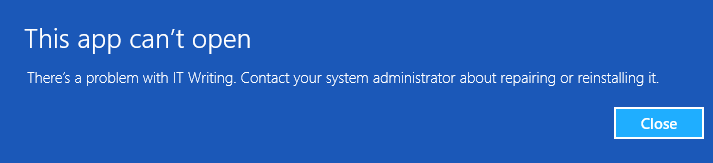
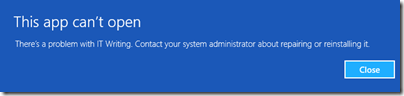
However, although the app installed it did not run.
image

The reason is this:

The computer does not have to be joined to a domain or have an activated sideloading product key before you install provisioned LOB apps. However, the apps will not run until the computer meets this sideloading requirement.

The key statement here concerns the activated sideloading product key. What is this? There is also a reference to it by Microsoft’s Antoine Leblond here:

To enable sideloading of a Metro style app onto a [non domain-joined] PC:

  • Set Group Policy for “Allow all trusted apps to install”. If you cannot use Group Policy, then you can set this through the following setting: HKEY_LOCAL_MACHINE\Software\Policies\Microsoft\Windows\Appx\AllowAllTrustedApps = 1
  • Verify that the app is signed by a CA that is trusted on the target machines
  • Activate a special product key by using a script on the target machine to enable sideloading. We’ll go into more detail about how the IT admin will acquire the product keys in an upcoming blog post. The product key only needs to be install and activated once on the PC.

The word script is linked to the reference for slmgr.vbs which is used for installing and activating Windows product keys, so although Microsoft has yet to reveal everything about these special product keys, it does sound like something which only makes sense in an enterprise context. A third-party vendor cannot mess with slmgr.vbs, which implies that sideloading will not always work.

Here is a developer who has run into exactly this problem. He wants to be able to deploy “a Win32 app that has a sideloaded WinRT component”. Microsoft’s Tim Heuer says:

I’m pretty sure you’re going to need enterprise SKUs

Maybe Embarcadero has found some setting that makes it work; but even if they have, what if Microsoft made some change to WinRT in the name of security that closes off these loopholes? Or stops the Metropolis REST communication from working?

“Our testing shows that there are switches that can enable that mode and you can set your PowerShell script to do these things,” says Thomas about the latter issue. “We’re going to be working around some of the limitations or additional constraints that Microsoft may put on their environment. We’re going to have to be active in understanding the changes, in talking to Microsoft about it, and updating it as necessary to make it continue to work in their sandboxed environment. It is their environment after all.”

Might there be security risks for the user in opening up holes to make Metropolis apps work? “I don’t think so,” says Thomas. “The WinRT side of it is really just four functions. The fact that they may allow the WinRT app to do this communication I don’t think opens up any kind of security hole.”

Despite Thomas’s reassurance, it seems to me risky to depend on a feature that runs counter to the way the operating system is intended to work.

That said, you can use Metropolis without the WinRT component, though you lose Live Tile support; and in fact such apps will run on older versions of Windows such as XP and Windows 7 as well; though you would have thought that they would make more sense for tablet users who are likely to be running Windows 8 anyway.

Update: this link suggests you could get around the sideloading problem by checking for a development license in a script and renewing if necessary. Make all your users have development licenses though? That does not sound good to me.

Developing a Windows Runtime app: some observations

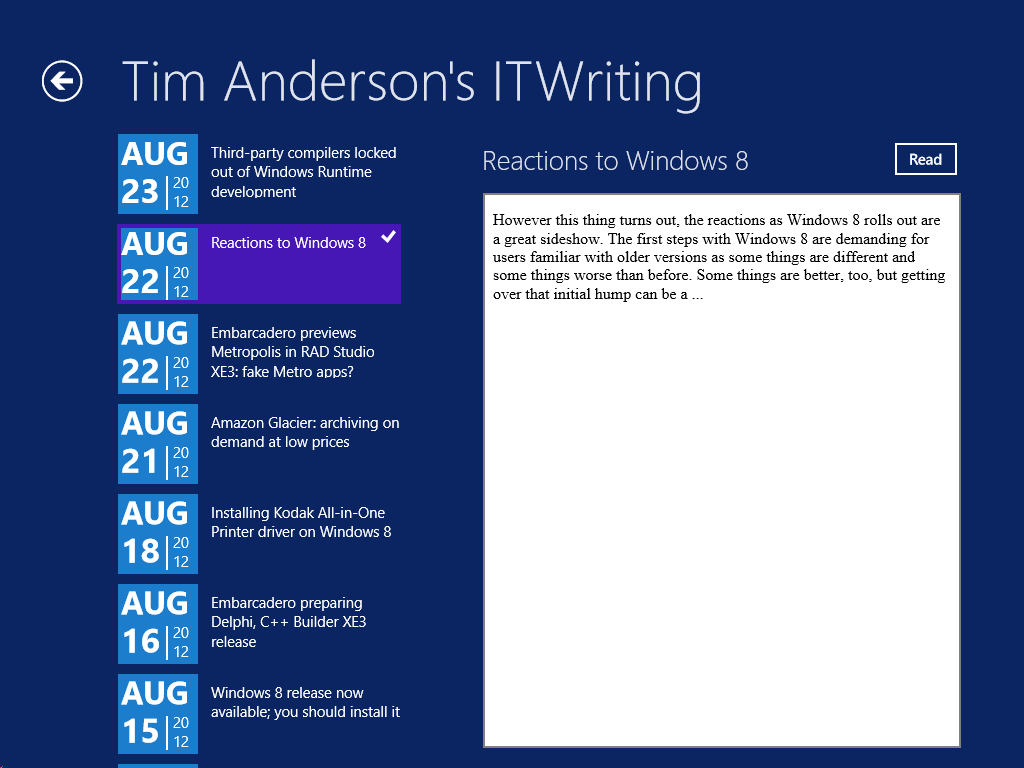
What would it take to create a Windows 8 Modern UI content reader for this site? Just for fun, I built a simple one; or rather, I slightly adapted Microsoft’s Metro style blog reader tutorial.

The app only has four screens (or pages) but despite its simplicity I found the tutorial somewhat fiddly. Getting the data from the WordPress RSS feed is simple, thanks to the Windows.Web.Syndication namespace which is part of .NET Framework 4.5. Most of the work is in the user interface, which means switching between XAML and C#. Of course as a developer I would rather work in C#.

Further, the Visual Studio editor for C# is better than the editor for XAML. In C# I can easily navigate the code using Go to Definition, Find all References, and so on.  In XAML it takes longer to find things like referenced styles and resources. Plus XAML is XML, which I find harder to read than an elegant language like C#. Even commenting out a line is more hassle in XML.

I did not like the colours used by the tutorial for the list of posts in SplitePage.xaml. It took me a while to work out what to change. Was the colour defined in a resource, or in a template, or in a style, or directly coded as an attribute of the relevant TextBlock object?

Of course you can open the XAML in Blend if you prefer, the designer-oriented tool that comes with Visual Studio 2012. Blend is more complex than the Visual Studio XAML editor, but may be better once you have figured out how it works.

The amount of work involved in making your app well-behaved is proportionately larger if your app is essentially very simple. You have to deal with different layouts for different screen sizes and orientation, as well as the small Snapped layout. You also have to consider what happens if your app is suspended and resumed.

The above means that despite the apparent simplicity of a Modern UI interface, with its chunky buttons, there is more to consider than with, say, a Windows Forms application whose window is never rotated and over which you have full control.

Still, I was pleased with my app which has reasonable functionality based on a small amount of work.

Visual Studio 2012 is impressive, though I did experience some screen corruption after switching back and forth between the Metro and Visual Studio environments for debugging. Restarting Visual Studio fixes it. Using the simulator seems more robust in this respect.

image

The App Bar

One thing though. If you squint at the above screenshot, you will see that I have put a Read button to the right of the post title. Clicking or tapping this opens the post in a embedded web browser view that is nearly full-screen. However, this Read button is not included in the tutorial, which says:

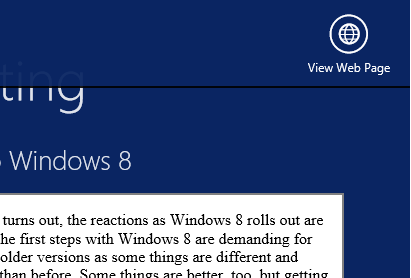
On the split page, we must provide a way for the user to go to the detail view of the blog post. We could put a button somewhere on the page, but that would distract from the core app experience, which is reading. Instead, we put the button in an app bar that’s hidden until the user needs it.

This may in fact be an excuse to include an App Bar in the tutorial; but I disagree with it. With the App Bar, the user has to right-click or swipe down to display the App Bar, and then click or tap the View Web Page button.

image

That is two actions rather than one. Is it really better than having a small button in the UI?

It seems to me that tucking things into the App Bar is fine in cases where there is real merit in an immersive experience, such as in the web browser, but less compelling when you already have a screen with a back button and a scrollable list. I was also concerned that users might not realise they needed to display the App Bar in order to use the app properly.

Let the design debate continue.

Design-centric

Microsoft’s Modern UI continues a trend which began with Windows Presentation Foundation (the first incarnation of XAML), which is to make a platform richer for UI designers and more challenging for developers who lack design skills. Nothing wrong with that; but if you remember how easy it was to snap together an app in Visual Basic 3.0, you may feel that something has been lost.

I guess that recognition of that fact was one of the motivations behind Visual Studio LightSwitch, in which you define the data and business rules, but the screens are generated for you. LightSwitch has complexities of its own though.

Third-party compilers locked out of Windows Runtime development

Embarcadero’s chief scientist Allen Bauer has posted about the problems facing tool vendors who want want to support Microsoft’s Windows Runtime (WinRT) platform with their own compilers, which he calls “Windows 8’s ‘dirty little secret.’”

The issue is that in order to enforce security and isolation in WinRT apps, Microsoft prohibits certain API calls. Even if you find a way to use them, applications that use these calls will not be accepted into the Windows Store, which in effect means no public distribution.

We are very keen on supporting WinRT with native Delphi & C++ code. Right now, the issues surrounding the WinRT space center around the fact that many OS-supplied APIs which are required by anyone implementing their own language RTL are actually off-limits unless you’re the VC++ RTL DLL. You know, little things like RtlUnwind for exception processing and VirtualAlloc (et. al.) for memory management… Any calls to those APIs from your application will automatically disqualify your application from being an "official" WinRT application capable of delivering through the MS app store.

Right now the VC++ RTL DLL is given special dispensation since that is the library that makes the calls to those forbidden APIs and not directly from the user’s app. We’re currently rattling some cages at MS to find out how or if they’re going to allow third-party tools to target WinRT. Until we can get past that, targeting WinRT isn’t actually possible from a deliverable product sense. We are able to build WinRT applications with Delphi that work with a developer certificate, however they all fail the application qualification checks because of the aforementioned (an other) APIs.

Bauer adds that there are other restrictions that make it hard to create an alternative toolchain:

For instance, you cannot merely open any file, access the registry, and even use the loopback (127.0.0.1) adaptor. LoadLibrary cannot be used to load any arbitrary DLL; you must call LoadPackageLibrary and only on a DLL that is present in the digitally signed appx package. WinRT is a seriously locked down sandbox or "walled-garden" with some extremely high walls.

Embarcadero’s answer has been to create a framework that makes desktop apps look and behave somewhat like WinRT apps. I posted about these fake metro apps here. Even Live Tiles are supported. However, these apps cannot be distributed via the Store either, but only through a desktop setup. In addition, they lack the security of true WinRT, and access to the Contracts system for safe exchange of data.

The company does have a .NET tool in the works, called Prism, that will build WinRT apps.

Who is the villain here? Embarcadero’s concern is understandable, since it is locked out of creating a native code compiler for WinRT. On the other hand, to what extent can Microsoft relax the restrictions without blowing a hole in the WinRT security story. There are parallels with the complaints from Google and Mozilla that they cannot compete equally with IE10 in the Modern UI environment.

Thanks to .NET support, Microsoft does have a measure support for alternative languages; it is the Common Language Runtime after all. What would be better though would be to support LLVM, as Apple does on iOS, though this is not likely to be on Microsoft’s roadmap.

Thanks to Eric Grange for pointing me to this post.

Embarcadero previews Metropolis in RAD Studio XE3: fake Metro apps?

Embarcadero has released a video (embedded at the foot of this post) previewing RAD Studio XE3, the next version of the application development suite which includes Delphi and C++ Builder.

Two big new features are Metropolis applications and an new HTML5 Builder tool which looks like a next-generation PHP Builder.

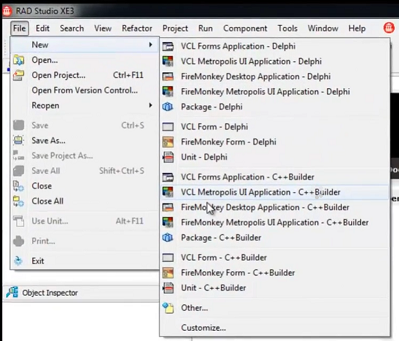
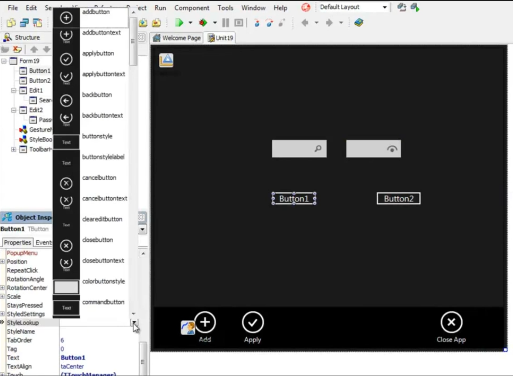
Metropolis – a neat name until Microsoft back-pedalled on the Metro designation for Windows Runtime apps – appears to be a framework for apps that look like Windows Runtime apps but in reality are not. At least, that is my presumption for “VCL Metropolis applications”. The VCL (Visual Component Library) is a Delphi framework (usable also in C++ Builder) which is tied to Windows and GDI, the old-style Windows graphics API, along with many other Win32 APIs. GDI does not work in the Windows Runtime.

image

No matter, all we need is full-screen apps, touch input, and a don’t-call-it-Metro look and feel, and presto, Windows Runtime apps in all but name. They might even run on Windows 7.

image

A glimpse at the controls.

image

Except that there will be significant differences between Metropolis and Windows Runtime. No support for Contracts, for example, the Windows Runtime mechanism for inter-app communication; no delivery from the Windows Store; no support for Windows RT.

The big issue though is this: why would you want a desktop app to look like a Windows Runtime app? And will not users be mightily confused?

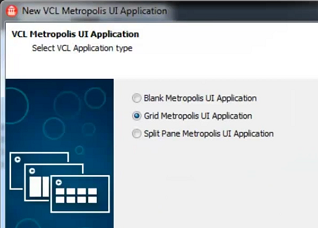
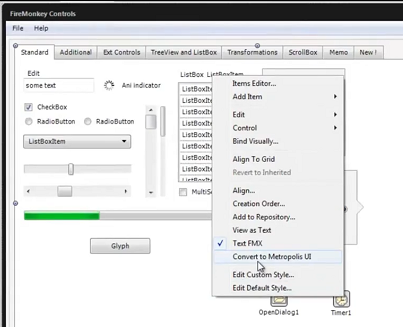
The video then goes on to talk about converting existing apps with a “Convert to Metropolis UI” menu option. It turns out though that you can also create FireMonkey Metropolis apps, and the Convert to Metropolis UI option is shown with a FireMonkey app, not a VCL app. Since the FireMonkey framework is designed for cross-platform and uses custom drawing for all its controls, potentially a FireMonkey app could be a real Windows Runtime app, though I get the impression it probably is not.

image

I do think Embarcadero needs absolute clarity here, which is notably lacking in this preview. There is no point in pretending that a Win32 app is a Windows Runtime app when it is not. I have asked for further information.

HTML5 Builder

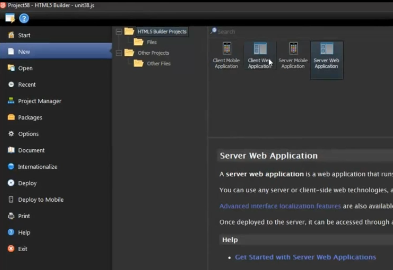
There is also a quick look at HTML5 Builder.

image

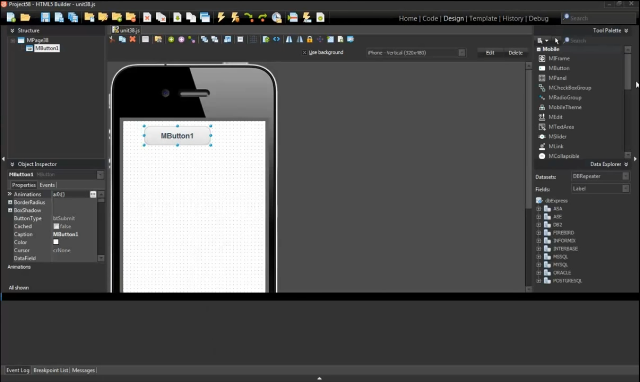
This tool targets server-side development with PHP, as well as apps for web,iOS,Android, Blackberry and Windows Phone. My guess is that there is PhoneGap/Cordova under the covers. I also saw some jQuery in the demo.

image

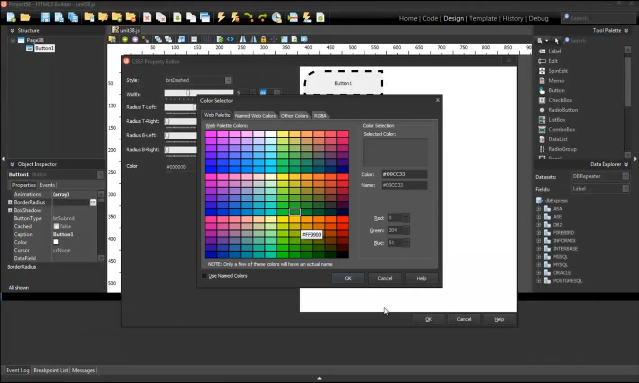
Here is a look at the CSS3 colour picker.

image

Update: looks like Embarcadero found a way to fake Live Tiles as well:

Metropolis applications are really traditional "desktop" applications styled to look like the Metro UI.
The TLiveTemplate component spawns a new process in the WinRT space which is is an actual WinRT LiveTile application. The LiveTile communicates with the Metropolis "desktop" backend via HTTP/REST to start/stop the application or update the LiveTile.

The screenshots are drawn from this video, or you can watch it on the Embarcadero site here.

For more info from attendees of the RAD Studio XE3 world tour see also:

http://members.adug.org.au/2012/08/22/highlights-of-the-sydney-xe3-event/

https://forums.embarcadero.com/thread.jspa?threadID=75773