Category Archives: software development

Developing for Windows Phone: what’s new

One thing that is easy to overlook in all the talk about Windows Phone, Nokia, and Microsoft’s prospects against iPhone and Android, is that the Windows Phone developer platform has substantially improved with the 7.1 SDK – the phone is 7.5 but the SDK is 7.1, just to confuse you.

Here are a few highlights from the list of what’s new:

Multitasking. Apps still do not continue to run when they do not have the focus. However, Microsoft has implemented several features to make it look as if they do. This includes background agents, background audio (another kind of agent), scheduled tasks, background file transfers, and fast application switching. Although apps do not execute in the background, they do stay in memory if free space allows, so that resume is near-instant.

Silverlight 4. The version of Silverlight implemented in Windows Phone is now Silverlight 4, though there are some differences between Silverlight on the desktop and Silverlight on the phone, including the fact that there is no Silverlight in the browser.

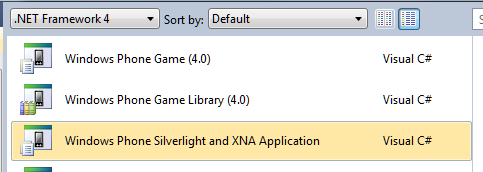
Apps that combine Silverlight and XNA. You can now render both XNA and Silverlight content in a single combined Windows Phone app.
image

Visual Basic and XNA. XNA was C# only in the initial release. No longer.

Better sensor support. You can now access the compass and gyroscope, and use a combined motion API.

Socket support. Use TCP and UDP socket protocols.

Network information. This is actually critical to creating well-behaved apps. New network information classes let you get network status and capabilities. You can also register for network availability change events.

Two-sided Live Tiles. Live Tiles in Windows Phone have two sides and flip automatically, effectively giving more space to show information.

Advertising SDK. Sign up to include ads from Microsoft Advertising in your app.

IE9 WebBrowser Control. You cannot embed your Silverlight app in the browser, but you can embed the WebBrowser control in your Silverlight app, now with IE9’s fast Javascript and HTML 5 features.

Local Database. A local database API is now included in Windows Phone. Sadly this is not Sqlite; I’m guessing it is a variant of SQL Server Compact Edition. You access and manipulate data with LINQ to SQL – no Entity Framework ORM (Object Relational Mapping) on the phone, though LINQ to SQL is also an ORM framework. There is no way other than LINQ to execute SQL locally.

New Launchers and Choosers. Launchers and Choosers let your app present picklists from data stored elsewhere in the phone. You can now choose an address, invite players to a game session, show a location on a map, or show map directions.

Read-only access to Contacts and Calendar.

Encrypted credential store. This enables you to store login details securely using a built-in API.

Programmatic access to the camera. This includes real-time access to the raw frames so you can create apps that use the camera.

Pictures and Search Extensibility. This lets your app interact with the Pictures hub and with the built-in search. Users who search Bing can launch your app from the results if there are matches.

New on-screen keyboards. There are now specialist keyboards for numbers and formulae.

Additional language support including East Asia. Overall there are 16 additional cultures available including font support.

Overall it adds up to a major update for developers. If you tried the first Windows Phone SDK and found too many annoyances, it might be worth a second look.

Is this the best mobile developer platform? I had this discussion today with Keith Varty, developer evangelist for Nokia. After rather enjoying a brief go with Xcode for iOS, I am not sure; there is no simple answer. It is certainly a candidate though: you get the excellent C# language, the mature Visual Studio IDE, and strong frameworks for both form-based and gaming applications. Then again you may miss those beautiful iOS controls.

What next for Adobe Flash? Think runtime not plugin

Adobe is stating that mobile Flash will no longer be developed:

Our future work with Flash on mobile devices will be focused on enabling Flash developers to package native apps with Adobe AIR for all the major app stores. We will no longer continue to develop Flash Player in the browser to work with new mobile device configurations (chipset, browser, OS version, etc.) following the upcoming release of Flash Player 11.1 for Android and BlackBerry PlayBook. We will of course continue to provide critical bug fixes and security updates for existing device configurations. We will also allow our source code licensees to continue working on and release their own implementations.

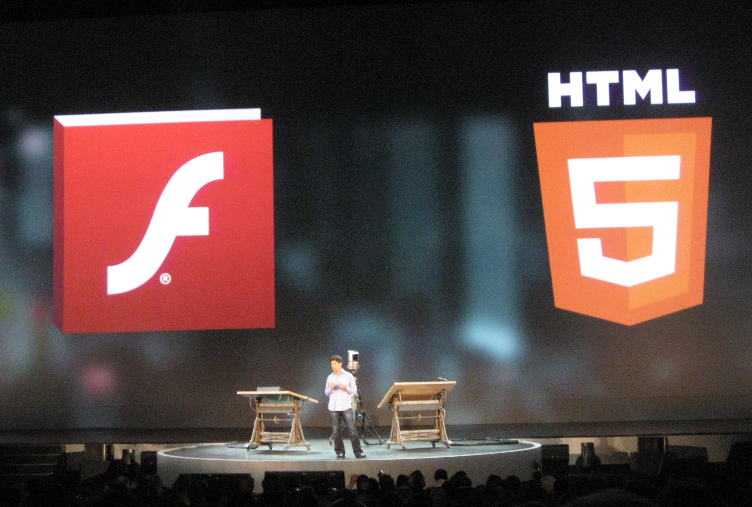
Although this seems like a major shift in strategy, Adobe has been moving in this direction for some time. At the MAX conference last month the company was clear that most web developers can be expected to use HTML 5 rather than Flash most of the time, reserving use of the plug-in for video, games and certain kinds of application. As for mobile, all the talk was about AIR and the captive runtime, an approach similar to the iOS packager which bundles the Flash runtime into your application so that no plug-in or additional download is required.

This approach is now explicit, and I reckon we can further conclude that if the Flash plugin for mobile is being abandoned, then the Flash plugin for the desktop is also less important than before. Mobile browsing is huge, and likely to grow, so developing web pages for Flash is unattractive other than in cases where there is an easy way to direct mobile browsers to a non-Flash alternative. Flash as a browser plugin will now decline forever, which is a good thing for web standards even if it is not necessarily a good thing for web developers, who must face the challenge of cross-browser development.

So what is Flash now? It is still Adobe’s runtime, and the client for its media services, and in that role it remains significant. Thanks to Adobe’s packaging work, you can take your Flash or Flex application and deploy it to most desktop and recent mobile platforms, though not to Windows Phone or older Android devices. Could you not use HTML 5, JavaScript and PhoneGap instead? Maybe in some cases; but Flash is a richer, faster and more consistent platform, as well as benefiting from Adobe’s design and development tools.

See also my piece for the Register: Down but not out: Flash in an HTML5 world.

Update: Added official Adobe link for statement on mobile Flash.

Eclipse and Xtend: some confusion in getting started

Last weekend there was some publicity around Xtend, an Eclipse project which extends Java with new language features. Xtend now has a new landing page, as announced by the lead architect Sven Efftinge.

I did intend to post about this yesterday, but I wanted to see it in action first, so I tried to download it and have a look. I believe this is a case where those who wrote the new landing page are too close to the project and made some assumptions, because I did not find it obvious how to proceed.

If you follow the Download link you are invited to paste one of the three URLs into the Eclipse update manager.

image

As a newcomer to the project, I did not want three URLs to choose from, I wanted just one. I picked Release as in general this one is likely to work.

Now, the instructions say:

To install the Xtend plugins open the update manager and paste one of the URLs on the right into the field ‘Work with’ and select the Xtend SDK.

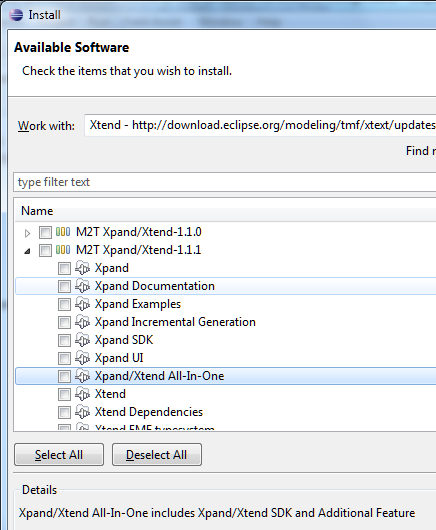
The update manager actually presents you with a long list of updates, none of which say Xtend. I took a stab at what I thought was the right thing.

image

The All-In-One includes the Xtend SDK, which is what I want, right?

Wrong. After installation I could not find the tutorial which the docs said would be available.

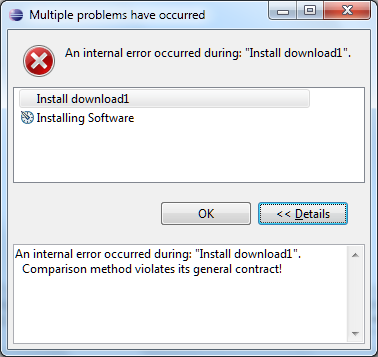
I did some messing around with Eclipse and got the occasional error like this one:

image

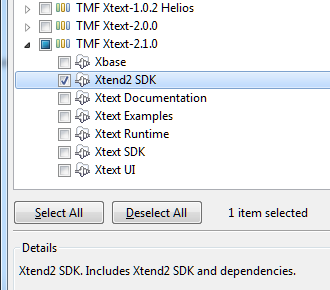
Then I realised that I should have looked under the TMF Xtext-2.1.0 tree, which is where the correct Xtend SDK resides:

image

Except that if you find this helpful post by  Max Rohde you will know:

The other packages need to be selected since otherwise the Xtend editors will not work.

So you should select all of TMF Xtext-2.1.0 (or the latest release). Easy when you know, but not obvious since the word Xtend does not appear in the top node of the tree.

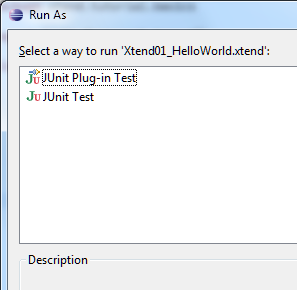
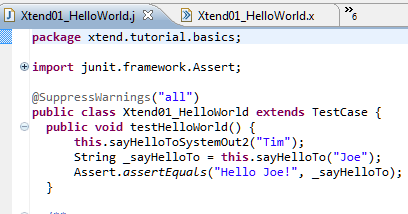
I was then able to create the tutorial project. I opened HelloWorld.xtend and got this:

image

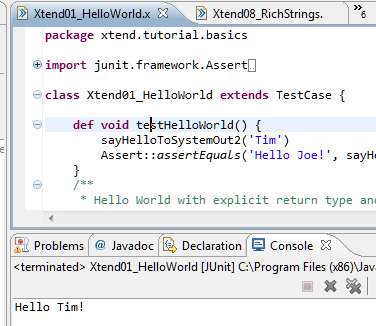
Ah, but you have read Rohde’s post so you know this is expected and that you should run this as a JUnit Test. However it does not have any output. To see some output, you have to run one of the other examples, like Xtend08_RichStrings, or perhaps add:

sayHelloToSystemOut2(‘Tim’)

to the testHelloWorld() method in HelloWorld.xtend.

image

OK, it works.

So what is Xtend? It is essentially a code generator which lets you write in Xtend and generate Java. You can see the generated code in the tutorial project under xtend-gen.

image

Xtend adds some nice features: type inference, property syntax, closures, switch expressions with no fall-through, template expressions, extension methods, and multiple dispatch.

I can imagine C# creator Anders Hejlsberg smiling here, as most of this is already in C# in some form or other.

But is Xtend the right way to bring these features to Java? I am not convinced so far. It is an interesting Eclipse project, but it may be more significant in speeding the implementation of features like these into Java itself, than as a mainstream approach to writing applications. Xtend is a kind of hybrid approach, where you will be switching between Java and Xtend while you code and debug your application, and I suspect it would get frustrating.

There is also the question of widespread community support – beyond Eclipse.

Finally, it would be good if the new landing page could be made more helpful for those getting started.

Quick thoughts on Xcode and Objective C versus Microsoft’s tools

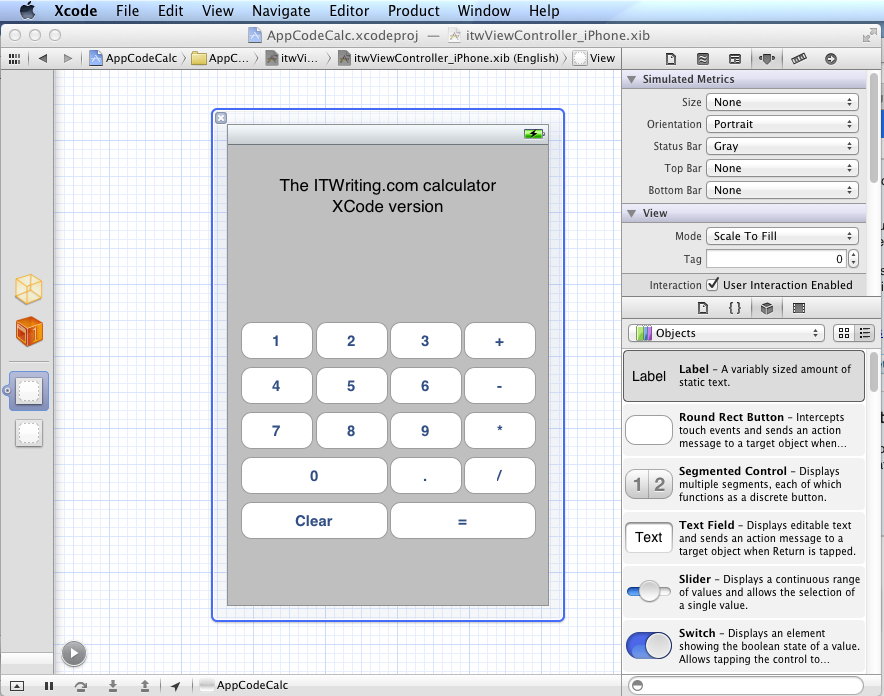
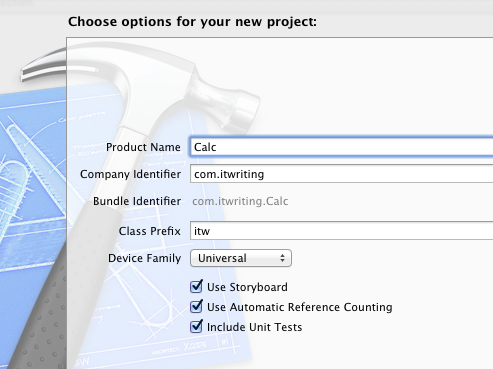
I have been trying out JetBrains’ AppCode which meant working in an Apple development environment for a time. I took the opportunity to implement my simple calculator app in iOS native code.

image

Objective C is a distinctive language with a mixed reputation, but I enjoy coding with it. I used Automatic Reference Counting (ARC), a feature introduced in Xcode 4.2 and OSX 10.7, iOS 5; ARC now also works with 10.6 and iOS 4. This means objects are automatically disposed, and I did not have to worry about memory management at all in my simple app. This is not a complete memory management solution (if there is such a thing) – if you use malloc you must use free – but it meant that the code in my app is not particularly verbose or complex compared to other languages. Apple’s libraries seem to favour plain English method names like StringByAppendingString which makes for readable code.

I was impressed by how easy it is to make an app that looks good, because the controls are beautifully designed. I understand the attraction of developing solely for Apple’s platform.

I also love the integrated source control in Xcode. You find yourself using a local Git repository almost without thinking about it. Microsoft could learn from that; no need for Team Foundation Server for a solo developer.

I did miss namespaces. In Objective C, if you want to remove the risk of name collision with a library, you have to use your own class prefix (and hope that nobody else picked the same one).

image

Interface Builder, the visual UI designer, is great but many developers do not use it, because coding the UI without it is more flexible. It is a shame that you have to make this choice, unlike IDE’s with “two way tools” that let you edit in code or visually and seamlessly keep the two in synch. I found myself constantly having to re-display windows like the Attributes Inspector though it is not too bad once you learn the keyboard shortcuts. The latest Interface Builder has a storyboard feature which lets you define several screens and link them. It looks useful, though when I played with this I found it difficult to follow all the linking lines the designer drew for me.

It is interesting to compare the Mac and iOS development platform with that for Windows. Microsoft promotes the idea of language choice, though most professional development is either C# or C++, whereas on Apple’s platform it is Objective C and Cocoa or you are on your own. Although Mac and Windows are of a similar age, Microsoft’s platform gives a GUI developer more choices: Win32, MFC, WTL, Windows Forms, Windows Presentation Foundation and Silverlight, and in Windows 8 the new WinRT.

I get the impression that Microsoft is envious of this single-minded approach and trying to bring it to Metro-style Windows 8, where you still have a choice of languages but really only one GUI framework.

That said, Visual Studio is an impressive tool and both C# and C++ have important features which are lacking in Objective C. I would judge that Visual Studio is the more productive tool overall, but Apple’s developer platform has its own attractions.

Review: JetBrains AppCode for Objective C

I have been trying out JetBrains AppCode, a new IDE for Apple’s Objective C. The company is best known for its IntelliJ IDE for Java, and AppCode essentially takes the same core IDE and reworks it for Objective C. AppCode is itself a Java application, but unless you have a religious objection to this I doubt you will find it a problem: I found it perfectly snappy and responsive on my machine, a 2.3 Ghz Core i5 with 8GB RAM.

Installation was a snap, as Mac users expect.

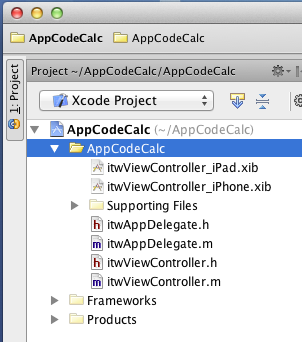
image

One thing I discovered immediately is that AppCode is not a replacement for Xcode, the official Apple IDE. The Apple SDKs are delivered with Xcode, and AppCode requires it. An AppCode project is also an Xcode project.

image

This is particularly important if you want to use Interface Builder, the Xcode visual designer, since AppCode has no equivalent. Double-click the .xib file and it opens in Xcode. This is a disorientating at first, but in practice I found it convenient to be able to switch between the two IDEs.

So why bother with AppCode, when Xcode is free? It is certainly not essential, but my view is that tools which save time or improve quality are worth the investment. Whether AppCode will do this for you will depend on how you work and whether you have any frustrations with Xcode, which improved considerably in version 4. Out of the box, Xcode has integrated Git or Subversion source code control, unit test integration, refactoring including Rename, Extract, and Encapsulate, the aforementioned Interface Builder, and a ton of other features. Sticking with Xcode is a safe choice.

That said, AppCode feels leaner and less cluttered than Xcode. It also has many additional productivity features in the editor. JetBrains’ IDEs are well known for refactoring, and while AppCode is not as rich as IntelliJ IDEA in this respect, it does have a more than Xcode.

Another strong feature is code generation. Press Command + n in the editor, and a context-sensitive Generate menu offers various time-saving options. I like the way I can type a new method in an implementation file, press Alt + Enter, and select Declare method in the interface to add it automatically to the interface file; or type it first in the interface and have it implemented automatically. It pays to learn the keyboard shortcuts

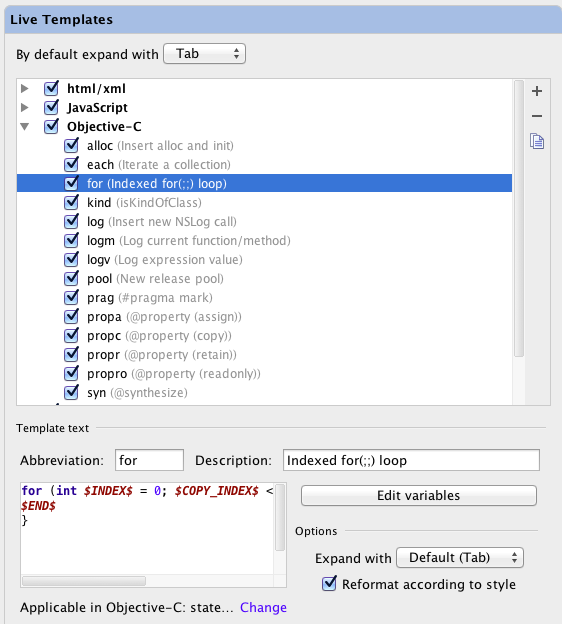
Live templates let you type an abbreviation and expand it to a block of code, which you then tab through to edit. Type for, select the template, press tab, and AppCode will create a for loop; press tab again to edit the variable name and the number of iterations. You can customise and create your own Live templates in the AppCode Preferences dialog.

image

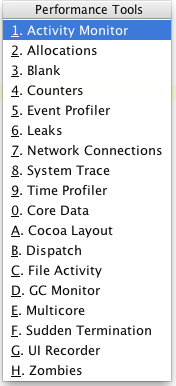
There are also a ton of performance tools in AppCode [update: note these are links to Xcode tools].  Choose Profile from the Run menu and choose what you want to analyse:

image

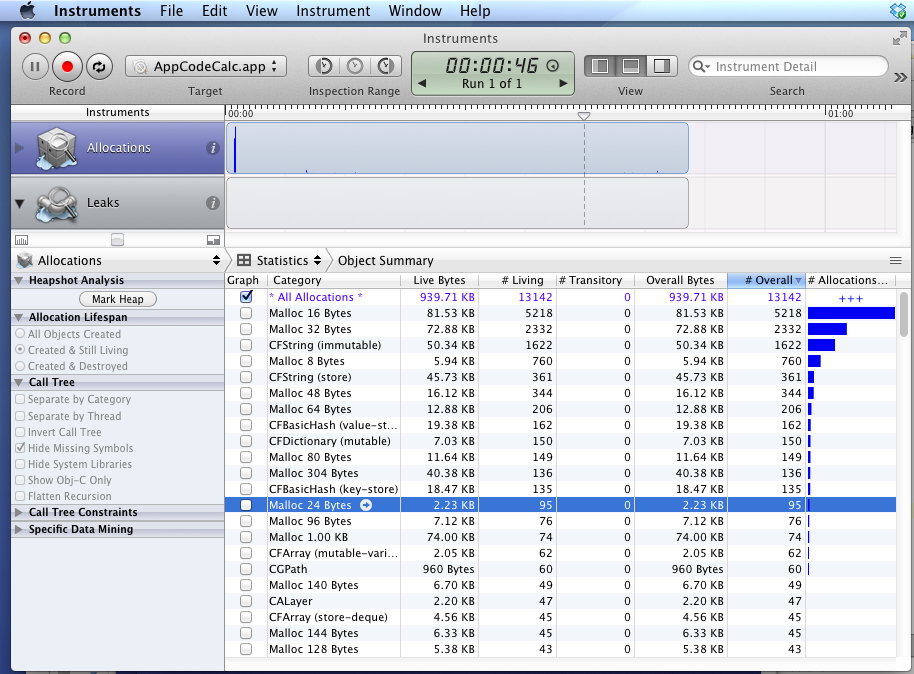
then run your app

image

You can also do static analysis according to customisable rules.

There is a debugger which works as you would expect including stack trace and variable inspection.

The best thing I can say about AppCode is that it is a pleasure to use. It does not throw up unnecessary dialogs, it works logically, and the tools are easy to use and configure. I have not always found this to be the case with Xcode, and if you spend a significant amount of your time on Objective C development then I recommend grabbing the trial download to discover if it will speed your work.

Post sponsored by Monster for the best in IT Jobs.

Twilio: programmable telephony, SMS comes to the UK, Europe

Web telephony provider twilio, which is based in San Francisco, has today announced its first international office, in London. You can now purchase UK telephone numbers at a cost of $1.00 per month, or Freephone numbers for $2.00 per month.

Twilio is not in competition with Skype or Google Voice; rather it offers an API so that you can incorporate voice calls and SMS messaging into web or mobile applications. The REST API lets you provision numbers with various options for what happens to incoming calls (conferencing, forwarding to another number or voice over IP, recording, transcriptions), as well as notifications so that you can get email or SMS alerts.

CEO and co-founder Jeff Lawson came from Amazon Web Services (AWS), and has a similar business model in that twilio targets developers and offers infrastructure as a service, rather than selling complete applications to its customers. Twilio does not own any datacenters, but uses mainly AWS and some RackSpace virtual servers to provide a resilient and scalable service.

The launch partner for the UK is Zendesk, a cloud-based helpdesk provider, which is using twilio to add voice to what was previously an email-based product. Zendesk forms an excellent case study. Using the service, you can provision a support number and have calls redirected to agents, or have a voicemail recorded, using a simple setup procedure. Calls can be recorded and you can have alerts sent when they are received.

What this means is that even the smallest businesses can offer helpdesk support using a pay-as-you-go model.

Lawson observes that twilio is the 6th and 13th most popular API on ProgrammableWeb (he says it is 5th if you combine voice and SMS) and claims very rapid growth in traffic using the API, though he will not talk about revenue. The company has around 60 employees in San Francisco and just one in the UK initially.

The service is also launching in beta for 5 other European countries: Poland, France, Portugal, Austria and Denmark. 11 other countries will be added by the end of 2011, though there are prominent omissions – no Germany or Spain, for example.

I was impressed by the demo and presentation at the press launch. Lawson provisioned a conferencing number and had us dial in during the briefing. He says twilio is engaged in disrupting on-premise telephony applications with a cloud service, in the same way Salesforce.com has done for CRM (Customer Relationship Management). The service is inexpensive to set up; Lawson said that this commodity pay-as-you-go pricing is essential for disruptive technology to succeed, another strategy borrowed from AWS.

There are server libraries for web platforms including Ruby, PHP, Java and C#, and client SDKs for JavaScript, Android and iOS.

Delphi XE2 FireMonkey for Windows, Mac, iOS: great idea, but is it usable?

I am sure all readers of this blog will know by now that Delphi XE2 (and RAD Studio XE2) has been released, and that to the astonishment of Delphi-watchers it supports not only 64-bit compilation on Windows, but also cross-platform apps for Windows, Mac OS X and even iOS for iPhone and iPad (with Android promised).

I tried this early on and was broadly impressed – my app worked and ran on all three platforms.

image

However it is an exceedingly simple app, pretty much Hello World, and there are some worrying aspects to this Delphi release. FireMonkey is based on technology from KSDev, which was acquired by Embarcadero in January this year. To go from acquisition to full Delphi integration and release in a few months is extraordinary, and makes you wonder what corners were cut.

It seems that corners were cut: you only have to read this post by developer and Delphi enthusiast Chris Rolliston:

To put it bluntly, FireMonkey in its current state isn’t good enough even for writing a Notepad clone (I know, because I’ve been trying). You can check out Herbert Sauro’s blog for various details (here, also a follow up post here). For my part, here’s a highish-level list of missing features and dubious coding practices, written from the POV of FireMonkey being a VCL substitute on the Mac (since on OS X, that is what it is).

Fortunately I did not write a Notepad clone, I wrote a Calculator clone, which explains why I did not run into as many problems.

Update: See also A look at the 3D side of FireMonkey by Eric Grange:

…if you want to achieve anything beyond a few poorly texture objects, you’ll need to design and write a lot of custom code rather than rely on the framework… with obvious implications of obsolescence and compatibility issues whenever FMX finally gets the features in standard.

There has already been an update for Delphi XE2 which is said to fix over 120 bugs as well as an open source licensing issue. I also noticed better performance for my simple iOS calculator after the update.

Still, FireMonkey early adopters face some significant issues if they are trying to make VCL-like applications, which I am guessing is a common scenario. There is a mismatch here, in that FireMonkey is based on VGScene and DXScene from KSDev, and the focus of those libraries was rich 2D and 3D graphics. Some Delphi developers undoubtedly develop rich graphical applications, but a great many do not, and I would judge that if Embarcadero had been able to deliver something more like a cross-platform VCL that just worked, the average Delphi developer would have been happier.

The company must be aware of this, and one reading of the journey from VSCene/DXScene to FireMonkey is that Embarcadero has been madly stuffing bits of VCL into the framework. Eventually, once the bugs are shaken out and missing features implemented, we may have something close to the ideal.

In the meantime, you can make a good case for Adobe Flash and Flex if what you really want is cross-platform 2D and 3D graphics; while VCL-style developers may be best off using the current FireMonkey more for trying out ideas and learning the new Framework than for real work, pending further improvements.

On the positive side, even though FireMonkey is a bit rough, Embarcadero has delivered a development environment for Windows and Mac that works. You can work in the familiar Delphi IDE and code around any problems. The Delphi community is not short of able developers who will share their workarounds.

I have some other questions about Delphi. Why are there so many editions, and who uses the middleware framework DataSnap, or other enterprisey features like UML modeling?

There appear to be five editions of Delphi XE2: Starter, Professional, Enterprise, Ultimate and Architect, where Architect has features missing in Ultimate – should the Ultimate be called the Penultimate? It breaks down like this:

  • Starter: low cost, restrictive license that is mainly non-commercial (you are allowed revenue up to $1000 per year). No 64-bit, no Mac or iOS. $199.00
  • Professional: The basic Delphi product. Missing a few features like UML diagramming, no DataSnap. Limited IntraWeb. $899.00.
  • Enterprise: For more than double the price, you get DataSnap and dbExpress server drivers. $1,999.00
  • Ultimate: Adds a developer edition of Embarcadero’s DBPowerStudio. $2999.00
  • Architect: Adds more UML modeling, and a developer edition of Embarcadero’s ER/Studio database modeling tool. $3499.00

The RAD Studio range is similar, but adds C++ Builder, PHP and .NET development. No Starter version. Prices from $1399.00 for Professional to $4299.00 for Architect. The non-Ultimate Ultimate is $3799.00.

All prices discounted by around 40% for upgraders.

The problem for Embarcadero is that Delphi is such a great and flexible tool that you can easily use it for database or multi-tier applications with just the Professional edition. See here, for example, for REST client and server suggestions. Third parties like devart do a good job of providing alternative data access components and dbExpress drivers. I would be interested to know, therefore, what proportion of Delphi developers buy into the official middleware options.

As an aside, I wondered about DataSnap licensing. I looked at the DataSnap page which says for licensing information look here – which is a MIDAS article from 2000, yes Embarcadero, that is 11 years ago. Which proves if nothing else what a ramshackle web site has evolved over the years.

Personally I would prefer to see Embarcadero focus on the Professional edition and improve humdrum things like FireMonkey documentation and bugs, and go easy on enterprise middleware which is a market that is well served elsewhere.

I have seen huge interest in Delphi as a productive, flexible, high-performance tool for Windows, Mac and mobile, but the momentum is endangered by quality issues.

Zend’s PHP cloud: develop in the cloud, deploy anywhere

Zend has announced Zend Studio 9 beta, the latest version of its IDE for PHP. The feature that caught my eye is integrated support for the Zend Developer Cloud, currently in technical preview. Setting up a PHP development environment is not too difficult, but can be a hassle to maintain, and the idea of being able to fire up an IDE anywhere and start coding is attractive.

You do not need Zend Studio to use the Developer Cloud; they are independent projects, and you can use the free Eclipse PHP Development Tools (PDT) or another IDE or editor.

The PHP Developer Cloud is not just a shared hosting environment for PHP applications:

All applications are housed within a container on the Zend Application Fabric. This container is separate from all other containers and has its own database instance and is easily connected to your IDE.

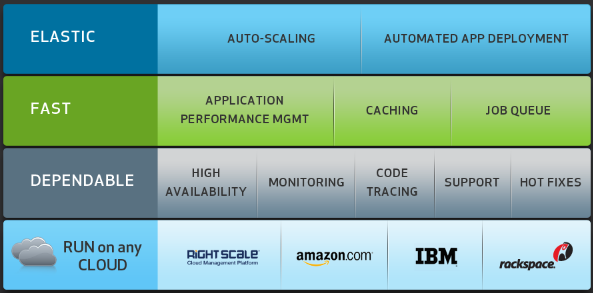
The Zend Application Fabric is for deployment as well as development. It is a server framework that includes the Zend Framework and also the capability of scaling on demand.

Once you have developed your app, you can deploy to any cloud provider that supports the Zend Application Fabric, including Amazon Web Services, IBM SmartCloud,  a private “custom cloud”, or a resilient multiple cloud option which Zend calls RightScale. You can deploy to RightScale using both Amazon and Rackspace together, which I presume means your app will keep on going even if one of these providers were to fail.

Details on the site are sketchy, but if Zend has got this right it ticks a lot of boxes for enterprise PHP developers.

image

Adobe MAX 2011 and the future of Flash

The unstated theme of Adobe MAX 2011 last week was this: what is the future of Flash? The issue being that with HTML 5 ascendant and Apple wrecking the idea of Flash as an ubiquitous web plug-in, should Adobe be frantically retooling its design tools for HTML and apps, or does Flash still have a future?

image

The answer is a little of both; but let’s be clear: there was more Flash than HTML at MAX. What was the most eye-catching demo? It was Flash running Unreal Tournament with the claim of better graphical performance than on Microsoft Xbox 360 or Sony Playstation 3.

It is also worth noting that the touch apps demonstrated at the day one keynote were created in Flash and compiled into apps using the new Captive Runtime feature in AIR 3.

At the same time there was a substantial amount of HTML effort on show. There was the announced acquisition of Nitobi, makers of PhoneGap – though note that PhoneGap itself is heading to the Apache Foundation – and demos of the Edge motion and interaction tool for HTML5. Adobe also told us about its work on CSS Regions and CSS  Shaders. I also saw how HTML export, including partial ActionScript to JavaScript conversion, is coming in a future version of Flash Professional.

My perception is that while Adobe is serious about stepping up a gear with its HTML tools, its heart is still with Flash. That said, there is a shift of emphasis away from Flash as a web plug-in, other than when it is the “Games console of the Web”, and towards Flash and Flex as a cross-platform development platform. Adobe is using Flash and AIR for its own Touch apps, previewed at MAX.

Let me add that the new features in AIR are huge, in particular the ability to package the Flash runtime as part of your app, called Captive Runtime, and the ability to extend your AIR app with native code. Cross-platform mobile tools are a particular interest of mine, and Adobe’s offering is strong in this field, though it will never be the most efficient. Adobe is also pressing ahead with something like web workers for ActionScript, providing a form of concurrency, though this is not in AIR 3 but planned for a future release. Another big new feature in the Flash runtime is Stage 3D, accelerated 3D graphics which enabled the Unreal demo mentioned above.

Nitobi’s Andre Charland was at MAX and I could not shake off the thought that he will find joining the Flash company difficult.

image

It will be near-impossible for Adobe to be equally enthusiastic about both PhoneGap and AIR, and given that Flash and AIR are so deeply woven into the company’s products I suggest that PhoneGap is more likely to be neglected.

Take a look at Adobe’s agenda for the Back from MAX event in London next month. It is 100% Flash and Flex.

What about the MAX attendees? I have contradictory evidence here. I noticed that a session on Building mobile apps with HTML, CSS and JavaScript (ie PhoneGap) was packed out, while the session running at the same time on What’s new in AIR – and what’s next was sparsely attended. This session was repeated, which means Adobe thought it would be a popular one. I was also surprised by how few went along to hear about Flash Professional Sneak Peek: a glimpse at the future which was a fascinating session if you are interested in the future of this tool. Adobe must have been surprised too, as it was in a large room.

image

That said, a session on native extensions for AIR was moved from one of the smallest rooms to one of the biggest and was still full. There was also great interest in concurrency in the Flash runtime. Many of the attendees I spoke to saw themselves as Flash and Flex developers and there was more talk about how to fight off the perception that the tech world is moving to HTML, than of how to encourage it.

Getting rid of Flash may seem like obvious progress to someone annoyed by the Adobe updater, or who is an Apple iOS enthusiast, or who does not like the idea of proprietary plugins. It does not feel like that though if you have a browser-hosted app to maintain and enjoy targeting a single runtime rather than testing in every browser, as well as using features of Flash that are hard to replicate in HTML.

Adobe’s design and development platform is still Flash-centric, which is either good or bad news depending on your perspective.

See also Down but not out: Flash in an HTML5 world.

Subversion 1.7 released: just one .svn directory per working copy

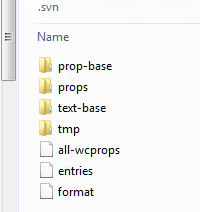
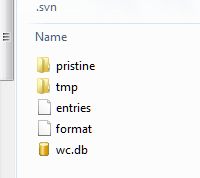
Yesterday saw the 1.7 release of Subversion, the widely used open source version control system. It is a significant release with many new features, bug-fixes and performance improvements, and I suggest reading the release notes or complete change log. One thing to highlight is that the default working copy metadata storage is now a single sqlite database per working copy, rather than a .svn direction containing metadata in sub-directory.

I upgraded my TortoiseSVN, which is already updated to 1.7, and tried upgrading one of my own projects. Here is the .svn folder before the upgrade:

image

and after

image

Those pesky .svn folders can be a nuisance so this is a welcome change, although there is a downside as the release notes warn:

It is not safe to copy an SQLite file while it’s being accessed via the SQLite libraries. Consequently, duplicating a working copy (using tar, cp, or rsync) that is being accessed by a Subversion process is not supported for Subversion 1.7 working copies, and may cause the duplicate (new) working copy to be created corrupted.

Subversion is less fashionable since the advent of distributed version control systems like git and mercurial; though for corporate development Subversion remains popular because a centralised system is easier to control.

WANdisco’s Jessica Thornsby has a helpful post on the new 1.7 features more details on the benefits of the new working copy metadata managements system.