Category Archives: software development

Developing an ASP.NET MVC app with Azure Active Directory: an ordeal

Regular readers will know that I am working on a simple (I thought) ASP.NET MVC application which is hosted on Azure and uses Azure Blob Storage.

So far so good; but since this business uses Office 365 it seemed to me logical to have users log in using Azure Active Directory (AD). Visual Studio 2013, with the latest update, has a nice wizard to set this up. Just complete the following dialog when starting your new project:
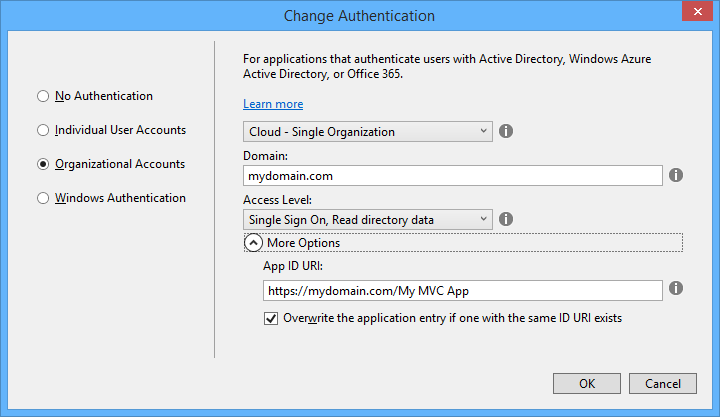
image

This worked fairly well, and users can log in successfully using Azure AD and their normal Office 365 credentials.

I love this level of integration and it seems to me key and strategic for the Microsoft platform. If an employee leaves, or changes role, just update Active Directory and all application access comes into line automatically, whether on premise or in the cloud.

The next stage though was to define some user types; to keep things simple, let us say we have an AppAdmin role for users with full access to the application, and an AppUser role for users with limited access. Other users in the organisation do not need access at all and should not be able to log in.

The obvious way to do this is with AD groups, but I was surprised to discover that there is no easy way to discover to which groups an AD user belongs. The Azure AD integration which the wizard generates is only half done. Users can log in, and you can programmatically retrieve basic information including the firstname, lastname, User Principal Name and object ID, but nothing further.

Fair enough, I thought, there will be some libraries out there that fill the gap; and this is how the nightmare begins. The problem is that this is the cutting edge of .NET cloud development and is an area of rapid change. Yes there are samples out there, but each one (including the official ones on MSDN) seems to be written at a different time, with a different approach, with different .NET assembly dependencies, and varying levels of alpha/beta/experimental status.

The one common thread is that to get the AD group information you need to use the Graph API, a REST API for querying and even writing to Azure Active Directory. In January 2013, Microsoft identity expert Vittorio Bertocci (Principal Program Manager in the Windows Azure Active Directory team at Microsoft) wrote a helpful post about how to restore IsInRole() and [Authorize] in ASP.NET apps using Azure AD – exactly what I wanted to do. He describes essentially a manual approach, though he does make use of a library called Azure Authentication Library (AAL) which you can find on Nuget (the package manager for .NET libraries used by Visual Studio) described as a Beta.

That would probably work, but AAL is last year’s thing and you are meant to use ADAL (Active Directory Authentication Library) instead. ADAL is available in various versions ranging from 1.0.3 which is a finished release, to 2.6.2 which is an alpha release. Of course Bertocci has not updated his post so you can use the obsolete AAL beta if you dare, or use ADAL if you can figure out how to amend the code and which version is the best/safest to employ. Or you can write your own wrapper for the Graph API and bypass all the Nuget packages.

I searched for a better sample, but it gets worse. If you browse around MSDN you will probably come across this article along with this sample which is a Task Tracker application using Azure AD, though note the warnings:

NOTE: This sample is outdated. Its technology, methods, and/or user interface instructions have been replaced by newer features. To see an updated sample that builds a similar application, see WebApp-GraphAPI-DotNet.

Despite the warnings, the older sample is widely referenced in Microsoft posts like this one by Rick Anderson.

OK then, let’s look at at the shiny new sample, even though it is less well documented. It is called WebApp-GraphAPI-DotNet and includes code to get the user profile, roles, contacts and groups from Azure AD using the latest Graph API client: Microsoft.Azure.ActiveDirectory.GraphClient. This replaces an older effort called the GraphHelper which you will find widely used elsewhere.

If you dig into this new sample though, you will find a ton of dependencies on pre-release assemblies. You are not just dealing the Graph API, but also with OWIN (Open Web Interface for .NET), which seems to be Microsoft’s current direction for communication between web applications.

After messing around with Nuget packages and trying to get WebApp-GraphAPI-DotNet working I realised that I was not happy with all this preview code which is likely to break as further updates come along. Further, it does far more than I want. All I need is actually contained in Bertocci’s January 2013 post about getting back IsInRole.

I ended up patching together some code using the older GraphHelper (as found in the obsolete Task Tracker application) and it is working. I can now use IsInRole based on AD groups.

This is a mess. It is a simple requirement and it should not be necessary to plough through all these complicated and conflicting documents and samples to achieve it.

Notes from the field: putting Azure Blob storage into practice

I rashly agreed to create a small web application that uploads files into Azure storage. Azure Blob storage is Microsoft’s equivalent to Amazon’s S3 (Simple Storage Service), a cloud service for storing files of up to 200GB.

File upload performance can be an issue, though if you want to test how fast your application can go, try it from an Azure VM: performance is fantastic, as you would expect from an Azure to Azure connection in the same region.

I am using ASP.NET MVC and thought a sample like this official one, Uploading large files using ASP.NET Web API and Azure Blob Storage, would be all I needed. It is a start, but the method used only works for small files. What it does is:

1. Receive a file via HTTP Post.

2. Once the file has been received by the web server, calls CloudBlob.UploadFile to upload the file to Azure blob storage.

What’s the problem? Leaving aside the fact that CloudBlob is deprecated (you are meant to use CloudBlockBlob), there are obvious problems with files that are more than a few MB in size. The expectation today is that users see some sort of progress bar when uploading, and a well-written application will be resistant to brief connection breaks. Many users have asynchronous internet connections (such as ADSL) with slow upload; large files will take a long time and something can easily go wrong. The sample is not resilient at all.

Another issue is that web servers do not appreciate receiving huge files in one operation. Imagine you are uploading the ISO for a DVD, perhaps a 3GB file. The simple approach of posting the file and having the web server upload it to Azure blob storage introduces obvious strain and probably will not work, even if you do mess around with maxRequestLength and maxAllowedContentLength in ASP.NET and IIS. I would not mind so much if the sample were not called “Uploading large files”; the author perhaps has a different idea of what is a large file.

Worth noting too that one developer hit a bug with blobs greater than 5.5MB when uploaded over HTTPS, which most real-world businesses will require.

What then are you meant to do? The correct approach, as far as I can tell, is to send your large files in small chunks called blocks. These are uploaded to Azure using CloudBlockBlob.PutBlock. You identify each block with an ID string, and when all the blocks are uploaded, called CloudBlockBlob.PutBlockList with a list of IDs in the correct order.

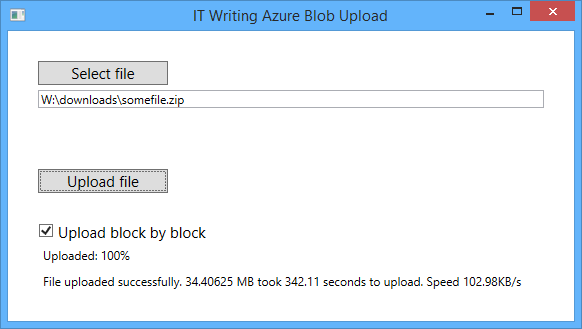
This is the approach taken by Suprotim Agarwal in his example of uploading big files, which works and is a great deal better than the Microsoft sample. It even has a progress bar and some retry logic. I tried this approach, with a few tweaks. Using a 35MB file, I got about 80 KB/s with my ADSL broadband, a bit worse than the performance I usually get with FTP.

Can performance be improved? I wondered what benefit you get from uploading blocks in parallel. Azure Storage does not mind what order the blocks are uploaded. I adapted Agarwal’s sample to use multiple AJAX calls each uploading a block, experimenting with up to 8 simultaneous uploads from the browser.

The initial results were disappointing. Eventually I figured out that I was not actually achieving parallel uploads at all. The reason is that the application uses ASP.NET session state, and IIS will block multiple connections in the same session unless you mark your ASP.NET MVC controller class  with the SessionStateBehavior.ReadOnly attribute.

I fixed that, and now I do get multiple parallel uploads. Performance improved to around 105 KB/s, worthwhile though not dramatic.

What about using a Windows desktop application to upload large files? I was surprised to find little improvement. But can parallel uploading help here too? The answer is that it should happen anyway, handled by the .NET client library, according to this document:

If you are writing a block blob that is no more than 64 MB in size, you can upload it in its entirety with a single write operation. Storage clients default to a 32 MB maximum single block upload, settable using the SingleBlobUploadThresholdInBytes property. When a block blob upload is larger than the value in this property, storage clients break the file into blocks. You can set the number of threads used to upload the blocks in parallel using the ParallelOperationThreadCount property.

It sounds as if there is little advantage in writing your own chunking code, except that if you just call the UploadFromFile or UploadFromStream methods of CloudBlockBlob, you do not get any progress notification event (though you can get a retry notification from an OperationContext object passed to the method). Therefore I looked around for a sample using parallel uploads, and found this one from Microsoft MVP Tyler Doerksen, using C#’s Parallel.For.

Be warned: it does not work! Doerksen’s approach is to upload the entire file into memory (not great, but not as bad as on a web server), send it in chunks using CloudBlockBlob.PutBlock, adding the block ID to a collection at the same time, and then to call CloudBlockBlob.PutBlockList. The reason it does not work is that the order of the loops in Parallel.For is indeterminate, so the block IDs are unlikely to be in the right order.

I fixed this, it tested OK, and then I decided to further improve it by reading each chunk from the file within the loop, rather than loading the entire file into memory. I then puzzled over why my code was broken. The files uploaded, but they were corrupt. I worked it out. In the following code, fs is a FileStream object:

fs.Position = x * blockLength;
bytesread = fs.Read(chunk, 0, currentLength);

Spot the problem? Since fs is a variable declared outside the loop, other threads were setting its position during the read operation, with random results. I fixed it like this:

lock (fs)
{
fs.Position = x * blockLength;
bytesread = fs.Read(chunk, 0, currentLength);
}

and the file corruption disappeared.

I am not sure why, but the manually coded parallel uploads seem to slightly but not dramatically improve performance, to around 100-105 KB/s, almost exactly what my ASP.NET MVC application achieves over my broadband connection.

image

There is another approach worth mentioning. It is possible to bypass the web server and upload directly from the browser to Azure storage. To do this, you need to allow cross-origin resource sharing (CORS) as explained here. You also need to issue a Shared Access Signature, a temporary key that allows read-write access to Azure storage. A guy called Blair Chen seems to have this all figured out, as you can see from his Azure speed test and jazure JavaScript library, which makes it easy to upload a blob from the browser.

I was contemplating going that route, but it seems that performance is no better (judging by the Test Upload Big Files section of Chen’s speed test), so I should probably be content with the parallel JavaScript upload solution, which avoids fiddling with CORS.

Overall, has my experience with the Blob storage API been good? I have not found any issues with the service itself so far, but the documentation and samples could be better. This page should be the jumping off point for all you need to know for a basic application like mine, but I did not find it easy to find good samples or documentation for what I thought would be a common scenario, uploading large files with ASP.NET MVC.

Update: since writing this post I have come across this post by Rob Gillen which addresses the performance issue in detail (and links to working Parallel.For code); however I suspect that since the post is four years old the conclusions are no longer valid, because of improvements to the Azure storage client library.

Google I/O 2014: impressive momentum, no wow moments

I am not in San Francisco but attended Google I/O Extended in London yesterday, to hear the keynote and a couple of sessions from Google’s annual developer conference.

image

I found the demographics different than most IT events I attend: a younger crowd, and plenty of start-ups and very small businesses, not at all enterprisey (is that a word?)

image

The main announcements:

A new version of Android, known as Android L (I don’t know if this will expand eventually to Lollipop or Liquorice or some such). Big release  with over 5,000 new APIs, we were told (when does Android start being called bloated, I wonder?). Themes include a new visual style called Material Design (which extends also to the Web and to Chrome), and suitability for more device types including Android TV, Android Wear (smart watches) and Android Auto. A new hardware accelerated graphics API called Android Extension Pack which implements OpenGL ES for better game performance, with support from NVIDIA Tegra. Android graphics performance will be good enough for a considerable subset of the gaming community and we saw Unreal Engine demoed.

Android L does not use Dalvik, the virtual machine that runs Java code. In its place is ART (Android Runtime). This is 64-bit, so while Java code will run fine, native code will need updating.

Google is working hard to keep Android under its control, putting more features into its Play Services, the closed part of Android available only from Google and which is updated every 6 weeks, bypassing the operator obstacle to OS updates. There is also a new reference design including both hardware and software which is designed for affordable smartphones in the developing world: third parties can take this and build a decent Android mobile which should sell for under $100 as I understood it. I imagine this is designed to ward off fractured Android efforts like Microsoft’s Nokia X, aimed at the same kind of market but without Play Services.

There are new Android smart watches on the way, and we saw the inevitable demonstration of a user using voice control to the watch for ordering taxis or pizzas, getting notifications, and sending simple messages.

Voice control demos always seem to be nervous moments for presenters – will they be understood? Unfortunately that uncertainty remains for real users too, as evidenced by Xbox One Kinect which is amazing in that it often works, but fails often enough to be irritating. Voice recognition is a hard problem, not only in respect of correctly translating the command, but also in correctly detecting what is a command (if the person standing next to me shouts “Taxi please” I do not want my watch to order one for me).

The smart watch problem also parallels the TV problem. The appeal of the watch is that it is a simple glanceable device for telling the time. The appeal of the TV is that it is a simple sit-back screen where you only have to select a channel. Putting more smarts into these devices seems to make sense, but at the same time damages that core feature, unless done with extreme care.

Android TV puts the OS into your television, though Google’s messaging here is somewhat confusing in that, on the one hand, Chromecast (also known as Googlecast) means that you can use your Google device (Android or Chromebook) as the computer and the TV as the display and audio system, while on the other hand you can use Android on the TV itself as an all-in-one.

We are inching towards unified home entertainment, but with Google, Microsoft (Xbox One), Sony (PlayStation) and Apple all jostling for position it is too early to call a winner.

Material Design – Metro for Android?

We heard a lot about Material Design, which is Google’s new design style. Google borrowed plenty of buzzwords form Microsoft’s “Metro” playbook, and I heard expressions like “fast and fluid”, clean typography, signposting, and content-first. Like Metro, it also seems to have a blocky theme (we will know when the next design wave kicks in as it will have rounded corners).

image

Material Design is not just for Android. You can also implement the concept in Polymer, which is a web presentation framework built on Web Components, a standard in draft at the W3C. Support for Web Components (and therefore Polymer) is already in Chrome, advancing rapidly in Mozilla Firefox, probably coming in Apple Safari, and maybe coming in Microsoft IE. However, a JavaScript library called Polyfill means that Polymer will run to some extent in any modern browser.

Whenever IE was mentioned by a presenter at Google I/O there was an awkward/knowing laugh from the audience. Think about what that means.

One of the ideas here is that with a common design concept across Android and web, developers can make web apps (and therefore Chrome apps) look and behave more like Android apps (or vice versa). Again, there is a similar concept at Microsoft, where the WinJS library lets you implement a Metro look and feel in a web app.

Microsoft may have been ahead of Google in this, but it has done the company little good in that adoption for Metro has been weak, for well-rehearsed reasons connected with the smartphone wars, legacy Windows desktop and so on. Google has less legacy weighing it down.

How good is Material Design though? Apple’s Steve Jobs once said of a new OS X design update that it was so good you want to lick it. Metro lacks that kind of appeal, and judging from yesterday’s brief samples, so does Material Design, whatever its other merits in terms of clarity and usability. It is early days though.

Business features: Samsung Knox, Office support, unlimited storage

Google announced a couple of  features aimed at business users. One is that Samsung Knox, app sandboxing and data security for business users, has been donated to Google for integration into Android. Another is that Google Docs will get the ability to edit Microsoft Office documents in their native format, removing an annoyance for users who previously had to convert documents to and from Google’s own format when exchanging them with Microsoft Office users.

This seems to be an admission that Microsoft Office is the business standard for documents, and you can take it either way – good for Google because compatibility is better, or good for Microsoft because it cements Office as the standard. There will be ifs and buts of course.

Google is also offering unlimited online storage for business users, called Drive for Work, at $10 per user per month, upping the ante for everyone in the online storage game – Microsoft, Dropbox, Box and so on.

Google’s Cloud Platform

Google showed new features in its cloud platform, with a focus on big data analytics using an approach called Cloud Dataflow. “We don’t use MapReduce any more”, said the presenter, explaining that Cloud Dataflow enables all of us to use the same technology Google uses to analyse big data.

Greg DeMichille, a director of product management for the cloud platform, appeared on stage to show features for in-browser tracing and debugging of cloud applications. I recall DeMichille being much involved in Microsoft’s version of Java back in the days of the battle with Sun; he also had a spell at Adobe getting behind Flash and Flex for developers.

No Wow moments

The Google I/O 2014 keynote impressed in terms of numbers – Android growth continues unabated – and in terms of partners lining up behind initiatives like Android TV and Android Auto. The momentum seems unstoppable and the mass market for mobile and embedded devices is Google’s to lose.

On the other hand, I did not notice any game-changing moments such as I experienced when first seeing the Chromebook, or the Google Now personalisation service. Both of those still exist, of course, but if Android will really change our lives for the better, Google could have done a better job of conveying that message.

Embarcadero AppMethod: another route to cross-platform mobile, now with C++ support

Embarcadero has updated AppMethod, its IDE for cross-platform mobile and desktop applications. The IDE now supports C++, and as a special offer, you can develop Android phone “free forever”, according to the web site.

AppMethod is none other than our old friend Delphi, combined with the FireMonkey cross-platform framework. The difference between AppMethod and the older RAD Studio product line (current version is XE6) is twofold:

1. AppMethod does not include the VCL, the Delphi framework for Windows applications. It does let you develop for Windows or Mac OS X using FireMonkey.

2. You can buy RAD Studio outright with a perpetual license, from £1342.00 plus VAT for a new user (RAD Studio Professional). AppMethod is only available on subscription.

AppMethod pricing is per developer per platform per year. Currently this is £179.83 plus VAT for individuals (very small businesses up to a maximum of 5 employees in the entire organisation) or £600 for larger businesses (a rather large premium).

C++ support is new in AppMethod 1.14 and supports all target platforms except the iOS Simulator (an annoying limitation). It supports ARC (Automatic Reference Counting) on Android as well as iOS. Mac OS X is supported from 10.8 (Mountain Lion) and up.

There are also a few changes in FireMonkey. You can load HTML into the TWebBrowser component using LoadFromStrings. There is a new date picker component.

Another new feature is in the RTL (run time library). Called App Tethering, it lets applications communicate with each other, for example using TCP. These can be apps on the same device or remote apps. Once paired, apps can run remote actions and share standard data types and streams.

There are also updates to push notifications for iOS and Android, Google Glass support, updated OpenGL and DirectX support on Windows, and more: see here for the complete documentation of what is new.

A Quick Hands-on

I installed the latest AppMethod on Windows 8. The install warns that AppMethod cannot co-exist with RAD Studio XE6, presumably because it is essentially the same thing re-wrapped. The product name is relatively new, but there is plenty of old stuff under the covers. AppMethod still has a dependency on JSharp, Microsoft’s Java implementation for .NET. Java code in the IDE dating back to who knows when?

image

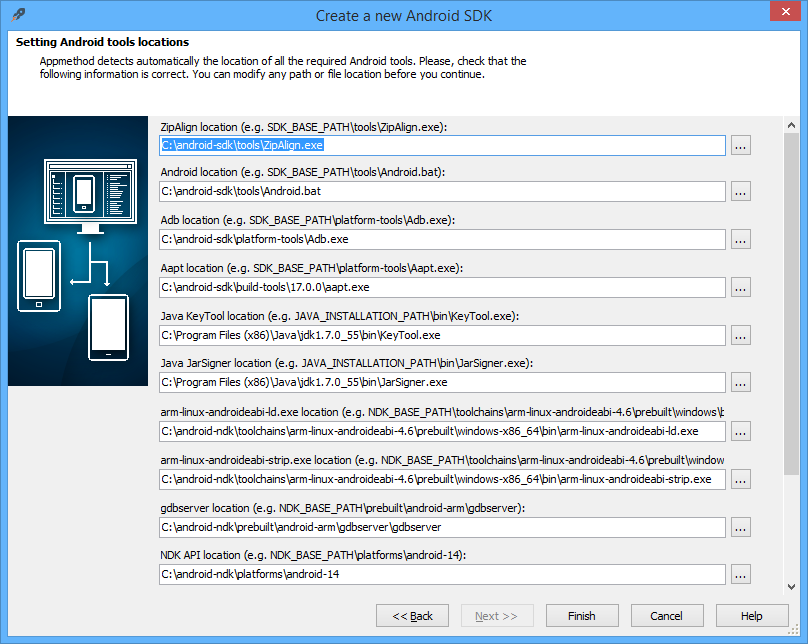
There is a 10-field dialog conforming paths for Android tools, which is a reminder of how many moving parts there are here. It is more complex that most Android development environments because it uses the NDK (Native Development Kit) as well as the usual SDK.

image

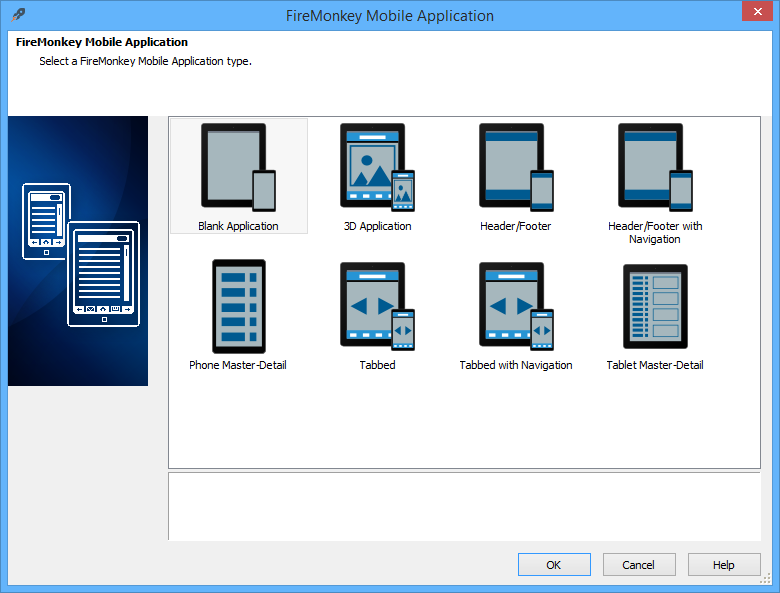
Once up and running, you can start a new project such as a FireMonkey mobile application:

image

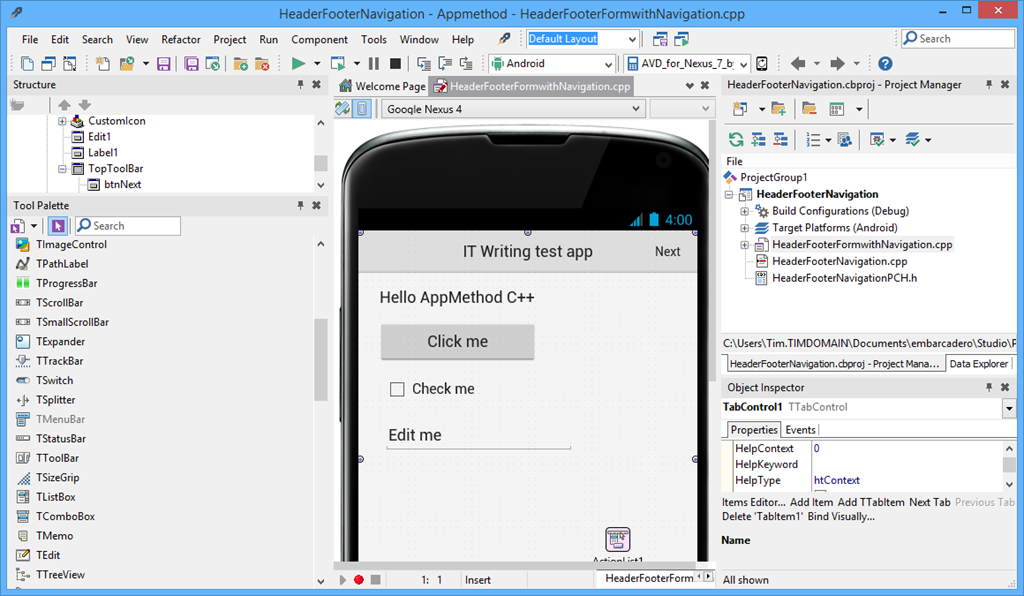
and then you are in an IDE which would not be entirely unfamiliar to a Delphi user in 1995 (or I suppose, a C++ Builder user in 1997) – I am not saying this is a bad thing, though the IDE feels dated in comparison to Microsoft’s Visual Studio.

image

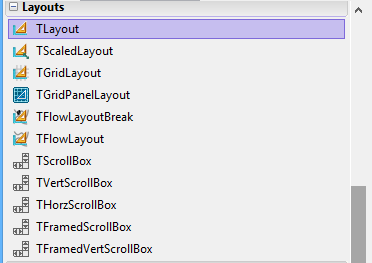
After coming from a spell of development with XAML it feels odd to have a form builder that defaults to xy layout, but layout managers are available:

image

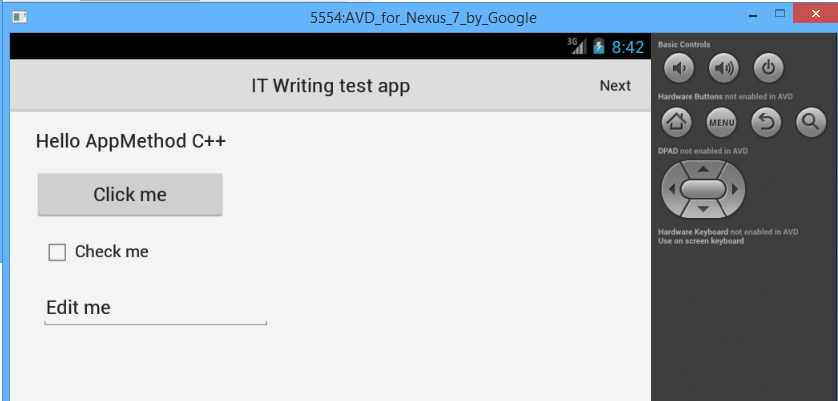
Compile and run, and after the usual slow initialization of the Android emulator, the app appeared.

image

Why AppMethod?

In the crowded world of cross-platform mobile development, why use AppMethod?

Embarcadero makes a big play of its native development, though it is “native” in respect of code execution but not in GUI fidelity since by default visual controls are custom-drawn by the framework. This is in contrast to Xamarin (the obvious alternative for developers from a Windows background) which does no custom drawing but only uses native controls; however for raw performance AppMethod may have the edge (I have not done comparisons).

Delphi developers should also look at RemObjects Oxygene which also uses a Delphi-like language but is hosted in Visual Studio and, like Xamarin, uses native UI components.

The AppMethod approach does make sense if you prioritise maximum code-sharing over getting exactly the right look and feel for each supported platform, and need better performance or more capability than HTML and JavaScript can get you. There is no support for Windows Phone though; if that is in your plans, Xamarin or HTML and JavaScript development is a better fit.

Visual Studio “14” announced, preview available with “Roslyn” open source compiler

Microsoft’s Soma Somasegar has announced the next version of Visual Studio, currently known as Visual Studio 14, but likely to be fully released in 2015 (and, I am guessing, likely to be called Visual Studio 2015).

This is a major release. It includes a new VB and C# compiler which is itself written in managed code, codenamed Roslyn. The open source Roslyn project provides new APIs that enable more powerful IDE features. Visual Basic is getting refactoring support for the first time.

The preview also includes a major update to ASP.NET that unifies ASP.NET MVC and the ASP.NET Web API, and has a new deployment model and developer experience:

Thanks to the Rosyln compiler, if you change ".cs” files or project.json file and want to see the change in the browser, you don’t need to build the project any more. Just refresh the browser.

There is no IIS express, nor IIS involved when you run from the command line. It means that you can publish your website to a USB drive, and run it by double clicking the web.cmd file!

On the C++ side, there is improved C++ 11 support and more features from C++ 14:

The Visual Studio "14" CTP includes support for user-defined literals, noexcept, alignof and alignas, and inheriting constructors from C++11, generalized lambda capture, auto function return type deduction, and generic lambdas from C++14, as well as many more new C++ features.

says Somasegar. There is also a refactored C Runtime (CRT):

msvcr140.dll no longer exists. It is replaced by a trio of DLLs: vcruntime140.dll, appcrt140.dll, and desktopcrt140.dll.

If you install the CTP (mine is downloading) use a spare machine or VM; it is an early preview that does not work side-by-side with other versions and the only uninstall may be to flatten the machine:

Installing a CTP release will place a computer in an unsupported state. For that reason, we recommend only installing CTP releases in a virtual machine, or on a computer that is available for reformatting.

Apple’s Swift programming language: easy coding for OS X and iOS at last?

Apple has announced a new programming language, called Swift. (There was already a language called Swift, used for parallel scripting, but Apple links to the other Swift in case you land on the wrong page. So far it looks like the other Swift has not returned the favour).

For as long as I can remember, serious Apple developers have had to use Objective-C, an object-oriented C that is not like C++. I have only dabbled in Objective-C but when I last tried it I was pleasantly surprised: memory management was no hassle and I found it productive. Nevertheless it is an intimidating language if you come from a background of, say, JavaScript or Microsoft .NET. Apple’s focus on Objective-C has left a gap for easier to use alternatives, though the main reason developers use something other than Objective-C, as far as I am aware, is for cross-platform projects. Companies such as Xamarin and Embarcadero (with Delphi) have had some success, and of course Adobe PhoneGap (or the open source Cordova) has had significant take-up for cross-platform code based on HTML and JavaScript.

I should mention that RAD (Rapid Application Development) on OS X has long been possible using the wholly-owned Filemaker, a database manager with a powerful scripting language, but this is not suitable for general-purpose apps.

Overall, it is fair to say that coding for OS X and iOS has a higher bar than for Windows because Apple has not provided anything like Microsoft’s C# or Visual Basic, type-safe languages with easy form builders that let you snap together an application in a short time, while still being powerful enough for almost any purpose. This has been a differentiator for Windows. Visual Basic is almost as old as Windows itself, and C# was introduced in 2000.

Now Apple has come up with its own equivalent. I am new to Swift as are most people outside Apple, but took a quick look at the book, The Swift Programming Language, along with the announcement details. A few highlights:

  • Swift is a type-safe language that compiles to native code using LLVM.
  • The IDE for Swift is Xcode. It supports Cocoa development (Apple’s user interface framework) via import of the existing Objective-C frameworks, which become Swift APIs via the import keyword:

import UIKit

  • You can mix Swift and Objective-C in a single project. In Objective C you can use #import to make Swift code visible and usable.
  • Swift is a C-family language and you will find familiar features like curly braces and semi-colons to terminate lines (though semi-colons are optional).
  • Swift uses reference counting for automatic memory management. There is rather complex section in the book about weak references and unowned references, to solve some of the problems inherent in reference counting.
  • Type inference is the preferred approach to declaring the type of a variable, but you can state the type if required. You can also declare constants.
  • Swift supports single inheritance for classes and multiple inheritance for protocols (protocols are more or less equivalent to interfaces in other languages).
  • There are advanced features including closures, generics, tuples, and variadic parameters. (I am not sure if “advanced” is the right word, but other languages such as C# and Java took a while to get these).
  • Swift has something like destructors which it calls deinitializers.
  • There is an interesting feature called Extensions which lets you add methods to any existing type. For example, you could extend Int with a prettyprint method and then call 3.prettyprint.
  • Swift variables are not normally nullable; they must have a value. However you can declare optional types (add a ?, such as Int?) that can be set to nil. You can also declare implicitly unwrapped optionals which can be nil, but once assigned a value cannot be nil thereafter.
  • Swift includes the AnyObject type which can represent anything.

Swift seems to me to have similar goals to Microsoft’s C#: easier and safer than C or C++, but intended for any use right up to large and complex applications. One of the best things about it is the smooth interoperability with Objective-C; this also saves Apple from having to write native Swift frameworks for its entire stack.

A smart move? I think so, though Swift is different enough from any other language that developers have some learning to do.

What difference will Swift make? Initially, not that much. Objective-C developers now have a choice and some will move over or start mixing and matching, but Swift is still single-platform and will not change the developer landscape. That said, Swift may make Apple’s platform more attractive to business developers, for whom C# or Java is currently more productive; and perhaps Apple could find ways of using Swift in places where previously you would have to use AppleScript, extending its usefulness.

If Apple developers were tempted towards Xamarin or Delphi for productivity, as opposed to cross-platform, they will probably now use Swift; but I doubt there were all that many in that particular group.

I would be interested to hear from developers though: what do you think of Swift?

Xamarin 3.0 brings iOS visual design to Visual Studio, cross-platform XAML, F#, NuGet and more

Xamarin has announced the third version of its cross-platform tools, which use C# and .NET to target multiple platforms, including iOS, Android and Mac OS X.

Xamarin 3.0 is a big release. In summary:

Xamarin Designer for iOS

Using a visual designer for iOS Storyboard projects, you can create and modify a GUI in both Visual Studio and Xamarin Studio (Xamarin’s own IDE). The designer uses the native Storyboard format, so you can open and modify existing files created in Xcode on the Mac. The technology here is amazing, since you iOS controls are rendered remotely on a Mac, and transmitted to the designer on Windows. See here for a quick hands-on.

Xamarin Forms

Xamarin has created the cross-platform GUI framework that it said it did not believe in. It is based on XAML though not compatible with Microsoft’s existing XAML implementations. There is no visual designer yet.

Why has Xamarin changed its mind? It was pressure from enterprise customers, from what I heard from CEO Nat Friedman. They want to make internal mobile apps with many forms, and do not want to rewrite the GUI code for every mobile platform they support.

Friedman made the point that Xamarin Forms still render as native controls. There is no drawing code in Xamarin Forms.

“The challenge for us in  building Xamarin forms was to give people enhanced productivity without compromising the native approach. The mix and match approach, where you can mix in native code at any point, you can get a handle for the native control, we’re think we’ve got the right compromise. And we’re not forcing Xamarin forms on you, this is just an option,”

he told me.

Again, there is a quick hands-on here.

F# support

F# is now officially supported in Xamarin projects. This brings functional programming to Xamarin, and will be warmly welcomed by the small but enthusiastic F# community (including, as I understand it, key .NET users in the financial world).

Portable Class Libraries

Xamarin now supports Microsoft’s Portable Class Libraries, which let you state what targets you want to support, and have Visual Studio ensure that you write compatible code. This also means that library vendors can easily support Xamarin if they choose to do so.

NuGet Packages

The NuGet package manager has transformed the business of getting hold of new libraries for use in Visual Studio. Now you can use it with Xamarin in both Visual Studio and Xamarin Studio.

Microsoft partnership

Perhaps the most interesting part of my interview with Nat Friedman was what he said about the company’s partnership with Microsoft. Apparently this is now close both from a technical perspective, and for business, with Microsoft inviting Xamarin for briefings with key customers.

Hands on with Xamarin 3.0: a cross-platform breakthrough for Visual Studio

Today Xamarin announced version 3.0 of its cross-platform mobile development tools, which let you target Android and iOS with C# and .NET. I have been trying a late beta preview.

In order to use Xamarin 3.0 with iOS support you do need a Mac. However, you can do essentially all of your development in Visual Studio, and just use the Mac for debugging.

To get started, I installed Xamarin 3.0 on both Windows (with Visual Studio 2013 installed) and on a Mac Mini on the same network.

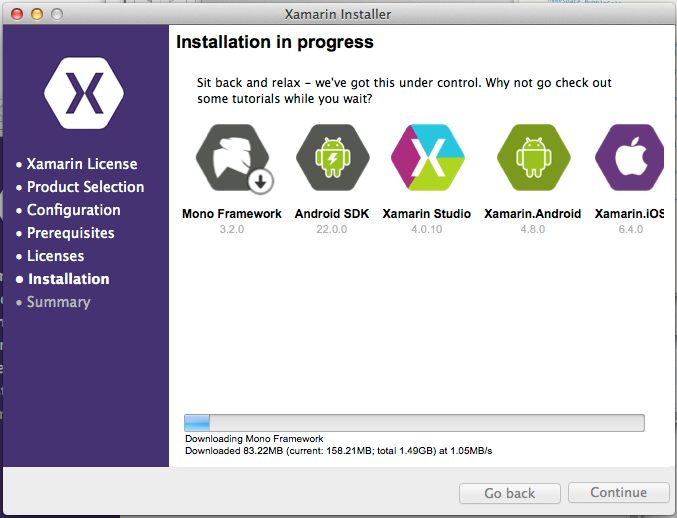
image

Unfortunately I was not able to sit back and relax. I got an error installing Xamarin Studio, following which the installer would not proceed further. My solution was to download the full DMG (Mac virtual disk image) for Xamarin Studio and run that separately. This worked, and I was able to complete the install with the combined installer.

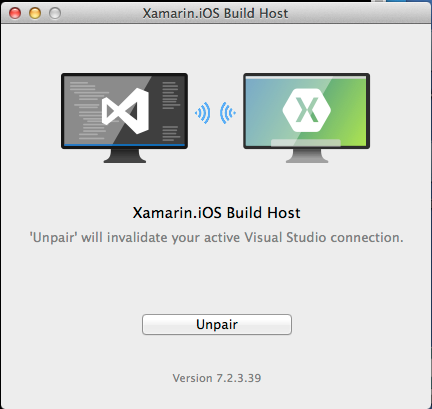
When you start a Visual Studio iOS project, you are prompted to pair with a Mac. To do this, you run a utility on the Mac called Xamarin.IOS Build Host, which generates a PIN. You enter the PIN in Visual Studio and then pairing is active.

image

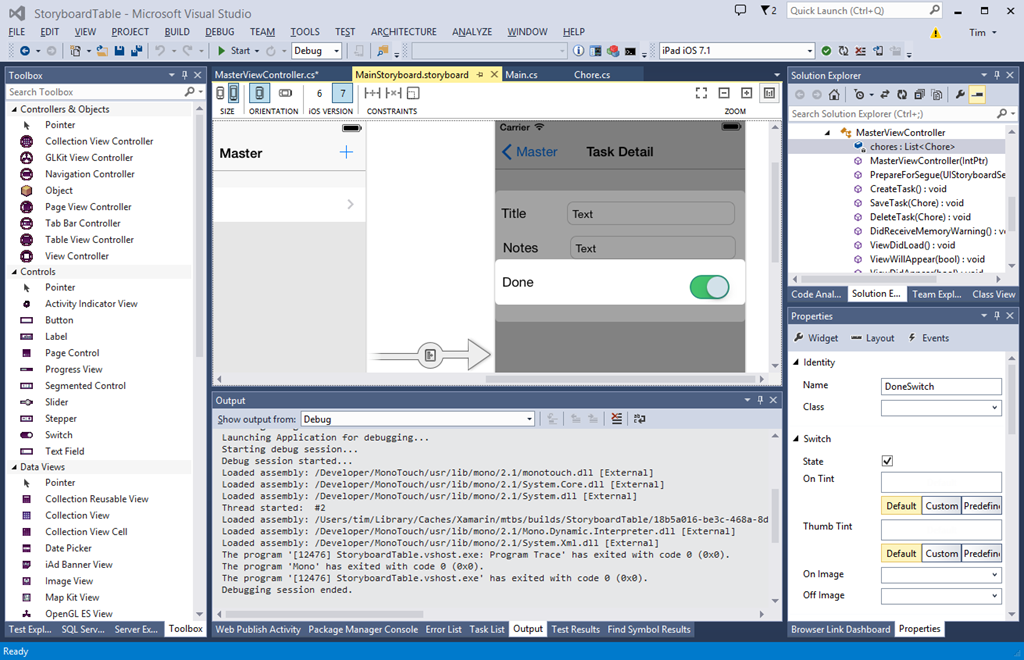
Once paired, you can create or open iOS Storyboard projects in Visual Studio, and use Xamarin’s amazing visual designer.

image

Please click this image to open it full-size. What you are seeing is a native iOS Storyboard file open in Visual Studio 2013 and rendering the iOS controls. On the left is a palette of visual components I can add to the Storyboard. On the right is the normal Visual Studio solution explorer and property inspector.

The way this works, according to what Xamarin CEO Nat Friedman told me, is that the controls are rendered using the iOS simulator on the Mac, and then transmitted to the Windows designer. Thus, what you see is exactly what the simulator will render at runtime. Friedman says it is better than the Xcode designer.

“The way we do event handling is far more intuitive than Xcode. It supports the new iOS 7 auto-layout feature. It allows you to live preview custom controls. Instead of getting a grey rectangle you can see it live rendered inside the canvas. We use the iOS native format for Storyboard files so you can open existing Storyboard files and edit them.”

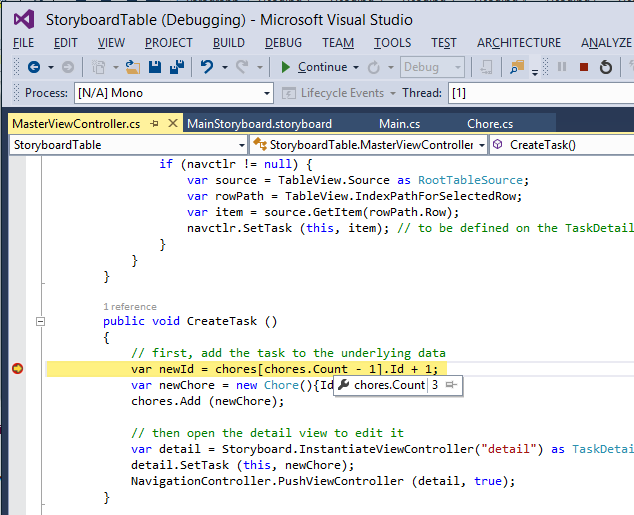
I made a trivial change to the project, configured the project to debug on the iOS simulator, and hit Start. On the Mac side, the app opened in the simulator. On the Windows side, I have breakpoint debugging.

image

Now, I will not pretend that everything ran smoothly in the short time I have had the preview. I have had problems with the pairing after switching projects in Visual Studio. I also had to quit and restart the iOS Simulator in order to get rendering working again. This is an amazing experience though, combining remote debugging with a visual designer on Visual Studio in Windows that remote-renders design-time controls.

Still, time to look at another key new feature in Xamarin 3: Xamarin Forms. This is none other than our old friend XAML, implemented for iOS and Android. The Mono team has some experience implementing XAML on Linux, thanks to the Moonlight project which did Silverlight on Linux, but this is rather different. Xamarin forms does not do any custom drawing, but wraps native controls. In other words, it like is the Eclipse SWT approach for Java, and not like the Swing approach which does its own drawing. This is keeping with Xamarin’s philosophy of keeping apps as native as possible, even though the very existence of a cross-platform GUI framework is something of a compromise.

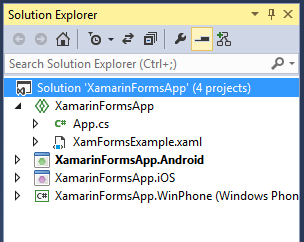
I have not had long to play with this. I did create a new Xamarin Forms project, and copy a few lines of XAML from a sample into a shared XAML file. Note that Xamarin Forms uses Shared Projects in Visual Studio, the same approach used by Microsoft’s Universal Apps. However, Xamarin Forms apps are NOT Universal Apps, since they do not support Windows 8 (yet).

image 

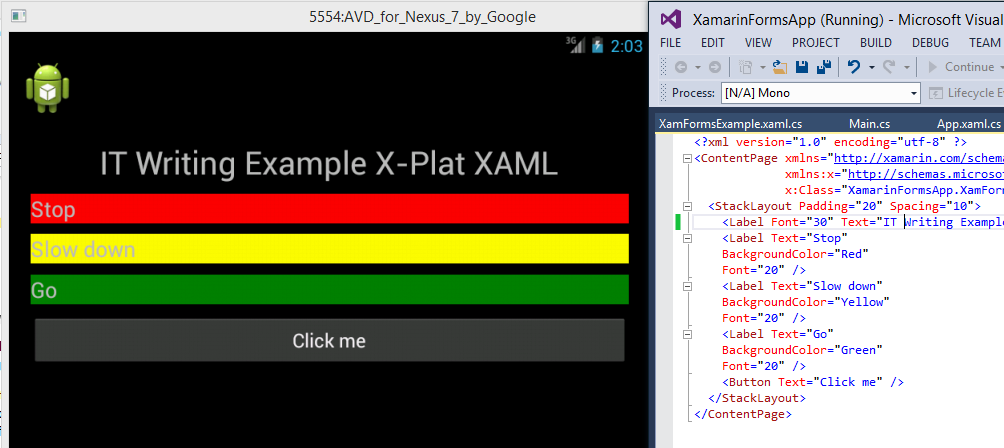
In a Shared Project, you have some code that is shared, and other code that is target-specific. By default hardly any code is shared, but you can move code to the shared node, or create new items there. I created XamFormsExample.xaml in the shared node, and amended App.cs so that it loads automatically. Then I ran the project in the Android emulator.

image

I was also able to run this on iOS using the remote connection.

I noticed a few things about the XAML. The namespace is:

xmlns="http://xamarin.com/schemas/2014/forms"
xmlns:x="http://schemas.microsoft.com/winfx/2009/xaml"

I have not seen this before. Microsoft’s XAML always seems to have a “2006” namespace. For example, this is for a Universal App:

xmlns="http://schemas.microsoft.com/winfx/2006/xaml/presentation"
xmlns:x=http://schemas.microsoft.com/winfx/2006/xaml

However, XAML 2009 does exist and apparently can be used in limited circumstances:

In WPF, you can use XAML 2009 features, but only for XAML that is not WPF markup-compiled. Markup-compiled XAML and the BAML form of XAML do not currently support the XAML 2009 language keywords and features.

It’s odd, because of course Xamarin’s XAML is cut-down compared to Microsoft’s XAML. That said, I am not sure of the exact specification of XAML in Xamarin Forms. I have a draft reference but it is incomplete. I am not sure that styles are supported, which would be a major omission. However you do get layout managers including AbsoluteLayout, Grid, RelativeLayout and StackLayout. You also get controls (called Views) including Button, DatePicker, Editor, Entry (single line editor), Image, Label, ListView, OpenGLView, ProgressBar, SearchBar, Slider, TableView and WebView.

Xamarin is not making any claims for compatibility in its XAML implementation. There is no visual designer, and you cannot port from existing XAML code. The commitment to wrapping native controls may limit prospects for compatibility. However, Friedman did say that Xamarin hopes to support Universal Apps, ie. to run on Windows 8 as well as Windows Phone, iOS and Android. He said:

I think it is the right strategy, and if it does take off, which I think it will, we will support it.

Friedman says the partnership with Microsoft (which begin in November 2013) is now close, and it would be reasonable to assume that greater compatibility with Microsoft XAML is a future goal. Note that Xamarin 3 also supports Portable Class Libraries, so on the non-visual side sharing code with Microsoft projects should be straightforward.

Personally I think both the Xamarin forms and the iOS visual designer (which, note, does NOT support Xamarin Forms) are significant features. The iOS designer matters because you can now do almost all of your cross-platform mobile development within Visual Studio, even if you want to follow the old Xamarin model of a different, native user interface for each platform; and Xamarin Forms because it enables a new level of code sharing for Xamarin projects, as well as making XAML into a GUI language that you can use across all the most popular platforms. Note that I do have reservations about XAML; but it does tick the boxes for scaling to multiple form factors and for enormous flexibility.

Hands on with Cordova in Visual Studio

At TechEd this week, Microsoft announced Apache Cordova support in Visual Studio 2013. A Cordova app is HTML and JavaScript wrapped as a native app, with support for multiple platforms including iOS and Android. It is the open source part of Adobe’s PhoneGap product. I downloaded the preview from here and took a quick look.

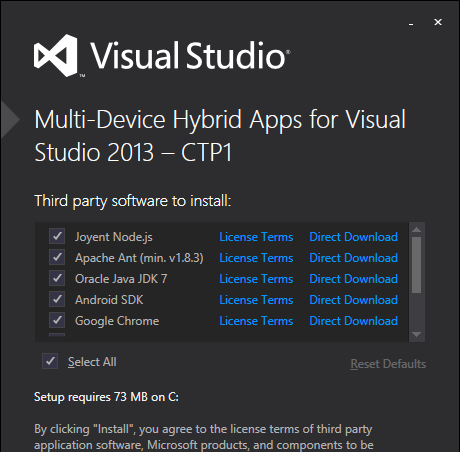
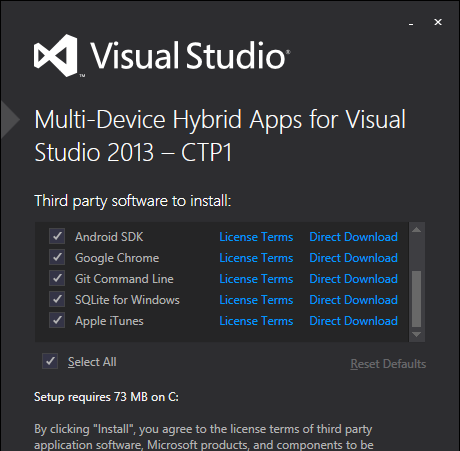
There is a long list of dependencies which the preview offers to install on your behalf:

image

and

image

The list includes the Java SDK, Google Chrome and Apple iTunes. The documentation explains that Java is required for the Android build process, Chrome is required to run the Ripple emulator (so you could choose not to install if you do not require Ripple), and iTunes is required for deploying an app to an iOS device, though a Mac is also required.

The license terms for both Chrome and iTunes are long and onerous, plus iTunes is on my list of applications not to install on Windows if you want it to run fast. Chrome is already installed on my PC, and I unchecked iTunes.

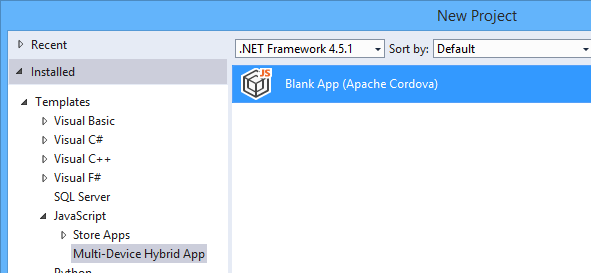
Next, I ran Visual Studio and selected a Multi-Device Hybrid App project (I guess “Cordova app” was rejected as being too short and simple).

image

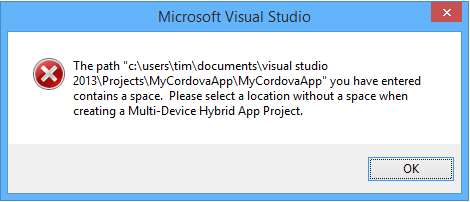
An annoyance is that if you use the default project location, it is incompatible because of spaces in the path:

image

The project opened, and being impatient I immediately hit Run.

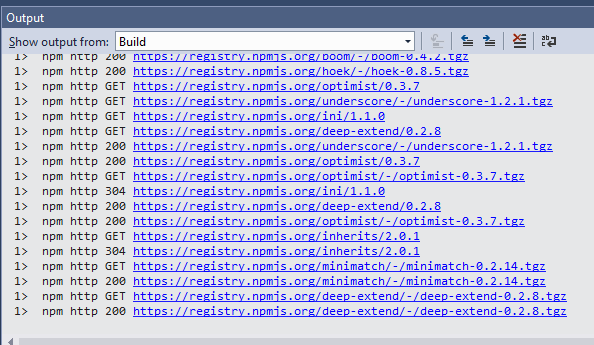
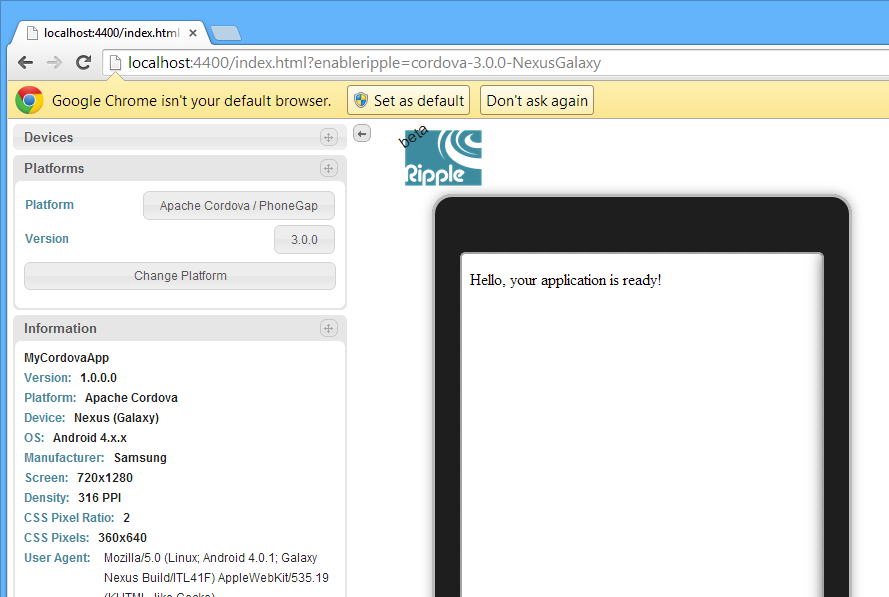
When you build, and debug using the default Ripple emulator (which runs in Chrome, hence the dependency), Visual Studio grabs a ton of dependencies.

image

and eventually the app runs:

image

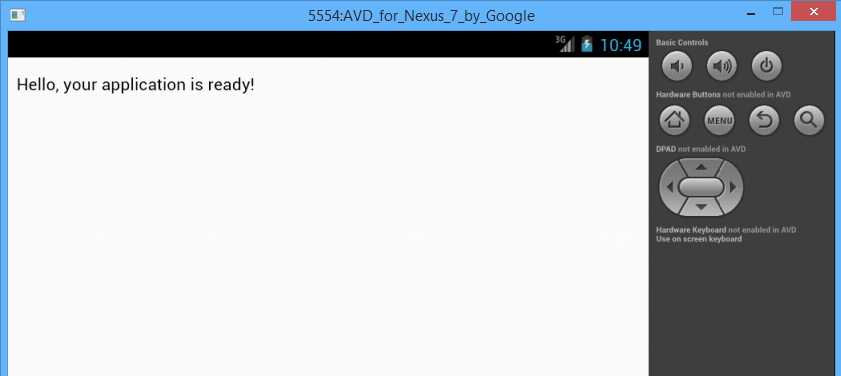
or you can debug in the Android emulator:

image

A good start.

Microsoft has some sample projects for AngularJS, BackboneJS and WinJS. This last is intriguing since you could emulate the Windows Phone look and feel (or something like it) on Android on iOS, though it would look far from native.

The preview is not feature-complete. The only supported device targets are Android 4.x, IOS 6 and 7, Windows 8.x Store apps, and Windows Phone 8.x. Windows Phone debugging does not work in this preview.

Office, Azure Active Directory, and mobile: the three pillars of Microsoft’s cloud

When Microsoft first announced Azure, at its PDC Conference in October 2008, I was not impressed. Here is the press release, if you fancy a look back. It was not so much the technology – though with hindsight Microsoft’s failure to offer plain old Windows VMs from the beginning was a mistake – but rather, the body language that was all wrong. After all, here is a company whose fortunes are built on supplying server and client operating systems and applications to businesses, and on a partner ecosystem that has grown up around reselling, installing and servicing those systems. How can it transition to a cloud model without cannibalising its own business and disrupting its own partners? In 2008 the message I heard was, “we’re doing this cloud thing because it is expected of us, but really we’d like you to keep buying Windows Server, SQL Server, Office and all the rest.”

Take-up was small, as far as anyone could tell, and the scene was set for Microsoft to be outflanked by Amazon for IaaS (Infrastructure as a Service) and Google for cloud-based email and documents.

Those companies are formidable competitors; but Microsoft’s cloud story is working out better than I had expected. Although Azure sputtered in its early years, the company had some success with BPOS (Business Productivity Online Suite), which launched in the UK in 2009: hosted Exchange and SharePoint, mainly aimed at education and small businesses. In 2011 BPOS was reshaped into Office 365 and marketed strongly. Anyone who has managed Exchange, SharePoint and Active Directory knows that it can be arduous, thanks to complex installation, occasional tricky problems, and the challenge of backup and recovery in the event of disaster. Office 365 makes huge sense for many organisations, and is growing fast – “the fastest growing business in the history of the company,” according to Corporate VP of Windows Server and System Center Brad Anderson, speaking to the press last week.

image
Brad Anderson, Corporate VP for Windows Server and System Center

The attraction of Office 365 is that you can move users from on-premise Exchange almost seamlessly.

Then Azure changed. I date this from May 2011, when Scott Guthrie and others moved to work on Azure, which a year later offered a new user-friendly portal written in HTML5, and Windows Azure VMs and web sites. From that moment in 2012, Azure because a real competitor in cloud computing.

That is only two years ago, but Microsoft’s progress has been remarkable. Azure has been adding features almost as fast as Amazon Web Services (AWS – and I have not attempted to count), and although it is still behind AWS in some areas, it compensates with its excellent portal and integration with Visual Studio.

Now at TechEd Microsoft has made another wave of Azure announcements. A quick summary of the main ones:

  • Azure Files: SMB shared storage for Azure VMs, also accessible over the internet via a REST API. Think of it as a shared folder for VMs, simplifying things like having multiple web servers serve the same web site. Based on Azure storage.
  • Azure Site Recovery: based on Hyper-V Recovery Manager, which orchestrates replication and recovery across two datacenters, the new service adds the rather important feature of letting you use Azure itself as your space datacenter. This means anyone could use it, from small businesses to the big guys, provided all your servers are virtualised.
  • Azure RemoteApp: Remote Desktop Services in Azure, though currently only for individual apps, not full desktops
  • Antimalware for Azure: System Center Endpoint Protection for Azure VMs. There is also a partnership with Trend Micro for protecting Azure services.
  • Public IPs for individual VMs. If you are happy to handle the firewall aspect, you can now give a VM a public IP and access it without setting up an Azure endpoint.
  • IP Reservations: you get up to five IP addresses per subscription to assign to Azure services, ensuring that they stay the same even if you delete a service and add a new one back.
  • MSDN subscribers can use Windows 7 or 8.1 on Azure VMs, for development and test, the first time Microsoft has allows client Windows on Azure
  • General availability of ExpressRoute: fast network link to Azure without going over the internet
  • General availability of multiple site-to-site virtual network links, and inter-region virtual networks.
  • General availability of compute-intensive VMs, up to 16 cores and 112GB RAM
  • General availability of import/export service (ship data on physical storage to and from Azure)

There is more though. Those above are just a bunch of features, not a strategy. The strategy is based around Azure Active Directory (which everyone gets if they use Office 365, or you can set up separately), Office, and mobile.

Here is how this works. Azure Active Directory (AD), typically synchronised with on-premise active directory, is Microsoft’s cloud identity system which you can use for single sign-on and single point of control for Office 365, applications running on Azure, and cloud apps run by third-parties. Over 1200 software as a service apps support Azure AD, including Dropbox, Salesforce, Box, and even Google apps.

Azure AD is one of three components in what Microsoft calls its Enterprise Mobility Suite. The other two are InTune, cloud-based PC and device management, and Azure Rights Management.

InTune first. This is stepping up a gear in mobile device management, by getting the ability to deploy managed apps. A managed app is an app that is wrapped so it supports policy, such as the requirement that data can only be saved to a specified secure location. Think of it as a mobile container. iOS and Android will be supported first, with Office managed apps including Word, Excel, PowerPoint and Mobile OWA (kind-of Outlook for iOS and Android, based on Outlook Web Access but delivered as a native app with offline support).

Businesses will be able to wrap their own applications as managed apps.

Microsoft is also adding Cordova support to Visual Studio. Cordova is the open source part of PhoneGap, for wrapping HTML and JavaScript apps as native. In other words, Visual Studio is now a cross-platform development tool, even without Xamarin. I have not seen details yet, but I imagine the WinJS library, also used for Windows 8 apps, will be part of the support; yes it works on other platforms.

Next, Azure Rights Management (RMS). This is a service which lets you encrypt and control usage of documents based on Azure AD users. It is not foolproof, but since the protection travels in the document itself, it offers some protection against data leaking out of the company when it finds its way onto mobile devices or pen drives and the like. Only a few applications are fully “enlightened”, which means they have native support form Azure RMS, but apparently 70% of more of business documents are Office or PDF, which means if you cover them, then you have good coverage already. Office for iOS is not yet “enlightened”, but apparently will be soon.

This gives Microsoft a three-point plan for mobile device management, covering the device, the applications, and the files themselves.

Which devices? iOS, Android and Windows; and my sense is that Microsoft is now serious about full support for iOS and Android (it has little choice).

Another announcement at TechEd today concerns SharePoint in Office 365 and OneDrive for Business (the client), which is getting file encryption.

What does this add up to? For businesses happy to continue in the Microsoft world, it seems to me a compelling offering for cloud and mobile.