Category Archives: software development

Curating an app store: does Apple have it right?

No matter how much market share Android grabs: it is Apple’s App Store that started this app thing rolling. Never forget that OS vendors and phone operators tried to push app stores before Apple came in, but fragmentation, horrible user interaction design, billing issues and perplexing compatibility problems made them a dead loss for most users. Today, Apple’s mobile platform remains the most important one in many sectors.

The trade off with app stores is that you give up freedom of choice (install anything you want from anywhere) in return for a safer and better experience; software installation nasties like runtime dependencies, malware or fake download apps do not exist. At least, that is how it is meant to be, which is why some are so disappointed by Microsoft’s store.

Now Apple has offered us some limited insight into its own curation practice. It has published the top ten reasons for App rejections for the last week in August.

Aside from the generic “more information needed,” the top reason is bugs, and the next two are non-compliance with the developer terms (could mean anything) and user interfaces that are poor or too complex.

Close behind it is another key one:

Apps that contain false, fraudulent or misleading representations or use names or icons similar to other Apps will be rejected

which accounts for the main complaint about some apps that make it into Microsoft’s store.

What Apple does not tell us is the proportion of apps that are approved, either first time, or after one or two revisions.

There is little to argue about in Apple’s list of reasons to reject, except this one:

If your app doesn’t offer much functionality or content, or only applies to a small niche market, it may not be approved.

Apps without content are fair game, but why should small niche markets not be served? It does not bother me if a great app for jellyfish spotters makes it into the store.

The other factor here is that if an app store has enough high quality apps then the bad ones will be hardly visible, other than in search results. Store curation is about presentation as well as content.

Is Apple getting it right? I am not hearing much shouting from developers about the arbitrary or unknown reasons why their app was rejected, which suggests that it is, but it may be I am not listening intently enough.

Embarcadero RAD Studio XE7 (Delphi, C++Builder): is seven the magic number?

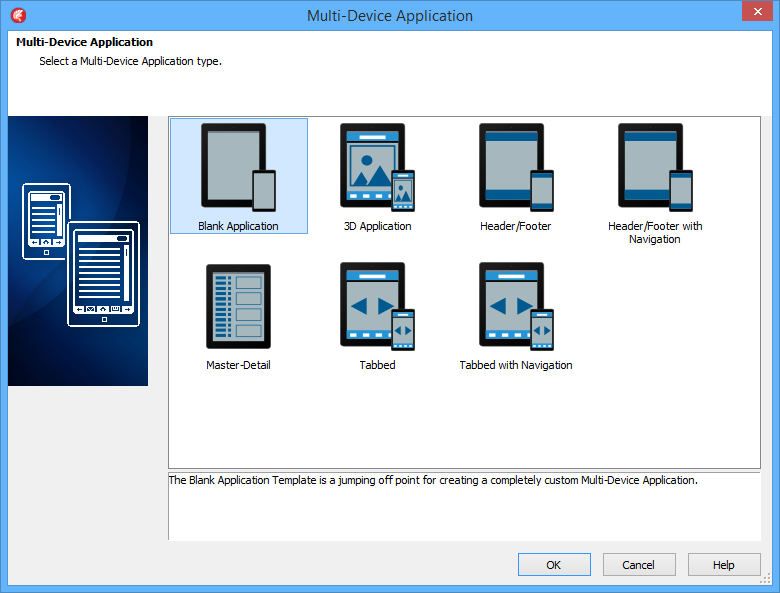
Embarcadero has released version 7 of its XE programming suite. The main products included are Delphi and C++ Builder, RAD development tools that share the same underlying libraries and visual designers but give developers a choice of language. Delphi uses an object-oriented evolution of Pascal.
image

Delphi is best known as a Windows Programming Tool – it used to be the main competition for Visual Basic – but over the last few years Embarcadero has added cross-platform Mac and mobile development with native compilers for OSX, iOS and Android. The IDE runs only on Windows but can compile for the Mac or for iOS New versions have come thick and fast – XE6 was released in April 2014 – so if you want to stay up to date, prefer for frequent upgrades or buy with a support and maintenance agreement. You can buy Delphi or C++ Builder separately if you do not require the suite.

The full RAD Studio also includes HTML 5 Builder, which supports mobile app development using Cordova (open source version of PhoneGap). There seems to be little new in HTML 5 Builder. An earlier PHP tool variously called Delphi for PHP and RadPHP was dropped some time back. I get the impression that Embarcadero is now more focused on its core good thing.
image

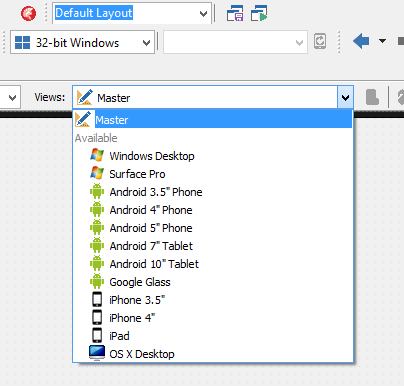
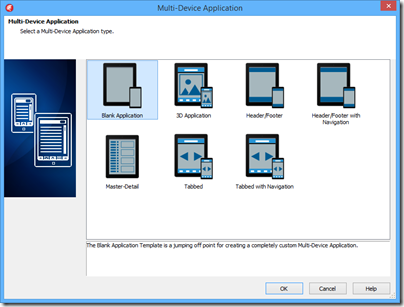
So what’s new? Making effective cross-platform development tools is not easy, with trade-offs between productivity (share more code) and writing the best app for each platform (share less code). This edition introduces a new approach to designing the user interface, called the Multi-Device Designer. It is based on a kind of inheritance. You build your base UI in a master form and write most of the event-handling code there. This master form is automatically adapted, to some extent, to other platforms. You can see how your form looks on these other platform by dropping down a list.
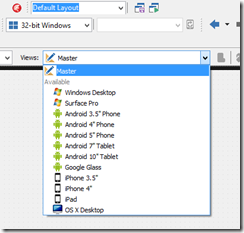
image

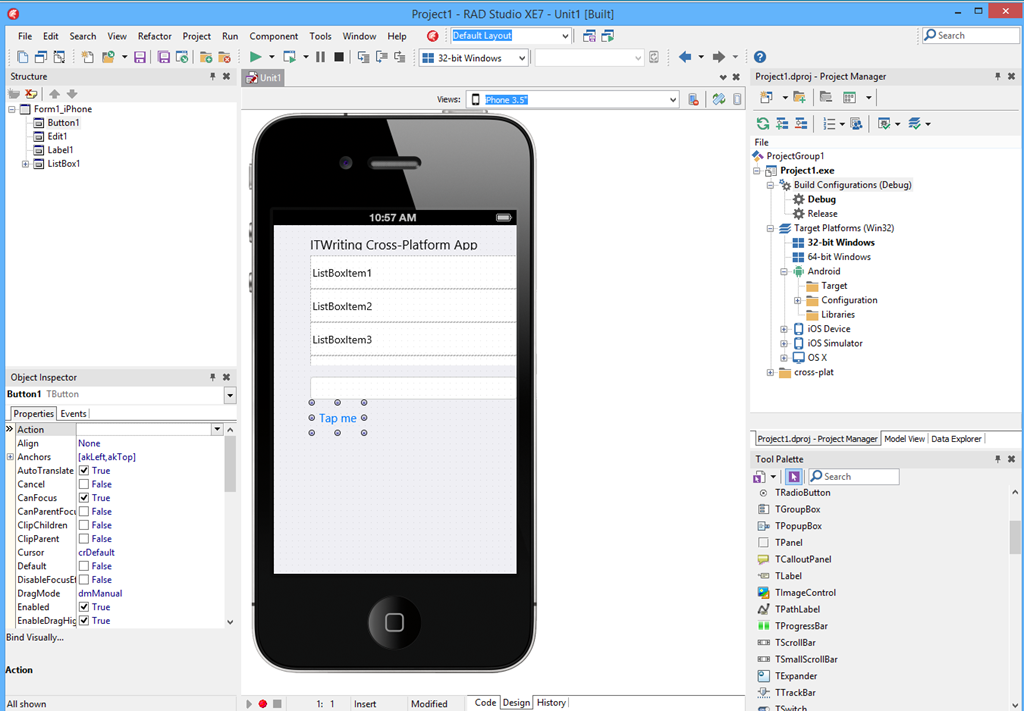
When you select the form for a specific platform, you can modify it for that platform. There is still only one form, but the platform-specific views override properties set in the master form. If you then further modify the master, the changes will flow down to the platform-specific forms unless properties have already been overridden.
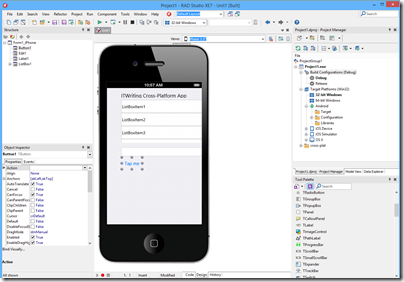
image

My impression after a five-minute play is that you will indeed have to made modifications to get each form looking right; the automatically generated versions were not too good. There is still good productivity potential here presuming the designer proves to be robust.

A common criticism of Embarcadero’s approach is that visual controls are custom-drawn on each platform, rather than using true native controls. That does not matter at all, Embarcadero always assured me. It does matter though; and now in XE7 we have the beginning of a solution. There are a couple of optional Platform Native Controls, TEdit and TCalendar for iOS, which do use native controls. I suspect this will be popular and hope that more platform native controls arrive in due course.

App Tethering is a feature/library that lets you easily set up connectivity between Delphi/C++ Builder apps on a local network. The first version only supported Ethernet/Wi-Fi, but now Bluetooth support has come, including Bluetooth LE on Windows 8 and recent Android devices.

On Android, a new tool called Java2OP lets you generate Object Pascal interfaces for Java Android classes, which sounds handy.

Aside: the naming of this tool suggests that the language is now called Object Pascal again, rather than Delphi, which became the official name some years back. Object Pascal makes more sense to me.

The System.Threading library now includes a new parallel programming library, including Parallel For, task scheduling, and futures. Futures are a way of creating code that will run at an indeterminate time. You associate a variable with a function that calculates its value. That function will run when you access the value, or before that if a background thread is available.

The IDE now has limited Git support (local repository only).

Another new piece in XE7 is Enterprise Mobility Services, a REST-based middleware stack that runs as an ISAPI DLL in Microsoft’s IIS web server. This includes database connectivity (using the FireDAC library), user management (though not Active Directory integration as yet, as I understand it) and usage analytics.

If you are using IIS, why would you not use ASP.NET and the Web API? The answer is that with EMS you can do end-to-end Delphi/C++ Builder as well as getting the performance of native code on the server.

Challenges for Embarcadero and RAD Studio

In the nineties it was Delphi versus Visual Basic, and although most developers who gave Delphi serious attention discovered that it was superior in most ways to Microsoft’s tool, the big-company backing and integration with Microsoft’s overall platform meant that VB was not much disrupted (though we may have Delphi to thank for the appearance of native code compilation in VB).

Today Embarcadero is up against Xamarin, which is similar in that it gives Microsoft platform developers a route to cross-platform development for Mac, iOS and Android.

From what I hear, cross-platform support in RAD Studio has been successful in reinvigorating the product within its niche, but it is Xamarin that has grown explosively, thanks to a combination of the C# language, Visual Studio integration, and a degree of official endorsement from Microsoft. Whereas Xamarin fits with Microsoft’s Universal App concept, shared C# code across all platforms, RAD Studio takes its own path, avoiding .NET in favour of native executables.

[I realise that there is endless debate about what native means, and that while RAD Studio has a good claim to native code, it is weak when it comes to native controls as noted above].

Unlike Xamarin, which has its own cross-platform IDE for Windows and Mac, RAD Studio requires Mac developers to use a PC or a Windows VM.

Embarcadero chose not to support Windows 8 “Metro” or Store apps, a decision which now looks wise, though it could yet work against them if Universal Apps are more compelling in Windows vNext. Another omission is Windows Phone; perhaps this does not matter greatly given its small market share, but within the Microsoft platform community it is a bigger lack than simple market share implies.

The advantage of the RAD Studio approach is that it is less dependent on Microsoft’s constant changes of direction, and performance is generally good. I have always been a fan of Delphi. There were some quality concerns when the FireMonkey cross-platform UI library was first adopted, but now in RAD Studio XE7 there is reasonable hope that the library is mature enough.

RAD Studio is the obvious route for long-time Delphi or C++ Developers migrating to mobile; it is a viable niche but I question whether it can ever move beyond it to grab a share of the wider mobile development market.

More information here.
Microsoft’s broken Windows Store: an unconvincing official response and the wider questions

Microsoft’s Todd Brix has posted about misleading apps in Windows Store:

Every app store finds its own balance between app quality and choice, which in turn opens the door to people trying to game the system with misleading titles or descriptions. Our approach has long been to create and enforce strong but transparent policies to govern our certification and store experience. Earlier this year we heard loud and clear that people were finding it more difficult to find the apps they were searching for; often having to sort through lists of apps with confusing or misleading titles. We took the feedback seriously and modified the Windows Store app certification requirements as a first step toward better ensuring that apps are named and described in a way that doesn’t misrepresent their purpose.

Although it is not mentioned, the post is likely in response to this article which describes the Windows Store as “a cesspool of scams”:

Microsoft’s Windows Store is a mess. It’s full of apps that exist only to scam people and take their money. Why doesn’t Microsoft care that their flagship app store is such a cesspool?

That is a good question and one which Brix does not answer. Nor are the complaints new. I posted in November 2012 about Rubbish apps in Windows Store – encouraged by Microsoft? with the extraordinary rumour that Microsoft employees were encouraging trivial and broken apps to be uploaded multiple times under different names.

The facts in that case are somewhat obscure; but there was no obscurity about the idiotic (if your goal is to improve the availability of compelling Windows Store apps) Keep the Cash campaign in March 2013:

Publish your app(s) in the Windows Store and/or Windows Phone Store and fill out the form at http://aka.ms/CashForApps to participate. You can submit up to 10 apps per Store and get $100 for each qualified app up to $2000.

image

Microsoft decided to reward mediocrity – no, even that is not strong enough – rather, to reward the distribution of meaningless trivial apps in order to pad out its store with junk and make the actual high quality apps (yes there are some) harder to find.

I agree with the commenters to Brix’s post who call him out on his claim that “Our approach has long been to create and enforce strong but transparent policies to govern our certification and store experience”. How do you reconcile this claim with the torrent of rubbish that was allowed, and even encouraged, to appear in the store?

Every public app store is full of junk, of course, and it is hard to see how that can be completely avoided; if Apple, Google or Microsoft declined apps for subjective reasons there would be accusations of exerting too much control over these closed platforms.

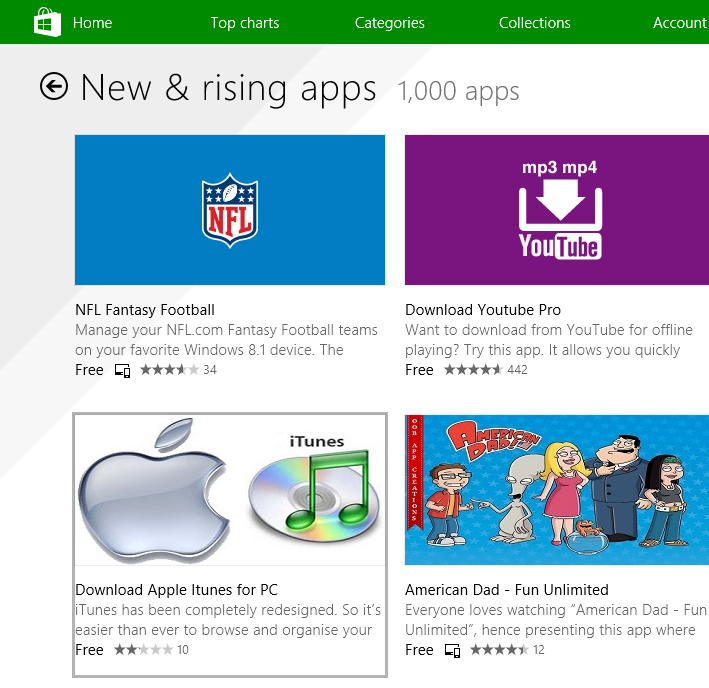
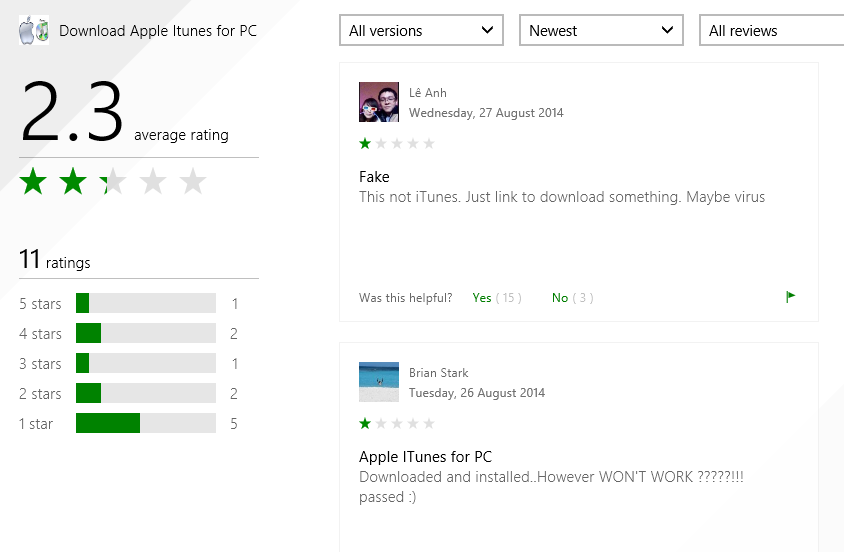
That does not excuse the appearance of apps like Download Apple Itunes (sic) for PC, listed today under New & rising apps:

image

The app is nothing to do with Apple; it is a third-party downloader of the kind I analysed here. The idea is to persuade people to run an application that installs all sorts of adware or even malware before directing them to a download that is freely available.

It seems that users do not think much of this example, which apparently does not even do what it claims.

image

While apps like this are making in into the store, I do not see how Brix can justify his claim of enforcing “strong but transparent policies to govern our certification and store experience”.

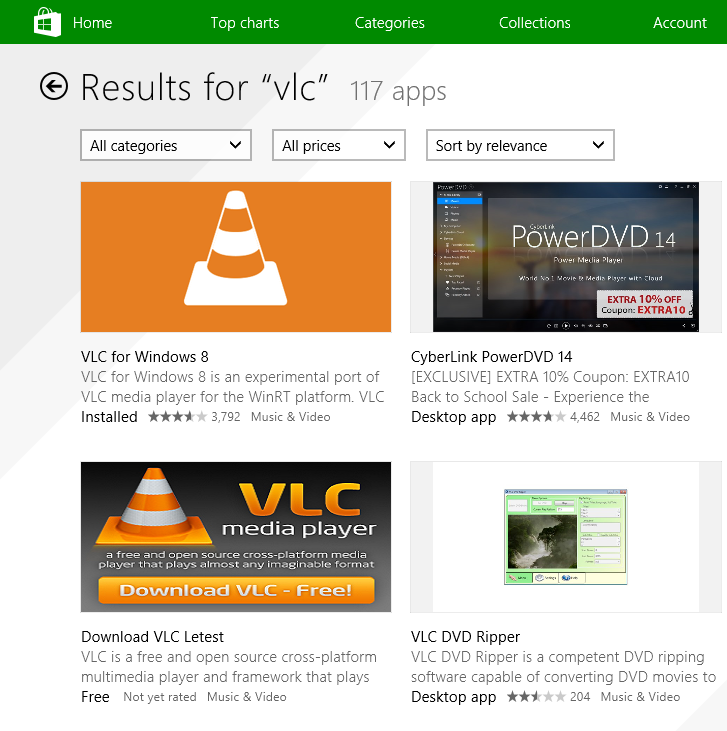
Even VLC, where scammy apps have been largely cleaned up following many complaints, is still being targeted. Apparently Microsoft’s store curators are happy to let through an app called “Download VLC Letest” (sic).

image

How much does this matter or has this mattered? Well, Microsoft launched Windows 8 at huge risk, trading the cost of unpopular and disruptive changes to the OS and user interface for the benefit of a new more secure and touch-friendly future. That benefit depended and depends completely on the availability of compelling apps which use the new model. The store, as the vehicle of distribution for those apps, is of critical importance.

Another benefit, that of protecting users from the kind of junk that has afflicted and diminished the Windows experience for many years, has been scandalously thrown away by Microsoft itself. It is a self-inflicted wound.

What could Microsoft do? It is too late for Windows 8 of course, but the correct approach to this problem, aside from not approving harmful and deceitful apps in the first place, is to take a strongly editorial approach. For less cost than was spend actually undermining the store by paying for rubbish, Microsoft could have appointed an editorial team to seek out strong apps and include within the store features that describe their benefits and tell their story, making the green store icon one that users would actually enjoy tapping or clicking. Currently there is too much reliance on automated rankings that are frequently gamed.

There are some excellent apps in the store, and teams that have worked hard to make them what they are. Apps to mention, for example, include Adobe’s Photoshop Express; Microsoft’s Fresh Paint; or Calculator Free. Those developers deserve better.

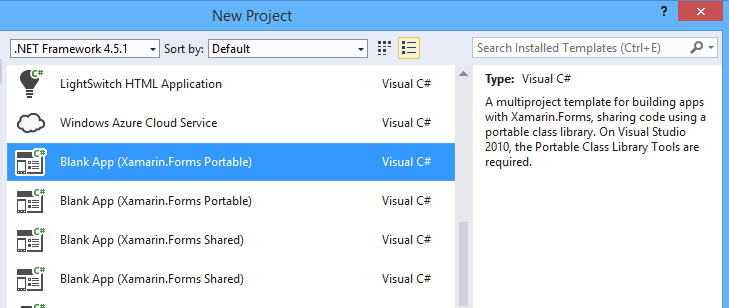
Xamarin announces large round of funding, plans international expansion

It is a case of “right time, right place” for Xamarin, as it scoops up Windows developers who need either to transition to iOS and Android, or to add mobile support to existing applications. You can also port applications to the Mac with its cross-platform development framework based on C#; no bad thing as Mac sales continue to boom.

image

Xamarin also fits with Microsoft’s new strategy, as I understand it, which is to provide strong support for iOS and Android for applications such as Microsoft Office, and services such as those hosted on Microsoft Azure.

Now the company has announced an additional $54 million of funding, which CEO Nat Friedman tells me is “the largest round of financing achieved by any mobile platform company ever”.

The financing comes from “new and existing investors, including Lead Edge Capital, Insight Venture Partners, Charles River Ventures, Ignition Partners, and Floodgate.”

What will the money be spent on? “Two things,” says Friedman. “We’re planning to expand our sales and marketing into Europe. We’re opening a sales office in London in the Fall. We did a roadshow with Microsoft in Europe and it was extremely successful. Second, we’re going to invest in improving the quality of our platforms.”

Friedman notes that mobile should not be considered a development niche. “Our view is that in the future all software will be mobile software in some way or another, when you build an application it will have to have some kind of mobile surface area.”

A few other points to note. One is that Xamarin Forms, recently introduced, has been a big hit with developers. “The Xamarin Forms forum has been our most popular forum,” says Friedman. “We’ve been really surprised.”

The company used to promote the idea of avoiding cross-platform code for the user interface, but then introduced Xamarin Forms as a cross-platform GUI framework, arguing that because it uses only native controls, it avoids the main drawbacks of the idea.

Some of the funding then will go into improving Xamarin Forms and tools to work with the framework.

Another key area is Visual Studio integration. The acquisition of the Visual Studio integration team from Clarius Consulting, in May 2014, is also significant here, since Clarius had strong expertise in this area.

Might Microsoft try to acquire Xamarin? Interesting question, and one which Friedman is not in a position to discuss; I am not a financial expert but would guess that Xamarin’s independent expansion increases its ability to be independent, though investors may be hoping to reap the rewards of an acquisition, who knows?

Bing Developer Assistant adds code samples to Visual Studio IntelliSense, with mixed results

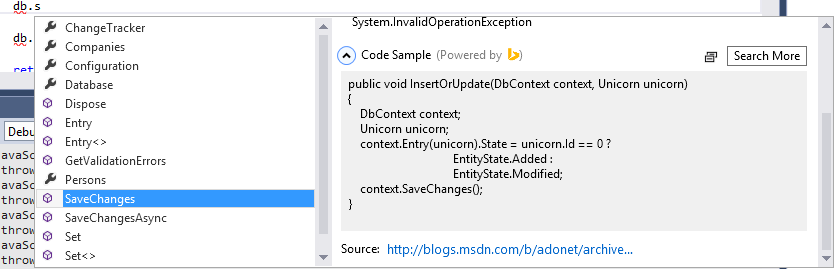
Microsoft has updated its Bing Developer Assistant Beta, a Visual Studio 2013 add-in which hooks into IntelliSense so that you get code samples as well as brief documentation. For example, in an Entity Framework project, if you select dbContext.SaveChanges, you get a code sample which uses that method.

image

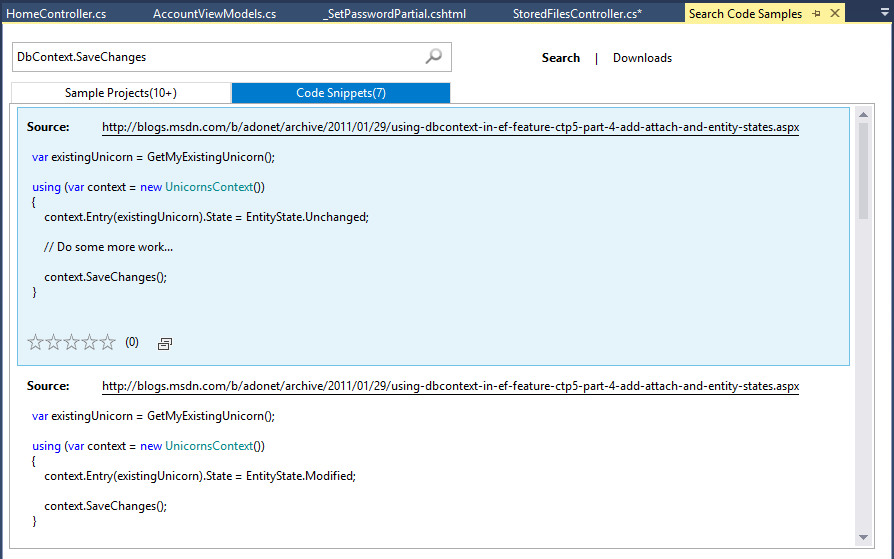
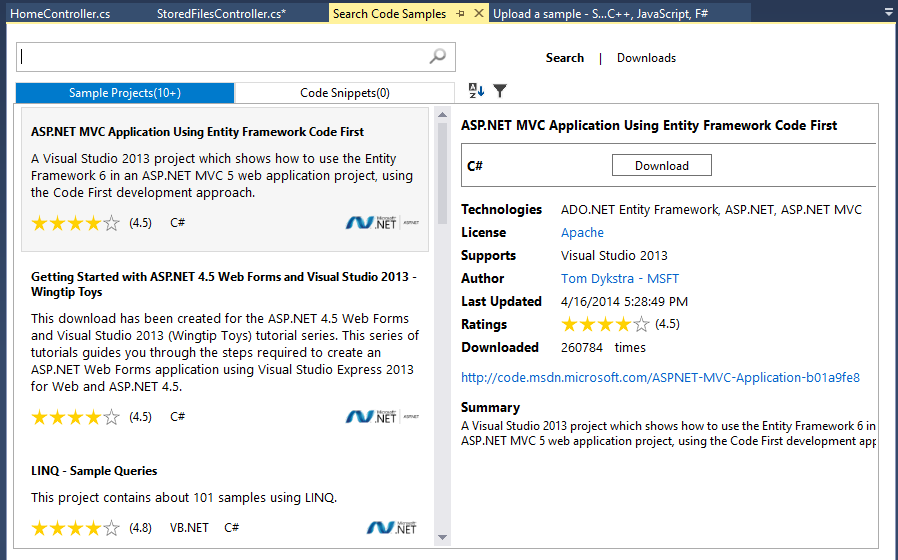
There is no guarantee of course that the sample is relevant to what you are trying to accomplish. You can hit Search More though and get a selection of code snippets and sample projects, drawn from sites including MSDN, StackOverflow and Codeproject.

image

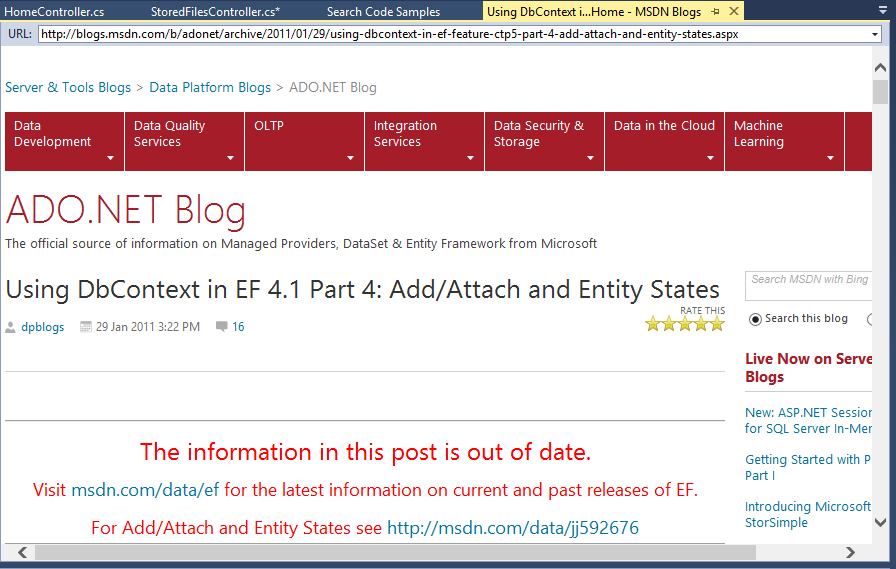
Developer beware though. Looking at the code samples, the top one is from a 2011 blog post relating to CTP (Community Tech Preview) 5 of Entity Framework 4.1. If you hit the link, you get this:

image

“The information in this post is out of date”, it says, followed by a link to what is in fairness a rather helpful article on using SaveChanges.

Hmm, maybe Bing Developer Assistant should try filtering the search to eliminate samples on preview or obsolete APIs? A snag here though is that on occasion the blogs and samples on preview frameworks are all you can get, because by the time the thing is actually released, the developer evangelists have move on to blog about the next up and coming cool thing.

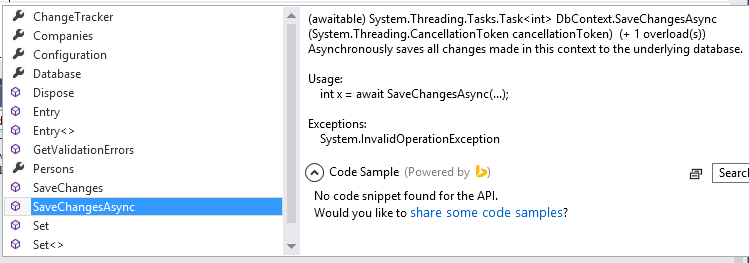
If you choose an object member for which Bing finds no code sample, you are prompted to add one of your own:

image

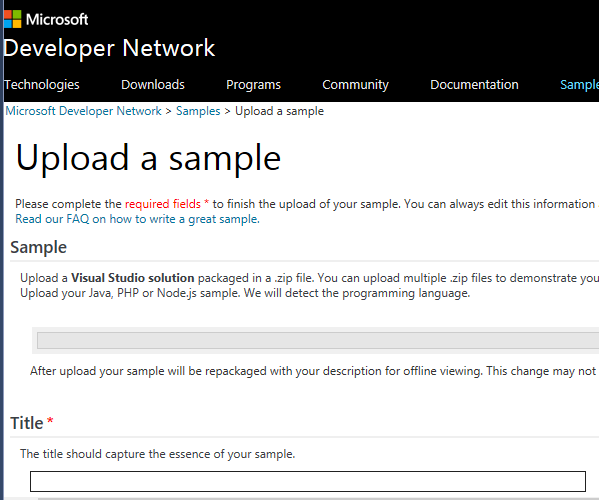
This takes to to the Developer Network sample upload page:

image

This form is quite a lot of work, but lets you add a code snippet or sample project together with title and comments explaining what it does.

The Bing Developer Assistant also searches for sample projects:

image

Again it is a case of picking and choosing what is really relevant; but developers are experts and expected to use common sense.

A drawback with Bing Developer Assistant is that only one add-on can extend IntelliSense, so if you use Resharper or another tool which also does this, you have to choose which one to allow.

In the end, this is all about integrating web search into the IDE. Is that a good idea, or is it better simply to have your web browser open, perhaps on another display, and type “dbContext SaveChanges EF6” or some such into your favourite search engine?

There is some merit in a search engine that automatically filters to show only code samples – hey, that is what Google’s popular Code Search did, until it was mysteriously shut down – though I’m not sure how much I like the idea of possibly obsolete and deprecated samples showing up in Visual Studio as you are coding.

Still, the truth is that web search is critical to software development today and it is good to see that recognised.

The UK government is adopting Open Document: some observations

The UK government is adopting the Open Document Format for Office Applications, for documents that are editable (read-only documents will be PDF or HTML). You can read Mike Bracken’s (Government Digital Service) blog on the subject here, and the details of the new requirements here. If you want to see the actual standards, they are on the OASIS site here.

I followed the XML document standards wars in some details back in 2006-2008. The origins of ODF go back to Sun Microsystems (a staunch opponent of Microsoft) which acquired an Office suite called Star Office, made it open source, and supported OpenOffice.org. My impression was that Sun’s intentions were in part to disrupt the market for Microsoft Office, and in part to promote a useful open standard out of conviction. OpenOffice eventually found its way to the Apache Foundation after Oracle’s acquisition of Sun. You can find it here.

During the time, Microsoft responded by shifting Office to use XML formats by default – these are the formats we know as .docx, .xlsx etc. It also made the formats an open standard via ECMA and ISO, to the indignation of ODF advocates who found every possible fault in the standards and the process. There were and are faults; but it has always seemed to me that an open XML standard for Microsoft Office documents was a real step forward from the wholly proprietary (but reverse engineered) binary formats.

The standards wars are to some extent a proxy for the effort to shift Microsoft from its dominance of business document authoring. Microsoft charges a lot for Office, particularly for businesses, and arguably this is an unnecessary burden. On the other hand, it is a good product which I personally prefer to the alternatives on Windows (on the Mac I am not so sure), and considering the amount of use Office gets during the working day even a small improvement in productivity is worth paying for.

As a further precaution, Microsoft added ODF support into its own Office suite. This was poor at first, though it has no doubt improved since 2007. However I would not advise anyone to set Microsoft Office to use ODF by default, unless mandated by some requirement such as government regulation. It is not the native format and I would expect a greater likelihood that something could go slightly wrong in formatting or metadata.

Bracken does not mention Microsoft Office in his blog; but as ever, the interesting part of this decision is how it will impact Office users in government, or working with government. If it is a matter of switching defaults in Office, that is no big deal, but if it means replacing Microsoft Office with Open Office or its fork, Libre Office, that will have more impact.

The problem with abandoning Microsoft Office is not only that that the alternatives may fall short, but also that the ecosystem around Microsoft Office and is document formats is richer – in other words, tools that consume or generate Office documents, add-ins for Office, and so on.

This also means that Microsoft Office documents are, in my experience, more interoperable (not less) than ODF documents.

That does not in itself make the UK government’s decision a bad one, because in making the decision it is helping to promote an alternative ecosystem. On the other hand, it does mean that the decision could be costly in constraining the choice of tools while the ODF ecosystem catches up (if it does).

How does the move towards cloud services like Office 365 and Google Docs impact on all this? Microsoft says it supports ODF in SharePoint; but for sure it is better to use Microsoft’s own formats there. For example, check the specifications for Office Online. You can edit docx in the browser, but not odt (Open Document Text); it is the same story with spreadsheets and presentations.

Google has recently added native support for the Microsoft formats to Google Docs.

Amazon’s Zocalo service, which I have just reviewed for the Register, can preview Microsoft’s formats in the browser, but while it also supports odt for preview, it does not support ods (Open Document Spreadsheet).

A good decision then by the UK government? Your answer may be partly ideological, but as a UK taxpayer, my feelings are mixed.

For more information on this and other government IT matters, I recommend Bryan Glick’s pieces over on Computer Weekly, like this one.

RemObjects previews native Apple Mac IDE for C#, .NET, Oxygene

RemObjects is previewing a new native Mac IDE for its Oxygene and C# compilers. Oxygene is a Delphi-like language (in other words, a variant of Object Pascal) which targets iOS, Mac, Android, Windows Phone and Windows. RemObjects C# shares the same targets. Both can compile to .NET assemblies for Windows, or to Mono for cross-platform .NET, or to a Mac or iOS executable (using the LLVM compiler), or to Java bytecode for the Android Dalvik runtime. You can get both Oxygene and RemObjects  C# bundled in a product called Elements.

In the past, RemObjects has used Visual Studio as its IDE. While this is a natural choice for Windows users, much development today is done on the Mac. Requiring Mac users to develop in a Windows Virtual Machine adds friction, so RemObjects is now working on a native IDE for the Mac codenamed Fire.

image

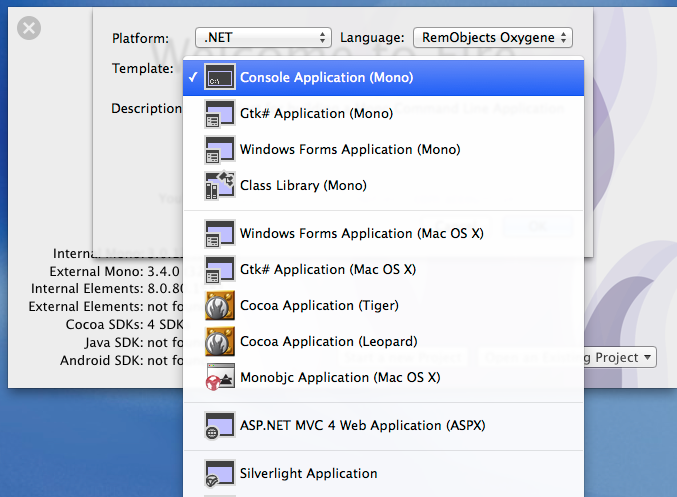
I gave Fire the briefest of looks. Here are some of the options for a new .NET application:

image

Note the appearance of ASP.NET MVC 4, and even Silverlight.

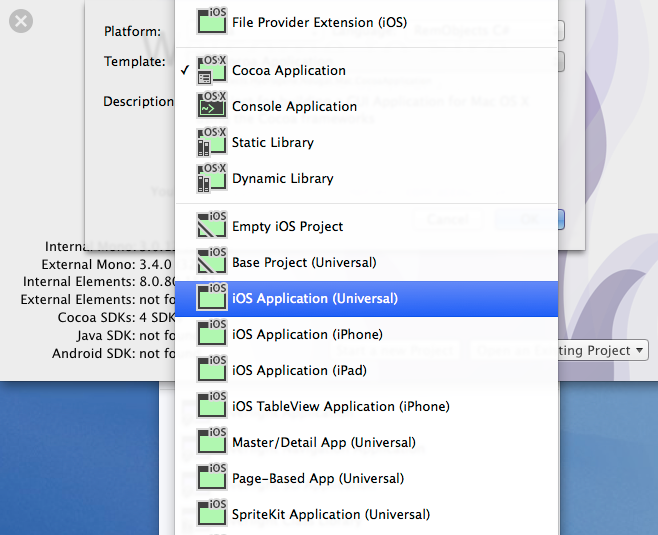
Here are the options for a new Cocoa application:

image

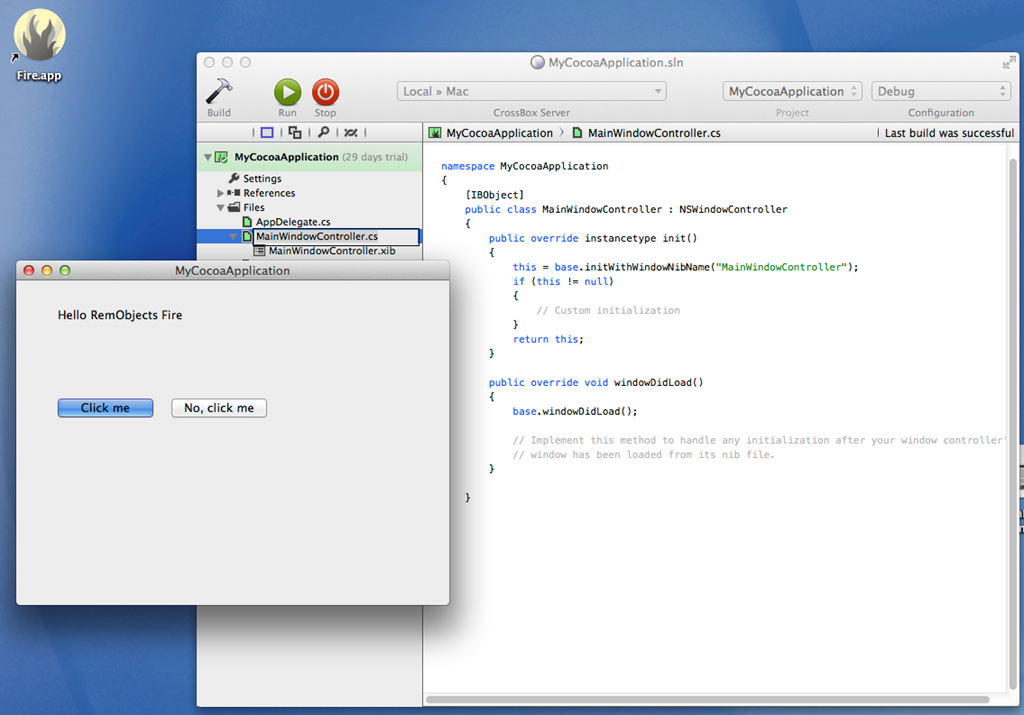
If you are developing for Cocoa, you can edit the resource file in Apple’s Xcode and use it in your application. I started a new C# Cocoa app, made a few changes and and then ran it from the IDE:

image

I imagine Microsoft will be keeping an eye on tools like this – if it is not, it should – since they fit with the strategy of supporting Microsoft services on multiple devices. Visual Studio is a fine tool but if Microsoft is serious about cross-platform, it needs strong Mac-native development tools. Xamarin came up with Xamarin Studio, which is cross-platform for Windows and Mac, but the RemObjects approach also looks worth investigating.

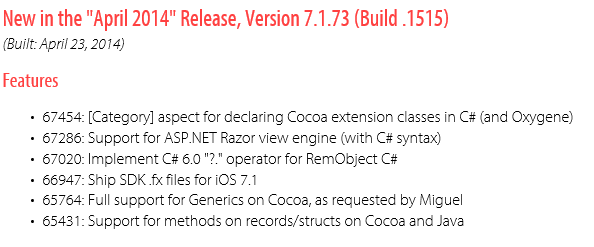
PS The first release of RemObjects C# lacked full generic support, for which failing Xamarin and Mono founder Miguel de Icaza took RemObjects to task on Twitter. I was amused to see this in the changelog for April 2014:

 image

65764 Full support for Generics on Cocoa, as requested by Miguel

For more details on Fire, see here.

A note on Azure storage and downloading large files

I have written a simple ASP.NET MVC application for upload and download of files to/from Azure storage.

Getting large file upload to work was the first exercise, described here. That is working well; but what about download?

If your files in Azure storage are public, you can simply serve an URL to the file. If it is not public though, you have a couple of choices:

1. Download the file under application control, by writing to Response.OutputStream or using a FileResult action.

2. Issue a Shared Access Signature (SAS) to the client which enables it to retrieve the file directly from Azure storage. The SAS is sent as an URL argument which tells Azure storage that the request is authorised. The browser downloads the file directly, so it makes no difference to your web application if the file is large.

Note that if you use the first option, it will not work with large files if you simply call DownloadToStream or similar:

container.GetBlockBlobReference(FileName).DownloadToStream(Response.OutputStream);

Why not? Well, the way this code works is that it downloads the large file to the web server, then sends it to the browser. What if your large file is 5GB? The browser will wait a long time for the first byte to be served (giving the user an unresponsive page); but before that happens, the web application will probably throw an exception because it does not like downloading such a large file.

This means the SAS option is a good one, though note that you have to specify an expiry time which could cause problems for users on a slow connection.

Another option is to serve the file in chunks. Use CloudBlockBlob.DownloadRangeToStream to write to Response.OutputStream in a loop until the download is complete. Call Response.Flush() after each chunk to send the chunk to the browser immediately.

This gives the user a nice responsive download experience complete with a cancel option as provided by the browser, and does not crash the application on the server. It seems to me a reasonable approach if the web application is also hosted on Azure and therefore has a fast connection to Azure storage.

What about resuming a failed download? The SAS approach should work as Azure supports it. You could also support this in your app with some additional work since Resume means reading the Range header in a GET request. I have not tried doing this but you might find some clues here.

Amazon Mobile SDK adds login, data sync, analytics for iOS and Android apps

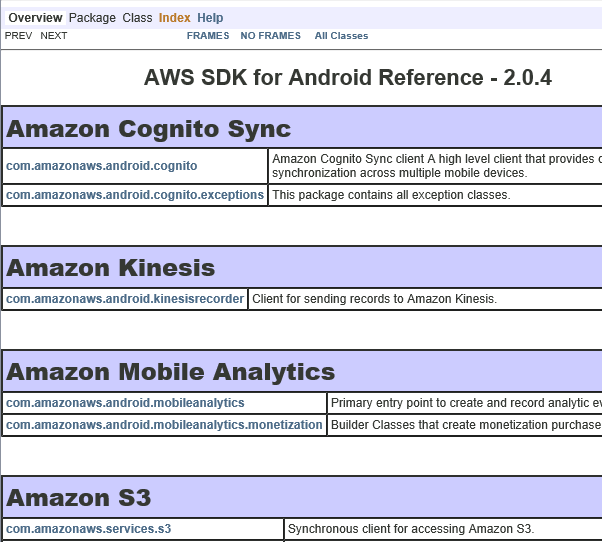
Amazon Web Services has announced an updated AWS Mobile SDK, which provides libraries for mobile apps using Amazon’s cloud services as a back end. Version 2.0 of the SDK supporting iOS, and Android including Amazon Fire, is now in preview, adding several new features:

Amazon Cognito lets users log in with Amazon, Facebook or Google and then synchronize data across devices. The data is limited to a 20MB, stored as up to 20 datasets of key/value pairs. All data is stored as strings, though binary data can be encoded as a base64 string up to 1MB. The intent seems to be geared to things like configuration or game state data, rather than documents.

Amazon Mobile Analytics collects data on how users are engaging with your app. You can get data on metrics including daily and monthly active users, session count and average daily sessions per active user, revenue per active user, retention statistics, and custom events defined in your app.

Other services in the SDK, but which were already supported in version 1.7, include push messaging for Apple, Google, Fire OS and Windows devices; Amazon S3 storage (suitable for any amount of data, unlike the Cognito sync service), SimpleDB and Dynamo DB NoSQL database service, email service, and SQS (Simple Queue Service) messaging.

Windows Phone developers or those using cross-platform tools to build mobile apps cannot use Amazon’s mobile SDK, though all the services are published as a REST API so you could use it from languages other than Objective-C or Java by writing your own wrapper.

The list of supported identity providers for Cognito is short though, with notable exclusions being Microsoft accounts and Azure Active Directory. Getting round this is harder since the federated identity services are baked into the server-side API.

image

Supporting developers: how could Microsoft improve?

Microsoft invests substantial resources in supporting developers; yet the last two topics I have explored in earnest – the Azure blob storage service, and ASP.NET MVC with Azure Active Directory integration – have been frustrating and difficult. Admittedly I am only an occasional developer, but I suspect my experience is common. What is going wrong, and how could Microsoft improve?

Among the problems I have encountered:

  • Abundant documentation of simple first steps with a vacuum for anything more advanced
  • Samples that do not run without tweaking
  • Samples designed for old versions of Visual Studio
  • Samples which use obsolete or deprecated libraries
  • Samples which are poor solutions for the problem they are supposed to address
  • Documentation or samples which use preview, beta or even alpha libraries. Microsoft sometimes seems to make more effort documenting what is in preview than what is fully released.
  • Posts on a topic which are out of date, but for which it is hard to find something current
  • Circular links – click here for more information – you get another article which links back to the first one, perhaps with an intermediate step
  • Poor quality responses to questions on official Microsoft forums

On the positive side, the reference documentation is not too bad. StackOverflow is a great resource and seems to attract higher quality responses (even sometimes from Microsoft staff) than the company’s own forums.

Here then are some of the improvements I would like to see:

1. A sharper distinction between what is in preview and what is production-ready. For any given problem, it would be great to find a clear statement of how you should address it for production now, with fully released and supported libraries, and another statement showing how you will be able to address it with the latest and greatest (but perhaps less stable) technology which is in preview.

2. For key teams in Microsoft to maintain sites which offer clearly delineated production and preview sections and which are kept rigorously up to date.

3. More short samples and fewer “this demonstrates everything” samples. Large samples are more difficult to install and study and have more complex dependencies.

4. Posts and their accompanying code inevitably go out of date and I do not favour removing them, which causes more difficulties than it solves (broken links). However it seems to me reasonable for teams to maintain a number of key samples for their product area and keep them up to date.

What am I missing – or am I complaining too much about what is normal in software development? As ever, I welcome your views.