Category Archives: windows

The Windows 8 app platform: how is it going? A few clues from developers

One way of looking at Microsoft’s Windows 8 strategy is as an attempt to establish a new tablet platform. By welding the tablet platform to the desktop platform, Microsoft ensured that every customer who wanted the latest Windows release would also get the tablet release, though some are stuck with keyboard and mouse to control it. The downside is that some users who would have upgraded to Windows 8 if it had been less radical will stick with Windows 7. Microsoft is betting that despite the controversy, the hybrid operating system is a better bet for the difficult task of creating a new ecosystem than building a completely new tablet operating system that few would have purchased.

So how is the new platform doing? I asked on Twitter for developers with apps on both Windows Phone 8 and Windows 8 to let me know how the rate of sales or downloads compare.

One was the maker of Cineworld, a cinema listing app for the UK and Ireland. He reported:

my cineworld app has about 1.8K downloads a month on WP.. on #win its a few hundred

The other was an app for fans of Manchester United football club called 1st4Fans:

Windows 8 is 70/day. Windows Phone is 130/day

Another was the maker of Barcode Generator:

Barcode Generator stats say 32K download since Aug and several hundreds dwn/day. Looks pretty good, isn’t it?

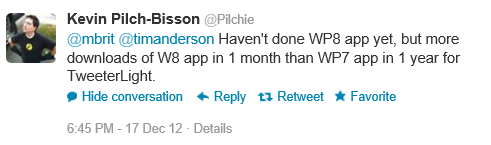
The author of TweeterLight says that he has “more downloads of W8 app in 1 month than WP7 app in 1 year”, showing that not everyone is finding the phone platform bigger than the tablet platform, though a key factor is that there is an official Twitter client for the phone but not for new-style Windows 8:

image

TweeterLight is also a paid-for app, which means fewer downloads and perhaps avoidance of the Twitter throttling that has afflicted the free clients.

Others are reporting a boom in Windows Phone downloads, like Lestyn Jones who says:

I’m finding that my #win8 app downloads are slowly growing where as my #wp8 have skyrocketed.

Put that together with the Cineworld stats – 1.8K per month for an app that is only relevant in the UK and Ireland. It does look as if Windows Phone has been considerably reinvigorated by the launch of Windows Phone 8.

Returning to Windows 8 though, my initial reaction was that these responses are not an impressive start for Microsoft’s new platform, considering the wide usage of Windows on the desktop.

My further reflection though is this. I find myself more willing to try out new-style apps on Windows 8 than desktop apps either on Windows 8 or previous versions, thanks to the ease of installation and removal, discovery through the store, and the additional security of the app sandbox. An interesting question to ask then: if Microsoft had not created this new app platform, how many of these niche apps would have been downloaded as desktop applications?

Despite its imperfections and mixed reception, at least Windows 8 now has an app platform.

This is a small sample and other reports would be welcome.

Trial apps and in-app purchases easy to hack on Windows 8 says Nokia engineer

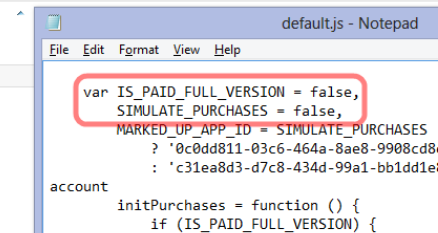
A principal engineer at Nokia, Justin Angel, has written a piece showing how to hack apps on Windows 8, undermining their potential revenue for the app vendors. “This is an educational article written in the hope both developers and Microsoft can benefit from an open exchange of knowledge,” he says, adding that the article was written in his own time and has nothing to do with his employer.

The hacks he describes cover:

  • Compromising in-app purchases by modifying data held locally, such as app currency.
  • Converting trial apps to full versions without paying
  • Removing ads from games
  • Reducing the cost of items offered for in-app purchase
  • Injecting Javascript  into the Internet Explorer 10 process in order to bypass trial restrictions

image

There is an inherent security weakness in any app that has to work offline, since the decryption keys also have to be stored locally; this inherent weakness is not unique to Windows 8. However, Angel argues that Microsoft could do more to address this, such as checking for tampered app files and preventing Javascript injection. Code obfuscation could also mitigate the vulnerabilities.

Although Angel is writing in his own time, the issues are relevant to Nokia, which makes Windows Phone devices and may make Windows 8 tablets in future.

Should Angel have revealed the cracks so openly and in such detail? This is an old debate; but it is sure to increase pressure on Microsoft to improve the security of the platform.

Nokia forms 71% of Windows Phone market according to AdDuplex research

These figures from AdDuplex, which runs an ad network for Windows Phone, surprised me. The company studies its stats for a random day in November, the 30th, and reports that 71% of the Windows Phone devices contacting its servers were from Nokia. The Lumia 710 leads with 24%, followed by Lumia 800 at 18%, and the Lumia 900 at 7%.

image

The obvious conclusion is that Nokia dominates the Windows Phone market. Bad news for HTC, which seems to be making a real effort with its 8X release (the 20th most popular device according to the stats).

Dominating the market may sound good for Nokia, but unfortunately the entire market is relatively small. The risk for the platform is that it becomes in effect a Nokia-only OS with all the other OEMs focused on Android.

Embarcadero launches C++ Builder XE3: first built on Clang

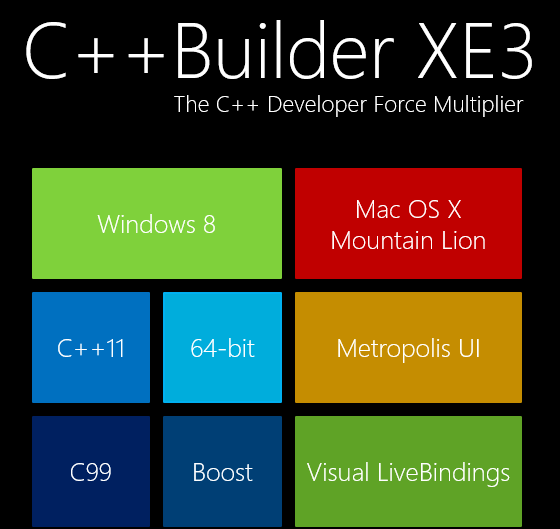
Embarcadero has released C++ Builder XE3, the first version built on the open source clang front end for the LLVM compiler. This has enabled the product to support many new features, including extensive C++ 11 support and a 64-bit compiler.

image

While it is a shame that the old Borland C/C++ Compiler is no more, it makes sense for Embarcadero to bring its VCL (Visual Component Library) and FireMonkey framework to Clang rather than continuing to work on its own compiler.

The other big change is cross-platform support. Through FireMonkey, C++ Builder XE3 supports Windows (including Windows 8) and Mac OS X, with iOS and Android promised for 2013.

Although Windows 8 is supported on the desktop, there is no official support for the Windows Runtime (Windows Store apps). Instead, Embarcadero has a curious application framework called Metropolis which fakes the Windows 8 style but with desktop applications, as if the Windows 8 world were not already sufficiently confusing.

The big question is how compatible VCL applications created for earlier versions of C++ Builder are with the XE3 release. With a new compiler and major changes to the VCL in order to support the new compiler, you might expect some issues.

“That’s what we’ve been spending all of our time on,” Embarcadero VP Michael Swindell told me. “This is fully compatible with all our previous C++ dialects. We’ve completely re-engineered the C++ front end but it’s engineered to be compatible with C++ Builder applications and Borland C++ applications.”

I would rather hear that from developers though, rather than from Embarcadero.

Although C++ Builder is a cross-platform compiler, it only runs on Windows. A common scenario is to run in Windows emulation on a Mac, using VMware Fusion or Parallels.

Similar changes are on the way for Delphi, which uses the same VCL and FireMonkey frameworks but with the Delphi language based on Object Pascal.

Note that the new Clang-based compiler is 64-bit only. You are meant to continue using the old Borland compiler for 32-bit, making it hard to maintain a single code base for both.

Microsoft Silverlight: shattered into a million broken urls

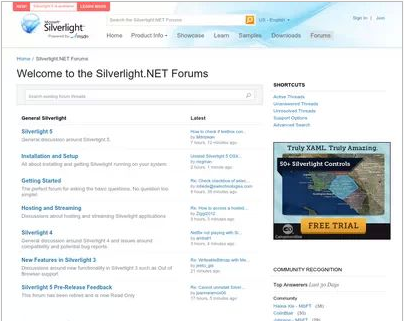
There has been some Twitter chatter about the closure of silverlight.net, Microsoft’s official site for its lightweight .NET client platform. multimedia player and browser plug-in.

image

I am not sure when it happened, but it is true. Silverlight.net now redirects to a page on MSDN. Some but not all of the content has been migrated to MSDN, but Microsoft has not bothered to redirect the URLs, so most of the links out there to resources and discussions on Silverlight will dump you to the aforementioned generic page.

One of the things this demonstrates is how short-sighted it is to create these mini-sites with their own top-level domain. It illustrates how fractured Microsoft is, with individual teams doing their own thing regardless. Microsoft has dozens of these sites, such as windowsazure.com, windowsphone.com, asp.net, and so on; there is little consistency of style, and when someone decides to fold one of these back to the main site, all the links die.

What about Silverlight though? It was always going to be a struggle against Flash, but Silverlight was a great technical achievement and I see it as client-side .NET done right, lightweight, secure, and powerful. It is easy to find flaws. Microsoft should have retained the cross-platform vision it started with; it should have worked wholeheartedly with the Mono team for Linux-based platforms; it should have retained parity between Windows and Mac; it should never have compromised Silverlight with the COM support that arrived in Silverlight 4.

The reasons for the absence of Silverlight in the Windows Runtime on Windows 8, and in both Metro and desktop environments in Windows RT, are likely political. The ability to run Silverlight apps on Surface RT would enhance the platform, and if COM support were removed, without compromising security.

XAML and .NET in the Windows Runtime is akin to Silverlight, but with enough differences to make porting difficult. There is an argument that supporting Silverlight there would confuse matters, though since Silverlight is still the development platform for Windows Phone 8 it is already confusing. Silverlight is a mature platform and if Microsoft had supported it in the Windows Runtime, we would have had a better set of apps at launch as well as more developer engagement.

I posted that Microsoft’s Silverlight dream is over in October 2010, during Microsoft’s final Professional Developers Conference, which is when the end of Silverlight became obvious. It lives on in Windows Phone, but I would guess that Windows Phone 8.5 or 9.0 will deprecate Silverlight in favour of the Windows Runtime. A shame, though of course it will be supported on the x86 Windows desktop and in x86 Internet Explorer for years to come.

Windows 8 Flash Player hassles: Windows update integration means IE users get an old version

Internet Explorer 10 in Windows 8 features a new approach to Adobe Flash Player updates. These are now delivered via Microsoft’s Windows Update, so you get security updates without having to suffer Adobe’s separate updater.

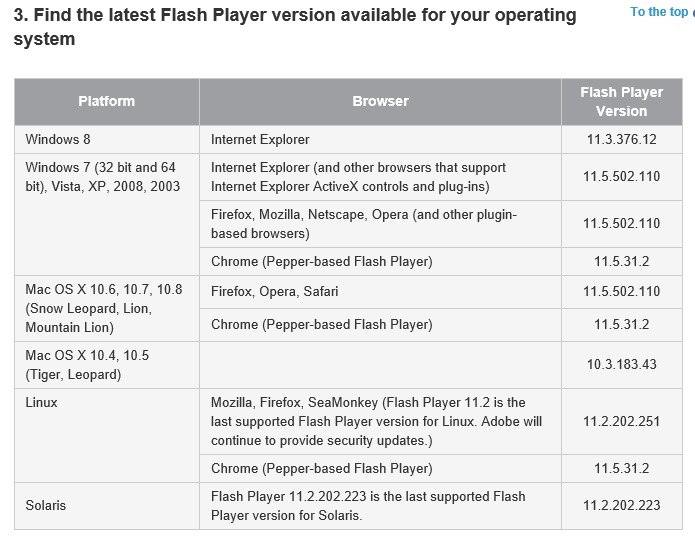
That seems a good thing, and for security it probably is, but it seems that the price of this convenience is that you run an old version. See the table here:

image

Note that Windows 7 users have version 11.5.502.110, while Windows 8 has only 11.3.376.12. There are major new features only available in the updated version.

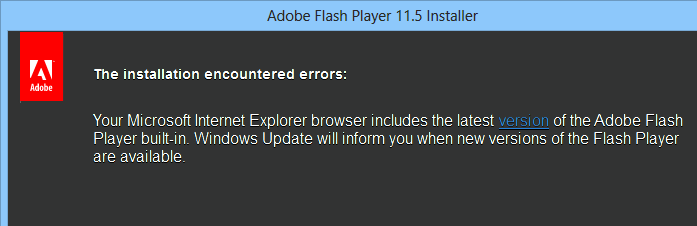
Trying to run the installer for the latest debug version fails with a misleading error message:

image

Umm, no it is not the latest version.

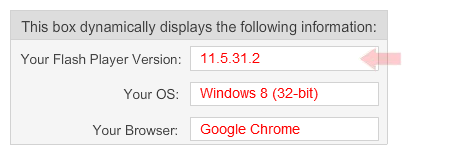
Of course you can get round this by running Google Chrome:

image

[the OS is actually 64-bit but Chrome runs as a 32-bit process].

This still strikes me as disappointing. You may want to run IE, if you like having the browser maintained and managed by the OS vendor, and in Windows RT (the ARM version of Windows) there is no other option. That is becoming an impossible choice for developers. Chrome offers WebKit (the browser engine used on most mobile devices and in Safari on the Mac) as well as nice tools and hooks for debugging, and Chrome-specific support from vendors like Adobe makes it hard to avoid.

The disruption of pay as you go hardware – and I do not mean leasing

Last week Amazon CEO Jeff Bezos spoke at a “Fireside Chat” with AWS (Amazon Web Services) chief Werner Vogels. It was an excellent and inspirational performance from Bezos.

image

If there was a common theme, it was his belief in the merit of low margins, which of necessity keep a business efficient. Low margins are also disruptive to other businesses with high margins. But how low can margins go? In some cases, almost to nothing. Talking of Kindle Fire, Bezos remarked that “We don’t get paid when you buy the device. We get paid when you use the device.” It is the same pay as you go model as Amazon Web Services, he said, trying to remain vaguely on topic since this was an AWS event.

His point is that Amazon makes money when you buy goods or services via the device, not from profit on the device itself. He adds that this makes him comfortable, since at that point the device is also proving its value to the customer.

Google has the same business model with its Nexus range, which is why Google Nexus 7 and Amazon Kindle Fire are currently the best value 7” tablets out there. For Google, there is another spin on this: it makes the OS freely available to OEMs so that they also push Google’s adware OS out to the market. If you are not making much profit on the hardware, it makes no difference whether you or someone else sells it.

We do not have to believe that either Amazon or Google really makes nothing at all on the Kindle Fire or Nexus 7. Perhaps they make a slim margin. The point though: this is not primarily a profit centre.

This is disruptive because other vendors such as Apple, Microsoft, Nokia or RIM are trying to make money on hardware. So too are the Android OEMs, who have to be exceptionally smart and agile to avoid simply pushing out hardware at thin margins from which Google makes all the real money.

Google can lose too, when vendors like Amazon take Android and strip out the Google sales channels leaving only their own. This is difficult to pull off if you are not Amazon though, since it relies on having a viable alternative ecosystem in place.

But where does this leave Apple and Microsoft? Apple has its own services to sell, but it is primarily a high margin hardware company selling on quality of design and service. Apple is under pressure now; but Microsoft is hardest hit, since its OEMs have to pay the Windows tax and then sell hardware into the market alongside Android.

Ah, but Android is not a full OS like Windows or OSX. Maybe not … yet … but do not be deceived. Three things will blur this distinction to nothing:

1. The tablet OS category (including iOS) will become more powerful and the capability of apps will increase

2. An increasing proportion of your work will be done online and web applications are also fast improving

3. More people will question whether they need a “full OS” with all that implies in terms of maintenance hassles

Microsoft at least has seen this coming. It is embracing services, from Office 365 to Xbox Music, and selling its own tablet OS and tablet hardware. That is an uphill struggle though, as the mixed reaction to Windows 8 and Surface demonstrates.

Most of the above, I hasten to add, is not from Bezos but is my own comment. Watch the fireside chat yourself below.

Review: Hauppauge HD PVR 2 Gaming Edition. Capture Xbox and PS3 gaming action for YouTube.

The Hauppauge HD PVR2 is a gadget for capturing video from an HDMI or component video source, such as an XBox 360 or PlayStation 3 games console, and has replaced the popular HD PVR, which was component video only. 

image

The concept is simple: instead of connecting you console directly to your TV or A/V amplifier, connect it to the HD PVR2. Then connect the unit to a PC or Mac via USB, and to the original TV or amplifier via HDMI. Your PC can then capture the video (and audio) while you are playing the game using the big screen. Hauppauge says the delay between input and output is only 60 microseconds, which you will not notice.

The use of HDMI makes connecting the PVR2 simpler than with its predecessor. Instaead of a bunch of component audio connections, there is just power, USB, HDMI in and out, and an A/V input that connects to component video sources where needed. The A/V input has a special cable that gives floating sockets for component video and analogue audio. The unit is also supplied with a cable suitable for connecting to a PS3.

image

You might need component input in two cases:

1. Your games console lacks HDMI – for example, Nintendo Wii.

2. The HDMI output is encrypted for copyright protection. This is the case with the PS3, but not the XBox. Since component video and analogue audio cannot be encrypted, you can capture anything this way.

Getting started

Hooking up the HD PVR2 was easy, but getting started was troublesome. We tried a succession of Windows 7 laptops, including a Pentium Dual Core 2.3Ghz, a Core 2 Duo at 2.6 Ghz Pentium, and a Core i5 at 1.6 Ghz. The pattern with all these was similar: the drivers and software installed OK, HDMI pass-through worked, the capture might work once, but then there were frustrating errors. The problems:

  • Difficult or impossible to select the HD PVR2 as the input device in the capture software
  • Capture software hanging
  • USB device error reported

image

This was tedious, partly because nothing could be captured, and partly because the only way to retry was to reboot both the laptop and the HD PVR2.

Swapping to a high-spec USB cable seemed to help a little, but soon the old problems were back, even after applying the latest driver updates from Hauppauge support.

Just before giving up, we connected to another Windows 7 Core i5 laptop, speed this time 2.5Ghz. Everything worked perfectly.

It is not clear what to conclude here. Hauppauge specifies:

Laptop or desktop PC with 3.0 GHz single core or 2.0 GHz multi-core processor

and adds in the FAQ:

You can record HD PVR 2 video on pretty much any PC. Older, slow, laptop or desktop PCs can be used to record HD PVR 2 video.

But when you playback an HD PVR 2 recording on your PC screen, you need a fast CPU and at least 256MB of graphics memory.

All our machines meet the spec. Either our sample box is particularly fussy, or Hauppauge is optimistic about the minimum requirements, or there are other factors at play.

Bundled software and Mac support

Hauppauge supplies Windows drivers for the HD PVR2 along with a version of Arcsoft ShowBiz for capturing and editing video.

If you want to use a Mac, Hauppauge recommends  third-party software called HDPVRCapture which costs an additional $29.95.

ShowBiz is easy to use and provides simple editing features and output to AVCHD, AVI, MPEG1, QTMOV or WMV. You can also upload direct to YouTube with a wizard.

You don’t have to use ShowBiz if you have other capture software you prefer.

Another feature is called Personal Logo. This is a separate application which lets you specify a bitmap as a logo to appear on your captured videos, along with its position and transparency. Handy for reminding everyone who you are on YouTube, or for publications posting review footage.

Capturing video

Once your system is up and working, you can start capturing video with one of two methods. The first is to hit a large corner button on top of the HD PVR2, which automatically starts up ShowBiz in capture mode. Alternatively, you can start ShowBiz, select Capture, and click Start.

While capturing, you can see the video running on the PC. There is several seconds delay between your live gameplay and the capture stream, which is confusing to watch, so ignore it and focus on your gameplay. When you are done hit stop. Videos are saved automatically, by default to the Videos folder on your PC, named according to the date and time.

Next, you can edit the video in ShowBiz. I created the following video and uploaded it to YouTube as a demo. However, I could not get the YouTube unload in ShowBiz to work. I saved the file as an AVI and uploaded it manually.

Settings in depth

When you run the Capture module in ArcSoft ShowBiz it exposes a number of settings, which you get to by clicking Device and Format Settings.

image

Device Settings lets you set brightness, contrast, Hue, Saturation and Sharpness.

image

Format settings gets you a bunch of settings which gives extensive control subject to the limitations of the hardware. Here are the settings for the H264 encoder:

image

Here are the video settings:

image

and the audio properties:

image

All this looks impressive though many users will just want to click and go. Mostly this works OK, though check that you have 16:9 specified if you use widescreen.

Note that 1080p at 60 fps (frames per second) is captured at a maximum of 30 fps, and 1080p at 50 fps is captured at a maximum of 25 fps.

Annoyances

Hauppauge says that your PC does not need to be on for HDMI pass-through to work. Despite this, we found that if you turn the system on from cold, pass-through does not work until the USB connection to a PC is made. Once up and running, you can disconnect and turn the PC off and pass-through still works.

ArcSoft ShowBiz is very basic. Fortunately you can import the captured videos into other editors.

Having to use component video for the PS3 is annoying but not the fault of Hauppauge. It is surprising in some ways that the XBox generally outputs an unencrypted HDMI stream.

Conclusion

When this device was not working I wanted to throw it out of the window; but once I got it running it was great. The bundled software is poor, documentation is thin, and it is just a little quirky, but the ability to capture your gaming output is worth a bit of hassle. 


Infragistics building cross-platform development strategy on XAML says CEO

I spoke to Dean Guida, CEO at Infragistics, maker of components for Windows, web and mobile development platforms. Windows developers with long memories will remember Sheridan software, who created products including Data Widgets and VBAssist. Infragistics was formed in 2000 when Sheridan merged with another company, ProtoView.

In other words, this is a company with roots in the Microsoft developer platform, though for a few years now it has been madly diversifying in order to survive in the new world of mobile. Guida particularly wanted to talk about IgniteUI, a set of JQuery controls which developers use either for web applications or for mobile web applications wrapped as native with PhoneGap/Cordova.

“The majority of the market is looking at doing hybrid apps because it is so expensive to do native,” Guida told me.

Infragistics has also moved into the business iOS market, with SharePlus for SharePoint access on an iPad, and ReportPlus for reporting from SQL Server or SharePoint to iPad clients. Infragistics is building on what appears to be a growing trend: businesses which run Microsoft on the server, but are buying in iPads as mobile clients.

image

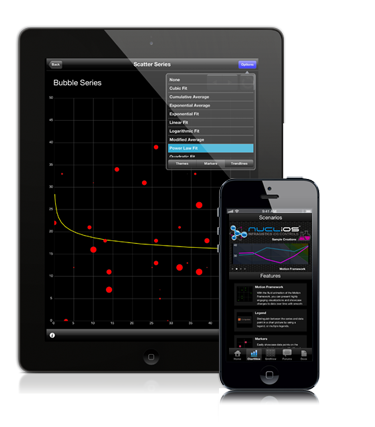
Other products include Nuclios, a set of native iOS components for developers, and IguanaUI for Android.

I asked Guida how the new mobile markets compared to the traditional Windows platform, for Infragistics as a component vendor.

“The whole market’s in transition,” he says. “People are looking at mobility strategy and how to support BYOD [Bring Your Own Device], all these different platforms, and a lot of our conversations are around IgniteUI. We need to reach the iPad, and more than the iPad as well.”

“There’s still a huge market doing ASP.NET, Windows Forms, WPF. It’s still a bigger market, but the next phase is around mobility.”

What about Windows 8, does he think Microsoft has got it right? Guida’s first reaction to my question is to state that the traditional Windows platform is by no means dead. “[Microsoft] may have shifted the focus away from Silverlight and WPF, but the enterprise hasn’t, in terms of WPF. The enterprise has not shifted aware from WPF. We’ve brought some of our enterprise customers to Microsoft to show them that, some of the largest banks in the world, the insurance industry, the retail industry. These companies are making a multi-year investment decision on WPF, where the life of the application if 5 years plus.

“Silverlight, nobody was really happy about that, but Microsoft made that decision. We’re going to continue to support Silverlight, because it makes sense for us. We have a codebase of XAML that covers both WPF and Silverlight.”

Guida adds that Windows 8 and Windows Phone 8 are “great innovation”, mentioning features like Live Tiles and people hub social media aggregation, which has application in business as well. “They’re against a lot of headwind of momentum and popularity, but because Microsoft is such an enterprise company, they are going to be successful.”

How well does the XAML in Infragistics components, built for WPF and Silverlight, translate to XAML on the Windows Runtime, for Windows 8 store apps?

“It translates well now, it did not translate well in the beginning,” Guida says, referring to the early previews. “We’re moving hundreds of our HTML and XAML components to WinJS and WinRT XAML. We’re able to reuse our code. We have to do more work with touch, and we want to maintain performance. We’re in beta now with a handful of components, but we’ll get up to 100s of components available.”

It turns out that XAML is critical to the Infragistics development strategy for iOS as well as Windows. “We wrote a translator that translates XAML code to iOS and XAML code to HTML and JavaScript. We can code in XAML, add new features, fix bugs, and then it moves over to these other platforms. It’s helped us move as quickly as we’ve moved.”

What about Windows on ARM, as in Surface RT? “We fully support it,” says Guida, though “with a straight port, you lose performance. That’s what we’re working on.”

Will you buy a Surface Pro? Here is why and why not

Microsoft has announced pricing for Surface Pro, its own-brand tablet running Windows 8. Quick summary:

  • 64GB is $899
  • 128GB is $999

image

UK pricing has not been announced, but if it follows the pattern of Surface RT we can expect around £720 and £799.

These prices include a free Surface pen, but not a Touch or Type keyboard cover. Since this is one of the best features of Surface, you can add around $120 or £100 (a little more for the Type cover) to the price.

Here’s why you don’t want a Surface Pro:

  • Unlike Surface RT, this tablet runs any Windows application, most of which do not work well with touch control. So you will need that keyboard and trackpad or mouse, making it an awkward thing versus an iPad or, in some ways, a traditional laptop.
  • The spec is a long way from cutting-edge. Screen is 1920×1080 pixels, versus 2048-by-1536  on a cheaper Apple iPad. Core i5 has been around a while. Storage spec is poor – even 128GB is small by current standards, my Samsung Slate from February had a 256GB SSD – and the cameras seem no better than the basic ones in Surface RT. 4GB RAM is also minimal for a new Windows machine.
  • This thing is not cheap. With the keyboard, it is nearly double the cost of a Surface RT, and you don’t get Office 2013 thrown in – Home and Student is around $100 or £85.
  • Microsoft is including a pen. Why? It does not clip into the Surface so you will lose it, and a pen, while fantastic for taking notes or sketching in tablet mode, is less good than a mouse or trackpad for most other operations.
  • Battery life half that of Surface RT: ouch.
  • Do not compare this with an iPad. It only makes sense if you want or need to run Windows. It is even less like an iPad than Surface RT.

A failure? Not necessarily. Here is why you do want a Surface Pro:

  • It is a little bigger than Surface RT, but much smaller than the average laptop, even with the keyboard cover, and it is all you need on your trip. I find laptops bulky and awkward now.
  • Performance will be much better than Surface RT. I presume it better my existing Samsung Slate, which has an older Core i5, and that is already a zippy performer.
  • The Surface is well made and designed. The only problem I am aware of with Surface RT is fraying keyboard seams, which I hope will be fixed in later production runs. The flip-out stand works well and the keyboard covers are excellent.
  • That USB 3.0 port is a big asset.  Of course Surface RT should have had this as well. You can attach as much storage as you need with great performance, or other devices.

The question is this: what other laptop or Windows 8 slate will be better than a Surface Pro, all things considered? You will easily find a better spec for the money, but when you evaluate the complete package Surface Pro may still be a winner.

That said, we have not yet seen Surface Pro and my judgment is based on combining what I know about Surface RT with my experience of the Samsung Core i5 slate.

The internal storage limitation is my biggest concern. 64GB is hopeless and 128GB still too small. There is a microSDXC card slot, and a sizeable card will be pretty much essential, again increasing the real-world price.