Category Archives: windows

Moving a database from on-premise SQL Server to SQL Azure: some hassle

I am impressed with the new Windows Azure platform, but when I moved a simple app from my local machine to Azure I had some hassle copying the SQL Server database.

The good news is that you can connect to SQL Azure using SQL Server Management studio. You need to do two things. First, check the server location and username. You should already know the password which you set when the database was created. You can get this information by going to the Azure portal, selecting the database, and clicking Show connection strings on the dashboard.

Second, open the SQL firewall for the IP number of your client. There is a link for this in the same connection string dialog.

Now you can connect in SQL Server Management Studio. However, you have limited access compared to what you get as an admin on your local SQL Server.

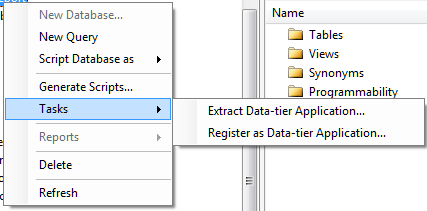
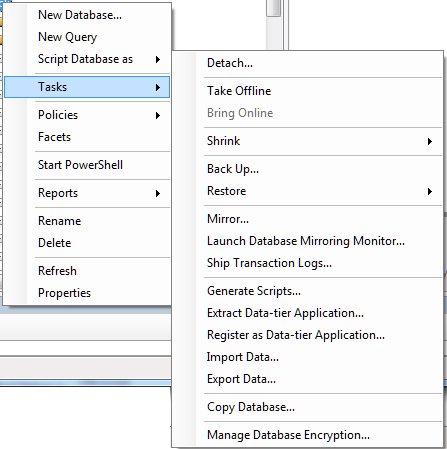
Here is the Tasks menu for an on-premise SQL Server database:

image

and here it is for a SQL Server Azure database:

image

Still, you can start Export Data or Copy Database from your on-premise connection and enter the Azure connection as the target. However, you should create the destination table first, since the Export Data wizard will not recreate indexes. In fact, SQL Azure will reject data imported into a table without at least one clustered index.

I tried to script a table definition and then run it against the SQL Azure database. You can generate the script from the Script Table as menu.

image

However even the simplest table will fail. I got:

Msg 40514, Level 16, State 1, Line 2
‘Filegroup reference and partitioning scheme’ is not supported in this version of SQL Server.

when attempting to run the script on SQL Azure.

The explanation is here.

Windows Azure SQL Database supports a subset of the Transact-SQL language. You must modify the generated script to only include supported Transact-SQL statements before you deploy the database to SQL Database.

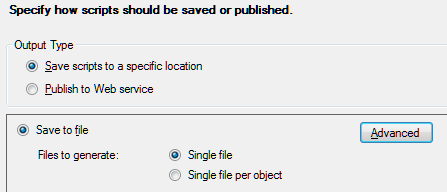
Fortunately there is an easier way. Right-click the table and choose Generate Scripts. In the wizard, click the Advanced button for Set Scripting Options.

image

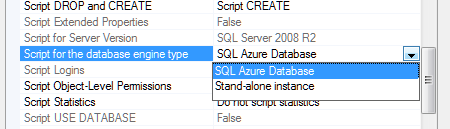
Find Script for the database engine type, and choose SQL Azure:

image

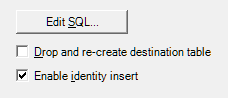
You may want to change some of the other options too. This generates a SQL script that works with SQL Azure. Then I was able to use the Export Data wizard using the new table as the target.  If you use Identity columns, don’t forget Enable identity insert in Edit Mappings.

image

Farewell to Microsoft Small Business Server

Microsoft has announced pricing and licensing for Windows Server 2012. A dry topic perhaps; but one which confirms the end of a product with which I am perhaps too familiar: Small Business Server. It is spelt out in the FAQ:

Q33. Will there be a next version of Windows Small Business Server 2011 Standard?

No. Windows Small Business Server 2011 Standard, which includes Exchange Server and Windows server component products, will be the final such Windows Server offering. This change is in response to small business market trends and behavior. The small business computing trends are moving in the direction of cloud computing for applications and services such as email, online back-up and line-of-business tools.

The next question confirms that there will not be a new edition of Small Business Server 2011 Premium either. The official replacement is Windows Server 2012 Essentials, which is in effect the next version of Small Business Server Essentials. This handles local Active Directory, file sharing, local applications, and a connector to Office 365. However there is a 25 user account limit, whereas SBS standard supported up to 75 users, so there will be some businesses who are now forced to choose between moving to Windows Server Standard, or ditching the local server completely (which is often impractical).

image

Microsoft is pinning the reason on cloud computing, which makes some sense. Now and again I am asked by small businesses what sort of technology they should adopt; and my answer in general is to point them at either Microsoft Office 365 or Google Apps.

It is not quite clear-cut. A Small Business Server can theoretically work out cheaper, if you presume that it will not require any external maintenance. That is rarely the case though, and for most people the cloud-hosted option will be both cheaper and less troublesome.

What if you do need on-premise Active Directory, Exchange and SharePoint, which are the core components of SBS? Technically, there are in my opinion better ways to do this than with SBS. While SBS has always been excellent value for money, it is over-complex because it crams onto one box applications which are designed to run on separate boxes. It does work, but if anything goes wrong it is actually harder to troubleshoot than when you have separate servers. I prefer to see one Hyper-V box with separate Virtual Machines (VMs) for each major function, than SBS running on bare metal. VMs are also more flexible, and easier to restore if the hardware breaks.

Farewell then to SBS. I will remember it with some affection though. Think back to the nineties, when most email was POP3, and most internet was dial-up. People had problems like losing emails, because they had been downloaded to a desktop PC and they were out and about with a laptop. Moving to Microsoft Exchange, for which Outlook is the client, was bliss by comparison. Email synchronised itself to all your PCs, you could work offline, and Outlook for all its faults became a one-stop application for calendar, contacts and messages.

The beauty of SBS was that you could get Exchange along with the benefits of a Windows domain – one central directory of users and the ability to assign permissions to file shares – at a price that was more than reasonable.

I also think of SBS as a reliable product, when correctly installed. When it does go wrong it is often due to users trying to do stuff that does not quite work, or other applications which get installed on the same box, or hardware faults which users have attempted to fix by messing around with Windows, or anti-virus software misbehaving (Sophos! Confess!).

Microsoft is doing the right thing though. The SBS bundle makes little sense today, and if you do still need it, you can stick with the 2011 edition for a few years yet.

Embarcadero adopts open source Clang for future C++ versions

A couple of months ago Embarcadero’s John Ray Thomas published a roadmap for the company’s C++ tools. Coming soon: not only a long-awaited 64-bit compiler for Windows, but also native iOS and Android support. On top of that, there are plans for “the very best in C++11 and C99 language and library compliance in the industry.”

Sounds good; but this forthcoming upgrade is not quite what it seems. I spoke to technical evangelist David Intersimone about the changes. The company is adopting Clang, an open source project which creates a C/C++/Objective C front-end for the LLVM compiler. “We’re integrating all that into our IDE,” said Intersimone. “We’re also going to be using that same toolchain world with our Delphi compiler as well.”

“We have analysed what to do about C++. Our compilers both for Delphi and C++ have been around for a lot of years, and over time it just got harder and harder to add new capabilities to make programming simpler and also to add power and richness to the languages. In C++ in particular the language continues to be updated, with now C++ 11. So we made the decision to use Clang and LLVM on the C++ side, for the 64-bit compiler. We’re going to keep our existing compiler for 32-bit Windows for now, and then eventually replace that.

“For Delphi we’re still using our existing compiler to do some of the work, but we’ve been working on a next-generation compiler for Delphi and that is still in the works. For a while we’ll have two compilers, the existing architecture compilers, and then new compilers.”

Embarcadero has its own C++ extensions to support component development, and is working on adding them to Clang. “We’re leveraging and extending the Clang compiler with the property-method-event extensions that we added to our own C++ compiler.”

It is a sad moment in some ways, bearing in mind the long history of what was once the Borland C++ compiler. Equally, it is a sensible move. Intersimone said that the work of keeping up with the evolving C++ specification was disproportionate to the benefits. “It’s a monster language, with a lot of power and a lot of complexity. It made perfect sense to fit our extensions [to Clang] versus building a compiler from scratch and having to continue to track the language into the future.”

Embarcadero can focus instead on its IDE and tools, and on the frameworks for Windows and for cross-platform.

Look out for a more detailed interview with David Intersimone in a future article for Hardcopy.

aQuantive may be Microsoft’s biggest acquisition failure. Have there been good ones? A look back.

Today’s news that Microsoft  is writing off $6.2 billion from the useless acquisition of aQuantive in August 2007 gives me pause for thought.

How bad is this company at acquisitions? Particularly those under CEO Steve Ballmer’s watch. He became CEO in January 2000.

image

Microsoft acquired Danger in February 2008 for $500M. Small relative to the aQuantive acquisition, but how much further money did the company burn transforming Danger from an excellent cloud and mobile company to the group that came up with Kin, the phone withdrawn from the market after just two months on sale? Not to mention the downtime and threatened loss of data suffered by Danger’s online service under Microsoft’s stewardship.

Microsoft attempted to buy Yahoo for $44.6bn in 2008. Yahoo’s executives declined, a move that was (very) bad for Yahoo shareholders but quite possibly right in a business sense; it would not have been a good fit.

Microsoft acquired Groove Networks complete with Notes inventor Ray Ozzie in March 2005. I put this in the disaster category. Groove went nowhere at Microsoft. Ozzie became Chief Software Architect and talked of internet vision but did not deliver. The wretched SharePoint Workspace is apparently based on Groove.

What about the good ones? My view is that Microsoft paid too much for Skype at $8.5 billion but at least it acquired a large number of users and has some chance of enhancing its mobile offerings with Skype integration.

Microsoft acquired Bungie in 2000 and given the success of Halo (without which, maybe, the whole Xbox project might have faltered) we have to count that a success, even though Bungie was spun off back to independence in 2007.

Other notables include Great Plains in December 2000 (now morphed into Dynamics ERP); Connectix in February 2003 which got Microsoft started in virtualization; and Opalis in December 2009 whose software now plays a key role in Microsoft’s System Center 2012 private cloud software.

Winternals in July 2006 was a great acquisition. Microsoft acquired some indispensable Windows troubleshooting tools, and also Mark Russinovich and Bryce Cogwell, able people who I suspect contributed to the transformation of Windows Vista into Windows 7, and in the case of Russinovich, to the technology in Windows Azure which now seems reborn as an excellent cloud platform.

You can see all Microsoft’s completed acquisitions here.

(If the company would like to acquire itwriting.com for a few billion I am willing to talk.)

Windows Phone 8 and Windows 8: nearly converged

Microsoft has shared details of the forthcoming Windows Phone 8 operating system, which is set to be available on devices before the end of 2012.

The improvements are fundamental, and it seems that Microsoft has finally created a mobile platform that has what it takes, technically, to compete in the modern smartphone market. Winning share from competitors is another thing of course; Nokia’s hoped-for third ecosystem is still tiny relative to Apple iOS or Google Android.

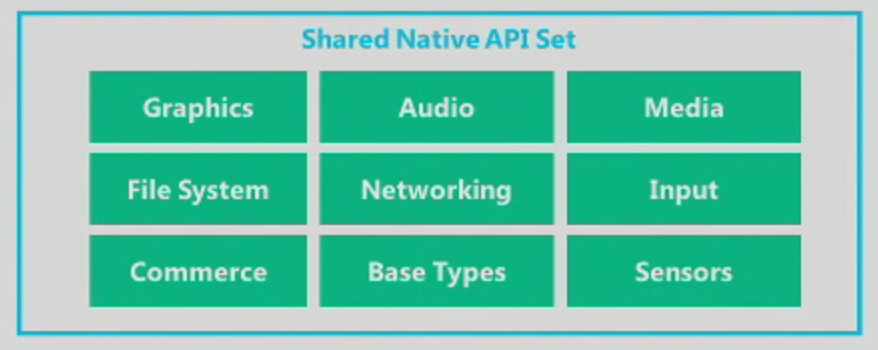
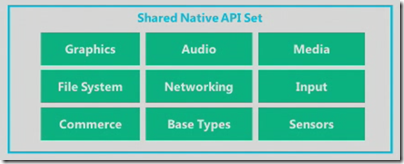
It starts with a change in the core operating system, from Windows CE to Windows 8. The two now share the same kernel, and APIs including Graphics, Audio, Media, File System, Networking, Input, Commerce, Base Types and Sensors. The .NET Framework is also the same. The browser will be Internet Explorer 10.
image

Silverlight was not mentioned, nor was XNA, though we were told that Windows Phone 7.x apps will run on Windows Phone 8.

The change does enable multi-core support at last. Screen resolution can now go up to 1280 x 768, ready for high-definition displays. There is also support for MicroSD storage, a feature which should have been in the first release.

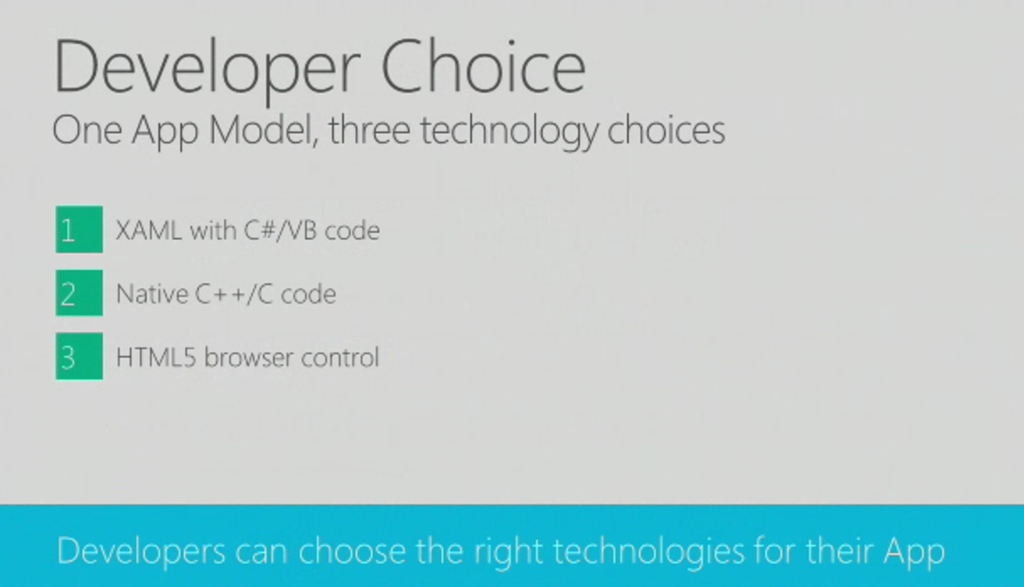
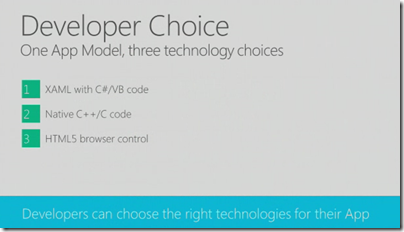
What about Windows RT, the runtime for Metro-style apps in Windows 8? Here is the significant slide from yesterday’s presentation:
devchoices

This looks similar to Windows RT, which also supports three development models: XAML and .NET, native C/C++ code, and HTML5. It is not quite the same though. One thing I did not hear mentioned was contracts, the communication and file sharing system built into Windows 8, though we were promised “sharing under user control”. Nor did we hear about language “projections”, the layer that lets different languages in Windows 8 call the same Windows Runtime APIs. My guess at the moment is that Windows Phone 8 does not include the Windows Runtime, though it does have much in common with it. The further guess is that the full Windows Runtime will come in Windows Phone 9.

In other words, it seems that Windows Phone 8 will not run apps coded for Windows 8, though we were told that if you code to the XAML and .NET model for apps, and the native code model for games, few changes will be needed. XNA developers should consider a change of direction.

Support for C/C++ is a key feature and one that in my view should have been in the first Windows Phone release. One of the things it enables is official support for SQLite, the cross-platform database engine also found in Mac OS X and numerous other platforms. A good day for SQLite, which pleases me as I am a fan.

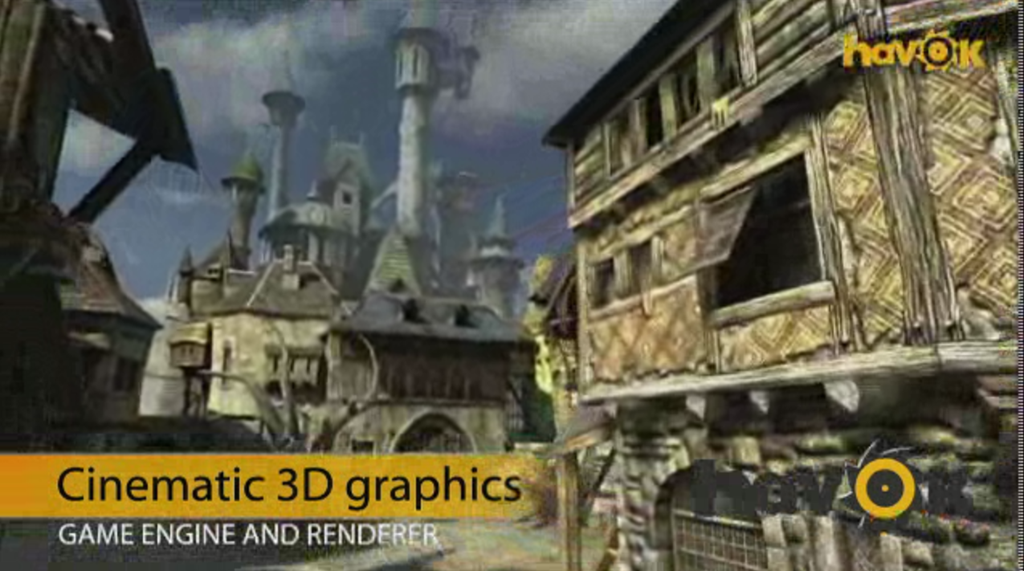
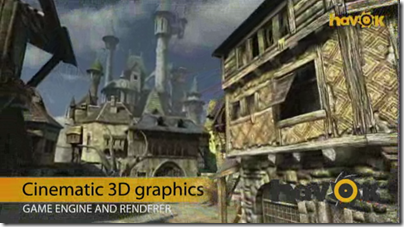
There will also be C/C++ gaming libraries coming to Windows Phone 8, including Havoc:
havoc

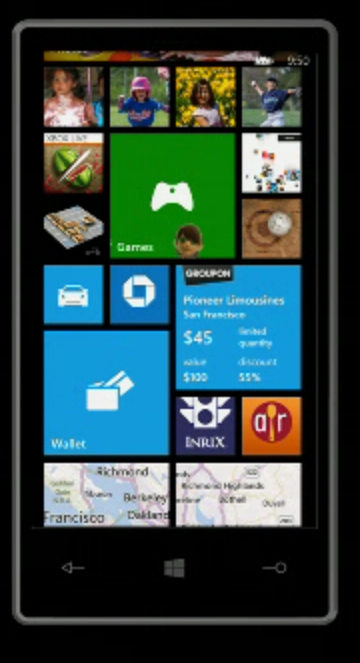
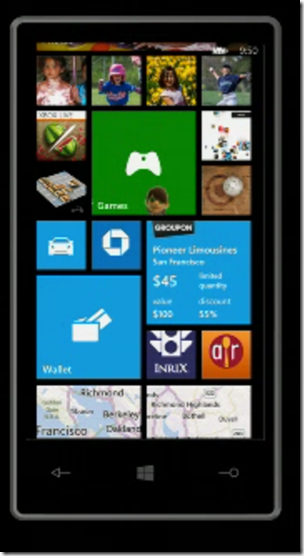
What else is new? Users will like the new Start screen, which unlike the whole of Windows Phone 8 is also coming to existing devices, which will get a half-way upgrade called Windows Phone 7.8 (7 and 8, geddit?). The innovation in the new Start screen is that any tile can be sized by the user to any of the supported sizes. The smallest size allows four tiles across, so you can make your Windows Phone look more like Android or iOS if you so choose.
newstart2

What else? Microsoft is not announcing “end-user features” yet, but did promise Nokia offline maps plus turn by turn directions; digital wallet which can be paired with a secure SIM for NFC (near field communications) payment, and deep support for Skype and VOIP so they “feel like any other call”. Apparently operators will love the way the wallet is implemented, because unlike Android it is hooked to the SIM, but I doubt they will be so keen on Skype.

There is an improved speech engine which duly failed to recognise speech input correctly in the first demo, though it worked after that.

Finally, Microsoft is now talking Enterprise for Windows Phone. There will be bitlocker encryption and enterprise app deployment without Windows store, as well as device management. Think full System Center 2012 integration.

Conclusion? There is disappointment that existing Windows Phone 7 devices are not fully upgradeable, but this is hardly surprising given the changed core. As a platform it is greatly improved, though I would like to see full WinRT included. Despite its poor start, you cannot dismiss this mobile OS as Microsoft continues to use its financial muscle to try and try again.

If it succeeds, will it be too late for Nokia? Maybe, though my hunch is that Microsoft will do what it takes to keep its key mobile partner alive.
Three reasons why Microsoft should make its own Windows RT (ARM) Tablet

Rumours are flying that Microsoft will announce an own-brand Windows RT tablet on Monday.

No comment on the truth of these, but it would be a smart move.

Here are three reasons.

First, the OEM foistware problem. This has got a little better in recent years, but not enough to compete with Apple and its clean machines. The problem is so bad that Microsoft set up its own retail stores to sell  cleaned-up Windows PCs:

Many new PCs come filled with lots of trialware and sample software that slows your computer down—removing all that is a pain, so we do it for you! Every PC the Microsoft Store sells is put on a software diet and performance is tuned to run the best it can.

Microsoft addressed this in Windows Phone by imposing conditions on the extent to which OEMs can customise the user interface or embed their own software. It cannot do this  though with Windows 8 on x86. Manufacturing its own model is one of the few ways Microsoft can get Windows PCs that work as designed into the hands of consumers.

Second, the design problem. Few Windows PCs (if any) are as well designed as Macs or iPads. Manufacturers are geared towards low prices and frequent model changes rather than intensive work on every detail of the design.

Third, Microsoft wants to make a splash with Windows RT, the ARM version, and there is evidence that it is having difficulty communicating its benefits or convincing its OEM partners to get fully behind it.

This third is the biggest issue, which might drive Microsoft to compete with its third-party partners, and requires some explanation. Many people I speak to cannot see the point of Windows RT. This version of Windows 8 will not run x86 applications, so you cannot install any of your old software. Further, there is no way to install desktop applications, so software vendors cannot port their existing applications. They must create new Metro-style apps instead. So why bother with Windows RT?

This reaction is understandable, but unfortunately for Microsoft Windows 8 on x86 has no chance of competing with Apple’s iPad.

Yesterday I attended an Asus event in London where the company was showing its new range of Android tablets and Windows ultrabooks. It was not showing its prototype Windows 8 machines, but I was able to discuss the likely Windows 8 products, All but one is x86, and they will have Wacom digitizers,  which means they will work with a stylus like an old-style Tablet PC, as well as with touch. That will push up the price.

Worse still, these x86 devices, like the Samsung Slate on which I run WIndows 8 Release Preview, will not be enjoyable to use with touch alone. Users will find themselves running applications designed for keyboard and mouse: you can get them to work, but it is frustrating. These devices are not Windows reimagined, they are the old Windows plus a few new tricks.

Too expensive, too hard to use: Windows 8 on x86 is not an iPad-beater.

Windows RT on the other hand is more promising. This does have a desktop, but it will only run Office, Windows Explorer, and whatever other desktop utilities Microsoft chooses to provide. Office aside, you will be forced to use touch-friendly Metro apps most of the time. Microsoft can tune Windows RT by removing legacy components that are no longer needed, because applications which rely on them cannot be installed. You also get the power efficiency of ARM, so a long battery life. Finally, if Microsoft has done it right Windows RT should be more secure, since the entire operating system is locked down.

Windows RT is critical to Microsoft and if it has to make its own hardware in order to market it properly, then it should do so.

Microsoft, Windows 8, and the Innovator’s Dilemma (or, why you hate Windows 8)

One thing is obvious from the immediate reaction to Windows 8 Release Preview. Most of those who try it do not like it. It is a contrast to the pre-release days of Windows 7, when there was near-consensus that, whatever you think of Windows overall, the new edition was better than its predecessors.

Why would a company with huge resources and the world’s most popular desktop operating system – 600 million Windows 7 licenses so far, according to OEM VP Steven Guggenheimer – create a new edition which its customers do not want?

Microsoft under Steve Ballmer is a somewhat dysfunctional company – too many meetings, says ex-softie Brandon Watson – but there is still a wealth of talent there. Specifically, Windows President Steven Sinofsky has proven his ability, first with Microsoft Office 2007 which beat off the challenge from OpenOffice.org, and next with Windows 7, which if it repeated the disappointment of Windows Vista would have damaged the company severely.

If it is not incompetence, then, what is it?

In this context, Clayton M. Christensen’s 1997 classic The Innovator’s Dilemma – When new technologies cause great firms to fail is a good read. Chapter one is here. Christensen studied the hard drive market, asking why sixteen of the seventeen companies which dominated the industry in 1976 had failed or been acquired by 1995, replaced by new entrants to the market. Christensen argues that these firms failed because they listened too much to their customers. He says that delivering what your customers want is mostly a good idea, but occasionally fatal:

This is one of the innovator’s dilemmas: Blindly following the maxim that good managers should keep close to their customers can sometimes be a fatal mistake.

Specifically, hard drive companies failed because new entrants had physically smaller hard drives that were more popular. The reason the established companies failed was because their customers had told them that physically smaller drives was not what they wanted:

Why were the leading drive makers unable to launch 8-inch drives until it was too late? Clearly, they were technologically capable of producing these drives. Their failure resulted from delay in making the strategic commitment to enter the emerging market in which the 8-inch drives initially could be sold. Interviews with marketing and engineering executives close to these companies suggest that the established 14-inch drive manufacturers were held captive by customers. Mainframe computer manufacturers did not need an 8-inch drive. In fact, they explicitly did not want it: they wanted drives with increased capacity at a lower cost per megabyte. The 14-inch drive manufacturers were listening and responding to their established customers. And their customers–in a way that was not apparent to either the disk drive manufacturers or their computer-making customers–were pulling them along a trajectory of 22 percent capacity growth in a 14-inch platform that would ultimately prove fatal.

Are there any parallels with what is happening in computer operating systems today? I think there are. It is not exact, given that tablet pioneer Apple cannot be described as a new entrant, though Google with Android is a closer match. Nevertheless, there is a new kind of operating system based on mobility, touch control, long battery life, secure store-delivered apps, and cloud connectivity, which is eating into the market share for Windows. Further, it seems to me that for Microsoft to do the kind of new Windows that its customers are asking for, which Christensen calls a “sustaining innovation”, like Windows 7 but faster, more reliable, more secure, and with new features that make it easier to use and more capable, would be a trajectory of death. Existing customers would praise it and be more likely to upgrade, but it would do nothing to stem the market share bleed to Apple iPad and the like. Nor would it advance Microsoft’s position in smartphones.

Should Microsoft have adapted its Windows Phone OS for tablets two years ago, or created Metro-style Windows as an independent OS while maintaining Windows desktop separately? YES say customers infuriated by the full-screen Start menu. Yet, the dismal sales for Windows Phone show how difficult it is to enter a market where competitors are firmly entrenched. Would not the same apply to Windows Metro? Reviewers might like it, developers might like it, but in the shops customers would still prefer the safety of iPad and Android and their vast range of available apps.

You begin to see the remorseless logic behind Windows 8, which binds new and old so tightly that you cannot escape either. Don’t like it? Stick with Windows 7.

Microsoft will not say this, but my guess is that customer dissatisfaction with Windows 8 is expected. It is the cost, a heavy cost, of the fight to be a part of the next generation of client computers. It is noticeable though that while the feedback from users is mostly hostile, Microsoft’s OEM partners are right behind it. They do not like seeing their business munched by Apple.

The above does not prove that Microsoft is doing the right thing. Displeasing your customers, remember, is mostly the wrong thing to do. Windows 8 may fail, and Microsoft, already a company with shrinking influence, may go into an unstoppable decline. Bill Gates was right about the tablet taking over from the laptop, history may say, but Microsoft was incapable of making the radical changes to Windows that would make it work until it was too late.

Give credit for this though: Windows 8 is a bold move, and unlike the Tablet PCs that Gates waved around ten years ago, it is an OS that is fit for purpose. Sinofsky’s goal is to unify the smartphone and the tablet, making a new mobile OS that users will enjoy while also maintaining the legacy desktop and slotting in to enterprise management infrastructure. I admire his tenacity in the face of intense protest, and I am beginning to understand that foresight rather than stupidity underlies his efforts.

Windows Vista designer pops up to explain and defend Windows 8

I wrote a first look for Windows 8 Release Preview for The Register which prompted, as you would expect, a barrage of comments from Reg users, most expressing distaste for Redmond’s latest. Buried on page three of the comments though is this one which is worth calling out, since it explains some of the thinking behind Aero Glass in Windows Vista and how that same thinking is expressed in the Metro design – though note that the user mdc (who is that?) says in a later comment that he has “moved into a different field entirely (photography)” so is not responsible for Metro or Windows 8.

image 

Anyway, mdc observes that Microsoft has been working for years on the idea of a “content-centric” user interface, one where the surrounding chrome disappears so that content is king. In this respect, Glass can be seen as a move towards the Metro immersive UI:

The initial premise for Glass (as it was called back then, the Aero UX sprung up around the Glass model) was not – as most people believe – to provide eye candy for the end user. Instead, it was an attempt to pull the window chrome away from the content and make it as unobtrusive as possible. The whole point of the glass effect itself was to allow the end user to make better use of their screen real-estate by allowing them to see content beneath the active window.

Glass was not radical though, and did not change the model of multiple overlapping windows. According to mdc though, something more revolutionary was considered for Vista:

Some of my other concepts promoted a VERY different approach to the user experience, much more in line with what is seen today in Windows 8. In fact, the premise for the shift in the desktop paradigm goes back as far as the early Blackcomb concepts first demoed by the MSN services division in 1999; it has ALWAYS been felt that the desktop itself is a rather clunky way of providing content to the end user, which is – after all – the purpose of computing devices, be they traditional desktops, laptops, phones, or even set-top boxes. Windowing systems were designed to allow users to work on multiple pieces of data in quick succession, and yet over the years usability studies have found that users rarely manipulate more than 2 documents simultaneously.

In the end the idea was rejected, partly because of the work involved, and partly because Microsoft’s Jim Allchin, among others, felt that the familiarity of the Windows user interface was an important selling point versus the competition.

Apparently we  are wrong to imagine that Windows 8 is based on the Windows Phone design:

While some have suggested that Windows 8’s interface is "touch-only" or "based on Windows Phone 7", that couldn’t be further from the truth. Windows Phone 7 was instead a pilot program – in a relatively low risk sector – for the designs originally suggested for Blackcomb, which have now found their way into Windows 8. At the time, touch interfaces hadn’t even been conceived of – remember, back then touch sensitive screens were Resistive nasties that required at best a stylus, or at worst jabbing at them hard with a finger or pen.

The fact is that Metro just happened to be easily accessible for touch devices, and that has been touted as one of its benefits; it is NOT, and never has been, the original aim of the design. The aim of the design is exactly the same as Aero was – to take the chrome away from the content, and allow the user to focus on what they’re doing rather than unnecessary clutter. A perfect example of this is internet Explorer on Metro; in its default state, all you see is a webpage; chrome CAN be pulled up if the user requires, but is otherwise absent. The majority of Metro applications are like this – in fact it’s part of the Metro UX specifications.

and he adds:

Personally, I see Metro as a good thing; it allows me to do my work without distraction, and I’m just disappointed that I wasn’t the one who did the design work for it this time around.

Windows 8 Metro is not just about touch then: it is a reshaping of the user interface to put content first.

Huge icons in Windows 8 Metro

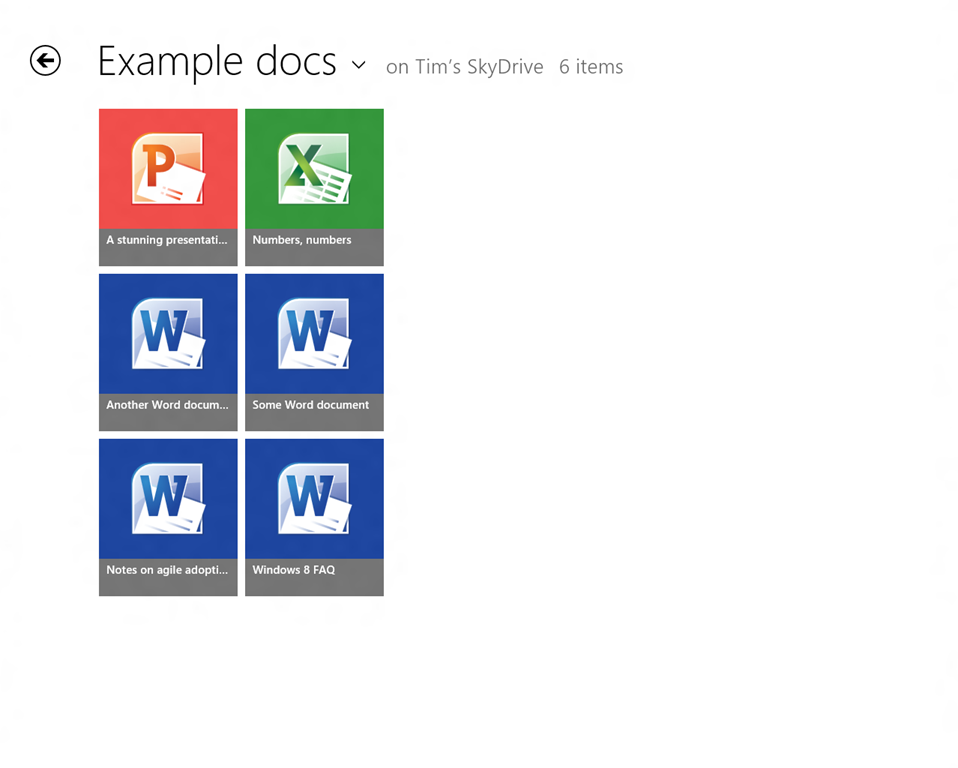
This is the SkyDrive Metro-style app running on my 1280 x 1024 desktop, in its default view. Note that each icon is 185 x 211 px. The actual title of each document is in relatively small text though still readable.

image

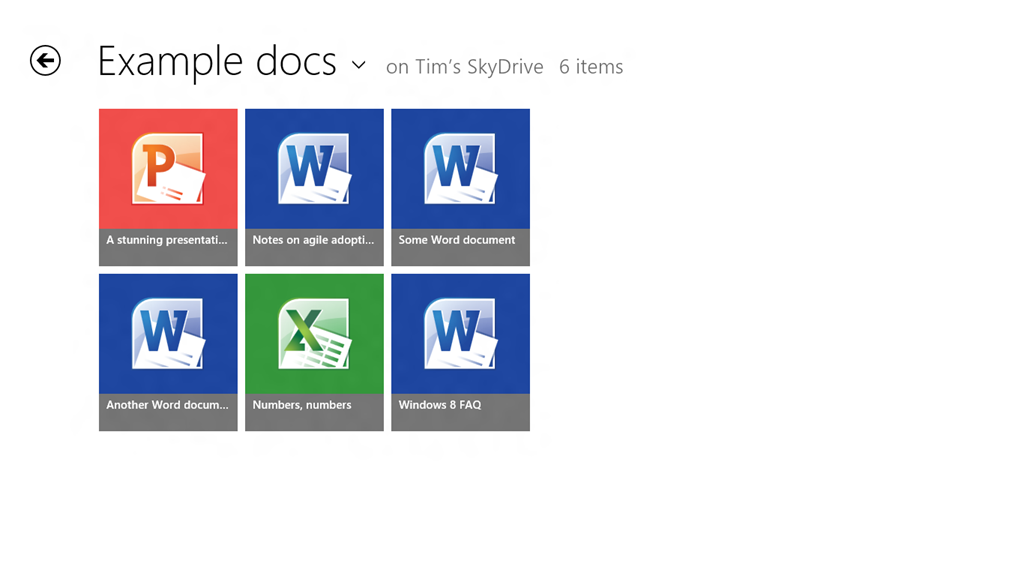
On my slate I only get two rows per screen:

image

You can set it to Detail view which gives nine rows on the desktop display and six rows on the slate.

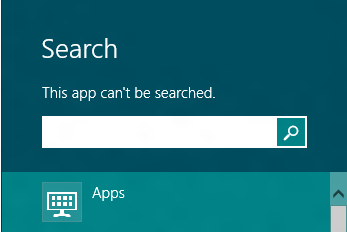
Touch-friendly, undoubtedly, but is this really best-practice design? What if you have lots of documents in a folder? I suppose it is just swipe-swipe-swipe, not helped by the fact that the SkyDrive app cannot be searched:

image

nor is there any way that I can see to sort the documents, say by last modified.

Of course you can do all these things in the touch-hostile desktop application.

Both the app and Windows 8 itself are pre-release so may improve, but I would like to see a smarter approach to browsing and selecting documents in Windows 8 Metro-style.

For more on Windows 8, see my review on The Register.

Windows 8 Release Preview now available, Adobe Flash included, finished version expected August 2012

Microsoft has made the Release Preview of Windows 8 available to download. So what’s new?

image

The press release:

  • Confirms that a “touch-friendly and power-optimized Adobe Flash Player” is integrated into Internet Explorer 10
  • Announces new Family Safety features
  • States that IE10 is “Do not track” by default
  • Announces new apps and improvements to existing ones

All of which will come as a disappointment to those hoping for any sort of change of direction following a mixed-to-negative reception for the Consumer Preview.

Windows chief Steven Sinofsky says:

If the feedback and telemetry on Windows 8 and Windows RT match our expectations, then we will enter the final phases of the RTM process in about 2 months.

My guess that feedback along the lines of “Bring back the Start menu” will not count as an obstacle.