Tag Archives: microsoft

The top Silverlight feature request: implement on more platforms

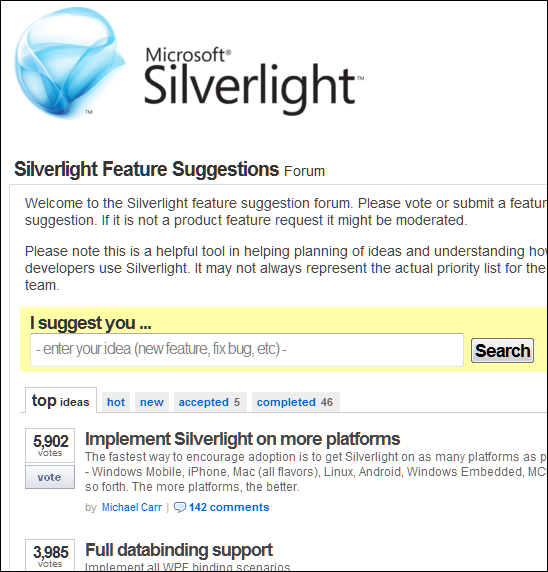
One of the things mentioned by Microsoft VP Scott Guthrie in his Firestarter keynote yesterday was that Silverlight 5, the new version set for release in 2011, implements some 70% of what users have voted for. I presume he means the feedback forum here. But look what the top request is – as noted by a comment to yesterday’s post:

image

Looking at the comments, Android is a common request, and relatively easy for Microsoft to achieve given the open nature of that platform.

This was apparently not part of the 70% though. Instead, Guthrie introduced more Windows-only features – showing that concerns about divergence between Windows and Mac implementations when Microsoft announced COM support at the 2009 PDC were justified.

What if Microsoft had purchased Novell, or purchased Mono from Novell, instead of letting it go to Attachmate? It would have enabled Microsoft to unify the Windows and Linux implementations as well as building on the work the Mono team has done on compilation for iOS.

That dream is over though; the Silverlight application strategy seems focused on making it better for Windows-platform corporations.

Silverlight 5 unveiled: more power, more Windows

Microsoft has announced details of Silverlight 5, a major new release of its browser plug-in and desktop runtime for Windows and Mac. Silverlight is also the primary application runtime for Windows Phone 7, though this update does not apply to the phone yet. Silverlight 5 will go into beta in the first half of 2011, and release is planned for the second half of 2011 – no more than a year or so away.

So what’s in Silverlight 5?

On the media side, there is hardware decoding of H.264 video (an overdue feature) plus enhancements including TrickPlay which enables fast-forward and rewind. There is also remote control support of some kind. According to VP Scott Guthrie, you will be able to stream HD video to a netbook.

The bigger area of change is in Silverlight as an application runtime. Here are the highlights:

  • Text rendering is much improved, with multi-columns, OpenType support, and control of tracking and leading.
  • Postscript vector printing greatly improves printing support, and you can now create a dedicated print view different from what is on screen.
  • A new hardware-accelerated 3D graphics API, as well as immediate mode graphics which lets you render directly to the GPU.
  • There is a 64-bit version of Silverlight 5.
  • WS-Trust support for secure messaging in tandem with Windows Communication Foundation.
  • Databinding enhancements, and support for debugging a binding by setting a breakpoint on it.

Alongside these, trusted Silverlight applications have new capabilities. But what is a trusted application? In the past, Silverlight applications become trusted if they run out of the browser and the user gives permission via a dialog. In Silverlight 5 this changes. A Silverlight application can be trusted within the browser as well, though Microsoft says this only works “when enabled via a group policy registry key and an application certificate”. This implies that the feature is aimed at corporate environments rather than for applets with a broad reach.

Once trusted, an in-browser Silverlight applet has the following additional features:

  • A new web browser control lets you host HTML content within a Silverlight application.
  • Read and write access to My Documents
  • Ability to launch Microsoft Office applications – examples include creating an email message or opening a report in Word
  • Access to COM components – Microsoft gives the example of accessing a USB security key or a bar-code scanner
  • Ability to call native code vith PInvoke (Platform Invoke)

In addition, out of browser applications support multiple windows including child windows, so they can be made to behave even more like normal desktop Windows applications.

You can see the theme here: making trusted Silverlight applications more powerful so that a larger proportion of custom business applications can be implemented in the browser or as Silverlight out-of-browser applications, rather than as traditional Windows applications that require desktop deployment. Put this together with Office 365 and Windows Azure, and you can see how well Silverlight works as a component in Microsoft’s cloud stack – provided users do not have anything inconvenient like an Apple iPad.

But what about the Mac? All these “trusted” features appear to be Windows-only. I asked about Mac support and was told:

We’re evaluating mechanisms for enabling similar trusted applications on the mac.

Fair enough; but the way this is put does suggest that having retreated from any ambitions for broad device reach in statements at the recent PDC conference, it now seems that Microsoft is further retreating from Mac and Windows parity, and moving Silverlight more towards being an application runtime for Windows – though note that there will still be a Silverlight 5 for the Mac and which will have the features that do not require COM or PInvoke.

It is disappointing that there is still no built-in local database support, though there are third-party offerings.

There are a couple of ways to look at Silverlight. Microsoft’s lack of commitment to cross-platform parity and its unwillingness to address broad device support means it does not look good as a broad-reach browser plugin, despite its great features on systems that do support it.

On the other hand, as an alternative to desktop Windows applications Silverlight looks increasingly attractive as its capabilities increase.

More information on the new features here – though note it neglects to mention what will and will not work on a Mac.

As Microsoft releases new tools for Windows Phone, developers ask: how is it selling?

Microsoft has released Visual Basic for Windows Phone Developer Tools – not a lot to report, I guess, except that what you could already do in C# you can now also do in Visual Basic.

Still, when someone at Microsoft asked me what I thought of the Windows Phone 7 developer platform I replied that the tools look good for the most part – though I would like to see a native code option and it seems unfortunate that mobile operators can install native code apps but the rest of us officially cannot – but the bigger question is around the size of the market.

We all know that a strong and large community of developers is critical to the success of a platform – but as I’ve argued before, developers will go where their customers are, rather than selecting a platform based on the available tools and libraries. It is a bit of both of course: the platform has to be capable of running the application, and ease of development is also a factor, but in the end nothing attracts developers more than a healthy market.

Therefore the critical question for developers is how well Windows Phone 7 is selling.

Nobody quite knows, though Tom Warren makes the case for not much more than 126,000, that being the number of users of the Windows Phone Facebook application.

I’m not quite convinced when Warren says:

It’s likely that most users will connect their Facebook account so the statistics could indicate nearly accurate sales figures.

Not everyone loves Facebook; and when I was trying out Windows Phone 7 I found myself reluctant to have it permanently logged in. Even so, I’d agree that well over 50% of users will enable Facebook integration so it is a useful statistic.

Although that suggests a relatively small number in the context of overall Smartphone sales, my perception is that lack of availability is part of the reason, so it is too early to judge the platform’s success. I do not see many Windows Phone 7 in the mobile phone shops that I pass in the UK; in fact it is unusual to see it at all. I am not sure if this is mainly because of supply shortages, or because Microsoft and its partners found it difficult to build expectations in the trade that this would be a sought-after device, or both.

Some bits of anecdotal evidence are encouraging for Microsoft. Early adopters seem to like it well enough. Nevertheless, it is a minority player at the moment and that will not change soon.

Developers are therefore faced with a small niche market. Microsoft has done a fair job with the tools; now it needs to get more devices out there, to convince developers that once they have built their applications, there are enough customers to make it worth while.

HTML 5 Canvas: the only plugin you need?

The answer is no, of course. And Canvas is not a plugin. That said, here is an interesting proof of concept blog and video from Alexander Larsson: a GTK3 application running in Firefox without any plugin.

image

GTK is an open source cross-platform GUI framework written in C but with bindings to other languages including Python and C#.

So how does C native code run the browser without a plugin? The answer is that the HTML 5 Canvas element, already widely implemented and coming to Internet Explorer in version 9, has a rich drawing API that goes right down to pixel manipulation if you need it. In Larsson’s example, the native code is actually running on a remote server. His code receives the latest image of the application from the server and transmits mouse and keyboard operations back, creating the illusion that the application is running in the browser. The client only needs to know what is different in the image as it changes, so although sending screen images sounds heavyweight, it is amenable to optimisation and compression.

It is the same concept as Windows remote desktop and terminal services, or remote access using vnc, but translated to a browser application that requires no additional client or setup.

There are downsides to this approach. First, it puts a heavy burden on the server, which is executing the application code as well as supplying the images, especially when there are many simultaneous users. Second, there are tricky issues when the user expects the application to interact with the local machine, such as playing sounds, copying to the clipboard or printing. Everything is an image, and not character-by-character text, for example. Third, it is not well suited to graphics that change rapidly, as in a game with fast-paced action.

On the other hand, it solves an immense problem: getting your application running on platforms which do not support the runtime you are using. Native applications, Flash and Silverlight on Apple’s iPad and iPhone, for example. I recall seeing a proof of concept for Flash at an Adobe MAX conference (not the most recent one) as part of the company’s research on how to break into Apple’s walled garden.

It is not as good as a true local application in most cases, but it is better than nothing.

Now, if Microsoft were to do something like this for Silverlight, enabling users to run Silverlight apps on their Apple and Linux devices, I suspect attitudes to the viability of Silverlight in the browser would change considerably.

Microsoft removes Drive Extender from new Windows Home Server, users rebel

Microsoft’s Windows Home Server has a popular feature called Drive Extender [Word docx] which lets you increase storage space simply by adding an internal or external drive – no fussing with drive letters. In addition, Drive Extender has some resilience against drive failure, duplicating files stored in shared folders when more than one drive is available.

Recognising the usefulness of this feature for business users as well as in the home, Microsoft prepared a significantly upgraded Drive Extender for the next version of Windows Home Server, code-named Vail, and for new “Essentials” editions of Small Business Server (SBS) and Storage Server. Anandtech has an explanation of the changes, necessary to support business features such as the Encrypted File System.

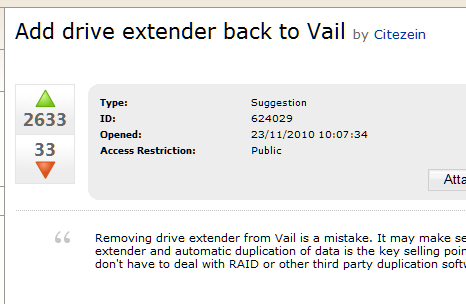
The new version is more complex though, and it seems Microsoft could not get it working reliably. Rather than delay the new products, Microsoft decided to drop the feature, as announced by product manager Michael Leworthy. Note the rating on the announcement.

image

Part of the problem is that rather than discuss difficulties in the implementation, Leworthy presented the decision as something to do with the availability of larger drives:

We are also seeing further expansion of hard drive sizes at a fast rate, where 2Tb drives and more are becoming easy accessible to small businesses.  Since customers looking to buy Windows Home Server solutons from OEM’s will now have the ability to include larger drives, this will reduce the need for Drive Extender functionality.

He added that “OEM partners” will implement “storage management and protection solutions”.

Unfortunately this was a key feature of Windows Home Server. The announcement drew comments like this:

My great interest in Vail has just evaporated.  Drive Extender is the great feature of Home Server, and what my personal data storage is based around.  I have loved owning my WHS but unfortunately without DE I will be looking for other products now.

A thread (requires login to WHS beta) on the beta feedback site Microsoft Connect attracted thousands of votes in a couple of days.

 image

One of the concerns is that while Drive Extender 2 may be needed for the business servers, the version 1 is fine for home users. Therefore it seems that the attempt to bring the technology to business servers has killed it for both.

The SBS community is less concerned about the issue than home users. For example, Eriq Neale says:

While I can see how the Home Server folks are going to lament the loss of DE from their product, as cool as it is, removing that technology removes a LOT of roadblocks I was expecting for Aurora and Breckenridge, and that’s good news for my business.

though Wayne Small says:

I know that a few of my fellow MVPs were told of this recently and sworn to secrecy under our NDA, and we honestly were dumbstruck as to the fact it had been cancelled.  I can only assume that the powers that be at Microsoft know what they are truly doing by removing this feature.  On the flip side however, it means that any server backup or antivirus product that worked with Windows Server 2008 R2 will now most certainly work with SBS 2011 Essentials without modification!  See – there is a silver lining there somewhere.

What should Microsoft do? I guess it depends on how badly broken Drive Extender 2 is. Perhaps one option would be to keep Drive Extender 1 in Vail, but leave it out of the business servers. Another idea would be to delay the products while Drive Extender 2 is fixed, presuming it can be done in months rather than years.

Or will Microsoft ignore the feedback and ship without Drive Extender at all? Microsoft may be right, in that shipping a server with broken storage management would be a disaster, no matter how much users like the feature.

How will online services impact Microsoft’s partner business?

2010 is the year Microsoft got serious about cloud services. Windows Azure opened for real business in November 2009 – OK, just before 2010 – and CEO Steve Ballmer took to telling the world how Microsoft is “all in” for cloud computing whenever he got up to speak. Office and SharePoint 2010 launched in May 2010 complete with the ability to create and edit Office documents from a web browser. Microsoft also announced Office 365, essentially an upgrade of its existing BPOS offering, offering hosted Exchange, Sharepoint and Lync (Office Communicator). Microsoft also announced Small Business Server 2011, including an Essentials edition, formerly codenamed “Aurora”, which is little more than Windows Home Server plus Active Directory and points small businesses towards cloud services for email and document collaboration.

I’d guess that Microsoft’s cloud conversion is driven in part by the progress Google, Salesforce.com and others have made in persuading businesses that hosted internet services make more sense than maintaining your own servers and server applications in many cases.

But what is the impact on Microsoft partners, who have been kept busy supplying and configuring servers, implementing backup, keeping systems running, and then upgrading them as they become obsolete? On the face of it they have less to do in a hosted world, and although Microsoft offers commission on the sale of online subscriptions, that might not compensate for lost business.

Then again, cloud services offer new opportunities, still need configuring, and look likely to be a source of new business for partners particularly at a time when the majority of businesses have not yet made the transition.

I’m researching a further piece on the subject and would love to hear honest views from partners such as resellers and solution providers about how Microsoft’s online services are affecting partner business now and in the future. Or maybe you think this cloud thing is overdone and it will be business as usual for a while yet. You can contact me by email – tim(at)itwriting.com – or of course comment below.

The Microsoft Azure VM role and why you might not want to use it

I’ve spent the morning talking to Microsoft’s Steve Plank – whose blog you should follow if you have an interest in Azure – about Azure roles and virtual machines, among other things.

Windows Azure applications are deployed to one of three roles, where each role is in fact a Windows Server virtual machine instance. The three roles are the web role for IIS (Internet Information Server) applications, the worker role for general applications, and newly announced at the recent PDC, the VM role, which you can configure any way you like. The normal route to deploying a VM role is to build a VM on your local system and upload it, though in future you will be able to configure and deploy a VM role entirely online.

It’s obvious that the VM role is the most flexible. You will even be able to use 64-bit Windows Server 2003 if necessary. However, there is a critical distinction between the VM role and the other two. With the web and worker roles, Microsoft will patch and update the operating system for you, but with the VM role it is up to you.

That does not sound too bad, but it gets worse. To understand why, you need to think in terms of a golden image for each role, that is stored somewhere safe in Azure and gets deployed to your instance as required.

In the case of the web and worker roles, that golden image is constantly updated as the system gets patched. In addition, Microsoft takes responsibility for backing up the system state of your instance and restoring it if necessary.

In the case of the VM role, the golden image is formed by your upload and only changes if you update it.

The reason this is important is that Azure might at any time replace your running VM (whichever role it is running) with the golden image. For example, if the VM crashes, or the machine hosting it suffers a power failure, then it will be restarted from the golden image.

Now imagine that Windows server needs an emergency patch because of a newly-discovered security issue. If you use the web or worker role, Microsoft takes responsibility for applying it. If you use the VM role, you have to make sure it is applied not only to the running VM, but also to the golden image. Otherwise, you might apply the patch, and then Azure might replace the VM with the unpatched golden image.

Therefore, to maintain a VM role properly you need to keep a local copy patched and refresh the uploaded golden image with your local copy, as well as updating the running instance. Apparently there is a differential upload, to reduce the upload time.

The same logic applies to any other changes you make to the VM. It is actually more complex than managing VMs in other scenarios, such as the Linux VM on which this blog is hosted.

Another feature which all Azure developers must understand is that you cannot safely store data on your Azure instance, whichever role it is running. Microsoft does not guarantee the safety of this data, and it might get zapped if, for example, the VM crashes and gets reverted to the golden image. You must store data in Azure database or blob storage instead.

This also impacts the extent to which you can customize the web and worker VMs. Microsoft will be allowing full administrative access to the VMs if you require it, but it is no good making extensive changes to an individual instance since they could get reverted back to the golden image. The guidance is that if manual changes take more than 5 minutes to do, you are better off using the VM role.

A further implication is that you cannot realistically use an Azure VM role to run Active Directory, since Active Directory does not take kindly to be being reverted to an earlier state. Plank says that third-parties may come up with solutions that involve persisting Active Directory data to Azure storage.

Although I’ve talked about golden images above, I’m not sure exactly how Azure implements them. However, if I have understood Plank correctly, it is conceptually accurate.

The bottom line is that the best scenario is to live with a standard Azure web or worker role, as configured by you and by Azure when you created it. The VM role is a compromise that carries a significant additional administrative burden.

25 years of Windows: triumph and tragedy

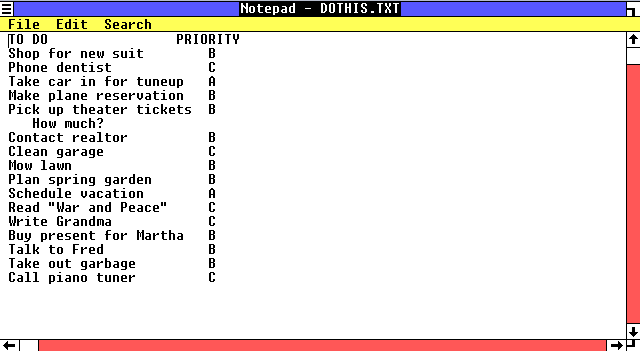
I wrote a (very) short history of Windows for the Register, focusing on the launch of Windows 1.0 25 years ago.

image

I used Oracle VirtualBox to run Windows 1.0 under emulation since it more or less works. I found an old floppy with DOS 3.3 since Windows 1.0 does not run on DOS 6.2, the only version offered by MSDN. In the course of my experimentation I discovered that Virtual PC still supports floppy drives but no longer surfaces this in the UI. You have to use a script. Program Manager Ben Armstrong says:

Most users of Windows Virtual PC do not need to use floppy disks with their virtual machines, as general usage of floppy disks has become rarer and rarer.

An odd remark in the context of an application designed for legacy software.

What of Windows itself? Its huge success is a matter of record, but it is hard to review its history without thinking how much better it could have been. Even in version 1.0 you can see the intermingling of applications, data and system files that proved so costly later on. It is also depressing to see how mistakes in the DOS/Windows era went on to infect the NT range.

Another observation. It took Microsoft 8 years to release a replacement for DOS/Windows – Windows NT in 1993 – and another 8 years to bring Windows NT to the mainstream on desktop and server with Windows XP in 2001. It is now 9 years later; will there ever be another ground-up rewrite, or do just get gradual improvements/bloat from now on?

I don’t count 64-bit Windows as a ground-up rewrite since it is really a port of the 32-bit version.

Finally, lest I be accused of being overly negative, it is also amazing to look at Windows 1.0, implemented in fewer than 100 files in a single directory, and Windows 7/Server 2008 R2, a platform on which you can run your entire business.

WS-I closes its doors–the end of WS-* web services?

The Web Services Interoperability Organization has announced [pdf] the “completion” of its work:

After nearly a decade of work and industry cooperation, the Web Services Interoperability Organization (WS-I; http://www.ws-i.org) has successfully concluded its charter to document best practices for Web services interoperability across multiple platforms, operating systems and programming languages.

In the whacky world of software though, completion is not a good thing when it means, as it seems to here, an end to active development. The WS-I is closing its doors and handing maintenance of the WS interoperability profiles to OASIS:

Stewardship over WS-I’s assets, operations and mission will transition to OASIS (Organization for the Advancement of Structured Information Standards), a group of technology vendors and customers that drive development and adoption of open standards.

Simon Phipps blogs about the passing of WS-I and concludes:

Fine work, and many lessons learned, but sadly irrelevant to most of us. Goodbye, WS-I. I know and respect many of your participants, but I won’t mourn your passing.

Phipps worked for Sun when the WS-* activity was at its height and WS-I was set up, and describes its formation thus:

Formed in the name of "preventing lock-in" mainly as a competitive action by IBM and Microsoft in the midst of unseemly political knife-play with Sun, they went on to create massively complex layered specifications for conducting transactions across the Internet. Sadly, that was the last thing the Internet really needed.

However, Phipps links to this post by Mike Champion at Microsoft which represents a more nuanced view:

It might be tempting to believe that the lessons of the WS-I experience apply only to the Web Services standards stack, and not the REST and Cloud technologies that have gained so much mindshare in the last few years. Please think again: First, the WS-* standards have not in any sense gone away, they’ve been built deep into the infrastructure of many enterprise middleware products from both commercial vendors and open source projects. Likewise, the challenges of WS-I had much more to do with the intrinsic complexity of the problems it addressed than with the WS-* technologies that addressed them. William Vambenepe made this point succinctly in his blog recently.

It is also important to distinguish between the work of the WS-I, which was about creating profiles and testing tools for web service standards, and the work of other groups such as the W3C and OASIS which specify the standards themselves. While work on the WS-* specifications seems much reduced, there is still work going on. See for example the W3C’s Web Services Resource Access Working Group.

I partly disagree with Phipps about the work of the WS-I being “sadly irrelevant to most of us”. It depends who he means by “most of us”. Granted, all this stuff is meaningless to the world at large; but there are a significant number of developers who use SOAP and WS-* at least to some extent, and interoperability is key to the usefulness of those standards.

The Salesforce.com API is mainly SOAP based, for example, and although there is a REST API in preview it is not yet supported for production use. I have been told that a large proportion of the transactions on Salesforce.com are made programmatically through the API, so here is one place at least where SOAP is heavily used.

WS-* web services are also built into Microsoft’s Visual Studio and .NET Framework, and are widely used in my experience. Visual Studio does a good job of wrapping them so that developers do not have to edit WSDL or SOAP requests and responses by hand. I’d also suggest that web services in .NET are more robust than DCOM (Distributed COM) ever was, and work successfully over the internet as well as on a local network, so the technology is not a failure.

That said, I am sure it is true that only a small subset of the WS-* specifications are widely used, which implies a large amount of wasted effort.

Is SOAP and WS-* dying, and REST the future? The evidence points that way to me, but I would be interested in other opinions.

The Java crisis and what it means for developers

What is happening with the Java language and runtime? Since Java passed into the hands of Oracle, following its acquisition of Sun, there has been a succession of bad news. To recap:

  • The JavaOne conference in September 2010 was held in the shadow of Oracle OpenWorld making it a less significant event than in previous years.
  • Oracle is suing Google, claiming that Java as used in the Android SDK breaches its copyright.
  • IBM has abandoned the Apache open source Harmony project and is committing to the Oracle-supported Open JDK. Although IBM’s Sutor claims that this move will “help unify open source Java efforts”, it seems to have been done without consultation with Apache and is as much divisive as unifying.
  • Apple is deprecating Java and ceasing to develop a Mac-specific JVM. This should be seen in context. Apple is averse to runtimes of any kind – note its war against Adobe Flash – and seems to look forward to a day when all or most applications delivered to Apple devices come via the Apple-curated and taxed app store. In mitigation, Apple is cooperating with the OpenJDK and OpenJDK for Mac OS X has been announced.
  • Apache has written a strongly-worded blog post claiming that Oracle is “violating their contractual obligation as set forth under the rules of the JCP”, where JCP is the Java Community Process, a multi-vendor group responsible for the Java specification but in which Oracle/Sun has special powers of veto. Apache’s complaint is that Oracle stymies the progress of Harmony by refusing to supply the test kit for Java (TCK) under a free software license. Without the test kit, Harmony’s Java conformance cannot be officially verified.
  • The JCP has been unhappy with Oracle’s handling of Java for some time. Many members disagree with the Google litigation and feel that Oracle has not communicated well with the JCP. JCP member Doug Lea stood down, claiming that “the JCP is no longer a credible specification and standards body”. Another member, Stephen Colebourne, has a series of blog posts in which he discusses the great war of Java and what he calls the “unravelling of the JCP”, and recently  expressed his view that Oracle was trying to manipulate the recent JCP elections.

To set this bad news in context, Java was not really in a good way even before the acquisition. While Sun was more friendly towards open source and collaboration, the JCP has long been perceived as too slow to evolve Java, and unrepresentative of the wider Java community. Further, Java’s pre-eminence as a pervasive cross-platform runtime has been reduced. As a browser plug-in it has fallen behind Adobe Flash, the JavaFX initiative failed to win wide developer support, and on mobile it has also lost ground. Java’s advance as a language has been too slow to keep up with Microsoft’s C#.

There are a couple of ways to look at this.

One is to argue that bad news followed by more bad news means Java will become a kind of COBOL, widely used forever but not at the cutting edge of anything.

The other is to argue that since Java was already falling behind, radical change to the way it is managed may actually improve matters.

Mike Milinkovich at the Eclipse Foundation takes a pragmatic view in a recent post. He concedes that Oracle has no idea how to communicate with the Java community, and that the JCP is not vendor-neutral, but says that Java can nevertheless flourish:

I believe that many people are confusing the JCP’s vendor neutrality with its effectiveness as a specifications organization. The JCP has never and will never be a vendor-neutral organization (a la Apache and Eclipse), and anyone who thought it so was fooling themselves. But it has been effective, and I believe that it will be effective again.

It seems to me Java will be managed differently after it emerges from its crisis, and that on the scale between “open” and “proprietary” it will have moved towards proprietary but not in a way that destroys the basic Java proposition of a free development kit and runtime. It is also possible, even likely, that Java language and technology will advance more rapidly than before.

For developers wondering what will happen to Java at a technical level, the best guide currently is still the JDK Roadmap, published in September. Some of its key points:

  • The open source Open JDK is the basis for the Oracle JDK.
  • The Oracle JDK and Java Runtime Environment (JRE) will continue to be available as free downloads, with no changes to the existing licensing models.
  • New features proposed for JDK 7 include better support for dynamic languages and concurrent programming. JDK 8 will get Lambda expression.

While I cannot predict the outcome of Oracle vs Google or even Apache vs Oracle, my guess is that there will be a settlement and that Android’s momentum will not be disrupted.

That said, there is little evidence that Oracle has the vision that Sun once had, to make Java truly pervasive and a defence against lock-in to proprietary operating systems. Microsoft seems to have lost that vision for .NET and Silverlight as well – though the Mono folk have it. Adobe still has it for Flash, though like Oracle it seems if anything to be retreating from open source.

There is therefore some sense in which the problems facing Java (and Silverlight) are good for .NET, for Mono and for Adobe. Nevertheless, 2010 has been a bad year for write once – run anywhere.

Update: Oracle has posted a statement saying:

The recently released statement by the ASF Board with regard to their participation in the JCP calling for EC members to vote against SE7 is a call for continued delay and stagnation of the past several years. We would encourage Apache to reconsider their position and work together with Oracle and the community at large to collectively move Java forward.  Oracle provides TCK licenses under fair, reasonable, and non-discriminatory terms consistent with its obligations under the JSPA.   Oracle believes that with EC approval to initiate the SE7 and SE8 JSRs, the Java community can get on with the important work of driving forward Java SE and other standards in open, transparent, consensus-driven expert groups.   This is the priority.   Now is the time for positive action.  Now is the time to move Java forward.

to which Apache replies succinctly:

The ball is in your court. Honor the agreement.