Category Archives: microsoft

Azure Stack on show at Microsoft Ignite

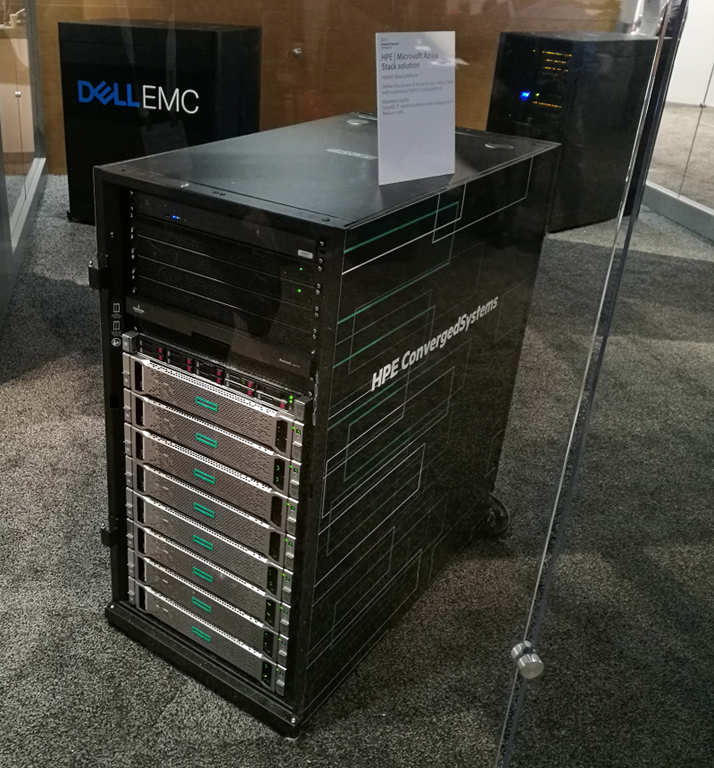
At the Expo here at Microsoft’s Ignite you can see Azure Stack – though behind glass.

image

Azure Stack is Microsoft’s on-premises edition of Azure, a private cloud in a box. Technical Preview 2 has just been released, with two new services: Azure Queue Storage and Azure Key Vault. You can try it out on a single server just to get a feel for it; the company calls this a “one node proof of concept”.

Azure Stack will be delivered as an appliance, hence the exhibition here. There are boxes from Dell, HP Enterprise and Lenovo on display. General availability is planned for mid-2017 according to the folk on the stand.

There is plenty of power in one of these small racks, but what if there is a fire or some other disaster? Microsoft recommends purchasing at least two, and locating them some miles from one another, so you can set up resilience just as you can between Azure regions.

Incidentally, the Expo at Ignite seems rather quiet; it is not on the way to anything other than itself, and I have to allow 10-15 minutes to walk there from the press room. I imagine the third party exhibitors may be disappointed by the attendance, though I may just have picked a quiet time. There is a huge section with Microsoft stands and this is a great way to meet some of the people on the various teams and get answers to your questions.

Microsoft pivot: Ignite is now its key conference

I have been covering Microsoft for quite a few years and it was always clear to me that the must-attend event, if you want to keep up with the company, was the Professional Developer Conference (PDC), and after that was scrapped, its successor developer event Build.

The reason for this is that at PDC or Build the company gives in-depth presentations on the latest features of its developer platform. Pivotal events that I recall include PDC 2003 where we learned about the “Three pillars of Longhorn”, PDC 2008 where Windows 7 was previewed, and Build 2011 where Windows 8 was unveiled.

Two of these three worked out badly for the company, and one fantastically well. The three pillars of Longhorn became the two pillars of Vista after a notorious “reset” of Windows development, while Windows 8 was so hated in the PC community that Microsoft retreated to the more familiar and desktop-oriented Windows 10 a few years later.

Windows 7 on the other hand was such a success that even today, more than a year after the release of Windows 10, many PCs ship with Windows 7 pre-loaded and 10 as an upgrade option. Well, maybe that is a sign of failure (of the later versions) rather than success; but however you choose to spin it, it has been hugely popular.

Perhaps I should also mention PDC 2000 where the .NET Framework was announced (strictly, it was announced at TechEd Europe the previous week, but I digress). That one worked out pretty well I guess, though not without internal conflict between the C++ folk and the .NET Folk – played out in both the Longhorn story and the Windows 8 story.

image

The reason though why these events were so strategically revealing was that nothing at Microsoft mattered more than the direction of Windows. These events were about informing and attracting developers to the Windows platform.

Alongside its developer events, Microsoft has always held others aimed more at system administrators, events like TechEd (especially the USA variant), MEC (Microsoft Exchange Conference) and Microsoft Management Summit (last held in 2013). While always interesting, it seemed to me that these IT Admin events were less strategic than the developer events, because the Windows platform was the foundation of the company’s business and it was at the developer events that you saw this platform evolve.

In August 2013 Microsoft co-founder Steve Ballmer stepped down as CEO, to be replaced by server guy Satya Nadella, accelerating the company’s pivot away from Windows and towards Office 365 and Azure as its key platform. Microsoft’s cloud runs on Windows of course, even if many of the VMs on Azure end up running Linux, but the company is now keen to emphasize its support for any operating system – or to be more precise, Windows, Mac, iOS, Android, and that vague thing IoT – presumably on the basis that broad endpoint support makes its cloud offering more compelling.

I could write screeds about Windows 10 and its evolution, about which I have mixed feelings. Windows for sure remains critically important to Microsoft, and indeed to all of us who feel that it meets needs that its competition does not address. (The answer is not always “just use a Mac”, if only because of Apple’s addiction to premium pricing and high profit margins).

Nevertheless, it is the cloud and hybrid cloud offerings that come first in today’s Microsoft, and Windows server rather than Windows 10 that is more strategically important.

That is why Microsoft Ignite, which starts on Monday 26th September 2016 and is aimed primarily at IT administrators, that is now the key event. Here we will see the formal launch of Server 2016 as well as Azure and Office 365 news; and I plan to pay close attention.

UK South or UK West? Microsoft opens new data centres for Azure and Office 365

Microsoft has opened “multiple data centre locations in the UK” to run Azure and Office 365 cloud services.

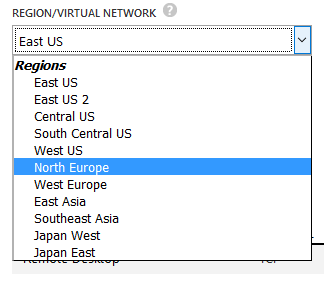
I went to the Azure portal to create a new VM, to see the new options. It looks like you have to use the new portal. Here is what I got in the old portal:

image

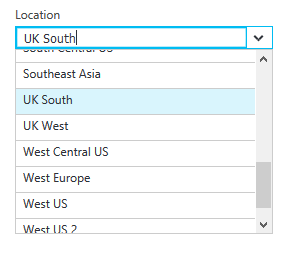
In the new one though, I can choose between UK South and UK West.

image

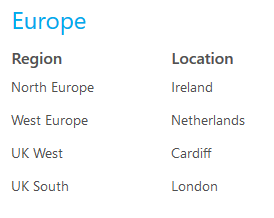
An Azure region is composed of multiple data centres so this looks like a substantial investment. According to this document, the new regions are located in Cardiff and London.

image

The new infrastructure supports Azure and Office 365 today, with Dynamics CRM Online promised for the “first half of 2017”, according to the announcement.

Early customers are the Ministry of Defence, South London and Maudsley NHS Foundation Trust, Aston Martin, Capita and Rosslyn Analytics.

The announcement will help Microsoft and its partners sell these services to UK businesses concerned about compliance issues; there may also be some latency benefit. That said, Microsoft is a US corporation and the US government has argued that it can access this data with only a US search warrant. Microsoft has resisted this and won an appeal in July 2016; however there could always be new legislation. There is no simple answer.

Amazon Web Services has also announced plans for UK data centres; in fact, AWS was the first to reveal plans, but Microsoft has been quicker with implementation.

Time for another look at “pure .NET”

Back in the Nineties there was a lot of fuss about “pure Java”. This meant Java code without any native code invocations that tie the application to a specific operating system.

It is possible to write cross-platform Java code that invokes native code, but it adds to the complexity. If it is an operating system API you need conditional code so that the write API is called on each platform. If it is a custom library it will have to be compiled separately for each platform.

Over on the Microsoft .NET site, developers have tended to have a more casual approach. After all, in the great majority of cases the code would only ever run on Windows. Further, Microsoft tended to steer developers towards Windows-only dependencies like SQL Server. After all, that is the value of owning a developer platform.

Times change. Microsoft has got the cross-platform bug, with its business strategy based on attracting businesses to its cloud properties (Office 365 and Azure) rather than Windows. The .NET Framework has been forked to create .NET Core, which runs on Mac and Linux as well as Windows. SQL Server is coming to Linux.

Another issue is porting applications from 32-bit to 64-bit, as I was reminded recently when migrating some ASP.NET applications to a new site. If your .NET code avoids P/Invoke (Platform Invoke) then you can compile for “Any CPU” and 64-bit will just work. If you used P-invoke and want to support both 32-bit and 64-bit it requires more care. IntPtr, used frequently in P/Invoke calls, is a different size. If you have custom native libraries, you need to compile them separately for each platform. The lazy solution is always to run as 32-bit but that is a shame.

What this means is that P/Invoke should only be used as a last resort. Arguably this has always been true, but the reasons are stronger today.

This is also an issue for libraries and components intended for general use, whether open source or commercial. It is early days for .NET Core support, but any native code dependencies will be a problem.

Breaking the P/Invoke habit will not be easy but “Pure .NET” is the way to go whenever possible.

Notes from the field: Office 365 pain following Windows 10 upgrade

I got involved in looking at a PC where a few Office 365 problems had arisen following an upgrade to Windows 10 (prompted by Microsoft supposedly ending its free upgrade offer).

In particular, SharePoint online was crashing Internet Explorer. Internet Explorer? Don’t Windows 10 users stick to Edge?

Unfortunately Edge is problematic with certain sites. It works OK with Office 365 but there are some issues. For example, open a SharePoint document library in IE and you get the very useful option to “Open with Explorer”, an Explorer UI for your cloud-hosted files.

image

Try this in Edge and you get:

image

Note how the help information does not tell you how to fix the problem.

For reasons like this, the user still had a shortcut to SharePoint online in IE on the Windows 10 taskbar. Click it though, and IE would crash with its “Internet Explorer has stopped working” dialog.

Probably an add-on, I thought. This was proved right when I opened IE with add-ons disabled – try running:

"%ProgramFiles%\Internet Explorer\iexplore.exe" –extoff

– and found that SharePoint online worked fine. After some experimentation, I discovered that the SharePoint Export Database Launcher add-on was causing the problem. Disabled it and SharePoint worked fine.

image

This add-on is installed by Microsoft Office. It prompts a couple of thoughts.

I do not know if every Windows 10 PC is similarly afflicted, but problems like this do suggest a lack of quality control in some areas. It is also unfortunate that when you install Office 365 Professional Plus you do not get any options; you get everything. Including, in this case, a buggy add-on.

Second, I wish Microsoft would pause from its energetic feature work with Office 365 and sort out the core functionality of working with documents in SharePoint online. As someone pointed out to me on Twitter today, the situation with OneDrive sync clients remains a mess, and when it goes wrong it is not always easy to troubleshoot.

Incidentally, I cannot resist telling you how to fix another OneDrive for Business issue. Here’s the problem: you open a document library in a web browser (even works in Edge), hit Sync, and OneDrive for Business fires up. If this is the first document library to be synced you might be prompted to sign in. So you enter your email address, hit Next, and then enter your password and click Sign in. Sometimes though nothing happens and you can’t sign in. What’s the fix? Don’t click Sign-in, press Enter!

The battle to own Windows Explorer shell overlay icons, or why your OneDrive green ticks have stopped working

There are a number of dark areas in Windows that do not work quite right. MAXPATH anyone? But here is another one that I have only recently become aware of.

If you use applications such as Mozy, OneDrive (Business or Personal), Adobe Creative Cloud, Tortoise (a developer utility) or Dropbox, you will be familiar with the idea of files in Explorer showing little icons to indicate their state: synced, not synced, in conflict, excluded and so on.

image

A common complaint is that while everything still works, the little green ticks (or whatever) no longer appear.

The reason for this is simple, if depressing. Well, there are two reasons. One is that Windows has a limit of 15 overlay icons. If more than that are specified (by multiple applications) then anything over the limit does not work.

The second is that multiple applications cannot apply overlays to the same file. So if you tried to set up your Tortoise repository in a OneDrive folder (do not do this), one or other would win the overlay battle but not both.

The overlay configuration is stored in the registry, at HKLM\Software\Microsoft\Windows\CurrentVersion\Explorer\ShelliconOverlayIdentifiers\

If you visit this location in RegEdit, you will notice something interesting:

image

Some of these entries, including AccExtIco (Adobe Creative Cloud), OneDrive (personal OneDrive) and SkyDrivePro (OneDrive for Business), have a leading space in their name. Why? That is because the authors of these applications want THEIR stuff to work right, so by including the leading space they get to the top of the queue.

(I also have entries for SkyDrive as well as OneDrive, registry bloat caused by the name change no doubt).

Microsoft’s support article on the subject therefore suggests renaming these entries to have TWO leading spaces:

Rename the following registry keys. To do this, right-click the folder, select Rename, and then rename the folder. When you rename the folder, add two spaces at the beginning of the name.

You can see where this is going to end … Adobe will install its entries with three spaces, Microsoft will come back with four, and so on. Possibly.

It is also an imperfect solution. On a machine suffering from this issue I performed an Office repair, which restored the old entries with a single leading space while not removing those with two leading spaces. More bloat.

If you get this problem, the best solution is to remove applications so that there is no conflict. If you want to use Mozy for backup, Dropbox because it works, and two OneDrives because they are nearly free, well, you are not going to have all your icon overlays working and that is that.

Microsoft financials April-June 2016: on track but continued drift away from consumers

Microsoft has announced its latest financials, and I have made a quick table summarising the year-on-year comparison for the quarter. See the end of this post for what the confusing segment categories represent.

Quarter ending  June 30th 2016 vs quarter ending June 30th 2015, $millions

Segment Revenue Change Operating income Change
Productivity and Business Processes 6969 +308 3000 -167
Intelligent Cloud 6711 +415 2190 -443
More Personal Computing 8897 -346 964 +359
Corporate and Other -1963 -1943 -3074 +5384

A few observations.

Office 365 is Microsoft’s current big success. According to the company’s press release, Office 365 revenue grew 54%, which is huge. However, on-premise sales declined which meant that overall revenue growth in “Office commercial products and cloud services” was only 5%. Still, that’s a successful transition.

The picture was similar in consumer Office, with Office 365 consumer increasing by 23.1% while overall revenue grew by only 19%.

Dynamics CRM is moving to the cloud. Microsoft says that Dynamics CRM online grew by more than 2.5 times, while overall revenue grew only 6%. The maths may be deceptive, if CRM online grew from a small base, but it is a clear trend. Not to be confused with Dynamics 365, which is ERP/Business process management, though Nadella is also bullish on the latter.

Azure revenue grew 102%.  Microsoft’s cloud results are not quite as sparkling as those from Amazon Web Services, but still impressive.

Enterprise Mobility is growing. This is a suite of tools built around InTune, Microsoft’s Mobile Device Management solution.

Surface is doing OK. Revenue up 9% thanks to Surface Pro 4 and Surface Book.

Windows news is mixed. “Windows OEM non-Pro revenue grew 27% and OEM Pro 2%” says the release, which given the weak PC market is decent. Windows 10 is at 350 million active devices, which Nadella said in the earnings webcast is the fastest ever adoption rate for a new version Windows; hardly surprising given the free upgrade offer and high-pressure upgrade marketing.

Xbox news is mixed. Gaming revenue is down 9%. Xbox Live revenue grew 4% but Xbox console revenue is down.

Windows Phone dives towards oblivion. Revenue is down 71%, from a base that was already tiny.

Microsoft cares less and less about consumers. “We will deliver more value and innovation” in Windows, says Nadella, “particularly for enterprise customers.” I also note the remark in the press release that “Search advertising revenue excluding traffic acquisition costs grew 16% (up 17% in constant currency) with continued benefit from Windows 10 usage,” suggesting that part of the Windows 10 consumer strategy is to use it as a vehicle for advertising; this is known in the business as “adware” and does not encourage me; it will push canny users towards Mac or Linux. In the earnings call, Nadella said that 40% of search advertising revenue is from Windows 10 devices. “The Cortana search box has over 100 million monthly active users with 8 billion questions asked to date,” said Nadella.

A reminder of Microsoft’s segments:

Productivity and Business Processes: Office, both commercial and consumer, including retail sales, volume licenses, Office 365, Exchange, SharePoint, Skype for Business, Skype consumer, OneDrive, Outlook.com. Microsoft Dynamics including Dynamics CRM, Dynamics ERP, both online and on-premises sales.

Intelligent Cloud: Server products not mentioned above, including Windows server, SQL Server, Visual Studio, System Center, as well as Microsoft Azure.

More Personal Computing: What a daft name, more than what? Still, this includes Windows in all its non-server forms, Windows Phone both hardware and licenses, Surface hardware, gaming including Xbox, Xbox Live, and search advertising.

Office 365 users: beware Outlook’s mysterious Not Implemented error

Outlook broke on my laptop the other day. Well, it still received mail, but many operations threw up an error, “Not Implemented”.

It was particularly annoying that the error affected sending emails, but the error dialog only showed when I tried to force a send and receive. Therefore, emails were stuck in the outbox with no notification.

This error can indicate a corrupt installation, but in my case it was simply an Office 365 mess-up. In particular, the problem was connected to a an automatic upgrade from Office 2013 Professional Plus to Office 2016 Pro Plus, for users on Office 365 E3 subscriptions.

Users are meant to see an upgrade notification before this occurs. I don’t recall seeing this, but it is possible. I suspect my problem was related to an issue that caused Microsoft to pause “Microsoft-initiated upgrades” on May 9 2016. Perhaps I clicked the upgrade offer back in May and had forgotten about it.

As far as I was concerned, Office 2013 had not in fact been upgraded. I use Office applications by clicking shortcuts on the taskbar, and these were still for Office 2013. I had not seen any notification of an upgrade completing.

When I got the error though, I looked a little more deeply and found that I had both Office 2013 and Office 2016 (the latter described as Microsoft Office 365 Pro Plus) installed. Control Panel – Programs and Features also showed that both were installed on 16th June 2016, two days after “Microsoft-initiated upgrades resumed for computers that had downloaded the Office 2016 upgrade files prior to May 9 2016.”

The fix was simple. Remove Office 2013. This removed my taskbar shortcuts, but I could then reinstate them with the 2016 versions and everything worked.

Just a small issue perhaps; but certain aspects of this are disappointing.

One is the incorrect error message. I know raising the right error message is challenging, but it is important.

Second, I doubt the automatic upgrade is meant to leave both versions in place. Why cannot Microsoft figure out how to remove the old version, install the new one, and even preserve my taskbar shortcuts with their equivalent upgraded versions?

Microsoft and LinkedIn: some early thoughts

Microsoft has announced its most expensive acquisition yet, taking over LinkedIn for $26.2 billion. The transaction is expected to close later in 2016.

Why? It’s about combining data from Office 365 with LinkedIn’s data on who works where. According to Microsoft, it’s “the word’s first economic graph, a digital mapping of the global economy,” said Microsoft CEO Satya Nadella. “If you connect these two graphs, that’s where the magic starts to happen.”

image

LinkedIn is not just a social network with a business flavour, but also offers online training thanks to its April 2015 acquisition of Lynda.com.

“A professional’s profile will be unified,” says the presentation, “and the right data at the right time will surface in an app, whether Outlook, Skype, Office or elsewhere.”

There is obvious synergy with Dynamics CRM for customer relationship building and “social selling” – which, at its best, is the ability to be there at the right time with the right offer for your product or service, having nurtured a relationship over a long period.

There is even an offer to “empower developers in new ways with rich APIs and new training opportunities.”

Will it work?

Microsoft is not good at acquisitions. That is in part because of its own internal politics, leading to tragedies like the takeover of Danger in 2008, a strong company with a strategic product that was so mismanaged following the takeover that it lead to the Kin disaster. Then there was Nokia, a perfect fit for Steve Ballmer’s strategy of “win at all costs” with Windows Phone, and a perfect misfit for Nadella’s “cloud plus any device” approach, leading to the dismantling of the acquired assets and most of the employees with huge destruction of value.

What about Yammer, acquired for $1.2 billion in 2012, to “accelerate Yammer’s adoption alongside complementary offerings from Microsoft SharePoint, Office 365, Microsoft Dynamics and Skype?” It is near-invisible today. Or Skype, $8.5 billion in May 2011? Skype still has lots of users, but Microsoft has failed on the technology side, fiddling with numerous different Windows and mobile clients and designs, making users unhappy, with poor connections, and absorbing Messenger to no benefit. Lync, Microsoft’s enterprise instant messaging system, has been renamed Skype for Business but still uses different technology.

Still, let’s presume the acquisition works and that LinkedIn continues to grow. Will it make sense for Microsoft? Will it make sense for Microsoft (and LinkedIn’s) customers?

Who are LinkedIn’s customers? In the first quarter of 2016, the quarterly revenue figures looked like this:

Talent solutions (recruitment): $558 million

Marketing solutions (advertising): $154 million

Premium subscriptions (users who pay): $149 million. Of LinkedIn’s 433 million members, just 2 million pay for subscriptions.

Why would you pay for a LinkedIn subscription? I’m speculating, but I’d guess that a paid subscription is excellent value for recruiters and fair value for job seekers, but little value for others. That means the recruitment aspect is if anything understated by the amount in Talent Solutions.

Those other 431 LinkedIn members are not customers. They are users whose presence forms the value of the service to the recruiters.

Microsoft could in principle find other ways to get value out of those users, by making them customers for its productivity offerings. I doubt that that this is the primary intent though. The intent is more about “the magic” of all that lovely data combined with Azure’s powerful analytics capabilities. Somehow that is meant to yield value in unexpected ways.

Google has enormous success with this approach. It services users highly value, such as search, Google Apps, YouTube, Maps, the Android operating system. Then it exploits the presence of those users to offer them contextual advertising. It becomes the portal to your life taking a little cut every time you spend money.

How does this work in a business context? This is not clear to me. What is the synergy between Office 365, which is essentially internal IT services outsourced to a public cloud, and LinkedIn, which is essentially about contact building to find work or sell services? I would say, not all that much. Yes, LinkedIn can be integrated into Office 365 such that it is easier to find freelance help for a need that arises, for example. Making it easier to leave your company by finding another job though is not likely to go down well with Office 365 customers.

Can Microsoft make LinkedIn an essential business destination, like YouTube for video or Google for search, to enable the kinds of contextual opportunities that drive Alphabet’s business? Anything could happen, but it is miles away from that at the moment. Is it the best source for business news? No. Is it the best way to keep in touch with colleagues? No, that’s your internal IT system (could be Office 365), or maybe Facebook or Twitter for social contact. Is it the best way to keep in touch with friends? No, that’s Facebook. And so on.

If you are talking Dynamics CRM, then there you can absolutely see the synergy, but that is not big enough to justify the $26 billion cost.

One of the issues is that LinkedIn is not loved. There is constant bombardment with contact requests which are just a chore. There are emails like this:

image

which mean little to me because honestly it is not a network I value – being mostly composed of people who have asked to “link in” with me in the hope that I may be useful to them by writing about their stuff. Others tell me they get constant invitations to apply for jobs; IT recruiters can be an aggressive bunch and no doubt it is the same in other professions where there is skills shortage.

In other words, getting from here to a point where LinkedIn is woven into our business lives in a mutually beneficial way looks like a difficult journey.

This might explain the lame illustration of how great life will be after the acquisition.

image

I have a meeting and Cortana is going to give me all kinds of information about the person I am meeting, social as well as professional. This is great for a salesperson going in to make a pitch. It might not be so great for the recipient of that pitch who may want to keep the meeting brief. It raises tricky questions about the overlap between personal and business data.

I recall the Outlook Connector, an add-on to Outlook that surfaced a panel of information about a person drawn mainly from Facebook. I found it intriguing but sometimes uncomfortable, that when someone emailed me for some business reason I would news of their recent holiday or some such.

Privacy and trust

One reason for choosing Microsoft over Google for cloud email and document services is that whereas Microsoft’s main business is in providing IT services, with Google you are always aware that its main business is advertising and that it wants to mine your data. Now that Microsoft wants to create “the world’s first economic graph” that distinction is less sharp. Microsoft wants to mine your data as well, in other words, and possibly not to your advantage. Now we will have to be alert, on Office 365, for checkboxes that say “Share this on my LinkedIn Profile” or “Notify my LinkedIn contacts” or some such.

I was disappointed not to hear more on the privacy and trust issues in the webcast following the announcement. It was left to a question at the end on maintaining the distinction between public and private data. “Nothing gets connected without customers opting in,” said Nadella. I would like to have heard that first. I would also like to be reassured that Nadella means “opting in” rather than “failing to opt out”, which is more the norm in this area.

The new Microsoft

What is the new Microsoft? The LinkedIn deal seems to be significant in several ways. It shows how the company is further tilting towards business rather than consumer customers. And it is not technology. Microsoft is buying data and an internet destination, not technical innovation. To me, Microsoft is at its best when it simplifies and democratizes technology – yes, it can do this, and I’d instance things like Excel, the original Visual Basic, Access, and more recently, things like HoloLens and Windows Phone (the best phone UI). You can even see this in Office 365; it has its complexities but compare it to setting up multiple servers with Active Directory, Exchange and SharePoint and you will get the point.

Right now I am not seeing the magic.

How to run Android Studio on Windows without disabling Hyper-V

Update: This post is out of date; you may still be able to get it to work but there are stability issues with the emulator. Microsoft has announced a better solution, if you are on the latest Windows 10 April 2018 Update or later, and you can now use the official Android emulator with Hyper-V. See also my more recent post here.

Original post:

If you run Windows and use the Hyper-V hypervisor, which is used by Visual Studio as well as being handy for testing stuff in virtual machines, then you will encounter an annoyance if you go on to install Android Studio, Google’s official IDE for Android.

The problem is that Google’s Android emulator uses Intel’s HAXM (Hardware Accelerated Execution Manager) which uses the same CPU virtualization extensions as Hyper-V. This means it is incompatible. It is not only that you can’t run Hyper-V and HAXM simultaneously; the PC has to be configured at boot to use one or the other.

The solution (if you do not want to disable Hyper-V) is to use Microsoft’s Android emulator, which is a free download here.

image

In order to use this with Android Studio, you need to run the emulator first. Then, in Android Studio, go to Run – Edit Configurations and select Show Device Chooser Dialog under Deployment Target Options.

image

Now run your project, and select the VS Emulator, ignoring the invitation to “Turn off Hyper-V”:

image

Now you can debug your application in the Visual Studio Emulator – which is pretty good.

image