Category Archives: microsoft

Microsoft scraps Expression Web and Design, blends Blend with Visual Studio

Microsoft is giving up its long effort to compete with Adobe in the design tools space. The Expression range of products is being discontinued, in favour of enhanced design capabilities in its developer-focused Visual Studio. Blend for Visual Studio continues, as a design tool for Windows Store apps and Windows Phone apps. A future edition of Blend for Visual Studio, currently in preview, will add WPF (Windows Presentation Foundation), Silverlight, and SketchFlow support. The release version of this upgraded edition is promised for Visual Studio 2012 Update 2.

The new product plans are announced here:

Microsoft is consolidating our lead design and development offerings — Expression and Visual Studio — to offer all of our customers a unified solution that brings together the best of Web and modern development patterns.

Expression Web, the web design tool which evolved out of FrontPage, and Expression Design, a vector drawing tool, will be discontinued completely. Microsoft’s web design tool will now be Visual Studio.

One consequence of this decision is that Expression Web 4 and Expression Design 4 are now free downloads, though unsupported.

Expression Encoder, for converting media for streaming, is also being discontinued, though Expression Encoder Pro will remain on sale throughout 2013. Microsoft says it is still investing in format conversion as part of Windows Azure Media Services.

Is this a good decision? In one sense it is a shame, since Expression Web is a decent product. At least one longstanding user of the product is disappointed:

For Microsoft, the web is dying and the future lies in Windows 8 apps. When asked what we web developers should be doing the answer was the same: Make Windows 8 apps. Which is about as useful as telling a contractor to start erecting tents instead of houses because houses are no longer relevant. Anyone outside the reach of whatever reality distorting force field they have running at the Redmond campus can see how idiotic this is, but that hasn’t stopped the people in charge for pulling the plug on one of the few applications from the company that had something new to offer.

That said, Expression Web has been available for a number of years and made little impression on the market, so how much value is there in continuing with a tool that few use, irrespective of its merits?

The decision makes sense in that Microsoft is shutting down an unsuccessful product line in order to focus on a successful one, Visual Studio.

Further, the end of Expression illustrates the difficulty Microsoft has had in attracting designers to its platform, despite high hopes in the early days of WPF and Mix conferences in Las Vegas.

Mobile: Windows Phone appeal growing, iOS and Android secure say Titanium developers

Appcelerator and IDC have released their latest mobile developer report, in which nearly 3,000 users of the cross-platform development tool Titanium report on their views and intentions.

These reports are always interesting but experience suggests that they are poor predictors. A year ago, the Q4 2011 report told us:

Amazon’s new Kindle Fire ignites developer interest. When surveyed among 15 Android tablets, the lowcost, content-rich eReader was second only to the Samsung Galaxy Tab globally in developer interest. A regional breakdown shows Amazon edging Samsung in North America for the top slot. At 49% very interested in North America, the Kindle Fire is just 4 points less than interest in the iPad (53%) prior to its launch in April 2010.

Now, the Q4 2012 report says:

Amazon’s Kindle continues to struggle for developers’ interest. With less than 22% of mobile application developers “very interested” in building mobile apps for the device, the Kindle just barely breaks into developers’ top 10 app targets.

This is one example; a glance back through previous editions shows plenty of others, showing that developers struggle as much as the rest of us when it comes to guessing the value of future markets.

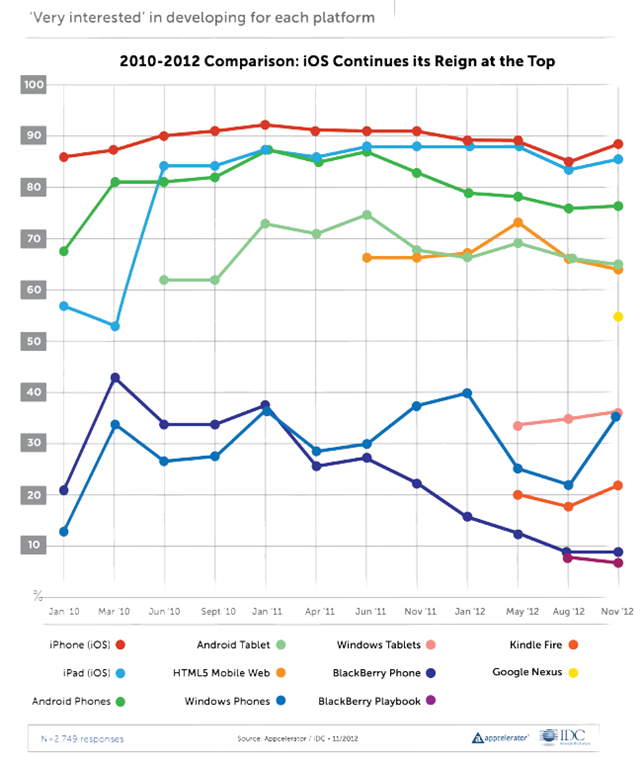
The report is still useful as a snapshot of how things look now, for cross-platform mobile developers. One question which is always asked, and therefore can be compared easily from one report to another, is the proportion of developers who are “very interested” in developing for each platform.

image

The top 5 contenders here are relatively stable, with Apple iOS top (iPhone and iPad), Android next (phone and tablet), and HTML5 Mobile Web also strong at about 65%.

The lower ranges are more interesting, as developers change their minds about prospects for the minority players. Windows Phone dived to around 22% in August 2012 but grew strongly to 36% in this report. Windows tablets, which we should probably take to mean the new Windows 8 app platform, is about the same. BlackBerry has declined from over 40% in March 2010 to 9% today, though I would suggest this will inevitably increase in the next report which will be after the launch of BlackBerry 10.

What else is interesting? One thing is Apple “fragmentation”. The problem here is that Apple iOS now has six screen sizes, once you add iPad mini and iPhone and iPad with or without high-res Retina displays. This gives me pause for thought. The challenge of mobile apps is now closer to that of desktop apps, where you do not know what display will be used or how users will choose to  size the application window. Intelligent layout and scaling is key.

Apple is also increasingly awkward to work with:

More generally, 90% of developers believe that Apple has become more difficult, or about the same, to deal with over the past three years when it comes to application
submission, fragmentation, and monetization.

Part of the report concerns Microsoft Surface. This focus is puzzling, in that it is the Windows 8 app platform which really matters, rather than Surface itself. Another oddity is the questions put, with no option to say “Surface is great”. The most positive option was:

It is a nice piece of hardware, but Windows 8 needs a lot more than that to be successful

A rather obvious statement which apparently won the agreement of 36% of developers.

The report gets even sillier when it comes to market disruption:

The top three companies that developers perceive to be ripe for disruption are a veritable who’s-who of the biggest tech darlings

say Appcelerator and IDC. It is true; but the figures are tiny:

Microsoft (8% of respondents), Google (7% of respondents), and Facebook (7% of respondents).

In other words, over 90% of developers believe these three companies are not likely to be disrupted soon; a figure that strikes me as conservative, especially for Microsoft.

More impressive is that over 60% of developers believe Facebook will lose out in future to a mobile-first social startup. This was also true last time round; 66% in Q3 2012 and 62% in Q4 2012.

The length of time it took Facebook to release just a single native iOS app, coupled with the fact that a corresponding native Android app is still MIA, has proven that the company does not yet have a viable cross-platform mobile strategy.

say Appcelerator and IDC. A fair point; but Facebook’s primary asset is its network of relationships rather than its software and it is not easy to disrupt. I would also guess that disruption is more likely to come from Google as it promotes Google+ and builds it more aggressively, perhaps, into Android, along with apps for iOS and other platforms as needed, than from a startup. But like the developers in this survey, I am guessing.

The Windows 8 app platform: how is it going? A few clues from developers

One way of looking at Microsoft’s Windows 8 strategy is as an attempt to establish a new tablet platform. By welding the tablet platform to the desktop platform, Microsoft ensured that every customer who wanted the latest Windows release would also get the tablet release, though some are stuck with keyboard and mouse to control it. The downside is that some users who would have upgraded to Windows 8 if it had been less radical will stick with Windows 7. Microsoft is betting that despite the controversy, the hybrid operating system is a better bet for the difficult task of creating a new ecosystem than building a completely new tablet operating system that few would have purchased.

So how is the new platform doing? I asked on Twitter for developers with apps on both Windows Phone 8 and Windows 8 to let me know how the rate of sales or downloads compare.

One was the maker of Cineworld, a cinema listing app for the UK and Ireland. He reported:

my cineworld app has about 1.8K downloads a month on WP.. on #win its a few hundred

The other was an app for fans of Manchester United football club called 1st4Fans:

Windows 8 is 70/day. Windows Phone is 130/day

Another was the maker of Barcode Generator:

Barcode Generator stats say 32K download since Aug and several hundreds dwn/day. Looks pretty good, isn’t it?

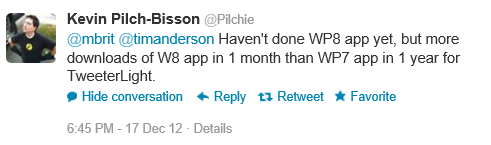
The author of TweeterLight says that he has “more downloads of W8 app in 1 month than WP7 app in 1 year”, showing that not everyone is finding the phone platform bigger than the tablet platform, though a key factor is that there is an official Twitter client for the phone but not for new-style Windows 8:

image

TweeterLight is also a paid-for app, which means fewer downloads and perhaps avoidance of the Twitter throttling that has afflicted the free clients.

Others are reporting a boom in Windows Phone downloads, like Lestyn Jones who says:

I’m finding that my #win8 app downloads are slowly growing where as my #wp8 have skyrocketed.

Put that together with the Cineworld stats – 1.8K per month for an app that is only relevant in the UK and Ireland. It does look as if Windows Phone has been considerably reinvigorated by the launch of Windows Phone 8.

Returning to Windows 8 though, my initial reaction was that these responses are not an impressive start for Microsoft’s new platform, considering the wide usage of Windows on the desktop.

My further reflection though is this. I find myself more willing to try out new-style apps on Windows 8 than desktop apps either on Windows 8 or previous versions, thanks to the ease of installation and removal, discovery through the store, and the additional security of the app sandbox. An interesting question to ask then: if Microsoft had not created this new app platform, how many of these niche apps would have been downloaded as desktop applications?

Despite its imperfections and mixed reception, at least Windows 8 now has an app platform.

This is a small sample and other reports would be welcome.

Xamarin brings C# to development of apps for the Mac App Store

Xamarin has released Xamarin Mac which adds Mac support to the existing iOS and Android compilers from the company:

  • MonoTouch: apps for iPhone and iPad using the MonoDevelop IDE on the Mac
  • Mono for Android: apps for Android using either Visual Studio or MonoDevelop
  • Xamarin.Mac: apps for Mac OS X using MonoDevelop on the Mac

The major platforms missing from the above are Windows and Linux (unless you count Android), even though Mono began as a Linux implementation of Microsoft’s .NET platform.

Xamarin says that a Windows version is not necessary since you can use Microsoft’s tools to code in C# for Windows desktop and Windows phone.

You can also get Mono for Windows, Mac and Linux from the old Mono project site.

Why would you bother with paid-for Xamarin.Mac when you can get Mono for Mac as a free download? There is even a Mac packager which lets you create a standalone package for your Mono app. A good question, but I guess the answer is the benefit of Xamarin-specific libraries and support from the company. Xamarin has also done the work to ensure that you can distribute your app via the Mac App Store.

Xamarin.Mac costs $399 for personal use, or $999 for an enterprise license which allows internal as well as app store distribution. A one year, one seat license with priority support costs $2,499.

Xamarin knows how to charge then, and in the end that may be a key reason why the project is working, whereas Mono struggled as an open source project that never had the resources it deserved.

The Mono Project site now says that it is “sponsored by Xamarin” so open source developers are getting some benefit from the commercial offshoot.

Xamarin is important for the C# language, since it represents a viable implementation which is independent of Microsoft.

Trial apps and in-app purchases easy to hack on Windows 8 says Nokia engineer

A principal engineer at Nokia, Justin Angel, has written a piece showing how to hack apps on Windows 8, undermining their potential revenue for the app vendors. “This is an educational article written in the hope both developers and Microsoft can benefit from an open exchange of knowledge,” he says, adding that the article was written in his own time and has nothing to do with his employer.

The hacks he describes cover:

  • Compromising in-app purchases by modifying data held locally, such as app currency.
  • Converting trial apps to full versions without paying
  • Removing ads from games
  • Reducing the cost of items offered for in-app purchase
  • Injecting Javascript  into the Internet Explorer 10 process in order to bypass trial restrictions

image

There is an inherent security weakness in any app that has to work offline, since the decryption keys also have to be stored locally; this inherent weakness is not unique to Windows 8. However, Angel argues that Microsoft could do more to address this, such as checking for tampered app files and preventing Javascript injection. Code obfuscation could also mitigate the vulnerabilities.

Although Angel is writing in his own time, the issues are relevant to Nokia, which makes Windows Phone devices and may make Windows 8 tablets in future.

Should Angel have revealed the cracks so openly and in such detail? This is an old debate; but it is sure to increase pressure on Microsoft to improve the security of the platform.

Microsoft Silverlight: shattered into a million broken urls

There has been some Twitter chatter about the closure of silverlight.net, Microsoft’s official site for its lightweight .NET client platform. multimedia player and browser plug-in.

image

I am not sure when it happened, but it is true. Silverlight.net now redirects to a page on MSDN. Some but not all of the content has been migrated to MSDN, but Microsoft has not bothered to redirect the URLs, so most of the links out there to resources and discussions on Silverlight will dump you to the aforementioned generic page.

One of the things this demonstrates is how short-sighted it is to create these mini-sites with their own top-level domain. It illustrates how fractured Microsoft is, with individual teams doing their own thing regardless. Microsoft has dozens of these sites, such as windowsazure.com, windowsphone.com, asp.net, and so on; there is little consistency of style, and when someone decides to fold one of these back to the main site, all the links die.

What about Silverlight though? It was always going to be a struggle against Flash, but Silverlight was a great technical achievement and I see it as client-side .NET done right, lightweight, secure, and powerful. It is easy to find flaws. Microsoft should have retained the cross-platform vision it started with; it should have worked wholeheartedly with the Mono team for Linux-based platforms; it should have retained parity between Windows and Mac; it should never have compromised Silverlight with the COM support that arrived in Silverlight 4.

The reasons for the absence of Silverlight in the Windows Runtime on Windows 8, and in both Metro and desktop environments in Windows RT, are likely political. The ability to run Silverlight apps on Surface RT would enhance the platform, and if COM support were removed, without compromising security.

XAML and .NET in the Windows Runtime is akin to Silverlight, but with enough differences to make porting difficult. There is an argument that supporting Silverlight there would confuse matters, though since Silverlight is still the development platform for Windows Phone 8 it is already confusing. Silverlight is a mature platform and if Microsoft had supported it in the Windows Runtime, we would have had a better set of apps at launch as well as more developer engagement.

I posted that Microsoft’s Silverlight dream is over in October 2010, during Microsoft’s final Professional Developers Conference, which is when the end of Silverlight became obvious. It lives on in Windows Phone, but I would guess that Windows Phone 8.5 or 9.0 will deprecate Silverlight in favour of the Windows Runtime. A shame, though of course it will be supported on the x86 Windows desktop and in x86 Internet Explorer for years to come.

Windows 8 Flash Player hassles: Windows update integration means IE users get an old version

Internet Explorer 10 in Windows 8 features a new approach to Adobe Flash Player updates. These are now delivered via Microsoft’s Windows Update, so you get security updates without having to suffer Adobe’s separate updater.

That seems a good thing, and for security it probably is, but it seems that the price of this convenience is that you run an old version. See the table here:

image

Note that Windows 7 users have version 11.5.502.110, while Windows 8 has only 11.3.376.12. There are major new features only available in the updated version.

Trying to run the installer for the latest debug version fails with a misleading error message:

image

Umm, no it is not the latest version.

Of course you can get round this by running Google Chrome:

image

[the OS is actually 64-bit but Chrome runs as a 32-bit process].

This still strikes me as disappointing. You may want to run IE, if you like having the browser maintained and managed by the OS vendor, and in Windows RT (the ARM version of Windows) there is no other option. That is becoming an impossible choice for developers. Chrome offers WebKit (the browser engine used on most mobile devices and in Safari on the Mac) as well as nice tools and hooks for debugging, and Chrome-specific support from vendors like Adobe makes it hard to avoid.

Visual Studio 2012 gets Windows XP targeting, Team Foundation Server fixes

Microsoft has released Update 1 for Visual Studio 2012. New in this update is the ability to target Windows XP with C++ applications. Brian Harry has a list of what has changed here, based on the preview from a month ago.

image

There are many updates and fixes for Team Foundation Server (TFS), including support for the Kanban development methodology in TFS Web Access. You can now do load testing, unit testing and coded UI tests for SharePoint apps. Another notable fix is that you can do mixed managed/native debugging in Windows Store (that is, Metro) apps.

The TFS update is not seamless, as Harry explains:

It’s actually a full new install (though it will silently uninstall the older version and install the update so it feels like a “patch”).  However, we still have some work to do to make this as seamless as possible.  If you’ve done any customization of your TFS install (enabling https, changing ports, etc) you will need to reapply those customizations after installing the update.

Harry also says there will not be an SP1, except that there might be:

As we are currently thinking about it, there will be no SP1.  We have changed the model from a single Service Pack between major releases to a sequence of “Updates”.  So you can, kind of, think of Update 1 as SP1.  I suppose it’s possible that, at some point, we will decide to name one of the Updates as an “SP” but that won’t really change anything.

Confused? Surely not.

You can get the update here or an offline (complete) installer is here.

Finally, I was interested to see some of the issues which developers find annoying highlighted in the comments to Soma Somasegar’s blog:

  • XAML 2009 is not supported in the editor
  • Expression Blend is still in preview
  • The need for a developer license to build Windows Store apps is a constant irritation. The complaint is not about needing a license to deploy to the Store, but about Visual Studio refusing to build Windows Store apps unless you obtain a free online license, which installs some sort of key on your machine, and which expires after a few months.

No complaints about monochrome icons though, so I guess the new look has been accepted if not actually loved by developers.

Kingston DataTraveler Workspace and Hands On with Windows to Go

I received a Kingston DataTraveler Workspace for review, one of the few devices supported for use as a Windows to Go drive. Windows to Go is a way of running Windows 8 from a USB drive. If you need to take work home and continue on a home PC, Windows to Go lets you do so in an isolated environment. It is also a useful way to protect sensitive data, since there is an option to encrypt the drive with Bitlocker, the encryption method built into recent versions of Windows.

image

The DataTraveler Workspace is a 32GB USB 3.0 drive. It follows the usual convention of having a blue connector to indicate USB 3.0 support.

image

USB 3.0 is recommended but not required for Windows to Go. If you run from USB 3.0, the performance should be equal or better than running from a hard drive. It will work with USB 2.0, but will be slower.

Microsoft’s documentation for Windows to Go is not that great. Still, it is easy to get started. All you need is a supported USB drive and Windows 8 Enterprise (or any x86 version if you do not mind using the command line).

First, mount the Windows 8 Enterprise install DVD. Identify install.wim from the Sources folder on the DVD and make sure it is accessible.

Next, connect the USB drive to a USB 3.0 port if possible.

Then start the Windows To Go wizard – to find it search Settings and not Apps on the Start screen. [If you do not have Windows 8 Enterprise, check the scripting guide as well as the licensing requirements.]

image

Run the wizard and select the target USB drive

image

The wizard will find install.wim automatically, or you can help it out if necessary.

Optionally set a BitLocker password. Recommended, or why do you need Windows to Go? Do not forget it though.

image

Finish the wizard and after a few minutes you have a Windows to Go device ready.

I stuck it into a Dell laptop running Windows 7 and booted. This is essentially a new install of Windows 8, so it did all the detecting devices and welcome stuff. I signed in with a Microsoft account and despite only having USB 2.0 on this laptop, was pleased with the performance.

image

I noticed that the normal SSD drive on the laptop was invisible in Explorer.

image

On further investigation, I found it had been marked offline by my system policy – I don’t recall setting this, so it is a default.

image

For my next experiment, I shut down, stuck the USB drive into a Samsung Slate, and rebooted. The slate did not boot from USB by default, but I did find Windows To Go startup options, which I believe are in all versions of Windows 8, which let you set an option to use it.

image

That worked. Then – disaster. The slate has no keyboard, and only one USB port. I was prompted for the Bitlocker password, but no matter where I tapped, the on-screen keyboard did not pop up for me to enter it. I had to find the dock for the slate, which has an additional USB port, plug in a USB keyboard, and retry. I can see this being a showstopper in some scenarios.

That worked though, and although I am not yet clear from the documentation how free and easy you can be moving Windows To Go between different hardware, I was impressed by how quickly and easily it started. The only inconvenience is that I had to re-enter the wifi key, presumably because the wifi adaptor on the slate is detected as a different device from the one on the Dell.

Pretty good, but this being a new install of Windows 8 I have considerable work ahead of me to make it useful by installing Office and other applications. How does this work in a business where you need stuff pre-installed?

The answer is here, if you can make sense of it: Microsoft’s instructions on creating a custom Windows image that you can use for multiple Windows To Go drives. It is not trivial; you start by downloading and install the Windows ADK (Windows Assessment and Deployment Kit) for Windows 8.

Another day maybe. For now, I am impressed. The main snag is that few of my PCs have USB 3.0.

Windows To Go does not work on Microsoft’s Surface RT tablet, but will work on Surface Pro when that is released.

Update: another issue with Windows To Go turned up when I tried running it on a netbook. I was impressed with the performance and that it worked, after a few minutes “detecting devices”. However when I launched Word 2013 it said Office needs activation because of changed hardware. Presumably this will be a real problem if you regularly use your Windows To Go device on different PCs, which as I understand it is how it is meant to be used.

Office activation is part of Microsoft’s copyright protection for Office and I presume that after a certain number of activations it will no longer activate.


Apps sell better with Live Tiles, says Nokia, with other tips for phone developers

I attended an online seminar by Nokia’s Jure Sustersic on Windows Phone 8 development. It was a high level session so not much new, though Sustersic says the 7.8 update for existing 7.x Windows Phones  is coming very soon; he would not announce a date though.

The slide that caught my eye was one on how to make more profitable apps, including some intriguing statistics. In particular, according to Sustersic:

  • Freemium apps (free to download but with paid upgrades or in-app purchases) achieve 70 times as many downloads and 7 times more revenue
  • The top 50 apps are 3.7 times more likely to have Live Tiles
  • The top 50 apps are 3.2 times more likely to use Push Notifications
  • The top 50 apps are updated every 2-3 months
  • The fastest growth is in new markets, so localize


image

Of course what Windows Phone developers want most is a larger market, so for Nokia to sell more phones. Random reboots aside, Windows Phone 8 has been well received, but it an uphill task.

I covered the Windows Phone 8 development platform in summary here.