Tag Archives: android

LibreOffice is four years old, plans Android version

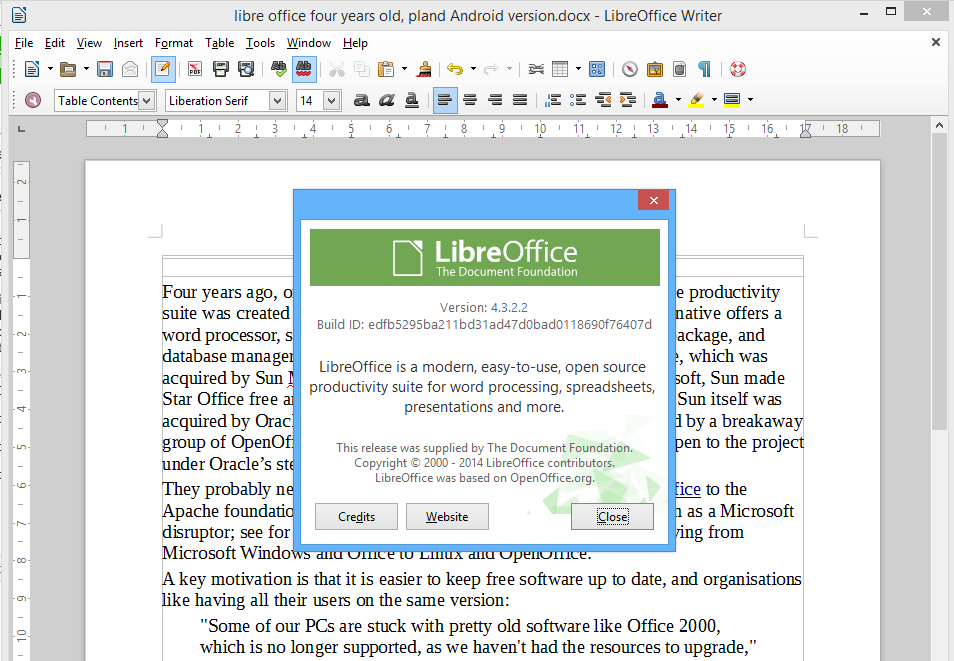
Four years ago, on 28th September 2010, the open source LibreOffice productivity suite was created by forking OpenOffice. This Microsoft Office alternative offers a word processor, spreadsheet, presentation graphics, vector drawing package, and database manager. Its origins are in a German suite called Star Office, which was acquired by Sun Microsystems in 1999. In an effort to disrupt Microsoft, Sun made Star Office free and open source, creating OpenOffice.org. However Sun itself was acquired by Oracle Corporation in 2010, and LibreOffice was created by a breakaway group of OpenOffice contributors who were wary of what might happen to the project under Oracle’s stewardship.

image

They probably need not have worried, since Oracle donated OpenOffice to the Apache foundation in 2011. It is still performing its intended function as a Microsoft disruptor; see for example this report of the Italian city of Udine moving from Microsoft Windows and Office to Linux and OpenOffice.

A key motivation is that it is easier to keep free software up to date, and organisations like having all their users on the same version:

"Some of our PCs are stuck with pretty old software like Office 2000, which is no longer supported, as we haven’t had the resources to upgrade," Gabriele Giacomini, the innovation and economic development councillor for the municipality of Udine, told ZDNet.

"By switching to open source, we will have the chance to allow our employees to work with the latest version of the suite”

Microsoft, of course, wants to address this by persuading users to subscribe to Office rather than buying it outright; though this does not solve the problem of out of date Windows versions (but watch this space).

But what about LibreOffice? What is the point of having two major open source productivity suites based on essentially the same products?

Good question; but one possible differentiator is that LibreOffice is working on an Android port. The Document Foundation, which runs the LibreOffice project, is inviting tenders for implementation of the suite on Android, complete with a basic interface for integrating with the user’s “preferred cloud storage”.

Another point of interest is that the Foundation is asking for commercial tenders rather than hiring its own coders to work with the open source community.

That said, there is already an Android port of OpenOffice, called AndrOpen Office, though this is a fork and not an official Apache OpenOffice project.

Are these multiple forks healthy proliferation, or open source confusion? That depends on your point of view, though it does show the ability of the open source community to respond to obvious needs.

It seems to me though that the suite would be more attractive to businesses if LibreOffice and OpenOffice could merge, and develop an official Android version of the suite.

My guess is that productivity software on tablets (and phablets) will be a key battleground as users do an increasing proportion of their work on mobile devices rather than PCs or laptops. Microsoft already has an iOS version of Office, and one for Android in preparation. There is also a version of Office for the Windows 8 “Metro” personality in preparation.

Open source advocate Glyn Moody has posted about the LibreOffice project here.

Android apps on Chrome: how it works and what it may become

Google announced at its I/O conference in June 2014 that Android apps are coming to its Chrome OS. Earlier this month product managers Ken Mixter and Josh Woodward announced that the first four Android apps are available in the Chromebook app store: Duolingo, Evernote, Sight Words and Vine.

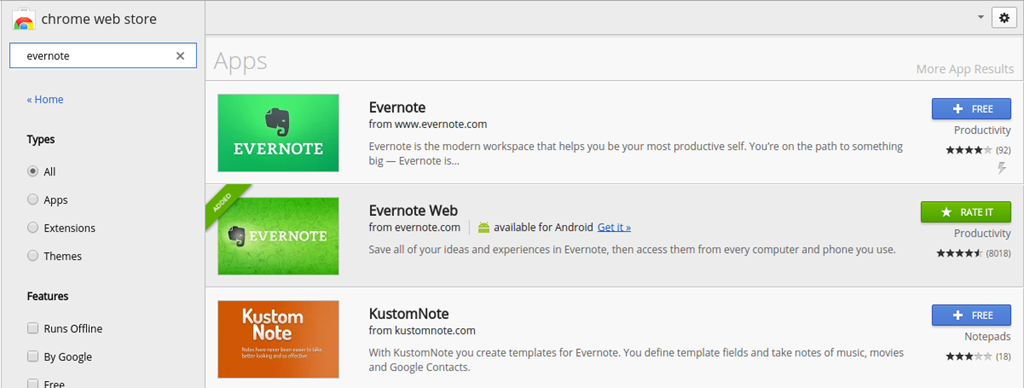
I delayed posting about this until I found the time to investigate a little into how it works. I fired up an Acer C720 and installed Evernote from the Chrome web store (in addition to Evernote Web which was already installed).

image

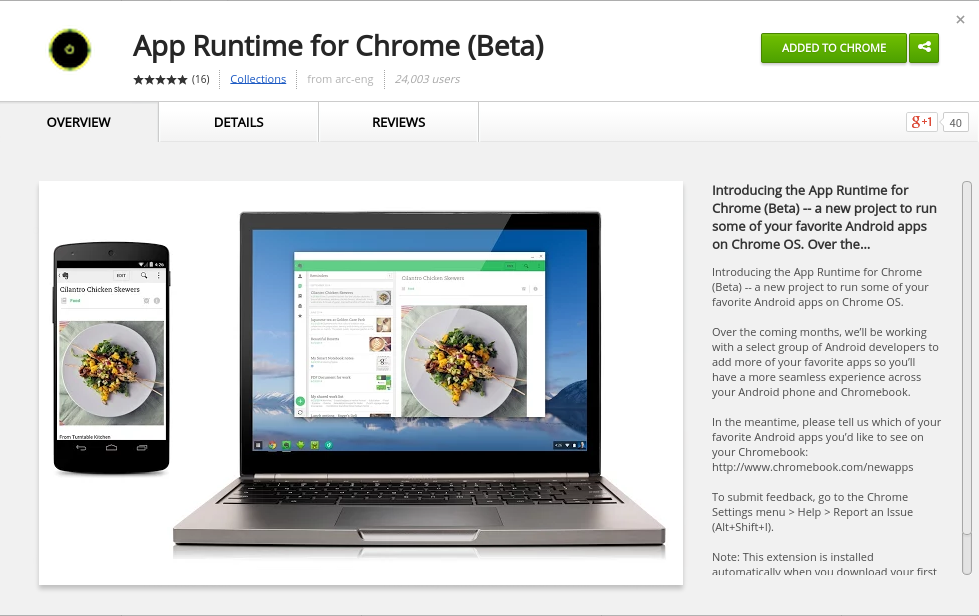
When you install your first Android app, Chrome installs the App Runtime for Chrome (Beta) (ARC) automatically.

image

Incidentally, I found Evernote slightly odd on Chromebook since it is runs in a window although the app is designed to run full screen, as it would on a phone or tablet. This caught me out when I went to settings, which looks like a dialog, and closed it with the x at the top right of the window. Of course that closes the app entirely. If you want to navigate the app, you have to click the back arrow at top left of the window instead.

But what is the App Runtime for Chrome? This seems to be an implementation of the Android runtime for NaCl (Native Client), which lets you run compiled C and C++ code in the browser. If you browse the parts of ARC which are open source, you can see how it implements the Android Open Source Project (AOSP) for arch-nacl: a virtual processor running as a browser extension.

Not all of ARC is open source. The docs say:

Getting Started with ARC Open Source on Linux

=============================================

A small set of shared objects can be built which are part of ARC currently.

A fully running system cannot currently be built.

It is early days, with just four apps available, ARC in beta, and developers asked to contact Google if they are interested in having their Android apps run on Chrome OS. However, an independent developer has already ported ARC to desktop Chrome:

ARChon runtime lets you run unlimited number of Android APKs created with chromeos-apk on Chrome OS and across any desktop platform that supports Chrome.

The desktop version is unstable, and apps that need Google Play services run into problems. Still, think of it as a proof of concept.

In particular, note that this is Android Runtime for Chrome, not Android Runtime for Chrome OS. Google is targeting the browser, not the operating system. This means that ARC can, if Google chooses, become an Android runtime for every operating system where Chrome runs – with the exception, I imagine, of Chrome for iOS, which is really a wrapper for Apple’s web browser engine and cannot support NaCl, and Chrome for Android which does not need it.

Imagine that Google gets ARC running well on Windows and Mac. What are the implications?

The answer is that Android will become a cross-platform runtime, alongside others such as Flash (the engine in Adobe AIR) and Java. There has to be some performance penalty for apps written in Java for Android running in an Android VM in the browser; but NaCl runs native code and I would expect performance to be good enough.

This would make Android an even more attractive target for developers, since apps will run on desktop computers as well as on Android itself.

Might this get to the point where developers drop dedicated Windows or Mac versions of their apps, arguing that users can just run the Android version? An ARC app will be compromised not only in performance, but also in the way it integrates with the OS, so you would not expect this to happen with major apps. However, it could happen with some apps, since it greatly simplifies development.

Embarcadero RAD Studio XE7 (Delphi, C++Builder): is seven the magic number?

Embarcadero has released version 7 of its XE programming suite. The main products included are Delphi and C++ Builder, RAD development tools that share the same underlying libraries and visual designers but give developers a choice of language. Delphi uses an object-oriented evolution of Pascal.

image

Delphi is best known as a Windows Programming Tool – it used to be the main competition for Visual Basic – but over the last few years Embarcadero has added cross-platform Mac and mobile development with native compilers for OSX, iOS and Android. The IDE runs only on Windows but can compile for the Mac or for iOS New versions have come thick and fast – XE6 was released in April 2014 – so if you want to stay up to date, prefer for frequent upgrades or buy with a support and maintenance agreement. You can buy Delphi or C++ Builder separately if you do not require the suite.

The full RAD Studio also includes HTML 5 Builder, which supports mobile app development using Cordova (open source version of PhoneGap). There seems to be little new in HTML 5 Builder. An earlier PHP tool variously called Delphi for PHP and RadPHP was dropped some time back. I get the impression that Embarcadero is now more focused on its core good thing.

image

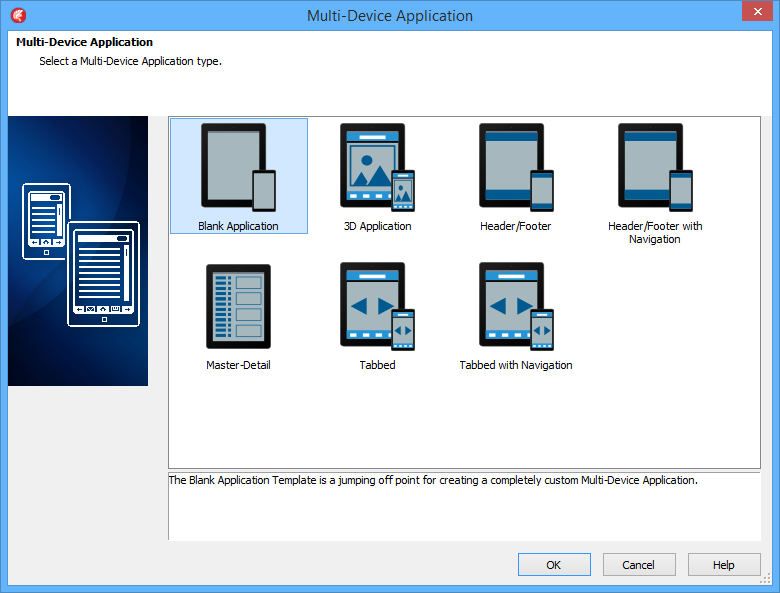
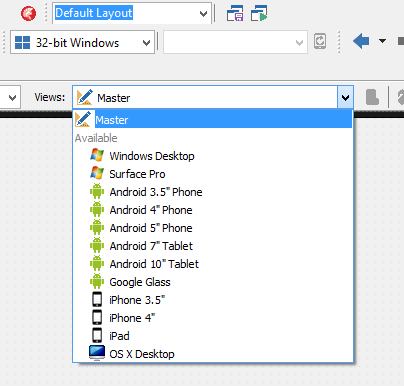
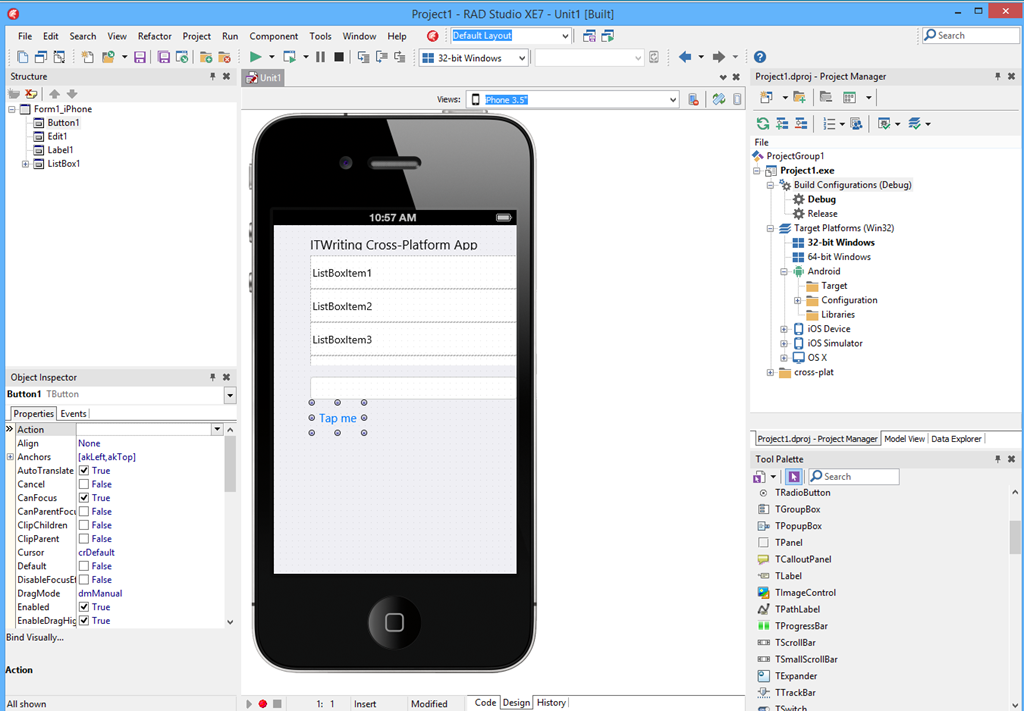
So what’s new? Making effective cross-platform development tools is not easy, with trade-offs between productivity (share more code) and writing the best app for each platform (share less code). This edition introduces a new approach to designing the user interface, called the Multi-Device Designer. It is based on a kind of inheritance. You build your base UI in a master form and write most of the event-handling code there. This master form is automatically adapted, to some extent, to other platforms. You can see how your form looks on these other platform by dropping down a list.

image

When you select the form for a specific platform, you can modify it for that platform. There is still only one form, but the platform-specific views override properties set in the master form. If you then further modify the master, the changes will flow down to the platform-specific forms unless properties have already been overridden.

image

My impression after a five-minute play is that you will indeed have to made modifications to get each form looking right; the automatically generated versions were not too good. There is still good productivity potential here presuming the designer proves to be robust.

A common criticism of Embarcadero’s approach is that visual controls are custom-drawn on each platform, rather than using true native controls. That does not matter at all, Embarcadero always assured me. It does matter though; and now in XE7 we have the beginning of a solution. There are a couple of optional Platform Native Controls, TEdit and TCalendar for iOS, which do use native controls. I suspect this will be popular and hope that more platform native controls arrive in due course.

App Tethering is a feature/library that lets you easily set up connectivity between Delphi/C++ Builder apps on a local network. The first version only supported Ethernet/Wi-Fi, but now Bluetooth support has come, including Bluetooth LE on Windows 8 and recent Android devices.

On Android, a new tool called Java2OP lets you generate Object Pascal interfaces for Java Android classes, which sounds handy.

Aside: the naming of this tool suggests that the language is now called Object Pascal again, rather than Delphi, which became the official name some years back. Object Pascal makes more sense to me.

The System.Threading library now includes a new parallel programming library, including Parallel For, task scheduling, and futures. Futures are a way of creating code that will run at an indeterminate time. You associate a variable with a function that calculates its value. That function will run when you access the value, or before that if a background thread is available.

The IDE now has limited Git support (local repository only).

Another new piece in XE7 is Enterprise Mobility Services, a REST-based middleware stack that runs as an ISAPI DLL in Microsoft’s IIS web server. This includes database connectivity (using the FireDAC library), user management (though not Active Directory integration as yet, as I understand it) and usage analytics.

If you are using IIS, why would you not use ASP.NET and the Web API? The answer is that with EMS you can do end-to-end Delphi/C++ Builder as well as getting the performance of native code on the server.

Challenges for Embarcadero and RAD Studio

In the nineties it was Delphi versus Visual Basic, and although most developers who gave Delphi serious attention discovered that it was superior in most ways to Microsoft’s tool, the big-company backing and integration with Microsoft’s overall platform meant that VB was not much disrupted (though we may have Delphi to thank for the appearance of native code compilation in VB).

Today Embarcadero is up against Xamarin, which is similar in that it gives Microsoft platform developers a route to cross-platform development for Mac, iOS and Android.

From what I hear, cross-platform support in RAD Studio has been successful in reinvigorating the product within its niche, but it is Xamarin that has grown explosively, thanks to a combination of the C# language, Visual Studio integration, and a degree of official endorsement from Microsoft. Whereas Xamarin fits with Microsoft’s Universal App concept, shared C# code across all platforms, RAD Studio takes its own path, avoiding .NET in favour of native executables.

[I realise that there is endless debate about what native means, and that while RAD Studio has a good claim to native code, it is weak when it comes to native controls as noted above].

Unlike Xamarin, which has its own cross-platform IDE for Windows and Mac, RAD Studio requires Mac developers to use a PC or a Windows VM.

Embarcadero chose not to support Windows 8 “Metro” or Store apps, a decision which now looks wise, though it could yet work against them if Universal Apps are more compelling in Windows vNext. Another omission is Windows Phone; perhaps this does not matter greatly given its small market share, but within the Microsoft platform community it is a bigger lack than simple market share implies.

The advantage of the RAD Studio approach is that it is less dependent on Microsoft’s constant changes of direction, and performance is generally good. I have always been a fan of Delphi. There were some quality concerns when the FireMonkey cross-platform UI library was first adopted, but now in RAD Studio XE7 there is reasonable hope that the library is mature enough.

RAD Studio is the obvious route for long-time Delphi or C++ Developers migrating to mobile; it is a viable niche but I question whether it can ever move beyond it to grab a share of the wider mobile development market.

More information here.

Asus bets on everything with new UK product launches for Android, Google Chromebook and Microsoft Windows

Asus unveiled its Winter 2014 UK range at an event in London yesterday. It is an extensive range covering most bases, including Android tablets, Windows 8 hybrids, Google Chromebooks, and Android smartphones.

image

Asus never fails to impress with its innovative ideas – like the Padfone, a phone which docks into a tablet – though not all the ideas win over the public, and we did not hear about any new Padfones yesterday.

The company’s other strength though is to crank out well-made products at a competitive price, and this aspect remains prominent. There was nothing cutting-edge on show last night, but plenty of designs that score favourably in terms of what you get for the money.

At a glance:

  • Chromebook C200 dual-proc Intel N2830 laptop 12″ display £199.99 and C300 13″ display £239.99
  • MeMO Pad Android tablets ME176C 7″ £119 and 8″ ME181 (with faster Z3580 2.3 GHz quad-core processor) £169
  • Transformer Pad TF103C Android tablet with mobile keyboard dock (ie a tear-off keyboard) £239
  • Two FonePad 7″ Android phablets: tablets with phone functionality, LTE in the ME372CL at £129.99  and 3G in the ME175CG at £199.99.
  • Three Zenfone 3G Android phones, 4″ at £99.99, 5″ at £149.99 and 6″ at £249.99.
  • Transformer Book T200 and T300 joining the T100 (10.1″ display) as Windows 8 hybrids with tear-off keyboards. The T200 has an 11.6″ display and the T300 a 13.3″ display and processors from Core i3 to Core i7 – no longer just a budget range. The T200 starts at £349.
  • Transformer Book Flip Windows 8.1 laptops with fold-back touch screens so you can use them as fat tablets. 13.3″ or 15.6″ screens, various prices according to configuration starting with a Core 13 at £449.
  • G750 gaming laptops from £999.99 to £1799.99 with Core i7 processors and NVIDIA GeForce GTX 800M GPUs.
  • G550JK Gaming Notebook with Core i7 and GTX 850M GPU from £899.99.

Unfortunately the press event was held in a darkened room useless for photography or close inspection of the devices. A few points to note though.

The T100 is, according to Asus, the world’s bestselling Windows hybrid. This does not surprise me since with 11 hr battery life and full Windows 8 with Office pre-installed it ticks a lot of boxes. I prefer the tear-off keyboard concept to complex flip designs that never make satisfactory tablets. The T100 now seems to be the base model in a full range of Windows hybrids.

On the phone side, it is odd that Asus did not announce any operator deals and seems to be focused on the sim-free market.

How good are the Zenfones? This is not a review, but I had a quick play with the models on display. They are not high-end devices, but nor do they feel cheap. IPS+ (in-plane switching) displays give a wide viewing angle. Gorilla Glass 3 protects the screen; the promo video talks about a 30m drop test which I do not believe for a moment*. The touch screens are meant to be responsive when wearing gloves. The camera has a five-element lens with F/2.0 aperture, a low-light mode, and “time rewind” which records images before you tap. A “Smart remove” feature removes moving objects from your picture. You also get “Zen UI” on top of Android; I generally prefer stock Android but the vendors want to differentiate and it seems not to get in the way too much.

Just another phone then; but looks good value.

As it happens, I saw another Asus display as I arrived in London, at St Pancras station.

image

The stand, devoted mainly to the T100, was far from bustling. This might be related to the profile of Windows these days; or it might reflect the fact that the Asus brand, for all the company’s efforts, is associated more with good honest value than something you stop to look at on the way to work.

For more details see the Asus site or have a look in the likes of John Lewis or Currys/ PC World.

*On the drop test, Asus says: “This is a drop test for the Gorilla glass, and is dropping a metal ball on to a pane of it that is clamped down, not actually a drop of the phone itself.”

Farewell Nokia X? Not quite, but the signs are clear as Microsoft bets on Universal Apps

I could never make sense of Nokia X, the Android-with-Microsoft-services device which Nokia announced less than a year ago at Mobile World Congress in Barcelona:

If Nokia X is a worse Android than Android, and a worse Windows Phone than Windows Phone, what is the point of it and why will anyone buy?

Nokia X is Android without Google’s Play Store; if Amazon struggles to persuade developers to port apps to Kindle Fire (another non-Google Android) then the task for Nokia, lacking Amazon’s ecosystem, is even harder. Now, following Microsoft’s acquisition, it makes even less sense: how can Microsoft simultaneously evangelise both Windows Phone and an Android fork with its own incompatible platform and store?

Nokia X was meant to be a smartphone at feature phone prices, or something like that, but since Windows phone runs well on low-end hardware, that argument does not stand up either.

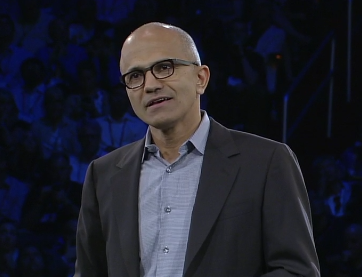
Now Nokia X is all but dead. Microsoft CEO Satya Nadella:

image

Second, we are working to integrate the Nokia Devices and Services teams into Microsoft. We will realize the synergies to which we committed when we announced the acquisition last September. The first-party phone portfolio will align to Microsoft’s strategic direction. To win in the higher price tiers, we will focus on breakthrough innovation that expresses and enlivens Microsoft’s digital work and digital life experiences. In addition, we plan to shift select Nokia X product designs to become Lumia products running Windows. This builds on our success in the affordable smartphone space and aligns with our focus on Windows Universal Apps.

and former Nokia CEO Stephen Elop, now in charge of Microsoft devices:

In addition to the portfolio already planned, we plan to deliver additional lower-cost Lumia devices by shifting select future Nokia X designs and products to Windows Phone devices. We expect to make this shift immediately while continuing to sell and support existing Nokia X products.

Nadella has also announced a huge round of job cuts, mainly of former Nokia employees, around 12,500 which is roughly 50% of those who came over. Nokia’s mobile phone business is no all Windows Phone (Lumia) and Nokia X. In addition, it sells really low-end phones, the kind you can pick up for £10 at a supermarket, and the Asha range which are budget smartphones. Does Microsoft have any interest in Asha? Elop does not even mention it.

It seems then that Microsoft is focusing on what it considers strategic: Windows Phone at every price point, and Universal Apps which let developers create apps for both Windows Phone and full Windows (8 and higher) from a single code base.

Microsoft does also intend to support Android and iOS with apps, but has no need to make its own Android phones in order to do so.

My view is that Nokia did an good job with Windows Phone within the constraints of a difficult market; not perfect (the early Lumia 800 devices were buggy, for example), but better by far than Microsoft managed with any other OEM partner. I currently use a Lumia 1020 which I regard as something of a classic, with its excellent camera and general high quality.

It seems to me reassuring (from a Windows Phone perspective) that Microsoft is keeping Windows Phone engineering in Finland:

Our phone engineering efforts are expected to be concentrated in Salo, Finland (for future, high-end Lumia products) and Tampere, Finland (for more affordable devices). We plan to develop the supporting technologies in both locations.

says Elop, who also notes that Surface and Xbox teams will be little touched by today’s announcements.

Incidentally, I wrote recently about Universal Apps here (free registration required) and expressed the view that Microsoft cannot afford yet another abrupt shift in its developer platform; the continuing support for Universal Apps in the Nadella era makes that less likely.

Speculating a little, it also would not surprise me if Universal Apps were extended via Xamarin support to include Android and iOS – now that is really a universal app.

Will Microsoft add some kind of Android support to Windows Phone itself? This is rumoured, though it could be counter-productive in terms of winning over developers: why bother to create a Windows Phone app if your Android app will kind-of run?

Further clarification of Microsoft’s strategy is promised in the public earnings call on July 22nd.

Amazon Mobile SDK adds login, data sync, analytics for iOS and Android apps

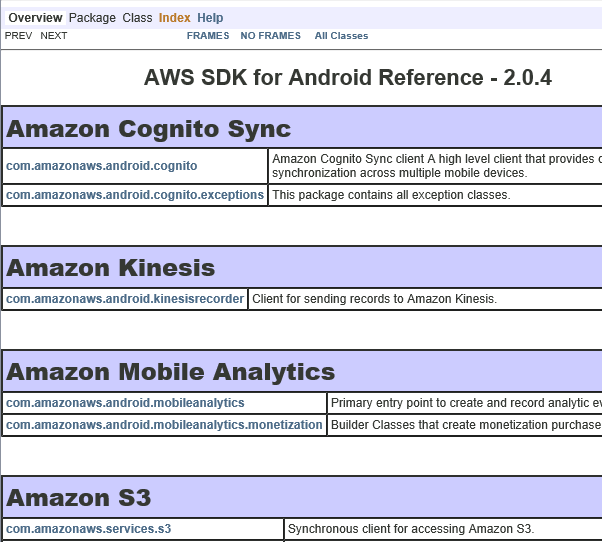
Amazon Web Services has announced an updated AWS Mobile SDK, which provides libraries for mobile apps using Amazon’s cloud services as a back end. Version 2.0 of the SDK supporting iOS, and Android including Amazon Fire, is now in preview, adding several new features:

Amazon Cognito lets users log in with Amazon, Facebook or Google and then synchronize data across devices. The data is limited to a 20MB, stored as up to 20 datasets of key/value pairs. All data is stored as strings, though binary data can be encoded as a base64 string up to 1MB. The intent seems to be geared to things like configuration or game state data, rather than documents.

Amazon Mobile Analytics collects data on how users are engaging with your app. You can get data on metrics including daily and monthly active users, session count and average daily sessions per active user, revenue per active user, retention statistics, and custom events defined in your app.

Other services in the SDK, but which were already supported in version 1.7, include push messaging for Apple, Google, Fire OS and Windows devices; Amazon S3 storage (suitable for any amount of data, unlike the Cognito sync service), SimpleDB and Dynamo DB NoSQL database service, email service, and SQS (Simple Queue Service) messaging.

Windows Phone developers or those using cross-platform tools to build mobile apps cannot use Amazon’s mobile SDK, though all the services are published as a REST API so you could use it from languages other than Objective-C or Java by writing your own wrapper.

The list of supported identity providers for Cognito is short though, with notable exclusions being Microsoft accounts and Azure Active Directory. Getting round this is harder since the federated identity services are baked into the server-side API.

image

Microsoft repositions for a post-Windows client world

Microsoft CEO Satya Nadella has penned a rather long public letter which sets out his ambitions for the company. It is not full of surprises for those who have been paying attention, but confirms what we are already seeing in projects such as Office for iPad: Microsoft is positioning itself for a world in which the Windows client does not dominate.

The statement that stands out most to me is this one (the highlighting is mine):

Apps will be designed as dual use with the intelligence to partition data between work and life and with the respect for each person’s privacy choices. All of these apps will be explicitly engineered so anybody can find, try and then buy them in friction-free ways. They will be built for other ecosystems so as people move from device to device, so will their content and the richness of their services

Microsoft is saying that it will build work/personal data partitioning into its applications, particularly one would imagine Office, and that it will write them for ecosystems other than its own, particularly one would imagine iOS and Android.

This is a big change from the Windows company, and one that I will expect to see reflected in the tools it offers to developers. If Microsoft is not trying to acquire Xamarin, you would wonder why not. It has to make Visual Studio a premier tool for writing cross-platform mobile applications. It also has to address the problem that an increasingly large proportion of developers now use Macs (I do not know the figures, but observe at some developer conferences that Windows machines are a rarity), perhaps via improved online developer tools or new tools that themselves run cross-platform.

Nadella is careful to avoid giving the impression that Microsoft is abandoning its first-party device efforts, making specific mention of Windows Phone, Surface, Cortana and Xbox, for example.

Our first-party devices will light up digital work and life. Surface Pro 3 is a great example – it is the world’s best productivity tablet. In addition, we will build first-party hardware to stimulate more demand for the entire Windows ecosystem. That means at times we’ll develop new categories like we did with Surface. It also means we will responsibly make the market for Windows Phone, which is our goal with the Nokia devices and services acquisition.

Here is another statement that caught my eye:

We will increase the fluidity of information and ideas by taking actions to flatten the organization and develop leaner business processes.

The company has become increasingly bureaucratic over the years, and that is holding back its ability to be agile (though some teams seem to move at high speed regardless; I would instance the Azure team as an example).

Nadella’s letter has too many flowery passages of uncertain meaning – “We will reinvent productivity for people who are swimming in a growing sea of devices, apps, data and social networks. We will build the solutions that address the productivity needs of groups and entire organizations as well as individuals by putting them at the center of their computing experiences.” – but I do not doubt that major change is under way.

Google I/O 2014: impressive momentum, no wow moments

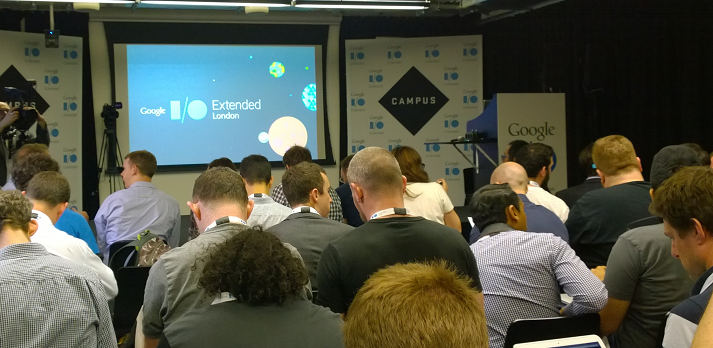
I am not in San Francisco but attended Google I/O Extended in London yesterday, to hear the keynote and a couple of sessions from Google’s annual developer conference.

image

I found the demographics different than most IT events I attend: a younger crowd, and plenty of start-ups and very small businesses, not at all enterprisey (is that a word?)

image

The main announcements:

A new version of Android, known as Android L (I don’t know if this will expand eventually to Lollipop or Liquorice or some such). Big release  with over 5,000 new APIs, we were told (when does Android start being called bloated, I wonder?). Themes include a new visual style called Material Design (which extends also to the Web and to Chrome), and suitability for more device types including Android TV, Android Wear (smart watches) and Android Auto. A new hardware accelerated graphics API called Android Extension Pack which implements OpenGL ES for better game performance, with support from NVIDIA Tegra. Android graphics performance will be good enough for a considerable subset of the gaming community and we saw Unreal Engine demoed.

Android L does not use Dalvik, the virtual machine that runs Java code. In its place is ART (Android Runtime). This is 64-bit, so while Java code will run fine, native code will need updating.

Google is working hard to keep Android under its control, putting more features into its Play Services, the closed part of Android available only from Google and which is updated every 6 weeks, bypassing the operator obstacle to OS updates. There is also a new reference design including both hardware and software which is designed for affordable smartphones in the developing world: third parties can take this and build a decent Android mobile which should sell for under $100 as I understood it. I imagine this is designed to ward off fractured Android efforts like Microsoft’s Nokia X, aimed at the same kind of market but without Play Services.

There are new Android smart watches on the way, and we saw the inevitable demonstration of a user using voice control to the watch for ordering taxis or pizzas, getting notifications, and sending simple messages.

Voice control demos always seem to be nervous moments for presenters – will they be understood? Unfortunately that uncertainty remains for real users too, as evidenced by Xbox One Kinect which is amazing in that it often works, but fails often enough to be irritating. Voice recognition is a hard problem, not only in respect of correctly translating the command, but also in correctly detecting what is a command (if the person standing next to me shouts “Taxi please” I do not want my watch to order one for me).

The smart watch problem also parallels the TV problem. The appeal of the watch is that it is a simple glanceable device for telling the time. The appeal of the TV is that it is a simple sit-back screen where you only have to select a channel. Putting more smarts into these devices seems to make sense, but at the same time damages that core feature, unless done with extreme care.

Android TV puts the OS into your television, though Google’s messaging here is somewhat confusing in that, on the one hand, Chromecast (also known as Googlecast) means that you can use your Google device (Android or Chromebook) as the computer and the TV as the display and audio system, while on the other hand you can use Android on the TV itself as an all-in-one.

We are inching towards unified home entertainment, but with Google, Microsoft (Xbox One), Sony (PlayStation) and Apple all jostling for position it is too early to call a winner.

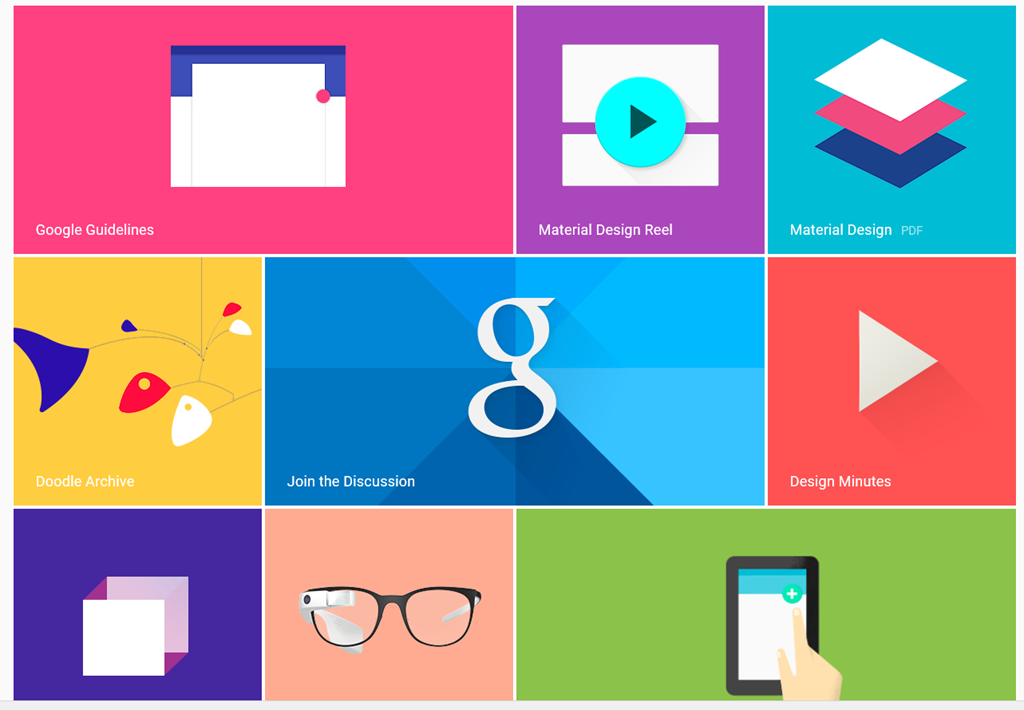
Material Design – Metro for Android?

We heard a lot about Material Design, which is Google’s new design style. Google borrowed plenty of buzzwords form Microsoft’s “Metro” playbook, and I heard expressions like “fast and fluid”, clean typography, signposting, and content-first. Like Metro, it also seems to have a blocky theme (we will know when the next design wave kicks in as it will have rounded corners).

image

Material Design is not just for Android. You can also implement the concept in Polymer, which is a web presentation framework built on Web Components, a standard in draft at the W3C. Support for Web Components (and therefore Polymer) is already in Chrome, advancing rapidly in Mozilla Firefox, probably coming in Apple Safari, and maybe coming in Microsoft IE. However, a JavaScript library called Polyfill means that Polymer will run to some extent in any modern browser.

Whenever IE was mentioned by a presenter at Google I/O there was an awkward/knowing laugh from the audience. Think about what that means.

One of the ideas here is that with a common design concept across Android and web, developers can make web apps (and therefore Chrome apps) look and behave more like Android apps (or vice versa). Again, there is a similar concept at Microsoft, where the WinJS library lets you implement a Metro look and feel in a web app.

Microsoft may have been ahead of Google in this, but it has done the company little good in that adoption for Metro has been weak, for well-rehearsed reasons connected with the smartphone wars, legacy Windows desktop and so on. Google has less legacy weighing it down.

How good is Material Design though? Apple’s Steve Jobs once said of a new OS X design update that it was so good you want to lick it. Metro lacks that kind of appeal, and judging from yesterday’s brief samples, so does Material Design, whatever its other merits in terms of clarity and usability. It is early days though.

Business features: Samsung Knox, Office support, unlimited storage

Google announced a couple of  features aimed at business users. One is that Samsung Knox, app sandboxing and data security for business users, has been donated to Google for integration into Android. Another is that Google Docs will get the ability to edit Microsoft Office documents in their native format, removing an annoyance for users who previously had to convert documents to and from Google’s own format when exchanging them with Microsoft Office users.

This seems to be an admission that Microsoft Office is the business standard for documents, and you can take it either way – good for Google because compatibility is better, or good for Microsoft because it cements Office as the standard. There will be ifs and buts of course.

Google is also offering unlimited online storage for business users, called Drive for Work, at $10 per user per month, upping the ante for everyone in the online storage game – Microsoft, Dropbox, Box and so on.

Google’s Cloud Platform

Google showed new features in its cloud platform, with a focus on big data analytics using an approach called Cloud Dataflow. “We don’t use MapReduce any more”, said the presenter, explaining that Cloud Dataflow enables all of us to use the same technology Google uses to analyse big data.

Greg DeMichille, a director of product management for the cloud platform, appeared on stage to show features for in-browser tracing and debugging of cloud applications. I recall DeMichille being much involved in Microsoft’s version of Java back in the days of the battle with Sun; he also had a spell at Adobe getting behind Flash and Flex for developers.

No Wow moments

The Google I/O 2014 keynote impressed in terms of numbers – Android growth continues unabated – and in terms of partners lining up behind initiatives like Android TV and Android Auto. The momentum seems unstoppable and the mass market for mobile and embedded devices is Google’s to lose.

On the other hand, I did not notice any game-changing moments such as I experienced when first seeing the Chromebook, or the Google Now personalisation service. Both of those still exist, of course, but if Android will really change our lives for the better, Google could have done a better job of conveying that message.

Embarcadero AppMethod: another route to cross-platform mobile, now with C++ support

Embarcadero has updated AppMethod, its IDE for cross-platform mobile and desktop applications. The IDE now supports C++, and as a special offer, you can develop Android phone “free forever”, according to the web site.

AppMethod is none other than our old friend Delphi, combined with the FireMonkey cross-platform framework. The difference between AppMethod and the older RAD Studio product line (current version is XE6) is twofold:

1. AppMethod does not include the VCL, the Delphi framework for Windows applications. It does let you develop for Windows or Mac OS X using FireMonkey.

2. You can buy RAD Studio outright with a perpetual license, from £1342.00 plus VAT for a new user (RAD Studio Professional). AppMethod is only available on subscription.

AppMethod pricing is per developer per platform per year. Currently this is £179.83 plus VAT for individuals (very small businesses up to a maximum of 5 employees in the entire organisation) or £600 for larger businesses (a rather large premium).

C++ support is new in AppMethod 1.14 and supports all target platforms except the iOS Simulator (an annoying limitation). It supports ARC (Automatic Reference Counting) on Android as well as iOS. Mac OS X is supported from 10.8 (Mountain Lion) and up.

There are also a few changes in FireMonkey. You can load HTML into the TWebBrowser component using LoadFromStrings. There is a new date picker component.

Another new feature is in the RTL (run time library). Called App Tethering, it lets applications communicate with each other, for example using TCP. These can be apps on the same device or remote apps. Once paired, apps can run remote actions and share standard data types and streams.

There are also updates to push notifications for iOS and Android, Google Glass support, updated OpenGL and DirectX support on Windows, and more: see here for the complete documentation of what is new.

A Quick Hands-on

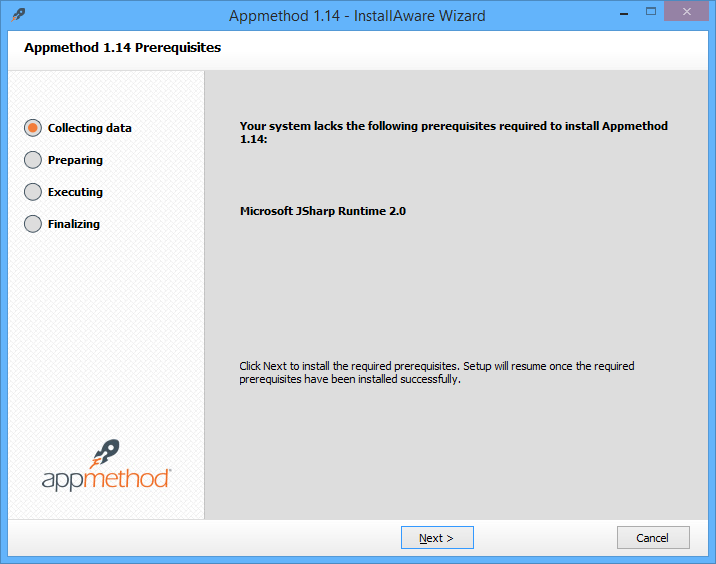
I installed the latest AppMethod on Windows 8. The install warns that AppMethod cannot co-exist with RAD Studio XE6, presumably because it is essentially the same thing re-wrapped. The product name is relatively new, but there is plenty of old stuff under the covers. AppMethod still has a dependency on JSharp, Microsoft’s Java implementation for .NET. Java code in the IDE dating back to who knows when?

image

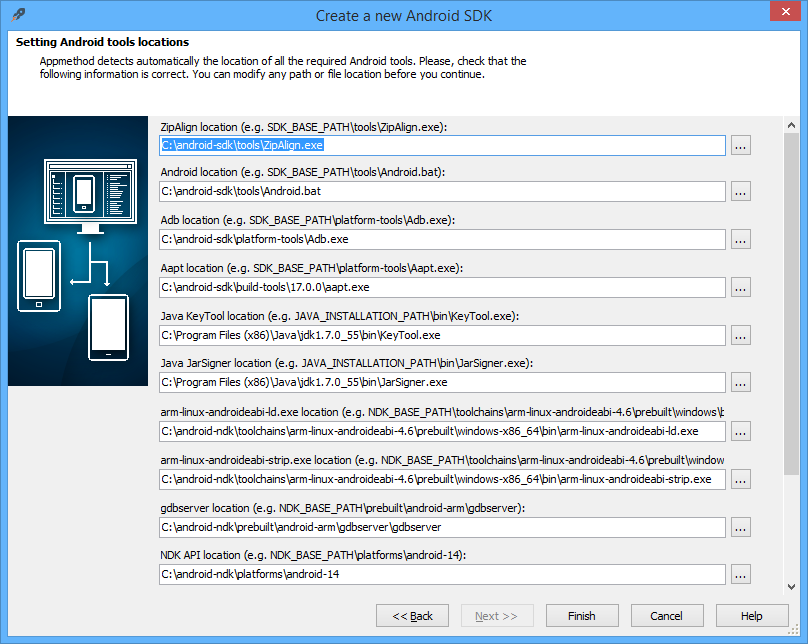
There is a 10-field dialog conforming paths for Android tools, which is a reminder of how many moving parts there are here. It is more complex that most Android development environments because it uses the NDK (Native Development Kit) as well as the usual SDK.

image

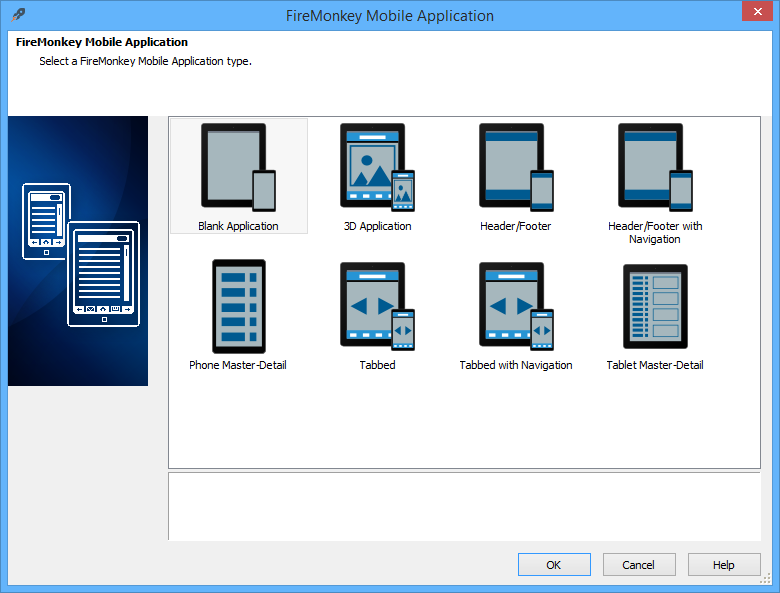
Once up and running, you can start a new project such as a FireMonkey mobile application:

image

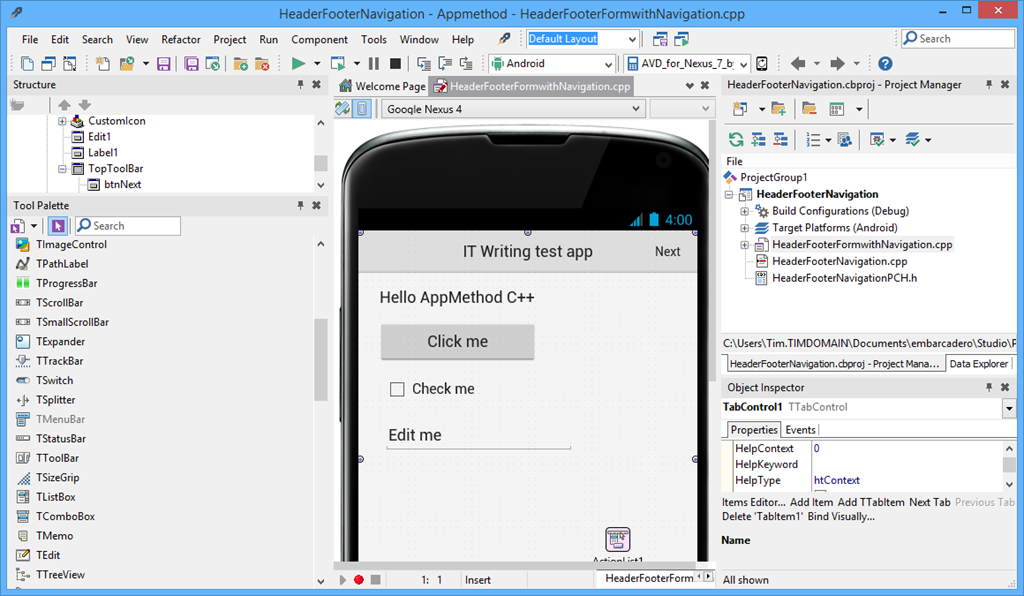
and then you are in an IDE which would not be entirely unfamiliar to a Delphi user in 1995 (or I suppose, a C++ Builder user in 1997) – I am not saying this is a bad thing, though the IDE feels dated in comparison to Microsoft’s Visual Studio.

image

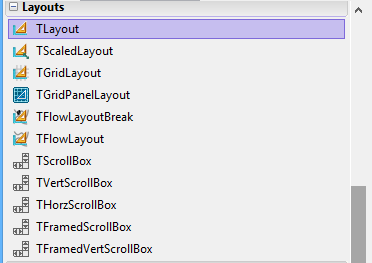
After coming from a spell of development with XAML it feels odd to have a form builder that defaults to xy layout, but layout managers are available:

image

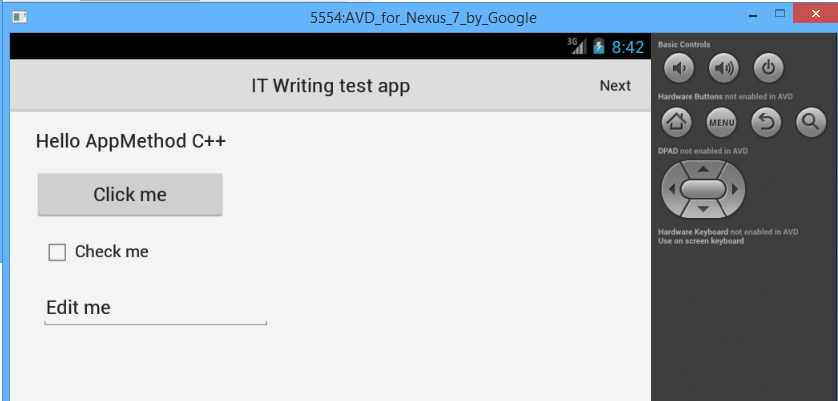
Compile and run, and after the usual slow initialization of the Android emulator, the app appeared.

image

Why AppMethod?

In the crowded world of cross-platform mobile development, why use AppMethod?

Embarcadero makes a big play of its native development, though it is “native” in respect of code execution but not in GUI fidelity since by default visual controls are custom-drawn by the framework. This is in contrast to Xamarin (the obvious alternative for developers from a Windows background) which does no custom drawing but only uses native controls; however for raw performance AppMethod may have the edge (I have not done comparisons).

Delphi developers should also look at RemObjects Oxygene which also uses a Delphi-like language but is hosted in Visual Studio and, like Xamarin, uses native UI components.

The AppMethod approach does make sense if you prioritise maximum code-sharing over getting exactly the right look and feel for each supported platform, and need better performance or more capability than HTML and JavaScript can get you. There is no support for Windows Phone though; if that is in your plans, Xamarin or HTML and JavaScript development is a better fit.

Hands on with Xamarin 3.0: a cross-platform breakthrough for Visual Studio

Today Xamarin announced version 3.0 of its cross-platform mobile development tools, which let you target Android and iOS with C# and .NET. I have been trying a late beta preview.

In order to use Xamarin 3.0 with iOS support you do need a Mac. However, you can do essentially all of your development in Visual Studio, and just use the Mac for debugging.

To get started, I installed Xamarin 3.0 on both Windows (with Visual Studio 2013 installed) and on a Mac Mini on the same network.

image

Unfortunately I was not able to sit back and relax. I got an error installing Xamarin Studio, following which the installer would not proceed further. My solution was to download the full DMG (Mac virtual disk image) for Xamarin Studio and run that separately. This worked, and I was able to complete the install with the combined installer.

When you start a Visual Studio iOS project, you are prompted to pair with a Mac. To do this, you run a utility on the Mac called Xamarin.IOS Build Host, which generates a PIN. You enter the PIN in Visual Studio and then pairing is active.

image

Once paired, you can create or open iOS Storyboard projects in Visual Studio, and use Xamarin’s amazing visual designer.

image

Please click this image to open it full-size. What you are seeing is a native iOS Storyboard file open in Visual Studio 2013 and rendering the iOS controls. On the left is a palette of visual components I can add to the Storyboard. On the right is the normal Visual Studio solution explorer and property inspector.

The way this works, according to what Xamarin CEO Nat Friedman told me, is that the controls are rendered using the iOS simulator on the Mac, and then transmitted to the Windows designer. Thus, what you see is exactly what the simulator will render at runtime. Friedman says it is better than the Xcode designer.

“The way we do event handling is far more intuitive than Xcode. It supports the new iOS 7 auto-layout feature. It allows you to live preview custom controls. Instead of getting a grey rectangle you can see it live rendered inside the canvas. We use the iOS native format for Storyboard files so you can open existing Storyboard files and edit them.”

I made a trivial change to the project, configured the project to debug on the iOS simulator, and hit Start. On the Mac side, the app opened in the simulator. On the Windows side, I have breakpoint debugging.

image

Now, I will not pretend that everything ran smoothly in the short time I have had the preview. I have had problems with the pairing after switching projects in Visual Studio. I also had to quit and restart the iOS Simulator in order to get rendering working again. This is an amazing experience though, combining remote debugging with a visual designer on Visual Studio in Windows that remote-renders design-time controls.

Still, time to look at another key new feature in Xamarin 3: Xamarin Forms. This is none other than our old friend XAML, implemented for iOS and Android. The Mono team has some experience implementing XAML on Linux, thanks to the Moonlight project which did Silverlight on Linux, but this is rather different. Xamarin forms does not do any custom drawing, but wraps native controls. In other words, it like is the Eclipse SWT approach for Java, and not like the Swing approach which does its own drawing. This is keeping with Xamarin’s philosophy of keeping apps as native as possible, even though the very existence of a cross-platform GUI framework is something of a compromise.

I have not had long to play with this. I did create a new Xamarin Forms project, and copy a few lines of XAML from a sample into a shared XAML file. Note that Xamarin Forms uses Shared Projects in Visual Studio, the same approach used by Microsoft’s Universal Apps. However, Xamarin Forms apps are NOT Universal Apps, since they do not support Windows 8 (yet).

image 

In a Shared Project, you have some code that is shared, and other code that is target-specific. By default hardly any code is shared, but you can move code to the shared node, or create new items there. I created XamFormsExample.xaml in the shared node, and amended App.cs so that it loads automatically. Then I ran the project in the Android emulator.

image

I was also able to run this on iOS using the remote connection.

I noticed a few things about the XAML. The namespace is:

xmlns="http://xamarin.com/schemas/2014/forms"
xmlns:x="http://schemas.microsoft.com/winfx/2009/xaml"

I have not seen this before. Microsoft’s XAML always seems to have a “2006” namespace. For example, this is for a Universal App:

xmlns="http://schemas.microsoft.com/winfx/2006/xaml/presentation"
xmlns:x=http://schemas.microsoft.com/winfx/2006/xaml

However, XAML 2009 does exist and apparently can be used in limited circumstances:

In WPF, you can use XAML 2009 features, but only for XAML that is not WPF markup-compiled. Markup-compiled XAML and the BAML form of XAML do not currently support the XAML 2009 language keywords and features.

It’s odd, because of course Xamarin’s XAML is cut-down compared to Microsoft’s XAML. That said, I am not sure of the exact specification of XAML in Xamarin Forms. I have a draft reference but it is incomplete. I am not sure that styles are supported, which would be a major omission. However you do get layout managers including AbsoluteLayout, Grid, RelativeLayout and StackLayout. You also get controls (called Views) including Button, DatePicker, Editor, Entry (single line editor), Image, Label, ListView, OpenGLView, ProgressBar, SearchBar, Slider, TableView and WebView.

Xamarin is not making any claims for compatibility in its XAML implementation. There is no visual designer, and you cannot port from existing XAML code. The commitment to wrapping native controls may limit prospects for compatibility. However, Friedman did say that Xamarin hopes to support Universal Apps, ie. to run on Windows 8 as well as Windows Phone, iOS and Android. He said:

I think it is the right strategy, and if it does take off, which I think it will, we will support it.

Friedman says the partnership with Microsoft (which begin in November 2013) is now close, and it would be reasonable to assume that greater compatibility with Microsoft XAML is a future goal. Note that Xamarin 3 also supports Portable Class Libraries, so on the non-visual side sharing code with Microsoft projects should be straightforward.

Personally I think both the Xamarin forms and the iOS visual designer (which, note, does NOT support Xamarin Forms) are significant features. The iOS designer matters because you can now do almost all of your cross-platform mobile development within Visual Studio, even if you want to follow the old Xamarin model of a different, native user interface for each platform; and Xamarin Forms because it enables a new level of code sharing for Xamarin projects, as well as making XAML into a GUI language that you can use across all the most popular platforms. Note that I do have reservations about XAML; but it does tick the boxes for scaling to multiple form factors and for enormous flexibility.