Tag Archives: microsoft

Having it both ways: can Microsoft equally back Windows Phone and “Any device”?

I attended an event in London which was a kind-of UK launch for Windows Phone 8.1. The first Lumia device running 8.1, the Lumia 630, is now on sale, though this was not the main focus. It was more about asking businesses to take another look at Windows Phone (and Windows tablets), following improvements Microsoft has made. The company is particularly pleased with a new white paper from MobileIron, a well-known company in mobile device management, praising the new security and manageability features:

Windows Phone 8 did not meet the stringent policies some enterprises required for protecting corporate data and resources. The release of Windows Phone 8.1 changes the game. Microsoft is delivering a rich new feature-set for business users, and providing IT departments with the compliance and security they require. These new security and management features, called the Enterprise Feature Pack, are included as a core component of Windows Phone 8.1. When combined with an enterprise mobility management (EMM) platform, these capabilities make it much easier for enterprises to adopt the Windows Phone platform.

Fair enough, though from what I can tell Windows Phone is still struggling to get the momentum it needs. Too many companies perceive that if they support iOS and Android then that is it, job done, as evidenced by this advertisement I saw recently. This in turn dampens sales. It is an unfortunate position to be in, particularly given the good work Microsoft (and Nokia) has done on the phone OS itself. I prefer the Windows Phone user interface to that in Android, but still need an Android device in order to try out new apps.

This could change if Microsoft can continue gradually bumping up its market share, but it is tough. The wider company is now side-stepping the problem by focusing on its strengths in Office, Active Directory and Office 365, and offering first-class support for these on iOS and Android, as evidenced by the excellent Office for iPad launched earlier this year.

There is a dilemma here though. Some Windows Phone users choose the phone because they feel it will work best with Microsoft’s business platform. Could the “any device” policy end up undermining Microsoft’s efforts to promote Windows Phone?

I put this to Chris Weber, Microsoft’s Corporate Vice President of Mobile Device Sales, who has come to the company from Nokia (before which he was at Microsoft, so a true Windows veteran).

image

From a business perspective, providing cloud services, management, security, it is a multi-platform world. It is a great business decision for Microsoft to be multi-platform. Customers demand it as well.  That doesn’t mean we don’t want to create the most compelling platform and set of devices that bring Windows to life. I think the cross-platform thing is a great story … but the benefit of us [Nokia and Microsoft] coming together is now we have hardware, software and services that can be integrated in a totally different way, and we’re one of the few players that have all those components. The level of integration is much greater on the Windows platform. For example, Office is built in, you don’t have to go to a store and download it. The Linq client is built into the calendar. The email client, being able to have rights protection. The mail client itself is the best of any of them. The ability to access a SharePoint site across the firewall without a VPN connection, unique to Windows Phone.

Then we also have to win the end user. We have to win IT and those requirements, but you also have to get end users excited. Things that you see in 8.1, like Cortana, there’s a huge benefit there. And we’re bringing that across every price point.

Fair points; yet currently the iPad has a better touch-friendly Office than Windows tablets or Windows Phone; and Windows phone users have frustrations where the integration falls short. One remarkable thing, for example, is that there is no way to use a shared Exchange or SharePoint calendar on Windows Phone other than in the browser, so no integration with the built-in calendar or offline support.

What Weber describes, near-perfect integration between Windows mobile devices and Microsoft’s server applications, should be the case though; making this even better should be a high priority for CEO Satya Nadella’s new Microsoft.

Weber makes the bold claim that he can convert any user to Windows Phone, but says the challenge is to make this happen at retail level, when the customer wanders in looking for a smartphone:

If you give me fifteen minutes, I think I can convince any iPhone or Android user to move to Windows Phone. We have to do this not in fifteen minutes but in probably a minute and a half, at retail, with people who are selling multiple devices and are used to selling the competitor platform more than us.

Focusing on enterprise integration is in my view long overdue, and a few large enterprise adoptions would give Windows Phone a significant boost. At retail though, my guess is that Microsoft’s main hope is what Nokia did so well: delivering a good smartphone experience in budget devices – the “every price point” to which Weber refers.

Visual Studio “14” announced, preview available with “Roslyn” open source compiler

Microsoft’s Soma Somasegar has announced the next version of Visual Studio, currently known as Visual Studio 14, but likely to be fully released in 2015 (and, I am guessing, likely to be called Visual Studio 2015).

This is a major release. It includes a new VB and C# compiler which is itself written in managed code, codenamed Roslyn. The open source Roslyn project provides new APIs that enable more powerful IDE features. Visual Basic is getting refactoring support for the first time.

The preview also includes a major update to ASP.NET that unifies ASP.NET MVC and the ASP.NET Web API, and has a new deployment model and developer experience:

Thanks to the Rosyln compiler, if you change ".cs” files or project.json file and want to see the change in the browser, you don’t need to build the project any more. Just refresh the browser.

There is no IIS express, nor IIS involved when you run from the command line. It means that you can publish your website to a USB drive, and run it by double clicking the web.cmd file!

On the C++ side, there is improved C++ 11 support and more features from C++ 14:

The Visual Studio "14" CTP includes support for user-defined literals, noexcept, alignof and alignas, and inheriting constructors from C++11, generalized lambda capture, auto function return type deduction, and generic lambdas from C++14, as well as many more new C++ features.

says Somasegar. There is also a refactored C Runtime (CRT):

msvcr140.dll no longer exists. It is replaced by a trio of DLLs: vcruntime140.dll, appcrt140.dll, and desktopcrt140.dll.

If you install the CTP (mine is downloading) use a spare machine or VM; it is an early preview that does not work side-by-side with other versions and the only uninstall may be to flatten the machine:

Installing a CTP release will place a computer in an unsupported state. For that reason, we recommend only installing CTP releases in a virtual machine, or on a computer that is available for reformatting.

The Microsoft Apartment: full of screens and an uninvited cucumber

I visited Microsoft’s “Apartment” in London, billed as a chance to see “Dragon’s Den star Kelly Hoppen’s apartment in the heart of Covent Garden kitted out with the latest Microsoft technologies,” and to include a “deep dive discussion” on Microsoft’s latest developer announcements.

How do you kit out an apartment with the latest Microsoft technologies? Apparently, you stick an Xbox One and a couple of PC screens in the living area, and upstairs in the study (a mezzanine floor), a PC, a Surface (not 3 sadly), and a Windows phone connected to a big screen.

image

There were certainly lots of screens, but nothing in the way of home automation, and after watching Microsoft presenters struggling to get the Xbox One to play the right kind of music, and later a shaky Skype demo, it is hard to enthuse over this particular setup.

For some reason, we were not shown any cool games on the Xbox One, nor cool apps on the Windows Phone other than the Cortana assistant which is not yet available in the UK. There was a demo of the new swipe keyboard in Windows 8.1 which inevitably saw the word “document” rendered as “cucumber”; a shame as I know from my own experience that this keyboard works very well, but demoing this kind of thing in public is only for the brave or the very well rehearsed.

We did see collaborative real-time editing on an Office document – not something home users generally do, but to be fair this was part of a business-oriented discussion which followed.

One feature which I had not previously been aware of was the ability of Skype on the Xbox One, in conjunction with Kinect, to follow the speaker around the room automatically. If you like pacing up and down while on Skype, this is a cool feature; perhaps it would be good for talking to excitable kids as well.

Takeaways? Let me put it like this. If you thought, perhaps, that the Xbox One has potential but feels (in software terms) not yet ready; or that Microsoft has no idea how to market to consumers; then there was nothing here that would change your mind.

As chance would have it, the Microsoft apartment is a few paces away from Apple’s huge Covent Garden store, and seeing the crowds eager to try the latest iDevices put the Microsoft event in perspective.

PS for another, more positive take on the event see this Neowin report.

Xamarin 3.0 brings iOS visual design to Visual Studio, cross-platform XAML, F#, NuGet and more

Xamarin has announced the third version of its cross-platform tools, which use C# and .NET to target multiple platforms, including iOS, Android and Mac OS X.

Xamarin 3.0 is a big release. In summary:

Xamarin Designer for iOS

Using a visual designer for iOS Storyboard projects, you can create and modify a GUI in both Visual Studio and Xamarin Studio (Xamarin’s own IDE). The designer uses the native Storyboard format, so you can open and modify existing files created in Xcode on the Mac. The technology here is amazing, since you iOS controls are rendered remotely on a Mac, and transmitted to the designer on Windows. See here for a quick hands-on.

Xamarin Forms

Xamarin has created the cross-platform GUI framework that it said it did not believe in. It is based on XAML though not compatible with Microsoft’s existing XAML implementations. There is no visual designer yet.

Why has Xamarin changed its mind? It was pressure from enterprise customers, from what I heard from CEO Nat Friedman. They want to make internal mobile apps with many forms, and do not want to rewrite the GUI code for every mobile platform they support.

Friedman made the point that Xamarin Forms still render as native controls. There is no drawing code in Xamarin Forms.

“The challenge for us in  building Xamarin forms was to give people enhanced productivity without compromising the native approach. The mix and match approach, where you can mix in native code at any point, you can get a handle for the native control, we’re think we’ve got the right compromise. And we’re not forcing Xamarin forms on you, this is just an option,”

he told me.

Again, there is a quick hands-on here.

F# support

F# is now officially supported in Xamarin projects. This brings functional programming to Xamarin, and will be warmly welcomed by the small but enthusiastic F# community (including, as I understand it, key .NET users in the financial world).

Portable Class Libraries

Xamarin now supports Microsoft’s Portable Class Libraries, which let you state what targets you want to support, and have Visual Studio ensure that you write compatible code. This also means that library vendors can easily support Xamarin if they choose to do so.

NuGet Packages

The NuGet package manager has transformed the business of getting hold of new libraries for use in Visual Studio. Now you can use it with Xamarin in both Visual Studio and Xamarin Studio.

Microsoft partnership

Perhaps the most interesting part of my interview with Nat Friedman was what he said about the company’s partnership with Microsoft. Apparently this is now close both from a technical perspective, and for business, with Microsoft inviting Xamarin for briefings with key customers.

Hands on with Xamarin 3.0: a cross-platform breakthrough for Visual Studio

Today Xamarin announced version 3.0 of its cross-platform mobile development tools, which let you target Android and iOS with C# and .NET. I have been trying a late beta preview.

In order to use Xamarin 3.0 with iOS support you do need a Mac. However, you can do essentially all of your development in Visual Studio, and just use the Mac for debugging.

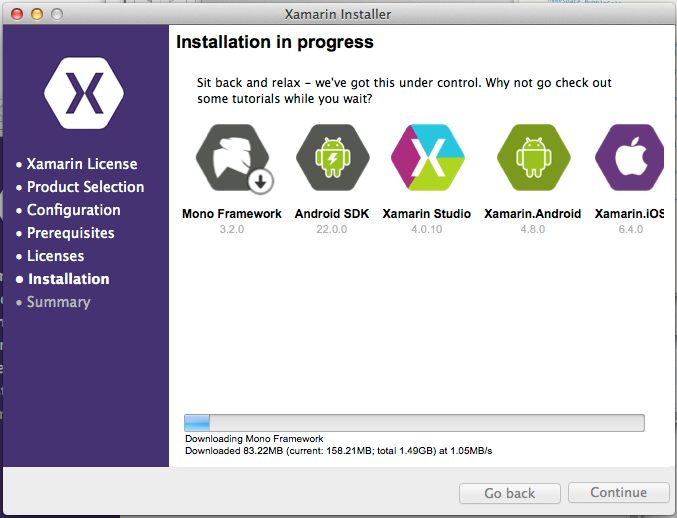
To get started, I installed Xamarin 3.0 on both Windows (with Visual Studio 2013 installed) and on a Mac Mini on the same network.

image

Unfortunately I was not able to sit back and relax. I got an error installing Xamarin Studio, following which the installer would not proceed further. My solution was to download the full DMG (Mac virtual disk image) for Xamarin Studio and run that separately. This worked, and I was able to complete the install with the combined installer.

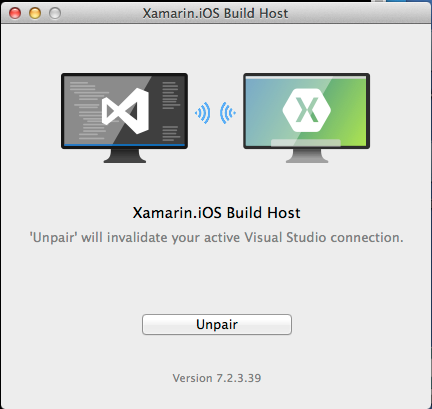
When you start a Visual Studio iOS project, you are prompted to pair with a Mac. To do this, you run a utility on the Mac called Xamarin.IOS Build Host, which generates a PIN. You enter the PIN in Visual Studio and then pairing is active.

image

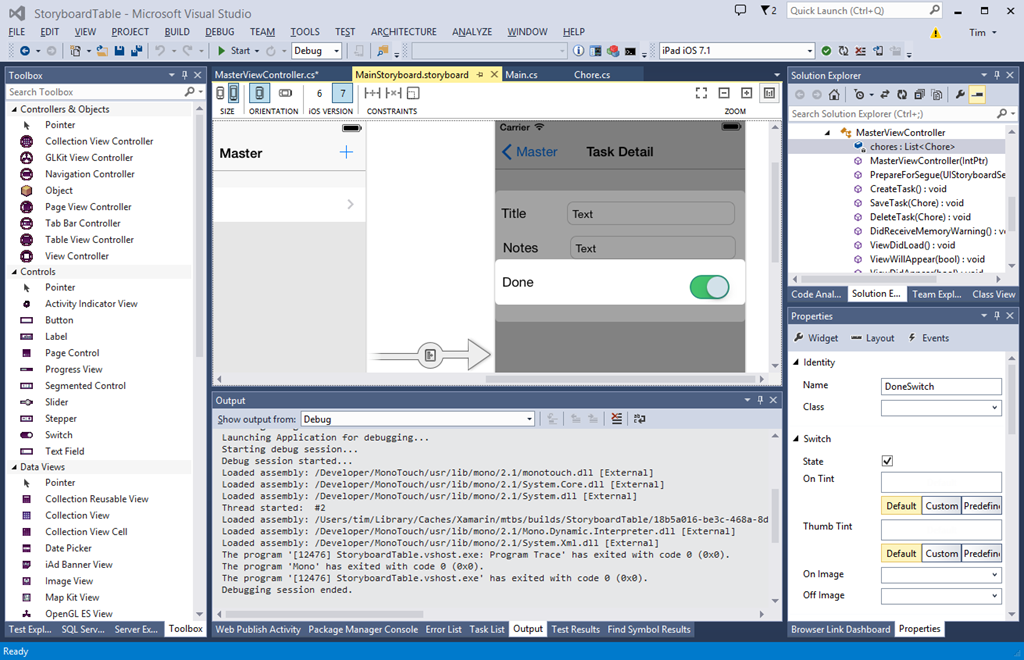
Once paired, you can create or open iOS Storyboard projects in Visual Studio, and use Xamarin’s amazing visual designer.

image

Please click this image to open it full-size. What you are seeing is a native iOS Storyboard file open in Visual Studio 2013 and rendering the iOS controls. On the left is a palette of visual components I can add to the Storyboard. On the right is the normal Visual Studio solution explorer and property inspector.

The way this works, according to what Xamarin CEO Nat Friedman told me, is that the controls are rendered using the iOS simulator on the Mac, and then transmitted to the Windows designer. Thus, what you see is exactly what the simulator will render at runtime. Friedman says it is better than the Xcode designer.

“The way we do event handling is far more intuitive than Xcode. It supports the new iOS 7 auto-layout feature. It allows you to live preview custom controls. Instead of getting a grey rectangle you can see it live rendered inside the canvas. We use the iOS native format for Storyboard files so you can open existing Storyboard files and edit them.”

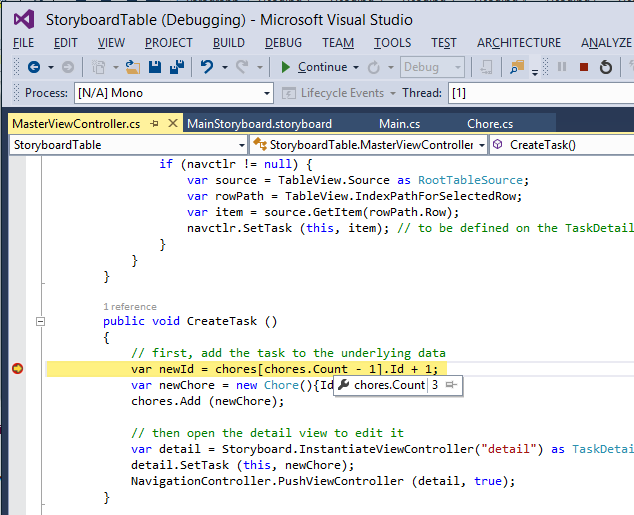
I made a trivial change to the project, configured the project to debug on the iOS simulator, and hit Start. On the Mac side, the app opened in the simulator. On the Windows side, I have breakpoint debugging.

image

Now, I will not pretend that everything ran smoothly in the short time I have had the preview. I have had problems with the pairing after switching projects in Visual Studio. I also had to quit and restart the iOS Simulator in order to get rendering working again. This is an amazing experience though, combining remote debugging with a visual designer on Visual Studio in Windows that remote-renders design-time controls.

Still, time to look at another key new feature in Xamarin 3: Xamarin Forms. This is none other than our old friend XAML, implemented for iOS and Android. The Mono team has some experience implementing XAML on Linux, thanks to the Moonlight project which did Silverlight on Linux, but this is rather different. Xamarin forms does not do any custom drawing, but wraps native controls. In other words, it like is the Eclipse SWT approach for Java, and not like the Swing approach which does its own drawing. This is keeping with Xamarin’s philosophy of keeping apps as native as possible, even though the very existence of a cross-platform GUI framework is something of a compromise.

I have not had long to play with this. I did create a new Xamarin Forms project, and copy a few lines of XAML from a sample into a shared XAML file. Note that Xamarin Forms uses Shared Projects in Visual Studio, the same approach used by Microsoft’s Universal Apps. However, Xamarin Forms apps are NOT Universal Apps, since they do not support Windows 8 (yet).

image 

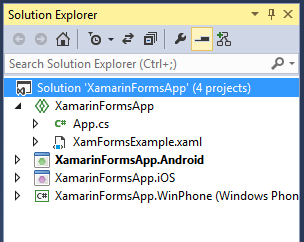
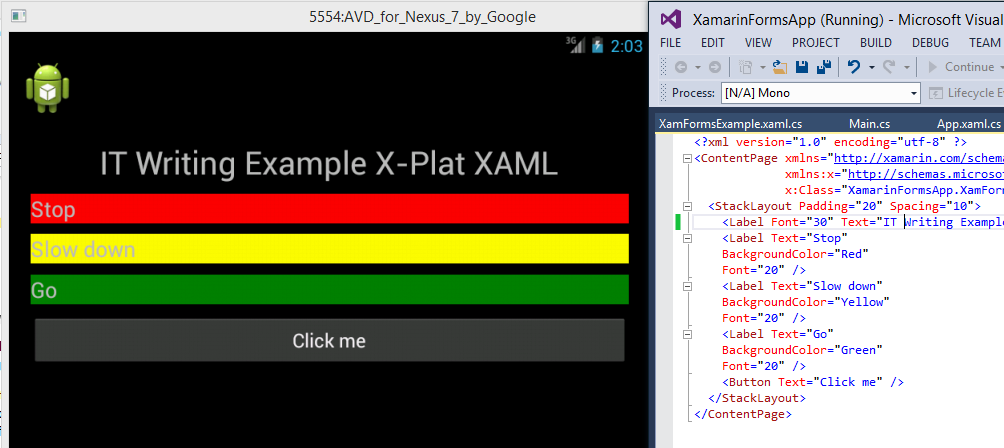
In a Shared Project, you have some code that is shared, and other code that is target-specific. By default hardly any code is shared, but you can move code to the shared node, or create new items there. I created XamFormsExample.xaml in the shared node, and amended App.cs so that it loads automatically. Then I ran the project in the Android emulator.

image

I was also able to run this on iOS using the remote connection.

I noticed a few things about the XAML. The namespace is:

xmlns="http://xamarin.com/schemas/2014/forms"
xmlns:x="http://schemas.microsoft.com/winfx/2009/xaml"

I have not seen this before. Microsoft’s XAML always seems to have a “2006” namespace. For example, this is for a Universal App:

xmlns="http://schemas.microsoft.com/winfx/2006/xaml/presentation"
xmlns:x=http://schemas.microsoft.com/winfx/2006/xaml

However, XAML 2009 does exist and apparently can be used in limited circumstances:

In WPF, you can use XAML 2009 features, but only for XAML that is not WPF markup-compiled. Markup-compiled XAML and the BAML form of XAML do not currently support the XAML 2009 language keywords and features.

It’s odd, because of course Xamarin’s XAML is cut-down compared to Microsoft’s XAML. That said, I am not sure of the exact specification of XAML in Xamarin Forms. I have a draft reference but it is incomplete. I am not sure that styles are supported, which would be a major omission. However you do get layout managers including AbsoluteLayout, Grid, RelativeLayout and StackLayout. You also get controls (called Views) including Button, DatePicker, Editor, Entry (single line editor), Image, Label, ListView, OpenGLView, ProgressBar, SearchBar, Slider, TableView and WebView.

Xamarin is not making any claims for compatibility in its XAML implementation. There is no visual designer, and you cannot port from existing XAML code. The commitment to wrapping native controls may limit prospects for compatibility. However, Friedman did say that Xamarin hopes to support Universal Apps, ie. to run on Windows 8 as well as Windows Phone, iOS and Android. He said:

I think it is the right strategy, and if it does take off, which I think it will, we will support it.

Friedman says the partnership with Microsoft (which begin in November 2013) is now close, and it would be reasonable to assume that greater compatibility with Microsoft XAML is a future goal. Note that Xamarin 3 also supports Portable Class Libraries, so on the non-visual side sharing code with Microsoft projects should be straightforward.

Personally I think both the Xamarin forms and the iOS visual designer (which, note, does NOT support Xamarin Forms) are significant features. The iOS designer matters because you can now do almost all of your cross-platform mobile development within Visual Studio, even if you want to follow the old Xamarin model of a different, native user interface for each platform; and Xamarin Forms because it enables a new level of code sharing for Xamarin projects, as well as making XAML into a GUI language that you can use across all the most popular platforms. Note that I do have reservations about XAML; but it does tick the boxes for scaling to multiple form factors and for enormous flexibility.

Fixing a low-tech computer attack by fake “Microsoft”

For the second time this week, I wasted some time fixing an infected Windows PC. The intriguing aspect of this infection though is that it was not really a virus – unless you count crude scripts designed to scare and inconvenience the user.

The problem started when an elderly friend was called, so she thought, by Microsoft. It was not Microsoft at all, but a fraudster from, it appears, India. He explained that there was a problem with her PC and offered to fix it. I am not sure of all the details, but she ended up paying £20 (after negotiating down from a higher figure) to a bank account in Calcutta.

While this does not sound like something any sane person would do, no doubt these people are suitably convincing after years of practice. It is also true that Microsoft has support staff in India though note that the real company NEVER rings out of the blue with a virus warning so if this happens to you, it is a scam.

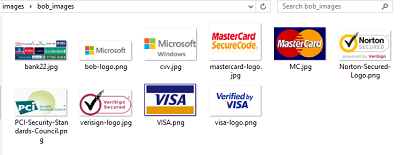
I found some payment forms on her PC. They include all the right logos.

image

The criminal got her to install TeamViewer and I found an entertaining batch file which perhaps he ran to simulate a security product. Here is part of it:

echo license key received
start /w wscript.exe C:sleep2000.vbs
echo:
echo:
echo:
echo Windows License is activated for Lifetime.
start /w wscript.exe C:sleep2000.vbs

and concludes:

echo Your license key has been succesfully activated in your computer..
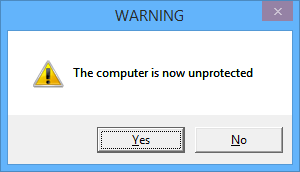
echo Now computer is protected from hackers.

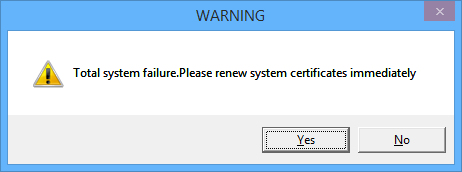
She thought that was the end of it, until she restarted her PC. First, she was prompted to run an executable called AA_v3.exe. If she cancelled, she got a message:

You have been hit by a stuxnet virus, you may lose all your files and folders

and then:

image

and

image

This is a simple .VBS script that displays message boxes in a loop.

Next, the computer shuts down. Why? Because the “stuxnet” message was a command in her startup folder that looks like this:

%windir%\system32\shutdown.exe -s -t 120 -c "You have been hit by a stuxnet virus, you may lose all your files and folders"

This runs before the other messages so you end up with a scary command prompt, more scary messages, and then your PC shuts down.

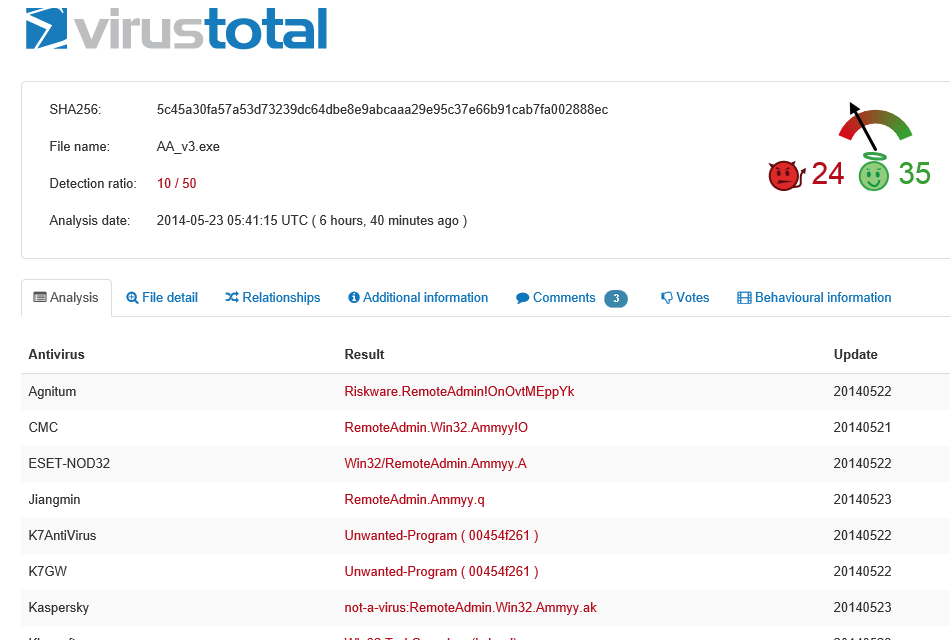
I am not sure what happens if you DO run AA_v3.exe. This, it turns out, is free remote control software called Ammyy Admin. This is so often used by scammers that there is a warning about it on the vendor’s web site:

!!! If you receive a phone call claiming to be from ‘Microsoft’ or someone claiming to work on their behalf, telling you that you have a virus on your computer or some errors which they will help you to fix via Ammyy Admin, it is definitely a scam.

Of course victims will not see this warning.

If you run it though, maybe the criminal can connect and cancel the shutdown before two minutes is up, and use the PC in a botnet. Or maybe there is a follow-up call demanding more money to fix the problem. Who knows?

The attraction of these low-tech scripts (for the fraudsters) is that anti-virus software will not detect anything amiss – though in fact, Ammyy Admin is so widely used for criminal purposes that 10 out of 50 anti-virus products used by Virustotal do report it as a “risky” executable.

image

The fix in this case was to log on using a different user profile – Safe mode would also have worked but I was working remotely. Once logged on I was able to remove the startup entries and run some other malware checking tools; ideally you would reinstall Windows but this is inconvenient for a home user.

The problem as ever is that if you know criminals have had use of a machine, you do not know what else they may have done.

This scam still seems to be common and profitable for the fraudsters, and will continue I imagine, unless both source and target countries make a real effort to find and prosecute those responsible.

Microsoft Small Business Server to Server Essentials R2: not a smooth transition

Recently I assisted a small business (of around 10 users) with a transition from Small Business Server 2003 to Server Essentials R2.

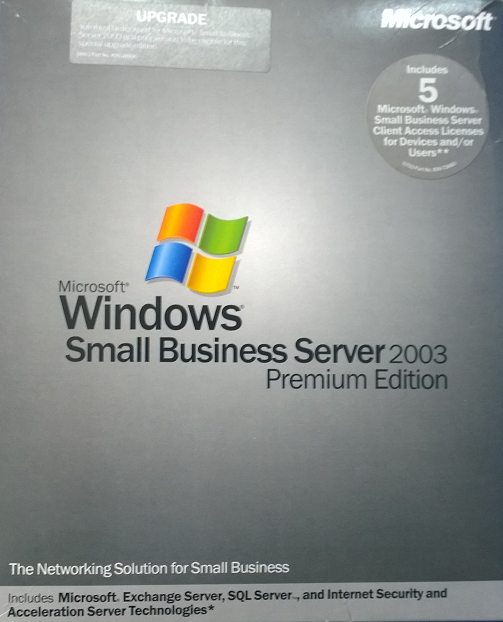
Small Business Server 2003 had served it well for nearly 10 years. The package includes Windows Server 2003 (based on XP), Exchange, and the rather good firewall and proxy server ISA Server 2004 (the first release had ISA 2000, but you could upgrade).
image

SBS 2003 actually still does more than enough for this particular business, but it is heading for end of support, and there are some annoyances like Outlook 2013 not working with Exchange 2003. This last problem had already been solved, in this case, by a migration to Office 365 for email. No problem then: simply migrate SBS 2003 to the latest Server 2012 Essentials R2 and everything can continue running sweetly, I thought.

Sever Essentials is an edition designed for up to 25 users / 50 devices and is rather a bargain, since it is cheap and no CALs are required. In the R2 version matters are confused by the existence of a Server Essentials role which lets you install the simplified Essentials dashboard in any edition of Windows Server 2012. The advantage is that you can add as many users as you like; the snag is that you then need CALs in the normal way, so it is substantially more expensive.

Despite the move to Office 365, an on-premise server is still useful in many cases, for example for assigning permissions to network shares. This is also the primary reason for migrating Active Directory, rather than simply dumping the old server and recreating all the users.

The task then was to install Server Essentials 2012 R2, migrate Active Directory to the new server, and remove the old server. An all-Microsoft scenario using products designed for this kind of set-up, should be easy right?

Well, the documentation starts here. The section in TechNet covers both Server 2012 Essentials and the R2 edition, though if you drill down, some of the individual articles apply to one or the other. If you click the post promisingly entitled Migrate from Windows SBS 2003, you notice that it does not list Essentials R2 in the “applies to” list, only the first version, and there is no equivalent for R2.

Hmm, but is it similar? It turns out, not very. The original Server 2012 Essentials has a migration mode and a Migration Preparation Tool which you run on the old server (it seems to run adprep judging by the description, which updates Active Directory in preparation for migration). There is no migration tool nor migration mode in Server 2012 Essentials R2.

So which document does apply? The closest I could find was a general section on Migrate from Previous Versions to Windows Server 2012 R2 Essentials. This says to install Server 2012 Essentials R2 as a replica domain controller. How do you do that?

To install Windows Essentials as a replica Windows Server 2012 R2 domain controller in an existing domain as global catalog, follow instructions in Install a Replica Windows Server 2012 Domain Controller in an Existing Domain (Level 200).

Note the “Level 200” sneaked in there! The article in question is a general technical article for Server 2012 (though in this case equally applicable to R2) aimed at large organisations and full of information that is irrelevant to a tiny 10-user setup, as well as being technically more demanding that you would expect for a small business setup.

Fortunately I know my way around Active Directory to some extent, so I proceeded. Note you have to install the Active Directory role before you can run the relevant PowerShell cmdlets. Of course it did not work though. I got an error message “Unable to perform Exchange Schema Conflict Check.”

This message appears to relate to Exchange, but I think this is incidental. It just happens to be the first check that does not work. I think it was a WMI (Windows Management Instrumentation) issue,  I did not realise this at first though.

I should mention that although the earlier paper on migrating to Server Essentials 2012 is obsolete, it is the only official documentation that describes some of the things you need to do on the source server before you migrate. These include changing the configuration of the internet connection to bypass ISA Server (single network card configuration), which you do by running the Internet Connection Wizard. You should also check that Active Directory is in good health with dcdiag.exe.

I now did some further work. I removed ISA Server completely, and removed Exchange completely (note you need your SBS 2003 install CD for this). Removing ISA broke the Windows Server 2003 built-in firewall but I decided not worry about it. Following a tip I found, I also used ntdsutil to change the DSRM (Directory Services Recovery Mode) password. I also upgraded the SBS AD forest to Server 2003 (it was on Server 2000), which is necessary for migration to work.

I am not sure which step did the trick, but eventually I persuaded the PowerShell for creating the Replica Domain Controller to work. Then I was able to transfer the FSMO roles. I was relieved; I gather from reading around that some have abandoned the attempt to go from AD in Server 2003 to AD in Server 2012, and used an intermediate Server 2008 step as a workaround – more hassle.

After that things went relatively smoothly, but not without annoyances. There are a couple to mention. One is that after migrating the server, you are meant to connect the client computers by visiting a special URL on the server:

Browse to http://destination-servername/connect and install the Windows Server Connector software as if this was a new computer. The installation process is the same for domain-joined or non-domain-joined client computers.

If you do that from a client computer that was previously joined to the SBS domain (having removed unwanted stuff like the SBS 2003 client and ISA client) then you are prompted to download and run a utility to join the new network. You do that, and it says you cannot proceed because a computer of the same name already exists. But this is that same computer! No matter, the wizard will not run, though the computer is in fact already joined to the domain.

If you want to run the connect wizard and set up the Essentials features like client computer backup and anywhere access, then as far as I can tell this is the official way:

  • Make sure you have an admin user and password for the PC itself (not a domain user).
  • Demote the computer from the domain and join it to a workgroup. Make sure the computer is fully removed from the domain.
  • Then go to the connect URL and join it back.

If you are lucky, the domain user profile will magically reappear with all the old desktop icons, My Documents and so on. If you are unlucky you may need manual steps to recover it, or to use profile migration tools.

This is just lazy on Microsoft’s part. It has not bothered to create a tool that will do what is necessary to migrate an existing client computer into the Server Essentials experience (unless such a tool exists and I did not find it; I have seen reports of regedit hacks).

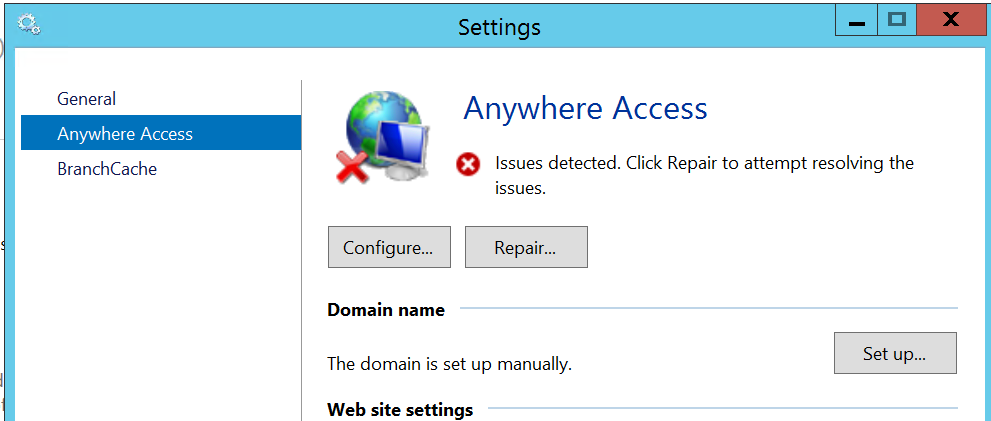
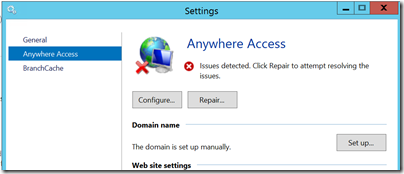
The second annoyance was with the Anywhere Access wizard. This is for enabling users to log in over the internet and access limited server features, and connect to their client desktop. I ran the wizard, installed a valid certificate, used a valid DNS name, manually opened port 443 on the external firewall, but still got verification errors.
image

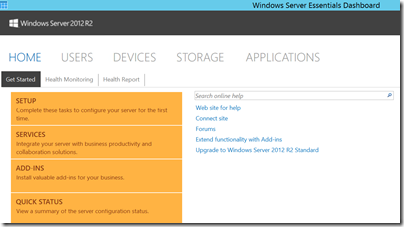
Clicking Repair is no help. However, Anywhere Access works fine. I captured this screenshot from a remote session:
image

All of the above is normal business for Microsoft partners, but does illustrate why small businesses that take on this kind of task without partner assistance may well run into difficulties.

Looking at the sloppy documentation and missing pieces I do get the impression that Microsoft cares little about the numerous small businesses trundling away on old versions of SBS, but which now need to migrate. Why should it, one might observe, considering how little it charges for SBS 2012 Essentials? It is a fair point; but I would argue that looking after the small guys pays off, since some grow into big businesses, and even those that do not form a large business sector in aggregate. Google Apps, one suspects, is easier.

An underlying issue, as ever with SBS, is that Windows Server and in particular Active Directory is designed for large scale setups, and while SBS attempts to disguise the complexity, it is all there underneath and cannot always be ignored.

In mitigation, I have to say that for businesses like the one described above SBS has done a solid job with relatively little attention over many years, which is why it is worth some pain in installation.

Update: A couple of further observations and tips.

Concerning remote access, I suspect the wizard wants to see port 80 open and directed to the server. However this is not necessary as far as I can tell. It is also worth noting that SBS Essentials R2 installs TS Gateway, which means you can configure RDP direct to the server desktop (rather than to the limited dashboard you get via the Anywhere Access site).

The documentation, such as it is, suggests that you use the router for DHCP. Personally I prefer to have this on the server, and it also saves time and avoids errors since you can import the DHCP configuration to the new server.

Office, Azure Active Directory, and mobile: the three pillars of Microsoft’s cloud

When Microsoft first announced Azure, at its PDC Conference in October 2008, I was not impressed. Here is the press release, if you fancy a look back. It was not so much the technology – though with hindsight Microsoft’s failure to offer plain old Windows VMs from the beginning was a mistake – but rather, the body language that was all wrong. After all, here is a company whose fortunes are built on supplying server and client operating systems and applications to businesses, and on a partner ecosystem that has grown up around reselling, installing and servicing those systems. How can it transition to a cloud model without cannibalising its own business and disrupting its own partners? In 2008 the message I heard was, “we’re doing this cloud thing because it is expected of us, but really we’d like you to keep buying Windows Server, SQL Server, Office and all the rest.”

Take-up was small, as far as anyone could tell, and the scene was set for Microsoft to be outflanked by Amazon for IaaS (Infrastructure as a Service) and Google for cloud-based email and documents.

Those companies are formidable competitors; but Microsoft’s cloud story is working out better than I had expected. Although Azure sputtered in its early years, the company had some success with BPOS (Business Productivity Online Suite), which launched in the UK in 2009: hosted Exchange and SharePoint, mainly aimed at education and small businesses. In 2011 BPOS was reshaped into Office 365 and marketed strongly. Anyone who has managed Exchange, SharePoint and Active Directory knows that it can be arduous, thanks to complex installation, occasional tricky problems, and the challenge of backup and recovery in the event of disaster. Office 365 makes huge sense for many organisations, and is growing fast – “the fastest growing business in the history of the company,” according to Corporate VP of Windows Server and System Center Brad Anderson, speaking to the press last week.

image
Brad Anderson, Corporate VP for Windows Server and System Center

The attraction of Office 365 is that you can move users from on-premise Exchange almost seamlessly.

Then Azure changed. I date this from May 2011, when Scott Guthrie and others moved to work on Azure, which a year later offered a new user-friendly portal written in HTML5, and Windows Azure VMs and web sites. From that moment in 2012, Azure because a real competitor in cloud computing.

That is only two years ago, but Microsoft’s progress has been remarkable. Azure has been adding features almost as fast as Amazon Web Services (AWS – and I have not attempted to count), and although it is still behind AWS in some areas, it compensates with its excellent portal and integration with Visual Studio.

Now at TechEd Microsoft has made another wave of Azure announcements. A quick summary of the main ones:

  • Azure Files: SMB shared storage for Azure VMs, also accessible over the internet via a REST API. Think of it as a shared folder for VMs, simplifying things like having multiple web servers serve the same web site. Based on Azure storage.
  • Azure Site Recovery: based on Hyper-V Recovery Manager, which orchestrates replication and recovery across two datacenters, the new service adds the rather important feature of letting you use Azure itself as your space datacenter. This means anyone could use it, from small businesses to the big guys, provided all your servers are virtualised.
  • Azure RemoteApp: Remote Desktop Services in Azure, though currently only for individual apps, not full desktops
  • Antimalware for Azure: System Center Endpoint Protection for Azure VMs. There is also a partnership with Trend Micro for protecting Azure services.
  • Public IPs for individual VMs. If you are happy to handle the firewall aspect, you can now give a VM a public IP and access it without setting up an Azure endpoint.
  • IP Reservations: you get up to five IP addresses per subscription to assign to Azure services, ensuring that they stay the same even if you delete a service and add a new one back.
  • MSDN subscribers can use Windows 7 or 8.1 on Azure VMs, for development and test, the first time Microsoft has allows client Windows on Azure
  • General availability of ExpressRoute: fast network link to Azure without going over the internet
  • General availability of multiple site-to-site virtual network links, and inter-region virtual networks.
  • General availability of compute-intensive VMs, up to 16 cores and 112GB RAM
  • General availability of import/export service (ship data on physical storage to and from Azure)

There is more though. Those above are just a bunch of features, not a strategy. The strategy is based around Azure Active Directory (which everyone gets if they use Office 365, or you can set up separately), Office, and mobile.

Here is how this works. Azure Active Directory (AD), typically synchronised with on-premise active directory, is Microsoft’s cloud identity system which you can use for single sign-on and single point of control for Office 365, applications running on Azure, and cloud apps run by third-parties. Over 1200 software as a service apps support Azure AD, including Dropbox, Salesforce, Box, and even Google apps.

Azure AD is one of three components in what Microsoft calls its Enterprise Mobility Suite. The other two are InTune, cloud-based PC and device management, and Azure Rights Management.

InTune first. This is stepping up a gear in mobile device management, by getting the ability to deploy managed apps. A managed app is an app that is wrapped so it supports policy, such as the requirement that data can only be saved to a specified secure location. Think of it as a mobile container. iOS and Android will be supported first, with Office managed apps including Word, Excel, PowerPoint and Mobile OWA (kind-of Outlook for iOS and Android, based on Outlook Web Access but delivered as a native app with offline support).

Businesses will be able to wrap their own applications as managed apps.

Microsoft is also adding Cordova support to Visual Studio. Cordova is the open source part of PhoneGap, for wrapping HTML and JavaScript apps as native. In other words, Visual Studio is now a cross-platform development tool, even without Xamarin. I have not seen details yet, but I imagine the WinJS library, also used for Windows 8 apps, will be part of the support; yes it works on other platforms.

Next, Azure Rights Management (RMS). This is a service which lets you encrypt and control usage of documents based on Azure AD users. It is not foolproof, but since the protection travels in the document itself, it offers some protection against data leaking out of the company when it finds its way onto mobile devices or pen drives and the like. Only a few applications are fully “enlightened”, which means they have native support form Azure RMS, but apparently 70% of more of business documents are Office or PDF, which means if you cover them, then you have good coverage already. Office for iOS is not yet “enlightened”, but apparently will be soon.

This gives Microsoft a three-point plan for mobile device management, covering the device, the applications, and the files themselves.

Which devices? iOS, Android and Windows; and my sense is that Microsoft is now serious about full support for iOS and Android (it has little choice).

Another announcement at TechEd today concerns SharePoint in Office 365 and OneDrive for Business (the client), which is getting file encryption.

What does this add up to? For businesses happy to continue in the Microsoft world, it seems to me a compelling offering for cloud and mobile.

Review: Power Cover for Microsoft Surface tablets

I took advantage of a recent US trip to purchase a Surface Power Cover, at the Microsoft Store in Bellevue, near Seattle.

The concept is simple: you get an external battery integrated into a Surface keyboard cover. The keyboard is similar to the second version of the Type Cover, though curiously without backlighting other than a caps lock indicator. The keys are mechanical which for most people means you can type faster than on the alternative Touch cover, though it is less elegant when considered as a cover rather than as a keyboard.

image

The trackpad is the same on all three second edition covers, which is to say, not good. The problem is not the trackpad itself, but the mouse buttons, which are NOT mechanical keys (they were on the first edition Type Cove). Given that you need to press and hold a mouse key for some operations, having a physical click on the trackpad buttons is particularly useful and much missed. Another annoyance is that you cannot disable tap to click, which means some mis-clicks are inevitable, though on the flip side it is easier to tap to click than to use the fiddly mouse buttons.

Having said that it is the same, I have noticed that the trackpad on the Power Cover seems a bit smoother and better behaved than the one on the Type Cover 2. This could be sample variation, or that it is new, or that Microsoft has slightly tweaked the internal design.

As you would expect, the Power Cover is heavier and more substantial than the Type Cover, though I find you notice the weight more than the bulk. Even with the Power Cover, it is still smaller and neater than a laptop. The extra rigidity is a benefit in some scenarios, such as when the keyboard protrudes over the edge of a table. The fabric hinge, which is a weak point in the design of all the Surface covers, seems to be the same on the Power Cover and I fear this may cause problems as the device wears, since the extra weight will put more strain on this hinge.

As with the other keyboard covers, if you fold it back under the tablet, the keys are disabled. In this mode the Power Cover is purely an external battery.

I used the cover with the original Surface Pro (it is compatible with all the models other than the original Surface RT). I understand that a firmware update is needed for the power cover to work; if so, it installed seamlessly though I did need to restart after connecting the keyboard for the first time. Everything worked as expected. If you click the battery icon in the notification area you can see the status of both batteries and which is charging, if you are plugged in; generally one one charges at a time.

image

I boarded my flight and noticed that the Surface is smart enough to use the external battery first, and then the internal, presumably on the basis that you might want to remove the keyboard and use the Surface in pure tablet mode.

image

It is impossible to be precise about how much extra time you get from the Power Cover, since it depends how you use the machine. It is a big benefit on the original Surface Pro which has rather poor battery life; extended battery life is perhaps the biggest real-world difference between the Surface Pro and the Surface Pro 2. Subjectively I have doubled the battery life on my year-old Surface Pro, which for me makes the difference between running out of battery fairly often, and hardly ever.

The Power Cover costs $199, which is expensive considering that you can get an entire spare Android tablet or Amazon Kindle Fire for less; but put in the context of the equally over-priced Type Cover, which costs $129, you can argue that it is not that much extra to pay. Prices from third-party sites will likely be lower once availability improves.

If you need it, you need it; and this must be the best way to extend the battery life of a Surface tablet.

The Surface keyboard covers are not perfect, and I still sometimes see an annoying fault where the mouse pointer or keys stop responding and you have to jiggle the connection or tap the screen a few times to get it back (I am sure this is a driver issue rather than a poor physical connection). Still, I put up with a few irritations because the Surface gives me full Windows in a more convenient and portable form factor than a laptop, and there is more right than wrong with the overall design.

Summary:

  • If you already have a keyboard and your Surface lasts as long as you need – forget it.
  • If you have a Surface that runs out of power with annoying frequency (probably a Surface Pro 1), this is worth it despite the high price.
  • If you don’t have a keyboard (for example, you are buying a new Surface) then this is worth the extra cost over the Type keyboard.

Microsoft’s new open source direction for C# and .NET (and native compilation too): Anders Hejlsberg explains

At the April 2014 Build conference Microsoft made some far-reaching announcements about its .NET platform and the C# programming language. Yes, there was talk of C# 6.0, the next version, but the real changes are more profound. Specifically:

C# and Visual Basic have a new compiler, itself written in C#, code-named Roslyn. Roslyn is not just a new compiler; Microsoft now calls it the “.NET Compiler Platform”.

There is a new commitment to open source for .NET projects. Microsoft formed the .NET Foundation to oversee existing open source projects, including  ASP.NET, Entity Framework, the Azure .NET SDK, and now Roslyn as well. “When it comes to development projects we are going to operate from the premise that open source is the default. Unless there are reasons why it does not work,” said C# lead architect Anders Hejlsberg.

image

Note that open source does not mean chaos. It does mean that you can fork the project if you want – the Roslyn license is Apache 2.0 – but getting Microsoft to accept new features you have contributed will not be trivial. Hejlsberg makes the point that language features are easy to add, but impossible to take away, so extreme care is necessary.

Microsoft is also supporting cross-platform C# to a greater extent than it has done in the past. The most obvious sign of this is its cooperation with Xamarin, which provides C# compilers for iOS and Android. Xamarin’s Miguel de Icaza got a top billing at Build, and is also involved in the .NET Foundation.

There is more though. The idea of standardised C# is re-emerging:

“The last ECMA standard was C# 2.0. There wasn’t a lot of demand for it, but that demand has recently risen and we have re engaged with the ECMA community to produce a standard for C# 5.0,” said Hejlsberg.

This bears some unpacking. Why was there little demand for ECMA C#? Partly I would guess from the assumption the C# was firmly in Microsoft’s grip, with Java the obvious choice for cross-platform development. The main interest was from the Mono folk (Miguel de Icaza again), which implemented .NET for Linux and the Mac with some success, but nothing to disturb Java’s momentum.

The focus now though is on mobile, and interest in C# is stronger, mainly from Microsoft-platform developers reaching beyond Windows. There is also Unity, which uses C# as a scripting language for developing games for multiple platforms, including iOS, Android, Windows, Mac, Linux, Xbox, PS3 and Wii – PS4 is coming very soon.

Microsoft has now consciously embraced multiple platforms, as evidenced by Office for iOS as well as the Xamarin collaboration. “We want C#developers to build great applications across different form factors and different device platforms,” said Jay Schmelzer Director of Program Management for Visual Studio.

You might observe that this position has been forced on the company by the rise of iOS and Android, a view which likely has some merit, but the impact it has on C# and .NET itself is still real.

I asked Hejlsberg to unpack the difference between the Roslyn project and C# 6.0, bearing in mind that both are covered on the Roslyn open source site; you can see the current status of C# 6.0 and the next Visual Basic here.

Roslyn is the name for the project that encompasses the new C#compiler and the new VB compiler and the new language services that they share. C# 6.0 is the name of the next version of the C #language which will have a specification and which will have an implementation. We are implementing C# 6.0 on the Roslyn platform. We are not going to continue to evolve our old C++ C# compiler – the C# compiler was originally written in C++ and has been evolved up through C# 5.0. That is where we are going to retire that code base, and going forward versions of C# will be built on Roslyn and therefore will be built open source. Unlike previously where, boom. C# came down from the sky with a set of features, it is going to happen more organically now, people will submit pull requests, open up issues, and you will see us work on these features. You will see them from inception to fruition.

“The C# team, the Roslyn team, the VB team, their day to day workplace now is the open source site. That is where they check-in code. It is a community in the making.

Even that is not all. At Build, Microsoft also announced .NET Native, which is a native compiler for C# and Visual Basic, now in preview for x64 Store apps. What is the difference between .NET Native and the existing NGen native compiler for .NET? Over to Hejlsberg:

NGen is the native feature that we currently support. NGen is really, “I’m going to JIT [Just in time compile] your code and then snapshot all the data structures and dump them in a file so that I can quickly rebuild that file later when you run this particular application”. But it is the same code generator and all the same features, and JIT is still there. NGen is really a way to pre-cache the JIT output and therefore get better performance, but it adds to the size of your app because you still have all the assemblies and metadata and then the NGen image as well.

.NET Native is a completely different approach. Instead of the JIT we use the backend from the C++ compiler. You can think of it as a linker that takes as input assemblies, and as output produces a PE [Portable Executable] executable. In the process this linker or code generator will analyse all the IL [Intermediate Language] that goes into the application and it will apply a thing known as tree-shaking where it eliminates all of the code that will never execute based on known execution roots.

In other words, the public static main of your program and also whatever pieces of your app that you designate as reflectable, they also become roots. Based on that we produce an optimised exe, and into that exe we link the pieces of the framework that you are referencing. We link in a garbage collector [GC], and it looks to the operating system just like an exe. When you run it, it runs a local GC in there and it is as efficient really as C++ code.

There are some restrictions associated with .net native, mainly that you can’t just willy-nilly reflect on the whole world. You can’t just generate new code and ask for that to be jitted because they may not be a JIT compiler. We are considering allowing you to link in a JIT compiler, but there are certain execution environments which don’t permit jitting, like Xbox. If you use reflection in your lap you have to tell us what to keep reflectable, because otherwise we will optimise it away.

According to Schmelzer:

The preview out today is scoped to Store app x64 and ARM. We haven’t run into any technical limitation that shows it can’t be done across the breadth, it is just a matter of request and need.

Open source, native code compilation, and an innovative compiler: it adds up to huge changes for C# and .NET, positive ones as far as I can tell.

The Xamarin connection is intriguing though. Developers in general admire the technology as far as I can tell, but it is expensive, and paying out for a Xamarin subscription on top of maybe MSDN for Visual Studio is too much for some smaller organisations and does not encourage experimentation. Might Microsoft acquire Xamarin and build Visual Studio into an IDE targeting all the major mobile platforms, but with special hooks to Azure-hosted services?

That prospect makes sense to me, though it would be a shame if the energetic Xamarin culture became bogged down in big-company bureaucracy. Currently though: no news to report.