Tag Archives: microsoft

Microsoft Financials show cloud growth, Nokia loss

Microsoft has announced its financial results for the quarter ending June 30th 2013. How is it doing?

Quarterly revenue is up to $23.38 billion from $20.49 billion year on year, though $1.98 billion of that is phone hardware – Nokia, in other words. Operating income is up to $6.48 billion from $6.07. Net income is down to $4.61 billion from $4.96 billion because of tax adjustments.

I am more interested in the segment breakdown, though Microsoft’s segments are not particularly clear:

Quarter ending June 30th 2014 vs quarter ending June 30th 2013, $millions

Segment Revenue Change Gross margin Change
Devices and Consumer Licensing 4694 +406 4407 +526
Computing and Gaming Hardware 1441 +274 18 +665
Phone Hardware 1985 N/A 54 N/A
Devices and Consumer Other 1880 +317 446 +78
Commercial Licensing 11222 +595 10296 +345
Commercial Other 2262 +688 691 +355

Revenue is actually up year on year in all segments. Windows has benefited from the end of XP support driving upgrades. Products Microsoft wants to talk about are Azure, SQL Server and System Center which are all growing revenue. “Commercial cloud revenue” or in other words Office 365, CRM online and Azure, grew 147% and is now a $4.4 billion business at current rate of sale.

The bad news is that Nokia contributed a $692 million loss (diminishment of operating income). Microsoft says it sold 5.8 million Lumia (Windows) phones and 30.3 million non-Lumia phones, with the majority of Lumia sales being low-cost devices.

Bing search grew revenue by 40% and US search share is up to 19.2% according to Microsoft.

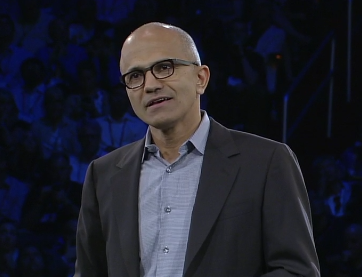
Microsoft CEO Satya Nadella promises “One Windows” in place of three, but should that be two?

Microsoft released its latest financial results yesterday, on which I will post separately. However, this remark from the earnings call transcript (Q&A with financial analysts) caught my eye:

In the year ahead, we are investing in ways that will ensure our Device OS and first party hardware align to our core. We will streamline the next version of Windows from three Operating Systems into one, single converged Operating System for screens of all sizes. We will unify our stores, commerce and developer platforms to drive a more coherent user experiences and a broader developer opportunity. We look forward to sharing more about our next major wave of Windows enhancements in the coming months.

What are the three versions of Windows today? I guess, Windows x86, Windows RT (Windows on ARM), and Windows Phone. On the other hand, there is little difference between Windows x86 and Windows RT other than that Windows RT runs on ARM and is locked down so that you cannot install desktop apps. The latter is a configuration decision, which does not make it a different operating system; and if you count running on ARM as being a different OS, then Windows Phone will always be a different OS unless Microsoft makes the unlikely decision to standardise on x86 on the phone (a longstanding relationship with Qualcomm makes this a stretch).

Might Nadella have meant PC Windows, Windows Phone and Xbox? It is possible, but the vibes from yesterday are that Xbox will be refocused on gaming, making it more distinct from PC and phone:

We made the decision to manage Xbox to maximize enterprise value with a focus on gaming. Gaming is the largest digital life category in a mobile first, cloud first world. It’s also the place where our past success, revered brand and passionate fan base present us a special opportunity.

With our decision to specifically focus on gaming we expect to close Xbox Entertainment Studios and streamline our investments in Music and Video. We will invest in our core console gaming and Xbox Live with a view towards the broader PC and mobile opportunity.

said Nadella.

As a further aside, what does it mean to “manage Xbox to maximize enterprise value”? It is not a misprint, but perhaps Nadella meant to say entertainment? Or perhaps the enterprise he has in mind is Microsoft?

Never mind; the real issue issue is about the development platform and making it easier to build applications for PC, phone and tablets without rewriting all your code. That is the promise of the Universal App announced earlier this year at the Build conference.

That sounds good; but remember that Windows 8.x is two operating systems in one. There is the desktop side which is what most of us use most of the time, and the tablet side (“Metro”) which is struggling. Universal Apps run on the tablet side. The desktop side has different frameworks and different capabilities, making it in effect a separate platform for developers.

“One Windows” then is not coming soon. But we might be settling on two.

Farewell Nokia X? Not quite, but the signs are clear as Microsoft bets on Universal Apps

I could never make sense of Nokia X, the Android-with-Microsoft-services device which Nokia announced less than a year ago at Mobile World Congress in Barcelona:

If Nokia X is a worse Android than Android, and a worse Windows Phone than Windows Phone, what is the point of it and why will anyone buy?

Nokia X is Android without Google’s Play Store; if Amazon struggles to persuade developers to port apps to Kindle Fire (another non-Google Android) then the task for Nokia, lacking Amazon’s ecosystem, is even harder. Now, following Microsoft’s acquisition, it makes even less sense: how can Microsoft simultaneously evangelise both Windows Phone and an Android fork with its own incompatible platform and store?

Nokia X was meant to be a smartphone at feature phone prices, or something like that, but since Windows phone runs well on low-end hardware, that argument does not stand up either.

Now Nokia X is all but dead. Microsoft CEO Satya Nadella:

image

Second, we are working to integrate the Nokia Devices and Services teams into Microsoft. We will realize the synergies to which we committed when we announced the acquisition last September. The first-party phone portfolio will align to Microsoft’s strategic direction. To win in the higher price tiers, we will focus on breakthrough innovation that expresses and enlivens Microsoft’s digital work and digital life experiences. In addition, we plan to shift select Nokia X product designs to become Lumia products running Windows. This builds on our success in the affordable smartphone space and aligns with our focus on Windows Universal Apps.

and former Nokia CEO Stephen Elop, now in charge of Microsoft devices:

In addition to the portfolio already planned, we plan to deliver additional lower-cost Lumia devices by shifting select future Nokia X designs and products to Windows Phone devices. We expect to make this shift immediately while continuing to sell and support existing Nokia X products.

Nadella has also announced a huge round of job cuts, mainly of former Nokia employees, around 12,500 which is roughly 50% of those who came over. Nokia’s mobile phone business is no all Windows Phone (Lumia) and Nokia X. In addition, it sells really low-end phones, the kind you can pick up for £10 at a supermarket, and the Asha range which are budget smartphones. Does Microsoft have any interest in Asha? Elop does not even mention it.

It seems then that Microsoft is focusing on what it considers strategic: Windows Phone at every price point, and Universal Apps which let developers create apps for both Windows Phone and full Windows (8 and higher) from a single code base.

Microsoft does also intend to support Android and iOS with apps, but has no need to make its own Android phones in order to do so.

My view is that Nokia did an good job with Windows Phone within the constraints of a difficult market; not perfect (the early Lumia 800 devices were buggy, for example), but better by far than Microsoft managed with any other OEM partner. I currently use a Lumia 1020 which I regard as something of a classic, with its excellent camera and general high quality.

It seems to me reassuring (from a Windows Phone perspective) that Microsoft is keeping Windows Phone engineering in Finland:

Our phone engineering efforts are expected to be concentrated in Salo, Finland (for future, high-end Lumia products) and Tampere, Finland (for more affordable devices). We plan to develop the supporting technologies in both locations.

says Elop, who also notes that Surface and Xbox teams will be little touched by today’s announcements.

Incidentally, I wrote recently about Universal Apps here (free registration required) and expressed the view that Microsoft cannot afford yet another abrupt shift in its developer platform; the continuing support for Universal Apps in the Nadella era makes that less likely.

Speculating a little, it also would not surprise me if Universal Apps were extended via Xamarin support to include Android and iOS – now that is really a universal app.

Will Microsoft add some kind of Android support to Windows Phone itself? This is rumoured, though it could be counter-productive in terms of winning over developers: why bother to create a Windows Phone app if your Android app will kind-of run?

Further clarification of Microsoft’s strategy is promised in the public earnings call on July 22nd.

Microsoft StorSimple brings hybrid cloud storage to the enterprise, but what about the rest of us?

Microsoft has released details of its StorSimple 8000 Series, the first major new release since it acquired the hybrid cloud storage appliance business back in late 2012.

I first came across StorSimple at what proved to be the last MMS (Microsoft Management Summit) event last year. The concept is brilliant: present the network with infinitely expandable storage (in reality limited to 100TB – 500TB depending on model), storing the new and hot data locally for fast performance, and seamlessly migrating cold (ie rarely used) data to cloud storage. The appliance includes SSD as well as hard drive storage so you get a magical combination of low latency and huge capacity. Storage is presented using iSCSI. Data deduplication and compression increases effective capacity, and cloud connectivity also enables value-add services including cloud snaphots and disaster recovery.

image

The two new models are the 8100 and the 8600:

  8100 8600
Usable local capacity 15TB 40TB
Usable SSD capacity 800GB 2TB
Effective local capacity 15-75TB 40-200TB
Maxiumum capacity
including cloud storage
200TB 500TB
Price $100,000 $170,000

Of course there is more to the new models than bumped-up specs. The earlier StorSimple models supported both Amazon S3 (Simple Storage Service) and Microsoft Azure; the new models only Azure blob storage. VMWare VAAPI (VMware API for Array Integration) is still supported.

On the positive site, StorSimple is now backed by additional Azure services – note that these only work with the new 8000 series models, not with existing appliances.

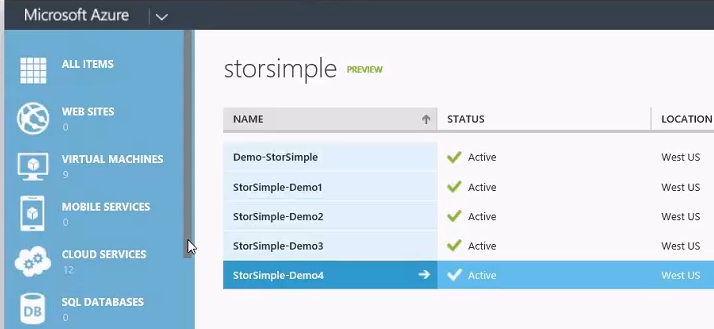
The Azure StoreSimple Manager lets you manage any number of StorSimple appliances from the Azure portal – note this is in the old Azure portal, not the new preview portal, which intrigues me.

image

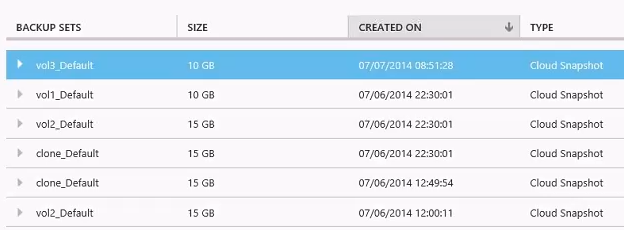
Backup snapshots mean you can go back in time in the event of corrupted or mistakenly deleted data.

image

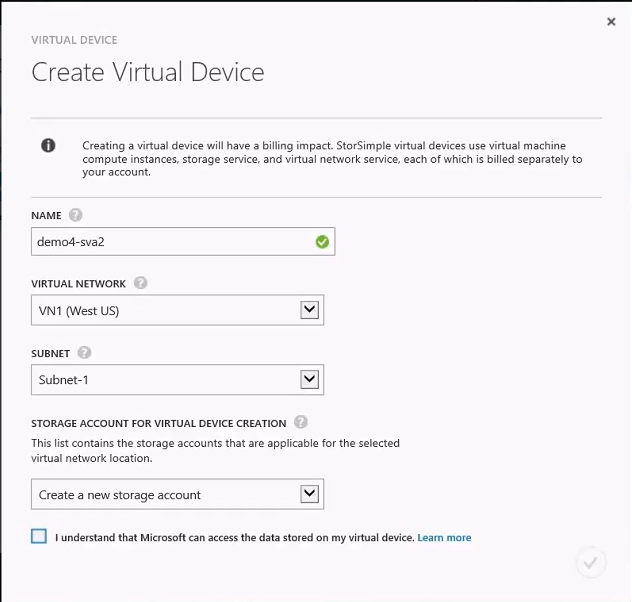
The Azure StorSimple Virtual Appliance has several roles. You can use it as a kind of reverse StorSimple; the virtual device is created in Azure at which point you can use it on-premise in the same way as other StorSimple-backed storage. Data is uploaded to Azure automatically. An advantage of this approach is if the on-premise StorSimple becomes unavailable, you can recreate the disk volume based on the same virtual device and point an application at it for near-instant recovery. Only a 5MB file needs to be downloaded to make all the data available; the actual data is then downloaded on demand. This is faster than other forms of recovery which rely on recovering all the data before applications can resume.

image

The alarming check box “I understand that Microsoft can access the data stored on my virtual device” was explained by Microsoft technical product manager Megan Liese as meaning simply that data is in Azure rather than on-premise but I have not seen similar warnings for other Azure data services, which is odd. Further to this topic, another journalist asked Marc Farley, also on the StorSimple team, whether you can mark data in standard StorSimple volumes not to be copied to Azure, for compliance or security reasons. “Not right now” was the answer, though it sounds as if this is under consideration. I am not sure how this would work within a volume, since it would break backup and data recovery, but it would make sense to be able to specify volumes that must remain always on-premise.

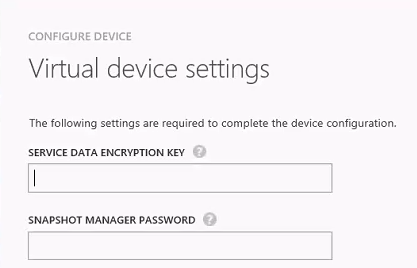
All data transfer between Azure and on-premise is encrypted, and the data is also encrypted at rest, using a service data encryption key which according to Farley is not stored or accessible by Microsoft.

image

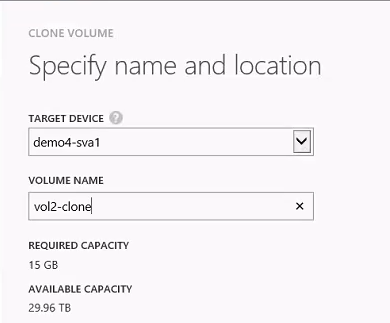
Another way to use a virtual appliance is to make a clone of on-premise data available, for tasks such as analysing historical data. The clone volume is based on the backup snapshot you select, and is disconnected from the live volume on which it is based.

image

StorSimple uses Azure blob storage but the pricing structure is different than standard blob storage; unfortunately I do not have details of this. You can access the data only through StorSimple volumes, since the data is stored using internal data objects that are StorSimple-specific. Data stored in Azure is redundant using the usual Azure “three copies” principal; I believe this includes geo-redundancy though this may be a customer option.

StorSimple appliances are made by Xyratex (which is being acquired by Seagate) and you can find specifications and price details on the Seagate StorSimple site, though we were also told that customers should contact their Microsoft account manager for details of complete packages. I also recommend the semi-official blog by a Microsoft technical solutions professional based in Sydney which has a ton of detailed information here.

StorSimple makes huge sense, but with 6 figure pricing this is an enterprise-only solution. How would it be, I muse, if the StorSimple software were adapted to run as a Windows service rather than only in an appliance, so that you could create volumes in Windows Server that use similar techniques to offer local storage that expands seamlessly into Azure? That also makes sense to me, though when I asked at a Microsoft Azure workshop about the possibility I was rewarded with blank looks; but who knows, they may know more than is currently being revealed.

Microsoft repositions for a post-Windows client world

Microsoft CEO Satya Nadella has penned a rather long public letter which sets out his ambitions for the company. It is not full of surprises for those who have been paying attention, but confirms what we are already seeing in projects such as Office for iPad: Microsoft is positioning itself for a world in which the Windows client does not dominate.

The statement that stands out most to me is this one (the highlighting is mine):

Apps will be designed as dual use with the intelligence to partition data between work and life and with the respect for each person’s privacy choices. All of these apps will be explicitly engineered so anybody can find, try and then buy them in friction-free ways. They will be built for other ecosystems so as people move from device to device, so will their content and the richness of their services

Microsoft is saying that it will build work/personal data partitioning into its applications, particularly one would imagine Office, and that it will write them for ecosystems other than its own, particularly one would imagine iOS and Android.

This is a big change from the Windows company, and one that I will expect to see reflected in the tools it offers to developers. If Microsoft is not trying to acquire Xamarin, you would wonder why not. It has to make Visual Studio a premier tool for writing cross-platform mobile applications. It also has to address the problem that an increasingly large proportion of developers now use Macs (I do not know the figures, but observe at some developer conferences that Windows machines are a rarity), perhaps via improved online developer tools or new tools that themselves run cross-platform.

Nadella is careful to avoid giving the impression that Microsoft is abandoning its first-party device efforts, making specific mention of Windows Phone, Surface, Cortana and Xbox, for example.

Our first-party devices will light up digital work and life. Surface Pro 3 is a great example – it is the world’s best productivity tablet. In addition, we will build first-party hardware to stimulate more demand for the entire Windows ecosystem. That means at times we’ll develop new categories like we did with Surface. It also means we will responsibly make the market for Windows Phone, which is our goal with the Nokia devices and services acquisition.

Here is another statement that caught my eye:

We will increase the fluidity of information and ideas by taking actions to flatten the organization and develop leaner business processes.

The company has become increasingly bureaucratic over the years, and that is holding back its ability to be agile (though some teams seem to move at high speed regardless; I would instance the Azure team as an example).

Nadella’s letter has too many flowery passages of uncertain meaning – “We will reinvent productivity for people who are swimming in a growing sea of devices, apps, data and social networks. We will build the solutions that address the productivity needs of groups and entire organizations as well as individuals by putting them at the center of their computing experiences.” – but I do not doubt that major change is under way.

Supporting developers: how could Microsoft improve?

Microsoft invests substantial resources in supporting developers; yet the last two topics I have explored in earnest – the Azure blob storage service, and ASP.NET MVC with Azure Active Directory integration – have been frustrating and difficult. Admittedly I am only an occasional developer, but I suspect my experience is common. What is going wrong, and how could Microsoft improve?

Among the problems I have encountered:

  • Abundant documentation of simple first steps with a vacuum for anything more advanced
  • Samples that do not run without tweaking
  • Samples designed for old versions of Visual Studio
  • Samples which use obsolete or deprecated libraries
  • Samples which are poor solutions for the problem they are supposed to address
  • Documentation or samples which use preview, beta or even alpha libraries. Microsoft sometimes seems to make more effort documenting what is in preview than what is fully released.
  • Posts on a topic which are out of date, but for which it is hard to find something current
  • Circular links – click here for more information – you get another article which links back to the first one, perhaps with an intermediate step
  • Poor quality responses to questions on official Microsoft forums

On the positive side, the reference documentation is not too bad. StackOverflow is a great resource and seems to attract higher quality responses (even sometimes from Microsoft staff) than the company’s own forums.

Here then are some of the improvements I would like to see:

1. A sharper distinction between what is in preview and what is production-ready. For any given problem, it would be great to find a clear statement of how you should address it for production now, with fully released and supported libraries, and another statement showing how you will be able to address it with the latest and greatest (but perhaps less stable) technology which is in preview.

2. For key teams in Microsoft to maintain sites which offer clearly delineated production and preview sections and which are kept rigorously up to date.

3. More short samples and fewer “this demonstrates everything” samples. Large samples are more difficult to install and study and have more complex dependencies.

4. Posts and their accompanying code inevitably go out of date and I do not favour removing them, which causes more difficulties than it solves (broken links). However it seems to me reasonable for teams to maintain a number of key samples for their product area and keep them up to date.

What am I missing – or am I complaining too much about what is normal in software development? As ever, I welcome your views.

Developing an ASP.NET MVC app with Azure Active Directory: an ordeal

Regular readers will know that I am working on a simple (I thought) ASP.NET MVC application which is hosted on Azure and uses Azure Blob Storage.

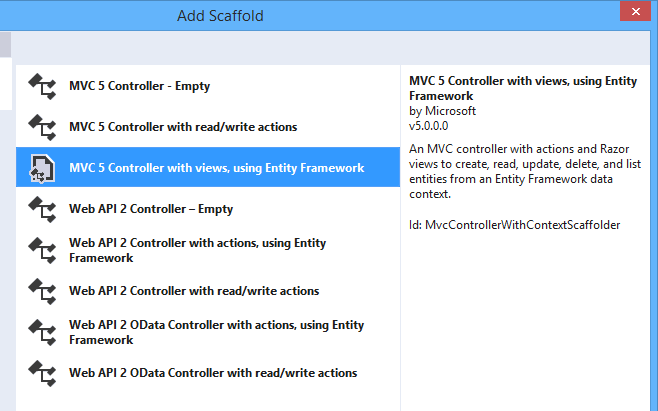
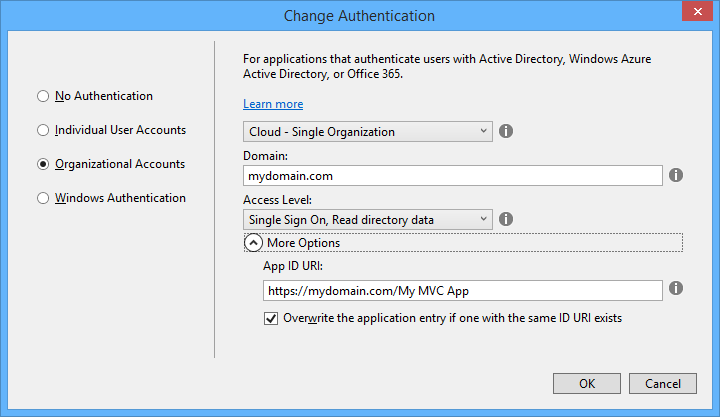
So far so good; but since this business uses Office 365 it seemed to me logical to have users log in using Azure Active Directory (AD). Visual Studio 2013, with the latest update, has a nice wizard to set this up. Just complete the following dialog when starting your new project:

image

This worked fairly well, and users can log in successfully using Azure AD and their normal Office 365 credentials.

I love this level of integration and it seems to me key and strategic for the Microsoft platform. If an employee leaves, or changes role, just update Active Directory and all application access comes into line automatically, whether on premise or in the cloud.

The next stage though was to define some user types; to keep things simple, let us say we have an AppAdmin role for users with full access to the application, and an AppUser role for users with limited access. Other users in the organisation do not need access at all and should not be able to log in.

The obvious way to do this is with AD groups, but I was surprised to discover that there is no easy way to discover to which groups an AD user belongs. The Azure AD integration which the wizard generates is only half done. Users can log in, and you can programmatically retrieve basic information including the firstname, lastname, User Principal Name and object ID, but nothing further.

Fair enough, I thought, there will be some libraries out there that fill the gap; and this is how the nightmare begins. The problem is that this is the cutting edge of .NET cloud development and is an area of rapid change. Yes there are samples out there, but each one (including the official ones on MSDN) seems to be written at a different time, with a different approach, with different .NET assembly dependencies, and varying levels of alpha/beta/experimental status.

The one common thread is that to get the AD group information you need to use the Graph API, a REST API for querying and even writing to Azure Active Directory. In January 2013, Microsoft identity expert Vittorio Bertocci (Principal Program Manager in the Windows Azure Active Directory team at Microsoft) wrote a helpful post about how to restore IsInRole() and [Authorize] in ASP.NET apps using Azure AD – exactly what I wanted to do. He describes essentially a manual approach, though he does make use of a library called Azure Authentication Library (AAL) which you can find on Nuget (the package manager for .NET libraries used by Visual Studio) described as a Beta.

That would probably work, but AAL is last year’s thing and you are meant to use ADAL (Active Directory Authentication Library) instead. ADAL is available in various versions ranging from 1.0.3 which is a finished release, to 2.6.2 which is an alpha release. Of course Bertocci has not updated his post so you can use the obsolete AAL beta if you dare, or use ADAL if you can figure out how to amend the code and which version is the best/safest to employ. Or you can write your own wrapper for the Graph API and bypass all the Nuget packages.

I searched for a better sample, but it gets worse. If you browse around MSDN you will probably come across this article along with this sample which is a Task Tracker application using Azure AD, though note the warnings:

NOTE: This sample is outdated. Its technology, methods, and/or user interface instructions have been replaced by newer features. To see an updated sample that builds a similar application, see WebApp-GraphAPI-DotNet.

Despite the warnings, the older sample is widely referenced in Microsoft posts like this one by Rick Anderson.

OK then, let’s look at at the shiny new sample, even though it is less well documented. It is called WebApp-GraphAPI-DotNet and includes code to get the user profile, roles, contacts and groups from Azure AD using the latest Graph API client: Microsoft.Azure.ActiveDirectory.GraphClient. This replaces an older effort called the GraphHelper which you will find widely used elsewhere.

If you dig into this new sample though, you will find a ton of dependencies on pre-release assemblies. You are not just dealing the Graph API, but also with OWIN (Open Web Interface for .NET), which seems to be Microsoft’s current direction for communication between web applications.

After messing around with Nuget packages and trying to get WebApp-GraphAPI-DotNet working I realised that I was not happy with all this preview code which is likely to break as further updates come along. Further, it does far more than I want. All I need is actually contained in Bertocci’s January 2013 post about getting back IsInRole.

I ended up patching together some code using the older GraphHelper (as found in the obsolete Task Tracker application) and it is working. I can now use IsInRole based on AD groups.

This is a mess. It is a simple requirement and it should not be necessary to plough through all these complicated and conflicting documents and samples to achieve it.

Google I/O 2014: impressive momentum, no wow moments

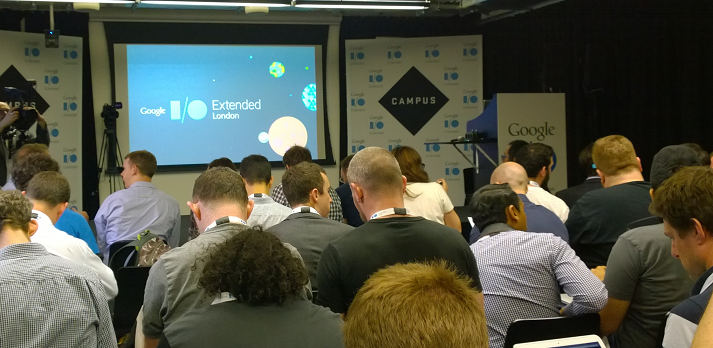
I am not in San Francisco but attended Google I/O Extended in London yesterday, to hear the keynote and a couple of sessions from Google’s annual developer conference.

image

I found the demographics different than most IT events I attend: a younger crowd, and plenty of start-ups and very small businesses, not at all enterprisey (is that a word?)

image

The main announcements:

A new version of Android, known as Android L (I don’t know if this will expand eventually to Lollipop or Liquorice or some such). Big release  with over 5,000 new APIs, we were told (when does Android start being called bloated, I wonder?). Themes include a new visual style called Material Design (which extends also to the Web and to Chrome), and suitability for more device types including Android TV, Android Wear (smart watches) and Android Auto. A new hardware accelerated graphics API called Android Extension Pack which implements OpenGL ES for better game performance, with support from NVIDIA Tegra. Android graphics performance will be good enough for a considerable subset of the gaming community and we saw Unreal Engine demoed.

Android L does not use Dalvik, the virtual machine that runs Java code. In its place is ART (Android Runtime). This is 64-bit, so while Java code will run fine, native code will need updating.

Google is working hard to keep Android under its control, putting more features into its Play Services, the closed part of Android available only from Google and which is updated every 6 weeks, bypassing the operator obstacle to OS updates. There is also a new reference design including both hardware and software which is designed for affordable smartphones in the developing world: third parties can take this and build a decent Android mobile which should sell for under $100 as I understood it. I imagine this is designed to ward off fractured Android efforts like Microsoft’s Nokia X, aimed at the same kind of market but without Play Services.

There are new Android smart watches on the way, and we saw the inevitable demonstration of a user using voice control to the watch for ordering taxis or pizzas, getting notifications, and sending simple messages.

Voice control demos always seem to be nervous moments for presenters – will they be understood? Unfortunately that uncertainty remains for real users too, as evidenced by Xbox One Kinect which is amazing in that it often works, but fails often enough to be irritating. Voice recognition is a hard problem, not only in respect of correctly translating the command, but also in correctly detecting what is a command (if the person standing next to me shouts “Taxi please” I do not want my watch to order one for me).

The smart watch problem also parallels the TV problem. The appeal of the watch is that it is a simple glanceable device for telling the time. The appeal of the TV is that it is a simple sit-back screen where you only have to select a channel. Putting more smarts into these devices seems to make sense, but at the same time damages that core feature, unless done with extreme care.

Android TV puts the OS into your television, though Google’s messaging here is somewhat confusing in that, on the one hand, Chromecast (also known as Googlecast) means that you can use your Google device (Android or Chromebook) as the computer and the TV as the display and audio system, while on the other hand you can use Android on the TV itself as an all-in-one.

We are inching towards unified home entertainment, but with Google, Microsoft (Xbox One), Sony (PlayStation) and Apple all jostling for position it is too early to call a winner.

Material Design – Metro for Android?

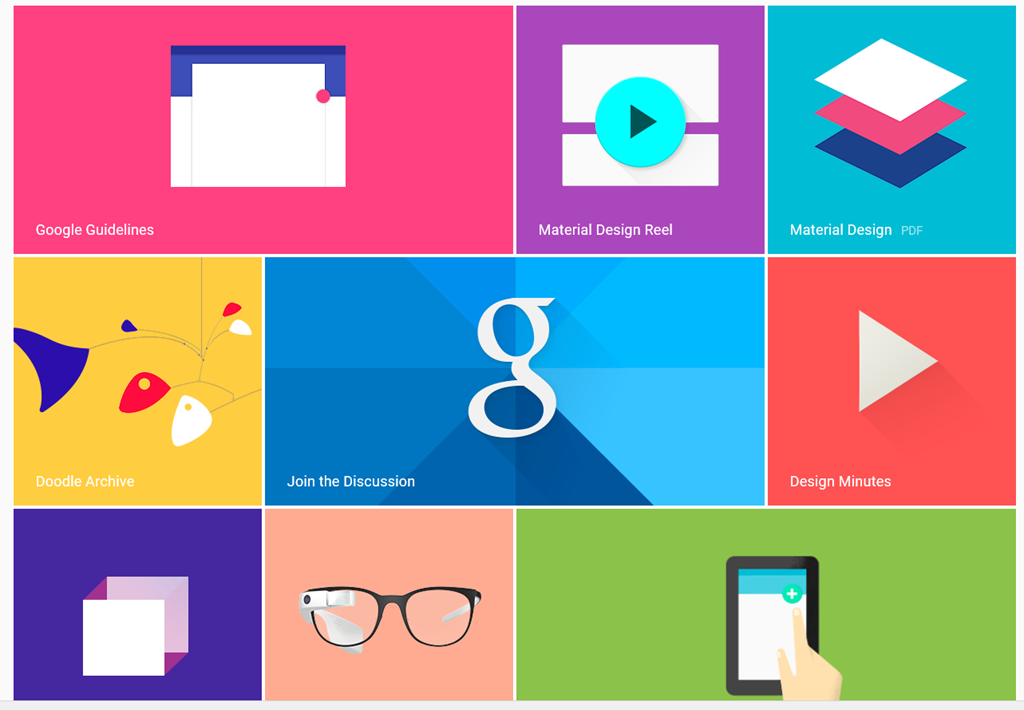
We heard a lot about Material Design, which is Google’s new design style. Google borrowed plenty of buzzwords form Microsoft’s “Metro” playbook, and I heard expressions like “fast and fluid”, clean typography, signposting, and content-first. Like Metro, it also seems to have a blocky theme (we will know when the next design wave kicks in as it will have rounded corners).

image

Material Design is not just for Android. You can also implement the concept in Polymer, which is a web presentation framework built on Web Components, a standard in draft at the W3C. Support for Web Components (and therefore Polymer) is already in Chrome, advancing rapidly in Mozilla Firefox, probably coming in Apple Safari, and maybe coming in Microsoft IE. However, a JavaScript library called Polyfill means that Polymer will run to some extent in any modern browser.

Whenever IE was mentioned by a presenter at Google I/O there was an awkward/knowing laugh from the audience. Think about what that means.

One of the ideas here is that with a common design concept across Android and web, developers can make web apps (and therefore Chrome apps) look and behave more like Android apps (or vice versa). Again, there is a similar concept at Microsoft, where the WinJS library lets you implement a Metro look and feel in a web app.

Microsoft may have been ahead of Google in this, but it has done the company little good in that adoption for Metro has been weak, for well-rehearsed reasons connected with the smartphone wars, legacy Windows desktop and so on. Google has less legacy weighing it down.

How good is Material Design though? Apple’s Steve Jobs once said of a new OS X design update that it was so good you want to lick it. Metro lacks that kind of appeal, and judging from yesterday’s brief samples, so does Material Design, whatever its other merits in terms of clarity and usability. It is early days though.

Business features: Samsung Knox, Office support, unlimited storage

Google announced a couple of  features aimed at business users. One is that Samsung Knox, app sandboxing and data security for business users, has been donated to Google for integration into Android. Another is that Google Docs will get the ability to edit Microsoft Office documents in their native format, removing an annoyance for users who previously had to convert documents to and from Google’s own format when exchanging them with Microsoft Office users.

This seems to be an admission that Microsoft Office is the business standard for documents, and you can take it either way – good for Google because compatibility is better, or good for Microsoft because it cements Office as the standard. There will be ifs and buts of course.

Google is also offering unlimited online storage for business users, called Drive for Work, at $10 per user per month, upping the ante for everyone in the online storage game – Microsoft, Dropbox, Box and so on.

Google’s Cloud Platform

Google showed new features in its cloud platform, with a focus on big data analytics using an approach called Cloud Dataflow. “We don’t use MapReduce any more”, said the presenter, explaining that Cloud Dataflow enables all of us to use the same technology Google uses to analyse big data.

Greg DeMichille, a director of product management for the cloud platform, appeared on stage to show features for in-browser tracing and debugging of cloud applications. I recall DeMichille being much involved in Microsoft’s version of Java back in the days of the battle with Sun; he also had a spell at Adobe getting behind Flash and Flex for developers.

No Wow moments

The Google I/O 2014 keynote impressed in terms of numbers – Android growth continues unabated – and in terms of partners lining up behind initiatives like Android TV and Android Auto. The momentum seems unstoppable and the mass market for mobile and embedded devices is Google’s to lose.

On the other hand, I did not notice any game-changing moments such as I experienced when first seeing the Chromebook, or the Google Now personalisation service. Both of those still exist, of course, but if Android will really change our lives for the better, Google could have done a better job of conveying that message.

Microsoft Azure: growing but still has image problems

I attended a Microsoft Cloud Day in London organised by the Azure User Group; I booked this when Technical Fellow Mark Russinovich was set to attend, but regrettably he cancelled at a late stage. I skipped the substitute keynote by UK Microsoftie Dave Coplin as I heard the very same talk earlier this month, so arrived mid-morning at the venue in Whitechapel; not that easy to find amid the stalls of Whitechapel Market (well, not quite), but if you seek out the Whitechapel branch of the Foxcroft and Ginger cafe (not known to Here Maps on Windows Phone, incidentally) then you will find premises upstairs with logos for Barclays Accelerator and Microsoft Ventures; something to do with assisting the flow of cash from corporate giants desperate for community engagement to business start-ups desperate for cash.

Giving technical presentations is hard, and while I admired Richard Conway’s efforts at showing how, with some PowerShell, he could transform some large dataset into rows of numbers using the magic of Azure HDInsight I didn’t think it quite worked. Beat Schwegler dived into code to explain the how and why of Azure Notification Hubs, a service which delivers push notifications to mobile apps; useful material, but could have been compressed. Then there was Richard Astbury at software development company two10degrees who talked about Project Orleans, high scale applications via “an Actor Model framework of programmable in-memory objects”; we learned about grains and silos (or software equivalents) in a session that was mostly new to me.

At the break I chatted with a somewhat bemused attendee who had come in the hope of learning about whether he should migrate some or all of his small company’s server requirements to Azure. I explained about Office 365 and Azure Active Directory which he said was more relevant to him than the intricacies of software development. It turns out that the Azure User Group is really about software development using Azure services, which is only one perspective on Microsoft’s cloud platform.

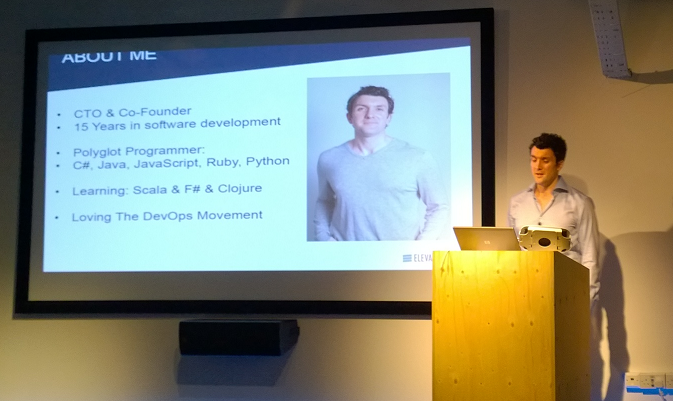
For me the most intriguing presentation was from Michael Delaney at ElevateDirect, a young business which has a web application to assist businesses in finding employees directly rather than via recruitment agencies. His company picked Amazon Web Services (AWS) over Azure two and a half years ago, but is now moving to Microsoft’s cloud.

image
Michael Delaney, CTO and co-founder ElevateDirect

Why did he pick AWS? He is not a typical Microsoft-platform person, preferring open source products including Linux, Apache Solr, Python and MySQL. When he chose AWS, Azure was not a suitable platform for a mainly Linux-based application. However, he does prefer C# to Java. According to Delaney, AWS is a Java-first platform and he found this getting in the way of development.

Azure today, says Delaney, has the first-class support for Linux that it lacked a few years back, and is a better platform for C# applications than AWS even though AWS does support Windows servers.

Migrating the application was relatively straightforward, he said, with the biggest issue being the move from Amazon S3 (Simple Storage Service) to Azure Storage, though he overcame this by abstracting the storage API behind his own wrapper code.

Azure is not all the way there though. Delaney is disappointed with the relational database options on offer, essentially SQL Server or third-party managed MySQL from ClearDB. He would like to see options for PostgreSQL and others. He would also like the open source Elastic Search to be offered as an Azure service.

There was a panel discussion later at which the question of Azure’s market perception was discussed. Most businesses, according to one attendee, think of AWS as the only option for cloud, even if they are Microsoft-platform businesses for whom Azure might be more suitable. It is a branding problem caused by the AWS first-mover advantage and market dominance, said Microsoft’s Steve Plank.

I would add that Azure is relatively new, at least in its new incarnation offering full IaaS (infrastructure as a service). AWS is also ahead on the number and variety of services on offer, and has not really messed up, which means there is little incentive for existing users to move unless, like Delaney, they find some aspect of Microsoft’s platform (in his case C#) particularly compelling.

This leads me back to the bemused attendee. It seems to me that Azure’s biggest advantage is Azure Active Directory and seamless integration with Office 365. Having said that, it is not difficult to host an application on AWS that uses Azure Active Directory, but there may be some advantage in working with a single cloud provider (and you can expect fast low-latency networking between Azure and Office 365).

A tale of two Lumias: snaps on a Lumia 630 versus a Lumia 1020

I spent a morning in Oxford taking some snaps and thought it would be fun to compare what a budget Windows Smartphone – the new Nokia Lumia 630 – can do versus the king of photography smartphones, the Nokia Lumia 1020.

Note this is not intended as a fair comparison; the 1020 costs around four times as much as the 630. It does show what you are giving up if you use a budget smartphone for all your snaps. In each case, you can click the image to see the full resolution.

Here is the Bodleian Library on the 630:

WP_20140614_09_36_07_Pro

and on the 1020, using the 5MP version (the 1020 also stores a high res version of each image):

WP_20140614_09_34_35_Pro

Next, Pembroke College on the 630:

WP_20140614_10_43_47_Pro

and on the 1020:


WP_20140614_10_42_32_Pro

Some flowers at the corner of Pembroke’s Chapel Quad, on the 630:

WP_20140614_10_44_21_Pro

and on the 1020:

WP_20140614_10_44_18_Pro

The difference is more telling if you zoom in. Here is a detail taken from a picture of Broad Street on the 630:

image

and on the 1020:

image

What about the high-res versions of the Lumia 1020 snaps? Here is a picture of Oxford’s “Bridge of Sighs”:

WP_20140614_09_37_21_Pro

Let’s zoom in to look at the sculpture on the bridge. This is from the 5MP version, which I’ve enlarged slightly:

image

Here is the same section taken from the high-res 34MP image:

image

I consider the improvement well worthwhile; it does pay to hang on to those high-res images for the pictures you most value.

I snapped this on the 630 too; here is the same zoomed-in and enlarged section:

image

Ouch!

Conclusion? The camera on the Lumia 630 is not too bad – for a cheap smartphone. The Lumia 1020 is something special and I am grateful to Nokia for delivering a smartphone with a camera good enough that I can leave a standalone camera out of my bag – noting that I am not a photographer, just a traveller who takes pictures. I have not used a tripod on any of the above; from my perspective, coping with camera shake is one of the characteristics I need in whatever camera I use.