Category Archives: professional

Macro virus reborn: ACAD/Medre.A steals drawings using AutoCAD AutoLISP

Remember the Concept virus? Someone wondered if you could make a self-replicating virus with a Microsoft Word macro. It worked; and the proof of concept soon became a real virus causing the usual mayhem and spoiling our clever VBA templates.

Microsoft locked down Office macros fairly effectively; but the idea lived on and has re-emerged as an AutoCAD virus which runs automatically when a drawing is opened. It is not quite the same, as in AutoCAD the code has to be in an external .lsp file, but you can have code in the S::STARTUP function run when a document loads, as explained in the documentation here. The malware relies on the fact that when drawings are emailed, users often archive an entire folder rather than sending a single file. This is how the virus spreads.

Most of the actual malicious code is not in AutoLISP, but in the more familiar form of VBScript files to which the code calls out. The malware then emails AutoCAD drawings to addresses in China – a rather crude mechanism for stealing data, but apparently somewhat effective since on investigation the target mailboxes were found overflowing with messages.

The threat is serious though. Much intellectual property and many future product plans are contained in AutoCAD drawings.

Security vendor ESET’s white paper [PDF] describes the attack in detail.

According to ESET, the combined efforts of Autodesk, Chinese ISP Tencent, and the Chinese National Computer Virus Emergency Response Center have contained the virus for now. There is also a free clean-up utility here: http://download.eset.com/special/EACADMedreCleaner.exe.

Telerik releases Kendo UI components for ASP.NET MVC

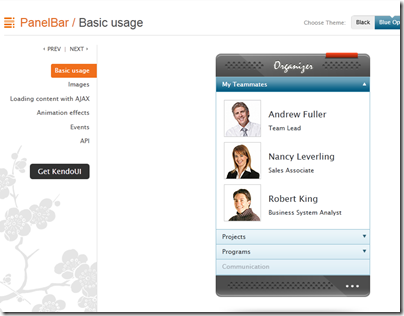
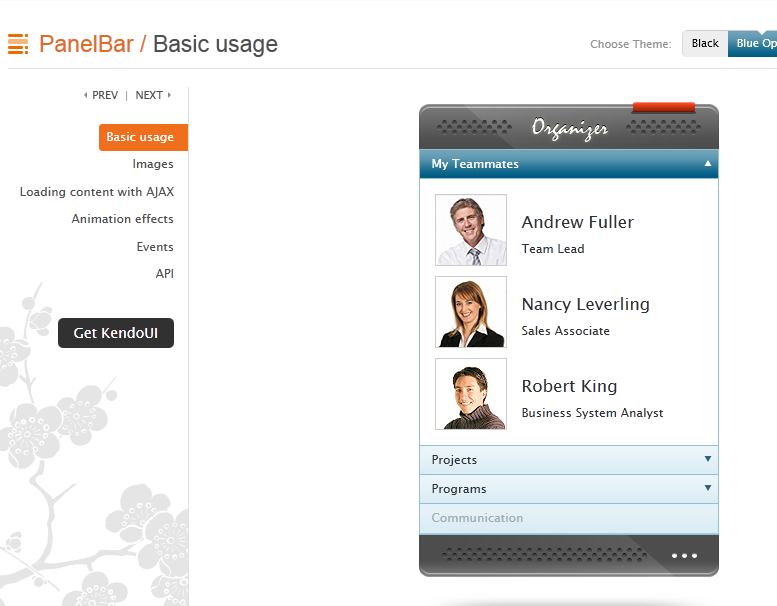
Component vendor Telerik has released an updated version of Kendo UI, its HTML5 framework. This is the first non-beta release with support for ASP.NET MVC server wrappers, with components including Grid, ListView, calendar and date controls, tree view, menu, editor and more. Kendo UI supports the MVVM (Model View ViewModel) pattern popular with Microsoft developers.
image


Telerik seems to be treading a careful path, maintaining its strong links to the .NET developer community while also creating a framework that can be used on other platforms.

I spoke to Todd Anglin, VP of HTML5 tools. Why the support for ASP.NET MVC – is Telerik seeing this becoming more popular than Web Forms, the older ASP.NET approach to web applications?

“Something in the range of 70% of ASP.NET developers are on web forms. We do see a bit of a trend that as they start new projects, developers are adopting ASP.NET MVC and HTML5, which is where it makes sense to use Kendo UI,” he told me.

The main reason though is that Kendo UI is less suitable for Web Forms, where more of the client-side code is generated by the framework. “Web Forms are a very high level abstraction,” said Anglin. “With MVC developers are a little closer to the metal.”

That said, he is not ruling out a Web Form wrapper for Kendo UI long-term.

Anglin says Kendo UI’s use of JQuery is a distinctive feature.  “Over the last few years JQuery has clearly risen above the pack to be the most common core Javascript library and the one most developers are familiar with. Unlike most commercial libraries out there Kendo UI chooses the JQuery core as the starting point and builds on that, so developers that adopt Kendo UI have a smoother on-ramp.”

Kendo UI supports both mobile and desktop web applications, but with different controls. “We believe that developers should offer experiences that are tailored to each device class, which is why you have Kendo UI web for keyboard and mouse, and Kendo UI mobile with a mobile-specific interface. We share code behind that, like the data source, between web and mobile, but we don’t think the interface on a mobile device should be the same as you show on a desktop browser,” said Anglin.

What about the tools side? Although Anglin says “We want to be agnostic on tools”, there is particularly good support for Visual Studion. “Kendo UI integrates with anything that supports HTML and JavaScript well, which includes the latest version of Visual Studio. We are delivering full vsdoc support for Visual Studio so that developers in that environment get Intellisense for JavaScript. But if you’re on a Mac you can use other tools,” he told me.

More interesting is a forthcoming cloud IDE. “We’ve just revealed a new tool called Icenium which is a cloud-based development environment for creating apps in HTML and JavaScript. It’s an incredible environment for building apps with Kendo UI.”

How about HTML5 apps that target the Windows Runtime (Metro) in Windows 8 – will Kendo UI work there? Apparently not:

“It’s certainly something we’ve paid attention to. Telerik’s primary position for Windows 8 runtime and Windows 8 development is with the traditional .NET targeted tools. Our RAD tools later this year will focus on introducing XAML and HTML tools for Windows Runtime. The HTML tools that we introduce will have a shared engineering core with Kendo UI, but we’ll make a tool that is specifically targeted at that runtime.

“Kendo UI is really focused on the cross-platform, cross-browser experience. You write once, at a core code level, and then use all the runtimes out there for HTML and JavaScript. Whereas Windows Runtime is leveraging familiar technology in HTML and JavaScript, but when you write a Windows Runtime app you are writing Windows software. It’s very platform-specific.”
The Development Game: Achievements in Visual Studio 2012

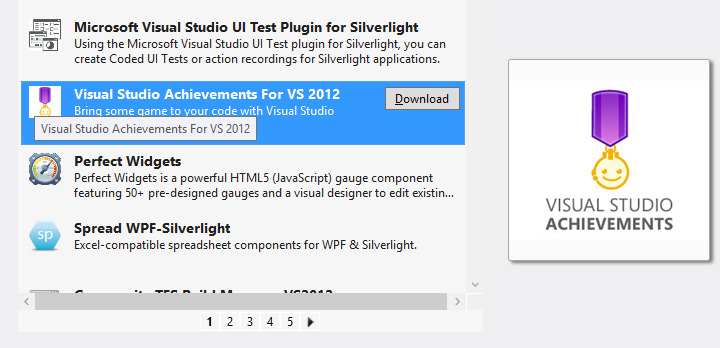
Microsoft has created an Achievements extension for Visual Studio 2012. Borrowing from achievements in games such as those on Xbox 360, and perhaps also inspired by the Office Ribbon Hero,  Visual Studio Achievements lets you earn awards for completing certain tasks, and share them on Facebook and Twitter. You can download Visual Studio Achievements from the Extension Gallery within the IDE.

image

Once installed, you will see a notification each time an achievement is unlocked.

image

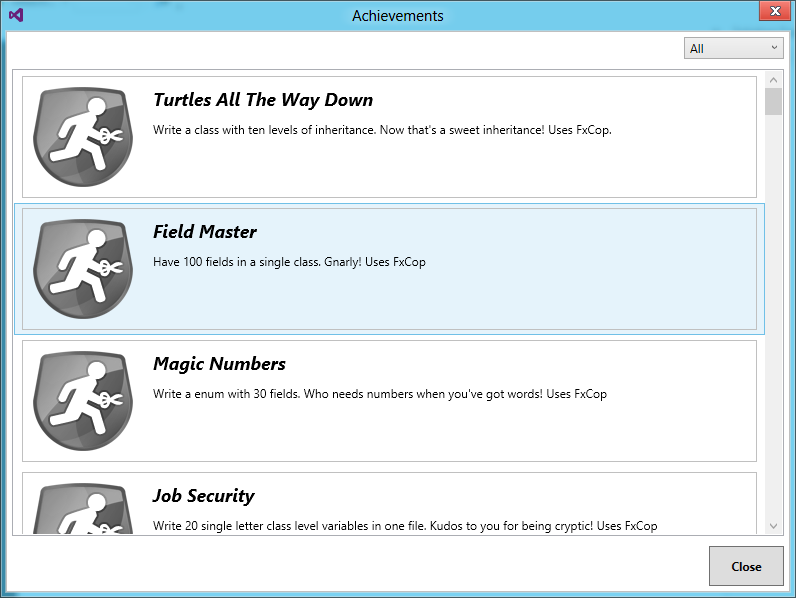
You can also check your progress via the Achievements option in the Tools menu, though mine seems slow to update.

image

It sounds a terrible idea, though there are some entertaining ones. Here are a few I like:

Job Security (0 points)

Write 20 single letter class level variables in one file. Kudos to you for being cryptic! Uses FxCop

and

Regional Manager (7 points)

Add 10 regions to a class. Your code is so readable, if I only didn’t have to keep collapsing and expanding!

and

Interrupting Cow (5 points)

Have 10 breakpoints in a file.Where’s that bug? Could here, could be there, could be anywhere!

and

Architect (5 points)

Add 10 items to a sequence diagram. You’re not just a developer; you’re an architect!

You get the idea.

Microsoft is using this to do some not-so-subtle promotion, with plenty of Windows Azure achievements, though it seems to short on Windows 8 badges as yet.

Unfortunately Visual Studio crashed shortly after I installed this extension and I am suspicious.

All pretty silly; yet I like the idea of friendly notifications when you breach some coding guideline.

Microsoft announces launch dates for Windows 8: software will be done early August

Microsoft’s Tami Reller has announced the launch dates for Windows 8, the company’s controversial new operating system which combines the familiar desktop with a new touch-based user interface and associated runtime. She was speaking at the Worldwide Partner Conference under way in Toronto.

image

The team is on track to complete the software in early August, a milestone known as RTM (Release to Manufacturing).

This means that the final version of Windows 8 will be available for download by developers and enterprises from August – just a couple of months from now.

PCs and tablets preloaded with Windows 8 will be in the shops from late October.

The appearance of Windows 8 hardware is more significant this time round than is usually the case. One reason is that most PCs currently on sale do not have touch screens; and even those that do will lack the range of sensors expected in Windows 8 tablets.

Even more significant is that the ARM build of Windows 8, called Windows RT, is only available with new hardware. This means it will not be generally available at all until the hardware appears in October.

Moving a database from on-premise SQL Server to SQL Azure: some hassle

I am impressed with the new Windows Azure platform, but when I moved a simple app from my local machine to Azure I had some hassle copying the SQL Server database.

The good news is that you can connect to SQL Azure using SQL Server Management studio. You need to do two things. First, check the server location and username. You should already know the password which you set when the database was created. You can get this information by going to the Azure portal, selecting the database, and clicking Show connection strings on the dashboard.

Second, open the SQL firewall for the IP number of your client. There is a link for this in the same connection string dialog.

Now you can connect in SQL Server Management Studio. However, you have limited access compared to what you get as an admin on your local SQL Server.

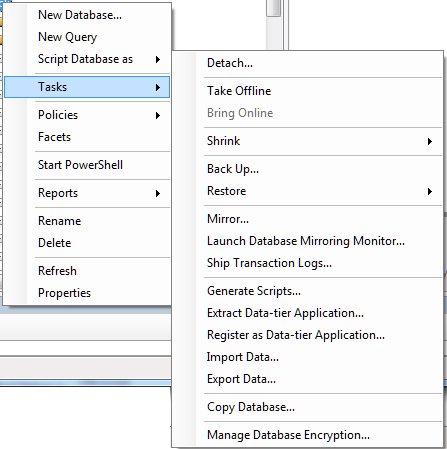
Here is the Tasks menu for an on-premise SQL Server database:

image

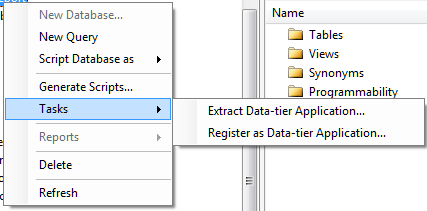
and here it is for a SQL Server Azure database:

image

Still, you can start Export Data or Copy Database from your on-premise connection and enter the Azure connection as the target. However, you should create the destination table first, since the Export Data wizard will not recreate indexes. In fact, SQL Azure will reject data imported into a table without at least one clustered index.

I tried to script a table definition and then run it against the SQL Azure database. You can generate the script from the Script Table as menu.

image

However even the simplest table will fail. I got:

Msg 40514, Level 16, State 1, Line 2
‘Filegroup reference and partitioning scheme’ is not supported in this version of SQL Server.

when attempting to run the script on SQL Azure.

The explanation is here.

Windows Azure SQL Database supports a subset of the Transact-SQL language. You must modify the generated script to only include supported Transact-SQL statements before you deploy the database to SQL Database.

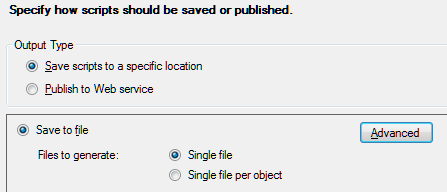
Fortunately there is an easier way. Right-click the table and choose Generate Scripts. In the wizard, click the Advanced button for Set Scripting Options.

image

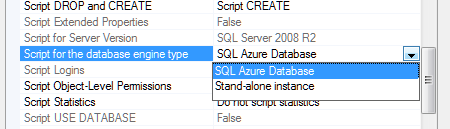
Find Script for the database engine type, and choose SQL Azure:

image

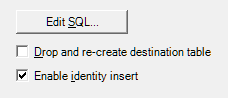
You may want to change some of the other options too. This generates a SQL script that works with SQL Azure. Then I was able to use the Export Data wizard using the new table as the target.  If you use Identity columns, don’t forget Enable identity insert in Edit Mappings.

image

Embarcadero adopts open source Clang for future C++ versions

A couple of months ago Embarcadero’s John Ray Thomas published a roadmap for the company’s C++ tools. Coming soon: not only a long-awaited 64-bit compiler for Windows, but also native iOS and Android support. On top of that, there are plans for “the very best in C++11 and C99 language and library compliance in the industry.”

Sounds good; but this forthcoming upgrade is not quite what it seems. I spoke to technical evangelist David Intersimone about the changes. The company is adopting Clang, an open source project which creates a C/C++/Objective C front-end for the LLVM compiler. “We’re integrating all that into our IDE,” said Intersimone. “We’re also going to be using that same toolchain world with our Delphi compiler as well.”

“We have analysed what to do about C++. Our compilers both for Delphi and C++ have been around for a lot of years, and over time it just got harder and harder to add new capabilities to make programming simpler and also to add power and richness to the languages. In C++ in particular the language continues to be updated, with now C++ 11. So we made the decision to use Clang and LLVM on the C++ side, for the 64-bit compiler. We’re going to keep our existing compiler for 32-bit Windows for now, and then eventually replace that.

“For Delphi we’re still using our existing compiler to do some of the work, but we’ve been working on a next-generation compiler for Delphi and that is still in the works. For a while we’ll have two compilers, the existing architecture compilers, and then new compilers.”

Embarcadero has its own C++ extensions to support component development, and is working on adding them to Clang. “We’re leveraging and extending the Clang compiler with the property-method-event extensions that we added to our own C++ compiler.”

It is a sad moment in some ways, bearing in mind the long history of what was once the Borland C++ compiler. Equally, it is a sensible move. Intersimone said that the work of keeping up with the evolving C++ specification was disproportionate to the benefits. “It’s a monster language, with a lot of power and a lot of complexity. It made perfect sense to fit our extensions [to Clang] versus building a compiler from scratch and having to continue to track the language into the future.”

Embarcadero can focus instead on its IDE and tools, and on the frameworks for Windows and for cross-platform.

Look out for a more detailed interview with David Intersimone in a future article for Hardcopy.

Updating the world’s most widely deployed SQL database engine: welcome to SQLite 4

A new version of SQLite is in preparation. If you are not a developer, you might not have heard of SQLite, but you have almost certainly used it. It is built into Mac OS X and numerous web browsers, used by many applications which run on Adobe’s Flash runtime, and is the obvious choice if you want a small, fast and reliable database engine to embed into an application. It is open source and as free as you can get:

Anyone is free to copy, modify, publish, use, compile, sell, or distribute the original SQLite code, either in source code form or as a compiled binary, for any purpose, commercial or non-commercial, and by any means.

SQLite3 is the current version; but now there is an update to version 4:

SQLite4 is an alternative, not a replacement, for SQLite3. SQLite3 is not going away. SQLite3 and SQLite4 will be supported in parallel. The SQLite3 legacy will not be abandoned. SQLite3 will continue to be maintained and improved. But designers of new systems will now have the option to select SQLite4 instead of SQLite3 if desired.

The reason for the new version is that some issues in version 3 could not be fixed without breaking compatibility.

So what is new? On a quick read, these seem to be the highlights:

  • A global configuration object (sqlite4_env) which eliminates all use of global and static variables.
  • A new key/value storage engine which has a “greatly simplified” interface and which is pluggable, so you can use a different one if required. The default storage engine is described as a “log-structured merge database”. A B-Tree engine may also be offered later.
  • Primary keys are now real primary keys, as opposed to unique constraints. This speeds up primary key searches.
  • Decimal maths. “All numeric values are represented internally as an 18-digit decimal number with a 3-digit base-10 exponent.” This is advantageous for currency calculations and for cross-platform consistency.
  • Foreign key constraints and recursive triggers on by default
  • Covering support in indexes (when required), to increase the number of queries that can be resolved by querying the indexes alone, at the expense of greater duplication of data

When will SQLite 4 be ready? Code is available but Author D Richard Hipp says:

Everything is still pretty makefile-touchy. Remember, this is like pre-alpha code. It works, but just barely. And things are changing rapidly.

Porting an application from SQLite3 to SQLite4 should be straightforward, according to the author. “An hour or two search-and-replace.”

image

BlackBerry 10: QNX multitasking goodness

I attended the London BlackBerry Jam, one of around 500 developers (the event was sold out) who showed up to learn about developing for Blackberry 10 and in the hope of snagging a prototype of RIM’s next smartphone, the BlackBerry 10 Dev Alpha. The event is part of a tour of 26 cities worldwide. I also spoke to Vivek Bhardwaj, Head of Software Portfolio EMEA for RIM. Does BlackBerry 10 have what it takes to  compete against Apple iPhone and Google Android?

A few quick observations. The event was split into native and web tracks, with the native track focusing on  C/C++ development and the Cascades UI framework, and the web track covering WebWorks, the HTML 5 developer tools which you can use to target mobiles as far back as BlackBerry 5, or to create apps that share code between BlackBerry and other mobile platforms.

There was also a tour of various mobile JavaScript libraries. One that caught my attention was Zepto.js, which implements most of the jQuery API in just 8.4k of compressed code, around 25% of the size of jQuery. The trade-off, aside from some missing features, is lack of support for Internet Explorer, though support for IE 10 is under consideration. Thought-provoking: the price of legacy platforms?

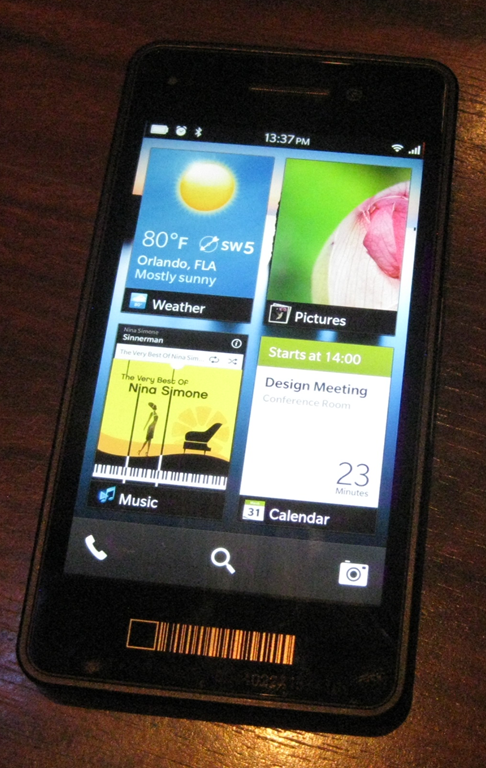
It turned out that the device Bhardwaj was holding, though pretty much the same hardware as the Dev Alpha giveaway, was more revealing as a glimpse of the next-generation BlackBerry. The Dev Alpha, which has an impressive 1280 x 768 screen, comes with no applications other than the web browser and its user interface is pretty much that of the PlayBook. Bhardwaj’s demo device on the other hand is a complete early version of BlackBerry 10 though there were parts that he would not demonstrate. I went to compose an email and he said, “we are not ready to show that yet.”

image

So what is distinctive about BlackBerry 10? One of its key features is multitasking, thanks to the processor scheduling capabilities of QNX, the embedded operating system which underlies both PlayBook and BlackBerry 10. According to Bhardwaj, this enables up to 8 apps to run at once. “Applications all run simultaneously. We don’t need to pause them,” he said. “It’s much more about flow.”

Although apps do run full screen, you can take advantage of the multitasking by “peeking” at a background app. This means holding your finger towards the corner of an app and dragging it left to see a little of what is underneath. In the pic below this is another image.

image

Talking to developers at the event I picked up considerable enthusiasm for BlackBerry 10, though compatibility is a headache. If your customer asks you to support all versions of BlackBerry back to the 5.0 series, you are stuck with WebWorks and the pre-WebKit browser in 5.0. If you can convince your customer to forget 5.0, then you can develop for WebKit. If you want to use Cascades then you are restricted to PlayBook and BlackBerry 10.

BlackBerry 10 also supports Adobe AIR, for Flash-based apps, and an Android runtime for repackaged Android apps.

The prototype BlackBerry 10 phone looks good, but as a brand new platform is it sufficiently exciting to revive RIM’s fortunes? “I don’t believe that in a trillion-dollar plus industry there can only be two players. I think there is more than enough space for four or five platforms. It’s very short-sighted if we think there can only be three ecosystems,” said Bhardwaj.  

Amazon web service APIs: a kind of cloud standard?

I am at the Cloud Computing World Forum in London where one of the highlights was a keynote yesterday from Amazon CTO Werner Vogels. Amazon, oddly enough, does not have a stand here; yet the company dominates the IAAS (Infrastructure as a service) market and has moved beyond that into more PAAS (Platform as a service) type services.

image

Vogels said that the reason for Amazon’s innovation in web services was its low margin business model. This was why, he said, none of the established enterprise software companies had been able to innovate in the same way.

He added that Amazon did not try to lock its customers in:

If this doesn’t work for you, you should be able to work away. You should be in charge, not the enterprise software company.

Sounds good; but Amazon has its own web services API and if you build on it there is an element of lock-in. Or is there? I was intrigued by a remark made by Huawei’s Head of Enterprise R&D John Roese at a recent cloud computing seminar:

We think there is an imperative in the industry to settle on standardised interfaces. There should be no more of this rubbish where people think they can differentiate based on proprietary interfaces in the cloud. A lot of suppliers are not very interested in this because they lose the stickiness of the solution, but we will not see massive cloud adoption without that portability. 

But what are these standardised interfaces? Roese said that Huawei uses Amazon APIs. For example, the Huawei Cloud Storage Engine:

The CSE boasts a high degree of openness. It supports S3-like interfaces and exposes the internal storage service enabler to 3rd party applications.

There is also Eucalyptus, open source software for private clouds that uses Amazon APIs. Is the Amazon web services API becoming a de-facto standard, and what does Amazon itself think about third parties adopting its API?

I asked Vogels, whose response was not encouraging for the likes of Huawei treating it as a standard. The question I put: is the adoption of Amazon’s API by third parties influencing his company in its maintenance and evolution of those APIs?

It is not influencing us. It is influencing them. Who is adopting our APIs? We licensed Eucalyptus. People ask us about standardisation. I’d rather focus on innovation. If others adopt our APIs, I don’t know, we rather focus on innovation.

The lack of interest in standardisation does undermine Vogels’ comments about the freedom of its customers to walk away, though lock-in is not so bad if your use of public cloud is primarily at the IAAS level (though you may be locked into the applications that run on it).

Another mitigating factor is that third parties can wrap cloud management APIs to make one cloud look like another, even if the underlying API is different. Flexiant, which offers cloud orchestration software, told me that it can do this successfully with, for example, Amazon’s API and that of Microsoft Azure. Perhaps, then, standardisation of cloud APIs matters less than it first appears.

Visual Studio LightSwitch to get HTML5 support

Microsoft’s Visual Studio LightSwitch is a rapid application development tool designed to create database-oriented, browser hosted applications with little code.

LightSwitch is intriguing because it does model-driven development. You design the model, LightSwitch generates the application. Microsoft’s idea was that non-specialist developer would like the tool, though there is little evidence of that. However, it does enable professional developers to put together functional applications quickly.

Unfortunately LightSwitch was conceived when Silverlight was all the rage at Microsoft. It generates Silverlight apps, which means they can run either on the desktop or in the browser, but also cuts out every device out there that does not run Silverlight. Including of course hot new mobile devices from Apple iOS to Android and even, on the Metro side, Windows 8.

But this is model-driven development, right? Just add code generation for HTML 5 and the same tool will generate standard browser-based apps.

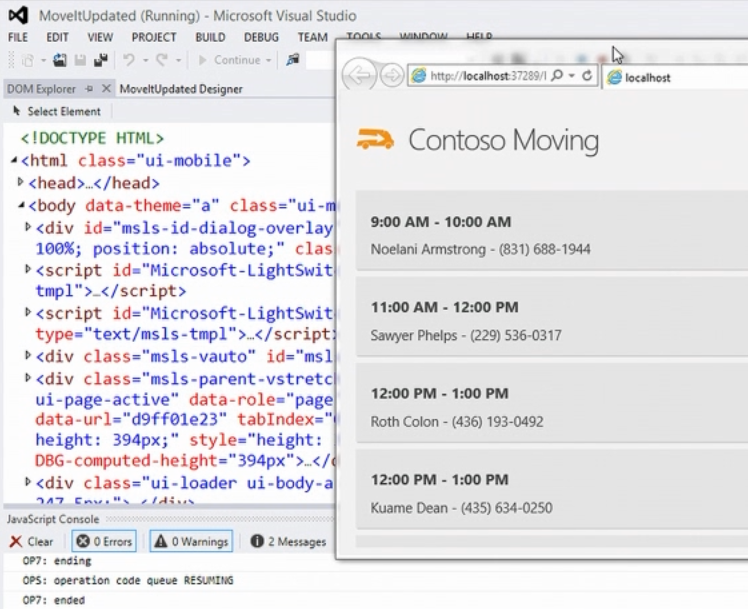
Microsoft has announced just that at TechEd, under way this week in Florida. Visual Studio VP Jason Zander demonstrated LightSwitch for HTML5:

image

which means you can run the apps on iOS:

image

This feature is not in the current RC of Visual Studio 2012 but will be added later.

HTML 5 support puts LightSwitch back on the map as a RAD (Rapid Application Development) tool. But is there any appetite for model-driven development, which has all-but failed in so many other implementations?

That is as yet unproven, but at least the fate of LightSwitch no longer depends on that of Silverlight.