Category Archives: professional

Appcelerator acquires Aptana

Appcelerator, a company whose main product is a cross-platform desktop and mobile toolkit called Titanium, has acquired Aptana, whose Aptana Studio 2 is probably the best IDE for JavaScript application development, and which also supports Ruby on Rails, PHP, Python, and Adobe AIR.

It makes sense, in that Titanium uses JavaScript as the primary language for the application logic and UI.

image

Appcelerator is already doing well from the current surge of interest in mobile apps, offering an obvious solution to developers endeavouring to support both Apple iOS and Google Android with a single code base. Aptana looks a good acquisition; but the news may not be so welcome to those who rely on Aptana Studio for Adobe AIR; I imagine Appcelerator may see this as a competing platform. Then again, most AIR developers use the Flash IDE or Flash Builder so it is unlikely to have a huge impact even if AIR support is dropped (I do not know what the plans are in this respect).

The server-side technologies like PHP and Ruby are a better fit, since many mobile apps have a server component.

Update: in the webcast about the acquisition, Appcelerator CEO Jeff Haynie said “There’s quite a few questions around Aptana as it relates to Adobe and ColdFusion; I don’t think we can say anything about that.”

The company is expecting to release a joint Aptana Studio/Appcelerator Titanium beta in March 2011. The initial release will not include a visual designer, though this is planned for some future release.

Adobe AIR is user-hostile compared to native apps says BankSimple CTO

Alex Payne, CTO at BankSimple, has written an analysis of Adobe AIR from the user’s perspective. The scenario: his team was looking for a an alternative to Campfire for group chat, and selected HipChat. They liked the features of HipChat, but not the desktop app, which is built using Adobe AIR:

My team experienced a number of the usual problems one has with AIR applications: lousy performance, odd interface bugs, key combinations and UI elements that didn’t conform to our operating system. AIR apps exist in an uncanny valley between a web application and a desktop application, and the result is unsettling and annoying. Pretty soon, we were itching to go back to Campfire (via the native Mac client Propane), even though HipChat has better features and the promise of improved reliability.

Payne investigated further and came to the conclusion that users prefer native apps; and that cross-platform toolkits are for the benefit of software companies not users. Echoes of Steve Jobs’ Thoughts on Flash:

Flash is a cross platform development tool. It is not Adobe’s goal to help developers write the best iPhone, iPod and iPad apps. It is their goal to help developers write cross platform apps.

And lest you think this is bad for AIR but good for Java, note that Payne adds:

For anyone who used a computer in the 1990s, AIR probably brings back scarring memories of Java apps: slow, ugly, inconsistent, awkward.

I was also reminded of Evernote’s experience with .NET versus native code, which I blogged here.

Payne is not all wrong, neither is Jobs. That said, the distinction between what is good for users and what is good for developers is not absolute. Maintaining a single cross-platform code-base, for example, is good for both users and developers, because it reduces bugs and assists feature-compatibility across platforms. It is also good for users of minority platforms who might otherwise have nothing.

Another question: how many of the issues Payne identifies are inherent to using AIR (or another cross-platform runtime), and how many are implementation issues? It is impossible to know without drilling into the details; but I don’t believe that all AIR (or Java, or .NET) apps have “lousy performance”.

It is true that ActionScript code is slower than Java or .NET code, and much slower than compiled C/C++, but speed of script execution is not always the performance bottleneck that users will notice most.

This is seemingly one of those never-ending computing debates; but a post like Payne’s is a reminder that neither Adobe AIR, nor any cross-platform runtime, is a perfect solution to the challenge of multiple client platforms.

nginx market share growing faster than any other web server

According to the latest netcraft web survey nginx market share is growing faster than that of any other web server, even though it is still small relative to Apache or Microsoft IIS. In December 2010 nginx share grew by 0.88% to 7.5% – which can also be expressed as a 13.3% increase.

Apache 59.13%
Microsoft 21.00%
nginx 7.50%
Google 5.53%
lighttpd 0.68%

I did not take much notice of nginx until hearing Ryan Dahl evangelise it at Cloudstock, a Dreamforce event, last month. Now I plan to install it at itwriting.com when I find the time.

Microsoft WebMatrix released: a simple editor for ASP.NET Razor and more, but who is the target user?

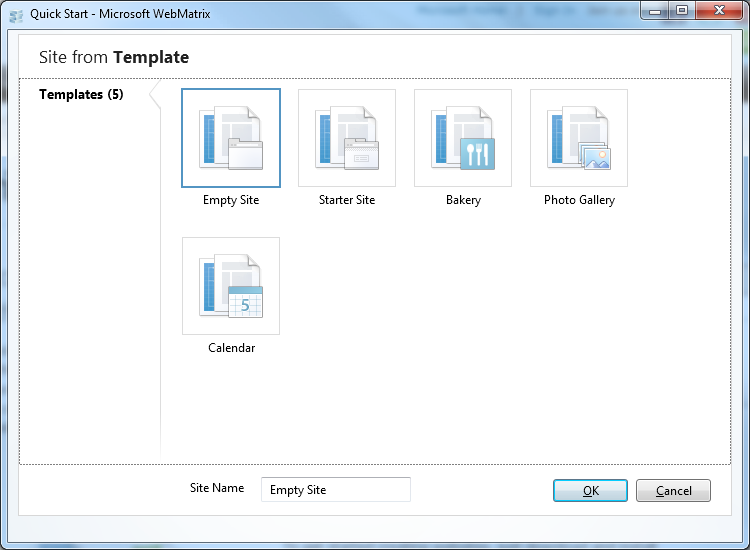
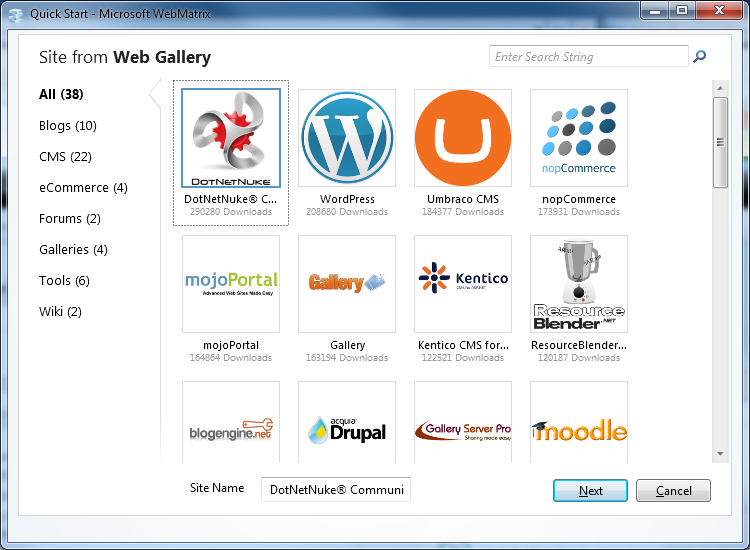
Microsoft has released WebMatrix, a free tool for creating web sites for Microsoft’s web server. It uses the Web Platform Installer and installed smoothly on my Windows 7 64-bit box. What you get is a cleanly-designed tool which lets you start web sites from templates or from standard installs of popular applications including WordPress, Drupal and Moodle.

image

Yes, you can use PHP and MySQL as well as .NET web applications, though the common factor is that all are configured for IIS, Microsoft’s web server.

With many ISPs already offering instant installs of apps like WordPress, it is more interesting to look at the site templates in WebMatrix, though the selection is smaller.

image

What is interesting about these is that they create sites based on Razor, an alternative view engine for ASP.NET. Microsoft VP Scott Guthrie describes Razor here. It is odd though: Razor is a feature of ASP.NET MVC 3, currently in release candidate phase, but you cannot create ASP.NET MVC sites in Web Matrix.

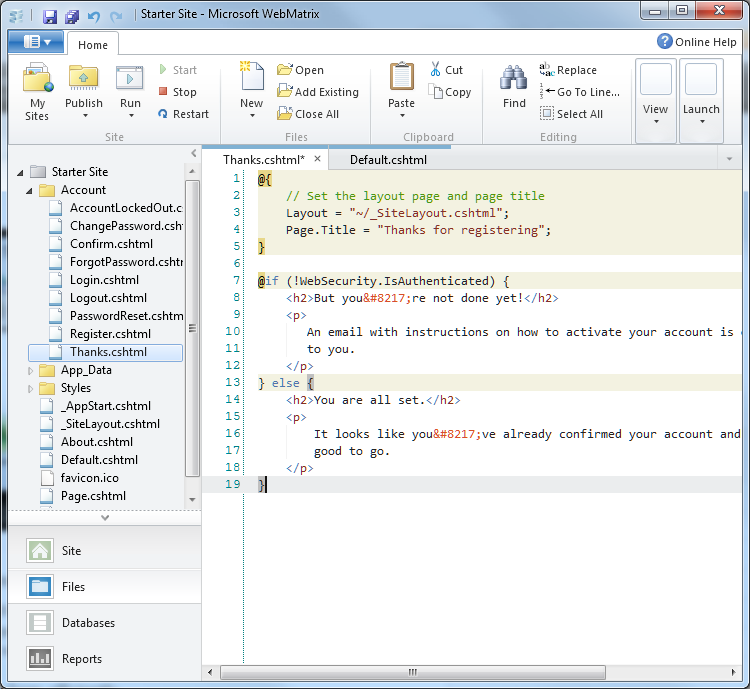
Once a site is created, you can modify it in the WebMatrix editor.

image

You can run the site on IIS Express with one click. WebMatrix will show you all the requests as you run, which could be handy for tracing problems. There is also a database management workspace which uses SQL Server Compact Edition, a reporting workspace which will analyse your site for problems, and the ability to publish a site using  FTP or Microsoft’s Web Deploy.

I like the clean look of WebMatrix, and that it is lightweight and fast; but who is the target user? It appears to be aimed at non-professionals; but this is a techie product that will not appeal to users looking for an easy to use web site builder. There is no visual editor; users are just chucked in at the deep end editing raw HTML and C#. There is not even any intellisense code completion. Clicking Online Help just brings up a Microsoft search form. There is no debugger to speak of; you are expected to upgrade to Visual Studio. Which raises the question, why not just get Visual Web Developer 2010 Express, which is also free, and has a better editor and debugging features? Of course you could use the two together; but Web Matrix is not adding much value. Features like the SEO analysis seem to be be based on the existing Search Engine Optimization Toolkit, which you can install without Web Matrix.

WebMatrix has been available in beta for six months, but its forum is relatively quiet.

Still, if nothing else Web Matrix is a handy way to take a look at Razor, which deserves attention. Shay Friedman has a technical introduction here.

Guthrie has a detailed look at the WebMatrix beta here.

Half-baked Android tablets will help Apple, give hope to Microsoft

The downside of open is fragmentation. CES earlier this month was overflowing with Android tablets and smartphones, but since anyone can use Android, device manufacturers may disappoint users, for example by shipping tablets that do not use a version of Android designed for tablets, or shipping devices that do not have access to the official Android Market.

The Inquirer reported yesterday that the Asus tablets announced at CES will not in fact ship with Android 3.0 Honeycomb. The reason stated is that:

because the company did not know the detailed technical specifications requirements of the Android 3.0 Honeycomb operating system, it could not confirm that Honeycomb will be the tablets’ OS.

Although it is stated that the tablets will ship with Android 2.3 Gingerbread, I get the impression that Asus might upgrade them to Honeycomb eventually; and since they are now apparently not due until the third quarter there is time for plans to change.

Not all Android devices have Google’s official compatibility blessing.  The frequently asked questions make a good read:

Anyone is welcome to use the Android source code, but if the device isn’t compatible, it’s not considered part of the Android ecosystem.

Only devices that have passed Google’s compatibility tests get access to the Android Market. This leads to a surprising situation for users: you might buy an Android tablet or smartphone and find that it has no access to the Android Market.

Vendors can get round this to some extent by creating their own Android app stores, though this kind of fragmentation is likely to have a bad outcome, with a limited selection of apps and insufficient market share to attract developer attention.

This means that a handy question to ask a salesman is: does this gadget have the Android Market? If the answer is anything less than a demo of the official Google Android Market client, that is reason for caution.

The context is that all these devices have to compete with Apple; and the App Store is a significant part of the appeal of iOS devices. Therefore an Android device without access to the Android Market is disadvantaged, though it is not something you are likely to find mentioned on the box.

There is an obvious danger for Android, that customers confronted with a vast range of Android offerings will find it hard to distinguish between what is excellent, what is reasonable, and horrible implementations like the Next Tablet.

Even the element of uncertainty is enough to help Apple, which is likely to announce a second generation iPad soon. It may even give hope to Microsoft, depending on when “Windows 8” tablets come to market and how good they prove to be.

The challenge for Google is how to keep Android open, while also preventing its brand from being damaged by too many sub-standard devices.

Visual Studio 2010 nine months on: how good has it proved?

Visual Studio 2010 was released on April 12th 2010. Nine months on, how good has it proved to be?

image

I researched deeply into Visual Studio 2010 at the time, and was impressed overall. It was a huge release, partly because the IDE was rebuilt using Windows Presentation Foundation, and partly because of a large number of new features including the F# language. Performance was always going to be an issue with the move to a .NET-based IDE, but on my machines I found it satisfactory.

Others have been less pleased with the performance. The comments to Jason Zander’s announcement of the Service Pack 1 beta last month make interesting reading. Here is the negative:

I am a professional .NET developer and I am really upset with VS 2010. It crashes more often than VS 2008. It is slow as hell. It even crashes when debugging. VS 2010 is built with WPF which is causing all these problems.

and here is the positive:

I don’t know what y’all complaining about – VS2010 is blazingly fast… at least on my machine.

I am not sure whether the performance issues are more dependent on the the type of work you are doing, or the size of the projects, or some other factor. One issue may be graphics performance, since this will make a big difference to WPF whereas not so much with Visual Studio 2008 and earlier.

Thinking back to this time last year, I also recall how Visual Studio 2010 seems so focused on .NET, including Silverlight. Later on we got the announcement of Visual Studio LightSwitch, a RAD database application tool which builds Silverlight clients. It now seems obvious, especially following the PDC (Professional Developers) conference in November, that the vision of the developer team at Microsoft did not align with the vision of the Windows team; and that the Windows team seemed to win that argument internally. It is odd, because Silverlight has the potential to solve problems for the company. It is a technology that extends from the desktop to Windows Phone 7, which is well-suited to app store deployment thanks to the way apps are isolated, and which potentially can run on multiple platforms. Now with Silverlight 5, promised for release this year, Microsoft is adding more Windows-specific features and allowing more fragmentation between versions. Silverlight on Windows Phone 7 is based on version 3, the Mac version has more limited capabilities than the Windows version, and so on.

Microsoft said at PDC that “HTML 5” is its broad-reach platform. That suggests that what Visual Studio needs is HTML 5 designers and JavaScript libraries that integrate with Microsoft’s server technologies and which make it easier to develop HTML application for multiple form factors including small devices.

It is a confusing story, and I would love to know if the subject came up in CEO Steve Ballmer’s discussions with Bob Muglia, VP of Server and Tools, recently. The outcome of those discussions is that Muglia will be leaving Microsoft in the summer.

We will have to wait for Visual Studio 2012, maybe, to discover any change in its direction. In the meantime, SP1 adds a new help viewer, in response to many complaints, as well as a few new features for testing and debugging. There is also a list of bug-fixes, some of which look significant:

and so on. Let me add that while the list looks bad, it is no more than you would expect for a tool of this complexity and in my own testing Visual Studio 2010 has worked well.

I agree though with some of the commenters who note that Microsoft is slow to react when bugs are reported. It will be more than a year after the initial release when SP1 is finished, though you can use the beta for production code if you dare.

I would be interested in hearing from users of Visual Studio 2010. How are you finding it, or did you try it and go back to Visual Studio 2008? I realise that adoption of a new IDE for production work tends to be slow, because developers are reluctant to switch mid-project.

Google flexes its Chrome browser muscles, removes support for H.264 video – but what about Adobe Flash?

Google has announced that it will remove support for the H.264 video codec in its Chrome browser:

…we are changing Chrome’s HTML5 <video> support to make it consistent with the codecs already supported by the open Chromium project. Specifically, we are supporting the WebM (VP8) and Theora video codecs, and will consider adding support for other high-quality open codecs in the future. Though H.264 plays an important role in video, as our goal is to enable open innovation, support for the codec will be removed and our resources directed towards completely open codec technologies.

The reason given is that Google wishes to support open standards. That sounds good for open standards, but not so good for users who simply want a video to play.

Google’s position contrasts that of Microsoft with IE9:

In its HTML5 support, IE9 will support playback of H.264 video as well as VP8 video when the user has installed a VP8 codec on Windows

Still, at least IE9 will play VP8 if the codec is installed, so that makes VP8 look a better option for content providers – which is the outcome Google is hoping for.

I have mixed feelings about this approach, because while it is good for open standards it is bad for compatibility. I am also not sure that it is consistent. Google announced in June that it is integrating Adobe Flash support into the browser; yet Flash is not an open standard.

That also suggests that H.264 video will still play in Chrome, provided it is in a Flash wrapper.

Maybe Google is learning from Apple how to deprecate technologies by removing support. Apple refuses to allow Java or Flash on iOS, and has stopped doing its own build of Java for OS X. Apple has also stated that these “optional” components may not be used in apps that are deployed in the Mac App Store, thus making a disincentive for developers considering those runtimes.

Apple has not squashed Flash though; and Google may find it equally hard to squash H.264, which is widely supported throughout the industry, has the best tools, and for which hardware is optimised. Apple supports H.264 but is unlikely to support WebM or Theora any time soon. Here’s what Apple CEO Steve Jobs said in April 2010:

To achieve long battery life when playing video, mobile devices must decode the video in hardware; decoding it in software uses too much power. Many of the chips used in modern mobile devices contain a decoder called H.264 – an industry standard that is used in every Blu-ray DVD player and has been adopted by Apple, Google (YouTube), Vimeo, Netflix and many other companies.

Although Flash has recently added support for H.264, the video on almost all Flash websites currently requires an older generation decoder that is not implemented in mobile chips and must be run in software. The difference is striking: on an iPhone, for example, H.264 videos play for up to 10 hours, while videos decoded in software play for less than 5 hours before the battery is fully drained.

When websites re-encode their videos using H.264, they can offer them without using Flash at all. They play perfectly in browsers like Apple’s Safari and Google’s Chrome without any plugins whatsoever, and look great on iPhones, iPods and iPads.

It seems Jobs spoke too soon when he said H.264 would play perfectly in Chrome.

Post updated to add Apple quote

What next for application help and documentation? First thoughts on Adobe’s Technical Communication Suite 3

Adobe has launched Technical Communication Suite 3, which bundles FrameMaker 10, RoboHelp 9, Captivate 5, Photoshop CS5 and Acrobat X. FrameMaker and RoboHelp are Windows-only, so the suite is the same.

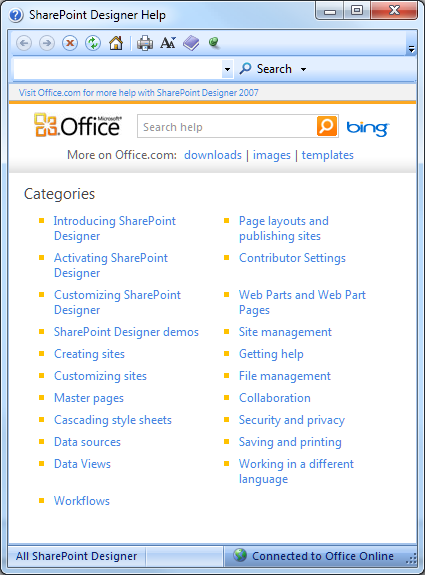
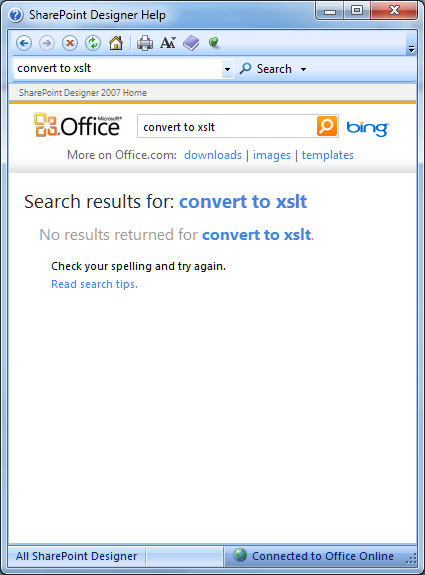
I had a brief briefing on the product today, which by coincidence came after my bad experience with SharePoint Designer and its help system. Please note: I do not hold Adobe responsible for the shortcomings of Microsoft’s online help, but it helped me to put the subject into context. I was trying to figure out how to get SharePoint to display file extensions in document lists. The supplied help looks pretty:

image

but I found it disappointing. I wanted to know, for example, what are the implications of converting a web part to XSLT, which is on one of the designer context menus:

image

Same story when I wanted to know what the @LinkFileName formula was meant to return. And when I looked for a SharePoint formula reference I got one useless result, an article on creating a workflow initiation form.

What we all do in these situations is to hit Google. The snag: whereas the little online help (which is also meant to search Office online) had high authority but no results, Google has the opposite problem: many results but little authority. I did eventually find the formula reference I wanted but finding correct information on the web as a whole is a matter of luck and judgment.

I found it interesting therefore to talk to Adobe about its Technical Communication Suite. How is online help changing? Do we even need it, when people hit Google rather than F1? Maybe it is better just to make sure your help articles and reference are easy to find on the web, rather than packaging them up and calling it a help document? In which case, we should be thinking in terms of a content management system, rather than online help as such.

The answer I guess is “all of these”. The key concept in Adobe Technical Communication Suite is “single-source authoring”, and you can use the same content for web pages as well as for print and traditional packaged online help.

It is still a bit old-school for my taste. For example, you can now include External content search in RoboHelp documents; but this only lets you add external URLS to the document along with search keywords. It does not let you search external content, but restricted to specified web sites, which would be a nice feature.

That said, if you use RoboHelp Server 9 – not included with the suite itself – in conjunction with an Adobe AIR help client, you can get user topic rating and commenting, so there is some concession to user-generated content.

There are also plenty of scenarios where you do still need a blow-by-blow documentation and reference for an application. In fact, if the SharePoint help mentioned above had provided this, I would have been happy.

This is not a review of the Technical Communication Suite, though I hope to get a look at the actual product shortly. In the meantime, a few points of interest. FrameMaker has considerable feature overlap with InDesign; but Adobe says there is still a place for a desktop publishing tool aimed at long technical documents with strong support for structured documents, cross-references and indexes. RoboHelp now supports collobaration workflows using Acrobat.com and PDF review. There is also new support for ePub, the eBook format for everything but Amazon Kindle, in FrameMaker and Kindle. I asked about Kindle support; the Adobe spokesperson was sniffy about Amazon’s proprietary MOBI format but said it might be added eventually if Amazon do not add ePub compatibility to the Kindle.

How Microsoft SharePoint makes simple things hard

When I was asked how to show file extensions in lists of documents on SharePoint sites I thought it would be a simple change to make. I did a quick Google and found several answers; but some of them involved editing core files that instinctively I thought should be left alone. I took a closer look and worked out the steps.

It turns out that you need SharePoint designer, plus you have to convert a web part to XSLT, and then figure out what to change in the rather complex page that is then generated.

A few observations.

First, I am surprised that Microsoft did not build in some easy way of showing the file extensions in a document library, which seems an obvious thing to want to do. There are hundreds of much more obscure things you can easily show, but not this one.

Second, it is nice that Microsoft has made its SharePoint Designer tool free, but I am not sure that the way it is presented is quite right. It is a techie product but I did not find Help particularly helpful. You know the kind of thing; you are in the Formula Editor, you hit F1, and you get a description of the dialog, when what you want of course is a reference to the formulae.

Third, when I did find the documentation I found it obscure. Here’s the reference for the @LinkFileName formula:

Returns a GUID that represents the icon that is used to create a link to a file in a document library, where the file can be edited by using a menu.

Hmm. I am not sure how many fat SharePoint books you need to read to understand why this particular formula is used as it is in SharePoint, or why String(@LinkFileName) returns the file name with its extension.

Fourth, I discovered that SharePoint deliberately hides the file extension. You can show the extension by removing the function that strips it off, in the formula that determines the contents of that cell.

Now I know why SharePoint is such good business for specialists.

Bob Muglia leaving Microsoft, CEO Steve Ballmer searching for new cloud leadership

Microsoft has announced that Bob Muglia, President of Server and Tools, is leaving Microsoft.

In his memo, Steve Ballmer says:

Bob Muglia and I have been talking about the overall business and what is needed to accelerate our growth. In this context, I have decided that now is the time to put new leadership in place for STB. This is simply recognition that all businesses go through cycles and need new and different talent to manage through those cycles.

It is always hard to tell from the outside, but in my encounters Muglia has been among the most articulate and confident of Microsoft’s top executives. I have also noticed in my regular look at Microsoft’s financials that the Server and Tools business has performed consistently well for as long as I can remember.

Most recently, Muglia took over the Azure business and seemed to know where he was going with it. He is also responsible for developer tools, and while his remarks about Silverlight at Microsoft’s PDC in November were disappointing to developers on that platform, they showed a clear sense of direction.

In this context, it seems surprising that Ballmer is in search of “new and different talent”. It does sound as if Ballmer and Muglia do not see the future of the cloud business – which is the focus of the memo – in the same way.

The key question: in what way did Ballmer and Muglia’s vision differ? I guess we will get some more clues as today’s news is discussed.

Update: Mary Jo Foley has posted Bob Muglia’s internal email to his team:

Later this year, I’m moving on to new opportunities outside of Microsoft, so I wanted to take a few minutes to share with you what’s important to me in life and leadership.

The foundation of who I am is based on living with integrity. Integrity requires principles, and my primary principle is to focus on doing the right thing, as best I can. The best thing, to the best of my ability, for our customers, our products, our shareholders, and of course, our people.

Just sugar, or did Muglia feel that staying at Microsoft would compromise those principles?

Since the announcement, the reaction across the industry has shown the high regard in which he is held, and bewilderment at why he is being let go. Here’s Redmonk analyst James Governor on Twitter:

Another exit: Microsoft server chief Muglia leaving company normally i say so what but this is TERRIBLE for microsoft