Category Archives: software development

ITWriting app hits the Windows 8 store

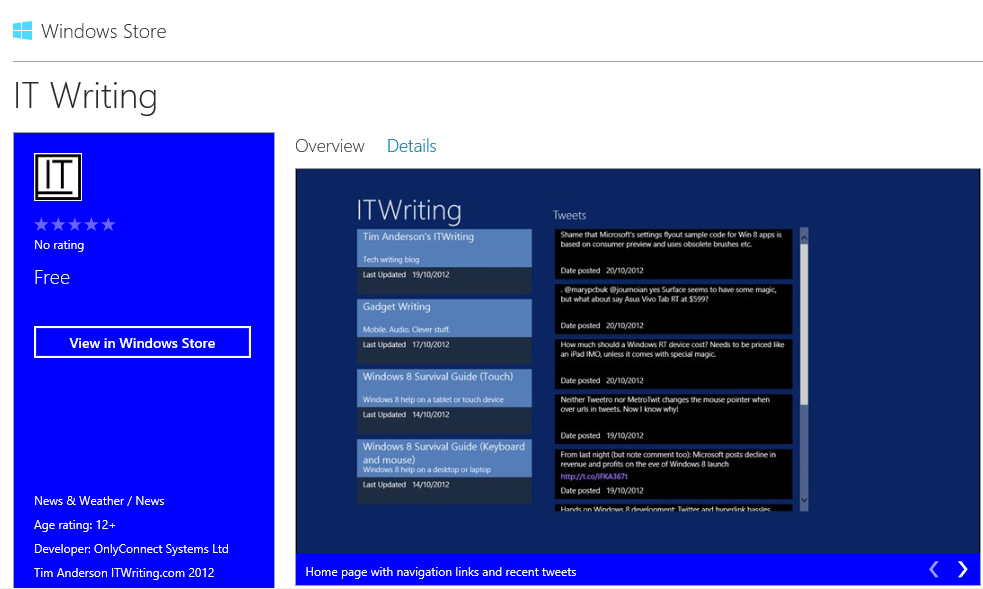
Hands on where possible is part of my technical journalism philosophy, so I have been trying out Windows 8 development for some time. After playing around with and adapting Microsoft’s blog reader sample I decided to take it further and try submitting it to the Windows 8 Store.

Today it was certified so you can install it now. It is free of course. 

image

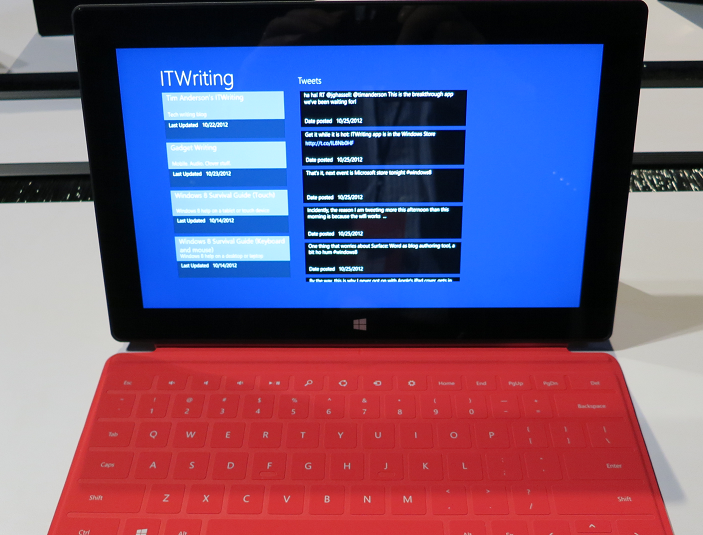
There is not much to it. It features quick access to recent posts on itwriting.com and gadgets.itwriting.com, recent tweets, and dedicated links to Windows 8 survival guides for both keyboard/mouse and touch/tablet users.

Despite its simplicity, creating the app was an interesting exercise. Having the app layout change in a moderately sensible way when switched between portrait and landscape, and filled or snapped, taught me a bit about XAML and the VisualStateManager element. I also struggled a bit with the flyouts that you use to implement app settings, the ones that appear when the user displays the Charms menu and taps or clicks Settings when your app has the focus. I used the official sample though I discovered that it will not compile as-is because the standard brush names have changed since the release preview for which the sample was apparently created. I have have some sort of z-order bug there which I have not yet solved.

Creating apps for Windows 8 is not difficult exactly, but it is fiddly. It seems to me harder than, for example, creating a desktop app using Windows Forms. In mitigation, setup and deployment is done for you which is a significant advantage. I was also pleased to discover that the app works fine on a Surface RT.

image

The Windows Store certification process was rather straightforward in my case; the app passed first time. I had noticed from other reports that having a privacy policy in place is important, so made sure that this is linked in this settings.

I do have some ideas for making the app a little more interesting. Share support and offline support would be obvious enhancements. Watch out for future updates!

Telerik Icenium: new desktop and cloud IDE for mobile development

When I heard that Telerik is bringing out a new IDE for mobile app development, I could contain my excitement, especially after learning that it is another PhoneGap/Cordova based approach, wrapping JavaScript and HTML as a native app. While speaking to Telerik’s Doug Seven though, I found myself increasingly impressed.

If that name sounds familiar, it might be because Seven was a director of Product Management in the Visual Studio team at Microsoft, and you can see that influence in the new IDE, which is called Icenium. Spot the Metro-style buttons at top left of the IDE!

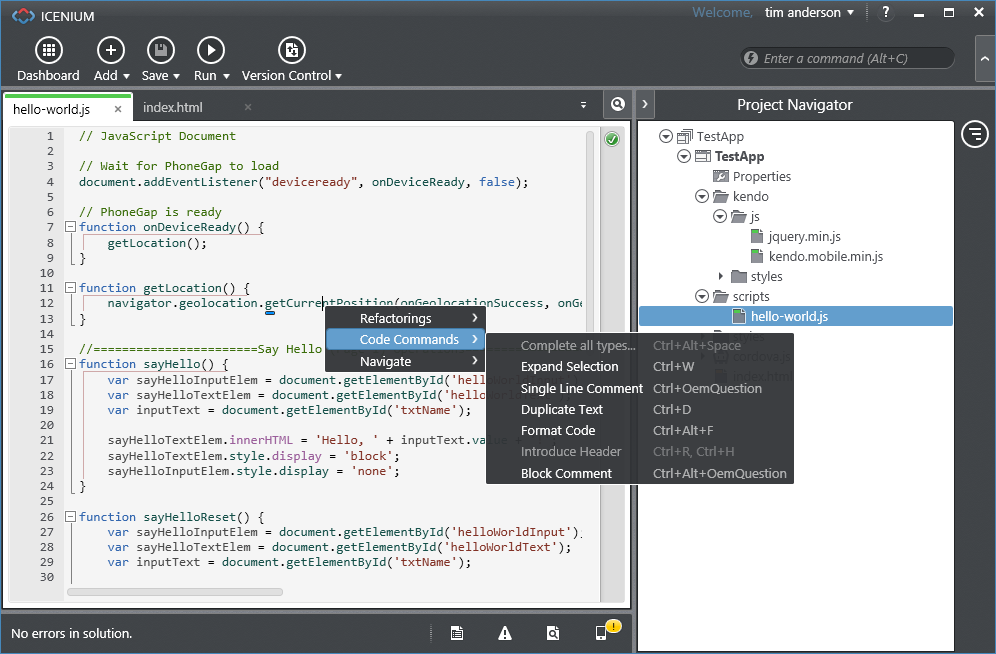
image

Icenium has several components. There is a Windows IDE called Graphite, illustrated above. Those on other platforms, or in distributed teams, can use Mist, which is a browser-based IDE which replicates many of the features of Graphite. There is also a set of cloud-based services to handle building apps for iPhone, iPad and Android devices. This means you do not need to install all the necessary SDKs on your own machine. Icenium also lets developers build signed iOS packages without needing to have a Mac.

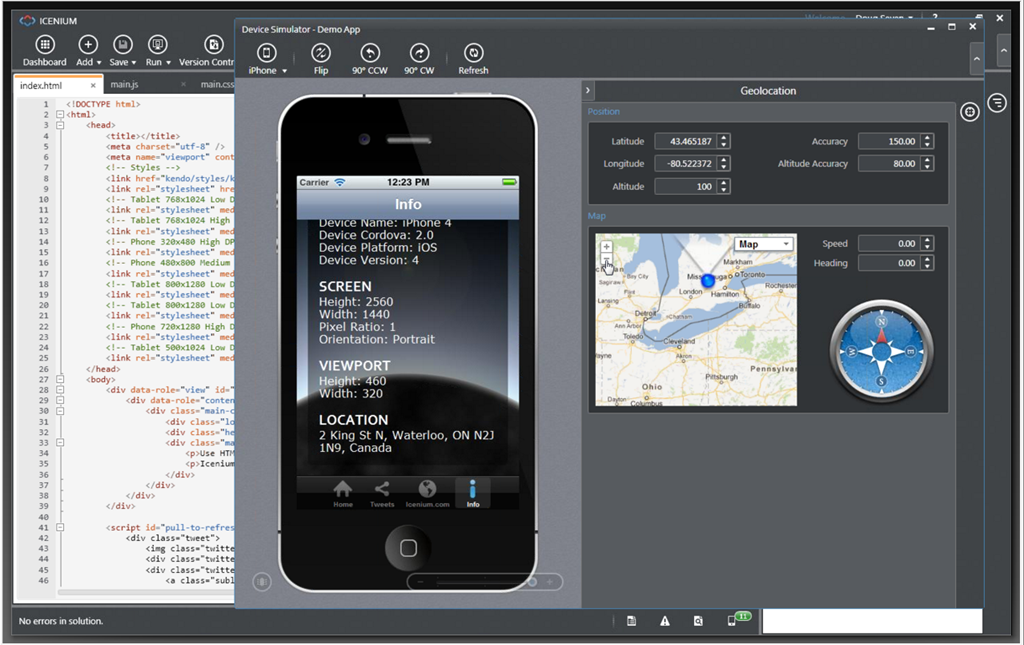
The Icenium Device Simulator lets you test applications quickly on your own machine.

image

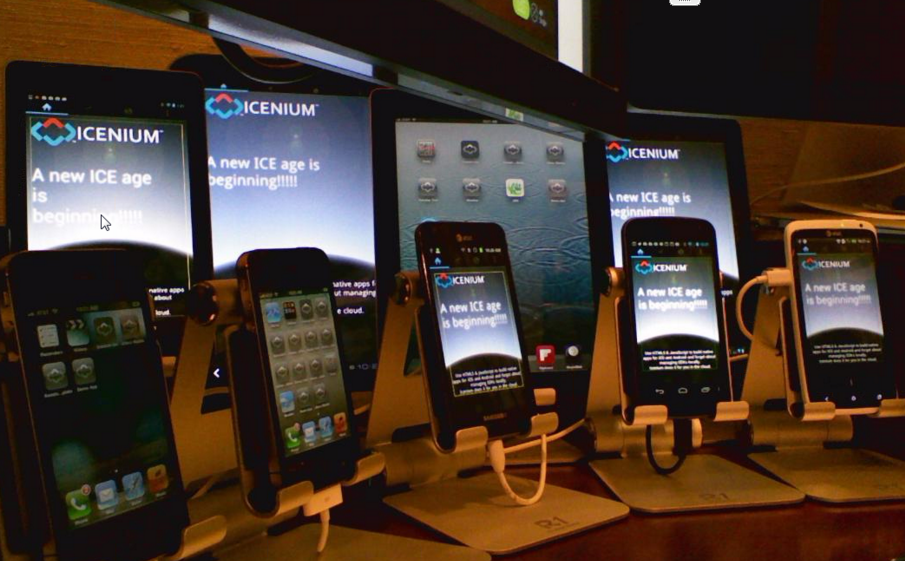
The tools look good, though I have not tried them yet, but the unique feature of Icenium is the ability to deploy and test quickly on multiple devices. Code is kept synchronized between Graphite and Mist, and also pushed out though LiveSync to multiple devices. Here is a snap of the view from Doug Seven’s desk, grabbed from his online presentation. He showed me how a code change ripples almost instantly to all these devices for testing.

image

An intriguing part of this is an iOS app called Ion which is a sort of runtime shell for Icenium apps. This means you can load apps for testing onto iOS devices that are not unlocked for developer use. You can also demonstrate apps on a client’s device using Ion. Apple’s attitude to runtimes in the App Store must be softening.

Icenium supports version control using either a Git repository hosted on the service, or your own choice of URL-based Git repositories.

Pricing will be per-developer at $16.00 per month if you sign up for a year, or $19.00 per month without a contract. Once you sign up, you can use all the tools on all your machines. You can also use Telerik’s Kendo UI Mobile framework. It is free until May 1 2013.

Isn’t Icenium’s cloud build feature similar to what Adobe’s PhoneGap Build already does?

“It’s a great comparison,” says Seven. “Adobe has the technology to make this [seamless development experience] possible, they just chose not to do it … [PhoneGap Build] is not integrated into the workflow. It’s a very manual process, I have to zip up my files, submit them to the PhoneGap Build process, then I get back these application packages that I have to manually deploy to my devices to see if it works.”

There is no support yet for mobile web apps, as opposed to apps packaged with Cordova, but this is a possibility for the future.

Like Adobe, Telerik has found WebKit and Google Chrome irresistible, despite Seven’s Microsoft background. WebKit is embedded in the Graphite IDE. You can use Mist with any modern browser, though “the one limitation is that the browser-based device simulator does require Chrome,” though he add that in general, “I use Mist on my iPad all the time.”

ThoughtWorks bemoans excessive software complexity, advocates small, focused services

ThoughtWorks has released its latest Technology Radar, an opinionated analysis of software development trends.

Things the folk at ThoughtWorks like include automated build and deployment, essential for Continuous delivery; NOSQL database managers especially Neo4j; mobile-first development; the AppCode IDE for Apple’s Objective-C; the Graphite realtime graphing tool for creating dashboards; Clojure and Scala for programming.

I meet some of the ThoughtWorks team at developer conferences from time to time, and generally find them smart and though-provoking to talk to. They must be the despair of the big enterprise software vendors, with a liking for open source and an aversion to heavyweight high-maintenance systems.

This remark particularly caught my eye:

Simple architectures—Simple continues to gain traction, including both techniques for building and composing applications, as well as infrastructure-based techniques to enable simple deployment, failover and recovery. This theme is a recurring one for us, but we have not yet seen the usage shifts we believe are necessary.

I asked consultant James Lewis and practice lead Sam Newman to expand on that. Why do we continue to choose complexity over simplicity?

“A lot of people like to stay inside their big box, and don’t understand the complexities that then creates,” said Newman. “There’s a lack of critical thought given to how services talk to each other. A lot of them are driven by whatever the vendor says you do. Java makes RMI very easy. [Microsoft] .NET makes binding to WSDL [SOAP] schemas very easy. All these tools make bad things very easy to do.

“When you start talking to organisations about smaller services that are focused on doing one thing well, they have the horror associated with now having more than one box to manage and operate. So it’s hard to talk about moving from one big monolithic complicated box that is hard to change, to lots of little boxes, without also having conversations with those clients about how they get better at managing multiple services.

“Netflix has 300 services. Each service runs on at least six machines. They are very good at deploying those services. Yet they are not an overly complicated domain compared to some of our clients.”

“Amazon were talking about this in 2004,” adds Lewis, “the idea that you join up development of these small, simple applications with the operational control, so the same people who build them are also the people who run them. Now that we’re seeing both private and public clouds, and the ability to spin up machines becoming more and more prevalent, its starting to become more attractive.”

This is a consistent theme from ThoughtWorks. Break up complex solutions into many small services, think about how they talk to each other (with REST and HTTP favoured), and think about the infrastructure and how to automate it as well as the software itself.

“In many organisations these conversations are happening,” Newman told me. “I go to clients now, and they talk about the Enterprise Service Bus as being something they’d love to get rid of if they only knew how. Five to ten years ago, to even mention the Enterprise Service Bus as being a problem, they’d look at you with daggers in their eyes.”

“It’s almost like we’re now able to fulfil the promise of service orientation,” says Lewis. “It needed these additional practices, around things like automated deployment, automated rollback, and an understanding that people and process are tied intrinsically with it.”

Another issue, claims Lewis, is that software architects simply get out of touch with best practice.

“Most architects who build big systems are quite a long way from their codebases. They sit in rooms talking to other architects. They might have last written a line of code five or ten years ago. What they do is to design systems as they would have done ten years ago. People do get divorced from the latest trends and perpetuate less effective ways of doing things.”

Finally, here’s something for the Microsoft platform people who read this site. ThoughtWorks is not altogether averse to Microsoft and mentions the Azure cloud platform as something which is becoming interesting. But Windows Phone:

Despite a promising start to Windows Phone, a well thought-out user interface, and probably the best development experience of any mobile platform, we have seen several stumbles in the execution of the platform strategy by Microsoft and its partners. This makes us less optimistic about the future of the platform than we were in the last radar.

Translation: nice mobile platform, but nobody’s buying it. Then again, on Monday next week Windows Phone 8 will be properly unveiled. Still hope?

Hands on Windows 8 development: Twitter and hyperlink hassles

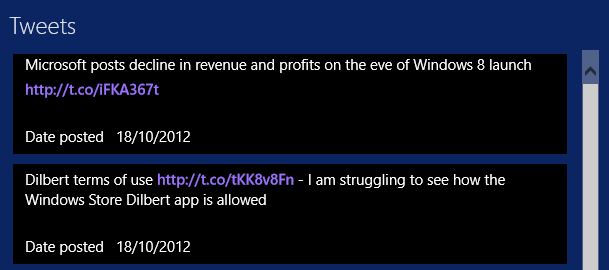
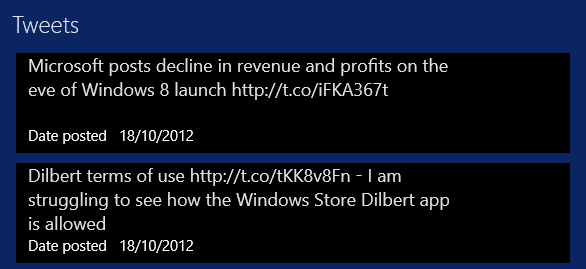
I have been messing around with a Windows 8 app to present content from ITWriting.com in an app, mainly as a learning exercise. I came up with the idea of showing recent tweets on the main page of the app. Like this:

image

I thought this would be easy, but encountered several problems. I am developing in XAML and C#; this aspect would probably be easier in HTML.

The first problem: retrieving the tweets. The Twitter REST API version 1.1 has GET statuses/user_timeline which does what I want, except that it requires “user context”, in other words a Twitter log-in. That is an unacceptable requirement for a user simply viewing my tweets, rather than their own timeline.

The deprecated  Twitter RSS API on the other hand is perfect. Unfortunately:

Please note that there is no support for the RSS response format in API v1.1. Properly versioned API v1 URLs will cease functioning in March 2013

Never mind, it will do for the moment. I created a Twitter data source which retrieves the tweets as RSS. In my XAML I have a ListView which is bound to this data source. This ListView has an ItemTemplate which defines what appears in the list. I added a TweetItemTemplate in the Resources section of the XAML which displays each tweet in a TextBlock. So far so good.

image

No hyperlinks though – they are dead. What is the use of a tweet without hyperlinks? Not much. I thought of a hack which would let you click or tap an entire tweet, look to see if a hyperlink is there, and then launch it. Ugly, and would only work for one hyperlink per tweet.

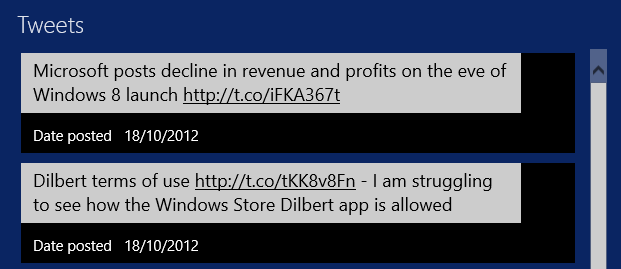
TextBlock does not support hyperlinks. However there is a way to do this using RichTextBlock. This supports a collection of inline elements. You can have a Run element containing text, then an InlineUIContainer containing a HyperLinkButton, then another Run element and so on. The Hyperlink will be out of alignment, as shown here, but you can fix that by tweaking margins and padding.

Of course, this approach does mean parsing the tweet to extract the URLs and then building the RichTextBlock content. So in place of my simple TextBlock binding I now have this:

  <ContentControl Content="{Binding Path=Title,Converter={StaticResource tweetToBlocks}}"></ContentControl>

I have also written a converter class which takes the bound value, builds the RichTextBlock in C#, and returns it. This gets you the result in the first image in this post. Not too bad, and the links work.

What is annoying though is that the mouse pointer does not change to a hand icon when you hover over the link. I thought I could fix this by subclassing HyperLinkButton and adding code to change the cursor on the PointerEntered event:

Window.Current.CoreWindow.PointerCursor = new Windows.UI.Core.CoreCursor(Windows.UI.Core.CoreCursorType.Hand, 1);

This does not work. At least, you can see a flash as the cursor tries to change, but it is overridden by the RichTextBlock which changes it back to a text select cursor. I have not found a way round this yet.

I then tried another approach. You can use a RichEditBox which does support links. The approach is different; you set the text of the Document property and then use the Link method to assign a link to a TextRange within it. It works; but I was frustrated to find that the mouse pointer still does not change to a hand when over the link. The RichTextBlock actually works just as well and is more integrated with XAML.

image

I am sure you could fix this by using a WebView – embedded IE – for each tweet, but that seems to me an unduly heavyweight approach. Better perhaps would be a single web view showing all the tweets, which I might try when I have a moment.

Even so, I was surprised how tricky it is to show tweets with hyperlinks in a ListView.

Twilio adds support for WebRTC: real time communications in JavaScript

Cloud telephony company Twilio has announced beta support for WebRTC at its conference in San Francisco.

WebRTC is a project supported by Google, Mozilla and Opera and lets you do real time communications, including access to camera and microphone, using a JavaScript API without a plug-in. There is also a W3C Working Group.

WebRTC support will be a feature of the Twilio client:

When Twilio Client apps are used with a WebRTC compatible browser, such as future versions of Google Chrome and Mozilla Firefox, Twilio Client will automatically take advantage of the improved audio performance of the WebRTC technology. If the browser doesn’t support it, Twilio Client will still work and fall back to existing browser technologies.

says Twilio.

Other new APIs announced at the conference include Test Credentials, which lets developers test code against the Twilio API without actually placing calls; Usage for retrieving Twilio usage logs and Usage Triggers which you can use to implement usage caps in order to limit cost.

Adapting the Items Page template in a Windows Runtime app

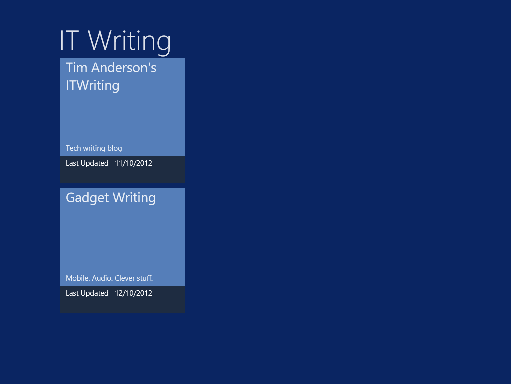
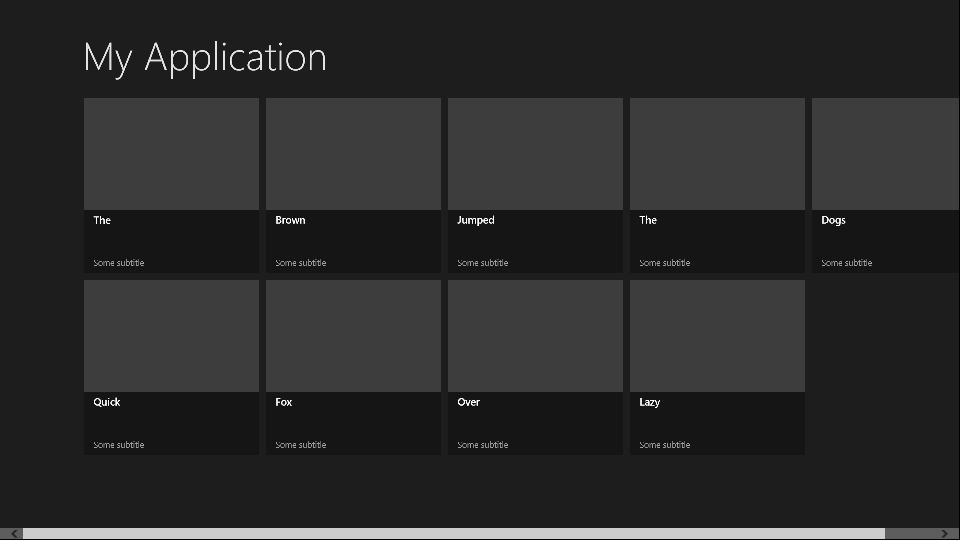
A while back I adapted a sample application in order to create an app for Windows 8. I am mulling over putting it in the Windows Store, but it needed some work. In particular, I wanted to add a Twitter feed to the front page. There is plenty of space:

image

Sounds easy; but inspecting the layout code I realised that I did not understand it all that well at first.

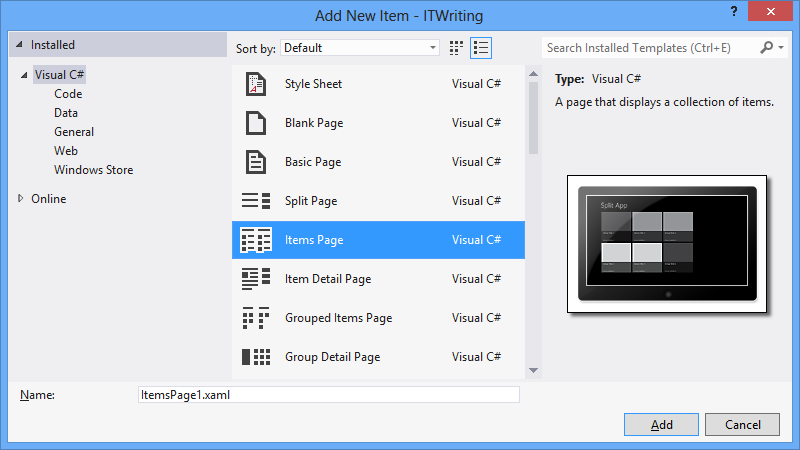
It is based on the Items Page template in Visual Studio 2012, and there is a fair amount going on in that template:

image

  • The contents are data-bound, which is great at runtime but inconvenient at design time as the page is empty.
  • The contents are layout-aware which means that they account for the four views possible in a Windows Runtime app: landscape, portrait, snapped, and filled. The “filled” name is a little misleading; this is an app which occupies most (but not all) of the screen when another app is snapped to one side.
  • The page uses resources and templates for its element styling, which are defined either in the page itself, or in StandardStyles.xaml which resides in the Common folder in your project (added automatically in projects which use the ItemsPage template).

It’s worth adding some dummy data early on so you can see what the page really looks like:

image

For example, imagine that you want to use a smaller item size that the default 250 x 250 size. Proceed as follows:

  1. Copy the DataTemplate called Standard250x250ItemTemplate from StandardStyles.xaml. Place it in the Page.Resources section of ItemsPage1.xaml (or whatever you called your ItemsPage). Rename it to, say, “MyItemTemplate”.
  2. Modify it to use a smaller size. You will probably want to adjust the bound elements as well, plus change the references to the standard Brush elements like  ListViewItemPlaceholderBackgroundThemeBrush as well.

Here is how the page looks with the space for the image removed, the DataTemplate height set to 50, and the height of the bound Title field set to 20:

image

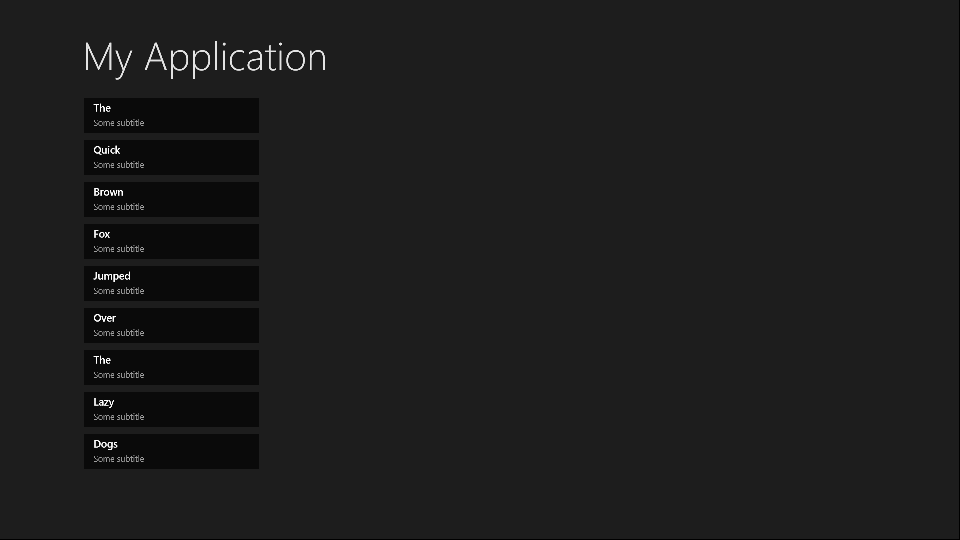
Note that this template is not used by the Snapped view. For that, you will need to copy and modify the Standard80ItemTemplate, or make your own template suitable for an item in the Snapped view.

The code that determines which templates are used in which state is in the VisualStateManager.VisualStateGroups element. This has a Storyboard animation for the Portrait and Snapped views. The way this works:

  1. The default view is landscape. This is why in the XAML there is a GridView called itemGridView which is visible, and a ListView called itemListView which is hidden (Visibility="Collapsed").
  2. In the Snapped view there is only room for a single-column list, not the grid. Therefore the Storyboard for the Snapped view sets the itemListView to visible and the itemGridView to hidden.
  3. When you change back to a non-Snapped landscape view, the layout reverts to the default. Code for this in in LayoutAwarePage.cs, also in the Common folder.

After working this out I was better able to adapt my own page. More on that another time!

Visual Studio 2012 hits and misses

A few quick reflections after writing a rather large review of Visual Studio 2012, Microsoft’s development tool for everything Windows.

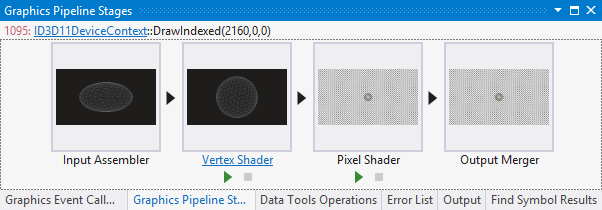
Several things impressed me. The Graphics Diagnostics Tools for Direct3D, for example, is amazing; you can capture a frame, select a pixel, and drill down into why it is the colour it is. See Amit Mohindra’s blog post here. Though admittedly I got “Unable to start the experiment session” on my first go with this; make sure the Debugger Type is set to Native Only.

image

Graphics is not really my area; but web development is more like it, and I continue to be impressed by what Microsoft has done with Windows Azure. You can go from hitting New Project in Visual Studio to an ASP.NET MVC 4.0 web site up and running on Windows Azure in moments. Even if you add an Azure SQL database into the mix it is not much harder. The experience is slightly spoiled by the fact that the new Azure portal for web sites etc is still in preview and seems to be a bit unreliable; I sometimes get an error when logging in and have to refresh before it works. That is a minor detail though; the actual deployed web sites and applications seem to work fine.

That said, it was also apparent to me that Microsoft’s Azure story has become a little confusing. Want an ASP.NET web app on Azure? Choose between a Web Role, a stateful VM, or a web site. Both web roles and web sites can be scaled quite effectively, thanks to the built in load balancer for web sites. Still, choice is good, as long as the differences are understood. It appears that Microsoft is still backing the web role approach as the most architecturally sound; but web sites are so easy to use and understand that it would not surprise me if they are more successful.

Another hit with me is the SQL Server Data Tools (SSDT), once I understood the difference between DACPACs and BACPACs – a DACPAC encapsulates the schema and logins etc for a database in a single file that you can import elsewhere, whereas a BACPAC also stores the data. The approach in SSDT is that a database schema is just a bunch of SQL scripts, and that if you manage it that way it makes a lot of sense in terms of version control, schema comparisons, deployment and maintenance.

On the ALM side I am impressed with Team Foundation Server Express, which is genuinely easy to install and lights up most of the key features of Microsoft’s ALM platform, though it does not handle the full SharePoint team portal or all the reporting features. Cloud hosting is also an option for TFS and that also worked OK for me, though with occasional delays as my code crossed the internet.

I hesitate slightly with TFS though. It feels like a heavyweight solution, whereas most developers like lightweight solutions. I know that open source tools like git and subversion only do a fraction of what you can do with TFS; but they also never keep me waiting.

I also wonder whether TFS simply creates too many artefacts. Work items seem to multiply rapidly as you use the system, which is good for traceability but could also become a bit of a bureaucratic nightmare if you have team members who make every action into a thing that needs comments and deadlines and links to source code and so on.

I guess it is like any other tool; it will work well for a team that already works well, but will not solve problems for a team that is already a bit dysfunctional.

I had not looked at Microsoft’s modelling featurs for a while; I was interested to discover new code generation features in the UML diagramming tools.

I am slowly beginning to understand what Microsoft is doing with apps for SharePoint. Get this: Microsoft is moving SharePoint 2013 towards being more of a service than a platform; you do not build apps on SharePoint; you build apps that use SharePoint services. This means you can at last develop SharePoint apps without having SharePoint installed on the same box as Visual Studio (thank goodness). And you can build SharePoint apps with PHP or Java as well as ASP.NET, because they are calling SharePoint, not running on it. Makes sense.

So what is not to like? There are a few puzzles, like the way Visual C++ has fallen behind in standards compliance despite the presence of Herb Sutter at Microsoft.

I also still find the whole XAML/Visual Studio/Blend thing a bit of a struggle. One day I will open up Blend, Microsoft’s XAML designer, and it will all fall into place as a natural and quick way to build a user interface, but it has not happened yet. I have also heard that developers should find the designer in Visual Studio enough; but at best it is rather slow and a little unpredictable.

Otherwise the tools for Windows Store apps seem decent to me, though I have heard that advanced developers are finding some issues; not surprising considering how new a platform it is. It is a distinctive platform, and my sense it that while there is a lot to like, developers need time to get the best from it, and there is also scope for Microsoft to improve it, maybe a few refinements in Windows 8 SP1?

Considering its scope, Visual Studio was relatively stable in my tests, though I did once get it into a state where it froze every time I tried to debug an application; fixed by a reboot (sigh).

I do not mind the monochrome user interface; I do not like it especially but it is something you get used to and do not notice after a short time.

Overall? Few people will use everything that is in Visual Studio and of course I have missed out most of it in the above, but it is a mighty achievement and still an asset to Microsoft’s platform.

Windows 8 discoverability: users searching for search

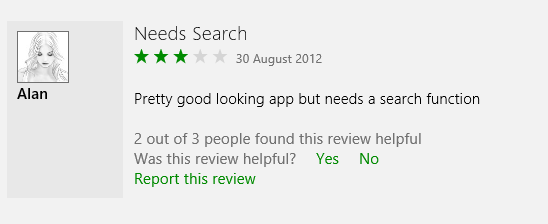
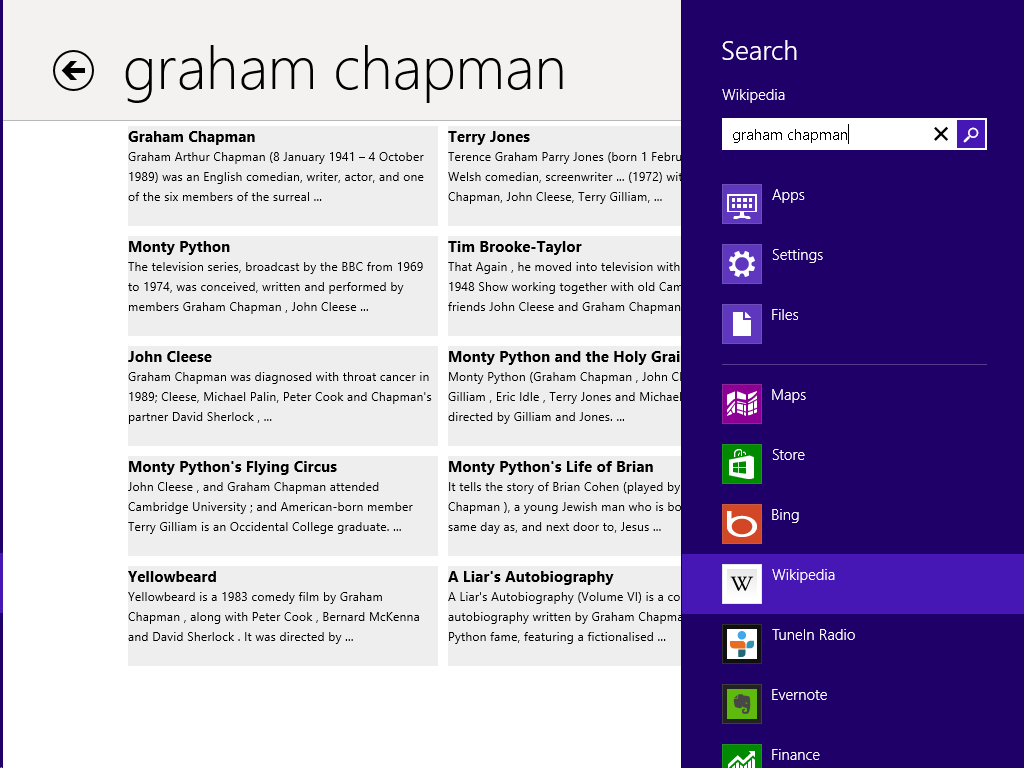
I have been poking around in the Windows Store as the public launch of Windows 8 approaches, and was intrigued by the reviews for the Wikipedia app, which is nicely done. Several users complain about the lack of a search function:

image

In fact the Wikipedia app has excellent fast search, on the Charms bar:

image

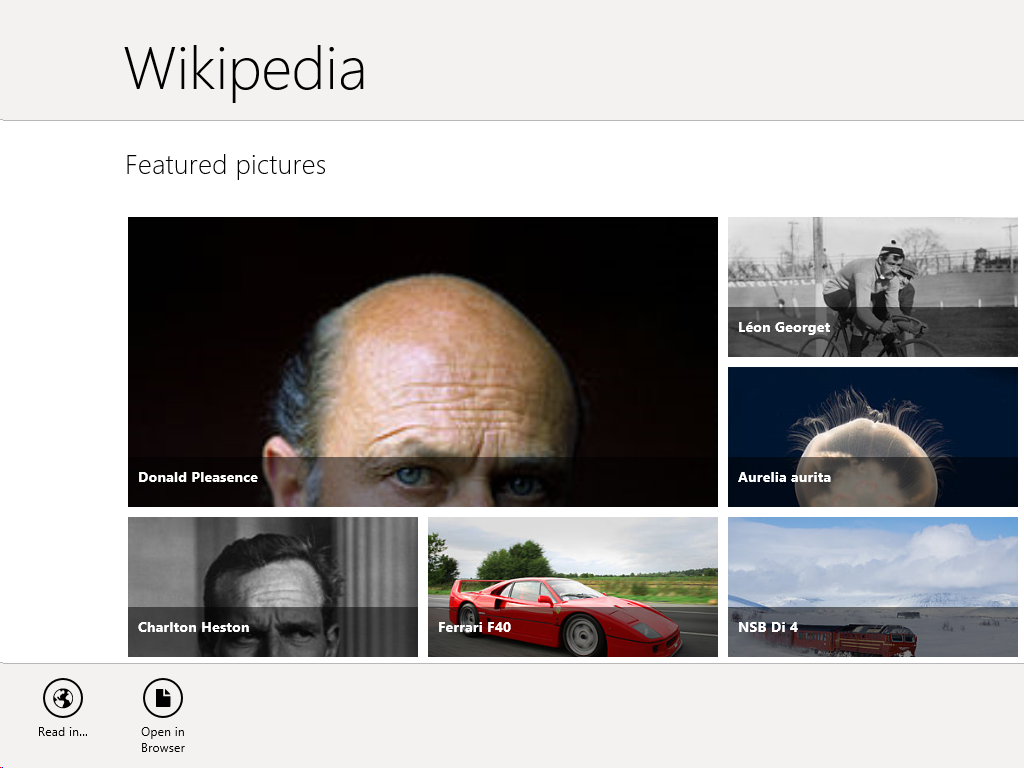
The problem: when you open the Wikipedia app there is no visual clue of where to find Search. Even if you have figured out that you need to right-click, or swipe up, to show the menu bar, it does not show a Search option.

image

The Wikipedia app developers have done the design correctly, in terms of Microsoft’s guidelines. This is the “Immersive user interface” which shows content rather than distracting UI furniture.

Another advantage of having Search on the Charms bar is that you are just a tap away from performing the same search in other apps, such as Internet Explorer.

The concept fails though if users simply do not discover key functions. What is the use of an encyclopaedia without search?

It does not help that the Charms bar, which is where Search lives, is hard to summon with the mouse. It is OK on a tablet (swipe from the right) or with the keyboard (Windows Key + Q). With the mouse, you have to position the pointer vaguely in the top or bottom corner and wait for Charms to fade into view if you have done it correctly. It is a vague movement with no feedback that you have initiated an action, like a button that does not click.

I presume though that as users live with Windows 8, Windows Key + Q will become natural when looking for a Search function (hah!). It is fair to say though that the UI does not score highly for discoverability.

How Adobe turned on a pin to embrace the web (and Google)

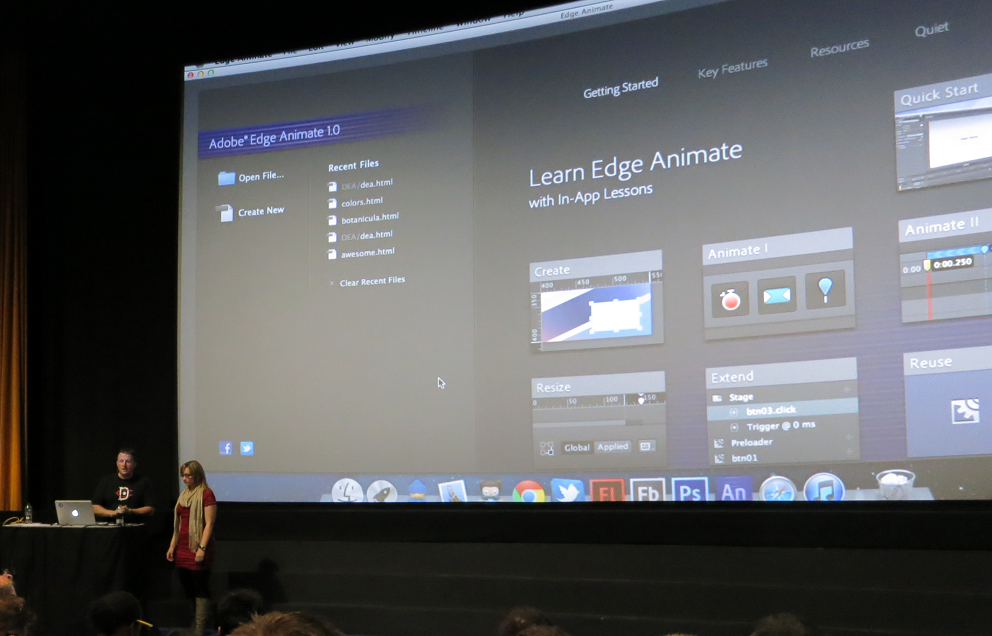
Adobe’s Create the Web world tour – which came to London yesterday – is in the public unveiling of of Adobe’s new wave of tools, the first since it turned away from Flash and towards open web standard, hardly a year ago.
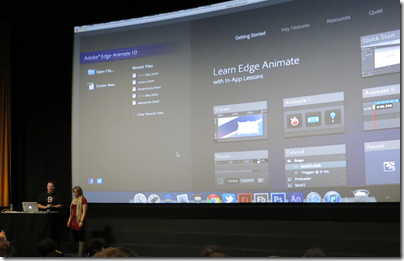
image 

Michael Chaize is a developer evangelist at Adobe. I asked him when it became clear to him personally that Adobe was no longer a Flash platform company.

“The main shift happened November last year [2011]” he told me. “It happened when we, for the Flash part, decided to just focus on video games and premium video, and invest in HTML tooling and specifications with a team of engineers. It was synced with the decision to stop developing Flash in mobile just to focus on apps with Adobe AIR.

“Now we are almost a year later, and Create the Web is an opportunity to showcase the work that has been done. All the product that have been launched, the Edge tools and service, just started in November of last year.”

The timing was confirmed by Adam Lehman, product manager for Edge Code, a tool built on Bracket, which is an open source project created by Adobe to provide a lightweight, code-centric editor for HTML 5 technologies. I asked him when work on Brackets started. Research started in mid-2011, he said, but “we got the team together in December 2011 and started coding.”

image
Adam Lehman

The Edge tools are intended as focused, lightweight product each targeting a specific small part of web design, in contrast to typical Creative Suite products such as Dreamweaver which encompass a large area of functionality; a valid approach but one which inevitably leads to huge tools that take an age to load and a lifetime to learn. Edge is also being used as a not-to-subtle way to promote Adobe’s subscription-based Creative Cloud, since the tools are only available by that route. As a further sweetener, you can get some of the tools as part of the free subscription tier.

It is remarkable that Adobe has navigated the difficult transition from Flash to HTML, and the difficult transition from shrink-wrap to subscription, with so little pain.

That said, perhaps the transition from Flash to HTML is not as profound as it first appears. The Flash runtime was always free, while Adobe made its money from design tools, and as the web become more capable, designing for the Web looks increasingly similar to designing for Flash.

Even the community is the same. “When it deals with expressive web, motion design, we feel that the Flash community can reuse their skills,” said Chaize.  “Being a Flash developer is not just about the language, it’s a knowledge, it’s a culture. Agencies tell me, ‘When I need to hire a motion designer for HTML, I hire a Flash guy.’

That said, HTML 5 is still inferior to Flash in some respects. I watched a slightly jerky animation showing off HTML 5 capabilities and could not help thinking that it would run more smoothly in Flash (of course it was all preview software). It will get there though. This is why Adobe is working to bring specifications like CSS shaders and CSS regions to the official standards.

There is another thing I noticed at Create the Web, which is the extent to which Adobe’s new tools are built on Google’s platform. Many of the Edge tools are made with the Chrome Embedded Framework; the browser used for demonstrations is Chrome Canary, a preview build implementing the newest standards, and if you look at the code you see abundant use of the WebKit prefix which designates features currently specific to the WebKit browser engine used by Apple, Google and others. There is also extensive use of WebGL, popular with designer but contentious because some browser vendors consider it a security risk and it is not an official web standard.

Lehman insists that there is no intention to go down a Google-specific route. “It was more of a technology stack we went with,” he says, explaining that the intent for Brackets is that it will one day run in the browser, in which case it will have to support Mozilla, Opera and Microsoft browsers as well.

The reason for adopting so much Google stuff is partly the excellent fit with what Adobe needed, and partly the low friction. “We didn’t have to go to a meeting, it was just published” said Lehman, referring to the Chromium Embedded Framework which let you run HTML5 applications on the desktop.

Brackets looks great, has real community adoption already, and Adobe has interesting plan for its future. Along with browser hosting, Lehman talks about proper debugging support with breakpoint, JavaScript macros, an embedded node.js engine, and more.

When Apple rejected Flash in iOS it put Adobe in a difficult spot – another reason for the company’s warmth towards Google and Android – but since then the transition has been remarkable.
Appcelerator mobile developer survey shows Windows 8 progress, uncertainty

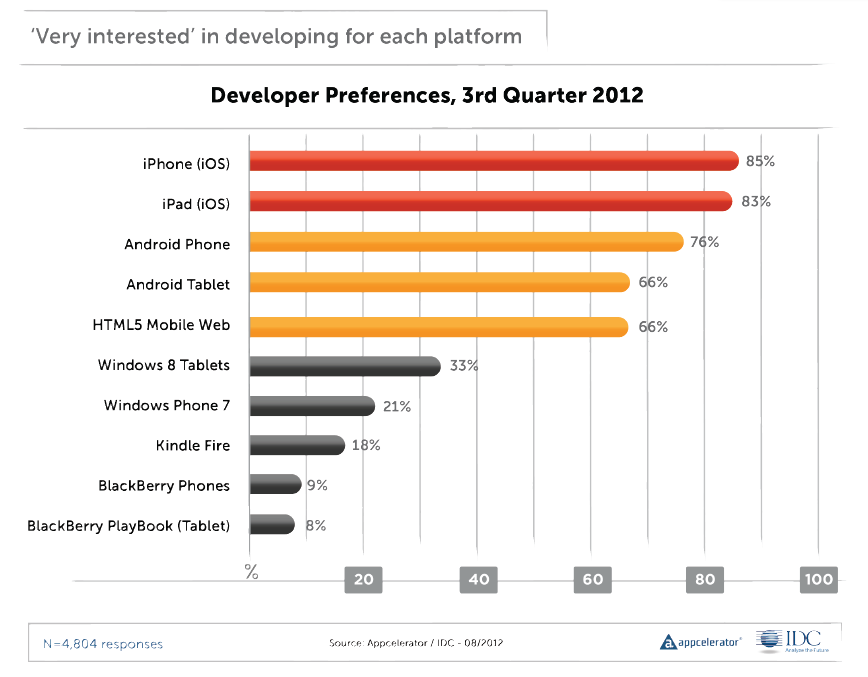
Cross-platform mobile tools vendor Appcelerator has released its latest mobile developer survey (in conjunction with IDC) representing the views of around 5,500 developers using its tools.

It is worth a read this time around. I was particularly interested to see what Appcelerator developers think of Windows 8, launching later this month. There is a chart showing the percentage of developers who are “very interested” in developing for various mobile platforms, and which shows Apple iOS leading at 85%/83% for iPhone and iPad, Android next, then HTML5, and then Windows 8 Tablets at 33% – already ahead of Windows Phone as well as Amazon and RIM devices (RIM has declined from 40% in January 2011).

image

The report says that potential Windows 8 developers are most interested in the “shared development capabilities between desktop and tablet promised by Microsoft with the launch of Windows 8.” I am not sure exactly what this means, and of course surveys like this are broad-brush and different developers will have meant different things. It could be about code sharing between desktop applications and Windows Runtime (WinRT) apps. It could be about the ability to run WinRT apps on the desktop as well as the tablet. It could be about Visual Studio and its ability to target multiple Windows platforms. However, the the survey goes on to talk about a “single paradigm for both desktop and tablet/smartphone applications” which seems to look forward to a future Windows where desktop applications really are legacy.

There is also a note that there were as many developers convinced that they will not be building apps for Windows 8 or Windows phone, as those who were.

What really counts is in the next paragraph in the report:

A large installed base of devices was the #1 criterion for 53% of developers when asked about why they choose to develop on a platform

This is the simple truth, which is why Microsoft has chosen a strategy which puts WinRT on every Windows 8 box whether or not it is really wanted.

The report also states that developers are dissatisfied with HTML5 for mobile applications, in terms of monetization, security, fragmentation, performance, and more. I suggest not taking too much account of this since Appcelerator’s Titanium tool is an alternative to HTML for mobile apps, so will have attracted those who do not want to use HTML5.

Finally, there is a fun section on what devices developers think they will be targeting in 2015. Televisions head the list, followed by connected cars. Most intriguing though are the final two: foldable screens and Google Glass. Apparently 67.1% believe Google Glass is in their future. Surveys, always entertaining but given the volatility of the results, not something you can rely on as a predictor.