Tag Archives: microsoft

Xamarin Evolve: developers enjoy the buzz around cross-platform coding with C#

“It’s like a Microsoft developer event back when they were good,” one exhibitor here at Xamarin Evolve in Atlanta told me, and I do see what he means. There is plenty of buzz, since Xamarin is just three years old as a company and growing fast; there is the sense of an emerging technology, and that developers are actually enjoying their exploration of what they can do on today’s mobile devices.

Microsoft is an engineering-led company and was more so in its early days. The same is true of Xamarin. It also also still small enough that everyone is approachable, including co-founders Miguel de Icaza and Nat Friedman. The session on what’s new in Xamarin.Mac and Xamarin.iOS was presented by de Icaza, and it is obvious that he is still hands-on with the technology and knows it inside out. Developers warm to this because they feel that the company will be responsive to their needs.

image

Approachability is important, because this is a company that is delivering code at breakneck speed and bugs or known issues are not uncommon. A typical conversation with an attendee here goes like this:

“How do you find the tools?” “Oh, we like them, they are working well for us. Well, we did find some bugs, but we talked to Xamarin about them and they were fixed quickly.”

Xamarin’s tools let you write C# code and compile it for iOS, Android and Mac. If you are building for Windows Phone or Windows, you will probably use Microsoft’s tools and share non-visual C# code, though the recently introduced Xamarin Forms, a cross-platform XML language for defining a user interface, builds for Windows Phone as well as iOS and Android.

The relationship with Microsoft runs deep. The main appeal of the tools is to Microsoft platform developers who either want to use their existing C# (or now F#) skills to respond to the inevitable demand for iOS and Android clients, or to port existing C# code, or to make use of existing C# libraries to integrate with Windows applications on the server.

That said, Xamarin is beginning to appeal to developers from outside the Microsoft ecosystem and I was told that there is now demand for Xamarin to run introductory C# classes. Key to its appeal is that you get deep native integration on each platform. The word “native” is abused by cross-platform tool vendors, all of whom claim to have it. In Xamarin’s case what it means is that the user interface is rendered using native controls on each platform. There are also extensive language bindings so that, for example, you can call the iOS API seamlessly from C# code. Of course this code is not cross-platform, so developers need to work out how to structure their solutions to isolate the platform-specific code so that the app builds correctly for each target. The developers of Wordament, a casual game which started out as a Windows Phone app, gave a nice session on this here at Evolve.

Wordament has an interesting history. It started out using Silverlight for Windows Phone and Google App Engine on the server. Following outages with Google App Engine, the server parts were moved to Azure. Then for Windows 8 the team ported the app to HTML and JavaScript. Then they did a port to Objective C for iOS and Java for Android. Then they found that managing all these codebases made it near-impossible to add features. Wordament is a network game where you compete simultaneously with players on all platforms, so all versions need to keep tightly in step. So they ported to Xamarin and now it is C# on all platforms.. 

I digress. The attendees here are mostly from a Microsoft platform background, and they like the fact that Xamarin works with Visual Studio. This also means that there are plenty of Microsoft partner companies here, such as the component vendors DevExpress, Syncfusion, Infragistics and ComponentOne. It is curious: according to one of the component companies I spoke to, Microsoft platform developers get the value of this approach where others do not. They have had only limited success with products for native iOS or Android development, but now that Xamarin Forms has come along, interest is high.

Another Microsoft connection is Charles Petzold – yes, the guy who wrote Programming Windows – who is here presenting on Xamarin Forms and signing preview copies of his book on the subject. Petzold now works for Xamarin; I interviewed him here and hope to post this soon. Microsoft itself is here as well; it is the biggest sponsor and promoting Microsoft Azure along with Visual Studio.

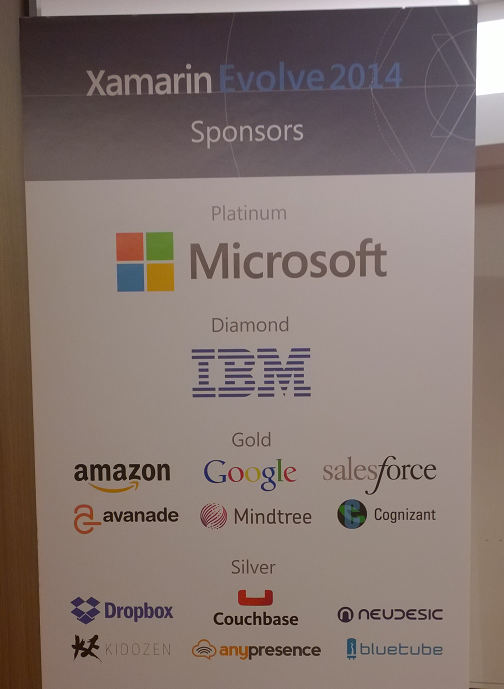
Xamarin is not Microsoft though, and that is also important. IBM is also a big sponsor, and announced a partnership with Xamarin, offering libraries and IDE add-ins to integrate with its Worklight mobile-oriented middleware. Amazon is here, promoting both its app platform and its cloud services. Google is a sponsor though not all that visible here; Peter Friese from the company gave a session on using Google Play Services, and Jon Skeet also from Google presented a session, but it was pure C# and not Google-specific. Salesforce is a sponsor because it wants developers to hook into its cloud services no matter what tool they use; so too is Dropbox.

  image

Most of the Xamarin folk use Macs, and either use Xamarin Studio (a customised version of the open source MonoDevelop IDE), or Visual Studio running in a virtual machine (given that the team mostly use Macs, this seems to me the preferred platform for Xamarin development, though Visual Studio is a more advanced IDE so you will probably end up dipping in and out of Windows/Mac however you approach it).

Xamarin announced several new products here at Evolve; I gave a quick summary in a Register post. To be specific:

  • A new fast Android emulator based on Virtual Box
  • Xamarin Sketches for trying out code with immediate analysis and execution
  • Xamarin Profiler
  • Xamarin Insights: analytics and troubleshooting for deployed apps

Of these, Sketches is the most interesting. You write snippets of code and the tool not only executes it but does magic like generating a graph from sequences of data. You can use it for UI code too, trying out different fonts, colours and shapes until you get something you like. It is great fun and would be good for teaching as well; maybe Xamarin could do a version for education at a modest price (or free)?

image

I am looking forward to trying out Sketches though I have heard grumbles about the preview being hard to get working so it may have to wait until next week.

image

LibreOffice is four years old, plans Android version

Four years ago, on 28th September 2010, the open source LibreOffice productivity suite was created by forking OpenOffice. This Microsoft Office alternative offers a word processor, spreadsheet, presentation graphics, vector drawing package, and database manager. Its origins are in a German suite called Star Office, which was acquired by Sun Microsystems in 1999. In an effort to disrupt Microsoft, Sun made Star Office free and open source, creating OpenOffice.org. However Sun itself was acquired by Oracle Corporation in 2010, and LibreOffice was created by a breakaway group of OpenOffice contributors who were wary of what might happen to the project under Oracle’s stewardship.

image

They probably need not have worried, since Oracle donated OpenOffice to the Apache foundation in 2011. It is still performing its intended function as a Microsoft disruptor; see for example this report of the Italian city of Udine moving from Microsoft Windows and Office to Linux and OpenOffice.

A key motivation is that it is easier to keep free software up to date, and organisations like having all their users on the same version:

"Some of our PCs are stuck with pretty old software like Office 2000, which is no longer supported, as we haven’t had the resources to upgrade," Gabriele Giacomini, the innovation and economic development councillor for the municipality of Udine, told ZDNet.

"By switching to open source, we will have the chance to allow our employees to work with the latest version of the suite”

Microsoft, of course, wants to address this by persuading users to subscribe to Office rather than buying it outright; though this does not solve the problem of out of date Windows versions (but watch this space).

But what about LibreOffice? What is the point of having two major open source productivity suites based on essentially the same products?

Good question; but one possible differentiator is that LibreOffice is working on an Android port. The Document Foundation, which runs the LibreOffice project, is inviting tenders for implementation of the suite on Android, complete with a basic interface for integrating with the user’s “preferred cloud storage”.

Another point of interest is that the Foundation is asking for commercial tenders rather than hiring its own coders to work with the open source community.

That said, there is already an Android port of OpenOffice, called AndrOpen Office, though this is a fork and not an official Apache OpenOffice project.

Are these multiple forks healthy proliferation, or open source confusion? That depends on your point of view, though it does show the ability of the open source community to respond to obvious needs.

It seems to me though that the suite would be more attractive to businesses if LibreOffice and OpenOffice could merge, and develop an official Android version of the suite.

My guess is that productivity software on tablets (and phablets) will be a key battleground as users do an increasing proportion of their work on mobile devices rather than PCs or laptops. Microsoft already has an iOS version of Office, and one for Android in preparation. There is also a version of Office for the Windows 8 “Metro” personality in preparation.

Open source advocate Glyn Moody has posted about the LibreOffice project here.

Microsoft Azure: new preview portal is “designed like an operating system” but is it better?

How important is the Azure portal, the web-based user interface for managing Microsoft’s cloud computing platform? You can argue that it is not all that important. Developers and users care more about the performance and reliability of the services themselves. You can also control Azure services through PowerShell scripts.

My view is the opposite though. The portal is the entry point for Azure and a good experience makes developers more likely to continue. It is also a dashboard, with an overview of everything you have running (or not running) on Azure, the health of your services, and how much they are costing you. I also think of the portal as an index of resources. Can you do this on Azure? Browsing through the portal gives you a quick answer.

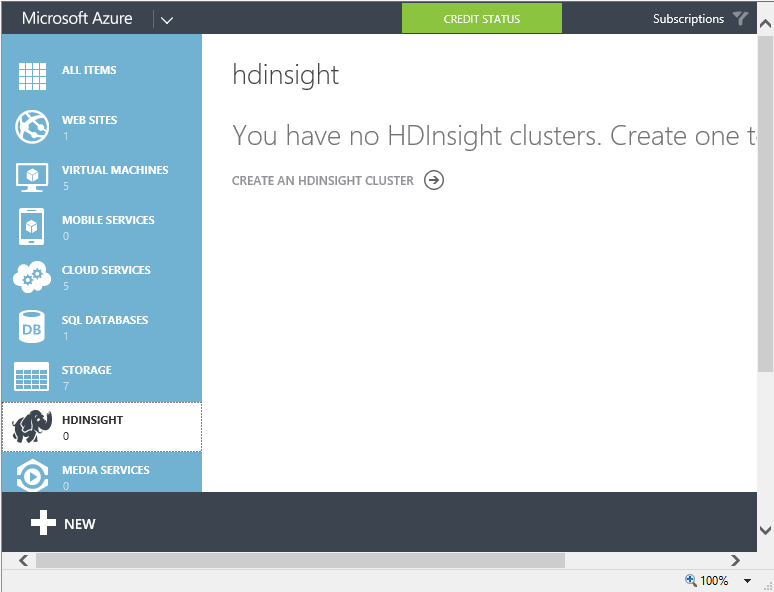
The original Azure portal was pretty bad. I wish I had more screenshots; this 2009 post comparing getting started on Google App Engine with Azure may bring back some memories. In 2011 there were some big management changes at Microsoft, and Scott Guthrie moved over to Azure along with various other executives. Usability and capability improved fast, and one of the notable changes was the appearance of a new portal. Written in HTML 5, it was excellent, showing all the service categories in a left-hand column. Select a category, and all your services in that category are listed. Select a service and you get a detailed dashboard. This portal has evolved somewhat since it was introduced, notably through the addition of many more services, but the design is essentially the same.

image

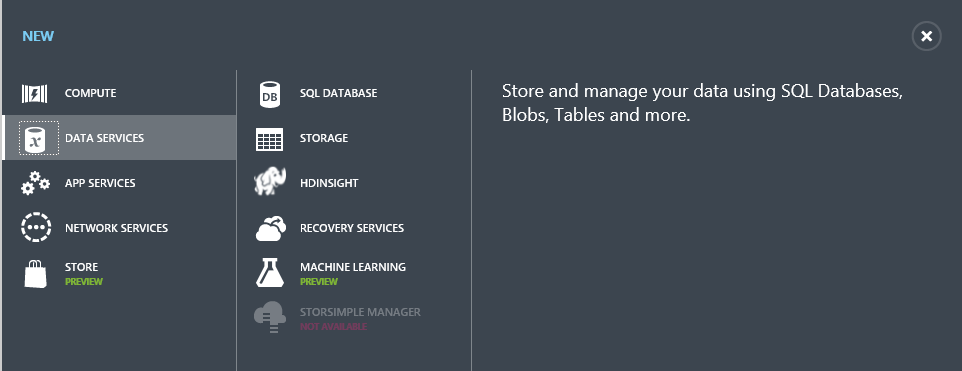
The New button lets you create a new service:

image

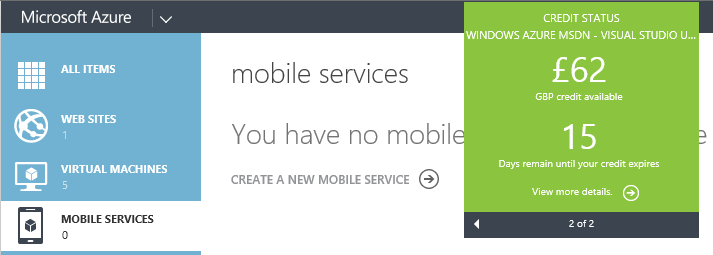
The portal also shows credit status right there – no need to hunt through links to account management pages:

image

It is an excellent portal, in other words, logically laid out, easy to use, and effective.

That is the old portal though. Microsoft has introduced a new portal, first demonstrated at the Build conference in April. The new portal is at http://portal.azure.com, versus http://manage.windowsazure.com for the old one.

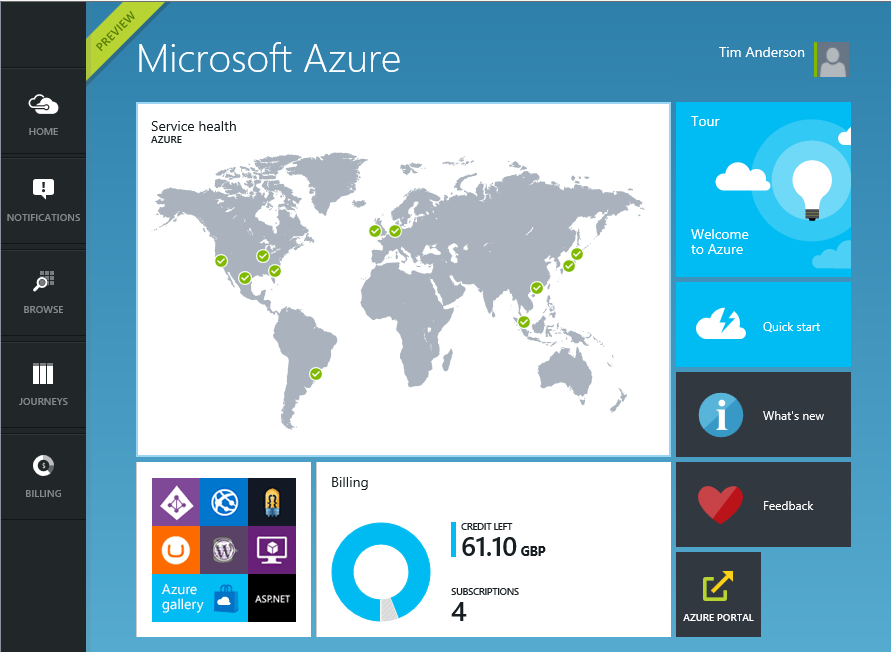
The new portal is different in look and feel:

image

Why a new portal and how does it work? Microsoft’s Justin Beckwith, a program manager, has a detailed explanatory post. He says that the old portal worked well at first but became difficult to manage:

As we started ramping up the number of services in Azure, it became infeasible for one team to write all of the UI. The teams which owned the service were now responsible (mostly) for writing their own UI, inside of the portal source repository. This had the benefit of allowing individual teams to control their own destiny. However – it now mean that we had hundreds of developers all writing code in the same repository. A change made to the SQL Server management experience could break the Azure Web Sites experience. A change to a CSS file by a developer working on virtual machines could break the experience in storage. Coordinating the 3 week ship schedule became really hard. The team was tracking dependencies across multiple organizations, the underlying REST APIs that powered the experiences, and the release cadence of ~40 teams across the company that were delivering cloud services.

The new portal is the outcome of some deep thinking about the future. It is architected, according to Beckwith, more like an operating system than like a web application.

The new portal is designed like an operating system. It provides a set of UI widgets, a navigation framework, data management APIs, and other various services one would expect to find with any UI framework. The portal team is responsible for building the operating system (or the shell, as we like to call it), and for the overall health of the portal.

Each service has its own extension, or “application”, which runs in an iframe (inline frame) and is isolated from other extensions. Unusually, the iframes are not used to render content, but only to run scripts. These scripts communicate with the main frame using the window.postMessage API call – familiar territory for Windows developers, since messages also drive the Windows desktop operating system.

Microsoft is also using TypeScript, a high-level language that compiles to JavaScript, and open source resources including Less and Knockout.

Beckwith’s post is good reading, but the crunch question is this: how does the new portal compare to the old one?

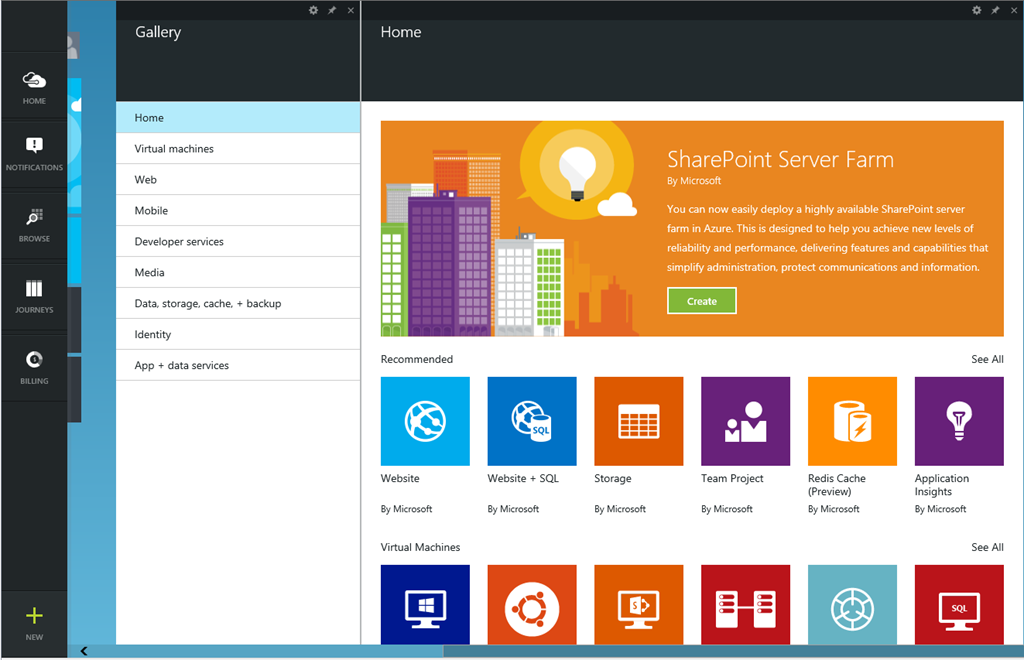
I get the sense that Microsoft has put a lot of effort into the new portal (which is still in preview) and that it is responsive to feedback. I expect that the new portal will in time be excellent. Currently though I have mixed feeling about it, and often prefer to use the old portal. The new portal is busier, slower and more confusing. Here is the equivalent to the previous New screen shown above:

image

The icons are prettier, but there is something suspiciously like an ad at top right; I would rather see more services, with bigger text and smaller icons; the text conveys more information.

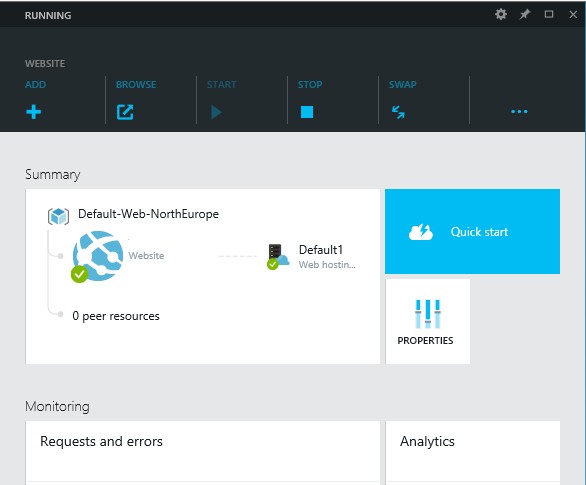
Let’s look at scaling a website. In the old portal, you select a website, then click Scale in the top menu to get to a nice scaling screen where you can set up autoscaling, define the number of instances and so on.

How do you find this in the new portal? You get this screen when you select a website (I have blanked out the name of the site).

image

This screen scrolls vertically and if you scroll down you can find a small Scale panel. Click it and you get to the scaling panel, which has a nicely done UI though the way panels constantly appear and disappear is something you have to get used to.

There are also additional scaling options in the preview portal (the old one only offers scaling based on CPU usage):

image

The preview portal also integrates with Visual Studio online for cloud-based devops.

The challenge for Microsoft is that the old portal set a high bar for clarity and usability. The preview portal does more than the old, and is more fit for purpose as the number and capability of Azure services increases, but its designers need to resist the temptation to let prettiness obstruct performance and efficiency.

Developers can give feedback on the portal here.

Microsoft OneDrive and OneDrive for Business: a guide for the perplexed

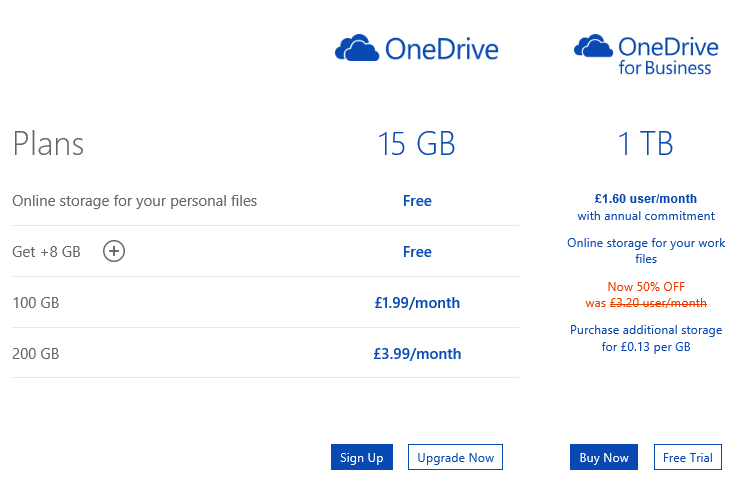
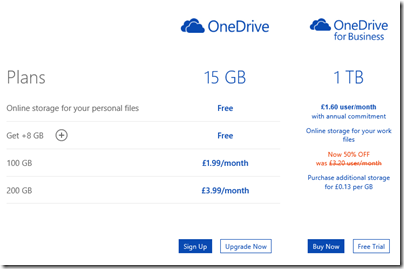
Microsoft’s price plans for additional cloud storage are odd:
image

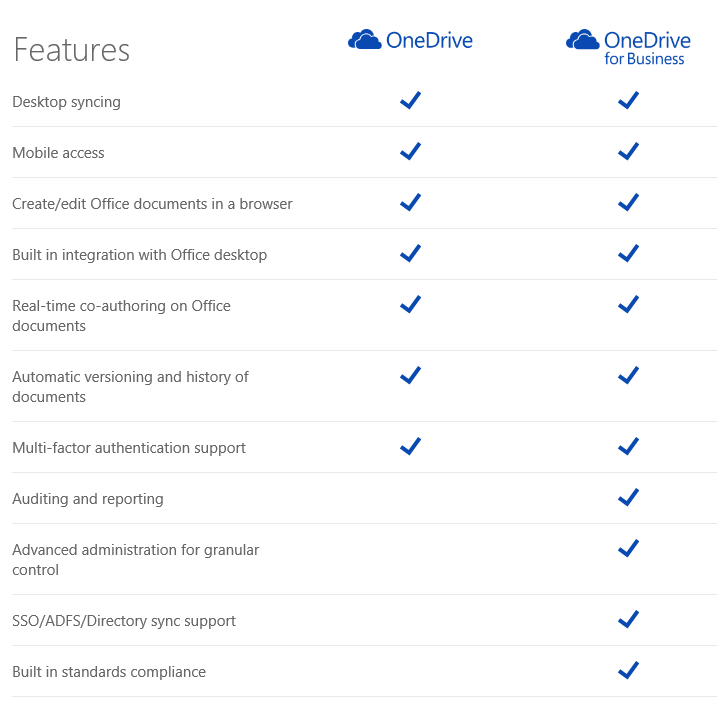
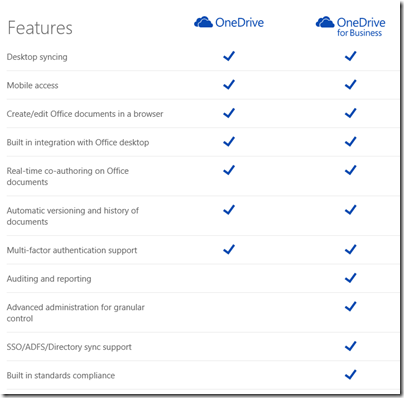
Hmm, £1.60 per month for 1TB or £3.99 for 200GB. Difficult decision? Especially as OneDrive for Business appears to be a superset of OneDrive:
image

It is not that simple of course (and see below for how you can get 1TB OneDrive for less). The two products have different ancestries. OneDrive was once SkyDrive and before that Windows Live Folders and before that Windows Live Drive. It was designed from the beginning as a cloud storage and client sync service.

OneDrive for Business on the other hand is essentially SharePoint: team portal including online document storage and collaboration. The original design goal of SharePoint (a feature of Windows Server 2003) was to enable businesses to share Office documents with document history, comments, secure access and so on, and to provide a workplace for teams. See the history here. SharePoint supported a technology called WebDAV (Web Distributed Authoring and Versioning) to allow clients to access content programmatically, and this could be used in Windows to make online documents appear in Windows Explorer (the file utility), but there was no synchronization client. SharePoint was not intended for storage of arbitrary file types; the system allowed it, but full features only light up with Office documents. In other words, not shared storage so much as content management system. Documents are stored in Microsoft SQL Server database.

SharePoint was bolted into Microsoft BPOS (Business Productivity Online Suite) which later became Office 365. In response to demand for document synchronization between client and cloud, Microsoft came up with SharePoint Workspace, based on Groove, a synchronization technology acquired along with Groove Networks in 2005.

I have no idea how much original Groove code remains in the the OneDrive for Business client, nor the extent to which SharePoint Online really runs the same code as the SharePoint you get in Windows Server; but that is the history and explains a bit about why the products are as they are. The OneDrive for Business client for Windows is an application called Groove.exe.

OneDrive and OneDrive for Business are different products, despite the misleading impression given by the name and the little feature table above. This is why the Windows, Mac and Mobile clients are all different and do different things.

OneDrive for Business is reasonable as an online document collaboration tool, but the sync client has always been poor and I prefer not to use it (do not click that Sync button in Office 365). You may find that it syncs a large number of documents, then starts giving puzzling errors for which there is no obvious fix. Finally Microsoft will recommend that you zap your local cache and start again, with some uncertainty about whether you might have lost some work. Microsoft has been working hard to improve it but I do not know if it is yet reliable; personally I think there are intractable problems with Groove and it should be replaced.

The mobile clients for OneDrive for Business are hopeless as DropBox replacements. The iOS client app is particularly odd: you can view files but not upload them. Photo sync, a feature highly valued by users, is not supported. However you can create new folders through the app – but not put anything in them.

Office on iOS on the other hand is a lovely set of applications which use OneDrive for Business for online storage, which actually makes sense in this context. It can also be used with consumer OneDrive or SharePoint, once it is activated.

The consumer version of OneDrive is mostly better than OneDrive for Business for online storage. It is less good for document collaboration and security (the original design goals of SharePoint) but more suitable for arbitrary file types and with a nice UI for things like picture sharing. The Windows and mobile clients are not perfect, but work well enough. The iOS OneDrive client supports automatic sync of photos and you can upload items as you would expect, subject to the design limitations of Apple’s operating system.

Even for document collaboration, consumer OneDrive is not that bad. It supports Office Web Apps, for creating and editing documents in the browser, and you can share documents with others with various levels of permission. 

What this means for you:

  • Do not trust the OneDrive for Business sync client
  • Do not even think about migrating from OneDrive to OneDrive for Business to get cheap cloud storage
  • No, you mostly cannot use the same software to access OneDrive and OneDrive for Business
  • Despite what you are paying for your Office 365 subscription, consumer OneDrive is a better cloud storage service
  • SharePoint online also known as OneDrive for Business has merit for document collaboration and team portal services, beyond the scope of consumer OneDrive

Finally, what Microsoft should do:

  • Create a new sync client for OneDrive for Business that works reliably and fast, with mobile apps that do what users expect
  • Either unify the technology in OneDrive and OneDrive for Business, or stop calling them by the same name

I do understand Microsoft’s problem. SharePoint has a huge and complex API, and Microsoft’s business users like the cloud-hosted versions of major server applications to work the same way as those that are on premise. However SharePoint will never be a optimal technology for generic cloud storage.

If I were running Office 365, I think I would bring consumer OneDrive into Office 365 for general cloud storage, and I would retain SharePoint online for what it is good at, which is the portal, application platform, and document collaboration aspect. This would be similar to how many businesses use their Windows servers: simple file shares for most shared files, and SharePoint for documents where advanced collaboration features are needed.

In the meantime, it is a mess, and with the explosive growth of Office 365, a tricky one to resolve without pain.

Microsoft has a relatively frank FAQ here.

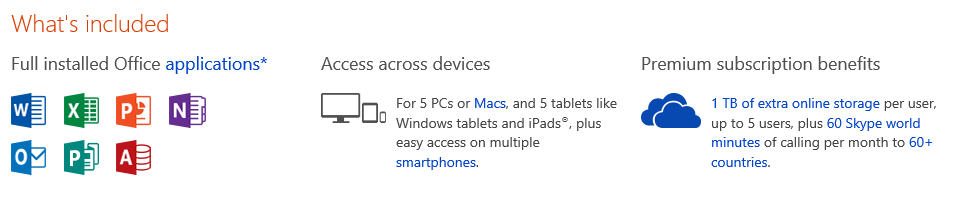
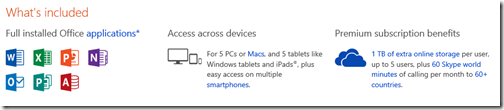
Postscript: here is a tip if you need large amounts of OneDrive storage. If you buy Office 365 Home for £7.99 per month or £79.99 per year (which works out at £6.66 per month) you get 1TB additional storage for consumer OneDrive for up to 4 users, as well as the main Office applications:
image

The way this works is that each user activates Office using a Microsoft account. The OneDrive storage linked to that account gets the 1TB extra storage while the subscription is active.

Another option is Office 365 Personal – same deal but for one user at £5.99 per month, or £59.99 per year (£4.99 per month).

Even for one user, it is cheaper to subscribe to Office 365 Home or Personal than to buy 1TB storage at £3.99 per month per 200GB. When you add the benefit of Office applications, it is a great deal.

Despite the name, these products have little to do with Office 365, Microsoft’s cloud-hosted Exchange, SharePoint and more. These are desktop applications plus consumer OneDrive.

Microsoft releases WinJS cross-browser JavaScript library but why?

Microsoft has announced WinJS 3.0:

The Windows Library for JavaScript (WinJS) project is pleased to announce the general availability of its first release – WinJS 3.0 – since the open source project began at //BUILD 2014.

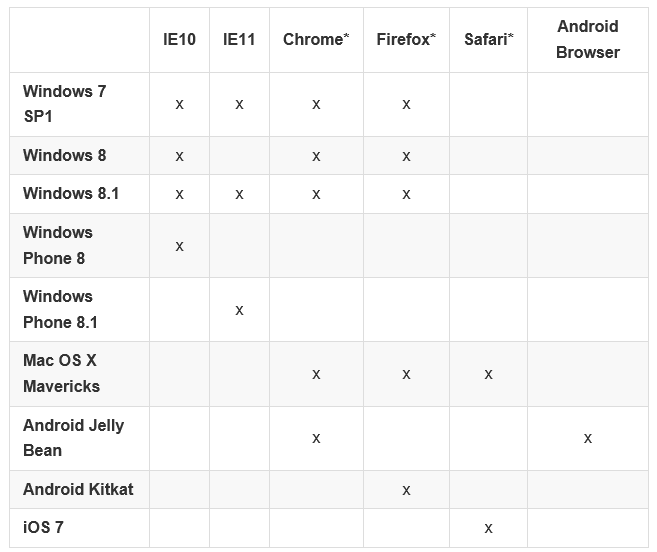
Much of WinJS will run on any modern browser but the browser support matrix has a number of gaps:

image

You can also see what runs where from this status table.

But what is WinJS? Note that it comes from the Windows apps team, not the web development team at Microsoft. WinJS was designed to enable app development for Windows 8 “Metro” (also known as the Windows Runtime) using JavaScript, CSS and HTML. Back in 2010, when Microsoft signalled the end of Silverlight and the rise of HTML 5 for browser-based applications, early versions of WinJS would already have been in preparation. Using WinJS you can share code across a Windows 8 app, web apps, and via an app packager like Apache Cordova, in apps for Android and iOS as well.

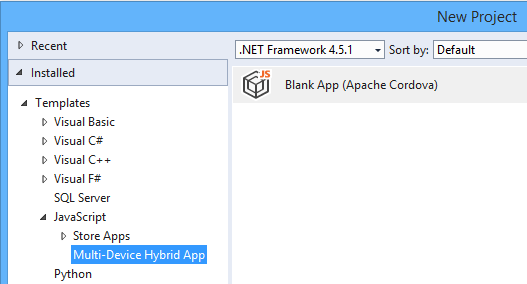
Note that Cordova is now integrated into Visual Studio, using the catchy name Multi-Device Hybrid App:

image

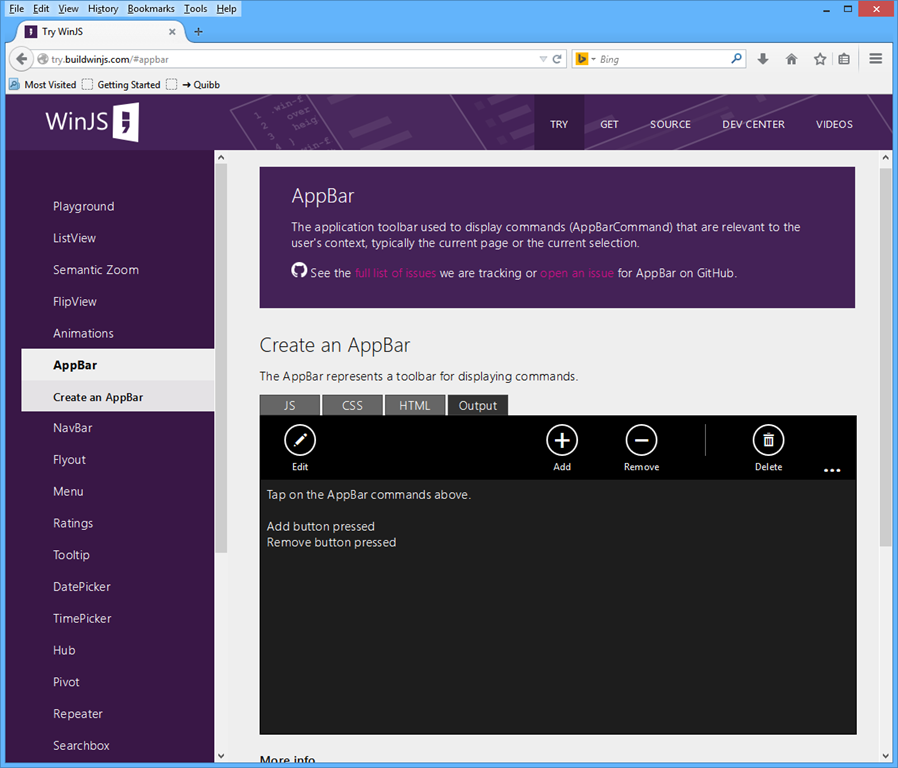
If you want to know what kind of controls and components are on offer in WinJS, you can find out using the excellent demo site here. This is Firefox:

image

Quick summary then: WinJS lets you build apps that look like Windows 8 Store apps, but which run cross-browser and cross-platform. But who wants to do that?

Maybe Microsoft does. The messaging from the company, especially since CEO Satya Nadella took over from Windows guy Steve Ballmer, is “any device”, provided of course that they hook up to Microsoft’s services. That messaging is intended for developers outside the company too. Check out the current campaign for Microsoft Azure, which says “consume on any device”.

image

This could be a web application, or it could be a client app using Azure Mobile Services or an ASP.NET Web API application to connect to cloud data.

You do not have to use WinJS to consume Microsoft’s services of course. Why would developers want to use the look and feel of a rather unloved app platform, rather than the native look and feel of Android or iOS? That is an excellent question, and in most cases they will not. There could be cases though, for example for internal business apps where users care most about functionality. What is the current stock? What is the lead time? Show me this customer’s order history. A WinJS app might not look right for the platform, but the UI will be touch-friendly, and ease of rollout across the major mobile platforms could trump Apple’s design guidelines.

If you are writing a pure web application, users expectations concerning native look and feel are not so high. The touch-oriented design of WinJS is its main appeal, though other web frameworks like JQuery Mobile also offer this. The “Metro” design language is distinctive, and Microsoft will be making a renewed push for Windows Store apps, or Universal Apps, as part of the new wave of Windows called Windows 9 or “Threshold”. WinJS is the way to build apps for that platform using JavaScript and HTML, with the added bonus of easy porting to a broad range of devices.

This is a hard sell though. I am impressed by the effort Microsoft has put into making WinJS work cross-platform, but will be surprised to see much usage outside Windows Store apps (including Windows Phone). On the other hand, it does help to keep the code honest: this really is HTML and JavaScript, not just a wrapper for Windows Runtime APIs.

Lifetime registration as a Windows Store developer, now from £12

Microsoft has removed some friction from developing for the Windows Store (whether phone or Windows 8) by removing the requirement to pay an annual subscription:

As we continue to execute on the vision to integrate the Windows and Windows Phone developer experiences, we have taken another step by moving to a one-time lifelong Dev Center registration fee.

says Microsoft’s Todd Brix in a post today. He adds that the 600,000 developers already registered are covered, with no additional fee required.

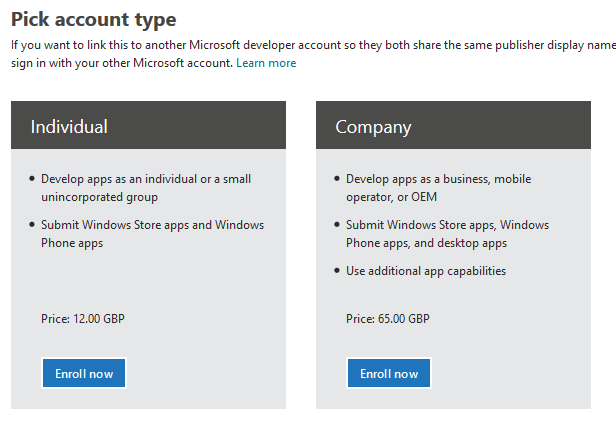
How much is the fee? Brix does not say, and I could not find it quickly, so I started the signup process. I was offered individual registration for just £12.00. A company registration is £65.00.

image

Both fees are of course negligible for a developer, compared to the cost of developing an app that is worth installing. Considering that Microsoft has had problems with junk apps filling its store, you could argue that fees are justifiable as a means of restraining the flow of meaningless or malicious apps.

The counter-argument is that fees deter developers from getting started, and that today’s hobbyist may come up with the next Minecraft. It is better to control quality with a robust checking process before apps are admitted into the store.

I had a quick glance today, and have the impression that Microsoft has made progress in removing the worst offenders, following some agitation at the end of last month.

Microsoft is laying the foundation for another go at its app platform with the launch of Windows 9, about which we will hear more in a couple of weeks time.

Microsoft integrates Azure websites with hybrid cloud

Microsoft has announced the integration of Azure websites with Azure virtual networks, including access to on-premise resources if you have a site-to-site VPN.

The Virtual Network feature grants your website access to resources running your VNET that includes being able to access web services or databases running on your Azure Virtual Machines. If your VNET is connected to your on premise network with Site to Site VPN, then your Azure Website will now be able to access on premise systems through the Azure Websites Virtual Network feature.

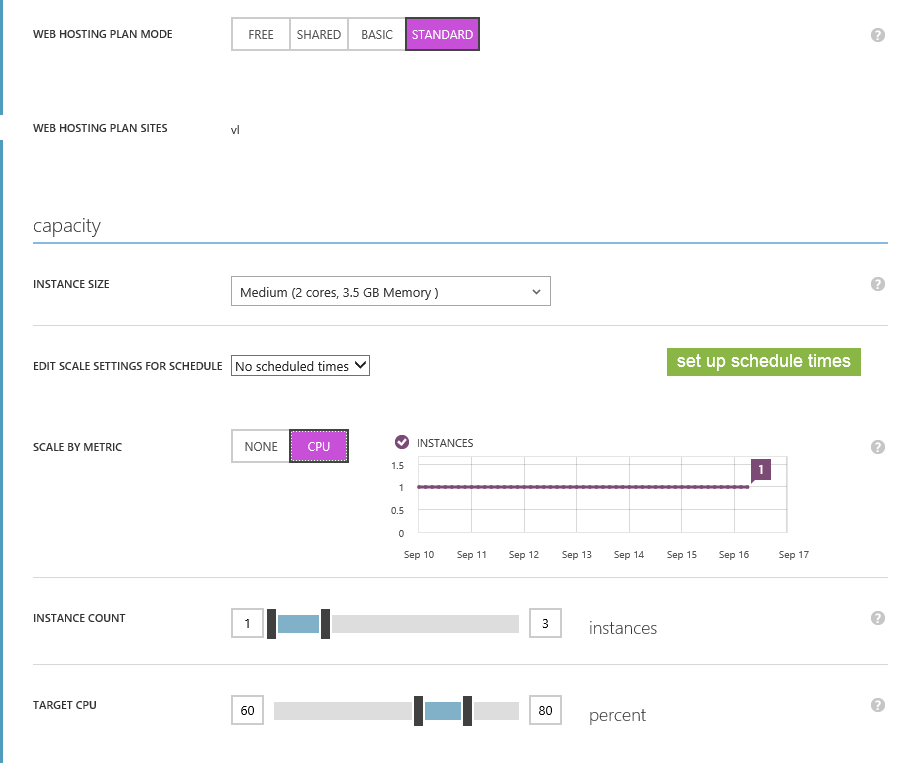
Azure websites let you deploy web applications running on IIS (Microsoft’s web server) hosted in Microsoft’s cloud. The application platform can be framework can be ASP.NET, Java, PHP, Node.js or Python. There are Free, Shared and Basic tiers which are mainly for prototyping, and a Standard tier which has auto-scaling features, managed through Microsoft’s web portal:

image

The development tool is Visual Studio, which now has strong integration with Azure.

Integration with virtual networks is a significant feature. You could now host what is in effect an intranet application on Azure if it is convenient. If it is only used in working hours, say, or mainly used in the first couple of hours in the morning, you could scale it accordingly.

Have a look at that web configuration page above, and compare it with the intricacies of System Center. It is a huge difference and shows that some parts of Microsoft have learned that usability matters, even for systems aimed at IT professionals.

Windows “9”: forget the Start menu, consider the apps

This week has seen multiple leaks of early builds of the next version of Windows – sometimes called Windows 9 or “Threshold” – showing Microsoft’s continuing inability to persuade all of its partners to keep secrets.

It seems to me that the leaks are likely to be genuine, though the usual health warnings apply. I also expect that Microsoft is deliberately holding back from releasing final UI designs, in part because they are likely to leak, so you should not read too much into the appearance.

The headline new features are a revamped Start menu which appears in the old position on the desktop, rather than on a separate screen; and the ability to run several desktops at once, as a way of organising your work.

No doubt the new Start menu will feel more comfortable for Windows 7 users, though for myself I am now used to the full-screen version and it is no big deal.

I am more interested in what is happening with Windows Store apps (also known as Metro or Windows Runtime apps). These are significant because it is this kind of app that you can easily port to Windows Phone using a Visual Studio Universal App project.

We saw these apps running in desktop windows, in a preview at the Build developer conference earlier this year. The leaked build seems also to have this feature. Check out the video here. Here is Calculator running on the desktop:

image

This is the Metro app, not the old desktop calculator. Here it is in Windows 8.1:

image

Note a big difference though: in Windows 8.1 you can get a window bar to appear along the top, but in Windows 9 there is also a maximize widget at top right of the window (in Windows, this doubles as a “restore down” button when the windows is already maximized).

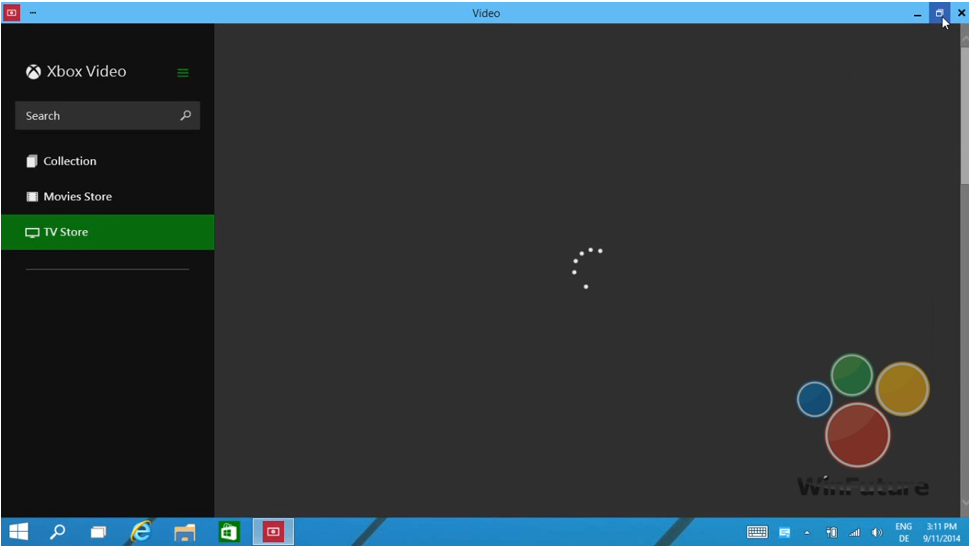
Later in the video, we see this in operation. The user starts the Xbox Video app full screen:

image

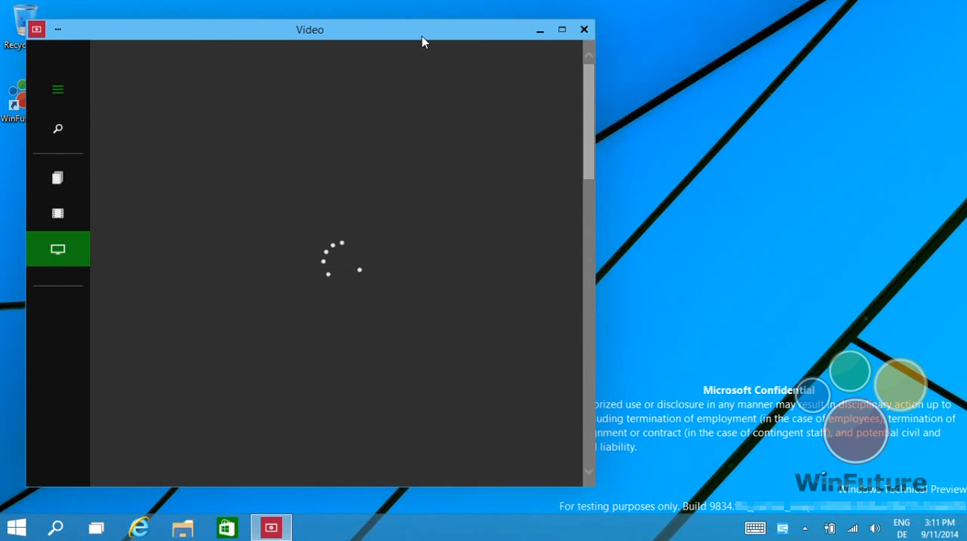
and then hits the “restore down” button:

image

This is therefore the bridge between the “Metro” and desktop environments. Hit that button, and the full-screen experience becomes a windowed app on the desktop.

In another leaked image, the Charms menu options (a right-edge menu in Windows 8.x) becomes a drop-down window menu, summoned by clicking in the right-hand upper corner. Users often find the Charms menu awkward with mouse and keyboard (I still do) so this will be a more convenient alternative.

Now, although Windows experts can easily see the difference between a Metro app and a desktop app, I doubt that the average user will care. All they will note is that this kind of app requires Windows 8 or 9 to run.

Although this is a diminished target for developers, who may still prefer to write desktop apps that target Windows 7 (or XP) and higher, my guess is that this new UI will make Windows Runtime apps more visible and acceptable for users who live primarily in the desktop – which is most Windows users.

If Microsoft can increase the momentum behind this style of apps, then their benefits will be more apparent too: easy install and uninstall via the Store, low malware risk, and a UI that works well on tablets as well as with mouse and keyboard. This in turn would make more sense of the small Windows tablets from the likes of Toshiba, HP and Lenovo which we recently saw at IFA in Berlin.

There would be a knock-on benefit for Windows Phone, too, thanks to relatively easy porting between the two platforms.

What do you think – is desktop integration enough to rescue the Windows 8 app platform?

Microsoft introduces a new 2D graphics API for the Windows Runtime

Microsoft has announced Win2D, a Windows Runtime API that wraps Direct2D (part of DirectX), for accelerated graphics in Windows Store apps.

The new API is described here and you can download the current binary here. It is in its early stages, but already supports basic drawing, bitmap loading, some image effects, and a vector and matrix math library. Here is some sample code:

void canvasControl_Draw(CanvasControl sender, CanvasDrawEventArgs args)
{
args.DrawingSession.Clear(Colors.CornflowerBlue);
args.DrawingSession.DrawEllipse(190, 125, 140, 40, Colors.Black, 6);
args.DrawingSession.DrawText("Hello, world!", 100, 100, Colors.Yellow);
}

Although this hardly looks exciting, it is important because it enables accelerated custom drawing from languages other than C++, and without needing to learn Direct2D itself. It will be easier to make rich custom controls, or casual 2D games.

That said, there are already alternative C# wrappers for DirectX in Windows Runtime apps, such as SharpDX.

Some of the comments on the MSDN post are sceptical:

Managed DirectX and XNA were however cancelled despite the frustration from the community which in response created open source alternatives to save the projects and customers that had invested in technology Microsoft introduced.

I understand that the future is "uncertain", but is this technology something that we should dare invest in or will it see the same fate as it’s earlier incarnations?

Microsoft’s Shawn Hargreaves assures:

Win2D is absolutely not a side project or some kind of stop gap that will later be replaced by anything different.

The target here is universal apps, so not just Windows Store apps but also Windows Phone. Despite the hesitant reception for the Windows Runtime in Windows 8, it looks as if Microsoft is still committed to the platform and that it will remain centre stage in Windows vNext.

Alcatel OneTouch on plans for Windows Phone OS tablets

At IFA in Berlin, I spoke to Dan Dery, VP and CMO at Alcatel OneTouch, who told me of the company’s plans for Windows Phone OS tablets. Alcatel OneTouch is part of TCL Corporation, a Chinese global electronics company, though for historical reasons (a 2004 joint venture between TCL and the French company Alcatel-Lucent) it has strong links with France; Dery’s first language is French.

image

Alcatel was at IFA to launch new Android devices, primarily the Hero 2 smartphone and the Hero 8 tablet, but Dery particularly caught my interest when he started talking about future plans for tablets running the Windows Phone OS 8.2 (the current version of Windows Phone is 8.1).

Note that I am reporting on my press briefing with Alcatel; I have not heard anything from Microsoft about Windows Phone 8.2.

“Rumour has it that the Windows Phone is going to be available on tablet kind-of form factor on ARM chipset, and we are going to be first in doing that. For example we are developing a 10 inch tablet which has this Magic Flip technology for the keypad with trackpad.”

Magic Flip is Alcatel’s brand name for smart magnetic covers which fold back as stands and which are able to show notifications, so it sounds like Alcatel has something Surface-like in mind here. The cost will be similar to Android he implied – my guess is that Microsoft will charge little or nothing for the use of Windows in this context – and the devices will have LTE, so we are talking about connected devices.

But why will the market want an Windows Phone tablet, I asked?

“Compared to Android there is still a big advantage with the presence and natural integration of Office. To be fair, you start having it on iOS. It’s available, but integrated, that is probably a different thing. The simple fact, for most of the users who are interested in that kind of use case, to receive an email which has an attachment, to click the attachment, to open it, edit it, and resend it, that’s almost impossible today unless you are going into the Microsoft environment. That’s the standard for 20 or 30 years in the market, you are not going to change it overnight.

“There is a big advantage in Microsoft because they are probably the most advanced in driving an integrated solution between computer, tablet and smartphone. Everybody is going in that direction, but Android is probably not the easiest one for that.”

Today, something like full Office is available on Windows RT (as found in Surface RT), but not on Windows Phone, which has cut-down viewers and editors for Office documents. The implication is that Windows Phone OS for tablets will have something more fully featured.

I asked Dery if the Windows Phone OS is more efficient than Android on a low-end device, from Alcatel’s experience with prototypes.

“It is the case. It was not a few months ago. There is a big advantage which is the memory footprint. This OS is meant to run with rather low memory, which is not the case in Android. You have far less overhead the day you switch on your device. Android is fantastic but in some countries, the day you switch it on you download a size of apps and services which obviously has a toll on the memory footprint, on the processing capability. That’s less the case on Windows Phone.

“I think they have been doing a pretty good job on eye-candy, on the UI, where even with a low GPU you can have elasticity features, and all that. So there are some benefits.

“So you can ask, if you are telling me this is so good, why haven’t you been shipping Windows Phone 8 for a year and a half?” said Dery. Apparently the company’s researchers have been uncertain whether the success of entry-level Windows Phones is because of the OS, or because of the Nokia brand. The company seems to have experimented with ideas or prototypes, but “each time we came up with a solution, and each time we have been told, maybe this works because it is Nokia. That is still today the big question mark. Is Windows Phone working in entry [level], is it Nokia with decent smartphones in entry making it happen? Nobody has the answer to that question.”

Dery is convinced that Microsoft’s appeal is for the mass market, not at the high end. “In essence it is a mass market thing. Playing it super high end, was more challenging,” he says.

Note that pre-announced plans can change. We should learn more soon.