Tag Archives: microsoft

Sony PlayStation network hacked, some disclosure, questions remain

Sony has posted information about the “illegal intrusion on our systems” that has caused the PlayStation Network (PSN) to be closed temporarily. PSN is necessary for playing online games and downloading music and videos.

Sony has disclosed that:

Between April 17 and April 19 2011 an attacker gained access to “user account information”

The information includes:

name, address (city, state, zip), country, email address, birthdate, PlayStation Network/Qriocity password and login, and handle/PSN online ID. It is also possible that your profile data, including purchase history and billing address (city, state, zip), and your PlayStation Network/Qriocity password security answers may have been obtained.

The information might include:

While there is no evidence at this time that credit card data was taken, we cannot rule out the possibility. If you have provided your credit card data through PlayStation Network or Qriocity, out of an abundance of caution we are advising you that your credit card number (excluding security code) and expiration date may have been obtained

The remainder of the information is mainly generic advice on fraud prevention. Many comments to the blog post make the reasonable point: why were they not informed earlier?

How many users are on PSN? The number 75 million is widely reported. In January Sony claimed over 69 million PSN members.

It is easy to say that Sony should have operated a more secure system. Making a judgment on that is hard because there is a lot we do not know. Was this information encrypted? Sony says passwords were stolen, which may mean they were unencrypted though that is hard to believe; or that they were encrypted but likely to be easily decrypted, which is perhaps more likely. On the other hand the fact that encryption is not mentioned in the post tends to suggest that none of this information was encrypted.

The scale of the incident makes it remarkable but the fact of network intrusions and personal data being stolen is not surprising, and likely much more of this happens than is reported.

The state of internet security overall remains poor and what we see constantly is that security best practices are ignored. Convenience and the desire of marketers to grab as much personal data as possible constantly trumps security.

Here is Kim Cameron, Microsoft’s identity architect, writing in 2005:

We should build systems that employ identifying information on the basis that a breach is always possible. Such a breach represents a risk. To mitigate risk, it is best to acquire information only on a “need to know” basis, and to retain it only on a “need to retain” basis. By following these practices, we can ensure the least possible damage in the event of a breach.

The concept of “least identifying information” should be taken as meaning not only the fewest number of claims, but the information least likely to identify a given individual across multiple contexts. For example, if a scenario requires proof of being a certain age, then it is better to acquire and store the age category rather than the birth date. Date of birth is more likely, in association with other claims, to uniquely identify a subject, and so represents “more identifying information” which should be avoided if it is not needed.

Cameron’s thoughtful and excellent “laws of identity” lack take-up within Microsoft as well as elsewhere; the CardSpace system that was built to support it was scrapped.

An example of the low priority of security around the web is the prevalence of “password security answers” as Sony describes them. This is additional information that allow you to recover an account if the password is forgotten, especially if the email address associated with the account is no longer in use. Contrary to the impression given by the forms that require the information, these questions and answers reduce your security in order to ease the burden on support. They break Cameron’s laws of identity by providing the third party with information that it does not need, such as mother’s maiden name, though of course you can provide fictional answers and in fact I recommend this.

Personally I am also one of those people who never tick the “save credit card details” box. I am happy to enter them every time, rather than hand them over to a system of unknown security. Some sites do not let you make purchases without saving credit card details; as I recall, Amazon is one of them, and Apple another. This means the consequences of security breaches at these companies are greater, though I imagine they also make more sales since the friction of the purchasing process is reduced.

I am not optimistic that internet security will improve in the near future, though I guess that major breaches like this one are a force for reform.

Update: In a new post Sony says that credit card data was encrypted but personal data was not. I am surprised if this included passwords; but the IT world is full of surprises.

Hands on with Office 365 – great service, some hassles

I have been trying Microsoft’s Office 365 which has recently gone into public beta, and is expected to go live later this year.

This cloud service provides Exchange 2010, SharePoint 2010 with Office Web Apps, and Lync Server to provide a complete collaboration service for organisations who prefer not to run these servers themselves – which is understandable give their cost and complexity.

Trying the beta is a little complex when you already have a working email and collaboration infrastructure. I chose to use a virtual machine running Windows 7 Professional. I also pre-installed Office 2010 Professional in an attempt to get the best experience.

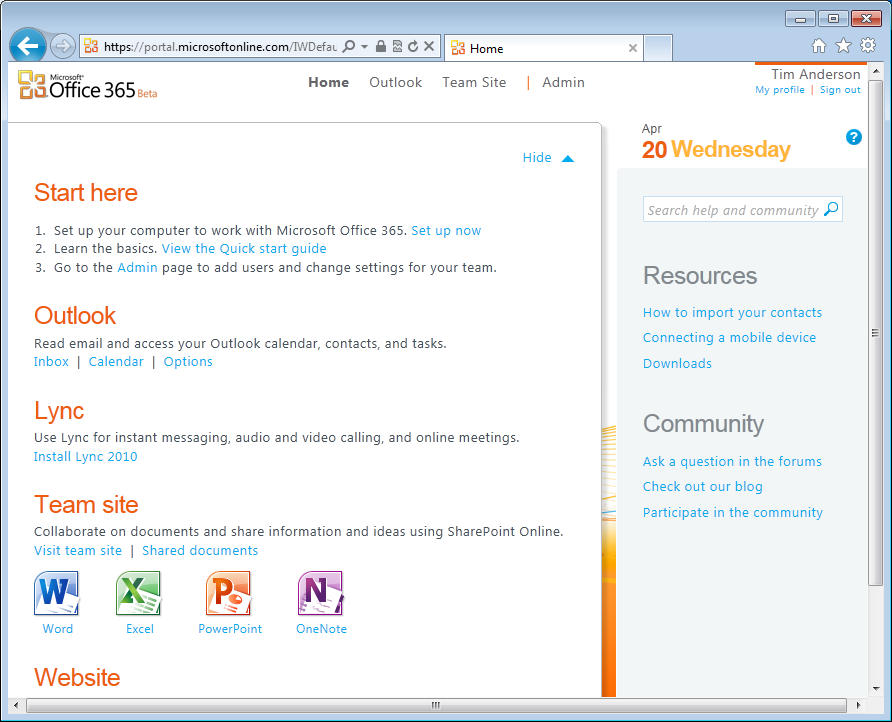
Initial sign-up is easy and I was soon online looking at the admin screen. I could also sign into Outlook Web Access and view my SharePoint site.

image

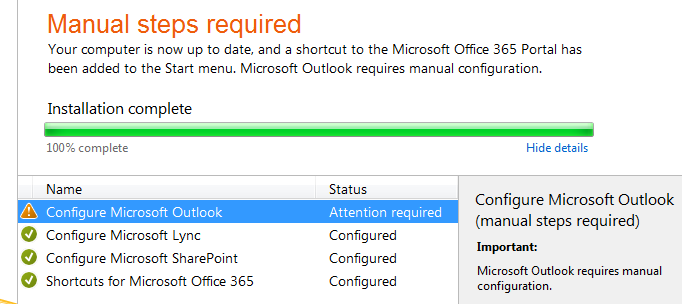
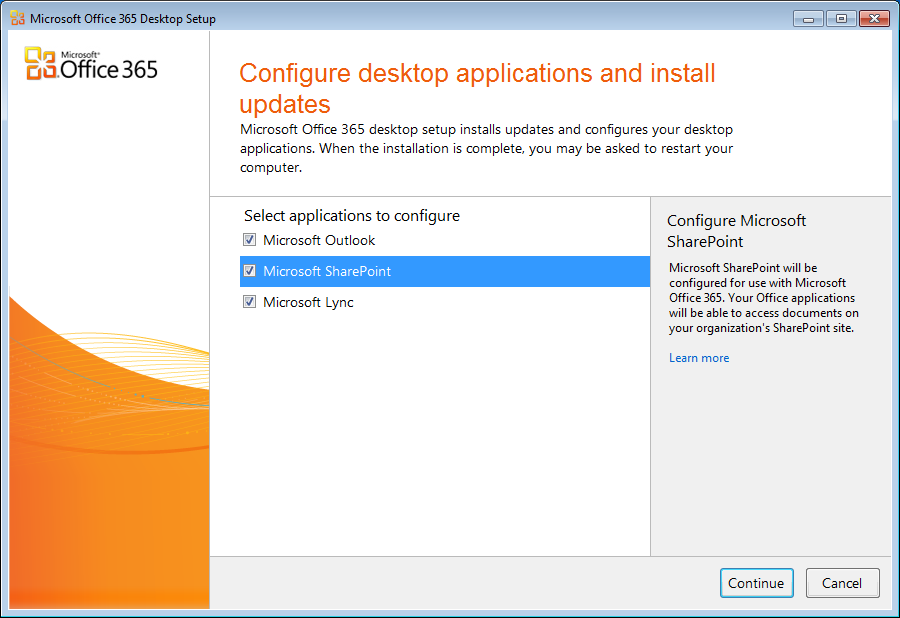
Hassles started when I clicked to setup up desktop applications. This is done by a helper application which configures and updates Outlook, SharePoint and Lync on your desktop PC. At this point I had not configured my own domain; I was simply username@username.onmicrosoft.com.

setup-office-365

The wizard successfully configured SharePoint and Lync, but not Outlook.

image

There was a “Learn more” link; but I was in a maze of twisty passages, all alike, none of which seemed to lead to the information I needed.

Part of the problem – and I have noticed this with BPOS as well – is that the style of the online help is masterful at telling you things you know already, while neglecting to tell you what you need to know. It also has a patronising style that I find infuriating, and a habit of showing you marketing videos at every opportunity.

I did eventually find instructions for configuring Outlook manually for Office 365, but they did not work. I also noticed discrepancies in the instructions. For example, this document says that the Exchange server is ch1prd0201.mailbox.outlook.com and that the proxy server for Outlook over HTTP is pod51004.outlook.com. That did not match with the server given in my online account for IMAP, POP3 and SMTP use, which was a different podnnnnn.outlook.com. I tried all sorts of combinations and none worked.

Eventually I found this comment in another help document:

Currently, the only supported scenario for configuring Outlook to work with Office 365 is a fully migrated environment.

I am not sure if this is true, but it did seem to explain my problems. Of course it would be easy for Microsoft to surface this information in a more obvious place, such as building it into the setup wizard. Anyway, I decided to go for the full Office 365 experience and to set up a domain.

Fortunately I have a domain which I obtained for a bright idea that I have yet to find time for. I added it to Office 365. This is a process which involves first adding a CNAME record to the DNS in order to prove ownership, and then making Office 365 the authoritative nameserver for the domain. I was not impressed by the process, because when Microsoft took over the nameserver role it threw away existing settings. This means that if you have a web site or blog at that domain, for example, it will disappear from the internet after the transfer. Once transferred, you can reinstate custom records.

Still, I had chosen an unused domain so that I did not care about this. I set up a new user with an email address at the new domain, and I amended the default SharePoint web site address to use the domain as well.

image

That all worked fine; but what about Outlook? The bad news was that the setup wizard still failed to configure Outlook, and I still did not know the correct server settings.

I could have contacted support; but I had one last try. I went into the mail applet in control panel and deleted the Outlook profile, so Outlook had no profile at all. Then I ran Outlook, went through the setup wizard, and it all worked, using autodiscover. Out of interest, I then checked the server settings that the wizard had found, which were indeed different in every case from those in the various help documents I had seen.

A few hassles then, and I am not happy with the way this stuff is documented, but nevertheless it all looks good once set up. The latest Exchange and SharePoint does make a capable collaboration platform, the storage limits are generous – up to 25GB per Exchange mailbox – and I think it makes a lot of sense. I expect Microsoft’s online services to win huge amounts of business that is currently going to Small Business Server, and some business from larger organisations too. Migration from existing Microsoft-platform servers should be smooth.

The biggest disappointment so far is that in Lync online the Enterprise Voice feature is disabled. This means no general-purpose voice over IP, though you can call PC to PC. To get this you have to install Lync on-premise:

Organizations that want to leverage the full benefits of Microsoft Unified Communications can purchase and deploy Microsoft Lync Server 2010 on their premises as part of Microsoft Office 365. Lync Server 2010 on-premises delivers full enterprise voice and premises-based, dial-in audio conferencing, enabling customers to reduce costs and increase productivity by replacing or enhancing traditional PBX systems.

though it is confusing since Enterprise Voice is listed as a feature of the high-end E4 edition; I believe this implies an on-premise server alongside Office 365 in the cloud.

Perhaps the biggest question is the unknown: will Office 365 live up to its promised 99.9% scheduled uptime SLA, and how will its reliability compare to that of Google Apps?

Office 365 is priced at $10 per user per month for the basic service (E1), $16 to add Office Web Apps (E2), $24.00 to add licenses for Office Professional, archiving for Exchange (E3) and voicemail, and $27.00 to add Enterprise Voice (E4). The version in beta is E3.

Native apps better than web apps? That’s silly talk says PhoneGap president

When I attended Mobile World Congress in February one of my goals was to explore the merits of the various different approaches to writing cross-platform mobile apps. One of the key ones is PhoneGap, and I got in touch with Nitobi’s president and co-founder André Charland. As it turned out he was not at that particular event, but he kept in touch and I spoke to him last week.

PhoneGap works by using the installed HTML and JavaScript engine on the device as a runtime for apps. That is not as limiting as it may sound, since today’s devices have high performance JavaScript engines, and PhoneGap apps can be extended with native plug-ins if necessary. But aren’t there inconsistencies between all these different browser engines?

Sure, it’s kinda like doing web development today. Just a lot better because it’s just different flavours of WebKit, not WebKit, Gecko, whatever is in IE, and all sorts of other differentiation. So that’s definitely how it is, but that is being overcome rather quickly I’d say with modern mobile JavaScript libraries. There’s JQuery Mobile, there’s Sencha Touch, there’s DoJo Mobile just released, SproutCore, which is backed by Strobe, which is kinda the core of Apple’s MobileMe.

There’s tons of these things, Zepto.js which is from the scriptaculous guy, Jo which is a framework out of a Palm engineer, the list of JavaScript frameworks coming out is getting longer and longer and they’re getting refined and used quite a bit, and those really deal with these platform nuances.

At the same time, phone manufacturers, or iOS, Android, WebOS, and now RIM, they’re competing to have the best WebKit. That means you’re getting more HTML5 features implemented quicker, you’re getting better JavaScript performance, and PhoneGap developers get to take advantage of that.

says Charland. He goes further when I put to him the argument made by native code advocates – Apple CEO Steve Jobs among them – that PhoneGap apps can never achieve the level of integration, the level of performance that they get with native code. Will the gap narrow?

I think it will go away, and people will look back on what they’re saying today and think, that was a silly thing to say.

Today there are definitely performance benefits you can get with native code, and our answer to that is simply that PhoneGap is a bundle made of core libraries, so at any point in your application that you don’t want to use HTML and JavaScript you can write a native plugin, it’s a very flexible, extensible architecture … So you can do it. We don’t necessarily say that’s the best way to go. Really if you’re into good software development practices the web stack will get you 90%, 95% of the way there, so that apps are indistinguishable from native apps.

Some of the native features we see in iOS apps, they’re reminiscent of Flash home pages of ten years ago, sure you can’t do it in HTML and JavaScript but it doesn’t add any value to the end user, and it detracts from the actual purpose of the application.

The other thing is, a lot of these HTML and JavaScript things, are one step away from being as good in a web stack as they are in native. When hardware acceleration gets into WebKit and the browser, then performance is really just as good.

Charland is also enthusiastic about Adobe’s recent announcement, that PhoneGap is integrated into Dreamweaver 5.5:

Two things are exciting from our perspective. It gives us massive reach. Dreamweaver is a widely used product that ties in very nicely to the other parts of the creative suite toolchain, so you can get from a high-level graphic concept to code a lot quicker. Having PhoneGap and JQuery Mobile in there together is nice, JQuery Mobile is definitely one of the more popular frameworks that we see our community latching on to.

The other thing is that Dreamweaver targets a broader level of developer, it’s maybe not super hard core, either Vi or super-enterprise, Eclipse guys, you know, it’s people who are more focused on the UI side of things. Now it gives them access to quickly use PhoneGap and package their applications, test them, prove their concepts, send them out to the marketplace.

He says Adobe should embrace HTML and Flash equally.

I also asked about Windows Phone support, and given that Microsoft shows no sign of implementing WebKit, I was surprised to get a strongly positive response:

We have something like 80% of the APIs in PhoneGap running on Windows Phone already. That’s open and in the public repo. We are just waiting basically for the IE9 functionality to hit the phone. The sooner they get that out in public, the sooner we can support Windows Phone 7. We have customers knocking at our door begging for it, we’ve actually signed contracts to implement it, with some very large customers. Just can’t there soon enough, really. I think it’s an oversight on their part to not get IE9 onto the phone quicker.

PhoneGap is at version 0.94 at the moment; Charland says 0.95 will be out “in a few weeks” and he is hoping to get 1.0 completed by O’Reilly OSCON in July.

I’ve posted nearly the complete transcript of my interview, so if you are interested in Charland’s comments on building a business on open source, and how PhoneGap compares to Appcelerator’s Titanium, and what to do about different implementations of local SQL on devices, be sure to read the longer piece.

Is Appcelerator Titanium native? And what does native mean anyway?

Of course we all know that Microsoft’s IE9 and the forthcoming IE10 are native – VP Dean Hachamovitch said so many times during his keynote at the Mix 2011 conference earlier this week. That has sparked a debate about what native means – so here is another interesting case.

Appcelerator’s Titanium cross-platform tool for mobile development is native, or at least that is what it claims:

image

Now, I am not sure that native has a precise definition, but to me it suggests a compiled application, rather than one interpreted at runtime. So this description of how Titanium executes JavaScript – its main language – is surprising:

In a Titanium Mobile application, your source code is packaged into a binary file and then interpreted at runtime by a JavaScript engine bundled in by the Titanium build process. In this guide, you will learn more about the JavaScript runtime environment that your code runs in. Titanium runs your application’s JavaScript using one of two JavaScript interpreters – JavaScriptCore on iOS (the interpreter used by Webkit) and Mozilla Rhino on Android and BlackBerry.

So a Titanium application is actually interpreted.

Native is a vague enough term that Appcelerator can no doubt justify its use here. “Native UI” is fair enough, so is “Native capabilities.” Native performance? That seems to me a stretch, though JavaScript performance is good and constantly improving. Appcelerator even has a web page devoted to what it means by native.

Titanium is also open source. Anyone doubtful about how it works need only consult the code.

In the light of Microsoft’s statements, it is interesting that what Appcelerator really means by native is “not a web page”:

Build Native Apps … Everything else is basically a web page.

So can an application be both native and interpreted? What about Silverlight apps on Windows Phone 7, are they native? Adobe AIR apps, surely they are not native? Google Android has a Native Development Kit which is introduced thus:

The Android NDK is a companion tool to the Android SDK that lets you build performance-critical portions of your apps in native code.

The implication is that byte code executed by the Dalvik virtual machine, which is the normal route for an Android app, is in some sense not native code. Which also implies that Appcelerator’s claims for Titanium are at least open to misunderstanding.

Windows Phone at Mix 2011: what Microsoft said and did not say

Yesterday Microsoft’s Joe Belfiore (phone VP) and Scott Guthrie (developer VP) took the stage at the Mix 2011 conference in Las Vegas to tell us what is new with Windows Phone.

The opening part of the keynote was significant. Belfiore spent some time talking about the “update situation”.

image

This is all to do with who controls what ends up on your phone. If you buy a Windows PC or laptop, you can get updates from Microsoft using Windows update or by downloading service packs; the process is between you and Microsoft.

Not so with Windows Phone. The operators have a say as well; and operators are not noted for delivering speedy OS updates to users. Operators seem to have difficulty with the notion that by delivering strong updates to existing devices that have already been purchased, they build user loyalty and satisfaction. They are more geared to the idea of delivering new features with new hardware. Updating existing phones can cause support calls and other hassles, or even at worst bricked devices. They would rather leave well alone.

When Microsoft launched Windows Phone it announced that there would be regular updates under Microsoft’s control; but this has not been the case with the first update, codenamed “NoDo”. The update process has been delayed and inconsistent between operators, just like the bad old days of Windows Mobile.

Belfiore went on about testing and phones being different from PCs and improvements to the process; but in the end it seems to me that Microsoft has given in:

Mobile operators have a very real and reasonable interest in testing updates and making sure they’re going to work well on their phones and on their network. Especially if you think about large operators with huge networks, they are the retailer who sells the phone, so they have to deal with returns, they take the support calls and they have to worry about whether their network will stay up and perform well for everyone … From our point of view, that’s quite reasonable, and our belief and understanding is that it’s standard practice in the industry that phones from all different vendors undergo operator testing before updates are made available.

That “testing” label can cover any amount of prevarication. It appears that Microsoft is unable to achieve what Apple has achieved: the ability to update its phone OS when it wants to. That is a disadvantage for Microsoft and there is no sign of improvement.

More positively, Microsoft announced a number of significant new features in the first major update to the OS, codenamed Mango. This is for existing devices as well as new ones, though new devices will have enhanced hardware. He focused on what matters for developers, and hinted that there will be other end user features. A few bullet points:

  • Internet Explorer 9 is on Mango – “The same exact code that has just shipped and is now getting installed on tons and tons of PCs is the code base that will be on the phone” said Belfiore. No, it is not built in Silverlight.
  • Limited multitasking for third-party apps. This is in the form of “Live agents” which run in the background. Full apps cannot multitask as I understand, though they can be suspended in memory for fast switching. Currently apps appear to do this but it is faked; now it will be for real, with the proviso that a suspended app may get shut down if its memory is needed by the OS.
  • Multiple live tiles for a single app.
  • Fixed marketplace search so that music does not appear when you search for an app.
  • Apps can register with search so that Bing searches can integrate with an app.
  • There will be a built in SQL Server CE database with programmatic access using Linq (Language Integrated Query).
  • Full TCP/IP socket support
  • Access to raw camera data for interesting imaging applications or barcode  processing
  • 1,500 new APIs in Mango
  • Performance improvements including a better garbage collector that apparently gives a significant boost
  • Improved tools with the ability to simulate GPS on the emulator, capture performance trace log from phone

It adds up to a decent update, though more Window Phone 7.5 than Windows Phone 8 (I do not know what the official name will be). Belfiore also mentioned new apps coming to Windows Phone 7, including Spotify, Skype and Angry Birds.

But what was not said? Here are a few things I would like to have heard:

  • When will get Adobe Flash on Windows Phone? Not mentioned.
  • What about Silverlight in the browser? You would think this would be easy to implement; but I have not seen it confirmed (let me know if you have news).
  • When will Nokia ship Windows Phone devices? Nokia’s Marco Argenti appeared on stage but said nothing of substance.
  • The Mango update is coming “in the fall” but when will current users get updates?
  • Will Windows Phone 8 move away from Windows CE to full Windows, so the same OS will work across phone, tablets and desktop PCs?

Above all, I would like convincing news about how Microsoft intends to get Windows Phone better exposure and fuller support from operators. I still hardly see it in retailers, and it seems a long way down the list when you talk to a salesperson about what new phone you should buy. I do not have a Windows Phone at the moment, but when I tried it for a  couple of weeks I mostly liked the user interface – I found the soft buttons on the Mozart annoying because they are easy to press accidentally – and I also like the developer tools, though I would like to see a native code development option. In the end though, it is no use developing for Windows Phone if your customers are asking for Apple iOS and Google Android.

Microsoft shared the following figures:

  • 12,000+ apps
  • 35,000 registered developers
  • 1.5 million tool downloads

It is a start, but these are not really big numbers, and the proportion of tool downloaders that end up delivering apps seems small so far.

A lot rests on the Nokia partnership and how that plays out.

It now appears that we will need to wait until September and the newly announced PDC (Professional Developers Conference) in Anaheim 13th-16th September before we learn more about the long-term mobile strategy.

Update: Microsoft’s Phil Winstanley tells me that the Windows Phone OS is just called “Windows Phone” regardless of version; but that the Mango update is referred to as “Windows Phone OS 7.5” when it is necessary to differentiate. If that sounds confusing, do not blame me!

Microsoft releases IE10 preview, talks up native HTML5

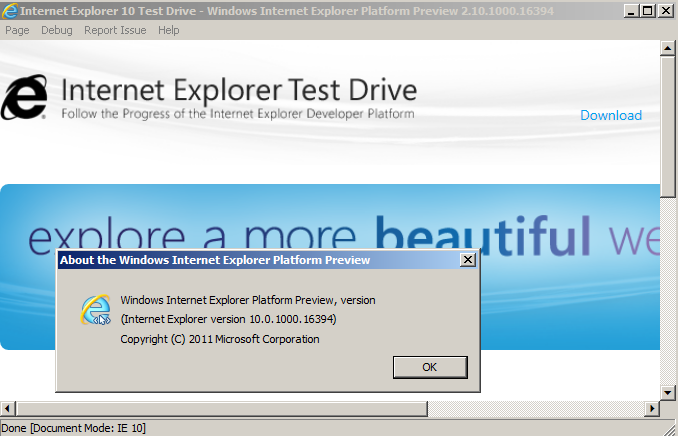
Microsoft has released an early preview of Internet Explorer 10, which you can download now. It shows the company’s commitment – for the moment – to an energetic release cycle for its web browser.

image

Why use IE? Microsoft is pushing the notion that only IE is truly native on Windows:

IE10 continues on IE9’s path, directly using what Windows provides and avoiding abstractions, layers, and libraries that slow down your site and your experience.

In practice, this means using the Windows graphic stack directly and integrating with the Windows shell through features like jump list support on Windows 7.

IE10 supports more CSS3 standards including multi-column layout, Grid layout and Flexible Box Layout,  and Gradients. There is also support for EcmaScript 5 Strict Mode, which enforces tighter standards so reducing the likelihood of errors. Strict Mode is optional; if a web browser tried to apply it to the entire web lots of pages would break.

Microsoft is promising to support additional CSS3 standards including transitions and 3D transforms, though these are not in the preview. New preview releases will appear every 8-12 weeks.

According to Corporate VP Dean Hachamovitch, the company is steering a tight path between falling behind, and implementing immature standards:

When browsers prematurely implement technology, the result is activity more than progress. Unstable technology results in developers wasting their time rewriting the same site.

he writes in a blog post.

IE10 was announced today at the Mix conference in Las Vegas. Mix seems to be featuring equal measures of HTML5 and Silverlight, which makes for an interesting tension. News on Windows Phone is also promised, though I am not sure whether this is the moment when Microsoft will tell us about the next generation of Windows Phone and how it ties in with Windows 8 and with tablet devices. All will be revealed (or not) tomorrow.

Trying out Remote Desktop to a Microsoft Azure virtual machine

I have been trying out Visual Studio LightSwitch, which has an option to deploy apps to Windows Azure.

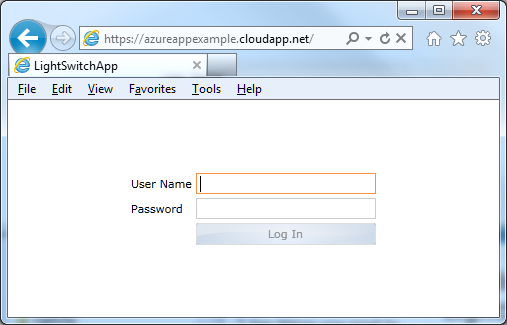
Of course I wanted to try this,  and after a certain amount of hassle generating certificates and switching between Visual Studio LightSwitch and the Azure management portal I succeeded.

image

I doubt I would have made it without this step by step guide by Andy Kung. The article begins:

One of the many features introduced in Visual Studio LightSwitch Beta 2 is the ability to publish your app directly to Windows Azure with storage in SQL Azure. We have condensed many steps one would typically have to go through to deploy an application to the cloud manually.

Somewhere between 30 and 40 screens later he writes:

The last step shows you a summary of what you’re about to publish. FINALLY! Click Publish.

We just have to imagine how many screens there would have been if Microsoft had not condensed the “many steps”. The result is also not quite right, because it uses self-signed certificates that will present security warnings when you use the app. For a product supposedly aimed at non-developers it is all hopelessly difficult; but I guess techies are used to this kind of thing.

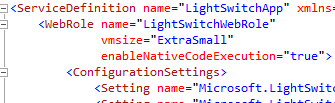
I was not content though. First, I wanted to use an Extra Small instance, and LightSwitch defaults to a Small instance with no obvious way to change it. I cracked that one. You switch the view in Solution Explorer to the File view, then find the file ServiceDefinition.csdef and edit the vmsize attribute:

image

It worked and I had an Extra Small instance.

I was still not satisfied though. I wanted to use Remote Desktop so I could check out the VM Azure had created for me. I could not see any easy way to do this in the LightSwitch project, so I created another Azure project and configured it for Remote Desktop access using the guide on MSDN. More certificate fun, more passwords. I then started to publish the project, but bailed out when it warned me that I was overwriting a previous deployment.

Then I copied the likely looking parts of ServiceDefinition.csdef and ServiceConfiguration.cscfg from the standard Azure project to the LightSwitch project. In ServiceDefinition.csdef that was the Imports section and the Certificates section. In ServiceConfiguration.cscfg it was all the settings starting Microsoft.WindowsAzure.Plugins.Remote…; and again the Certificates section. I think that was it.

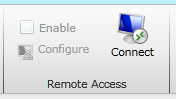
It worked. I published the LightSwitch app, went to the Azure management portal, selected the instance, and clicked Connect.

image

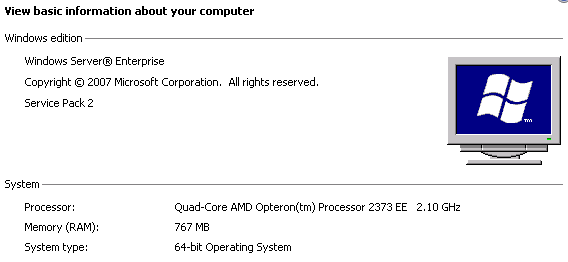
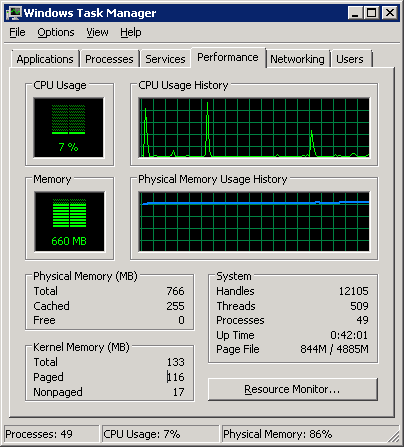
What I found was a virtual Quad-Core Opteron with 767MB RAM and running Windows Server 2008 Enterprise SP2. It seems Azure does not use Server 2008 R2 yet – at least, not for Extra Small instances.

image

750MB RAM is less than I would normally consider for Server 2008 – this is Extra Small, remember – but I tried using my simple LightSwitch app and it seemed to cope OK, though memory is definitely tight.

image

This VM is actually not that small in relation to many Linux VMs out there, happily running Apache, PHP, MySQL and numerous web applications. Note that my Azure VM is not running SQL Server; SQL Azure runs on separate servers. I am not 100% sure why Azure does not use Server Core for VMs like this. It may be because server core is usually used in conjunction with GUI tools running remotely, and setting up all the permissions for this to work is a hassle.

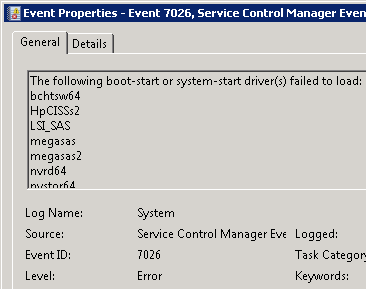
I took a look at the Event Viewer. I have never seen a Windows event log without at least a few errors, and I was interested to see if a Microsoft-managed VM would be the first. It was not, though there are a mere 16 “Administrative events” which is pretty good, though the VM has only been running for an hour or so. There were a bunch of boot-start drivers which failed to load:

image

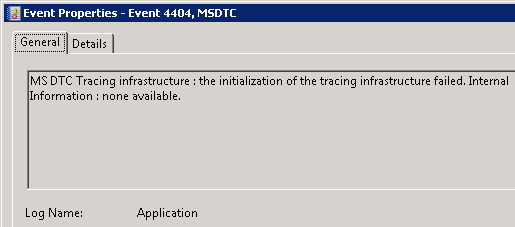
and this, which I would describe as a typical obscure and probably-unimportant-but-who-knows Windows error:

image

The Azure VM is not domain-joined, but is in a workgroup. It is also not activated; I presume it will become activated if I leave it running for more than 14 days.

Internet Explorer is installed but I was unable to browse the web, and attempting to ping out gave me “Request timed out”. Possibly strict firewall rules prevent this. It must be carefully balanced, since applications will need to connect out.

The DNS suffix is reddog.microsoft.com – a remnant of the Red Dog code name which was originally used for Azure.

As I understand it, the main purpose of remote desktop access is for troubleshooting, not so that you can install all sorts of extra stuff on your VM. But what if you did install all sorts of extra stuff? It would not be a good idea, since – again as I understand it – the VM could be zapped by Azure at any time, and replaced with a new one that had reverted to the original configuration. You are not meant to keep any data that matters on the VM itself; that is what the Azure storage services are for.

Hands On with Visual Studio LightSwitch – but what is it for?

Visual Studio LightSwitch, currently in public beta, is Microsoft’s most intriguing development tool for years. It is, I think, widely misunderstood, or not understood; but there is some brilliant work lurking underneath it. That does not mean it will succeed. The difficulty Microsoft is having in positioning it, together with inevitable version one limitations, may mean that it never receives the attention it deserves.

Let’s start with what Microsoft says LightSwitch is all about. Here is a slide from its Beta 2 presentation to the press:

image

Get the idea? This is development for the rest of us, "a simple tool to solve their problems” as another slide puts it.

OK, so it is an application builder, where the focus is on forms over data. That makes me think of Access and Excel, or going beyond Microsoft, FileMaker. This being 2011 though, the emphasis is not so much on single user or even networked Windows apps, but rather on rich internet clients backed by internet-hosted services. With this in mind, LightSwitch builds three-tier applications with database and server tiers hosted on Windows server and IIS, or optionally on Windows Azure, and a client built in Silverlight that runs either out of browser on Windows – in which case it gets features like export to Excel – or in-browser as a web application.

There is a significant issue with this approach. There is no mobile client. Although Windows Phone runs Silverlight, LightSwitch does not create Windows Phone applications; and the only mobile that runs Silverlight is Windows Phone.

LightSwitch apps should run on a Mac with Silverlight installed, though Microsoft never seems to mention this. It is presented as a tool for Windows. On the Mac, desktop applications will not be able to export to Excel since this is a Windows-only capability in Silverlight.

Silverlight MVP Michael Washington has figured out how to make a standard ASP.NET web application that accesses a LightSwitch back end. I think this should have been an option from the beginning.

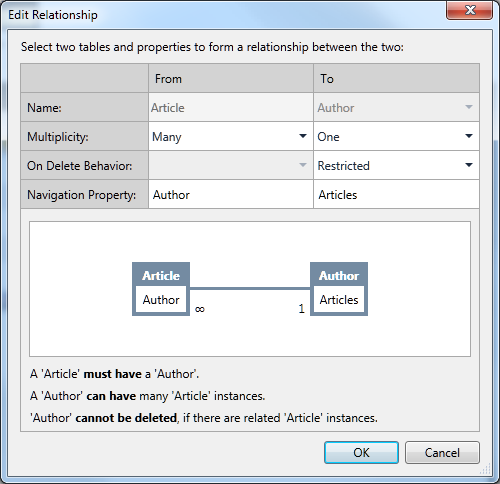
I digress though. I decided to have a go with LightSwitch to see if I can work out how the supposed target market is likely to get on with it. The project I set myself was a an index of magazine articles; you may recognize some of the names. With LightSwitch you are insulated from the complexities of data connections and can just get on with defining data. Behind the scenes it is SQL Server. I created tables for Articles, Authors and Magazines, where magazines are composed of articles, and each article has an author.

The LightSwitch data designer is brilliant. It has common-sense data types and an easy relationship builder. I created my three tables and set the relationships.
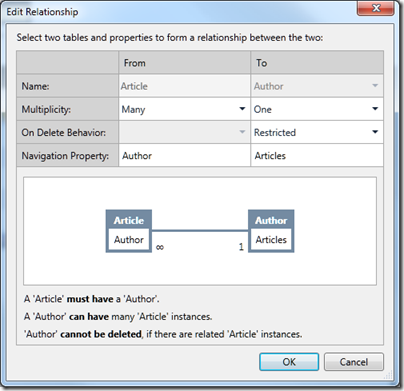
image

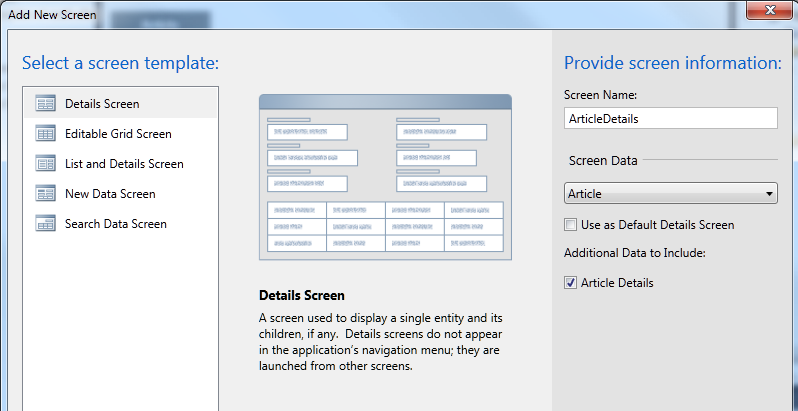
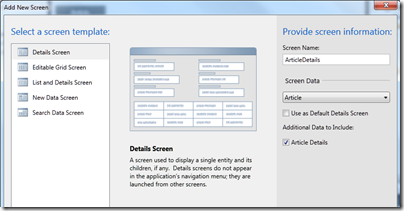
Then I created a screen for entering articles. When you add a screen you have to say what kind of screen you want:
image

I chose an Editable Grid Screen for my three tables. LightSwitch is smart about including fields from related tables. So my Articles grid automatically included columns for Author and for Magazine. I did notice that the the author column only showed the firstname of the author – not good. I discovered how to fix it. Go into the Authors table definition, create a new calculated field called FullName, click Edit Method, and write some code:

partial void FullName_Compute(ref string result)
{
    // Set result to the desired field value
   result = this.Firstname + " " + this.Lastname;

}

Then you set FullName as the “Summary” field for the table.

Have we lost our non-developer developer? I don’t think so, this is easier than a formula in Excel once you work out the steps. I was interested to see the result variable in the generated code; echoes of Delphi and Object Pascal.

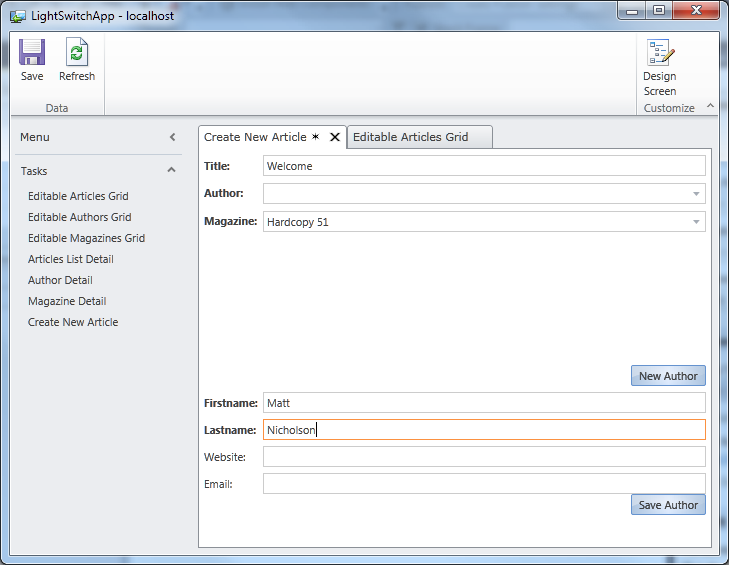
I did discover though that my app has a usability problem. In LightSwitch, the user interface is generated for you. Each screen becomes a Task in a menu on the left, and double-clicking opens it. The screen layout is also generated for you. My problem: when I tried entering a new article, I had to specify the Author from a drop-down list. If the author did not yet exist, I had to open an Authors editable grid, enter the new author, save it, then go back to the Articles grid to select the new author.

I set myself the task of creating a more user-friendly screen for new articles. It took me a while to figure out how, because the documentation does not seen to cover my requirement, but after some help from LightSwitch experts I arrived at a solution.

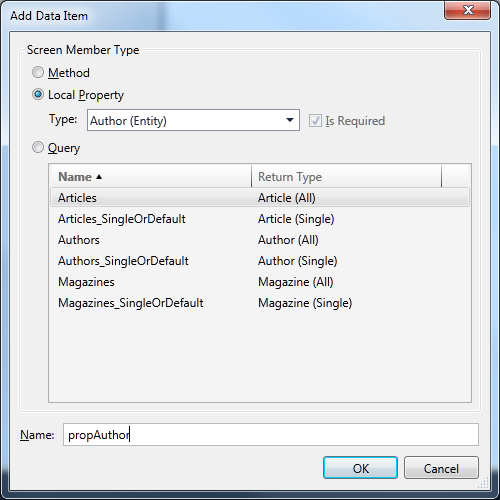
First, I created a New Data Screen based on the Article table. Then I clicked Add Data Item and selected a local property of type Author, which I called propAuthor.

image

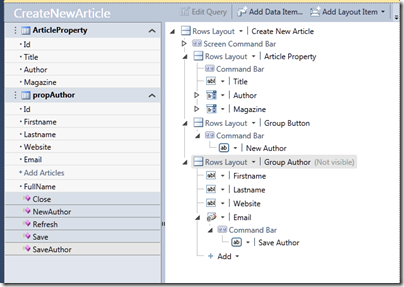
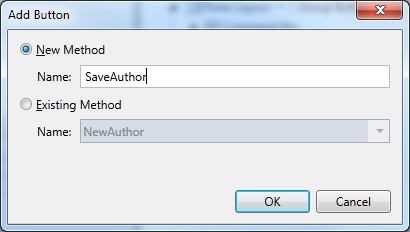
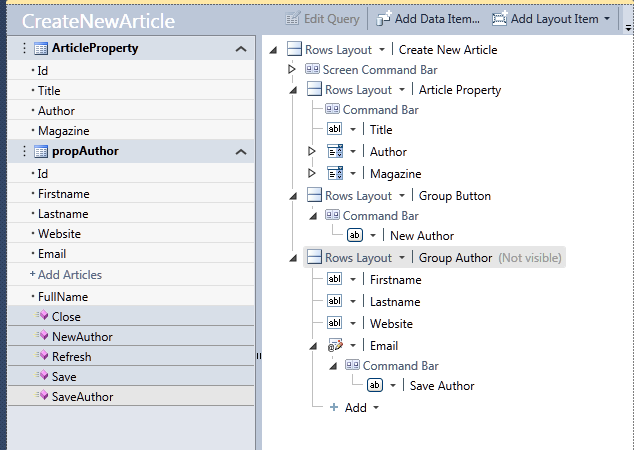
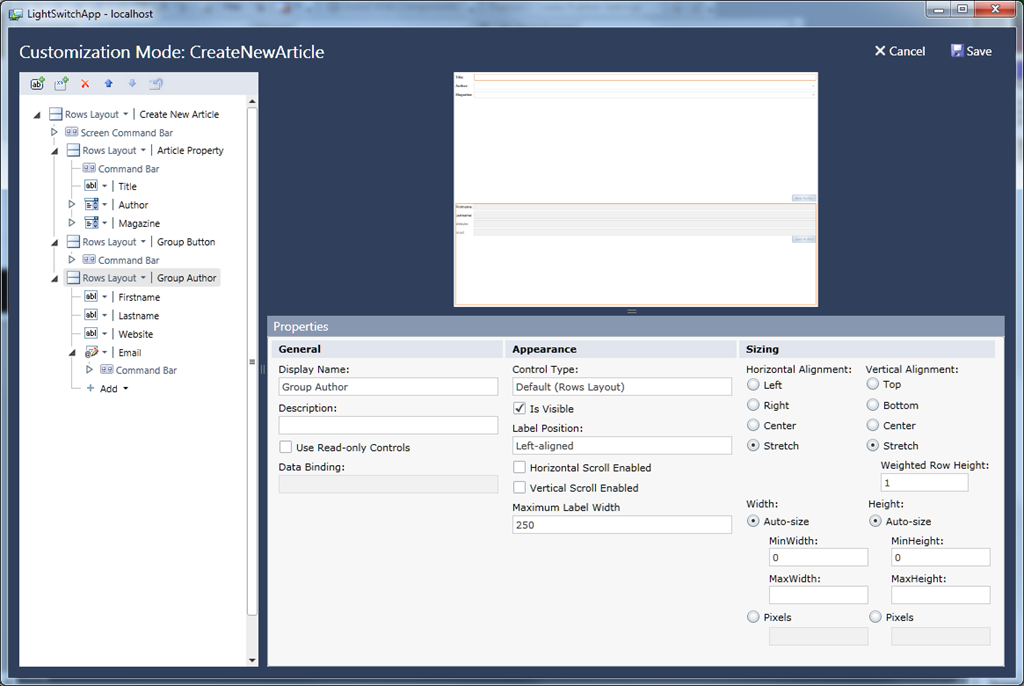
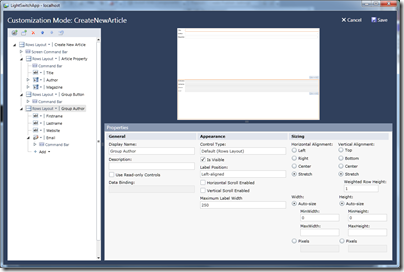
Next, I added two groups to the screen designer. Screen designs in LightSwitch are not like any screen designs you have seen before. They are a hierarchical list of elements, with properties that affect their appearance. I added two new groups, Group Button and GroupAuthor, and set GroupAuthor to be invisible. Then I dragged fields from propAuthor into the Author group. Then I added two buttons, one called NewAuthor and one called SaveAuthor. Here is the dialog for adding a button:
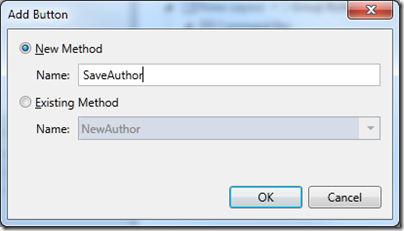
image

and here is my screen design:

image

So the idea is that when I enter a new article, I can select the author from a drop down list; but if the author does not exist, I click New Author, enter the author details, and click Save. Nicer than having to navigate to a new screen.

In order to complete this I have to write some more code. Here is the code for NewAuthor:

partial void NewAuthor_Execute()
{
     // Write your code here.
     this.propAuthor = new Author();
     this.FindControl("GroupAuthor").IsVisible = true;
}

Note the use of FindControl. I am not sure if there is an easier way, but for some reason the group control does not show up as a property of the screen.

Here is the code for SaveAuthor:

partial void SaveAuthor_Execute()
{
    // Write your code here.
    this.ArticleProperty.Author = propAuthor;
    this.Save();
}
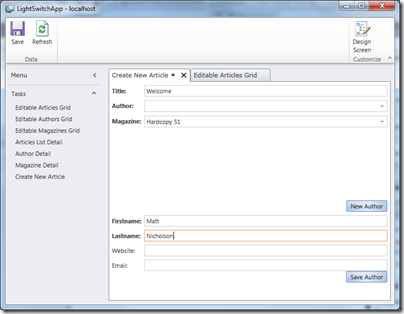
image

This works perfectly. When I click Save Author, the new author is added to the article, and both are saved. Admittedly the screen layout leaves something to be desired; when I have worked out what Weighted Row Height is all about I will try and improve it.
image

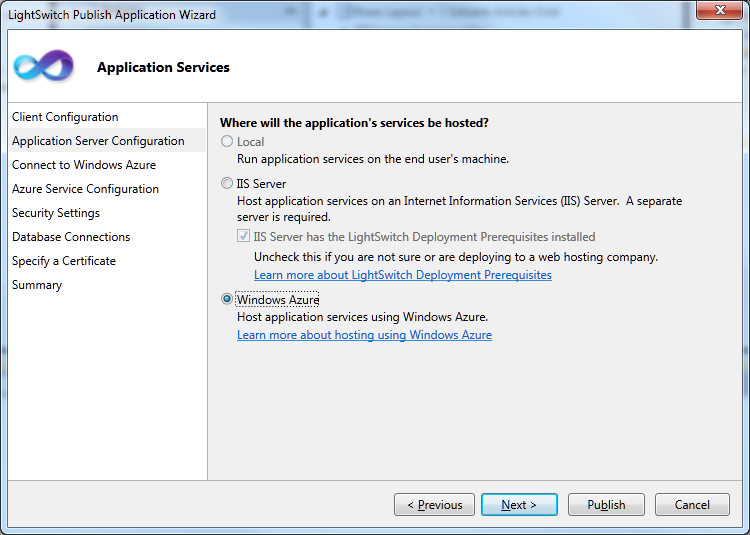
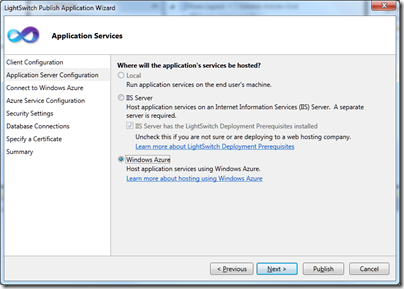
Before I finish, I must mention the LightSwitch Publish Wizard, which is clearly the result of a lot of work on Microsoft’s part. First, you choose between a desktop or web application. Next you choose an option for where the services are hosted, which can be local, or on an IIS server, or on Windows Azure.
image

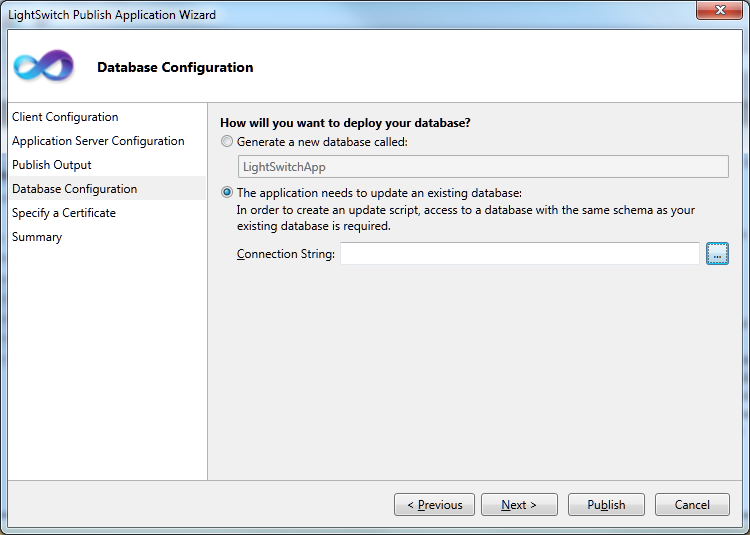
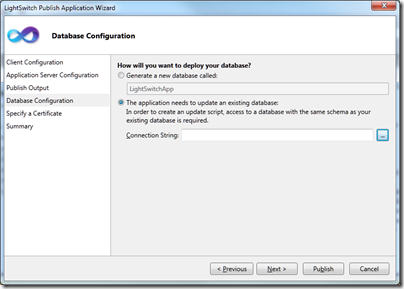
Something I like very much: when you deploy, there is an option to create a new database, but to export the data you have already entered while creating the app. Thoughtful.
image

As you can see from the screens, LightSwitch handles security and access control as well as data management.

What do I think of LightSwitch after this brief exercise? Well, I am impressed by the way it abstracts difficult things. Considered as an easy to use tool for model-driven development, it is excellent.

At the same time, I found it frustrating and sometimes obscure. The local property concept is a critical one if you want to build an application that goes beyond what is generated automatically, but the documentation does not make this clear. I also have not yet found a guide or reference to writing code, which would tell me whether my use of FindControl was sensible or not.

The generated applications are functional rather than beautiful, and the screen layout designer is far from intuitive.

How is the target non-developer developer going to get on with this? I think they will retreat back to the safety of Access or FileMaker in no time. The product this reminds me of more is FoxPro, which was mainly used by professionals.

Making sense of LightSwitch

So what is LightSwitch all about? I think this is a bold effort to create a Visual Basic for Azure, an easy to use tool that would bring multi-tier, cloud-hosted development to a wide group of developers. It could even fit in with the yet-to-be-unveiled app store and Appx application model for Windows 8. But it is the Visual Basic or FoxPro type of developer which Microsoft should be targeting, not professionals in other domains who need to knock together a database app in their spare time.

There are lots of good things here, such as the visual database designer, the Publish Application wizard, and the whole model-driven approach. I suspect though that confused marketing, the Silverlight dependency, and the initial strangeness of the whole package, will combine to make it a hard sell for Microsoft. I would like to be wrong though, as a LightSwitch version 2 which generates HTML 5 instead of Silverlight could be really interesting.
Microsoft promises Silverlight 5 beta soon, more love for HTML 5 in uncertain blog post

Microsoft has promised to deliver a Silverlight 5 beta at the Mix conference next week. The team posting is by Walid Abu-Hadba (Corporate VP of Developer and Platform Evangelism), Soma Somasegar (Senior VP or Developer Division) and Scott Guthrie (Corporate VP of .NET Developer Platform) and seems intended to clarify the company’s much-debated strategy concerning Silverlight vs HTML 5:

we have received questions from the community about the future of plug-ins, and how Silverlight is viewed as part of an overall solution set. We’ll provide clarity, background and context below

Despite the high-powered authorship though, the post tells us little. I mean, can you get vaguer than this?

HTML5 is a solution for many scenarios, and developers should make the appropriate choice based on application needs, knowing that we have a heritage and a future vision of supporting a wide variety of technologies to meet those needs.

This sentence is considered so perfectly nuanced that it is repeated at the end of the post.

If you enjoy reading between lines, there is a phrase to ponder here:

Over the coming months we’ll be particularly demonstrative of our emphasis on HTML 5, in Internet Explorer and in tools.

I’m hearing noises about Visual Studio 2012 now, and I imagine we will see some HTML 5 tooling there. I would expect it to include support for rich ASP.NET clients talking to WCF RIA Services or maybe  WCF Web APIs as well as things like the ASP.NET Membership Framework; and I would expect JQuery and ASP.NET Ajax to figure strongly.

I do not think Silverlight is dead though; apart from its role in Windows Phone, we are hearing rumours about the AppX application model in Windows 8 which looks a lot like Silverlight; and I have already noted the extensive use of Silverlight in Microsoft’s own products. I would rather hear the developer division VPs discuss this aspect of Silverlight, rather than reiterate corporate angst over how it relates to HTML 5. I would also like to see a post signed by the Windows team as well as by developer division.

Fit for business? Google updates App Engine with the Enterprise in mind

Google has updated App Engine to 1.4.3. The new version adds:

Prospective Search API for Python – this lets you register a large set of queries which are executed against a flow of data so you can create notifications or other actions whenever a match is found.

Testbed Unit Test Framework for Python – this lets you create stubs for Google services for lightweight unit tests.

Concurrent requests for Java – a single application instance can now serve multiple requests provided it is marked threadsafe. An important feature.

Java Remote API – the remote API lets you access an App Engine datastore from your local machine.

I have had the sense that Google App Engine is more attractive to start-ups and small organisations than to enterprise customers. It is interesting to see Google working on bringing the Java and Python runtimes closer to parity, as Java is more widely used for enterprise development.

Another initiative aimed at enterprise customers is App Engine for Business, currently in preview. What you get is:

An Enterprise Administration Console console for managing all apps built by your company, with access control lists.

99.9% service level agreement

Hosted SQL:

While many applications can be built on the App Engine Datastore (which uses Google’s BigTable database system), we know SQL is the industry standard for the enterprise, so we’ve got you covered. SQL database support on App Engine gives enterprise developers access to the full capabilities of a dedicated relational database, without the headache of managing it.

SSL to an URL that uses your domain, such as https://myapp.apps.example.com.

Pricing – $8 per user up to a maximum of $1000 per month. In other words, if you have more than 125 users the cost per user starts coming down; if you have 1000 users it is a bargain.

Has Google done enough to make App Engine attractive to enterprise customers? This post from a frustrated developer back in November 2010 complained about stability issues and other annoyances that do not really exist on Amazon or Microsoft Azure; the Salesforce.com platform does have some throttling limitations. But it does seem that Google is determined to address the issues and App Engine for Business looks promising.