Tag Archives: microsoft

Windows Phone 8 will run Windows 8, with Silverlight centre stage?

More information on Windows 8 is leaking out now; and it gives some clues about how Microsoft intends to make sense of its two device platforms, Windows tablets and Windows Phone.

Microsoft held back from making its Windows Phone 7 OS available on tablets, which is why most of the numerous tablets being pushed out to compete with Apple run Google Android, and a few of them Windows 7 with its excessive power requirements and a user interface poorly designed for touch control.

Now the strong rumour is that Windows 8 supports two user interfaces, one that is tile-based like Windows Phone 7, and another that is designed for PCs.

In other words, rather than continuing with the Windows Phone 7 OS which is built on Windows CE, Microsoft will build a new version of the Windows Phone 7 UI on top of full Windows.

My further assumption is that Silverlight apps will still run on the new OS, providing continuity with Windows Phone 7 which uses Silverlight or XNA, both based on .NET, for its application platform.

Silverlight might also be used as the platform for apps delivered by the new Windows app store. This is Paul Thurrott, though reported as rumour:

Windows 8 will also include a new app model codenamed Jupiter that will target a new Windows Marketplace app store. The app store will provide access to new, Silverlight based "immersive" applications that are deployed as AppX packages (.appx). The Windows and Office teams are betting very heavily on this new app type, according to my source, and development has already begun using a beta version of Visual Studio 2012. These apps can be written in C#, Visual Basic, and even C++.

We do know that Silverlight 5 supports full platform invoke of native code, a feature which tends to support the idea that it is becoming a key runtime for Windows.

Let me speculate a little further. Imagine you are Adobe, for example, which has said it will deliver the Flash runtime for Windows Phone. Although it competes with Silverlight to some extent, Microsoft needs to tick the Flash box for Windows Phone. But why would Adobe want to invest in Flash for Windows CE, when this OS is not going to be used for Windows Phone 8 and it will have to write new code? I will not be surprised if we hear that Flash is now not coming until Windows Phone 8.

Even within Microsoft itself, I would guess that investment is focused on the next generation rather than the one that is destined to be short-lived.

One partner that is no doubt close to Microsoft’s plans is Nokia. If the above is correct, then Nokia is buying into the Windows OS, not the Windows Phone OS. Will Nokia wait for Windows Phone 8 before launching devices on the platform? I have no idea – and delay will be costly – but I imagine its main plans will be focused on Windows Phone 8 and the possibility of tablet as well as smartphone devices.

The immediate conclusions would be:

  • Silverlight is safe as a development platform, but only for Windows. See also Silverlight the new Windows runtime, HTML 5 the new Silverlight?
  • The Windows Phone 7 OS will be short-lived but the new UI should be a natural progression from what we have now, and apps should still run, so Microsoft can position Windows Phone 8 to users as a new version of Windows Phone rather than a change of direction.
  • Microsoft will not have a coherent mobile and tablet platform until Windows 8 ships sometime in 2012. Google, Apple, RIM, HP, all have plenty of time to establish their competing platforms.

How an RTF file can install a virus when opened

There is an analysis by Rob Rachwald over on the Imperva Data Security Blog of how an RTF document can carry a virus, in this case a trojan executable. RTF (RIch Text Format) is generally considered safer than the Microsoft Office .DOC format since it cannot include macros; but the vulnerability in this case is in the software that parses the RTF when it is opened in Microsoft Office on Windows or Mac – though in this case the actual payload is Windows-only so would not normally affect Mac users.

Unfortunately this code may run when previewing a document in Outlook, which normally embeds Word, so it is potentially rather damaging.

Rachwald traces how the embedded trojan evades anti-virus, installs itself into the Windows system32 folder, and creates a remote shell application.

It does appear that the vulnerability was patched in November 2010. Still, it is interesting that the insecure code survived in Microsoft Office at least back to Office XP Server Pack 3 in 2004 and probably earlier.

I mention it partly because the analysis is a good read, and partly to highlight the fact that even RTF documents may not be safe.

Small businesses and the cloud: 60% have no plans to adopt?

Microsoft has released a few details from a global survey of small businesses, defined as employing up to 250 employees, and cloud computing.

The research finds that 39 percent of SMBs expect to be paying for one or more cloud services within three years, an increase of 34 percent from the current 29 percent. It also finds that the number of cloud services SMBs pay for will nearly double in most countries over the next three years.

I think this means that today 71% of small businesses do not pay for any cloud services, but that this is expected to drop to 61% in the next three years.

It is worth noting that very small businesses can get quite a long way with free services such as Google Mail. So when we read that:

The larger the business, the more likely it is to pay for cloud services. For example, 56 percent of companies with 51–250 employees will pay for an average of 3.7 services within three years.

that may mean that very small businesses mainly use free services, rather than none at all.

In my experience, many small businesses do not have clearly articulated IT strategies, so I am sceptical about this kind of survey. One day the server breaks down and at that point the business decides whether to get a new server or buy into something like Microsoft BPOS or Office 365 instead.

A business actually has to be pretty determined to embrace cloud computing in a comprehensive way. There are often a number of business-critical applications that presume a Windows server on the premises, sometimes in old versions or custom-written in Visual Basic or Access. It is easier to maintain that environment, but perhaps to start using cloud-based email, CRM or even document storage alongside it.

I still find it interesting that Microsoft’s research points to larger businesses within this sector being more open to cloud computing than the smallest ones. The new Small Business Server 2011 range makes the opposite assumption, that smaller businesses (with Essentials) will be cloud-based but larger ones (with Standard) will remain on-premise. I still cannot make sense of this, and it seems to me that the company is simply unwilling to be radical with its main Small Business Server offering. It is a missed opportunity.

That said, clearly there is a lot of caution out there If, if I am right in my reading of the figures, that 61% have no plans to pay for anything cloud-based over the next 3 years.

RIM announces Java and Android runtimes for the Playbook, beta of native SDK

RIM has announced several new options for developing apps for its PlayBook tablet.

RIM will launch two optional “app players” that provide an application run-time environment for BlackBerry Java® apps and Android v2.3 apps. These new app players will allow users to download BlackBerry Java apps and Android apps from BlackBerry App World and run them on their BlackBerry PlayBook.

In addition, RIM will shortly release the native SDK for the BlackBerry PlayBook enabling C/C++ application development on the BlackBerry® Tablet OS. For game-specific developers, RIM is also announcing that it has gained support from two leading game development tooling companies, allowing developers to use the cross-platform game engines from Ideaworks Labs and Unity Technologies to bring their games to the BlackBerry PlayBook.

It sounds as if the Android runtime will not be perfectly compatible with real Android:

Developers currently building for the BlackBerry or Android platforms will be able to quickly and easily port their apps to run on the BlackBerry Tablet OS thanks to a high degree of API compatibility.

Nevertheless, this will be an attractive route for Android developers looking for a quick way to port to the Blackberry.

The native SDK is currently in “limited alpha release” but RIM is promising an open beta for this summer.

The BlackBerry Tablet OS NDK will allow developers to build high-performance, multi-threaded, native C/C++ applications with industry standard GNU toolchains. Developers can create advanced 2D and 3D applications and special effects by leveraging programmable shaders available in hardware-accelerated OpenGL ES 2.0.

The deal with Unity is important too. Unity is an increasingly popular toolkit for game development and adding the Blackberry to the list of supported platforms will boost its appeal. Ideaworks Labs makes the Airplay SDK, a cross-platform toolkit which already supports Apple iOS, Android, Symbian, Samsung Bada, HP webOS and Windows Mobile.

Note that the primary SDK for the Playbook has until now been Adobe AIR; and since the UI itself uses the Flash runtime this likely still makes sense for many applications.

RIM is doing a good job of opening up its platform. It is an interesting contrast to Microsoft’s “Silverlight, XNA or nothing” approach for Windows Phone.

Silverlight in Microsoft products – Silverlight the new Windows runtime, HTML 5 the new Silverlight?

Is Microsoft ditching Silverlight and embracing HTML 5? Or is Silverlight the future of desktop and browser-based development on Microsoft’s platform?

Good question; and I am not sure that Microsoft itself can answer. There is evidence for both cases.

One thing I have noticed though is that Silverlight is turning up in numerous Microsoft products. This is in contrast to the early years of the original .NET Framework, which Microsoft used rather little in its own stuff, though the context is different today because of the growth in web-based development.

I guess we cannot really count Visual Studio LightSwitch, which is a tool that builds Silverlight applications, though it is interesting insofar as the target market is not expert developers, but smart general users who want to build database applications.

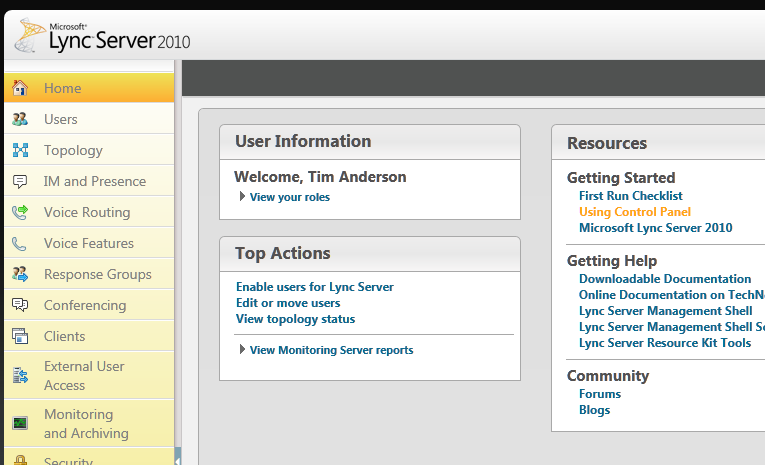
Lync Server 2010 is a better example. Silverlight is used for the control panel.

image

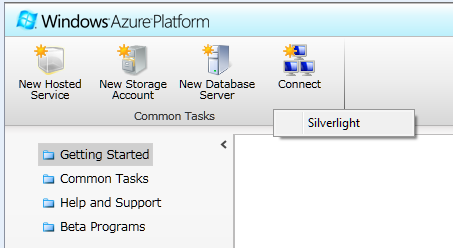
Windows Azure, a strategic product for Microsoft, uses Silverlight for its control panel

image

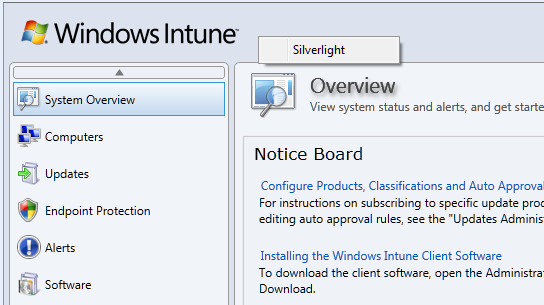
Windows Intune, for maintaining networks online

image

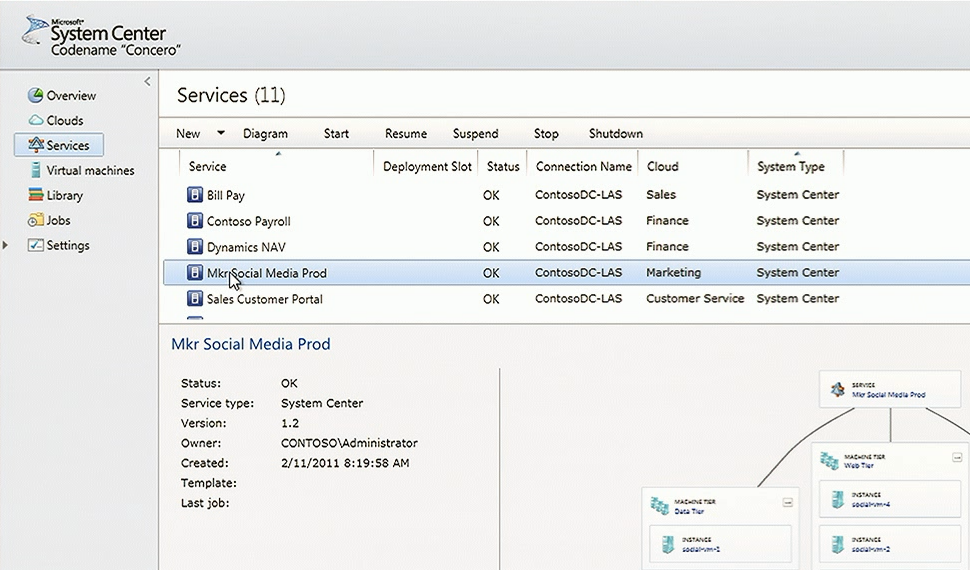
System Center for managing Microsoft servers. I’m not actually sure how much Silverlight is used in System Center, but I understand the newly announced “Concero”, a new feature for managing public and private clouds, uses a Silverlight control panel and I suspect it is used elsewhere as well.

image

These are a few that I am aware of; I would be interested in other examples.

Now, you can make sense of this to some extent by distinguishing “Windows platform” from “broad reach” applications. It is curious, but Silverlight which started out as a broad reach plugin is gradually moving towards a Windows platform runtime, though it still runs on a Mac with some limitations, mainly lack of COM interop. There has been speculation that Silverlight could merge with the desktop Windows Presentation Foundation and become a commonly used application runtime for desktop Windows as well as web apps, and of course Windows Phone.

When Microsoft wants broad reach, it uses HTML, an example being Office Web Apps which make hardly any use of Silverlight.

Nevertheless, using Silverlight for products like Windows Intune could be annoying for administrators who might otherwise use an Apple iPad when out and about; but I guess Microsoft figures that if you are deep enough into Windows to use Intune, you probably will not be using an iPad.

Let me add that Silverlight seems to me to be working well in the examples above, to the extent that I have tried it. Could they be done equally well in HTML and JavaScript? Probably, if users have IE9, but probably not if it is IE8 or earlier.

Silverlight the new Windows, HTML 5 the new Silverlight?

Browser wars heat up as Firefox 4 arrives

Just one week after the final release of Microsoft’s Internet Explorer 9, and here comes another major browser, Mozilla Firefox 4.

What’s new in Firefox? Performance, for one thing. There is a new JavaScript engine called JägerMonkey which is more effective than the old TraceMonkey – though TraceMonkey is still there – and there is hardware-accelerated graphics on Windows Vista and Windows 7 using Direct2D, and on Windows and Mac Direct3D or OpenGL are used to speed page composition.

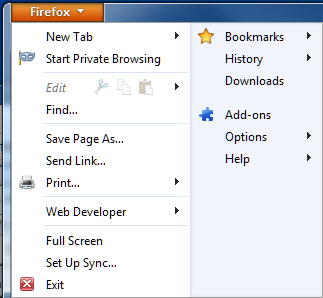
On the appearance side, Mozilla has streamlined the user interface with tabs above the address bar, sorry Awesome Bar, and reduced the number of buttons. By default there are no menus visible, and you are meant to use the Firefox button at top left:

image

I was disconcerted not to find the Tools menu here and one of the first things I did was to show the menu bar, though it does spoil the new UI design.

Firefox is also coming to Android and Maemo devices, and a great feature called Sync will synchronize bookmarks, tabs, passwords and history across all the devices you use.

There is also a new privacy feature called Do not track. This is a way of telling websites that you do not wish to be tracked. Tracking is used by web advertisers to send ads based on your browsing history as seen by that advertiser. Since many websites have scripts served by the same ad agency, this can be considerable. The feature does not block tracking, but only requests not to be tracked. It is off by default and buried in Advanced options, so will probably not be very effective.

image

Firefox is an excellent browser, with many more features than I have mentioned above. A few observations though.

The new features in Firefox 4 echo many of the few features in Internet Explorer 9, which in turn echoes some of the themes in Chrome. However on my system IE9 seems to be a little faster than Firefox 4, the user interface is more polished in my opinion, and the tracking protection in IE9 is more effective since it does actually block tracking.

Then again, there are Firefox add-ons that also block tracking; and in general Firefox seems to have the best range of available add-ons, which could well be the deciding factor for many users.

Firefox 4 still has a separate search box, and in principle I like this. I find it annoying that IE9 and Chrome intermingle searches and URLs in one box. I suspect though that I am in a minority of users. If you switch between browsers, you can find yourself typing searches in the Awesome Bar anyway, though habit, so I am guessing Mozilla will cave in and combine them eventually.

Mozilla is a non-profit organisation with a strong open source and community ethos and that also may be enough reason to use Firefox.

It does face intense competition now though, and it must be a concern that its income comes largely from:

search functionality included in our Firefox product through all major search partners including Google, Yahoo, Yandex, Amazon, Ebay and others.

which in practice is mostly from Google, which has a competing browser.

Personally I think Mozilla will struggle to maintain market share for Firefox; though version 4 is having a good launch complete with a delightful Twitter party

image

and a pretty download stats counter which is currently on 2.75 million and climbing fast.

image

Disappearing items in Outlook and Exchange

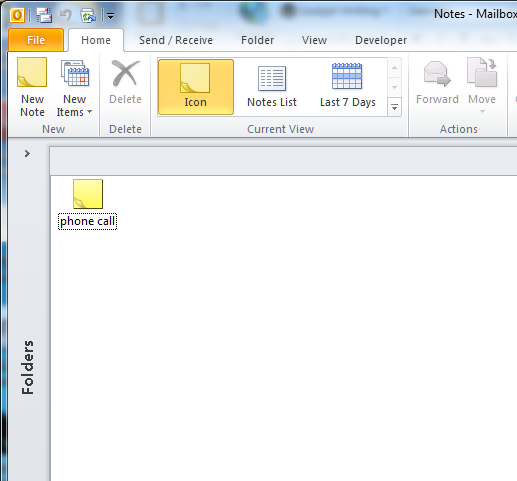
I came across what looks to me like an unusual bug, most likely in Microsoft Outlook. Background: I have used the Notes folder in my Exchange mailbox for all sorts of information going back several years. This morning, I looked at the folder and found it empty, except for one solitary item. Normally there are over 1000. The surviving item was the result of my last search in that folder.

image

Now, the Exchange database is robust in my experience; and most often when items disappear it is not a bug but a result of Outlook working as designed but catching the user out in some way. Here are some common reasons:

  1. The items got auto-archived. Archives can be present on any machine on which you run Outlook. The default location for the archive folder is in a hidden location such as C:\Users\[USERNAME]\AppData\Local\Microsoft\Outlook\archive1.pst, where [USERNAME] is your Windows username. It really is hard for users to find this without expert help. How can the popular corporate mail client have usability like this? But I digress. The solution is to open the archive in Outlook and drag items back where they are wanted.
  2. The items are present, but filtered out by the view. Views in Outlook can be filtered to restrict the items on display, for example to unread items only. The user set the filter by clicking something in Outlook’s labyrinthine user interface, but does not realise it is still set. The effect is that items disappear. The solution is to reset the filter.
  3. The user accidentally dragged a folder inside another folder. This is easily done, as Outlook does not prompt you when you do this; it just moves the folder. The symptom is that a little expand symbol appears in the target folder, if it does not already have subfolders. The solution is to drag it back.
  4. The user accidentally deleted the items or folder. Outlook does not prompt when you delete items. In this case, however, the items end up in the Deleted Items folder. The solution is to drag them back where you want them.

Even if the user has subsequently emptied the deleted items folder, there is hope. Outlook has a little-known feature called Recover Deleted Items. Items go into a kind of hidden deleted items folder for a period after they get removed from the visible deleted items folder, or if they are removed with Shift-Delete. Recover Deleted Items, which is on the Folder tab in Outlook 2010 and on the Tools menu in earlier versions, will let you get them back.

My disappeared notes were nowhere to be found. Further, the evidence is that I had not deleted them, since the surviving item was the result of a search. There is no command that I know of to delete all items in a folder other than the result of a search.

Still, I wanted to get them back if possible; and preferably without restoring Exchange to an earlier date, this being a fairly slow and painful operation. I checked my laptop without connecting it to the network, to see if this had an offline copy. My laptop runs Outlook 2007. There was no offline copy, since it had synchronised subsequent to the items disappearing.

Incidentally, this is why synchronisation and redundancy are not the same as backup.

I had one more go at Recover Deleted Items. Curiously, Outlook 2007 does have a Recover Deleted Items option for the Notes folder, whereas Outlook 2010 does not. Note though that the deleted items live not in the local offline store, but in Exchange.

To my surprise, all my old notes were there. I selected them all in the Recover Deleted Items window and clicked to undelete. Now I am back where I was, except that all my old notes now have a “Created” date of today. A nuisance, but a good outcome nonetheless.

But what happened? I have two questions about this. One is how the items got deleted in the first place. The second is how they ended up in Recover Deleted Items. The documentation for Recover Deleted Items will make your head spin. It is an Exchange feature, but apparently controlled by Outlook. This knowledgebase article says it only works on the Deleted items folder, unless you are using Outlook 2007 when it works on all the folders.

Does that suggest that is was Outlook 2007 that deleted my items? But how could Outlook 2007 on one machine delete all the items except the result of a search in Outlook 2010 on another machine? It does not make sense.

My view is that Outlook has become so obscure and intricate in its inner workings that anything is possible. I think Microsoft should build a new Exchange client.

The future of Google Apps: social features, high performance spreadsheets, working offline

Yesterday I spoke to Google’s Global Product Management Director for Google Enterprise (whew!) Matthew Glotzbach, at a press briefing for Google Apps which included the announcement of Google Docs Discussions, as covered here.

image_thumb

One of the issues discussed in the briefing was Cloud Connect, which I reported on here. Cloud Connect automatically copies and synchronises Microsoft Office documents with Google’s cloud storage. There are some performance and usability issues, but the biggest problem is that you cannot edit the documents in the browser; or rather, if you do, Google makes a second copy leading to versioning issues.

Google says this is a file format issue. The online Google Docs applications cannot edit documents in Microsoft Office formats – “the document models are completely different” says Glotzbach – though it can import and export those formats. Could Google develop the ability to edit Office documents online? “It is a technical challenge, something we haven’t built yet,” he added.

It is an interesting point. Microsoft’s Office Web Apps have flaws, but they do let you maintain the same document whether edited in the browser or in the Office desktop applications. It is an example of friction if you try to live partly in Microsoft Office, and partly in Google’s cloud. It may be better to stick with one or the other.

What about offline capability, something I hear a lot as counting against Google Docs. Google had a solution for this based on its Gears add-on, but then withdrew it.

We are actively working on offline. It is extremely important. Gears was a precursor. A lot of the ideas embedded in Gears have become part of HTML5.

says Glotzbach. I asked whether this will extend to the Chrome OS netbook operating system, and he said that it will:

Chrome, as the most modern browser based on HTML 5, has the capabilities built into its core. Chrome OS as a derivative of that has those offline capabilities baked into it, so it is a matter of having applications take advantage of that.

We also talked about the new discussions feature. I observed that it seems to be just one part of a bigger story. What about discussions spanning multiple documents? What about discussions without documents? Is there any way of doing that?

“Yes, email,” he said, chuckling. Clearly Google has taken to heart that email remains the de facto mechanism for most corporate collaboration. “We’ve also got Google groups. Obviously the manifestation of a group for many users is email, that’s how they interact with it, but there is also a destination site or page for that group.”

Might Google develop its own equivalent to Salesforce.com Chatter, for Twitter-like enterprise messaging?

The idea of eventually being able to pull in other streams, the idea of social media inside the enterprise Is a powerful idea. I think Chatter is a good example of that, and others such as Yammer. I think those ideas will likely find their way into businesses. It is not clear to me that social will be a destination within an Enterprise. Rather I see it as, features will emerge in various products that leverage those social capabilities. Discussions is influenced heavily by a lot of those social media ideas, and so you can see that evolving into more integrated social capabilities across the app suite.

What about Google spreadsheets, which seem great for simple tasks and collaboration, but suffer performance and scalability issues when used with large data collections that work fine in Excel?

There’s always work to do. We have today some limitations in terms of spreadsheet size. Those are things we are actively working on. With browser technologies I actually think we have an advantage over desktop applications. If I told you I had a spreadsheet that had 5 million columns and a billion rows, there’s no desktop spreadsheet in the world that can handle that kind of volume, but because we have in essence supercomputers on the back end processing that, what you display is just a window of that large data. So we’re using clever technologies like pre-fetching the rows and columns that are just off the edge of the page, similar to some of the technologies we use with Google Maps.

But it’s an example where we have some artificial limitations that we are working to remove. Imagine doing really sophisticated non-linear calculations in a spreadsheet. We’ve got a supercomputer on the back end that can do that for you in seconds.

Microsoft’s code-first Entity Framework 4.1 nearly done

Microsoft has announced the release candidate of Entity Framework 4.1, the data persistence library for .NET, with a go-live licence. The final release to the web is expected in around one month’s time.

The big new feature is code-first, where you do not need to define a database schema or even a database model. You simply write classes that define objects you want to store, and the framework handles the work of defining the database for you.

Note that according to this article on MSDN:

The Entity Framework is Microsoft’s recommended data access technology for most types of applications.

Of course Microsoft has a long history of data access APIs and keeping up with the latest recommendation over the years has been a challenge. That said, the low-level ADO.NET data API has been in place since the first release of the .NET framework and has evolved rather than been replaced. There has been some confusion over LINQ to SQL versus Entity Framework; but note that LINQ (Language Integrated Query) works with Entity Framework as well.

So what is code-first? A good starting point is VP Scott Guthrie’s post from July last year, where he walks through a complete example using his Nerd Dinner theme. He writes classes to define two entities, Dinner and RSVP. Then he writes the following code:

image

Having defined this NerdDinners class inheriting from DbContext, he can go ahead and write a complete database application.

At this point there is still no database. In the simplest case though, you can just add a database connection to the project with the same name as the DbContext class – in this case, “NerdDinners”. The Entity Framework will use this connection, define a database schema for you, and save and retrieve objects accordingly.

The magic under the hood is an example of convention over configuration. That is, the framework will generate code and schema according to assumptions it makes based on the names used in your classes. For example, it picks up the field named DinnerID and makes it a primary key; and seeing a collection of RSVP objects called RSVPs in the Dinner class, the framework creates a relationship between the two generated tables. You can override the default behaviour with code mapping rules. There is also provision for updating the schema if you need to add or modify the fields, though this is a point of uncertainty in Guthrie’s post.

It looks fantastic; though there are a few caveats. One is that Microsoft tends to assume use of its own database managers, SQL Server or for simple cases, SQL Server CE. That said, there are drivers for other databases; for example devart has code-first drivers for Oracle, MySQL, PostgreSQL and SQLite.

Another point is that there is a trade-off when working at such a high level of abstraction. There is less code for you to write, but a large amount of generated code, which can make debugging or optimizing an application harder. This is a familiar trade-off though; and you could say that hand-rolled SQL is no different in principle from hand-rolled assembly code; you can get fantastic results but the amount of effort and skill required is greater, as is the risk of errors if you get it slightly wrong.

The Mono team has said that it does not intend to implement Entity Framework currently; there is a summary of work needed here. If you want to write .NET code that ports easily to Mono it is best avoided.

Are you using Entity Framework in new .NET projects? I would be interested to hear from .NET developers what approach you take to data persistence.

Microsoft’s stumbling Windows Phone 7 launch – from a fan

Danny Tuppeny’s post on Why I’m Close to Giving Up on Windows Phone 7, as a User and a Developer is worth a read. He describes his experience as a Microsoft-platform developer who is a natural enthusiast for Windows Phone, except that he has been unimpressed with how its launch has been handled.

The first thing he noticed was its lack of visibility on the high street – something I have also observed:

I popped into a Carphone Warehouse over the road from the office where I work on launch day. The staff knew nothing about WP7. I called all the local Orange stores, hoping for a HTC Mozart. Nobody knew when, or if, they would be getting any Windows Phone 7 devices. Wow.

That was not necessarily Microsoft’s fault. It had to convince its operator partners to promote the phone, and they had to convince retailers. All difficult with a launch device, in a market all-but sewn up by Apple and Android between them.

Over to Microsoft then, to convince the world of the value of its device. What would it take? Microsoft needed a start-up mentality. Total commitment to its mobile platform. Regular updates and bug-fixes. Responsive support.

As time went on, cracks started to show. There were bugs. Many bugs. At one point, the SMS message store for my wife got corrupt, which meant I couldn’t send, or read, text messages to/from her. I got in touch with the UK WP7 developer advocate that had sorted out the developer phone for my company, and explained the issue. After many emails going back and forth I was told that there may be logs on my phone that would help Microsoft track down this issue but security procedures do not allow them to share a tool to get the logs off my device. I was instead, told to try a factory reset. This fixed the issue, but Microsoft were no closer to finding/fixing the bug.

So what Tuppeny experienced was the opposite of start-up mentality; rather, the frustration of dealing with a huge corporation.

Next, he was disappointed by delays to the Windows Phone 7 update, promised at launch, that would add copy and paste to the operating system:

The update was delayed. And delayed. There was zero transparency from Microsoft. Despite the rest of the company making huge strides in this area over the previous few years, Windows Phone 7 is a quiet, closed box. Nobody knew what was happening with the update, and more importantly, the bug fixes.

He is not giving up:

I’m not giving up, just yet. I truly believe Windows Phone 7 can be something brilliant, but there are definitely issues that need addressing. To show how seriously I believe Microsoft could make this work, I’ve applied to go and work for the Windows Phone team.

My own perspective on this is that Microsoft as a whole does not convey commitment to its mobile platform. How can this be, when CEO Steve Ballmer makes a point of hyping the phone at events like CES and Mobile World Congress? Well, I ask myself why Microsoft has refused to use the Windows Phone 7 OS in a tablet form factor, for which it seems well suited; and I ask myself how the phone OS can survive if Windows 8 is launched on a multitude of different form factors and device types. Paul Thurrott says it:

I can and have speculated that Sinofsky, as the dominant sub-CEO executive at Microsoft now, will simply swoop in and dismantle WP when Windows 8 is ready, but that is just an uneducated outside opinion, nothing more.

That may well not be the case; but the mere fact that some signs point towards it undermines the platform.

If I were Nokia this would worry me; except that Nokia may also in fact plan to embrace some new Windows 8 thing when the time comes, and one presumes that Microsoft has shared more of its future plans with Nokia’s executives than it has with the rest of us.